USER MANUAL CS-E12CKP PANASONIC
Before using your air-conditioner, please read this operating instructions carefully and keep it for future reference.
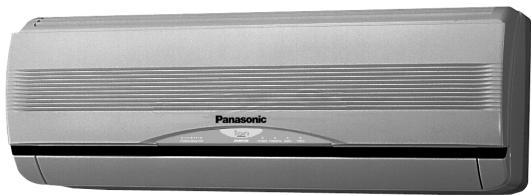
INVERTER MODEL :-
(Refrigerant: R410A)
Indoor
CS-E9CKP
CS-E12CKP
CS-E15CKP
Outdoor
CU-E9CKP5
CU-E12CKP5
CU-E15CKP5
ENGLISH P. 1 - P. 10
PORTUGUES P. 11 - P. 20
DEUTsCH P.21-P.30
FRANÇAIS. P. 31 - P. 40
NEDERLAND. P. 41 - P. 50
ITALIANO P.51-P.60
GREEK P.61-P.70
ESPANOL P.71-P.81
RUSSIAN P.82-P.93


LOT 2, PERSIARAN TENGKU AMPUAN, SECTION 21,
SHAH ALAM INDUSTRIAL SITE, SELANGOR, MALAYSIA
Thank you for purchasing our Panasonic Room Air Conditioner.
CONTENTS
Features 1
Safety Precautions 2
Installation Precautions
Operation Precautions
▶Name of Each Part 3~4
Indoor Unit
Outdoor Unit
Accessories
Remote Control
Preparation Before Operation 5
Indoor Unit
Remote Control
How to Operate 5~6
Setting the Timer 7
Convenience Operation 7
Powerful Mode Operation
Quiet Mode Operation
Ionizer Mode Operation
Care and Maintenance 8
Cleaning the Indoor Unit and Remote Control
Cleaning the Air Filter
Cleaning the Front Panel
Air Purifying Filters
Pre-season Inspection
When the Air Conditioner is Not Used for an Extended Period of Time
Recommended Inspection
Helpful information 9
Energy Saving and Operation Hints... 9
Troubleshooting 10
Call the Dealer Immediately
Note:
Before using your air conditioner, please read this operating instructions carefully and keep it for future reference.
FEATURES
Cool, quiet, comfort from Panasonic Inverter Aided air conditioner
For your convenience to operate in the dark.
(Refer page 4)
Automatic Operation
Sense indoor temperature to select the optimum mode.
(Refer page 5)
Vertical / Horizontal Air Swing
Auto swing for vertical and horizontal airflow direction.
(Refer page 6)
To provide quiet operation.
(Refer page 7)
Produce negative ion for fresh air.
(Refer page 7)
Powerful Mode
Reaches the desired room temperature quickly.
(Refer page 7)
For quick and easy cleaning. (washable)
(Refer page 8)
Catechin Air Purifying Filter
Filter that can trap dust, tobacco smoke and tiny particles in the room. It can also prevent growth of bacteria and viruses trapped in this filter.
(Refer page 8)
- Triple Deodorizing Filter
Absorb odours produced by wall paper, construction material and living environment.
(Refer page 8)
Restart the unit automatically after power failure.
(Refer page 9)
- Environmental Friendly (For Refrigerant: R410A Model)
Zero ozone depleting potential and low global warming potential by using R410A refrigerant.

Warning
1) If the supply cord is damaged or needed to be replaced, it must be replaced by the manufacturer or its service agent or a similarly qualified person in order to avoid a hazard.
2) Remove power plug or disconnect from the main before servicing this appliance.
3) Do not repair by yourself.
In case of malfunction of this appliance, do not repair by yourself. Contact the sales dealer or service dealer for a repair.
4) Turn off the power (Isolation from main power supply). Pull off the power plug from the receptacle, or switch off the breaker, or switch off the power disconnecting mean to isolate the equipment from the main power supply in case of an emergency.
5) The appliance is not intended for use by young children or infirm person without supervision.
Young children should be supervised to ensure that they do not play with the appliance.

Caution
DISCONNECT THE MAIN PLUG FROM THE SUPPLY SOCKET WHEN NOT IN USE, WHERE SUPPLY CONNECTION IS VIA MAIN PLUG.
Airborne noise.
A-weighted sound pressure level of this appliance is less than 70dB (A) under the JIS C 9612 test conditions.
Maximum cooling operation
1 m from the unit
IMPORTANT
Replacement or installation of power plugs shall be performed by authorised/qualified personnel only.
The wires in this main lead are coloured in accordance with the following code:
Green and Yellow : Earth
Blue Neutral
Brown :Live
"As the colours of the wires in the main lead of this appliance may not correspond with the coloured markings identifying the terminals in your plug, proceed as follow :
The wire which is coloured green and yellow must be connected to the terminal in the plug which is marked by the letter E or by safety earth symbol or coloured green or green and yellow.
The wire which is coloured blue must be connected to the terminal which is marked with letter N or coloured black.
The wire which is coloured brown must be connected to the terminal which is marked with letter L or coloured red."
SAFETY PRECAUTIONS
Before operating, please read the following "Safety Precautions" carefully.
- To prevent personal injury, injury to others and property damage, the following instructions must be followed.
- Incorrect operation due to failure to follow instructions will cause harm or damage, the seriousness of which is classified as follow:

Warning
This sign warns of death or serious injury.

Caution
This sign warns of damage to property.
The instructions to be followed are classified by the following symbols:

This symbol (with a white background) denotes an action that is PROHIBITED.


These symbols (with a black background) denote actions that are COMPULSORY.
Installation Precautions

Warning
- Do not install, remove and reinstall the unit by yourself.
Improper installation will cause leakage, electric shock or fire. Please engage an authorized dealer or specialist for the installation work.

Caution

This room air conditioner must be earthed.
Improper grounding could cause electric shock.
- Ensure that the drainage piping is connected properly.
Otherwise, water will leak out.

- Do not install the unit in a potentially explosive atmosphere.
Gas leak near the unit could cause fire.
Operation Precautions

Warning
This sign warns of death or serious injury.

- Do not share outlet.
- Do not insert plug to operate the unit. Do not pull out plug to stop the unit.
- Do not operate with wet hands.
- Do not damage or modify the power cord.
- Do not insert finger or other objects into the indoor or outdoor units.
- Do not expose directly to cold air for a long period.

- Plug in properly.
- Use specified power cord.

- If abnormal condition (burnt smell, etc.) occurs, switch off and unplug the power supply.


Caution
This sign warns of injury.

- Do not pull the cord to disconnect the plug.
- Do not wash the unit with water.
- Do not use for other purposes such as preservation.
- Do not use any combustible equipment at airflow direction.
- Do not sit or place anything on the outdoor unit.

- Switch off the power supply before cleaning.
- Ventilate the room regularly.
- Pay attention as to whether the installation rack is damaged after long period of usage.

- Switch off the power supply if the unit is not used for a long period.
NAME OF EACH PART
Indoor Unit
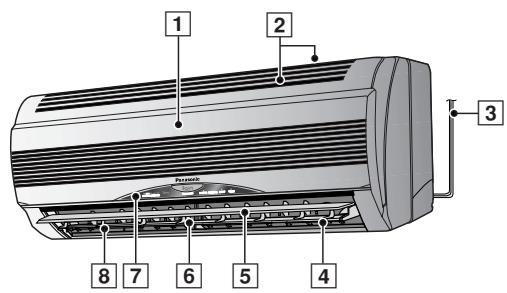
1 Front Panel
2 Air Intake Vent
3 Power Supply Cord
4 lonizer
Vertical Airflow Direction Louver
6 Horizontal Airflow Direction Louver
7 Indicator Panel
Air Outlet Vent
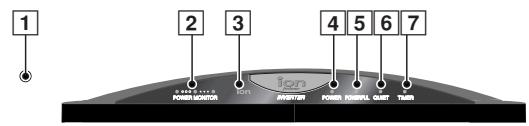
1 Auto Operation Button
(when the front panel is opened)
2 Power Monitor Lamps - ORANGE
- Lights up from LOW to HIGH to show the compressor operating condition.
Light off when then compressor stops.
3 Ionizer Mode Indicator - GREEN
4 Power Indicator - GREEN
5 Powerful Mode Indicator - ORANGE
6 Quiet Mode Indicator - ORANGE
7 Timer Mode Indicator - ORANGE
Indoor Unit
(when the front panel is opened)
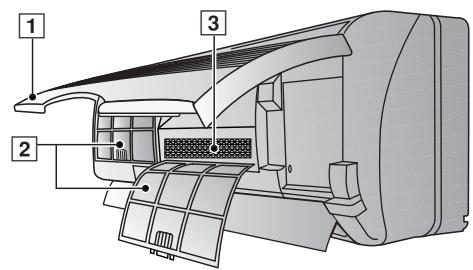
1 Front Panel
2 Air Filters
3 Air Purifying Filter
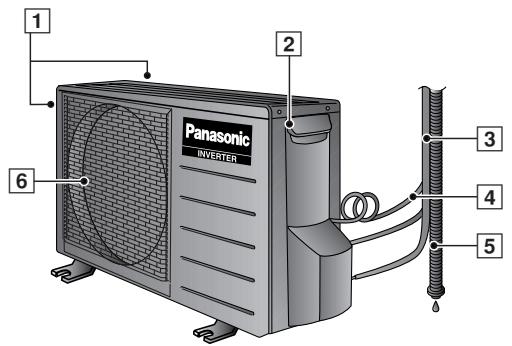
Outdoor Unit
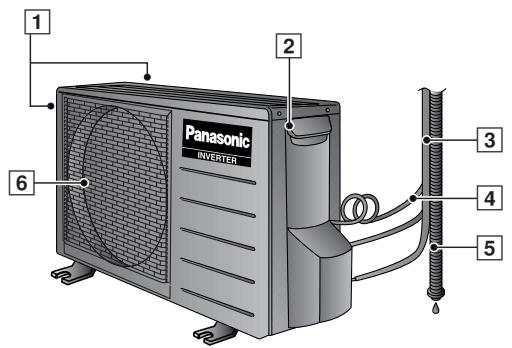
Air Intake Vents
Ground Terminal (Inside cover)
3 Piping
4 Connecting Cable
5 Drain Hose
6 Air Outlet Vents
Accessories
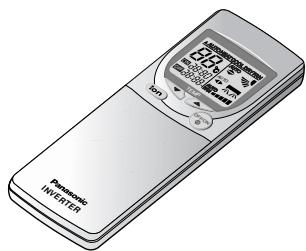
Remote Control
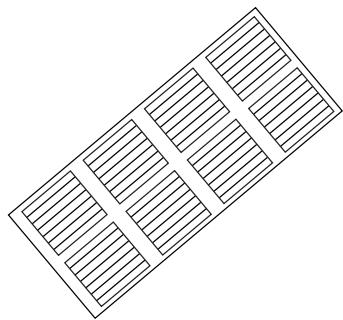
Remote Control Indication Sticker
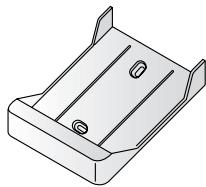
Remote Control Holder
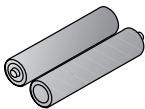
- Two RO3 (AAA) dry-cell batteries or equivalent
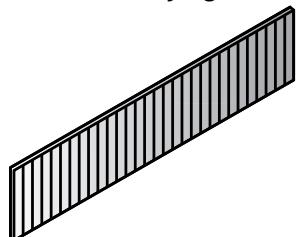
Air Purifying Filter
(Catechin Air
Purifying Filter)
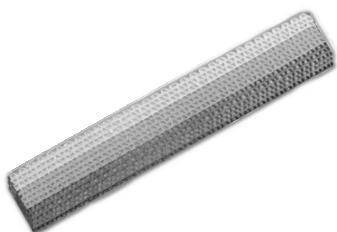
(Triple Deodorizing
Filter)
NAME OF EACH PART
Remote Control
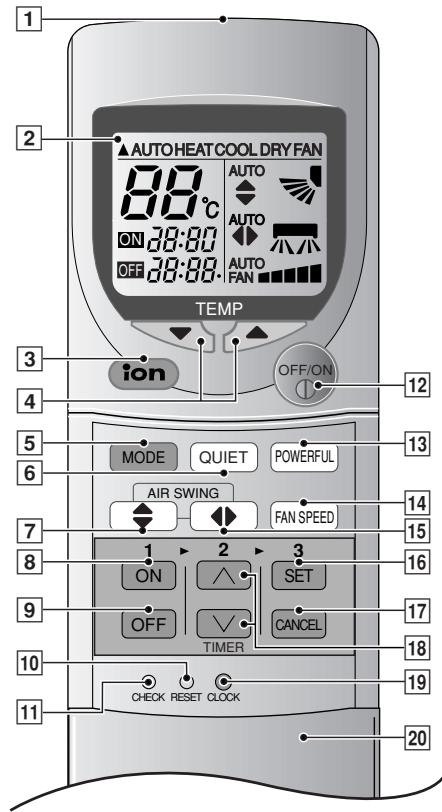
Remote Control Signal.
- Make sure it is not obstructed.
Maximum distance : 10 m.
- Signal received sound.
One short beep or one long beep.
Notes for Remote Control.
- Do not throw or drop.
- Do not get it wet.
- Certain type of fluorescent lamps may affect signal reception. Consult your dealer.
1 Signal Transmitter
Operation Display
3 Ionizer Mode Operation Button
4 Room Temperature Setting Button (Illuminating button)
5 Operation Mode Selection Button
6 Quiet Mode Operation Button
7 Vertical Airflow Direction Button
8 ON-Timer Button
9 OFF-Timer Button
10 Reset Point (Press with fine-tipped object to clear the memory)
11 Check Point To be used by the service technician only.
OFF/ON Button (Illuminating button)
13 Powerful Mode Operation Button
14 Fan Speed Selection Button
15 Horizontal Airflow Direction Button
16 Timer Set Button
17 Timer Cancellation Button
18 Time-Setting Button
19ClockButton
Remote Control Cover
- How to Insert the Batteries
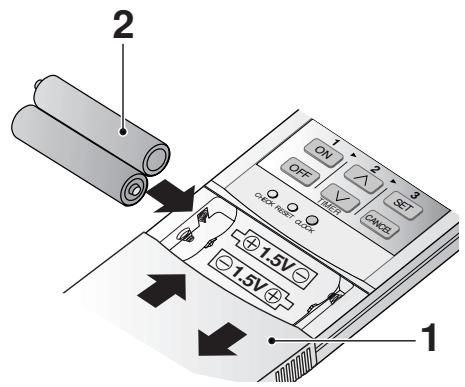
1 Slide down the remote control cover completely
2 Insert the batteries
- Be sure the direction is correct
- 12.00 at display - flashing
- Set the current time (CLOCK) immediately to prevent battery exhaustion.
- About the batteries
- Can be used for approximately one year.
- Observe the following when replacing the batteries
- Replace with new batteries of the same type.
- Do not use rechargeable batteries (Ni-Cd).
- Remove the batteries if the unit is not going to be used for a long period.
1 Connect the power supply cord to an independent power supply
2 Open the front panel
3 Remove the air filters
4 Fit the air purifying filters in place
5 Insert the air filters
6 Close the front panel
Remote Control
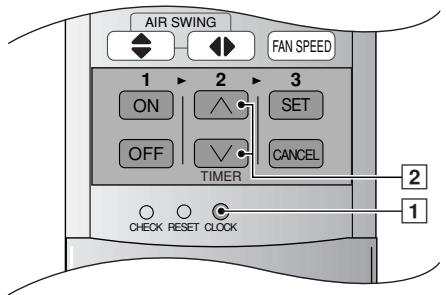
1 Press 1.
2 Then press 2 to increase or decrease the time.
3 Press 1 again. Set time at display will light up.
HOW TO OPERATE
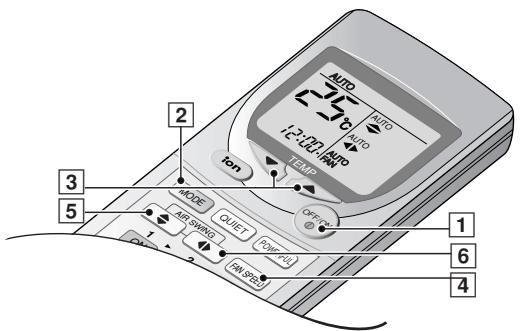
To start the operation
Press 1.
- POWER indicator (green) on the indoor unit will light up. (LED blinks when the room temperature is low at the start of heating or operation mode is selected during Automatic Operation.)
The power monitor lamps light up to show the compressor operating condition.
- To stop, press once more.
Setting Mode
AUTO - Automatic Operation
HEAT - Heating Operation
COOL - Cooling Operation
DRY - Soft Dry Operation
FAN - Fan Operation
Setting Temperature
- Press 3 to increase or decrease the temperature.
- The temperature can be set between 16°C 30°C . (Not adjustable during Fan Operation.)
Recommended temperature:
HEAT : 20°C 24°C
COOL : 26° C 28° C
DRY : Approx. room temperature
Automatic Operation
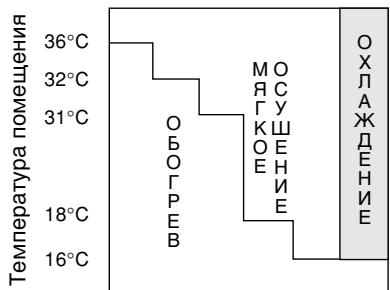
- At the start of the Automatic operation, Heating, Cooling or Soft Dry is automatically selected according to the outdoor temperature, indoor temperature and setting temperature.
- The operation mode changes every half hour, when necessary.
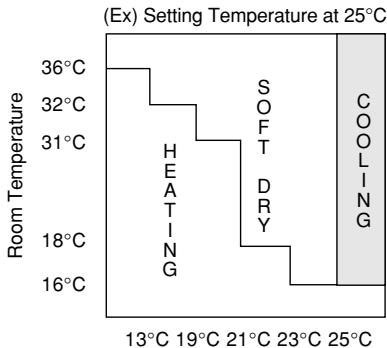
Outdoor Temperature
Setting the Fan Speed
There are five stages of fan speed in addition to Auto Fan speed.
AUTO
FAN - Heating
When the temperature of the discharge air increases, the fan speed increases.
Cooling Dry
Changes the fan speed to generate a cool breeze. The air starts to blow out approximately 40 seconds after the start of Cooling or Soft Dry.
Setting the Vertical Airflow Direction.


- For COOL/DRY operation. Swing up/down automatically.

- For HEAT operation When the discharge air temperature is low such as at the start of the heating operation, the air blows at horizontal level. As the temperature rises, the hot air blows in a downwards direction.
Louver adjustment range
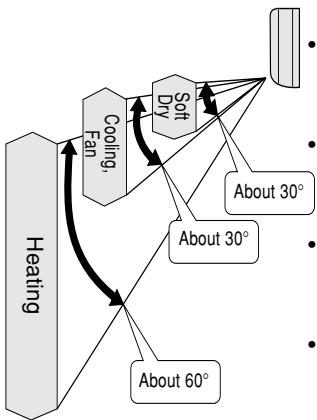
- The adjustment range is different for each operation i.e. Heating, Cooling and Soft Dry. (Fig.at left)
- The angle indicated on the remote control is different from that on the indoor unit.
- The louver angle automatically changes to prevent condensation during Cooling and Soft Dry.
- When operation stops, the louver automatically closes.
Five stages of adjustments can be made in this range.
Notes
- Do not adjust the vertical airflow direction louver downward during Cooling and Soft Dry. Drops of water may condense on the air outlet vent and drip down.
- Use the remote control to change the vertical airflow direction louver. Using your hands to adjust the direction may cause the louver to malfunction. If this happens, stop operation immediately and restart.
Setting the Horizontal Airflow Direction.
| Horizontal Airflow Direction | Indoor Unit | →→→→→→ |
| Remote Control | →AUTO→→→→→→→ |

- For COOL/DRY operation. Louvers swing horizontally at a fixed speed.

- For HEAT operation When air temperature is low, air is sent in. When temperature goes up, louver swing horizontally at a fixed speed.
- Use this air conditioner under the following conditions:
Unit in ° C
| DBT: Dry Bulb Temp
WBT: Wet Bulb Temp | Indoor | Outdoor |
| DBT | WBT | DBT | WBT |
| Maximum Temperature-Cooling
(Maximum Temperature-Heating) | 32
(30) | 23
(-) | 43
(24) | 26
(18) |
| Minimum Temperature-Cooling
(Minimum Temperature-Heating) | 16
(2) | 11
(-) | 16
(-5) | 11
(-6) |
Notes
- If the unit is not going to be used for an extended period of time, turn off the main power supply. If it is left at the ON position, approximately 2.8 W of electricity will be used even if the indoor unit has been turned off with the remote control.
If operation is stopped, then restart immediately, the unit will resume operation only after 3 minutes.
Operation Details
COOL - Cooling Operation
- To set the room temperature at your preference cooling comfort.
AUTO - Automatic Operation
- Sense indoor temperature to select the optimum mode.
- Temperature is not displayed on the remote control during AUTO operation.
DRY - Soft Dry Operation
- Dehumidifies while maintaining the setting temperature. The Soft Dry Operation is recommended during the rainy season.
If the room temperature exceeds the setting temperature, operation switches to Cooling.
- The fan speed is rather slow during Soft Dry Operation.
- The humidity may not decrease when the indoor temperature is lower than the setting temperature on the remote control.
HEAT - Heating Operation
- To warm up the room temperature upon your preference setting temperature.
- Heat is obtained from outdoor air to warm up the room. When the outdoor ambient air temperature falls, the heating capacity of the unit might be reduced. We recommend that you use an additional heating device when the outdoor ambient air temperature is low.
FAN - FAN Operation
- Circulates air throughout the room.
- Purifies and deodorizes the air if the air purifying filter is used. Fan Operation is recommended during seasons in which neither Heating nor Cooling is used.
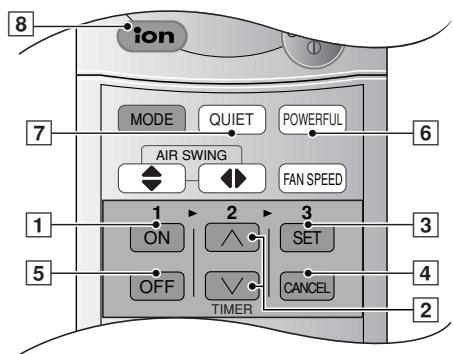
SETTING THE TIMER
Ensure that the current time is correct before setting the timer. The timer cannot be set if the time display is flashing.
ON-TIMER Operation
To start the air conditioner operation automatically.
- Press 1 to set the operation.
- Press 2 to increase or decrease the time.
- Then press 3.
To cancel this operation, press 4.
OFF-TIMER Operation
To stop the air conditioner operation automatically.
- Press 5 to set the operation.
- Press 2 to increase or decrease the time.
- Then press 3.
To cancel this operation, press 4.
Timer Mode Operation Details
- When the ON-Timer is set, operation will start before the actual set time. This is to allow the room temperature to reach the setting temperature by the setting time. (Maximum of 35 minutes in advance).
- Once the timer is set, operation will start and stop at the same time everyday.
- The current time is not displayed when the timers are set.
- When both timers are used together, the TIMER mode indicator on the indoor unit remains lit even when the operation is stopped by the OFF-TIMER.
Powerful Mode Operation
To obtain the set temperature quickly.
- Used in winter to warm yourself quickly upon returning home (Heating + Powerful).
- Used in summer to cool yourself after a hot bath (Cooling + Powerful).
Press 6.
× Powerful mode indicator (orange) on the indoor unit will light up.
- To cancel this operation, press once more.
Note
- The setting temperature and the fan speed changes automatically in order to heat, cool or dehumidify the room quickly.
| Operation | Temperature | Fan Speed |
| Automatic | HEAT | 3.5°C higher | Slightly Stronger |
| COOL | 2°C lower (For first 20 minutes) |
| DRY | 1°C lower (For first 20 minutes) |
Quiet Mode Operation
To provide quiet operation.
Press 7.
※ Quiet mode indicator on the indoor unit will light up.
- To cancel this operation, press once more.
Operation Details
Air flow sound will reduce during operation.
Ionizer Mode Operation
Produce negative ion for fresh air.
Press 8.
※ Ion mode indicator on the indoor unit will light up.
- To cancel this operation, press once more.
Operation Details
Air conditioner ON:
Provide negative ion during operation.
Air conditioner OFF:
Provide negative ion with FAN operation.
- If blinking, press 8 twice.
If still blinking, please call service.

CARE AND MAINTENANCE
■ Cleaning the Indoor Unit and Remote Control
- Wipe gently with a soft, dry cloth.
- Do not use water hotter than 40°C or polishing fluid to clean the unit.
Cleaning the Air Filter
(Recommendation: If the unit is operated in a dusty environment, clean the filters every two weeks, continuous use of this dirty filters will reduce cooling or heating efficiency)
1 Remove dirt using a vacuum cleaner.
2 Wash back of the air filter with water.
3 If badly soiled, wash it with soap or a mild household detergent.
4 Let it dry and reinstall it.
Be sure the "FRONT" mark is facing you.
Damaged air filter.
Consult the nearest authorized dealer.
Part No.: CWD001047.
- Do not use benzene, thinner, scouring powder or clothes soaked in caustic chemical to clean the unit.
Cleaning the Front Panel
Must be removed before washing)
1 Raise the front panel higher than the horizontal and pull to remove it.
2 Gently wash with water and a sponge.
- Do not press the front panel too hard when washing.
- When use kitchen cleaning fluid (neutral detergent), rinse thoroughly.
- Do not dry the front panel under direct sunlight.
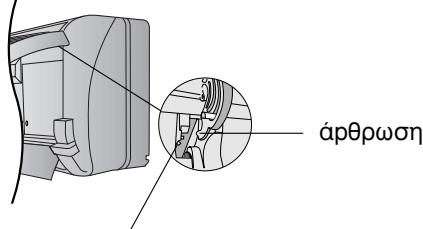
3 To fix the front panel, raise the front panel horizontally, match the protruding portion on the indoor unit to the fulcrum and push into place.
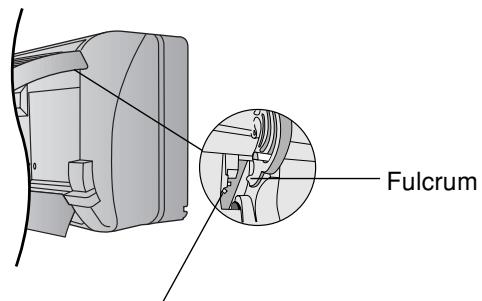
Protruding portion on indoor unit
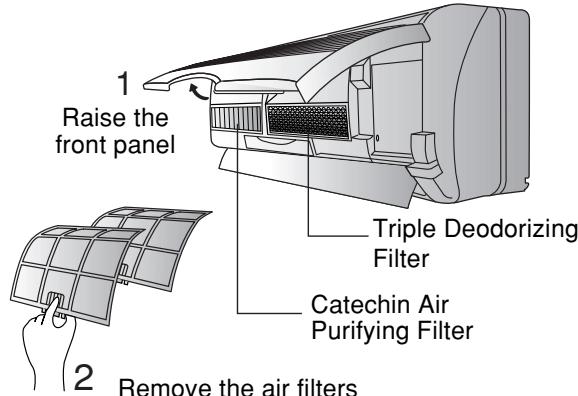
Air Purifying Filters
- Triple Deodorizing Filter
- Absorb odours produced by wall paper, construction material and living environment.
Reusable.
Vacuum, place under direct sunlight for 6 hours and fit it back in place.
(Recommended:every6months)
Catechin Air Purifying Filter
- The filter is coated with catechin to prevent growth of bacteria and viruses.
- Reusable.
Vacuum and fit it back in place
(Recommended: every 6 months)
- Recommended to change these filters every 3 years. Do not reuse damaged filters.
Consult the nearest authorized dealer to purchase a new filter.
Catechin Air Purifying Filter No.: CZ-SF70P
Triple Deodorizing Filter No.: CZ-SFD72P
- If you operate the air conditioner with dirty filters:
Air is not purified
- Cooling capacity decreases
-Foul odour is emitted
Pre-season Inspection
Is the discharged air cold/warm?
Operation is normal if 15 minutes after the start of operation, the difference between the air intake and outlet vents temperature is:-
COOL - 8°C or above
HEAT - 14°C or above
- Are the air intake or outlet vents of the indoor or outdoor units obstructed?
- Are the remote control batteries weak?
If the remote control display appears weak, replace the batteries.
■ When the Air Conditioner is Not Used for an Extended Period of Time
1 To dry the internal parts of the indoor unit, operate the unit for 2 - 3 hours using:
FAN operation
2 Turn off the power supply and unplug.
Note: If the unit is not switched off by the remote control, it will start operating when you plug in (because the unit is equipped with Auto Restart Control).
3 Remove the remote control batteries.
Recommended Inspection
- After used over several seasons, the unit will become dirty and thus decreases the unit's performance. Depending on the operation conditions, a dirty unit may produce odour and dust may pollute dehumidification system. Therefore, a seasonal inspection is recommended in addition to regular cleaning. (Consult an authorized dealer).
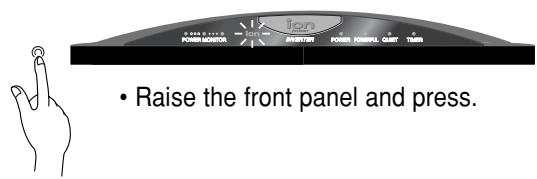
Automatic Operation
- If the remote control fails to function or has been misplaced, press the Auto Operation button to start the Automatic operation.
- The Automatic operation will be activated immediately once the Auto operation button is pressed. However, temperature cannot be adjusted in this operation.
- The power indicator on the indoor unit will blink until the operation mode is selected automatically.
- To cancel this operation, press once more.
Auto Restart Control
- If there is a power failure, operation will be automatically restarted under the previous operation mode and airflow direction when power is resumed. (When the operation is not stopped by remote control).
- If you do not want the unit to restart automatically when power is resumed, switch off the power supply.
- If you do not require Auto Restart Control, consult your dealer.
- Auto Restart Control is not available when Timer Mode is set.
- When the operation restarts, the outdoor unit will operate only after 3 4 minutes.
Timer Setting
- When power failure occurs, the timer setting will be cancelled. Once power is resumed, reset the timer.
Thunder and Lightning
- This air conditioner is equipped with a built-in surge protective device. However, in order to further protect your air conditioner from being damaged by abnormally strong lightning activity, you may switch off the main power supply and unplug from power socket.
Voltage fluctuation
- The outdoor unit stops operation frequently due to a fluctuation in the voltage. Consult your dealer.
Here are some useful tips for optimum performance and cost-effective operation.
Setting the Temperature
- Approximately 10% of electricity can be saved.
- Set the temperature higher or lower than the desired temperature.
Cooling Operation : 1° C higher Heating Operation : 2° C lower
Air Filters and Air Purifying Filters
- Clean the air filters every 2 weeks and the Air Purifying Filters every 6 months.
- Dirty filters may reduces cooling or heating efficiency.
■ Keep All Doors and Windows Closed
- Otherwise, cooling or heating performance will be reduced and electricity cost is wasted.
Outdoor Unit
- Do not block the air outlet vents. Otherwise, it will lower the cooling or heating performance.
Timer Mode
- To prevent wastage of electricity, use Timer when going out.
Avoid Direct Sunlight
- Keep curtains or drapes closed to avoid direct sunlight during cooling operation.
TROUBLESHOOTING
Before calling your dealer, refer to the checklist
| Problem? | Check |
| · The unit does not operate | · Has a circuit breaker been tripped or a fuse blown?
· Is the power supply plug disconnected from the outlet?
· Is the Timer being used correctly? |
| · The unit does not cool or heat effectively | · Has the temperature been set correctly?
· Are the air filters dirty?
· Are the air intake or outlet vents blocked?
· Are all the windows and doors closed?
※ Measure the temperature difference. Operation is normal if, 15 minutes after the start of operation, the temperature difference between the air intake and outlet vents is 8°C or above for cooling and 14°C or above for heating. |
| · The unit does not receive remote control signals, or the remote control display is weak or non-existent | · Are the batteries weak?
· Have the batteries been inserted with the ⊕ and ⊙ poles in the correct position? |
| Problem? | Reason |
| · Air is not discharged immediately | · At Cooling • Soft Dry (auto Fan Speed)
Air will not be discharged for approximately 40 seconds.
The unit is designed to prevent tobacco, cooking and body odors from being discharged together with the cool air.
· At Heating (POWER LED blinks)
This is to prevent cold air from blowing out. Please wait. |
| · Operation stops suddenly | · At Cooling • Soft Dry (auto Fan Speed)
The indoor fan repeatedly stops for 80 seconds and operates for 20 seconds to check the indoor temperature.
Whenever the temperature reaches the setting temperature, operation starts again.
· At Heating (POWER LED blinks)
When the outdoor temperature is low and humidity is high, frost accumulates on the outdoor unit. The POWER LED blinks when the unit is melting the frost. (Please wait as defrosting may take up to 10 minutes.) |
| · Fog is blowing out from the unit | · This occurs when the airflow from the air conditioner comes to the room. |
| · There is a noise | · A 'pass' sound is heard during defrosting or when the air conditioner operation has been stopped. This is caused by the refrigerant inside the air conditioner flowing in the opposite direction.
· The air conditioner will expand or contract due to changes in temperature, causing a cracking sound.
· The sound of water flowing is caused by the refrigerant flowing inside the unit. |
| · The outdoor unit gives off water and steam | · When defrosting, the frost melts and changes to water and steam. |
If the following conditions occur, turn off and unplug the main power supply, and then call the dealer immediately.
Abnormal noise is heard during operation.
Water or foreign material gets into the remote control by mistake.
Water leak from the indoor unit.
- Switches or buttons do not operate properly.
- Circuit breaker trips or fuse blows frequently.
- Power supply cord and plug become unusually warm.
- A smell of burning is emitted.
When the Timer LED at indoor unit blinks
The Timer LED blinks indicating abnormality.
Press the check button at remote control for 5 seconds, error code will be displayed.
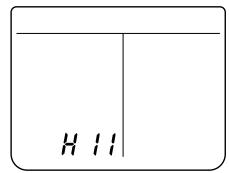
Remote Control Display.
Press TIMER or button to identify the error code
Beep sound (4 times) will be heard for the correct error code shown.
Turn off the power supply and remove the power supply plug.
Inform the error code to an authorised dealer.
Depending on which 3 characters are displayed, temporary operation may be possible.
| Characters allowing temporary operation | Possible temporary operations | Description of operation |
| H23 | Cooling | Emergency operation with limited functions. (The Timer LED continues to blink.) |
| H27 | Heating |
| H28 | Cooling |
Temporary operation
- Press the MODE button and select Heating or Cooling.
- Press the operation OFF/ON button ('beep! beep! beep! beep!' sound is heard).
※ Use this operation temporarily, until repairs can be made.
Obrigado por ter adquirido o/DDs Aparelho de Ar Condicionado Panasonic.
INDICE
Characteristicas 11
2 Instalar as pilhas
- Comprove sé a posicao correcta
- 12.00 no visor - piscando
- Acerte a hora actual (CLOCK) imeditamente, para evitar desgaste das pilhas.
Sobre as pilhas
1 Frontgitter
2 Grobstaubfilter
3 Feinfilter
AuBengerat
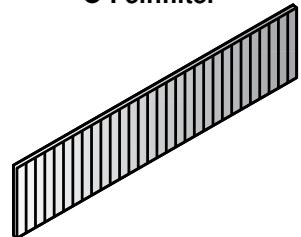
Feinfilter
(Catechin-Feinfilter)
Baon TnC EoWTePiknC movadac
PexkIM NOBbIeHHoM MoUHOCTN
Быстpo DOBOДТ Temпатурь в KMнот do Кеним.
(CMOTpn CTpaHnuy 88)
CbeMHnapeHnaHeIb
ДлбьICTpoииудбнОйочSTКИ(ВODOCToиka).
(CMOTpn cTpaHnUy 89)
Bo3nyhblnBtp cKaTexHOM
C NOMOUsbIO 3TOro QmNbTpMa MoXHO NOrIoUaTb NbIb, Ta6aHbI DbIM N MeJKe NcactuB B NOMEeHIN. OH TAKKe CnOCo6eN npedOTbpaauTa b poCT n pa3Bntne nonabux H Hero 6akTeprn u BnpyCoB.
(CMOTpn cTpaHnUy 89)
TpoHOn De3oOpnpuOuNΦnIbTp
TOrnoaet 3anaxn, nCnyckaembIe o6oAMN, CTPONTeJIbHbIMM MaTePnaIaNMI N JxINoI CpeOn.
(CMOTpn cTpaHnUy 89)
ABTO3anyck
ABTomatnueckn BkIIOucaET yCTpoIcTBO BCclyae 06pbIbA 3JIeKTPoNITAHNA.
(CMOTpn CTpaHnUy 90)
HE 3AΓP3HRET OKPYXKAIOUYIO CPEIy
(Дяхладагента:ТиR410A)
IcnoIb3yEmbI oxnaInteIb R410A He Bbl3bIbAeT pa3pyeHnO 03OHOBOr cNo I yMeHbIaET pNCK Co3dAnHr TeJIINHOro 3ΦΦeKTa.

PPEyPPEKDEHNE
1)Bcnyae nobpekdeHnI shypa nntaHnI nnB03NKnHObeHnne Hno6xoJIMOCnI ero 3aMeHbI, 3Ty onepaunIO, BO n36eKaHne HeCCHACTHOrO clyuHn, DOnJxeh BblONJIrTb TOLbKO n3rTOBNTb, ero npedctabNTeIb IIN KBAInΦnIpuOBaHHb pa60THNK.
2)Ппжд,ЧemпpoBoOntьТexHnueckmOcMOTpycTpoIcTBA, BbKJIIOUHTe HAnpRaxeHne IINBbIePPhIte UHyp n3 pO3eTKN.
3) He npo3BODnTe peMOHT caMoCTOReTbHo. B Cnyae HEmCnpaBHOCTN yCTPOIcTBa, He NItaIteCb OTPeMOHTnpoBaT bero cMoCTOReTbHo. IIO BCem Bonpocam, CB83aHHbIM C peMOHTOM, o6paaJIteCb K pnoDaBu yIi anareHt y no 06cnyKBAHnO.
4) OTKIIOHNTe NITAHne (OTcoEINHnTe arperaT ot 3NeKtpocetn).B abapnnHOI CNTuAun BbDEpHnTE BUNky UHypa NTaHnra n3 PO3eTKn, INcNoIb3yIte nppebIbTeJIb TOKa IIN C NOMOuIb BO bIKIQUaTeJIa pa3oMKNHe 3NeKtpUeCKHy cIe b c TEM, uTO6bl NOJHOCTbIO H30JInPOBaTb arperaT OT 3NeKtpocetn.

ПЕДОCTEРЖЕΗΝ
ECNIB DAHHbIM MOMENT BBy HE IONb3YET Ecb YCTPOIcTBOM, BByIDEPHNTE BNIKKY N3 PO3ETKN (ECNJFNJIbTP IOnKJIIOUeH K CETIN POMOUsbIO UHTENCEJbHOrO PA3bEMA).
C03daBaEmbIyM.
По даннбIM, пolyeHHbIM B pe3yIbTaTe ИСпытAHЯВ COOTBETCTBи CO CTaHДapTOM JIS C 9612, cpeДнБЗБЕшENHOE 3HAчEHNE 3BYKOBORO DAblENHry, CO3ДаBaEMOrO HaCTOJIUM arperatOM, He npeBbIwaet 70 d5 (A).
MaKcImaJIbHaN cNoCObHocTb OxJaXeHnA
1 M ot arperata
BAKHAR INHΦOPMALI
3aMeHy nIy uCTaHOBky ITeNceIbHbIX pa3bEmoB DoJIKeH npOn3BOIDnTb TOIbKO yIOnHOMOeHHbIK BaJIuΦnUpOBaHHbI nepcoHaI.
MEPbI INPEIOCTOPOXKHOCTN
Ipeed nauJOM 3KcnIyatauIN KOHnIuHOhepa TtateIbHo n3yUHTe pa3JeI "Mepbl npedocToXHOCTH".
Bo n36eXaHne nOlyeHn TpaBM nOlb3oBaTeIeM n OkpyXaHOUcIMN IIObMn HeyKOCHNTeIbHO Co6JIHOaIte npINBeDeHHbIe HIXe IHCTpyKcIu.
- HenpaBnIbHoe o6paueHHe n c KOHduuHepom BCJeCTBne HrhopuOBaHn IprNBeDeHHbIX HNKe IHCTpyKm MOKeT NocJyKHTb npUHHO npUHHeHn BpeDa 3DopOBbIO INI NOBpeXdHn KOHduuHepa, CTeNEh CepBe3HOCTN KOTOpBX yCNoBHO 06o3HaueHa B TeKCTe HaCTOaSei NHCTpyKcN CLeDuOuMMn CmMBOJaMn:

PPEyPPEKDEHNE
3TOT 3nak npedynpejkaeTo BO3MOxHOCTN JeTaIbHO rXOda nIN Cepbe3HO TpaBMbl.

ПЕДОCTEРЖЕНЕ
3TOT 3HaK npeDynpexKaeT O BO3MOxHOCTNOJyHeHn TpaBMbl.
- Yka3aHn, KOtOpbIe DoJIxHbI OBa3aTeIbHO BblIOJIHaTbCn, Obo3NaHaHTcB TKeCTe CNeDyOuIMN CmMBOJAmN:

3TOT CUMBOJ (C 6eIbIM 3aHINM FOHOM) O3Haayae TdEiCTBVE, BblONHeHne KOTOPORO 3APPEUJAETCA.


3TOT CnMBOJIb (C 6eJIbIM 3aIHNM fOHOM) O3NaHauIOT DeIcTBnKoTOpbl HEOBXODINBl.
MepblnpedoctopoXhOCTn npn 3KcPnyatauH

PPEyPPEKDEHNE
He yctanabnBaute, He demoHTnpuTe n He nepeHocnte yCTpOncTBO camOCTOaTeJbHo.
HenpaBnIbHa yCTaHOBka MoKet npBecTn K yTeYkAm BObl, nopaKeHHO 3JIeKTPnueCKM TOKOM IIN BO3HNKHOBEHHIO NOXapa.ДЯ YcTaHOBKn O6paUaIteCb K yN0NJHomOeHHOMy ppeCTaBtEnIO IIN CpeuaJIncTAMΦnpMbI.

ПЕДОCTEРЖЕHN

JaHHbIK KOMHaTHbIK KOHNzHOHeP DOJXeH 6bTb 3a3eMJIeH.
HekaeeCTBeHHoe 3a3eMJIeHne rpo3nt IopaxKeHEm 3JekTpueckm TOKOM.
He nepraTe 3a uHyp, yTo6bI BbTaunTb BNkky n3 po3ETKn.g.
He MoIte KOHdNtioHep BDOJ.
He nCnoJIb3yIte yCTpoIcTBO He IIO Ha3NaYeHnIO, HApPIMep dIa COxpaHEHn IPOdyKTOB.
He npimEnHnTe npnbOpbl OTkpblTOrO rpeHn pAOM C KOHNIOHepom.
He cauntecb n He KnaunTe Hnueero Ha hapyKnbl 6nok.

- Ipepe nuctkoynctpoiCTBa OTKJIHOaTe nHTaHne.
- Perylnpno npoBepnBaIte nomeueHne.
CneIITe 3a TEM, YTO6bI He NOBpeINtB MOHTXHyIO paMy B pe3yIbTaTe IINIteIbHOJ 3KcNnlyataaun.

B Cnyae HeNCNoJIb3OBAHnKoHdIuHOhepa B TeueHHe IInTeJbHOro BpeMeHN BblKlIOuaTKe UHp PNTaHn I3 p03eTKN.
HANMEHOBAHNE KOMPOHETOB KOHNUCHOHEPA
BhutypeHHn 6JOK
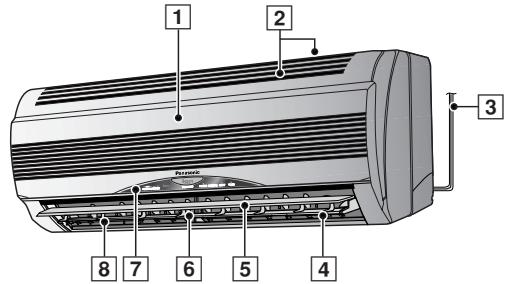
1 PerednnaheIb
2 Bo3nyx03a60hble OTBepCTnA
3 LHyp nntaHn
4 MoHn3aTOp
5 XKaJIIO3n BepTnKaJIbHOrO HAnpaBJIeHnBaBO3NyUHOro NOTOKa
6 KajIO3nI rOpN3OHTaJIbHOro HAnpaBJeHnBa BO3DyUHOrO pyuHaerpeyunipOBka
7 PanaHnB INDnKaTopa
B03dyxObIyNcKHOeOTBepCTne
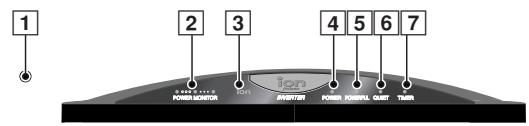
1 KhoNka aBtOMaTnueCKoTopeXnMa (C OTKpbIToI nepeDHe nHaHeJIbO)
- HaxmTe KhoNky 2 yTo6bI Bbl6paTb:-
AUTO - ABTomatnueckn pekIM
HEAT - Pekim HargebaHnA
COOL - PekimoxlaXeHnA
DRY -Pekm MrgkO cyuKn
FAN -Pexm uPkynuIN BO3dyxa
YctaHOBka temnepatypa
- HaxMMTe KHOKNy 3 YTObbl yBEnuHTb nIyMeHbWNb TEMnepaTyp.
- Tempea Typa Moket 6bItb yctahOBJIeHa B INHTepBaIe Mexny 16°C n 30°C
- PekomehnyeMaT TempepaTypa:
HEAT (OBOΓPEB) : 20°C ~ 24°C
COOL (OXIIAXKDEHNE) : 26°C ~ 28°C
DRY (OCUJIEHNE) : npn6J. KOMHaTHaTeMnepaTpa
■ ABTomatnueckn pexkm
- B haçaIe aBTOMaTnueCKOro peKIMa IpnOxCoIIT abTOMaTnueCKn BbIbOp o6OrpeBa, OxJaXKeHIN HJI MЯrKOrO OcyUeHnB CooTBetCTBnC TEmpePaTpyo HapyXHO R03dYxa, TEmpePaTpyo NOMEuEHNr N 3aDaHHoN TEmpePaTpyo.
- Пру Нeoбхоюмoctnи реким pa60ы мehнетс Кждьгплчaca.
(Ex) 3aДаннай Temпература - 25°C
13°C 19°C 21°C 23°C 25°C
Hapykha TemnepaTypa
UctahOBka CKOpOCTn BpaSeHnBEHTNJATOPa
- Haxmte KhoNky 4 yTo6bBb6paTb:-
Kpome aBtOMaTnueCKOrO BbIbOpa CkOpOCTu BEHTNJIrTopa, ectb nTb peXIMOB CKOpOCTu BEHTNJIrTopa.
AUTO
FAN - 06orpeB
Kornda TemnepaTypa Bb6paacbBaemoro BO3dyxa NOBbIaAeTcR,CKOpOCTb BEHTINJTopa TAKKe NOBbIaAeTcR.
OxnaJdHne OcyuHne
MeHReT CKOpocTb BEHTINrTopa dIa cO3dAnHn IpoXnAaHOro BeTePka. Bo3dyx NaHHaet BbIXoHntb IprMepHoYepe3 40 cekyHn IocNe Haayana peKmOB OxJaXdHeHne nn MArkoe ocUeHne.
YctaHObKa BepTnKajIbHOrO HapPaBHeHn NOtOKa BO3dYxa
- Haxmnte KhoNky [5] UTo6bI BbIbpaTb:-


Дяразьв ржиме OXЛАЖДЕНЯ/OCYLUEHIN.
ABTomatnueckoe nokayubahne XkaH03n BBepx/Bn3.

Haxmte KhoNky 6yTO6bY BblpaTb:
PexkIM BeHTnIaun (FAN)
2 BbIKIIOUHTe NITaHne N BbIepeHNTe UHyp n3 po3eTKN. PpIMeuaHne: Ecnn He BbIKIIOuHTb yCTpoiCTBO npn NOMOUsyIyIbTa IINCTaHcIIOHHORO UnpaBLeHn, OHO CaMo aBTOMaTmUeCKN BKIIIOUHTCn, KAK TOJIbKO Bbl BCTaBNTe 6JToENCeJIb B PO3ETky (NoCKOJIbKy yCTpoiCTBO OCHaUeHO 6JLOkOM aBTOMaTmUeCKOTO BKIIIOUHeHn).
3 DoctaHbTe 6aTapeKu n3 nyIbTa duCTaHcNoHHoro ynpabHeHn.
■ PekomeHnyeMbI OCMOTp
- Пос两款 Heckobkix net 3KcNlpyatauny yctpoiCTBO 3aqr3HaeTcA,уTO npINBODIT K CHNXeHNHO eO 3ΦΦeKTHBHOCTN.
Пи Надлжашem obpaшenHn, 3aqr3HehHoe yctpoiCTBO cNoC6HcMo cTaTB nCTOuHnikOM HepnIaTHbIX 3anaxOB, a cKoINBuaarCB HEm nbIb MOKET BbIECTn n3 CTPOR CNTcEMy BlaFONORLOUeHn.
ПоТOMy, крОme peYrJAPHOчNCTKn, peKOMeHnyETcЯпinoDUnCeCKn pOn3BODHTb TExHNUeCKn OCMOTp. (PpOKOHcYbTbTnpYIteCb y yNOJHMOUeHHOrO dInepa).
Pone3naHnΦopMaun
KhoNka ABToMaTnueckn peXkIM
KoJIe6aHnHa npJxKeHn
HapyxHoe yctpoiCTBO qacto npekpaaet pa60taTb 13-3a KOle6aHn HnpaXeHn. IpokohcyIbTppyItecB C BaWM dInepom.
CobetbI NO 3KcPnyatauN N 3KOHOMN 3JIeKTPo3Heprnn
Hnke npBBeHebI NOJe3HbIe COBtbl JIy o6ecneueHnOONImaJIbHbIX XapaKTePncTnK m 3KOHOmNCHo pa60tbl.
YctahOBKa TEMnepaTypbl
- MoXHo C3KoHOMMt b Do 10% 3JIeKToP03Heprn.
- YctaHOBInTe TempepaTypy BblSe NJIH HIXe XeJaEMOn OTMETKN.
Pexmm oxlaXdEHHa : 1°C Bblie
Pexm HarpBaHn : 2°C HnXe
Bo3dyhbln BO3dyxoouchntteIbhlbIΦnlbTpbl
OuIaIte Bo3dyHbI KIbTp KaJIbIe 2 HeJIeN I 3aMeHJIte Bo3dyXOOHCTIeJIbHbI KIbTp KaJIbIe 6 MEcra.
3aqr3HennbI qnIbTp cHnkaet OXlaJdaOuSyIO NnHarpeBaHOuNIO CNOco6HoCTb KOHNIOHepa.
He 3aogopaxnBaIte BbInyckHbIe OTBepCTn. HNaYe OxJaIOUaI NHarpeBaIOUaI cNoC6HOCTN CHN3rTcA
PexKmbi TaMepa
- TTo6bl 3pr He paCXoOBoA Tb 3NeKtPo3HeprHIO, BKNHOyaiTe TaIMep yXOJa N3 DoMa.
He noDBepraTe BO3eNCTBnIO npAMORO COJHeHOro CBeta
3aKpbIbAte 3aHaBeCKn IINI UToBpI, YTObI BO BpeMpa60TbI pexIMMa OXIAJKeHnB KOMHaTy He IpOHNKaIInpMbIe COInHeHbIe JyH.
ПОИСК И YYSTPAHEHNE HENCПAPBHOCTEД
Ipejde yem obaaatabcra K BaWemy dInlepy, BbINOHNHe HxKepeuHcJIeHHbIe npOBepKn.
| ПюбLEMа? | Пюверыо
He Bvyкючирь в abTomatческь bvyкючать и He cropeь
лиPrepoхалов
He OTKючесн в Bvyka shура рintань ot po3etkn?
Правиьно в scnoьься таймер? |
| •Усточьгов He npoшьогп охлajдени ялharpeв
эффektimb. | •Правильно Ль бlya Задан Tempepatура?
•He 3aGras3HINICь в Bo3dUnbte Фильтby?
•He nepekpblы Ль ВОЗdUnbte ББОДхOBыИngСнhoe
otbercentri?
•ЗakpyыЛь вce Okha nDbepn?
※ Измерпу разни Tempepatуyp. Ystpoctво pa60tae
HopmaIbNo, ecnчЧepez 15 minyrtnc le nachana pa60tby
pa3Hniua MeJxU Tempepatуpamn Bo3dUny y
Bo3dUnbte B6O3bOPHOr O Bo3dUnbte CCKHOr O TbePCTN paBHA
8eC iln 6bIbwe prn pexkime oxlanjdehenny Iln 14eC iln
6bIbwe prn pexkime oborgpeba. |
| •Усточьгов He npinHmae cnghalbl nyltbta
dcingTahunOHOrO UyprablenHIM, iln INMdkauzmaHa
dincJIeE pylbTa cna6aII Ilin OTCyTCTBvET. | •He pazraDInuLbLьлб ATapapeKn?
•YctahOBIneHlьльлб CO6bIoDcHEmmpaBILhoi
nonpapinoctn? |
| ПюбLEMа? | Пючина
•Оздух He bly6pacbIbAeTcR HeMeedlenHo.
•Рубота ВHEZANH NopekpaAsaetcR.
•Из усточь вьIxODH
•Сышеншum.
•Наржнь 6LOK
•HapyЖнь 6LOK
•Сышеншum.
•Сышеншum.
•Сышenшum.
•Сышenшum.
•Сышenшum.
•Сышenшum.
•Сышenшum.
•Сышenшum.
•Сышenшum.
•Сышenшum.
•Сышenшum.
•Сышenшum.
•Сышenшum.
•Сышenшum.
•Сышenшum.
*Зурпсьгов (CBToDIOID POWER mrigaert)
Зурпсьгов (CBToDIOID POWER mrigaert)
ВERTINIATROP BHyrpenHero 6LoKa PerioDUnyceckn
OCTAHABINBaETCn Ha 80 seyund n p6o7aET B TceHene 20
seyund n p6o7aET B TceHene 20
seyund n p6o7aET B TceHene 20
seyund n p6o7aET B TceHene 20
seyund n p6o7aET B TceHene 20
seyund n p6o7aET B TceHene 20
seyund n p9OJcHT B TceHene 20
(Пожanytsa, пооздпет, рasmopaxkBaHne мegest 3aHrtbdo
10 minutyI.) |
| •Из усточьв вьIxODHТуman.
•Сышеншum.
•Сышenшum.
•HapyЖнь 6LOK InCnyskaet Bodу ilmnap. | •Зурпсьгов (CBToDIOID POWER mrigaert)
Зурпсьгов (CBToDIOID POWER mrigaert)
•Зурпсьгов (CBToDIOID POWER mrigaert)
•Зурпсьгов (CBToDIOID POWER mrigaert)
•Зурпсьгов (CBToDIOID POWER mrigaert)
•Зурпсьгов (CBToDIOID POWER mrigaert)
•Зурпсьгов (CBToDIOID POWER MINGA
•Зурпсьгов (CBToDIOID POWER MINGA
•Зурпсьгов (CBToDIOID POWER MINGA
•Зурпсьгов (CBToDIOID POWER MINGA
•Зурпсьгов (CBToDIOID POWER MINGA
•Зурпсьгов (CBToDIOID POWER MINGA |
CnTuaun, KOrda Heo6xoIm cpoHbIy Bbl3OB CneuHaNCTa fnpMbI
BcIyae BO3HKnHOBeHHN HNKe nepeuNCJIeHHbIX HeucnPaBHOCTeB, BbIKNoHTe 3NeKTPoNTaHHe, BbITAHHTe UHyp n3 pO3eTK N HEMeJdEHHO 6ObpaTtEc b K npOdaBu.
Bo Bpempa60bI KOHNzHHepe cJIbIeH HeHOpMaIbHbI ShM.
Boda nnn kakne-lnbo noctopohnme MaepnaJIbI no Own6Ke nonanin Bnylt dntaunOHoro ynpabHeHr.
- I3 BHyTpHHeRo 6noka Ha6nIoJaTcYyTeuKa BObl.
- PepeKlHouateJIIN nn KhoNKn pa6OtaHt HenpaBnIbHO.
- ABTomatnueckn BbIKJIIOHATeJIb YACTO BbIKJIIOHauaETCA.
- NobbiueHHbH HarpeB uHypa nTuHaNn BUNKn.
- BvIeJIaTeTc3anax rapn.
Korda Miraet CBeToNDIO TaMepa Ha BHytpenHem 6Ioke
CBeToND TaMepa MnaeT, yka3bIbIa Ha HeHOpMaIbHyU pa60Ty. HAnKMTe KONKy npOBePKu (CHECK) Ha npLTbe DnCTaHIOHOHOro ynpabAeHnHaYepKbIaTe ee HaxaToB TceHeHne 5 cekyHd, pnp 3OTm Ha nDCnPee NOBnTCa KOd OOn6Kn.
He npimehaTb rheepaToPbIe ycTaHOBKn IJIa NITaHnA.
- Tempepatphtbye ycIOBn
BpeKmE oxJaXdHnA
TempepaBHytpn NomeuHn 16-32oC
Tempepatya BHe nomeueHn 16-43°C
B pexkme obopeba
TempepaBHTPn NOMEH 2-30°C
Temnepaotypa BHe nOmeuEHH 5-24°C
- YcnoBnA yCTaHOBKn
CneNyTe HNcTpyKuIN NO yCTaHOBKe N pa3MeueHHo He yctaHaBnBaTb CNEyUOuNX MeCTax:
Co6HoaIte HnctpyKuIO nO 3KcNpyaTcuN.
- CoctoHne n3eJnA
YcIOBnI pON3BODCTBa NCKJIouaIOT MoINΦnKaUHIO NOBpeXdEHnI PtN TpaHCnOpTIpOBKe.
6.Прпрдьгье CTUXHьгд eДСТВИ
Ha daHHOe n3dJIeNe He paacnpoctpaHReTcra paoTHn npnIOBpeKdEHNOT npnpoDhbIX CTXhNHBIX beDCTBn (HaNPmep-B pe3yIbTaTe HABODHeHN).
Matsushita Electric Industrial Co., Ltd.
Web Site : http://www.panasonic.co.jp/global/
© Первов на ручим язblК Panasonic (CIS) Oy 1998
Note
Please remember to record the following:
Model Number
- Serial Number
Dealer's Name
- Date Purchased
Nota



