Baby Care 4 - Baby monitor AUDIOLINE - Free user manual and instructions
Find the device manual for free Baby Care 4 AUDIOLINE in PDF.


| Product Type | Baby Monitor |
| Brand | Audioline |
| Model | Baby Care 4 |
| Frequency Range | 2.4 GHz |
| Range (Outdoor) | Up to 300 meters |
| Range (Indoor) | Up to 50 meters |
| Power Supply | AC adapter (both units) |
| Battery Life | Approximately 8 hours |
| Audio Monitoring | Two-way communication |
| Night Light | Yes, built-in |
| Sound Level Indicator | LED bar on parent unit |
| Out of Range Alert | Yes, visual and audible |
| Low Battery Alert | Yes |
| Volume Control | Adjustable on parent unit |
| Cleaning | Wipe with a dry, soft cloth |
| Safety | Non-toxic materials, complies with CE standards |
| Spare Parts Availability | Contact Audioline customer service |
| Repairability | Designed for easy battery replacement |
| General Information | Digital baby monitor with DECT technology for clear sound and interference-free operation |
Frequently Asked Questions - Baby Care 4 AUDIOLINE
User questions about Baby Care 4 AUDIOLINE
0 question about this device. Answer the ones you know or ask your own.
Ask a new question about this device
Download the instructions for your Baby monitor in PDF format for free! Find your manual Baby Care 4 - AUDIOLINE and take your electronic device back in hand. On this page are published all the documents necessary for the use of your device. Baby Care 4 by AUDIOLINE.
USER MANUAL Baby Care 4 AUDIOLINE
with digital, noiseless Radio Communication
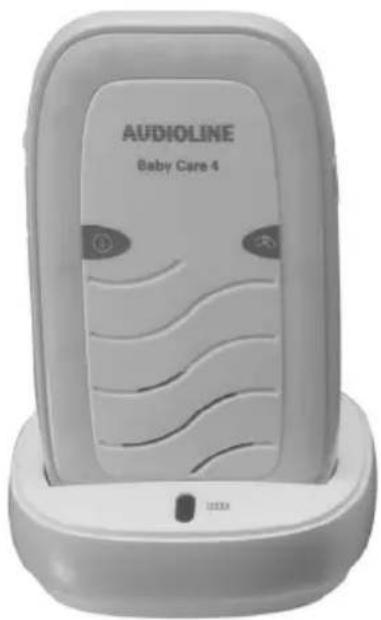
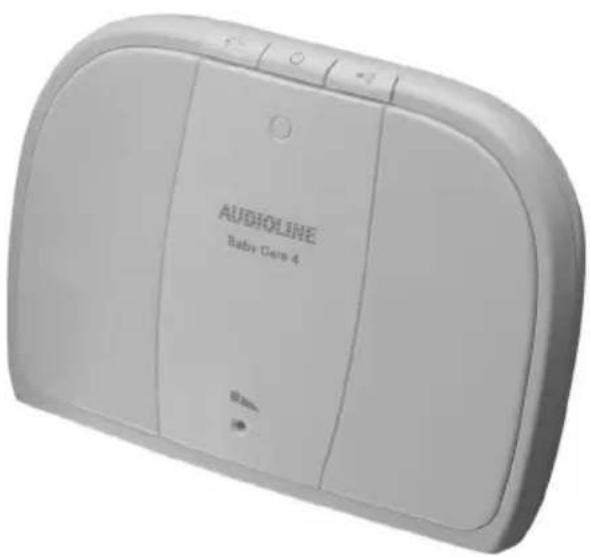
natural_image
White Audioline baby phone 4 device with control buttons and display screen (no readable text beyond branding)Bedienungsanleitung
Operating Instructions
D
GB
AUDIOLINE
Baby Care 4
Operating Instructions__13
natural_image
Simple line drawing of a device casing with a handle and label '13' (no text or symbols on the diagram itself)3 Inbetriebnahme
Sicherheitshinweise

Receiver (parent unit) 15.
Charger Pod 15
3 Starting Up 16
Safety notes 16
Checking the package contents 16
At the Parent Unit 16
At the Baby Unit 16
4 Operation 17
Switching your Baby Monitor On or Off 17
Volume 17
Battery Level Indicator/Battery Low Warning 17
Baby Alert 17
Parent to Parent Paging 17
Night Light 17
5 Troubleshooting 18
6 Technical Data 19
Cleaning and upkeep 19
Declaration of Conformity 19
7 Guarantee 20
1 General Information
Please read this operating instruction manual thoroughly.
Under no circumstances open the equipment or complete any repair work yourself. In the case of claims under the terms of guarantee, contact your sales outlet.
We reserve the right to make technical and appearance modifications to the product during the course of product improvement.
Intended use
The Baby Monitor serves to monitor rooms. The sender (baby unit) transmits vocal sounds and other noises from the baby to the receiver (parent unit). Any other use is considered unintended use.
Use of the equipment is no substitute for personal attention and supervision of a child. Rights to claims for liability beyond the scope of legal regulations are excluded.
Safety notes
The Baby Monitor has been designed to provide added reassurance for those times when you cannot be in the same room as your baby. It is NOT a substitute for adult supervision. A parent must always stay within range of the monitor during use. Your Baby Monitor is not a medical device, nor a device to prevent cases of Sudden Infant Death Syndrome or 'cot death', and you should not rely on it for your baby's wellbeing. It is important that you regularly check on your baby personally
- Never place anything over your Baby Monitor or cover it in any way.
- Do not place your Parent or Baby Unit near water or in a damp environment.
- If travelling abroad, make sure that the voltage shown on the mains power adaptor corresponds to the local mains power supply.
- Never dispose of batteries in the household rubbish. Check with you local authority for correct disposal options.
- Never use non-rechargeable batteries in your Parent Unit. Use only the recommended type - 2 x AAA 1.2 V 800 mAH NiMH.
- Use only the mains adaptor supplied or you may risk damaging your Baby Monitor.
- When your Baby Monitor is not in use, it is recommended that you disconnect it from the mains supply and remove the batteries.
- Do not spray it with cleaning polish. Disconnect it from the mains power before cleaning.
- The adaptors may become warm during use, please take care when handling.
- Do not place your Parent or Baby Unit in direct sunlight.
The charge capacity of the re-chargeable batteries in the Parent Unit will reduce with time and will eventually need to be replaced. New re-chargeable batteries are obtainable from our Helpline.
Disposal
In order to dispose of your device, take it to a collection point
provided by your local public waste authorities (e.g. recycling centre). The adjacent symbol indicates that the device must not be disposed of in normal domestic waste! According to laws on the disposal of electronic and electrical devices, owners are obliged to dispose of old
electronic and electrical devices in a separate waste container.
Batteries/Rechargeable batteries must be disposed of at the point of sale or at the appropriate collection points provided by the public waste authorities.
Packaging materials must be disposed of according to local regulations.


2 Operating Elements
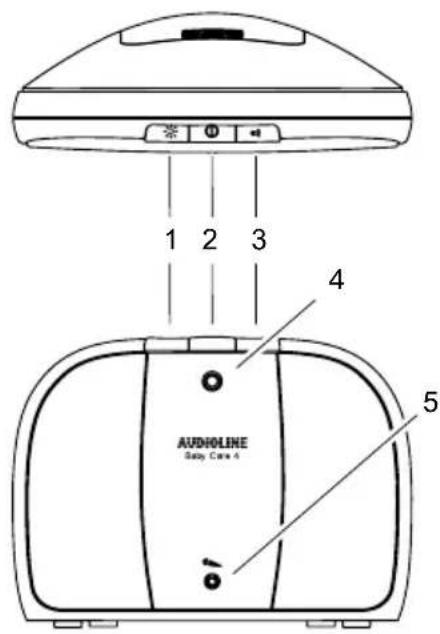
Sender (baby unit)
1 Night Light Key
Press to turn On the Night Light. Light will glow softly through the front panel. Press again to fade the Light to Off.
2 Power On/Off
Press to turn the Unit ON. Press and hold to turn the Unit OFF.
3 Page Key
Press and hold. Parent unit makes an audible alert. Useful to call for assistance or to locate a missing Parent Unit.
4 Control lamp
Red light glows when the power is On. If operating from the batteries, a slow flashing light indicates batteries are low.
5 Microphone
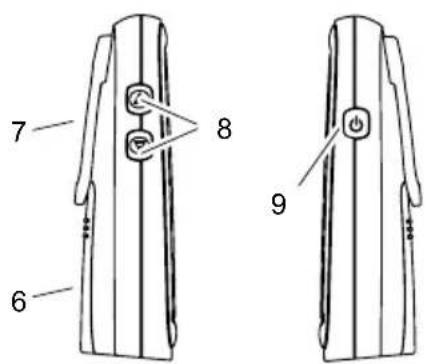
Receiver (parent unit)
6 Battery Cover
Rechargeable batteries.
7 Belt Clip
8 Volume Keys Up/Down
Adjust the Volume at which you hear the sounds in your babys room.
9 Power Key
Press and release to switch ON.
Press and hold to turn it OFF.
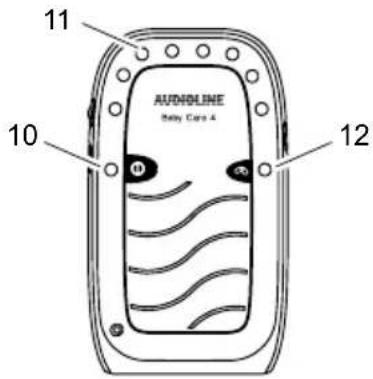
10 Power Light
A red light means that the power is ON.
Flashing light means rechargeable batteries need recharging.
11 Noise level indicators
12 Link Light
Green light ON means 'Linked' to Baby Unit. Flashing light means 'Link' is lost.
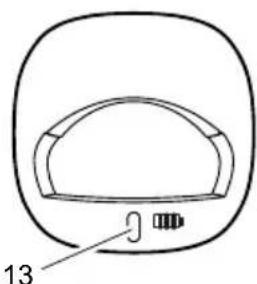
Charger Pod
13 Charging Light
When Parent unit is placed in the Charger Pod the red charger light comes ON to indicate the batteries are charging. Light will remain ON to ensure optimum charge is maintained.
natural_image
Simple line drawing of a device casing with a handle and label '13' (no text or symbols on the diagram itself)3 Starting Up
Safety notes

It is essential to read the “General Information” at the beginning of this manual before starting up.
Checking the package contents
The package contains:
| 1 Parent unit (receiver) | 1 mains adapter with charger pod2 NiMH rechargeable batteriesType AAA, 800 mAh |
| 1 Baby unit (sender) 1 mains adapter with power cord |
At the Parent Unit
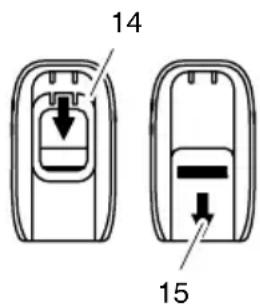
- Remove the Belt Clip by lifting the clip (14) at the top and sliding it downwards.
- Then remove the battery cover (15) on the back of the Parent Unit by applying pressure and sliding it down. Insert the rechargeable batteries as marked on the unit and close the cover again.
- Place the Parent Unit into the Charger Pod.
- Plug the mains adaptor into a mains power socket. The red charger light on the charger pod will illuminate indicating that the Parent Unit is charging (the light will remain on to ensure optimum charge is maintained).

Before first use, or if it has been out of use for a long time, the Parent Unit will need to be charged for 13 hours. During this time, the Parent Unit will operate from the Charger pod when switched on. Note that the Parent Unit cannot be used without batteries, even if it is placed in the charger.
At the Baby Unit
- In event of a power failure, your Baby Monitor can switch to battery power. It is therefore recommended that you insert non-rechargeable batteries in the Baby Unit.
- Remove the battery cover on the back of the Baby Unit by applying pressure and sliding it down. Insert 3 alkaline batteries of the type AA (not provided) as marked on the unit and close the cover again. Do not use rechargeable batteries in the Baby Unit.
- Plug the power cord into the power input at the side of the Baby Unit and plug the adaptor plug into a mains power socket.
- Press and hold the "Power Key" until the red Power light on the front of the Baby Unit illuminates.

The Baby Unit should be placed about 1 m to 1.5 m away from the baby's cot on a flat surface. Never place the Baby Unit inside the cot, bed or playpen. Make sure the unit, cords and mains adaptor are out of reach of the baby and other young children. Never place either Unit on antique or polished surfaces.
4 Operation
Once you have set up your Baby Monitor, you will be able to hear the sounds in your baby's room through the Parent Unit. You should also be able to "see" those sounds as the green and red sensor lights around the top of the Parent Unit rise and fall with the sound levels.

If the connection between the Parent and Baby Units is broken at any time the green Link light on the Parent Unit will flash slowly, the parent unit will beep to alter you that the link has been lost and the green and red sensor lights will cease to react to any sounds. To re-establish the Link, move closer to the baby unit or follow the directions in chapter "Troubleshooting".
Switching your Baby Monitor On or Off
Once connected to the power supply, your Baby unit and Parent Unit must both be switched on to operate. To switch on, press and release the “Power Key” on each Unit. To switch off, press and hold the “Power Key”.
Volume
You can adjust the volume at which you hear your baby by using the “Up” and “Down” keys on the side of the Parent Unit. Whilst you are adjusting the volume, the 5 green sound sensor lights act as an indicator of the volume level.
Battery Level Indicator/Battery Low Warning
The Parent Unit will work up to 10 hours out of the Charger Pod, but this depends on the level of charge in the batteries. If the charge is low, the red Power light on the Parent Unit will begin to flash and you should return it to the Charger Pod to recharge the batteries. You can still use your Parent Unit from the Charger Pod.
When you first switch on your Parent Unit, the green and red sensor lights will briefly indicate the current charge level of the batteries in the following way:
8 lights illuminated = fully charged
6 lights illuminated = half charged
4 lights illuminated = battery is running low
2 lights (alarm beep sounds) = batteries need re-charging
A battery low warning beep will sound if the charge is low, or becomes low during use and the red power light on the Parent Unit will begin to flash. If this occurs you should return the Parent Unit to the Charge Pod to re-charge the batteries. You can still use your Parent Unit from the Charge Pod whilst the batteries are charging.
Baby Alert
If the volume of your Parent Unit is turned all the way down and you are just using the lights to monitor the noise levels in your baby's room, you will hear a warning beep on the Parent Unit should the noise levels in your baby's room increase to the point that the red sound sensor lights are showing. To stop the alert tone and turn off the Baby Alert feature, just turn the volume back up at the Parent Unit.
Parent to Parent Paging
Useful if one parent is in the baby's room and needs contact the other. Also helps to find a mislaid Parent Unit.
At the Baby Unit
Press and hold the "Page key". The Parent Unit will emit a paging tone. To cancel the tone either press and hold any key on the Parent Unit, or press the "Page key" on the Baby Unit a second time.
Night Light
The Baby Unit has a one touch night light which emits a soft starry glow, providing comfort and re-assurance for your baby and allowing you to see them in a darkened room.
At the Baby Unit
Press the "Night Light Key" on the top of the unit. A soft light will turn on gently. Press again and the light will fade away.
Service-Hotline Germany: Tel. 0180 5 001388, cost via German landline at time of going to print: 14 ct/min., different costs possible via mobile telephone systems
5 Troubleshooting
In the case of technical problems, contact our Hotline, tel. 0180 5 00 13 88 (Cost via German landline at time of going to print: 14 ct/min., different costs possible via mobile telephone systems). In the case of claims under the terms of guarantee, contact your sales outlet. There is a 2 year period of guarantee.
| Faults | Causes |
| The red 'Power' lights do not come on when you plug in. | - Check that you have turned the power on from the mains and that the connections are firm and that you have pressed and released the “Power Key” on both the Parent and Baby Units. |
| The green 'Link' light on the Parent Unit is flashing and you cannot hear the sounds from your baby's room. | - 1. You may have moved out of range -move closer to the Baby Unit and wait 5 seconds for the Link to establish.- 2. You may need to re-establish the Link between the two units. Turn both units off by pressing and holding the “Power Keys” and then back on again by pressing and releasing the “Power Keys”. The red power lights and green Link light should come on (this may take a few seconds). The red and green sound sensor lights will briefly illuminate to indicate the charge state of the rechargeable batteries in the parent unit. |
| Can't hear your baby on the Parent Unit but the 'Link' light is still glowing steadily. | - Check that the volume is turned up on the Parent Unit. |
| The Red 'Power' light is flashing on the Parent Unit. | - Your re-chargeable batteries are running low. Return the Parent Unit to the Charger Pod to recharge them. |
| Your Baby Monitor is emitting an high pitched ear-pier-cing noise. | - This may happen if your Parent and Baby Units are too close together. Move them further apart. |
6 Technical Data
| Feature Value | |
| Operating Frequency 1.8 GHz | |
| Range Up to 300 m under optimum conditions. The range is reduced in buildings (up to 50 m) as a result of walls, doors etc. | |
| Power supply, baby unit (sender) Input: 230 V AC, 25 mAOutput: 6 VDC, 200 mA, Center is + | |
| Non rechargeable batteries, baby unit (not included in the package contents) | Type: AA, 1.5 V Alkaline |
| Transmitting power Average: 10 mW | Maximum: 250 mW |
| Power supply, parent unit (receiver) (hard wired) | Input: 230 VAC, 25 mAOutput: 6 VDC, 200 mA |
| Re-chargeable batteries Type: AAA, 1.2 V | 800 mAh NiMH |
| Operating time with charged battery Approx. 10 hours | |
| Permissible ambient temperature 10 °C to | 30 °C |
| Permissible relative humidity 20 % to 75 % | |
Cleaning and upkeep
Clean the equipment with a dry, soft, lint-free cloth. Never use cleaning agents or solvents.
Declaration of Conformity
This device fulfils the requirements stipulated in the EU directive:
1999/5/EU directive on radio equipment and telecommunications terminal equipment and the mutual recognition of their conformity. Conformity with the above mentioned directive is confirmed by the CE symbol on the device.
To view the complete Declaration of Conformity, please refer to the free download available on our web site www.audioline.de.

GB
7 Guarantee
AUDIOLINE equipment is produced and tested according to the latest production methods. Carefully selected materials and highly developed technology ensure perfect functioning and a long service life. The terms of guarantee do not apply to the batteries or power packs used in the products. The period of guarantee is 24 months from the date of purchase.
All deficiencies related to material or manufacturing errors within the period of guarantee will be redressed free of charge. Rights to claims under the terms of guarantee are annulled following tampering by the purchaser or third parties. Damage caused as the result of improper handling or operation, incorrect positioning or storage, improper connection or installation or Acts of God and other external influences are excluded from the terms of guarantee. In the case of complaints, we reserve the right to repair defect parts, replace them or replace the entire device. Replaced parts or devices become our property. Rights to compensation in the case of damage are excluded where there is no evidence of intent or gross negligence by the manufacturer.
If your device does show signs of a defect within the period of guarantee, please contact the sales outlet where you purchased the AUDIOLINE device, producing the purchase receipt as evidence. All claims under the terms of guarantee in accordance with this agreement can only be asserted at the sales outlet. No claims under the terms of guarantee can be asserted after a period of two years from the date of purchase and hand-over of the product.
GB
GB