Baby Care 3 - Baby monitor AUDIOLINE - Free user manual and instructions
Find the device manual for free Baby Care 3 AUDIOLINE in PDF.


| Product Type | Audio Baby Monitor |
| Brand | Audioline |
| Model | Baby Care 3 |
| Dimensions (Parent Unit) | 120 x 80 x 30 mm |
| Dimensions (Baby Unit) | 100 x 70 x 25 mm |
| Weight (Parent Unit) | 100 g |
| Weight (Baby Unit) | 150 g |
| Power Supply (Parent Unit) | Rechargeable battery, 3.7V Li-ion |
| Power Supply (Baby Unit) | Mains adapter (5V DC, 500 mA) |
| Operating Range | Up to 300 m outdoor, up to 50 m indoors |
| Channels | 8 DECT channels (auto-scan) |
| Audio Transmission | Voice-activated (VOX) and continuous mode |
| Volume Control | Adjustable with 5 levels |
| Temperature Sensor | Displays room temperature on parent unit |
| Night Light | Not available (audio only) |
| Lullabies | No |
| Battery Life (Parent Unit) | Up to 10 hours (standby) |
| Cleaning | Wipe with a soft, damp cloth. Do not use solvents. |
| Spare Parts | Available via customer service (batteries, adapters) |
| Warranty | 2 years |
| Safety Certification | CE, RoHS compliant |
Frequently Asked Questions - Baby Care 3 AUDIOLINE
User questions about Baby Care 3 AUDIOLINE
0 question about this device. Answer the ones you know or ask your own.
Ask a new question about this device
Download the instructions for your Baby monitor in PDF format for free! Find your manual Baby Care 3 - AUDIOLINE and take your electronic device back in hand. On this page are published all the documents necessary for the use of your device. Baby Care 3 by AUDIOLINE.
USER MANUAL Baby Care 3 AUDIOLINE
natural_image
Two white AudiOLINE Baby CARE 3 wireless devices with antenna antennas and sound waves (no visible text or symbols on the devices themselves)Operating Instructions 11
1 General safety information.... 12
2 User controls 14
3 Setting up....15
3.1 Setting up the baby unit.... 15
3.1.1 Fit batteries in baby unit 15
3.1.2 Operation with plug-in mains power supply.... 15
3.2 Setting up the parent unit 15
4 Operation.... 16
4.1 The baby unit.... 16
The parent unit 16
5 Important information 17
5.1 Troubleshooting.... 17
5.2 Technical data 17
5.3 Guarantee.... 18
5.4 Declaration of Conformity/CE mark 18
1 General safety information
With the Baby Care 3 Babyphone you have purchased a quality AUDIOLINE product. Please read these operating instructions carefully in order to learn about all the options. If you should have any questions, please contact our Service Department on the Hotline number 0180 5 00 13 88 (costs Telekom by printing: 12ct/min). Under no circumstances open the unit yourself and do not try to carry out your own repairs. For any claims under the warranty, please refer to your dealer.
The following items are supplied
| one parent unit | Plug-in power supply for baby unit |
| one baby unit | one instruction manual |
Intended use
The unit is designed for transmitting speech signals such as noises made by children. Warning or signal tones from breathing or heartbeat monitors CANNOT be transmitted.
NOTE: The use of this unit CANNOT replace the personal supervision of a child or other person requiring care. No liability that falls outside the statutory regulations can be accepted.
Safety Information
- The unit is not suitable for medicinal applications.
- Maintain a safe distance of at least one metre when using the unit.
- For safety reasons, use only the original power supplies provided. The unit may set on fire if unsuitable power supplies are used.
- When using a power supply, make sure that the cable and plug are in perfect condition. Kinked or chafed cables can cause a short-circuit. Caution: Fire hazard.
- Ensure that all components are adequately ventilated during operation. Do not place pillows or towels on the units.
- Do not use the units in areas where there is a risk of explosion.
- The units are designed for use in protected rooms with a temperature range of 10 °C to 30 °C. The units must not be installed in damp rooms such as a bathroom or laundry room. Avoid proximity to sources of heat such as radiators and do not expose the unit to direct sunlight.
- If the useful life of the complete equipment has expired, please dispose of it carefully in accordance with the statutory requirements and in a manner friendly to the environment.
Range/Channel selection
The maximum range is up to 120m. If there is another Babyphone working on the same channel within this radius, signals from this may also be received. In this case, choose another channel. You will find information on the radio frequencies in the chapter entitled Technical Data.
Batteries
- Use only high-quality batteries in battery mode.
- Do not throw batteries into the fire or immerse in water.
- If you are not using the units over an extended period, please remove the batteries. Long-term storage with the batteries fitted can cause the batteries to leak.
- Do not dispose of old or defective batteries with the normal household waste. You are legally obliged to return all batteries and rechargeable batteries to suitable collection points.
- General Information -
Position
Do not set up the units in the immediate vicinity of other electrical equipment such as microwaves or hi-fi systems, as this may result in mutual interference. The location has a decisive influence on trouble-free operation.
Place the units on a flat and non-slip surface. The feet do not normally leave any marks on the surface. However, due to the large number of varnishes and surfaces in use, it may not be possible to prevent marks occurring on the surface due to the feet of the unit.
Cleaning and care
The surface of the case can be cleaned with a soft, dry, lint-free cloth. Never use cleaning agents, particularly aggressive solvents. No attention is necessary apart from cleaning the case occasionally.
2 User controls
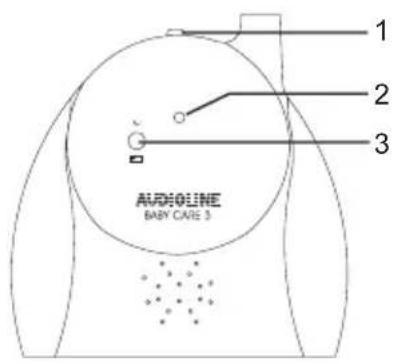
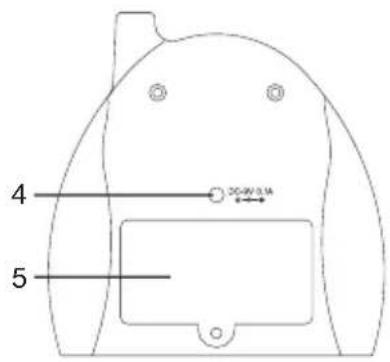
Baby unit
1 On/Off and channel changeover switch
2 Microphone
3 Indicator light
On/Off and battery capacity
4 Connection for power supply
5 Battery compartment
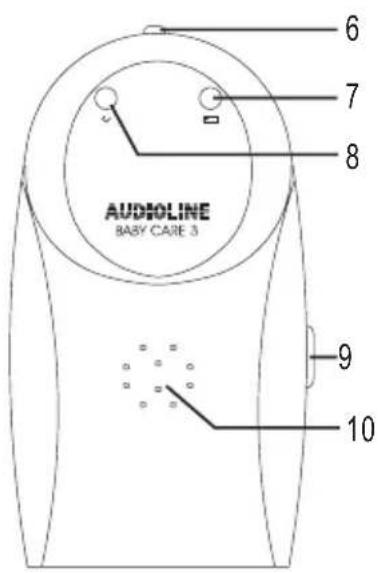
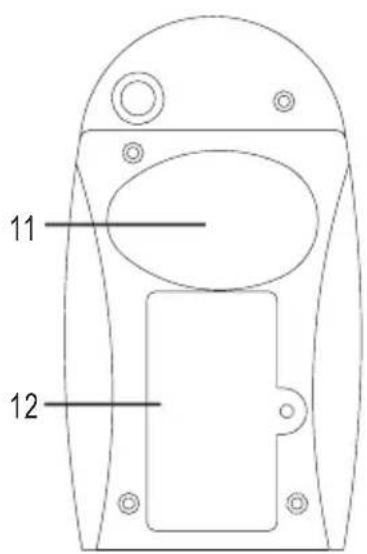
Parent unit
6 On/Off and channel changeover switch
7 Indicator light battery capacity
8 Indicator light On/Off
9 Volume
10 Loudspeaker
11 Belt clip
12 Battery compartment
3 Setting up
The parent unit is operated by a 9V block battery (not included). The baby unit can be operated by the power supply provided or by a 9V block battery (not included).
Note: In order to reduce the production of electromagnetic fields, we recommend the use of batteries.
3.1 Setting up the baby unit
3.1.1 Fit batteries in baby unit
- The battery compartment is located on the rear.
- Open the battery compartment with a small screwdriver.
Note: For safety reasons, the battery compartment is locked by means of a screw so that the baby cannot open the compartment. This ensures that the baby is unable to come into contact with the batteries.
- Connect the battery cable to the 9V block battery, taking care to ensure that the polarity is correct.
- Place the battery in the battery compartment and close the compartment.
The battery should be changed if the appropriate indicator light shows red during battery operation.
3.1.2 Operation with plug-in mains power supply
Insert the small round plug into the socket provided on the rear of the baby unit and plug the power supply into a mains socket (230V/50Hz). Ensure that the plug-in mains power supply is adequately ventilated.
Note: If you experience a power failure, the baby unit will not automatically switch to battery power. You must disconnect the power supply.
3.2 Setting up the parent unit
- The battery compartment is located on the rear.
- Open the battery compartment with a small screwdriver.
- Connect the battery cable to the 9V block battery, taking care to ensure that the polarity is correct.
- Place the battery in the battery compartment and close the compartment.
The battery should be changed when the appropriate indicator light comes on.
4 Operation
4.1 The baby unit
Position the baby unit near to the baby. Please observe the minimum distance of one metre. For best transmission, the integral microphone should be pointing towards the child.
Now select one of the two channels A or B with the channel switch A Aus B. The parent and baby units must be set to the same channel.
The baby unit is now ready for use and the integral microphone will continuously transmit any noise made by your child.
The indicator light will always show green when the baby unit is switched on. In battery mode, the indicator light will show red if the battery needs to be changed.
To switch off the baby unit, slide the channel switch A Aus B to the OFF position.
Note: Check that both units are working properly each time before using.
4.2 The parent unit
Select one of the two channels A or B with the channel switch A Aus B. The parent and baby units must be set to the same channel. The parent unit is now ready for use. Set the required volume with the slider on the right-hand side.
The parent unit has an aerial, which can be adjusted through 180^ . In poor reception conditions, you may be able to improve the situation by moving the aerial.
The indicator light 🔍 shows green when there is sufficient battery capacity. You should change the battery if the indicator light shows red.
To switch off the parent unit, move the slide switch A Aus B to the OFF position.
5 Important information
5.1 Troubleshooting
| Nothing happens Check | the power supply (batteries or mains power supply) for the parent and baby units. |
| No transmission | Move the baby unit closer to the baby. Please observe the minimum distance of one metre however. |
| Move the parent and baby units closer together. | |
| Check the channel selector switch. The parent and baby units must be working on the same channel. | |
| Interference | Select the other channel on the parent and baby units. |
| Move the parent and baby units closer together. | |
| Check the condition of the batteries. | |
| Move the parent and baby units further apart. Whistling sound | |
| Reduce the volume on the parent unit. | |
| Check the condition of the batteries. Noise | |
| Check the channel selector switch. The parent and baby units must be working on the same channel. | |
| Foreign reception Switch | to the other channel. |
For technical problems, you can also contact our hotline on Tel. 0180 5 00 13 88 (costs Telekom by printing: 12ct/min).
5.2 Technical data
AUDIOLINE units are manufactured and tested in accordance with the most up-to-date manufacturing procedures. Selected materials and highly developed technologies ensure trouble-free operation and long life. The warranty is not applicable to the batteries or battery packs used in the various products. The warranty period is 24 months calculated from the day of purchase
All defects, which are the result of material or manufacturing faults, will be rectified free of charge within the warranty period. Claims under the warranty shall not be considered if the equipment has been tampered with by the purchaser or third parties. Damage, which results from improper handling or use, incorrect positioning or storage, inappropriate connection or Installation and through Act of God or other external influences are not covered by the warranty. In the case of complaints, we reserve the right to repair or to replace the defective parts or to exchange the unit. Parts or units that have been exchanged shall become our property. Claims for damages shall not be entertained unless they relate to intention or gross negligence on the part of the manufacturer.
If, however, your unit should develop a fault within the warranty period, please contact the shop where you bought your AUDIOLINE unit, taking with you your purchase receipt. In accordance with these conditions, all claims under the warranty shall be made exclusively to your dealer. Rights under the warranty can no longer be enforced after the expiry of two years from the purchase and handing over of our products.
5.4 Declaration of Conformity/CE mark
The telephone complies with the basic requirements of the R&TTE Directive "1999/5/EEC". This is confirmed by the CE mark.
For the complete Declaration of Conformity, please use the free download from our web site www.audioline.de.
This product was developed for the operation within Germany. This product transmits in a non-EU-harmonised frequency band. CE0359