
Nivea 7000 Series HQ7330 - Shaver PHILIPS - Free user manual and instructions
Find the device manual for free Nivea 7000 Series HQ7330 PHILIPS in PDF.


| Product Type | Electric Shaver |
| Model | Nivea 7000 Series HQ7330 |
| Brand | Philips |
| Power Supply | Adapter 100-240V to <24V safe low voltage |
| Battery Type | Built-in rechargeable lithium-ion (Li-ion) |
| Charging Time | 1 hour for full charge; 12 hours for first use or after long disuse |
| Fast Charge | 6 minutes charge for one shave |
| Shaving Time (fully charged) | Up to 35 minutes |
| Motor | Power-on lights indicate motor running |
| Shaving System | Rotary shaving heads |
| Trimmer | Pop-up trimmer for sideburns and moustache |
| Wet/Dry Use | Can be used in bath or shower; rinse under tap |
| Cleaning | Daily rinse under hot tap; brush for hair chamber; replace heads every 2 years |
| Protection Cap | Included to protect shaving heads when not in use |
| Noise Level | Lc = 59 dB(A) |
| Safety | Complies with IEC safety regulations; adapter must not get wet; do not use if damaged |
| Environment | Recycle at official collection point; built-in battery must be removed before disposal |
| Accessories Included | Adapter HQ8500/HQ8000, brush, protection cap |
| Replacement Heads | Philips HQ8 shaving heads only |
| Guarantee | International guarantee; shaving heads not covered (wear and tear) |
Frequently Asked Questions - Nivea 7000 Series HQ7330 PHILIPS
User questions about Nivea 7000 Series HQ7330 PHILIPS
0 question about this device. Answer the ones you know or ask your own.
Ask a new question about this device
Download the instructions for your Shaver in PDF format for free! Find your manual Nivea 7000 Series HQ7330 - PHILIPS and take your electronic device back in hand. On this page are published all the documents necessary for the use of your device. Nivea 7000 Series HQ7330 by PHILIPS.
USER MANUAL Nivea 7000 Series HQ7330 PHILIPS
Congratulations on your purchase and welcome to Philips! To fully benefit from the support that Philips offers, register your product at www.philips.com/welcome.
Important
Read this user manual carefully before you use the appliance and save it for future reference.
Danger
- Make sure the adapter does not get wet.
Warning
- The adapter contains a transformer. Do not cut off the adapter to replace it with another plug, as this causes a hazardous situation.
- This appliance is not intended for use by persons (including children) with reduced physical, sensory or mental capabilities, or lack of experience and knowledge, unless they have been given supervision or instruction concerning use of the appliance by a person responsible for their safety.
- Children should be supervised to ensure that they do not play with the appliance.
Caution
- Do not use the shaver or the adapter if it is damaged.
- Only use the adapter supplied.
- If the adapter is damaged, always have it replaced with one of the original type in order to avoid a hazard.
- Charge, use and store the shaver at a temperature between 5^ C and 35^ C.
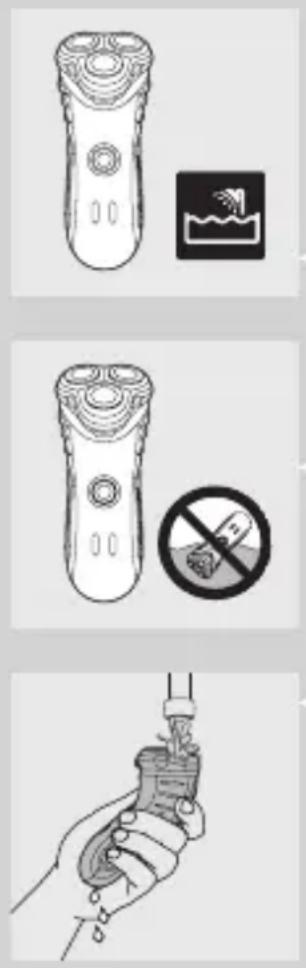
- Always unplug the shaver before you clean it under the tap and before you use the appliance in the bath or shower.
- Be careful with hot water. Always check if the water is not too hot, to prevent your hands from getting burnt.
- The appliance complies with the internationally approved IEC safety regulations and can be safely used in the bath or shower and cleaned under the tap.
- Do not immerse the shaver in water.
- Water may leak from the socket at the bottom of the appliance when you rinse it. This is normal and not dangerous because all electronics are enclosed in a sealed power unit inside the shaver. - The shaver and the other accessories are not dishwasher-proof.
General
- The adapter transforms 100-240 volts to a safe low voltage of less than 24 volts.
- Noise level: Lc = 59dB(A)
Electromagnetic fields (EMF)
This Philips appliance complies with all standards regarding electromagnetic fields (EMF). If handled properly and according to the instructions in this user manual, the appliance is safe to use based on scientific evidence available today.
Charging
Make sure the appliance is switched off before you start charging it.
ENGLISH6
When you charge the shaver for the first time or after a long period of disuse, let it charge continuously for at least 12 hours, for instance overnight.
Charging normally takes 1 hour.
After having been charged for 6 minutes, the battery contains enough energy for one shave.
When the shaver is fully charged, it has a shaving time of up to 35 minutes.
Note: The shaver cannot be used directly from the mains.
Charge indications
natural_image
Technical line drawing of a remote control device with no visible text or symbolsCharging
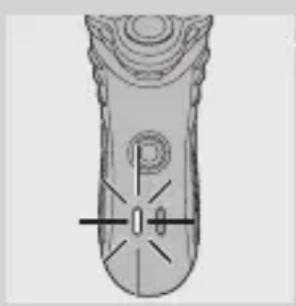
When you start charging the empty shaver, the charging light goes on.
Battery fully charged
When the battery is fully charged, the charging light starts to flash.
When you unplug the shaver, the charging light goes out.
natural_image
Top-down schematic of a remote control device with no visible text or symbolsBattery running low
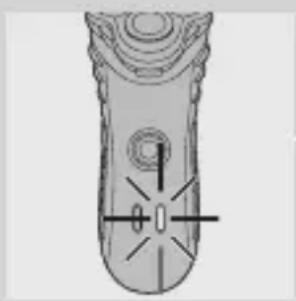
When the battery is running low, the battery-low light goes on.
When you switch off the shaver, this light flashes a few times.
Charging the appliance
Charge the shaver when the battery-low light goes on.
natural_image
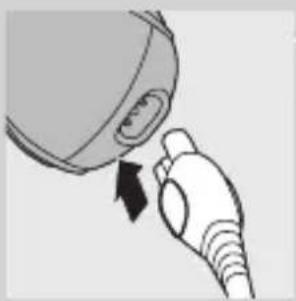
Illustration of a hand holding a plug with a black arrow indicating direction (no text or symbols)1 Put the appliance plug in the shaver.
2 Put the adapter in the wall socket.
3 Remove the adapter from the wall socket and pull the appliance plug out of the shaver when the battery has been fully charged.
Using the appliance
Shaving
1 Press the on/off button once to switch on the shaver.
The power-on lights go on to indicate that the motor is running.
2 Apply Nivea shaving foam to your face, for a fresh shaving sensation.
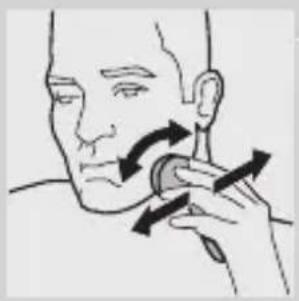
3 Move the shaving heads quickly over your skin, making both straight and circular movements.
- Moisten the shaving heads for an optimal shaving performance.
- Your skin may need 2 or 3 weeks to get accustomed to the Philips shaving system.
4 Press the on/off button once to switch off the shaver.
The power-on lights go out.
5 Clean the shaver (see chapter ‘Cleaning and maintenance’).
natural_image
Illustration of a person applying pressure to their ear with arrows indicating direction (no text or symbols)ENGLISH8
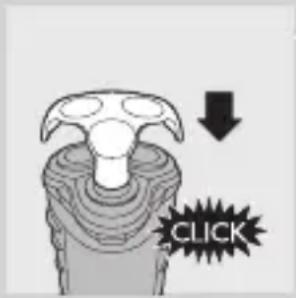
6 Put the protection cap on the shaver every time you have used it, to prevent damage to the shaving heads.
Trimming
natural_image
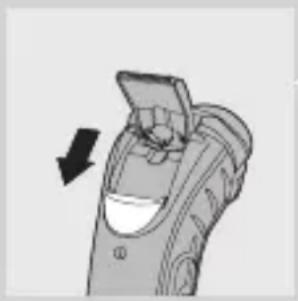
Illustration of a handheld device with a hand holding a tray, showing a black arrow pointing to the handle (no text or symbols present)For grooming sideburns and moustache.
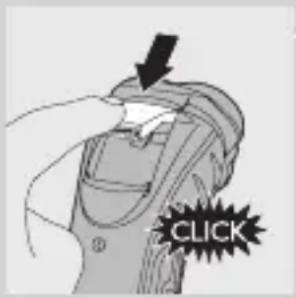
1 Open the trimmer by pushing the slide downwards.
The trimmer can be activated while the motor is running.
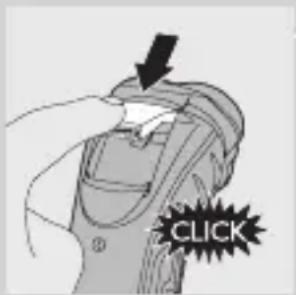
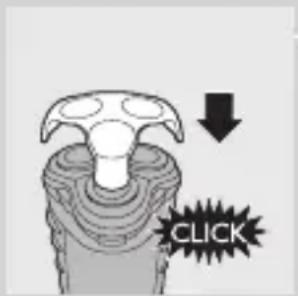
2 Close the trimmer ('click').
Cleaning and maintenance
Regular cleaning guarantees better shaving performance.
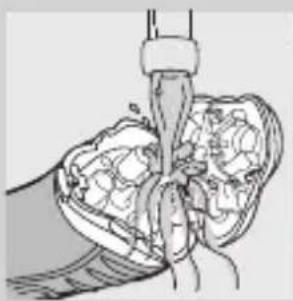
Be careful with hot water. Always check if the water is not too hot, to prevent your hands from getting burnt.
Note: Water may leak from the socket at the bottom of the appliance when you rinse it. This is normal and not dangerous.
Every day: shaving unit and hair chamber
natural_image
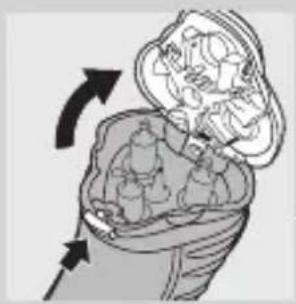
Illustration of a medical device inside a bag with arrows indicating rotation (no text or symbols)1 Switch off the shaver, remove the adapter from the wall socket and pull the appliance plug out of the shaver.
2 Press the release button to open the shaving unit.
natural_image
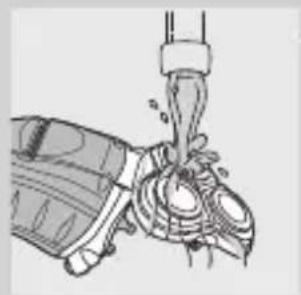
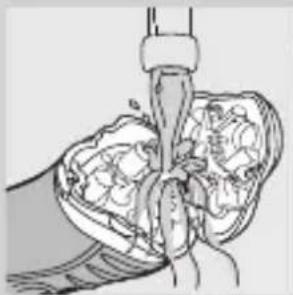
Medical illustration showing a surgical procedure with tissue manipulation (no text or labels)3 Clean the shaving unit and the hair chamber by rinsing them under a hot tap for some time.
natural_image
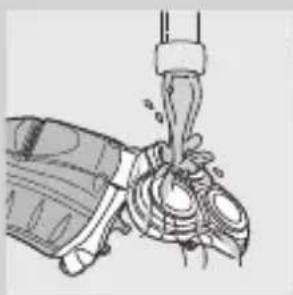
Illustration of a hand gripping a mechanical component with a spring (no text or symbols)Make sure you clean the inside as well as the outside of the shaving unit.
4 Close the shaving unit and shake off excess water.
natural_image
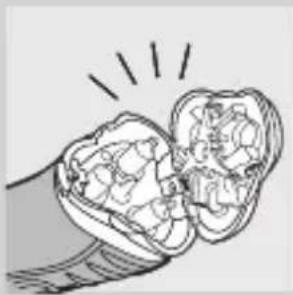
Illustration of a hand holding an open tooth with visible teeth and surrounding bone structure (no text or symbols)Never dry the shaving unit with a towel or tissue, as this may damage the shaving heads.
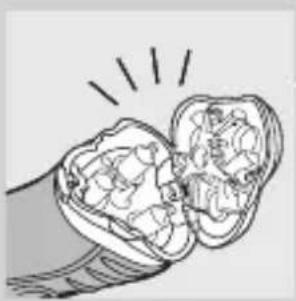
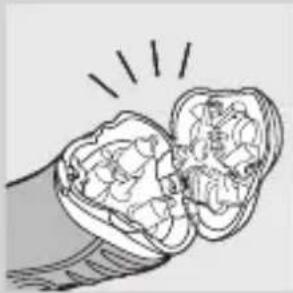
5 Open the shaving unit again and leave it open to let the appliance dry completely.
You can also clean the hair chamber without water by using the brush supplied.
Every six months: shaving heads
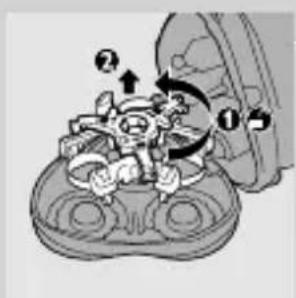
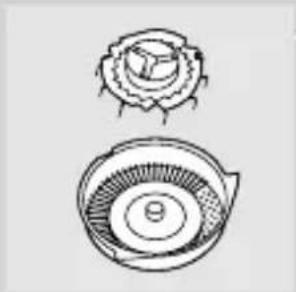
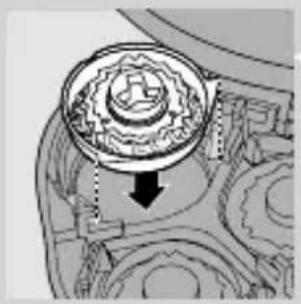
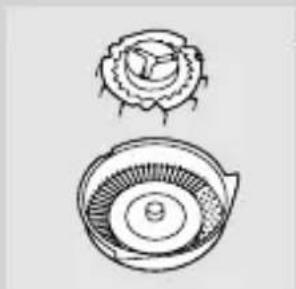
1 Open the shaving unit, turn the lock anticlockwise (1) and remove the retaining frame (2).
natural_image
Two technical line drawings of a mechanical component, one top view and one side view (no text or symbols)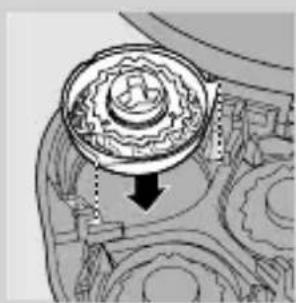
natural_image
Mechanical gear assembly diagram showing a rotating component with a downward arrow indicating motion (no text or labels)2 Clean the cutters and guards with the brush supplied.
Do not clean more than one cutter and guard at a time, since they are all matching sets. If you accidentally mix up the cutters and guards, it may take several weeks before optimal shaving performance is restored.
3 Put the shaving heads back into the shaving unit. Put the retaining frame back into the shaving unit and turn the lock clockwise.
4 Close the shaving unit.
Trimmer
natural_image
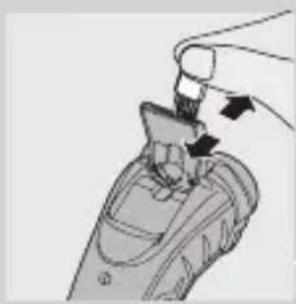
Illustration of a hand holding a small object with arrows indicating motion or force (no text or symbols)Clean the trimmer every time you have used it.
1 Switch off the shaver, remove the adapter from the wall socket and pull the appliance plug out of the shaver.
2 Clean the trimmer with the brush supplied.
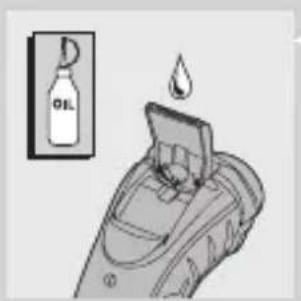
3 Lubricate the trimmer teeth with a drop of sewing machine oil every six months.
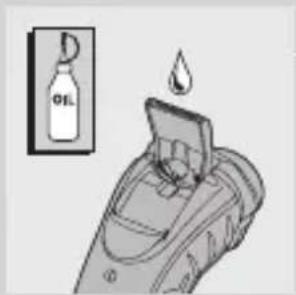
Storage
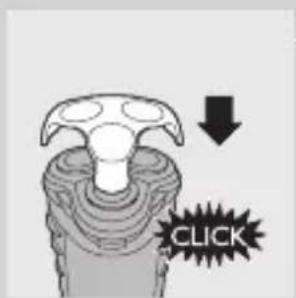
- Put the protection cap on the shaver to prevent damage to the shaving heads.
Replacement
Replace the shaving heads every two years for optimal shaving results.'
Replace damaged or worn shaving heads with HQ8 Philips shaving heads only.
Note: Do not mix up the cutters and the guards to guarantee optimal shaving performance.
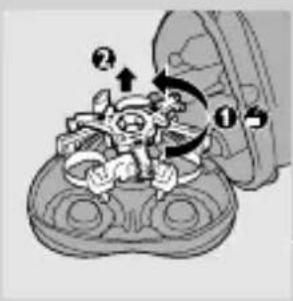
1 Switch off the shaver, remove the powerplug from the wall socket and pull the appliance plug out of the shaver.
2 Press the release button to open the shaving unit.
3 Turn the lock anticlockwise (1) and remove the retaining frame (2).
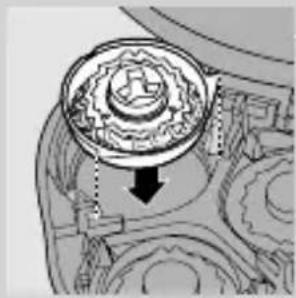
4 Remove the shaving heads and place new ones in the shaving unit. Put the retaining frame back into the shaving unit and turn the lock clockwise.
Make sure that the projections of the shaving heads fit exactly into the recesses.
5 Close the shaving unit.
Accessories
The following accessories are available:
- HQ8500/HQ8000 powerplug.
- HQ8 Philips Shaving Heads.
- HQ110 Philips Shaving Head Cleaning Spray.
- HQ8010 car cord.
Environment
natural_image
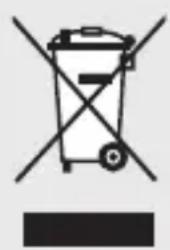
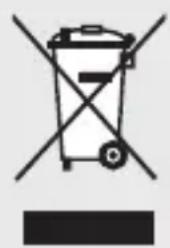
Symbol of a trash bin crossed with no text or numbers, representing waste sorting or disposal (no text present)- Do not throw away the appliance with the normal household waste at the end of its life, but hand it in at an official collection point for recycling. By doing this, you help to preserve the environment.
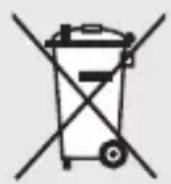
- Do not throw the battery away with the normal household waste but hand it in at an official collection point.
Disposal of the battery
The built-in rechargeable lithium-ion (Li-ion) battery contains substances that may pollute the environment. Always remove the battery before you discard and hand in the appliance at an official collection point. Dispose of the battery at an official collection point for batteries. If you have trouble removing the battery, you can also take the appliance to a Philips service centre. The staff of this centre will remove the battery for you and will dispose of it in an environmentally safe way.
natural_image
Medical illustration of a joint with surgical instrument (no text or labels)Only remove the battery if it is completely empty.
1 Remove the powerplug from the wall socket and pull the appliance plug out of the shaver.
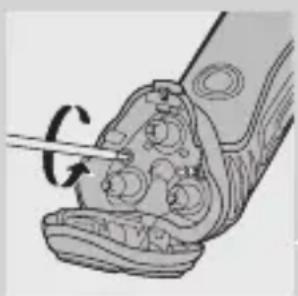
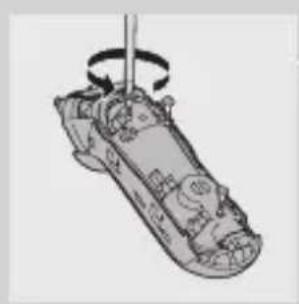
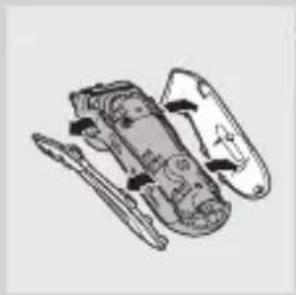
2 Let the shaver run until it stops, undo the two screws in the hair chamber and remove it.
natural_image
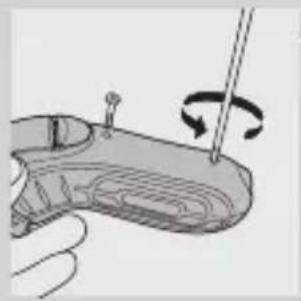
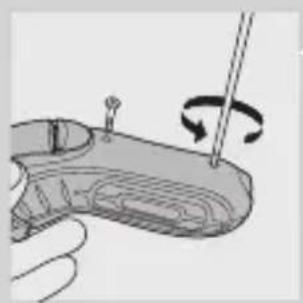
Illustration of a hand holding a small electronic device with a rotating button (no text or symbols)3 Undo the two screws at the back of the shaver and remove the back panel of the housing.
natural_image
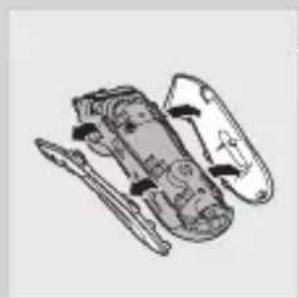
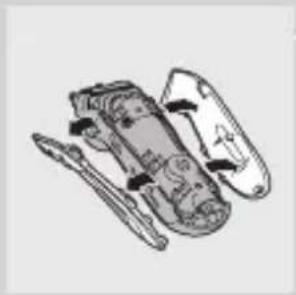
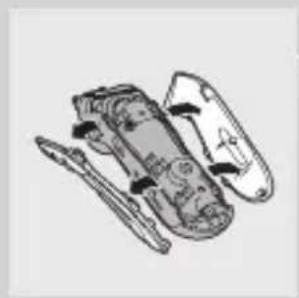
Technical line drawing of a mechanical assembly with internal components (no text or symbols)4 Remove the side panels by pulling them off the sealed power unit.
natural_image
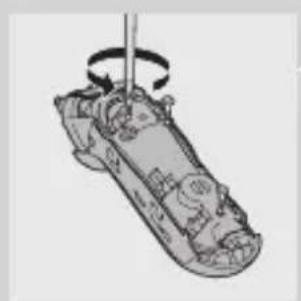
Diagram of a mechanical component with a rotating shaft and internal components (no text or symbols)5 Undo the three screws in the sealed power unit.
natural_image
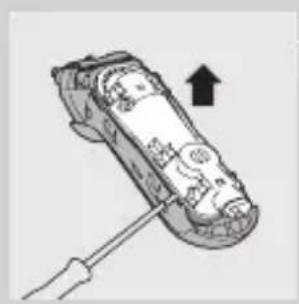
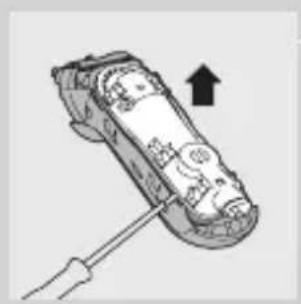
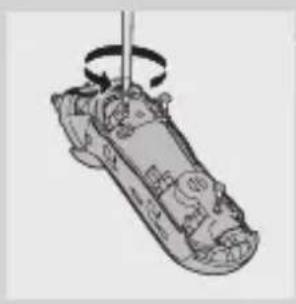
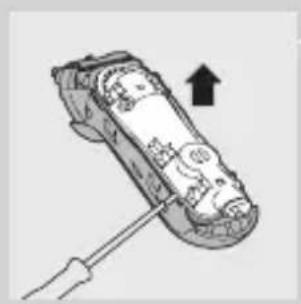
Illustration of a mechanical device with a screwdriver inserted, showing internal components and an upward arrow (no text or symbols)6 Remove the back panel of the sealed power unit by means of a screwdriver.
7 Remove the battery.
Be careful, the battery strips are very sharp.
Do not connect the shaver to the mains again after the battery has been removed.
Guarantee & service
If you need service or information or if you have a problem, please visit the Philips website at www.philips.com or contact the Philips Consumer Care Centre in your country (you find its phone number in the worldwide guarantee leaflet). If there is no Consumer Care Centre in your country, go to your local Philips dealer.
Guarantee restrictions
The shaving heads (cutters and guards) are not covered by the terms of the international guarantee because they are subject to wear.
Troubleshooting
1 The shaver does not shave as well as it used to.
Cause 1: the shaving heads are dirty. The shaver has not been rinsed long enough or the water used was not hot enough.
- Clean the shaver thoroughly before you continue shaving. See chapter ‘Cleaning and maintenance’.
- Cause 2: long hairs are obstructing the shaving heads.
- Clean the cutters and guards with the brush supplied. See chapter ‘Cleaning and maintenance’, section ‘Every six months: shaving heads’.
Cause 3: the shaving heads are damaged or worn.
- Replace the shaving heads. See chapter 'Replacement'.
2 The shaver does not work when the on/off button is pressed.
The battery is empty.
- Recharge the battery. See chapter 'Charging'.
Note: The shaver cannot be used directly from the mains.
3 The shaving unit has come off the shaver.
The shaving unit has not been placed correctly.
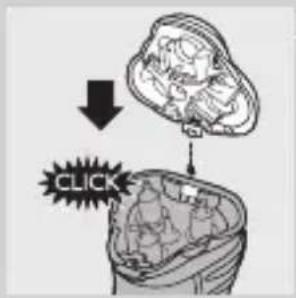
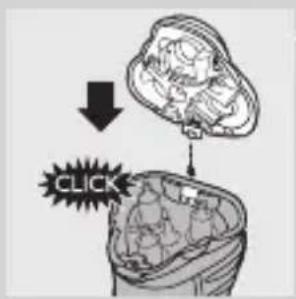
- If the shaving unit becomes detached from the shaver, you can easily put it back by inserting the hinge into the slot in the rim of the hair chamber and pushing it home until it locks into place ('click').
y_BOA
natural_image
Technical line drawing of a remote control device with no visible text or symbolsЗареждане
natural_image
Top-down schematic of a remote control device with no visible text or symbolsnatural_image
Illustration of a hand inserting a plug into a device (no text or symbols)natural_image
Illustration of a person applying facial massage to the ear with directional arrows indicating motion (no text or symbols)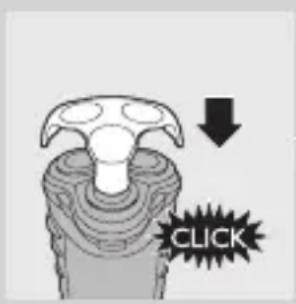
natural_image
Illustration of a handheld device with a black arrow indicating rotation (no text or symbols)natural_image
Illustration of a person inside a wrapped bag with arrows indicating rotation (no text or symbols)natural_image
Medical illustration showing a surgical procedure with tissue manipulation (no text or labels)natural_image
Illustration of a mechanical device with a lever and clamped components (no text or symbols)natural_image
Illustration of a hand holding a dental implant, showing internal tissue structure (no text or symbols)natural_image
Two hand-drawn diagrams of a flower and a circular object with internal patterns (no text or symbols)natural_image
Mechanical gear assembly diagram showing internal components and a downward arrow indicating motion (no text or labels)natural_image
Illustration of a hand holding a small object with arrows indicating motion (no text or symbols)natural_image
Medical illustration of a surgical procedure on a joint, showing anatomical structures without any text or labelsnatural_image
Diagram of a mechanical component with a rotating shaft and adjustment knob (no text or symbols)БЪЛГАРСКИ26
natural_image
Cross-sectional diagram of a mechanical device showing internal components (no text or labels)natural_image
Diagram of a mechanical component with a rotating shaft and internal parts, no visible text or symbolsnatural_image
Illustration of a handheld device with a screwdriver inserted, showing internal components and an upward arrow (no text or symbols)natural_image
Pure electrical circuit lines without any symbolsNabíjení
natural_image
Diagram of a remote control panel with no visible text or symbolsnatural_image
Top-down schematic of a remote control device with no visible text or symbols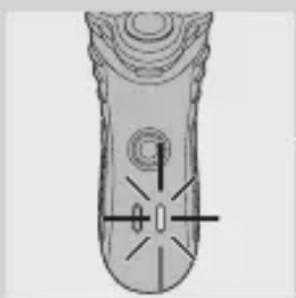
natural_image
Top-down schematic of a remote control device with no visible text or symbols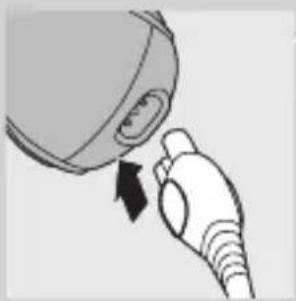
natural_image
Illustration of a hand holding a plug with a black arrow indicating force (no text or symbols)natural_image
Illustration of a person applying a circular massage or pressure tool to their face (no text or symbols present)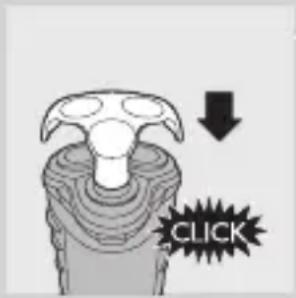
natural_image
Illustration of a handheld device with a hand holding a tray and a black arrow pointing to the handle (no text or symbols)natural_image
Diagram of a medical device inside a bag with arrows indicating rotation (no text or labels)natural_image
Medical illustration showing a surgical procedure with tissue manipulation (no text or labels)natural_image
Illustration of a hand gripping a mechanical component (no text or symbols visible)natural_image
Illustration of a hand holding an open mouth with internal organs, emitting radiating light beams (no text or symbols)natural_image
Two technical line drawings of a mechanical component, one top view and one side view (no text or symbols)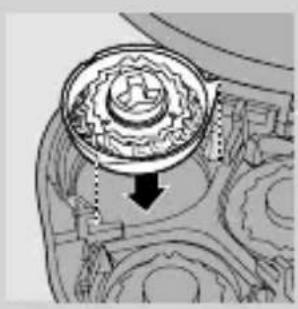
natural_image
Mechanical gear assembly diagram showing internal components and a downward arrow indicating motion (no text or labels)natural_image
Illustration of a hand holding a small object with arrows indicating motion or force (no text or symbols)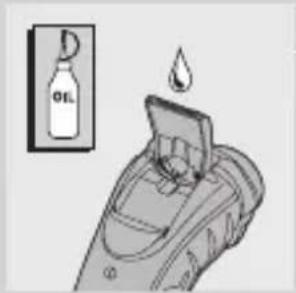
natural_image
Mechanical gear assembly diagram showing a rotating component with a downward arrow indicating motion (no text or labels)Příslušenství
natural_image
Symbol of a trash bin with crossed lines indicating no waste or restriction, and a solid black rectangle below (no text or symbols)natural_image
Medical illustration showing a surgical procedure on a joint with a tool (no text or labels)natural_image
Illustration of a hand holding a small electronic device with a rotating pointer (no text or symbols)natural_image
Technical line drawing of a mechanical assembly with internal components (no text or symbols)natural_image
Illustration of a mechanical device with rotating arm and base components (no text or symbols)natural_image
Illustration of a hand holding a screwdriver with an arrow indicating upward motion (no text or symbols)natural_image
Technical line drawing of a remote control handle with no visible text or symbolsLaadimine
natural_image
Technical line drawing of a remote control device with no visible text or symbolsAku saab tühjaks
natural_image
Illustration of a hand holding a device with a black arrow pointing to the port (no text or symbols)natural_image
Illustration of a person applying pressure to their ear with arrows indicating direction (no text or symbols)natural_image
Illustration of a handheld device with a black arrow pointing to the handle (no text or symbols)natural_image
Illustration of a medical device with internal components and directional arrows indicating movement (no text or symbols)natural_image
Medical illustration showing a surgical procedure with tissue manipulation (no text or labels)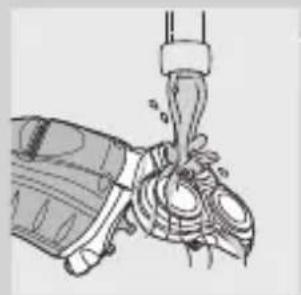
natural_image
Illustration of a mechanical device with a lever and handle (no text or symbols)natural_image
Illustration of a hand holding an open tooth with visible teeth and surrounding bone structure (no text or symbols)natural_image
Mechanical assembly diagram showing a gear-like component with directional arrows and numbered parts (no text or symbols)natural_image
Two technical line drawings of a mechanical component, possibly a gear or turbine fan, with no visible text or symbols.natural_image
Mechanical gear assembly diagram showing a central rotating component with a downward arrow indicating motion (no text or labels)natural_image
Illustration of a hand holding a small object with arrows indicating motion or assembly (no text or symbols)natural_image
Mechanical gear assembly diagram showing a rotating component with a downward arrow indicating motion (no text or labels)natural_image
Symbol of a trash bin crossed with no text or numbers, representing waste sorting or disposal (no text present)natural_image
Illustration of a mechanical component with a tool inserted, showing internal parts and a curved base (no text or symbols)natural_image
Illustration of a hand holding a tool with a rotating arrow indicating rotation (no text or symbols)natural_image
Diagram of a mechanical device with internal components and directional arrows (no text or labels)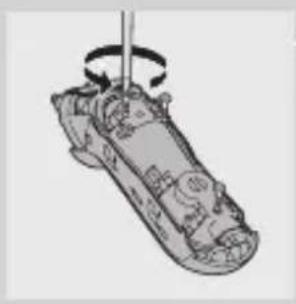
natural_image
Illustration of a mechanical component with a rotating shaft and internal components (no text or symbols)natural_image
Illustration of a hand using a screwdriver to lift a car (no text or symbols visible)natural_image
Technical line drawing of a remote control handle with no visible text or symbolsPunjenje
Kada počnete puniti prazni aparat, pali se kontrolna lampica.
natural_image
Top-down schematic of a remote control device with no visible text or symbolsBaterija je gotovo prazna
Kada je baterija gotovo prazna, pali se lampica koja označava da je baterija pri kraju.
natural_image
Illustration of a hand holding a device with an arrow indicating rotation (no text or symbols)natural_image
Illustration of a person applying a circular massage device to their face (no text or symbols)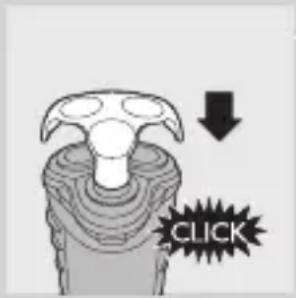
natural_image
Illustration of a handheld device with a hand holding a tray, showing a black arrow pointing to the handle (no text or symbols present)Za podrezivanje zalizaka i brkova.
1 Otvorite trimer guranjem klizača prema dolje. Trimer se može aktivirati dok motor radi.
2 Zatvorite trimer ('klik').
natural_image
Diagram of a human head with internal organs and directional arrows indicating movement (no text or labels)1 Isključite aparat za brijanje, izvadite adapter za napajanje iz zidne utičnice, a utikač iz aparata.
natural_image
Medical illustration showing a surgical procedure with tissue manipulation (no text or labels)Provjerite jeste li očistili jedinicu za brijanje iznutra i izvana.
natural_image
Illustration of a hand pouring liquid into a container with splashes (no text or symbols)Nikada nemojte sušiti jedinicu za brijanje frotirskim ili papirnatim ručnikom jer to može oštetiti glave za brijanje.
natural_image
Illustration of a hand holding a piece of bread with visible filling and a light burst effect (no text or symbols)5 Ponovno otvorite jedinicu za brijanje i ostavite je otvorenom kako bi se aparat u potpunosti osušio.
natural_image
Two hand-drawn diagrams of a rose and a circular fan-like object, no text or symbols present.2 Očistite rezače i štitnike priloženom četkicom. Nemojte istovremeno čistiti više od jednog rezača i štitnika jer su međusobno usklađeni. Ako ih slučajno pomiješate, možda će trebati nekoliko tjedana prije uspostavljanja ponovnog optimalnog rada aparata.
natural_image
Mechanical gear assembly diagram showing a rotating component with a downward arrow indicating motion (no text or labels)3 Glave za brijanje vratite u jedinicu za brijanje. Okvir za pričvršćivanje vratite u jedinicu za brijanje i okrenite kvačicu za zaključavanje u smjeru kazaljke na satu.
natural_image
Illustration of a hand holding a small object with arrows indicating motion or force (no text or symbols)Očistite trimer nakon svake uporabe.
1 Isključite aparat za brijanje, izvadite adapter za napajanje iz zidne utičnice, a utikač iz aparata.
2 Trimer čistite isporučenom četkicom.
natural_image
Mechanical gear assembly diagram showing a rotating component with no visible text or symbolsDodatni pribor
Dostupan je sljedeći dodatni pribor:
- Adapter za napajanje HQ8500/HQ8000.
- Glave za brijanje HQ8 Philips.
- Sredstvo za čišćenje glave za brijanje Philips HQ110.
- Kabel za korištenje u automobilu HQ8010.
Zaštita okoliša
natural_image
Symbol of a trash bin crossed with no text or numbers, representing waste sorting or disposal (no text present)- Aparat koji se više ne može koristiti nemojte odlagati s uobičajenim otpadom iz kućanstva, nego ga odnesite u predviđeno odlagalište na recikliranje. Time ćete pridonijeti očuvanju okoliša.
natural_image
Medical illustration showing a surgical procedure on a joint with a tool (no text or labels)1 Izvadite adapter za napajanje iz zidne utičnice, a utikač iz aparata.
2 Ostavite aparat da radi dok se ne zaustavi, odvrnite dva vijka spremišta za dlačice i izvadite ga.
3 Odvrnite dva vijka na stražnjoj strani aparata i odvojite stražnju ploču kućišta.
natural_image
Illustration of a hand holding a small electronic device with a rotating pointer (no text or symbols)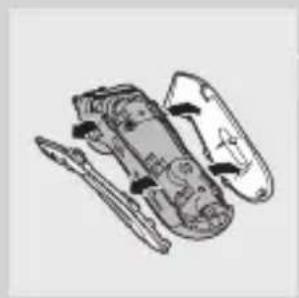
natural_image
Technical line drawing of a mechanical assembly with no visible text or symbols4 Odvojite bočne ploče povlačeći ih s jedinice za napajanje.
natural_image
Illustration of a mechanical device with a rotating shaft and internal components (no text or symbols)5 Odvrnite tri vijka na jedinici za napajanje.
natural_image
Illustration of a handheld device with a screwdriver and an upward arrow indicating motion (no text or symbols)Napomena: Aparat za brijanje ne može se koristiti izravno priključen na mrežno napajanje.
3 Jedinica za brijanje se odvojila od aparata.
Jedinica za brijanje nije ispravno postavljena.
- Ako se jedinica za brijanje odvoji od aparata, možete je jednostavno vratiti umetanjem šarke u otvor na rubu spremišta za dlake i guranjem dok ne dođe u odgovarajući položaj ('klik').
Bevezetés
natural_image
Technical line drawing of a remote control device with no visible text or symbolsTöltés
natural_image
Top-down schematic of a remote control device with no visible text or symbolsnatural_image
Illustration of a hand holding a device with a black arrow indicating the process (no text or symbols present)natural_image
Illustration of a person applying a circular massage or pressure technique to their face (no text or symbols present)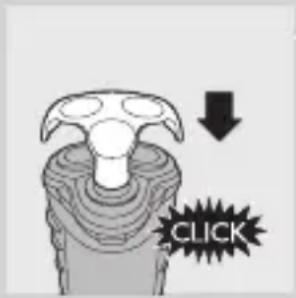
natural_image
Illustration of a handheld device with a hand holding a tray, showing a black arrow pointing to the handle (no text or symbols present)natural_image
Illustration of a human head in a bun with arrows indicating movement or force (no text or symbols)natural_image
Medical illustration showing a surgical procedure with tissue manipulation (no text or labels)natural_image
Line drawing of a mechanical component with a lever and base (no text or symbols)natural_image
Illustration of a hand holding a toothbrush with teeth removed (no text or symbols)natural_image
Mechanical assembly diagram showing a gear-like component with numbered parts and directional arrows (no text or symbols)natural_image
Two abstract circular diagrams with layered patterns, no text or symbols presentnatural_image
Mechanical gear assembly diagram showing a rotating component with a downward arrow indicating motion (no text or labels)natural_image
Illustration of a hand holding a device with arrows indicating motion (no text or symbols)natural_image
Symbol of a trash bin with crossed lines indicating no waste or restriction, and a solid black rectangle below (no text or symbols)natural_image
Medical illustration showing a surgical procedure on a joint with a tool (no text or labels)natural_image
Illustration of a hand holding a small electronic device with a rotating pointer (no text or symbols)natural_image
Technical line drawing of a mechanical assembly (no text or symbols)natural_image
Illustration of a mechanical device with a rotating shaft and internal components (no text or symbols)natural_image
Illustration of a mechanical device with a wrench and an upward arrow, no visible text or symbolsnatural_image
Technical line drawing of a mechanical component with no visible text or symbolsЗарядтау
natural_image
Top-down schematic of a remote control device with no visible text or symbolsnatural_image
Illustration of a hand inserting a plug into a device (no text or symbols)natural_image
Illustration of a person applying facial massage to the ear with directional arrows indicating motion (no text or symbols)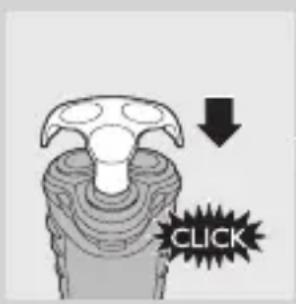
natural_image
Illustration of a handheld device with a black arrow indicating rotation (no text or symbols)natural_image
Illustration of a person inside a bag with arrows indicating rotation or movement (no text or symbols)natural_image
Medical illustration showing a surgical procedure with tissue manipulation (no text or labels)natural_image
Illustration of a hand pouring liquid into a mechanical component (no text or symbols visible)natural_image
Illustration of a hand holding a piece of bread with visible filling and flour dust (no text or symbols)natural_image
Mechanical assembly diagram showing a robot interacting with a gear-like device (no text or symbols visible)natural_image
Two hand-drawn diagrams of a mechanical or architectural component, one circular and one circular, with no visible text or symbols.natural_image
Mechanical gear assembly diagram showing internal components and a downward arrow indicating motion (no text or labels)natural_image
Illustration of a hand holding a small object with arrows indicating motion or force (no text or symbols)natural_image
Mechanical gear assembly diagram showing a rotating component with a downward arrow indicating motion (no text or labels)natural_image
Symbol of a trash bin crossed with a diagonal line, no text or numbers presentnatural_image
Medical illustration showing a surgical procedure on a joint with a tool (no text or labels)natural_image
Diagram of a mechanical component with a rotating tool and screwdriver (no text or symbols)КАЗАКША86
natural_image
Illustration of a mechanical device with internal components (no text or symbols)natural_image
Illustration of a mechanical component with a rotating shaft and internal parts (no text or symbols)natural_image
Illustration of a handheld device with a screwdriver inserted, showing internal components and an upward arrow (no text or symbols)natural_image
Illustration of a hand holding an electrical plug with a black arrow indicating the insertion point (no text or symbols present)natural_image
Illustration of a person applying pressure to their ear with arrows indicating direction (no text or symbols)natural_image
Illustration of a handheld device with a black arrow indicating rotation (no text or symbols)natural_image
Illustration of a medical device inside a bag with arrows indicating rotation (no text or symbols)natural_image
Medical illustration showing a surgical procedure with an incision and surrounding tissue (no text or labels)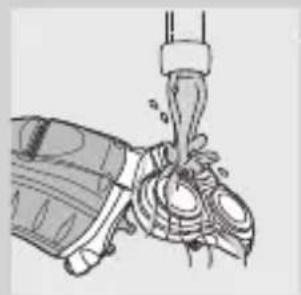
natural_image
Illustration of a hand pouring liquid into a mechanical component (no text or symbols visible)natural_image
Illustration of a hand holding a small, cracked object with radiating lines indicating light (no text or symbols)natural_image
Two abstract circular diagrams with concentric rings and radial lines, no text or symbols present.natural_image
Mechanical gear assembly diagram showing a central rotating component with a downward arrow indicating motion (no text or labels)natural_image
Illustration of a hand holding a tool interacting with a device (no text or symbols visible)natural_image
Medical illustration of a surgical procedure on a foot, showing anatomical structures without any text or labelsnatural_image
Illustration of a hand holding a small object with a rotating arrow indicating rotation (no text or symbols)natural_image
Technical line drawing of a mechanical assembly with multiple components (no text or symbols)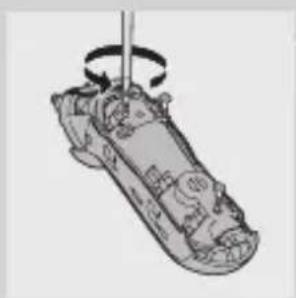
natural_image
Illustration of a mechanical component with a rotating shaft and internal components (no text or symbols)natural_image
Illustration of a hand using a screwdriver to lift a car (no text or symbols visible)natural_image
Technical line drawing of a remote control device with no visible text or symbols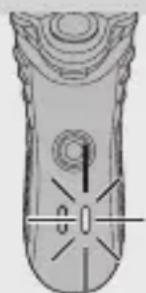
natural_image
Illustration of a remote control device with no visible text or symbolsLādēšana
natural_image
Illustration of a hand holding a device with a black arrow indicating the process (no text or symbols present)natural_image
Illustration of a person applying a medical or therapeutic device to their face, showing motion arrows (no text or symbols)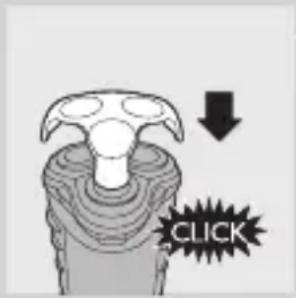
natural_image
Illustration of a handheld device with a downward arrow indicating action (no text or symbols)natural_image
Illustration of a person inside a bag with arrows indicating movement or change (no text or symbols)natural_image
Medical illustration showing a surgical procedure with tissue manipulation (no text or labels)natural_image
Line drawing of a mechanical component with a lever and base (no text or symbols)4 Aizveriet skūšanas bloku un nokratiet lieko ūdeni.
natural_image
Illustration of a hand holding a tooth with visible teeth and surrounding bone structure (no text or symbols)natural_image
Two technical line drawings of a mechanical component, one circular and one circular with internal grooves (no text or symbols)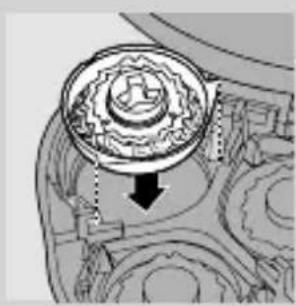
natural_image
Mechanical gear assembly diagram showing a rotating component with a downward arrow indicating motion (no text or labels)natural_image
Illustration of a hand holding a small object with arrows indicating motion or force (no text or symbols)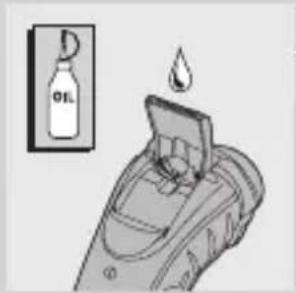
natural_image
Symbol of a trash bin crossed with a diagonal line, no text or numbers presentnatural_image
Mechanical assembly diagram showing a tool interacting with a component (no text or symbols visible)natural_image
Illustration of a hand holding a small object with a rotating arrow indicating rotation (no text or symbols)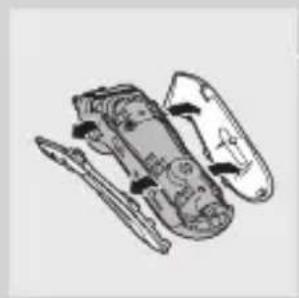
natural_image
Technical line drawing of a mechanical assembly with no visible text or symbols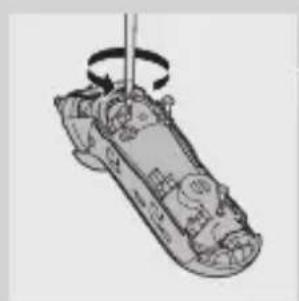
natural_image
Illustration of a mechanical device with a rotating shaft and internal components (no text or symbols)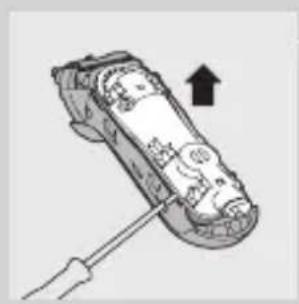
natural_image
Illustration of a mechanical device with a tool and an arrow indicating direction (no text or symbols)natural_image
Top-down schematic of a remote control device with no visible text or symbolsŁadowanie
natural_image
Top-down schematic of a remote control device with no visible text or symbolsnatural_image
Illustration of a hand holding a plug with a black arrow pointing to the tip (no text or symbols)natural_image
Illustration of a person applying a circular massage device to their face (no text or symbols)natural_image
Illustration of a handheld device with a downward arrow indicating compression or disassembly (no text or symbols)natural_image
Illustration of a person inside a bag with arrows indicating movement or change (no text or symbols)natural_image
Medical illustration showing a surgical procedure with tissue manipulation (no text or labels)natural_image
Line drawing of a mechanical device with a lever and base mount (no text or symbols)natural_image
Illustration of a hand holding a tooth with visible teeth and surrounding bone structure (no text or symbols)natural_image
Mechanical assembly diagram showing a gear and cam mechanism (no text or labels)natural_image
Two abstract circular diagrams with concentric rings and curved surfaces, no text or symbols present.natural_image
Mechanical gear assembly diagram showing internal components and a downward arrow indicating motion (no text or labels)natural_image
Illustration of a hand holding a small object inserted into a device (no text or symbols visible)natural_image
Mechanical gear assembly diagram showing internal components and a downward arrow indicating motion (no text or labels)natural_image
Symbol of a trash bin crossed with no text or numbers, representing waste sorting or disposal (no text present)natural_image
Medical illustration of a surgical tool interacting with a mechanical component (no text or symbols visible)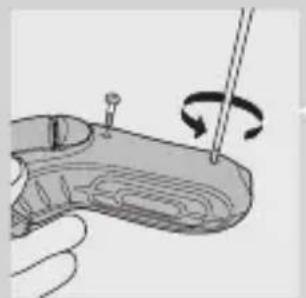
natural_image
Illustration of a hand holding a tool with a rotating arrow indicating rotation (no text or symbols)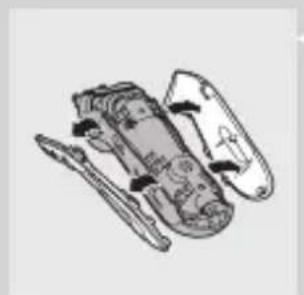
natural_image
Illustration of a mechanical device with multiple components and no visible text or symbols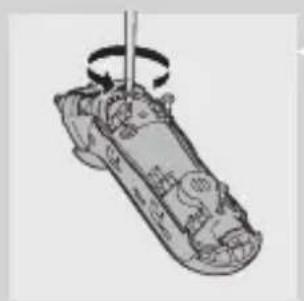
natural_image
Diagram of a mechanical device with rotating shaft and internal components (no text or symbols)natural_image
Illustration of a mechanical device with a screwdriver inserted, showing internal components and an upward arrow (no text or symbols)natural_image
Technical line drawing of a remote control device with no visible text or symbolsÎncărcare
natural_image
Line drawing of a remote control panel with no text or symbolsnatural_image
Illustration of a hand holding a device with an arrow indicating rotation (no text or symbols)natural_image
Illustration of a person applying a medical or therapeutic tool to their face, showing motion arrows (no text or symbols)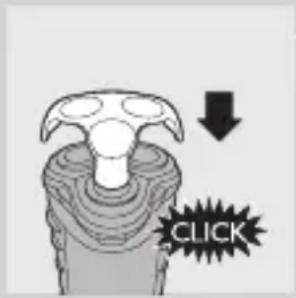
natural_image
Illustration of a handheld device with a downward arrow indicating action (no text or symbols)natural_image
Illustration of a person inside a device with arrows indicating motion (no text or symbols)natural_image
Medical illustration showing a surgical procedure with tissue manipulation (no text or labels)natural_image
Illustration of a mechanical component pouring liquid into a pump (no text or symbols)natural_image
Illustration of a hand holding a piece of bread with visible filling and flour dust (no text or symbols)natural_image
Two technical line drawings of a mechanical component, one circular and one circular with internal grooves (no text or symbols)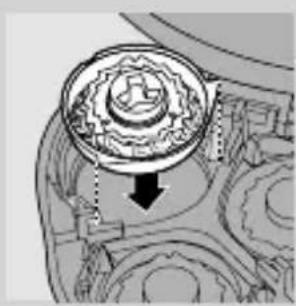
natural_image
Mechanical gear assembly diagram showing a rotating component with a downward arrow indicating motion (no text or labels)natural_image
Illustration of a hand holding a small object with arrows indicating motion or force (no text or symbols)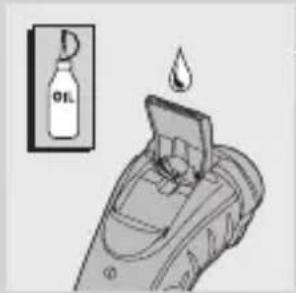
natural_image
Symbol of a trash bin crossed with no text or numbers, representing waste sorting or disposal (no text present)natural_image
Medical illustration showing a surgical procedure on a joint with a tool (no text or labels)natural_image
Illustration of a hand holding a small electronic device with a rotating pointer (no text or symbols)natural_image
Technical line drawing of a mechanical assembly with internal components (no text or symbols)natural_image
Diagram of a mechanical device with rotating shaft and internal components (no text or symbols)natural_image
Illustration of a handheld device with a screwdriver inserted, showing internal components and an upward arrow (no text or symbols)The battery is empty.
natural_image
Illustration of a remote control with a water feature symbol (no text or labels)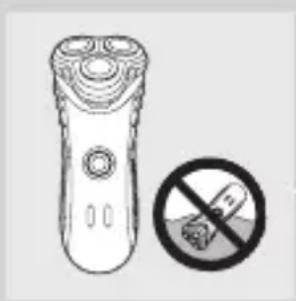
natural_image
Illustration of a remote control with a prohibition symbol (no text or labels)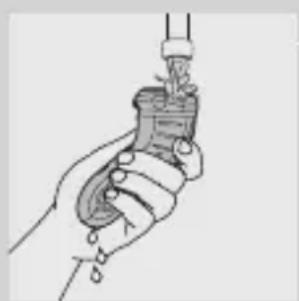
natural_image
Illustration of a hand holding a small object with a droplet, possibly a tool or device (no text or symbols visible)natural_image
Pure technical diagram of a mechanical component with no visible text, numbers, or symbolsЗарядка
natural_image
Top-down schematic of a remote control device with no visible text or symbolsnatural_image
Illustration of a hand inserting a plug into a device (no text or symbols)natural_image
Illustration of a person applying a circular massage device to their face (no text or symbols)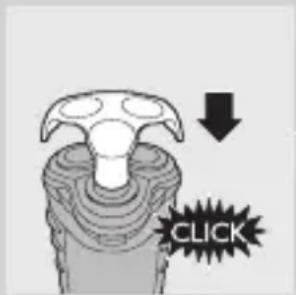
natural_image
Illustration of a handheld device with a black arrow indicating rotation (no text or symbols)natural_image
Illustration of a medical device with internal components and directional arrows indicating movement (no text or symbols)natural_image
Medical illustration showing a surgical procedure with tissue manipulation (no text or labels)natural_image
Illustration of a mechanical device with a lever and clamped components (no text or symbols)natural_image
Illustration of a hand holding a piece of bread with visible filling and a light burst (no text or symbols)natural_image
Two hand-drawn diagrams of a flower and a circular fan-like structure (no text or symbols)natural_image
Mechanical gear assembly diagram showing a rotating component with a downward arrow indicating motion (no text or labels)natural_image
Illustration of a hand holding a small object with arrows indicating motion (no text or symbols)natural_image
Mechanical assembly diagram showing a gear and cam mechanism (no text or labels)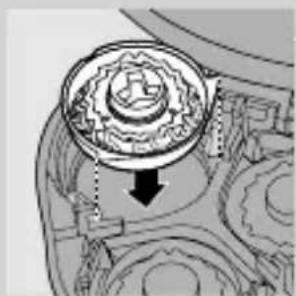
natural_image
Mechanical gear assembly diagram showing a rotating component with a downward arrow indicating motion (no text or labels)natural_image
Diagram of a mechanical assembly with a tool interacting with a component (no text or symbols visible)natural_image
Illustration of a hand holding a small object with a tool, showing rotational motion (no text or symbols)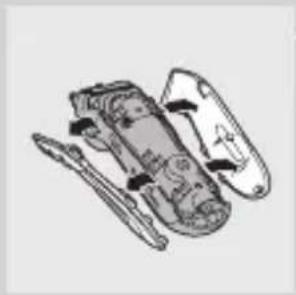
natural_image
Illustration of a mechanical device with internal components and no visible text or symbolsnatural_image
Illustration of a mechanical component with a rotating shaft and internal parts (no text or symbols)natural_image
Illustration of a handheld device with a screwdriver inserted, showing internal components and an upward arrow (no text or symbols)natural_image
Illustration of a remote control with a water feature symbol (no text or labels)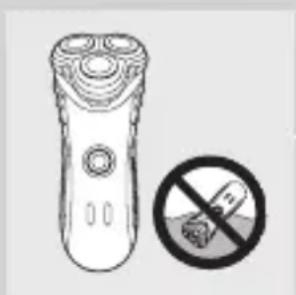
natural_image
Illustration of a remote control with a no-smoking symbol (no text or labels)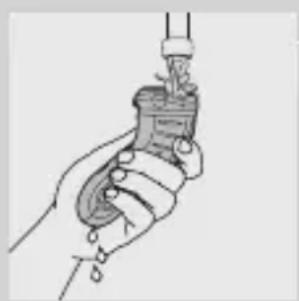
natural_image
Illustration of a hand holding a small object with a droplet, no text or symbols presentnatural_image
Pure electrical circuit lines without any symbolsNabíjanie
natural_image
Technical line drawing of a remote control device with no visible text or symbolsVybitá batéria
natural_image
Illustration of a hand inserting a plug into a device (no text or symbols)Holiaci strojček nabite, ked' sa rozsvieti kontrolné svetlo batéria takmer vybitá.
1 Koncovku zasuňte do holiaceho strojčeka.
2 Adaptér pripojte do siet'ovej zásuvky.
3 Ked' je batéria plne nabitá, adaptér odpojte zo siete a koncovku kábla odpojte z holiaceho strojčeka.
Použitie zariadenia
Holenie
natural_image
Illustration of a person applying facial massage to the ear with directional arrows indicating motion (no text or symbols)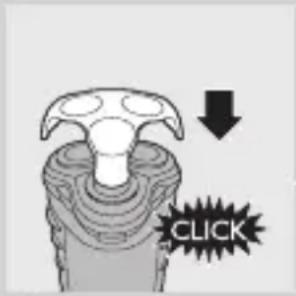
natural_image
Illustration of a handheld device with a black arrow pointing to the handle (no text or symbols)natural_image
Diagram of a human head with internal organs and directional arrows indicating movement (no text or labels)1 Holiaci strojček vypnite, adaptér odpojte zo siete a vytiahnite koncovku z holiaceho strojčeka.
2 Stlačte uvolňovacie tlačidlo a otvorte holiacu jednotku.
natural_image
Medical illustration showing a surgical procedure with tissue manipulation (no text or labels)natural_image
Line drawing of a mechanical component with a lever and base (no text or symbols)Holiacu jednotku nesmiete sušit' pomocou uteráka ani inej tkaniny, pretože by ste mohli poškodit' holiace hlavy.
natural_image
Illustration of a hand holding a toothbrush with visible teeth and surrounding bone structure (no text or symbols)5 Holiacu jednotku znovu otvorte a nechajte celé zariadenie riadne osušit'.
natural_image
Simple line drawing of a rose and a circular fan-like object (no text or symbols)natural_image
Mechanical gear assembly diagram showing a central rotating component with a downward arrow indicating motion (no text or labels)natural_image
Illustration of a hand holding a small object with arrows indicating motion or force (no text or symbols)1 Holiaci strojček vypnite, adaptér odpojte zo siete a koncovku z holiaceho strojčeka.
2 Stlačte uvol'ňovacie tlačidlo a otvorte holiacu jednotku.
3 Zámkom otočte proti smeru pohybu hodinových ručičiek (1) a vyberte prítlačný rám (2).
4 Vyberte holiace hlavy a namiesto nich vložte do holiacej jednotky nové. Prítlačný rám vložte spät' do holiacej jednotky a zámkom otočte v smere pohybu hodinových ručičiek.
natural_image
Symbol of a trash bin crossed with a diagonal line, no text or numbers presentnatural_image
Medical illustration showing a surgical procedure on a joint with an arrow indicating rotation (no text or labels)1 Adaptér odpojte zo siete a kábel z holiaceho strojčeka.
natural_image
Diagram of a mechanical component with rotating arrows indicating motion (no text or symbols)natural_image
Illustration of a multi-step aircraft assembly with no visible text or symbolsnatural_image
Illustration of a mechanical device with rotating arm and internal components (no text or symbols)natural_image
Illustration of a car being towed with a tool, showing the wheel and gear assembly (no text or symbols)natural_image
Technical line drawing of a remote control device with no visible text or symbols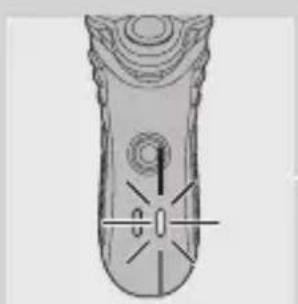
natural_image
Illustration of a remote control with no visible text or symbolsPolnjenje
natural_image
Illustration of a hand holding an electrical plug with a black arrow indicating the insertion point (no text or symbols present)natural_image
Illustration of a person applying a medical or cosmetic tool to their face, showing motion arrows (no text or symbols)natural_image
Illustration of a handheld device with a black arrow indicating rotation (no text or symbols)1 Odprite rezilo s potiskom drsnika navzdol.
natural_image
Illustration of a human head in a gesturing bag with arrows indicating movement (no text or symbols)1 Izklopite brivnik, odstranite adapter iz stenske vtičnice in izvlecite vtikač aparata iz brivnika.
natural_image
Medical illustration showing a surgical procedure with tissue manipulation (no text or labels)SLOVENŠČINA166
natural_image
Illustration of a hand pouring liquid into a mechanical component (no text or symbols visible)Dobro očistite notranji in zunanji del brivne enote.
natural_image
Illustration of a hand holding an open tooth with visible teeth and surrounding bone structure (no text or symbols)natural_image
Two abstract circular diagrams with concentric rings and radial lines, no text or symbols present.natural_image
Mechanical gear assembly diagram showing a central rotating component with a downward arrow indicating motion (no text or labels)natural_image
Illustration of a hand holding a small object with arrows indicating motion or force (no text or symbols)Shranjevanje
natural_image
Mechanical assembly diagram showing gear and housing components (no text or labels)3 Zavrtite zaklep proti levi (1) in odstranite nosilno ogrodje (2).
natural_image
Mechanical gear assembly diagram showing a rotating component with a downward arrow indicating motion (no text or labels)natural_image
Medical illustration showing a surgical procedure on a joint with a tool (no text or labels)1 Izvlecite omrežni vtikač iz stenske vtičnice in vtikač aparata iz brivnika.
2 Brivnik pustite delovati, dokler se sam ne zaustavi, odvijte vijaka v prostoru za dlačice in ga odstranite.
natural_image
Illustration of a hand holding a small electronic device with a rotating pointer (no text or symbols)natural_image
Illustration of a vehicle chassis with internal components (no text or symbols)SLOVENŠČINA170
natural_image
Illustration of a mechanical device with a rotating shaft and internal components (no text or symbols)5 Odvijte tri vijake v motorni enoti.
natural_image
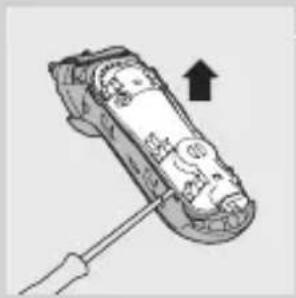
Illustration of a hand holding a screwdriver with an arrow indicating upward motion (no text or symbols)6 Z izvijačem odstranite hrbtno ploščo napajalne enote.
7 Odstranite baterijo.
Previdno, baterijski kontakti so zelo ostri.
natural_image
Technical line drawing of a remote control with no visible text or symbolsPunjenje
natural_image
Top-down view of a remote control device with no visible text or symbolsBaterija je skoro prazna
natural_image
Illustration of a hand holding a device with an arrow indicating rotation (no text or symbols)natural_image
Illustration of a person applying a circular massage device to their face (no text or symbols)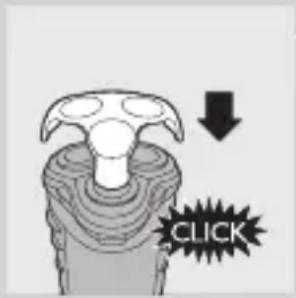
6 Posle svake upotrebe na aparat za brijanje stavite zaštitnu navlaku da biste sprečili kvarove glava za brijanje.
Podrezivanje
natural_image
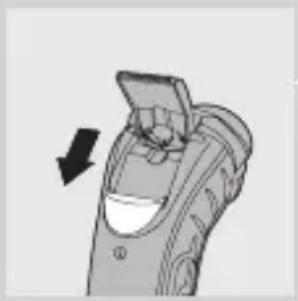
Illustration of a handheld device with a downward arrow indicating action (no text or symbols)Za oblikovanje zalizaka i brkova.
1 Otvorite trimer gurajući klizač prema dole. Trimer možete da uključite i dok motor radi.
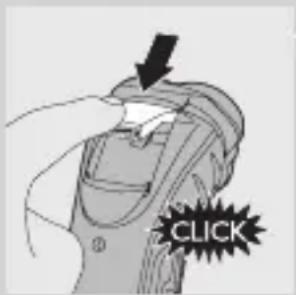
2 Zatvorite trimer ('klik').
natural_image
Diagram of a human head with internal organs and directional arrows indicating movement (no text or labels)1 Isključite aparat, isključite adapter za napajanje iz zidne utičnice i utikač uređaja iz aparata.
2 Pritisnite dugme za oslobadanje i otvorite jedinicu za brijanje.
3 Očistite jedinicu za brijanje i komoru za prikupljanje dlaka ispiranjem toplom vodom iz slavine.
natural_image
Medical illustration showing a surgical procedure with tissue manipulation (no text or labels)Vodite računa o tome da treba da očistite unutrašnjost i spoljašnji deo jedinice za brijanje.
natural_image
Illustration of a hand pouring liquid into a container with a tool (no text or symbols)natural_image
Illustration of a hand holding an open tooth with visible teeth and surrounding bone structure (no text or symbols)natural_image
Illustration of a robot inside a vehicle's seat, showing mechanical components and motion arrows (no text or symbols)1 Otvorite jedinicu za brijanje, okrenite bravu u pravcu suprotnom od kazaljke na satu (1) i izvadite granični okvir (2).
natural_image
Two abstract circular diagrams with concentric rings and radial patterns, no text or symbols present.natural_image
Mechanical component diagram showing a circular assembly with internal gears and a downward arrow (no text or symbols)3 Vratite glave za brijanje u jedinicu za brijanje. Vratite granični okvir u jedinicu za brijanje i okrenite bravu u pravcu kazaljke na satu.
natural_image
Illustration of a hand holding a small object with arrows indicating motion (no text or symbols)Trimer čistite nakon svake upotrebe.
1 Isključite aparat, isključite adapter za napajanje iz zidne utičnice i utikač uređaja iz aparata.
1 Isključite aparat, isključite adapter za napajanje iz zidne utičnice i utikač uređaja iz aparata.
2 Pritisnite dugme za oslobađanje i otvorite jedinicu za brijanje.
3 Okrenite bravu u pravcu suprotnom od kazaljke na satu (1) i izvadite granični okvir (2).
4 Izvadite glave za brijanje i stavite nove u jedinicu za brijanje. Vratite granični okvir u jedinicu za brijanje i okrenite bravu u pravcu kazaljke na satu.
natural_image
Mechanical gear assembly diagram showing a central rotating component with an arrow indicating motion (no text or labels)Dodatna oprema
Na raspolaganju su sledeći dodaci:
- HQ8500/HQ8000 adapter za napajanje
- Philips glave za brijanje HQ8.
- Sprej za čišćenje glava za brijanje HQ110 Philips.
- Kabl za automobil HQ8010.
Zaštita okoline
natural_image
Symbol of a trash bin crossed with no text or numbers, representing waste sorting or disposal (no text present)natural_image
Medical illustration of a surgical procedure on a knee joint (no text or labels)natural_image
Illustration of a hand holding a small electronic device with a rotating pointer (no text or symbols)3 Odvijte dva vijka na zadnjoj strani aparata za brijanje i odvojite zadnju ploču kućišta.
natural_image
Technical line drawing of a mechanical assembly with internal components (no text or symbols)natural_image
Illustration of a mechanical device with rotating arm and internal components (no text or symbols)5 Odvijte tri vijka na zapečaćenoj jedinici za napajanje.
natural_image
Illustration of a mechanical device with a tool and an upward arrow, no visible text or symbolsNapomena: Aparat ne može da se koristi ako je direktno priključen na električnu mrežu.
3 Jedinica za brijanje se odvojila od aparata.
Jedinica za brijanje nije ispravno postavljena.
- Ako se jedinica za brijanje odvoji od aparata, možete je vratiti na jednostavan način, stavljanjem kukice u žleb na rubu komore za prikupljanje dlaka, gurajući je prema dole sve dok ne legne na svoje mesto ('klik').
Вступ
natural_image
Technical line drawing of a remote control device with no visible text or symbolsЗарядження
natural_image
Top-down schematic of a remote control device with no visible text or symbolsnatural_image
Illustration of a hand holding a device with an arrow indicating rotation (no text or symbols)natural_image
Illustration of a person applying a circular massage or pressure technique to their head (no text or symbols present)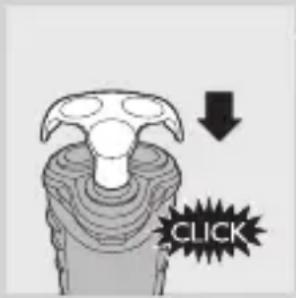
natural_image
Illustration of a handheld device with a downward arrow indicating compression or disassembly (no text or symbols)natural_image
Diagram of a human head with internal organs and directional arrows indicating movement (no text or labels)natural_image
Medical illustration showing a surgical procedure with tissue manipulation (no text or labels)natural_image
Line drawing of a mechanical component with a lever and base (no text or symbols)natural_image
Illustration of a hand holding two open dental crowns with radiating lines indicating light (no text or symbols)natural_image
Mechanical assembly diagram showing a gear-like component with numbered parts and directional arrows (no text or symbols)natural_image
Two technical line drawings of a mechanical component, possibly a fan or impeller, with no visible text or symbols.natural_image
Mechanical gear assembly diagram showing a central rotating component with an arrow indicating direction (no text or labels)natural_image
Illustration of a hand holding a small object with arrows indicating motion or force (no text or symbols)natural_image
Symbol of a trash bin with crossed lines indicating no waste or restriction, and a solid black rectangle below (no text or symbols)natural_image
Medical illustration showing a surgical procedure on a joint with a tool (no text or labels)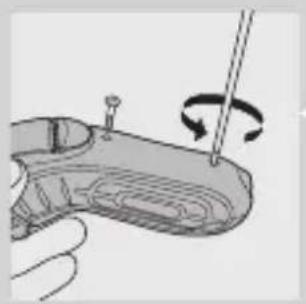
natural_image
Illustration of a hand holding a handgun with a screwdriver and rotating motion (no text or symbols)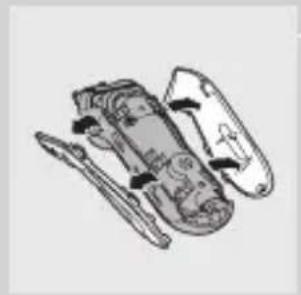
natural_image
Illustration of a mechanical component with multiple parts and fasteners (no text or symbols)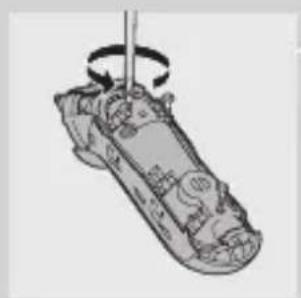
natural_image
Illustration of a shoe being held by a pole, showing the blade and fold (no text or symbols)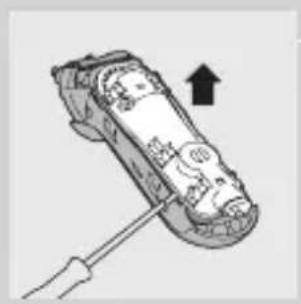
natural_image
Illustration of a hand holding a small electronic device with a screwdriver, showing internal components and an upward arrow (no text or symbols)natural_image
Pure electrical circuit lines without any symbols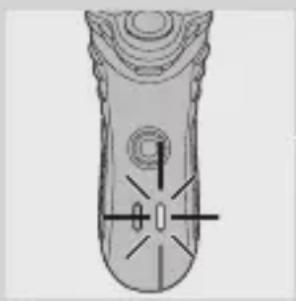
natural_image
Top-down schematic of a remote control device with no visible text or symbolsnatural_image
Illustration of a hand holding a device with an arrow indicating rotation (no text or symbols)natural_image
Illustration of a person applying facial massage to the ear with directional arrows indicating motion (no text or symbols)natural_image
Illustration of a handheld device with a black arrow pointing to its side panel (no text or symbols)natural_image
Illustration of a human head in a bun with arrows indicating movement or force (no text or symbols)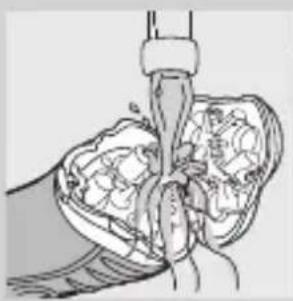
natural_image
Medical illustration showing a surgical procedure with tissue and instrument (no text or labels)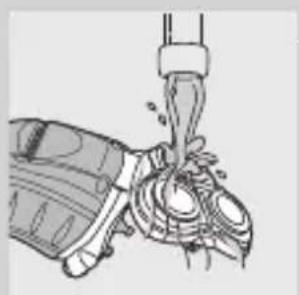
natural_image
Illustration of a mechanical device with a lever and clamped components (no text or symbols)natural_image
Illustration of a hand holding two types of dental crowns with radiating lines indicating light (no text or symbols)natural_image
Two abstract circular diagrams with concentric rings and radial lines, no text or symbols present.natural_image
Mechanical assembly diagram showing a gear-like component with a downward arrow indicating motion (no text or symbols present)natural_image
Illustration of a hand holding a small object with arrows indicating motion (no text or symbols)natural_image
Medical illustration of a joint with surgical tools (no text or labels)natural_image
Illustration of a hand holding a small electronic device with a rotating arrow indicating rotation (no text or symbols)natural_image
Illustration of a mechanical device with internal components and no visible text or symbolsnatural_image
Diagram of a mechanical device with rotating shaft and internal components (no text or symbols)natural_image
Illustration of a handheld device with a screwdriver inserted, showing internal components and an upward arrow (no text or symbols)natural_image
Illustration of a hand holding a plug with a black arrow pointing to the tip (no text or symbols)Şarj etme
natural_image
Illustration of a person applying pressure to their ear with arrows indicating direction (no text or symbols)natural_image
Illustration of a handheld device with a black arrow indicating direction (no text or symbols)natural_image
Illustration of a human head in a bun with an arrow indicating rotation (no text or symbols)natural_image
Medical illustration showing a surgical procedure with tissue manipulation (no text or labels)natural_image
Illustration of a mechanical device with a lever and handle (no text or symbols)natural_image
Illustration of a hand holding an open tooth with visible teeth and surrounding bone structure (no text or symbols)natural_image
Two hand-drawn diagrams of a mechanical or architectural component, one top and one bottom, with no visible text or symbols.natural_image
Mechanical gear assembly diagram showing internal components and a downward arrow indicating motion (no text or labels)natural_image
Illustration of a hand holding a small object with arrows indicating motion or force (no text or symbols)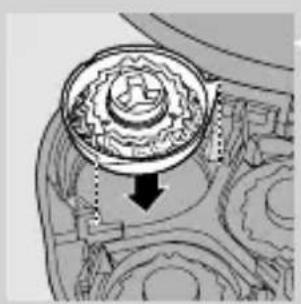
natural_image
Mechanical gear assembly diagram showing internal components and a downward arrow indicating motion (no text or labels)natural_image
Medical illustration of a surgical procedure on a patient's foot, showing anatomical structures without any text or labels.natural_image
Illustration of a hand holding a small object with a rotating arrow indicating rotation (no text or symbols)natural_image
Illustration of a mechanical device with multiple components (no text or symbols visible)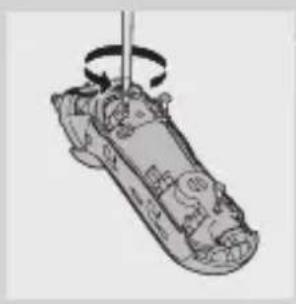
natural_image
Illustration of a mechanical component with a rotating shaft and internal components (no text or symbols)natural_image
Illustration of a hand using a screwdriver to lift a car (no text or symbols visible)- Important
- Danger
- Warning
- Caution
- General
- Electromagnetic fields (EMF)
- Charging
- ENGLISH6
- Charge indications
- Battery fully charged
- Battery running low
- Charging the appliance
- Using the appliance
- Shaving
- ENGLISH8
- Trimming
- Cleaning and maintenance
- Every day: shaving unit and hair chamber
- Every six months: shaving heads
- Trimmer
- Storage
- Replacement
- Accessories
- Environment
- Disposal of the battery
- Guarantee & service
- Guarantee restrictions
- Troubleshooting
- y_BOA
- Зареждане
- БЪЛГАРСКИ26
- Nabíjení
- Příslušenství
- Laadimine
- Aku saab tühjaks
- Punjenje
- Baterija je gotovo prazna
- Dodatni pribor
- Zaštita okoliša
- Jedinica za brijanje se odvojila od aparata.
- Bevezetés
- Töltés
- Зарядтау
- КАЗАКША86
- Lādēšana
- Ładowanie
- Încărcare
- Зарядка
- Nabíjanie
- Vybitá batéria
- Použitie zariadenia
- Holenie
- Polnjenje
- SLOVENŠČINA166
- Shranjevanje
- SLOVENŠČINA170
- Baterija je skoro prazna
- Podrezivanje
- Dodatna oprema
- Zaštita okoline
- Вступ
- Зарядження
- Şarj etme
Brand : PHILIPS
Model : Nivea 7000 Series HQ7330
Category : Shaver