
HVL-F36AM - External Flash SONY - Free user manual and instructions
Find the device manual for free HVL-F36AM SONY in PDF.


User questions about HVL-F36AM SONY
0 question about this device. Answer the ones you know or ask your own.
Ask a new question about this device
Download the instructions for your External Flash in PDF format for free! Find your manual HVL-F36AM - SONY and take your electronic device back in hand. On this page are published all the documents necessary for the use of your device. HVL-F36AM by SONY.
USER MANUAL HVL-F36AM SONY
Operating Instructions
Mode d'emploi
Bedienungsanleitung
Before operating the product, please read this manual thoroughly and retain it for future reference.
WARNING
To reduce fire or shock hazard, do not expose the unit to rain or moisture.
Tape over lithium battery contacts to avoid short-circuit when disposing of batteries, and follow local regulations for battery disposal.
Keep batteries or things that could be swallowed away from young children. Contact a doctor immediately if an object is swallowed.
Immediately remove the batteries and discontinue use if...
- the product is dropped or subjected to an impact in which the interior is exposed.
- the product emits a strange smell, heat, or smoke.
Do not disassemble. Electric shock may occur if a high voltage circuit inside the product is touched.
IMPORTANT SAFETY INSTRUCTIONS
When using your photographic equipment, basic safety precautions should always be followed, including the following:
Read and understand all instructions before using.
Close supervision is necessary when any appliance is used by or near children. Do not leave appliance unattended while in use.
Care must be taken as burns can occur from touching hot parts.
Do not operate appliance with a damaged cord or if the appliance has been dropped or damaged- until it has been examined by a qualified serviceman.
Let appliance cool completely before putting away. Loop cord loosely around appliance when storing.
To reduce the risk of electric shock, do not immerse this appliance in water or other liquids.
To reduce the risk of electric shock, do not disassemble this appliance, but take it to a qualified serviceman when service or repair work is required. Incorrect reassembly can cause electric shock when the appliance is used subsequently.
The use of an accessory attachment not recommended by the manufacturer may cause a risk of fire, electric shock, or injury to persons.
Batteries may become hot or explode due to improper use.
Use only the batteries specified in this instruction manual.
Do not install the batteries with the polarity (+ / - ) reversed.
Do not subject batteries to fire or high temperatures.
Do not attempt to recharge (except for rechargeable batteries), short or disassemble.
Do not mix, batteries of different types, brands or ages.
SAVE THESE INSTRUCTIONS
CAUTION
Do not touch the flashtube during operation, it may become hot when the flash fires.
For customers in Europe


Disposal of Old Electrical & Electronic Equipment (Applicable in the European Union and other European countries with separate collection systems)
This symbol on the product or on its packaging indicates that this product shall not be treated as household waste. Instead it shall be handed over to the applicable collection point for the recycling of electrical and electronic equipment. By ensuring this product is disposed of correctly, you will help prevent potential negative consequences for the environment and human health, which could otherwise be caused by inappropriate waste handling of this product. The recycling of materials will help to conserve natural resources. For more detailed information about recycling of this product, please contact your local Civic Office, your household waste disposal service or the shop where you purchased the product.
For the customers in the U.S.A.
CAUTION
You are cautioned that any changes or modifications not expressly approved in this manual could void your authority to operate this equipment.
NOTE:
This equipment has been tested and found to comply with the limits for a Class B digital device, pursuant to Part 15 of the FCC Rules.
These limits are designed to provide reasonable protection against harmful interference in a residential installation.
This equipment generates, uses, and can radiate radio frequency energy and, if not installed and used in accordance with the instructions, may cause harmful interference to radio communications.
However, there is no guarantee that interference will not occur a particular installation. If this equipment does cause harmful interference to radio or television reception, which can be determined by turning the equipment off and on, the user is encouraged to try to correct the interference by one or more of following measures:
- Reorient or relocate the receiving antenna.
- Increase the separation between the equipment and receiver.
- Connect the equipment into an outlet on a circuit different from that to which the receiver is connected.
- Consult the dealer or an experienced radio/TV technician for help.
Table of contents
Features 6
Name of parts 7
Control panel 8
Preparations
Inserting batteries 9
Attachment and removal of the flash 11
Auto power ON/OFF 12
Basics
Program auto flash (The basics) 13
Recording modes 16
Apprifications
Zoom flash coverage 18
Bounce flash 22
AF illuminator 25
High-speed sync (HSS) 26
Wireless flash mode (WL) 28
Time to auto power off 35
Additional Information
Flash range 37
Notes on use 39
Maintenance 40
Specifications 41
Before use
For details, refer to the operating instructions supplied with your camera.
This flash is not dust-proof, splash-proof or waterproof.
Do not place this flash in the following locations
Regardless of whether this unit is in use or in storage, do not place it in any of the following locations. Doing so may lead to a malfunction.
- Placing this flash in locations subject to direct sunlight such as on dashboards or near a heater may cause this unit to deform or malfunction.
- Locations with excessive vibration
- Locations with strong electromagnetism
- Locations with excessive sand In locations such as the seashore and other sandy areas or where dust clouds occur, protect the unit from sand and dust. This may lead to a malfunction.
Features
- A compact flash that provides a flash output with a maximum guide number 36 (85 mm position, ISO 100· m ).
- Can be used with compatible lenses to enable ADI (Advanced Distance Integration) flash metering, which is not affected by the reflection rate of the background or subject.
- Enables High-speed Sync.
- Provides many functions such as bounce flash, etc.
Name of parts
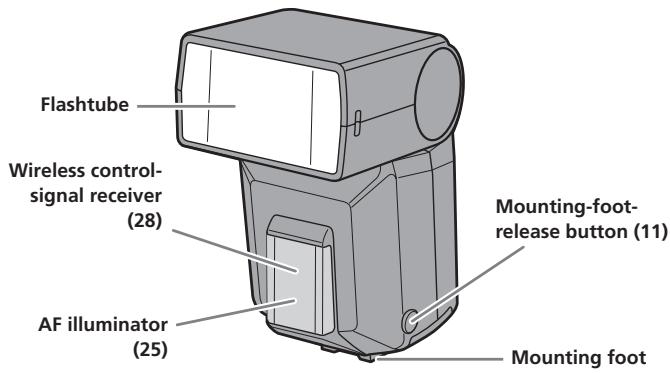
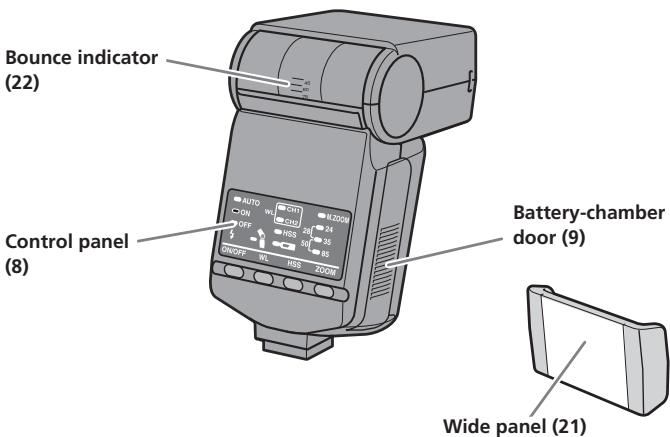
Remove the protective sheet from the front of the AF illuminator before use.
Control panel
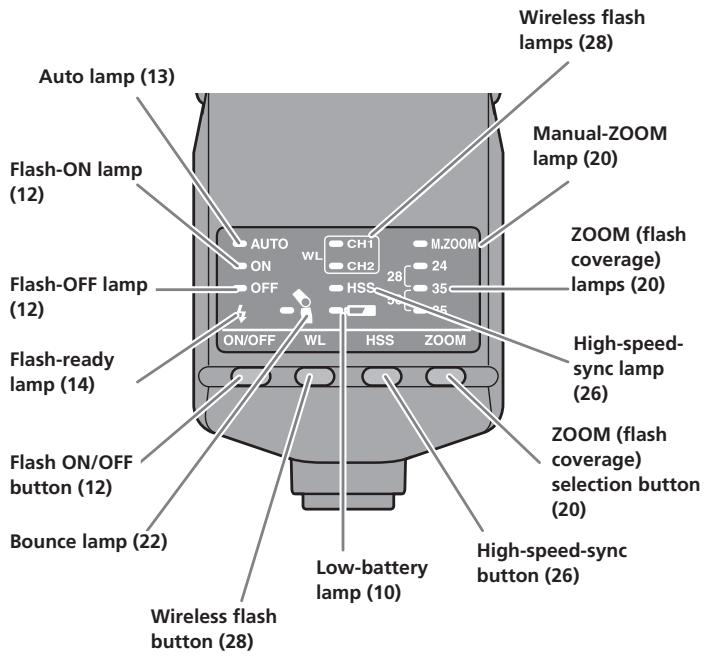
Inserting batteries
The HVL-F36AM may be powered by :
*Batteries are not supplied.
- Four AA-size alkaline batteries
- Four AA-size lithium batteries
- Four AA-size rechargeable nickel-metal hydride (Ni-MH) batteries Always ensure that rechargeable nickel-metal hydride batteries are charged in the specified charger unit.
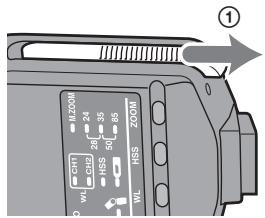
1 Open the battery-chamber door as shown.
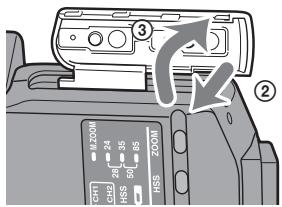
2 Insert the batteries in the battery chamber as in the diagram.
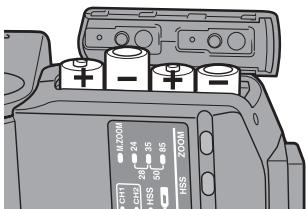
3 Close the battery-chamber door.
- Follow the reverse steps when opening the battery-chamber door.
- The lamp on the control panel comes on. If it does not come on, press the flash ON/OFF button.
Checking Batteries
The lamp on the control panel comes on or blinks when the batteries are low.
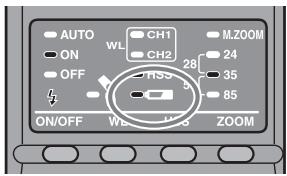
lamp on
Changing the batteries is recommended. The flash can still be used in this state if (Flash-ready lamp) on the rear of the unit is lit.
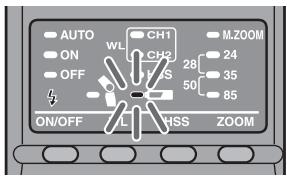
Only lamp blinking
Flash cannot be used. Insert new batteries.
- If nothing comes on when the flash ON/OFF button is pressed, check the orientation of the batteries.
Attachment and removal of the flash
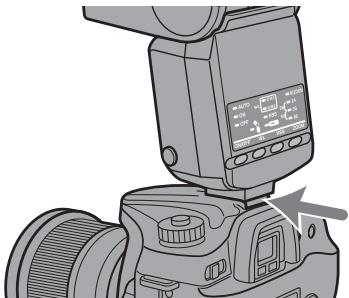
Attaching the flash to the camera
Push the mounting foot firmly onto the camera until it stops.
- The flash is locked in place automatically.
- If the built-in flash in the camera is protruding, lower it before attaching the flash unit.
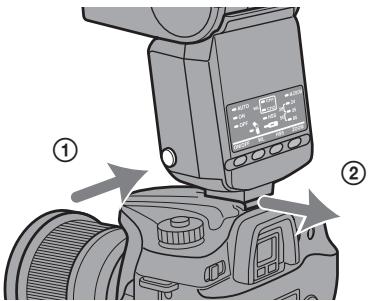
Removing the flash from the camera
While pressing the mounting-foot release button ①, remove the flash ②.
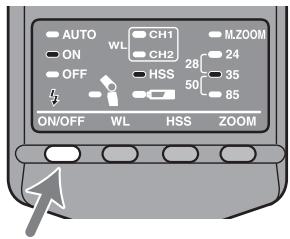
Auto power ON/OFF
Press the flash ON/OFF button on the back side of the flash.
Power of the flash turns it on.
- When the power of the flash is turned on, the flash-ON lamp on the control panel comes on.
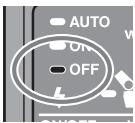
If you press the flash ON/OFF button while the flash is turned on, the flash switches off and the flash-OFF lamp on the control panel comes on.
- The flash-OFF lamp goes out after 8 seconds.
Auto power off
When the camera or flash is not used for four minutes, power switches off and control panel indicators disappear automatically to save the batteries.
- In wireless flash photography (p. 28), control panel indicators disappear after 60 minutes.
- You can change the time until auto power off, or disable auto power off. (p. 35)
Program auto flash (The basics)
1 Select the P mode on the camera.
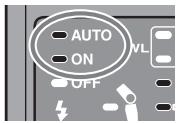
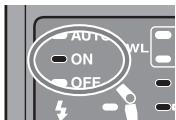
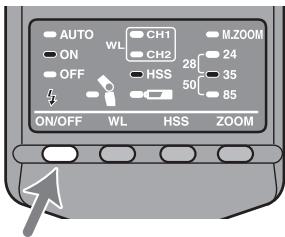
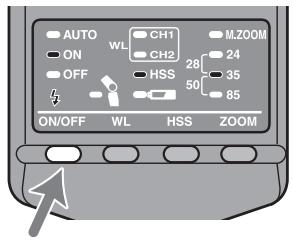
2 Press the flash ON/OFF button to turn on the "AUTO" and "ON" lamps or the "ON" lamp on the control panel.
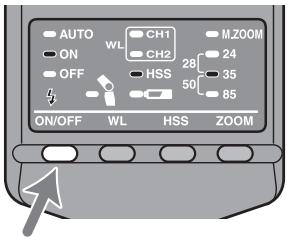
- The "AUTO" and "ON" lamps come on with Autoflash. Only the "ON" lamp comes on with Fill-flash.
3 When the flash is charged, press the shutter button to take a photo.
- The flash is charged when the flash-ready lamp 12 on the control panel of the unit and the indicator in the camera viewfinder are both on.
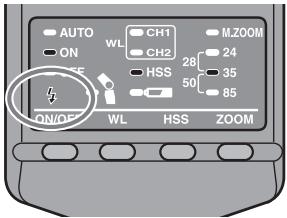
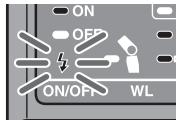
When the correct exposure has been obtained for the photo just taken, the flash-ready lamp on the control panel blinks.
- The photo will be under-exposed if taken before charging is complete.
- Press the shutter button after making sure that charging is complete when using the flash with the self-timer.
- Either Autoflash or Fill-flash is selected, depending on your camera. For details, refer to the operating instructions of your camera.
-
If your camera has AUTO mode or Scene Selection mode, they are dealt with here as program auto.
-
The following tables show the distance reached by the light from the flash (i.e. the flash range). See page 37 for further details.
(unit:m)
| ISO100 | Focal length (mm) | |||||
| 24 | 28 | 35 | 50 | 85 | ||
| Aperture | 2.8 | 1-7 | 1-8 | 1-9 | 1-10 | 1-13 |
| 4 | 1-5 | 1-5.5 | 1-6 | 1-7 | 1-9 | |
| 5.6 | 1-3.5 | 1-4 | 1-4.5 | 1-5 | 1-6.5 | |
(unit:m)
| ISO400 | Focal length (mm) | |||||
| 24 | 28 | 35 | 50 | 85 | ||
| Aperture | 2.8 | 1-14 | 1-16 | 1-18 | 1-20 | 1.2-26 |
| 4 | 1-10 | 1-11 | 1-12.5 | 1-15 | 1-18 | |
| 5.6 | 1-7 | 1-8 | 1-9 | 1-10 | 1-13 | |
Recording modes
Aperture priority flash photography (A)
1 Select the A mode on the camera.
2 Press the flash ON/OFF button to turn on the flash-ON lamp.
- Fill-flash is selected.
3 Set the aperture and focus the subject.
- Reduce the aperture (i.e. increase the f-stop) to reduce the flash range, or open the aperture (i.e. reduce the f-stop) to increase the flash range.
- The shutter speed is automatically set.
4 Press the shutter button when charging is complete.
Shutter speed priority flash photography (S)
1 Select the S mode on the camera.
2 Press the flash ON/OFF button to turn on the flash-ON lamp.
- Fill-flash is selected.
3 Set the shutter speed, and focus the subject.
4 Press the shutter button when charging is complete.
Manual exposure mode flash photography (M)
1 Select the M mode on the camera.
2 Press the flash ON/OFF button to turn on the flash-ON lamp.
- Fill-flash is selected.
3 Set the aperture and shutter speed, and focus the subject.
- Reduce the aperture (i.e. increase the f-stop) to reduce the flash range, or open the aperture (i.e. reduce the f-stop) to increase the flash range.
4 Press the shutter button when charging is complete.
Zoom flash coverage
Auto zoom
This flash automatically switches zoom coverage to cover a range of focal lengths from 24mm to 85mm when photographing (auto zoom). Normally, you do not need to switch the zoom coverage manually.
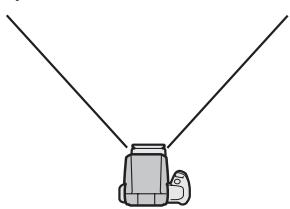
24 mm focal length
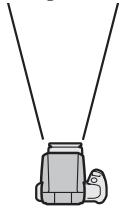
85 mm focal length
- Press the shutter button partway down.
When the coverage is set to 24mm , 35mm or 85mm , the corresponding lamp comes on.
For example: 24mm
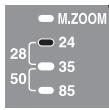
When the coverage is set to 28mm or 50mm , two lamps come on.
For example: 28mm
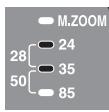
- Auto zoom coverage is set as follows:
| Focal length in use | Coverage |
| 24 mm - 27 mm | 24 mm |
| 28 mm - 34 mm | 28 mm |
| 35 mm - 49 mm | 35 mm |
| 50 mm - 84 mm | 50 mm |
| 85 mm or more | 85 mm |
- When a lens having a focal length of less than 24mm is used with auto zoom, "24 mm" lamp blinks. Use of the wide panel (p. 21) is recommended in this case to prevent darkening at the periphery of the image.
Manual zoom
You can manually set the zoom coverage regardless of the focal length of the lens in use.
Press the ZOOM button to display the desired zoom coverage.
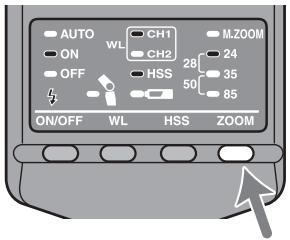
- Zoom coverage is changed in the following order. The manual-ZOOM lamp "M.ZOOM" comes on.
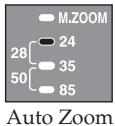

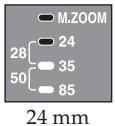

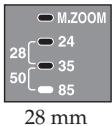
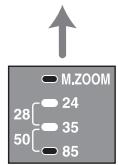
85 mm

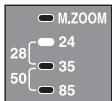
50~mm

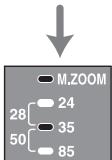
35mm
- If the zoom coverage is set to less than the focal length of the lens in use, the periphery of the screen darkens.
Wide panel (17 mm zoom angle)
Attaching the wide panel expands flash coverage to a focal length of 17 mm.
Attach the supplied wide panel to the flashtube.
- Push the wide panel onto the flashtube until it clicks into place.
- If removing the wide panel is difficult, pull one side off first.
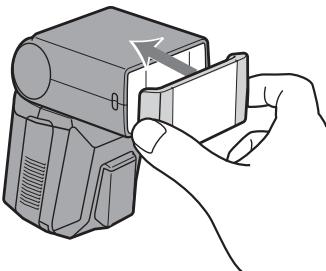
- When using the wide panel, only set the zoom coverage to 24mm .
- When photographing a flat subject from the front at a focal length of about 17mm , the periphery of the screen may darken slightly because the focal distances at the center and periphery of the screen are different.
- When using a wide-angle lens with a focal length below 17mm , the periphery of the screen may darken.
- When using the wide panel, press the high-speed-sync button to keep the high-speed-sync lamp off.
See the following table for the flash range when using the wide panel.
(unit:m)
| ISO100 | ISO400 | |
| 2.8 | 1 - 4 | 1 - 8 |
| 4 | 1 - 2.8 | 1 - 5.6 |
| 5.6 | 1 - 2 | 1 - 4 |
Bounce flash
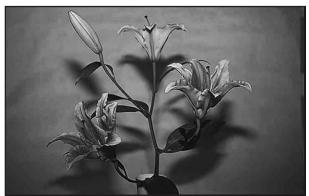
Using the flash with a wall directly behind the subject produces strong shadows on the wall. By directing the flash at the ceiling you can illuminate the subject with reflected light, reducing the intensity of the shadows and producing a softer light on the screen.
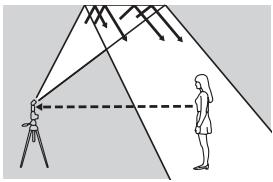
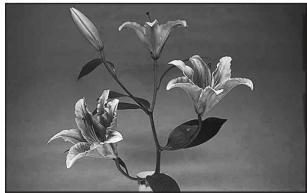
Bounce flash
Normal flash
Rotate the flash upwards.
- The flash can be set to 45^ , 60^ , 75^ or 90^ .
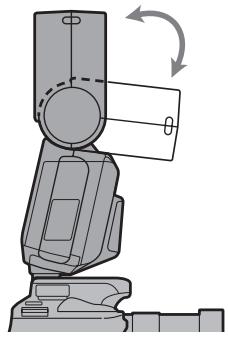
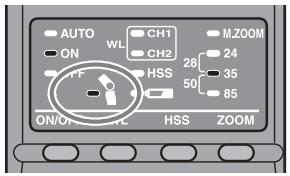
- The bounce lamp on the control panel comes on.
- High-speed sync (p. 26) is cancelled when using bounce flash.
- Use a white ceiling or wall to reflect the flash. A colored surface may color the light. High ceilings or glass are not recommended.
Adjusting bounce angle
Simultaneously using direct light and bounced light from the flash produces uneven lighting. Determine the bounce angle with respect to the distance to the reflective surface, the distance from the camera to the subject, the focal length of the lens etc.
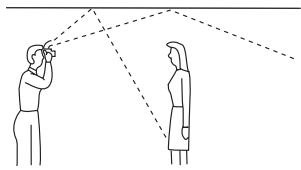
Correct
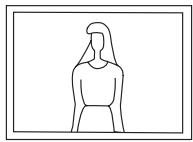
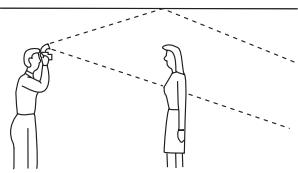
Incorrect
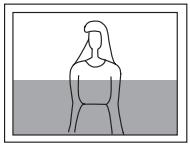
Determine the angle in relation to the following table.
| Focal length of lens | Bounce angle |
| 70 mm minimum | 45° |
| 28 - 70 mm | 60° |
| 28 mm maximum | 75°, 90° |
AF illuminator
In low-light or when subject contrast is low, when the shutter button is pressed partway down for Auto Focus, the red lamp on the front of the flash unit will light. This is the AF illuminator used as an aid in Auto Focus.
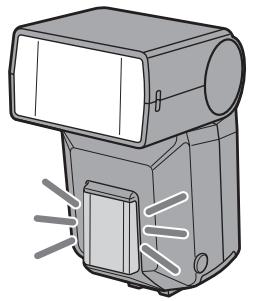
- The AF illuminator operates even when the flash is off.
- The camera AF illuminator does not operate while the flash AF illuminator is operating.
- The AF illuminator does not operate while Continuous AF is used in focusing mode (when continually focusing on a moving subject).
- The AF illuminator may not operate if the focal length of the lens is greater than 300mm . The flash will not operate when removed from the camera.
High-speed sync (HSS)
High-speed sync
Normal flash
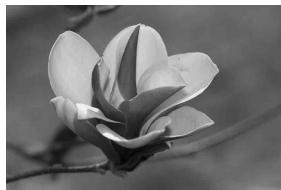
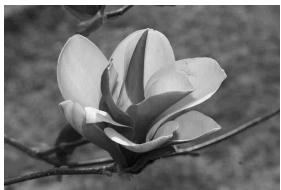
High-speed sync eliminates the restrictions of flash sync speed and enables the flash to be used through the entire shutter speed range of the camera. The increased selectable aperture range allows flash photography with a wide aperture, leaving the background out of focus and accentuating the front subject. Even when photographing at a wide f-stop in the A mode or M mode, when the background is very bright and the shot will normally be over-exposed, you can adjust the exposure by using the high-speed shutter.
Press the high-speed sync button (HSS).
- The high-speed-sync lamp comes on.
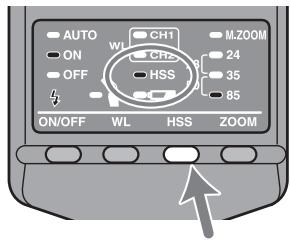
- If you press the high-speed sync button (HSS) again, high-speed sync is cancelled. When high-speed sync is cancelled, the shutter speed cannot be set faster than the sync speed.
- Taking photos in bright locations is recommended.
- The flash range with high-speed sync is smaller than with normal flash photography.
You can find the accurate flash range with high-speed sync by using the HSS flat flash (ISO100) table on page 41. Divide the guide number by the aperture to obtain the maximum distance of the flash range.
For example, with a 1/500 shutter speed and 28mm focal length, the guide number is 8 according to the table. Since 8 (the guide number) divided by 4 (the aperture) equals 2, the flash range in this case would be 2m .
The number is doubled when using ISO400.
- High-speed sync cannot be used with bounce flash.
- When using a flash meter or color meter, high-speed sync cannot be used because it interferes with the proper exposure.
Flash Sync Speed
Flash photography is generally associated with a maximum shutter speed referred to as the flash sync speed. This restriction does not apply to cameras designed for high-speed sync (HSS) photography (p. 26), since they allow flash photography at the maximum shutter speed of the camera.
Wireless flash mode (WL)
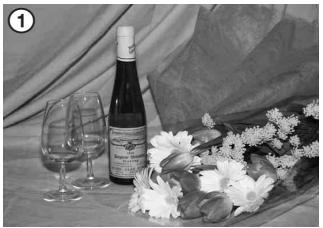
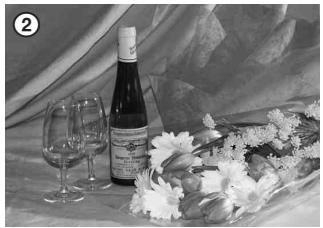
Photographs taken with the flash attached to the camera are flat as shown in photo ①. In such cases, remove the flash from the camera and position it to obtain a more three-dimensional effect as shown in photo ②.
When taking this type of photograph with a single lens reflex camera, the camera and the flash unit are most commonly connected by a cable. This flash eliminates the need for a cable to transmit signals to the flash unit by using the light of the built-in flash itself as a signal. The correct exposure is determined automatically by the camera.
Normal flash
Wireless flash
Wireless Flash Range
The wireless flash uses a light signal from the built-in flash as a trigger to operate the off-camera flash unit. Follow the points below when positioning the camera, flash, and subject.
Photograph in dark locations indoors.
- Place the off-camera flash within the gray area in the following diagram.
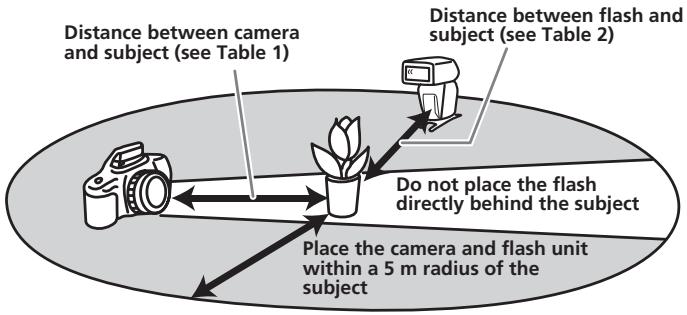
Distance camera-HVL-F36AM-subject
| Distance camera - subject (Table 1) | Distance HVL-F36AM - subject (Table 2) | ||||||
| Other than HSS | HSS | ||||||
| Shutter speed | All shutter speeds | Maximum 1/60 sec | 1/60 to sync speed | 1/250 sec | 1/500 sec | 1/1000 sec | 1/2000 sec |
| Aperture | |||||||
| 2.8 | 1.4 - 5 | 1.4 - 5 | 1 - 5 | 1 - 4 | 1 - 3 | 1 - 2 | 1 - 1.5 |
| 4 | 1 - 5 | 1 - 3.5 | 1 - 5 | 1 - 3 | 1 - 2 | 1 - 1.5 | - |
| 5.6 | 1 - 5 | 1 - 2.5 | 1 - 3.5 | 1 - 2 | 1 - 1.5 | - | - |
Unit:m
- The distances in the above table assume the use of ISO 100. If ISO 400 is used the distances must be multiplied by a factor of two (assume a limit of 5m ).
Notes on wireless flash
- You cannot use a flash meter or color meter in wireless flash mode because the camera's built-in pre-flash goes off.
- The zoom position for the HVL-F36AM is automatically set to 24mm .
- When photographing with the wireless flash, the flash may in rare cases go off by mistake due to ambient static electricity or electromagnetic noise.
When the flash is not in use, turn it off using the flash ON/OFF button.
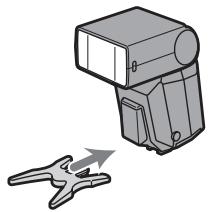
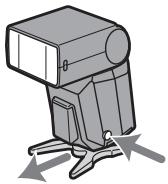
Attaching and removing the mini-stand
- Use the supplied mini-stand when the flash unit is separate from the camera.
- You can attach the flash unit to a tripod using the tripod socket holes in the mini-stand.
Attachment
Removal
Photography with wireless flash
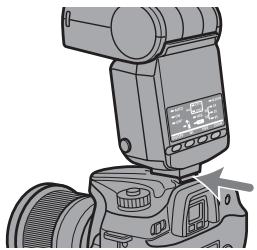
1 Attach the flash to the camera and turn the power of the flash and camera on.
2 Set the camera to wireless flash.
- The setting method differs depending on the camera used. For details, see the operating instructions of your camera.
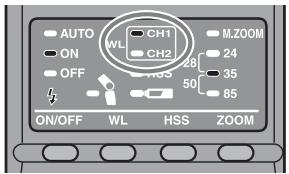
- When the camera is set to wireless the flash is also set to wireless automatically, and WL is displayed on the control panel.
- The channel 1 "CH1" lamp for the wireless flash comes on. When channel 2 is selected, the "CH2" lamp is lit. For details on changing the channel settings, see page 33.
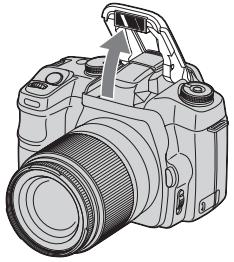
3 Remove the flash from the camera and raise the built-in flash.
- When the flash is removed from the camera, the high-speed-sync lamp comes on.
4 Set up the camera and flash.
- Set up the camera and flash in a dark location, such as indoors.
See page 28 for details.


5 Make sure that the built-in flash and flash are fully charged.
- is lit in the viewfinder when the built-in flash is fully charged.
- The AF illuminator on the front blinks, and on the rear is lit, when the flash is fully charged.
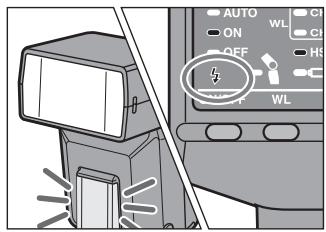
6 Use test flash to check the flash.
- The test flash method differs depending on the camera used. For details, see the operation instructions of your camera.
- If the test flash does not work, change the position of the camera, flash or subject.
7 Check again that the built-in flash and the flash are fully charged, and press the shutter button to take the photo.
Changing the channel setting
If another wireless flash is being used nearby, such as at a photo session, your flash may be set off by the light signal from the built-in flash of another camera. To prevent this, you can change the channel as follows.
1 Make sure that the wireless flash lamps "CH1" and "CH2" are both off.
- If they are on, press the wireless flash button to turn them off.
2 Press the wireless flash button for three seconds.
- After three seconds the channel is changed, and the channel indicator lamp changes accordingly.
3 Attach the flash to the camera and press the shutter button partway down.
- This operation transmits the channel information from the flash to the camera.
Setting wireless flash by flash only
When the flash is attached to the camera and the wireless flash set up, the channel information is transmitted to the camera. This means that if you continue to use the same camera and flash combination without changing the wireless channel then you can also set the flash and camera separately to wireless.
Camera setting:
Set to the wireless flash mode.
For details, refer to the operating instructions supplied with your camera.
Flash setting:
Press the wireless flash button to turn on the "CH1" or "CH2" lamp.
Time to auto power off
You can change the time to auto power off.
1 Press the flash ON/OFF button for three seconds.
- The auto lamp, flash-ON lamp and flash-OFF lamp come on at the same time.
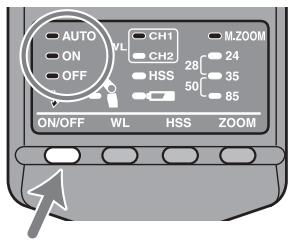
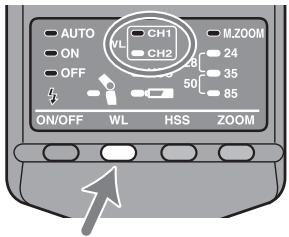
2 Press the wireless flash button to select a channel.
- Channel 1"CH1"
Auto power off - Channel 2 "CH2"
Auto power off when wireless flash is set
3 Press the zoom selection button to select the desired time until auto power off.
- Channel 1 "CH1"
Auto power off
Options
Lamps
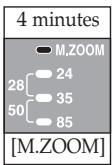
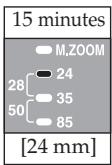
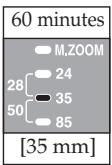
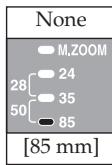
- Channel 2 "CH2"
Auto power off in wireless flash mode
Options
Lamps
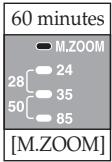
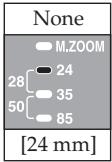
4 Press the flash ON/OFF button to return to normal status.
- The selected settings are maintained even if the flash unit is switched off or the battery is removed.
Flash range
The following tables show the flash range when taking photos with the flash attached to the camera (i.e. the appropriate range to provide a correct exposure).
When the focal length is 17mm (unit: m)
| ISO25 | ISO50 | ISO100 | ISO200 | ISO400 | ISO800 | ISO1000 | |
| F32 | - | - | - | - | - | - | 1.0 - 1.1 |
| F22 | - | - | - | - | - | 1.0 - 1.4 | 1.0 - 1.6 |
| F16 | - | - | - | - | 1.0 - 1.4 | 1.0 - 1.9 | 1.0 - 2.2 |
| F11 | - | - | - | 1.0 - 1.4 | 1.0 - 2.0 | 1.0 - 2.7 | 1.0 - 3.2 |
| F8 | - | - | 1.0 - 1.4 | 1.0 - 1.9 | 1.0 - 2.8 | 1.0 - 3.8 | 1.0 - 4.4 |
| F5.6 | - | 1.0 - 1.4 | 1.0 - 2.0 | 1.0 - 2.8 | 1.0 - 3.9 | 1.0 - 5.4 | 1.0 - 6.3 |
| F4 | 1.0 - 1.4 | 1.0 - 1.9 | 1.0 - 2.8 | 1.0 - 3.9 | 1.0 - 5.5 | 1.0 - 7.5 | 1.0 - 8.8 |
| F2.8 | 1.0 - 2.0 | 1.0 - 2.8 | 1.0 - 3.9 | 1.0 - 5.5 | 1.0 - 7.9 | 1.0 - 11 | 1.0 - 13 |
| F2 | 1.0 - 2.8 | 1.0 - 3.9 | 1.0 - 5.5 | 1.0 - 7.7 | 1.0 - 11 | 1.0 - 15 | 1.0 - 18 |
| F1.4 | 1.0 - 3.9 | 1.0 - 5.5 | 1.0 - 7.6 | 1.0 - 11 | 1.0 - 16 | 1.0 - 21 | 1.1 - 25 |
When the focal length is 24mm (unit: m)
| ISO25 | ISO50 | ISO100 | ISO200 | ISO400 | ISO800 | ISO1000 | |
| F32 | - | - | - | - | 1.0 - 1.3 | 1.0 - 1.7 | 1.0 - 2.0 |
| F22 | - | - | - | 1.0 - 1.3 | 1.0 - 1.8 | 1.0 - 2.5 | 1.0 - 2.9 |
| F16 | - | - | 1.0 - 1.3 | 1.0 - 1.8 | 1.0 - 2.5 | 1.0 - 3.4 | 1.0 - 3.9 |
| F11 | - | 1.0 - 1.3 | 1.0 - 1.8 | 1.0 - 2.5 | 1.0 - 3.6 | 1.0 - 5.0 | 1.0 - 5.7 |
| F8 | 1.0 - 1.3 | 1.0 - 1.8 | 1.0 - 2.5 | 1.0 - 3.5 | 1.0 - 5.0 | 1.0 - 6.9 | 1.0 - 7.9 |
| F5.6 | 1.0 - 1.8 | 1.0 - 2.5 | 1.0 - 3.6 | 1.0 - 5.0 | 1.0 - 7.1 | 1.0 - 9.8 | 1.0 - 11 |
| F4 | 1.0 - 2.5 | 1.0 - 3.5 | 1.0 - 5.0 | 1.0 - 7.0 | 1.0 - 10 | 1.0 - 14 | 1.0 - 16 |
| F2.8 | 1.0 - 3.6 | 1.0 - 5.0 | 1.0 - 7.1 | 1.0 - 10 | 1.0 - 14 | 1.0 - 20 | 1.0 - 23 |
| F2 | 1.0 - 5.0 | 1.0 - 7.0 | 1.0 - 10 | 1.0 - 14 | 1.0 - 20 | 1.3 - 28 | 1.4 - 32 |
| F1.4 | 1.0 - 7.1 | 1.0 - 10 | 1.0 - 14 | 1.0 - 20 | 1.3 - 28 | 1.8 - 40 | 2.0 - 45 |
- The flash range at a focal length of 28mm is roughly between the long range limit values at focal lengths of 24mm and 35mm . The flash range at a focal length of 50mm is roughly between the long range limit values at focal lengths of 35mm and 80mm .
When the focal length is 35mm (unit: m)
| ISO25 | ISO50 | ISO100 | ISO200 | ISO400 | ISO800 | ISO1000 | |
| F32 | - | - | - | 1.0 - 1.1 | 1.0 - 1.6 | 1.0 - 2.2 | 1.0 - 2.5 |
| F22 | - | - | 1.0 - 1.1 | 1.0 - 1.6 | 1.0 - 2.3 | 1.0 - 3.1 | 1.0 - 3.6 |
| F16 | - | 1.0 - 1.1 | 1.0 - 1.6 | 1.0 - 2.2 | 1.0 - 3.1 | 1.0 - 4.3 | 1.0 - 5.0 |
| F11 | 1.0 - 1.1 | 1.0 - 1.6 | 1.0 - 2.3 | 1.0 - 3.2 | 1.0 - 4.5 | 1.0 - 6.3 | 1.0 - 7.2 |
| F8 | 1.0 - 1.6 | 1.0 - 2.2 | 1.0 - 3.1 | 1.0 - 4.4 | 1.0 - 6.3 | 1.0 - 8.6 | 1.0 - 9.9 |
| F5.6 | 1.0 - 2.2 | 1.0 - 3.1 | 1.0 - 4.5 | 1.0 - 6.3 | 1.0 - 8.9 | 1.0 - 12 | 1.0 - 14 |
| F4 | 1.0 - 3.1 | 1.0 - 4.4 | 1.0 - 6.3 | 1.0 - 8.8 | 1.0 - 12 | 1.0 - 17 | 1.0 - 20 |
| F2.8 | 1.0 - 4.5 | 1.0 - 6.2 | 1.0 - 8.9 | 1.0 - 13 | 1.0 - 18 | 1.1 - 25 | 1.3 - 28 |
| F2 | 1.0 - 6.2 | 1.0 - 8.8 | 1.0 - 13 | 1.0 - 18 | 1.1 - 25 | 1.6 - 35 | 1.8 - 40 |
| F1.4 | 1.0 - 8.9 | 1.0 - 13 | 1.0 - 18 | 1.1 - 25 | 1.6 - 36 | 2.2 - 50 | 2.5 - 56 |
When the focal length is 85mm (unit: m)
| ISO25 | ISO50 | ISO100 | ISO200 | ISO400 | ISO800 | ISO1000 | |
| F32 | - | - | 1.0 - 1.1 | 1.0 - 1.6 | 1.0 - 2.3 | 1.0 - 3.1 | 1.0 - 3.6 |
| F22 | - | 1.0 - 1.1 | 1.0 - 1.6 | 1.0 - 2.3 | 1.0 - 3.3 | 1.0 - 4.5 | 1.0 - 5.2 |
| F16 | 1.0 - 1.1 | 1.0 - 1.6 | 1.0 - 2.3 | 1.0 - 3.2 | 1.0 - 4.5 | 1.0 - 6.2 | 1.0 - 7.1 |
| F11 | 1.0 - 1.6 | 1.0 - 2.3 | 1.0 - 3.3 | 1.0 - 4.6 | 1.0 - 6.5 | 1.0 - 9 | 1.0 - 10 |
| F8 | 1.0 - 2.3 | 1.0 - 3.2 | 1.0 - 4.5 | 1.0 - 6.3 | 1.0 - 9.0 | 1.0 - 12 | 1.0 - 14 |
| F5.6 | 1.0 - 3.2 | 1.0 - 4.5 | 1.0 - 6.4 | 1.0 - 9.0 | 1.0 - 13 | 1.0 - 18 | 1.0 - 20 |
| F4 | 1.0 - 4.5 | 1.0 - 6.3 | 1.0 - 9 | 1.0 - 13 | 1.0 - 18 | 1.1 - 25 | 1.3 - 28 |
| F2.8 | 1.0 - 6.4 | 1.0 - 9.0 | 1.0 - 13 | 1.0 - 18 | 1.1 - 26 | 1.6 - 35 | 1.8 - 40 |
| F2 | 1.0 - 9.0 | 1.0 - 13 | 1.0 - 18 | 1.1 - 25 | 1.6 - 36 | 2.3 - 50 | 2.6 - 56 |
| F1.4 | 1.0 - 13 | 1.0 - 18 | 1.1 - 26 | 1.6 - 36 | 2.3 - 51 | 3.2 - 71 | 3.6 - 80 |
- When photographing at a distance of less than 1m , the lens may block the light from the flash causing a shadow to appear at the bottom of the photo. Photograph in wireless flash mode.
Notes on use
While shooting
- This flash unit generates strong light, so it should not be used directly in front of the eyes.
Batteries
- The battery level displayed on the control panel may be lower than the actual battery capacity, temperature, and storage conditions. The displayed battery level is restored to the correct value after the flash has been used a few times. When l blinks to indicate that the flash cannot be used, pressing the flash ON/OFF button a number of times may result in restoration of the correct battery level display. If the battery level is still not restored, replace the battery.
- When using lithium batteries, if the batteries become hot due to high temperature or continuous use, may blink and the flash may not work for a while. Wait for the batteries to cool down before using the flash again.
- Nickel-metal hydride batteries can lose power suddenly. If starts blinking or the flash can no longer be used while taking pictures, change or recharge the batteries.
- The flash frequency and number of flashes provided by new batteries may vary from the values shown in the table, depending on the time elapsed since manufacture of the batteries.
Temperature
- The flash unit may be used over a temperature range of 0^ to 40^ .
- Do not expose the flash unit to extremely high temperatures (e.g. in direct sunlight inside a vehicle) or high humidity.
- To prevent condensation forming on the flash, place it in a sealed plastic bag when bringing it from a cold environment into a warm environment. Allow it to reach room temperature before removing it from the bag.
- Battery capacity decreases at colder temperatures. Keep your camera and spare batteries in a warm inside pocket when shooting in cold weather. may come on even when there is some power left in the batteries in cold weather. Batteries will regain some of their capacity when warmed to normal operating temperature.
- This flash unit is not waterproof. Be careful not to bring it into contact with water or sand when using it at the seashore, for example. Contact with water, sand, dust, or salt may result in a malfunction.
Maintenance
Remove this unit from the camera. Clean the flash with a dry soft cloth. If the flash has been in contact with sand, wiping will damage the surface, and it should therefore be cleaned gently using a blower. In the event of stubborn stains, use a cloth lightly dampened with a mild detergent solution, and then wipe the unit clean with a dry soft cloth. Never use strong solvents, such as thinner or benzine, as these damage the surface finish.
Specifications
Guide number
Normal flash (ISO 100)
| Flash Coverage Setting (mm) | 17* | 24 | 28 | 35 | 50 | 85 |
| GN | 11 | 20 | 22 | 25 | 29 | 36 |
- When the wide panel is attached
Wireless flash (ISO 100)
| Flash Coverage Setting (mm) | 17* | 24 | 28 | 35 | 50 | 85 |
| GN | 8.5 | 14 | 15 | 19 | 22 | 28 |
- When the wide panel is attached
HSS flat flash (flash with HSS, ISO 100)
| Shutter speed | Flash Coverage Setting (mm) | ||||
| 24 | 28 | 35 | 50 | 85 | |
| 1/250 | 10 | 11 | 13 | 15 | 18 |
| 1/500 | 7 | 8 | 9 | 11 | 13 |
| 1/1000 | 5 | 5.6 | 6.5 | 7.5 | 9 |
| 1/2000 | 3.5 | 4 | 4.6 | 5.3 | 6.4 |
| 1/4000 | 2.5 | 2.8 | 3.2 | 3.8 | 4.5 |
| 1/8000 | 1.7 | 2 | 2.3 | 2.6 | 3.2 |
| 1/12000 | 1.2 | 1.4 | 1.6 | 1.8 | 2.2 |
Frequency/Repetition
| Alkaline | Lithium | Nickel hydride (1550 mAh) | |
| Frequency (sec) | 0.2 - 6 | 0.2 - 6 | 0.2 - 5 |
| Repetition (times) | 200 - 4000 | 500 - 10000 | 150 - 3000 |
- Repetition is the approximate number of times that are possible before a new battery is completely dead.
Flash coverage
| Flash coverage | Flash Coverage Setting (mm) | |||||
| 17* | 24 | 28 | 35 | 50 | 85 | |
| Top-bottom (°) | 115 | 60 | 53 | 45 | 34 | 23 |
| Left-right (°) | 125 | 78 | 70 | 60 | 46 | 31 |
- When the wide panel is attached
Continuous 40 flashes at 5 flashes per second flash performance (Normal flash, GN 6, 85mm , nickel-metal hydride battery)
AF illuminator Autoflash at low contrast and low brightness Operating range (with a 50~mm lens attached to 100 Central area: 0.5m to 6m PrPeripheral areas: 0.5m to 3m
Flash control Flash control using pre-flash, TTL direct metering
Dimension W 68× H122× D89mm (Approx.) (23 / 4× 47 / 8× 35 / 8 inches)
Mass (Approx.) 260 g (9.2 oz)
Included items Flash (1), Mini-stand (1), Case (1), Wide panel (1), Set of printed documentation
Functions in these operating instructions depend on testing conditions at our firm.
Design and specifications are subject to change without notice.
Trademark
±b is a trademark of Sony Corporation.
3 Refermer le compartment.
Printed on 70% or more recycled paper using VOC (Volatile Organic Compound)-free vegetable oil based ink.