MFB100 - Educational Toys LEXIBOOK - Free user manual and instructions
Find the device manual for free MFB100 LEXIBOOK in PDF.



| Product type | Interactive electronic plush |
| Brand | LEXIBOOK |
| Model | MFB100 |
| Product name | Yayé the Hippopotamus |
| Target audience | Babies and young children |
| Power supply | 3 AAA/LR03 batteries (included, demonstration batteries to replace) |
| Main functions | Light effects, music (5 lullabies), voice recording (up to 10 seconds), playback, magical sound effects, nightlight |
| Sleep Guardian function | 3 modes: lights only, music only, or lights + music. Automatic activation by detecting crying, duration ~1 minute |
| Nightlight | Activation by holding the nightlight button, deactivation by pressing |
| Interactive buttons | 5 buttons on the back: Light show, Music, Magic, Record, Playback |
| Automatic sleep mode | After 30 seconds of inactivity |
| Additional features | Hidden handkerchief in the belly, tail pulled for surprise effect |
| Estimated dimensions | Height approximately 25 cm |
| Estimated weight | Approximately 400 g |
| Material | Plush fabric, electronic components |
| Maintenance and cleaning | Clean with a slightly damp cloth, without detergent. Do not machine wash, do not immerse |
| Safety | Only use with recommended batteries, respect polarity. Remove batteries if not used for a long time. Do not expose to heat or moisture. Do not disassemble. |
| Warranty | 2 years, covers material and assembly defects, subject to compliance with the instructions |
| Reference | MFB100 |
| Manufacturer | LEXIBOOK S.A., 2 avenue de Scandinavie, 91953 Courtaboeuf Cedex, France |
Frequently Asked Questions - MFB100 LEXIBOOK
User questions about MFB100 LEXIBOOK
0 question about this device. Answer the ones you know or ask your own.
Ask a new question about this device
Download the instructions for your Educational Toys in PDF format for free! Find your manual MFB100 - LEXIBOOK and take your electronic device back in hand. On this page are published all the documents necessary for the use of your device. MFB100 by LEXIBOOK.
USER MANUAL MFB100 LEXIBOOK
UNPACKING THE DEVICE
When unpacking, ensure that the following elements are included:
1 x Yayé MFB100
1 x instruction manual
WARNING: All packaging materials, such as tape, plastic sheets, wire ties and tags are not part of this toy and should be discarded.
BATTERY INFORMATION
Yayé operates with 3 × 1.5V = - - - AAA/LR03 batteries (included).
This product is supplied with batteries for demonstration purposes. They should be replaced with new batteries before use.
WARNING: Remove and discard the plastic tab before playing.
Battery replacement
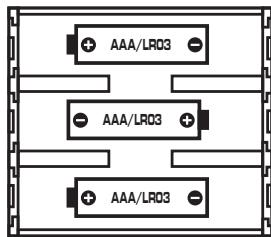
- Open the pocket located under the toy. Using a screwdriver, open the battery compartment inside the product.
- Remove the used batteries and insert 3 new AAA/LR03 batteries observing the polarity indicated in the compartment, and as per the diagram shown below.
- Close the battery compartment and tighten the screw.
Non-rechargeable batteries are not to be recharged. Rechargeable batteries are to be removed from the product before being charged. Rechargeable batteries are only to be charged under adult supervision. Different types of batteries or new and used batteries are not to be mixed. Only batteries of the same or equivalent type as recommended are to be used. Batteries are to be inserted with the correct polarity. Exhausted batteries are to be removed from the product. The supply terminals are not to be short circuited. Do not throw batteries into a fire. Remove the batteries if you are not going to use the product for a long period of time.
WARNING: Mal-function or loss of memory may be caused by strong frequency interference or electrostatic discharge. Should any abnormal function occur, remove the batteries and insert them again
PRODUCT FEATURES
Image A
- "Lightshow" button
- "Music" button
- "Magic" button
- "Record" button
- "Play" button
Image B (inside the toy)
- "ON/OFF" button
- "Volume" wheel
- "Mode selector" switch
BASIC FUNCTIONS
- Use the "ON/OFF" button ON OFF located on the top of the battery compartment to turn on or turn off the toy.
Note: The MFB100 will automatically go into power saving mode (sleep mode) after 30 seconds of inactivity.
- Press one of the five buttons on the back of the toy to activate light and sound effects, play lullabies or record a message. Press the same button once again to stop the lightshow or the lullabies.

"Lightshow" button: use this button to activate or deactivate the lightshow. The lightshow will be switched on for 1 minute.

"Music" button: use this button to play one of the five lullabies available. Each lullaby is approximately 1 minute long. Press and hold this button to play all the lullabies in sequence. You can use the volume wheel on the battery compartment to adjust the volume level.

"Magic" button: use this button to play a random funny sound effect.

"Record" button: press and hold this button and speak clearly near the toy to record a message. Release the button when you have finished. Your message will be played to confirm the recording.
Note: Each new recording will delete and replace the previous one. The recording maximum length duration is 10 seconds.

"Play/Pause" button: press this button to play the recorded message. If you didn't record any message, pressing this button will play a pre-record sound effect.
SLEEP GUARDIAN
- Use the selector switch located on the top of the battery compartment to turn on or turn off ("OFF" position) the "Sleep Guardian" function or to select one of the 3 modes:
Mode 1: Lightshow
Mode 2: Music
Mode 3: Lightshow and music

- If the baby cries, the "Sleep Guardian" feature will start automatically for 1 minute approximately.
IMPORTANT NOTE: To activate the "Sleep Guardian" function, make sure to select one of the 3 available modes.
Surprise! A little handkerchief is hidden in Yayé's belly. You can take it out or put it back in at any time!
Pull Yayé's tail to have a funny surprise!
NIGHT LIGHT MODE
Press and hold the button to switch on the nightlight. Press the button once again to switch it off.
MAINTENANCE AND WARRANTY
Use only a soft, slightly damp cloth to clean the unit. Do not use detergent. Do not expose the unit to direct sunlight or any other heat source. Do not immerse the unit in water. Do not dismantle or drop the unit. Do not try to twist or bend the unit.
NOTE: Please keep this instruction manual, it contains important information.
This product is covered by our two-year warranty. For any claim under the warranty or after-sale service, please contact your distributor and present a valid proof of purchase. Our warranty covers any manufacturing material and workmanship defect, with the exception of any deterioration arising from the non-observance of the instruction manual or from any careless action implemented on this item (such as dismantling, exposition to heat and humidity, etc.). It is recommended to keep the packaging for any further reference. In a bid to keep improving our services, we could implement modification on the colours and the details of the product shown on the packaging.
Reference: MFB100
©2009 LEXIBOOK®
Designed and developed in Europe - Made in China
Lexibook UK Ltd,
Wimbledon Village Business Centre,
Thornton House, Thornton Road,
Wimbledon, London SW19 4NG
UK.
Helpline: 0808 1003015.
http://www.lexibook.com
Environmental Protection
Unwanted electrical appliances can be recycled and should not be discarded along with regular household waste! Please actively support the conservation of resources and help protect the environment by returning this appliance to a collection centre (if available).
DESEMBALAJE DEL PRODUCTO
Lexibook Ibérica S.L.