Pro Multi 2 - Stroller Beemoo - Free user manual and instructions
Find the device manual for free Pro Multi 2 Beemoo in PDF.


| Product Type | Stroller |
| Brand | Beemoo |
| Model | Pro Multi 2 |
| Dimensions (Unfolded) | Approx. 100 x 60 x 105 cm |
| Dimensions (Folded) | Approx. 40 x 30 x 80 cm |
| Weight | Approx. 9.5 kg |
| Maximum Child Weight | 22 kg |
| Age Range | From birth to approx. 3 years |
| Power Source | None (manual operation) |
| Main Functions | Reclining seat, adjustable canopy, multiple recline positions, swivel front wheels, brake system, storage basket |
| Harness Type | 5-point harness |
| Care and Cleaning | Wipe frame with damp cloth; hand wash fabric parts; do not use bleach |
| Safety Features | Brake on rear wheels, locking mechanism for folding, safety harness, UV protection canopy |
| Spare Parts and Repairability | Replacement wheels, canopy, seat pad available from Beemoo; consult manual for part numbers |
| General Information | Designed for everyday use; complies with safety standards EN 1888 |
Frequently Asked Questions - Pro Multi 2 Beemoo
User questions about Pro Multi 2 Beemoo
0 question about this device. Answer the ones you know or ask your own.
Ask a new question about this device
Download the instructions for your Stroller in PDF format for free! Find your manual Pro Multi 2 - Beemoo and take your electronic device back in hand. On this page are published all the documents necessary for the use of your device. Pro Multi 2 by Beemoo.
USER MANUAL Pro Multi 2 Beemoo
Beemoo·PRO MULTI ^2
IMPORTANT! VIKTIGT! ADVARSEL!
READ CAREFULLY AND
KEEP FOR FUTURE
REFERENCE.
Model: Beemoo Pro Multi 2 Stroller
LÄS NOGA OCH
BEHÅLL FÖR FRAMTIDA
REFERENS.
Modell: Beemoo Pro Multi 2 Sittvagn
LES N∅YE OG BEHOLD
FOR FREMTIDIG
REFERANSE.
Modell: Beemoo Pro Multi 2 Sportsvogn
ADVARSEL! TÄRKEÄÄ!
LÆS OMHYGGELIGT
OG GEM TIL
FREMTIDIG
REFERENCE.
Model: Beemoo Pro Multi 2 Klapvogn
LUE OHJEET
HUOLELLISESTI JA
SÄILYTÄ NE TULEVAA
TARVETTA VARTEN.
Malli: Beemoo Pro Multi 2 Lastenrattaat
WICHTIG!
LESEN SIE DIESE HINWEISE
AUFMERKSAM UND
BEWAHREN SIE SIE FÜR
ZUKÜNFTIGE FRAGEN AUF.
natural_image
Close-up of a mechanical component with a white arrow pointing to a specific part (no visible text or symbols)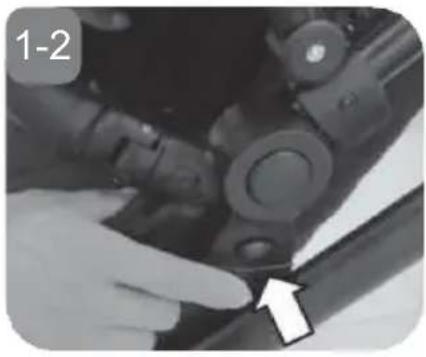
natural_image
Close-up of a hand adjusting mechanical components with a white arrow pointing to a detail (no visible text or symbols)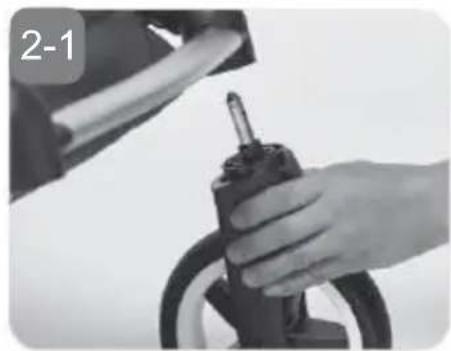
natural_image
Close-up of a hand holding a tire with a screwdriver, no visible text or symbols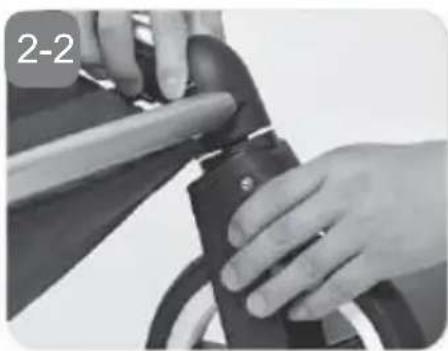
natural_image
Close-up of hands using a tool to adjust or install a mechanical component (no visible text or symbols)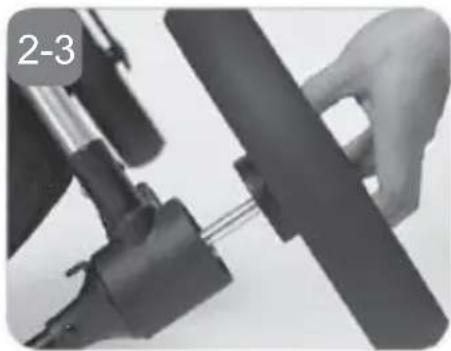
natural_image
Close-up of hands operating a mechanical device with a black lever and attached shaft (no visible text or symbols)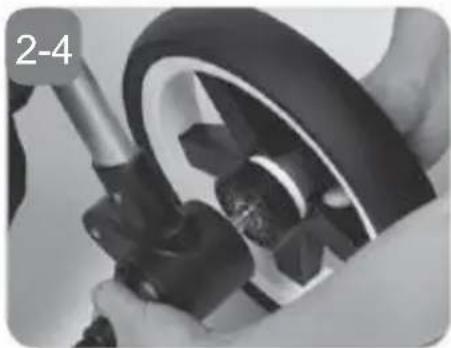
natural_image
Close-up of hands assembling a stroller with a black plastic wheel (no visible text or symbols)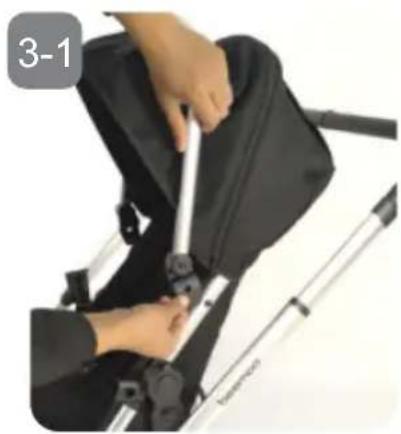
natural_image
Person using a camera to lift a black athletic bag, no visible text or symbols→
natural_image
Close-up of a baby stroller with a gray canopy cover and white trim, no visible text or symbols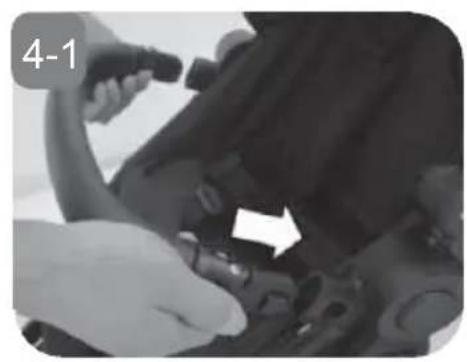
natural_image
Close-up of hands adjusting a mechanical component with an arrow indicating direction (no visible text or symbols)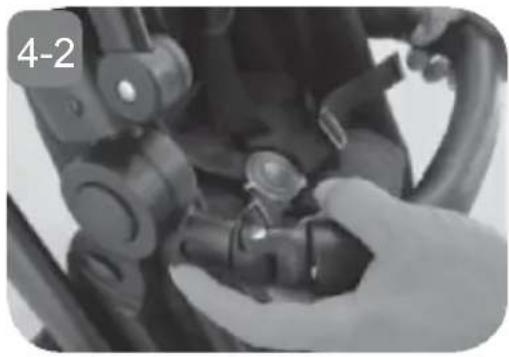
natural_image
Close-up of a hand adjusting a mechanical component with no visible text or symbols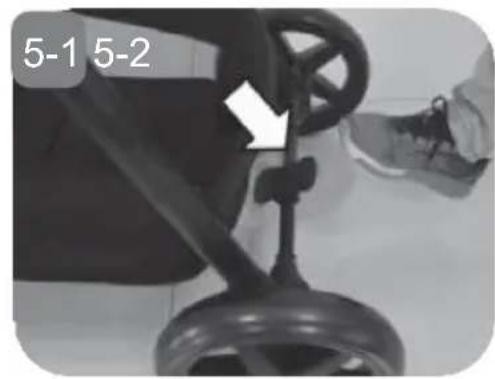
natural_image
Close-up of a bicycle steering wheel with a hand operating the wheel (no visible text or symbols)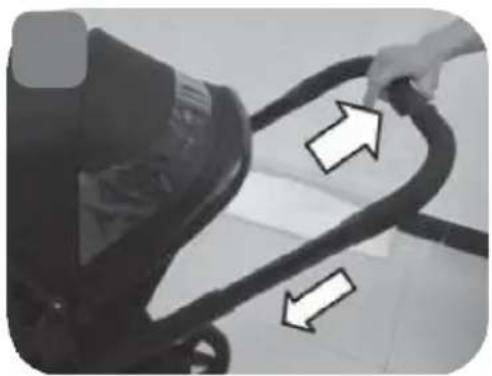
natural_image
Close-up of a hand holding a curved black object with two white arrows pointing to it, against a plain background (no text or symbols visible)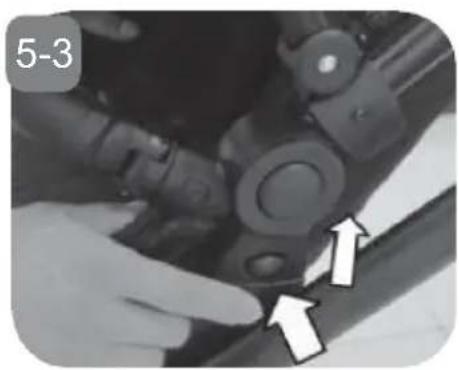
natural_image
Close-up of hands operating a mechanical component with directional arrows indicating movement (no text or symbols)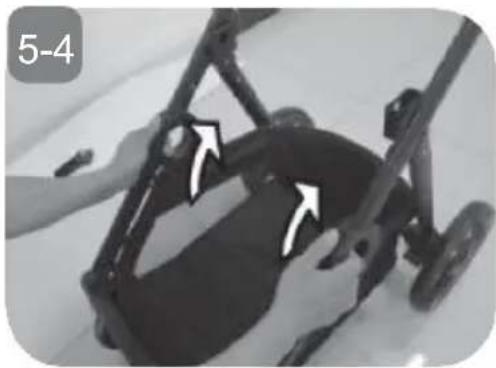
natural_image
Close-up of a black stroller with wheels and a hand adjusting the seat (no visible text or symbols)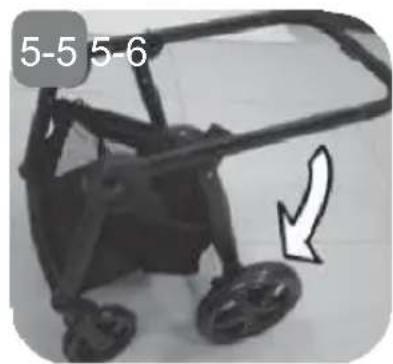
natural_image
Black stroller with wheels and a white arrow pointing to the side (no text or symbols on the device itself)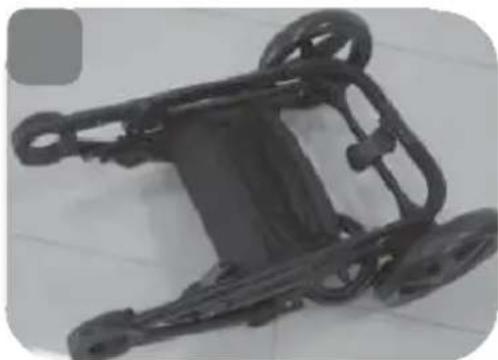
natural_image
Metallic mechanical component with multiple wheels and a central body, displayed on tiled floor (no text or symbols visible)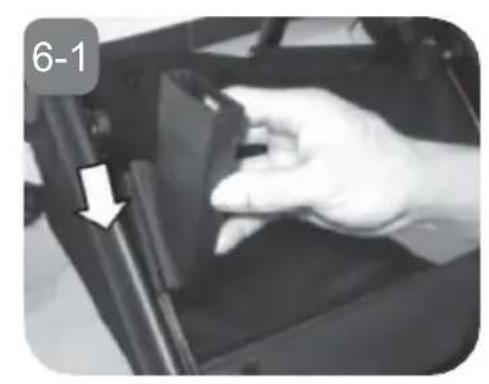
natural_image
Close-up of a hand pressing down on a mechanical component, with a white arrow pointing to the part (no text or symbols visible)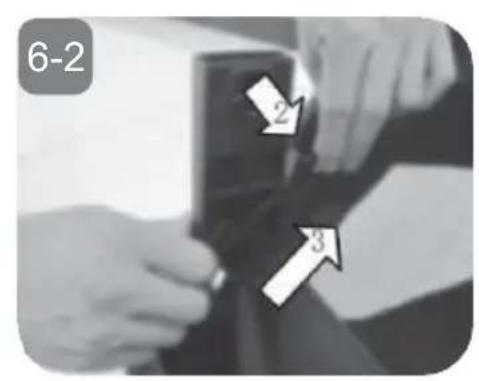
natural_image
Close-up of a hand adjusting a black mechanical component with a white arrow pointing to a detail (no text or symbols visible)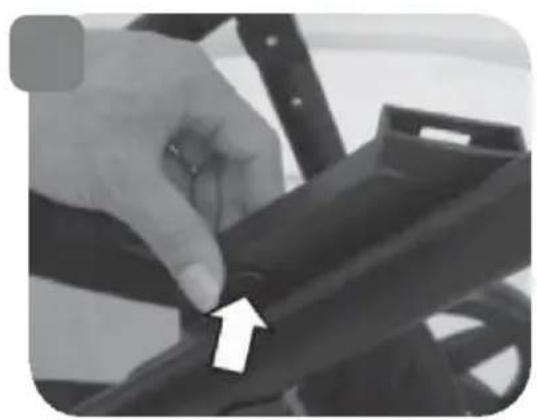
natural_image
Close-up of a hand adjusting a black metal bracket with an arrow pointing to the detail (no text or symbols visible)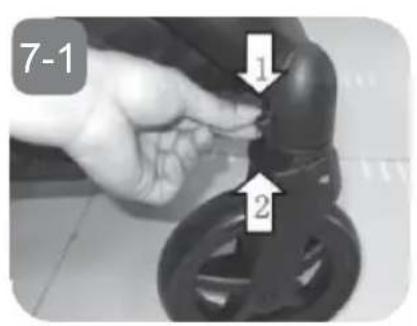
natural_image
Close-up of a stroller with a hand adjusting the wheel (no visible text or symbols)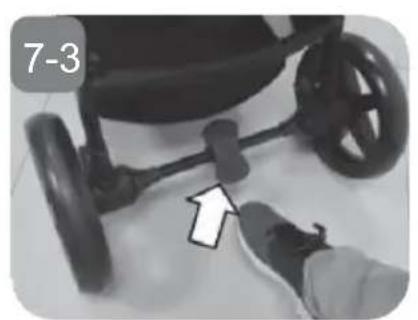
natural_image
Close-up of a stroller with wheels and a hand adjusting the seat (no text or symbols visible)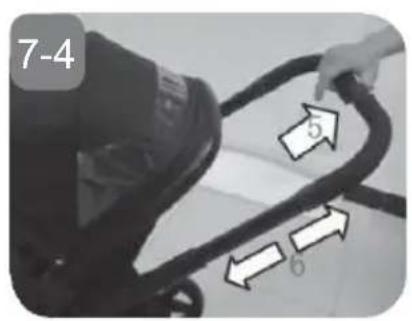
natural_image
Close-up of a hand adjusting a mechanical component with arrows pointing to specific parts (no text or symbols visible)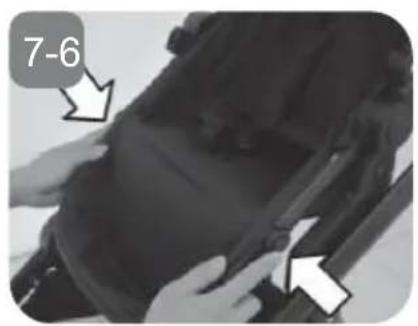
natural_image
Two-step illustration of a stroller seat assembly: one with a curved arrow indicating rotation, the other showing internal seating arrangement (no text or symbols)WARNING
- Please read these instructions carefully before use and keep them for later reference. The safety of your child could be put at risk if you do not follow these instructions.
- WARNING! Never leave the child unattended.
- WARNING! Ensure that all the locking devices are engaged before use.
- WARNING! To avoid injury ensure that the child is kept away when unfolding and folding this product.
- WARNING! Do not let the child play with this product.
- WARNING! This seat unit is not suitable for children under 6 months.
- WARNING! Always use the restraint system.
- WARNING! Check that the pram body, seat unit, carrycot unit and/or car seat attachment devices are correctly engaged before use.
- WARNING! This product is not suitable for running or skating.
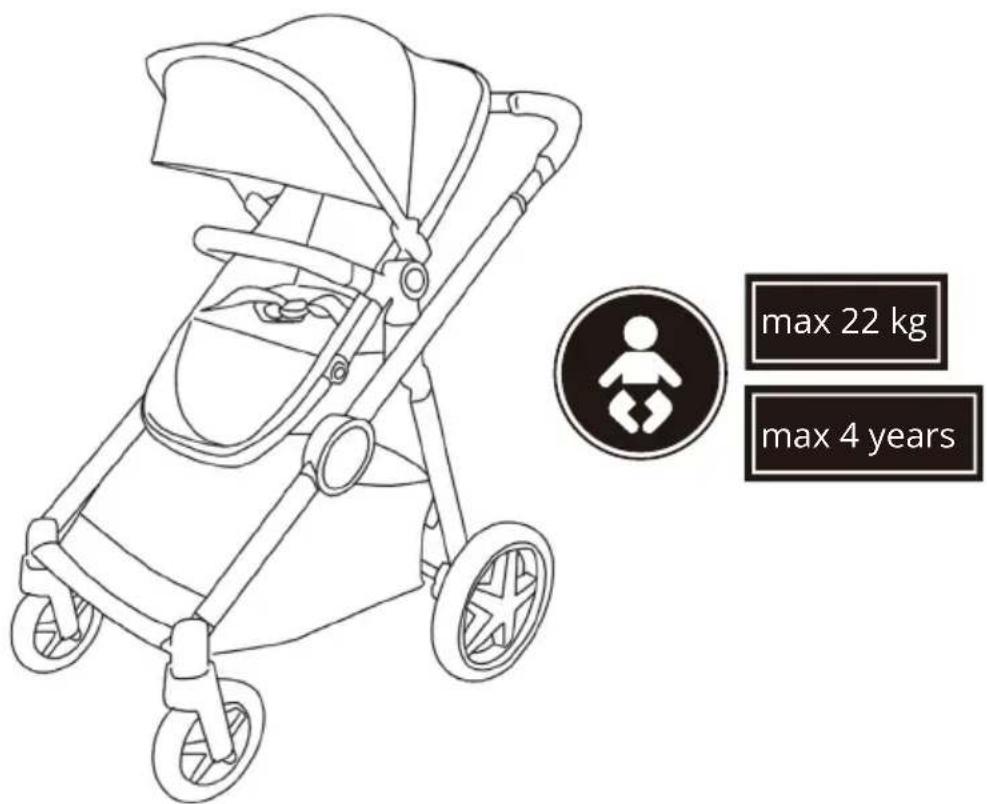
- WARNING! Maximum weight of a child for which the product is intended is up to 22 kg/seat or 4 years whichever comes first.
- Do not insert any additional mattresses into the stroller.
- The maximum loading weight for the basket is 3 kg.
- Never use this stroller to carry more than 2 children at the same time.
- Do not use the seat section for children under 6 months. Children under 6 months must be lying down in a carrycot.
- Use only accessories and spare parts provided and approved by the manufacturer. Accessory which are not approved by the manufacturer shall not be used.
- Any load attached to the handle and on the back of the backrest and on the sides of the vehicle will affect the stability of the vehicle.
- The parking device shall be engaged when placing and removing the child.
- This product is tested and approved according to European Standards: EN 1888-1 & EN 1888-2:2018+A1:2022.
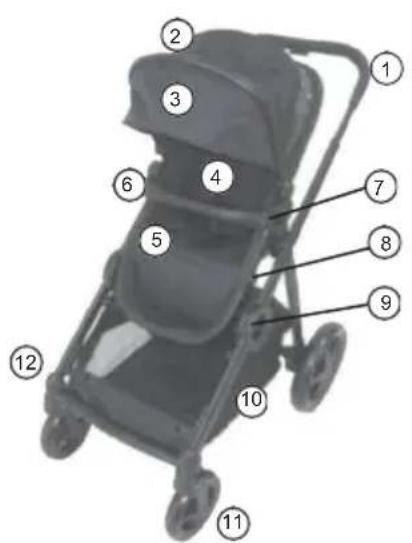
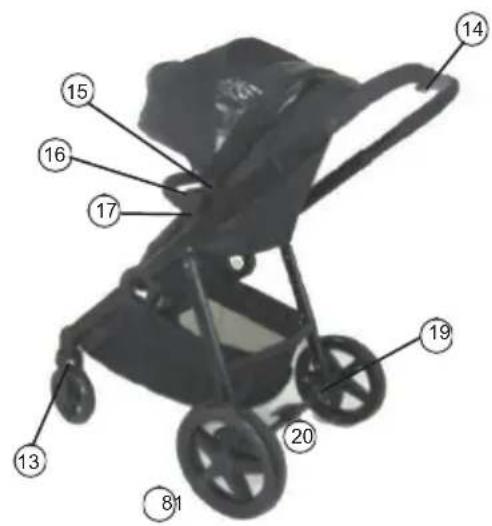
PARTS LIST
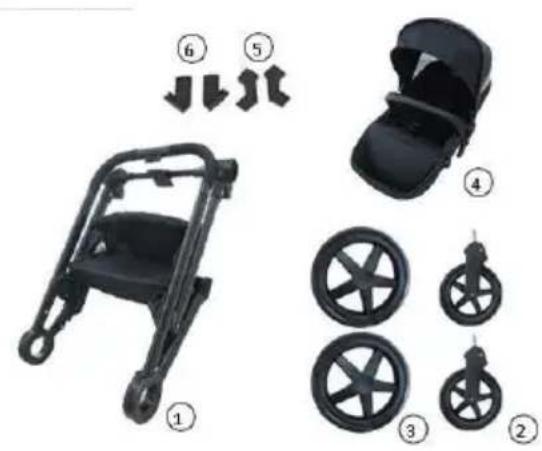
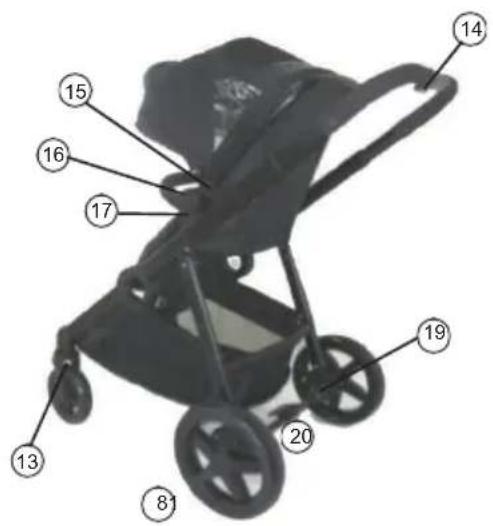
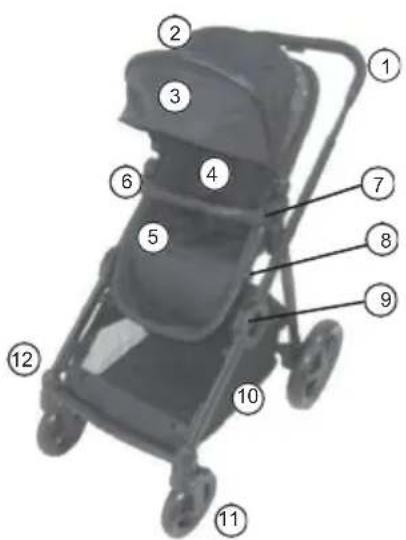
- Chassis
- Front Wheels (x2)
- Rear Wheels (x2)
- Seat unit
- Back Seat Adapters
- Front Seat Adapters
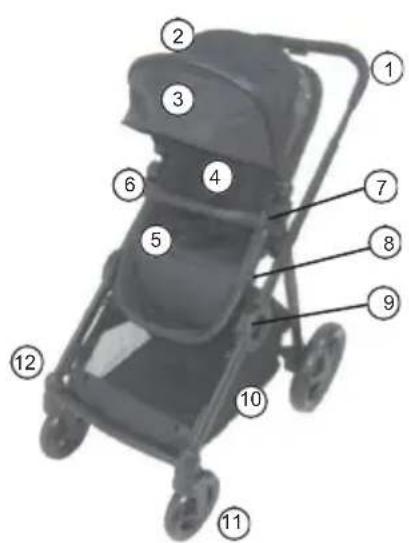
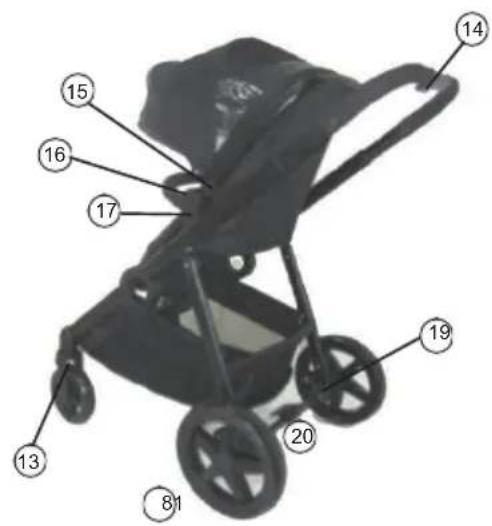
- Handle
- Canopy
- Sun cap
- Shoulder pads
- 5-point harness
- Bumper bar
- Bumper bar release button
- Footrest adjustment button
- Folding button
-
Storage basket (max weight 3 kg)
-
Front wheels
- Front wheel release button
- Front swivel wheel lock
- Handle height adjustment button
- Canopy latch
- Seat adjustment release button
- Seat release button
- Rear wheels
- Parking brake
- Rear wheel release button
ASSEMBLING AND FUNCTIONS
Note! All pictures shown are for illustration purpose only.
Actual product may vary due to product enhancement.
Install/Remove the Seat
1-1. Slide both seat moldings down until they click into position.
1-2. Pull the seat to make sure it is fully engaged.
IMPORTANT! In single seat mode, seat adapters are not needed.
Please install the seat directly on to chassis.
Install/Remove the Wheels
2-1. Insert the front wheel into the tube of the frame until it clicks into position.
2-2. To remove the front wheels: Press the button and pull the front wheel out.
2-3. Insert the rear wheel into the tube of the frame until it clicks into position.
2-4. To remove the rear wheels: Press the release button and pull the rear wheels out.
Canopy attachment
3-1. Attach the canopy to the seat frame by pressing down the black clip of the canopy. Make sure the clip's attachment hole fits over the nob on the side of the seat frame.
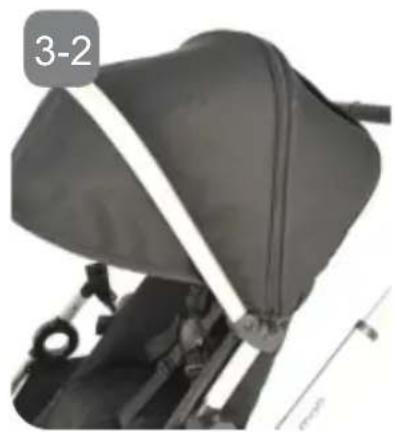
3-2. Zip up the canopy and attach the Velcro on the back of the seat.
Install/Remove the Bumper bar
4-1. To attach the bumper bar, insert its attachment points into openings on seat section until you hear each side click into place.
4-2. To remove the bumper bar, press the release buttons on both sides of the seat and pull the bumper bar out.
Folding the Stroller
Warning: Always remove your child from the stroller prior to folding of stroller.
5-1. Apply the brake before folding the stroller.
5-2. Press the handle adjustment button and slide the handle to its lowest position.
5-3. Remove the seat and/or carrycot by pressing the buttons on both sides of the seat, pull the seat up to remove it.
Note: You do not need to remove the seat when folding the stroller when only one seat section is attached.
5-4. Stand at the front of the stroller. Press the buttons on the sides of the chassis in the direction of the marked arrows and lift it to fold the chassis.
5-5. Push the chassis down in the direction of the arrow.
5-6. Push down as far as possible and secure the hook on the side to prevent the stroller from unfolding during transport.
Install/Remove the front, back seat adapter
6-1. Install the front seat adapters: Insert the adapters on both sides into hinge points until you hear each side click into place.
6-2. Remove the front seat adapters: Separate the adapter clip point by using your finger. Pull the adapter to remove it.
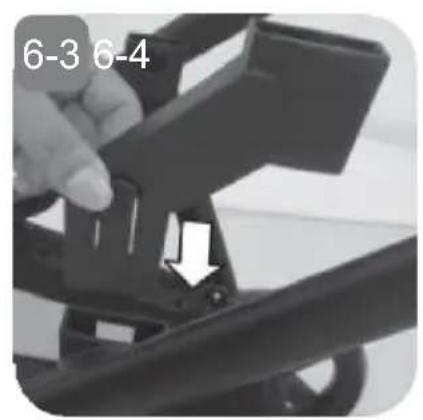
6-3. Install the back seat adapters: Insert the adapters on both sides into hinge points until you hear each side click into place.
6-4. Remove the back seat adapter: Press the release button and pull the adapter upwards to remove it.
IMPORTANT! In single seat mode, seat adapters are not needed. Please install the seat directly on to chassis.
USING YOUR STROLLER
7-1. Lock the front wheel by pushing the swivel wheel lock downwards. Unlock the swivel function by pushing the lock upwards.
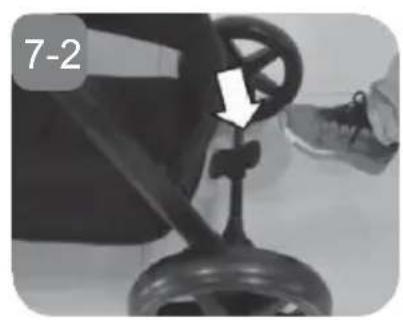
7-2. To lock the rear wheel, push the brake pedal down, push the stroller until the rear wheels locks.
7-3. To unlock the rear wheel, push the brake pedal up.
7-4. Press and hold the adjustment button on the handle and slide the handlebar to desired height. The handlebar will click into place.
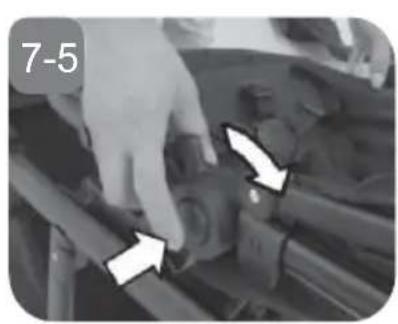
7-5. To adjust the seats recline position, press down the buttons on each sides of the seat downwards and tilt the seat to the desired position.
7-6. To adjust the position of the footrest, press the buttons on both sides of the footrest downwards and tilt the footrest to the desired position.
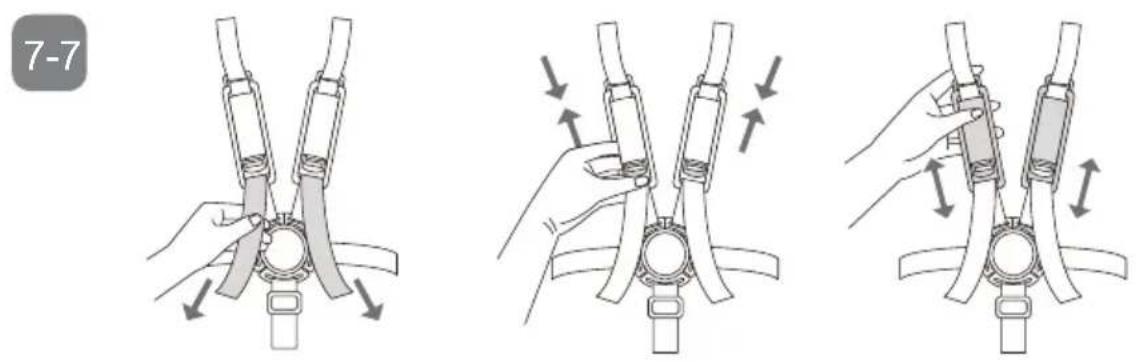
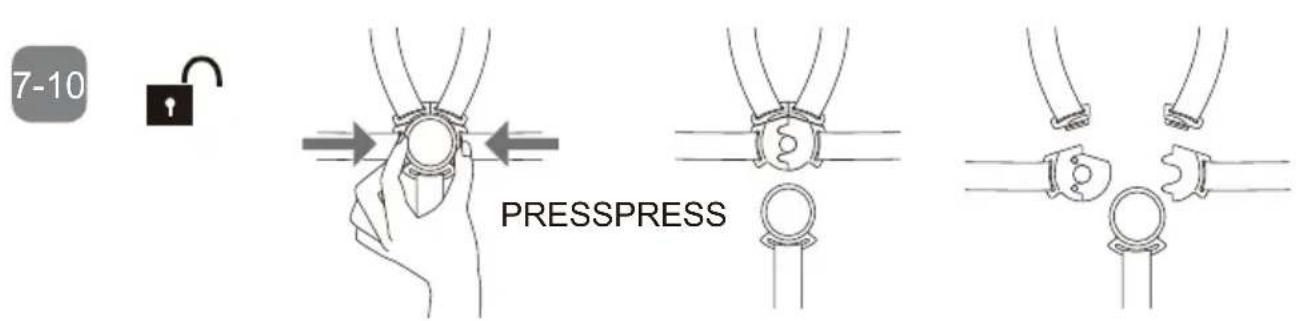
7-7. Place your child in the stroller, with the crotch strap between the child's leg. Tighten the waist strap and shoulder strap.
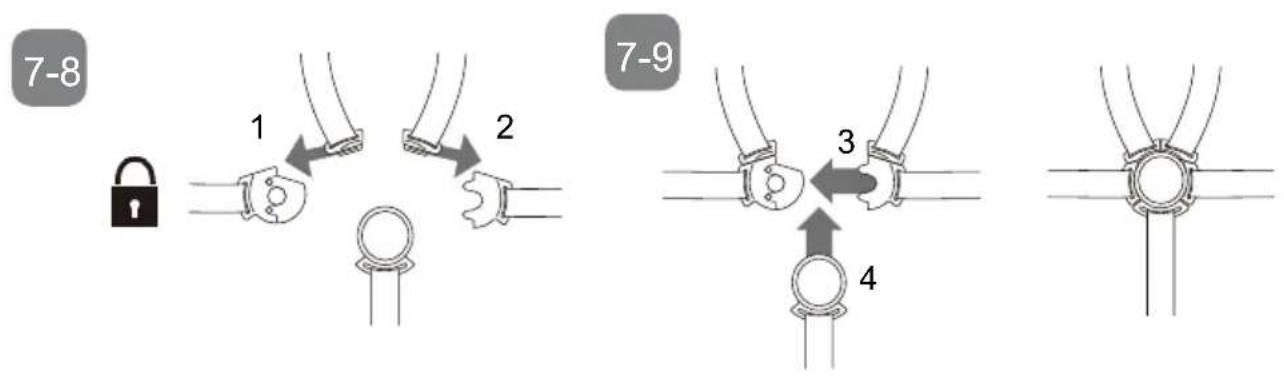
7-8. Fit the harness clips together. Slide the right clip into right buckle until you hear a click.
7-9. Slide the left clip into left buckle until you hear a click. Pull the harness to make sure it is secured.
7-10. To release the harness, press the harness release buttons.
USING THE CANOPY
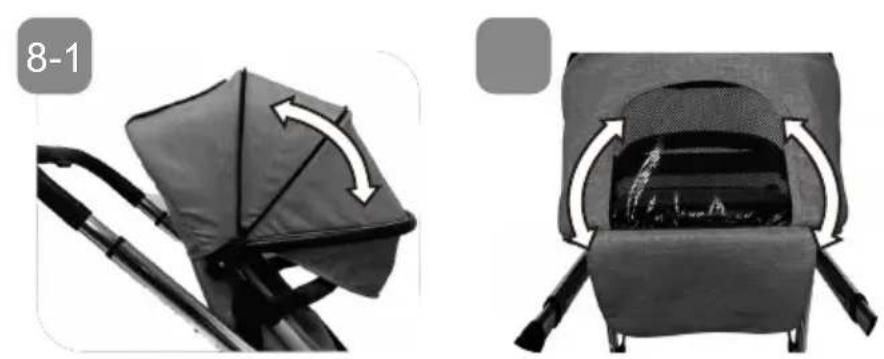
8-1. Adjust the length of the canopy by pulling the canopy. For additional extension, unzip the zipper and fold the extension out. The sun cap can be attached for additional canopy length.
8-2. Lift the lid of the canopy for viewing the child in the stroller, and for additional airflow.
ADJUSTABLE RECLINE POSITIONS (SEAT SECTION)
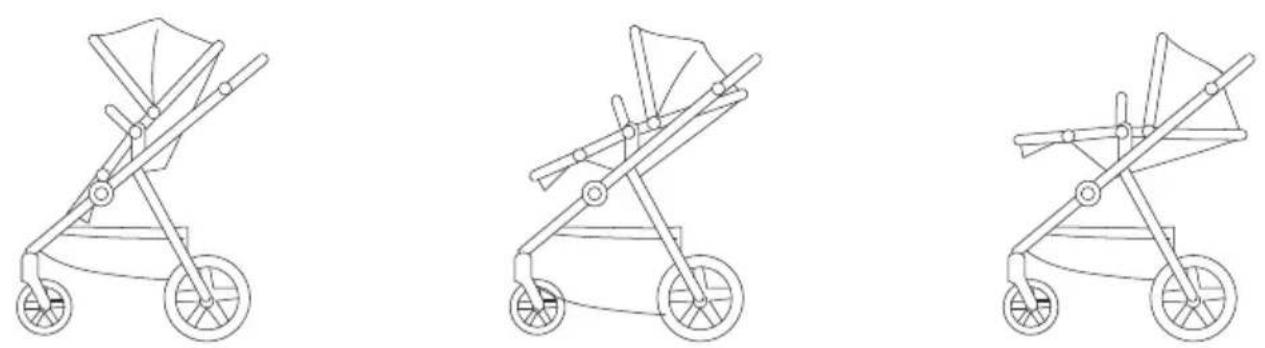
Sitting Position Middle Position Lying position
IMPORTANT! In single seat mode, seat adapters are not needed. Please install the seat directly on to chassis.
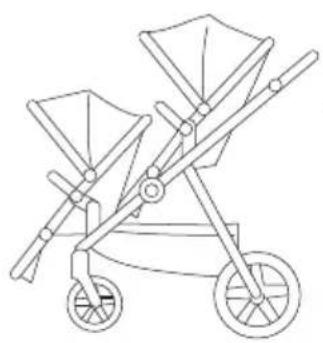
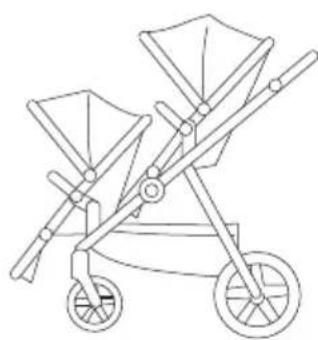
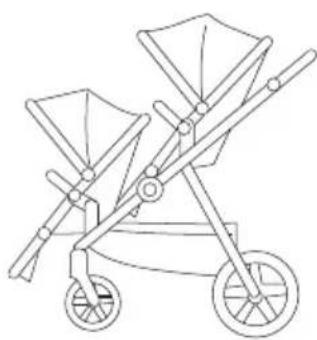
POSSIBLE SEAT POSITIONS USING TWO SEAT SECTIONS
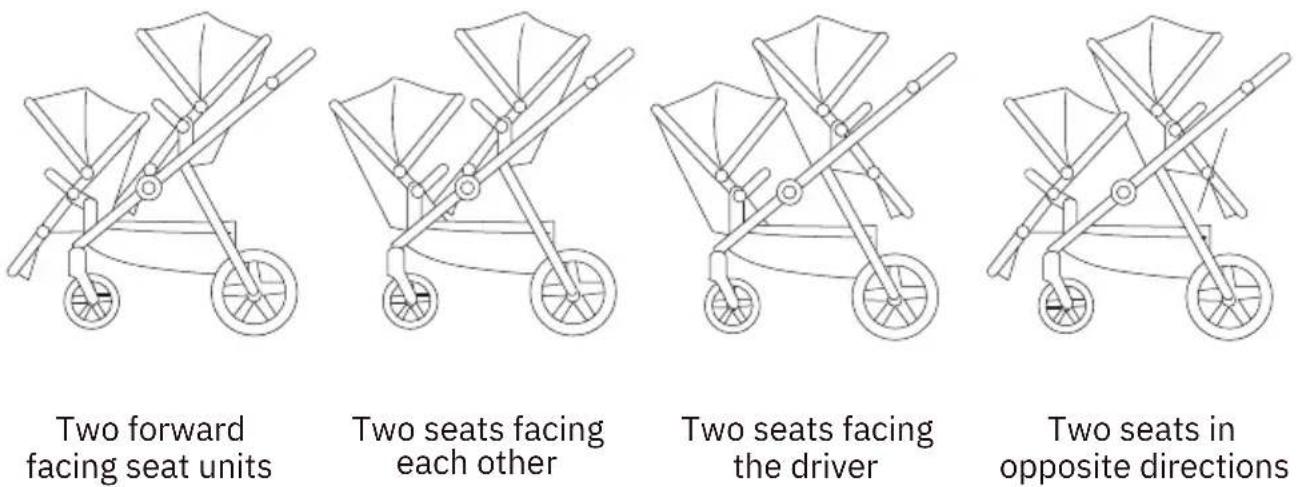
NOTE! The maximum weight of a child placed in the seat sections is 22 kg/seat, or 4 years of age, whichever comes first.
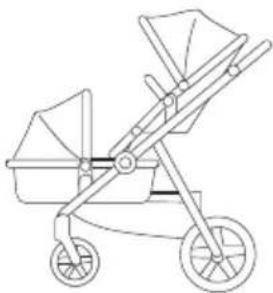
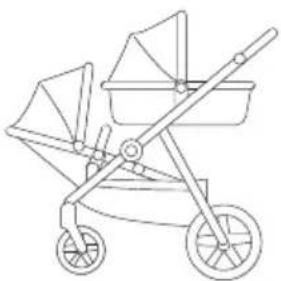
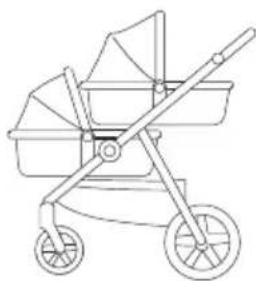
POSSIBLE SEAT POSITIONS USING CARRYCOT/S AND/OR SEAT SECTION
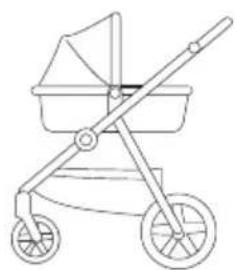
natural_image
Line drawing of a baby stroller with two wheels and a basket (no text or symbols)Using one carrycot (facing the driver).
natural_image
Line drawing of a two-wheeled baby stroller with two generations (no text or symbols)Lower section carrycot facing the driver and upper seat facing driving direction.
natural_image
Line drawing of a two-wheeled baby stroller with two generations (no text or symbols)Lower seat section and upper carrycot, both facing the driver.
natural_image
Line drawing of a baby stroller with wheels and compartments (no text or symbols)Two carrycots, one in upper and one in lower sections, both facing the driver.
NOTE! The maximum weight of a child placed in a carrycot is 9 kg/carrycot. NOTE! Do not use the seat section for children under 6 months. Children under 6 months must be lying down in a carrycot.
CARE AND MAINTENANCE
- Clean and inspect the product regularly.
- Check on a regular basis that the brakes, wheels, latches, connecting elements, belt systems and seams are properly functional.
- Do not expose the product to strong sunlight.
• After use in rain or snow, the wheels should be lubricated, and the vehicle dried to prevent rust. - If stroller is wet due to washing or rain/snow, make sure it dries entirely.
- Stop using the stroller if it is damaged.
- Only use spare parts provided and approved by the manufacturer.
- The seats and infant carrier can be cleaned using soapy water and air dry.
- Do not use harsh cleaning detergent (such as solvents).
WARNING
- Chassi
- Framhjul (x2)
- Bakhjul (x2)
- Sittdel
- Bakre adaptrar
- Främre adaptrar
natural_image
Line drawing of a baby stroller with two wheels and a canopy (no text or symbols)natural_image
Line drawing of a baby stroller with wheels and handle (no text or symbols)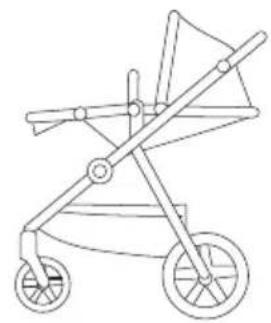
natural_image
Line drawing of a baby stroller with wheels and handle (no text or symbols)MÖJLIGA SITTDELSPOSITIONER MED TVÅ SITTDELAR
natural_image
Line drawing of a two-wheeled baby stroller with wheels and canopy (no text or symbols)natural_image
Line drawing of a two-wheeled baby stroller with wheels and handles (no text or symbols)natural_image
Line drawing of a two-wheeled baby stroller with wheels and handles (no text or symbols)natural_image
Line drawing of a two-wheeled baby stroller with wheels and handles (no text or symbols)- Chassis
- Framhjul (x2)
- Bakhjul (x2)
- Setedel
- Bakre seteadapter
- Fremre seteadapter
- Håndtak
- Kalesje
- Soltrekk
- Skulderputer
- 5-punktsbelte
- Frontbøyle
- Løsneknapp frontbøyle
- Justeringsknapp fotstøtte
- Sammenfoldingsknapp
-
Varekurv (maksimal vekt 3 kg)
-
Framhjul (2)
- Løsneknapp framhjul
- Svinglås framhjul
- Høydejusteringsknapp håndtak
- Kalesjefeste
- Justeringsknapp sete
- Løsneknapp sete
- Bakhjul (2)
- Parkeringsbremse
- Løsneknapp bakhjul
MONTERING OG FUNKSJONER
natural_image
Line drawing of a two-wheeled baby stroller with wheels and handles (no text or symbols)natural_image
Line drawing of a two-wheeled baby stroller with wheels and handles (no text or symbols)natural_image
Line drawing of a two-wheeled baby stroller with wheels and handle (no text or symbols)natural_image
Line drawing of a two-wheeled baby stroller with wheels and handles (no text or symbols)natural_image
Line drawing of a baby stroller with two wheels and a basket (no text or symbols)natural_image
Line drawing of a two-wheeled baby stroller with two generations (no text or symbols)natural_image
Line drawing of a two-wheeled baby stroller with two generations (no text or symbols)natural_image
Line drawing of a baby stroller with wheels and basket (no text or symbols)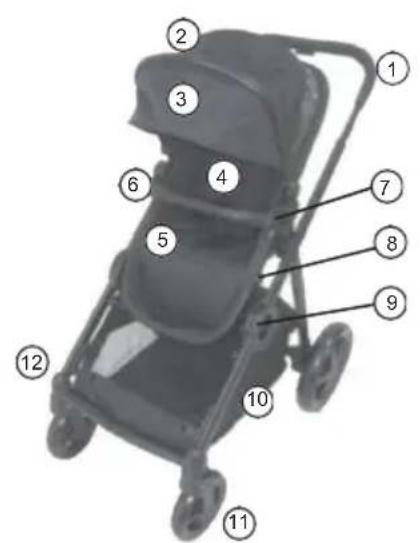
natural_image
Line drawing of a two-wheeled baby stroller with wheels and handle (no text or symbols)natural_image
Line drawing of a stroller with wheels and handle (no text or symbols)natural_image
Line drawing of a baby stroller with wheels and handle (no text or symbols)Liggende stilling
MULIGE SÆDEPOSITIONER VED BRUG AF TO KLAPVOGNSSÆDER
natural_image
Line drawing of a two-wheeled baby stroller with wheels and handles (no text or symbols)natural_image
Line drawing of a two-wheeled stroller with wheels and cabinetry (no text or symbols)natural_image
Line drawing of a two-wheeled baby stroller with wheels and handle (no text or symbols)natural_image
Line drawing of a two-wheeled baby stroller with wheels and handles (no text or symbols)natural_image
Line drawing of a baby stroller with two wheels and a basket (no text or symbols)natural_image
Line drawing of a two-wheeled baby stroller with two generations (no text or symbols)natural_image
Line drawing of a two-wheeled baby stroller with wheels and handle (no text or symbols)natural_image
Line drawing of a baby stroller with wheels and basket (no text or symbols)
KOKOAMINEN JA TOIMINNOT
natural_image
Line drawing of a baby stroller with two wheels and a canopy (no text or symbols)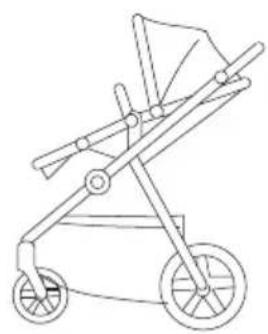
natural_image
Line drawing of a baby stroller with wheels and handle (no text or symbols)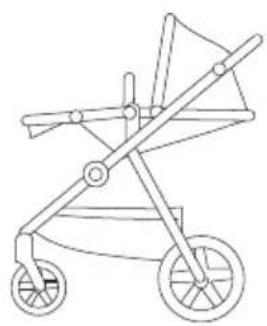
natural_image
Line drawing of a baby stroller with wheels and handle (no text or symbols)Istuma-asento Keskiasento Makuuasento
KAHDEN ISTUINOSAN MAHDOLLISET ASENNUSTAVAT
natural_image
Line drawing of a two-wheeled baby stroller with wheels and handles (no text or symbols)natural_image
Line drawing of a two-wheeled baby stroller with wheels and handles (no text or symbols)natural_image
Line drawing of a two-wheeled baby stroller with wheels and handle (no text or symbols)natural_image
Line drawing of a two-wheeled baby stroller with wheels and handles (no text or symbols)natural_image
Line drawing of a baby stroller with two wheels and a basket (no text or symbols)natural_image
Line drawing of a two-wheeled baby stroller with two generations (no text or symbols)natural_image
Line drawing of a two-wheeled baby stroller with two generations (no text or symbols)natural_image
Line drawing of a baby stroller with wheels and basket (no text or symbols)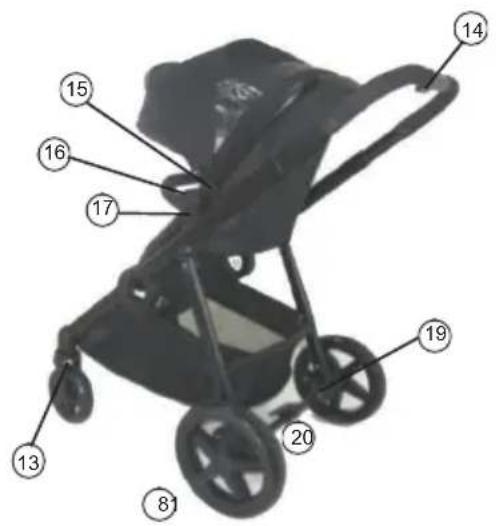
- Håndtag
- Kaleche
- Solskærm
- Schulterpolster
- 5-punktssele
- Frontbügel
- Frontbügel frakoblingsknap
- Fodstøttens justeringsknap
- Foldeknap
-
Aufbewahrungskorb (max. Gewicht 3 kg)
-
Forhjul
- Forhjulets frakoblingsknap
- Svingbart forhjulslås
- Håndtagets højdejusteringsknap
- Kalechelås
- Sædets justeringsknap
- Klapvognsdelens frakoblingsknap
- Baghjul
- Feststellbremse
- Baghjulets frakoblingsknap
MONTAGE UND FUNKTIONEN
natural_image
Line drawing of a baby stroller with two wheels and a canopy (no text or symbols)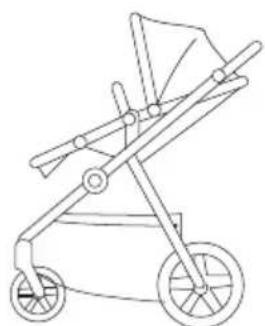
natural_image
Line drawing of a baby stroller with wheels and handle (no text or symbols)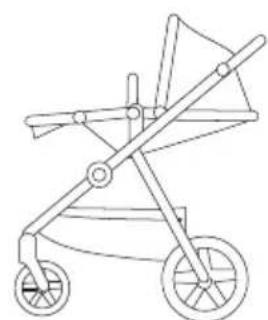
natural_image
Line drawing of a stroller with wheels and handle (no text or symbols)natural_image
Line drawing of a two-wheeled baby stroller with wheels and handles (no text or symbols)natural_image
Line drawing of a two-wheeled baby stroller with wheels and handles (no text or symbols)natural_image
Line drawing of a two-wheeled baby stroller with wheels and handles (no text or symbols)natural_image
Line drawing of a two-wheeled baby stroller with wheels and handles (no text or symbols)natural_image
Line drawing of a baby stroller with two wheels and a basket (no text or symbols)natural_image
Line drawing of a baby stroller with two wheels and two side baskets (no text or symbols)natural_image
Line drawing of a two-wheeled baby stroller with two wheels and a basket (no text or symbols)natural_image
Line drawing of a baby stroller with wheels and compartments (no text or symbols)Produced by: Jollyroom AB
Sörredsvägen 111
SE- 418 78 Göteborg
SWEDEN
Contact:
+46(0)31 310 00 00

Fremstillet af: Jollyroom AB
Sörredsvägen 111
SE-418 78 Gøteborg
SVERIGE
Kundeservice:
+45 88 44 88 88

Producerad av: Jollyroom AB
Sörredsvägen 111
SE-418 78 Göteborg
SVERIGE
Konsumentkontakt:
+46(0)31 310 00 00
