805-895 - Toy Nordic Play - Free user manual and instructions
Find the device manual for free 805-895 Nordic Play in PDF.


| Product Type | Play Tent |
| Brand | Nordic Play |
| Model | 805-895 |
| Dimensions (Assembled) | 100 x 100 x 100 cm |
| Weight | 1.5 kg |
| Recommended Age | 3 years and up |
| Material | Polyester fabric, steel frame |
| Battery Required | No |
| Assembly Required | Yes |
| Number of Pieces | 1 tent, 1 carrying bag |
| Portability | Folds flat, includes carry bag |
| Cleaning Instructions | Wipe clean with damp cloth; mild soap if needed |
| Safety Standards | Meets EN71 toy safety standards |
| Indoor/Outdoor Use | Indoor use recommended; outdoor use in dry weather |
| Spare Parts Availability | Not applicable (single unit) |
Frequently Asked Questions - 805-895 Nordic Play
User questions about 805-895 Nordic Play
0 question about this device. Answer the ones you know or ask your own.
Ask a new question about this device
Download the instructions for your Toy in PDF format for free! Find your manual 805-895 - Nordic Play and take your electronic device back in hand. On this page are published all the documents necessary for the use of your device. 805-895 by Nordic Play.
USER MANUAL 805-895 Nordic Play
natural_image
Black and white toy off-road vehicle with visible tires, front panel, and roof structure (no text or symbols)

Size 99,5 x 66 x 71 cm
Art. no. 805-895
EAN 5705858718828
Imported by / Importeret af
NSH NORDIC A/S
Virkefeltet 4
DK-8740 Braedstrup
Made in China / produceret i Kina
General safety rules for NORDIC PLAY products
Warning:
- The vehicle may not be used on roads, sidewalks, in hills or sand.
- The vehicle should only be used on flat surfaces.
- Do not overload the vehicle. Pay attention to the maximum weight limits. Typical maximum total weight is 25 - 35 kg. Please check for your specific model.
- Only adults may charge the battery.
- Children using the vehicle should always be supervised by a responsible adult.
- Do not charge the vehicle's circuit.
- Do not drive in water or other fluids.
- Stop the vehicle when it is approaching an obstacle, turn away from the obstacle and drive somewhere else.
- Please charge the battery when the vehicle starts to drive slowly, otherwise the battery's lifespan can be shortened.
- Please charge the battery fully before the battery is stored for longer periods without use. Charge the battery every three months to extend the battery's lifespan.
- Do not drive during rain.
- Battery, charger, electrical cables, outlets and other parts should periodically be checked. If damages are discovered, the vehicle may not be used until these are fixed.
- The charger should be checked for damages on cord, plug and other parts periodically. If there are damages, the charger may not be used until the damage is fixed.
- Vehicle with a battery may not be used by children under 3 years of age.
- Push/foot-to-floor vehicles without a battery can be used from 1 year of age.
- The vehicle may only be used with the recommended charger.
• The charger is not a toy. - Only clean with a damp cloth.
- Check that all parts are undamaged. If not, repair or change these.
- It is a good idea to use safety equipment, depending on the vehicle.
- Worn out batteries should be removed/changed from the vehicle.
- The battery should be removed before the vehicle is disposed of.
- Declaration of conformity: This product is in accordance with EU directive 2014/53 / EU.
Warning:
For your child's safety, pay attention to the following:
- Only adults may assemble the product.
- Small parts and plastic parts should be kept away from the child to avoid risk of suffocation.
- Children may not touch or open the battery holder.
• Adult supervision is required. - Vehicles with a battery may not be used by children under 3 years of age.
- Push/foot-to-floor vehicles without battery can be used from 1 year of age.
- Use the vehicle with caution, since driving skills are required to avoid falls or crashes that can result in injuries to the user or third party.
- Instructions on how the vehicle is used should be given to the child before use – especially for the braking system.
- May not be used in traffic. Only use the vehicle on private property.
- Only drive on flat surfaces away from other vehicles and obstacles.
General safety rules for NORDIC PLAY products
- Avoid sharp bumps and sudden changes of the surface.
- Avoid roads and surfaces with water, sand, gravel, dirt, leaves and other debris.
- Wet weather can reduce the traction, brake effect and visibility.
- Do not drive when it is dark.
- Avoid excessive speed in conjunction with downhill driving.
- Watch out for pedestrians.
- Check and tighten all screws before every drive. Do not allow two or more children to use the vehicle at once.
- Do not use the vehicle if it has damages.
-
Change damaged parts immediately.
-
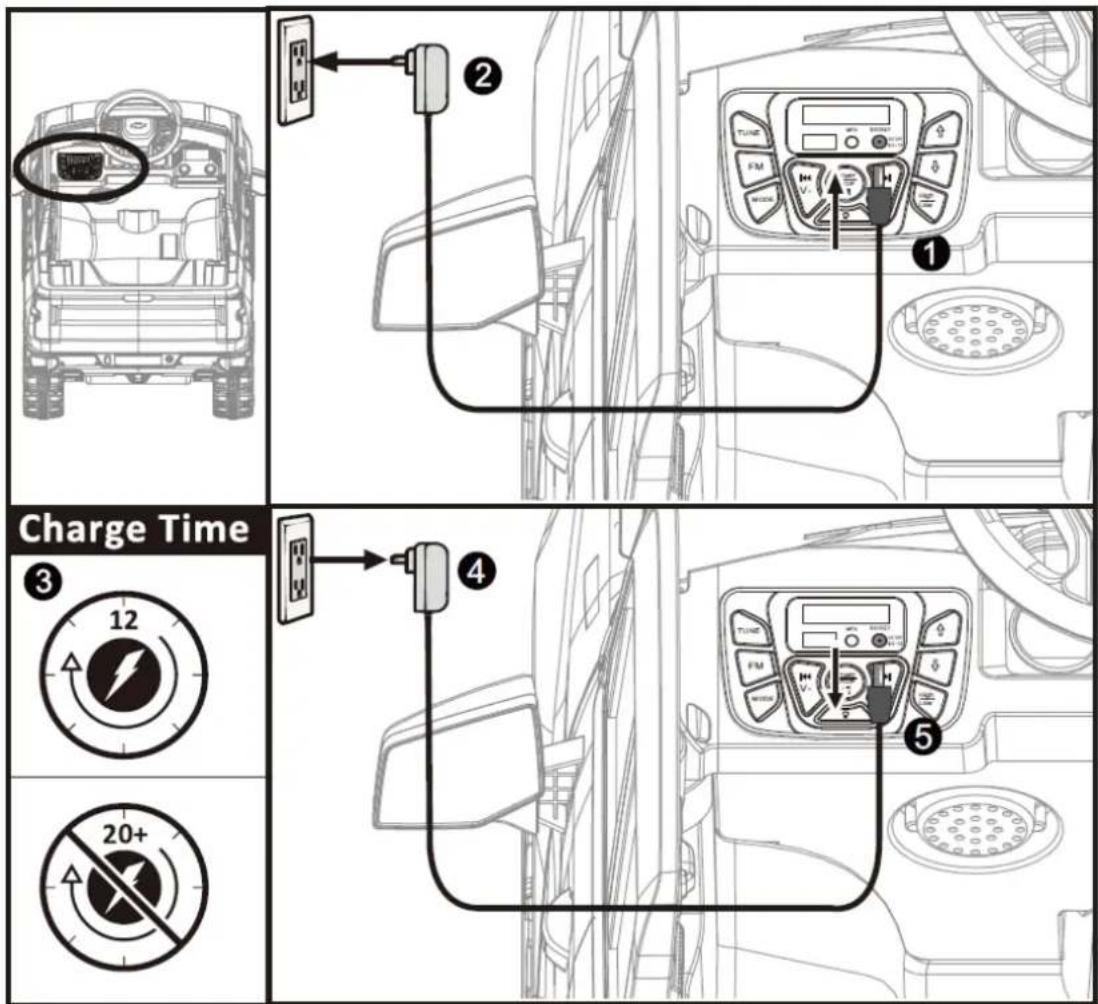
Insert 220V/12V charger cable's connector to the vehicle.
- Insert actual 220V/12V charger unit to your 220V power outlet. The battery will start charging.
- Detach after 8-12 hours
IMPORTANT NOTE: When shifting (forward/backward), please make sure the vehicle is completely stopped, otherwise it will damage the gear box and motor.
Forward: 1. Press the "Forward/backward switch" to the "Forward" position.
- Press the "Foot pedal", the vehicle drives forward.
Stop: 1. The vehicle will brake automatically, when foot is lifted from the "foot-pedal".
Back Up: 1. Press the "Forward/backward switch" to the "Backward" position.
- Press the "Foot pedal", the vehicle will back up.
Loosen the screw from the back of the seat seat, take away the seat. Then connect the battery line red wire to the red terminal of the battery and finally then connect black wire to black battery terminal. Never connect wires into the uncorrect battery terminals. After the connections, please assemble the seat back to the original place and tighten the screw.
Battery replacement and fuse
The battery is equipped with a thermal fuse which blows if the motor, battery or electrical circuit is overloaded. The vehicle must then be switched off for at least 5 minutes, after which the fuse will restore itself. If the product does not work, the fuse may therefore be the problem. To avoid this, read the following points:
- Do not overload the vehicle.
- Do not pull anything behind the vehicle.
- Do not drive up steep hills.
- Do not run into motionless objects that cause the wheels to spin.
- Do not drive at extreme temperatures.
- Make sure the product does not come into contact with liquids.
- Do not touch the electrical circuit.
As the battery gets older it will start to lose some of its capacity. Depending on the conditions, it can last anywhere from 1 - 3 years. If the battery needs a replacement, follow these steps:
- Loosen the crew and remove the seat.
- Disconnect the cables from the battery terminals.
- Remove the battery cover.
- Carefully lift the battery out of the vehicle. Depending on the condition of the battery (leakage or similar), safety equipment may be required. Do not lift the battery from its wires but from the battery itself.
- Put the battery in a plastic bag and dispose it responsibly. NEVER put the battery to general waste.
- Insert the new battery into the vehicle.
- Reconnect the cables to the new battery. Red wire to red terminal (+) and black wire to black terminal (-) of the battery.
- Slide the seat into place. Tighten the screw.
| Problem Possible Cause Solution | ||
| Vehicle does not run Battery low on power Recharge battery. | ||
| Thermal fuse has tripped Let the vehicle cool down for 5 minutes.Do not overload the vehicle. | ||
| Battery connector or wires are looseCheck that the battery connectors and wires are firmly connected. | ||
| Battery is dead Battery lasts 1-3 years. Replace battery and recycle the old battery responsibly. | ||
| Electrical system is damagedContact your distributor please. | ||
| Motor is damagedContact your distributor please. | ||
| Vehicle does not run very long Battery is not properly charged. Check that the battery connectors are firmly plugged into each other when recharging. Recharge battery again. | ||
| Battery is old Battery lasts 1-3 years. Replace battery and recycle the old battery responsibly. | ||
| Vehicle runs sluggishly Battery low on power Check that the battery connectors are firmly plugged into each other when recharging. Recharge battery again. | ||
| Battery is old Battery lasts 1-3 years. Replace battery and recycle the old battery responsibly. | ||
| Vehicle is overloadReduce weight on vehicle.Maximum user weight is 25 kgs. | ||
| Vehicle is being used in unsuitable conditionsUse the vehicle on flat, even surfaces. | ||
| Vehicle needs a push to go forward | Poor contact of wires or connectors | Check that the battery connectors are firmly plugged into each other when recharging. Recharge battery again. |
| “Dead Spot” on motor A dead spot means the electric power is not being delivered to the terminal con nection and the vehicle needs repair.Contact your distributor please. | ||
| Difficult shifting from forward to reverse or vice-versa | Attempting to shift while the vehicle is motion | Always completely stop the vehicle before shifting. |
| Loud grinding or clicking noises coming from motor or gear box | Motor or gears are damagedContact your distributor please. | |
| Battery will not recharge | Battery connector or adapter connector is loose | Check that the battery connectors are firmly plugged into each other when recharging. Recharge battery again. |
| Charger not plugged in | Check that the battery charger is plugged into a working wall outlet. | |
| Charger is not working | Contact your distributor please. | |
| Charger feels warm when recharging | This is normal and not a cause for concern | |
Completely read through this manual and the troubleshooting guide table before calling. If you still need help resolving the problem Contact your distributor please.
Maintenance
- Check all screws periodically and tighten as needed.
- Check the vehicle's plastic components frequently for damage.
- The mechanical parts of the vehicle can be lubricated with oil if necessary.
- Store the product indoors to protect it from the weather.
- Keep product away from hot items such as stove and the likes.
- Do not drive in rain, snow, sand and gravel as this may damage the product.
- Do not clean the product with a garden hose and do not use soap. A dry or moist cloth is enough.
If the product is not to be used for an extended period, recharge the battery and then disconnect all cables
Installation and Operating Instructions

natural_image
Line drawing of a multi-axle off-road vehicle with large tires and front suspension (no text or symbols)Please read the operating instructions carefully before use
Before using the vehicle the child should understand the vehicle controls and safety issues. They must also demonstrate the capability to handle the vehicle and operate its controls. It is the responsibility of the adult to educate the child and supervise the vehicles use. Read the following safety warnings to any child using the vehicle before riding.
| Suitable age: 37 - | 96 months Battery: 12V 4.5Ah | ||
| Load Capacity: 30 | kg Size of car: 99,5 x 66 x 71 cm | ||
| Speed: 2-4 km/h | |||
| Material: Metal and plastic | Optimum temperature: | 0 - 40° | |
| Charger: | Input: 100-240V AC | Charging time: | 8 - 12 hours |
| Output: DC 12V 500 - 1000mA | Motor DC 12V | ||
Our products are suitable for ASTM F963; GB6675,GB19865; EN71 and EN62115 standard.
Parts list
| NO. | QTY PICTURE | NO. QTY PICTURE | |||
| 1 1 | 2 1 | 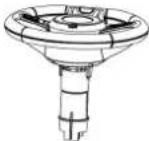 A (Steering wheel) A (Steering wheel) |  B (Instruction Book) B (Instruction Book) | ||
| 3 4 | 4 4 | 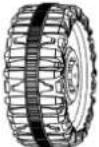 C (Wheel) C (Wheel) | 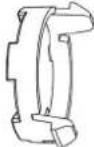 D (Wheel cover) D (Wheel cover) | ||
| 5 1 | 6 1 |  E (Remote control) E (Remote control) |  F (Rear Axle) F (Rear Axle) | ||
| 7 4 | 8 1 | 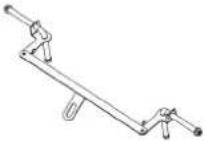 G (Front Axle) G (Front Axle) | 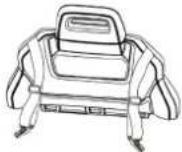 H (Backrest) H (Backrest) | ||
| 9 1 | 10 1 |  I (Seat) I (Seat) |  L (Wind deflector) L (Wind deflector) | ||
| 11 1 | 12 1 set | 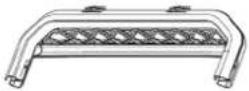 K-1 (Tail bracket - upper part) K-1 (Tail bracket - upper part) | 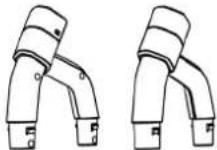 K-2 (Tail bracket - lower part) K-2 (Tail bracket - lower part) | ||
| 13 1 | set 14 1 |  L (Tail bracket light) L (Tail bracket light) | 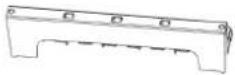 M (Tail box parts) M (Tail box parts) |
*Photos are for reference ONLY.
Parts list
| NO. | QTY PICTURE | NO. QTY PICTURE | |||
| 15 1 | 16 1 | 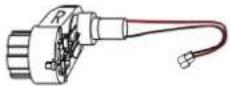 N (Motor R) O (Motor L) N (Motor R) O (Motor L) |  | ||
| 17 6 | 18 2 |  P (Self-tapping screw) Q (M8 spanner) P (Self-tapping screw) Q (M8 spanner) |  | ||
| 19 1 | 20 2 |  R (Charger) S (Spring) R (Charger) S (Spring) | 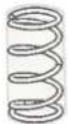 |
INSTALLATION INSTRUCTION
text_image
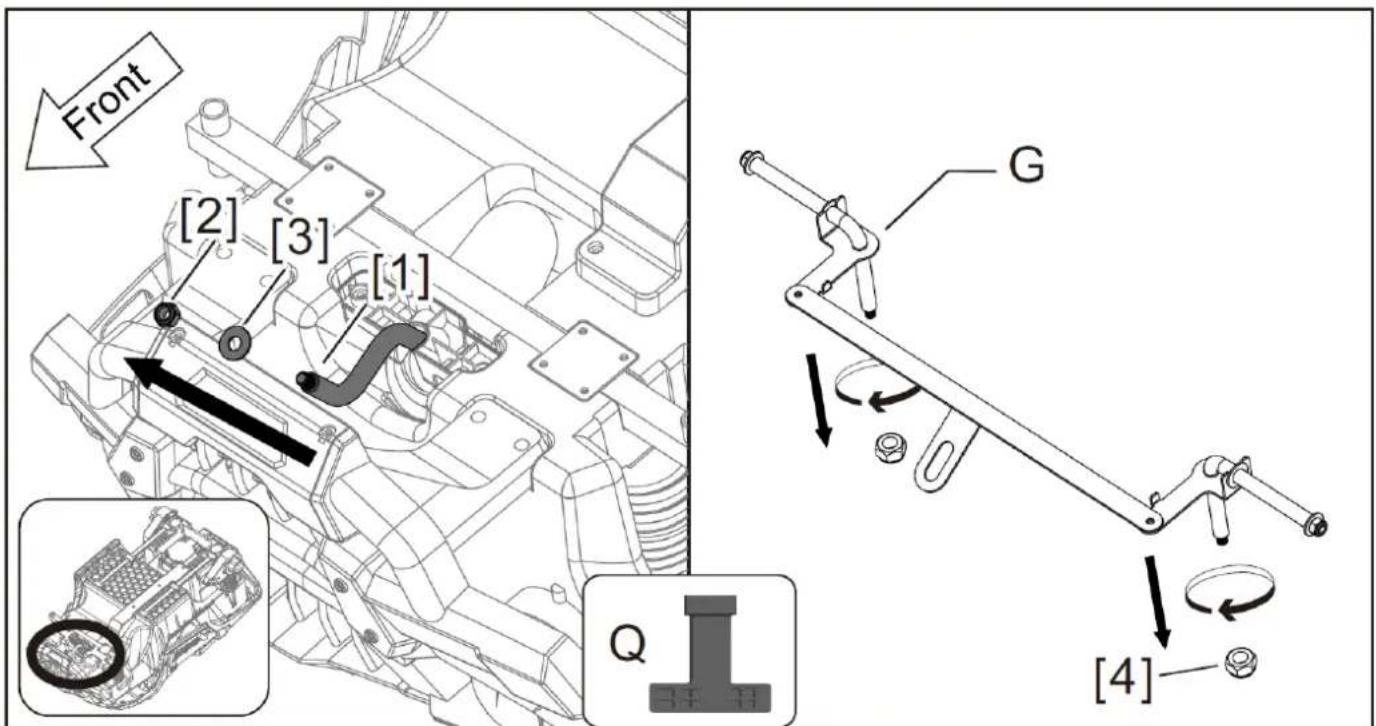
Front [2] [3] [1] G Q [4]Step 1: Install the front axle
- Use Q (M8 spanner) to loose the [2] nut from the [1] steering shaft in counterclockwise direction, and also take down the [3] gasket.
- Use Q (M8 spanner) to loose the [4] nut from the G (front axle) in counterclockwise direction.
text_image
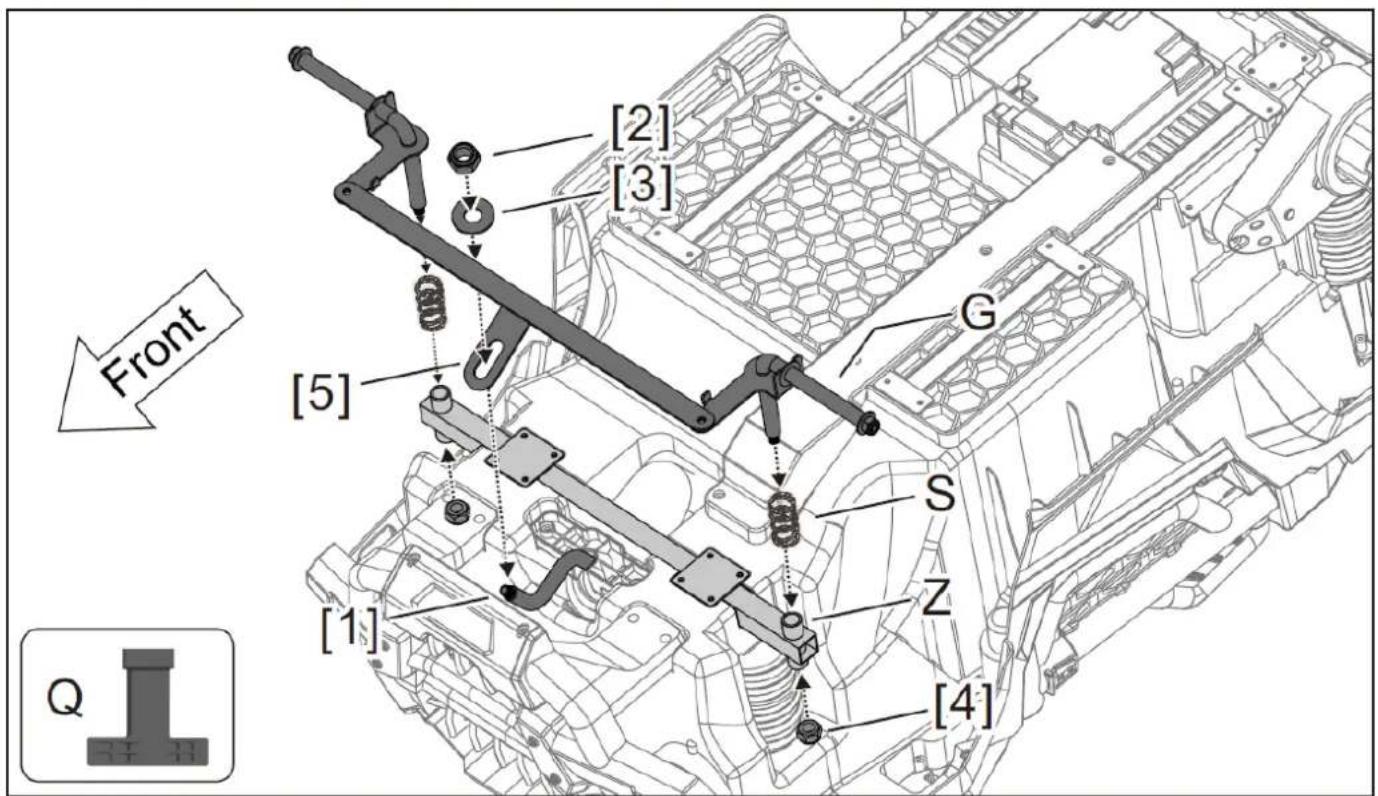
[2] [3] Front [G] [5] [S] Z [1] [4] Q- Install the S (spring) at Z (square pipe), then insert the G (front axle) through the S (spring) and square pipe, finally install the [4] nut in clockwise direction (in the meantime, insert the [5] of front axle should through the [1] steering shaft, then install the [3] gasket and [2] nut to fix them in clockwise direction).
text_image
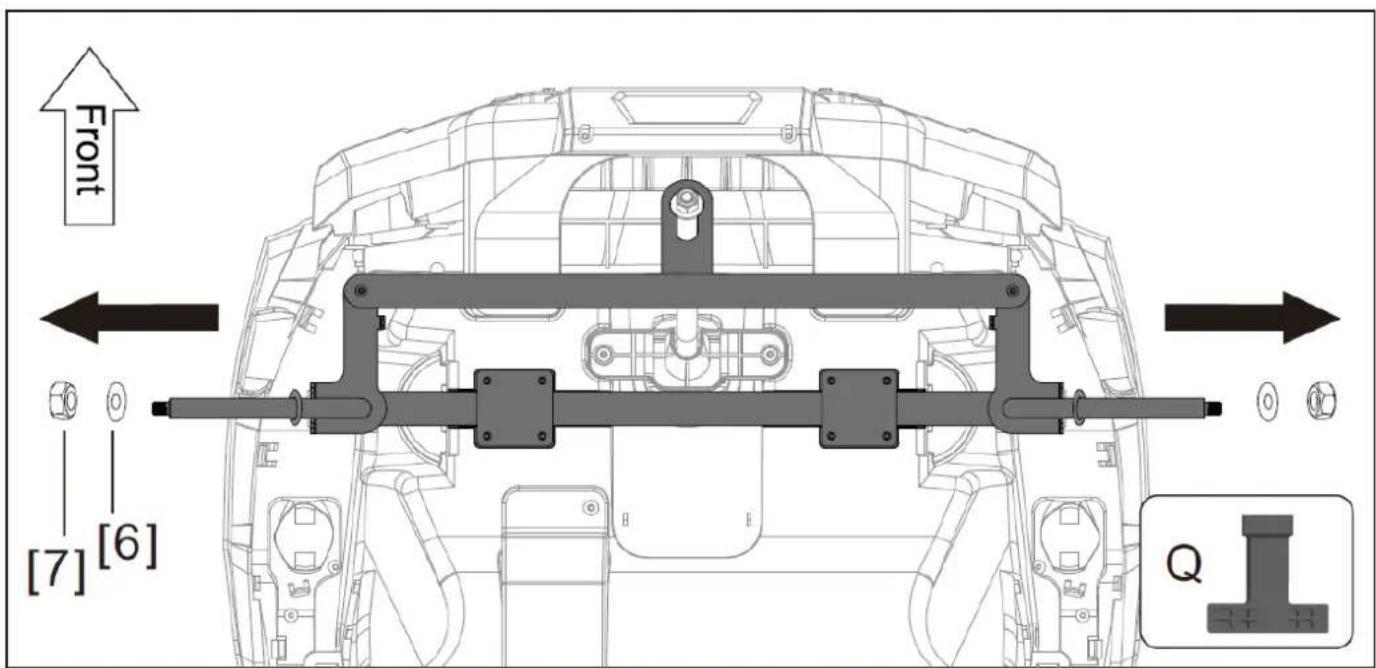
Front [7] [6] Q- Use Q (M8 spanner) to loosen the [7] nut from the front axle, and take down one piece of gasket from the front axle ( keep the other one piece of gasket on front axle ), as show in figure.
Installation Steps
text_image
① [9] [8] F Q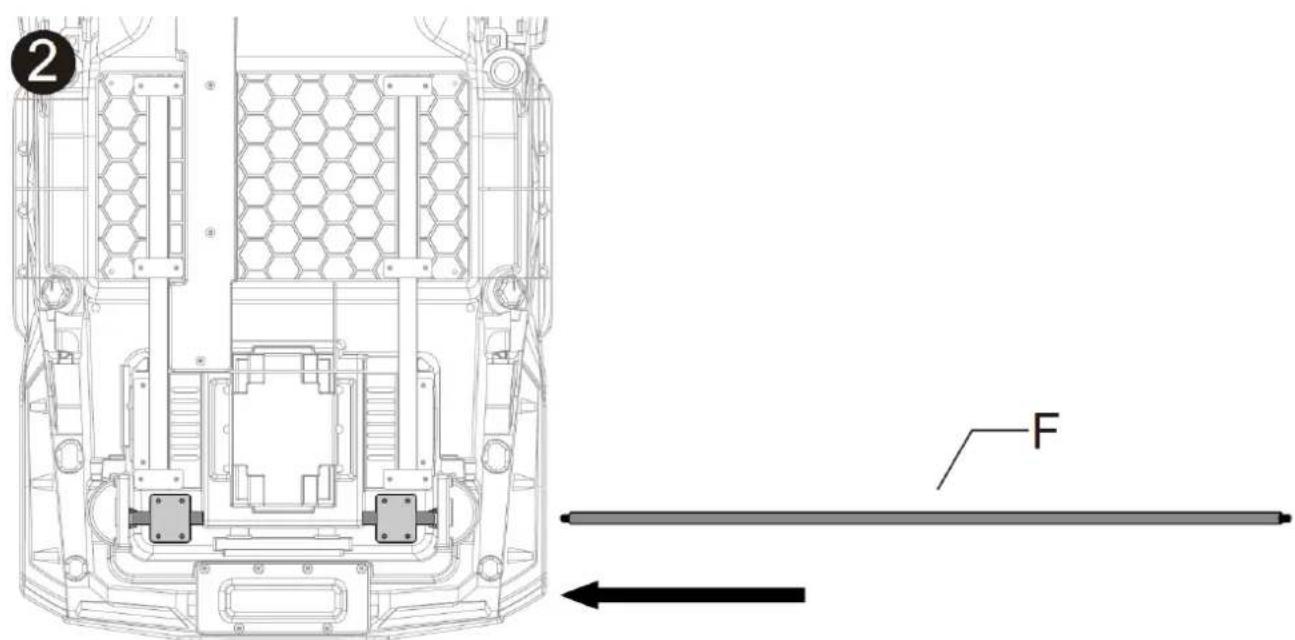
text_image
2 F
text_image
(3) [10] Z Z [10] N O FrontStep 2: Install the rear axle
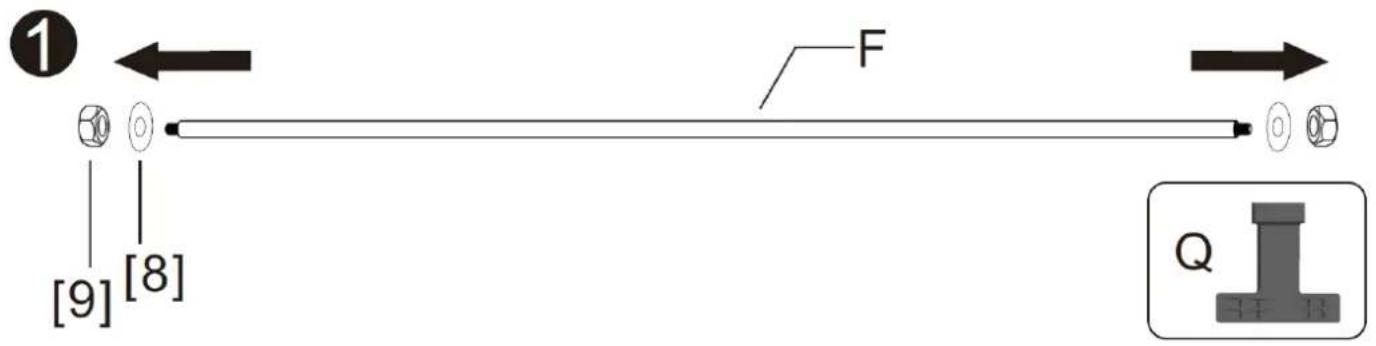
- Use Q (M8 spanner) to loose the [9] nut and [8] gasket from F (real axle).
- Install F (rear axle) into the body slot as shown in the figure.
- Install X (left motor) on F (rear axle), install the motor terminal and [10] in slot Z. Repeat on the other side.
text_image
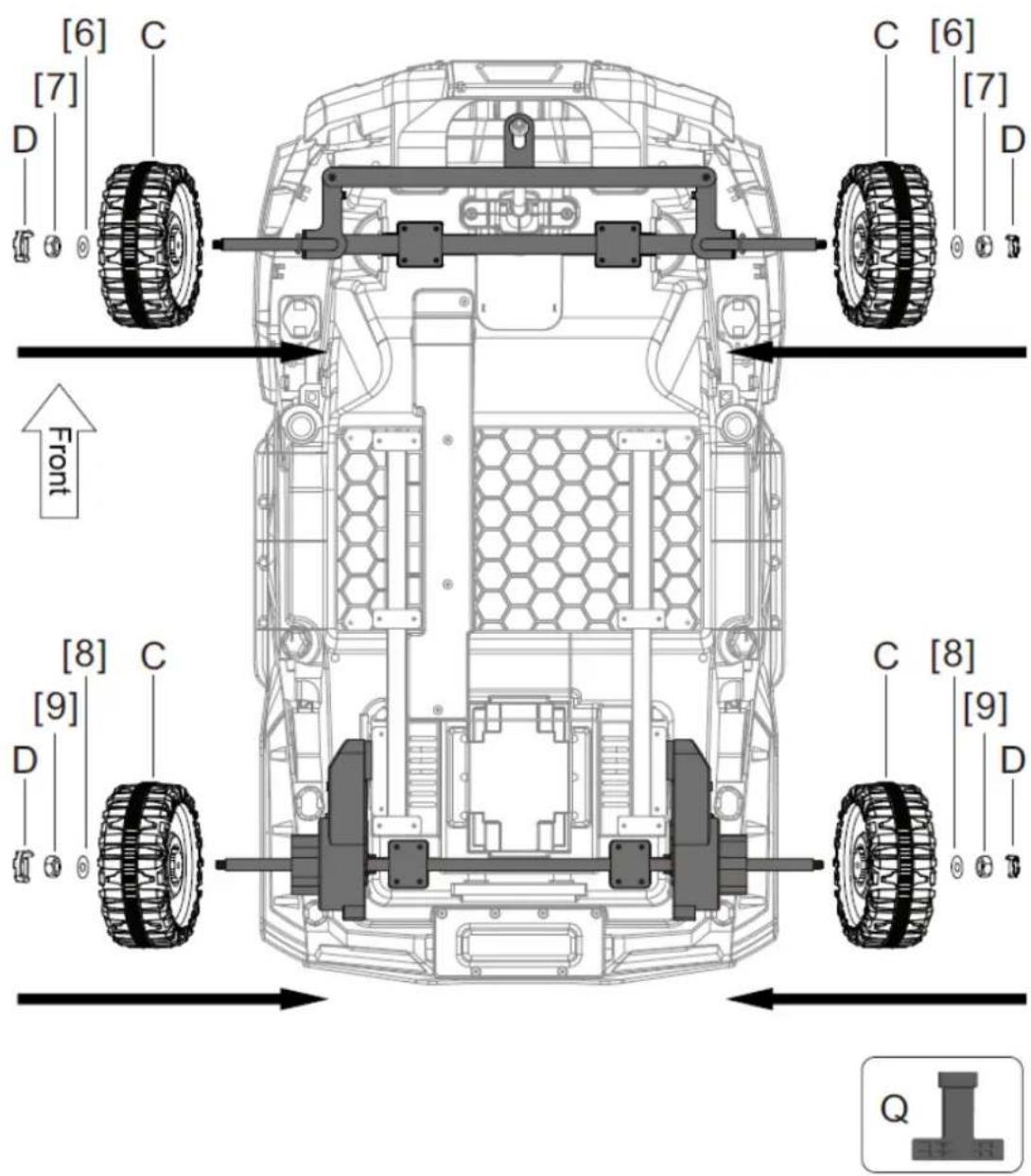
[6] C [7] D Front [8] C [9] D C [8] [9] D QStep 3: Install the wheel
- Install C (wheel) and [6] gasket and [7] nut onto the front axle, then install the D (wheel cover) onto the C (wheel) finally.
- Install the rear wheel in same way, (reminder: tighten the nuts at both ends of rear axle at same time).
Installation steps
text_image
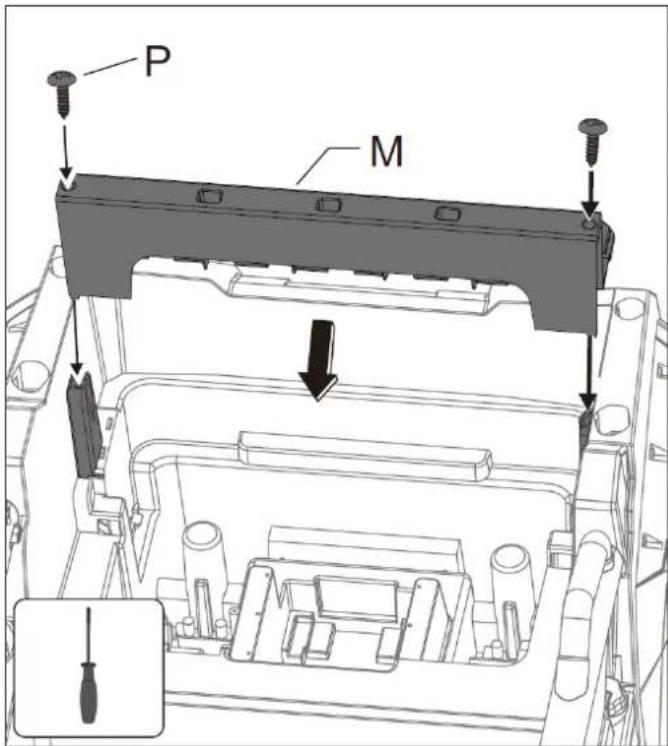
P MStep 4: Install tail box parts
Place and fix M (tail boxparts) on the corresponding position as shown in figure.
Use 2 P (self-attack screws) to fix it.
text_image
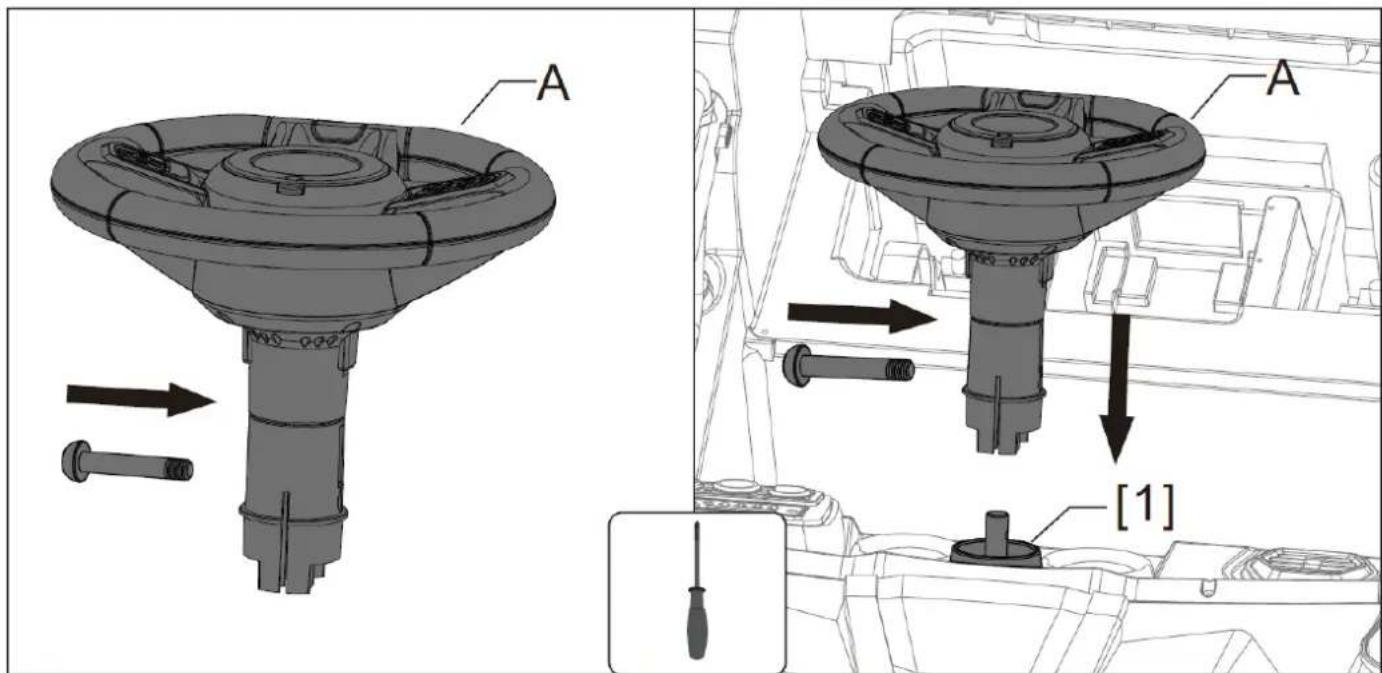
A A [1]Step 5: Install steering wheel
- First use screwdriver to wring the screw out of A (steering wheel) by counterclockwise.
- Press A (steering wheel) into [1], then use the screw to fix it.
Installation Steps
text_image
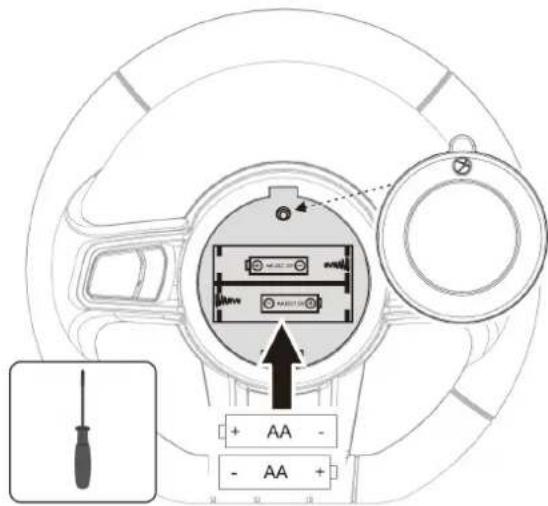
Diagram of a car interior showing labeled components including screwdriver, battery, and fan with directional arrows indicating movement or assembly.Step 6: Install steering wheel battery Firstly use a screwdriver to unscrew the steering wheel cover in counterclockwise, then install 2 AA batteries as shown, finally cover the cover and tighten the screws in clockwise.
WARNING
- All batteries should be inserted in the correct polarity.
- Non-rechargeable battery cannot be recharged
- Take out and properly deal with the dead battery. To avoid injury, please keep kids away from the battery.
- The direct contact between the positive and negative terminals may result in fire or explosion. Avoid direct connect between the terminals.
- Do not mix old and new batteries. DO not mix alkaline, standard(carbon-zinc), or rechargeable (nickel-cadmium) batteries.
- Only an adult who has read and understood the safety warnings can recharge the battery.
text_image
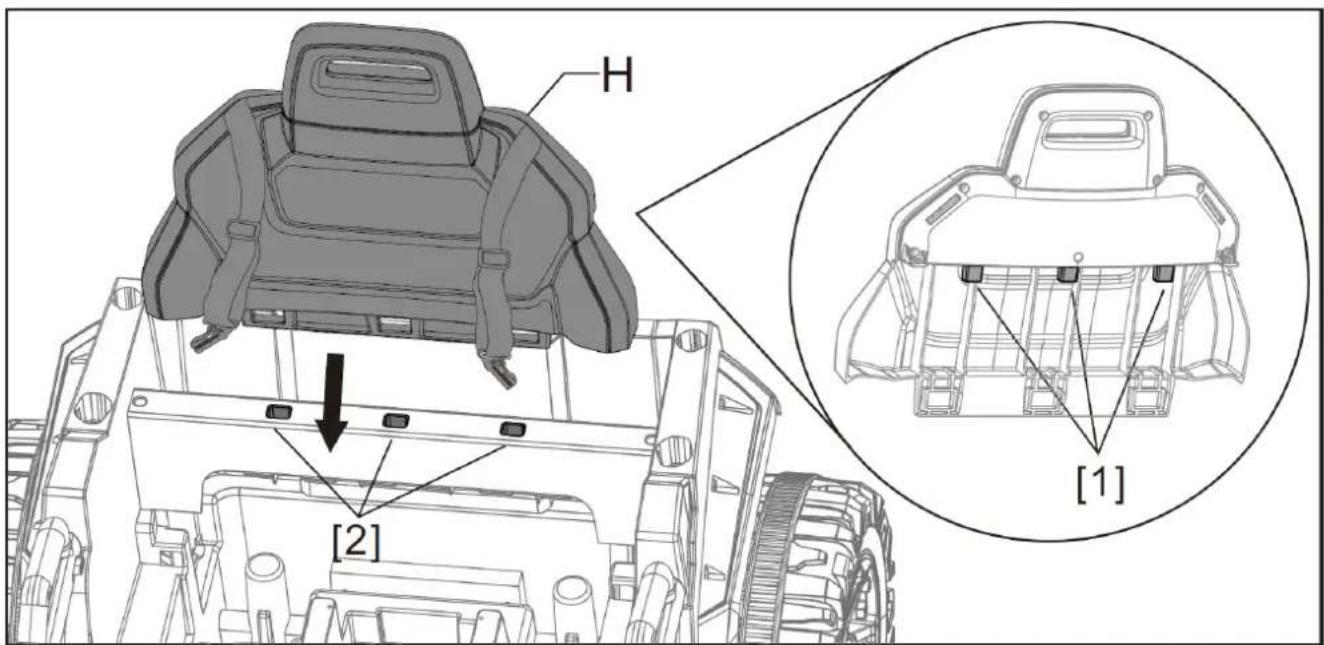
H [2] [1]Step 7-1: Install back of the chair
Place H (back of the chair) on the corresponding position as shown in figure. Note: the 3 [1] need to be inserted into the 3 [2] on the car body as shown in figure.
Installation Steps
text_image
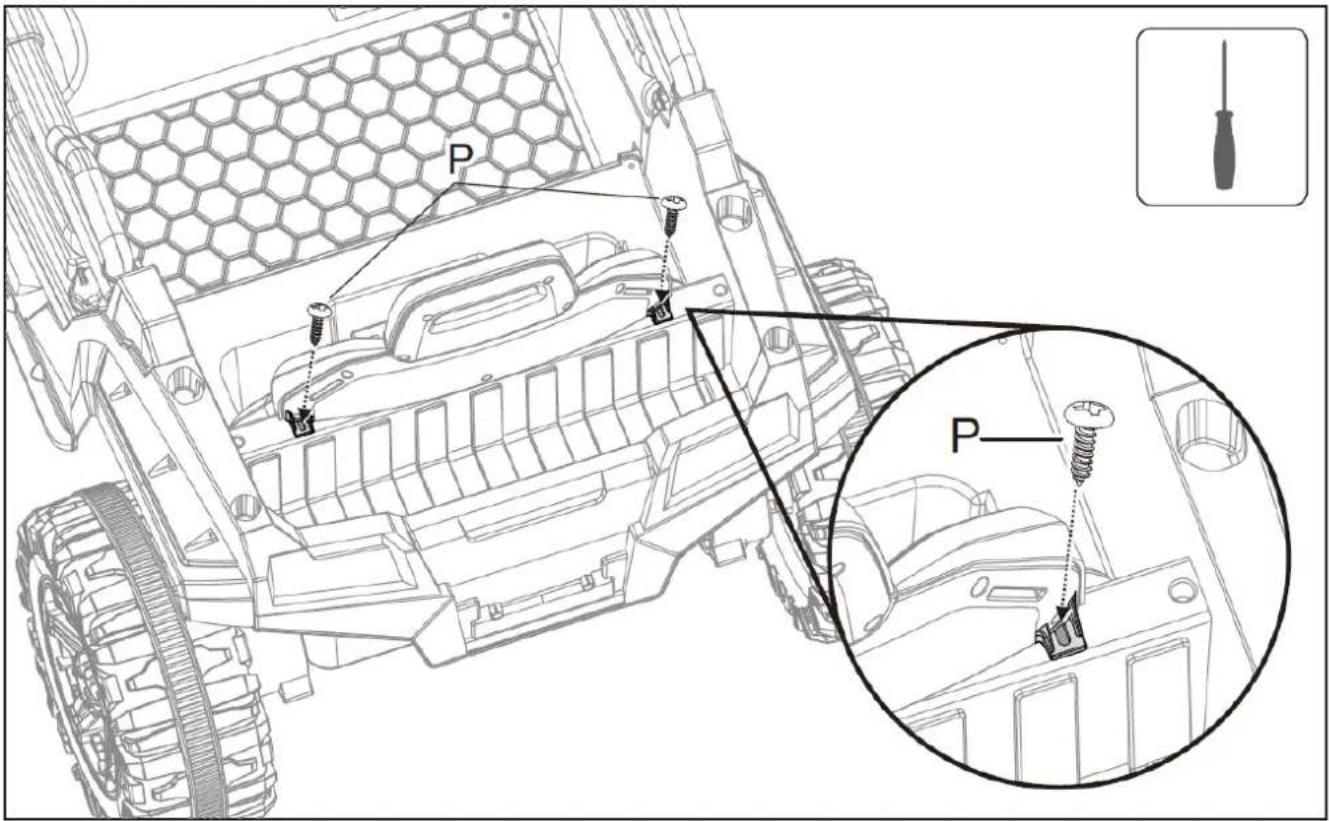
P PStep 7-2: Install back of the chair
Tighten clockwise with 2 P (self-tapping screws) as shown in the figure.
text_image
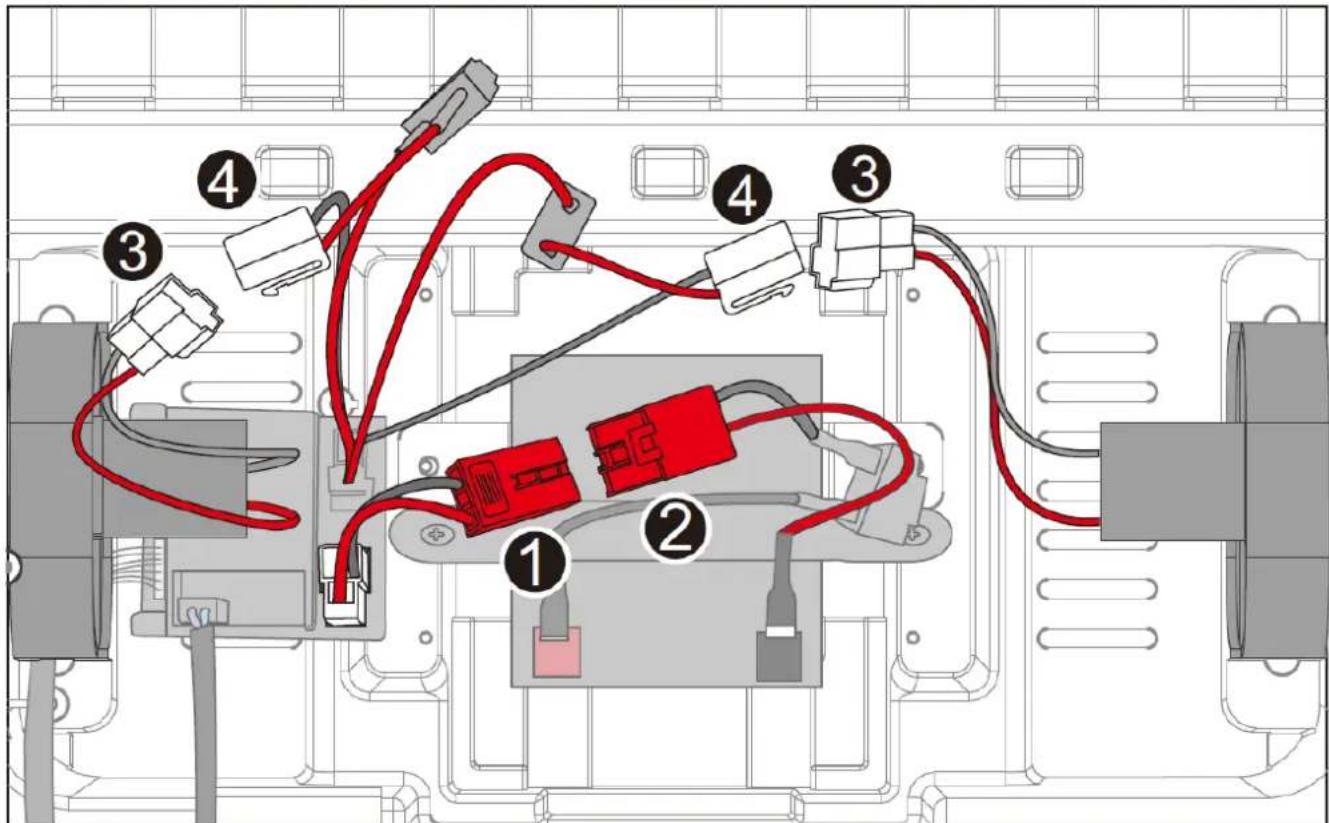
Diagram of an electronic device rear panel with labeled components including connectors and wiring pathsStep 8: Connect the power
First connect the terminal 3 and 4
Then connect the power port 1 and 2
Installation Steps
text_image
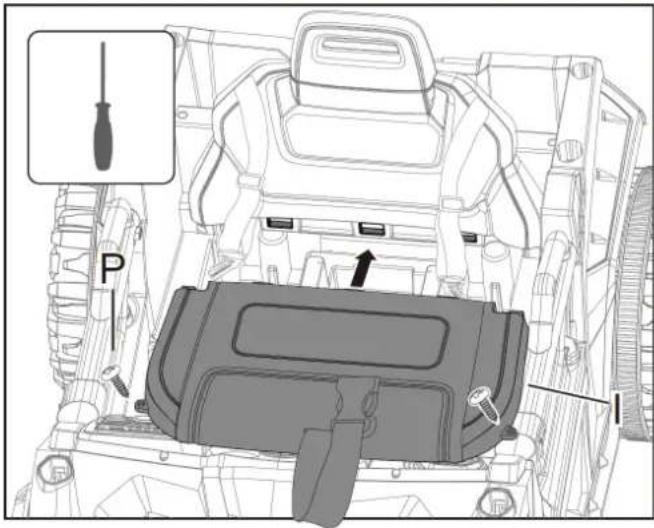
Technical diagram of a vehicle's internal components with labeled parts and a screwdriver icon pointing to the component.Step 9: Install the chair
The 3 buckles on I (chair) need to be inserted into the corresponding grooves on the back of the chair. Then use 2 P (self- attack screws) to fix it.
natural_image
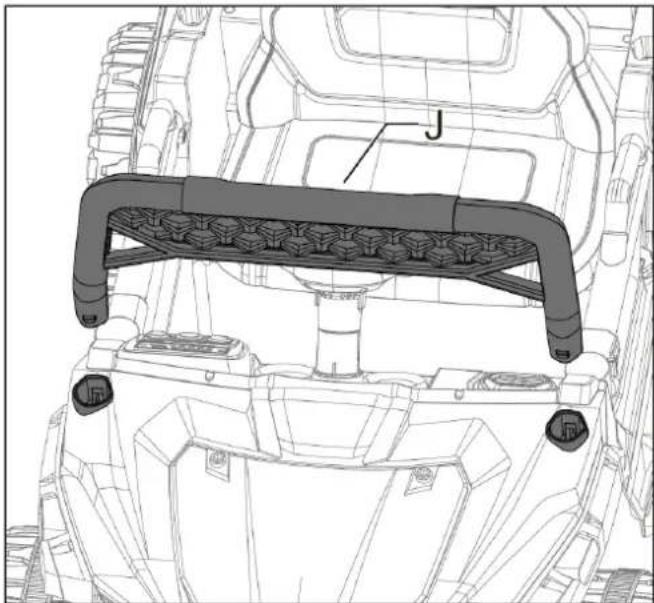
Technical line drawing of a mechanical assembly with labeled component 'J' (no text or symbols beyond label)Step 10: Install the wind deflector
Install the J (wind deflector) to the right position as shown in figure, press hard to fixed it.
Installation Steps
text_image
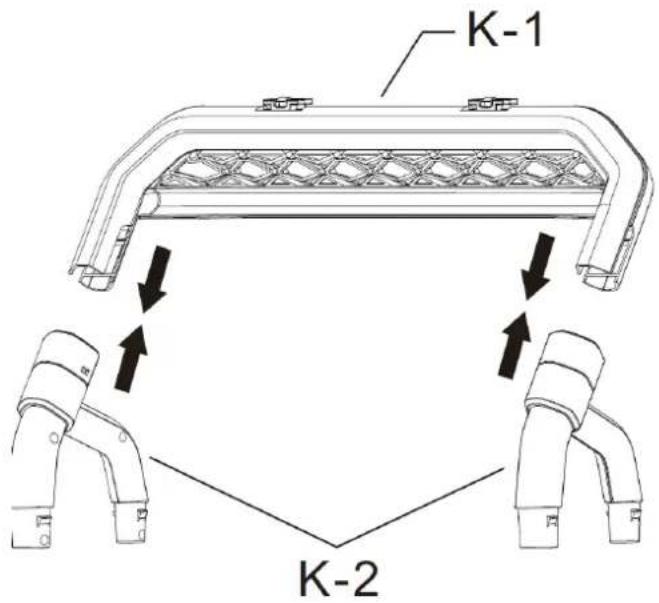
K-1 K-2Step 11-1: Install the tail bracket
Install the K-1 (Tail bracket - upper part) and K-2 (Tail bracket - lower part) in correct direction, as shown in figure.

text_image
K LStep 11-2: Install the tail bracket
Install the 2 pcs of L (Tail bracket light) on the K (tail bracket), as shown in figure.
natural_image
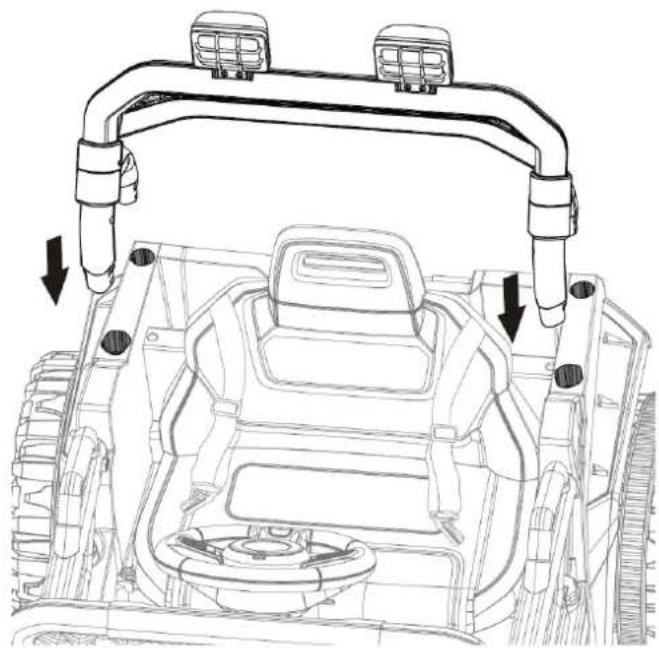
Technical line drawing of a vehicle chassis with overhead pipe fittings and mounting brackets (no text or symbols)Step 11:3 Install the tail bracket
Install the tail bracket to the right position as shown in figure, press hard to fixed it.
Direction for use
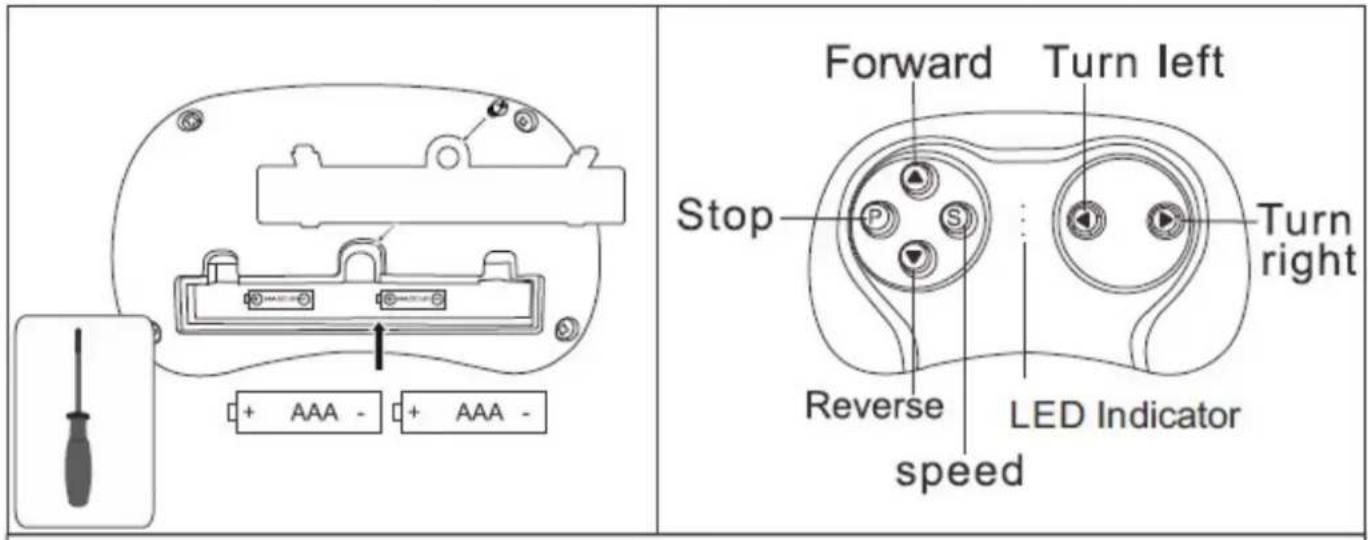
1. The installation and replacement of the batteries in the remote control:
text_image
Forward Turn left Stop Turn right Reverse LED Indicator speedUse a screwdriver to remove the battery cover of the remote control, insert two AAA 1.5V dry batteries in correct polarity. Close the battery cover and fix it with the screw.
(Battery replacement also according to the above steps)
! WARNING!
- All batteries should be inserted in the correct polarity.
- Non-rechargeable battery cannot be recharged.
- Take out and properly deal with the dead battery. To avoid injury, please keep kids away from the battery.
- The direct contact between the positive and negative terminals may result in fire or explosion. Avoid direct connect between the terminals.
- Do not mix old and new batteries. Do not mix alkaline, standard (carbon-zinc), or rechargeable (nickel-cadmium) batteries.
- Only an adult who has read and understood the safety warnings can recharge the battery.
2. Matching the frequency of car and remote control
- Turn off the Power Switch on the car.
- Remove the battery cover on the Remote Control and put in 2 AAA batteries, the three LED indicators will flash
- Turn on the Power Switch on the car, when the LED indicators stop flashing and 2 of them are on, matching successes.
- Once the matching has been made, there is no need to match code again only if the battery is replaced.
- The Remote Control will enter a sleep mode if not used for a long time and the LED indicators will be off. Press any buttons to wake up the Remote Control, and it can be used normally.
Button Description: ▲: forward ▼: reverse ◀: turn left ▶: turn right S: Speed P: Emergency brake, press it and the running function will fail, press again, it release.
Remote control operating instruction
Remote control has priority (when the car is in Remote control, the remote control personnel can control the car forward and backward, high/Low speed, steering and other functions, the driver CAN NOT operate the car). Press the ▲ forward button, the car goes forward.
Press ▼ reverse button, the car goes reverse.
Press the P button to brake the car urgently. Press P button again to release the brake system. Press the turn left button, car turn left. Press the turn right button, car turn right, The S button is speed button, one light on is low speed, two lights on is intermediate speed, three lights on is high speed.
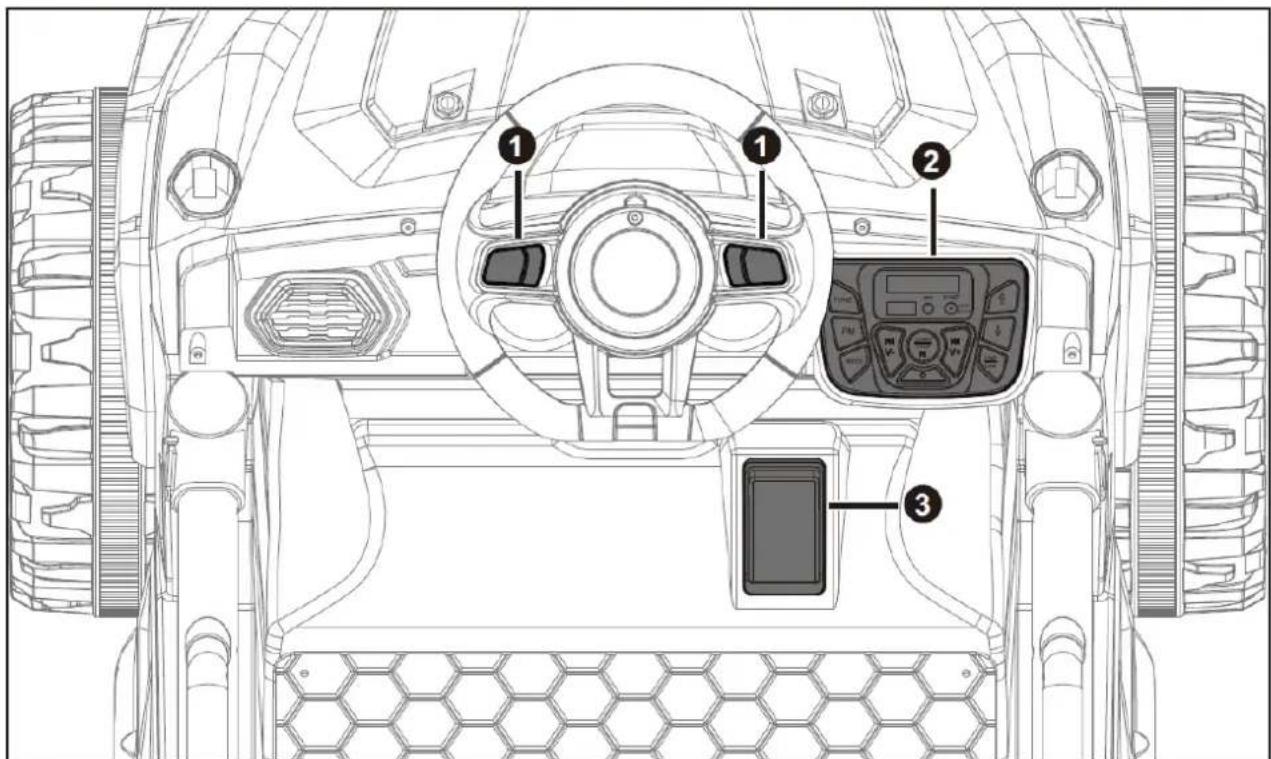
3. Instruction of each switch and function button
text_image
Technical diagram of a military vehicle's front view with labeled components including steering wheel, dashboard, and control panel.- Horn button: press the button to play the horn.
- Control board
- Foot pedal switch: step on the foot pedal switch, the car will move forward, loosen the pedal, the car will stop.
4-1. Instruction of control board
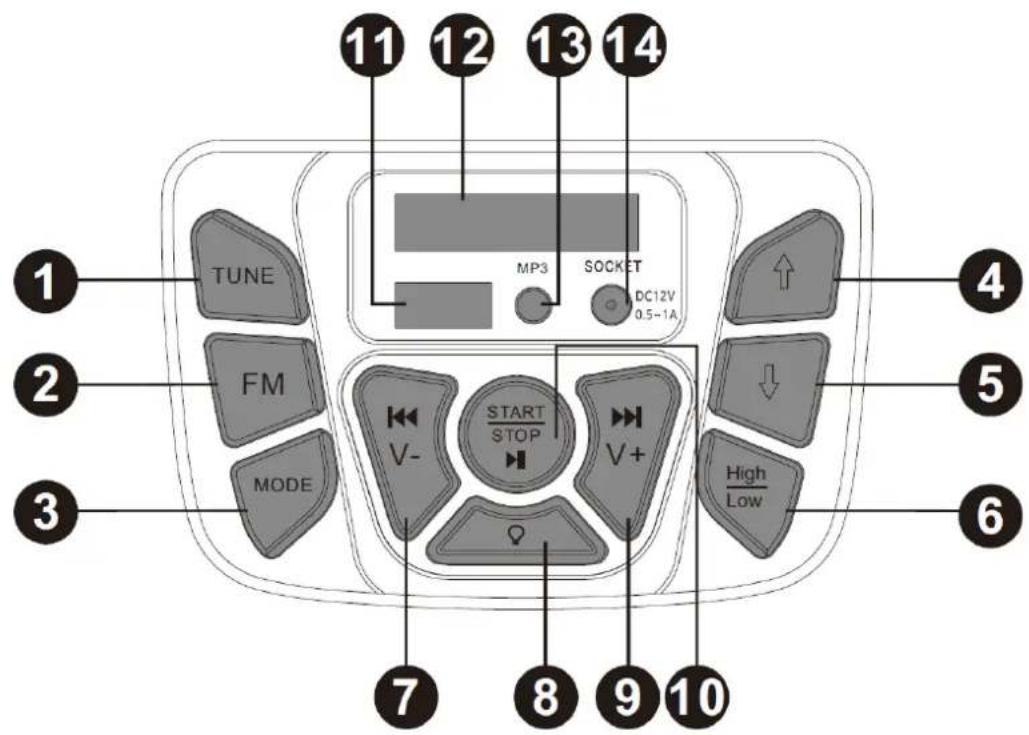
text_image
1 2 3 TUNE FM MODE V- START STOP V+ SOCKET MP3 DC12V 0.5-1A 7 8 9 10 11 12 13 14 4 5 6- FM Radio Search: Press the button to seek a radio station.
- FM Station: Press this button to enter the FM mode.
- Mode Switch Button: Press to toggle between music, Flash Driver and AUX mode.
- Forward: Press forward button, step on the foot switch the car will move forward, loosen the pedal the car will stop.
- Reverse: Press Reverse button, step on the foot switch the car will move Reverse, loosen the pedal the car will stop.
- High/Low Speed: Power on, by default, the forward speed is high speed, press the High/low button can change to low speed, press this button again, can change to high speed. For backward, there is only one speed, the high/low button is invalid.
- |◀◀ /V- Previous /VOL down: Short press to play the previous song, long press to decrease the volume.
- Light Switch: Turn headlight on/off.
- ▶▶| /V+Next/ VOL up: Next channel / Volume up: Short press to play the next song, long press to increase the volume.
- Start/Stop/ ▶: Long press to turn on and off the power. When the music or radio are on, short press to stop it, short press again to restart it.
- Adaptor connector: Insert Flash driver to play the desired song, only MP3 mode is supported.
- Voltage Display Screen: The value on the display be used to determine whether the battery needs to be charged.
- AUX Mode: Connect your desired audio device.
- Charge hole: charge the car with the own charger.
4-2. Direction for use
-
START/STOP/▶: Long press button10 (START/STOP/▶|| button) for 2-3 seconds, will turn on the power, light the screen 12 and make a starting sound, after that, it can operate normally; Long press button 10 (START/STOP/▶|| button) for 2-3 seconds, will turn off the power.
-
FM radio function: press button 2 (FM button) to enter the FM mode; then press button 1 (TUNE button) will search the FM channel, This process takes a while to automatically search the station and save. When the search is complete, the car will automatically play the first radio station. Short press button 9 (▶▶|/V+ button), will play the next channel; short press button 7 (■◀◀/V- button), will play the last channel; Long press button 9 (▶▶|/V+ button), will increase the volume; long press button 7 (■◀◀/V- button), will lower the volume; short press button 10 (START/STOP/▶■| button), can stop playing, short press this button again, can restart play it.
-
Adaptor port: insert flash driver into 11 (Adaptor port), will automatically play the music inside. Short press button 9 (▶▶| /V+ button), will play the next music; short press button 7 (■◀◀/V- button), will play the last music; Long press button 9 (▶▶| /V+ button), will increase the volume; long press button 7 (■◀◀/V- button), will lower the volume; short press button 10 (START/STOP/▶■■ button), can stop playing, short press this button again, can restart play it.
-
AUX player function: Insert one end of the audio cable into 13 (AUX connector), insert the another end into mobile phone, MP3, MP4, etc. Play the audio in the device, the sound will come out from the car. Long press button 9 (▶▶/V+ button), will increase the volume; long press button 7 (◀◀/V- button), will lower the volume; short press button 10
(START/STOP/▶■ button), can stop playing, short press this button again, can restart play it. Play progress is not affected by pauses. Under AUX mode, the last song/the next song cannot be switched in central control, can only be switched on mobile phone, MP3, MP4 or other devices.
-
Switch between Music, flash driver and AUX: If insert flash driver or AUX, press button 3 (MODE button) can switch between different play modes(Music, flash driver, AUX).
-
Forward/ reverse, and high/ low speed function: Power on, by default, the forward speed is high speed, press button 6 (High/low button) can change to low speed, press this button again, can change to high speed. Press button 5 (↓ button), change to reverse mode, under this mode, there is only one speed, the high/low button is invalid. Press button 4 (↑ button), can change to forward mode.
-
Light button: Power on, by default, the light is on, press this button ( ) can turn off the light. Press again, can turn on the light.
5. Operation guide for Manual control (forward, Reverse):
Driver sit down and fasten the seat belt. Long press the Start button, the display will light up, the car will play a start sound (2-5 seconds). Press the forward button and step on the foot switch, the car will move forward, release the foot switch, the car will stop. Press the reverse button and step on the foot switch, the car will move backward, release the foot switch, the car will stop.
Long press the Start button again to turn off the power.
6. The illustration of high/Low Speed
Power on, by default, the forward speed is high speed, step on the foot switch, the car will move forward fast, release the foot switch, the car will stop. Press the high/low speed button can change to low speed, step on the foot switch, the car will move forward slowly, release the foot switch, the car will stop. Press the high/low speed button again will change to high speed.
* ONLY one speed for reverse, the high/low switch can not control the reverse speed. Everytime when power on, by default, the car will move forward in high speed.
7. Instruction of the recoverable fuse
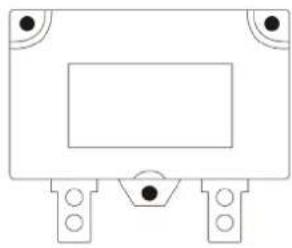
Resettable fuse: when the current exceeds a certain rating, the recoverable fuse will automatically cut off the power supply for 5-10 seconds, then the current will be resupplied.
natural_image
Pure electrical circuit lines without any symbols
WARNING
RISK OF FIRE. Do not bypass fuse. This may overload and damage the electrical system. Replace only with original size and type.
8. Charging instructions.

WARNING
Please plug wall charger directly into a wall outlet. Do not use anextension cord.
text_image
Charge Time ③ 12 20+When battery power is low, please charge it immediately. The charging port is on the control board as shown in figure. Note: toys can not be operated in the charging state. Toys should be recharged by adult operation.
natural_image
Line drawing of a multi-axle off-road vehicle with large tires and front suspension (no text or symbols)text_image
Front [2] [3] [1] G Q [4]text_image
[2] [3] Front [G] [5] [S] Z [1] [4] Qtext_image
Front [7] [6] Qtext_image
① [9] [8] F Q
text_image
2 F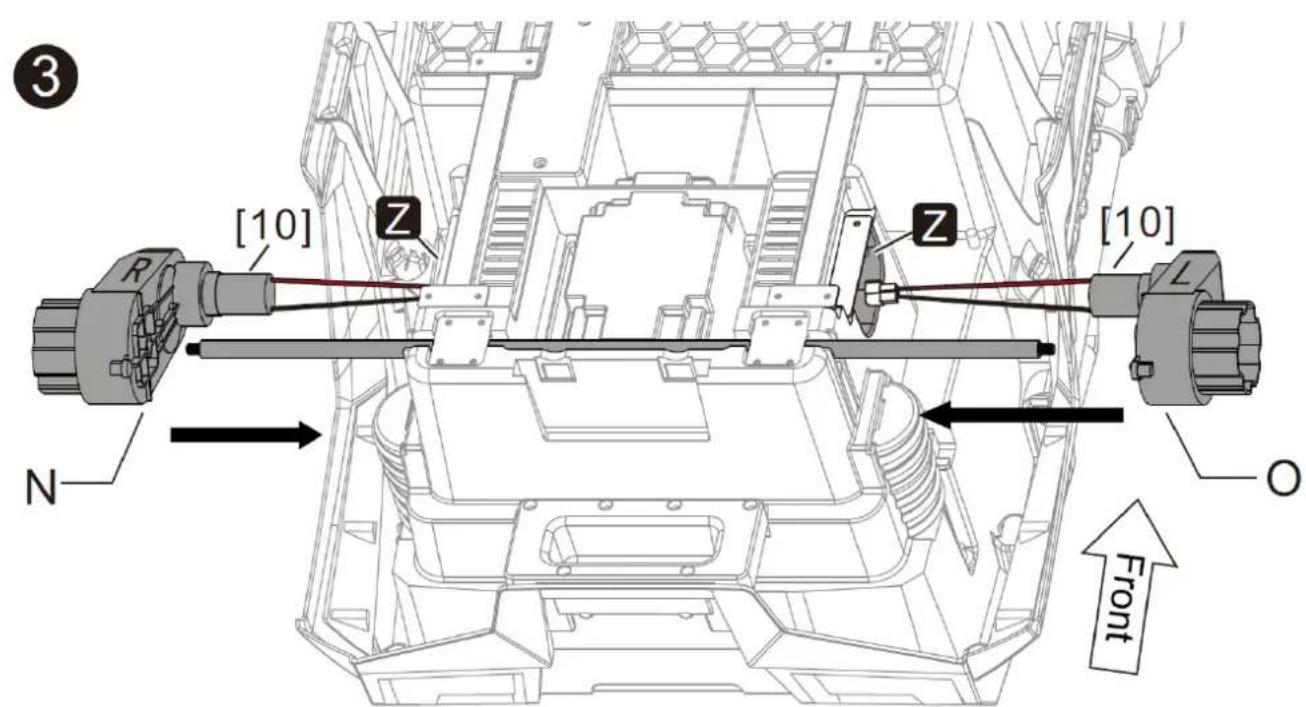
text_image
(3) [10] Z Z [10] N O Fronttext_image
[6] C [7] D Front [8] C [9] D C [8] [9] D Qtext_image
Diagram of a car interior showing a battery pack with labeled components and an inset image of a screwdriver.text_image
H [2] [1]text_image
Diagram of an electronic device rear panel with labeled components and red wiring connectionstext_image
Technical diagram of a vehicle's internal components with labeled parts and a screwdriver icon pointing to the component.natural_image
Technical line drawing of a mechanical assembly with labeled component 'J' (no text or symbols beyond label)natural_image
Technical line drawing of a vehicle chassis with overhead pipe fittings and mounting brackets (no text or symbols)text_image
Forward Turn left Stop Turn right Reverse LED Indicator speedtext_image
Technical diagram of a military vehicle's front view with labeled components including steering wheel, dashboard, and control panel.natural_image
Pure electrical circuit lines without any symbolstext_image
Charge Time 3 12 20+natural_image
Line drawing of a multi-axle off-road vehicle with large tires and front suspension (no text or symbols)text_image
Front [2] [3] [1] G Q [4]text_image
[2] [3] Front [G] [5] [S] Z [1] [4] Qtext_image
Front [7] [6] Qtext_image
① [9] [8] F Q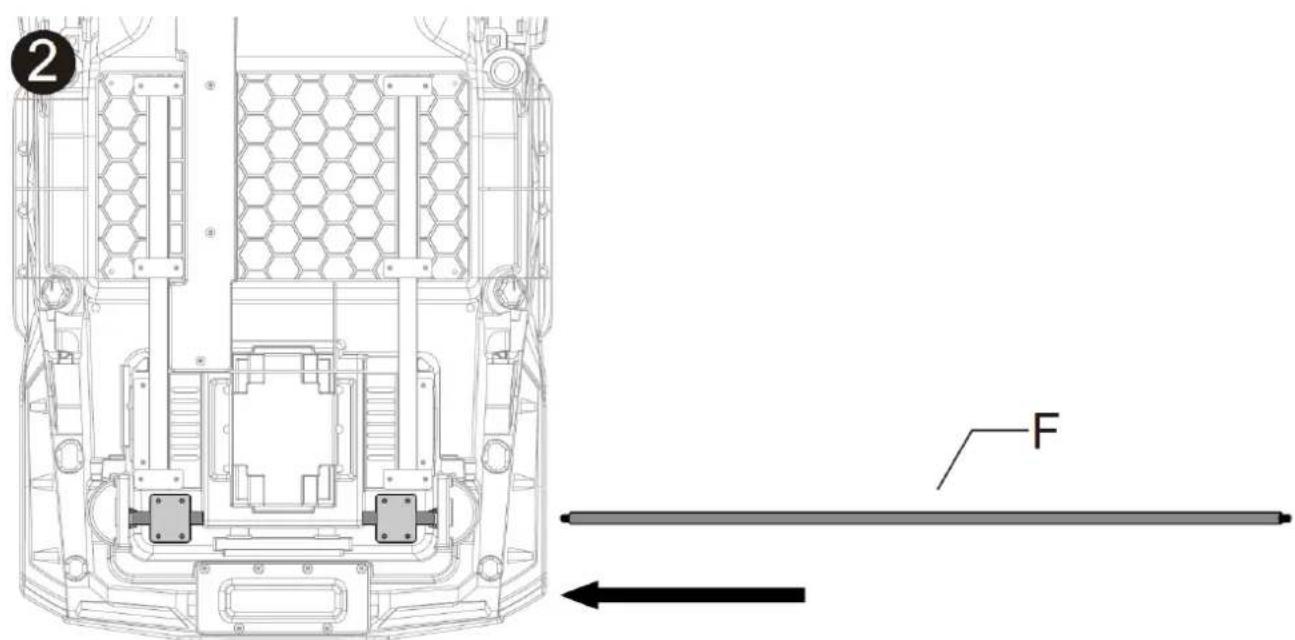
text_image
2 F
text_image
(3) [10] Z Z [10] N O Fronttext_image
[6] C [7] D Front [8] C [9] D C [8] [9] D Qtext_image
Diagram of a car interior showing a battery pack with labeled components and an inset image of a screwdriver.text_image
H [2] [1]text_image
Diagram of an electronic device rear panel with labeled components and red wiring connectionstext_image
Technical diagram of a vehicle's internal components with labeled parts and a screwdriver icon pointing to the component.natural_image
Technical line drawing of a mechanical assembly with labeled component 'J' (no text or symbols beyond label)natural_image
Technical line drawing of a vehicle chassis with overhead pipe fittings and mounting brackets (no text or symbols)text_image
Forward Turn left Stop Reverse LED Indicator speedtext_image
Technical diagram of a military vehicle's front view with labeled components including steering wheel, dashboard, and control panel.natural_image
Simple line drawing of a rectangular electronic component with mounting holes and a central rectangle (no text or symbols)text_image
Charge Time 3 12 20+natural_image
Line drawing of a multi-axle off-road vehicle with large tires and front suspension (no text or symbols)text_image
Front [2] [3] [1] G Q [4]text_image
[2] [3] Front [G] [5] [S] Z [1] [4] Qtext_image
Front [7] [6] Qtext_image
① [9] [8] F Q
text_image
2 F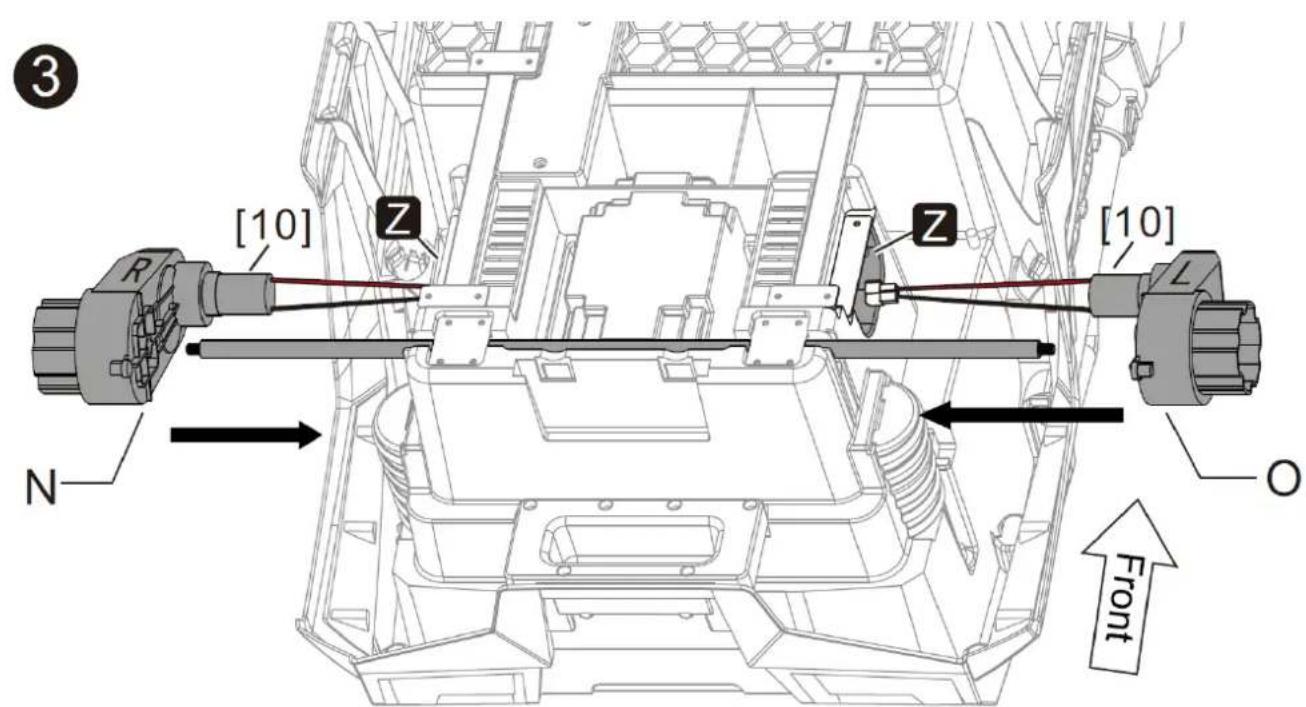
text_image
(3) [10] Z Z [10] N O Fronttext_image
[6] C [7] D Front [8] C [9] D C [8] [9] D Qtext_image
Diagram of a car interior showing battery panel placement and switch, with an inset image of a screwdriver.text_image
H [2] [1]text_image
Diagram of an electronic device rear panel with labeled components including connectors and wiring pathsnatural_image
Technical line drawing of a mechanical assembly with labeled component 'J' (no text or symbols beyond label)natural_image
Technical line drawing of a vehicle chassis with overhead pipe fittings and mounting brackets (no text or symbols)text_image
Forward Turn left Stop Turn right Reverse LED Indicator speedtext_image
Technical diagram of a military vehicle's front view with labeled components including steering wheel, dashboard, and control panel.Driver sit down and fasten the seat belt. Long press the Start button, the display will light up, the car will play a start sound (2-5 seconds). Press the forward button and step on the foot switch, the car will move forward, release the foot switch, the car will stop. Press the reverse button and step on the foot switch, the car will move backward, release the foot switch, the car will stop.
Long press the Start button again to turn off the power.