805-893 - Toy Nordic Play - Free user manual and instructions
Find the device manual for free 805-893 Nordic Play in PDF.


| Product type | Toy |
| Brand | Nordic Play |
| Model | 805-893 |
| Dimensions (L x W x H) | 30 x 20 x 15 cm |
| Weight | 0.5 kg |
| Material | ABS plastic, non-toxic |
| Recommended age | 3 years and up |
| Power source | 2 AA batteries (not included) |
| Functions | Sound effects, light-up features, interactive buttons |
| Safety certifications | CE, EN71 |
| Assembly required | No |
| Included accessories | Toy unit, instruction manual |
| Cleaning instructions | Wipe with a damp cloth; do not immerse in water |
| Storage | Store in a dry place away from direct sunlight |
| Battery replacement | Remove battery compartment screw; replace with new AA batteries |
| Spare parts availability | Not available separately |
| Repairability | Not user-serviceable; contact customer support |
| Warranty | 1 year from date of purchase |
Frequently Asked Questions - 805-893 Nordic Play
User questions about 805-893 Nordic Play
0 question about this device. Answer the ones you know or ask your own.
Ask a new question about this device
Download the instructions for your Toy in PDF format for free! Find your manual 805-893 - Nordic Play and take your electronic device back in hand. On this page are published all the documents necessary for the use of your device. 805-893 by Nordic Play.
USER MANUAL 805-893 Nordic Play
natural_image
Blue toy airplane with propeller and white fan, no visible text or symbols

Size 100 x 124 x 62 cm
Art. no. 805-892 _ 805-893
EAN 5705858718781 _ 5705858718798
Imported by / Importeret af
NSH NORDIC A/S
Virkefeltet 4
DK-8740 Braedstrup
Made in China / produceret i Kina
General safety rules for NORDIC PLAY products
Warning:
- The vehicle may not be used on roads, sidewalks, in hills or sand.
- The vehicle should only be used on flat surfaces.
- Do not overload the vehicle. Pay attention to the maximum weight limits. Typical maximum total weight is 25 - 35 kg. Please check for your specific model.
- Only adults may charge the battery.
- Children using the vehicle should always be supervised by a responsible adult.
- Do not charge the vehicle's circuit.
- Do not drive in water or other fluids.
- Stop the vehicle when it is approaching an obstacle, turn away from the obstacle and drive somewhere else.
- Please charge the battery when the vehicle starts to drive slowly, otherwise the battery's lifespan can be shortened.
- Please charge the battery fully before the battery is stored for longer periods without use. Charge the battery every three months to extend the battery's lifespan.
- Do not drive during rain.
- Battery, charger, electrical cables, outlets and other parts should periodically be checked. If damages are discovered, the vehicle may not be used until these are fixed.
- The charger should be checked for damages on cord, plug and other parts periodically. If there are damages, the charger may not be used until the damage is fixed.
- Vehicle with a battery may not be used by children under 3 years of age.
- Push/foot-to-floor vehicles without a battery can be used from 1 year of age.
- The vehicle may only be used with the recommended charger.
• The charger is not a toy. - Only clean with a damp cloth.
- Check that all parts are undamaged. If not, repair or change these.
- It is a good idea to use safety equipment, depending on the vehicle.
- Worn out batteries should be removed/changed from the vehicle.
- The battery should be removed before the vehicle is disposed of.
- Declaration of conformity: This product is in accordance with EU directive 2014/53 / EU.
Warning:
For your child's safety, pay attention to the following:
- Only adults may assemble the product.
- Small parts and plastic parts should be kept away from the child to avoid risk of suffocation.
- Children may not touch or open the battery holder.
• Adult supervision is required. - Vehicles with a battery may not be used by children under 3 years of age.
- Push/foot-to-floor vehicles without battery can be used from 1 year of age.
- Use the vehicle with caution, since driving skills are required to avoid falls or crashes that can result in injuries to the user or third party.
- Instructions on how the vehicle is used should be given to the child before use – especially for the braking system.
- May not be used in traffic. Only use the vehicle on private property.
- Only drive on flat surfaces away from other vehicles and obstacles.
General safety rules for NORDIC PLAY products
- Avoid sharp bumps and sudden changes of the surface.
- Avoid roads and surfaces with water, sand, gravel, dirt, leaves and other debris.
- Wet weather can reduce the traction, brake effect and visibility.
- Do not drive when it is dark.
- Avoid excessive speed in conjunction with downhill driving.
- Watch out for pedestrians.
- Check and tighten all screws before every drive. Do not allow two or more children to use the vehicle at once.
- Do not use the vehicle if it has damages.
-
Change damaged parts immediately.
-
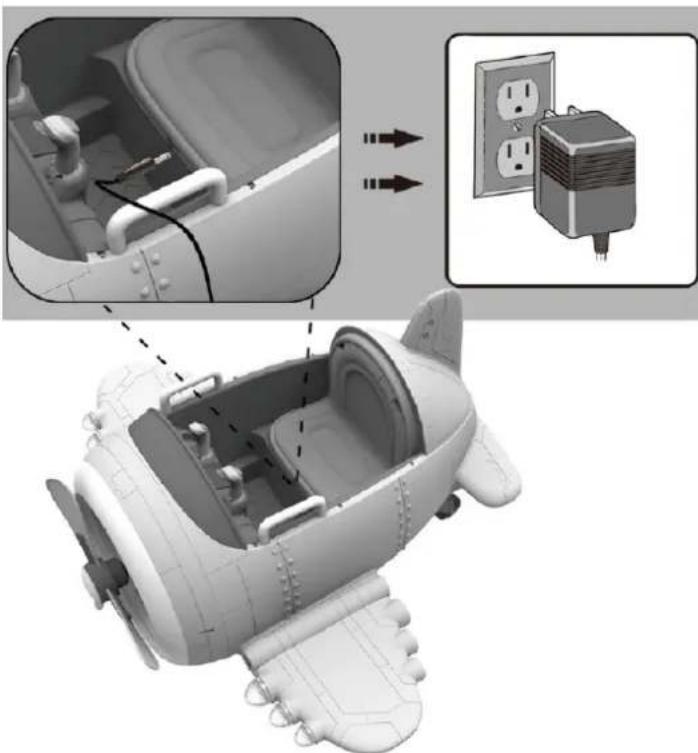
Insert 220V/12V charger cable's connector to the vehicle.
- Insert actual 220V/12V charger unit to your 220V power outlet. The battery will start charging.
- Detach after 8-12 hours
IMPORTANT NOTE: When shifting (forward/backward), please make sure the vehicle is completely stopped, otherwise it will damage the gear box and motor.
Forward: 1. Press the "Forward/backward switch" to the "Forward" position.
- Press the "Foot pedal", the vehicle drives forward.
Stop: 1. The vehicle will brake automatically, when foot is lifted from the "foot-pedal".
Back Up: 1. Press the "Forward/backward switch" to the "Backward" position.
- Press the "Foot pedal", the vehicle will back up.
Loosen the screw from the back of the seat seat, take away the seat. Then connect the battery line red wire to the red terminal of the battery and finally then connect black wire to black battery terminal. Never connect wires into the uncorrect battery terminals. After the connections, please assemble the seat back to the original place and tighten the screw.
Battery replacement and fuse
The battery is equipped with a thermal fuse which blows if the motor, battery or electrical circuit is overloaded. The vehicle must then be switched off for at least 5 minutes, after which the fuse will restore itself. If the product does not work, the fuse may therefore be the problem. To avoid this, read the following points:
- Do not overload the vehicle.
- Do not pull anything behind the vehicle.
- Do not drive up steep hills.
- Do not run into motionless objects that cause the wheels to spin.
- Do not drive at extreme temperatures.
- Make sure the product does not come into contact with liquids.
- Do not touch the electrical circuit.
As the battery gets older it will start to lose some of its capacity. Depending on the conditions, it can last anywhere from 1 - 3 years. If the battery needs a replacement, follow these steps:
- Loosen the crew and remove the seat.
- Disconnect the cables from the battery terminals.
- Remove the battery cover.
- Carefully lift the battery out of the vehicle. Depending on the condition of the battery (leakage or similar), safety equipment may be required. Do not lift the battery from its wires but from the battery itself.
- Put the battery in a plastic bag and dispose it responsibly. NEVER put the battery to general waste.
- Insert the new battery into the vehicle.
- Reconnect the cables to the new battery. Red wire to red terminal (+) and black wire to black terminal (-) of the battery.
- Slide the seat into place. Tighten the screw.
To protect the environment, batteries and electrical equipment must be disposed separately from household waste. Contact the municipality for the nearest collection point.
| Problem Possible Cause Solution | ||
| Vehicle does not run Battery low on power Recharge battery. | ||
| Thermal fuse has tripped Let the vehicle cool down for 5 minutes.Do not overload the vehicle. | ||
| Battery connector or wires are looseCheck that the battery connectors and wires are firmly connected. | ||
| Battery is dead Battery lasts 1-3 years. Replace battery and recycle the old battery responsibly. | ||
| Electrical system is damagedContact your distributor please. | ||
| Motor is damagedContact your distributor please. | ||
| Vehicle does not run very long Battery is not properly charged. Check that the battery connectors are firmly plugged into each other when recharging. Recharge battery again. | ||
| Battery is old Battery lasts 1-3 years. Replace battery and recycle the old battery responsibly. | ||
| Vehicle runs sluggishly Battery low on power Check that the battery connectors are firmly plugged into each other when recharging. Recharge battery again. | ||
| Battery is old Battery lasts 1-3 years. Replace battery and recycle the old battery responsibly. | ||
| Vehicle is overloadReduce weight on vehicle.Maximum user weight is 25 kgs. | ||
| Vehicle is being used in unsuitable conditionsUse the vehicle on flat, even surfaces. | ||
| Vehicle needs a push to go forward | Poor contact of wires or connectors | Check that the battery connectors are firmly plugged into each other when recharging. Recharge battery again. |
| “Dead Spot” on motor A dead spot means the electric power is not being delivered to the terminal con nection and the vehicle needs repair.Contact your distributor please. | ||
| Difficult shifting from forward to reverse or vice-versa | Attempting to shift while the vehicle is motion | Always completely stop the vehicle before shifting. |
| Loud grinding or clicking noises coming from motor or gear box | Motor or gears are damagedContact your distributor please. | |
| Battery will not recharge | Battery connector or adapter connector is loose | Check that the battery connectors are firmly plugged into each other when recharging. Recharge battery again. |
| Charger not plugged in | Check that the battery charger is plugged into a working wall outlet. | |
| Charger is not working | Contact your distributor please. | |
| Charger feels warm when recharging | This is normal and not a cause for concern | |
Completely read through this manual and the troubleshooting guide table before calling. If you still need help resolving the problem Contact your distributor please.
Maintenance
- Check all screws periodically and tighten as needed.
- Check the vehicle's plastic components frequently for damage.
- The mechanical parts of the vehicle can be lubricated with oil if necessary.
- Store the product indoors to protect it from the weather.
- Keep product away from hot items such as stove and the likes.
- Do not clean the product with a garden hose and do not use soap. A dry or moist cloth is enough.
- Do not drive in rain, snow, sand and gravel as this may damage the product.
If the product is not to be used for an extended period, recharge the battery and then disconnect all cables
Installation and Operating Instructions
natural_image
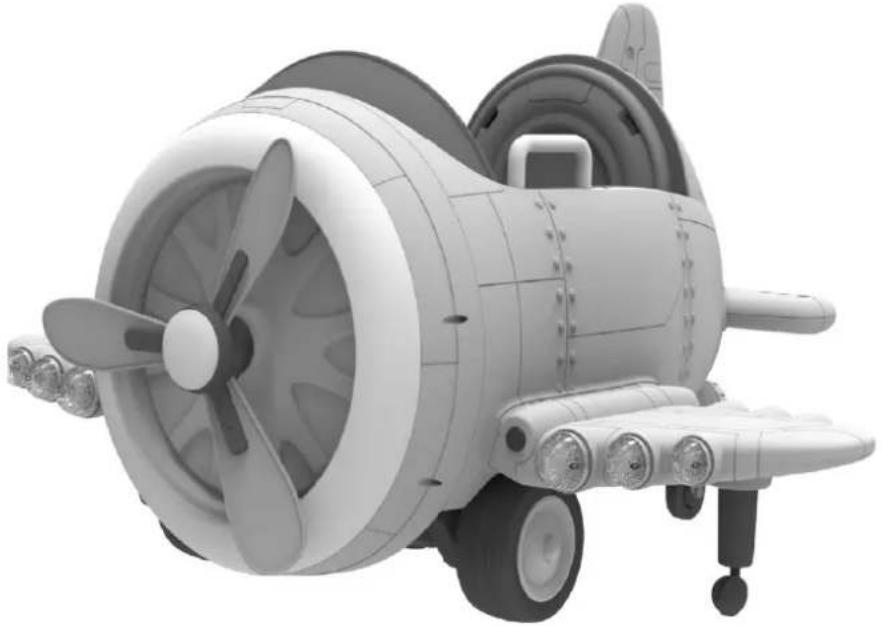
3D rendering of a toy airplane with propeller and fan (no text or symbols visible)Please read the operating instructions carefully before use
Before using the vehicle the child should understand the vehicle controls and safety issues. They must also demonstrate the capability to handle the vehicle and operate its controls. It is the responsibility of the adult to educate the child and supervise the vehicles use. Read the following safety warnings to any child using the vehicle before riding.
| Suitable age: 3+ years Battery: 2 x 6V 4.5Ah | |||
| Load Capacity: 30 kg Size of car: 100 x 124 x 62 cm | |||
| Speed: 1,5 - 3 km/h Carton size: 94 x 55 x 58 cm | |||
| Material: Metal and plastic | Optimum temperature: | 0 - 40° | |
| Charger: Output | Input: 100-240V AC | Charging time: | 8 - 12 hours |
| DC 12V / 15V Motor DC | 12V | ||
| Fuse | F 7A, Self-resetting | ||
Our products are suitable for ASTM F963; GB6675,GB19865; EN71 and EN62115 standard.
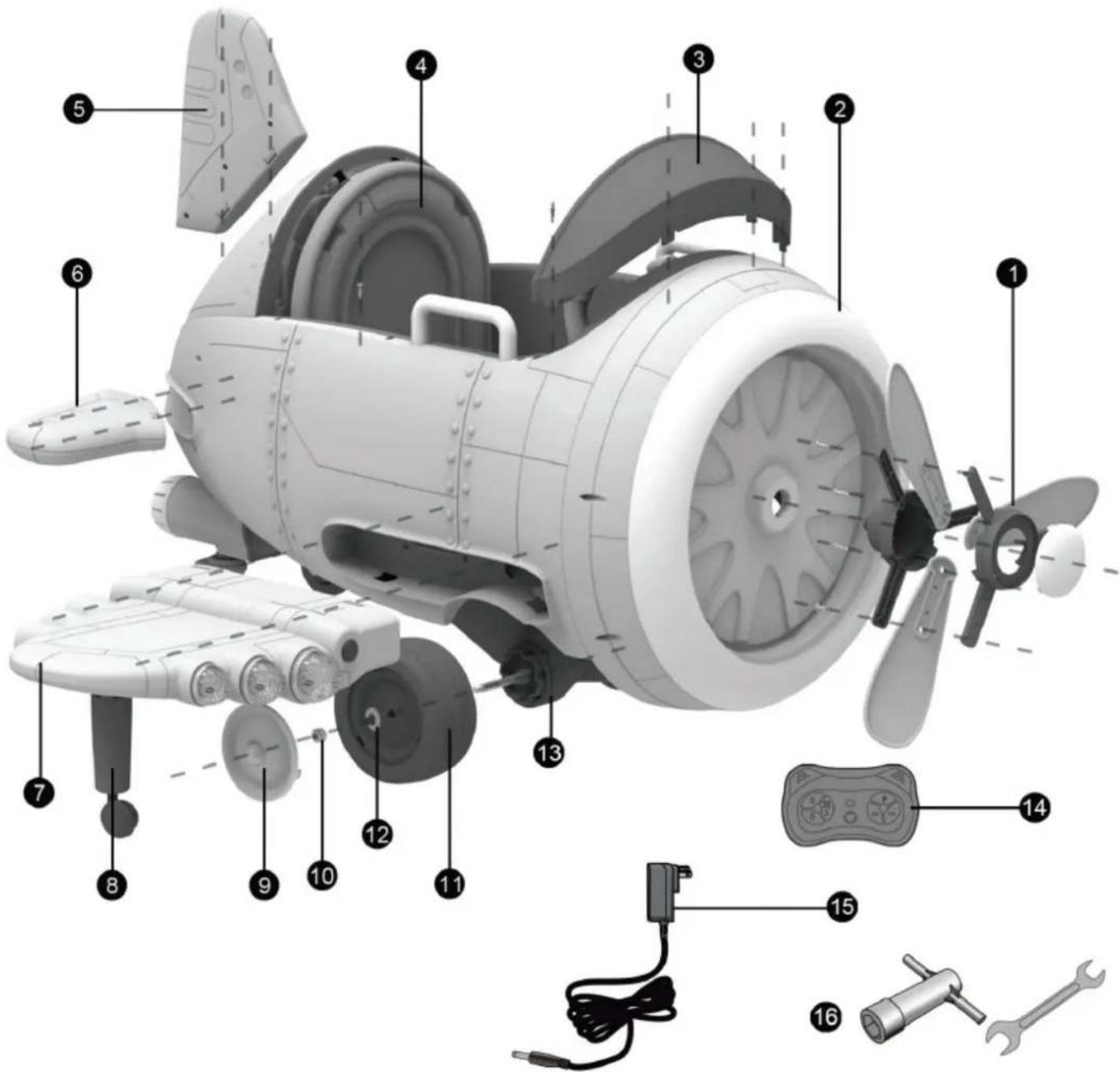
Parts diagram:
text_image
Exploded view diagram of a futuristic propeller with numbered parts for identification and assembly reference.HINT: some parts shown are assembled both sides of plane
| 1 Screw propeller 2 Fuselage 3 Windshield | ||||
| 4 Seat 5 Vertical tail 6 Horizontal tai | ||||
| 7 Airfoil 8 Training wheel 9 Wheel cover | ||||
| 10 Nut 11 Wheel 12 Washer | ||||
| 13 Gearbox 14 Remote control | 15 Charger | |||
| 16 | Spanner(some model) | |||
Assembly steps
Install the front wheels (some model)
As showed in the picture:
- Remove the nut and washer from the axle.
- As showed in the picture:
Fix the wheel, washer and nut onto the axle in proper order. - Fix the wheel cover.
- Fix anther wheel on the other side.
Install the back wheels (some model)
As showed in the picture:
Fix the back universal wheels by the spanner.

natural_image
3D cutaway view of an aircraft fuselage showing internal components and labeled parts (no text or symbols)Connect the power supply
As showed in the picture:
- Remove the seat.
- Plug the power connector into the terminal on battery as showed. Connect the connectors - Red to Red and Black to Black.
- Install the seat to the corresponding place and fasten with the screws.

natural_image
Interior view of a vehicle showing a battery pack and structural components (no visible text or symbols)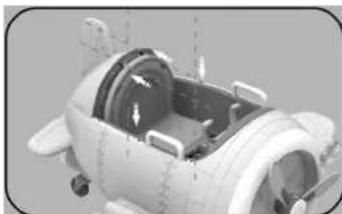
natural_image
3D rendering of a mechanical component with internal parts and mounting holes (no visible text or symbols)Install the airfoil
As showed in the picture:
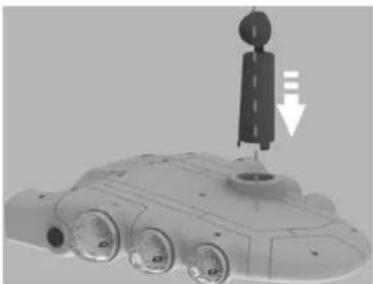
- Press the training wheel downward to fix it.
- Push the airfoil according to the direction of the arrow and make sure to fit in position.
natural_image
3D rendering of a futuristic vehicle with visible structural components and a vertical arrow indicating motion (no text or symbols)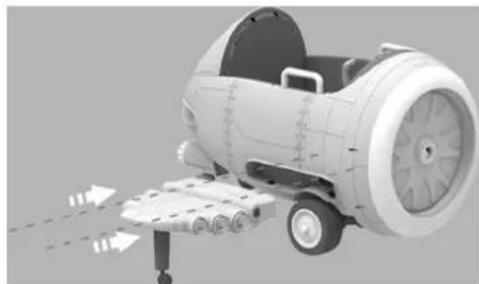
natural_image
3D rendering of a jet engine with visible propellers and wheels, no text or symbols presentAssembly steps
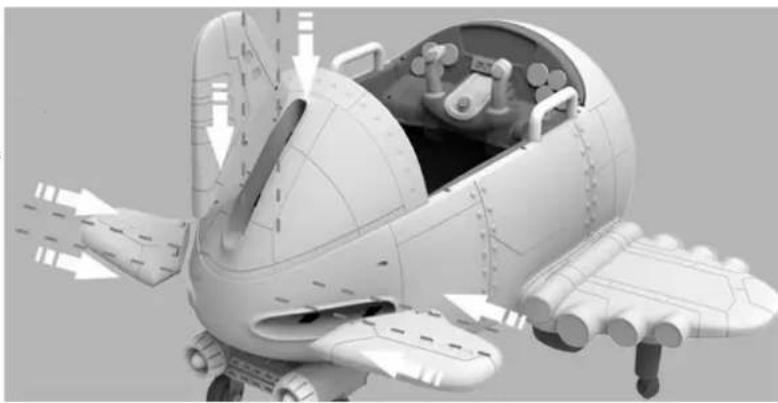
Install the vertical tail and horizontal tails
As showed in the picture:
- Press the vertical tail downward to fix it.
- Push two horizontal tails according to the direction of arrow and make sure to fit in position.
natural_image
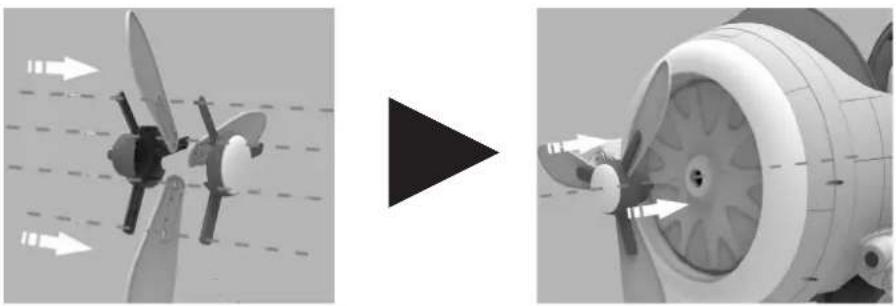
3D rendered model of a futuristic aircraft with open cockpit and internal components (no visible text or symbols)Install the screw propeller
As showed in the picture:
- Install the propeller blade to the propeller and fasten by screws.
- Push propeller according to the direction of arrow and make sure to fit in position.
natural_image
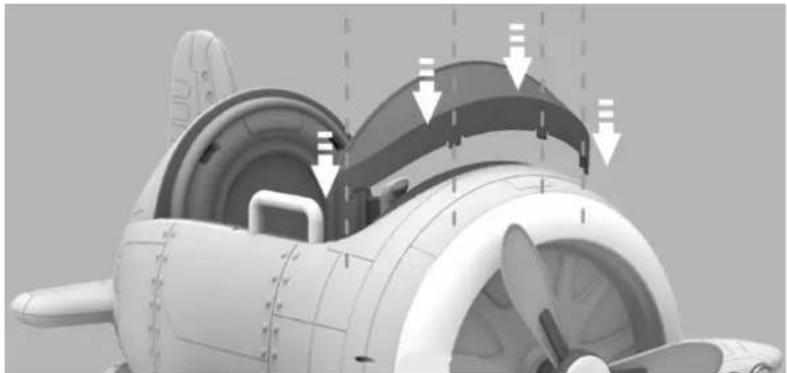
Two-panel illustration showing a propeller with directional arrows and a turbine blade, no text or symbols present.Install the windshield
As showed in the picture:
Press the windshield downward to fix it.
natural_image
3D rendering of a propeller airplane showing internal blades and structural components (no text or symbols)Operating the plane
- USB slot for USB drive
- Display
- Switch music ▲ / adjust the volume -
- Stop / Play
- Switch music ▼/ adjust volume +
- Mode button
- General power switch
- Sounds button
- Joysticks

text_image
Labeled diagram of a game controller head with numbered components for identificationLED display shows "USB": - indicates Player is playing from USB Drive.
LED display shows "FM": - indicates Radio function.
LED display shows "voltage digital": - indicates system voltage.
IN RADIO MODE:
Press 4 to auto scan and store radio stations. (No manual scan function)
Press 4 will always start auto scan function. Quickly press 4 to store Radio Channel.
Short press 3 or 5 to switch stored radio station.
Long press 3 or 5 to adjust volume.
IN MUSIC MODE
Short press 4 to play or pause music.
Short press 3 or 5 to switch music.
Long press 3 or 5 to adjust volume.
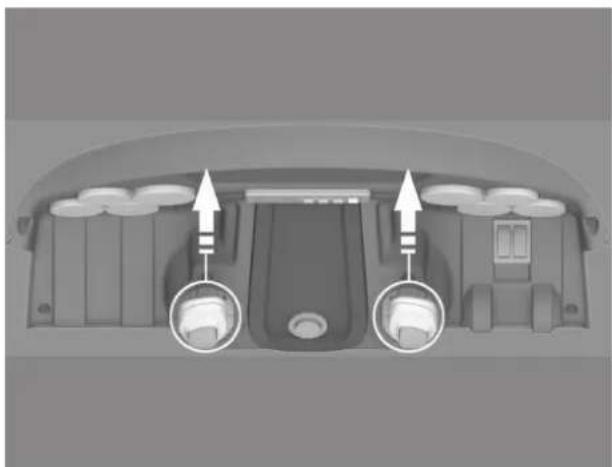
Operating the plane
A. Turn on the General power switch first, the sound can be played.
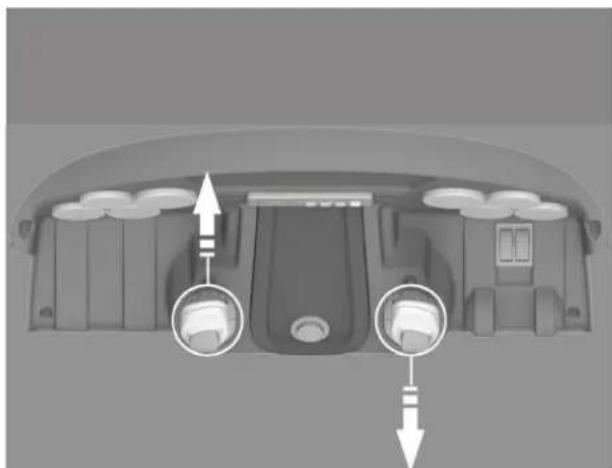
B. Forward: As showed in the picture, push the left and right joysticks at the same time, the plane drives forward.
C. Stop: Do not push or pull the joysticks.
D. Reverse: As showed in the picture, pull the left and right joysticks at the same time, the plane drivers backward.
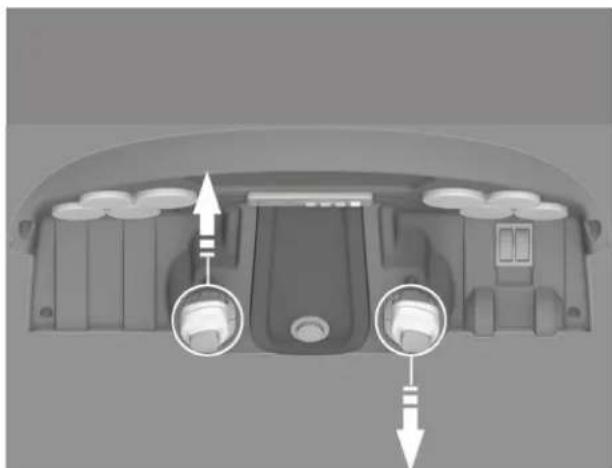
E. Turn left: As showed in the picture, pull the left joysticks, the plane drives turn left.
F. Turn right: As showed in the picture, push the left joysticks, pull the right joysticks, the plane drives turn right.
natural_image
Top-down view of a car dashboard with two circular insets highlighting the front and side views (no text or symbols)Forward Reverse

natural_image
Top-down view of a car dashboard with two circular adjustment knobs and directional arrows indicating movement (no text or symbols)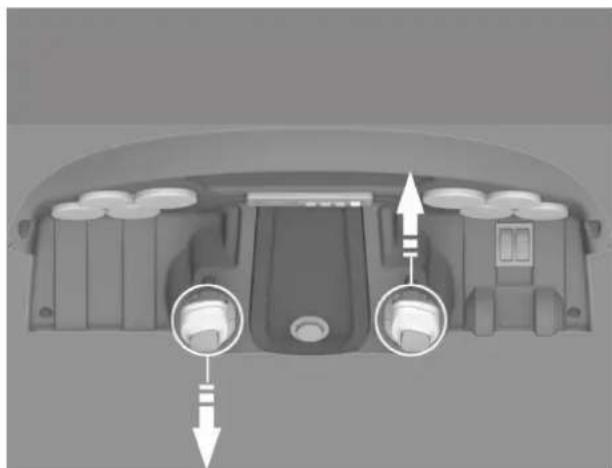
natural_image
Top-down view of a car dashboard with two circular indicators pointing to the front and side (no text or symbols)Turn left Turn right
natural_image
Top-down view of a car's rearview showing dashboard and seat area with directional arrows (no text or symbols)Operating the plane
Fold airfoil

text_image
Press the button on the airfoil, fold the airfoil up or down.Charging instructions Check the drive battery and charger (supply
natural_image
3D model of an aircraft showing internal components and external electrical outlet (no text or symbols)IMPORTANT!
Before using the unit for the first time the battery needs to be charged for at least 8 to 12 hours - no more than 20 hours. Once battery is depleted, recharge for 8 to 12 hours - no more than 20 hours.
cord, connector) for wear and damage before charging. Do not charge the battery if damage has occurred. Only replace with the same type and voltage rechargeable battery and charger supplied by the manufacturer.
- Only use the rechargeable battery (or equivalent replacement) and charger supplied with your plane.
• Always turn power off and charge battery after riding. - The drive battery should be charged when depleted, or if not used regularly, once a month. Failure to charge the battery as directed will cause permanent damage to the battery and will void the warranty.
STEPS:
- Turn power switch OFF.
- Locate charging port according the picture.
- Plug charger plug into charging port.
- Plug charger into wall outlet.
- When battery is fully charged, unplug charger from the wall outlet and disconnect from charger port.
NOTE: The charger may feel warm during the charging. If excessively hot, unplug and replace.
NOTE: This product has charging protection: When charging, all functions are turned OFF:
Remote control manual

text_image
FORWARD STOP BACKWARD CAR_SELECT 2.4G SPEED_SELECT LEFT RIGHT
WARNING!
The remote control is not a toy. It is for adult use only, and should not be used by a child. A close adulty supervision is always required.
Reception range may change significantly with weather, battery and other environmental conditions
Operation manual
The first time you use it, you need to frequency bind.
- Take out the remote control, install the battery
- Long press on the button "CAR SELECT KEY" for 2-4 seconds, indicator light will flash
- Turn on the power of the car, indicator light flashes to long lighting, then frequency bind succeed
- If the frequency bind failed (indicator light flashes), remove the battery and repeat steps 1-3
- If the Remote control is without operation after 10 seconds the indicator light will go into power saving mode
- Button description: (▲ Forward) (▼ Backward) (◀ Turn left) (▶ Turn right)
P: Emergency brake, press it and the running function will fail, press again, it release Press "S" cycle swift 1,5 km/hr 3 km/hr

WARNING!
PREVENT INJURIES AND DEATHS:
NEVER LEAVE CHILD UNATTENDED. DIRECT ADULT SUPERVISION IS REQUIRED.
• Always keep child in view when child is in plane.
- Never use in roadways, near cars, on or near steep inclines or steps, swimming pools or other bodies of water.
• Always wear shoes.
• Always sit on the seat.
- Suitable for age 3+ years: Maximum user weight is 30 kgs.
• Not to be used in traffic.
MUST CONFIRM BEFORE USING THAT FOLLOWING WORK WHICH IS ALREADY FINISHED:
- Important! Before using the plane for the first time, the battery needs to be charged for 8 - 12 hours, no more than 20 hours. Only an adult can charge or recharge the battery.
- Finishing the complete car to assemble according to the steps that the manual described. The plug-in package of storage battery has already been inserted well, the power has already been put through.
- All places to need the screw guarantee the screw has already been locked.
RULES FOR SAFE RIDING
READ THESE RULES ALOUD TO YOUR CHILD AND THEIR PLAYMATES AND MAKE SURE THEY UNDERSTAND THEM!
- This toy is no break. Always wear a helmet and protective clothing when riding.
- Direct adult supervision required.
- Keep children within safe riding areas.
- Never driving in roadway, near motor planes, on lawn space, on near steep inclines or steps, swimming pools other bodies of water.
- Use the toy only on flat surfaces. Such as inside your house, garden or playground.
- Never use in the dark. A child could encounter unexpected obstacles and have an accident. Oprate the plane only in the daytime or a well-lit area.
- It is not recommended to drive the plane on wet surfaces or on lopes of greater than 15 degrees.
- Do not use this plane outdoors when it is raining or snowing.
• Make sure you come to a complete stop before changing directions from forward to back. - Please follow the correct weight and age limits allowed to drive this plane.
- It is prohibited to change the circuit or add other electric parts.
- Inspect wires and connections of the plane periodically.
- In order to avoid accidents, please ensure the plane is safe before riding.
- Do not let any child touch the wheels or be near them when the car is moving.
- This plane has adjustable play seat belts. Please instruct children how to tie the safety belt before using, guarantee the security.
natural_image
3D rendering of a toy airplane with propeller and fan (no text or symbols visible)text_image
Exploded view diagram of a futuristic propeller with numbered parts for identification and assembly reference.natural_image
3D cutaway view of an aircraft fuselage showing internal components and labeled parts (no text or symbols)natural_image
Interior view of a vehicle showing a curved ramp and dashboard (no visible text or symbols)
natural_image
3D rendering of a mechanical component with internal components and mounting holes (no visible text or symbols)natural_image
3D rendering of a futuristic vehicle with visible structural components and a vertical arrow indicating motion (no text or symbols)
natural_image
3D rendering of a jet engine with visible propellers and wheels, no text or symbols presentnatural_image
3D model of a futuristic spacecraft with open cockpit and internal components (no visible text or symbols)natural_image
Two technical diagrams showing propeller blade alignment before and after assembly (no text or symbols)Montering af forrude:
natural_image
3D rendering of a propeller airplane showing internal components and airflow direction arrows (no text or symbols)Instrument panel:
text_image
Labeled diagram of a game controller head with numbered components for identificationnatural_image
Top-down view of a car dashboard with two circular insets highlighting the front and side views (no text or symbols)Fremad Tilbage

natural_image
Top-down view of a car dashboard with two circular buttons and directional arrows indicating movement or control points (no text or symbols present)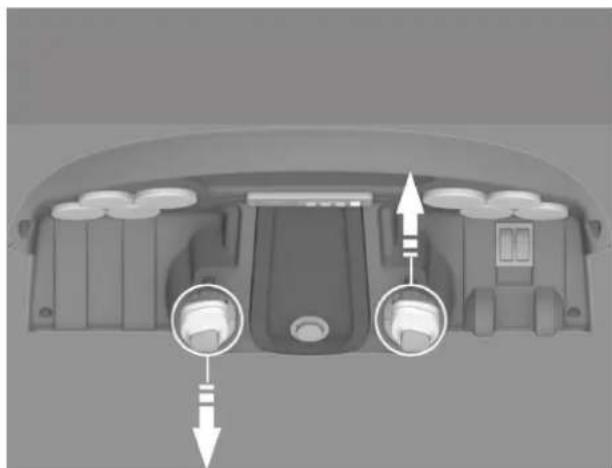
natural_image
Top-down view of a car dashboard with two circular ports and directional arrows indicating flow or movement (no text or symbols)natural_image
Top-down view of a car interior showing dashboard and seat area with directional arrows indicating movement (no text or symbols)Fold vingerne sammen

text_image
Tryk på knappen som vist på tegningen og fold vingen op eller nednatural_image
3D model of an airplane cockpit showing internal components and a close-up of its electrical outlet (no text or symbols visible)VIGTIGT!
natural_image
3D model of a toy airplane with propeller and fan (no text or symbols visible)text_image
Exploded view diagram of a futuristic propeller with numbered parts for identification and assembly reference.natural_image
3D cutaway view of a jet engine showing internal components and labeled parts (no text or symbols)Anslutning av ström
natural_image
Interior view of a vehicle showing a battery pack and structural components (no visible text or symbols)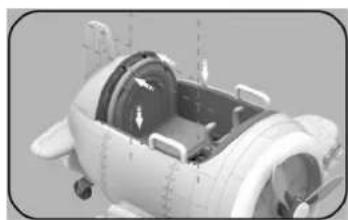
natural_image
3D rendering of a mechanical component with internal parts and mounting holes (no visible text or symbols)natural_image
3D model of a submarine with visible structural components and a vertical arrow indicating motion (no text or symbols)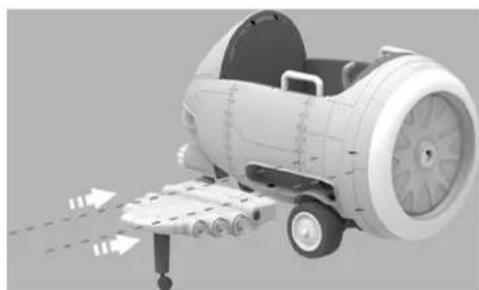
natural_image
3D rendering of a jet engine with visible propellers and wheels, no text or symbols presentnatural_image
3D rendered model of a futuristic spacecraft with open cockpit and internal components (no text or symbols visible)natural_image
Two-panel illustration showing a propeller with propellers and fan blades, connected by a black triangular play button (no text or symbols)natural_image
3D rendering of a propeller airplane showing internal blades and structural components (no text or symbols)Instrument panel:
text_image
Labeled diagram of a game controller head with numbered components for identificationnatural_image
Top-down view of a car dashboard with two circular indicators pointing to the front and side (no text or symbols visible)Framåt Bakåt

natural_image
Interior view of a vehicle dashboard with two circular buttons and directional arrows indicating movement or control points (no text or symbols present)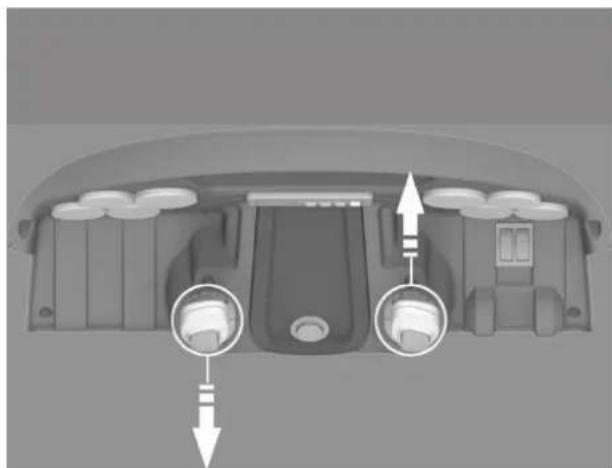
natural_image
Top-down view of a car dashboard with two circular indicators pointing to the front and side (no text or symbols)
natural_image
Top-down view of a car interior showing dashboard and seat area with directional arrows (no text or symbols)natural_image
3D model of an aircraft showing internal components and external electrical outlet (no text or symbols)VIKTIGT!
natural_image
3D model of a toy airplane with propeller and fan assembly (no text or symbols visible)text_image
Exploded view diagram of a futuristic propeller with numbered parts for identification and assembly reference.natural_image
3D cutaway view of a jet engine showing internal components and labeled parts (no text or symbols present)Virran kytkentä
Kuvan mukaisesti:
natural_image
Interior view of a vehicle showing a mechanical component and a magnified inset of a device (no visible text or symbols)
natural_image
Close-up of a mechanical device with visible internal components and mounting brackets (no text or symbols)Siipien asennus:
natural_image
3D rendering of a futuristic vehicle with a mounted sensor or antenna (no visible text or symbols)
natural_image
3D rendering of a jet engine with visible propellers and wheels, no text or symbols presentnatural_image
3D rendered model of a futuristic spacecraft with visible internal components and external structure (no text or symbols)Potkurien asennus:
natural_image
Two-panel illustration showing a propeller blade and its internal fan blade, with no visible text or symbols.Tuulilasin asennus:
natural_image
3D cutaway view of a propeller aircraft showing internal components and airflow direction arrows (no text or symbols)Kojelauta:
text_image
Labeled diagram of a game controller head with numbered components for identificationnatural_image
Top-down view of a car dashboard with two circular arrows pointing to the front and side panels (no text or symbols visible)natural_image
Top-down view of a car dashboard with two circular adjustment knobs and directional arrows indicating movement (no text or symbols)
natural_image
Top-down view of a car dashboard with two labeled buttons and directional arrows indicating movement (no text or symbols present)