
CDR765 - CD Player PHILIPS - Free user manual and instructions
Find the device manual for free CDR765 PHILIPS in PDF.



| Product type | CD player/recorder |
| Brand | Philips |
| Model | CDR765 |
| Dimensions (W x H x D) | Approximately 43 x 9 x 30 cm |
| Weight | Approximately 4.5 kg |
| Power supply | 230 V ~ 50/60 Hz |
| Power consumption | 15 W |
| Laser type | GaAlAs semiconductor |
| Laser wavelength | 775-795 nm (at 25°C) |
| Laser output power (playback) | 2.5 mW |
| Laser output power (recording) | 35 mW |
| Compatible disc formats | Audio CD, CD-R, CD-RW |
| Main functions | CD playback, CD-R/RW recording, programmed playback, repeat, search |
| Connections | Analog audio outputs (RCA), optical digital output, audio input (RCA) |
| Operating temperature | 5°C to 35°C |
| Operating relative humidity | 5% to 90% (without condensation) |
| Maintenance and cleaning | Clean with a soft, dry cloth. Do not use chemicals. Clean the lens with a specific cleaning CD. |
| Safety | Class 1 laser (eye-safe). Do not open the casing. Unplug before maintenance. |
| Spare parts and repairability | Contact an authorized Philips service center. Parts availability according to regulations. |
| General information | Compliant with Canadian radio interference regulations. Indoor use only. |
Frequently Asked Questions - CDR765 PHILIPS
User questions about CDR765 PHILIPS
0 question about this device. Answer the ones you know or ask your own.
Ask a new question about this device
Download the instructions for your CD Player in PDF format for free! Find your manual CDR765 - PHILIPS and take your electronic device back in hand. On this page are published all the documents necessary for the use of your device. CDR765 by PHILIPS.
USER MANUAL CDR765 PHILIPS
Instructions for use
Mode d'emploi
One Year Exchange Warranty on Parts
This product must be carried in for repair.
WHO IS COVERED?
You must have proof of purchase to receive warranty service. A sales receipt or other document showing that you purchased the product is considered proof of purchase.
WHAT IS COVERED?
Warranty coverage begins the day you buy your product. For 90 days thereafter, all parts will be repaired or replaced, and labor is free. From 90 days to one year from the day of purchase, all parts will be repaired or replaced, but you pay for all labor charges. After one year from the day of purchase, you pay for the replacement or repair of all parts, and for all labor charges.
All parts, including repaired and replaced parts, are covered only for the original warranty period. When the warranty on the product expires, the warranty on all replaced and repaired parts also expires.
WHAT IS EXCLUDED?
Your warranty does not cover:
- labor charges for installation or setup of the product, adjustment of customer controls on the product, and installation or repair of antenna systems outside of the product.
- product repair and/or part replacement because of misuse, accident, unauthorized repair or other cause not within the control of Philips Consumer Electronics Company.
- reception problems caused by signal conditions or cable or antenna systems outside the unit.
- a product that requires modification or adaptation to enable it to operate in any country other than the country for which it was designed, manufactured, approved and/or authorized, or repair of products damaged by these modifications.
- incidental or consequential damages resulting from the product. (Some states do not allow the exclusion of incidental or consequential damages, so the above exclusion may not apply to you. This includes, but is not limited to, prerecorded material, whether copyrighted or not copyrighted.)
- a product that is used for commercial or institutional purposes (including but not limited to rental purposes).
WHERE IS SERVICE AVAILABLE?
Warranty service is available in all countries where the product is officially distributed by Philips Consumer Electronics Company. In countries where Philips Consumer Electronics Company does not distribute the product, the local Philips service organization will attempt to provide service (although there may be a delay if the appropriate spare parts and technical manual(s) are not readily available).
MAKE SURE YOU KEEP ...
Please keep your sales receipt or other document showing proof of purchase. Attach it to this owner's manual and keep both nearby. Also keep the original box and packing material in case you need to return your product.
BEFORE REQUESTING SERVICE...
Please check your owner's manual before requesting service. Adjustments of the controls discussed there may save you a service call.
TO GET WARRANTY SERVICE IN U.S.A., PUERTO RICO OR U.S. VIRGIN ISLANDS...
Take the product to a Philips factory service center (see enclosed list) or authorized service center for repair. When the product has been repaired, you must pick up the unit at the center. Centers may keep defective parts.
(In U.S.A., Puerto Rico and U.S. Virgin Islands, all implied warranties, including implied waarranties of merchantability and fitness for a particular purpose, are limited in duration to the duration of this express warranty. Because some states do not allow limitations on how long an implied warranty may last, this limitation may not apply to you.)
TO GET WARRANTY SERVICE IN CANADA...
Take the product to a Philips consumer service center (listed below), self-servicing dealer ar autorized service depot.
Philips Electronics Ltd.
601 Milner Avenue, Scarborough, Ontario, MIB IM8
(416) 292-5161
4977 Levy Street, St. Laurent Québec, H4R 2N9
(514) 956-0120
1741 Boundary Road, Vancouver, B.C. VSM 3Y7
(604) 294-3441
(In Canada, this warranty is given in lieu of all other warranties. No other warranties are expressed or implied, including any implied warranties of merchantability or fitness for a particular purpose. Philips is not liable under any circumstances for any direct, indirect, special, incidental or consequential damages, howsoever incurred, even if notified of the possibility of such damages.)
REMEMBER...
Please record the model and serial numbers found on the product below. Also, please fill out and mail your warranty registration card promptly. It will be easier for us to notify you if necessary.
MODEL #
SERIAL #
This warranty gives you specific legal rights. You may have other rights which vary from state/province to state/province.
Philips Service Company, P.O. Box 555, Jefferson City, Tennessee 37760, (423) 475-8869
CAUTION
USE OF CONTROLS OR ADJUSTMENTS OR PERFORMANCE OF PROCEDURES OTHER THAN THOSE SPECIFIED HEREIN MAY RESULT IN HAZARDOUS RADIATION EXPOSURE.
The set complies with the FCC-Rules, Part 15 and with 21 CFR 1040.1
CAUTION
TO PREVENT ELECTRIC SHOCK, MATCH WIDE BLADE OF PLUG TO WIDE SLOT, FULLY INSERTED.
ATTENTION
POUR EVITER LES CHOCS ELECTRIQUES, INTRODUIRE LA LAME LA PLUS LARGE DE LA FICHE DANS LA BORNE CORRESPONDANTE DE LA PRISE ET POUSSER JUSQU'AU FOND.
CDN
Canada
This digital apparatus does not exceed the Class B limits for radio noise emissions from digital apparatus as set out in the Radio Interference Regulations of the Canadian Department of Communications.
Beam divergence 60 degree
This warning label is located on the rearside and inside this laser product.
CAUTION: INVISIBLE
LASER RADIATION
WHEN OPEN. DO NOT STARE INTO BEAM
DANGER: INVISIBLE LASER RADIATION WHEN OPEN.
VARO!
AVOID DIRECT EXPOSURE TO BEAM.
AVATTAESSA JA SUOJALUKITUS OHITEJTAESSA OLET ALTTIINANAKYMATTOMAALLE LASERSATEILYLLE.ALA KATSO SATEESEEN.
WARNING!
OSYNLIG LASERSTRÅLNING NÄR DENNA DEL ÄR ÖPPNAD OCH SPARREN AR URKOPPLAD. BETRAKTA EJ STRALEN
or
DANGER - Invisible laser radiation when open.
AVOID DIRECT EXPOSURE TO BEAM
THIS DEVICE COMPLIES WITH PART 15 OF THE FCC (U.S.A.) RULES.
OPERATION IS SUBJECT TO THE FOLLOWING TWO CONDITIONS : (1) THIS DEVICE MAY NOT CAUSE HARMFUL
INTERFERENCE, AND (2) THIS DEVICE MUST ACCEPT ANY INTERFERENCE RECEIVED, INCLUDING INTERFERENCE THAT MAY CAUSE UNDESIRED OPERATION.
NOTE
This equipment has been tested and found to comply with the limits for a Class B digital device, pursuant to part 15 of the FCC Rules. These limits are designed to provide reasonable protection against harmful interference in a residential installation. This equipment generates, uses and can be used in accordance with the instructions, may cause harmful interference to radio communications. However, there is no guarantee that interference will not occur in a particular installation.
If this equipment does cause harmful interference to radio or television reception, which can be determined by turning this equipment off and on, the user is encouraged to try to correct the interference by one or more of the following measures :
- reorient or relocate the receiving antenna.
- increase the separation between the equipment and receiver.
- connect the equipment into an outlet on a circuit different from that to which the receiver is connected.
- consult the dealer or an experienced radio/TV technician for help.
IMPORTANT
THIS PRODUCT WAS FCC VERIFIED UNDER TEST CONDITIONS THAT INCLUDED USE OF SHIELDED CABLES AND CONNECTORS BEWTEEN SYSTEM COMPONENTS. IT IS IMPORTANT THAT YOU USE SHIELDED CABLES TO REDUCE THE POSSIBILITY OF CAUSING INTERFERENCE TO RADIOS, TELEVISION SETS AND OTHER ELECTRONIC DEVICES. IF YOU HAVE ANY PROBLEMS CONTACT YOUR DEALER.
ANY CHANGE OR MODIFICATIONS TO THE EQUIPMENT BY THE USER NOT EXPRESSLY APPROVED BY THE GRANTEE OR MANUFACTURER COULD VOID THE USER'S AUTHORITY TO OPERATE SUCH EQUIPMENT.
English 4
English
Français....22
Français
Español 40
Enspadol
-
Read Instructions - All the safety and operating instructions should be read before the appliance is operated.
-
Retain Instructions - The safety and operating instructions should be retained for future reference.
-
Heed Warnings - All warnings on the appliance and in the operating instructions should be adhered to.
-
Follow Instructions - All operating and use instructions should be followed.
-
Water and Moisture - The appliance should not be used near water - for example, near a bathtub, washbowl, kitchen sink, laundry tub, in a wet basement, or near a swimming pool, and the like.
-
Carts and Stands - The appliance should be used only with a cart or stand that is recommended by the manufacturer.
6A.

An appliance and cart combination should be moved with care. Quick stops, excessive force, and uneven surfaces may cause the appliance and cart combination to overturn.
-
Wall or Ceiling Mounting - The appliance should be mounted to a wall or ceiling only as recommended by the manufacturer.
-
Ventilation - The appliance should be situated so that its location or position does not interfere with its proper ventilation. For example, the appliance should not be situated on a bed, sofa, rug, or similar surface that may block the ventilation openings; or, placed in a built-in installation, such as a bookcase or cabinet that may impede the flow of air trough the ventilation openings.
-
Heat - The appliance should be situated away from heat sources such as radiators, heat registers, stoves, or other appliances (including amplifiers) that produce heat.
-
Power Sources - The appliance should be connected to a power supply only of the type described in the operation instructions or as marked on the appliance.
-
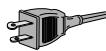
Grounding or Polarization - The precautions that should be taken so that the grounding or polarization means of an appliance is not defeated.
-
Power-Cord Protection - Power-Supply cords should be routed so that they are not likely to be walked on or pinched by items placed upon or against them, paying particular attention to cords at plugs, convenience receptacles, and the point where they exit from the appliance.
-
Cleaning - The appliance should be cleaned only as recommended by the manufacturer.
-
Nonuse Periods - The power cord of the appliance should be unplugged from the outlet when left unused for a long period of time.
-
Object and Liquid Entry - Care should be taken so that objects do not fall and liquids are not spilled into the enclosure through openings.
-
Damage Requiring Service - The apliance should be seviced by qualified service personnel when :
a. The power-supply cord or plug has been damaged; or
b. Objects have fallen, or liquid has been spilled into the appliance; or
c. The appliance has been exposed to rain ; or
d. The appliance does not appear to operate normally or exhibits a marked change in performance; or
e. The appliance has been dropped, or the enclosure damaged.
17 Servicing - The user should not attempt to service the appliance beyond that described in the operating instructions. All other servicing should be referred to qualified service personnel.
WARNING
TO REDUCE THE RISK OF FIRE OR ELECTRIC SHOCK, DO NOT EXPOSE THIS APPLIANCE TO RAIN OR MOISTURE.

CAUTION
RISK OF ELECTRIC SHOCK DO NOT OPEN

CAUTION: TO REDUCE THE RISK OF ELECTRIC SHOCK, DO NOT REMOVE COVER (OR BACK). NO USER-SERVICEABLE PARTS INSIDE. REFER SERVICING TO QUALIFIED SERVICE PERSONNEL.
The lightning flash with arrowhead symbol, within an equilateral triangle, is intended to alert the user to the presence of uninsulated “dangerous voltage” within the product’s enclosure that may be of sufficient magnitude to constitute a risk of electric shock to persons.

The exclamation point within an equilateral triangle is intended to alert the user to the presence of important operating and maintenance (servicing) instructions in the literature accompanying the appliance.
Table of contents
GENERAL INFORMATION
Technical information ....4
Disc for recording....5
Discs for playback....5
Maintenance 5
Accessories 5
OPERATING BUTTONS AND CONNECTIONS
Operating buttons on the front....6
Connections on the back....6
DISPLAY
DISPLAY explanation ....7
DISPLAY messages....8
INSTALLATION
Connections general 9
Analogue connections CD Recorder & CD Player .....9
Analogue connections CD Player deck....10
Digital coaxial connections CD Recorder ....10
Digital optical connections CD Recorder....11
Power supply....11
Set-up recommendations....11
Inserting batteries in the remote control .....11
REMOTE CONTROL & INSERTING DISCS
Remote control commands....12
Inserting discs....12
RECORDING
Remarks about recording....13
Normal and high-speed dubbing ....13
Digital recording from external CD player ....14
Synchronized digital recording from external
CD player: CD-SYNC 15
Analogue recording from an external source......16
Finalizing CD-R & CD-RW discs....17
Unfinalizing CD-RW discs....17
ERASING & PLAYING
Erasing CD-RW discs ....18
Playing CDs on deck 1 and/or deck 2....18
Playing as a 2-disc changer ....18
PLAYING
Selecting a track or searching....19
Shuffle (random-order) play 19
Repeat CD, track or program .....19
Programming 20
FIXING PROBLEMS
Troubleshooting 21
Diagnostic program....21
Welcome!
Thank you for purchasing this Philips Compact Disc
Recorder/Player Double Deck.
In the 1980s Philips invented a new audio system - the CD.
The CD (compact disc) revealed the new dimensions of digital sounds and enhanced the pleasures of audio.
Compact disc technology permits a high contrast in both loud and quiet passages, with perfect channel separation. Philips has continued to develop compact disc technology and the result is the CD recorder.
With your Philips CD Recorder/Player you can make your own, high-quality audio CDs, subject only to the legal restrictions on copying. You can either dub at high or normal speed from the Player to the Recorder or record from an external source.
Naturally all pre-recorded audio CDs can combined CDs - e.g. CD-Extra - can be played using one or both of the decks individually or together as a double-deck changer.
Recordings may only be made for personal use. It is forbidden to copy material protected by copyright, including computer programs, films, television and audio recordings.
This appliance may not be used for such applications.
Technical information
Subject to modification without notice.
Digital frequency response 0–22,050Hz
Playback S/N 100dB
Playback dynamic range....95dB
Play back total harmonic distortion....0.0056%, -85dB
Recording S/N (Analogue)....90dB
Recording S/N (Digital) ....Equal to source
Recording dynamic range....92dB
Recording total harmonic distortion....0.0056%, -85dB
Digital coaxial input (IEC 958)....44.1 kHz +/-100ppm
Digital optical input (IEC958)....44.1 kHz +/- 100ppm
Analogue input (4 steps -3, 0, 3 and 6 dB) .....500 mVrms/50k =0dB
Audio output....2V RMS ±2dB
Digital coaxial output 0.5 Vpp/75
Headphones....0-5V RMS/8-2000
Dimensions ....17 1/8 x 12 x 35 5/8 inches
Weight....4kg
Power consumption....20W
Operating temperature....5 - 35°C
Power Supply....AC 120V
Disc for recording
For recording use, special audio discs must be used (for music only). These Discs bear the logos as shown below. The text 'DIGITAL AUDIO' is present! Copyright fees have been paid on these discs in some countries.
With your recorder you can use two types of discs for recording purposes:
- CD-Audio Recordable (CD-R) discs: Fully recorded and finalized, these discs play on all CD players and recorders.

- CD-Audio ReWritable (CD-RW) discs: Can be recorded, erased and re-recorded hunderds of times. When finalized, they play on CD-RW compatible CD players and recorders.

In the course of 1999 most Philips CD players and recorders will be CD-RW compatible.
Discs for playback
Your CD Recorder/Player can play:
- All prerecorded audio CDs, and combined CDs such as CD Extra.
- All Audio CD-R and Audio CD-RW.
Note: CD-R discs recorded with a computer can only be used when they are correctly treated according the audio standard (IEC958: Consumer part). Single session only!
Maintenance
It is extremely important that the discs used for recording are free of dust and scratches.
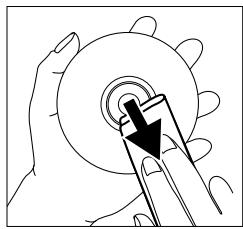
To clean a CD, wipe it in a straight line from the center towards the outer edge using a soft, lint-free cloth. Cleaning agents may damage the disc! Write only on the printed side of a CD-R or CD-RW, and only with a soft felt-tipped pen.
natural_image
Illustration of a hand using a tool to cut a circular object (no text or symbols visible)Clean the CD Recorder/Player using a soft, lint-free cloth that has been slightly dampened. Do not use a cleaning agent; this might have a corrosive effect.
text_image
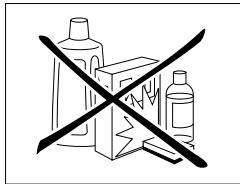
Prohibition sign with crossed-out boxes and a pencil, symbolizing hazardous products or chemicals.Do not expose the CD Recorder/the Player batteries or CDs to extreme humidity, rain, sand or excessive heat from heating equipment or direct sunlight.
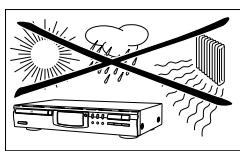
If the CD Recorder/Player does not read the CDs correctly, use a cleaning CD (commonly available) to clean the lens before taking the CD Recorder/Player in for repairs. Other cleaning methods may damage the lens. Keep the tray closed at all times to avoid getting dust on the lens.
The lens may become clouded when the CD Recorder/Player is moved from cold to warm surroundings; it will not be possible to play a CD when this happens. Leave the CD Recorder/Player in the warm surroundings to allow the moisture to evaporate.
Accessories
- 2 Analogue audio cables (with red and white plugs)
- 1 Digital coaxial cable (with black plugs)
- Power cord
- 2 Batteries
- Remote control
- Guarantee
text_image
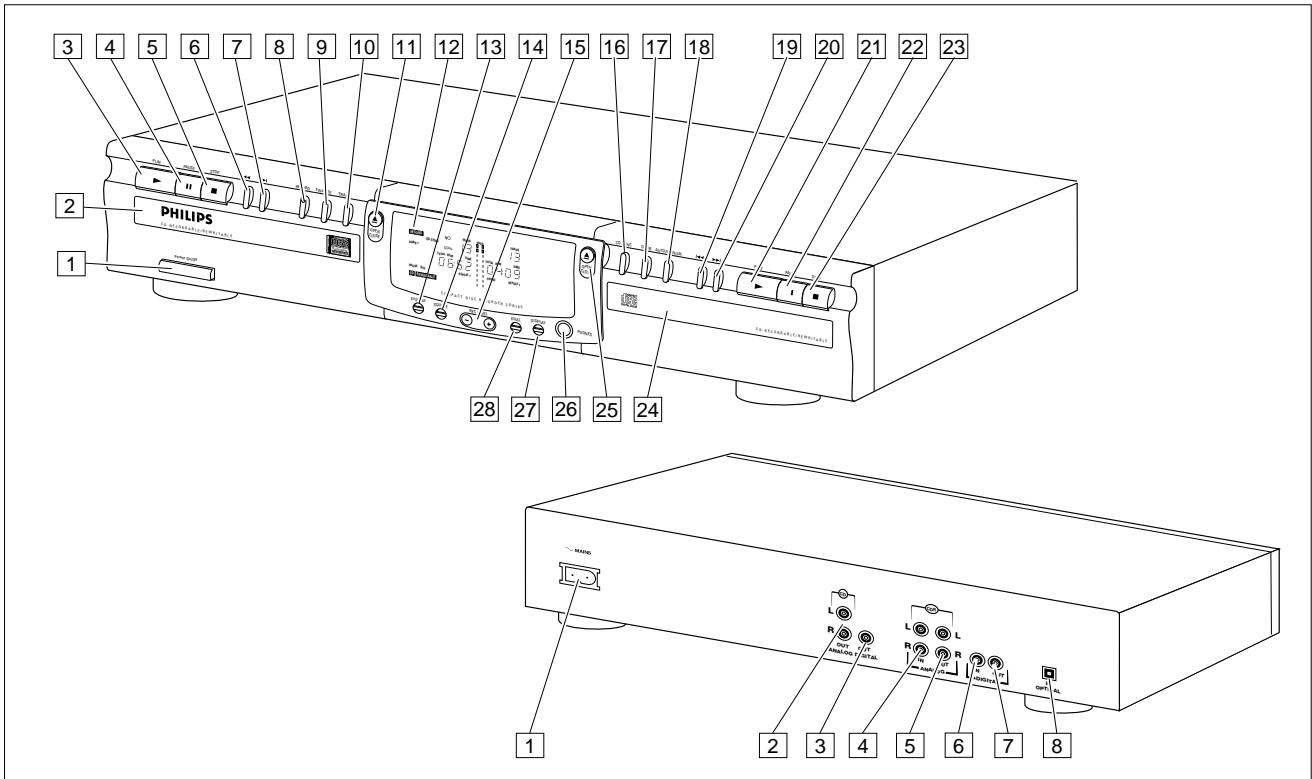
3 4 5 6 7 8 9 10 11 12 13 14 15 16 17 18 2 PHILIPS 1 28 27 26 25 24 1 2 3 4 5 6 7 8 9 L L R R OPT AL MOSG R OPT AL MOSG OPT AL MOSG MOSG MOSG MOSG MOSG MOSG MOSG MOSG MOSG MOSG MOSG MOSG MOSG MOSG MOSG MOSG MOSG MOSG MOSG MOSG MOSG MOSG MOSG MOSG MOSG MOSGS MOSGS MOSGS MOSGS MOSGS MOSGS MOSGS MOSGS MOSGS MOSGS MOSGS MOSGS MOSGS MOSGS MOSGS MOSGS MOSGS MOSGS MOSGS MOSGS MOSGS MOSGS MOSGS MOSGS MOSGS MOSGP MOSGP MOSGP MOSGP MOSGP MOSGP MOSGP MOSGP MOSGP MOSGP MOSGP MOSGP MOSGP MOSGP MOSGP MOSGP MOSGP MOSGP MOSGP MOSGP MOSGP MOSGP MOSGP MOSGP MOSGP MOS GPOperating buttons on the front
CD recorder
1 ON/OFF ....turn the CD recorder/player ON and OFF
2 Disc tray
3 PLAY ▶...... start play or record
4 PAUSE II ..... interrupt play
5 STOP ■ .... stops
6 ◀◀ previous track/search back
7 ▶▶I ....... next track/search forward/new track
8 RECORD......record
9 FINALIZE .... . finalize recording
10 ERASE .... erase recording
11 OPEN/CLOSE .....open/close disc tray
12 DISPLAY (information screen)
13 DISPLAY ..... select display information
14 SOURCE.....select digital or analogue input
15 REC LEVEL ....adjusts the recording level (analogue)
16 CD-SYNC.....synchronized recording; recording starts automatically
17 DUBB. digital dubbing (normal or high speed) from CD Player to CD Recorder
18 AUTO/MANUAL .. select track numbering method
CD player
19 ◀◀. . . . . . . . . . . previous track/search back
20 ▶▶1. . . . . . . . . next track/search forward
21 PLAY ▶...... start play
22 PAUSE II ..... interrupt play
23 STOP ■ .... stops
24 Disc tray
25 OPEN/CLOSE....open/close disc tray
26 PHONES ..... plug for headphones
27 DISPLAY ..... select display information
28 DUAL . . . . . . . plays CD Recorder and CD Player separately
Connections on the back
1 Connection to power supply
4 ANALOG IN. . . . . connects to the line output of an amplifier. (left and right)
5 ANALOG OUT CDR & CD
...... connection for input line on amplifier (left and right)
6 DIGITAL IN ..... connection for digital coaxial input from external source, e.g. amplifier or recording device
7 DIGITAL OUT CDR & CD
... connects to the digital coaxial input of e.g. amplifier or recording device
8 OPTICAL IN ..... connection for digital optical input from external CD player
For use only in the DUAL mode (simultaneous play-back):
3 DIGITAL OUT CD. . connection for digital coaxial output from CD deck to external device, e.g. amplifier or recording device
2 ANALOG OUT CD . connection for analogue output from CD deck to input line on an amplifier (left and right)
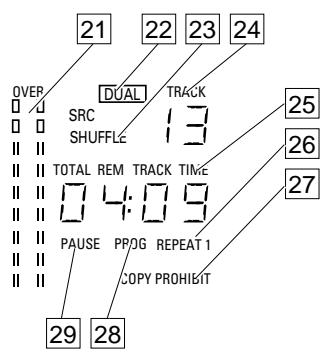
DISPLAY explanation
The display has a section for the CD Recorder and a section for the CD Player.
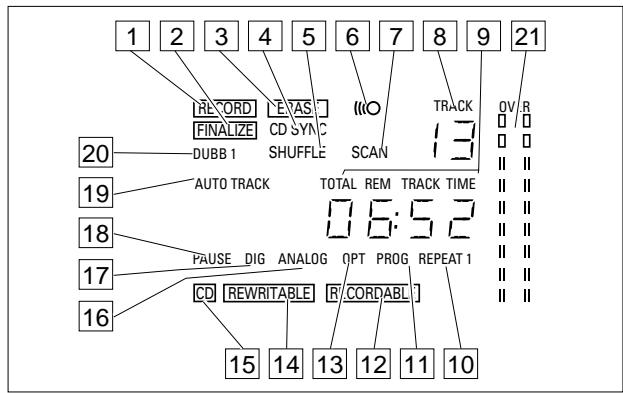
1 RECORD . . . . . lights up during recording and flashes in record standby
2 FINALIZE . . . . . lights up during finalizing and flashes in finalize standby
3 ERASE ..... lights up during erase recording and flashes in erase standby
4 CD-SYNC.....synchronized recording is active.
5 SHUFFLE ..... plays tracks in random order
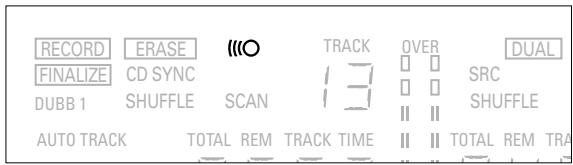
6 "O remote control active
7 SCAN . . . . . . . scans for COPY PROHIBIT or data track in dubbing mode.
8 TRACK.... track number
9 TOTAL REM TRACK TIME lights up according to selected time mode
10 REPEAT (1) ..... repeat function activated during play
11 PROG ..... programmed play
12 RECORDABLE ... Unfinalized CD-R disc inserted
13 OPT ..... digital optical input is selected
14 REWRITABLE .... CD-RW disc inserted
15 CD ....CD inserted (a pre-recorded CD or finalized CD-R or CD-RW disc)
16 ANALOG ..... analogue input is selected
17 DIG.....lights when digital input is selected and flashes when digital input is incorrect.
18 PAUSE .... pause function is active
19 AUTO TRACK .... automatically increase track numbers
20 DUBB (1) ..... dubbing from CD player to CD recorder
21 Record/play level bar (analogue)
text_image
21 22 23 24 OVER DUAL TRACK SRC 13 SHUFFLE TOTAL REM TRACK TIME 04:09 PAUSE PPOG REPEAT 1 COPY PROHIBIT 29 28CD player section
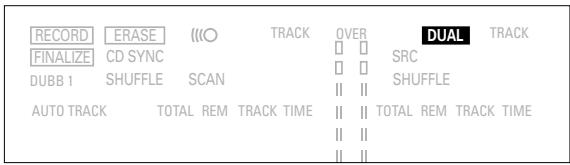
22 DUAL .... play CD Recorder and CD Player separately
23 SHUFFLE .... plays tracks in random order
24 TRACK.... track number
25 TOTAL REM TRACK TIME lights up according to selected time mode
26 REPEAT 1.....repeat track
27 COPY PROHIBIT . . lights up when attempting to record a protected digital audio recording
28 PROG ..... programmed play
29 PAUSE .... pause function is active
DISPLAY messages
Messages, as listed and explained here may appear on the display for your guidance.
READ 176 ......player is reading disc information
OPC ....during OPC procedure
OPEN ....during tray opening
CLOSE .....during tray closing
70-d 15C ......no disc inserted, or disc unreadable
UPdRtE ......updating disc contents
RECOVER ......during recovery procedure
6U5Y ....recording pause (four seconds) in progress or tracks are being scanned in DUBB mode
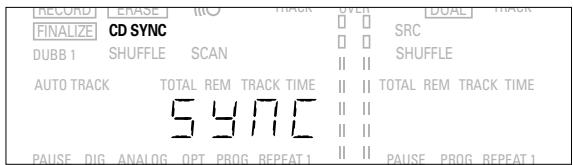
547C ....during synchronized recording standby
ETR ....during erase-track standby
d 15C ....during erase-disc standby
NO-OPC .....laser power calibration failed. Recording no longer possible
FULL ......program full
cd-FULL ......no more recording possible
noAUD 10......(flashing) no audio disc loaded or failure to read data
F INRL.....laser power calibration performed 96 times, finalize disc
d 15 IERL ......digital coaxial input selected
OPT ICAL ......digital optical input selected
SHUFFLE .....during shuffle
FC-d 15C ......recovered disc. Finalizing not possible
E0C ......flashes during unfinalize disc standby, lights during unfinalize disc
INPUT ....during input selection (CD-SYNC)
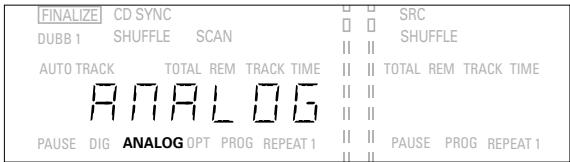
ANALOS ......analog input selected
dubb-1......normal-speed dubbing
dubb ......high-speed dubbing
dUAL ....CD Recorder and CD Player operating separately
SELECT CD......CD Player selection
SELECT [dr] ....CD Recorder selection
dURL OFF......separate operation off
PRO6 Cd ....start CD Player programming
PRO6 Cdr ..start CD Recorder programming ( playback)
d 16 IERL FEC ..track will be recorded digitally
-3db ....recording sensitivity level -3 dB
□db ......recording sensitivity level 0 dB
3db ......recording sensitivity level 3 dB
5db ......recording sensitivity level 6 dB
NO-ΓEC ......data (non-audio) track found during scan
ANALOS FEC ....copy prohibited track found during dubbing (track will be copied analogue)
Connections general
For playing back on the CD Recorder and/or the CD Player deck, the following output connections are available:
- Digital coaxial output (CD & CD-R)
- Analogue output (CD & CD-R)
We recommend that these be connected to the TAPE or CD-R input on your amplifier.
For external recording, the following input connections are available:
- Digital optical input
- Digital coaxial input
- Analogue input
For playing back on the CD Recorder and CD Player decks separately (DUAL mode), the following output connections are available:
- Digital coaxial output (CD)
- Analogue output (CD)
We recommend that these be connected to the CD input on your amplifier.
The connections to be made depend upon the possibilities your audio equipment offers. Please refer to the user manuals for your other audio equipment first.
Digital recordings, either optical or coaxial, will give the best performance in terms of audio and versatility (e.g. auto-track). (The digital optical connection is less sensitive to external disturbances).
If your equipment does not allow for digital connections, the high quality Analogue/Digital Converter on the CD Recorder/Player will ensure excellent audio performance when recordings are made from an analogue source.
Playback via the digital coaxial output of the CD Recorder/Player gives the best audio performance.
If your equipment does not offer digital connections the high quality Digital-Analog-Convertor of the CD Recorder/Player ensures a high sound quality via the analogue output.
We recommend that both digital and analogue connections be made, so that analogue recordings can be made when digital recording is not possible.
The most common ways of connecting the CD Recorder/Player are explained below. If you still have difficulties with the connections, feel free to contact the Philips Consumer Service desk in your country.
Analogue connections CD Recorder & CD Player
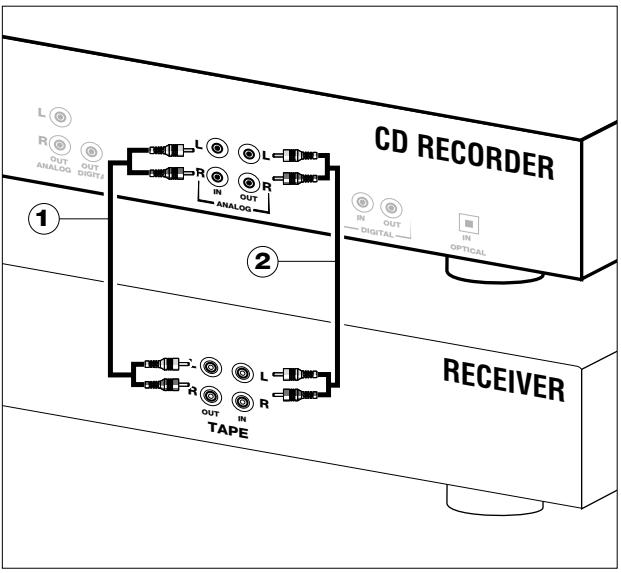
This connection must be established for the play-back CD Recorder deck and for the CD Player deck (cable ②)
Cable ① is used only if you want to make recordings from an external analogue source.
text_image
CD RECORDER L R OUT ANALOG IN DIGITZ R IN OUT ANALOG IN OUT DIGITAL IN OPTICAL 1 2 RECEIVER R OUT IN TAPEUse the audio cables supplied. Connect the red plugs to the R sockets, and the white plugs to the L sockets.
1 For recording from an external source, connect Cable ① to the ANALOGUE IN plug on the CD Recorder/Player and the LINE-OUT or TAPE-OUT plug on an amplifier.
Note: For recording directly from a CD player the analogue input of the CD Recorder/Player should be connected to the analogue output of the CD player.
2 For playing back, connect Cable ② to the ANALOGUE OUT plugs on the CD Recorder/Player and the INPUT plugs on an amplifier, e.g. TAPE IN, CD-R or AUX.
Note: Never use the PHONO input.
Analogue connection CD Player deck
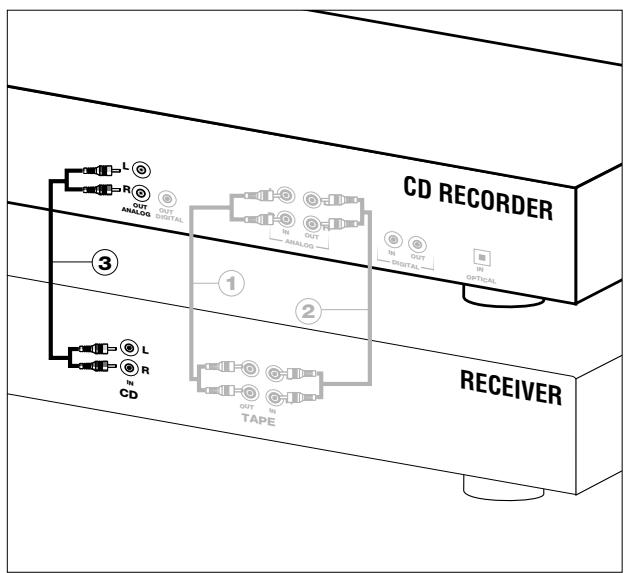
This connection is only required if you want to play back on the CD Player deck separately from the CD Recorder deck. This is called the DUAL mode.
flowchart
graph TD
    A["CD RECORDER"] --> B["RECEIVER"]
    B --> C["OUT CTABAL"]
    C --> D["IN OUT CTABAL"]
    D --> E["IN IN Optical"]
    B --> F["OUT TAPE"]
    F --> G["IN IN TADE"]
    H["L OUT ANALOG"] --> I["OUT ANALOG"]
    J["R OUT ANALOG"] --> K["OUT ANALOG"]
    L["L OUT ANALOG"] --> M["OUT ANALOG"]
    N["CD"] --> O["IN IN TADE"]
    P["3"] --> Q["1"]
    P --> R["2"]
1 For playing back separately on the CD Player deck, connect a third cable ③ (not supplied) between the ANALOGUE OUT plugs on the CD Recorder and the INPUT plugs on an amplifier, e.g. CD or AUX.
(Connect the red line in the R plugs and the white line in the L plugs.)
Note:
- Never use the PHONO input
- Your CD Recorder/Player is equipped with a digital coaxial output for the CD Player deck. This output connection can be used for digital play-back.
Digital Coaxial Connection CD Recorder
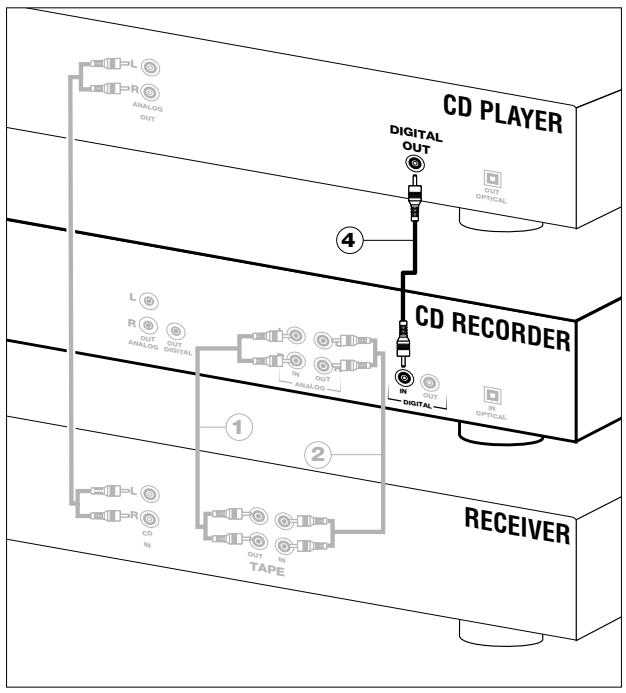
This connection is only required if you want to record from an external CD player with a digital coaxial output.
flowchart
graph TD
    A["CD PLAYER"] --> B["ANALOG OUT"]
    B --> C["CD RECORDER"]
    C --> D["ANALOG OUT"]
    D --> E["OUT DIGITAL"]
    E --> F["IN OUT DIGITAL"]
    F --> G["IN IN OPTICAL"]
    G --> H["OUT OPTICAL"]
    H --> I["IN IN OPTICAL"]
    I --> J["IN IN TAPE"]
    style A fill:#f9f,stroke:#333
    style C fill:#ccf,stroke:#333
    style J fill:#cfc,stroke:#333
1 For recording from an external source, use a fourth cable ④ (not supplied) to connect the DIGITAL IN plug on the CD Recorder/Player to the DIGITAL OUT plug on an external CD player.
Note: Your CD Recorder/Player is equipped with a digital coaxial output plug (common plug for CD Recorder deck and CD Player deck). This output can be used for digital play-back.
Digital Optical Connection CD Recorder
This connection is only required if you want to record from an external CD player with a digital optical output.
1 Remove the dust caps from the digital optical connections. (We recommend that you save the caps).
2 For recording from an external source, use a fiber-optic cable ⑤ to connect the digital optical input on the CD Recorder/Player and the digital optical output on an external CD player.
Note: For playing back, the digital coaxial outputs or analogue outputs on the CD Player and the CD Recorder must be connected to an amplifier.
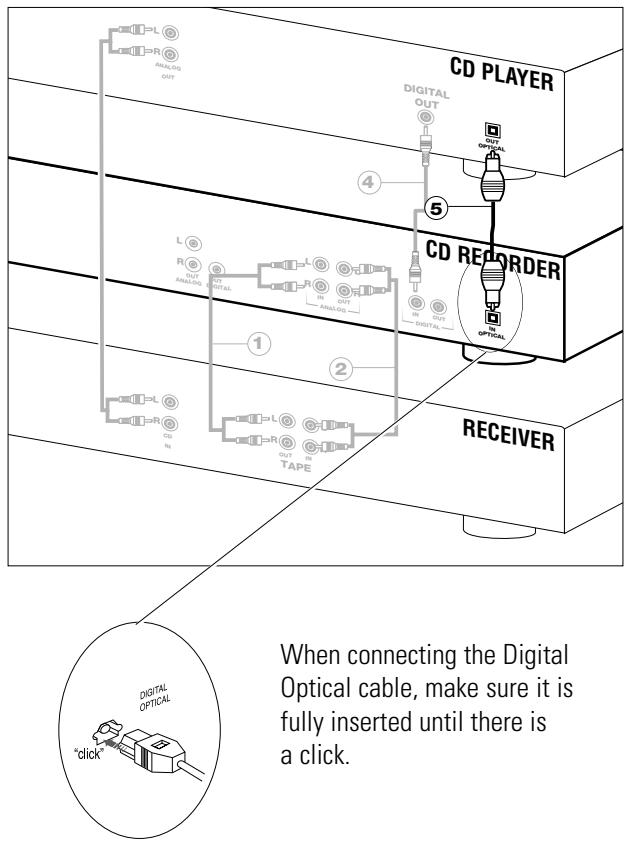
flowchart
graph TD
    A["CD PLAYER"] --> B["CD REORDER"]
    B --> C["RECEIVER"]
    D["Digital Optical Cable"] --> E["click"]
    style A fill:#f9f,stroke:#333
    style B fill:#ccf,stroke:#333
    style C fill:#cfc,stroke:#333
    style D fill:#fcc,stroke:#333
    note right of A: "When connecting the Digital Optical cable, make sure it is fully inserted until there is a click."
    note right of C: "When connecting the Digital Optical cable, make sure it is fully inserted until there is a click."
Setup recommendations
- Place the CD Recorder/Player on a solid, vibration free surface.
- Do not place the CD Recorder/Player near a source of heat or in direct sunlight.
- Do not use the CD Recorder/Player under extremely damp conditions.
- If the CD Recorder/Player is placed in a cabinet, make sure that a one-inch space remains free on all sides of the recorder for proper ventilation.
Power supply
natural_image
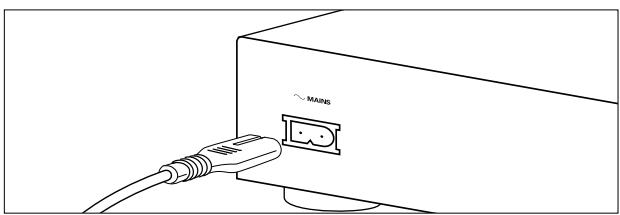
Line drawing of a computer interface with a cable and a labeled port (no text or symbols beyond the label)1 Plug the power cord supplied into the MAINS connector on the CD Recorder/Player, then into a wall socket.
2 Press ON/OFF to turn the CD Recorder/Player on.
Note:
- The CD Recorder/Player will automatically adjust to the local mains voltage.
- When the CD Recorder/Player is in the 'OFF' position, it is still consuming some power. If you wish to disconnect your CD Recorder/Player completely from the mains, withdraw the plug from the AC Outlet.
Inserting batteries in the remote control
natural_image
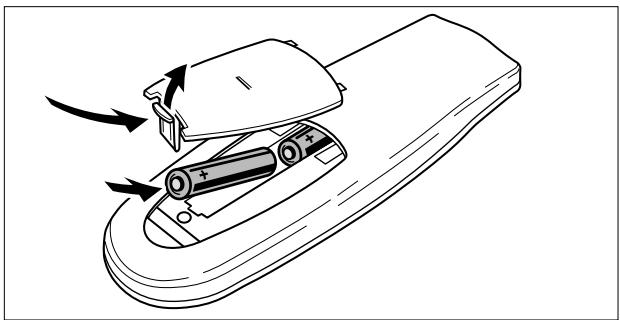
Line drawing of a remote control device with battery and switch components (no text or symbols)1 Open the battery compartment cover.
2 Insert 2 batteries (AAA, R03 or UM-4; as supplied) as shown.
3 Replace the cover.
Note: We recommend using 2 batteries of the same type and condition.
Batteries contain chemical substances; dispose of them properly.
Remote control commands
text_image
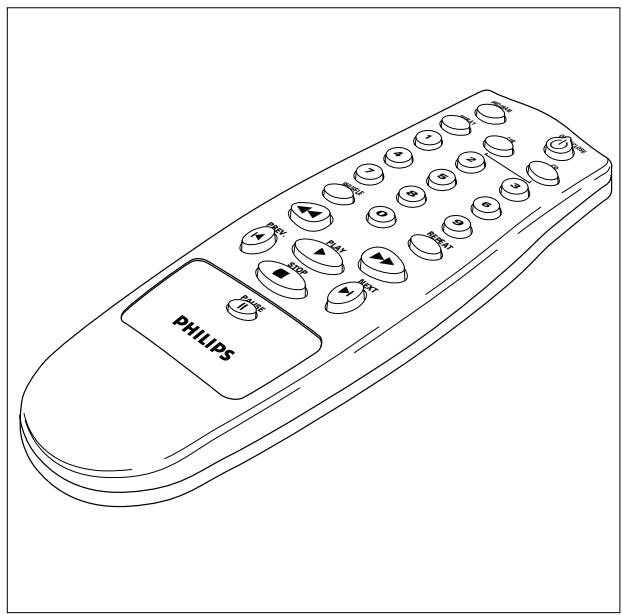
PHILIPSPROGRAM.....programs track numbers
DISPLAY .... selects display information
Number keys 0 - 9 ... selets a track by number
SHUFFLE .... plays CD(RW) or program in random order
◀◀. . . . . . . . . . searches backward
PREVIOUS ◀ ..... selects the beginning of a previous track
STOP ■ . . . . . . stops CD(RW) and clears a program
PAUSE II.... interrupts CD(RW) play
NEXT ▶I . . . . . . . . . . selects the beginning of subsequent
PLAY▶ . . . . . . . . . . . . . . . . . . . . . . . . . . . . . . . . . . . . . . . . . . . . . . . . . . . . . . . . . . . . . . . . . . . .
▶▶ ....searches forward
REPEAT .... repeat play
CD ....select CD Player
CD-R.....select CD Recorder
OPEN/CLOSE .....opens or closes the disc tray
When you press a button on the remote control, the indicator on the display will light up.
text_image
RECORD ERASE (O) TRACK OVER DUAL FINALIZE CD SYNC (3) □ □ SRC DUBB 1 SHUFFLE SCAN || || SHUFFLE AUTO TRACK TOTAL REM/TRACK TIME || || TOTAL REM TRANote: Unless indicated otherwise, all buttons are located on the front of the CD Recorder/Player. If also provided on the remote control, the corresponding buttons on the remote control can be used after the CD Recorder or the CD Player has been selected by pressing CD-R or CD.
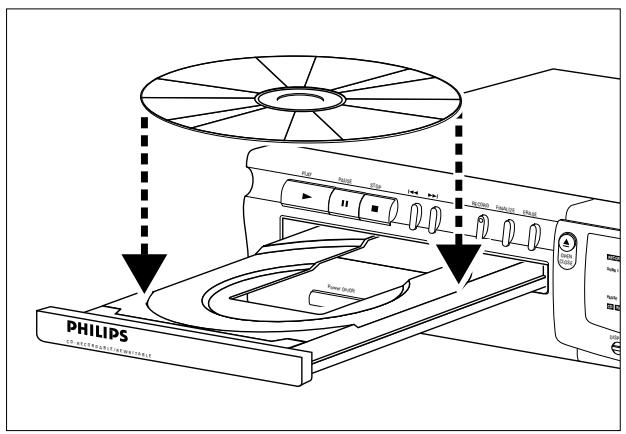
Inserting discs
text_image
PHILIPS CL. PTECH/CM/SPG/CM/SPG/CM/SPG RPM NMR STO 100 200 RETURN CASHION LIFE 71 Press OPEN/CLOSE (11) to open the disc tray.
2 Insert a CD, CD-R or, CD-RW in the appropriate recess in the tray, label side up.
IMPORTANT:
For recording it is important that the blank disc be completely free of dust particles or scratches. (see Disc Maintenance, p.5.)
Unfinalized discs cannot be played in the CD Player deck!
3 Gently push the front of the tray or press OPEN/CLOSE to close the tray (see also Playing a CD).
CD-Recorder only
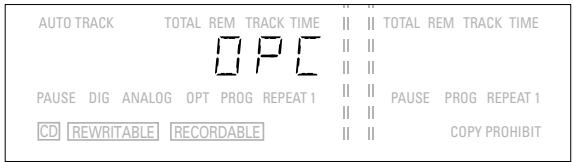
The display will indicate the type of disc you have inserted.
| II | II | ||
| AUTO TRACK | TOTAL REM TRACK TIME | II | II TOTAL REM TRACK TIME |
| II | II | ||
| II | II | ||
| PAUSE DIG ANALOG OPT PROG REPEAT 1 | II | II PAUSE PROG REPEAT 1 | |
| II | II | ||
| CD REWRITABLE RECORDABLE | II | II COPY PROHIBIT |
- If a CD-R is finalized the display will indicate CD.
- If a CD-RW is finalized it is still a CD-ReWritable and the display will indicate CD REWRITABLE.
If you insert a blank or partly-recorded CD-R or CD-RW, the CD recorder will calibrate the disc for optimum recording. During this process the display will first show □□□ and then the number of audio tracks previously recorded. Calibration can take up to 25 seconds.
text_image
AUTO TRACK TOTAL REM TRACK TIME || || TOTAL REM TRACK TIME DPC || || || || PAUSE DIG ANALOG OPT PROG REPEAT 1 || || PAUSE PROG REPEAT 1 CD REWRITABLE RECORDABLE || || COPY PROHIBITNote: Only Audio CDs will be accepted. If a non-audio disc is inserted, the display will indicate noAUD ID.
Remarks about recording
You will soon discover how easy it is to make your own CDs. Nevertheless, we recommend that you use a CD-RW disc for your first try. The two ways to make recordings are described below:
- Digital dubbing (normal or high-speed dubbing)
-
Recording from an external source:
-
Digital
- Digital with synchronized start using external CD player
-
Analogue
-
The recording procedure is the same for CD-Rs or CD-RWs.
- If the disc is a CD-RW and is already finalized you must unfinalize it first (page 17).
- If the disc already contains recordings, the CD recorder will automatically search for the end of the last track, so that you can start recording from there.
- There must be at least 7 seconds of recording time left on the disc, or you will not be able to activate the record standby mode.
- If the display indicates COPY PROHIBIT, no digital recording can be made of the source material. Recording will not start or will stop after 4 seconds.
-
The Serial Copy Management System (SCMS) only allows digital recording under specific conditions:
-
It is not possible to make a digital copy from a digital copy.
- Analogue recording is always possible!
-
The number of recordings from the original is unlimited.
-
A maximum of 99 tracks can be recorded on a disc. The minimum allowable track length is 4 seconds.
- Digital recordings can be made from CDs (or other sources with an output Sample Frequency of 44.1 kHz +/- 100 ppm) via the digital input.
- Recordings from DAT or DCC players will not stop automatically.
Important:
If you want to play back the recorded CD-R disc on the CD Player deck or on any other regular CD player, it must be finalized first. See the instructions for finalizing discs (page 17).
Finalized CD-RW discs play only on CD-RW compatible CD players.
Normal and high-speed dubbing
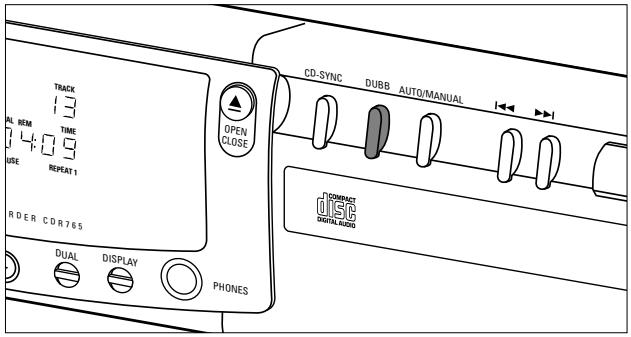
Use the dubbing feature for high-speed recording from the CD Player deck to the CD Recorder deck. The quality of the original recording will be retained.
text_image
TRACK 13 AL REM TIME 4:09 URE REPEAT 1 ORDER CDR765 DUAL DISPLAY PHONES OPEN CLOSE CD-SYNC DUBB AUTO/MANUAL DISC DIGITALLOGSSome comments about dubbing:
- A complete disc or program can be copied at high speed (DUBB).
- Single tracks or programs can be copied at normal speed (DUBB-1).
- Track numbers will be increased automatically.
- Track numbers cannot be increased manually.
Preparing for normal and high-speed dubbing
1 Make sure that the recording disc is completely free of scratches and dust particles.
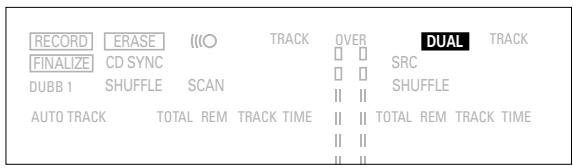
2 If necessary, press the DUAL button to switch off the DUAL mode on the display.
DUAL should be off.
text_image
RECORD ERASE (O) TRACK OVER DUAL TRACK FINALIZE CD SYNC SRC DUBB 1 SHUFFLE SCAN SHUFFLE AUTO TRACK TOTAL REM TRACK TIME || || TOTAL REM TRACK TIME || ||Start high-speed dubbing (Disc copy)
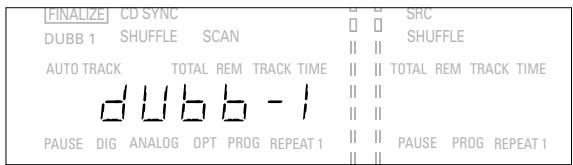
1 To record a complete disc or program, press DUBB repeatedly until:
dubb appears and DUBB flashes on the display. After some time, bUSY and the track number will appear on the display. The CD Player will scan the tracks on the CD and then stop.
text_image
[FINALIZE] CD SYNC DUBB 1 SHUFFLE SCAN AUTO TRACK TOTAL REM TRACK TIME dubb - 1 PAUSE DIG ANALOG OPT PROG REPEAT 1 SRC SHUFFLE || || TOTAL REM TRACK TIME || || PAUSE PROG REPEAT 1- To see the tracks that will be recorded, press DISPLAY. The track numbers will be shown in sequence.
- If NO-FEC appears, the track cannot be dubbed.
- If ANALOGUE FEC appears, the tracked will be dubbed analogue at normal speed.
- All other tracks will be copied in the normal fashion at double speed.
- Tracks for which d IS REAL FEC appears will be digitally recorded at double speed.
2 To start dubbing, press PLAY on the CD Player deck. High-speed dubbing will start. DUBB will stop flashing and remain lighted. The track number and the recording time will be displayed.
- To check the (remaining) recording time, press Display (this can be done during recording).
- Dubbing will stop automatically.
3 To manually stop recording, press STOP DUBB will go out and dubbing will stop. The minimal track length must be four seconds, otherwise a pause will be added to the track.
After dubbing, the display will show for several seconds. The Total Time indications may differ slightly, but no audio information is lost.
Note:
- Pause cannot be operated during DUBB.
- Dubbing will be done one track at a time, meaning that short pauses will be added between the tracks. If you program all tracks in their original sequence and dub at normal speed (DUBB-1), pauses will not be added.
Start dubbing at normal speed (copy a track or program)
Copying one track at a time (DUBB-1) is done at normal speed.
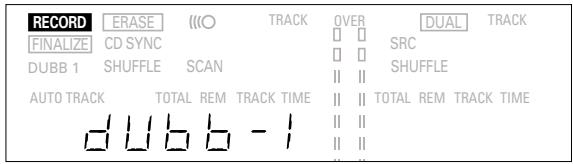
1 For recording, press DUBB repeatedly until: dubb - 1 appears on the display and DUBB-1 flashes. After some time, RECORD will flash.
text_image
RECORD ERASE INFO TRACK OVER DUAL TRACK FINALIZE CD SYNC SRC DUBB 1 SHUFFLE SCAN II SHUFFLE AUTO TRACK TOTAL REM TRACK TIME || || TOTAL REM TRACK TIME dubb - 1 || ||2 To select a track for dubbing, briefly press ◀◀ or ▶▶ on the CD Player one or more times.
- If you want to copy a program, you must enter the program first before selecting DUBB-1 (see Programming, page 2.0)
- If you select a track using the digital key pad on the remote control, dubbing will start automatically.
3 To start dubbing, press PLAY on the CD Player. DUBB-1 will stop flashing and remain lighted and the selected track or program will be copied at normal speed. The track number and the recording time used will be shown on the display. - To check the (remaining) recording time, press Display. This can be done during recording.
Note: Copy prohibited tracks will be copied analogue.
4 To stop dubbing, press STOP.
DUBB-1 will go out and the dubbing will stop. The minimal track length must be four seconds, otherwise a pause will be added to the track.
After dubbing, UPdATE will appear on the display for several seconds. The Total Time indications may differ slightly, but no audio information will be lost.
Note: Pause cannot be operated during DUBB-1.
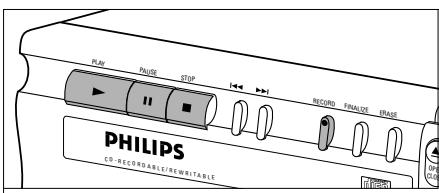
Digital recording from an external CD Player
text_image
PLAY PHASE STOP RECORD FINALDE TRASE PHILIPS CD-RECOGNABLE/REWHIRABLE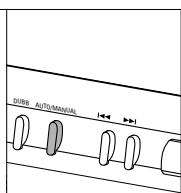
text_image
COMPACT DISC RECORDS SERIES DISPLAY BRANCH RECEIVED DUAL DISPLAY PHONES
Preparing for digital recording
1 Make sure the disc is absolutely free of scratches and dust particles.
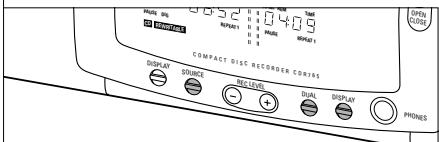
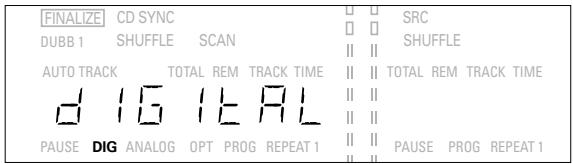
2 Press SOURCE repeatedly until (depending on the digital connection used):
DIG d IS ICRL or DIG OPT ICRL appears on the display.
text_image
FINALIZE CD SYNC DUBB 1 SHUFFLE SCAN AUTO TRACK TOTAL REM TRACK TIME d 15 I E AL PAUSE DIG ANALOG OPT PROG REPEAT 1 SRC SHUFFLE TOTAL REM TRACK TIME PAUSE PROG REPEAT 1- If necessary, press DUAL to switch off the DUAL mode; DUAL will no longer appear on the display.
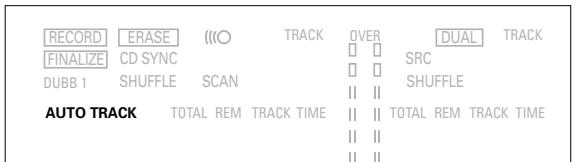
3 Press AUTO/MANUAL to switch between automatic and manual track numbering.
If AUTO is selected (the preferred method), AUTO TRACK will appear on the display.
text_image
RECORD ERASE ((O)TRACK OVER DUALTRACK FINALIZE CD SYNC SRC DUBB 1 SHUFFLE SCAN SHUFFLE AUTO TRACK TOTAL REM TRACK TIME || || TOTAL REM TRACK TIME || ||- AUTO: The track increments are automatically copied from the digital source material.
- MANUAL: Track numbers can be incremented manually by pressing ▶. (minimum track length is 4 seconds).
(This can also be done in AUTO mode).
- Track numbers cannot be changed after recording.
Note: AUTO TRACK works only with Consumer Sources with a digital output signal according to the IEC 958 (consumer part) audio standard.
Start digital recording
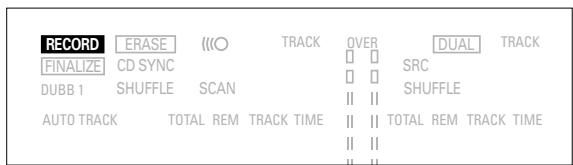
1 With the recorder stopped, press RECORD to enter the Record standby mode.
RECORD flashes.
text_image
RECORD ERASE (O) TRACK OVER DUAL TRACK FINALIZE CD SYNC SRC DUBB 1 SHUFFLE SCAN SHUFFLE AUTO TRACK TOTAL REM/TRACK TIME II II TOTAL REM/TRACK TIME II II II II- If DIG also flashes, the digital connection is incorrect.
2 To start recording, press PLAY on the CD Recorder/Player and immediately start the source (from the stop mode). RECORD lights continuously. The track number and recording time used will be indicated on the display. - To record a three-second pause (silence) at the beginning of a track, press PAUSE on the CD Recorder/Player.
- To check the (remaining) recording time, press DISPLAY. (This can also be done during the recording.)
3 To stop recording, press STOP on the CD Recorder/Player. RECORD will go out. - To interrupt recording, press PAUSE. RECORD starts to flash. Resume at step 2.
After recording the display will show UPDATE for several seconds.
Note: With AUTO TRACK on, the recorder will stop automatically. Recordings from DAT or DCC will stop after 20 seconds silence. With AUTO TRACK off, the AUTO STOP mode is disabled.
Synchronized digital recording from an external CD player - CD-SYNC
text_image
RECORD CD SYNC DUBB 1 IIO SCAN TOTAL REM 0.6:52 REPEAT 1 TRACK TIME 0.4:09 OVER 13 13 13 13 13 13 TIME PAUTE REPEAT 1 OPEN CLOSE COMPACT DISC RECORDER CDR765 DISPLAY SOURCE REC LEVEL DUAL DISPLAY PHONES CD-SYNC DUBB AUTO/N CONNECT DISC DIGITAL AUDIOPreparing for synchronized digital recording
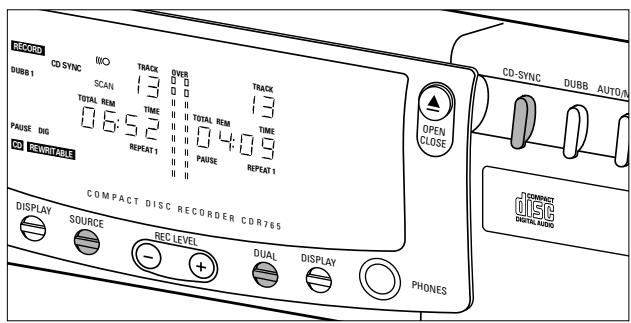
The CD-SYNC feature enables you to make fast and easy digital recording of a CD. Track increments are automatically detected from the digital source material. Track increments cannot be added manually.
1 Make sure the disc is absolutely free of scratches and dust particles.
2 Press SOURCE repeatedly until (depending on the connection used):
DIG d 16 IcAL or DIG OPT IcAL will appear on the display.
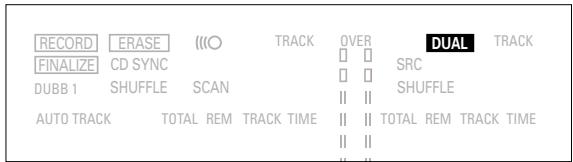
- If necessary, press DUAL to switch off the DUAL mode; DUAL will no longer appear on the display.
text_image
RECORD ERASE (○) TRACK OVER DUAL TRACK FINALIZE CD SYNC □ □ SRC DUBB 1 SHUFFLE SCAN □ □ SHUFFLE AUTO TRACK TOTAL REM TRACK TIME || || TOTAL REM TRACK TIME || ||Start synchronized digital recording
1 With the CD Recorder/Player stopped, press CD-SYNC. On the display, CD-SYNC & SYNC appear. After a time, RECORD starts to flash.
text_image
[RECORD] [ERASE] [IO] TRACK 051E [DUAL] TRACK FINALIZE CD SYNC DUBB 1 SHUFFLE SCAN || || SRC || || SHUFFLE AUTO TRACK TOTAL REM TRACK TIME || || TOTAL REM TRACK TIME SYNC PAUSE DIG ANALOG OPT PROG REPEAT1 || || PAUSE PROG REPEAT 1- If DIG also flashes, the digital connection is incorrect.
2 To start recording, press PLAY on the external digital source.
The CD Recorder/Player automatically starts to record and RECORD lights continuously. The track number and recording time used will be indicated on the display
- If you start the source during a track, CD-SYNC will not start recording until the beginning of the next track.
- To check the (remaining) recording time, press DISPLAY. (This can also be done during recording)
3 To stop recording, press STOP on the CD Recorder/Player. CD-SYNC and RECORD go out. - To interrupt recording, press PAUSE. RECORD starts to flash. To resume, press PLAY on the CD Recorder/Player.
After recording the display will show UPdATE for several seconds.
Note:
- The CD Recorder/Player will not start until it recognizes a digital signal. Although the reaction time is less than 200 milliseconds, the very beginning of the music may sometimes not be recorded. If this happens, you can start the recording manually (see digital recording - unsynchronized).
- Recordings from DAT or DCC will only stop after 20 seconds silence.
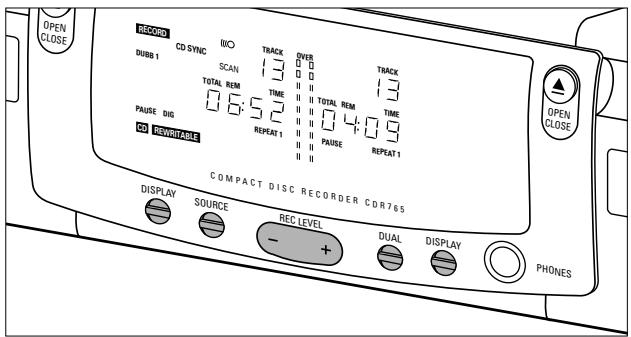
Analogue recording from an external source
text_image
OPEN CLOSE 12000 CD SYNC IIIO TRACK OVER TRACK DUBB 1 SCAN 13 13 TOTAL REM TIME TOTAL REM TIME 06:52 04:09 PAUSE DIG REPEAT 1 PAUSE REPEAT 1 CD RAWITABLE COMPACT DISC RECORDER CDR785 DISPLAY SOURCE REC LEVEL DUAL DISPLAY - + PHONESOnly make analog recordings if digital recording is not possible.
Preparing for analogue recording
1 Make sure the disc is absolutely free of scratches and dust particles.
2 Press SOURCE repeatedly until: ANALOG appears on the display.
text_image
[FINALIZE] CD SYNC DUBB 1 SHUFFLE SCAN AUTO TRACK TOTAL REM TRACK TIME ANALOG PAUSE DIG ANALOG OPT PROG REPEAT 1 SRC SHUFFLE TOTAL REM TRACK TIME PAUSE PROG REPEAT 1- If necessary, press DUAL to switch off the DUAL mode; DUAL will no longer appear on the display.
text_image
RECORD ERASE <text_image
RECORD ERASE (○)TRACK OVER DUALTRACK (FINALIZE)CD SYNC □ □ SRC DUBB 1 SHUFFLE SCAN □ □ SHUFFLE AUTO TRACK TOTAL REM TRACK TIME || || TOTAL REM TRACK TIME || ||Start analogue recording
1 To start recording, press PLAY on the CD Recorder/Player and immediately start the source. RECORD lights continuously. The track number and recording time used appear on the display. - To record a 3-second silence at the start of a track, press PAUSE. - To check the (remaining) recording time, press DISPLAY. (This can also be done during the recording) 2 To stop recording, press STOP on the CD Recorder/Player. RECORD will go out. - To interrupt recording, press PAUSE. RECORD will start to flash. Resume at step 1. After recording the display will show UPdRtE for several seconds. Note: With AUTO TRACK on, the recorder will stop automatically after a 20 seconds silence. With AUTO TRACK off, the AUTO STOP mode is disabled.Finalizing CD-R & CD-RW discs
Finalizing is a simple procedure that is necessary in order to play back the discs on the CD Recorder/Player or on an external CD player. Note: Finalizing prevents any further recording on a CD-R. A finalized CD-RW must be unfinalized to allow further recording or erasure of tracks. 1 Make sure the disc (in the CD Recorder/Player) is absolutely free of scratches and dust particles. 2 With the recorder stopped press FINALIZE and then within 3 seconds press RECORD. text_image
RECORD | ENRASE | MO | TRACK | SVER | [DUAL] | TRACK FINALIZE CD SYNC DUBB 1 SHUFFLE SCAN AUTO TRACK TOTAL REM TRACK TIME II II 1:42 PAUSE DIG ANALOG OPT PROG REPEAT 1 II PAUSE PROG REPEAT 1Unfinalizing CD-RW discs
For CD-RW discs only. If you want to make more recordings (or to erase tracks) on a finalized disc you must unfinalize it first. The Table of Contents (TOC) on the disc will be removed. To unfinalize: 1 Press ERASE twice. On the display, EOC and ERASE will flash. text_image
RECORD ERASE <Erasing CD-RW discs
For CD-RW discs only. You can erase: - track by track from the end. - the entire disc.To erase the last track :
1 Make sure the disc is not finalized (Showing OPC on display during start up). Otherwise unfinalizeize first (p.17) 2 Press ERASE. On the display, ER and ERASE will flash. text_image
RECORD ERASE (O) TRACK OVER DUAL TRACK FINALIZE CD SYNC SRC DUBB 1 SHUFFLE SCAN SHUFFLE AUTO TRACK TOTAL REM/TRACK TIME || || TOTAL REM/TRACK TIME \\u7a7aTo erase the entire disc:
1 Press ERASE once (for finalized CD-RW) and twice (for unfinalized CD-RW) On the display, □ 15C and ERASE will flash. text_image
RECORD ERASE (○) TRACK OVER DUAL TRACK FINALIZE CD SYNC □ □ SRC DUBB 1 SHUFFLE SCAN □ □ SHUFFLE AUTO TRACK TOTAL REMTRACK TIME || || □ □ || || □ □ || ||Playing CDs on Deck 1 and/or Deck 2
With your CD Double Deck, you can play the CD Recorder deck and/or the CD Player deck either simultaneously or separately (DUAL). For separate playing, the extra CD output must also be connected to an amplifier (see page 9.) text_image
PHILIPS CD- REGINA/REINITABLE Polarity Out/Off COMPACT DISC RECORDER CNTAS Signal SOURCE MOUNTS Signal SIMULAN Polarity OUT Signal SOURCE MOUNTS Signal SIMULAN Polarity OUT Signal SOURCE MOUNTS Signal SIMULAN Polarity OUTPlaying as a 2-disc changer
Your CD Recorder/Player can play CDs in both decks either successively or in random order (SHUFFLE play). 1 Press DUAL to switch DUAL off DUAL should be off. 2 On the deck you want to use, press PLAY to start CD play. The track number and track time of the deck in play appear on the display, together with the record/play level indicator. After the first disc has played, the second disc will be played. TIP: Use SHUFFLE to play the tracks on the two discs in random order (see SHUFFLE, page 19). 3 Press DISPLAY once, twice or three times to see: Remaining track time, total remaining time, or total track time with level indicator off. 4 To temporarily interrupt play, press PAUSE. PAUSE will light up on the display. 5 To continue play, press PAUSE again or press PLAY. 6 To stop play, press STOP. The number of tracks and the total playing time on the CD will appear on the display. Selecting a track or searching text_image
PLAY PAUSE STOP RECORD FINALIZE ERASE PHILIPS CD-RECORDABLE/REWIRITABLESelecting a track during play
1 Briefly press ◀◀ or ▶▶ one or more times. The player will skip to the beginning of the current, previous or next tracks, including tracks on the other disc when both decks are in use as a 2-disc changer. or \- Select CD-R or CD on the remote control, then press the desired track number using the numeric key pad on the remote control. For two-digit track numbers, press the numeric keys in rapid succession. For tracks on the other disc, select the desired deck first by pressing CD or CD-R. Play will skip to the beginning of the selected track.Selecting a track when CD is not playing
1 Briefly press ◀◀ or ▶▶ one or more times. or Select CD-R or CD on the remote control, then press the desired track number using the numeric key pad on the remote control. For two-digit track numbers, press the numeric keys in rapid succession. 2 Press PLAY. Play will start with the track selected.Searching during CD play
1 Hold down ◀◀ or ▶▶ on the front of the deck or ◀◀ or ▶▶ on the remote control. The player will search either forward or backward at ten times the normal speed with the sound on low level, and will then search at fifty times the normal speed with the sound muted. The search will extend over both discs if the changer mode (DUAL off) is activated. 2 Release the button when the desired passage has been found. Play will start with the desired passage. Note: During Shuffle, Repeat or Programmed play, search is restricted to within the track being played at the time. Shuffle (random order) play natural_image
Illustration of a remote control panel with circular buttons and indicator lights (no text or symbols)Repeat CD, track or program
1 Press REPEAT on the remote control one or more times during CD play. When REPEAT 1 appears on the display, the current track plays repeatedly. When REPEAT appears on the display, the discs or programmes play repeatedly. 2 To return to normal play, press REPEAT one or more times until: The REPEAT message disappears from the display. Note: \- You can use shuffle in combination with repeat CD or programmed play using the two-disc changer. \- Repeat will also be cleared if you open the disc tray.Programming
You can program up to thirty tracks to play in a desired sequence using either the CD Player deck or the CD Recorder/Player. Individual tracks can be included in the program more than once, but will count as a track each time they are included. natural_image
Illustration of a remote control panel with circular buttons and a small icon (no text or symbols)Clearing a program
1 Press STOP if necessary to stop programmed play. 2 Press STOP again to clear the program. PROG disappears from the display. Note: The program is also cleared when you open the disc tray.Troubleshooting
If you think your CD Recorder/Player is defective, it is wise to check this list first, and run the diagnostic program. Maybe you have forgotten a simple step.Warning!
Under no circumstances should you attempt to repair the CD Recorder/Player yourself as this will invalidate the guarantee.SYMPTOM: • SOLUTION:
No power
- check to ensure that the ON/OFF button is on - check to ensure that the power cable is plugged in correctly - switch the recorder OFF and then immediately back ONAuto track does not work
- check to ensure that auto track is selected. - check to ensure that there are 3 seconds silence in between the tracks (analogue recording only) - check to ensure that the source is a consumer source with the digital output according the IEC audio standard.No sound
- check the audio connections - if using an amplifier, try using a different sourceAmplifier sound is distorted
\- check to ensure that the CD Recorder/Player analogue output is not connected to the amplifier Phono input.Play will not start
- check to ensure that the label of the CD is facing up - clean the disc - check to ensure that the disc is not defective by trying another disc - make sure that the disc has been finalized for play in a CD player.Remote control does not work
- point the remote control directly at the CD Recorder/Player - check the batteries and replace if necessary - select the right source firstWill not record
- clean the disc - check to ensure that CD-RW is not finalized - check to ensure that the disc is recordable and replace if necessary - make sure the disc is an AUDIO disc (noAUD 10 may not appear) - wrong input source selected.Analog recording is distorted
• make sure the recording level is correct20 second pause between recordings
\- see Synchronized digital recording (CD-SYNC) p.15Player does not react
\- switch the ON/OFF button on the front of the player off and back onRECOVER on display
- a power failure has occurred during recording, the CD Recorder/Player is attempting to repair the disc. - if FC-d ISC then appears on the display, the disc cannot be recorded further, and cannot be finalized. It can, however, still be played on the CD Recorder/Player or on another CD recorder. - on a CD-RW disc, the track being recorded is lost, but further recording and finalization can still be done. - If NO-OPC appears on the display, the disc cannot be used for recording. However, it can still be used as a CD on this recorder.NO-REC on display
\- While scanning a CD before recording, a non-audio track was detected. This track cannot be copied and will be skipped.Diagnostic program
If the malfunction persists, perform the Diagnostic Program: 1 Switch the CD Recorder/Player off using ON/OFF. 2 Simultaneously press PLAY and STOP and switch the CD Recorder/Player back on using ON/OFF. The display will now indicate 6USY and after a few minutes, the message will change to ---- or PASSED - If the - - - - message appears, your recorder is defective and needs to be repaired. Consult your supplier or call the Philips Consumer Line to find the nearest service centre. The number of the Consumer Line can be found in the guarantee booklet. - If the PASSED message appears, you may be misinterpreting the user instructions or using an inappropriate disc, or there may be a mechanical defect or an incorrect connection. Carefully read the user instructions once again; and if necessary contact your supplier. - If you cannot solve the problem, contact to the nearest service centre. 3 Switch off the CD Recorder/Player using ON/OFF to exit from the Diagnostic Program.Table des matières
GÉNÉRALITÉS
Caractéristiques techniques .....22 Disques destinés à l'enregistrement .....23 Disques destinés à la lecture 23 Entretien 23 Accessoires 23COMMANDES ET CONNEXIONS
Commandes en façade ....24 Connexions à l'arrière....24AFFICHEUR
Description 25 Messages 26INSTALLATION
Généralités sur les connexions....27 Connexions analogiques enregistreur de CD et lecteur de CD 27 Connexions analogiques du lecteur de CD....28 Connexions coaxiales numériques pour l'enregistreur de CD 28 Connexions optiques numériques de l'enregistreur de CD 29 Alimentation 29 Conseils d'installation....29 Mise en place des piles dans la télécommande .....29TÉLÉCOMMANDE ET MISE EN PLACE DES DISQUES
Commandes à distance....30 Mise en place des disques....30ENREGISTREMENT
Remarques préliminaires ....31 Copie à vitesse rapide et normale ....31 Enregistrement numérique à partir d'un lecteur de CD externe ....32 Enregistrement numérique synchronisé à partir d'un lecteur de CD externe - CD-SYNC ......33 Enregistrement analogique depuis une source externe ....34 Finalisation (disques CD-R et CD-RW) ....35 Annulation la finalisation (disques CD-RW)......35EFFACEMENT ET LECTURE
Effacement des disques CD-RW....36 Lecture de CD sur la platine1 et/ou sur la platine 2 .....36 Lecture sur un changeur à 2 disques ....36LECTURE
Sélection d'une plage ou recherche....37 Lecture en mode aléatoire ....37 Répétition de la lecture d'un disque, d'une plage ou d'un programme....37 Programmation ....38EN CAS DE PROBLÈMES
Dépannage 39 Programme de diagnostic ....39Bienvenue !
Nous vous remercions d'avoir choisi un enregistreur/lecteur de disques compacts à double platine Philips. Dans les années 1980, Philips a inventé un nouveau système audio: le disque compact, couramment appelé CD (compact disc). Les disques compacts vous ont fait découvrir la nouvelle dimension du son numérique, accroissant ainsi votre plaisir d'écoute. La technologie du disque compact permet en effet d'obtenir un son contrasté, quelle que soit son intensité, avec une séparation parfaite des voies. Voici maintenant l'enregistreur de CD, qui est le fruit des recherches que Philips a poursuivi dans ce domaine. Avec votre enregistreur/lecteur de CD Philips, vous pouvez réaliser vous-même des disques compacts de grande qualité (à condition de respecter les restrictions légales sur la reproduction des œuvres), en les copiant à vitesse normale ou élevée à partir du lecteur ou de l'enregistreur, ou encore en les enregistrant à partir d'une source externe. Bien entendu, vous pouvez également écouter tous les CD audio pré-enregistrés, ainsi que les CD mixtes tels que les CD Extra, soit en utilisant une seule platine ou les deux, soit les deux platines ensemble comme avec un changeur à 2 platines. Les enregistrements sont strictement réservés à un usage privé. Il est interdit de reproduire le matériel protégé par un droit d'auteur, y compris les programmes informatiques, les films, es enregistrements télévisés et audio. L'appareil ne doit pas être utilisé à cet effet.Caractéristiques techniques
Ces caractéristiques peuvent être modifiées sans préavis. Digital réponse en fréquence 0–22,050Hz Rapport signal/bruit en lecture 100dB Gamme dynamique en lecture 95dB Distorsion harmonique totale en lecture....0.0056%, -85dB Rapport signal/bruit en enregistrement (analogue) .....90dB Rapport signal/bruit en enreg. (numérique) .....identique a la source Gamme dynamique en enregistrement....92dB Distorsion harmonique totale en enregistrement....0.0056%, -85dB Entrée coaxiale numérique (CEI 958))......44.1 Khz +/-100ppm Entrée optique numérique (CEI 958) ......44.1 Khz +/- 100ppm Entrée analogique (4 pas -3,0,3 et 6 dB).....500mVrms/50k =0dB Sortie audio ....2V RMS ±2dB Sortie coaxiale numérique....0.5 Vpp/75 Casque d'écoute 0-5V RMS/8-2000 Dimensions 435 x 305 x 88mm Poids 4kg Consommation électrique ....20W Température en fonctionnement....5 - 35°C Tension d'alimentation ....AC 120VDisques destinés à l'enregistrement
Pour l'enregistrement, il faut utiliser des disques audionumériques spéciaux (pour musique seulement). Ces disques portent, selon leur type, un des logos indiqués ci-dessous ainsi que la mention « DIGITAL AUDIO ». Des redevances de droits d'auteur ont été payées pour ces disques dans certains pays. Votre enregistreur accepte deux types de disques pour l'enregistrement : \- Les disques de type CD-R (CD Audio Recordable), enregistrables une fois. Une fois enregistrés et finalisés, ces disques peuvent être lus par tous les lecteurs et les enregistreurs de CD.  \- Les disques de type CD-RW (CD Audio ReWritable), qui sont réinscriptibles. Ces disques peuvent être enregistrés, effacés et réenregistrés des centaines de fois. Une fois finalisés, ils doivent être lus par des lecteurs et des enregistreurs compatibles CD-RW. Il est prévu qu'au cours de l'année 1999 la plupart des lecteurs et des enregistreurs de CD Philips seront compatibles CD-RW. Disques destinés à la lecture
Votre enregistreur/lecteur de CD peut lire : - Tous les CD audionumériques pré-enregistrés et les CD mixtes tels que les CD Extra; - Tous les disques audio de type CD-R et CD-RW. Remarque: Les disques CD-R enregistrés avec un ordinateur peuvent être utilisés s'ils ont été traités conformément à la norme CEI 958 relative aux appareils audionumériques grand public.Session unique seulement!Entretien
Il est essentiel que les disques destinés à l'enregistrement soient exempts de poussière et de rayures. Pour nettoyer un disque compact, essuyez-le en passant un linge doux et non pelucheux en un mouvement rectiligne dirigé du centre vers les bords. Les produits de nettoyage peuvent endommager le disque. Écrivez seulement sur le côté imprimé des CD-R ou des CD-RW et uniquement avec un stylo feutre à pointe douce. natural_image
Illustration of a hand using a finger to press a circular component with a black arrow indicating the press direction (no text or symbols present)text_image
Warning sign with crossed-out black lines and labeled bottle illustrationsAccessoires
- 2 câbles audio analogiques (avec des fiches rouges et blanches) - 1 câble coaxial numérique (avec des fiches noires) - 1 cordon d'alimentation - 2 piles - 1 télécommande - un livret de garantie text_image
3 4 5 6 7 8 9 10 11 12 13 14 15 16 17 18 2 PHILIPS 1 28 27 26 25 24 L R L R L R L L L L L L L L L L L L L L L L L L L L L L L L L L L L L L L L L L L L L L L L L L L L L L L L L L MOSOCommandes en façade
CD recorder
1 ON/OFF ..... mise sous tension/hors tension 2 Tiroir de chargement 3 PLAY ▶ ..... mise en marche de la lecture ou de l'enregistrement 4 PAUSE II. ..... interruption temporaire de la lecture 5 STOP ■ ..... arrêt 6 ◀◀.... plage précédente/recherche arrière 7 ▶▶1. .... plage suivante/recherche avant/nouvelle plage 8 RECORD ..... enregistrement 9 FINALIZE.....finalisation de l'enregistrement 10 ERASE ..... effacement de l'enregistrement 11 OPEN/CLOSE ... ouverture/fermeture du tiroir de chargement 12 AFFICHEUR (messages d'information) 13 DISPLAY ..... sélection de l'information sur l'afficheur 14 SOURCE ..... sélection de l'entrée numérique ou analogique 15 REC LEVEL ..... réglage du niveau d'enregistrement (analogique) 16 CD-SYNC ..... enregistrement synchronisé (démarrage automatique à l'enregistrement) 17 DUBB . . . . . . . . copie numérique (rapide ou normale) du lecteur de CD vers l'enregistreur de CD 18 AUTO/MANUAL. incrémentation automatique ou numérotation manuelle des plagesCD player
19 ◀◀.... plage précédente/recherche arrière 20 ▶▶I.... plage suivante/recherche avant 21 PLAY ▶ ..... débute la lecture 22 PAUSE II ..... interruption temporaire de la lecture 23 STOP ■ ..... arrêt 24 Disc tray 25 OPEN/CLOSE ... ouverture/fermeture du tiroir de chargement 26 PHONES ..... prise pour casque 27 DISPLAY ..... sélection de l'information sur l'afficheur 28 DUAL.....lecture indépendante de l'enregistreur et du lecteur de CDConnexions à l'arrière
1 Connexion secteur 4 ANALOG IN . . . pour connexion à sortie de ligne d'un amplificateur (gauche et droite) 5 ANALOG OUT CDR & CD ..... pour connexion à entrée de ligne d'un amplificateur (gauche et droite) 6 DIGITAL IN. . . . pour connexion à la sortie coaxiale numérique d'un lecteur de CD externe 7 DIGITAL OUT CDR & CD connexion à l'entrée coaxiale numérique d'un amplificateur ou d'un système d'enregistrement, par exemple 8 OPTICAL IN .... pour connexion à la sortie optique numérique d'un lecteur de CD externe À utiliser uniquement avec le MODE DUAL (lecture simultanée) : 3 DIGITAL OUT CD .. permet de connecter le lecteur de CD à l'entrée coaxiale numérique d'un amplificateur ou d'un système d'enregistrement, par exemple 2 ANALOG OUT CD . permet de connecter le lecteur de CD à l'entrée de ligne d'un amplificateur (gauche et droite)AFFICHEUR description
L'afficheur est doté d'une section réservée à l'enregistreur de CD et une autre destinée au lecteur de CD. text_image
1 2 3 4 5 6 7 8 9 21 RECORD LEAS FINALIZE CD SYNC DUBB 1 SHUFFLE SCAN TRACK 13 OVR □ □ □ □ □ □ □ □ □ □ □ □ □ □ □ □ □ □ □ □ □ □ □ □ □ □ □ □ □ □ □ □ □ □ □ □ □ □ □ □ □ □ □ □ □ □ □ □ □ □ □ ▢ □ ▢ □ ▢ □ ▢ □ ▢ □ ▢ □ ▢ □ ▢ □ ▢ □ ▢ □ ▢ □ ▢ □ ▢ □ ▢ □ ▢ □ ▢ □ ▢ □ ▢ □ ▢ □ ▢ □ ▢ □ ▢ □ ▢ □ ▢ □ ▢ □ □ □ □ □ □ □ □ □ □ □ □ □ □ □ □ □ □ □ □ □ □ □ □ □ □ □ □ □ □ □ □ □ □ □ □ □ □ □ □ □ □ □ □ □ □ □ □ □ △ □ △ □ △ □ △ □ △ □ △ □ △ □ △ □ △ □ △ □ △ □ △ □ △ □ △ □ △ □ △ □ △ □ △ □ △ □ △ □ △ □ △ □ △ □ △ □ △ □ ▲Section réservée à l'enregistreur de CD
1 RECORD....s'allume pendant l'enregistrement et clignote en mode d'attente. 2 FINALIZE . . . . . . s'allume pendant la finalisation et clignote en mode d'attente. 3 ERASE ....s'allume pendant l'effacement d'un enregistrement et clignote en mode d'attente. 4 CD-SYNC.... indique que l'enregistrement synchronisé est actif. 5 SHUFFLE ..... lecture des plages dans un ordre aléatoire 6 "O indique que la télécommande est activée. 7 SCAN.... balayage à la recherche d'une interdiction d'enregistrement ou d'une piste de données en mode de copie. 8 TRACK ..... numéro de plage 9 TOTAL REM TRACK TIME s'allume selon le mode de durée sélectionné 10 REPEAT (1) ..... indique que la fonction de répétition est activée en lecture. 12 RECORDABLE ... indique qu'un disque CD-R non finalisé a été mis en place. 13 OPT ...... entrée optique numérique sélectionnée 14 REWRITABLE . . . indique qu'un disque CD-RW a été mis en place. 15 CD .... indique qu'un disque a été mis en place (CD préenregistré, disques CD-R ou CD-RW finalisés). 16 ANALOG ..... indique que l'entrée analogique est sélectionnée. 17 DIG....s'allume lorsque l'entrée numérique est sélectionnée et clignote lorsque l'entrée numérique est incorrecte. 18 PAUSE .... indique que la fonction arrêt momentané est activée. 19 AUTO TRACK .... indique que la numérotation automatique des plages est en fonction. 20 DUBB (1) ..... copie du lecteur de CD vers l'enregistreur de CD 21 Indicateur de niveau d'enregistrement ou de lecture (mode analogique). text_image
21 22 23 24 OVER DUAL TRACK SRC 13 SHUFFLE TOTAL REM TRACK TIME 0 4:0 9 PAUSE PPOG REPEAT 1 COPY PROHIBIT 29 28Section réservée au lecteur de CD
22 DUAL ..... lecture indépendante de l'enregistreur et du lecteur de CD 23 SHUFFLE ..... lecture des plages dans un ordre aléatoire 24 TRACK ..... numéro de plage 25 TOTAL REM TRACK TIME s'allume selon le mode de durée sélectionné 26 REPEAT 1.... répétition de la lecture 27 COPY PROHIBIT . . s'allume lors d'une tentative d'enregistrement d'un disque numérique protégé 28 PROG .... indique qu'un programme de lecture est en cours. 29 PAUSE .... indique que la fonction arrêt momentané est activée.AFFICHEUR messages
Les messages suivants s'affichent le cas échéant pour votre information : FERd 175 .....lecture des informations du disque OPC ....procédure de calibrage en cours (Optical Power Calibration) OPEN.....ouverture du tiroir en cours CLOSE ......fermeture du tiroir en cours NO-d ISC ......aucun disque mis en place ou disque illisible UPdRtE ......mise à jour du contenu du disque ΓΕΖΟΥΕΓ ......procédure de récupération en cours BUSY....fin de l'enregistrement (4 secondes) en cours ou balayage en cours de la plage en mode DUBB SYNC....attente d'enregistrement synchronisé ETRA ......attente d'effacement de plage d 15C ......attente d'effacement du disque NO-OPC ......échec du calibrage ; enregistrement ultérieur impossible FULL ......programme complet cd-FULL ......impossibilité d'enregistrer davantage noRud 10 .....(clignotant) absence de disque audio ou impossibilité de lire les données F INRL ....calibrage effectué 96 fois, finalisation requise d 16 ItcRL .....entrée coaxiale numérique sélectionnée OPT ICAL......entrée optique numérique sélectionnée SHUFFLE ......lecture aléatoire en cours FC-d 15C......disque récupéré, finalisation impossible E0C ....clignote lors de l'attente de la finalisation d'un disque, s'allume lors de l'annulation de la finalisation d'un disque INPUT ......sélection de l'entrée en cours (CD-SYNC) ANRLOS ......entrée analogique sélectionnée dubb-1.....copie à vitesse normale dubb.....copie à vitesse élevée dUAL ......enregistreur et lecteur de CD fonctionnant séparément SELECT Cd......sélection du lecteur de CD SELECT Cdr ..sélection de l'enregistreur de CD dURL OFF .....enregistreur et lecteur de CD fonctionnant ensemble PRO6 Cd ..début de la programmation du lecteur de CD PRO6 Cdr début de la programmation de l'enregistreur de CD (lecture) d 16 ITAL FEC enregistrement numérique de la plage -3db......sensibilité du niveau d'enregistrement -3 dB 0db ......sensibilité du niveau d'enregistrement 0 dB 3db ......sensibilité du niveau d'enregistrement 3 dB 6db ......sensibilité du niveau d'enregistrement 6 dB NO REC ......piste de données (non audio) trouvée pendant le balayage ANALOS FEC ..piste de copie interdite trouvée pendant la copie (copie analogique de la piste)Généralités sur les connexions
Pour la lecture, l'enregistreur de CD (et/ou le lecteur de CD) est doté des entrées suivantes : - sortie coaxiale numérique (CD et CD-R) - sortie analogique (CD et CD-R) Nous conseillons de connecter ces sorties à l'entrée TAPE ou CD-R de votre amplificateur. Pour l'enregistrement externe, les entrées suivantes sont présentes : - entrée optique numérique - entrée coaxiale numérique - entrée analogique Pour la lecture, lorsque le lecteur de CD fonctionne indépendamment de l'enregistreur de CD (mode Dual), les sortie suivantes sont prévues : - sortie coaxiale numérique (CD) - sortie analogique (CD) Nous conseillons de connecter ces sorties à l'entrée CD de votre amplificateur. Les connexions à effectuer dépendent de l'équipement audio dont vous disposez déjà. Veuillez tout d'abord vous reporter au mode d'emploi de votre matériel. Les enregistrements numériques (optiques ou coaxiaux) donnent les meilleurs résultats, tant pour la qualité du son que pour la facilité d'utilisation (numérotation automatique, par exemple). La connexion optique numérique est moins sensible aux perturbations externes. Si votre matériel n'est pas équipé à cet effet, votre enregistreur/lecteur de CD possède un convertisseur analogique/numérique de très grande qualité qui assure de très bonnes performances audio pour les enregistrements effectués par l'entrée analogique. La meilleure performance audio est obtenue lorsque la lecture s'effectue par le biais de la sortie coaxiale numérique de l'enregistreur CD. Si votre matériel n'est pas équipé à cet effet, l'enregistreur/lecteur de CD possède un convertisseur numérique/analogique qui assure un son de très bonne qualité par l'intermédiaire de la sortie analogique. Nous vous conseillons d'établir systématiquement les deux types de connexions, numériques et analogiques. Ainsi, vous pouvez toujours réaliser des enregistrements analogiques lorsque l'enregistrement numérique est impossible. Nous décrivons ci-après les méthodes les plus courantes pour connecter le enregistreur/lecteur de CD. Si vous éprouvez malgré tout des difficultés, vous pouvez contacter le centre de service à la clientèle de Philips situé dans votre pays.Connexions analogiques de l'enregistreur et du lecteur de CD
Cette connexion doit être réalisée tant pour l'enregistreur de CD que pour le lecteur de CD (câble ②). Le câble ① est uniquement nécessaire si vous souhaitez effectuer des enregistrements à partir d'une source analogique externe. flowchart
graph TD
    A["CD RECORDER"] --> B["RECEIVER"]
    B --> C["1: L ⊙ R ⊙ OUT ANALOG"]
    B --> D["2: IN IN OUT ANALOG"]
    B --> E["3: IN IN OUT DIGITAL"]
    B --> F["4: IN IN OPTICAL"]
    style A fill:#f9f,stroke:#333
    style B fill:#ccf,stroke:#333
    style C fill:#fff,stroke:#333
    style D fill:#fff,stroke:#333
    style E fill:#fff,stroke:#333
    style F fill:#fff,stroke:#333
Connexions analogiques du lecteur de CD
Connexions analogiques du lecteur de CD. Cette connexion est uniquement nécessaire si vous souhaitez utiliser le lecteur séparément de l'enregistreur de CD. Cela est possible grâce au mode DUAL. flowchart
graph TD
    A["CD RECORDER"] --> B["Analog"]
    B --> C["Digital"]
    C --> D["Analog"]
    D --> E["Digital"]
    E --> F["In"]
    F --> G["OUT"]
    G --> H["In"]
    H --> I["OUT"]
    I --> J["In"]
    J --> K["OUT"]
    K --> L["In"]
    L --> M["OUT"]
    M --> N["In"]
    N --> O["IN"]
    O --> P["OUT"]
    P --> Q["In"]
    Q --> R["IN"]
    R --> S["IN"]
    S --> T["IN"]
    T --> U["IN"]
    U --> V["IN"]
    V --> W["IN"]
    W --> X["IN"]
    X --> Y["IN"]
    Y --> Z["IN"]
    Z --> AA["IN"]
    AA --> AB["IN"]
    AB --> AC["IN"]
    AC --> AD["IN"]
    AD --> AE["IN"]
    AE --> AF["IN"]
    AF --> AG["IN"]
    AG --> AH["IN"]
    AH --> AI["IN"]
    AI --> AJ["IN"]
    AJ --> AK["IN"]
    AK --> AL["IN"]
    AL --> AM["IN"]
    AM --> AN["IN"]
    AN --> AO["IN"]
    AO --> AP["IN"]
    AP --> AQ["IN"]
    AQ --> AR["IN"]
    AR --> AS["IN"]
    AS --> AT["IN"]
    AT --> AU["IN"]
    AU --> AV["IN"]
    AV --> AW["IN"]
    AW --> AX["IN"]
Connexions coaxiales numériques pour l'enregistreur de CD
Cette connexion est uniquement nécessaire si vous souhaitez réaliser des enregistrements à partir d'un lecteur de CD externe avec une sortie coaxiale numérique. flowchart
graph TD
    A["CD PLAYER"] --> B["Digital OUT"]
    B --> C["CD RECORDER"]
    C --> D["RECEIVER"]
    subgraph Digital Out
        E["IN"] --> F["OUT"]
        G["IN"] --> H["IN"]
        I["IN"] --> J["IN"]
        K["IN"] --> L["IN"]
        M["IN"] --> N["IN"]
        O["IN"] --> P["IN"]
        Q["IN"] --> R["IN"]
        S["IN"] --> T["IN"]
        U["IN"] --> V["IN"]
        W["IN"] --> X["IN"]
        Y["IN"] --> Z["IN"]
        AA["IN"] --> AB["IN"]
        AC["IN"] --> AD["IN"]
        AE["IN"] --> AF["IN"]
        AG["IN"] --> AH["IN"]
        AI["IN"] --> AJ["IN"]
        AK["IN"] --> AL["IN"]
        AM["IN"] --> AN["IN"]
        AO["IN"] --> AP["IN"]
        AQ["IN"] --> AR["IN"]
        AS["IN"] --> AT["IN"]
        AU["IN"] --> AV["IN"]
        AW["IN"] --> AX["IN"]
        AY["CD IN"] --> AZ[R OUT ANALOG OUT DIGITAL IN ANALOG OUT IN DIGITAL IN DIGITAL IN DIGITAL IN DIGITAL IN DIGITAL IN DIGITAL IN DIGITAL IN DIGITAL IN DIGITAL IN DIGITAL IN DIGITAL IN DIGITAL IN DIGITAL IN DIGITAL IN DIGITAL IN DIGITAL IN DIGITAL IN DIGITAL IN DIGITAL IN DIGITAL IN DIGITAL IN DIGITAL IN DIGITAL IN DIGITAL IN DIGITAL IN DIGITAL IN DIGITAL IN DIGITAL IN DIGITAL IN DIGITAL IN DIGITAL IN DIGITAL IN DIGITAL IN DIGITAL In DIGITAL IN DIGITAL IN DIGITAL IN DIGITAL IN DIGITAL IN DIGITAL IN DIGITAL IN DIGITAL IN DIGITAL IN DIGITAL IN DIGITAL IN DIGITAL IN DIGITAL IN DIGITAL IN DIGITAL IN DIGITAL IN DIGITAL IN DIGITAL IN DIGITAL IN DIGITAL IN DIGITAL IN DIGITAL IN DIGITAL IN DIGITAL IN DIGITAL IN DIGITAL IN DIGITAL IN DIGITAL IN DIGITAL IN DIGITAL IN DIGITAL IN DIGITAL IN DIGITAL IN<nl>
Connexions optiques numériques de l'enregistreur de CD
Cette connexion est uniquement nécessaire si vous souhaitez réaliser des enregistrements à partir d'un lecteur de CD externe avec une sortie optique numérique. 1 Ôtez les capuchons de protection des connecteurs optiques numériques. (Nous vous conseillons de conserver ces capuchons.) 2 Pour l'enregistrement externe, branchez un câble en fibres optiques ⑤ d'un côté sur l'entrée optique numérique de l'enregistreur/lecteur de CD et de l'autre sur la sortie optique numérique d'un enregistreur/lecteur de CD. Remarque: Pour la lecture, les sorties coaxiales numériques ou les sorties analogiques de l'enregistreur et du lecteur de CD doivent être connectées à un amplificateur. text_image
CD PLAYER DIGITAL OUT OPTICAL 4 5 CD REORDER LORQUE vous connectez le câble optique numérique, assurez-vous qu'il est complètement introduit : vous devez entendre un déclic. RECEIVER Digital OPTICAL "click"Conseils d'installation
- Installez l'enregistreur/lecteur de CD sur une surface stable exempte de vibrations. - Ne placez pas l'enregistreur/lecteur de CD près d'une source de chaleur ou au soleil. - N'utilisez pas l'enregistreur/lecteur de CD dans des conditions d'humidité extrêmes. - Si l'enregistreur/lecteur de CD est placé dans un meuble, assurez-vous qu'il reste autour de l'appareil un espace d'au moins 2,5 cm pour permettre une ventilation suffisante. Alimentation natural_image
Line drawing of a computer monitor with an attached cable and socket (no text or symbols)natural_image
Line drawing of a remote control device with battery and switch components (no text or symbols)text_image
PHILLIPS| PROGRAM | programmation de la lecture d'une suite de plages |
| DISPLAY | sélection de l'information à afficher |
| Taste numérique 0 - 9 | sélection d'une plage par son numéro |
| SHUFFLE | lecture d'un CD ou d'un CD-RW ou d'un programme en mode aléatoire |
| ◀◀ | recherche arrière |
| PREVIOUS |◀ | sélection du début de la plage précédente |
| STOP ■ | arrêt d'un CD ou d'un CD-RW et effacement du programme |
| PAUSE II | interruption de la lecture d'un CD ou d'un CD-RW |
| NEXT ▶I | sélection du début de la plage suivante |
| PLAY ▶ | démarrage de la lecture d'un CD ou d'un CD-RW |
| ▶▶ | recherche avant |
| REPEAT | lecture en mode répétition |
| CD | sélection du lecteur de CD |
| CD-R | sélection de l'enregistreur de CD |
| OPEN/CLOSE | ouverture ou fermeture du tiroir de chargement |
text_image
RECORD ERASE (O) TRACK OVER DUAL FINALIZE CD SYNC 1 □ □ SRC DUBB 1 SHUFFLE SCAN 1 □ □ SHUFFLE AUTO TRACK TOTAL REM/TRACK TIME || || TOTAL REM TRAtext_image
PHILIPS CD-ROM/CD-ROM/CD-ROM/CD-ROM Power button Power button Power button Power button Power button Power button Power button Power button Power button Power button Power button Power button Power button Power button Power button Power button Power button Power button Power button Power button Power button Power button Power button Power button Power buttonIMPORTANT :
Pour l'enregistrement, il est important d'utiliser un disque vierge absolument exempt de particules de poussière ou de rayures (voir Entretien, p. 23). Un disque non finalisé ne peut être lu par le lecteur de CD ! 3 Poussez le tiroir avec précaution ou appuyez sur OPEN/CLOSE pour le refermer le (voir également Lecture d'un disque compact).Enregistreur de CD uniquement
Le type de disque s'allume sur l'afficheur.| AUTO TRACK TOTAL REM TRACK TIME | || | || | TOTAL REM TRACK TIME | ||
| || | || | ||||
| || | || | ||||
| PAUSE DIG ANALOG OPT PROG REPEAT 1 | || | || | PAUSE PROG REPEAT 1 | ||
| || | || | ||||
| CD REWRITABLE RECORDABLE | || | || | COPY PROHIBIT | ||
| AUTO TRACK | TOTAL REM TRACK TIME | || | || | TOTAL REM TRACK TIME |
| DPC | || | || | ||
| || | || | |||
| PAUSE DIG ANALOG OPT PROG REPEAT 1 | || | || | PAUSE PROG REPEAT 1 | |
| CD | REWRITABLE | RECORDABLE | || | || |
Remarques préliminaires
Vous allez bientôt découvrir à quel point il est facile de réaliser vos propres CD. Toutefois, pour votre premier essai, il vaut mieux utiliser un disque réinscriptible (CD-RW). Deux modes d'enregistrement peuvent être utilisés : - Copie numérique (enregistrement rapide ou normal) - Enregistrement à partir d'un lecteur de CD externe : - numérique - numérique (début synchronisé sur le lecteur de CD externe) - analogique - La procédure d'enregistrement est identique pour les CD-R et les CD-RW. - S'il s'agit d'un disque CD-RW déjà finalisé, vous devez d'abord annuler la finalisation (voir p. 35). - Si le disque comporte déjà des enregistrements, l'enregistreur/lecteur de CD se positionne automatiquement à la fin de la dernière plage. - Il doit rester au moins 7 secondes de durée d'enregistrement sur le disque, sinon vous ne pouvez sélectionner le mode d'attente d'enregistrement. - Si le message COPY PROHIBIT est affiché, cela signifie qu'il n'est pas possible d'enregistrer numériquement la source. Au bout de 4 secondes, on n'observe aucun démarrage de l'enregistrement ou bien celui-ci s'arrête. - Le système de protection contre les duplications en chaîne SCMS (Serial Copy Management System) permet de faire des enregistrements numériques sous certaines conditions : - il est impossible d'effectuer une copie numérique à partir d'une autre copie numérique; - l'enregistrement analogique est toujours possible; - le nombre d'enregistrements à partir de l'original est illimité. - On peut enregistrer au maximum 99 plages sur un disque. La durée minimale d'une plage est de 4 secondes. - Digital recordings can be made from CDs (or other sources with an output Sample Frequency of 44.1 kHz +/- 100 ppm) via the digital input. - Les enregistrements à partir des magnétophones DAT ou DCC ne s'arrêteront pas automatiquement.Important :
Si vous voulez lire un disque CD-R enregistré sur le lecteur de CD interne ou sur n'importe quel lecteur de CD courant, vous devez d'abord le finaliser. Se reporter à la section "Finaliser les disques", page 35. Les disques CD-RW finalisés peuvent être lus uniquement par des lecteurs compatibles CD-RW.Copie à vitesse élevée et normale
Utilisez la fonction de copie pour l'enregistrement rapide du lecteur de CD vers l'enregistreur de CD (vitesse élevée). La qualité originelle de l'enregistrement est préservée. text_image
TRACK 13 TOTAL REM TIME 0 4:09 PAUSE REPEAT 1 CORDER CDR765 OPEN CLOSE CD-SYNC DUBB AUTO/MANUAL COMM2 disc DIGITAL BOARD DUAL DISPLAY PHONESRemarques sur la copie :
- Il est possible de copier un disque entier ou un programme à vitesse élevée (DUBB). - Des plages isolées (ou programme) seront par contre copiées à vitesse normale (DUBB-1). - Le numéro de plage sera augmenté automatiquement. - Le numéro de plage ne peut être augmenté manuellement.Préparation pour la copie à vitesse élevée et normale
1 Vérifiez que le disque à enregistrer est absolument exempt de rayures et de particules de poussière. 2 Si nécessaire, appuyez sur DUAL pour éteindre l'indication DUAL sur l'afficheur. DUAL s'éteint. text_image
RECORD ERASE IIO TRACK OVER DUAL TRACK FINALIZE CD SYNC SRC DUBB 1 SHUFFLE SCAN II II SHUFFLE AUTO TRACK TOTAL REM TRACK TIME II II TOTAL REM TRACK TIME II IIDébut de la copie à vitesse élevée (copie du disque)
1 Pour enregistrer un disque entier ou un programme dans sa totalité, appuyez plusieurs fois sur DUBB jusqu'à ce que : L'indication DUBB apparaisse sur l'afficheur et que l'indication DUBB clignote. Après un laps de temps, BUSY et le numéro de plage apparaissent sur l'afficheur ; le lecteur de CD passe en revue les plages sur le CD et s'arrête ensuite. text_image
FINALIZE CD SYNC DUBB 1 SHUFFLE SCAN AUTO TRACK TOTAL REM TRACK TIME dubb - 1 PAUSE DIG ANALOG OPT PROG REPEAT 1 SRC SHUFFLE TOTAL REM TRACK TIME PAUSE PROG REPEAT 1Début de la copie à vitesse normale (copie d'une plage ou d'un programme)
La copie plage par plage (DUBB-1) doit être effectuée à vitesse normale. 1 Pour l'enregistrement, appuyez plusieurs fois sur DUBB jusqu'à ce que : dubb - l'apparaisse sur l'afficheur et que DUBB-1 se mette à clignoter. Après un laps de temps, l'indication RECORD se met à clignoter. text_image
RECORD ERASE I/O TRACK OVER DUAL TRACK FINALIZE CD SYNC SRC DUBB 1 SHUFFLE SCAN II II SHUFFLE AUTO TRACK TOTAL REM TRACK TIME II II TOTAL REM TRACK TIME dubb - 1 II II II IIEnregistrement numérique à partir d'un lecteur de CD externe
text_image
PLAY PHLISE STOP 14:4" RECORD FINALIZE ENRASE PHILIPS CD: RECOROABLE/NEWRITABLE PUMSIP NO. INPUT 1 OUTPUT 1 PUMSIP 1 COMPACT DISC. RECORDER CORPAS DISPLAY SOURCE REC LIME DUAL DISPLAY PHONEStext_image
DUMB AUTO/MANUAL PLAN C D - APréparation pour enregistrement digital
1 Vérifiez que le disque est absolument exempt de rayures et de particules de poussière. 2 Appuyez sur SOURCE plusieurs fois (selon le type de connexion numérique utilisée) : DIG d 16 IcRL ou DIG OPT IcRL apparaisse sur l'afficheur. text_image
FINALIZE CD SYNC DUBB 1 SHUFFLE SCAN AUTO TRACK TOTAL REM TRACK TIME d 15 I E AL PAUSE DIG ANALOG OPT PROG REPEAT 1 SRC SHUFFLE TOTAL REM TRACK TIME PAUSE PROG REPEAT 1text_image
RECORD | ERASE | (○) TRACK OVER | DUAL TRACK FINALIZE CD SYNC DUBB 1 SHUFFLE SCAN || || SRC || || SHUFFLE AUTO TRACK TOTAL REM TRACK TIME || || TOTAL REM TRACK TIME || || ||Démarrage de l'enregistrement numérique
1 L'enregistreur étant à l'arrêt, appuyez sur RECORD pour activer le mode d'attente d'enregistrement : RECORD clignote. text_image
RECORD ERASE (O) TRACK OVER DUAL TRACK (FINALIZE) CD SYNC SRC DUBB 1 SHUFFLE SCAN SHUFFLE AUTO TRACK TOTAL REM/TRACK TIME || || TOTAL REM/TRACK TIME || ||Enregistrement numérique synchronisé depuis un lecteur de CD externe - CD-SYNC
text_image
OVER 13 TOTAL HCM TIME 04:09 PAUSE REPEAT 1 RECORDER CDR765 LEVEL DUAL DISPLAY PHONES OPEN CLOSE CD-SYNC DUBB AUTO/MANUAL COMPACT DISC DIGITAL CARDPréparation
La fonction CD-SYNC vous permet d'enregistrer rapidement et facilement un CD. La numérotation des plages est reprise automatiquement du matériel numérique source. Il n'est pas possible d'ajouter manuellement des numéros de plages. 1 Vérifiez que le disque est absolument exempt de rayures et de particules de poussière. 2 Appuyez sur SOURCE plusieurs fois (selon le type de connexion utilisée) : DIG d IS ICAL ou DIG OPT ICAL apparaisse sur l'afficheur. - Si nécessaire, appuyez sur DUAL afin que l'indication DUAL disparaisse de l'afficheur. text_image
RECORD ERASE (○)TRACK OVER DUALTRACK FINALIZE CD SYNC □ □ SRC DUBB 1 SHUFFLE SCAN □ □ SHUFFLE AUTO TRACK TOTAL REM TRACK TIME || || TOTAL REM TRACK TIME || ||Démarrage de l'enregistrement numérique synchronisé
1 L'enregistreur/lecteur de CD étant à l'arrêt, appuyez sur CD-SYNC. CD-SYNC et SYNC s'affichent. Quelques instants après, RECORD clignote. text_image
[RECORD] [ERASE] [IO] TRACK 5VER [DUAL] TRACK FINALIZE CD SYNC DUBB 1 SHUFFLE SCAN AUTO TRACK TOTAL REM TRACK TIME || || TOTAL REM TRACK TIME SYNC PAUSE DIG ANALOG OPT PROG REPEAT 1 □ □ SRC □ □ SHUFFLE || || || || || || || || || || || || || || || || || || || || || || || || || || || || || || || || || || || || || || || || || || || || || || || || || || || || || || || || || || || || || || || || || || || || || || || || || || || || || || || || || || || || || || || || || || || || || || || || || || || || || |Remarque:
- L'enregistreur/lecteur de CD ne démarre pas tant qu'il n'a pas reconnu un signal numérique. Bien que la durée de réaction soit inférieure à 200 milli-secondes, il est possible que les premières notes ne soient pas toujours enregistrées. Dans ce cas, débutez l'enregistrement manuellement (reportez-vous à la section "Enregistrement numérique sans synchronisation") - Les enregistrements effectués à partir des magnétophones DAT ou DCC s'arrêteront après 20 secondes de silence. Enregistrement analogique depuis une source externe text_image
OPEN CLOSE RECORD CD SYNC IIIO TRACK OVER 13 13 DUBR1 SCAN TOTAL REM TIME TOTAL REM TIME 0.6:52 0.4:09 PAUSE DIG REPEAT 1 PAUSE REPEAT 1 CD MULTIPATABLE COMPACT DISC RECORDER CDR765 DISPLAY SOURCE REC LEVEL DUAL DISPLAY PHONESPréparation
1 Vérifiez que le disque est absolument exempt de rayures et de particules de poussière. 2 Appuyez sur SOURCE plusieurs fois jusqu'à ce que : ANALOG s'allume. text_image
[FINALIZE] CD SYNC DUBB 1 SHUFFLE SCAN AUTO TRACK TOTAL REM TRACK TIME ANALOG PAUSE DIG ANALOG OPT PROG REPEAT 1 SRC SHUFFLE TOTAL REM TRACK TIME PAUSE PROG REPEAT 1| RECORD | ERASE | (○) | TRACK | OVER | DUAL | TRACK | |
| FINALIZE | CD SYNC | ☐ ☐ | SRC | ||||
| DUBB 1 | SHUFFLE | SCAN | ☐ ☐ | SHUFFLE | |||
| II | II | ||||||
| AUTO TRACK | TOTAL REM TRACK TIME | II | II TOTAL REM TRACK TIME | ||||
| II | II | ||||||
| II | II | ||||||
text_image
RECORD ERASE (O)TRACK OVER DUALTRACK FINALIZE CD SYNC SRC DUBB 1 SHUFFLE SCAN SHUFFLE AUTO TRACK TOTAL REM TRACK TIME || || TOTAL REM TRACK TIME || ||Démarrage de l'enregistrement analogique
1 Pour démarrer l'enregistrement, appuyez sur PLAY et faites démarrer immédiatement la source. RECORD s'allume. Le numéro de plage et la durée d'enregistrement écoulée s'affichent. - Pour enregistrer un silence de 3 secondes au début d'une plage, appuyez sur PAUSE. - Pour vérifier la durée d'enregistrement restante, appuyez sur DISPLAY. Il est également possible d'effectuer cette vérification pendant l'enregistrement. 2 Pour arrêter l'enregistrement, appuyez sur la touche STOP de l'enregistreur. RECORD s'éteint. \- Pour interrompre l'enregistrement, appuyez sur PAUSE. RECORD clignote. Reprenez ensuite à l'étape 1. À la fin de l'enregistrement, UPDATE s'affiche pendant quelques secondes. Remarque: Lorsque le message "AUTO TRACK" s'allume, l'enregistreur s'arrête automatiquement après 20 secondes de silence. Dès que le message "AUTO TRACK" s'éteint, le mode d'arrêt automatique est désactivé.Finalisation (disques CD-R et CD-RW)
La finalisation est une procédure simple qui est nécessaire pour que les disques puissent être lus sur ce lecteur de CD ou sur tout autre lecteur de CD externe. Remarque: La finalisation empêche tout enregistrement ultérieur sur un CD-R (présent dans l'enregistreur/lecteur de CD). Il faut annuler la finalisation sur un disque de type CD-RW pour effectuer des enregis-trements ultérieurs ou pour effacer des plages. 1 Vérifiez que le disque est absolument exempt de rayures et de particules de poussière. 2 L'enregistreur étant à l'arrêt, appuyez sur FINALIZE puis, dans les 3 secondes, sur RECORD. text_image
RECORD FINALIZE CD SYNC DUBB 1 SHUFFLE SCAN AUTO TRACK TOTAL REM TRACK TIME 1:42 PAUSE DIG ANALOG OPT PROG REPEAT 1 □ □ SRC □ □ SHUFFLE □ □ □ □ □ □ □ □ □ □ □ □ □ □ □ □ □ □ □ □ □ □ □ □ □ □ □ □ □ □ □ □ □ □ □ □ □ □ □ □ □ □ □ □ □ □ □ □ □ □ □ ▢ □ ▢ □ ▢ □ ▢ □ ▢ □ ▢ □ ▢ □ ▢ □ ▢ □ ▢ □ ▢ □ ▢ □ ▢ □ ▢ □ ▢ □ ▢ □ ▢ □ ▢ □ ▢ □ ▢ □ ▢ □ ▢ □ ▢ □ ▢ □ ▢ □ □ □ □ □ □ □ □ □ □ □ □ □ □ □ □ □ □ □ □ □ □ □ □ □ □ □ □ □ □ □ □ □ □ □ □ □ □ □ □ □ □ □ □ □ □ □ □ □ △Annulation de la finalisation (disques CD-RW)
Cette procédure s'applique uniquement aux disques de type CD-RW. Pour effacer des plages ou en ajouter sur un disque finalisé, il faut d'abord annuler la finalisation, ce qui supprime la table des matières (TOC, Table of content). Pour annuler la finalisation : 1 Appuyez deux fois sur ERASE. EOC et ERASE clignotent sur l'afficheur. text_image
RECORD ERASE ((O)TRACK OVER DUALTRACK FINALIZE CD SYNC SRC DUBB 1 SHUFFLE SCAN SHUFFLE AUTO TRACK TOTAL REM TRACK TIME || || TOTAL REM TRACK TIME || ||Effacement des disques CD-RW
Cette procédure s'applique uniquement aux disques de type CD-RW. Vous pouvez : - soit effacer plage par plage à partir de la fin, - soit effacer le disque en entier.Pour effacer la dernière plage :
1 Vérifiez que le disque n'est pas finalisé (le message OPC doit s'afficher au démarrage). Sinon, procédez d'abord à l'annulation de la finalisation (voir p. 35). 2 Appuyez sur ERASE. ETRA et ERASE clignotent sur l'afficheur. text_image
RECORD ERASE (O) TRACK OVER DUAL TRACK FINALIZE CD SYNC SRC DUBB 1 SHUFFLE SCAN SHUFFLE AUTO TRACK TOTAL REM/TRACK TIME || || TOTAL REM/TRACK TIME || ||Pour effacer le disque en entier :
1 Appuyez une fois sur ERASE (pour les disques CD-RW finalisés) ou deux fois (pour les disques CD-RW non finalisés). d 15C et ERASE clignotent sur l'afficheur. text_image
RECORD ERASE ((O)TRACK OVER DUAL)TRACK FINALIZE CD SYNC SRC DUBB 1 SHUFFLE SCAN SHUFFLE AUTO TRACK TOTAL REM TRACK TIME || || || || || || || || || ||Lecture de CD sur la platine 1 et/ou sur la platine 2
Grâce à cette double platine, il est possible d'utiliser l'enregistreur et/ou le lecteur de CD individuellement et en même temps. Dans ce cas, la sortie CD supplémentaire doit également être connectée à un amplificateur (voir page 27). text_image
PHILIPS CD-ACDC/REDALE/MONITABLE Farms On/OFF COMPACT DISC RECORDER CORNERS CD-ACDC/REDALE/MONITABLE POHENSChangeur à 2 disques
Avec votre enregistreur/lecteur de CD vous pouvez utiliser les deux platines successivement ou dans un ordre aléatoire (lecture avec fonction SHUFFLE). 1 Appuyez sur DUAL pour commuter en mode DUAL off. DUAL doit s'éteindre. 2 Appuyez sur PLAY pour débuter la lecture du CD sur la platine que vous souhaitez utiliser. Le numéro et la durée de la plage en cours de lecture sur la platine utilisée apparaissent sur l'afficheur, ainsi que l'indicateur de niveau d'enregistrement et de lecture. Après avoir lu le premier disque, l'appareil passe au second.CONSEIL :
Utilisez la fonction SHUFFLE pour lire les plages des deux disques dans un ordre aléatoire. 3 Appuyez une, deux, trois ou quatre fois sur DISPLAY pour afficher respectivement les données suivantes : La durée restante pour la plage, la durée restante totale, la durée totale pour la plage sans affichage de l'indicateur de niveau d'enregistrement et de lecture. 4 Pour interrompre la lecture, appuyez sur PAUSE. PAUSE s'allume sur l'afficheur. 5 Pour reprendre la lecture, appuyez à nouveau sur PAUSE ou appuyez sur PLAY. 6 Pour arrêter la lecture, appuyez sur STOP. Le nombre de plages et la durée de lecture totale s'affichent. Sélection d'une plage ou recherche text_image
PLAY PAUSE STOP RECORD FINALIZE ERASE PHILIPS CD-RECORDABLE/REWRITABLESélection d'une plage pendant la lecture
1 Appuyez brièvement une ou plusieurs fois sur ◀◀ ou ▶▶. Le lecteur se positionne au début de la plage en cours, de la plage précédente ou de la plage suivante, y compris les plages sur l'autre disque (dans le cas du changeur uniquement). ou \- Sélectionnez CD-R ou CD sur la télécommande et composez le numéro de plage souhaité à l'aide des touches numériques sur la télécommande. Pour les numéros à 2 chiffres, appuyez rapidement sur les touches. Pour les plages sur l'autre disque, appuyez d'abord sur CD ou CD-R si nécessaire. Le lecteur de positionne au début de la plage sélectionnée.Sélection d'une plage avec le lecteur à l'arrêt
1 Appuyez brièvement une ou plusieurs fois sur ◀◀ ou ▶▶. ou - Sélectionnez CD-R ou CD sur la télécommande et composez le numéro de plage souhaité à l'aide des touches numériques. Pour les numéros à 2 chiffres, appuyez rapidement sur les touches. 2 Appuyez sur PLAY. La lecture débute à la plage sélectionnée.Recherche pendant la lecture du CD
1 Maintenez enfoncée la touche ◀◀ ou ▶▶ (ou ◀◀ ou ▶▶ sur la télécommande). Le lecteur recherche d'abord vers l'arrière ou vers l'avant à 10 fois la vitesse normale avec le son à faible volume, puis passe à 50 fois la vitesse normale en sourdine. Pour le changeur uniquement (mode DUAL), la recherche s'effectue sur les deux disques. 2 Relâchez la touche une fois le passage souhaité atteint. La lecture débute au passage souhaité. Remarque: Lorsque l'appareil est en mode lecture aléatoire (SHUFFLE), répétition de lecture (REPEAT) ou lecture programmée (PROGRAM), la recherche est restreinte à la plage en cours d'exécution. Lecture en mode aléatoire (Shuffle) natural_image
Illustration of a remote control with circular buttons and icons (no text or symbols)Répétition de la lecture d'un disque, d'une plage ou d'un programme
1 Appuyez une ou plusieurs fois sur la touche REPEAT de la télécommande pendant la lecture d'un disque. Lorsque REPEAT 1 s'affiche, la lecture de la plage en cours se répète. REPEAT indique la répétition de tout le disque ou du programme. 2 Pour revenir au mode normal de lecture, appuyez une ou plusieurs fois sur REPEAT jusqu'à ce que : REPEAT s'éteigne.Remarques :
- Vous pouvez combiner les fonctions de lecture aléatoire et de répétition du disque ou de lecture programmée avec le changeur à 2 disques. - L'ouverture du tiroir de chargement annule également le mode répétition de la lecture.Programmation
Vous pouvez programmer la lecture de 30 plages au maximum dans l'ordre voulu, soit sur le lecteur de CD soit sur l'enregistreur/lecteur de CD. Une plage peut être programmée plusieurs fois, mais elle est prise en compte à chaque fois. natural_image
Illustration of a remote control with circular buttons and icons (no text or symbols)Note:
\- Pour vérifier le programme, appuyez sur ◀◀ ou ▶▶, le lecteur ou l'enregistreur de CD étant à l'arrêt. \- Pour ajouter des plages au programme, répétez les étapes 1 à 6. \- Si vous tentez de programmer plus de 30 plages, le message FULL s'affiche. 6 Appuyez sur PLAY pour démarrer la lecture du programme.Effacement d'un programme
1 Appuyez sur STOP pour arrêter la lecture du programme si nécessaire. 2 Réappuyez sur STOP pour effacer le programme. PROG s'éteint. Remarque: L'ouverture du tiroir de chargement efface également le programme.Dépannage
Si vous pensez que votre votre enregistreur/lecteur de CD est défectueux, vérifiez d'abord les points suivants et lancez le programme de diagnostic. Peut-être avez-vous simplement oublié une étape.Attention!
N'essayez en aucun cas de réparer l'enregistreur/lecteur de CD vous-même, car cela annulerait la garantie. SYMPTÔME • SOLUTION:Pas de courant.
- Assurez-vous que la touche ON/OFF est placée sur ON. - Assurez-vous que le cordon d'alimentation est branché correctement. - Mettez l'enregistreur hors tension (OFF), puis remettez-le immédiatement sous tension (ON).La numérotation automatique des plages ne fonctionne pas.
- Vérifiez si la fonction est sélectionnée. - Vérifiez si le silence séparant les plages est bien de 3 secondes (enregistrement analogique uniquement). - Vérifiez si la source est un appareil grand public conforme à la norme audionumérique de la CEI.Pas de son.
• Vérifiez les connexions audio. - Si vous utilisez un amplificateur, essayez une autre source.Distorsion du son de l'amplificateur.
\- Vérifiez que la sortie analogique de l'enregistreur n'est pas connectée à l'entrée Phono de l'amplificateur.La lecture ne démarre pas.
- Assurez-vous que la face imprimée du disque se trouve vers le haut. - Nettoyez le disque. - Vérifiez si le disque est défectueux en essayant un autre CD. - Vérifiez que le disque est finalisé avant de le lire dans le lecteur de CDLa télécommande ne fonctionne pas.
- Orientez la télécommande directement vers l'enregistreur. - Inspectez les piles et remplacez-les si nécessaire. - Commencez par sélectionner la source souhaitée.L'enregistrement n'est pas possible.
- Nettoyez le disque. - Dans le cas d'un disque CD-RW, vérifiez qu'il n'est pas finalisé. - Vérifiez que le disque est enregistrable et remettez-le en place si nécessaire. - Il ne s'agit pas d'un disque AUDIO (noAUD 10) - La source d'entrée choisie est inadéquate.L'enregistrement analogique présente des distorsions.
\- Assurez-vous que le niveau d'enregistrement est approprié.Les enregistrements sont séparés par des pauses de 20 secondes
\- Reportez-vous à la section sur l'enregistrement numérique synchronisé (CD-SYNC), p. 33.Le lecteur ne réagit pas.
\- Mettez le lecteur hors tension (OFF), puis à nouveau sous tension (ON) à l'aide de la touche en façade.Le message RECOVER s'affiche.
- Une panne de courant est survenue pendant l'enregistrement. L'enregistreur/lecteur de CD tente de réparer le disque. - Si le message FC-d ISC s'affiche ensuite, il n'est pas possible de poursuivre l'enregistrement et le disque ne peut être finalisé. Il peut toutefois être lu sur l'enregistreur/ lecteur de CD ou sur un autre enregistreur de CD. - Sur un disque de type CD-RW, la plage en cours d'enregistrement est perdue, mais il est possible de poursuivre l'enregistrement et de finaliser le disque. - Si NO-OPE s'affiche, cela signifie qu'aucun enregistrement ultérieur n'est possible. Vous pouvez toutefois lire ce CD sur l'enregistreur.Le message NO-REC s'affiche.
\- pendant le balayage d'un CD avant l'enregistrement, une plage non audio est détectée. Cette plage ne peut être copiée et sera omise.Programme de diagnostic
Si le problème persiste, vous pouvez lancer le programme de diagnostic: 1 Mettez l'enregistreur/lecteur hors tension (OFF) à l'aide de la touche ON/OFF. 2 Appuyez simultanément sur PLAY et STOP et remettez l'enregistreur/lecteur sous tension à l'aide de la touche ON/OFF. Le message 6054 s'affiche et après quelques minutes, ---- ou PASSED s'affiche. \- Si le message - - - - s'affiche, votre enregistreur est défectueux et doit être réparé. Consultez votre revendeur ou appelez le Centre d'information aux consommateurs (CIC) Philips afin d'obtenir les coordon-nées du centre de réparation le plus proche. Le numéro de téléphone du CIC figure dans le livret de garantie. \- Si le message PASSED s'affiche, il est possible que vous ayez interprété le mode d'emploi de façon erronée, que vous utilisiez un disque inapproprié, qu'il y ait un défaut mécanique ou qu'un branchement soit incorrect. Dans ce cas, relisez attentivement le mode d'emploi et contactez votre revendeur si nécessaire. \- Si le problème persiste, contactez le centre de réparation le plus proche. 3 Mettez l'enregistreur/lecteur hors tension à l'aide de la touche ON/OFF pour quitter le programme de diagnostic.Indice
INFORMACIÓN GENERAL
Datos técnicos 40 Disco para grabación ....41 Discos para reproducir ....41 Mantenimiento 41 Accesorios 41CONTROLES Y CONEXIONES
Controles del panel frontal 42 Conexiones del panel posterior ....42PANTALLA
Descripción de la pantalla 43 Mensajes de pantalla 44INSTALACIÓN
Conexiones generales....45 Conexiones analógicas del reproductor y la grabadora 45 Conexiones analógicas del reproductor de CD .....46 Conexiones digitales coaxiales del reproductor de CD....46 Conexiones digitales ópticas del reproductor de CD.....47 Alimentación 47 Recomendaciones de configuración....47 Inserción de las pilas en el mando a distancia .....47MANDO A DISTANCIA E INSERCIÓN DE DISCOS
Órdenes del mando a distancia .....48 Inserción de discos 48GRABACIÓN
Observaciones sobre la grabación .....49 Copia a velocidad alta y normal 49 Grabación digital de un reproductor de CD externo ....50 Grabación digital sincronizada de un reproductor de CD externo - CD-SYNC .....51 Grabación analógica de una fuente externa .....52 Ultimación de discos CD-R y CD-RW .....53 Rehabilitación de discos CD-RW ....53BORRADO Y REPRODUCCIÓN
Borrado de discos CD-RW 54 Reproducción de discos en las unidades 1 y 2 .....54 Uso como cambiador de 2 discos....54REPRODUCCIÓN
Selección de pista o búsqueda....55 Reproducción al azar (orden aleatorio)......55 Repetición de CD, pista o programa....55 Programación ....56DETECCIÓN DE PROBLEMAS
Solución de problemas ....57 Programa de diagnóstico ....57Bienvenido!
Gracias por adquirir esta doble unidad Philips de grabación y reproducción de CD. En los años ochenta, Philips inventó un nuevo sistema de audio: el CD. El disco compacto reveló al usuario las nuevas dimensiones de los sonidos digitales y se sumó a los placeres del mundo del audio. La tecnología de los compactos admite un alto contraste tanto en los pasajes fuertes como en los débiles, con una separación entre canales perfecta. Philips avanza ahora un paso más en esta tecnología y el resultado es la grabadora de CD. Con el grabador/reproductor de CD Philips, podrá crear sus propios CD-Audio de alta calidad (sujetos únicamente a las limitaciones legales de copia), tanto copiando a velocidad alta o normal del reproductor en la grabadora, como grabando de una fuente externa. Naturalmente, también podrá reproducir todos los CD-Audio pregrabados y los CD combinados (por ejemplo, CD Extra) utilizando ambas unidades por separado o conjuntamente como un cambiador de 2 discos. Las grabaciones sólo pueden realizarse para uso personal. Está prohibido copiar material protegido por las leyes de copyright, incluidos los programas informáticos, películas, televisión y grabaciones de audio. Este equipo no puede ser utilizado en tales aplicaciones.Datos técnicos
Sujeto a modificación sin previo aviso. Respuesta digital en frecuencia 0-22.050 Hz Relación S/R en reproducción .....100 dB Margen dinámico en reproducción .....95 dB Distorsión armónica total en reproducción ....0,0056%, -85 dB Relación S/R (analógica) 90 dB Relación S/R en grabación (digital) ......Igual que la fuente Margen dinámico en grabación 92 dB Distorsión armónica total en grabación......0,0056%, -85 dB Entrada digital coaxial (IEC 958) ......44,1 Khz +/-100 ppm Entrada digital óptica (IEC958)....44,1 Khz +/- 100 ppm Entrada analógica (-3, 0, 3 y 6 dB) ....500 mVrms/50 k = 0 dB Salida de audio....2 V RMS ±2 dB Salida digital coaxial 0,5 Vpp/75 Auriculares 0-5 V RMS/8-2000 Dimensiones 435 x 305 x 88 mm Peso....4 kg Consumo 20 W Temperatura de funcionamiento....5 - 35°C Alimentación......120V c.a.Discos para grabación
Para las grabaciones, deben utilizarse discos especiales de audio (sólo música) que exhiban los logotipos indicados y la leyenda "DIGITAL AUDIO". En algunos países se han satisfecho tasas de copyright sobre estos discos. El equipo utiliza dos tipos de discos para fines de grabación: \- CD-audio grabables (CD-R): Completamente grabados y ultimados, estos discos se pueden utilizar en todos los reproductores y grabadoras de CD.  \- CD-audio regrabables (CD-RW): Pueden grabarse, borrarse y regrabarse cientos de veces. Una vez ultimados, funcionan en reproductores y grabadoras de  CD compatibles con el formato CD-RW. En el año 1999, la mayoría de los reproductores y grabadoras de CD Philips serán compatibles con el formato CD-RW.Discos para reproducción
La grabador/reproductor de CD puede reproducir: - Todos los CD-audio pregrabados y los CD combinados, como el CD Extra. - Todos los discos de audio CD-R y CD-RW. Observación: Los discos CD-R grabados con un ordenador sólo podrán utilizarse si son procesados debidamente conforme al estándar de audio (IEC958: Consumo). Recuérdese: sólo una sesión de grabación.Mantenimiento
En las grabaciones, es muy importante que los discos no estén sucios ni rayados. Para limpiar un CD, pase un paño suave y sin pelusas en línea recta desde el centro hacia afuera. Los productos de limpieza pueden dañar el disco. Escriba únicamente en la cara rotulada del CD-R o CD-RW, y sólo con rotulador (punta de fieltro blanda). natural_image
Illustration of a hand pressing a button on a circular object with a black arrow (no text or symbols)text_image
Diagram showing crossed-out plastic packaging with bottles and a box, indicating no packaging or anti-packaging.Accesorios
- 2 cables de audio analógicos (conectores rojo y blancos) - 1 cable digital coaxial (conectores negros) - Cable de alimentación - 2 pilas - Mando a distancia - Garantía text_image
3 4 5 6 7 8 9 10 11 12 13 14 15 16 17 18 2 PHILIPS 1 28 27 26 25 24 L OPT MOSO R L R L OPT MOSO R L OPT MOSO 1 2 3 4 5 6 7 8Controles del panel frontal
CD recorder
1 ON/OFF ..... enciende y apaga la grabadora/reproductor de CD 2 Bandeja de disco 3 PLAY ▶.....activa la reproducción o grabación 4 PAUSE II ....... activa una pausa 5 STOP ■ .... parada 6 ◀◀ pista anterior/búsqueda atrás 7 ▶▶▶ ...... siguiente pista/búsqueda adelante/nueva pista 8 RECORD....grabación 9 FINALIZE .... finalizes recording 10 ERASE .... borra la grabación 11 OPEN/CLOSE.... abre/cierra la bandeja de disco 12 DISPLAY (pantalla de información) 13 DISPLAY ..... selecciona la información de la pantalla 14 SOURCE....selecciona la entrada digital o analógica 15 REC LEVEL ..... ajusta el nivel de grabación (analógica) 16 CD-SYNC....grabación sincronizada (comienzo automático) 17 DUBB....copia digital (rápida o normal) del reproductor a la grabadora 18 AUTO/MANUAL .. selecciona el método de selección de número de pistaCD player
19 ◀◀……pista anterior/búsqueda atrás 20 ▶▶I.....siguiente pista/búsqueda adelante 21 PLAY ▶...... inicia la reproducción 22 PAUSE II ..... activa una pausa 23 STOP ■ .... parada 24 Bandeja de disco 25 OPEN/CLOSE.... abre/cierra la bandeja de disco 26 PHONES ..... toma de auriculares 27 DISPLAY ..... selecciona la información de la pantalla 28 DUAL .... reproducción independiente de ambas unidadesConexiones del panel posterior
1 Conexión a la red 4 ANALOG IN.....conexión a la salida de línea de un amplificador (izquierda y derecha) 5 ANALOG OUT CDR & CD ...... se conecta a la entrada de línea de un amplificador (izquierda y derecha) 6 DIGITAL IN ..... se conecta a la salida digital coaxial de un reproductor de CD externo 7 DIGITAL OUT CDR & CD ...... se conecta a la entrada digital coaxial de un amplificador, equipo de grabación, etc. 8 OPTICAL IN..... se conecta a la salida digital óptica de un reproductor de CD externo Sólo en el modo DUAL (reproducción simultánea): 3 DIGITAL OUT CD. . conecta el reproductor de CD a la entrada digital coaxial de un amplificador, equipo de grabación, etc. 2 ANALOG OUT CD. . conecta el reproductor de CD a la entrada de línea de un amplificador (izquierda y derecha)Descripción de la pantalla
La pantalla consta de una sección para la grabadora de CD y otra para la del reproductor. text_image
1 2 3 4 5 6 7 8 9 21 RECORD FNAS FINALIZE CD SYNC DUBB 1 SHUFFLE TRACK 13 0V R || || | SCAN AUTO TRACK TOTAL REM TRACK TIME 06:52 || || | || || | || || | || || | || || | || || | || || | || || | || || | || || | || || | || || | || || | || || | || || | || || | || || | || || | || || | || || | || || | || || | || || | || || | || || | || || | || || | || || | || || | || || | || || | || || | || || | || || | 15 14 13 12 11 10Sección de la grabadora de CD
1 RECORD.....se ilumina durante la grabación, y parpadea en espera de grabación 2 FINALIZE ..... se ilumina durante la ultimación, y parpadea en espera de ultimación 3 ERASE .... se ilumina durante el borrado, y parpadea en espera de borrado 4 CD-SYNC.....está activada la grabación sincronizada 5 SHUFFLE ....reproduce las pistas en un orden aleatorio 6 "O mando a distancia activado 7 SCAN......búsqueda de COPY PROHIBIT (prohibición de copia) o de la pista de datos en el modo de copia. 8 TRACK.....número de pista 9 TOTAL REM TRACK TIME se ilumina en función del modo de lectura de tiempo seleccionado 10 REPEAT (1) ..... función de repetición activada durante la reproducción 11 PROG.... reproducción programada 12 RECORDABLE ... se ha insertado un CD-R sin ultimar 13 OPT .... está seleccionada la entrada óptica digital 14 REWRITABLE .... se ha insertado un CD-RW 15 CD ....hay un CD insertado (CD pregrabado o CD-R/CD-RW ultimado) 16 ANALOG .... está seleccionada la entrada analógica 17 DIG...... se ilumina cuando está seleccionada la entrada digital, y parpadea cuando la entrada digital es incorrecta 18 PAUSE ..... pausa activada 19 AUTO TRACK .... incremento automático de número de pista 20 DUBB (1) ..... copia del reproductor en la grabadora de CD 21 Barra de nivel de grabación/reproducción (analógica) text_image
21 22 23 24 OVER DUAL TRACK SRC 13 SHUFFLE TOTAL REM TRACK TIME 0 4:09 PAUSE PPOG REPEAT 1 COPY PROHIBIT 29 28Sección del reproductor de CD
22 DUAL .... reproducción independiente de la grabadora y el reproductor de CD 23 SHUFFLE ..... eproduce las pistas en un orden aleatorio 24 TRACK.....número de pista 25 TOTAL REM TRACK TIME se ilumina en función del modo de lectura de tiempo seleccionado 26 REPEAT 1..... modo de repetición 27 COPY PROHIBIT .. se ilumina cuando se intenta grabar material de audio digital protegido por ley 28 PROG....reproducción programada 29 PAUSE ..... pausa activadaMensajes de pantalla
La pantalla puede ofrecer los siguientes mensajes informativos: READ 176 ......leyendo información del disco OPC ....procedimiento de calibración OPC en curso OPEN ......apertura de bandeja CLOSE ......cierre de bandeja 70-d 15C ......no hay ningún disco insertado, o es ilegible UPDATE ......actualizando el contenido del disco RECOUER ......procedimiento de recuperación en curso BUSY ......parada de grabación (4 segundos) activada, o exploración de pistas en el modo de copia 547C ......espera de grabación sincronizada ¿FRA ....durante la espera para el borrado de pista d ISC ......espera de borrado de disco NO-OPC ....durante la espera para el borrado de pista FULL ......programa completo cd-FULL......no es posible seguir grabando noAud 10 ......(intermitente) no hay cargado un disco de audio, o es imposible leer los datos F INRL ......se ha ejecutado la calibración láser en 96 ocasiones; ultime el disco d 16 1EAL ....durante la espera para el borrado de pista OPT ICAL ......entrada digital óptica seleccionada SHUFFLE ......reproducción al azar FC-d 15C ......disco recuperado. No es posible la ultimación E0C ....parpadea durante la espera de rehabilitación de disco, iluminado fijo durante la operación de rehabilitación de disco INPUT ......selección de entrada (CD-SYNC) ANALOS......entrada analógica seleccionada dubb-1 ....durante la copia a velocidad normal dubb ....durante la copia a alta velocidad dUAL ....funcionamiento por separado de reproductor y grabadora SELECT Cd .....durante la selección del reproductor de CD SELECT Cdr ....durante la selección de la grabadora de CD dUAL OFF ......funcionamiento conjunto de reproductor y grabadora de CD PROS Cd ....comienzo de programación del reproductor de CD PROS Cdr..comienzo de programación de la grabadora de CD (reproducción) d 15 IcRL FEC..la pista se grabará digitalmente - 3db ......sensibilidad de nivel de grabación de -3 dB 0db......sensibilidad de nivel de grabación de 0 dB 3db......sensibilidad de nivel de grabación de 3 dB Edb......sensibilidad de nivel de grabación de 6 dB NO-REC......se ha encontrado una pista de datos (no audio) durante la exploración ANALOS FEC ..se ha encontrado una pista protegida (COPY PROHIBIT) durante la copia (se grabará en formato analógico)Conexiones generales
Para la reproducción en la grabadora (o reproductor) de CD, se dispone de las siguientes salidas: - Salida coaxial digital (CD y CD-R) - Salida analógica (CD y CD-R) Recomendamos la conexión a la entrada TAPE o CD-R del amplificador. Para la grabación externa, están disponibles las siguientes entradas: - Entrada óptica digital - Entrada coaxial digital - Entrada analógica Para la reproducción por separado (modo dual), existen las siguientes salidas: \- Salida coaxial digital (CD) \- Salida analógica (CD) Recomendamos la conexión a la entrada de CD del amplificador. Las conexiones dependerán de las posibilidades que ofrezca su equipo de audio. Consulte primero los manuales de uso de sus otros componentes. Las grabaciones digitales (ópticas o coaxiales) ofrecen el mejor rendimiento en sonido y utilidad (por ejemplo, detección automática de pistas). (La conexión digital óptica es menos sensible a las perturbaciones externas). Si su equipo no dispone de conexiones digitales, el sofisticado convertidor D/A de la grabador/reproductor de CD garantizará un excelente rendimiento cuando se realicen grabaciones a través de la entrada analógica. La reproducción a través de la salida digital coaxial de la grabador/reproductor de CD ofrece los mejores resultados. Si su equipo no dispone de conexiones digitales, el sofisticado convertidor D/A de la grabador/reproductor de CD garantizará una excelente calidad de sonido a través de la salida analógica. Le recomendamos efectuar siempre las conexiones digitales y analógicas. De esta manera, siempre podrá realizar grabaciones analógicas cuando no sea posible la grabación digital. A continuación explicamos las maneras más habituales de conectar la grabador/reproductor de CD. Si aun así tiene dudas con las conexiones, puede contactar en cualquier momento con el Servicio de Atención al Cliente de Philips de su país.Conexiones analógicas del reproductor y la grabadora
Esta conexión debe realizarse para la reproducción en ambas unidades (cable ②). El cable ① sólo se requiere para grabar de una fuente analógica externa. flowchart
graph TD
    A["CD RECORDER"] --> B["RECEIVER"]
    B --> C["1: L OUT ANALOG, OUT DIGITY"]
    B --> D["2: IN IN ANALOG, IN IN DIGITAL, IN OPTICAL"]
    B --> E["3: L OUT R OUT TAPE"]
    style A fill:#f9f,stroke:#333
    style B fill:#ccf,stroke:#333
Conexiones analógicas del reproductor de CD
Esta conexión sólo se requiere para reproducir en ambas unidades por separado (modo dual). flowchart
graph TD
    A["CD RECORDER"] --> B["IN"]
    A --> C["OUT"]
    A --> D["IN"]
    A --> E["OUT"]
    F["RECEIVER"] --> G["IN"]
    F --> H["OUT"]
    F --> I["IN"]
    F --> J["OUT"]
    K["L"] --> L["R"]
    L --> M["ANALOG"]
    M --> N["OUT"]
    N --> O["OPTICAL"]
    P["L"] --> Q["R"]
    Q --> R["IN"]
    R --> S["CD"]
    T["1"] --> U["IN"]
    U --> V["OUT"]
    V --> W["OPTICAL"]
    X["2"] --> Y["IN"]
    Y --> Z["OUT"]
    Z --> AA["OPTICAL"]
Conexiones digitales coaxiales de la grabadora de CD
Esta conexión sólo se requiere para grabar de un reproductor de CD externo provisto de salida digital coaxial. flowchart
graph TD
    A["CD PLAYER"] --> B["Digital OUT"]
    B --> C["CD RECORDER"]
    C --> D["IN DIGITAL OUT"]
    D --> E["IN DIGITAL IN"]
    F["RECEIVER"] --> G["OUT TAPE"]
    G --> H["IN Analog"]
    I["L"] --> J["R OUT ANALOG"]
    J --> K["OUT DIGITAL"]
    L["L"] --> M["R OUT ANALOG"]
    M --> N["OUT DIGITAL"]
    O["L"] --> P["R OUT ANALOG"]
    P --> Q["OUT DIGITAL"]
    R["L"] --> S["R OUT ANALOG"]
    S --> T["OUT DIGITAL"]
Conexiones digitales ópticas para la grabadora de CD
Esta conexión sólo se requiere para grabar de un reproductor de CD externo provisto de salida digital óptica. 1 Retire las tapas de las conexiones digitales ópticas (le recomendamos que las conserve). 2 Para la grabación externa, conecte un cable de fibra óptica ⑤ entre la entrada digital óptica de la grabador/reproductor de CD y la salida digital óptica de un reproductor de CD. Observación: Para la reproducción, las salidas digitales coaxiales o analógicas del reproductor y de la grabadora de CD deberán estar conectadas a un amplificador. flowchart
graph TD
    A["CD PLAYER"] --> B["CD RECORDER"]
    B --> C["RECEIVER"]
    D["Digital OUT"] --> E["Digital OUT"]
    F["Digital OUT"] --> G["Digital OUT"]
    H["Digital OUT"] --> I["Digital OUT"]
    J["Digital OUT"] --> K["Digital OUT"]
    L["Digital OUT"] --> M["Digital OUT"]
    N["Digital OUT"] --> O["Digital OUT"]
    P["Digital OUT"] --> Q["Digital OUT"]
    R["Digital OUT"] --> S["Digital OUT"]
    T["Digital OUT"] --> U["Digital OUT"]
    V["Digital OUT"] --> W["Digital OUT"]
    X["Digital OUT"] --> Y["Digital OUT"]
    Z["Digital OUT"] --> AA["Digital OUT"]
    AB["Digital OUT"] --> AC["Digital OUT"]
    AD["Digital OUT"] --> AE["Digital OUT"]
    AF["Digital OUT"] --> AG["Digital OUT"]
    AH["Digital OUT"] --> AI["Digital OUT"]
    AJ["Digital OUT"] --> AK["Digital OUT"]
    AL["Digital OUT"] --> AM["Digital OUT"]
    AN["Digital OUT"] --> AO["Digital OUT"]
    AP["Digital OUT"] --> AQ["Digital OUT"]
    AR["Digital OUT"] --> AS["Digital OUT"]
    AT["Digital OUT"] --> AU["Digital OUT"]
    AV["Digital OUT"] --> AW["Digital OUT"]
    AX["Digital OUT"] --> AY["Digital OUT"]
    AZ["Digital OUT"] --> BA["Digital OUT"]
    BB["Digital OUT"] --> BC["Digital OUT"]
    BD["Digital OUT"] --> BE["Digital OUT"]
    BF["Digital OUT"] --> BG["Digital OUT"]
    BH["Digital OUT"] --> BI["Digital OUT"]
    BJ["Digital OUT"] --> BK["Digital OUT"]
    BL["Digital OUT"] --> BM["Digital OUT"]
    BN["Digital OUT"] --> BO["Digital OUT"]
    BP["Digital OUT"] --> BQ["Digital OUT"]
    BR["Digital OUT"] --> BS["Digital OUT"]
    BT["Digital OUT"] --> BU["Digital OUT"]
    BV["Digital OUT"] --> BW["Digital OUT"]
    BX["Digital OUT"] --> BY["Digital OUT"]
    BZ["CD RECORDER"] --> CA["CD RECORDER"]
    style A fill:#f9f,stroke:#333
    style B fill:#f9f,stroke:#333
    style C fill:#ccf,stroke:#333
    style D fill:#cfc,stroke:#333
    style E fill:#fcc,stroke:#333
    style F fill:#cff,stroke:#333
    style G fill:#ffc,stroke:#333
    style H fill:#fcc,stroke:#333
    style I fill:#cff,stroke:#333
    style J fill:#fcc,stroke:#333
    style K fill:#fcc,stroke:#333
    style L fill:#fcc,stroke:#333
    style M fill:#fcc,stroke:#333
    style N fill:#fcc,stroke:#333
    style O fill:#fcc,stroke:#333
    style P fill:#fcc,stroke:#333
    style Q fill:#fcc,stroke:#333
    style R fill:#fcc,stroke:#333
    style S fill:#fcc,stroke:#333
    style T fill:#fcc,stroke:#333
    style U fill:#fcc,stroke:#333
    style V fill:#fcc,stroke:#333
    style W fill:#fcc,stroke:#333
    style X fill:#fcc,stroke:#333
    style Y fill:#fcc,stroke:#333
    style Z fill:#fcc,stroke:#333
    note right of A: "Cuando conecte el cable digital óptico, asegúrese de insertarlo por completo (oirá un clic)."
    note right of B: "digital optical"
    note right of C: "click"
    note right of D: "digital optical"
    note right of E: "digital optical"
    note right of F: "digital optical"
    note right of G: "digital optical"
    note right of H: "digital optical"
    note right of I: "digital optical"
    note right of J: "digital optical"
    note right of K: "digital optical"
    note right of L: "digital optical"
    note right of M: "digital optical"
    note right of N: "digital optical"
    note right of O: "digital optical"
    note right of P: "digital optical"
    note right of Q: "digital optical"
    note right of R: "digital optical"
    note right of S: "digital optical"
    note right of T: "digital optical"
    note right of U: "digital optical"
    note right of V: "digital optical"
    note right of W: "digital optical"
    note right of X: "digital optical"
    note right of Y: "digital optical"
    note right of Z: "digital optical"
    note right of AB: "digital optical"
    note right of AC: "digital optical"
    note right of AD: "digital optical"
    note right of AE: "digital optical"
    note right of AF: "digital optical"
    note right of AG: "digital optical"
    note right of AH: "digital optical"
    note right of AI: "digital optical"
    note right of AJ: "digital optical"
    note right of AK: "digital optical"
    note right of AL: "digital optical"
    note right of AM: "digital optical"
    note right of AN: "digital optical"
    note right of AO: "digital optical"
    note right of AP: "digital optical"
    note right of AQ: "digital optical"
    note right of AR: "digital optical"
    note right of AS: "digital optical"
    note right of AT: "digital optical"
    note right of AU: "digital optical"
    note right of AV: "digital optical"
    note right of AW: "digital optical"
    note right of AX: "digital optical"
    note right of AY: "digital optical"
    note right of AZ: "digital optical"
    note right of BA'x'x'
    note right of BB'x'
    note right of BC'x'
    note right of DA'x'
    note right of AE'x'
    note right of AF'x'
    note right of AG'x'
    note right of AH'x'
    note right of AI'x'
    note right of AJ'x'
    note right of AK'x'
    note right of AL'x'
    note right of AM'x'
    note right of AN'x'
    note right of AO'x'
    note right of AP'x'

    %% Note to be used in the diagram as required.
The diagram is designed to plot digital logic functions with labels 'click' and 'optical'.
Recomendaciones de configuración
- Coloque la grabador/reproductor de CD sobre una superficie sólida que no esté expuesta a vibraciones. - No sitúe grabador/reproductor de CD cerca de una fuente de calor o a la luz solar directa. - No utilice la grabador/reproductor de CD en entornos extremadamente húmedos. - Si se integra la grabador/reproductor de CD en un mueble, asegúrese de que quede libre un espacio de 2,5 cm alrededor de la unidad para su correcta ventilación.Alimentación
natural_image
Line drawing of a computer monitor with an attached cable and two ports (no text or symbols)Inserción de las pilas en el mando a distancia
natural_image
Line drawing of a remote control device with battery and switch components (no text or symbols)Las pilas contienen sustancias químicas. Deshágase de las pilas usadas conforme a las disposiciones vigentes.
Órdenes del mando a distancia text_image
PHILLIPStext_image
RECORD ERASE (O) TRACK OVER DUAL FINALIZE CD SYNC 1 □ □ SRC DUBB 1 SHUFFLE SCAN 1 □ □ SHUFFLE AUTO TRACK TOTAL REM/TRACK TIME || || TOTAL REM TRtext_image
PHILIPS CD-ROM/CD-ROM/CD-ROM/CD-ROM Power button Power button Power button Power button Power button Power button Power button Power button Power button Power button Power button Power button Power button Power button Power button Power button Power button Power button Power button Power button Power button Power button Power button Power button Power buttonIMPORTANTE:
Para la grabación, conviene que el disco vacío esté completamente limpio de partículas de polvo y rayados (véase Mantenimiento, p.41). Un disco sin ultimar no podrá ser leído por el reproductor de CD. 3 Presione lentamente el frente de la bandeja o pulse el botón OPEN/CLOSE para cerrar el compartimento (véase también Reproducción de un CD).Sólo grabadora de CD
La pantalla le informará sobre el tipo de disco insertado. text_image
AUTO TRACK TOTAL REM TRACK TIME || || TOTAL REM TRACK TIME || || || || PAUSE DIG ANALOG OPT PROG REPEAT 1 || || PAUSE PROG REPEAT 1 || || CD REWRITABLE RECORDABLE || || COPY PROHIBITtext_image
AUTO TRACK TOTAL REM TRACK TIME || || TOTAL REM TRACK TIME DPC || || || || PAUSE DIG ANALOG OPT PROG REPEAT 1 || || PAUSE PROG REPEAT 1 CD REWRITABLE RECORDABLE || || COPY PROHIBITObservaciones sobre la grabación
En poco tiempo comprobará lo fácil que es crear sus propios discos compactos. No obstante, es aconsejable utilizar un CD-RW la primera vez. Existen dos modalidades de grabación: - Copia digital (velocidad alta o normal) - Grabación de un reproductor de CD externo: - Digital - Digital (arranque sincronizado con el reproductor externo) - Analógica - El procedimiento de grabación es igual para los CD-R y para los CD-RW. - Si se trata de un CD-RW ultimado, en primer lugar deberá rehabilitarlo (página 53). - Si el disco ya contiene grabaciones, la unidad buscará automáticamente el final de la última pista para iniciar la grabación desde ese punto. - En el disco deben quedar al menos 7 segundos de tiempo disponible, o de lo contrario no podrá activar el modo de espera de grabación. - Si la pantalla indica COPY PROHIBIT, no podrá realizar ninguna grabación digital del material fuente. La grabación no comenzará, o se detendrá a los 4 segundos. - El sistema SCMS (gestión de copias en serie) sólo permite la grabación digital en determinadas condiciones: - Significa que no es posible realizar una copia digital de una copia digital. - La grabación analógica siempre es posible. - El número de grabaciones del original es ilimitado. - Un disco admite un máximo de 99 pistas grabadas. La longitud mínima de pista admisible es de 4 segundos. - Se pueden realizar grabaciones digitales de discos compactos (u otras fuentes con una frecuencia de muestreo a la salida de 44,1 kHz +/- 100 ppm) a través de la entrada digital. - Las grabaciones de DAT o DCC no se detendrán de forma automática.Importante:
Si desea escuchar el CD-R en el reproductor interno o en un reproductor normal, antes deberá ser ultimado. Véase "Ultimación de discos" (p. 53). Los CD-RW ultimados sólo son utilizables en reproductores de CD compatibles con el formato CD-RW.Copia a velocidad alta y normal
Utilice la función dubbing para copiar a alta velocidad del reproductor en la grabadora de CD (alta velocidad). La calidad de la grabación original no se verá afectada. text_image
TRACK 13 TOTAL REM TIME 0:4:09 PAUSE REPEAT 1 CORDER CDR765 OPEN CLOSE CD-SYNC DUBB AUTO/MANUAL COMPACT DISC DIGOLABOG EL DUAL DISPLAY PHONESPreparación para la copia a velocidad alta o normal
1 Compruebe detenidamente que el disco no esté rayado ni sucio. 2 Si es preciso, pulse DUAL para que desaparezca dicha indicación de la pantalla. DUAL deberá desaparecer de la pantalla. text_image
RECORD ERASE ((O)TRACK OVER DUALTRACK FINALIZE CD SYNC SRC DUBB 1 SHUFFLE SCAN SHUFFLE AUTO TRACK TOTAL REM TRACK TIME || || TOTAL REM TRACK TIME || ||Inicio de copia a alta velocidad (copia de disco)
1 Para grabar un disco completo o un programa, pulse repetidas veces DUBB hasta que: aparezca la indicación 6566, y la misma indicación parpadee en la pantalla. Después de unos instantes, se visualizará 6559 y un número de pista. El reproductor revisará las pistas del disco y se detendrá. text_image
FINALIZE CD SYNC DUBB 1 SHUFFLE SCAN AUTO TRACK TOTAL REM TRACK TIME dubb - 1 PAUSE DIG ANALOG OPT PROG REPEAT 1 SRC SHUFFLE TOTAL REM TRACK TIME II II II II II II II II II II PAUSE PROG REPEAT 1Observación:
- La pausa no funciona durante la copia a alta velocidad. - La copia se realizará pista por pista, con un breve espacia-miento entre una y otra. Esto no ocurrirá si programa todas las pistas de la secuencia original y realiza la copia a velocidad normal (DUBB-1).Inicio de la copia a velocidad normal (pista o programa)
La copia de una pista (DUBB-1) se realizará a velocidad normal. 1 Para grabar, pulse DUBB repetidas veces hasta que: se visualice dubb-1, y la indicación DUBB-1 aparezca intermitente. Después de unos instantes, la indicación RECORD aparecerá intermitente. text_image
RECORD ERASE I/O TRACK OVER DUAL TRACK FINALIZE CD SYNC SRC DUBB 1 SHUFFLE SCAN II SHUFFLE AUTO TRACK TOTAL REM TRACK TIME II TOTAL REM TRACK TIME dubb -1 II IIGrabación digital de un reproductor de CD externo
text_image
PLAY PAUSE STOP RECORD FINAL/IE EXASE PHILIPS CD: RECOGNABLE/REWRITABLEtext_image
COMPACT DISC RECORDER CORTISS DISPLAY SOURCE ADC LEVEL DUAL DISPLAY PHONESPreparación para la grabación digital
1 Asegúrese de que el disco está absolutamente limpio y no presenta rayados. 2 Pulse SOURCE repetidas veces hasta que (según la conexión digital utilizada): En la pantalla se visualiza DIG d 15 IERL o DIG OPT IERL. text_image
FINALIZE CD SYNC DUBB 1 SHUFFLE SCAN AUTO TRACK TOTAL REM TRACK TIME DIG I E AL PAUSE DIG ANALOG OPT PROG REPEAT 1 SRC SHUFFLE TOTAL REM TRACK TIME PAUSE PROG REPEAT 1text_image
RECORD ERASE ((O)TRACK OVER DUALTRACK FINALIZE CD SYNC SRC DUBB 1 SHUFFLE_SCAN SHUFFLE AUTO TRACK TOTAL REM TRACK TIME || || TOTAL REM TRACK TIME || ||Comienzo de grabación digital
1 Desde la posición de parada, pulse RECORD para activar el modo de estera de grabación. RECORD record parpadea. text_image
RECORD ERASE ### TRACK OVER DUALTRACK FINALIZE CD SYNC SRC DUBB 1 SHUFFLE SCAN SHUFFLE AUTO TRACK TOTAL REM TRACK TIME || || TOTAL REM TRACK TIME || ||Grabación digital sincronizada de un reproductor de CD externo - CD-SYNC
text_image
OVER 13 TOTAL REM TIME 04:09 PAUSE REPEAT 1 RECORDER CDR765 LEVEL DUAL DISPLAY PHONES OPEN CLOSE CD-SYNC DUBB AUTO/MANUAL CONTACT DISC DIGITAL CARDPreparación para la grabación digital sincronizada
La función CD-SYNC le permite realizar una grabación digital rápida y sencilla de un CD. Los incrementos de pista se detectan automáticamente del material original, y no se pueden añadir manualmente. 1 Asegúrese de que el disco está absolutamente limpio y no presenta rayados. 2 Pulse SOURCE repetidas veces hasta que (según la conexión utilizada): En la pantalla se visualiza DIG d 16 ICAL o DIG OPE ICAL. \- Si es necesario, pulse DUAL para que desaparezca dicha indicación de la pantalla. text_image
RECORD ERASE (O) TRACK OVER DUAL TRACK FINALIZE CD SYNC SRC DUBB 1 SHUFFLE SCAN SHUFFLE AUTO TRACK TOTAL REM TRACK TIME || || TOTAL REM TRACK TIME || ||Inicie la grabación digital sincronizada
1 Con la grabadora en la posición de parada, pulse CD-SYNC. En la pantalla aparecen las indicaciones CD-SYNC y SYNC. Tras unos instantes, RECORD comienza a parpadear. text_image
[RECORD] [ERASE] [IO] TRACK OVER [DUAL] TRACK FINALIZE CD SYNC □ □ SRC DUBB 1 SHUFFLE SCAN || || SHUFFLE AUTO TRACK TOTAL REM TRACK TIME || || TOTAL REM TRACK TIME SYNC || || PAUSE DIG ANALOG OPT PROG REPEAT1 || || PAUSE PROG REPEAT1Observación:
- La grabador/reproductor de CD no se activará hasta que no reconozca una señal digital. Aunque el tiempo de respuesta no llega a 200 milisegundos, el comienzo real de la música puede perderse en ocasiones. En tal caso, puede activar la grabación manualmente (véase la grabación digital no sincronizada). - Las grabaciones de DAT o DCC únicamente se detendrán tras un silencio de 20 segundos. Grabación analógica de una fuente externa text_image
SECOND CD SYNC DUBB1 I/O SCAN TOTAL REM 0.6:52 REPEAT 1 TRACK 13 TIME OVER 13 TOTAL REM 0.4:09 PAUSE DIG CO REFINDATE OPEN CLOSE OPEN CLOSE COMPACT DISC RECORDER CDR765 DISPLAY SOURCE REC LEVEL - + DUAL DISPLAY PHONESPreparación para la grabación analógica
1 Asegúrese de que el disco está absolutamente limpio y no presenta rayados. 2 Pulse Source repetidas veces hasta que: ANALOG aparezca en la pantalla.| FINALIZE CD SYNC | SRC | ||||||
| DUBB 1 | SHUFFLE | SCAN | SHUFFLE | ||||
| AUTO TRACK TOTAL REM TRACK TIME | TOTAL REM TRACK TIME | ||||||
| ANALOG | |||||||
| PAUSE DIG ANALOG OPT PROG REPEAT 1 | PAUSE PROG REPEAT 1 | ||||||
| RECORD | ERASE | (○) | TRACK | OVER | DUAL | TRACK | |
| FINALIZE | CD SYNC | □ □ | SRC | ||||
| DUBB 1 | SHUFFLE | SCAN | □ □ | SHUFFLE | |||
| II | II | ||||||
| AUTO TRACK | TOTAL REM TRACK TIME | II | II TOTAL REM TRACK TIME | ||||
| II | II | ||||||
| II | II | ||||||