
AZ1837P - CD Player PHILIPS - Free user manual and instructions
Find the device manual for free AZ1837P PHILIPS in PDF.


| Product Type | Portable CD Player |
| Brand | Philips |
| Model | AZ1837P |
| Dimensions (Approx.) | 25 x 15 x 5 cm |
| Weight (Approx.) | 0.5 kg |
| Power Supply | Batteries (2x AA) or AC adapter (4.5V) |
| Disc Formats | CD, CD-R, CD-RW |
| Anti-Shock Protection | Yes (ESP) |
| Audio Output | Headphone jack (3.5mm) |
| Volume Control | Analog wheel |
| Buttons | Play/Pause, Stop, Skip Fwd/Back, Volume |
| Display | LCD (track number, elapsed time) |
| Battery Life (Approx.) | Up to 8 hours continuous playback |
| Cleaning | Soft dry cloth; do not use liquids |
| Safety | Keep away from moisture and extreme temperatures |
| Spare Parts | Contact Philips support for replacements |
| Repair | Not user-serviceable; refer to authorized service |
Frequently Asked Questions - AZ1837P PHILIPS
User questions about AZ1837P PHILIPS
0 question about this device. Answer the ones you know or ask your own.
Ask a new question about this device
Download the instructions for your CD Player in PDF format for free! Find your manual AZ1837P - PHILIPS and take your electronic device back in hand. On this page are published all the documents necessary for the use of your device. AZ1837P by PHILIPS.
USER MANUAL AZ1837P PHILIPS
Always there to help you
Register your product and get support at
www.philips.com/welcome
AZ1837
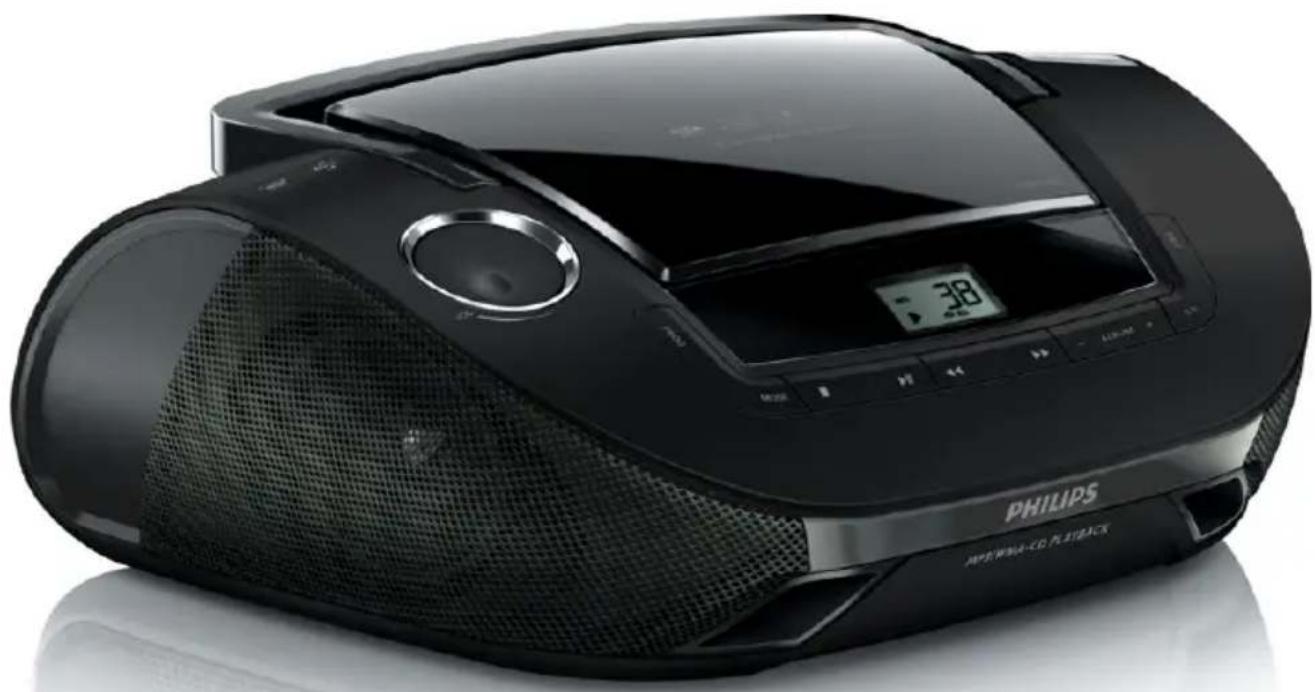
natural_image
Black Philips 3800 CD radio with digital display and mesh grille (no visible text or symbols on device body)User manual
PHILIPS
Contents
1 Important 2
Safety 2
2 Your CD Soundmachine 4
Introduction 4
What's in the box 4
Overview of the main unit 4
3 Get started 7
Install batteries 7
Connect power 7
4 Use your CD Soundmachine 8
Play a CD 8
Play from USB device 8
Listen to radio 8
Control play 8
Select play modes 8
5 Other features 10
Program tracks 10
Listen to an external device 10
6 Product information 11
USB playability information 11
7 Troubleshooting 12
Troubleshooting 12
8 Notice 13
1 Important
Safety

This 'bolt of lightning' indicates uninsulated material within the device may cause an electrical shock. For the safety of everyone in your household, please do not remove the covering.
The 'exclamation mark' calls attention to features for which you should read the enclosed literature closely to prevent operating and maintenance problems.
WARNING: To reduce the risk of fire or electric shock, the device should not be exposed to rain or moisture and objects filled with liquids, such as vases, should not be placed on the device.
CAUTION: To prevent electric shock, fully insert the plug. (For regions with polarized plugs: To prevent electric shock, match wide blade to wide slot.)
Important Safety Instructions
- Follow all instructions.
- Heed all warnings.
- Do not use this apparatus near water.
- Clean only with dry cloth.
- Do not block any ventilation openings. Install in accordance with the manufacturer's instructions.
- Do not install near any heat sources such as radiators, heat registers, stoves, or other device (including amplifiers) that produce heat.
- Protect the power cord from being walked on or pinched, particularly at plugs, convenience receptacles, and the point where they exit from the device.
- Only use attachments/accessories specified by the manufacturer.
- Use only with the cart, stand, tripod, bracket, or table specified by the manufacturer or sold with the device. When a cart is used, use caution when moving the cart/device combination to avoid injury from tip-over.

- Unplug this device during lightning storms or when unused for long periods of time. - Refer all servicing to qualified service personnel. Servicing is required when the device has been damaged in any way, such as power-supply cord or plug is damaged, liquid has been spilled or objects have fallen into the device, the device has been exposed to rain or moisture, does not operate normally, or has been dropped.
- Battery usage CAUTION – To prevent battery leakage which may result in bodily injury, property damage, or damage to the device:
- Do not mix batteries (old and new or carbon and alkaline, etc.).
• Install the battery correctly, + and - as marked on the device. - The batteries shall not be exposed to excessive heat such as sunshine, fire or the like.
- Remove battery when the device is not used for a long time.
• Device shall not be exposed to dripping or splashing.
- Do not place any sources of danger on the device (e.g. liquid filled objects, lighted candles).
- Where the MAINS plug or an appliance coupler is used as the disconnect device, the disconnect device shall remain readily operable.

Warning
• Never remove the casing of this device.
- Never lubricate any part of this device.
- Never place this device on other electrical equipment.
- Keep this device away from direct sunlight, naked flames or heat.
- Never look into the laser beam inside this device.
- Ensure that you always have easy access to the power cord, plug, or adaptor to disconnect this device from the power.
2 Your CD Soundmachine
Congratulations on your purchase, and welcome to Philips! To fully benefit from the support that Philips offers, register your product at www.philips.com/welcome.
Introduction
With the CD Soundmachine, you can:
• play CDs, MP3/wma discs
• play mp3/wma files on USB devices
- listen to FM/MW radio
• program the play sequence of tracks.
What's in the box
Check and identify the contents of the package:
• Main unit (without batteries)
- 1 x power cord
- 1 x MP3 link cable
- User Manual
Overview of the main unit
A


① Source selector: CD•USB/MW/FM/OFF
- Select CD•USB, MW(AM), FM source, or turn off the unit.
②

- USB socket.
③
VOL+/-
- Adjust volume.
④
Display panel
• Show current status.
⑤
OPEN/CLOSE
- Press to open or close the disc compartment.
⑥
Tuning
- Tune to radio stations.
⑦
USB
- Select USB device source.
⑧
CD
- Select CD source.
⑨
- ALBUM +
- For MP3-CDs: skip to the next/previous album in an MP3-CD.
⑩

- Select the previous/next track.
- Search backward/forward.
⑪

- Pause or resume play.
12

- Stop play.
- Erase a program.
13
MODE
- Select a play mode: REPEAT or SHUFFLE.
14
PROG
- For MP3-CDs: program tracks and browse the program.
15
Telescopic antenna
- Adjust FM reception.
16
MP3 LINK
- Socket for connecting an external device.
17
Battery compartment
18
AC\~Mains
• Power supply socket.
3 Get started

Caution
- Use of controls or adjustments or performance of procedures other than herein may result in hazardous radiation exposure or other unsafe operation.
Always follow the instructions in this chapter in sequence.
If you contact Philips, you will be asked for the model and serial number of this apparatus. The model number and serial number are on the bottom of the apparatus. Write the numbers here:
Model No. ____
Serial No.
Install batteries

Note
• You can use both batteries and AC power as power supply of this device.
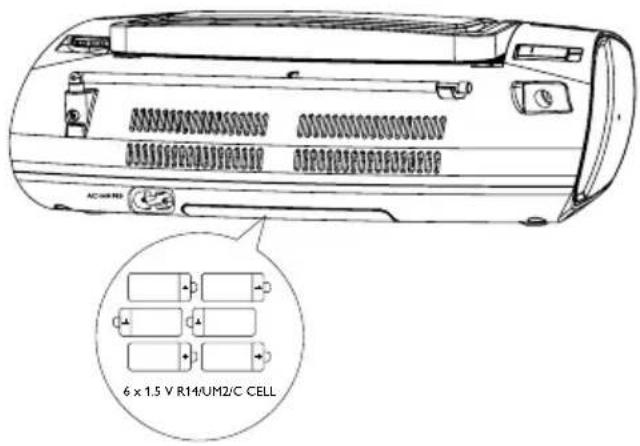
1 Open the battery compartment.
2 Insert 6 × 1.5 V R14/UM2/C CELL batteries (not supplied) with correct polarity (+/-) as indicated. ®
3 Close the battery compartment.
Connect power

Caution
- Risk of product damage! Make sure that the power supply voltage corresponds to the voltage printed on the back or the underside of the product.
- Risk of electric shock! When you unplug the AC power cord, always pull the plug from the socket. Never pull the cord.
• Before you connect the AC power cord, make sure that you have completed all other connections.

Note
• To save energy: switch the source selector to OFF after use.


natural_image
Line drawing of an electric car connected to a power outlet via cable (no text or symbols)4 Use your CD Soundmachine
Play a CD

Note
- You cannot play CDs encoded with copyright protection technologies.
You can play commercially available audio CDs:
• CD-Recordables (CD-R)
• CD-Rewritables (CD-RW)
- MP3-CDs
- WMA-CDs
1 Switch the source selector to CD•USB.
2 Press and open the lid of the CD compartment.
3 Insert a CD with the printed side facing up, and then close the CD lid.
4 Press CD to select CD source, and press
▶II to start play. ↳] is displayed.
- To stop play, press ■
• To pause or resume play, press ▶II.
Play from USB device

Note
• Make sure that the USB device contains playable audio contents for supported formats.
1 Insert a USB storage device into the socket.
2 Switch the source selector to CD•USB, and then press USB to select USB source.
3 Press - ALBUM + to select a folder.
4 Press ◀◀ to▶ select a file, and press
▶II to start play.
- To stop play, press ■
• To pause or resume play, press ▶II.
Listen to radio
1 Switch the MW/FM selector to MW or FM.
2 Rotate TUNING until you find optimal reception.

Tip
•To improve FM reception, you can extend, incline, or turn the telescopic antenna for best reception.
- To improve MW reception, turn the device to face a different direction.
Control play
| Buttons | Functions |
| VOL | Rotate to adjust the volume. |
| ■ | Stop play. |
| ▶II | Pause or resume play. |
| |◀/▶▶| | Press to select a previous/next track. Press and hold to fast backward/ forward. |

Note
- When search reaches the end of the last track, the CD stops.
Select play modes
1 Press MODE repeatedly to select a play mode:
• [ ☉] (repeat) – repeat a track
• [ ALL] (repeat all) - repeat an entire CD/program
• [ ✉ ] (shuffle) - play tracks randomly
• [ ∞] (shuffle repeat all)
- repeat all tracks randomly.
2 To return to normal play, press MODE repeatedly until play mode icons are no longer displayed.

Tip
• Shuffle play cannot be selected when you play programmed tracks.
5 Other features
Program tracks
You can program up to 20 tracks in the desired sequence.
1 In stop mode, press PROG to start to program play sequence.
→ [PROG] and [P01] are displayed.
2 For MP3-CDs, press - ALBUM + to select an album.
3 Press ◀◀ to ▶ select a track, and then press PROG to confirm.
4 Repeat steps 2 to 3 to program more tracks.
When all 20 tracks are stored, no more tracks can be selected and [FUL] is displayed.
5 To play program, press ▶II
- In stop mode, press and hold PROG to browse programmed tracks.
6 To delete program, press ■n stop mode.
→ [CLr] is displayed.
Listen to an external device
You can also listen to an external audio device through this unit.
For an audio device with a headphone socket:
1 Connect the supplied MP3 LINK cable to:
- the MP3-LINK socket on the back of the unit.
- the headphone socket on an MP3 player.
2 Start to play the MP3 player. (See the user manual of the MP3 player.)
6 Product information

Note
•Product information is subject to change without prior notice.
| Power supply | |
| - AC Power | 110-127~/220-240 V;50/60 Hz |
| - Battery | 6 × 1.5 V R14/UM2/CCELL batteries |
| Power consumption <12 W | |
| Power output 2 × 1 W RMS | |
| USB | ≤ 300 mA |
| Operatingtemperature range | -10 °C - 50 °C14 °F -122 °F |
| Dimensions (W x H x D) | 341 × 122 × 236 mm |
| Weight 1.8 kg | |
USB playability information
Compatible USB devices:
• USB flash memory (USB 2.0 or USB1.1)
• USB flash players (USB 2.0 or USB1.1)
- memory cards (requires an additional card reader to work with this apparatus)
Supported formats:
• USB or memor y file format FAT12, FAT16, FAT32 (sector size: 512 bytes)
• MP3 bit rate (data rate): 32-320 Kbps and variable bit rate
• WMA v9 or earlier
- Directory nesting up to a maximum of 8 levels
• Number of albums/ folders: maximum 99
• Number of tracks/titles: maximum 999
• ID3 tag v2.0 or later
- File name in Unicode UTF8 (maximum length: 128 bytes)
Unsupported formats:
- Empty albums: an empty album is an album that does not contain MP3/WMA files, and is not be shown in the display.
- Unsuppor ted file formats are skipped. For example, Word documents (.doc) or MP3 files with extension .dlf are ignored and not played.
• AA C, WAV, PCM audio files - DRM protected WMA files (.wav, .m4a, .m4p, .mp4, .aac)
• WMA files in Lossless format
7 Troubleshooting
Troubleshooting

Warning
- Never remove the casing of this device.
To keep the warranty valid, never try to repair the system yourself.
If you encounter problems when using this device, check the following points before requesting service. If the problem remains unsolved, go to the Philips Web page (www.philips.com/support). When you contact Philips, make sure that the device is nearby and the model number and serial number are available.
No power
- Make sure that the AC power plug of the unit is connected properly.
- Make sure that there is power at the AC outlet.
- Insert the batteries with their polarities (+/- signs) aligned as indicated.
- Replace the battery.
No sound
- Adjust the volume.
- Make sure that the track played is of a compatible format.
Display does not function properly. /No reaction to operation of any of the controls.
- Disconnect the AC power cord.
- Connect the AC power cord after a few seconds.
Cannot play disc
- Make sure that the disc label is inserted with the printed side facing up.
- Wipe the disc with fibre cleaning cloth from the centre to the edge in a straight line.
-
This disc may be defective. Play another disc.
-
Make sure that the CD is a finalized CD/CD-R/CD-RW.
- Make sure that the laser lens is clean.
- Make sure that the CD is not encoded with copyright protection technologies.
The CD skips tracks
- Make sure that the CD is not damaged or dirty.
- Make sure that program/shuffle mode is deactivated.
USB device or SD/MMC card not supported
- The USB device or SD/MMC card is incompatible with the apparatus. Try another one.
8 Notice
Any changes or modifications made to this device that are not expressly approved by Philips Consumer Lifestyle may void the user's authority to operate the equipment.
Your product is designed and manufactured with high quality materials and components, which can be recycled and reused.
Never dispose of your product with other household waste. Please inform yourself about the local rules on the separate collection of electrical and electronic products and batteries. The correct disposal of these products helps prevent potentially negative consequences on the environment and human health.
Your product contains batteries, which cannot be disposed of with normal household waste. Please inform yourself about the local rules on separate collection of batteries. The correct disposal of batteries helps prevent potentially negative consequences on the environment and human health.
Please visit www.recycle.philips.com for additional information on a recycling center in your area.
Environmental information
All unnecessary packaging has been omitted. We have tried to make the packaging easy to separate into three materials: cardboard (box), polystyrene foam (buffer) and polyethylene (bags, protective foam sheet.)
Your system consists of materials which can be recycled and reused if disassembled by a specialized company. Please observe the local regulations regarding the disposal of packaging materials, exhausted batteries and old equipment.

The USB-IF Logos are trademarks of Universal Serial Bus Implementers Forum, inc.

Windows Media and the Windows logo are trademarks, or registered trademarks of Microsoft Corporation in the United States and/or other countries.
Recording and playback of material might require consent. See Copyright Act 1956 and The Performer's Protection Acts 1958 to 1972.

The making of unauthorized copies of copy-protected material, including computer programs, files, broadcasts and sound recordings, may be an infringement of copyrights and constitute a criminal offence. This equipment should not be used for such purposes.
This apparatus includes these labels:

Class II equipment symbol

This symbol indicates that the apparatus has a double insulation system.

Specifications are subject to change without notice
All rights reserved.
AZ1837_78_UM_V1.0



- Always there to help you
- User manual
- PHILIPS
- Contents
- Important 2
- Your CD Soundmachine 4
- Get started 7
- Use your CD Soundmachine 8
- Other features 10
- Product information 11
- Troubleshooting 12
- Notice 13
- Important
- Safety
- Important Safety Instructions
- Warning
- Your CD Soundmachine
- Introduction
- What's in the box
- Overview of the main unit
- Get started
- Caution
- Install batteries
- Note
- Connect power
- Use your CD Soundmachine
- Play a CD
- Play from USB device
- Listen to radio
- Tip
- Control play
- Select play modes
- Other features
- Program tracks
- Listen to an external device
- Product information
- USB playability information
- Compatible USB devices:
- Supported formats:
- Unsupported formats:
- Troubleshooting
- Troubleshooting
- No power
- No sound
- Display does not function properly. /No reaction to operation of any of the controls.
- Cannot play disc
- The CD skips tracks
- USB device or SD/MMC card not supported
- Notice
- Environmental information
Brand : PHILIPS
Model : AZ1837P
Category : CD Player