MODE D'EMPLOI VPC-TH1BL SANYO INSTRUCTION MANUAL
VPC-TH1EX
VPC-TH1
VPC-TH1GX
Dual Camera
Xacti
HD HIGH DEFINITION
natural_image
Illustration of a digital video camera with extended screen (no text or symbols)
Important note
This manual explains how to safely operate the VPC-TH1EX, VPC-TH1 and VPC-TH1GX.
Any information regarding only one of these products will be labeled as such.
Warning
TO PREVENT THE RISK OF FIRE OR ELECTRIC SHOCK, DO NOT EXPOSE THIS APPLIANCE TO RAIN OR MOISTURE.
FOR AMERICAN USERS
The following advisory is included in accordance with the laws of the State of California (USA):
WARNING:
This product contains chemicals, including lead, known to the State of California to cause cancer, birth defects or other reproductive harm. Wash hands after handling.
- This equipment has been tested and found to comply with the limits for a Class B digital device, pursuant to Part 15 of the FCC Rules. These limits are designed to provide reasonable protection against harmful interference in a residential installation. This equipment generates, uses and can radiate radio frequency energy and, if not installed and used in accordance with the instructions, may cause harmful interference to radio communications. However, there is no guarantee that interference will not occur in a particular installation. If this equipment does cause harmful interference to radio or television reception, which can be determined by turning the equipment off and on, the user is encouraged to try to correct the interference by one or more of the following measures:
• Reorient or relocate the receiving antenna.
- Changes or modifications not expressly approved by the party responsible for compliance could void the user's authority to operate the equipment.
Model number: VPC-TH1
Trade Name: SANYO
Responsible party: SANYO FISHER COMPANY
Address: 21605 Plummer Street, Chatsworth, California 91311
Telephone No.: (818) 998-7322
This device complies with Part 15 of the FCC Rules. Operation is subject to the following two conditions:
(1) this device may not cause harmful interference, and
FOR CANADIAN USERS
- This Class B digital apparatus complies with Canadian ICES-003.
FOR EU USERS
The symbol mark and recycling systems described below apply to EU countries and do not apply to countries in other areas of the world.
Your SANYO product is designed and manufactured with high quality materials and components which can be recycled and/or reused.
The symbol mark means that electrical and electronic equipment, batteries and accumulators, at their end-of-life, should be disposed of separately from your household waste.
Note:
If a chemical symbol is printed beneath the symbol mark, this chemical symbol means that the battery or accumulator contains a heavy metal at a certain concentration. This will be indicated as follows: Hg: mercury, Cd: cadmium, Pb: lead
In the European Union there are separate collection systems for used electrical and electronic equipment, batteries and accumulators.
Please, dispose of them correctly at your local community waste collection/recycling centre.
Please, help us to conserve the environment we live in!
natural_image
Symbol of a trash bin crossed out by two diagonal lines (no text or numbers present)
SANYO FISHER Sales (Europe) GmbH
Stahlgruberring 4, D-81829 München, Germany
SANYO Electric Co., Ltd.
1-1, Sanyo-cho, Daito City, Osaka 574-8534, Japan
FOR RUSSIAN USERS
АЯ46
This product is certified by an official certification company which is authorized by the Russian Federation.
HOW TO READ THIS MANUAL
For first-time users
Please read the sections on “SETUP” and “SIMPLE” in this manual, as well as the included “QUICK GUIDE” to familiarize yourself with your camera’s operation.
To use the various camera features
Please read the sections on "NORMAL" and "OPTION SETTINGS" in this manual. To view on a TV, please read the section on "OTHER DEVICES AND CONNECTIONS" in this manual. To connect to a computer, please see the "Xacti Software CD INSTRUCTION MANUAL".
To use additional features
To use a computer to edit the recorded data or to save data to a DVD, please read the "Xacti Software CD INSTRUCTION MANUAL".
You may find the answers to questions or problems concerning camera operation in the sections “COMMONLY ASKED QUESTIONS” (page 149) and “TROUBLESHOOTING” (page 157).
Symbols used in this manual
HINT Points giving some extended instructions or special points to pay attention to.
CAUTION Points that require special attention.
(page xx) Refer to the page indicated for detailed information.
SHOOT, PLAY BACK AND SAVE
Preparing the camera
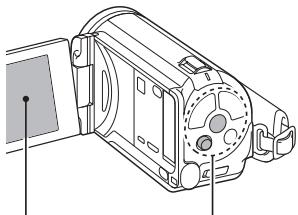
1 Insert the SD Memory Card.
An SD Memory Card is not included with your camera. Please purchase a commercially sold card.
In this manual, the SD Memory Card is referred to as the "card".
2 Connect the AC adaptor to the camera.
Shooting
1
Press the ON/OFF button for at least 1 second to turn the camera on.
- If the screen to set the date and time appears, press the MENU button 2 times to cancel it.
For how to set the date and time, see page 33.
2
Record.
To record a video clip:
- Press the [ ] button to begin recording a video clip.
- Press the [ ] button again to end the recording.
To take a photo:
- Press the [icon] button.
- A still image is captured.
357
00:13:51
Before capturing those important shots, be sure to first take a test shot to confirm that your camera is set up and ready to go
- Sanyo declines any claim for compensation for recorded contents etc. in case of photographing or recording failure due to a chance camera or card flaw.
Playback
- The display changes to the Playback Screen.
2 Select the image to play back.
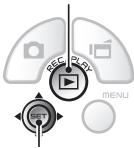
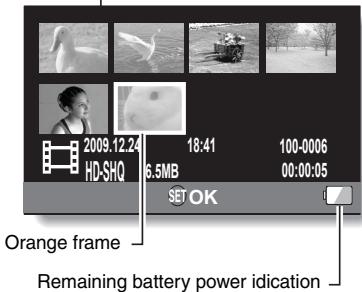
Toggle the SET button left, right, up or down to move the orange frame to the image you wish to play back.
The image information for the framed image is shown at the bottom of the screen.
natural_image
Technical line drawing of a mechanical device with mounting bracket and control panel (no text or symbols)
REC/PLAY button
flowchart
graph TD
    A["REC"] --> B["PLAY"]
    B --> C["EST"]
    C --> D["MENU"]
    style A fill:#f9f,stroke:#333
    style B fill:#ccf,stroke:#333
    style C fill:#cfc,stroke:#333
    style D fill:#fcc,stroke:#333
SET button
- Playback begins.
- Press the REC/PLAY button.
When you are finished using the camera...
Press the ON/OFF button for at least 1 second to turn the camera off.
To continue to the next operation...
Please confirm that your computer is connected to the Internet.
Burn your recorded video clips onto a DVD (Windows Vista)
Using the supplied CD-ROM (Xacti Software CD), you can store your captured images on a DVD. Detailed information about the Xacti Software CD can be found on page 4 in the Xacti Software CD INSTRUCTION MANUAL.
Install application programs
1 Set the supplied CD-ROM in your computer's DVD drive.
\- The installation window opens.
- After clicking on an application program, follow the instructions shown on the monitor to install the program.
- When the window appears requesting to restart your computer, click the [Finish] button to reboot.
3 Remove the CD-ROM from the computer's DVD drive.
SHOOT, PLAY BACK AND SAVE
Connect your camera to a computer
Connect your camera to a computer, and copy the desired files to the computer.
1 Use the supplied dedicated USB interface cable to connect your camera to the computer.
2 Turn on the camera.
\- The USB Connection Screen appears on the camera's monitor.

\- The screen to select the computer connection mode appears.
- The message [Found New Hardware] appears in the task tray, showing that the camera is recognized as a drive.
- The card is recognized (mounted) as a disk, and the [XACTI (E:)] icon appears in the [My Computer] window.
\- The drive name (E:) may be different on your computer.
5 Copy the files from the card to the computer's hard disk.
\- The data recorded with your camera are stored in the following folder. You can specify the folder on the hard disk to which to copy the files. XACTI (E:\DCIM\*\*\*SANYO
(\*\*\*) represents numbers [page 12 in the Xacti Software CD INSTRUCTION MANUAL]).
\- The drive name (E:) may be different on your computer.
HINT
\- For information on how to copy all the camera's still image and video clip files at once, please see the support pages at the website below: http://www.sanyo-dsc.com/
SHOOT, PLAY BACK AND SAVE
Burn video clips onto a DVD (For Windows Vista users)
Here's how to write your recorded data onto a DVD in the mpeg2 format. For information on other operations, please see the Help file for TotalMedia Extreme. To access the TotalMedia Extreme Help file, click the [?] Help button on the TotalMedia Extreme start screen.
1 Insert a blank DVD in your computer's DVD drive.
\- The TotalMedia Extreme application starts, and the startup page appears.

3
Click the [Create video] icon.
\- The "Create DVD" window appears.

4
- The screen to select the video clip file to write to a DVD appears.
- Click the file you wish to write to a DVD.
- To select multiple files, keep the [Ctrl] key pressed while selecting files.
\- The file(s) selected in step 4 and the DVD file capacity appear in the "Create DVD" window.

6 Click the [Design] tab.
- The window appears to design the title menu for when the DVD is played back.
- Select the desired design.
[Preview/produce] tab

7 Click the [Preview/produce] tab.
\- A warning regarding the image quality of the preview image appears.
\- The screen to begin burning to disk appears.

\- The “save project” confirmation window appears.
\- Enter a name for the project file.
\- The "Burn disk" window appears.

- Burning begins.
- Depending on your computer's capacity, it may take some time to burn a large file.
- When burning is completed, the DVD is ejected from the DVD drive.
SHOOT, PLAY BACK AND SAVE
• The TotalMedia Extreme top page appears.
15 Click the [x] button to close the startup page.
• TotalMedia Extreme is exited.
CAUTION
Does the window requesting confirmation to enable the MPEG-2 Codec appear?
When using TotalMedia Extreme for the first time, a window requesting you to confirm activation of the MPEG-2 Codec appears during the procedure. The MPEG-2 Codec must be activated in order to burn files to a DVD. Complete the following procedure to activate the MPEG-2 Codec.
\- Note that your computer must be connected to the Internet in order to complete this procedure. Please confirm that your computer is connected to the Internet.
① When the window requesting confirmation to activate the MPEG-2 Codec, click the [Yes] button.
• The ArcSoft website appears.
② Click on [Special downloads].
- The window appears for you to enter your email address, name, license ID, etc.
- Enter the correct information.
③ Click the [Submit] button.
\- Soon thereafter, the URL for the download to activate the MPEG-2 Codec will be sent to the email address you entered in step ②.
④ Click the download URL link.
\- The program will be downloaded to your computer.
⑤ Double-click the icon for the downloaded program.
- Follow the instructions to activate the MPEG-2 Codec.
• DVD burning via the TotalMedia Extreme program is now enabled.
- When the procedure above has been completed, continue to the procedure to burn to DVD.
United States/Canada
Tel: +1-510-979-5599
Web: http://www.arcsoft.com/support/
E-mail Support: http://www.arcsoft.com/public/
content\_page.asp?pageID=83
Hours: M-F from 9:00am - 5:00pm
(Pacific Standard Time, excluding holidays observed by ArcSoft)
Language: English
Europe
Tel: +353 (0) 61-702087
Web: http://www.arcsoft.com/en/support
Email Support: eurosupport@arcsoft.com
Hours: M-Th from 8:30am - 5:30pm GMT
(excluding holidays observed by ArcSofts Affiliate)
F from 8:30am - 5:00pm GMT
(excluding holidays observed by ArcSoft's Affiliate)
(Adjusted for daylight savings time when applicable)
Language: English, French, Italian, German, Spanish and Dutch
China
Tel: +86 (0) 571-88210575
Web: http://www.arcsoft.com.cn/support
E-Mail Support: support@arcsoft.com.cn
Hours: M-F 8:30am-5:30pm
(Beijing local time) (excluding holidays observed by ArcSoft)
Language: Chinese
How was that? The convenient accessories not only let you immediately view images captured with the camera, but you can also upload images to your computer and create your original DVDs. Read the following explanations to find out how you can fully enjoy your camera's digital video feature.

natural_image
Illustration of a woman sitting on a sofa with a laptop and CD, no text or symbols present
CONTENTS
HOW TO READ THIS MANUAL ....iii
QUICK SEARCH BY OPERATION 6
CHECKING THE INCLUDED ACCESSORIES 11
How to use the accessories 13
ABOUT THE SEPARATELY SOLD ACCESSORIES AND
THE CARD 15
Separately sold accessories 15
Media cards that can be used with this camera 15
What "card" means in this manual 15
GETTING THE MOST OUT OF YOUR CAMERA 16
High-quality images with "High Definition" 16
Includes SIMPLE mode for quick-and-easy operation 17
Image stabilizer for sharp pictures 17
Sharp face shots 18
Lots of accessories for optimal use of your captured images ..... 19
SYSTEM MAP 20
SETUP
PARTS NAMES 21
INSTALLING THE CARD 23
CHARGING THE BATTERY PACK 25
About recharging 29
About the temperature alert icon ⚡️ 29
TURNING THE CAMERA ON AND OFF 30
Turning on the camera 30
Turning on the camera when the power save (sleep) mode is active 31
Turning off the camera 32
DATE AND TIME SETTING 33
SWITCHING BETWEEN THE RECORDING MODE AND PLAYBACK MODE 36
SWITCHING THE OPERATING MODE 37
Switching between the SIMPLE and NORMAL modes 37
Accessing/exiting the SIMPLE/NORMAL Mode Menu Screen ..... 38
Overview of the SIMPLE Mode Setting Screen 43
Overview of the NORMAL Mode Setting Screen 47
■ SIMPLE
SHOOTING
BEFORE TAKING PICTURES ....55
For best results ....55
Using the autofocus ....56
Select the recording size ....59
Select the focus setting 60
Hints for taking pictures 61
VIDEO CLIP RECORDING 62
SHOOTING SINGLE SHOTS 63
Using the flash 65
SHOOT A STILL IMAGE WHILE RECORDING A VIDEO CLIP ......67
MACRO-PHOTOGRAPHY (ZOOM) 69
PLAYBACK
PLAYING BACK VIDEO CLIPS AND STILL IMAGES ....70
How to save one frame from a video clip as a still image .....73
SLIDESHOW PLAYBACK 74
PLAYBACK VOLUME 75
DELETING FILES 76
Delete single/delete all 76
Delete selected 77
PLAYBACK MODES 79
21-image display playback 79
Selecting the playback folder 80
Magnifying (zooming in) the image 81
CONTENTS
NORMAL
SHOOTING
RECORDING MENU 1 82
Video setting 82
Still image setting 85
Scene select setting 86
Filter setting 86
Self-timer setting 87
RECORDING MENU 2 88
Video stabilizer (motion compensation) setting 88
Focus range setting 89
Focus mode setting 90
Light-measuring mode setting 90
ISO sensitivity setting 91
RECORDING MENU 3 92
White balance setting 92
Exposure setting 93
Face chaser setting 94
High sensitivity mode setting 95
Exposure compensation 96
PLAYBACK
PLAYBACK MENU 1 98
Slideshow settings 98
File protect setting 99
Rotate 101
PLAYBACK MENU 2 102
Correcting the image 102
Editing video clips 103
Printing instructions 113
FILE INFO DISPLAY 117
■ OPTION SETTINGS
DISPLAY THE OPTION SETTING MENU 118
INTRODUCTION TO THE OPTION SETTING MENU 119
Storage folder setting 125
Shortcut setting 126
Screen language 128
TV output setting 129
File No. continued setting 134
Formatting (initializing) 136
CHECKING THE REMAINING CARD MEMORY 137
Checking the remaining number of images and video recording time ....137
For audio recordings ....138
CHECKING THE REMAINING BATTERY PACK CHARGE ....139
■ OTHER DEVICES AND CONNECTIONS
CONNECTING TO A TV
CONNECTING TO A TV 141
Connecting to a standard video input terminal 142
Connect to the 480p/720p terminal .....143
Connecting to the HDMI terminal 144
PLAYING BACK ON A TV 145
CONNECTING TO A PRINTER
PRINTING 146
CONTENTS
■ APPENDICES
COMMONLY ASKED QUESTIONS 149
TROUBLESHOOTING 157
Camera 157
Notes regarding the Scene Select feature and filters 165
SPECIFICATIONS 167
Camera 167
Camera connectors 171
Battery life 171
Possible No. of Images/Possible Shooting Time/
Possible Recording Time .... 172
Concerning the multi-indicator 173
Supplied AC adaptor 174
Supplied Li-ion battery pack 174
Others 175
Before capturing those important shots, be sure to first take a test shot to confirm that your camera is set up and ready to go 176
HINTS FOR TAKING PICTURES 177
QUICK SEARCH BY OPERATION
Your camera has an abundance of convenient features and functions. From creating precisely the photo you want, to viewing images using various techniques, you can locate the exact operation for your purposes in the following table.
Shooting/recording Basic operation Convenient functions Additional functions Getting started shooting/recording“VIDEO CLIP RECORDING” on page 62“SHOOTING SINGLE SHOTS” on page 63“Sequential shots” on page 85“Audio recording” on page 82 Log the date and time of your photos“DATE AND TIME SETTING” on page 33Zoom in on the subject“MACRO-PHOTOGRAPHY (ZOOM)” on page 69Close-up photography“Focus range” (super macro mode) on pages 44 and 50“Select the focus setting” (super macro mode) on page 60 For more accurate focus“How to use the manual focus” (manual focus) on page 89Set the focus to a narrow range“Focus mode setting” on page 90Reduce noise when recording“NOISE REDUCTION setting” on page 122 Optimize the photo quality“Select the recording size” on pages 44 and 59.“Video setting” on pages 48 and 82“Still image setting” on pages 48 and 85 Set the camera’s color/contrast characteristics“Image quality setting” on page 122 Capture fast-moving subjects“Scene select” (sports mode) on page 48Suppress camera shake effect“Video stabilizer (motion compensation) setting” on pages 50 and 88
QUICK SEARCH BY OPERATION
Shooting/recording Basic operation Convenient functions Additional functions Shoot in dark conditions“Exposure compensation” on page 96“Using the flash” on pages 44, 48 and 65“Scene select setting” (night view portrait mode/fireworks mode/lamp mode) on pages 48 and 86 Increase the camera’s sensitivity“ISO sensitivity setting” on pages 50 and 91“High sensitivity mode setting” on pages 52 and 95 Photographing people“Scene select setting” (portrait mode/night view portrait mode) on pages 48 and 86“Filter setting” (cosmetic filter) on pages 48 and 86Sharp face shots“Face chaser setting” on pages 52 and 94 Simplified operation for shooting/playback“SWITCHING BETWEEN THE RECORDING MODE AND PLAYBACK MODE” on page 36 Photographing landscapes“Scene select” (landscape mode) on page 48 Take a self-photo“Self-timer setting” on pages 48 and 87 Make images lighter or darker“Exposure compensation” on page 96“High sensitivity mode setting” pages 52 and 95 Measure the brightness of a specific area“Light-measuring mode setting” on pages 50 and 90Adjust the camera’s sensitivity“ISO sensitivity setting” pages 50 and 91For a more precise exposure setting“Exposure setting” (manual exposure control) on pages 52 and 93 Change the color of the images“Filter setting” (monochrome filter/sepia filter) on pages 48 and 86 Make white appear natural“White balance setting” on pages 52 and 92 Playback Basic operation Convenient functions Additional functions Getting started viewing images• “PLAYING BACK VIDEO CLIPS AND STILL IMAGES” on page 70 Adjust the speaker volume• “PLAYBACK VOLUME” pages 53 and 75Search for image/ audio files• “21-image display playback” on page 79• “Selecting the playback folder” on pages 54 and 80Magnify an image• “Magnifying (zooming in) the image” on page 81 Change the angle of view• “Rotate” on pages 53 and 101 • “Audio playback” on page 84 Adjust the speaker volume• “PLAYBACK VOLUME” on pages 53 and 75 Continuous playback• “SLIDESHOW PLAYBACK” on pages 46, 74 and 98 Adjust the monitor brightness• “Adjusting the monitor brightness” on page 64• “BRIGHTNESS setting” on page 122 Playback on a TV• “PLAYING BACK ON A TV” on page 145Set the TV system• “TV output setting” on pages 122 and 129
QUICK SEARCH BY OPERATION
File managing/processing Basic operation Convenient functions Additional functions Search for image/audio files“21-image display playback” on page 79“Selecting the playback folder” on pages 54 and 80 Delete files“DELETING FILES” on pages 46, 53 and 76 Protect files from accidental erasure“File protect setting” on pages 53 and 99Format a card“Formatting (initializing)” on pages 124 and 136 Delete a part of a video clip and join video clips“Editing video clips” on pages 54 and 103 Specify the number of prints, index print, and date imprint“Printing instructions” on pages 54 and 113 View the settings that were in effect when the image/audio files were recorded“FILE INFO DISPLAY” on page 117 Using with a computer Basic operation Convenient functions Additional functions Use the camera as a card reader"SETTING THE CONNECTION MODE" on page 7 in the Xacti Software CD INSTRUCTION MANUAL."USING AS A CARD READER" on page 9 in the Xacti Software CD INSTRUCTION MANUAL Copy files from your camera to a computer"Connect your camera to a computer" on page ix Burn files copied to the computer onto a DVD"Burn video clips onto a DVD (For Windows Vista users)" on page xi Playback"About video clip files recorded with this camera" on page 13 in the Xacti Software CD INSTRUCTION MANUAL Using as a webcam"Using as a PC camera" on page 15 in the Xacti Software CD INSTRUCTION MANUAL Record an image of the computer screen"SCREEN CAPTURE" on page 17 in the Xacti Software CD INSTRUCTION MANUAL
CHECKING THE INCLUDED ACCESSORIES
\- Xacti Software CD (CD-ROM) (page 4 in the Xacti Software CD INSTRUCTION MANUAL): 1

• Dedicated USB interface cable (page 7 in the Xacti Software CD INSTRUCTION MANUAL): 1

natural_image
Illustration of a USB cable with connector port (no text or symbols)
• AC adaptor and power card (page 27): 1

natural_image
Illustration of a gray electronic device with cables and connectors (no text or symbols)
\- Lens cap (page 14): 1

natural_image
Illustration of a looped cable and a circular device (no text or symbols)
\- Grip belt (page 13): 1

natural_image
Line drawing of a belt buckle with a strap and buckle (no text or symbols)
• Li-ion battery pack (page 26): 1

natural_image
Isometric illustration of a rectangular electronic component with four side slots (no text or symbols)
• Dedicated AV interface cable (page 142): 1

natural_image
Illustration of a coiled cable with multiple connectors (no text or symbols)
\- "SAFETY MANUAL" (safety precautions booklet) Please read this booklet carefully before using the camera.

\- Quick Guide
Included with model VPC-TH1GX. Not included with other models.

CHECKING THE INCLUDED ACCESSORIES
How to use the accessories
Grip belt

flowchart
graph TD
    A["Device with beltbelt"] --> B["Car seatbelt with seatbelt switch"]
    B --> C["Car seatbelt with seatbelt switch"]
    C --> D["Car seatbelt with seatbelt switch"]
    D --> E["Car seatbelt with seatbelt switch"]
    E --> F["Car seatbelt with seatbelt switch"]
Lens cap
①

natural_image
Line drawing of a mechanical component with a circular housing and curved arm (no text or symbols)

②

natural_image
Simple line drawing of a circular mechanical component with a coiled cable (no text or symbols)
③

natural_image
Line drawing of a camera with lens and strap (no text or symbols)


④

natural_image
Line drawing of a camera with a circular lens and cable, showing a downward arrow (no text or symbols)
⑤

natural_image
Line drawing of a vintage camera with lens and frame (no text or symbols)

ABOUT THE SEPARATELY SOLD ACCESSORIES AND THE CARD
Separately sold accessories
- Mini HDMI cable VCP-HDMI02
Cable for connecting to the HDMI terminal on the camera.
• Lithium-ion Battery Charger VAR-L50
Battery charger for the supplied or separately sold lithium-ion battery pack (DB-L50A).
• Lithium-ion Battery DB-L50
Same model as the supplied lithium-ion battery pack.
The type of card that can be inserted into and used with this camera is:
- SD Memory Card
- SDHC Memory Card

natural_image
Isometric view of a rectangular electronic device with a black triangular pointer on the top surface (no text or symbols)
What "card" means in this manual
\- In this manual, SD Memory Cards and SDHC Memory Cards that can be used in this digital camera are referred to as “card”.
GETTING THE MOST OUT OF YOUR CAMERA
Your dual camera can record video clips in High Definition. It includes an operation mode that lets even novice shutterbugs record and play back without getting flustered, as well as software with which you can easily create your original DVDs.
High-quality images with “High Definition” (pages 48, 59 and 82)
Your camera can capture high definition (HD) 1280 × 720 -pixel video clips. Also, the H.264/MPEG-4 AVC standard is used for formatting video files. You get both compact file size and high picture quality in one high-performance camera.

natural_image
Illustration of a family watching television on a wall, with no visible text or symbols
GETTING THE MOST OUT OF YOUR CAMERA
Includes SIMPLE mode for quick-and-easy operation (page 37)
Select from two recording/playback modes: the “SIMPLE mode” for users new to the camera, and the “NORMAL mode” for full use of all the camera’s many features and functions.
Example:


Image stabilizer for sharp pictures (pages 50 and 88)
Your camera can compensate for the camera shake that results in blurry images when you try to capture a fast-moving subject, or when you zoom in while recording a video clip.

natural_image
Illustration of a child running with a soccer ball, another person taking a picture with a smartphone, and another person standing nearby (no text or symbols)
Sharp face shots (pages 52 and 94)
Your camera is equipped with a face recognition feature which detects the subject's face even when slightly lit from behind or in dim surroundings and automatically adjusts the focus and brightness to compensate. Now those otherwise perfect photos that are marred by shadowed faces can be minimized.

natural_image
Illustration of a family group with five members (two adults and two children) standing together, no text or symbols present.
GETTING THE MOST OUT OF YOUR CAMERA
Lots of accessories for optimal use of your captured images (pages 20, and page 4 in the Xacti Software CD INSTRUCTION MANUAL)
Use the accessory cables to view images on a TV or computer. Or connect the camera directly to a printer to make prints of your photos. And with the software in the supplied CD-ROM (Xacti Software CD), you can create your original DVDs and CDs.

natural_image
Illustration of a woman sitting on a sofa using a CD with a laptop nearby, no text or symbols present
SYSTEM MAP
You can connect the camera to various devices to expand its capabilities.

flowchart
graph TD
    A["Camera"] --> B["Dedicated USB interface cable"]
    A --> C["Dedicated AV interface cable"]
    A --> D["Mini HDMI cable (optional)"]
    B --> E["Computer"]
    C --> F["Printer"]
    D --> G["TV"]
    E --> H["Internet"]
    F --> I["Photo shop"]
    G --> J["Commercially available SD Memory Card"]
    J --> K["Card reader"]
    J --> L["DPOF-compatible printer"]
    J --> M["Photo shop"]
Front

Bottom

Rear


INSTALLING THE CARD
Be sure to format a newly purchased card or one that was used in another device before using it in your camera (pages 124 and 136). If an unformatted card is used, the card itself may become unusable.

⑤ Insert the card until it clicks into place
- After inserting the card, colse the card slot cover.
natural_image
Diagram showing two views of a vehicle dashboard with control panels and buttons, no text or symbols present
CAUTION
Do not attempt to forcibly remove the card
\- Doing so may damage the card or the stored files.
If the multi-indicator is flashing red...
\- Never remove the card when the multi-indicator is flashing red, as doing so may result in loss of files stored in the card.
HINT
Shooting without a card installed
\- When a card is installed, images are recorded to and played back from the card. When no card is installed, images are recorded to and played back from the camera's internal memory. When the camera is turned on with no card installed, the internal memory icon 📄 is shown on the monitor to let you know that the images you capture will be saved to the camera's internal memory.
CHARGING THE BATTERY PACK
Please charge the supplied battery pack before using it. Install the battery pack in the camera, and connect the AC adaptor to charge the battery. Power to the camera can also be supplied from a power outlet when the AC adaptor is connected.
1 While pressing the battery cover lock, slide it (①), and pull out the battery cover toward the bottom of the camera (②).
\- The battery cover comes off.

2 Insert the battery pack, then replace the battery cover.
• Take care that it is positioned correctly.
Battery pack

natural_image
Technical illustration of a mechanical component before and after assembly, showing internal components and mounting features (no text or symbols)
natural_image
Technical line drawing of a camera module with an arrow indicating the component (no text or symbols present)
3 Use the power cord to connect the AC adaptor to a power outlet.
\- Charging begins.
How to open the DC IN terminal cover

natural_image
Line drawing of a mechanical device with a central wheel and attached bracket (no text or symbols)
① Use fingernail to open.


natural_image
Line drawing of a car wheel assembly with a knob and lever (no text or symbols)
② Open downwards.
DC IN terminal

CAUTION
\- The battery pack becomes hot when the camera is used continuously for a long time. If you attempt to charge the battery pack in this state, the multi-indicator may flash red and it may not be possible to charge the battery pack. Wait until the battery pack has cooled down before attempting to charge it.
Does the battery pack appear swollen?
\- The lithium-ion battery used in this camera may expand slightly when stored in a hot environment or repeatedly used, but this is not a safety hazard.
HINT
About the internal backup battery
\- This camera's internal battery serves to maintain the date and time settings, as well as the shooting settings. The backup battery will be fully charged when the battery pack is kept in the camera continuously for about 2 days. In the fully charged state, the backup battery will maintain the camera settings for about 7 days.
When not using the camera for a long time, remove the battery pack
\- A small amount of power is still used even if the camera is turned off, and it is therefore recommended that the battery pack be removed from the camera if it is not going to be used for a long time. Note that when the battery pack is removed for a long period, the time and date settings may be cleared. Before using your camera again, be sure to confirm that the camera settings are correct.
Recharging when connected to the USB terminal (page 6 in the Xacti Software Pack INSTRUCTION MANUAL)
- The battery can be recharged while the camera is connected to a computer.
- Note, however, that the time it takes to recharge will differ depending on the camera's operating condition.
- Connect the dedicated USB interface cable to the USB connector on your computer. Do not connect it to the USB connector on the monitor or the keyboard, or to the USB hub.
- If the camera is not going to be used for an extended period of time, please disconnect the dedicated USB interface cable from the camera.
About recharging
Recharging takes place only when the camera is turned off, or when the power save function or the sleep function has been activated. Recharging does not take place when the camera is in the recording mode or playback mode.
About the temperature alert icon
During camera use, if the temperature of the battery or inside the camera (excluding the battery) rises, a temperature alert icon ⚙️ will appear as described below.
■ When the battery or internal camera (excluding battery) temperature rises during use
- During camera use, if the temperature of the battery or inside the camera (excluding the battery) rises, a 📐 icon lights on the monitor. It is still possible to record and play back even when the 📐 icon is lit; however it is advised that you discontinue use as soon as possible and turn the camera off.
- If the temperature rises further, the 📁 icon will start to flash, and the camera will turn off automatically.
The camera cannot be turned on until the temperature has dropped (or as long as the 📄 icon remains flashing). Please wait until the temperature has dropped before resuming use.
- During video recording, a countdown indicator will show the time starting about 15 seconds before shutdown. When the indicator shows 0 seconds, recording stops.
- If the camera is turned off while the temperature is high (that is, while the 📁️ icon is flashing), it cannot be turned on again until the temperature has dropped (or as long as the 📁️ icon remains flashing).
TURNING THE CAMERA ON AND OFF
Turning on the camera
- If you press the REC/PLAY button for at least 1 second, the camera turns on in the playback mode.
- If you briefly press the ON/OFF button, once, the camera will switch to the power save mode.

Turning on the camera when the power save (sleep) mode is active
In order to preserve battery pack power, the power save (sleep) function will automatically turn off the camera after about 1 minute of no use during shooting, or about 5 minutes of no use during playback (factory-preset setting).
\- When the power save mode is active, you can restore the power by any of the following methods:
- Press the ON/OFF button.
- Press the [ ] or [ ] button.
- Open the monitor unit.
- Press the SET button.
\- When the MENU button is used to turn on the camera, the screen to set the operation sounds appears.
- After the power save mode has been active for about 1 hour, the camera will switch to the standby mode. In this case, you can restore the power by pressing the ON/OFF button, or by closing and then opening the monitor unit.
- When the AC adaptor is connected, the power save mode will become active about 5 minutes after the camera is turned on (factory-preset setting).
- The user can specify the time elapsed before the power save mode is activated (page 124).
- When the camera is connected to a computer or printer, the power save mode becomes active after about 12 hours.
• The camera turns off.

HINT
\- Press the ON/OFF button briefly to activate the power save function.
About the standby mode
\- To turn off the camera only briefly, you can close the monitor unit to put the camera in the standby mode. The standby mode uses almost no power. When the monitor unit is opened again, the camera turns on immediately and you are ready to shoot or view images without any delay.
CAUTION
If the Ⓛ? icon appears...
\- When a picture is taken, the date and time it was captured are recorded with it. If the date and time settings have not been completed (page 33), the date and time cannot be recorded with the captured images. For this reason, immediately after the camera is turned on, the "Set date and time" reminder briefly appears, after which the Ⓐ? icon is shown on the Recording Screen. To have the date and time recorded with the images, please complete this setting before capturing images.
DATE AND TIME SETTING
The camera will record the date and time an image or audio recording is taken so that you can display them during playback. Therefore, before capturing images, make sure the correct date and time are set.
\- To correct the date and time setting, please see under HINT on page 35.
Example: To set the clock to 7:30 p.m. on December 24, 2009
1 Turn on the camera (page 30), and press the SET button.
• The Clock Set Screen appears.
- Follow the procedures below to enable or disable the date display during playback, to set the display format for the date, and to set the date and time.
\- To display the Recording or Playback Screen, press the MENU button 2 times.

2 Set the date.
① Select "DATE".
② Press the SET button.
- The Set Date Screen appears.
③ Set the date to "2009/12/24".
- The date is set in the following order: Set the year Set the month Set the day.
- Toggle the SET button left or right to select year, month or day. Toggle the SET button up or down to increase or decrease the number.
④ Press the SET button.

3 Set the clock.
① Select "TIME".
② Press the SET button.
- The Set Time Screen appears.
③ Set the time to "19:30".
- The time is set in the following order: Set the hour Set the minute.
- A 24-hour clock is used for the time display.
④ Press the SET button.

4 Set the order in which the date is displayed during playback.
① Select "DISP".
② Press the SET button.
- The Set Date Format Screen appears.
③ Toggle the SET button up or down.
- Toggle the SET button up to change the displayed date order as follows:


flowchart
graph LR
    A["→Y/M/D →M/D/Y →D/M/Y"] --> B[" "]
Toggle the SET button down to change it in the reverse order.
④ Press the SET button.
- The date and time setting is completed.
- To display the Recording or Playback Screen, press the MENU button.
HINT
\- Under normal conditions, while the battery pack is being replaced, an internal battery will maintain the date and time settings. However, there is a small chance the settings may be lost (the backup will last for about 7 days). It is recommended to check that the date and time settings are still correct after replacing the battery pack and before shooting or recording of any type (follow step 1).
To correct the date and time settings
① Turn on the camera.
② Display the Option Setting Menu [1] (page 118).
③ Select "CLOCK SET" and press the SET button.
- The screen to set the date and time appears.
- The current date and time settings are shown.
④ Select the line you wish to change, and make the correction.
SWITCHING BETWEEN THE RECORDING MODE AND PLAYBACK MODE
Switch between the recording mode (for recording) and the playback mode (for viewing your recorded images).
1 Turn on the camera (page 30).
- The mode changes.
- The mode changes each time the REC/PLAY button is pressed.

SWITCHING THE OPERATING MODE
The “SIMPLE mode” comprises only those functions that are most often used and necessary to operate the camera, while the “NORMAL mode” enables full use of all the camera’s many functions. Select the mode that is suitable for your purposes.
Switching between the SIMPLE and NORMAL modes
1 Turn on the camera (page 30).
\- The previous mode is active.
\- The Menu Screen for the active mode appears.
\- Switch from the SIMPLE mode to the NORMAL mode, or from the NORMAL mode to the SIMPLE mode.
\- Press the MENU button to cancel the Menu Screen.


Operating mode icon
1 Set the camera to the recording or playback mode (page 36).
2 Select the desired operating mode (page 37).
3 If the Menu Screen is not displayed, press the MENU button.
• The Menu Screen appears.
- To cancel the Menu Screen, press the MENU button.


natural_image
Technical line drawing of a mechanical component with no visible text or symbols

SWITCHING THE OPERATING MODE
\- The Setting Screen for the selected item appears.

flowchart
graph TD
    A["Camera"] --> B["Press"]
    B --> C["Push down"]
    C --> D["Push up"]
    D --> E["SET"]
    E --> F["Select an item to change"]
    F --> G["Description of selected item"]
    G --> H["Select video and photo size"]
    H --> I["To keep in HDTV size"]
    I --> J["HDTV size 2M [4:3"]]
    J --> K["EXIT OK"]
\- The Menu Screen for the selected tab appears.


- The Setting Screen for the selected item appears.
- To return to the Menu Screen, press the MENU button.

HINT
About the applicable mode indicator
\- This indicator shows the shooting mode(s) for which the selected setting is effective.
: This setting is effective during still image shooting.
: This setting is effective during video clip recording.
: This setting is effective during still image shooting and video clip recording.
SWITCHING THE OPERATING MODE

① Recording size (page 59)
\- Select the video clip size to record.

The video clip size is 1280 × 720 pixels, recorded at 30 frames/sec. The captured still image size is 1600 × 1200 (4:3) pixels.

The video clip size is 640 × 480 pixels, recorded at 30 frames/sec.
The captured still image size is 1600 × 1200 (4:3) pixels.
② Focus range (page 60)
\- Select the focus range that corresponds to the distance to the subject.
The camera automatically focuses on the subject within a range of 50 cm (19.69 in.) to infinity (normal).
: The camera focuses on a subject within a range of 1 cm (0.39 in.) to 1 m (3.28 ft.) (super macro).
③ Flash (page 65)
\- Specify how the flash will operate.
A: The camera detects the subject brightness and uses the flash only when necessary.
The flash operates with every image captured regardless of the conditions.
: The flash does not operate even in dark situations.
④ S-N (page 37)
\- Set to the NORMAL mode.
⑤ Remaining battery power indication (page 139)
SWITCHING THE OPERATING MODE

① Slideshow (page 74)
- Specify the slideshow settings and play the slideshow.
② Playback volume (page 75)
- Adjust the volume for video clip and audio file playback.
③ Delete (page 76)
- Delete files.
④ S▶N (page 37)
- Set to the NORMAL mode.
⑤ Remaining battery power indication (page 139)
SWITCHING THE OPERATING MODE
Overview of the NORMAL Mode Setting Screen

① Video clip settings (page 82)
HD-SHQ : Record at 1280 × 720 pixels, 30 fps (30p).
SWITCHING THE OPERATING MODE

① Video stabilizer (page 88)
\- Compensate for camera shake during video clip recording.
Record with image stabilizer on.
: Record without image stabilizer.
② Focus range (page 89)
\- Select the focus range that corresponds to the distance to the subject.
The camera automatically focuses on the subject with a range of 50 cm (19.69 in.) to infinity (normal).
MF: The focus can be set manually.
: The camera focuses on the subject within a range of 1 cm (0.39 in.) to 1 m (3.28 ft.) (super macro).
③ Focus area (page 90)
9-AF: 9-point range finder focus
S-AF: Spot focus
④ Light-measuring mode (page 90)
: Multi-section light measuring
☐: Center-weighted light measuring
: Spot light-measuring
⑤ ISO sensitivity (page 91)
AUTO: Sensitivity is set automatically (video clip recording: ISO 50 to 800; still image shooting: ISO 50 to 200)
50: Sets sensitivity to ISO 50
100: Sets sensitivity to ISO 100
200: Sets sensitivity to ISO 200
400: Sets sensitivity to ISO 400
800: Sets sensitivity to ISO 800
1600: Sets sensitivity to ISO 1600
\- The indicated ISO value is the standard output sensitivity.
⑥ Remaining battery power indication (page 139)
SWITCHING THE OPERATING MODE

① White balance (page 92)
AWB: White balance is automatically adjusted depending on the ambient lighting (auto).
: For shooting in sunny conditions (fair).
☐: For shooting in overcast conditions (cloudy).
For shooting under fluorescent lighting (fluorescent).
☐: For shooting under incandescent lighting (incandescent).
☐: For setting the most accurate white balance (one push).
② Exposure (page 93)
P: The exposure is set automatically.
\$: Set the shutter speed manually.
A: Set the aperture manually.
M: Set the aperture and shutter speed manually.
③ Face chaser (page 94)
[+] : Enable face chaser.
[19]: Disable face chaser.
④ High sensitivity mode (page 95)
HS: Increased sensitivity.
HS: Normal sensitivity.
⑤ Zoom
\- Specify the optical zoom maximum magnification setting and the digital zoom ON/OFF setting.
10x: Maximum 10× optical zoom (digital zoom disabled).
20x: Maximum 20× optical zoom (digital zoom disabled).
30x: Maximum 30× optical zoom (digital zoom disabled).
D: Maximum 30× optical zoom, digital zoom enabled (maximum 1500×).
\- Cannot be selected when the still image setting is set to 2M or 2M.
⑥ Remaining battery power indication (page 139)
SWITCHING THE OPERATING MODE

① Slideshow (page 98)
\- Specify the slideshow settings and play the slideshow.
② Playback volume (page 75)
\- Adjust the volume for video clip and audio file playback.
③ Protect (page 99)
\- File protect setting (delete prohibited)
④ Delete (page 76)
\- Delete files.
⑤ Rotate (page 101)
\- Rotate a still image.
⑥ Remaining battery power indication (page 139)

① Edit photo (page 102)
\- Repair the “red-eye” caused by the flash, reduce the blur from camera shake, or enhance the contrast.
② Video clip edit (page 103)
\- Edit video clips.
③ Printing instructions (page 113)
\- Specify the printing instructions (DPOF settings).
④ Select folder (page 80)
\- Select a folder to play back.
⑤ Copy
\- Copy files from the card to the internal memory, or vice versa.
⑥ Remaining battery power indication (page 139)
BEFORE TAKING PICTURES
For best results
Hold the camera securely, keeping your elbows close to your body and making sure the camera is stable.
Correct hold

natural_image
Illustration of a person holding a magnifying glass (no text or symbols)
Incorrect hold

natural_image
Illustration of a person holding a magnifying glass over a small object (no text or symbols present)
A finger is blocking the lens or flash.
Example:
① Insert your hand in the grip belt.
② Enfold the camera in the palm of your hand to grip it.
③ Use your index finger to operate the zoom switch, and your thumb to operate the other controls.

natural_image
Line drawing of a hand holding a handheld video camera (no text or symbols)

natural_image
Line drawing of a camera lens assembly (no text or symbols)
natural_image
Line drawing of a digital camera with an open lid (no text or symbols)
- Due to the characteristics of the camera, the outer surface may become warm during use, but this does not indicate a malfunction. (In particular, the area indicated by gray in the figure may become hot.)
- If the camera starts to feel uncomfortably hot during use, you might temporarily discontinue use until it cools down, or try holding it in your other hand for a while.
Please use a tripod or other support when using the camera for a long time.
Using the autofocus
The autofocus will work in almost all situations; however, there are certain conditions that may cause the autofocus function to not work properly. If the autofocus function is not working properly, set the focus range to capture images (page 60).
■ Conditions that may cause incorrect focus
The following examples are some of the situations where the autofocus function may not work.
\- Subjects with low contrast, very bright subjects at the center of the image or dark subjects or locations
Use the focus-lock function to lock the focus on an object with contrast at the same distance as the desired subject.

natural_image
Illustration of a cartoon-style car with a glowing light effect and trees in the background (no text or symbols)
\- Subjects without vertical lines
Use the focus-lock function to lock the focus while framing the subject vertically, then re-orient the camera to compose a horizontally framed image.

natural_image
Simple line drawing of a potted tree with a flower on the left, against a striped background (no text or symbols)
BEFORE TAKING PICTURES
The following examples are some of the situations where the autofocus function may work, but not as desired.
- When both near and far objects are present
Use the focus-lock function to lock the focus on an object at the same distance as the desired subject, then reposition the camera to compose the picture.

natural_image
Illustration of a panda sitting in front of vertical bars (no text or symbols)
\- Fast-moving subjects
Use the focus-lock function to lock the focus on an object at the same distance as the desired subject, then reposition the camera to compose the picture.

natural_image
Illustration of a soccer player kicking a ball (no text or symbols)
HINT
- Still images can be rotated when they are played back (pages 53 and 101).
- When the [ ] button is pressed halfway, the image in the monitor may waver vertically. This is the result of internal image processing and is not a malfunction. This wavering is not recorded and will not affect your images in any way.
- When the optical zoom is used or when the autofocus is operating, the image may appear to waver, but this is not a malfunction.
BEFORE TAKING PICTURES
Select the recording size
The larger the image size (number of pixels), the better the image quality will be, but the file size will also be larger. Select the image quality that is correct for the intended purpose.
1 Display the SIMPLE Mode Recording Menu (page 38), select the recording size setting, and press the SET button.


: The video clip size is 1280 × 720 pixels, recorded at 30 frames/sec.

The captured still image size is 1600 × 1200 (4:3) pixels.
The video clip size is 640 × 480 pixels, recorded at 30 frames/sec.
The captured still image size is 1600 × 1200 (4:3) pixels.
2 Select the desired video clip recording size, and press the SET button.
\- This completes the recording size setting.
Select the focus setting
Select the focus range corresponding to the distance between the camera and the subject.
1 Display the SIMPLE Mode Recording Menu (page 38), select the focus setting, and press the SET button.

: The camera automatically focuses on the subject within a range of 50 cm (19.69 in.) to infinity (normal).
☑: The camera focuses on a subject within a range of 1 cm (0.39 in.) to 1.0 m (3.28 ft.) (super macro).
2 Select the desired focus range, and press the SET button.
• This completes the focus range setting.
Hints for taking pictures
Muting the operation sounds
\- The audio guidance that sounds when you operate the camera can be muted (page 120).
Where are the image and audio files saved?
\- All the image and sound files are recorded on the card installed in the camera, or in the camera's internal memory.
Taking pictures in backlight conditions...
\- When taking pictures with the light coming from behind the subject, due to the characteristics of the lens, ghost patterns (flare phenomenon) may appear in the captured image. In this situation, it is recommended that you avoid taking pictures with the subject lit from behind.
While the image files are being recorded...
\- While the multi-indicator is flashing red, the image files are being written to the memory, during which time it is not possible to capture another image. Another image can be captured after the flashing red indicator turns off. However, even when the multi-indicator is flashing red, depending on the camera's internal memory remaining capacity, in some cases the next image can be captured about 2 seconds after shooting.
VIDEO CLIP RECORDING
1 Turn on the camera (page 30), and set it to the recording mode (page 36).
2 Press the [ ] button.
- Recording begins.
- It is not necessary to keep the [图标] button pressed while recording.
- When the remaining recording time available for the currently recording clip becomes little, a countdown of the remaining recording time appears on the display.
3 End the recording.
\- Press the [图标] button again to stop recording.

SHOOTING SINGLE SHOTS
Capture a still image (single-shot).
1 Turn on the camera (page 30), and set it to the recording mode (page 36).
2 Press the [ ] button.
① Press the [ ] button halfway.
\- The autofocus operates, and the image is focused (focus lock).
② Continue to gently press the [ ] button all the way.
- The shutter releases and the image is captured.
- You can view the captured image on the monitor by keeping the [ ] button depressed when you capture the image.
①
②


HINT
Adjusting the monitor brightness
\- While the Recording Screen is active, you can quickly access the screen for adjusting the brightness of the monitor by pressing the MENU button for at least 1 second.
What is the camera focusing on?
- A target mark [] on the monitor shows the area the camera is focusing on.
- The camera automatically determines the correct focus by measuring from 9 different focus points within the shooting area. If the target mark is at a position that is different from the point you wish to focus on, you can refocus, for example, by changing the shooting angle.
- The large target mark appears when the camera focuses on a wide area in the center of the screen.

The focus and exposure can be locked (in the NORMAL mode)
- By assigning an operation shortcut to the SET button (pages 122 and 126), you can set the autofocus or the exposure to a fixed setting. When the exposure setting is fixed, the AF icon appears on the monitor; when the autofocus setting is fixed, the AF icon appears on the monitor.
- When the focus range (pages 48 and 86) setting or scene select setting is changed, the focus lock is released.
The shutter speed and aperture are displayed (in the NORMAL mode)
\- The shutter speed and aperture settings are shown on the Recording Screen. You can use them as a reference when shooting.
If the camera shake icon 📄 appears... (in the NORMAL mode)
- During still image shooting, if the shutter speed is slow and the possibility that the image may be blurred due to camera shake becomes high, the camera shake icon may appear on the monitor. In this case, use a tripod to stabilize the camera when shooting, or set the flash operation mode to automatic (pages 48 and 65).
- When shooting with the scene select function set to the fireworks mode, the camera shake icon always appears, but this is normal.
SHOOTING SINGLE SHOTS
Using the flash
The flash is not only used for photographing under dark conditions, but is also convenient for example when the subject is in shadow or lit from behind. The flash is available only when shooting single-shot still images.
1 Display the SIMPLE Mode Recording Menu (page 38), select the flash setting, and press the SET button.
\- The screen to select the flash operation appears.

A: The camera detects the subject brightness and uses the flash only when necessary.
☑: The flash operates with every image captured regardless of the conditions.
☐: The flash does not operate even in dark situations.
\- This completes the flash operation setting.
CAUTION
Do not touch the flash unit when shooting
\- The flash unit becomes very hot and may cause a burn. Avoid touching the flash unit when shooting.
HINT
- The flash cannot be used during video clip recording.
- By assigning an operation shortcut to the SET button (pages 122 and 126), you can change the flash mode from the Recording Screen (in the NORMAL mode).
SHOOT A STILL IMAGE WHILE RECORDING A VIDEO CLIP
You can capture a still image (a single-shot) while recording a video clip.
1 Turn on the camera (page 30), and set it to the recording mode (page 36).
2 Press the [ ] button.
3 When you see a scene you'd like to capture as a still image, press the [ ] button.
4 Press the [图标] button to end the video clip recording.


natural_image
Technical line drawing of a mechanical device with no visible text or symbols

natural_image
Black-and-white photo of a smiling child sitting on a bed next to a small dog, with no visible text or symbols in the main scene.
HINT
- When shooting a still image while recording a video clip, the flash does not operate.
- When the remaining video recording time becomes approximately 50 seconds, it will no longer be possible to capture a still image while recording a video clip. The exact remaining recording time at which this occurs will differ depending on the subject and on the recording size (page 59), as well as on the video clip recording mode (page 82). If you intend to capture a still image while recording a video clip, it is suggested that you take note of the remaining video recording time.
About the recording size of still images
\- The size of a still image captured during video clip recording depends on the video clip recording size.
Video clip recording size setting Still image recording size HD-SHQ 0.9M (16:9) TV-HR TV-SHQ 1.1M (4:3)0.3M (4:3)
\- It is not possible to capture sequential shots.
MACRO-PHOTOGRAPHY (ZOOM)
Your camera has two zoom functions: optical zoom and digital zoom.
1 Point the camera lens at the subject.
2 Push the zoom switch toward [T/○] or [W/□□] to compose the desired image.
[T/○]: Zoom in on the subject.
[W/■]: Zoom out.
- When the zoom switch is pushed, the zoom bar appears on the monitor.
- When moving the optical zoom, push the zoom switch lightly to zoom slowly, and press more strongly to zoom quickly.
- When the optical zoom factor is at maximum, zooming stops temporarily. When the zoom switch is pushed toward the [T/○] side again, the mode changes to the digital zoom mode and zooming continues (in the NORMAL mode).
3 Take the picture.
For video clip recording, see page 62.
For shooting single shots, see page 63.
For shooting sequential shots, see page 85.
Zoom switch [T/○]/[W/□]

When optical zoom only is enabled

When both optical and digital zoom are enabled

PLAYING BACK VIDEO CLIPS AND STILL IMAGES
1 Set the camera to the playback mode (page 36).
2 Select the image to play back.
- Toggle the SET button left, right, up or down to move the orange frame to the file you wish to play back.
- The image information for the framed image is shown at the bottom of the screen.
- The image you selected in step 2 is displayed fullscreen.
- If a video clip was selected, playback begins.
During still image playback:
Toggle the SET button down.
During video clip playback:
Toggle the SET button down once to stop video clip playback, and toggle the SET button down again.

PLAYING BACK VIDEO CLIPS AND STILL IMAGES
Video clip playback operation
To do this... Do this Normal forward playback Press the SET button. Stop playback During playback, toggle the SET button down. Pause During playback, press the SET button or toggle the SET button up.During accelerated playback, toggle the SET button up. To play back one image at a time (single-frame step) During forward playback After pausing playback, toggle the SET button to the right. During reverse playback After pausing playback, toggle the SET button to the left. Slow playback During forward playback After pausing playback, press and hold the SET button to the right. During reverse playback After pausing playback, press and hold the SET button to the left. To accelerate playback Forward playback During forward playback, toggle the SET button to the right.The playback speed changes each time the SET button is toggled to the right, as follows:Normal playback → 2× → 5× → 10× → 15×Toggle the SET button to the left to resume normal playback speed. Reverse playback During forward playback, toggle the SET button to the left.The playback speed changes each time the SET button is toggled to the left, as follows: 15× ← 10× ← 5×Toggle the SET button to the right to resume normal playback speed. Return to normal playback speed Press the SET button. Adjusting the volume Louder: During playback, push the zoom switch toward the [T] side.Softer: During playback, push the zoom switch toward the [W] side.
HINT
If the 📄 appears on the playback Screen...
\- The icon appears when playing back a file that was saved in segments (page 83). Although playback of these multiple files is continuous, there is a slight pause at the point where the files are joined.
PLAYING BACK VIDEO CLIPS AND STILL IMAGES
How to save one frame from a video clip as a still image
1 Play back the video clip. Pause the playback at the point you wish to "snap" a photo.
\- The screen to select the aspect ratio of the still image appears. Select the desired aspect ratio, and press the [ ] button. Note, however, that if the video clip aspect ratio is 4:3, you cannot select 16:9.
HINT
The file for a video clip is very large
- Therefore, be aware that if the video clip is uploaded to a computer to be played back, the computer may not be able to play back the video fast enough, making it appear jerky. (The video will always be displayed properly on the camera monitor or a television.)
- Depending on the card, shooting may end even before the possible shooting time indicated.
Display the video clip playback point
- During video clip playback, press the MENU button for at least 1 second to display a bar showing the current playback point in the video clip.
- Press the MENU button for about 1 second to cancel the bar.
CAUTION
During video clip playback, the sound of a motor is audible...
\- During recording, the sound of the optical zoom movement or autofocus movement was recorded. This is not a malfunction.
If no audio is heard...
\- The audio is not played back when the video clip is played back in the frame-by-frame, fast playback or reverse playback mode.
SLIDESHOW PLAYBACK
You can play back files in succession with the “slideshow playback” feature.
1
Display the SIMPLE Mode Playback Menu (page 38), select the slideshow setting, and press the SET button.
: Play back all files.
: Play back video clips and audio files.
☐: Play back still image files.

2
Select the type of file to play back, and press the SET button.
- Slideshow playback begins.
- To stop slideshow playback, press the SET button or MENU button.
HINT
About the slideshow settings
\- The slideshow settings can be changed from the NORMAL Mode Playback Menu (page 98).
PLAYBACK VOLUME
Adjust the playback volume for video clips and audio files.
1 Display the SIMPLE Mode Playback Menu (page 38), select the playback volume setting, and press the SET button.
• The volume control bar appears.
2 Toggle the SET button to the left or right to set the volume, and press the SET button.
\- The playback volume is set, and the display returns to the SIMPLE Mode Playback Menu.

HINT
The volume can be adjusted during playback
\- During video clip or audio file playback, if you push the zoom switch toward [T/○] or [W/■], the volume control bar will appear, allowing you to adjust the volume.
In the NORMAL mode
\- When you select "PLAY VOLUME" from the NORMAL Mode Playback Menu and press the SET button, the volume control bar appears.
DELETING FILES
You can delete files if you no longer need them. You can delete single files, selected files or all the files at one time.
Delete single/delete all
1 Display the SIMPLE Mode Playback Menu (page 38), select the delete setting, and press the SET button.
DELETE SINGLE:
Deletes one file at a time.
DELETE SELECTED:
Deletes the selected files (page 77).
DELETE ALL:
Deletes all files.

2 Select the desired delete mode, and press the SET button.
• The Delete Confirmation Screen appears.
- Toggle the SET button to the left or right to select the file you wish to delete.
- There is no confirmation screen when deleting single files. Please make sure that the displayed image is one you wish to delete.
\- Toggle the SET button to the left or right to confirm the files to delete.
Delete selected
Delete selected files.
1 Display the SIMPLE Mode Playback Menu (page 38), select the delete setting, and press the SET button.
\- The screen to select files to delete appears.

3 Select an image you wish to delete.
\- Toggle the SET button left, right, up or down to move the orange frame to the file you wish to delete.
- The selected file is marked with the delete icon [ ☐].
- Up to 100 files can be selected.
- To cancel a delete selection and remove the delete icon from a file, move the orange frame to the marked file and press the SET button.
• The Confirm Delete Screen appears.
\- The selected files are deleted.
HINT In the NORMAL mode
\- When you select "DELETE" from the NORMAL Mode Playback Menu and press the SET button, the Delete Screen appears.
CAUTION
\- Files that are protected from accidental delete cannot be deleted. To delete protected files, set the protect setting for the files to off (pages 53 and 99), and then follow the file delete procedure.
21-image display playback
1 Display the image you wish to play back.
2 Push the zoom switch toward the [W/□] side.
• The 21-image display appears.
3 Select the image to play back.
- Toggle the SET button up, down, left or right to move the orange frame to the desired image, and press the SET button.
- Instead of pressing the SET button, you can push the zoom switch toward the [T/○] side to show the 8-image display.
- If the zoom switch is pushed toward the [W/■] side while the 21-image display is shown, the display changes to the screen to select the playback folder (page 80).
- It is not possible to perform the file delete or file protect settings on the 21-image display.


Selecting the playback folder
If the card contains multiple folders, you can select from which folder you would like to play back.
1 Display the Playback Screen.
2 Push the zoom switch toward the [W/□] side twice.
- The screen to select the playback folder appears.
- If the zoom switch is pushed toward the [T/○] side, the camera changes to the 21-image display (page 79).

\- The files in the selected folder are displayed in the Playback Screen.
HINT
In the NORMAL mode
\- When you select “SELECT FOLDER” from the NORMAL Mode Playback Menu and press the SET button, the screen to select the playback folder appears.
Magnifying (zooming in) the image
1 Display the image that you want to magnify.
\- For a video clip, pause playback at the place you want to magnify.
2 Push the zoom switch toward the [T/○] side.
• Magnification is enabled.
- The image is magnified, and the central portion of image is displayed.
- Toggle the SET button to view different parts of the magnified image.
To magnify:
Magnification increases each time the zoom switch is pushed toward the [T/○] side.
To return to normal size:
Magnification decreases each time the zoom switch is pushed toward the [W/■] side.
\- Press the SET button to return to the normal (100%) view.

natural_image
Black and white photo of a blooming flower with no visible text or symbols
HINT
The magnified portion of the image can be saved as a separate image
\- Press the [icon] button. The magnified portion is saved as a new still image.
Video setting
You can record video clips in either the HD mode (16:9 horizontal to vertical aspect ratio) or the SD mode (4:3 aspect ratio). In addition, the higher the frame rate number, the smoother playback will be. However, as with the recording size, the file size is also proportionately larger, using up more memory. This menu is also used when making audio recordings.
CAUTION
When editing video clips...
- In order for video clips to be joined, they must have been photographed in the same mode.
- Video clips that were photographed in different modes cannot be joined.
Audio recording
■ Audio recording
1
- The audio recording mode is enabled.
- The menu display is canceled if the MENU button is pressed.

\- Audio recording begins. During recording, 🔒 appears in the monitor. It is not necessary to continue pressing the [图标] button while recording.

3 End the recording.
\- Press the [图标] button again to stop recording.
HINT
You can capture a still image during an audio recording
\- Press the [图标] button during audio recording to capture a 0.3M still image.
About files saved in segments
\- When the video setting is set to a voice memo that exceeds about 13 hours, the recorded file is saved once, and the recording continues in a new file. For other video settings, when the file size exceeds 4 GB, the recorded file is saved once, and the recording continues in a new file. (These 4 GB segments are automatically created. The recording session continues until you stop recording, but video clip or voice memo recording is temporarily interrupted while the file is being saved.)
\- Playback begins.
To do this... Do this Normal playback Start playback Press the SET button. Pause Press the SET button Toggle the SET button up. Stop playback Toggle the SET button down. Fast forward/ fast reverse Fast forward During playback, toggle the SET button to the right. Each time the SET button is toggled to the right, the speed increases. If the SET button is toggled to the left during fast forward, the speed decreases. Fast reverse During playback, toggle the SET button to the left. Each time the SET button is toggled to the left, the speed increases. If the SET button is toggled to the right during fast reverse, the speed decreases. Pause Toggle the SET button up. Return to normal playback Press the SET button. Volume adjustment Louder During playback, push the zoom switch toward the [T/○] side. Softer During playback, push the zoom switch toward the [W/□] side.
CAUTION
If no audio is heard...
\- The audio is not played back when the audio recording is played back in the fast playback or fast reverse mode.
Still image setting
For still images, you can select either the 4:3 or 16:9 horizontal to vertical aspect ratio. This menu is also used for shooting sequential shots.
Sequential shots
\- The camera changes to the sequential shots mode.
\- Shooting begins. Shooting continues as long as the [图标] button is kept pressed.
HINT
What is the maximum number of images in a sequential shots sequence?
1.17: 30 images
2M: 29 images
- If you continue shooting even after the maximum number of images has been captured, recording does not stop.
- If you continue shooting after the maximum number of images has been captured, subsequent captured images will overwrite the sequence already captured, beginning from the first image in the sequence.
About the focus when shooting sequential shots
\- When sequential shots are captured, the autofocus operates when the [ ] button is pressed halfway, fixing the focus.
Can the flash be used?
\- The flash does not operate when shooting sequential shots.
Scene select setting
You can select from various preset settings (aperture, shutter speed, etc.) for specific shooting conditions.
HINT
- To return to normal photography, select AUTO from the scene select menu, and press the SET button.
- When capturing images using the lamp 🔍, fireworks 🔍 or night view portrait 🔍 setting, use a tripod or other method to stabilize the camera.
- In the sequential shots mode, it is not possible to select night view portrait ⚙★, fireworks ⚙️, or lamp ⚠️.
- A table showing the limitations for settings corresponding to scene select icons other than AUTO is on page 165.
Filter setting
The filter feature changes image characteristics such as color tones, to apply unique effects to the photographed image.
HINT
- To return to normal photography, select ☒ from the filter menu, and press the SET button.
- A table showing the limitations for settings corresponding to filter icons other than 📋 is on page 166.
Self-timer setting
By assigning an operation shortcut to the SET button (pages 122 and 126), you can set the self-timer from the Recording Screen.
HINT
To pause or cancel the self-timer function...
- If the [ ] button or [ ] button is pressed again before the shutter is released, the self-timer countdown temporarily stops. Press the [ ] button or [ ] button one more time to restart the self-timer.
- To cancel self-timer photography, select the 📋 icon from the self-timer menu, and press the SET button.
- The self-timer is automatically reset to off ☐ after the power save mode is activated and the camera turned off.
When 10 is selected...
\- When the [ ] button or [ ] button is pressed, the multi-indicator will blink for about 10 seconds, and then the image is captured. Also, 4 seconds before the shutter releases, the indication shown in the illustration appears on the monitor.

natural_image
Simple diagram with four gray circles arranged horizontally, no text or symbols present
Video stabilizer (motion compensation) setting
Your camera can minimize a jittery picture by compensating for unintentional hand motion during video clip recording.
HINT
If the motion compensation does not seem to be working...
- Due to the mechanical characteristics of this function, it may not be possible for the camera to compensate for violent motion.
- If the digital zoom (page 69) is being used, the large magnification factor may make it difficult for the motion compensation function to work correctly.
- When the scene select function is set to night view portrait 🙏 or lamp 🔒, the motion compensation effect may be insignificant.
When motion compensation is enabled,
\- The following icons are shown on the monitor:

Focus range setting
How to use the manual focus
\- The focus distance adjustment bar appears.
\- The focus distance is set, and you are returned to the Recording Screen.

natural_image
Black and white photo of a flower with grass background, no visible text or symbols
HINT
About the focus range
- The focus distance indication shows the distance between the center of the lens and the subject.
- In some cases there may be a slight variance between the distance (numerical figure) you set in the manual focus mode and the actual distance.
About zoom movement when using the manual focus
- If the focus distance is set to 1.5 m (4.92 ft.) or less, the zoom changes to the largest setting that is suitable for that focus distance.
- When the focus distance is set to 1.5 m (4.92 ft.) or less, the zoom will function only within the range at which the image is focused.
About the super macro mode
- When the focus range is set to super macro ⬇, the zoom is temporarily set to the wide end.
- By assigning an operation shortcut to the SET button (pages 122 and 126), you can change the focus range setting from the Recording Screen.
Focus mode setting
When the spot focus setting is selected, the focus mark + appears in the center of the monitor.

Focus mark
Light-measuring mode setting
When spot light-measuring is selected, the light-measuring spot mark □ appears in the center of the monitor.

Light-measuring spot mark
ISO sensitivity setting
With the initial settings, the ISO sensitivity is automatically set according to the brightness of the subject. However, the ISO sensitivity can be set to a fixed setting.
HINT
- At the AUTO setting, the ISO sensitivity is set automatically (video clip recording: ISO 50 to 800; still image shooting: ISO 50 to 200).
- By setting a higher ISO sensitivity, you can set faster shutter speeds and capture images in darker locations, but noise in the captured images may increase or the images may be irregular.
- By assigning an operation shortcut to the SET button (pages 122 and 126), you can change the ISO setting from the Recording Screen.
CAUTION
Does the image appear to flicker when recording a video clip?
\- If recording a video clip under fluorescent lights with the ISO sensitivity set to 400 or higher, a noticeable flicker may appear in the image.
White balance setting
This camera automatically adjusts the white balance under most lighting conditions. However, if you want to specify the lighting conditions or change the overall tone of the image, the white balance can be manually set.
How to use the one push setting
1 Select the □ icon.
2 Fill the entire screen with a plain white card (or piece of paper, etc.), and press the SET button.
• This completes the white balance setting.
HINT
To cancel the white balance setting
\- Select AWB, and then press the SET button.
Exposure setting
The shutter speed and aperture size can be set individually.
1
Select the desired icon from the exposure menu, and press the SET button.
① Toggle the SET button up or down to select aperture value or shutter speed.
② Toggle the SET button left or right to change the setting for the selected parameter.

2
Press the SET button.
• This completes the exposure setting.
HINT
- To prevent the effects of camera shake at slow shutter speeds, it is recommended to use a tripod or other method to stabilize the camera.
- A slow shutter speed may be useful for photographing in a darker environment, but noise in the image may be increased.
- To minimize noise in the image, complete the noise reduction setting (page 122).
- The exposure setting automatically becomes if the scene select function is active.
- In the sequential shots mode, the shutter speed is faster than 1/15 sec.
- Even if the shutter speed is set to slower than 1/29 sec., the shutter speed during video clip recording is 1/30 sec.
- If the exposure setting is set to S , A or M , by assigning an operation shortcut to the SET button (pages 122 and 126), you can select the S , A or M exposure setting from the Recording Screen.
Face chaser setting
As you record, the face chaser detects the subject's face, and adjusts the brightness and focus in a way that produces a clear and bright photo of the subject's face.
HINT
When the face chaser is set to ON...
• Each face in the Recording Screen is marked with a green frame.
- Faces that are in focus are marked with a double green frame.
- When shooting begins, the frames marking the faces that are in focus change to orange.
- If the scene select function setting was fireworks 📄 or landscape 📋, it automatically changes to AUTO.
- The light measuring mode changes to multi-section light measuring.
- When you play back an image that was captured using the face chaser function and magnify it, the magnified image will be centered on the face(s) that were focused on.
CAUTION
- The face chaser function does not work while the digital zoom is being used.
- The face chaser function does not work when zooming in or out.
- The face chaser function may not work when the subject's face in the monitor is relatively small or appears dark.
High sensitivity mode setting
When you shoot in the high sensitivity mode, the captured image appears even brighter than that specified by the ISO sensitivity and exposure compensation settings.
CAUTION
Limitations of the high sensitivity mode
- When the shutter speed is reduced to create a bright image, video clip motion will appear uneven during playback.
- When shooting in a dark environment, the autofocus and auto exposure may not function effectively.
Exposure compensation
By assigning the exposure compensation operation shortcut to the SET button (pages 122 and 126), you can make the image lighter or darker when capturing images.
1 Assign the operation shortcut to the SET button (pages 122 and 126).
2 Toggle the SET button in the direction for which the operation shortcut was assigned.
\- The exposure compensation bar appears.
3 Toggle the SET button to the left or right to adjust the exposure.
- The exposure compensation numerical value is shown at the left end of the exposure compensation bar.
- The exposure compensation can be set to a value from -1.8 EV to +1.8 EV.
- The exposure compensation bar is canceled when the MENU button or the SET button is pressed.

HINT
The exposure compensation setting is canceled in the following cases:
- When the pointer is set to the center position.
- When the camera is set to the playback mode.
• After the power is turned off.
- When the camera is set to the standby mode.
Slideshow settings
Specify the settings for playing back files continuously in a “slideshow” format. In a slideshow of still images, you can set the transition time, transition effects and BGM.
Changing a setting
1 Select the item you wish to change, and press the SET button.
2 Toggle the SET button up or down to change the setting.
3 Press the SET button.
Begin the slideshow

1 Select "START" and press the SET button.
- Slideshow playback begins.
- To stop slideshow playback, press the SET button or MENU button.
HINT
BGM for video clips?
\- When video clips are played back in a slideshow, the recorded audio track is played back; the BGM is not played.
File protect setting
Prevent accidental erasure of image and audio files.
Protect files one by one
1 Display the file that you want to protect from accidental erasure, and display the NORMAL Mode Playback Menu (page 38).
2 Select "PROTECT" and press the SET button.
3 Select "PROTECT SINGLE" and press the SET button.
- "LOCK" appears.
- If the protect mode has already been enabled for the file, then "UNLOCK" appears.
4 Toggle the SET button up or down to select "LOCK", and press the SET button.
- The protect mode is set for the file.
- The protect mark 📄 indicates that the file is locked.

CAUTION
\- Even if the protect mode is set for certain files, they will be deleted if the card is reformatted.
HINT
To select a different image in step 3...
\- Toggle the SET button to the left or right.
To cancel the protect mode for a file...
\- Display the desired file and repeat steps 1 to 4. The protect mark will disappear and the protect mode is canceled.
Protect selected files
Select multiple files to protect.
1 Display the NORMAL Mode Playback Menu (page 38).
2 Select "PROTECT" and press the SET button.
3 Select "PROTECT SELECTED" and press the SET button.
\- Toggle the SET button left, right, up or down to move the orange frame to the file you wish to protect.

4 Press the SET button.
- The selected file is marked with the protect icon [ ]
- To cancel a protect selection and remove the protect icon from a file, move the orange frame to the marked file and press the SET button.
Rotate
Captured still images can be rotated to the correct orientation for viewing.
HINT
\- An image for which the protect mode has been enabled cannot be rotated. To rotate a protected image, cancel the protect mode before beginning the rotate image procedure (pages 53 and 99).
Correcting the image
Repair the red-eye effect in still images to make the eyes appear more natural, enhance the contrast, or correct a blurry image due to camera shake.
HINT
If the “Contrast correction not successful”, “Red-eye correction not successful” or “Blur correction not successful” message appears...
- The camera was not able to successfully repair the image.
- The correction function works to automatically edit flaws that the camera detects in captured images. In some cases, the camera may fail to correct a flaw.
Concerning the date and time information for the saved image
\- When an image is corrected and saved, the recorded date and time of capture (Exif information) remains unchanged from the original image. However, the file date shown on the computer changes to the date and time the image was revised.
Editing video clips
You can trim away unwanted portions from a video clip and save it as a new video clip (video clip cutting [extracting]). You can also join video clips together and save them as one separate clip ("joining").
Specify the frames (①, ②) where the video clip is to be cut.

flowchart
graph LR
    A["①: Dance"] --> B["②: Music"]
    B --> C["③: Music"]
    style A fill:#f9f,stroke:#333
    style B fill:#f9f,stroke:#333
    style C fill:#f9f,stroke:#333
[Two ways to cut the video clip]
\- Trim away portions
Ⓐ and Ⓒ, and save
portion Ⓑ.
● ●

natural_image
Film strip illustration showing four sequential illustrations of human figures in dynamic poses, no text or symbols present
\- Delete portion Ⓑ, and join portions Ⓐ and Ⓒ.
● ●

natural_image
Sequence of black-and-white line drawings showing a dynamic human figure in various poses, framed within a filmstrip border (no text or symbols)
\- The original video clip is not affected.
● ●

natural_image
Sequence of six frames showing a dynamic human figure in various poses, no text or symbols present
(You can also choose to erase the original video clip when the new clip is saved.)
Procedure to join video clips
Specify the video clip that will come first.

Specify the video clip that you wish to append (join).

Join the video clips.
- The video clips are joined.
- The original video clips are not affected. (You can also choose to erase the original video clips when the new clip is saved.)

natural_image
Film strip illustration showing two scenes of human figures in dynamic poses, no text or symbols present


CAUTION
Caution when editing video clips
- When editing video clips, do not press the REC/PLAY button. If you press the REC/PLAY button while editing video clips, not only will the editing not be properly completed, but the original video clip may also be erased.
- As the number or size of the video clips increases, the card memory may become full, making it impossible to edit or save the video clips. In this case, you will need to free some of the memory on the card by deleting files that are no longer necessary (pages 53 and 76).
Regarding the capture date of the saved files
\- The capture date of edited images changes to the date that the files are saved.
1 Display the video clip from which you wish to extract a segment.
2 Display the NORMAL Mode Playback Menu (page 38), select "EDIT VIDEO", and press the SET button.

3 Select "CUT" and press the SET button.
• The Cutting Screen appears.

- Use the procedure below to specify the frame from which the video clip extract will start.
- Play the video clip until approximately the desired point, pause the video clip, then play the video clip one frame at a time, stopping at the start point of the extract. This will be the first frame of the extract.
- If the start point of the video clip is also the start point of the extract, proceed to step 5.
Play:
After pausing playback, press and hold the SET button to the right for about 2 seconds for forward playback, or to the left for reverse playback.
Pause:
During playback, press the SET button.
Accelerated playback:
During playback, toggle the SET button to the left or right to change the playback speed.
Single frame:
After pausing playback, toggle the SET button to the right to move forward one frame, or to the left to move back one frame.
- The start point of the video clip extract is set, and the screen to specify the end point appears.
- Specify the end point of the extract by following the same procedure as in step 4.
SAVE AS NEW:
The edited video clip will be saved as a new file. The original video clip remains unchanged.
OVERWRITE:
The original video clip will be deleted. Only the edited video clip will be saved.
REVIEW CLIP:
Play back the edited video clip before saving it.

- Editing starts.
- When editing ends, you are returned to the NORMAL Mode Playback Menu.
HINT
- You will not be able to overwrite the file if the original file is protected.
- If the “Card full” message appears, you will need to free some of the memory by deleting files that you do not need to keep.
CAUTION
Warning concerning the battery pack remaining charge
- During the editing of lengthy video clips, the time to process the large amount of data can become quite long. To avoid problems caused by the battery pack becoming depleted in the middle of video clip editing, before starting to edit be sure that a sufficiently charged battery pack is installed in the camera, or connect the AC adaptor.
- It is recommended that a computer be used to edit long video clips.
CAUTION
\- Video clips that were photographed in different modes cannot be joined.
1 Display the NORMAL Mode Playback Menu (page 38), select "EDIT VIDEO", and press the SET button.

2 Select "JOIN" and press the SET button.
\- The 8-image playback display for video clips appears.

3 Move the orange frame to the video clip you wish to join, and press the SET button.
- The specified video clip is labeled with a number.
- Up to 9 video clips can be selected.
- To cancel a selection and remove the number label from a video clip, select the video clip and press the SET button.

\- A screen appears for you to select either to save the joined video clip as a new (separate) file, or to delete the original video clips and replace them with the joined video clip.
SAVE AS NEW:
The joined video clip will be saved as a new file. The original video clips remain unchanged.
OVERWRITE:
The original video clips will be deleted. Only the joined video clip will be saved.
REVIEW CLIP:
Play back the joined video clip before saving it.

- Editing starts.
- When editing ends, you are returned to the NORMAL Mode Playback Menu.
HINT
- If the file size of the video clip after editing exceeds 4 GB, it is not possible to either “SAVE AS NEW” or “OVERWRITE”.
- You will not be able to overwrite the file if the original file is protected. If you want it to be erased, you will need to first remove the protection (pages 53 and 99).
- If the “Insufficient memory remaining” message appears, you will need to free some of the memory by deleting files that you do not need to keep.
CAUTION
Warning concerning the battery pack remaining charge
- During the editing of lengthy video clips, the time to process the large amount of data can become quite long. To avoid problems caused by the battery pack becoming depleted in the middle of video clip editing, before starting to edit be sure that a sufficiently charged battery pack is installed in the camera, or connect the AC adaptor.
- It is recommended that a computer be used to edit long video clips.
Printing instructions
In addition to using your printer to print out still images captured with your camera, as with conventional film, you can have prints made at shops offering digital print services. Moreover, this camera is DPOF-compatible, so you can use the camera to specify the number of prints, whether or not the date is displayed on the print, and also to request an index print.
Display the Printing Instructions Screen
1
Display the NORMAL Mode Playback Menu (page 38), select "PRINT INSTRUCTIONS", and press the SET button.
ALL IMAGES:
The specified printing instructions apply to all the images.
EACH IMAGE:
The printing instructions are specified for each individual image.
INDEX:
All the still images are printed as miniature images (thumbnail images), several images on one print.
ALL CLEAR:
Clear all the printing instructions. This cannot be selected if no printing instructions have been specified for the image.

HINT
Printing a single frame from a video clip
\- To print with a printer or have the digital print service shop print out a still image from a video clip, you must first save it (extract still) as a still image (page 73).
\- DPOF (Digital Print Order Format) is a print order format. You can connect your camera to a DPOF-compatible printer to produce your prints. You can also set the printing instructions for the desired images, and then have the requested images printed automatically (page 147).
About the finished prints
- Rotated images (pages 53 and 101) will be printed in their original orientation.
- The quality of the print output will differ depending on the print service and printer used.
Specifying date imprinting and print quantities
You can specify printing instructions for each individual image (EACH IMAGE), or apply the printing instructions to all the images (ALL IMAGES).
1 Display the Printing Instructions Screen (page 113).
2 Select "ALL IMAGES" or "EACH IMAGE".
ALL IMAGES:
The printing instructions are applied to all the images.
EACH IMAGE:
The printing instructions are applied only to the image currently displayed.

- The Date/Copies Print Screen appears.
- If "EACH IMAGE" was selected, toggle the SET button to the left or right to display the desired image to print.
- The printing instructions that are currently active for the displayed image are shown. You can toggle the SET button to the left or right to confirm the printing instructions for each image.

Printing instructions

4 Specify whether the date is displayed on the print, and the number of prints.
HINT
Can't specify dated prints?
\- Dated prints are not possible for photos that were captured before the camera's date and time setting was completed.
Index print
Printing out many small images on one sheet is called an "index print". This is convenient for use as a list of the images you have captured.
FILE INFO DISPLAY
On the Information Screen you can check what the settings were when a file was recorded with your camera.
1 Display the desired file on the camera monitor.
- The Information Screen appears.
- If the MENU button is pressed again, the Information Screen is canceled.
① Video clip mode settings
② Image or sound number
③ Protect setting
④ File size
⑤ Shooting or recording time
⑥ Exposure compensation setting
⑦ Aperture value
⑧ Shutter speed
⑨ Remaining battery charge
⑩ Date and time of image
⑪ Still image resolution settings
⑫ ISO sensitivity setting


The camera settings are executed via the Option Setting Menu.
1 Turn on the camera, set it to the NORMAL mode, and press the MENU button.

2 Select an Option tab (1, 2 or 3), and press the SET button.
- The Option Setting Menu appears.
- If you toggle the SET button to the right, the screen to select a setting to change appears.

To access a Setting Screen
3 Toggle the SET button up or down to select the item you wish to set, and press the SET button.
- The Setting Screen for the selected item appears.
- To return to the Menu Screen, press the MENU button.
Tab 1

① CLOCK SET setting (page 33)
\- Set the camera's clock.
② INFO DISPLAY setting
\- Specify the information to display on the playback screen.
SHOW ALL:
Display the capture date and playback time (video clips).
DATE & TIME:
Display the capture date.
COUNTER:
Display the playback time when playing back a video clip.
OFF:
Do not display the capture date or playback time.
③ STARTUP DISPLAY setting
\- Select the display that appears on the monitor when the camera is turned on in the recording mode.
DATE & TIME:
The camera's date and time setting is shown.
Xacti:
The Xacti logo is shown.
OFF:
No startup display.
④ OPERATION BEEP setting
\- Settings for the camera's operation sounds, audio guide and volume.
TURN ON/OFF:
Mute or enable the sounds when the camera is turned on or off.
SHUTTER:
Select the sound that is produced when the [ ] button is pressed.
KEY SW:
Select the sound that is produced when the SET button, MENU button, etc. are pressed.
AUDIO GUIDE:
Mute or enable the camera's audio help guide.
OPERATION VOL:
Adjust the volume of the operation sounds.
⑤ POST VIEW setting
\- Specify the duration that the captured image is shown on the monitor (post-view) after the [ ] button is pressed.
⑥ REC FOLDER setting (page 125)
⑦ Remaining battery charge display (page 139)
Tab 2

① SHORTCUTS setting (page 126)
② NOISE REDUCTION setting
\- Compared to normal shooting, when the PHOTO NR function is ON, the image processing time after shooting a still image is slightly longer.
VIDEO NR:
Turn ON/OFF the image noise reduction function during video clip recording.
PHOTO NR:
Turn ON/OFF the image noise reduction function during still image shooting.
WIND SOUND NR:
Turn ON/OFF the wind noise reduction function during video clip/audio recording.
③ Image quality setting
- Set the vividness and sharpness of the images.
④ BRIGHTNESS setting
- Adjust the brightness of the camera's monitor display.
⑤ LANGUAGE setting (page 128)
⑥ TV OUTPUT setting (page 129)
⑦ Remaining battery charge display (page 139)
Tab 3

① POWER SAVE setting (page 31)
\- Specify the elapsed period of inactivity before the power save mode (to conserve battery power) is activated.
② FILE NO. CONT'D setting (page 134)
③ FORMAT (page 136)
④ RESET SETTINGS
- Reset the camera settings to the factory-preset settings.
- The following settings do not change with this procedure:
Date and time setting
Language setting
TV system setting
⑤ Remaining battery charge display (page 139)
Storage folder setting
Create or select a recording folder (a folder in which to store recorded files).
\- Select "CREATE NEW FOLDER".
\- Select the desired folder number.

- This completes the create/select folder setting.
- If you created a new folder, it automatically becomes the selected recording folder.
CAUTION
When an existing folder cannot be selected or a new one created...
\- A folder cannot be selected if it was created using a different device, or if it already contains the maximum number of files.
Shortcut setting
Assign functions (operation shortcuts) to the SET button when it is toggled up, down, left or right when the Recording Screen is displayed.
○: Assign the function when the SET button is toggled up.
○ : Assign the function when the SET button is toggled down.
○ : Assign the function when the SET button is toggled to the left.
○: Assign the function when the SET button is toggled to the right.
RECOMMENDED SETTINGS:
The most commonly used settings are automatically assigned.

\- The screen to assign a function to the key appears.
OFF: No operation shortcut is assigned to the key.
AF Lock: Lock the focus (page 64).
AE LOCK: Lock the exposure setting (page 64).
FOCUS: Set the focus range (pages 60 and 89). (This operation shortcut can be assigned only to the ⬤ or ◼ key.)
FLASH: Set the flash operation (pages 44, 48 and 65).
EXP COMPENSATION: Adjust the exposure (page 96).
ISO ISO: Set the ISO sensitivity (pages 50 and 91).
SELF-TIMER: Set the self-timer (pages 48 and 87).
M EXPOSURE: Set the exposure value for the exposure setting (pages 52 and 93)
DISP. ON/OFF: Turn the shooting settings display on/off.
SEQUENTIAL: Switch between sequential shots and single shots.
\- Display the function you wish to assign to the key.
- The selected function is assigned to the key, and you are returned to the Shortcuts Screen.
• To assign functions to the other keys, repeat steps 2 through 4.

- The screen to confirm the shortcut settings appears, and then you are returned to the Option Setting Menu.
- This completes the shortcuts setting.
Screen language
You can set the monitor of your camera to display the messages in any one of several languages.
ENGLISH: English
FRANCAIS: French
DEUTSCH: German
ESPAÑOL: Spanish
ITALIANO: Italian
NEDERLANDS: Dutch
РУССКИЙ: Russian
PORTUGUÊS: Portuguese
TÜRKÇE: Turkish
ภาษาไทย:
Thai
한국어:
Korean
中文(简): Chinese (simplified)
中文(繁): Chinese (traditional)

\- The selected display language is set.
TV output setting
Specify the type of image signal that is output from your camera's USB/AV terminal or HDMI terminal.
1
Select "TV OUTPUT", and press the SET button.
TV SYSTEM:
Set the type of TV signal that is output from the USB/AV terminal.
TV TYPE:
Set the TV's aspect ratio.
HDMI:
Set the signal that is output from the HDMI terminal.
HDMI-CEC:
Set the HDMI-CEC function.
COMPONENT:
Set the signal that is output from the USB/AV terminal.

\- The screen to change the parameter for the selected setting appears.
NTSC: Outputs NTSC video signals.
PAL: Outputs PAL video signals.
HINT
About the HDMI-CEC function
- This is a system control function by which, through an HDMI cable, a control signal is output to electronic devices and the operation of multiple devices is coordinated.
- The HDMI-CEC function will operate correctly only when the camera is connected to a SANYO TV that incorporates the HDMI-CEC function.
- When the HDMI-CEC function is used, your TV's remote control unit can be used to operate the camera playback; however, it does not work to turn the camera ON. In addition, in the playback mode, the camera's power save function is disabled.
- For information concerning connecting and operation, please see your TV's instruction manual. (As of May 2008, SANYO TVs that incorporate the HDMI-CEC function have not been released.)
Relation between “TV TYPE” setting and TV display
The tables below show the video signal that is output when the “TV TYPE” setting is changed. However, note that for some TVs that have an auto-detect function, the output may not conform to the table, or the TV display may not change at all.
“TV TYPE” setting TV type to be connected Image file to be displayed TV display 4:3 4:3 Still image (4:3) Video clip in SD mode Video clip in HD mode
INTRODUCTION TO THE OPTION SETTING MENU
“TV TYPE” setting TV type to be connected Image file to be displayed TV display 16:9 16:9 Still image (4:3) Video clip in SD mode Video clip in HD mode
CAUTION
If the TV display is not correct...
\- If the appearance of the image on the TV monitor is not correct, you can either change the camera's "TV TYPE" setting, or change the screen size setting on your TV. To change the screen size setting on your TV, please refer to the instruction manual for your TV.
The aspect ratio of the output still image does not change to 16:9?
\- The still image output will be 4:3 for images captured in a 4:3 still image mode.
File No. continued setting
If a newly formatted card is used, the file name (image number) of the captured image automatically begins from 0001. If the card is subsequently reformatted, or if a different reformatted card is used, the file names again begin from 0001. This is because the file number continued function is set to "OFF", and consequently it results in more than one card containing images with the same numbers. By setting the file number continued function to "ON", even if the card is reformatted or the card is replaced with another card, the consecutive numbering of file names continues from the last number recorded by the camera.
File name (image number) Card A 0001, 0002...... 0012, 0013 :Replace card↓ Card B 0001, 0002...... 0012, 0013
File name (image number) Card A 0001, 0002...... 0012, 0013 :Replace card↓ Card B 0014, 0015......0025, 0026
- If Card B already has files in it when it replaces Card A, file names are assigned as follows.
When the highest file number on Card B (before replacing) is lower than the highest file number on Card A: the file name of the next recorded image continues from last file name recorded on Card A.

When the highest file number on Card B (before replacing) is higher than the highest file number on Card A: the file name of the next recorded image continues from last file name recorded on Card B.

HINT
\- Until the file number continued function is turned “OFF”, consecutive file names are assigned. It is recommended that the file number continued function be returned to “OFF” at the end of each photography session.
A card must be formatted with this camera:
• After purchasing, when used for the first time, or
- If it was formatted using a personal computer or another digital camera.
The card cannot be formatted if the lock switch is set to the "LOCK" position.
Proceed with the format procedure after setting the lock switch to the unlocked position.
CAUTION
\- Do not turn off the power to the camera or eject the card during formatting.
\- When a storage medium is formatted, all recorded files on the medium are erased. Protected data (pages 53 and 99) is also erased, so before formatting a card, any data you want to keep should be copied to your personal computer's hard disk or other storage medium.
- If a card is reformatted or the data is erased from the card using the camera or a computer, the card's control data may be merely modified and the data itself may not be completely erased from the card.
- In some cases it may be possible to recover the data from a reformatted card using special software for that purpose. However, if the camera is used to execute a full format, it will be impossible to recover the data even by the use of data recovery software.
- If you are disposing of a card, it is recommended that you physically destroy it. If you are transferring the card to someone else to use, it is recommended that you use the camera's full format function to reformat the card, or use commercially available software for erasing card data. Managing data is the responsibility of the user.
CHECKING THE REMAINING CARD MEMORY
You can check how many images can be captured and how much recording time is available on the card. For a table showing the maximum number of images and recording time for specific cards, please see “Possible No. of Images/Possible Shooting Time/Possible Recording Time” on page 172.
Checking the remaining number of images and video recording time
1 Set the camera to the recording mode (page 36).
- The remaining number of images appears in the upper left of the monitor.
- The remaining video recording time appears in the upper right of the monitor.
- The remaining number of images and video recording time will differ depending on the resolution and compression settings.

1
Set the camera to the audio recording mode (page 82).
\- The remaining audio recording time is shown.

HINT
- When the remaining number of images or the remaining video recording time is "0", you cannot capture any more images. To capture more images, either install a new card, or save the images to a computer and then delete them (page 76) from the card.
- When the remaining number of images or the remaining video recording time is "0", it may be possible to capture a few more images by setting a lower resolution setting (pages 59, 82 and 85), or selecting a different image quality setting.
CHECKING THE REMAINING BATTERY PACK CHARGE
When using the battery pack, the remaining battery pack charge can be checked on the monitor. Make sure to check this indicator before capturing an image. For an indication of the possible length of time for battery pack operation, see page 171.
- The battery pack remaining charge indicator appears in the lower right corner of the monitor.
- Due to the battery pack characteristics, when the ambient temperature is low,
☐ may appear early for an incorrect indication of the remaining charge.
Also, depending on the conditions of use of the camera or the ambient conditions (temperature, etc.), the indicated remaining charge may change.
Therefore, this indication can only be used as a general approximation of the remaining charge.

Battery pack remaining charge indicator

Remaining battery time indication
Battery pack remaining charge indicator Battery remaining charge [SSH4] Approx. full. [S8TC] Sufficient power for recording and playback. Power is low. It will soon be impossible to capture or play back images. “Battery depleted” If this icon flashes when the [ ] button or [ ] button is pressed, images cannot be captured. Recharge the battery pack.
\- The approximate remaining battery time indication appears on the monitor. Please use this as a reference to estimate the remaining recording and/or playback time.
HINT
- If any file is present, you can also check the remaining battery pack charge on the Information Screen (page 117).
- Battery life may differ even among battery packs of the same type.
- Depending on the usage of the camera (such as the number of times the flash is used, the use of the monitor, etc.) or the ambient temperature (temperatures below 10^ [50°F]), the number of images that can be saved on a fully charged battery pack will vary greatly.
- It is recommended that you prepare an extra battery pack(s) when taking pictures at a wedding or while traveling, for example, so you don't miss capturing images of important moments due to the battery pack power running out. The same is recommended for taking photos in cold environments. (In a ski area, for example, the battery pack can be kept warm in your pocket until ready to use.)
CONNECTING TO A TV
By connecting the camera to a TV, you can play back the recorded files on the TV.
CAUTION
Insert and pull out the cable carefully
- When connecting the cables, make sure that the cable plugs are correctly oriented and that they match the shapes of the terminal sockets on the devices. Push the plugs in straight when connecting them. If undue force is used to connect a cable, it may permanently damage the connector pins in the terminal socket.
- Do not use excessive force when connecting and disconnecting cables.
About image output: The image output destination differs depending on the connection cable.
Connection cable Image output destination Recording mode Playback mode Standby Recording Dedicated AV interface cable Camera monitor NTSC: ○PAL: ○ ○ ○ TV NTSC: ○PAL: × × ○ Dedicated component cable Camera monitor ○ ○ ○ TV ○ × ○ HDMI cable Camera monitor ○ ○ ○ TV ○ × ○
○: Images are output ✗: Images are not output

Connect to the 480p/720p terminal
If your TV has a 480p/720p input terminal, you can enjoy the high video quality of component output from your camera.

CAUTION
If your TV does not have 480p/720p video input capability
\- The images will not appear on the TV.
Connecting to the HDMI terminal

HINT
\- HDMI, the HDMI logo and High-Definition Multimedia Interface are trademarks or registered trademarks of HDMI Licensing, LLC.
HDMI ^TM
HIGH-DEFINITION MULTIMEDIA INTERFACE
PLAYING BACK ON A TV
- After connecting the camera to the television, switch the TV input to the terminal to which the camera is connected.
- The playback method is the same as when viewing images on the camera's monitor. (Use the TV controls to adjust the volume.)
- The same playback procedure as when playing back with the camera is used to play back audio recordings as well.
CAUTION
Insert and pull out the cable carefully
- When connecting the cables, make sure that the cable plugs are correctly oriented and that they match the shapes of the terminal sockets on the devices. Push the plugs in straight when connecting them. If undue force is used to connect a cable, it may permanently damage the connector pins in the terminal socket.
- Do not use excessive force when connecting and disconnecting cables.
PRINTING
Your camera supports the PictBridge function. By connecting the camera directly to a PictBridge-enabled printer, the camera's monitor can be used to select images and initiate printing (PictBridge printing).
1 Open the monitor unit to turn on the camera, and turn on the printer.
2 Use the supplied dedicated USB interface cable to connect the camera to the printer.

4 The PictBridge printing mode is activated.
\- The camera switches to the PictBridge printing mode, and the PictBridge Menu Screen appears.

PRINT 1 IMAGE: Select the still images you wish to print.
PRINT ALL IMAGES: Print all the still images.
INDEX: Print all the still images as thumbnail images, many images per print.
DPOF: Print images according to the print order settings.
PRINTER SETTINGS: Print images according to settings specified by the camera, such as paper size, type, size, layout, printing quality, etc.
HINT
To cancel printing
① During printing, toggle the SET button down.
\- The confirmation screen to cancel printing appears.
② Select "CANCEL" and press the SET button.
\- If "EXIT" is selected and the SET button is pressed, printing resumes.
About printing all the images
- Printing is not possible if there are more than 999 images in the card.
- Delete unwanted images before printing.
About DPOF printing
\- DPOF printing is not possible if your printer is not DPOF-compatible.
About the printer settings
- The printer setting parameters shown on the Printer Settings Screen will differ depending on the printer that is connected.
- To use printer values that do not appear on your camera's Printer Settings Screen, select "☐".
- If a function set by the camera is not available in the printer, the camera's printer setting will automatically change to “☐”.
CAUTION
Insert and pull out the cable carefully
- When connecting the cables, make sure that the cable plugs are correctly oriented and that they match the shapes of the terminal sockets on the devices. Push the plugs in straight when connecting them. If undue force is used to connect a cable, it may permanently damage the connector pins in the terminal socket.
- Do not use excessive force when connecting and disconnecting cables.
Caution when connecting a printer
- If the power to the printer is turned off while it is connected, the camera may not operate correctly. If the camera does not operate correctly, disconnect the USB interface cable, turn off the camera, and then reconnect the cable.
- During PictBridge printing, the camera's button operation response is slower.
- If the camera is powered by the battery pack for printing, make sure that the remaining battery charge is sufficient.
COMMONLY ASKED QUESTIONS
If you have a question about the camera operation, you might find the answer in this compilation of commonly asked questions.
Question Answer Action Power Why doesn’t the power turn on? Due to cold temperatures, the battery pack temporarily lost its power. Place the camera in your pocket to warm it up before using it. Why is the battery pack consumed so quickly even after it was fully recharged? The ambient temperature is very low. Keep the battery pack in an environment of 10 to 40 °C (50 to 104°F). Why doesn’t recharging end? The battery pack life has expired. Replace with a new battery pack. If this is not effective, consult your dealer. Why does the The remaining battery pack power is low. Use the supplied AC adaptor, or replace the battery pack with a fully charged one. Shooting Why does the multi-indicator flash red? A recorded file is being saved on the card. Not a malfunction. Wait until the multi-indicator turns off. Why doesn’t the flash operate? The camera has determined that the image is bright enough and the flash is not necessary. Not a malfunction. Capture the image; the camera will determine when the flash is necessary. Shooting Are the settings retained even after the camera is turned off? — All settings except the self-timer and the exposure compensation are retained even after the camera is turned off. Which resolution setting should I use? — Select the resolution setting according to the intended use. 2M , 2H : For printing standard photo (photo service) sizes. 1.1M , 1.1H , 0.3M , 0.3M : For photos displayed on a web page, or sent as e-mail attachments.
COMMONLY ASKED QUESTIONS
Question Answer Action Shooting What is the difference between the digital zoom and the optical zoom? — Because shooting with the optical zoom uses the optics of a physical lens, you can shoot without losing minute details in the image. The digital zoom, on the other hand, works by magnifying a portion of the image that hits the image sensor and may produce a coarser image. How can I get the distant view into focus? — Set the scene select function to the landscape [icon] mode when photographing. Or, set the focus range setting to manual focus [MF], and set the distance to ∞. Monitor When used in cold weather, why does the image seem to leave traces as it moves? Condition due to the monitor characteristics. Not a malfunction. Spots that appear in the monitor only appear in the monitor and will not be recorded with the images. Why does the displayed image contain some red, blue and green dots, or why are black spots visible? Viewing images Why is the image too bright? The subject was too bright. When capturing an image, devise a way to compensate for a bright subject, for example, by changing the shooting angle. Why is the image out of focus? The focus is not locked properly. Hold the camera correctly and slowly press the [ ] button halfway to lock the focus. Then press the [ ] button all the way to capture the image. Why is a part of the image missing? The image was captured at close range. When capturing an image at close range, compose the image using the monitor.
COMMONLY ASKED QUESTIONS
Question Answer Action Viewing images Why is there no image (?] is shown)? This may happen when trying to play back images stored on a card from a different digital camera. Play back images that were recorded on a card using this camera. Why is the playback image distorted? If the subject moves or the camera is moved during recording, a distorted image may sometimes occur. Not a malfunction. This is a characteristic of the CMOS sensor. Viewing images Why isn't the magnified image clear? Due to the characteristics of the camera, magnified images appear less clear. Not a malfunction. Why isn't the captured image clear? The image was captured using the digital zoom. Not a malfunction. Can I play back image and sound files that I edited using my computer? — We cannot guarantee the accurate playback of files that have been edited using a computer. Why is there a motor-like sound during video clip playback? The sound of the camera's mechanical action was recorded. Not a malfunction. Connecting to a TV Why is there no sound? The volume on the TV is set to the minimum. Adjust the volume on the TV. Printing Why does a message appear during PictBridge printing? There is a problem with the printer. Please refer to the instruction manual for your printer.
COMMONLY ASKED QUESTIONS
Question Answer Action Misc. The “Cannot edit video clips with unlike settings” message appears. You have attempted to join video clips having different resolutions or frame rates. Select video clips that have the same resolution or frame rate. Why is a noise heard from a nearby TV or radio during battery recharging? Electromagnetic waves are emitted from the AC adaptor. Move the AC adaptor further away from the TV or radio when recharging the battery pack. Why does the “Card full” message appear? There is no more available memory on the card. Delete unnecessary files, or use a card that has more memory available. Why does the “Card is protected” message appear? The lock switch on the card is in the locked (protect) position. Move the lock switch to the unlocked position. Why can’t the camera be operated? A temporary internal circuitry problem may be the cause. Remove the AC adaptor and the battery pack from the camera, wait a few minutes, then reinstall the battery pack and try again. A problem such as inability to record or play back occurs. The card contains files that were saved using a device other than this camera. After saving your files to a different medium, format the card. Misc. Can I use my camera abroad? — When the camera is connected to a TV, you can switch the camera's video output to NTSC or PAL. If you have questions about accessories etc., please consult with a dealer near you for advice. Why does the “System error” message appear? A problem has occurred within the camera or card. Check the following items:1 Remove the card and then install it again.2 Remove the battery pack and then install it again.3 Install a different card.If “System error” still appears after performing the above steps, then take the camera to the dealer for service.
TROUBLESHOOTING
Before taking your camera to the repair shop, check the following table for a possible solution to the problem.
Camera
Problem Cause Action Reference page Power No power. The battery pack is dead. Recharge the battery pack, or replace with a new battery pack. Or connect the AC adaptor (supplied). 25, 27 The battery pack has not been inserted correctly. Reinsert the battery pack, making sure to orient it correctly. A blinking temperature warning icon is shown, and the camera does not turn on. The battery pack is too hot. Wait for the battery pack to cool down. 29 The camera turns off by itself. The power save function is operating. Turn on the camera again. 31 Shooting An image is not captured when the [ ] button or [ ] button is pressed. The power is not turned on. If the power save function was activated, turn on the camera before shooting.If the camera was turned off, press the ON/OFF button to turn it on. 31 The maximum number of images that can be captured or the maximum video clip recording time has been reached. Install a new card. 23 Delete the images that are not necessary. 76 The flash does not operate. The flash off mode is selected. Set the flash to automatic flash mode or forced flash mode. 48, 65 The battery pack is dead. Recharge the battery pack, or replace with a fully charged battery pack.Or connect the AC adaptor (supplied). 25, 27
TROUBLESHOOTING
Problem Cause Action Reference page Shooting The digital zoom does not work. The zoom setting is set to 10x , 20x or 30x . Set the zoom setting to 4444 . 52, 69 A warning tone (beep-beep-beep) sounds, and it is not possible to take a picture using the self-timer. The battery pack is consumed. Recharge the battery pack, or replace with a fully charged battery pack. Or connect the AC adaptor (supplied). 25, 27 When zooming in or out, the zoom movement stops momentarily. The optical zoom has moved to the maximum magnification position. Not a malfunction. Release the zoom switch, and push it again. 69 There is noise in the captured image. The ISO sensitivity setting is too high. Set the ISO sensitivity to a lower setting. 50, 91 The 4444 icon appears, and shooting is not possible. The camera's internal temperature is high. Discontinue shooting, and wait for the camera to cool down before using it again. 29 Monitor No playback image appears. The camera is not set to the playback mode. Set the camera to the playback mode. 36, 70 Viewing images The image is too dark. The flash was blocked by a finger or other object. Hold the camera correctly, and make sure the flash is not obstructed. 55 The subject was too far away. Capture the image in the range of operation of the flash. 170 The subject was lit from behind. Use the forced flash mode. 48, 65 Use the exposure compensation function. 96 Use the spot light-measuring mode. 50, 90 There is not enough light. Adjust the ISO sensitivity setting. 50, 91
TROUBLESHOOTING
Problem Cause Action Reference page Viewing images The image is too bright. The forced flash mode is selected. Select a different flash mode. 48, 65 The subject was too bright. Use the exposure compensation function. 96 The ISO sensitivity setting is incorrect. Set the ISO sensitivity to AUTO. 50, 91 The image is not in focus. The subject is too close to the camera. Capture the image with the subject within the photographable range. Select the correct focus setting for your needs. 50, 60, 90 The focus setting is not correct. The camera moved when the [ ] button was pressed. (camera shake) Hold the camera correctly and slowly press the [ ] button halfway to lock the focus. Then press the [ ] button all the way to capture the image. 55, 63 The focus is not locked properly. The lens is dirty. Clean the lens. — Viewing images The colors of the images captured indoors are not correct. This is due to ambient lighting. Capture the image using the forced flash mode. 48, 65 The white balance setting is incorrect. Set the white balance setting correctly. 52, 92 A part of the image is missing. The strap or a finger was blocking the lens. Hold the camera correctly, and make sure the lens is not obstructed. 55 “No image” is shown. There is no file in the installed card. Play back after capturing images or making audio recordings. — During audio playback, there is no sound. The playback volume setting on the camera is too low. Adjust the playback volume. 53, 71, 75 Connecting to a TV There is no color in the image. The image is distorted. The TV output setting is not correct. Select the correct TV output setting. 122, 129
TROUBLESHOOTING
Problem Cause Action Reference page Connecting to a TV No image or sound. The camera is not correctly connected to the TV. Follow the instructions to make the connection correctly. 142 to 144 The TV input is not set correctly. Set the input on the TV to “VIDEO” or “HDMI”. The edge of the image is cut off. This is a characteristic of the TV. Not a malfunction. — Image editing You cannot edit or rotate an image. The protect mode is set. Cancel the protect mode. 53, 99 Charging The battery pack is not charging. Correctly insert the battery pack in the charger. Make sure that the battery pack is correctly oriented when inserting it in the charger. 25 Misc. The “Image is protected” message appears and the file cannot be deleted. You have attempted to delete a file that is protected from accidental erasure. Set the protect setting for the file to UNLOCK. 53, 99 Misc. The audio guide does not sound. The audio guide setting is set to “OFF”. Set the audio guide setting to “ON”. 120 The recording capacity is less than that indicated in the section “Possible No. of Images/ Possible Shooting Time/ Possible Recording Time” (page 172). The recording capacity is less than the value specified for the card. Depending on the card, the capacity may be less than the specified value. Please refer to the instructions that accompanied the card. — The battery pack appears to be swollen. Normal change occurring with battery use. Even with normal correct use of the lithium-ion battery, it has a tendency to swell as the number of charge and discharge cycles adds up and it gradually approaches the end of its service life. Not a safety hazard. If the battery quickly becomes depleted, for example, it has reached the end of its service life. Replace it with a new battery pack. —
Notes regarding the Scene Select feature and filters
\* The shutter speed decreases to 1/15 sec.
Scene Select
Setting Remarks Sports[IMAGE] Focus range: Fixed at [IMAGE].Exposure: Fixed at [P]. Portrait[IMAGE] Landscape[IMAGE] Focus range: Fixed at [IMAGE].Face chaser: Fixed at “OFF”.Exposure: Fixed at [P]. Night view portrait[IMAGE] Focus range: Fixed at [IMAGE].Exposure: Fixed at [P].Still image setting: When sequential shots is active, changes to [2M]. Snow & beach[IMAGE] Fireworks[IMAGE] Focus range: Fixed at [IMAGE].Flash: Fixed at [IMAGE].ISO sensitivity: Fixed at [AUTO].Face chaser: Fixed at “OFF”.Exposure: Fixed at [P].Still image setting: When sequential shots is active, changes to [2M].Focus range: Fixed at [IMAGE].Flash: Fixed at [IMAGE].Still image NR: Fixed at “OFF”.Exposure: Fixed at [P].Still image setting: When sequential shots is active, changes to [1.1M]. The [2M] setting is not available.ISO sensitivity: Fixed at [AUTO].
Filter
Setting Remarks Monochrome Still image mode: 2M cannot be selected. Sepia
About the scene select function and focus range settings
- The scene select function changes to AUTO when the focus range is set to or MF.
- Even if you set the focus range to 🎨 or MF, it changes to 🎩 when the scene select function is set to any setting other than AUTO.
Camera
Recorded image file format Still images:JPEG format (DCF, DPOF, Exif 2.2 compliant)Note: Designed mainly by the Japan Electronics and Information Technology Industries Association (JEITA), DCF (Design rule for Camera File system) is standard for digital still camera image files to provide interoperability between digital photography devices for the images stored on removable memory cards. However, it is not guaranteed that all devices will support the DCF standard.Video clips:Conforms to ISO-standard MPEG-4 AVC/H.264*Audio:MPEG-4 audio (AAC compression)48 kHz sampling rate, 16-bit stereo format Data storage media Internal memory: Approx. 43 MBSD Memory Card (accepts a maximum 32 GB SDHC Memory Card) Image sensor/camera effective number of pixels 1/6-inch (0.4 cm) CMOS sensorStill images: Approx. 1.1 million pixelsVideos (HD mode): Approx. 970,000 pixelsVideos (SD mode): Approx. 1.1 million pixels
\* Video clip files recorded with models VPC-CA65 and VPC-CG65 are in the same H.264 format as this model. However, such files cannot be played back, since they are not compatible due to differences such as the data compression method.
Still image shooting mode (recording resolution) 2M: 1600 × 1200 pixels (approx. 2 million pixels)11M: 1184 × 888 pixels (approx. 1.1 million pixels)0.5M: 1280 × 720 pixels (approx. 900,000 pixels, 16:9 aspect ratio)0.3M: 640 × 480 pixels (approx. 300,000 pixels)2M: 1600 × 1200 pixels (approx. 2 million pixels, sequential shots)1.1M: 1184 × 888 pixels (approx. 4 million pixels, sequential shots) Video clip recording mode (recording resolution) HD modeHD-SHQ: 1280 × 720 pixels, 30 fps (30p)SD modeTV-HR: 640 × 480 pixels, 60 fps (60p)TV-SHQ: 640 × 480 pixels, 30 fps (30p)The 60 fps frame rate of this camera is 59.94 fps, and the 30 fps frame rate is 29.97 fps. White balance Full-auto TTL, manual setting possible Lens Focal length: f = 2.5 mm to 75.0 mm, Optical 30× zoomOpen: F = 1.8 (Wide) to 4.3 (Tele)7 groups, 10 elements (including two with three aspheric surfaces)Galvanometer irisInternal ND filter35 mm film camera conversionStill image shooting: 43 mm to 1,290 mm (30×)Video clip recording: 43 mm to 1,290 mm (30×) Exposure control type Programmable AE/Shutter speed priority AE/ Aperture priority AE/Manual exposure controlExposure compensation available from the Shooting Setting Screen (0 ±1.8 EV in 0.3 EV steps) Light-measuring mode Multi-section measuring, center-weighted measuring, spot measuring
SPECIFICATIONS
Range Normal mode:50 cm (19.69 in.) to infinitySuper macro mode:1 cm (0.39 in.) to 1 m (3.28 ft.) (Wide end only) Digital zoom For shooting:1× to approx. 50×For playback:1× to 25× (varies with resolution) Shutter speed Still image shooting mode: 1/2 to 1/500 sec.(Maximum approx. 2 seconds when scene select function set to lamp [IMAGE](During flash: 1/30 to 1/500 sec.)Sequential shots mode: 1/15 to 1/500 sec. (no flash)Video clip recording mode: 1/30 to 1/10,000 sec.(1/15 sec. max.: when scene select function is set to the lamp [IMAGE] high sensitivity mode) Sensitivity Still image shooting (standard output sensitivity*)/video clip recording mode:Auto (video clip recording: ISO 50 to 800; still image shooting: ISO 50 to 200)/ISO 50, ISO 100, ISO 200, ISO 400, ISO 800, and ISO 1600 (switchable from Shooting Setting Screen)• Sensitivity measured in compliance with the ISO standard (ISO 12232:2006).• Maximum ISO sensitivity up to 1600 equivalent when Scene Select function is set to [IMAGE]. Minimum subject illumination 11 lux (1/30 sec in the scene select AUTO mode)3 lux (1/15 sec in the HIGH SENSITIVITY or lamp mode) Image stabilizer Video: ElectronicStill image: Electronic Monitor 3.0" (7.6 cm) low-temperature polysilicon TFT color wide liquid crystal (transmissive), approx. 230,000 pixels Flash working range GN = 4.0Approx. 50 cm (19.69 in.) to 4.4 m (14.44 ft.) (Wide)Approx. 80 cm (31.50 in.) to 1.9 m (6.23 ft.) (Tele) Flash modes Auto-flash, forced flash, flash off Focus TTL-type AF (still image shooting mode: 9-point range finder/spot focus; video clip recording mode: Continuous focus), manual focus (22 steps) Self-timer Approx. 2-second delay, 10-second delay Ambient environment Temperature 0 to 40 °C (32 to 104°F) (operation)0 to 35 °C (32 to 95°F) (when charging)-20 to 60 °C (-4 to 140°F) (storage) Humidity 30 to 90% (operating, no condensation)10 to 90% (storage, no condensation) Power supply Battery pack (supplied) Li-ion battery pack (DB-L50) ×1 AC adaptor (supplied) VAR-G9 Power consumption 2.8 W (When using the Li-ion battery during recording) Dimensions (excluding protrusions) 53.3 (W) × 105 (D) × 57.3 (H) mm2.10 (W) × 4.13 (D) × 2.26 (H) in. (Maximum dimensions)Volumetric capacity: Approx. 253 cc Weight Approx. 226 g (8.0 oz.) (camera only [without battery pack and card])Approx. 269 g (9.5 oz.) (including battery pack and card)
Camera connectors
USB/AV(communication/audio and video output) terminal Dedicated regrouped jack Audio output 310 mVrms (-8 dBs), 47 kΩ, stereo Video output 1.0 Vp-p, 75 Ω unbalanced, sync negative, composite video, NTSC color TV system/PAL TV system (switchable from the Option Setting Menu) USB USB 2.0 High SpeedPC camera: USB video class
Battery life
Shooting Still image shooting mode Approx. 470 images: CIPA standard (when a SanDisk 2 GB SD Memory Card is used) Video clip recording mode Approx. 200 minutes: Recorded in mode Playback Approx. 570 minutes: Monitor on, continuous playback
- Until battery pack runs out when using a fully charged battery pack at a 25 °C (77°F) ambient temperature.
- The operation time may vary depending on the conditions of the battery pack and the conditions of use. Especially when used at temperatures below 10 °C (50°F), the battery pack operation time is significantly reduced.
Possible No. of Images/Possible Shooting Time/ Possible Recording Time
Shooting/ recording mode Resolution setting Internal memory SD Memory Card 8 GB 16 GB Still image mode 2M 32 images 5,790 images 11,600 images 1.1M 39 images 7,110 images 14,200 images 0.9M 41 images 7,540 images 15,100 images 0.3M 53 images 9,570 images 19,200 images 2M 32 images 5,790 images 11,600 images 1.1M 39 images 7,110 images 14,200 images Video clip mode HD-SH0 38 sec. 1 hr. 55 min. 3 hr. 51 min. TV-HR 56 sec. 2 hr. 51 min. 5 hr. 43 min. TV-SH0 1 min. 49 sec. 5 hr. 32 min. 11 hr. Audio recording mode — 43 min. 130 hr. 261 hr.
- If the continuous recording time of a voice memo exceeds about 13 hours, the recorded file is saved once, and then recording continues in a new file. In the video clip recording mode, when the size of the file being recorded exceeds 4 GB, the recorded file is saved once, and then recording continues in a new file. (These 4 GB segments are automatically created. The recording session continues until you stop recording, but video clip or voice memo recording is temporarily interrupted while the file is being saved.)
- The above values apply when an SD Memory Card by SanDisk is used.
- Even with cards of the same capacity, the amount of data that can actually be stored may differ depending on the card brand, etc.
- The continuous shooting time for each video clip will differ depending, for example, on the card capacity, environmental conditions (temperature and shooting conditions, etc.).
Concerning the multi-indicator
The camera's multi-indicator will light, flash, or be off, depending on the different camera operations.
Color Multi-indicator status Camera status Green Lit Connected to a computer or printer Flashing Power save mode active Orange Lit Connected to a TV Red Lit Charging Flashing Slow Battery charge error or rise in internal temperature Fast During self-timer photography Very fast Accessing memory

Supplied AC adaptor
Part number VAR-G9 Power source AC 100 V to 240 V, 50/60 Hz Rated output DC 5 V, 2.0 A Ambient environment Temperature 0 to 40 °C (32 to 104 °F) (operation), -20 to 60 °C (-4 to 140 °F) (storage) Humidity 20 to 80% (no condensation) Dimensions 46.0 (W) × 77.8 (D) × 24.0 (H) mm1.81 (W) × 3.06 (D) × 0.94 (H) in. Weight (without power cord) Approx. 140 g (4.9 oz.) Power cord rated value VPC-TH1 AC 125 V, 7 A VPC-TH1EX AC 250 V, 2.5 A VPC-TH1GX Differs depending on the country
- When using the supplied AC adaptor abroad, the power cord may need to be replaced in accordance with local requirements. Please contact your local dealer for details.
Supplied Li-ion battery pack
Model number DB-L50 Voltage 3.7 V Capacity 1,900 mAh (Typ.) Ambient environment Temperature 0 to 40 °C (32 to 104 °F) (during use)-10 to 30 °C (14 to 86 °F) (storage) Humidity 10 to 90% (no condensation) Dimensions 53.1 (W) × 35.3 (D) mm × 11.4 (H)2.09 (W) × 1.39 (D) in. ×0.45 (H) Weight Approx. 41 g (1.4 oz.)
Others
Mac OS is a trademark of Apple Inc., registered in the U.S. and other countries.
Microsoft and Windows are registered trademarks of Microsoft Corporation in the USA and other countries.
Intel and Pentium are registered trademarks of Intel Corporation (USA).
In this manual, the Microsoft ^® Windows ^® 2000 operating system, Microsoft ^® Windows ^® XP operating system, and Microsoft ^® Windows ^® Vista operating system are collectively referred to as “Windows”.
ArcSoft is a registered trademark of ArcSoft, Inc.
Software Red Eye by FotoNation™ 2003-2005 is a trademark of FotoNation® Inc.
Red Eye software ^© 2003-2005 FotoNation In Camera Red Eye - covered by U.S. Patent No. 6,407,777. Other patents Pending.

SDHC is a trademark.

HDMI, the HDMI logo and High-Definition Multimedia Interface are trademarks or registered trademarks of HDMI Licensing, LLC.

All other company and product names are registered trademarks or trademarks of their respective owners.
CAUTION
- It is forbidden to copy this manual, whole or in part, without prior written permission.
- All images and illustrations given in this manual are for explanation purposes and may differ slightly from that of the actual product. Also, actual specifications are subject to change without prior notice and therefore may differ from the contents of this manual.
Before capturing those important shots, be sure to first take a test shot to confirm that your camera is set up and ready to go
- Sanyo Electric shall not be held responsible for any problems resulting from the use of this camera.
- Sanyo Electric declines all responsibility for damages due to improper use of the camera, failure to adhere to the instructions given in this manual, or repairs or changes done by those other than a technician authorized by the manufacturer.
- Sanyo Electric shall not be held responsible for any damage caused by optional devices or consumable items used with the camera other than those supplied with the camera or those specified by Sanyo Electric.
- Sanyo Electric shall not be held responsible for any losses or loss of revenue resulting from the loss of data caused by the malfunction, or the repairing of a malfunction, of the camera.
- The images captured with this camera will differ in quality from pictures taken with a standard film camera.
HINTS FOR TAKING PICTURES
Taking great pictures in difficult surroundings is easier than you might think. By keeping a few points in mind and choosing the correct settings, you can create photos that you'll be proud to display and share.
If images are blurred even when the autofocus is used
Your camera employs an autofocus function. When you snap a picture using the autofocus, the camera automatically adjusts the settings so that the image will be in focus. If you are getting blurred images even when using the autofocus, one or more of the following might be the reason.
■ How the autofocus works
The autofocus is activated when the [ ] button is gently pressed halfway. Press the [ ] button slightly, and the target mark will appear on the monitor to indicate that the autofocus has been activated. Next, continue to gently press the [ ] button all the way to snap the picture. This two-step method is the way to ensure that your photos are perfectly focused.
■ Reasons for unfocused images
① The [ ] button was pressed all the way in one step.
② After the image was focused, the subject moved.
\- Even if camera focuses the subject once, if the distance between the camera and the subject is changed, the subject may become out of focus.
③ The focus setting is not set for the correct distance.
\- If you shoot a close-up subject with the camera set to the normal focus mode, or if you shoot a subject at normal distance with the camera set to the super macro (close-up) mode (pages 50, 60 and 89), the image will not be in focus.
■ Preventing blurred images
① Confirm that the camera is set to the correct focus mode for your subject.
② Hold the camera correctly, and press the [ ] button halfway.
③ Wait for the target mark to appear in the monitor, and holding the camera steady, gently continue to press the [ ] button all the way down.
Following these steps for a gentle but firm pressing of the [ ] button will ensure that you get beautifully focused photos.
Photographing a moving subject
Situation: You would like to snap an action shot of a moving child or pet. The autofocus is activated, but because the subject is moving, the image may be blurred. In particular, when the distance between the camera and the subject is changing, it is difficult to lock the focus on the subject. Here are some hints for successfully capturing images of moving subjects.
■ Reasons for unfocused images
When the [ ] button is gently pressed halfway, the camera's autofocus works by determining the distance between the camera and the subject. Once the subject is in focus, if it then moves before the picture is snapped, the image may be out of focus. This often happens when you once lock the focus on a subject and then wait for the right moment to snap the picture. And, conversely, a blurred image may result if you press the [ ] button all the way in one step in an attempt to quickly capture an action scene, thus failing to activate the autofocus in time.
■ Preventing blurred images (How to use the manual focus [page 89])
In addition to the autofocus, a manual focus mode is also incorporated in your camera. In the autofocus mode, the distance between the camera and the subject is automatically determined when you press the [ ] button halfway. In contrast to this, with the manual focus mode, you manually set the focus by specifying the correct distance between the camera and the subject before taking the picture.
■ How to photograph a moving subject
① Set the camera's focus mode to the manual focus. Set the focus distance to the correct distance between the camera and the subject.
② When the subject is at the set focus distance, gently press the [ ] button all the way down.
HINTS FOR TAKING PICTURES
Shooting portraits (portrait mode 📄)
Points:
- Choose a background that doesn't detract from your subject.
- Move in close to your subject.
- Pay attention to lighting and how it affects your subject.
NOTE
- If the background is distracting, it will not show your subject to his best advantage. Move in closer to your subject or zoom in so that the background does not compete with the subject.
- In portrait photography your subject is clearly the central figure, so try techniques that allow the subject to stand out.
- If light is coming from behind your subject (backlit), his face will appear dark. You can get a better picture by using the flash, for example, or changing the exposure compensation setting.
Photographing moving subjects (sports mode 📁)
Points:
- Match the camera's movement with that of the subject.
- Set the zoom to the Wide end (wide-angle).
- Don't be too hesitant to press the [ ] button, or you'll miss the action.
NOTE
- Tips to not missing those great action shots: Make sure you're holding the camera correctly. Keep the subject in the lens at all times, moving the camera with him while waiting for the right shot. Move your whole body—not just your arms—with the camera while shooting.
- Blurred images are more likely when the zoom is set to the Tele end than the Wide end. Set the zoom as close as possible to the Wide end.
- Learn to press the [图标] button quickly yet smoothly the instant your photo chance occurs.
Night photography (night view portrait mode 🙏★)
Points:
- Avoid camera shake.
- Increase the ISO sensitivity.
NOTE
- Camera shutter speed during night photography is considerable slower, so there is a much greater chance that your photographed images will be blurry. Stabilize the camera when shooting.
- You can photograph your subject with the night scene in the background by using the flash. Be careful not to shoot too close to the subject, however, or your subject's face will appear too bright.
- After the flash operates, keep the camera and the subjects motionless for about 2 seconds.
Photographing scenery (landscape mode 📁)
Points:
- Shoot using a high resolution.
- For zoom photography, use the optical zoom.
- Pay attention to picture composition.
NOTE
- When shooting with a wide-angle setting, or if you intend to enlarge the photo, the higher the resolution, the better.
- To zoom in on distant scenery, it's better to use the optical zoom. Using the digital zoom produces a coarser image. Hold the camera securely, keeping your elbows close to your body and making sure the camera is stable. Taking care to stabilize the camera will increase the likelihood of getting a clear photo.
- Don't forget to pay attention to picture composition; note perspective and be aware of how the placement of objects affects the scene.







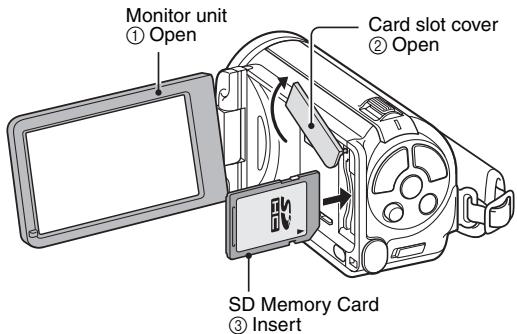
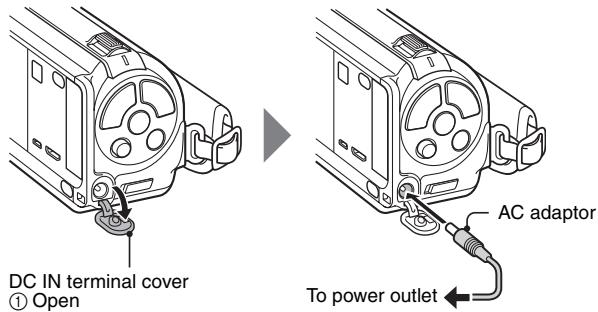
![ON/OFF button [ ] button [ ] button MENU MENU button](/content/2025/01/96679/images/c9bab5c91e77baba9e5c149c95d3bdc8900450a1b861a93b971c8b1ebeba6efb.jpg)