MODE D'EMPLOI FX-250HC CASIO
fx-82SX/
fx-250HC
CE
CASIO ELECTRONICS CO., LTD.
Unit 6, 1000 North Circular Road,
London NW2 7JD, U.K.
| ENGLISH | 1 | DEUTSCH | 99 |
| ESPAÑOL | 33 | ITALIANO | 134 |
| FRANÇAIS | 66 | | |
Sommaire
Précautions de manipulation ... 2
Modes ... 3
Calculs de base ... 5
Calculs de constante ... 6
Calculs de mémoire ... 7
Calculs de fractions ... 8
Calculs de pourcentages ... 10
Calculs de fonctions scientifiques ... 11
Calculs statistiques (mode SD) ... 16
Informations techniques ... 18
Précautions de manipulation
- Votre calculatrice est composée de pièces de précision. Ne tentez jamais de la démonter.
- Évitez de faire tomber votre calculatrice et de la soumettre à des chocs violents.
- Ne rangez pas la calculatrice et ne la laissez pas dans des endroits exposés à des températures élevées ou à l'humidité, ou à de grandes quantités de poussière. Lorsqu'elle est exposée à de basses températures, la calculatrice peut mettre plus de temps à afficher les résultats et peut même cesser de fonctionner. Le fonctionnement correct reprendra une fois que la calculatrice aura été ramenée à température normale.
- L'écran deviendra vide et les touches ne fonctionneront pas pendant les calculs. Lorsque vous utilisez le clavier, surveillez l'écran pour vous assurer que toutes vos frappes sont correctement exécutées.
- Ne laissez jamais de piles usagées dans le compartiment à piles. Elles peuvent fuir et endommager l'appareil.
- Évitez d'utiliser des liquides volatils tels que le diluant ou le benzène pour nettoyer l'appareil. Essuyez-le avec un chiffon doux, ou avec un chiffon imbibé d'une solution d'eau et d'un détergent neutre, puis essoré.
- En aucun cas le fabricant et ses fournisseurs ne pourront être tenus responsables envers vous ou toute autre personne de dommages, dépenses, pertes de profits, pertes d'économies ou tout autre dommage résultant d'un dysfonctionnement, de réparations ou du remplacement des piles. L'utilisateur doit conserver des enregistrements physiques des données pour se protéger contre une telle perte de données.
- Ne jetez jamais les piles, le panneau à cristaux liquides ou d'autres composants au feu.
- Avant de supposer que l'appareil est défectueux, relisez attentivement ce manuel et assurez-vous que le problème n'est pas dû à une pile faible ou à une erreur de manipulation.
- Le contenu de ce manuel est sujet à modification sans préavis.
- Aucune partie de ce manuel ne peut être reproduite sous quelque forme que ce soit sans le consentement écrit exprès du fabricant.
- Conservez ce manuel à portée de main pour référence future.
Modes
| Application | Key Operation | Mode Name* |
| Standard deviation calculations | MODE • | SD |
| Normal calculations | MODE 0 | COMP |
| Calculations using degrees | MODE 4 | DEG |
| Calculations using radians | MODE 5 | RAD |
| Calculations using grads | MODE 6 | GRA |
| Number of decimal place specification | MODE 7 | FIX |
| Number of significant digit specification | MODE 8 | SCI |
| Cancels FIX and SCI settings | MODE 9 | NORM |
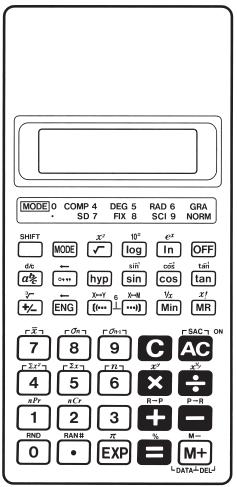
Les indicateurs d'affichage montrent le réglage du mode actuel. L'absence d'indicateur d'affichage indique le mode COMP.
Remarque !
- Un guide des modes se trouve au-dessus de l'écran d'affichage.
- Les modes DEG, RAD et GRA peuvent être utilisés en combinaison avec les modes COMP et SD. • MODE 9 ne quitte pas le mode SD. • MODE 0 quitte le mode SD. • MODE 0 n'efface pas les spécifications SCI ou FIX.
- Appuyez toujours sur AC avant d'entrer dans les modes DEG, RAD et GRA.
- N'oubliez pas de toujours régler le mode de fonctionnement et l'unité d'angle (DEG, RAD, GRA) avant de commencer votre calcul.
Calculs de base
- Utilisez le mode COMP pour les calculs de base. • Exemple 1 : 23+4,5-53
23 + 4,5 - 53 = -25,5
• Exemple 2 : 56 × (-12) ÷ (-2,5)
56 ✗ 12 +/- ÷ 2,5 +/- = 268,8
• Exemple 3 : 2 ÷ 3 × (1 × 10^20)
2 ÷ 3 × 1 EXP 20 = 6,666666667 × 10^19
• Exemple 4 : 7 × 8 - 4 × 5 = 36
7 × 8 - 4 × 5 = 36.
• Exemple 5 : 6/4 × 5 = 0,3
4 ✗ 5 ÷ 6 SHIFT X-Y = 0,3
• Exemple 6 : 2 × [7 + 6 × (5 + 4)] = 122
2 × [⋯] 7 + 6 ×
[(-⋯ 5 + 4 ⋯)] [⋯] = 122.
- Vous pouvez ignorer toutes les opérations ⋯ avant la touche Ⓞ.
Calculs de constante
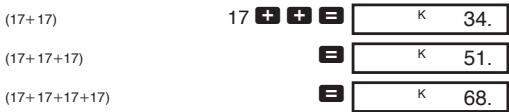
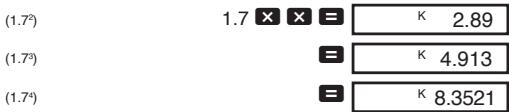
- Appuyez sur +, -, × ou ÷ deux fois après avoir entré un nombre pour en faire une constante.
- « K » s'affiche à l'écran lorsqu'une constante est utilisée.
- Utilisez le mode COMP pour les calculs de constante.
• Exemple 1 : 2,3+3, puis 2,3+6

• Exemple 2 : 12 × 2,3 , puis 12 × (-9)

• Exemple 3 : 17+17+17+17=68
• Exemple 4 : 1,74=8,3521
Calculs de mémoire
- Utilisez le mode COMP pour les calculs de mémoire.
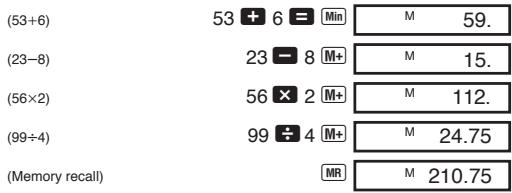
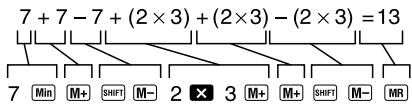
- Utilisez Min, M+, SHIFT M- et MR pour les calculs de mémoire. Min remplace le contenu actuel de la mémoire.
- « M » s'affiche lorsqu'il y a une valeur en mémoire.
- Pour effacer la mémoire, appuyez sur 0 Min ou AC Min.
• Exemple 1 : (53+6)+(23-8)+(56×2)+(99÷4)=210.75
- Exemple 2 : Pour calculer ce qui suit en utilisant la mémoire comme indiqué.
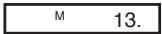
- Exemple 3 : Pour calculer ce qui suit en utilisant la mémoire et une constante : (12× 3) - (45× 3) + (78× 3) = 135 .
| (12×3) | 3 × × 12 = Min | MK | 36. |
| (45×3) | 45 SHIFT M- | MK | 135. |
| (78×3) | 78 M+ | MK | 234. |
| (Memory recall) | | MR | 135. |
Calculs de fractions
- Utilisez le mode COMP pour les calculs de fractions.
- Le nombre total de chiffres (y compris les barres de fraction) ne peut pas dépasser 10. • Exemple 1 : 2/3 + 4/5 = 17/15
2 a % 3 + 4 a % 5 = 1 7 1 5.
• Exemple 2 : 31/4 + 12/3 = 411/12
3 a % 1 a % 4 +
1 a % 2 a % 3 = 4 _ 1 1 1 _ 1 1 2.
• Exemple 3 : 2/4 = 1/2
2 a % 4 2 _ 4.
= 1 _ 2.
• Exemple 4 : 1/2 + 1.6 = 2.1
1 % 2 + 1.6 = 2.1
Le résultat d'un calcul de fraction/décimale est toujours en décimal.
• Exemple 5 : 1/2 ⇔ 0.5 (Fraction ⇔ Décimal)
1 a% 2 = 1_2.
a% 0.5
a% 1_2.
• Exemple 6 : 12/3 ⇔ 5/3
1 % 2 % 3 1_2_3.
SHIFT d/c 5_3.
SHIFT d/c 1_2_3.
Calculs de pourcentage
- Utilisez le mode COMP pour les calculs de pourcentage. • Exemple 1 : Pour calculer 12 % de 1500.
1500 × 12 SHIFT % 180.
• Exemple 2 : Pour calculer quel pourcentage de 880 représente 660.
660 ÷ 880 SHIFT % 75.
• Exemple 3 : Pour ajouter 15 % à 2500.
2500 ✗ 15 SHIFT % + 2875.
• Exemple 4 : Pour réduire 3500 de 25 %.
3500 ✗ 25 SHIFT % - 2625.
• Exemple 5 : Pour calculer ce qui suit, en utilisant une constante.
12 % de 1200 = 144
18 % de 1200 = 216
23 % de 1200 = 276
| (12%) | 1200 × × 12 SHIFT % | K | 144. |
| (18%) | 18 SHIFT % | K | 216. |
| (23%) | 23 SHIFT % | K | 276. |
Calculs de fonctions scientifiques
- Utilisez le mode COMP pour les calculs de fonctions scientifiques.
- Certains calculs peuvent prendre beaucoup de temps.
- Attendre le résultat avant de commencer le calcul suivant. • π=3.1415926536.
■Conversion sexagésimale ↔ décimale
• Exemple : 14°25'36" ↔ 14.42667
14 ◦” 25 ◦” 36 ◦”
14.42666667
SHIFT
14°25°36
■Fonctions trigonométriques et inverses
• Exemple 1 : sin ( π/6 rad) (mode RAD)
SHIFT π ÷ 6 = sin
RAD
0.5
• Exemple 2 : cos 63°52'41" (mode DEG)
63 ◦, 52 ◦, 41 ◦, cos
DEG
0.440283084
• Exemple 3 : tan (-35gra) (mode GRA)
35 +/- tan
GRA
-0.612800788
• Exemple 4 : -1(√22rad) (mode RAD)
2 √ ÷ 2 = SHIFT cos -1
RAD
0.785398163
■ Fonctions hyperboliques / hyperboliques inverses
• Exemple 1 : sinh 3,6 3,6 hyp sin 18,28545536 • Exemple 2 : -1 30 30 hyp SHIFT sin -1 4,094622224
■ Logarithmes courants et naturels, exposants
• Exemple 1 : log 1,23 1,23 log 0,089905111
• Exemple 2 : In 90 (=log e 90) 90 In 4,49980967
• Exemple 3 : 64/ 4 64 4 3.
• Exemple 4 : 100.4 + 5e-3
.4 SHIFT 10 x +
5 × 3 +/- SHIFT ex =
2,760821773
• Exemple 5 : 23
2 SHIFT xy 3
8.
• Exemple 6 : 2-3
2 SHIFT xy 3 +/-
0.125
• Exemple 7 : e10
10 SHIFT ex
22026.46579
• Exemple 8 : log sin 40° + log cos 35° (mode DEG)
40 sin
log
+
35
cos
log
=
DEG
-0.278567983
Pour convertir en antilogarithme :
SHIFT
10x
DEG
0.526540784
• Exemple 9 : 81/3
8
SHIFT
xI/y
3
=
■ Racines carrées, racines cubiques, carrés, inverses et factorielles
• Exemple 1 : √2 + √3 × √5
2 √
+
3 √
×
5 √
=
5.287196909
• Exemple 2 : √[3]5 + √[3]-27
5 SHIFT
3√
+
27
+/−
SHIFT
3√
=
-1.290024053
• Exemple 3 : 123+302
123
+
30
SHIFT
2
=
• Exemple 4 : 1/1/3-1/4
3
SHIFT
1/x
-
4
SHIFT
1/x
=
SHIFT
1/x
• Exemple 5 : 8!
8 SHIFT x!
40320.
■ Calculs FIX, SCI, NORM, RND, RAN#, ENG
- Exemple 1 : 1.234 + 1.234 , arrondi du résultat à deux décimales (FIX 2).
MODE 7 2
FIX 0.00
1.234 + 1.234 =
• Exemple 2 : 1,234+1,234, arrondi de la saisie à deux décimales.
MODE 7 2 1,234 SHIFT RND +
1,234 SHIFT RND =
FIX
2,46
- Appuyez sur MODE 9 pour effacer la spécification FIX.
- Exemple 3 : 1 ÷ 3 , affichage du résultat avec deux chiffres significatifs (SCI 2).
MODE 8 2
SCI
0,0 00
1 ÷ 3 =
SCI
3,3 -01
- Appuyez sur MODE 9 pour effacer la spécification SCI.
• Exemple 4 : Pour convertir 56 088 mètres en kilomètres.
56088 ENG
56,088 03
• Exemple 5 : Pour convertir 0,08125 grammes en milligrammes.
.08125 ENG 81.25 -03
- Exemple 6 : Pour générer un nombre aléatoire entre 0,000 et 0,999.
Exemple (les résultats diffèrent à chaque fois)
SHIFT RAN#
0.664
■Conversion de coordonnées
- Exemple 1 : Pour convertir des coordonnées polaires (r = 2, θ = 60°) en coordonnées rectangulaires (x, y) . (Mode DEG)
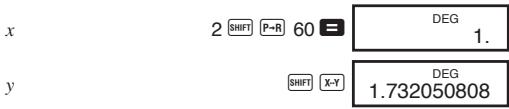
SHIFT X-Y échange la valeur affichée avec la valeur en mémoire.
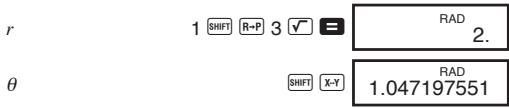
- Exemple 2 : Pour convertir des coordonnées rectangulaires (1, √3) en coordonnées polaires (r, θ) . (Mode RAD)
Permutation
- Exemple : Pour déterminer combien de valeurs à 4 chiffres différentes peuvent être produites en utilisant les nombres de 1 à 7.
7 SHIFT nPr 4 840.
Combinaison
- Exemple : Pour déterminer combien de groupes de 4 membres peuvent être organisés dans un groupe de 10 individus.
10 SHIFT nCr 4 210.
Calculs statistiques (mode SD)
- Appuyez sur MODE pour entrer dans le mode SD pour les calculs statistiques utilisant l'écart type.
- Si FIX ou SCI est affiché à l'écran, appuyez d'abord sur MODE 9. • La saisie des données commence toujours par SHIFT SAC.
- Exemple : Pour calculer σn-1 , σn , , n , x et x2 pour les données suivantes : 55, 54, 51, 55, 53, 53, 54, 52.
Entrez en mode SD. MODE 0. SD
Saisie des données. SHIFT SAC 55 DATA
54 DATA 51 DATA
55 DATA 53 DATA DATA
54 DATA 52 DATA
SD
52.
Écart type de l'échantillon
SHIFT σn - 1
SD 1.407885953
Écart type de la population
SHIFT On
SD 1.316956719
Moyenne arithmétique
SHIFT
Nombre de données
SHIFT
n
Somme des valeurs
SHIFT
Σx
Somme des carrés des valeurs
SHIFT
x2
• DATA DATA saisit la même donnée deux fois (comme ci-dessus). - Vous pouvez également saisir plusieurs entrées de la même donnée en utilisant ✗. Pour saisir la donnée 110 dix fois, par exemple, appuyez sur 110 ✗ 10 DATA. - Les résultats ci-dessus peuvent être obtenus dans n'importe quel ordre, et pas nécessairement celui indiqué ci-dessus. - Pour supprimer une donnée que vous venez de saisir, appuyez sur SHIFT DEL.
• Exemple 1 : Pour modifier des données que vous venez de saisir.
| Correct | Actual | Correction |
| 51 DATA | 50 DATA | SHIFT DEL51 DATA |
| 130 ×31 DATA | 120 × | AC 130 ×31 DATA |
| 130 ×31 DATA | 120 ×31 | AC 130 ×31 DATA |
• Exemple 2 : Pour modifier des données saisies précédemment.
| Correct | Actual | Correction |
| 51 DATA | 49 DATA | 49 SHIFT DEL51 DATA |
| 130 ×31 DATA | 120 ×30 DATA | 120 × 30 SHIFT DEL 130 ×31 DATA |
■Touches et leurs fonctions
- Généralités
Calculs arithmétiques ..... +, -, ×,

Effacement (conserve la mémoire) ...... c
Saisie des nombres 0 - 9, •
Mise hors tension ....OFF
Mise sous tension ; tout effacer AC
Changement de signe ....+/-
- Mémoire
Mise en mémoire ...... Min
Soustraction en mémoire .... SHIFT M-
Mémoire plus M+
Rappel mémoire .... MR
- Spécial
Conversion décimal-sexagésimal .... SHIFT
Échange affichage/mémoire .... SHIFT X-Y,
SHIFT X-M
Exposant .... EXP
Arrondi interne .... SHIFT RND
Parenthèses ....[(...), ...)]
Pi (3.1415926536) SHIFT π
Sélection du mode ...... MODE
Conversion sexagésimal-décimal .....
Touches de fonction shift .... SHIFT
• Fonctions scientifiques
Arc cosinus .... SHIFT cos -1 Arc sinus .... SHIFT sin -1 Arc tangente .... SHIFT tan -1 Antilogarithme décimal .... SHIFT 10 x Logarithme décimal log Cosinus cos Racine cubique .... SHIFT √ Ingénierie ...... ENG , SHIFT ↔ ENG Factorielle .... SHIFT x! Fraction a% Fraction .... SHIFT d/c Hyperbolique ...... hyp Antilogarithme naturel .... SHIFT ex Logarithme naturel In Pourcentage .... SHIFT % Polaire-rectangulaire .... SHIFT P→R Puissance .... SHIFT xy Nombre aléatoire .... SHIFT RAN# Inverse .... SHIFT 1/x Rectangulaire-polaire .... SHIFT R→P Racine .... SHIFT xIy Sinus ....sin
Carré .... SHIFT x2
Racine carrée .... \\
Tangente tan
Permutation ....SHIFT nPr
Combinaison ....Shift nCr
• Statistiques (mode SD)
Moyenne arithmétique .... SHIFT
Suppression de données .... SHIFT DEL
Saisie de données ...... DATA
Nombre de données .... SHIFT n
Écart type de la population ........ SHIFT σn
Écart type de l'échantillon ....[SHIFT] [σn-1]
Effacement du registre statistique .... SHIFT SAC
Somme des carrés des valeurs .... SHIFT x2
Somme des valeurs .... SHIFT x
Cette calculatrice peut afficher jusqu'à 10 chiffres. Les valeurs plus grandes sont automatiquement affichées en notation exponentielle. Dans le cas des valeurs décimales, vous pouvez choisir entre deux formats qui déterminent à quel moment la notation exponentielle est utilisée.
• NORM 1
Avec NORM 1, la notation exponentielle est automatiquement utilisée pour les valeurs entières de plus de 10 chiffres et les valeurs décimales avec plus de deux décimales.
• NORM 2
Avec NORM 2, la notation exponentielle est automatiquement utilisée pour les valeurs entières de plus de 10 chiffres et les valeurs décimales avec plus de neuf décimales.
Pour basculer entre NORM 1 et NORM 2
Appuyez sur MODE 9. Rien n'indique à l'écran quel format est actuellement en vigueur, mais vous pouvez déterminer le réglage en effectuant le calcul suivant.

- Tous les exemples de ce manuel montrent les résultats de calcul en utilisant le format NORM 1.
■ En cas de problème...
Si les résultats de calcul ne sont pas ceux attendus ou si une erreur se produit, effectuez les étapes suivantes.
- MODE 0 (mode COMP)
- MODE 4 (mode DEG)
- MODE 9 (mode NORM)
- Vérifiez la formule avec laquelle vous travaillez pour confirmer qu'elle est correcte.
- Saisissez les modes corrects pour effectuer le calcul et réessayez.
■Correction des erreurs pendant les calculs
- Si vous faites une erreur lors de la saisie d'une valeur (mais que vous n'avez pas encore appuyé sur une touche d'opérateur arithmétique), appuyez sur C pour effacer la valeur puis saisissez la valeur correcte.
- Dans une série de calculs, appuyez sur C pendant qu'un résultat intermédiaire est affiché pour effacer uniquement le dernier calcul effectué.
- Pour changer la touche d'opérateur (+, -, ×, ÷, SHIFT ײ, SHIFT ×⁵), etc.) que vous venez d'appuyer, appuyez simplement sur la touche d'opérateur correcte. Dans ce cas, l'opérateur de la dernière touche sur laquelle vous appuyez est utilisé, mais l'opération conserve l'ordre de priorité de l'opération pour la première touche sur laquelle vous avez appuyé.
■Dépassement de capacité ou contrôle d'erreur
Les conditions suivantes rendent tout calcul ultérieur impossible.
a. Lorsqu'un résultat (qu'il soit intermédiaire ou final) ou un total accumulé en mémoire est supérieur à ±9,999999999 × 10^99. (L'indicateur « -E- » apparaît sur l'écran.) b. Lorsque des calculs de fonction sont effectués avec une valeur qui dépasse la plage d'entrée. (L'indicateur « -E- » apparaît sur l'écran.) c. Lorsqu'une opération illogique (comme une tentative de calcul de x̄ et σn alors que n = 0) est effectuée lors de calculs statistiques. (L'indicateur « -E- » apparaît sur l'écran.) d. Lorsqu'une opération mathématique illégale (comme une division par zéro) est effectuée. (L'indicateur « -E- » apparaît sur l'écran.)
e. Le nombre total de niveaux de parenthèses imbriquées dépasse six, ou lorsque plus de 18 paires de parenthèses sont utilisées. (L'indicateur « -⊆- » apparaît sur l'écran.)
- Pour effacer l'une des conditions ci-dessus, appuyez sur AC et effectuez le calcul depuis le début.
- Dans le cas de la condition e, vous pouvez également appuyer sur C. Cela efface le résultat intermédiaire juste avant le dépassement, vous pouvez donc continuer le calcul à partir de ce point.
- Aucune erreur ne se produit lorsque le résultat est dans la plage de +(1 × 10^-99) à -(1 × 10^-99). À la place, l'écran affiche tous des zéros.
Alimentation électrique
Cette calculatrice est alimentée par deux piles sèches au manganèse de taille AA (R6P (SUM-3) ou UM-3). Remplacez les piles dès que possible lorsque les caractères de l'écran deviennent faibles et difficiles à lire.
- Appuyez sur AC pour allumer.
- Appuyez sur OFF pour éteindre l'appareil.
- L'appareil s'éteint automatiquement (mais les données en mémoire sont conservées) si aucune touche n'est actionnée pendant environ six minutes.
Important !
Une utilisation incorrecte des piles peut provoquer leur éclatement ou une fuite, ce qui peut endommager la calculatrice.
- Veillez à remplacer les piles au moins une fois tous les deux ans, quel que soit le niveau d'utilisation de la calculatrice. Des piles anciennes peuvent fuir et causer de graves dommages à l'intérieur de la calculatrice.
- Les piles fournies avec la calculatrice lors de l'achat sont uniquement destinées à des tests. Elles peuvent ne pas offrir une durée de vie complète.
- Toutes les données stockées en mémoire sont perdues lors du remplacement des piles. Veillez à noter les données importantes avant de remplacer les piles.
- Veillez toujours à insérer les piles en respectant les bornes positive (+) et négative (−).
- Ne mélangez jamais des piles de types différents.
- Ne mélangez jamais des piles neuves avec des piles usagées.
- Ne tentez jamais de recharger les piles, de les démonter ou de les court-circuiter. Tenez les piles éloignées des flammes et de la chaleur.
- Gardez les piles hors de portée des jeunes enfants. En cas d'ingestion, consultez immédiatement un médecin.
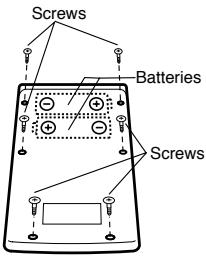
Pour remplacer les piles
- Appuyez sur OFF pour éteindre l'appareil.
- Retirez les vis qui maintiennent le capot arrière, puis retirez le capot.
- Retirez les anciennes piles.
- Installez deux piles neuves en orientant correctement les bornes positive (+) et négative (−).
- Replacez le capot arrière et fixez-le avec les vis.
- Appuyez sur AC pour mettre l'appareil sous tension.
■ Ordre des opérations et niveaux
Les opérations sont effectuées dans l'ordre de priorité suivant.
- Fonctions
- xy , x1/y , R → P, P → R, nPr, nCr
- ×, ÷
- +, -
- Les opérations de même priorité sont effectuées de gauche à droite, les opérations entre parenthèses étant effectuées en premier. Si les parenthèses sont imbriquées, les opérations entre parenthèses les plus internes sont effectuées en premier.
- Les registres L1 à L6 stockent les opérations. Il y a six registres, donc les calculs jusqu'à six niveaux peuvent être stockés. • Chaque niveau peut contenir jusqu'à trois parenthèses ouvertes, donc les parenthèses peuvent être imbriquées jusqu'à 18 fois.
- Exemple : L'opération suivante utilise 4 niveaux et 5 parenthèses imbriquées.
2 × [(⋯] [(⋯] [(⋯] 3 + 4 × [(⋯] [(⋯] 5 + 4
Le tableau ci-dessous montre le contenu des registres après la saisie ci-dessus.
| Register | Contents |
| x | 4 |
| L1 | ((5 + |
| L2 | 4 × |
| L3 | (((3 + |
| L4 | 2 × |
| L5 | |
| L6 | |
Voici les formules, plages et conventions qui s'appliquent aux différents calculs pouvant être effectués avec cette calculatrice.
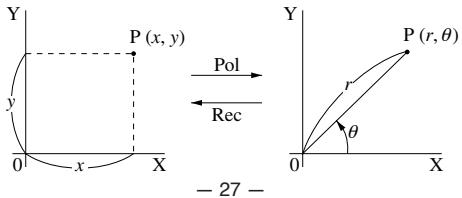
- Avec les coordonnées polaires, θ peut être calculé dans une plage de -180° < θ ≤ 180° . La plage de calcul est la même pour les radians et les grades.
Permutation
- Plage de saisie : n ≥ r ≥ 0 ( n, r : nombres naturels)
- Formule : nPr = n!/(n - r)!
Combinaison
- Plage de saisie : n ≥ r ≥ 0 ( n, r : nombres naturels)
- Formule : nCr = n!/n!(n - r)!
Écart type de la population
σ_ n = √ _ i = 1 ^ n (xi - x) ^ 2n = √ x ^ 2 - ( x) ^ 2 / nn
Écart type de l'échantillon
σn-1 = √i=1n (xi - )2n-1 = √ x2 - ( x)2 / n/n-1
Moyenne arithmétique
= i=1n xin = x/n
Spécifications
Alimentation : Deux piles sèches au manganèse de taille AA (UM-3 ou R6P (SUM-3))
Durée de vie des piles : Environ 9 000 heures de fonctionnement continu avec le type UM-3, 11 000 heures de fonctionnement continu avec R6P (SUM-3)
Puissance
Consommation : 0,0004 W
Plages de saisie :
| Functions | Input Range |
| x | (DEG)|x|<9× 10⁹ | However, for x : |
| x | (RAD)|x|<5× 10⁷π rad | |x|≠ 90(2n+1) :DEG |
| x | (GRA)|x|<1× 10¹⁰ grad | |x|≠ π/2·(2n+1) :RAD |
| | |x|≠ 100(2n+1) :GRA |
| -1x | |x|≤ 1 |
| -1x |
| -1x | |x|<1× 10100 |
| x | |x|≤ 230.2585092 | For and ,errors are cumulative and accuracy is affected at a certain point when x=0 . |
| x |
| x | |x|<1× 10100 |
| -1x | |x|<5× 1099 |
| -1x | 1≤ x<5× 1099 |
| -1x | |x|<1 |
| x/ x | 1× 10-99≤ x<1× 10100 |
| 10x | \( -1\times 10^{100} |
| Functions | Input Range |
| ex | -1 × 10100 < x ≤ 230.2585092 |
| | 0 ≤ x < 1 × 10100 |
| x2 | |x| < 1 × 1050 |
| 1/x | |x| < 1 × 10100; x ≠ 0 |
| 3 | |x| < 1 × 10100 |
| x! | 0 ≤ x ≤ 69 ( x is an integer) |
| nPr/nCr | 0 ≤ r ≤ n n < 1 × 10¹⁰ ( n and r are integers) |
| R → P | 2 + y2 < 1 × 10100 |
| P → R | 0 ≤ r < 1 × 10100 However, for θ : (DEG)|θ| < 9 × 10⁹ |θ| ≠ 90(2n+1):DEG (RAD)|θ| < 5 × 10⁷ πrad |θ| ≠ π/2 · (2n+1):RAD (GRA)|θ| < 1 × 10¹⁰ grad |θ| ≠ 100(2n+1):GRA |
| o', " | Sexagesimal: |a|, b, c < 10100 0 ≤ b, c Decimal: |x| ≤ 2.7777777777 × 1096 |
| xy | x > 0: -1 × 10100 < y x < 100 x = 0: y > 0 x < 0: y = n; 1/2n+1 (n is an integer) However: -1 × 10100 < y |x| < 100 |
| x1/y | x >0: y ≠ 0 -1 × 10100 < 1/y x < 100 x = 0: y >0 x < 0: y = 2n+1; 1/n (n ≠ 0; n is an integer) However: -1 × 10100 < 1/y |x| < 100 |
| ab/c | Total of integer, numerator, and denominator must be 10 digits or less (including division marks). |
| SD | |x| < 1 × 1050 |n| < 1 × 10100 σn, : n ≠ 0 σn-1: n ≠ 0, 1 |
- Les erreurs sont cumulatives avec de tels calculs internes continus comme xy, x1/y, x!, et √[3]x, donc la précision peut être affectée négativement.
Température de fonctionnement :
0 ^ ° C - 4 0 ^ ° C (3 2 ^ ° F - 1 0 4 ^ ° F)
Dimensions : 19 (H) × 73 (L) × 147 (P) mm
Poids : 104 g piles incluses
Capacité de calcul :
- Entrée / Calculs de base
Mantisse à 10 chiffres ; ou mantisse à 10 chiffres plus exposant à 2 chiffres jusqu'à 10±99
CASIO®
CASIO COMPUTER CO., LTD.
6-2, Hon-machi 1-chome,
Shibuya-ku, Tokyo 151-8543, Japon