
TIVUMAX EASY-6400S - Décodeur satellite HUMAX - Notice d'utilisation et mode d'emploi gratuit
Retrouvez gratuitement la notice de l'appareil TIVUMAX EASY-6400S HUMAX au format PDF.



| Type de produit | Décodeur satellite HD |
| Modèle | TIVUMAX EASY-6400S (HD-6400S) |
| Marque | HUMAX |
| Alimentation | 230 V AC, 50 Hz (adaptateur secteur fourni) |
| Connectivité | Entrée LNB (satellite), HDMI, SCART, SPDIF optique, Ethernet (LAN), 2 ports USB 2.0 |
| Résolution vidéo | 576i, 576p, 720p, 1080i, 1080p |
| Fonctions principales | Réception satellite HD, enregistrement sur disque dur externe (PVR), Time Shift, Media player (vidéo, musique, photos), TV Apps (portail), EPG, contrôle parental, recherche de programmes |
| Formats audio | Dolby Digital, Dolby Digital Plus, MPEG, AAC |
| Enregistrement | Enregistrement simultané de 2 chaînes, programmation, padding, disque dur externe USB (≥64 Go recommandé) |
| Réseau | Ethernet 10/100, Wi-Fi via adaptateur USB optionnel |
| Normes | DVB-S2, compatible DiSEqC 1.0/1.2, USALS, SCD |
| Smartcard | Lecteur de Smartcard (pour TV payante) |
| Télécommande | Infrarouge, piles AAA (2×1.5V) |
| Entretien et nettoyage | Débrancher avant nettoyage ; utiliser un chiffon doux légèrement humide ; pas de solvants |
| Sécurité | Ne pas exposer à l'humidité ; ne pas ouvrir le boîtier ; ne pas obstruer les aérations ; utiliser uniquement l'adaptateur fourni |
| Consommation en veille | < 0,5 W (mode éco) |
| Accessoires inclus | Télécommande, piles, adaptateur secteur, câble HDMI, manuel d’utilisation, Smartcard (selon opérateur) |
| Dimensions (approx.) | 260 × 180 × 45 mm (estimation) |
| Poids (approx.) | 1,2 kg (estimation) |
| Pièces détachées et réparabilité | Contacter le SAV HUMAX ; les pièces doivent être spécifiées par le constructeur |
FOIRE AUX QUESTIONS - TIVUMAX EASY-6400S HUMAX
Questions des utilisateurs sur TIVUMAX EASY-6400S HUMAX
0 question sur cet appareil. Repondez a celles que vous connaissez ou posez la votre.
Poser une nouvelle question sur cet appareil
Téléchargez la notice de votre Décodeur satellite au format PDF gratuitement ! Retrouvez votre notice TIVUMAX EASY-6400S - HUMAX et reprennez votre appareil électronique en main. Sur cette page sont publiés tous les documents nécessaires à l'utilisation de votre appareil TIVUMAX EASY-6400S de la marque HUMAX.
MODE D'EMPLOI TIVUMAX EASY-6400S HUMAX
Manuale dell'utente
TIVUMAX EASY (HD-6400S)
TIVUMAX HD (HD-6600S)
TIVUMAX PRO (HD-6800S)
AVVISI
Grazie per avere scelto un prodotto Humax. Si prega di leggere attendamente il presente manuale,onde poter installare edutilizzare correttamente l'apparecchio e mantenere al massimo le sue prestazioni. Si consiglia di tenere il manuale a portata di mano in caso di future consultagioni. Le informazioni contenate in quello manuale sono soggette a modificaenza preavviso.
Copyright (Copyright © 2015 HUMAX Corporation)
Il presente manuale non puo' essere copiato, utilizzato o tradotto parzialmente o per intero senza autorizzazione scritta da parte di HUMAX.
Significato dei symboli
| A A R M O F E L E T R I C H O O N S S O U T E P R E | Per evitare il rischio di scosse elettriche, non rimuovere il coperchio (o il pannello posteriore). All'interno non vi sono parti riparabili dall'utente. Per assistenza, rivolgersi a personale significato. |
| A | Questo simbolo indica una tensione pericolosa all'interno del prodotto, che presenta il rischio di scosse elettriche o lesions personali. |
| A | Questo simbolo indicaistruzioni importanti relative al prodotto. |
Avviso di pericol, Attenzione e Nota
All'interno del manuale, prestare particolare attenzione alle seguentiindicazioni che segnalano situazioni pericolose.
Avviso di pericololo
Indica una situazione pericolosa con possibili consequences gravi per la salute.
Attenzione
Indica una situazione che potrebbe essere causa di danni all'apparecchio oppure ad altri apparetcchi.
Nota
Indica informazioni aggintive che agevolano l'utente alla soluzione di possibili problemi e aiutano a mantenere sempre efficiente l'unita'.
Garanzia
La garanzia non copre eventuali componenti danneggiati a causa di un uso improprio delle informazioni continue nel presente manuale.
Istruzioni 'WEEE'(RAEE)
Questo prodotto non deve essere smaltito insieme ad altri rifiuti domestici al termine del suo ciclo vitale. Smaltire il prodotto separamente dagli altri rifiuti e riciclarlo in modo da favorire il riutilizzo dei materiali che lo compongono. Ciò consente di non arrecare danni all'ambiente o alla salute dovuti a uno smaltimento non controllato dei rifiuti.
Utenti domestici:
Contattare il proprio rivenditore o le autorità locali per chiedere informazioni sullo smaltimento e il riciclaggio del prodotto.
Utenti commerciali:
Contattare il proprio fornitore e controllare i termini e le condizioni del contratto di acquisto. Questo prodotto non deve essere smaltito insiemeagli altri rifiuti commerciali.
Marchi
Nagravision é un marchio registrato di KUDELSKI S.A.
- Prodotto su licenza di Dolby Laboratories. Dolby e il symbolo della dopbia D sono marchi di Dolby Laboratories.
- HDMI, il logo HDMI, e l'interfaccia High-Definition Multimedia sono marchi e marchi registrati di HDMI Licensing LLC.
Note: Il nome del modello è riportato su un'etichetta posta alla base dell'apparecchio.

DICHIARAZIONE DI CONFORMITA UE SEMPLIFICATA
La dichiarazione di conformità UE amplificata a cui si fa riferimento nell'Articolo 10(9)iene fornita come segue:
Con la presente, HUMAX dichiara che il tipo di appearecchio radio HD-6400S, HD-6600S e HD-6800S è conforme alla Direttiva 2014/53/UE e alle direttive pertinenti.
Il testo completo della dichiarazione di conformità UE è disponibile al segunte indirizzo Internet:
Regno Unito: http://uk.humaxdigital.com/ec
- Germania: http://de.humaxdigital.com/ec
Per la sicurezza personale
Istruzioni sulla sicurezza
1. ALIMENTAZIONE PRINCIPALE
Utilizzare il prodotto solo con il tipo di alimentazione indicata sull'etichetta. Se non si è sicuri del tipo di alimentazione presente in casa, rivolgersi all'azienda elettrica locale.
- Prima di iniziare qualsiasi procedura di manutenzione o installmenta, scollegare il prodotto dall'alimentazione principale.
2. SOVRACCARICO
- Non sovraccaricare la presa a muro, la prolonga o l'adattatore, poiché potrebbe esserci l rischio di incendio o scosse elettriche.
3. LIQUIDI
- Il prodotto non deve essere esesto a liquidi di alcun genere. Non collocare sull'apparecchio oggetti contenti liquidi.
4. PULIZIA
- Prima della pulizia, scollegare l'apparecchio dalla presa a muro.
- Per pulire il prodotto usare un panno leggermente inumidito. Non utilizzare solventi. Pulire delicatamente con un panno morbio per non graffare la superficie.
5. PULIZIA
- Verificare che le aperture di ventilazione poste sulla parte superiore del prodotto siano libero. L'unità deve una idonea circolazione dell'aria.
Non appoggiare il prodotto su superfici morbide.
Non appoggiare alcun oggeto sul prodotto. In caso contrario, i fori di ventilazione potrebbero ostruiri oppure la superficie potrebbe subire danni.
6. ATTACCHI
- Non utilizzato attacchi non supportati per evitare rischi o causare danni al prodotto.
7. FULMINI, TEMPORALI O NON UTILIZZO
- Durante un temporale o se l'appareccchio rimane non sorvegliato o non utilizzato per un lungo periodo di tempo, scollegarlo dalla presa a muro e staccare l'antenna. Questa precauzione consente di preservare l'unità dai danni causati da fulmini e picchi di corrente.
8. CORPI ESTRANEI
- Non insere oggetti atraverso le aperture dell'unità, poiché potrebbero toccare pericolosi punti sotto tensione o danneggiare i componenti.
9. SOSTITUZIONE DEI COMPONENTI
- Quando è necessario sostituire dei componenti, controllare che il tecnico dell'assistenza utilizzi le parti di ricambio specificate dal costruttore o parte che abbiano le stesse crateristiche di quale originali. L'utilizzo di parti non autorizzato vuo provocare ulteriori danni all'unità.
10. COLLEGAMENTO ALLA PARABOLA, ALL'ANTENNA, AL RICEVITORE TV VIA CAVO
- Scollegare l'alimentazione elettrica prima di collegare o scollegare il cavo della parabola, dall'antenna o dal ricevitore TV via cavo. In caso contrario, I'LNB della parabola, la linea TV via cavo o I'antenna potrebbero subire danni.
11. COLLEGAMENTO AL TELEVISORE
- Prima di collegare o scollegare il cavo dal televisione, scollegare il prodotto dall'alimentazione principale. In caso contrario, le televisione potrebbe subire danni.
12. MESSA A TERRA (Solo Satellite)
- Il cavo dell'LNB deve essere collegato alla terra dell'impianto elettrico della parabola satellitate.
13. POSIZIONE
Collocare il prodotto al chiuso ed evitare l'esposizione a fulmini, pioggia e sole. Non posizionarlo vicino a un radiatore o a una fonte di calorie.
- Colocare l'unità ad almeno 10 cm da qualiasi apparecchiatura sensibile alle influenze elettromagnetice, come tevisori o videoregistratori.
Non ostruire le aperture con oggetti e non posizionare il prodotto su un letto, un divano, un tappeto o superfici simil.
- Se si posizione il prodotto su uno scaffale o una libreria, verificare che vi sia una ventilazione adeguata e che per il montaggio siano state seguite le istruzioni del costruttore.
- Non posizione il prodotto su un carrello, un supporto, un treppiede, una mensola o un ravolo instabili, da dove potrebbe cadere. La caduta del prodotto puocauseare gravi lesioni a un bambino o a un adulto etnotevoli danni all'apparecchiatura.
Non collocare fiambre, comme quella da una candela accesa, sopra o nelle vicinanzhe del prodotto.
Attenzione e Avviso di pericolo
1. Per evitare di danneggiare il cavo o la spina di alimentazione;
Non modificare o manipolare arbitriamente il cavo di alimentazione o la spina.
Non piegare o attorcigliare il cavo di alimentazione.
- Scollegare il cavo di alimentazione prendendolo per la spina.
- Tenere le appearecchiature per il riscaldamento il più lontano possibile dal cavo di alimentazione per evitare che il rivestimento in vinile si sciolga.
- La spina di alimentazione deve poter essere sempre accessibile da parte dell'utente e fungere quale interrettatore principale.
2. Per evitare scosse elettriche;
Non apriere il corpo principale.
Non inseire oggetti infammabili o metallici all'interno del prodotto.
Non toccare la spina di alimentazione con le mani bagnate.
In caso di fulmini, scollegare il cavo di alimentazione.
3. Per evitare danni al prodotto;
Non utilizzato il prodotto in caso di funzionamento anomalo. L'uso prolongato dell'unità malfinzionante cui cause scarisi danni al prodotto. Se il prodotto presenta malfinzionamenti, contattare il distributore locale.
Non inseire oggetti metallici o corpi estranei nelle alloggiamenti dei moduli e delle Smartcard. (laddove applicabile) Ciò potrebbe causare danni al prodotto e ridurne la durata.
4. Per evitare danni al disco fisso (solo PVR)
Non spostare il prodotto o spegnerlo improvisamente quando il disco fosso è in funzione.
- La società non pourrait essere ritenuta responsablee per eventuali perdite di dati al disco fisso causati da un uso inappropriato o inadeguato.
Contenui e accessori
Indice
AVVISI. 2
Per la sicurezza personale 4
Conteni e accessori. 5
Indices
Accessori
Guidarapida. 6
Pannello anteriore e posteriore
Telecomando (TIVUMAX EASY)
Telecomando (TIVUMAX HD / TIVUMAX PRO)
Collegamenti
Installazione guidata
Gestione dei canali 12
Informazioni sul programma
Diretta TV. 15
In onda & Successivo
Guida ai canali
Media & Apps. 17
TV APPS
Media
Registrazione e riproduzione 23
Registrazione
Riproduzione
Ricerca 28
Ricerca
Impostazioni 29
Controllo genitori
Preference
Canali
Fissa-Solo LNB
Fisso - DiSEqC
SCD
DiEqC 1.2
USALS
Aggiorna
Sistema
Appendice 35
Risoluzione dei problemi
Assistenza e supporto
Messaggio di erreore
Glossario
Open Source Software Notice
Accessori
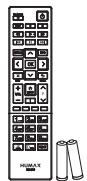
Telecomando / Batterie
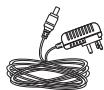
Alimentatore
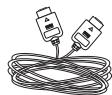
cavo HDMI (TVUMLAX EASY:TVUMLAX HEY)
Manuale dell'utente

Smartcard
Nota: Gli accessori in dotazione possono variate in base alla località.
Pannello anteriore e posteriore
Note: Le immagini qui riportate possono differire dal prodotto acquistato.
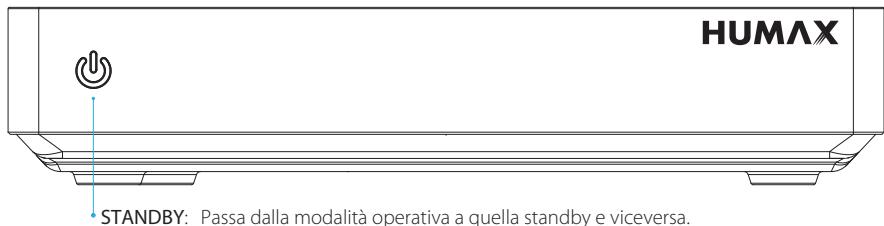
Le spi verdi indicano il funzionamento, nelle rosse la modalità standby o registrarazione
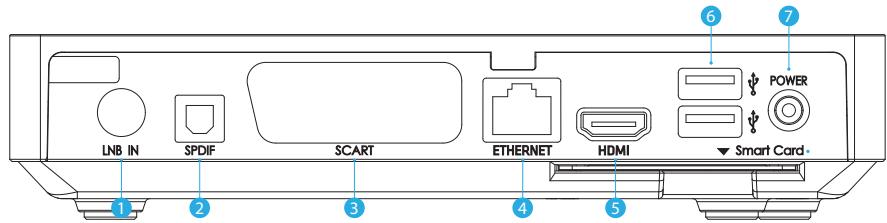
- LNB IN: Collegare il cavo dell'antenna satellitare.
- SPDIF: utilisezare un cavo S/PDIF per il collegamento alsystema audio per ricevere audio digitale.
- SCART:utilizzare un cavo TV SCART per il collegamento al tevisore.
- ETHERNET: Collegare un cavo LAN.
- HDMI: utilisezare un cavo HDMI per il collegamento al tevisore.
- Porta USB: collegare un disponivo di memoria USB.
- POWER: Collegare un cavo di alimentazione.
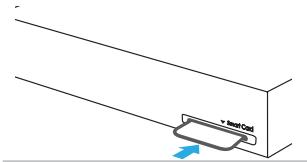
Inserimento di una Smartcard
- Tenere la Smartcard in senso orizzontale con il dato contenente il chip rivolto verso il basso.
- Inserire la Smartcard nell'alloggiamento.
Telekomando (TIVUMAX EASY)
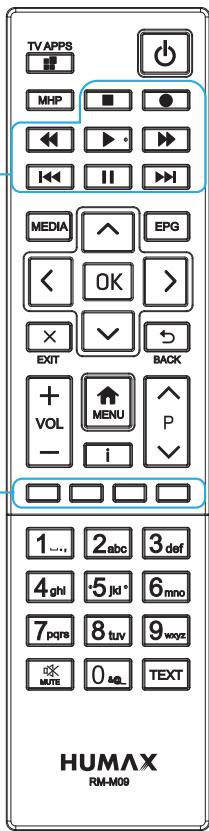
| TV APPS | Accede al portale HUMAX TV | |
| STANDBY | Passa alla modalità operativa a quella standby e viceversa | |
| MHP | Visualizza le informazioni relative all'applicazione MHP | |
| 1 | Tasti di controllo della riproduzione | ■ Stop, ●Registra, ⇌ Riavolgi, ▷ Riproduci, ➔ Avanzam. rapido, ⇌ Avanti, ⊥ Pause, ➔ Indietro |
| MEDIA | Visualizza l'élenco dei supporti | |
| EPG | Visualizza la guidà Tivu | |
| Tasti FRECCIA | Muovono il cursore verso l'alto, il basso, a sinistra e a destra | |
| OK | Selezione un menu o confirmara la selezione | |
| EXIT | Esce da tutti i menu On-Screen Display (OSD) | |
| BACK | Torna al canale o alla schermata precedente | |
| VOL+/- | Cambia il volume audio | |
| MENU | Visualizza il menu principale | |
| i (Information) | Visualizza le informazioni su canali e programmi | |
| P ∧/V | Cambia il canale | |
| 2 | Tasti COLORE | Per applicazioni interattive |
| Tasti NUMERICI | (0~9) | |
| MUTO | Esclude l'audio | |
| TEXT | Accede al servizio di testo digitale |
Inserimento delle batterie
Inserire le batterie facendo corrispondere il polo positivo (+) e quello negativo (-) .
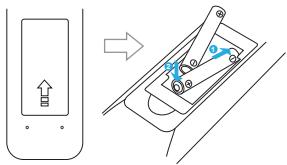
Informazione agli utenti
ai sensi del decreto legislativo 20 novembre 2008, n. 188 "Attuazione della direttiva 2008/103/CE concennte pile, accumulatori e smaltimento dei relativi rifiuti Il vosto telecomando necessita di 2 batterie del tipo AAA, 1,5VDC.
Le batterie fornite a corredo non contengono mercurio (Hg), cadmio (Cd) o piombo (Pb).
Non mescolate diversi tipi di batterie e non utilizzate batterie vecchie e nuove allo stesso tempo. Non utilizzate batterie ricaricabili. Al fine di evitare possibili rischi di esplosioni, rispettate le polarita indicate all'interno del vano batterie. Sostituitele solo con il tipo
sopra specificato. Non gettatele nel fuoco, non ricaricatele. Se non utilizzate il telecomando per un lungo periodo, togliete le batterie. Rispettate I'ambiente e la legge! Le batterie devono essere raccolte separatamente dagli altri rifiuti!
Telekomando (TIVUMAX HD / TIVUMAX PRO)
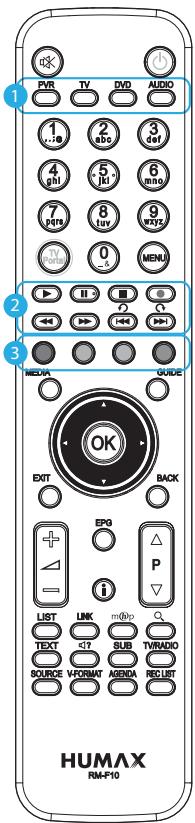
| ※ | MUTE | Esclude l'audio |
| STANDBY | Passa alla modalità operativa a quellastandby e viceversa | |
| 1 | MODALITA' | Cambia la modalità del telecomando. |
| Tasti NUMERICI | (0-9) | |
| TV Portal | Accede al portale HUMAX TV | |
| MENU | Visualizza il menu principale | |
| 2 | Tasti di controllo della riproduzione | Riproduci, Pausa, Stop,Registra, Riavvolgi,Avanzam. Rapido, Indietro,Avanti |
| 3 | Tasti COLORE | Per applicazioni interattive |
| MEDIA | Visualizza l'élenco dei supporti | |
| GUIDE | Visualizza la guida In onda & successivo | |
| Tasti FRECCIA | Muovono il cursore verso l'alto, il basso,a sinistra e a destra | |
| OK | Selezione un menu o conferma la selezione | |
| EXIT | Esce da tutti i menu On-Screen Display(OSD) | |
| BACK | Torna al canale o alla schermataprecedente | |
| +/- | Cambia il volume audio | |
| P ▲/▼ | Cambia il canale | |
| EPG | Visualizza la guida Tivu |
| I (Informazioni) | Visualità le informazioni su canali e programmi | |
| LIST | Visualità l'elenco canali | |
| LINK | Accesso diretto al portale tivùlink* *Funzionalità disponibile in seguito all'aggiornamento software | |
| mhp | Visualità le informazioni relative all'applicazione MHP | |
| Q | Ricerca | Ricerca i programmi |
| TEXT | Accede al servizio di testo digitale | |
| ? | AUDIO | Cambia la lingua audio |
| SUB | Cambia la lingua dei sottotitoli | |
| TV/RADIO | Passa alla modalità TV a quella radio e viceversa | |
| SOURCE | Passa tra le sorgenti di ingresso alla SCART | |
| V-FORMAT | Imposta la risoluzione video | |
| AGENDA | Visualità i programmi pianificati | |
| REC LIST | Visualità le registrazioni pianificate |
Collegamenti
Questa sezione describes how to properly dispositivi and totenere the massima qualita del segnale.
Attenzione: Collegare tutti i dispositivi prima di collegare qualiasi cavo di alimentazione alle prese di corrente. Prima di collegare o scollegare qualiasi cavo, spegnere sempre il prodotto, il teilevisore e gli altri dispositivi.
Note: Se si verificano problemi durante la configurazione del prodotto, contattare il rivenditore locale o l'Assistenza clienti HUMAX.
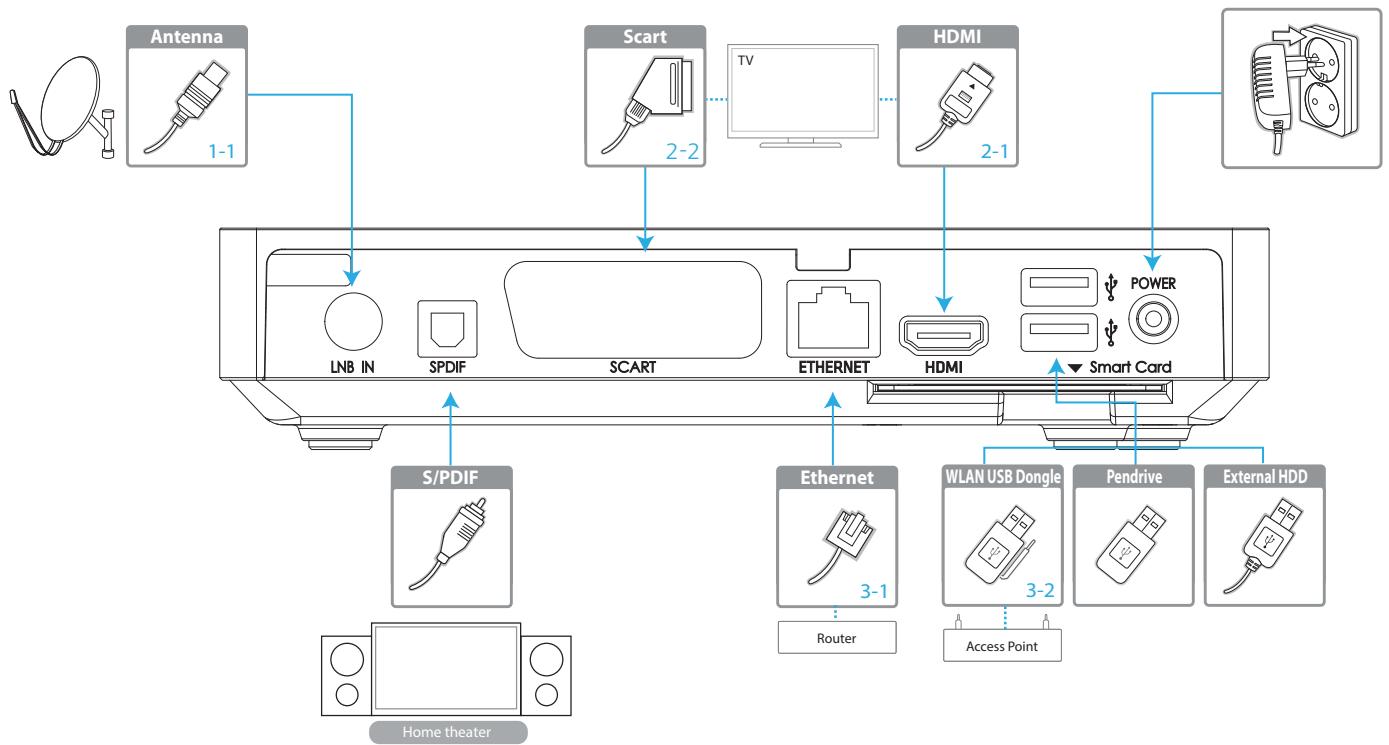
Guidrapida
Collegamento dell'antenna
1-1 Collegamento del cavo dell'antenna
Collegare l'antenna a LNB IN.
Collegamento del teilevisore
2-1 Uso del cavo HDMI
Per ottenere la migliorie qualità dell'imagine, utilizzare un cavo HDMI per il collegamento al tevisore.
2-2 Uso del cavo SCART
Per ottener immagini di qualità ottimale, utilizzare un cavo SCART per il collegamento al tevisore.
Nota:
- Utilizzare un cavo S/PDIF per il collegamento alsystema audio per ricevere audio digitale.
- I programmi codificati mediante DRM (Digital Rights Management) sono non essere visibili utilizzando un cavo HDMI. Non è possibile utilizzato un cavo HDMI per la visione di programmi protetti con DRM. Per tali programmi, utilizzare un cavo SCART.
Collegamento alla rete
3-1 Collegamento alla LAN
- Utilizzare un cavo Ethernet per collegare il prodotto e il router LAN.
- Impostare le opzioni per la LAN. (Per maggiori dettagli videere Sistema>Rete Lan Impostazione.)
3-2 Collegamento al Wi-Fi
- Collegare la chiavetta USB wireless alla porta USB. (venduta a parte)
- Impostare le opzioni per il Wi-Fi. (Per maggiori dettagli videere Sistema>Rete Wi-fi Impostazione.)
Nota:
- Si consiglia di effettuire il collegamento di rete mediante una LAN diretta.
- Accertarsi che la distance tra l'access point Wi-Fi e il prodotto non sia eccessiva. Ciò potrebbeicomportareuna ridotta qualità del servizio.
Accensione
- Collegare il cavo di alimentazione del prodotto a una presa a parete.
- Verificare che l'interruttore ON/OFF sul retro del prodotto sua posizionato su ON.
- Accendere il prodotto premendo il tasto STANDBY sul telecomando o il tasto STANDBY sul pannello anteriore del prodotto.
Guidrapida
Installazione guidata
L'installazione guidata si avvia automaticamente alla prima accensione del prodotto dopo l'acquisto o quando si esegue la funzione di ripristino alle impostazioni di fabbrica.
Note: Uscendo dall'installazione guidata perché completato la ricerca dei canali, non tutti i canali potrebbero essere disponibili. In quello caso, accedere a MENU > IMPOSTAZIONI > CANALI > CERCA CANALI e cercare altri canali.
1. Lingua
Selezionare la lingua.
2. Codice PIN
Digitare il codice PIN.
3. Video
Impostare l'uscita video sul tevisore.
4. Antenna
Impostare le opzioni satellite e il tipo di antenna.
Vedere Impostazioni > Canali > Impostazione antenna per maggiori dettagli.
5. Canale
Impostare le opzioni di ricerca quando eseguire la ricerca dei canali.
Salvare i canali trovati al termine della ricerca.
Informazioni sul programma
Premendo il tasto i vengono visualizzate le informazioni relative al programma.
Premere nuovamente il tasto i per chiudere la finestra a comparna.
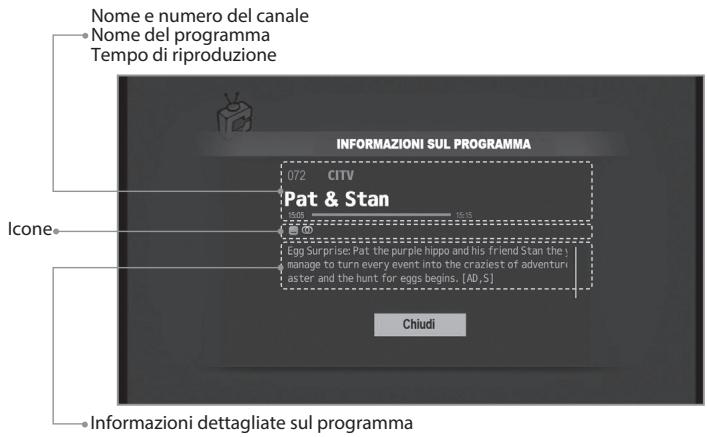
| i | Informazioni sul programma Per visualizzare le informazioni relative al programma premere i. |
| ▲/▼ | Informazioni dettagliate sul programma Premere il tasting ▲/▼ per scorrere verso l'alto e verso il basso nelle informazioni dettagliate del programma. |
lcone
| Programma bloccato | |
| CAS | Programma codificato (icone CAS) |
| = | Teletext |
| REC | Registrazione |
| ×REC | grammar non registrabile |
| Registrazione pianificata | |
| Visione pianificata | |
| 18 | Livello controllo genitori (età minima per la visione) |
| HD | Programma HD |
| - | Sottotitolo |
| Multiaudio | |
| D D | Dolby Digital Dolby Digital Plus |
Elenco canali
Premere il tasting OK durante la visione di un programma TV in diretta per acceder allel'elenco dei canali.
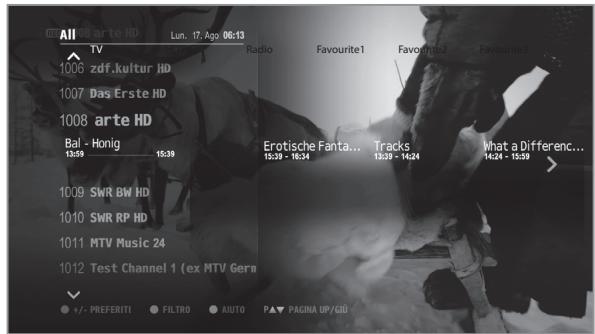
Modifica dei canali
| ▲/▼ | Modifica dei canali Premere il tasto ▲/▼ per selezionare un canale nell'elenco canali. Selezionare un canale e premere il tasto OK. Il canale selezionato viene visualizzato a schermo. |
| ► | Elencare programmi futuri Premere il tasto ▷ per elencare i programmi futuri. Selezionare il programma futuro desiderato e premere OK. E' possibile impostare un promemoria del programma. |
Nota: Premere il tasto EXIT per uscire. Per tornare alla schermata precedente, premere BACK.
Modifica dei canali in Elenco canali
| ROSSO | Aggiungere canali preferiti Selezionare il canale da aggiungere usando il tasto ▲/▼, quando premere il tasto ROSSO. Selezionare un gruppo di canali preferiti. Elimare canali preferiti Selezionare il canale da eliminare usando il tasto ▲/▼, quando premere il tasto ROSSO. Selezionare un gruppo di canali preferiti. |
| VERDE | Filtrare la visualizzazione dei canali Premere il tasto VERDE per filtrare i canali in base al tipo di canale. (Tutti, Genere, Pref., Provider) |
| BLU | Visualizzare Informazioni e Guida Premere il tasto BLU per visualizzare maggiori informazioni durante la gestione dei canali. |
| i | Per visualizzare informazioni dettagliate sul programma, premere il tasto i. |
| OK | Impostare un promemoria Premere il tasto OK sul programma futuro per impostare un promemoria. |
| ● | Impostare la prenotazione di una registrazione Premere il tasto REC sul programma futuro per impostare la prenotazione della registrazione. |
Note: Per modificare piu canali, accedere a MENU > IMPOSTAZIONI > CANALI.
E' possibile impostare la registrarazione solo se è stato collegato un disco fisso esterno atto ad accogliere la registrarazione.
Modifica delle informazioni di un canale
MENU > IMPOSTAZIONI > CANALI > MODIFICA INFO CANALE
- Selezionare un canale e premere OK. Viene visualizzata una finestra a comparna.
- Digitare il numero di un nuovo canale e premere OK.
- Premere nuovamente il tasting OK. Viene visualizzata una tastiera virtuale.
- Digitare il nome di un nuovo canale.
- Selezionare Fine per completare il processo di modifica delle informazioni di un canale.
Note: Modificando il nome o il numero di un canale, tutte le prenotazioni di registrazione e i promemoria adesso correlati verranno eliminati.
Eliminazione canali
MENU > IMPOSTAZIONI > CANALI > ELIMINA CANALE
- Selezionare un canale nella colonna a sinistra e premere OK. I canali eliminati vengono visualizzati nella colonna a destra.
- Premere il tasting / per passare alla colonna sinistra a quella destra e viceversa.
- Premere il tasto GIALLO per salvare le modifiche.
Modifica dei canali preferiti
MENU > IMPOSTAZIONI > CANALI > MODIFICA PREFERITI
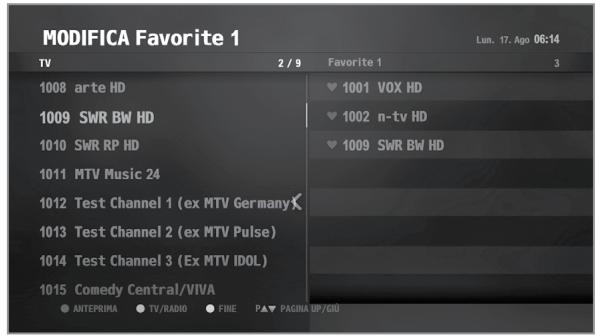
Aggiungere canali preferiti
- Selezionare un gruppo di canali preferiti da modificare.
- Selezionare un canale nella colonna a sinistra e premere OK. Il canale viene aggiunto all'elenco dei preferiti.
Eliminare canali preferiti
- Selezionare un gruppo di canali preferiti da modificare.
- Selezionare un canale nella colonna a destra e premere OK. Il canale viene eliminato all'elenco dei preferiti.
Modificare l'ordine
- Selezionare un gruppo di canali preferiti da modificare.
- Selezionare un canale nella colonna a destra e premere il tasto VERDE.
- Premere il tasting / , quindi premere GIALLO per completare la modifica dell'ordine.
Rinominare canali preferiti
- Selezionare un gruppo di canali preferiti da modificare.
- Premere il tasto ROSSO. Viene visualizzata una tastiera virtuale.
- Digitare un nuovo nome.
- Selezionare Fine con la tastiera virtuale per salvare il nuovo nome.
Diretta TV
- Premere il tastingo MENU.
- Selezionare DIRETTA TV e premere OK.
Note: Selezionare RECENTI per visualizzare l'elenco dei programmi visualizzati di recente.
In onda & Successivo
MENU>DIRETTA TV >IN ONDA & SUCCESSIVO
E' possible visualizzare i programmi currenti e futuro.
Selezionare uno dei programmi successivi e premere per elencare i programmi futuro.
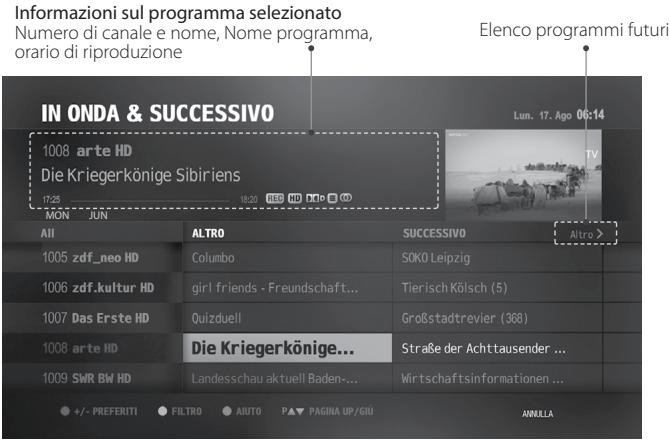
Nota:
: Registrazione pianificata
:Visionepianificata
- Vedere Gestione dei canali > Elenco canali per maggiori informazioni sull'uso dei tasti colore
| OK | Impostare promemoria Selezionare il programma futuro desiderato e premere OK. E' possibile impostare un massimo di 20 promemoria. |
| ● | Registrarare un programma Selezionare un programma currente e premere REC. E' possibile registrarare due canali contemporaneamente. Impostare la prenotazione di una registrazione Selezionare un programma futuro e premere REC. E' possibile impostare un massimo di 20 prerotazioni di registrazione. |
| i | Per visualizzare informazioni dettagliate sul programma, premere il tasto i. |
| ▲/▲ | Premere il tasto ↓/▲ per passare alla giornata precedente/successiva durante la visualizzazione dell'élenco dei programmi futuri. |
| BACK | Premere BACK per chiudere la finestra a compara s e tornare alla schermata precedente. |
Guida ai canali
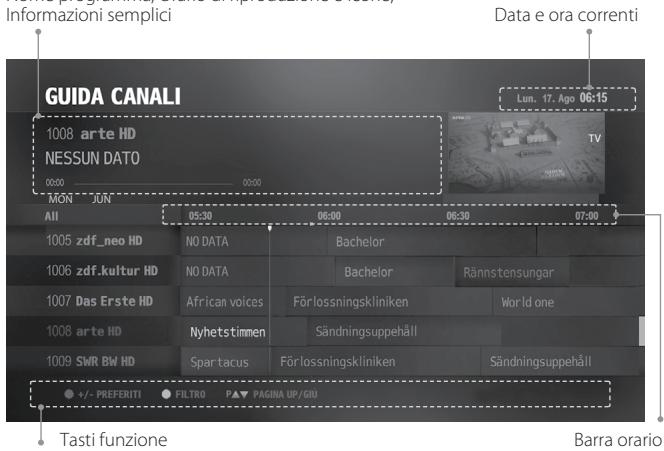
MENU > DIRETTA TV > GUIDA AI CANALI
Informazioni sul programma selezionato
Nome programma, Orario di riproduzione e lcone, Informazioni sempliciti
Visione dei programmi
- Selezionale un programma corrente e premere OK. Il programma viene visualizzato nel riquadro di anteprima.
- Premere nuovamente OK per visualizzare il programma.
Nota: Digitare il numero di un canale per visualizzarlo direttamente.
Impostazione dei canali preferiti
- Selezionale il canale da aggiungere o eliminare dal gruppo dei preferiti e premere il tasto ROSSO.
- Selezionare il gruppo di preferiti da aggiungere o eliminare e premere OK.
- Premere il tasto BACK per chiudere la finestra a comparsa.
Filtro dei canali
- Premere il tastinge VERDE e selezionare un gruppo. Vengono elencati i canali che appartagengono al gruppo.
- Premere il tasto BACK per chiudere la finestra a comparsa.
Pianificazione di promemoria e registrazioni
- Selezionare un programma futuro e premere OK per impostare il promemoria. Selezionare un programma futuro e premere REC per impostare la prenotazione della registrazione.
- Premere nuovamente OK o REC per annullare la prenotazione.
Visualizzazione elenco programmi pianificati
MENU >DIRETTA TV>PROGRAMMA PIANIFICATO
Selezionare un programma e premere OK. Viene visualizzata una finestra a compara.
E' possibile modificare il programma pianificato in base alla prenotazione della registrazione. Inoltre, è possible visualizzare informazioni dettagliate sul programma.
TV APPS
TIVUMAX EASY

TIVUMAX HD / TIVUMAX PRO

É possible scaricare TV APPS dal APP Market e visualizzarle sul proprio TV.
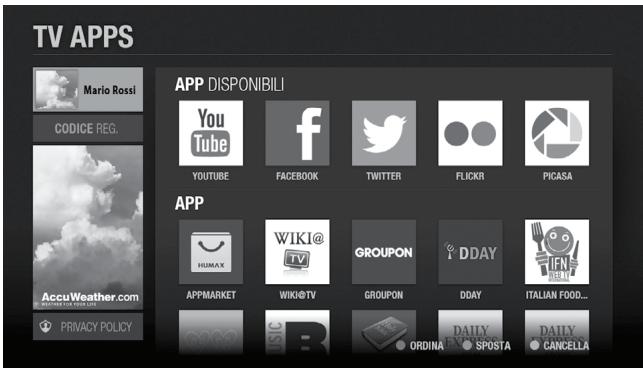
Premere il tasto MENU e selezionare TV APPS.
Nota:
- Accertarsi di essere in grado di connettersi alla rete prima di utilizzato quello servizio.
- Le App possono essere diverse in base alla regione o ai service provider utilizzati.
- L'uso di alcune app potrebbe essere subordinato all'accettazione dell'Informativa sulla privacy.
Le App del TV sono soggette a modifica alla preavviso. HUMAX non puo essere ritenuta responsable per il contentuto o l'interruzione dei servizi.
Creazione di un account
Dopo aver创建工作 possible usufruire di varie offerte di contentuti delle TV APPS.
- Accedere a http://www.myhumax.net.
- Cliccare su Nuovo account e seguire le istruzioni per la creazione di un account.
Nota:
- É necessario digitar le codice di registrazione per registrar il ricevitore sul server HUMAX. Acceder e a MENU > FILE MULTIMEDIALI & APP > TV APPS, quando selezionare CODICE REG.
Il codice di registrazione ha una validità di 3 ore. - É possible creare fino a 4 account personali.
Effettuare l'accesso
Eseguido l'accesso al proprio account è possible gestire le proprio App.
Selectionare il profilo utente e digitare la password utente per effettuare l'accesso.
Nota: Come impostazione predefinita viene fornito un account famigliare.
Accedere a SNS
Mediante la ID e la password registrate in myhumax.net è possible effettuare l'accesso al proprio account SNS.
Scaricare applicazioni
Mediente il App Market è possibile scaricare centinaia di applicazioni.
- Selezionare App Market.
- Consultare il App market e selezionare la App desiderata.
Modifica delle App
Selezionare una App e premere il tasting colorato.
Ordina: Ordinare le App in ordine alfabetico o di uso più recente.
- Sposta: Spostare le App nella posizione desiderata.
- Impostazioni: Inizializzare le App TV o accettare la politica sulla riservatezza.
Media
- Premere il tastingo MENU.
- Selezionare MEDIA & APPS e premere OK.
Note: Selezionare RECENTI per visualizzare i file multimediali usati di recente.
É possibile riproduire video, brani musicali o immagini memorizzati su un disco esterno o sui dispositivi conformi alle specifiche delle reti domestiche.
Selezionare il tipo di supporto desiderato e premere OK. E' possibile visualizzare l'élenco dei file multimediali.
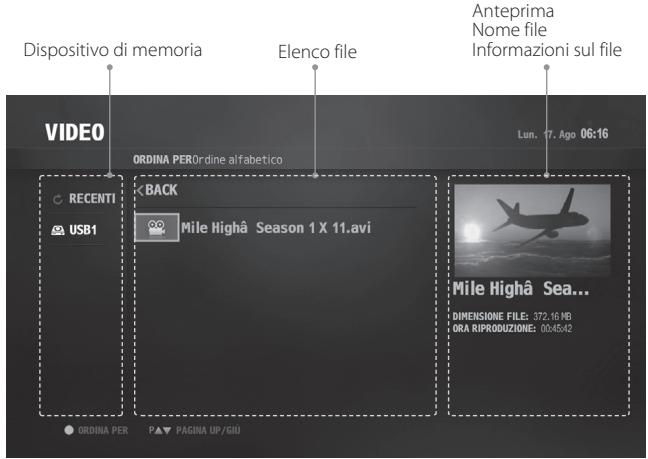
| «/» | Selezionare file Selezionare un file. Le informazioni relative al file vengono visualizzate nell'anteprima. |
| OK | Riproduire file La riproduzione si avvia dall'inizio del file. |
| « | Cambiare dispositivo di memoria Premere il tasto « perambiare dispositivo di memoria. |
| ROSSO | Eliminare la cronologia Eliminare i file dall'élenco dei file recenti. |
| VERDE | Ordinare file Ordinare i file in ordine alfabetico e di orario. |
| GIALLO | Cercare file Ricercaire i file nella memoria utilizzato parole chiave. |
Nota:
- Le porte USB del prodotto erogano una alimentazione di 1.0A totali. L'alimentazione di 1.0A viene condivisa tra tutti i dispositivi collegati al prodotto.
- Verificare che l'alimentazione sia collegata se si usa un dispositivo di memoria USB che richiede alimentazione esterna.
- Se il disposativo di memoria USB è collegato in modalità standby, viene automaticamente riconosciutto all'accensione del prodotto.
- Non scollegare il disposativo di memoria USB durante la riproduzione di un file inesso contentuto, poiché ciò potrebbe danneggiare il file o il disposativo stesso.
- I dispositiivi di memoria USB inferiori a USB 2.0 sono supportati, tuttavia potrebbero funzionare in modo anomalo.
L'icona di rete viene visualizzata solo quando la rete è collegata. - HUMAX non garantisce la compatibilità con tutti i dispositivi di memoria USB disponibili sul mercato e non assume responsabilità per agli ed eventuale perdita di dati.
Uso di Media Server DLNA
Il prodotto HUMAX è un dispositivo conforme agli standard delle reti domestiche in grado di condivere contentuti multimediali con altri dispositivi analoghi quali PC, NAS o un altro PVR HUMAX collegati alla stessa rete domestica.
É possibile riproduire video, brani musicali o immagini memorizzati sui dispositivi conformiagli standard delle retidomestiche sul proprio dispositosivo quando è collegato alla stessa rete domestica.
Collegamento alla rete domestica
- Collegare l'apparecchio alla rete domestica mediante il router o Wi-Fi access point.
- Premere MENU e accedere a Impostazioni > Sistema > Impostazione rete.
- Impostare le opzioni per LAN o Wi-Fi. (Per maggiori dettagli vedere Sistema > Impostazione rete.)
Riproduzione di file con il videoregistratore
: File memorizzati su PC, NAS o un altro PVR HUMAX
- Premere MEDIA.
- Selezionare il tipo diftenut.
- Selezionare uno dei server in elenco.
- Selezionare i file da riproduire.
Nota:
- L'elenco dei Media Server delle reti domestiche supportati viene visualizzato automaticamente.
- Il software per Media Server per reti domestiche, quale Windows Media Player 12, delve essere installato ed eseguito sul PC per poter condividere i file multimediai memorizzati sul PC. I file multimediai devono essere memorizzati nella cartella library del PC.
- Per l'impostazione di un server per reti domestiche vedere le istruzioni del proprio systema operativo.
Lettore video
È possibile riproduire video memorizzati su un disco esterno o sui dispositivi conformiagli standard delle reti domestiche.
- Premere MEDIA e selezionare Video.
- Selezionare una memoria e una cartella.
- Selezionare un file e premere OK. La riproduzione si avvia
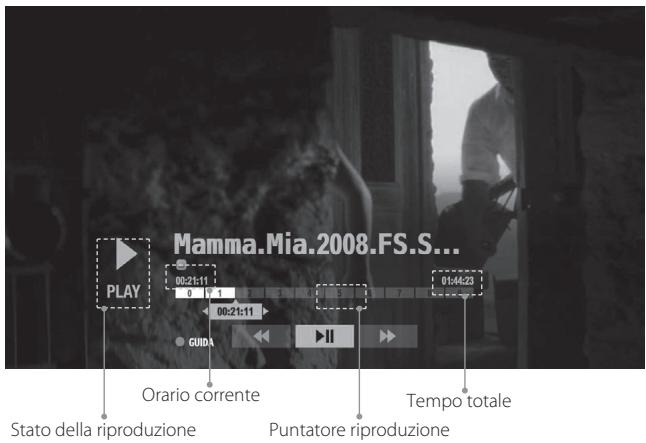
| NUMERICI (0~9) | Riproduire file Passare alla scena corrispondente. |
| ▲▼ | Passare a scene particolare Avanzare o tornare indietro di 30 secondi. |
Durante la copertura di un file video, è possible usare le funzioni di riavvolgimento e avanzamento rapido, slow motion e pausa. Per maggiori informazioni sui tasti di controllo e sulla barra di copertura vedere la sezione Registrazione e copertura > Riproduzione.
Nota:
- In caso di riproduzione di file bloccati viene richiesta l'immissione della password.
- I file con una data di scadenza DRM (Digital Rights Management) possono scadere se non visualizzati prima della data prevista.
- Alcuni tasti di controllo della riproduzione potrebbero non essere disponibili a seconda del contentuto.Lettore video
Lettore musicale
É possibile riproduire brani musicali memorizzati su un disco esterno o sui dispositivi conformiagli standard delle reti domestiche.
Premere MEDIA e selezionare MUSICA.
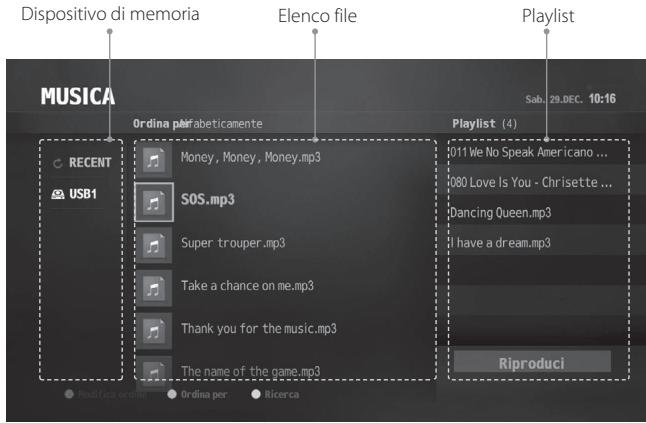
Modifica della playlist
| ▲/▲ | Spostare il cursore tra l'elenco dei file e la playlist. |
| OK | Selezionare un file e premere OK. Il file viene aggiunto o eliminato alla playlist. |
| ROSSO | Selezionare un file nella playlist e premere il tasto ROSSO. E' possibile spostare il file usando il tasto ▲/▼. Premere OK per completare la modificà dell'ordine. |
Riproduzione della musica
Selection are un file e premere OK o RIPRODUCI. Tutti i file conteni t inlla cartella verranno riprodotti in sequenza.
Per riproduire solo determinati file, selezionare i file desiderati usando il tasto ROSSO quindi premere OK o RIPRODUCI.
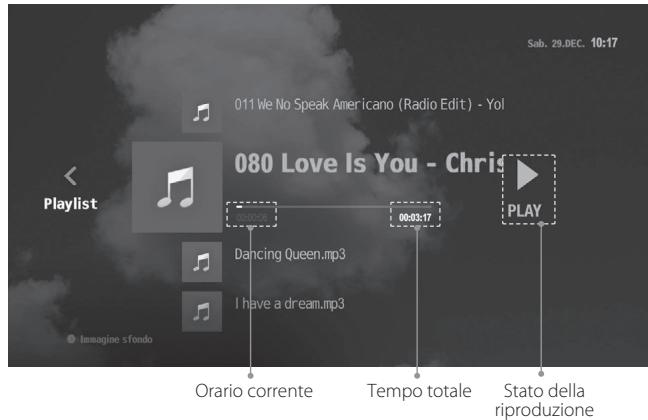
| ▲/▼ | Selezione il file precedente o successivo |
| OK | Riproduce o mette in pausa. |
| ROSSO | Visualizza lo sfondo |
| ▲/▼ | Accede alla playlist |
Visualizzatore di immagini
É possibile riproduire immagini memorizzate su un disco esterno o sui dispositivi conformiagli standard delle retidomestiche.
- Premere MEDIA e selezionare FOTO.
- Selezionare una memoria e una cartella.
- Premere OK. E' possible visualizzare tutti i file conteni nella cartella.
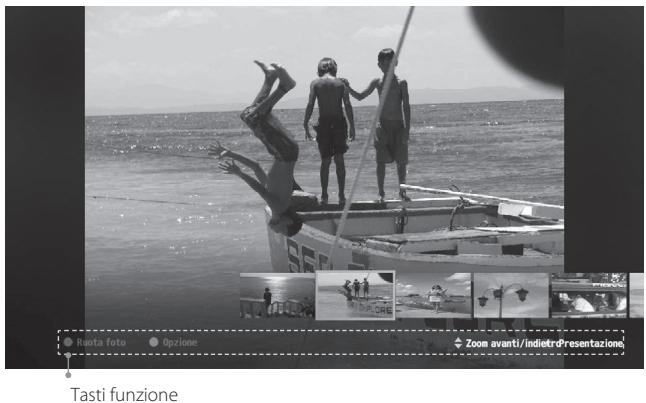
| ▲/▲ | Spostare il cursore per selezionare una foto. |
| OK | Visualizzare la foto selezionata a piano schermo. |
| ▲/▼ | Ingrandire o ridurre una foto. |
| Riproduci / II Pause | Riproduire o mettere in pausa una presentazione. |
| ROSSO | Ruotare la foto in senso orario o antiorario. |
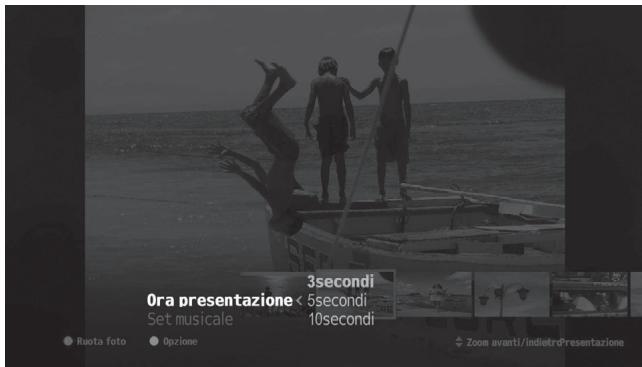
Slideshow
E' possibile impostare il tempo di riproduzione di una presentazione e riproduire musica durante la proiezione.
- Premere il tasting BLU.
-
Selezionare DURATA DIAPOSTIVA o IMPOSTA MUSICA
-
DURATA DIAPOSTITIVA: Appare la durata di visualizzazione della foto
-
IMPOSTA MUSICA: File musicali da riproduire durante la presentazione. Selezionare un brano musicale da un elenco di file recenti.
-
Premere il tasting OK per salvare l'impostazione e uscire.
Registrazione
- É possibile registrar immediamente i programmi e programmare le registrazioni nella Guida TV, Dettagli programma o Registrazioni. É possible registrar un programma durante la visione di un altre programma.
- Questa funzione è disponibile solo quando al prodotto è stato collegato un disco fisso esterno ed abbinato per la registrazione.
Collegamento del disco fisso esterno
Collegando un disco fisso esterno per la prima volta viene richiesto di formattare il disco o di assegnarlo per la registrazione.
- Collegare il disco fisso esterno alla porta USB.
- Accedere a Menu > Impostazione > Sistema > Formatta HDD per formattare il disco fisso o assegnarlo per la registrazione.
La formattazione può richiedere diversi minuti in base alla dimensione del disco o della pendrive.
Nota:
- Per la registrazione, utilizzare dischi fissi esterni o pendrive con capienza superiore a 64GB.
Registrazione istantanea
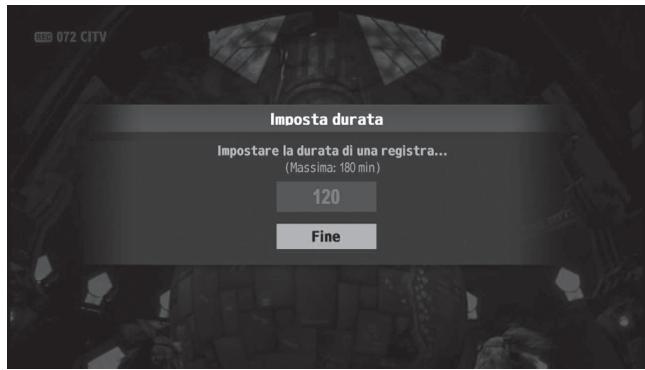
E' possibile registrar il programma corrente e impostare la durata della registrazione.
- Premere REC. Viene visualizzata una finestra a comparna.
- Digitare la durata della registrazione.
Non inserendo la durata della registrazione entro 5 minuti, la registrazione continua per due ore.
- Premere INTERROMPI per arrestare la registrazione.
Registrazione manuale
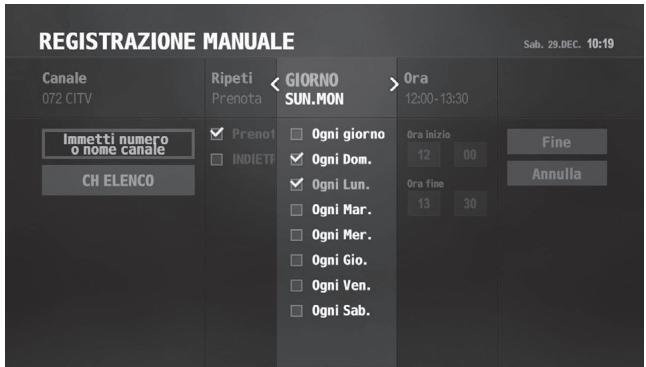
E' possibile impostare la prenotazione della registrazione di un singolo episodio o più episodi contemporaneamente.
Accedere a MENU > REGISTRAZIONE > REGISTRAZIONE MANUALE per prenotare una registrazione.
- Ricerca canali
Premere il tasto OK per digitare direttamente il nome di un canale.
Selezionare Elenco canale per cercare un canale. Viene visualizzata una finesta a compara.
- Impostare l'opzione di ripetizione
Selezionare Prenota o Indietro per registrar o meno il canale ripeturamente.
Nel Campo successivo è possibile scegliere il giorno o la data della registrazione.
- Impostare il giorno o la data
Selezionare un giorno o la data.
- Impostare l'orario
Digitare I'orario di inizio e di fine (00:00 24:00)
- Completare la prenotazione
Selezionare FINE per completing la prenotazione della registrazione.
Conflitto di registrazione
Tentando di registrar più di due programmi contemporaneamente o cuiando il canale durante la registrazione, si verifica un conflitto di registrazione. Gli erre di sintonizzazione possono essere risolti nel modo seguente:
- Tentando di avviare una nuova registrazione durante una prima registrazione, si verifica un conflitto di registrazione. è possible interrompere la registrazione in corso o annullare la nuova registrazione.
- Quando una registrazione programmata sta per iniziare durante la visione di un'alto programma, si verifica un erre di confitto. É possible annullare la registrazione programmata o modificare il canale programmato.
Programmazione della registrazione
E' possibile visualizzare l'elenco delle registrazioni programmate in ordine di orario.
Accedere a REGISTRAZIONE > REGISTRAZIONE PROGRAMMATA per modificare le registrazioni programmate.
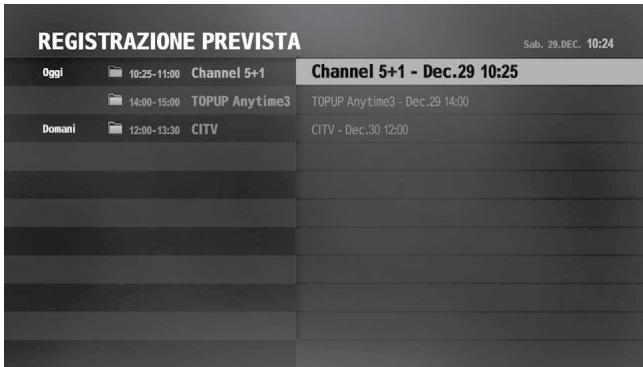
- Selezionare una registrazione programmata e premere OK. Viene visualizzata una finestra a comparna con le informazioni sul programma. Nella finestra a comparna è possible annullare o modificare la prenotazione della registrazione.
Per tornare alla schermata precedente, premere BACK.
Impostazione delle opzioni di registrazione
MENU > IMPOSTAZIONI > PREFERENZE > REGISTRAZIONE
È possibile impostare un orario di padding (riempimento) se la registrazione inizia prima o termina或者其他 l'orario previsto.
- Inizio Padding Time: è possibile impostare un ulteriore tempo di registrazione prima dell'inizio della registrazione.
- Fine Padding Time: è possibile impostare un ulteriore tempo di registrazione dopo la fine della registrazione.
- Eliminazione automatica di una singola registrazione: É possibile impostare la giornata per la quale Maintainere le registrazioni.
- Eliminazione automatica di una registrazione ripetitiva: è possibile impostare il numero di registrazioni da conservare per le registrazioni in series.
Nota:
- Se una registrazione programmata sta per iniziare durante la registrazione di un altre programma, il banner di registrazione verrà visualizzato per alcuni secondi come promemoria. Se l'utente non sta guardando il canale di registrazione, per circa 30 secondi prima dell'inizio della registrazione programmata comparirà sullo schermo un avviso e il canale verrà commutato sul canale di registrazione all'inizio della registrazione.
- La registrazione non potra essere interrotta nemmeno premendo il tasto STANDBY. Le nuove registrazioni verranno avviateanche se è stata impostata la modalitàstandby.
- Durante la visione di un programma in registrazione, è possibile utilizzare i tasti di controllo della riproduzione quali pausa, avanzamento rapido, instant replay, slow motion, ecc.
- E' possible registrar solo i programmi della TV digitale. Non è possible registrar audio e video da un dispositivo esterno.
- Verificare che vi sia spazio sufficiente sul disco prima di avviare una registrazione. In caso contrario, la registrazione si arresterà. Lo spazio necessario per la registrazione di 1 ora di programmazione può diferire in base al programma.
Riproduzione
E' possibile riproduire i programmi registrati memorizzati sul disco fisso esterno.
Programmi registrati
MENU > REGISTRAZIONE > PROGRAMMI REGISTRATI
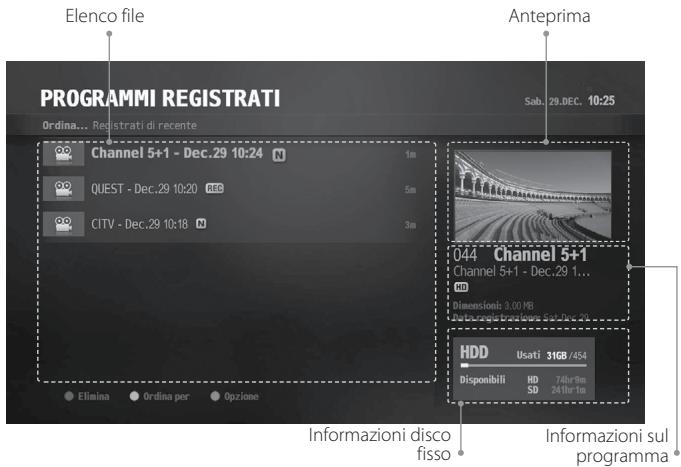
| ▲/▼ | E' possibile selezionare un programma registrato. |
| ROSSO | Elimare file Elimare il file selezionato. |
| VERDE | Ordinare file Ordinare i programmi registrati in ordine alfabetico, per nome del canale o per data di registrazione. |
| BLU | Rinominare file Digitare il nome del file usando la tastiera. Memorizzare file Il file noniene eliminato automaticamente; è l'utente che deve decide la cancellazione. Copia dei file Copia dei file su un dispositivo di memoria USB. |
Controlli di coproduzione
Selezionare un file e premere OK. La riproduzione si avvia.
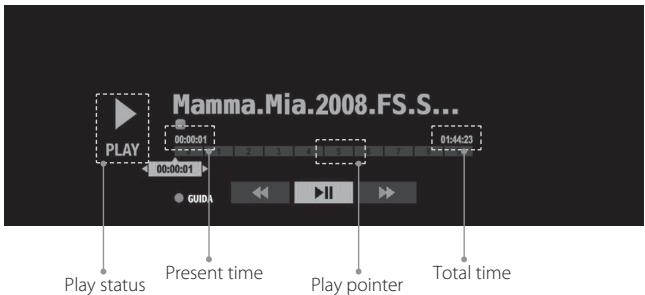
| ▷ | Riproduci |
| ∥ | Scena in pausa. |
| ■ | Arresta la riproduzione e vai al programma TV in onda. |
| ↔ | Indietro |
| ▷ | Avanzamento rapido |
| ◁ | Riproduce la registrazione precedente. |
| ▷ | Riproduce la registrazione successiva. |
Nota: Premere il tastingo numero per passare alla scenacorrespondente.
Messa in pausa e riavolgimento Diretta TV (TSR)
Time Shifted Recording (TSR) permette diMETTere in pausa una trasmissione in onda e di continuarne la riproduzione successivement dal punto di arresto. La funzione TSR memorizza temporaneamente e automaticamente sul disco fisso collegato il programma in visione. La funzione TSR ha una capacité di memoria di 90 minuti.
Permettere in pausa ilprogramma in visione
Premere II . Premere per riprendere la visione. La funzione Pausa create un divario temporale tra la trasmissione in onda e il punto di visione. Questo divario equivale al periodo di interruzione del programma.
Premere per chiudere il divario temporale e tornare al programma in onda.
Per tornare indietro e guardare le scene che si sono perse
Premere . Premere nel punto dal quale si desidera avviare la visione. All'interno di un programma è possibile mettere in pausa, tornare indietro o avanzare velocamente.
E' inoltre possibile tornare velocemente al punto iniziale. Tornado indietro fino al punto iniziale, la riproduzione del programma si avvia automaticamente alla velocità normale.
Per avanzare velocemente saltando le scene
Premere . E' possibile avanzare velocemente solo quando vi è un divario temporale tra il punto di visione e la trasmissione in onda causato da una pausa, una riproduzione in slow motion, o dal rewind. E' inoltre possibile avanzare velocamente fino a raggiungere la trasmissione in onda. Se si raggiunge la trasmissione in onda durante l'avanzamento veloce, il programma riprenderà la riproduzione a velocità normale.
Ricerca
MENU >RICERCA
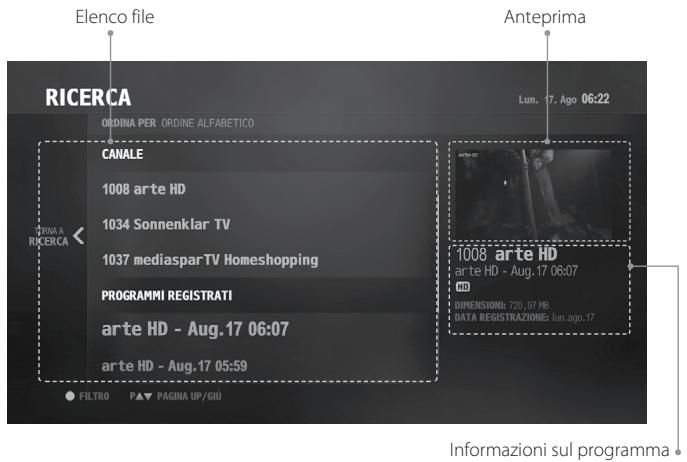
Se non si ricorda il titolo di un programma, o non si è sicuri su come trovarlo una seconda volta, accedere a MENU > RICERCA. E'possible cercare programmi TV o file multimediai mediante parole chiave.
Ricerca di file
- Premere il tasto MENU > RICERCA.
- Premere il tasting OK per visualizzare una tastiera virtuale.
- Digitare una parola chiave sulla tastiera virtuale.
E' necessario digitare una parola composta da almeno due lettere.
- Al terminé selezionare Fine.
Tutti i file ricercati sono elencati in ordine alfabetico.
Note: Non è possibile cercare file multimediali memorizzati su dispositivi conformi alle reti domestiche.
Controllo genitori
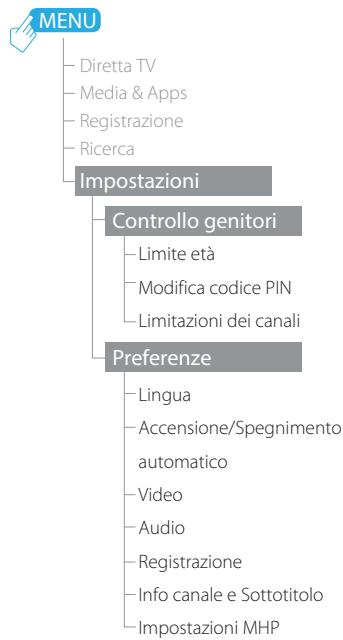
Liminé età
E' possiblo bloccare il programma se quello supera il limite di età stabilito per la visione. (Visualizza tutti, 7, 12, 14, 18, Blocca tutti)
Modifica codice PIN
Digitare un nuovo codice PIN.
Limitazioni dei canali
E' possibile impostare il blocco canali per limitare la visione di determinati canali.
Note: Digitare la password per guardare i programmi bloccati.
Preference
Lingua
E' possibile impostare la lingua del systema, la lingua audio e la lingua sottotitoli.
Accensione/Spegnimento automatico
E' possibl e impostare l'orario al quale l'apparecchio si accende o si spegne.
Note: Verificare che gli orari del timer di accensione e di specnimento non coincidano.
Video
- Formato schermo: E' possibile selezionare il rapporto e il formato di visione del tevisore. (16:9 Auto-16:9 Pillar Box-16:9 Zoom-4:3 Auto-4:3 Letter Box - 4:3 Centrato)
- Risoluzione: E' possibile selezionare la risoluzione del teilevisore (576i-576p-720p-1080i-1080p)
- Uscita SCART TV: E' possibile selezionare l'opzione di uscita del segnale video. (CVBS - RGB)
Audio
- Uscita audio digitale: E'possible selezionare l'uscita del segnale audio digitale. (Multicanale - Stereo)
- Sincronizzazione labiale: E' possibile regolare la differenza tra audio e video.
- Modalità Downmix: E' possibile regolare l'audio multicanale. (Surround - Stereo)
Registrazione
È possibile impostare il tempo di padding della registrazione per aggiungere un tempo di registrazione aggiuntivo all'inizio ed alla fine, ed impostare la cancellazione automatica dei programmi registrati. Vedere Impostazione delle opzioni di registrazione.
Info canale e Sottotitoli
E' possiblo impostare la durata di visualizzazione delle informazioni relative al canale ed attivare e disattivare i sottotitoli.
Impostazioni MHP
E' possibile configurare le opzioni dell'impostazione MHP.
Canali
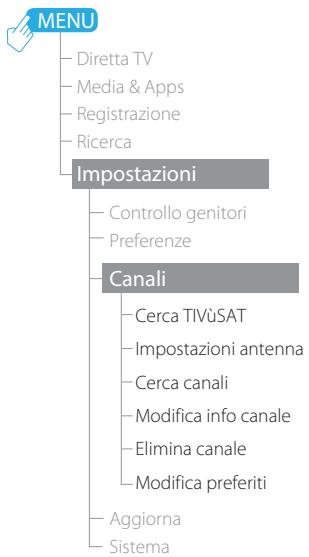
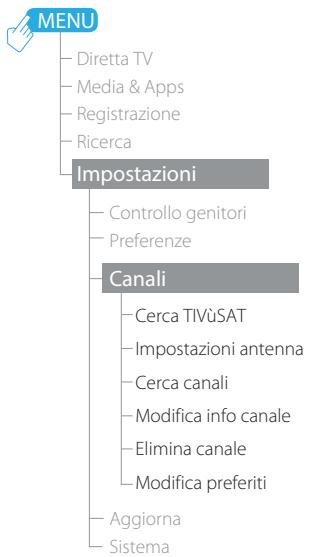
Cerca tivusat
- Selezionale Cerca tivusat e premere OK per eseguire la ricerca dei canali tivusat.
- Una volta completata la ricerca, selezionare Salva e premere OK per memorizzare i canali individuati.
Note: L'opzione Cerca tivusat e attiva solo quando il satellite e impostato su HOT BIRD.
Impostazione antenna
Impostare il tipo di antenna prima di cercare i canali.
Fissa - Solo LNB
Quando si usa solo l'antenna fissa e lo switch LNB,
- Selezionare Fissa - Solo LNB.
-
Impostare le opzioni satellite.
-
Satellite: Selezionare il satellite.
- Freqenza LNB: Selezionare la frequenza LNB.
-
Test transponder: Verificare lo stato del segnale di anni transponder e selezionare quello con la migliorare qualità.
-
Al terminise selezionare OK.
Fisso - DiSEqC
Quando si usa l'antenna fissa e lo switch DiSEqC,
- Selezionare Fisso -DiSEqC.
-
Impostare le opzioni satellite.
-
Satellite: Selezionare il satellite.
- Freqenza LNB: SeLECTIONARE la frequenza LNB.
- Tono 22 kHz: SeLECTIONARE On se si usa un commutatore a 22kHz.
- DiSEqC: SeLECTION are lo switch DiSEqC.
- Test transponder: Verificare lo stato del segnale di agli transponder e selezionare quello con la migliorare qualità.
3 Al terminine selezionare OK.
SCD
Single Cable Distribution (SCD) permette la distribuzione della programmazione trasmessa su un singolo cavo a più utenti eliminando la necessità di averere più cavi per supportare altri dispositivi elettronici.
Se si usa più di un ricevitore satellitare, impostarne uno alla volta e spegnere gli altri durante l'opération.
- Selezionare SCD.
- Impostare le opzioni satellite.
- Satellite: Selezionare il satellite.
-
Freqenza LNB: SeLECTIONARE la frequenza LNB.
Sintonizzatore 1: -
Selezionare la banda utente da 1 a 8.
- Selezionare la frequenza utente basata sulla banda utente del sintonizzatore 1.
-
Verificare lo stato del segnale di agli transponder e selezionare quello con la migliorie qualità.
-
Al terminise selezionare OK.
DiSEqC 1.2
DiSEqC 1.2 permette la commutazione sino a 16 sorgenti e il controlled del motore di sintonizzazione satellitare a singolo asse.
- Selezionare DiSEqC 1.2.
-
Impostare le opzioni satellite.
-
Satellite: Selezionare il satellite.
- Freqenza LNB: Selezionare la frequenza LNB.
-
Impostazione posizione
-
Impostare il movimento del motore e l'intervaldo di movimento da 1 a 127.
Sintonzzare la posizione usando il tasto t/u fina a raggiungere la massa forza e qualita del segnale. - Memorizzare la posizione.
-
Verificare lo stato del segnale di agli transponder e selezionarne uno con la migliorie qualità.
-
Al terminise selezionare OK.
USALS
Universal Satellites Automatic Location System è un protocollo di lavoro del motore della parabola in grado di create automaticamente un elenco dei satelliti osservibili memorizzandone la posizione rispetto all'impostazione della parabola motorizzata.
Se si usa un'antenna motorizzata per effettuire una ricerca più efficace dei canali, è possibile impostare la posizione dei satelliti.
- Selezionare USALS.
-
Impostare le opzioni satellite.
-
Satellite: Selezionare il satellite.
- Freqenza LNB: SeLECTIONARE la frequenza LNB.
- Longitudine: Immettere longitudine e direzione.
- Latitudine: Immettere latitudine e direzione.
-
Test transponder: Verificare lo stato del segnale di anni transponder e selezionare quello con la migliorare qualità.
-
Al terminise selezionare OK.
Ricerca canali
E' possibile controllare le informazioni sul satellite e modificarne le opzioni.
- SeLECTIONARE un satellite e premere OK per eseguire la modifica.
-
Impostare le opzioni satellite.
-
Transponder: Verificare lo stato del segnale di agli transponder e selezionare quello con la migliorie qualità.
- Tipo di ricerca Selezionale il tipo di canale da cercare.
Aggiorna
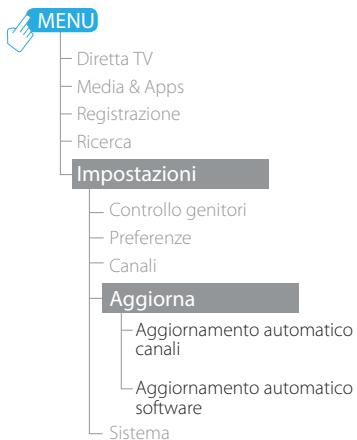
Aggiornamento automatico canali
E' possibl e impostare l'attivazione della ricerca automatica dei canali in modalità standby o in modalità operativa.
Aggiornamento Automatico Software (OTA)
Per mantenere ottimali le prestazioni del prodotto, e fondamentale disponre della versione software piu aggiornata. Si consiglia di controllare periodicamente il situ per verificare la disponibilita di aggiornamenti software.
OTA e l'acronimo di Over-the-Air e significa che il software puo essere scaricatotramite I'antenna.
Il produttore si riserva il diritto di decidere se e quando mettere a disposizione il software.
Nota:
L'aggiornamento del software potrebbe richiedere almeno 30 minuti.
- Alcune funzioni, come la prenotazione dei programmi, possono non essere attive fino al completo aggiornamento del software.
- Aggiornare il software solo quando la forza e la qualita del segnale sono ottimali. Se le condizioni meteo non sono favorevoli, e la forza e la qualita del segnale sono basse, rimandare l'aggiornamento del software.
- Il prodotto perché automaticamente eventuali aggiornamenti software in modalita standby. Se viene rilevato nuovo software, si vuo scegliere se scaricarlo immediatamente o in una fase successiva al ritorno in modalita operativa. Selezionando Piu tardi, il messaggio verra nuovamente visualizzato all'accensione.
- E' inoltre possibie effettuare l'aggiornamento software collegando un dispositivo USB contenente i file di installmente del nuovo software. E' possibie scaricare nuovo software dal site web HUMAX.
Avverenza:
Il cavo di alimentazione deve essere collegato e l'apparecchio tenuto acceso durante l'aggiornamento del software. Lo spegnimento dell'apparecchio durante l'aggiornamento del software potrebbe causare danni irreparabili al prodotto.
Non scollegare il cavo di segnale (cavo RF) durante l'aggiornamento del software. L'aggiornamento potrebbe interrompersi causando il malfunzionamento del prodotto.
Sistema
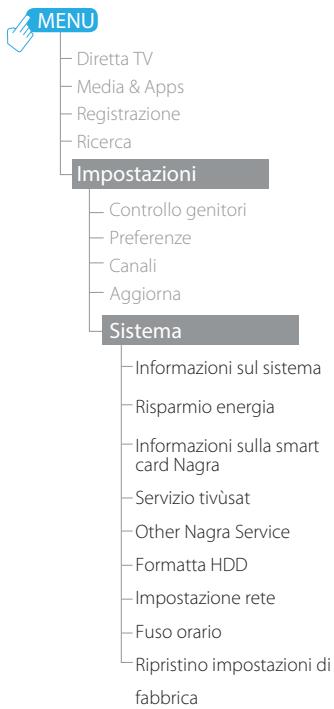
Informazioni sulsystema
E' possibile visualizzare le informazioni di sistema.
Risparmio energia
Risparmio energia in standby: Impostare il timer per ridurre il consumo energetico in standby a meno di 0,5 W.
Questa modalità è conforme alla Direttiva per la progettazione ecocompatibile di prodotti che consumano energia (EuP).
Specnimento automatico: Impostare il timer per l'attivazione automatica della modalità standby in mancanza di input da parte dell'utente per alcune ore di seguito (Disattivato, 2h, 3h, 4h, 5h).
Note: Prima che il prodotto entri in modalità standby, verrà visualizzato un messaggio per 30 secondi. Ignorando tale messaggio, il prodotto entra in modalità standby automaticamente.
Informazioni Smartcard Nagra
E' possibile visualizzare le informazioni relative alla Smartcard Nagra.
Servizio tivùsat
E' possibile visualizzare le informazioni relative alla Smartcard tivù.
Other Nagra Service
Formatta HDD
Formattare l'unità HDD esterna.
Nota: Tutti file vengono eliminati après la formattazione.
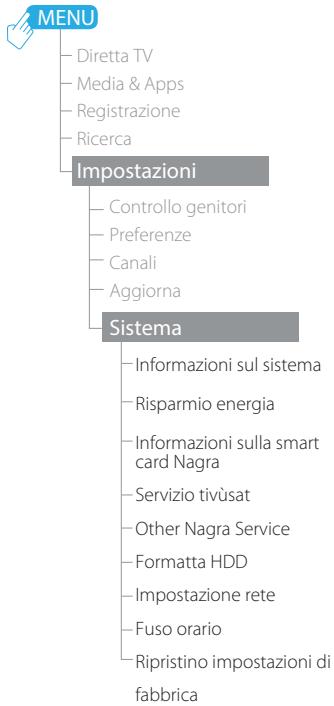
Impostazione rete
Note: Questa funzione è disponibile solo se il cavo Ethernet è stato collegato all'apparecchio. Verificare che il cavo Ethernet sia correttamente collegato. Per maggiori informazioni vedere Collegamento alla rete.
Configurazione Wi-Fi (wireless)
- Selezionare Wi-Fi Impostazione (Impostazione Wi-Fi)
- Impostare il Wi-Fi su ATTIVATO.
Vengono elencate le retti Wi-Fi disponibili. - Selezionare una rete Wi-Fi dall'elenco delle reti Wi-Fi disponibili.
Note: Accertarsi che lo stick WLAN USB via collegato alla porta USB della LAN wireless.
Configurazione LAN
- Selezionare LAN Impostazione (Impostazioni LAN).
-
Selezionare il tipo di configurazione IP tra Auto e Manuale.
-
Auto: Se si usa un router o un modem con funzione DHCP (Dynamic Host Configuration Protocol) selezionare Auto. L'indirizzo IP verrà determinato automaticamente.
-
Manuale: Se non vi è un server DHCP collegato alla rete e si desidera impostare l'indirizzo IP manualmente, selezionare Manuale. Digitare i valori per l'indirizzo IP, la maschera di sottorete, l'indirizzo del gateway e il DNS
-
Selezionare APPLICA per collegarsi alla rete selezionata e premere OK.
Note: Whenever you want to use the "s" button, press it on the right side of the text.
Fuso orario
É possible impostare il valore GMT ed attivare o disattivare l'ora legale.
Ripristino impostazioni di fabbrica
- Selezionare RIPRISTINO IMPOSTAZIONI DI FABBRICA, quindi Si.
- Verrà chiesto di digitare il proprio codice PIN. Digitare il codice PIN.
Attenzione: Ripristinando le impostazioni ai valori di fabbrica, tutte le configurazioni dell'utente verranno annullate. Immediatamente dopo aver ripristinato le impostazioni ai valori di fabbrica viene visualizzata automaticamente l'installazione guidata.
Risoluzione dei problemi
Il prodotto e stato fabbricato in conformita con gli standard internazionali sulla sicurezza. Leggere attendamente le seguenti precauzioni per la sicurezza.
-
Sul pannello anteriore non viene visualizzato alcun messaggio. (Il prodotto non si accende.)
-
Controllare il cavo di alimentazione principale e verificare che sua inserito in una presa di corrente adeguata.
- Verificare che la presa di corrente sia attiva.
- Collegare il cavo di alimentazione a una diversa presa di corrente.
-
Controllare che l'interruttore di accensioneippo sul retro sia in posizione On.
-
Nessuna imagine
-
Verificare che il prodotto sia acceso e si trovi in modalita operativa. (Premere il tasto STANDBY)
- Verificare che il cavo AV sia collegato correttamente al tevisore.
- Verificare che il cavo dell'antenna sia collegato correttamente al prodotto.
- Verificare di aver attivato la ricerca dei canali.
- Controllare il livello di luminosita del tevisore.
- Controllare che il canale sia attualmente in onda Contattare la stazione emittente per verificare che il canale sia in onda.
- Premere il tasto SOURCE se il prodotto e in modalita di ingresso esterno.
-
Assicurarsi che le impostazioni dell'antenna nel menu siano corrette.
-
Scarsa qualita audio e video
-
Verificare che nelle vicinanze del prodotto non siano presenti Telefoni cellulari o fornì a microonde.
- Mantenere separati il cavo di alimentazione e il cavo RF.
Note: Se l'antenna e coperta alla neve o il segnale RF e indebolito da una pioggia pesante, le condizioni del suono e dell'imagine sono risultare scarse. Tuttavia, una qualita audio o video scadente causata da condizioni meteo avverse non puo essere considerata come un malfunzionamento del prodotto.
[Satellite]
- Verificare che l'allineamento della parabola sia corretto.
- Eventualmente, sostituire il disco con uno di maggiori dimensioni per aumentare il livello dei segnali ricevuti.
- Sostituire l'LNB con un dispositorio nuovo dotato di un sistema per la riduzione dei disturbi piu potente, qualora i disturbi fosso recessivi.
- Sostituire l'LNB con un dispositorio nuovo in caso di danni o malfunzionamenti.
- Installare l'antenna in un'area priva di ostacoli.
-
Verificare i livelli del segnale e regolare l'antenna se il livello e troppo basso. Il livello del segnale puo essere influenzato delle condizioni meteo.
-
Audio scadente o inesistente
-
Controllare che il cavo AV sia collegato correttamente.
- Controllare il livello del volume del tevisore e del prodotto.
- Controllare se il volume del teilevisore e azzerato.
-
Verificare il tipo di audio o di traccia nel menu AV. (laddove applicabile)
-
Il telecomando non funziona
-
Il telecomando funziona correttamente solo se punto direttamente verso il ricevitore del tevisore.
Rimuovere e reinserire le batterie del telecomando. - Sostituire le batterie del telecomando.
-
Impostare il telecomando in modalita STB o PVR, se si usa un telecomando universale. (laddove applicabile)
-
Impossibile effettuare prenotazioni.
-
Verificare che non vi siano prenotazioniprecedenti che interferiscano con quale nuove.
-
La ricerca dei canali non funziona.
-
[Satellite] Assicurarsi che le impostazioni dell'antenna nel menu siano corrette.
[Cavo] Assicurarsi che l'antenna sia collegata correttamente. -
[Terrestre] Usare il tipo corretto di antenna in grado di ricevere i canali VHF o UHF nella propria zona.
-
Impossible aggiornare il software.
-
Se il prodotto non visualizza un messaggio di richiesta aggiornamento, significata che non e disponibile alcun aggiornamento software.
-
Impossible visualizzare i canali a lavoro.
-
Controllare nel menu di averere un abbonamento valido per i canali che si desidera visualizzare. Contattare l'operatore di rete per maggiori informazioni.
-
Il prodotto emette strani rumori.
-
Il rumore proviene alla ventola; il disco fisso funziona regolarmente.
Questo tipo di rumore e inevitabile ma raramente percettibile. -
Impossible registrar i programmi. (Solo PVR)
-
Il disco fisso e piano. Eliminare programmi non necessari e fare spazio per una nuova registrazione.
- Verificare se la registrazione si sorvappone a un'alto canale. Interrompere l'attuale registrazione o attendere la fine della registrazione.
-
Accertarsi che il prodotto sia acceso all'inizio della registrazione.
-
Impossibleutilizzare Time Shifted Recording.(SoloPVR)
-
TSR potrebbe non essere disponibile durante la registrazione. Attendere la fine della registrazione.
-
Eliminare programmi non necessari e fare spazio per una nuova registrazione.
-
Impossibile riproduire. (Solo PVR)
-
Per riproduire un file registrato di un canale codificato, usare la Smartcard. In caso sia trascorso molto tempo dall'ultima registrazione, potrebbe non funzionare. Contattare il distributore del prodotto.
-
Il segnale durante la registrazione potrebbe essere debole o il disco fisso troppo pieno.
-
Impossibile cancellare canale durante la registrazione. (Solo PVR)
-
Potrebbe essere impossibile passare ad alcuni canali a causa delle limitazioni del sintonizzatore o del tipo di connessione.
Assistenza e supporto
Le informazioni riguardanti la risoluzione dei problemi, l'aggiornamento del software e l'assistenza al prodotti sono consultabili sul situ HUMAX. Qualora il prodotto richiedesse un'assistenza in garanzia si prega di contattareil centro d'assistenza tecnica i cui recapiti sono reperibili sul situ HUMAX italia.
HUMAX Italia
Sito web: www.humaxdigital.com/italy
E-mail: servizioclienti@humaxdigital.com
Note: Per riparazioni hardware, visitare il nostro site web.
Humax Srl
Via Brescia 28
20063 Cernusco S/N (MI)
Fax. +39 02 99765669
Il manuale in lingua inglesi è disponibile sul site web Humax.
Messaggio di erre
| Messaggio di erre | Possibili cause | Operazioni da eseguire |
| Nessun oppure scarso segnale [Satellite] | La parabola del satellite non è puntata correttamente sul satellite. | Regolare il puntamento della parabola. |
| Segnale troppo debole. | Aumentare la tensione dell'LNB o collegare un amplificatore di segnale. | |
| La parabola satellitare è troppo piccola. | Sostituirla con una di maggiore diametro. | |
| Problema con LNB. | Sostituire l'LNB. | |
| Impostazione dell'antenna errata. | Impostare correttamente l'antenna. | |
| Nessuno oppure scarso segnale [Cavo] | Il cavo non è collegato. | Assicurarsi che l'antenna sia collegata correttamente. |
| Il cavo potrebbe essere danneggiato o difettoso. | Cambiare il cavo. | |
| Canale non disponibile. | Cambiare il cavo. | |
| Nessuno oppure scarso segnale [Terrestre] | L'antenna non è orientata correttamente. | Regolare la posizione dell'antenna. Controllare il cavo dell'antenna. Se il problema persistsiste, contattare un technician per verificare il funzionamento e l'installazione dell'antenna. |
| Canale codificato o non disponibile. | Il canale sta trasmettendo, ma non fornisce alcun segnale video o audio. | Verificare che il canale sia attualmente in onda. |
| Il canale è stato eliminato dall'emittente. | Confermare che il canale sia attualmente in onda. | |
| Il canale è dedicato alla trasmissione dati. | Rimuovere il canale dall'elenco e verificare i nuovi dettagli del transponder. | |
| Audio non disponibile. | Il canale sta trasmettendo, ma non fornisce alcun segnale audio. | Premere il tasto audio per confirmare che il canale disponga di opzioni audio. |
| Error messages | attualmente in onda | What to do |
| Nessun accesso | Nessun accesso | Accertarsi di avere un abbonamento al canale desiderato. |
| Nessuna autorizzazione. | Se il prodotto è rimasto spento per un lungo periodo di tempo (standby o scollegato), attendere l'autorizzazione. L'operazione potr'à richiedere sono a 60 minuti. | |
| Nessuna schedas insertita | La Smartcard non è insertita. | Inserire la Smartcard |
| Scheda errata | E' stata insertita una Smartcard non corretta. | Inserira una Smartcard corretta. |
| La Smartcard non è insertita correttamente. | Estrarre la Smartcard e reinserirla. | |
| Smartcard danneggiata. | Contattare il rivenditore presso cui è stata acquistata la Smartcard o l'emittente del canale per averne una sostitutiva. | |
| LNB in corto [Satellite] | Il cavo LNB è in corto. | Sostituire il cavo dell'LNB. |
| Il cavo LNB è internamente in corto. | Sostituire l'LNB. | |
| Alcune sostanze estranee sono penetrate nella porta LNB IN. La porta può essere danneggiata. | Rimuovere tali sostanze e contattare un centro di assistenza in caso di guasti. |
Glossario
CVBS (Composite Video Baseband Signal)
Tecnologia per la trasmissione di segnali video lungo un cavo. Miscela i segnali di luminanza (luminosità) e crominanza (colore).
DiSEqC (Digital Satellite Equipment Control)
Un ricevitore compatibile DiSEqC si basa su un commutatore in grado di rilevare il tono 22kHz che si attiva e disattiva rapidamente. In quello modo, un ricevitore appositamente progettato è in grado di rilevare più LNB atraverso un commutatore DiSeqC.
DLNA (Digital Living Network Alliance)
DLNA consente all'utente di condidere video, musica e fotra dispositivi conformi DLNA collegati alla rete domestica.
Dolby Digital
Sistema di codifica in grado di comprimerere digitalmente fino a 5.1 canali discrete audio (sinistra anteriore, centro, destra anteriore, sinistra surround, destra surround) in un unico Bitstream. ComPREnde un canale con effetto a bassa frequenza (LFE) che eroga l'audio necessario per riproduire gli effetti speciali.
DVB (Digital Video Broadcasting)
Serie di standard che definiscono le trasmissioni digitali che utilizzato i sistemi via satellite, via cavo o via antennaterestre.
EPG (Electronic Programme Guide)
L'equivalente elettronico di una guida ai programmi TV cartacea; si tratta di un'applicazione usata con STB te tevisori digitali per elencare i programmi che sono o saranno disponibili su agli canale, compreso un breve riassunto o commento per agli programma. Le informazioni fornite nella EPG vengono inviate e aggiornate dall'emittente.
FEC (Forward Error Correction)
Tecnica per il controllo degli errors durante una trasmissione dati.
Frequenza
La proprietà di un segnale misurata in cicli per secondo (=Hz).
FTA (Free To Air)
Una emittente libera che permette di ricevere canali o servizienza dover sottoscrivere alcun abbonamento a pagamento.
HDD (Hard Disk Drive)
Principale supporto di memoria composto da lastre di alluminio o vetro, rivestite da un materiale ferromagnetico.
HDMI (High-Definition Multimedia Interface)
Una interfaccia audio/video completeness digitale che supporta video standard, ottimizzati o ad alta definizione,或者其他 un audio digitale multicanale su un unico cavo. Trasmette tutti gli standard HDTV ATSC e supporta l'audio digitale a 8 canali.
LNB (Low Noise Block)
Un dispositivo che montato su un braccio rivolto verso il satellite concentra i segnali provenienti dal satellite. Un LNB converte i segnali ricevuti dal satellite a una frequenza inferiore e li inviva al ricevitatore settilhare mediante cavo coassiale.
OTA (Over The Air)
Standard per la trasmissione di software per le
apparecchiatura mediante un systema di trasmissione. I
produttori si riservano il diritto di decidere il rilascio del
software dei loro prodotti.
PID (Packet Identifier)
Insieme di numero che identificano i pacchetti inviati in un unico flusso di dati.
Polarizzazione
Direzione dei campi elettrici e magnetici di un segnale. I satelliti utilizzano sia la polarizzazione orizzontale sua verticale. Cio significa che una frequenza puo essere utilizzata due volte.
PVR (Personal Video Recorder)
Video registrarato in grado di registrazione e riproduzione i programmi direttamente usando un disco fisso interno.
QPSK (Quadrature Phase Shift Keying)
Tecnà di modulazione digitale nella quale la fese di trasportoouldusereuno dei deu quattro possibili valori.
RF (Radio Frequency)
I segnali tevisivi sono modulati su segnali in RF e demodulati dal sintonizzatore del telesivore o dell'STB.
RGB (Rosso - Verde - Blu)
Tecnologia per la trasmissione di segnali video lungo un cavo. RGB è unsystema di rappresentazione dei colori rosso, verde e blu su un teilevisore o un monitor. I tre colori sono più essere combinati con varie proportioni al fine di ottenerare la sfumatura desiderata.
SCART
Connettore standard 21 pin per collegare due
apparecchi audio visi come per esempio un tevisatore al videoregistratore. Ogni dispositivo avrava una connessione a 21 pin; per la connessione dei dispositivi viene utilizzato un cavo maschio a entrambe le estremita del cavo.
Smartcard
Una scheda delle dimensioni di una carta di credito che contiene un chip di memoria aggiornabile. Viene utilizzata per l'accesso a canali o servizi trasmessi da televisioni a pagamento (criptate) e viene inserita in un apposto ricevitatore.
S/PDIF (Sony/Philips Digital Interface format)
Formato standard per iltrasferimento dei segnali audio digitali. Permette iltrasferimento dei segnali audio tra due dispositivi sulla conversione verso o da analogico, che potrebbe provocare un degrado della qualità del segnale.
S-Video (Super-Video)
Talvolta chiamatoanche video Y/C; Tecnologia per la trasmissione dei segnali video lungo un cavo. E'una trasmissione di un segnale video nella quale i segnali di luminanza (luminosità) e crominanza (colore) sono trasmessi separatamente al fine di ottenere una magiore chiarezza delle immagini.
Transponder
Un satellite è suddiviso in parti chiamate transponder. Un transponder è una sezione di distribuzione del satellite. Ogni transponder più essere utilizzato per distribuire più canali o servizi.
TSR (Time Shifted Recording)
Funzione che effettua la registrazione temporanea del programma attuale al fine di supportare il trickplay.
Open Source Software Notice
HUMAX products use certain open source operating system software distributed pursuant to GNU GENERAL PUBLIC LICENSE version 2 and GNU LESSER GENERAL LICENSE Version 2.1 each as defined and published by the Free Software Foundation, Inc.
The following GPL and LGPL software source codes used in this product can be provided and this offer is valid for up to three years from the date of original download of the software or purchase of product containing such software. Please contact us at gmail@humaxdigital.com.
GPL Software
linux
busybox
e2fsprogs
tinyftp
ntpclient
rt5578
LGPL Software
webkit
libiconv
libssl
FFmpeg
This software uses libraries from the Ffmpeg project under the LGPLv2.1
FreeType License (FTL) Software
freetype
Portions of this software are copyright © <2007> The FreeType Project (www.freetype.org).
All rights reserved.
OpenSSL License Software
OpenSSL
This product includes cryptographic software written by Eric Young. (eay@cryptsoft.com)
This product includes software written by Tim Hudson. (fjh@cryptsoft.com)
This product includes software developed by the OpensSL Project for use in the OpensSL Toolkit.(http://www.opensl.org)
Use, modification and redistribution of the Open Source Software is governed by the terms and conditions of the applicable Open Source License. The GNU General Public License (GPL) v2 is shown below.
The GNU General Public License (GPL)
Version 2, June 1991
Copyright (C) 1989, 1991 Free Software Foundation, Inc.51 Franklin Street, Fifth Floor, Boston, MA 02110-1301, USA. Everyone is permitted to copy and distribute verbatim copies of this license document, but changing it is not allowed.
Preamble
The licenses for most software are designed to take away your freedom to share and change it. By contrast, the GNU General Public License is intended to guarantee your freedom to share and change free software—to make sure the software is free for all its users. This General Public License applies to most of the Free Software Foundation's software and to any other program whose authors commit to using it. (Some other Free Software Foundation software is covered by the GNU Lesser General Public License instead.) You can apply it to your programs, too. When we speak of free software, we are referring to freedom, not price. Our General Public Licenses are designed to make sure that you have the freedom to distribute copies of free software (and charge for this service if you wish),
that you receive source code or can get it if you want it; that you can change the software or use pieces of it in new free programs; and that you know you can do these things.
To protect your rights, we need to make restrictions that forbid anyone to deny you these rights or to ask you to surrender the rights. These restrictions translate to certain responsibilities for you if you distribute copies of the software, or if you modify it.
For example, if you distribute copies of such a program, whether gratis or for a fee, you must give the recipients all the rights that you have. You must make sure that they, too, receive or can get the source code. And you must show them these terms so they know their rights.
We protect your rights with two steps: (1) copyright the software, and (2) offer you this license which gives you legal permission to copy, distribute and/or modify the software.
Also, for each author's protection and ours, we want to make certain that everyone understands that there is no warranty for this free software. If the software is modified by someone else and passed on, we want its recipients to know that what they have is not the original, so that any problems introduced by others will not reflect on the original authors' reputations.
Finally, any free program is threatened constantly by software patents. We wish to avoid the danger that redistributors of a free program will individually obtain patent licenses, in effect making the program proprietary. To prevent this, we have made it clear that any patent must be licensed for everyone's free use or not licensed at all.
The precise terms and conditions for copying, distribution and modification follow.
TERMS AND CONDITIONS FOR COOPYING, DISTRIBUTION AND MODIFICATION
- This License applies to any program or other work which contains a notice placed by the copyright holder saying it may be distributed under the terms of this General Public License. The "Program", below, refers to any such program or work, and a "work based on the Program" means either the Program or any derivative work under copyright law; that is to say, a work containing the Program or a portion of it, either verbatim or with modifications and/or translated into another language. (Hereinafter, translation is included without limitation in the term 'modification'.) Each licensee is addressed as "you".
Activities other than copying, distribution and modification are not covered by this License; they are outside its scope. The act of running the Program is not restricted, and the output from the Program is covered only if its contents constitute a work based on the Program (independent of having been made by running the Program). Whether that is true depends on what the Program does.
-
You may copy and distribute verbatim copies of the Program's source code as you receive it, in any medium, provided that you conspicuously and appropriately publish on each copy an appropriate copyright notice and disclaimer of warranty; keep intact all the notices that refer to this License and to the absence of any warranty; and give any other recipients of the Program a copy of this License along with the Program. You may charge a fee for the physical act of transferring a copy, and you may at your option offer warranty protection in exchange for a fee.
-
You may modify your copy or copies of the Program or any portion of it, thus forming a work based on the Program, and copy and distribute such modifications or work under the terms of Section 1 above, provided that you also meet all of these conditions:
a) You must cause the modified files to carry prominent notices stating that you changed the files and the date of any change.
b) You must cause any work that you distribute or publish, that in whole or in part contains or is derived from the Program or any part thereof, to
be licensed as a whole at no charge to all third parties under the terms of this License.
c) If the modified program normally reads commands interactively when run, you must cause it, when started running for such interactive use in the most ordinary way, to print or display an announcement including an appropriate copyright notice and a notice that there is no warranty (or else, saying that you provide a warranty) and that users may redistribute the program under these conditions, and telling the user how to view a copy of this License. (Exception: if the Program itself is interactive but does not normally print such an announcement, your work based on the Program is not required to print an announcement.)
These requirements apply to the modified work as a whole. If identifiable sections of that work are not derived from the Program, and can be reasonably considered independent and separate works in themselves, then this License, and its terms, do not apply to those sections when you distribute them as separate works. But when you distribute the same sections as part of a whole which is a work based on the Program, the distribution of the whole must be on the terms of this License, whose permissions for other licensees extend to the entire whole, and thus to each and every part regardless of who wrote it.
Thus, it is not the intent of this section to claim rights or contest your rights to work written entirely by you; rather, the intent is to exercise the right to control the distribution of derivative or collective works based on the Program. In addition, mere aggregation of another work not based on the Program with the Program (or with a work based on the Program) on a volume of a storage or distribution medium does not bring the other work under the scope of this License.
- You may copy and distribute the Program (or a work based on it, under Section 2) in object code or executable form under the terms of Sections 1 and 2 above provided that you also do one of the following:
a) Accompany it with the complete corresponding machine-readable source code, which must be distributed under the terms of Sections 1 and 2 above on a medium customarily used for software interchange; or, b) Accompany it with a written offer, valid for at least three years, to give any third party, for a charge no more than your cost of physically performing source distribution, a complete machine-readable copy of the corresponding source code, to be distributed under the terms of Sections 1 and 2 above on a medium customarily used for software interchange; or,
c) Accompany it with the information you received as to the offer to distribute corresponding source code. (This alternative is allowed only for noncommercial distribution and only if you received the program in object code or executable form with such an offer, in accord with Subsection b above.) The source code for a work means the preferred form of the work for making modifications to it. For an executable work, complete source code means all the source code for all modules it contains, plus any associated interface definition files, plus the scripts used to control compilation and installation of the executable. However, as a special exception, the source code distributed need not include anything that is normally distributed (in either source or binary form) with the major components (compiler, kernel, and so on) of the operating system on which the executable runs, unless that component itself accompanies the executable. If distribution of executable or object code is made by offering access to copy from a designated place, then offering equivalent access to copy the source code from the same place counts as distribution of the source code, even though third parties are not compelled to copy the source along with the object code.
- You may not copy, modify, sub license, or distribute the Program except as expressly provided under this License. Any attempt otherwise to copy, modify, sub license or distribute the Program is void, and will automatically terminate your rights under this License. However, parties who have
received copies, or rights, from you under this License will not have their licenses terminated so long as such parties remain in full compliance.
-
You are not required to accept this License, since you have not signed it. However, nothing else grants you permission to modify or distribute the Program or its derivative works. These actions are prohibited by law if you do not accept this License. Therefore, by modifying or distributing the Program (or any work based on the Program), you indicate your acceptance of this License to do so, and all its terms and conditions for copying, distributing or modifying the Program or works based on it.
-
Each time you redistribute the Program (or any work based on the Program), the recipient automatically receives a license from the original licensor to copy, distribute or modify the Program subject to these terms and conditions. You may not impose any further restrictions on the recipients' exercise of the rights granted herein. You are not responsible for enforcing compliance by third parties to this License.
-
If, as a consequence of a court judgment or allegation of patent infringement or for any other reason (not limited to patent issues), conditions are imposed on you (whether by court order, agreement or otherwise) that contradict the conditions of this License, they do not excuse you from the conditions of this License. If you cannot distribute so as to satisfy simultaneously your obligations under this License and any other pertinent obligations, then as a consequence you may not distribute the Program at all. For example, if a patent license would not permit royalty-free redistribution of the Program by all those who receive copies directly or indirectly through you, then the only way you could satisfy both it and this License would be to refrain entirely from distribution of the Program. If any portion of this section is held invalid or unenforceable under any particular circumstance, the balance of the section is intended to apply and the section as a whole is intended to apply in other circumstances. It is not the purpose of this section to induce you to infringe any patents or other property right claims or to contest validity of any such claims; this section has the sole purpose of protecting the integrity of the free software distribution system, which is implemented by public license practices. Many people have made generous contributions to the wide range of software distributed through that system in reliance on consistent application of that system; it is up to the author/donor to decide if he or she is willing to distribute software through any other system and a licensee cannot impose that choice. This section is intended to make thoroughly clear what is believed to be a consequence of the rest of this License.
-
If the distribution and/or use of the Program is restricted in certain countries either by patents or by copyrighted interfaces, the original copyright holder who places the Program under this License may add an explicit geographical distribution limitation excluding those countries, so that distribution is permitted only in or among countries not thus excluded. In such case, this License incorporates the limitation as if written in the body of this License.
-
The Free Software Foundation may publish revised and/or new versions of the General Public License from time to time. Such new versions will be similar in spirit to the present version, but may differ in detail to address new problems or concerns.
Each version is given a distinguishing version number. If the Program specifies a version number of this License which applies to it and "any later version", you have the option of following the terms and conditions either of that version or of any later version published by the Free Software Foundation. If the Program does not specify a version number of this License, you may choose any version ever published by the Free Software Foundation.
- If you wish to incorporate parts of the Program into other free programs whose distribution conditions are different, write to the author to ask for permission. For software which is copyrighted by the Free Soft-
ware Foundation, write to the Free Software Foundation; we sometimes make exceptions for this. Our decision will be guided by the two goals of preserving the free status of all derivatives of our free software and of promoting the sharing and reuse of software generally.
NO WARRANTY
- BECAUSE THE PROGRAM IS LICENSED FREE OF CHARGE, THERE IS NO WARRANTY FOR THE PROGRAM, TO THE EXTENT PERMITTED BY APPLICABLE LAW. EXCEPT WHEN OTHERWISE STATED IN WRITING THE COPYRIGHT HOLDERS AND/OR OTHER PARTIES PROVIDE THE PROGRAM "AS IS" WITHOUT WARRANTY OF ANY KIND, Either EXPRESSED OR IMplied, INCLUDING, BUT NOT LIMITED TO, THE IMPLIED WARRANTYES OF MERCHANTIBILITY AND FITNESS FOR A PARTICULAR PURPOSE. THE ENTIRE RISK AS TO THE QUALITY AND PERFORMANCE OF THE PROGRAM IS WITH YOU. SHOULD THE PROGRAM PROVE DEFECTIVE, YOU ASSUME THE COST OF ALL Necessary SERVICING, REPAIR OR CORRECTION. 12. IN NO EVENT UNLESS REQUIRED BY APPLICABLE LAW OR AGREE ON TO WRIVING WILL ANY Copyright HOLDER, OR ANY OTHER PARTY WHO MAY MODIFY AND/OR REDISTRIBUTE THE PROGRAM AS PERMITTED ABOVE, BE LIABLE TO YOU FOR DAMAGES, INCLUDING ANY GENERAL, SPECIAL, INCIDENTAL OR CONSEJUNCTIONAL DAMAGES ASRING OUT OF THE USE OR INABILITY TO USE THE PROGRAM (INCLUDING BUT NOT LIMITED TO LOSS OF DATA OR DATA BEING REDERED INACCURATE OR LOSSES SUSTAINED BY YOU OR THIRD PARTIES OR A FAILURE OF THE PROGRAM TO OPERATE WITH ANY OTHER PROGRAMS), EVEN IF SUCH HOLDER OR OTHER PARTY HAS BEEN ADVISED OF THE POSSIBILITY OF SUCH DAMAGES.
END OF TERMS AND CONDITIONS
How to Apply These Terms to Your New Programs
If you develop a new program, and you want it to be of the greatest possible use to the public, the best way to achieve this is to make it free software which everyone can redistribute and change under these terms. To do so, attach the following notices to the program. It is safest to attach them to the start of each source file to most effectively convey the exclusion of warranty; and each file should have at least the "copyright" line and a pointer to where the full notice is found. One line to give the program's name and a brief idea of what it does. Copyright (C) xxxy: name of author This program is free software; you can redistribute it and/or modify it under the terms of the GNU General Public License as published by the Free Software Foundation, either version 2 of the License, or (at your option) any later version. This program is distributed in the hope that it will be useful, but WITHOUT ANY WARRANTY; without even the implied义务 of MERCHANTABILITY or FITNESS FOR A PARTICULAR PURPOSE. See the GNU General Public License for more details. You should have received a copy of the GNU General Public License along with this program; if not, write to the Free Software Foundation, Inc., 51 Franklin Street, Fifth Floor, Boston, MA 02110-1301, USA. Also add information on how to contact you by electronic and paper mail. If the program is interactive, make it output a short notice like this when it starts in an interactive mode:
Gnomovision version 69, Copyright (C) year name of author Gnomovision comes with ABSOLUTELY NO WARRANTY; for details type 'show w'. This is free software, and you are welcome to redistribute it under certain conditions; type 'show c' for details.
The hypothetical commands 'show w' and 'show c' should show the appropriate parts of the General Public License. Of course, the commands you use may be called something other than 'show w' and 'show c'; they could even be mouse-clicks or menu items-whatever suits your program. You should also get your employer (if you work as a programmer) or your school, if any, to sign a "copyright disclaimer" for the program, if necessities
sary. Here is a sample; alter the names:
Yoyodyne, Inc., hereby disclaims all copyright interest in the program 'Gnomovision' (which makes passes at compilers) written by James Hacker.
signature of Ty Coon, 1 April 1989
Ty Coon, President of Vice
This General Public License does not permit incorporating your program into proprietary programs. If your program is a subroutine library, you may consider it more useful to permit linking proprietary applications with the library. If this is what you want to do, use the GNU Library General Public License instead of this License.
GNU Lesser General Public License (LGPL)
Version 2.1, February 1999
Copyright (C) 1991, 1999 Free Software Foundation, Inc. S1 Franklin Street, Fifth Floor, Boston, MA 02110-1301 USA Everyone is permitted to copy and distribute verbatim copies of this license document, but changing it is not allowed.
[This is the first released version of the Lesser GPL. It also counts as the successor of the GNU Library Public License, version 2, hence the version number 2.1.]
Preamble
The licenses for most software are designed to take away your freedom to share and change it. By contrast, the GNU General Public Licenses are intended to guarantee your freedom to share and change free software-to make sure the software is free for all its users.
This license, the Lesser General Public License, applies to some specially designated software packages—typically libraries—of the Free Software Foundation and other authors who decide to use it. You can use it too, but we suggest you first think carefully about whether this license or the ordinary General Public License is the better strategy to use in any particular case, based on the explanations below. When we speak of free software, we are referring to freedom of use, not price. Our General Public Licenses are designed to make sure that you have the freedom to distribute copies of free software (and charge for this service if you wish); that you receive source code or can get it if you want it; that you can change the software and use pieces of it in new free programs; and that you are informed that you can do these things. To protect your rights, we need to make restrictions that forbid distributors to deny you these rights or to ask you to surrender these rights. These restrictions translate to certain responsibilities for you if you distribute copies of the library or if you modify it. For example, if you distribute copies of the library, whether Gratis or for a fee, you must give the recipients all the rights that we gave you. You must make sure that they, too, receive or can get the source code. If you link other code with the library, you must provide complete object files to the recipients, so that they can relink them with the library after making changes to the library and recomposing it. And you must show them these terms so they know their rights. We protect your rights with a two-step method: (1) we copyright the library, and (2) we offer you this license, which gives you legal permission to copy, distribute and/or modify the library. To protect each distributor, we want to make it very clear that there is no warranty for the free library. Also, if the library is modified by someone else and passed on, the recipients should know that what they have is not the original version, so that the original author's reputation will not be affected by problems that might be introduced by others.
Finally, software patents pose a constant threat to the existence of any free program. We wish to make sure that a company cannot effectively restrict the users of a free program by obtaining a restrictive license from a patent holder. Therefore, we insist that any patent license obtained for
a version of the library must be consistent with the full freedom of use specified in this license. Most GNU software, including some libraries, is covered by the ordinary GNU General Public License. This license, the GNU Lesser General Public License, applies to certain designated libraries, and is quite different from the ordinary General Public License. We use this license for certain libraries in order to permit linking those libraries into non-free programs. When a program is linked with a library, whether statically or using a shared library, the combination of the two is legally speaking a combined work, a derivative of the original library. The ordinary General Public License therefore permits such linking only if the entire combination fits its criteria of freedom. The Lesser General Public License permits more lax criteria for linking other code with the library. We call this license the "Lesser" General Public License because it does less to protect the user's freedom than the ordinary General Public License. It also provides other free software developers Less of an advantage over competing non-free programs. These disadvantages are the reason we use the ordinary General Public License for many libraries. However, the Lesser license provides advantages in certain special circumstances. For example, on rare occasions, there may be a special need to encourage the widest possible use of a certain library, so that it becomes a de-facto standard. To achieve this, non-free programs must be allowed to use the library. A more frequent case is that a free library does the same job as widely used non-free libraries. In this case, there is little to gain by limiting the free library to free software only, so we use the Lesser General Public License. In other cases, permission to use a particular library in non-free programs enables a greater number of people to use a large body of free software. For example, permission to use the GNU C Library in non-free programs enables many more people to use the whole GNU operating system, as well as its variant, the GNU/Linux operating system. Although the Lesser General Public License is Less protective of the users' freedom, it does ensure that the user of a program that is linked with the Library has the freedom and the wherewithal to run that program using a modified version of the Library. The precise terms and conditions for copying, distribution and modification follow. Pay close attention to the difference between a "work based on the library" and a "work that uses the library". The former contains code derived from the library, whereas the latter must be combined with the library in order to run.
TERMS AND CONDITIONS FOR COPIYING, DISTRIBUTION AND MODIFICATION
- This License Agreement applies to any software library or other program which contains a notice placed by the copyright holder or other authorized party saying it may be distributed under the terms of this Lesser General Public License (also called "this License"). Each license is addressed as 'you'. A "library" means a collection of software functions and/or data prepared so as to be conveniently linked with application programs (which use some of those functions and data) to form executables. The "Library", below, refers to any such software library or work which has been distributed under these terms. A "work based on the Library" means either the Library or any derivative work under copyright law: that is to say, a work containing the Library or a portion of it, either verbatim or with modifications and/or translated straightforwardly into another language. (Hereinafter, translation is included without limitation in the term "modification.") "Source code" for a work means the preferred form of the work for making modifications to it. For a library, complete source code means all the source code for all modules it contains, plus any associated interface definition files, plus the scripts used to control compilation and installation of the library. Activities other than copying, distribution and modification are not covered by this License; they are outside its scope. The act of running a program using the Library is not restricted, and output from such a program is covered only if its contents
constitute a work based on the Library (independent of the use of the Library in a tool for writing it). Whether that is true depends on what the Library does and what the program that uses the Library does.
-
You may copy and distribute verbatim copies of the Library's complete source code as you receive it, in any medium, provided that you conspicuously and appropriately publish on each copy an appropriate copyright notice and disclaimer of warranty; keep intact all the notices that refer to this License and to the absence of any warranty; and distribute a copy of this License along with the Library. You may charge a fee for the physical act of transferring a copy, and you may at your option offer warranty protection in exchange for a fee.
-
You may modify your copy or copies of the Library or any portion of it, thus forming a work based on the Library, and copy and distribute such modifications or work under the terms of Section 1 above, provided that you also meet all of these conditions:
a) The modified work must itself be a software library.
b) You must cause the files modified to carry prominent notices stating that you changed the files and the date of any change.
c) You must cause the whole of the work to be licensed at no charge to all third parties under the terms of this License.
d) If a facility in the modified Library refers to a function or a table of data to be supplied by an application program that uses the facility, other than as an argument passed when the facility is invoked, then you must make a good faith effort to ensure that, in the event an application does not supply such function or table, the facility still operates, and performs whatever part of its purpose remains meaningful. (For example, a function in a library to compute square roots has a purpose that is entirely well-defined independent of the application. Therefore, Subsection 2d requires that any application-supplied function or table used by this function must be optional: if the application does not supply it, the square root function must still compute square roots.) These requirements apply to the modified work as a whole. If identifiable sections of that work are not derived from the Library, and can be reasonably considered independent and separate works in themselves, then this License, and its terms, do not apply to those sections when you distribute them as separate works. But when you distribute the same sections as part of a whole which is a work based on the Library, the distribution of the whole must be on the terms of this License, whose permissions for other licensees extend to the entire whole, and thus to each and every part regardless of who wrote it.
Thus, it is not the intent of this section to claim rights or contest your rights to work written entirely by you; rather, the intent is to exercise the right to control the distribution of derivative or collective works based on the Library. In addition, mere aggregation of another work not based on the Library with the Library (or with a work based on the Library) on a volume of a storage or distribution medium does not bring the other work under the scope of this License.
-
You may opt to apply the terms of the ordinary GNU General Public License instead of this License to a given copy of the Library. To do this, you must alter all the notices that refer to this License, so that they refer to the ordinary GNU General Public License, version 2, instead of to this License. (If a newer version than version 2 of the ordinary GNU General Public License has appeared, then you can specify that version instead if you wish.) Do not make any other change in these notices. Once this change is made in a given copy, it is irreversible for that copy, so the ordinary GNU General Public License applies to all subsequent copies and derivative works made from that copy. This option is useful when you wish to copy part of the code of the Library into a program that is not a library.
-
You may copy and distribute the Library (or a portion or derivative of it, under Section 2) in object code or executable form under the terms of Sections 1 and 2 above provided that you accompany it with the complete corresponding machine-readable source code, which must
be distributed under the terms of Sections 1 and 2 above on a medium customarily used for software interchange. If distribution of object code is made by offering access to copy from a designated place, then offering equivalent access to copy the source code from the same place satisfies the requirement to distribute the source code, even though third parties are not compelled to copy the source along with the object code.
- A program that contains no derivative of any portion of the Library, but is designed to work with the Library by being compiled or linked with it, is called a "work that uses the Library". Such a work, in isolation, is not a derivative work of the Library, and therefore falls outside the scope of this License. However, linking a "work that uses the Library" with the Library creates an executable that is a derivative of the Library (because it contains portions of the Library), rather than a "work that uses the library". The executable is therefore covered by this License. Section 6 states terms for distribution of such executables.
When a "work that uses the Library" uses material from a header file that is part of the Library, the object code for the work may be a derivative work of the Library even though the source code is not. Whether this is true is especially significant if the work can be linked without the Library, or if the work is itself a library. The threshold for this to be true is not precisely defined by law. If such an object file uses only numerical parameters, data structure layouts and accessors, and small macros and small inline functions (ten lines or less in length), then the use of the object file is unrestricted, regardless of whether it is legally a derivative work. (Executables containing this object code plus portions of the Library will still fall under Section 6.)
Otherwise, if the work is a derivative of the Library, you may distribute the object code for the work under the terms of Section 6. Any executables containing that work also fall under Section 6, whether or not they are linked directly with the Library itself.
- As an exception to the Sections above, you may also combine or link a "work that uses the Library" with the Library to produce a work containing portions of the Library, and distribute that work under terms of your choice, provided that the terms permit modification of the work for the customer's own use and reverse engineering for debugging such modifications.
You must give prominent notice with each copy of the work that the Library is used in it and that the Library and its use are covered by this License. You must supply a copy of this License. If the work during execution displays copyright notices, you must include the copyright notice for the Library among them, as well as a reference directing the user to the copy of this License. Also, you must do one of these things:
a) Accompany the work with the complete corresponding machine-readable source code for the Library including whatever changes were used in the work (which must be distributed under Sections 1 and 2 above); and, if the work is an executable linked with the Library, with the complete machine-readable "work that uses the Library", as object code and/or source code, so that the user can modify the Library and then relink to produce a modified executable containing the modified Library. (It is understood that the user who changes the contents of definitions files in the Library will not necessarily be able to recompute the application to use the modified definitions.)
b) Use a suitable shared library mechanism for linking with the Library. A suitable mechanism is one that (1) uses at run time a copy of the library already present on the user's computer system, rather than copying library functions into the executable, and (2) will operate properly with a modified version of the library, if the user installs one, as long as the modified version is interface-compatible with the version that the work was made with.
c) Accompany the work with a written offer, valid for at least three years, to give the same user the materials specified in Subsection 6a, above, for
a charge no more than the cost of performing this distribution. d) If distribution of the work is made by offering access to copy from a designated place, offer equivalent access to copy the above specified materials from the same place.
e) Verify that the user has already received a copy of these materials or that you have already sent this user a copy.
For an executable, the required form of the "work that uses the Library" must include any data and utility programs needed for reproducing the executable from it. However, as a special exception, the materials to be distributed need not include anything that is normally distributed (in either source or binary form) with the major components (compiler, kernel, and so on) of the operating system on which the executable runs, unless that component itself accompanies the executable.
It may happen that this requirement contradicts the license restrictions of other proprietary libraries that do not normally accompany the operating system. Such a contradiction means you cannot use both them and the Library together in an executable that you distribute.
- You may place library facilities that are a work based on the Library side-by-side in a single library together with other library facilities not covered by this License, and distribute such a combined library, provided that the separate distribution of the work based on the Library and of the other library facilities is otherwise permitted, and provided that you do these two things:
a) Accompany the combined library with a copy of the same work based on the Library, uncombined with any other library facilities. This must be distributed under the terms of the Sections above.
b) Give prominent notice with the combined library of the fact that part of it is a work based on the Library, and explaining where to find the accompanying uncombined form of the same work.
-
You may not copy, modify, subLicense, link with, or distribute the Library except as expressly provided under this License. Any attempt otherwise to copy, modify, subLicense, link with, or distribute the Library is void, and will automatically terminate your rights under this License. However, parties who have received copies, or rights, from you under this License will not have their licenses terminated so long as such parties remain in full compliance.
-
You are not required to accept this License, since you have not signed it. However, nothing else grants you permission to modify or distribute the Library or its derivative works. These actions are prohibited by law if you do not accept this License. Therefore, by modifying or distributing the Library (or any work based on the Library), you indicate your acceptance of this License to do so, and all its terms and conditions for copying, distributing or modifying the Library or works based on it.
-
Each time you redistribute the Library (or any work based on the Library), the recipient automatically receives a license from the original licensor to copy, distribute, link with or modify the Library subject to these terms and conditions. You may not impose any further restrictions on the recipients' exercise of the rights granted herein. You are not responsible for enforcing compliance by third parties with this License.
-
If, as a consequence of a court judgment or allegation of patent infringement or for any other reason (not limited to patent issues), conditions are imposed on you (whether by court order, agreement or otherwise) that contradict the conditions of this License, they do not excuse you from the conditions of this License. If you cannot distribute so as to satisfy simultaneously your obligations under this License and any other pertinent obligations, then as a consequence you may not distribute the Library at all. For example, if a patent license would not permit royalty-free redistribution of the Library by all those who receive copies directly or indirectly through you, then the only way you could satisfy both it and this License would be to refrain entirely from distribution of the Library. If any portion of this section is held invalid or
unenforceable under any particular circumstance, the balance of the section is intended to apply, and the section as a whole is intended to apply in other circumstances. It is not the purpose of this section to induce you to infringe any patents or other property right claims or to contest validity of any such claims; this section has the sole purpose of protecting the integrity of the free software distribution system which is implemented by public license practices. Many people have made generous contributions to the wide range of software distributed through that system in reliance on consistent application of that system; it is up to the author/ donor to decide if he or she is willing to distribute software through any other system and a licensee cannot impose that choice. This section is intended to make thoroughly clear what is believed to be a consequence of the rest of this License.
-
If the distribution and/or use of the Library is restricted in certain countries either by patents or by copyrighted interfaces, the original copyright holder who places the Library under this License may add an explicit geographical distribution limitation excluding those countries, so that distribution is permitted only in or among countries not thus excluded. In such case, this License incorporates the limitation as if written in the body of this License.
-
The Free Software Foundation may publish revised and/or new versions of the Lesser General Public License from time to time. Such new versions will be similar in spirit to the present version, but may differ in detail to address new problems or concerns.
Each version is given a distinguishing version number. If the Library specifies a version number of this License which applies to it and "any later version", you have the option of following the terms and conditions either of that version or of any later version published by the Free Software Foundation. If the Library does not specify a license version number, you may choose any version ever published by the Free Software Foundation. 14. If you wish to incorporate parts of the Library into other free programs whose distribution conditions are incompatible with these, write to the author to ask for permission. For software which is copyrighted by the Free Software Foundation, write to the Free Software Foundation; we sometimes make exceptions for this. Our decision will be guided by the two goals of preserving the free status of all derivatives of our free software and of promoting the sharing and reuse of software generally.
NO WARRANTY
-
BECAUSE THE LIBRARY IS LICENSED FREE OF CHARGE, THERE IS NO WARRANTY FOR THE LIBRARY, TO THE EXTENT PERMITTED BY APPLICABLE LAW. EXCEPT WHEN OTHERWISE STATED IN WRITING THE Copyright HOLDERS AND/or OTHER PARTIES PROVIDE THE LIBRARY 'AS IS' WITHOUT WARRANTY OF ANY KIND, Either EXPRESSED OR IMPLIED, INCLUDING, BUT NOT LIMITED TO, THE IMPLIED WARRANTYS OF MERCHANTABILITY AND FITNESS FOR A PARTICULAR PURPOSE. THE ENTIRE RISK AS TO THE QUALITY AND PERFORMANCE OF THE LIBRARY IS WITH YOU. SHOULD THE LIBRARY PROVE DEFECTIVE, YOU ASSUME THE COST OF ALL NECESSARY SERVICING, REPAIR OR CORRECTION.
-
IN NO EVENT UNLESS REQUIRED BY APPLICABLE LAW OR AGREED TO IN WRITING WILL ANY Copyright HOLDER, OR ANY OTHER PARTY WHO MAY MODIFY AND/OR REDISTRIBUTE THE LIBRARY AS PERMITTED ABOVE, BE LIABLE TO YOU FOR DAMAGES, INCLUDING ANY GENERAL SPECIAL, INCIDENTAL OR CONSEQUENTIAL DAMAGES ASRISING OUT OF THE USE OR INABILITY TO USE THE LIBRARY (INCLUDING BUT NOT LIMITED TO LOSS OF DATA OR DATA BEING RENDERED INACCURATE OR LOSSES SUSTAINED BY YOU OR THIRD PARTIES OR A FAILURE OF THE LIBRARY TO OPERATE WITH ANY OTHER SOFTWARE), EVEN IF SUCH HOLDER OR OTHER PARTY HAS BEEN ADVISED OF THE POSSIBILITY OF SUCH DAMAGES.
END OF TERMS AND CONDITIONS
How to Apply These Terms to Your New Libraries
If you develop a new library, and you want it to be of the greatest possible use to the public, we recommend making it free software that everyone can redistribute and change. You can do so by permitting redistribution under these terms (or, alternatively, under the terms of the ordinary General Public License).
To apply these items, attach the following notices to the library. It is safest to attach them to the start of each source file to most effectively convey the exclusion of warranty; and each file should have at least the "copyright" line and a pointer to where the full notice is found. one line to give the library's name and an idea of what it does. · Copyright (C) year name of author This library is free software; you can redistribute it and/or modify it under the terms of the GNU Lesser General Public License as published by the Free Software Foundation; either version 2.1 of the License, or (at your option) any later version. This library is distributed in the hope that it will be useful, but WITHOUT ANY WARRANTY; without even the implied warranty of MERCHANTABILITY or FITNESS FOR A PARTICULAR PURPOSE. See the GNU Lesser General Public License for more details. You should have r received a copy of the GNU Lesser General Public License along with this library; if not, write to the Free Software Foundation, Inc., 51 Franklin Street, Fifth Floor, Boston, MA 02110-1301 USA Also add information on how to contact you by electronic and paper mail. You should also get your employer (if you work as a programmer) or your school, if any, to sign a "copyright disclaimer" for the library, if necessary. Here is a sample; alter the names:
Yoyodyne, Inc., hereby disc 'lams all copyright interest in the library Frob' (a library for tweaking knobs) written by James Random Hacker. signature of Ty Coon, 1 April 1990
Ty Coon, President of Vice
License
Fonts are © Bitstream (see below). DejaVu changes are in public domain. Explanation of copyright is on Gnome page on Bitstream Vera fonts. Glyphs imported from Arev fonts are © Tavmjung Bah (see below)
Bitstream Vera Fonts Copyright
Copyright (c) 2003 by Bitstream, Inc. All Rights Reserved. Bitstream Vera is a trademark of Bitstream, Inc.
Permission is hereby granted, free of charge, to any person obtaining a copy of the fonts accompanying this license ("Fonts") and associated documentation files (the "Font Software"), to reproduce and distribute the Font Software, including without limitation the rights to use, copy, merge, publish, distribute, and/or sell copies of the Font Software, and to permit persons to whom the Font Software is furnished to do so, subject to the following conditions: The above copyright and trademark notices and this permission notice shall be included in all copies of one or more of the Font Software typefaces.
The Font Software may be modified, altered, or added to, and in particular the designs of glyphs or characters in the Fonts may be modified and additional glyphs or characters may be added to the Fonts, only if the fonts are renamed to names not containing either the words "Bitstream" or the word "Vera".
This License becomes null and void to the extent applicable to Fonts or Font Software that has been modified and is distributed under the "Bitstream Vera" names.
The Font Software may be sold as part of a larger software package but no copy of one or more of the Font Software typefaces may be sold by itself.
THE FONT SOFTWARE IS PROVIDED "AS IS", WITHOUT WARRANTY OF ANY KIND, EXPRESS OR IMPLIED, INCLUDING BUT NOT LIMITED TO ANY WARRANTY OF MERCHANTABILITY, FITNESS FOR A PARTICULAR PURPOSE AND NONINFRINGEMENT OF COPYRIGHT, PATENT, TRADEMARK, OR OTHER RIGHT. IN NO EVENT SHALL BITSTREAM OR THE GNOME FOUNDATION BE LIABLE FOR ANY CLAIM, DAMAGES OR OTHER LIABILITY, INCLUDING ANY GENERAL, SPECIAL, INDIRECT, INCIDENTAL, OR CONSEQUENTIAL DAMAGES, WHETHER IN AN ACTION OF CONTRACT, TORT OR OTHERWISE, ARISING FROM, OUT OF THE USE OR INABILITY TO USE THE FONT SOFTWARE OR FROM OTHER DEALINGS IN THE FONT SOFTWARE.
Except as contained in this notice, the names of Gnome, the Gnome Foundation, and Bitstream Inc., shall not be used in advertising or otherwise to promote the sale, use or other dealings in this Font Software without prior written authorization from the Gnome Foundation or Bitstream Inc., respectively. For further information, contact: fonts at gnome dot org.
Arev Fonts Copyright
Copyright (c) 2006 by Tavmjong Bah. All Rights Reserved.
Permission is hereby granted, free of charge, to any person obtaining a copy of the fonts accompanying this license ("Fonts") and associated documentation files (the "Font Software"), to reproduce and distribute the modifications to the Bitstream Vera Font Software, including without limitation the rights to use, copy, merge, publish, distribute, and/or sell copies of the Font Software, and to permit persons to whom the Font Software is furnished to do so, subject to the following conditions:
The above copyright and trademark notices and this permission notice shall be included in all copies of one or more of the Font Software typefaces.
The Font Software may be modified, altered, or added to, and in particular the designs of glyphs or characters in the Fonts may be modified and additional glyphs or characters may be added to the Fonts, only if the fonts are renamed to names not containing either the words "Tavmjong Bah" or the word "Arev".
This License becomes null and void to the extent applicable to Fonts or Font Software that has been modified and is distributed under the "Tavmjong Bah Arev" names.
The Font Software may be sold as part of a larger software package but no copy of one or more of the Font Software typefaces may be sold by itself.
THE FONT SOFTWARE IS PROVIDED "AS IS", WITHOUT WARRANTY OF ANY KIND, EXPRESS OR IMPLIED, INCLUDING BUT NOT LIMITED TO ANY WARRANTY OF MERCHANTABILITY, FITNESS FOR A PARTICULAR PURPOSE AND NONINFRINGEMENT OF COPYRIGHT, PATENT, TRADEMARK, OR OTHER RIGHT. IN NO EVENT SHALL TAVIMJONG BAH BE LIABLE FOR ANY CLAIM, DAMAGES OR OTHER LIABILITY, INCLUDING ANY GENERAL, SPECIAL, INDIRECT, INCIDENTAL, OR CONSEQUENTIAL DAMAGES, WHETHER IN AN ACTION OF CONTRACT, TORT OR OTHERWISE, ASING FROM, OUT OF THE USE OR INABILITY TO USE THE FONT SOFTWARE OR FROM OTHER DEALINGS IN THE FONT SOFTWARE.
Except as contained in this notice, the name of Tavmjong Bah shall not be used in advertising or otherwise to promote the sale, use or other dealings in this Font Software without prior written authorization from Tavmjong Bah. For further information, contact: tavmjong @ free . fr.