
PHI 51 - Enceinte audio INFINITY - Notice d'utilisation et mode d'emploi gratuit
Retrouvez gratuitement la notice de l'appareil PHI 51 INFINITY au format PDF.

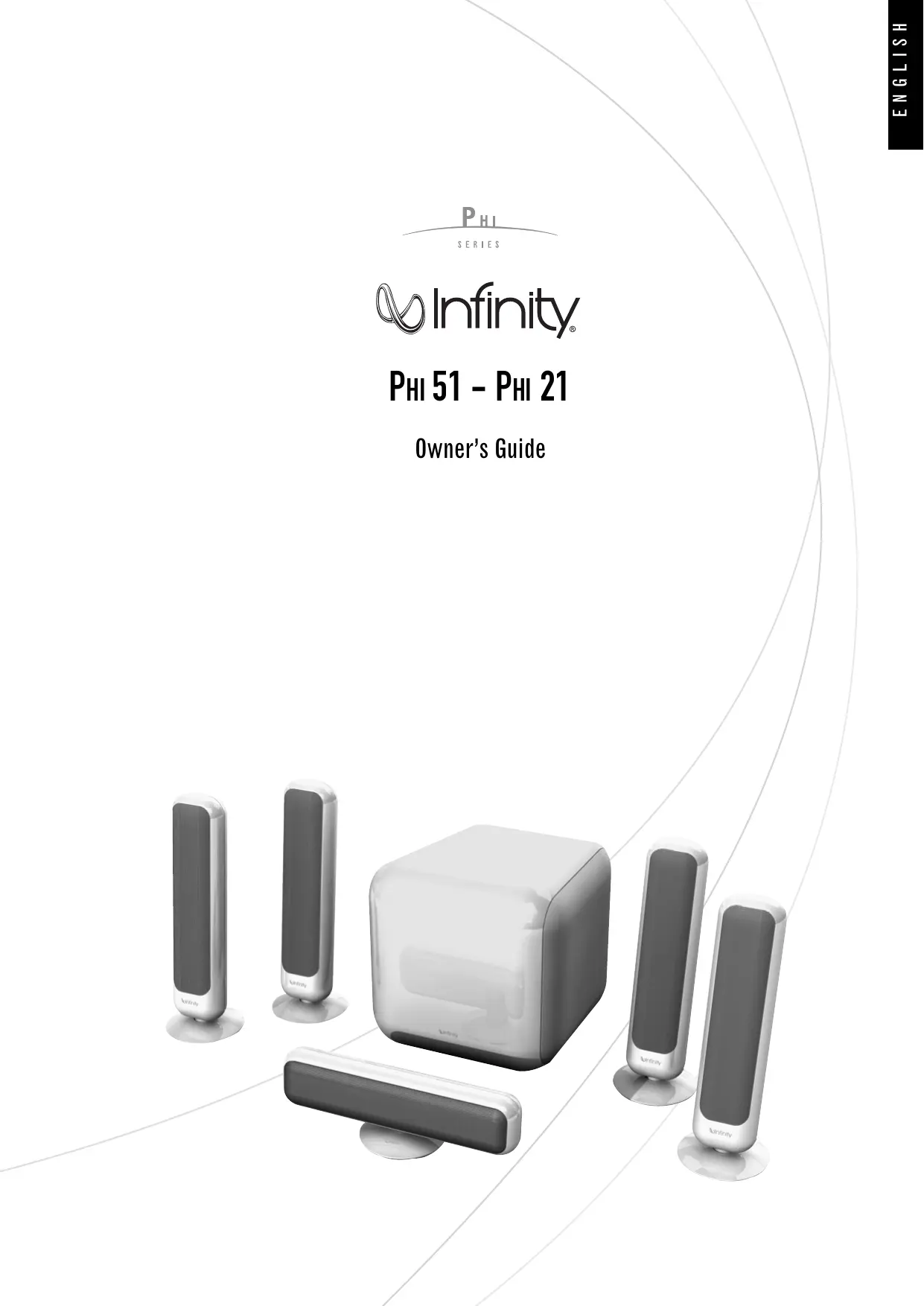

| Type de produit | Enceinte audio (système home cinéma) |
| Marque | INFINITY |
| Modèle | PHI 51 |
| Gamme | PHI Series |
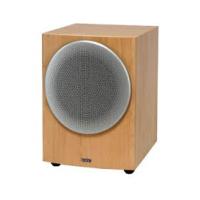
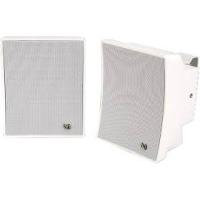
| Composition du système | 2 enceintes satellites PHI 21, 1 enceinte centrale, 1 caisson de graves PHI Sub |
| Type d'enceinte satellite | Fermée |
| Réponse en fréquence (satellite) | 200 Hz - 22 kHz (±3 dB) |
| Puissance recommandée (satellite) | 25 - 100 Watts |
| Sensibilité (satellite) | 84 dB (2,83 V @ 1 m) |
| Impédance nominale (satellite) | 4 ohms |
| Fréquence de coupure (satellite) | 2500 Hz, 12 dB/octave |
| Type de caisson de graves | Bass-reflex |
| Réponse en fréquence (caisson) | 35 Hz - 250 Hz |
| Puissance du caisson | 100 Watts RMS |
| Haut-parleur de graves | 210 mm (8 pouces) longue excursion, blindé |
| Réglage de fréquence de coupure (caisson) | 50 Hz - 250 Hz, 24 dB/octave, variable en continu |
| Dimensions (satellite HxLxP) | 367 x 85 x 120 mm |
| Poids du satellite | 1,3 kg |
| Dimensions (caisson HxLxP) | 296 x 296 x 296 mm |
| Poids du caisson | 9,7 kg |
| Blindage magnétique | Oui (satellites et caisson) |
| Alimentation | Secteur, commutateur de tension (réglé sur 240V par défaut) |
| Consommation | Non spécifiée, mais veille automatique disponible |
| Entrées caisson | Line-level (LFE), haut niveau (enceinte) |
| Nettoyage | Chiffon doux sec, aspirateur doux pour la grille, pas de solvants |
| Sécurité | Ne pas exposer à l'eau, ne pas surcharger les prises, débrancher avant nettoyage |
| Température ambiante max | 45 °C |
FOIRE AUX QUESTIONS - PHI 51 INFINITY
Questions des utilisateurs sur PHI 51 INFINITY
0 question sur cet appareil. Repondez a celles que vous connaissez ou posez la votre.
Poser une nouvelle question sur cet appareil
Téléchargez la notice de votre Enceinte audio au format PDF gratuitement ! Retrouvez votre notice PHI 51 - INFINITY et reprennez votre appareil électronique en main. Sur cette page sont publiés tous les documents nécessaires à l'utilisation de votre appareil PHI 51 de la marque INFINITY.
MODE D'EMPLOI PHI 51 INFINITY
PHI
SERIES

Infinity
PHI 51 - PHI 21
Owner's Guide
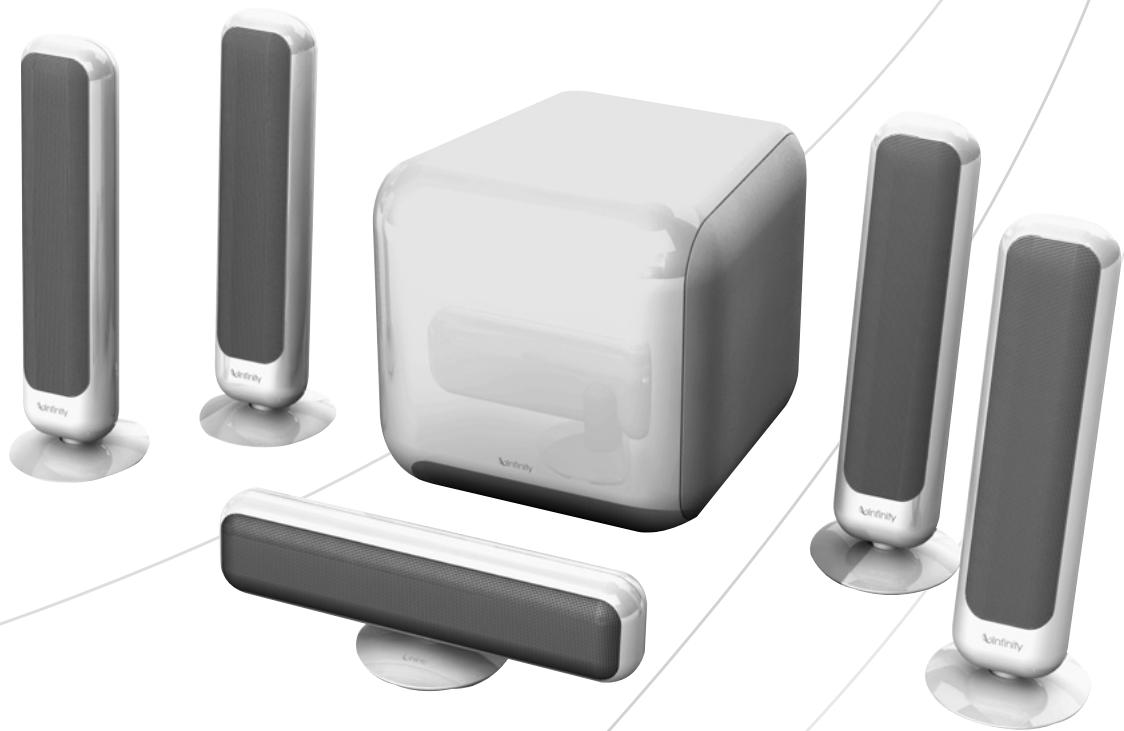
PHI OWNER'S GUIDE
Table of Contents
3 Important safety precautions
4 Introduction
4 Unpacking the System
4 Planning Your System
5 Placement
5 Wall-Mounting the Satellites
6 Assembling the Floorstands
6 Center and Satellite Speaker Connections
7 Subwoofer Controls
8 Subwoofer Connections
9 Operation
9 Maintenance and Service
10 Specifications
CAUTION
RISK OF ELECTRIC SHOCK DO NOT OPEN
CAUTION: To prevent electric shock,
do not remove the grounding plug
on the power cord, or use any plug
or extension cord that does not have
a grounding plug provided.
Make certain that the
AC outlet is properly grounded.
Do not use an adapter plug
with this product

The lightning flash with arrowhead symbol
within an equilateral triangle is intended to alert the user to the presence of
uninsulated "dangerous voltage" within the
product's enclosure that may be of
sufficient magnitude to constitute a risk of electric shock in response.

The exclamation point within an
equilateral triangle is intended to alert the
user to the presence of important operating and maintenance (nonworking).
operating and maintenance (servicing) instructions in the literature accompanying
Instructions in the literature accompanying the appliance.
Declaration of Conformity

We, Harman Consumer Group, Inc.
2, Route de Tours
72500 Château-du-Loir,
FRANCE
declare in own responsibility that the product described
in this owner's manual is in compliance with technical
standards:
EN 61000-6-3-2001
EN 61000-6-1-2001
EN 55013:2001+A1-2003
EN 55020: 2002+A1-2003
EN 61000-3-2: 2000
EN 61000-3-3: 1995+A1-2001
EN 60065:2002

Laurent Rault
Harman Consumer Group International
Chateau-du-Loir, FRANCE 2/08
read first! Important Safety Instruction!
-
Read Instructions. All the safety and operating instructions should be read before the product is operated.
-
Retain Instructions. The safety and operating
instructions should be retained for future reference.
a. The apparatus shall not be exposed to dripping or
splashing and that no objects filled with liq
as vases, shall be placed on the apparatus.
b. The MAINS plug or an appliance coupler is used as the disconnect device, the disconnect device shall remain readily operable.
- HeedWarnings.All warnings on the product and in
the operating instructions should be adhered to.
- Follow Instructions. All operating and use instruc
tions should be followed.
- Water and Moisture. The product should not be used
near water - for example, near a bathtub, washbowl,
kitchen sink, laundry tub, in a wet basement, or near a swimming pool, and the like.
- Accessories. Do not place this product on an unsta
ble cart, stand, tripod, bracket, or table. The product
may fall, causing serious injury to a child or adult, and
serious damage to the product. Use only with a cart.
stand, tripod, bracket, or table recommended by the
manufacturer or sold with the product. Any mounting
the product should follow the manufacturer's instruc
tions, and should use a mounting accessory recom
mended by the manufacturer.
- Wall or Ceiling Mounting. The product should be
mounted on a wall or ceiling only when and as recom
mended by the manufacturer.
- Ventilation. Slots and openings in the cabinet are
provided for ventilation and to ensure reliable opera-
tion of the product and to protect it from overheating.
and these openings must not be blocked or covered.
The openings should never be blocked by placing the
product on a bed sofa rug or other similar surface .
This product should not be placed in a built-in instal-
lation such as a bookcase or rack unless proper venti
lation is provided or the manufacturer's instructions
therefore is provided by the manufacturer's instructions have been adhered to.
- Heat. The product should be situated away from heat
sources such as radiators, heat registers, stoves, or
other products that produce heat . If placed near an
amplifier, check with the manufacturer for applicability.
-
Power Sources. This product should be operated only from the type of power source indicated on the marking label. If you are not sure of the type of power supply to your home, consult your product dealer or local power company. For products intended to operate from battery power, or other sources, refer to the operating instructions.
-
Grounding or Polarization. This product may be equipped with a polarized alternating-current line plug (a plug having one blade wider than the other). This plug will fit into the power outlet only one way. This is a safety feature. If you are unable to insert the plug fully into the outlet, try reversing the plug. If the plug should still fail to fit, contact your electrician to replace your obsolete outlet. Do not defeat the safety purpose of the polarized plug.
-
Power-Cord Protection. Power-supply cords should be routed so that they are not likely to be walked on or pinched by items placed upon or against them, paying particular attention to cords at plugs, convenience receptacles, and the point where they exit from the product.
-
Cleaning. Unplug this product from the wall outlet
before cleaning. Do not use liquid cleaners or aerosol
cleaners. Use a dry cloth for cleaning.
- Nonuse Periods. The power cord of the product
should be unplugged from the outlet when left unused for long periods of time.
-
Lightning. For added protection for this product during a lightning storm, or when it is left unattended and unused for long periods of time, unplug it from the wall outlet and disconnect the antenna or cable system. This will prevent damage to the product due to lightning and power-line surges.
-
Overloading. Do not overload wall outlets, extension cables, or other load.
cords, or integral convenience receptacles, as this can result in a risk of fire or electric shock.
- Object and Liquid Entry. Never push objects of any
kind into this product through openings , as they may
time sensitive voltage points or short-out parts that
could result in a fire or electric shock . Never spill
liquid of any kind on the product.
- Damage Requiring Service, Unplug this product
from the wall outlet and refer servicing to qualified
service personnel under the following conditions:
a. The power-supply cord or the plug has been damaged: or
b. Objects have fallen, or liquid has been spilled into the product; or
c. The product has been exposed to rain or water; or
d. The product does not operate normally when fol-
lowing the operating instructions. Adjust only
those controls that are covered by the operating
instructions, as an improper adjustment of other con
trols may result in damage and will often require
extensive work by a qualified technician to restore the
product to its normal operation; or
e. The product has been dropped, or the enclosure
damaged; or
f. The product does not appear to operate normally or
exhibits a marked change in performance.
- Attachments. Do not use attachments not recom
mended by the product manufacturer as they may
cause hazards.
- Replacement Parts. When replacement parts are
required , be sure the service technician has used
replacement parts specified by the manufacturer or
that have the same characteristics as the original
Part I. Unauthorized substitutions may result in fire
electric shock or other hazards
- Safety Check. Upon completion of any service or
repairs to this product, ask the service technician to
perform safety checks to determine that the product is
in proper operating condition.
- Servicing. Do not attempt to service this product
yourself, as opening or removing covers may expose
you to dangerous voltage or other hazards. Refer all
servicing to qualified service personnel.
INTRODUCTION
Infinity PHI Series
The PHI Series of loudspeakers continues Infinity's longstanding commitment to accurate sound reproduction. Our drivers, precision dividing networks and rigid, well-braced enclosures combine to deliver uncompromised performance in any stereo or multichannel home theater system. In addition, PHI Series speakers, except for the powered subwoofoers, are magnetically shielded for safe placement adjacent to a television.
Unpacking the System
Carefully unpack the system. If you suspect damage from transit, report it immediately to your dealer and/or delivery service. Keep the shipping carton and packing materials for future use. Open the package and verify the following contents for the:
PHI 51
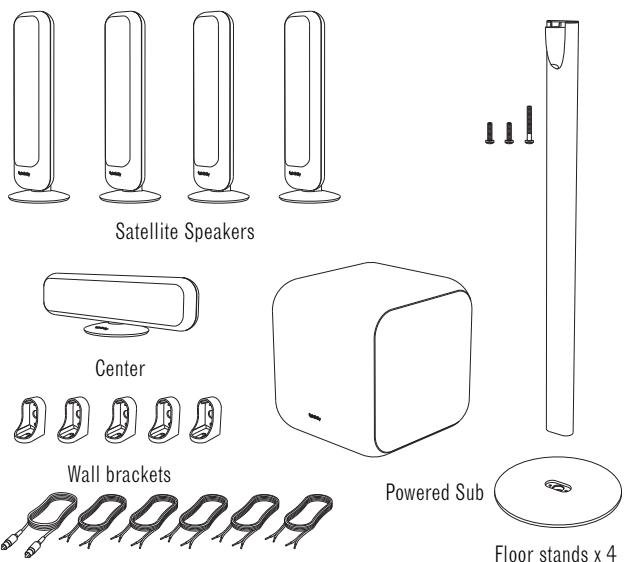
5 m combined subwoofer signal cable/ trigger cable.
2 lengths of 12m speaker cable for rear speakers.
3 lengths of 6 m speaker cable for front and center speakers
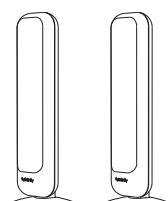
PHI 21
Satellite Speakers
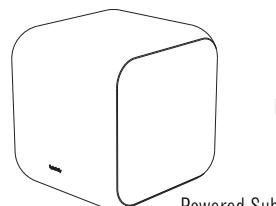
Powered Sub
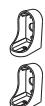
Wall jackets
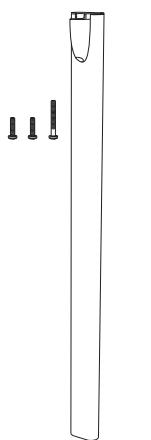
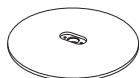
Floor stands × 2

5 m combined subwoofer signal cable/ trigger cable.
2 lengths of 6m speaker cable for satellite speakers
PLANNING YOUR SYSTEM
Before deciding where to best place your speakers, survey your room an study Figures 1 and 2. The illustrations depict how to position the PHI 51 system. The PHI 21 system should be positioned according to the same principles, but of course without Center Channel and Surround speakers.
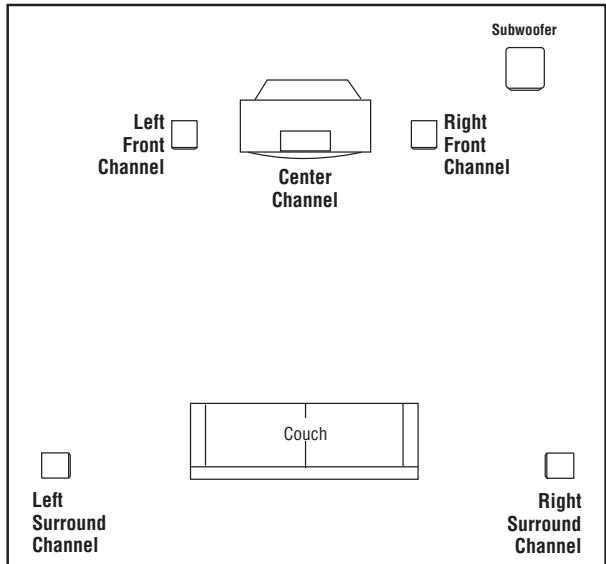
Figure 1. In this overhead view of a typical installation, satellite speakers are used to reproduce sound for the front and surround channels. The center channel reproduces sound and dialogue. The powered subwoofer provides bass for effects and music.
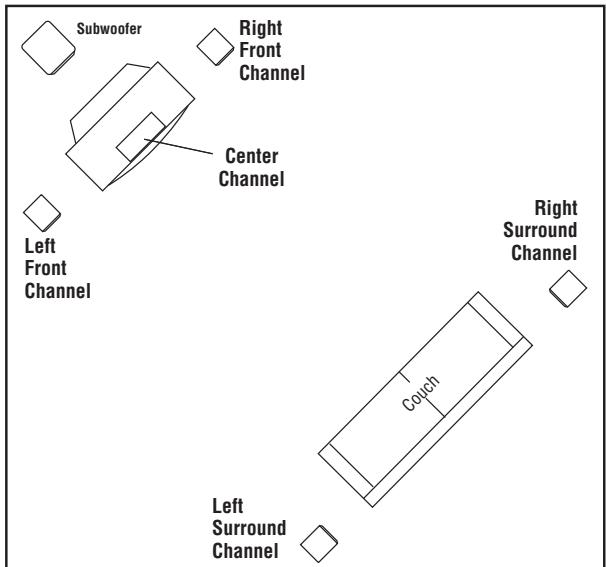
Figure 2. This figure shows an alternative layout which may be more suitable for some rooms.
PLACEMENT
NOTE: The satellite speakers can be placed on a shelf, or mounted on a wall using the supplied wall brackets. Alternatively, the floor stands permit free positioning around the room.
Left and Right Front Channels
For left and right front channels, place one satellite to the left and another to the right of the television, as shown in Figure 1. Since the speakers are magnetically shielded, you can place them very close to the TV without worrying about the magnetic field distorting the picture. The friction stands let you tilt the speakers towards you if they are higher or lower than your ears.
Center Channel
For the center channel, place the speaker directly on top of, or below, your television. Use a shelf if the television does not provide a stable platform.
Surround Channels
For left and right surround channels, place one speaker on the left and another on the right, to the side of or slightly behind the listening area. The surround speakers should be mounted at a height of between 1.2 and 2 meters.
Subwoofer
Since the installation of a subwoofer can be somewhat more complicated than installing full-range speakers, it is essential that you read this section very carefully prior to connecting the subwoofer to your system. Should you have questions relating to installation, it is advisable to call either your dealer or Infinity's Customer Service Department for advice.
The performance of the subwoofer is directly related to its placement in the listening room and how you align the subwoofer with the satellite speakers. Setting the volume of the subwoofer in relation to the left and right speakers is also of critical importance because it is essential that the subwoofer integrate smoothly with the entire system. Setting the subwoofer's volume level too high will result in an overpowering, boomy bass. Setting the volume level too low will negate the benefits of the subwoofer.
Here are several additional facts on installation that may prove useful. It is generally believed that low frequencies (below 125Hz ) are nondirectional and, therefore, placement of a subwoofer within any listening room is not critical. While in theory it is true that the larger wavelengths of extremely low frequencies are basically nondirectional, the fact is that, when installing a subwoofer within the limited confines of a room, reflections, standing waves and absorptions generated within the room will strongly influence the performance of any subwoofer system. As a result, specific location of the subwoofer becomes important, and we strongly recommend that you experiment with placement before choosing a final location. Placement will depend upon your room (for example, whether or not your room permits placement of the subwoofer near either satellite) and the amount and quality of bass required.
REMOVING THE SATELLITE DESK STANDS
The PHI satellites are equipped with their desk stands right out of the box. This means that you can simply place them on any shelf or table just as they are. Only if you wish to mount them on a wall or put them on floor stands, is it necessary to detach the desk stands.
1: Remove the trim cover hiding the cable terminals.
2: Remove the central screw at the bottom of the desk stand.
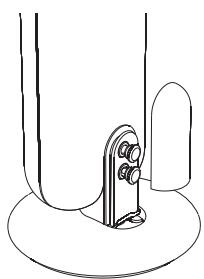
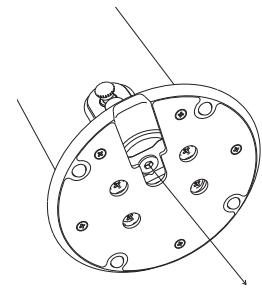
You are now ready to either wall mount your satellites or to attach them to floor stands.
WALL-MOUNTING THE SATELLITES
The PHI satellites are designed to be mounted on the wall. There is a wall bracket for each satellite speaker.
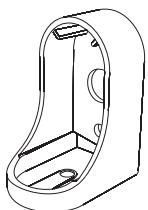
Note: The customer is responsible for the correct selection and use of mounting hardware (available through hardware stores) that will ensure the proper and safe wall-mounting of the speakers.
Step 1.
Mark the positions on the wall where you would like to place the mounting screws.
Step 2.
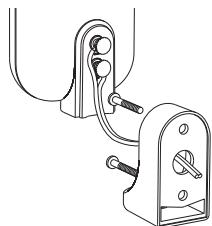
Place bracket against wall and fasten two appropriate screws through the bracket's screw holes into the wall. The wall brackets have a hole in the back for cables that are installed into the wall. Make sure that enough cable is free to reach the plus and minus terminals on the back of the speaker and then dress it through the hole in the bracket before securing the bracket onto the wall. Refer to the Center and Satellite Speaker Connections.
After having secured the bracket on the wall with the wire hanging through the hole, attach the two leads to the terminal screws on the speaker, and secure the speaker to the wall bracket with the single central screw.
息
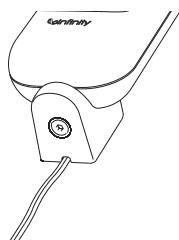
If you do not run wires inside the walls, you may dress the wires to run out of the bottom of the wall bracket. There is a break-out section in the plastic of the wall bracket made for this purpose. Simply break this section away to open access. You may dress the cable inside a cable tray to make a nice, clean-looking installation.
ASSEMBLING THE FLOORSTAND
Assembling the stand
- The PHI stand is supplied with the base detached from the column.
- Feed your speaker cable through the stand column. The cable can exit through the hole at the bottom center of the stand base.
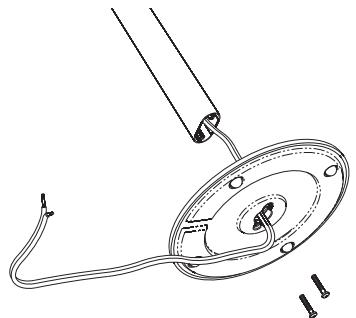
- Secure the stand base to the column and tighten the two supplied fixing screws.
Attaching the stand to the speaker
- Connect the cable to the speaker terminals. Refer to the Center and Satellite Speaker Connections. Pull enough cable out of the top of the column to allow it to reach the speaker terminals comfortably when the satellite is fixed in position.
- Attach the speaker to the stand with the supplied long screw.
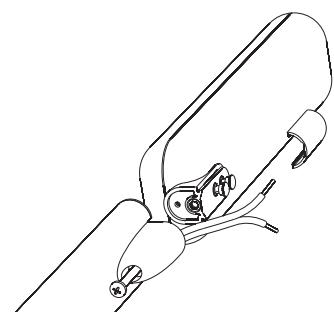
- Re-fit the Trim cap on the speaker and tighten the fixing screw.
CENTER AND SATELLITE SPEAKER CONNECTIONS
Turn Off All Power
After placing the speakers, you are ready to connect your system. First, turn off all audio-system power. Use the speaker wire provided, or use high-quality speaker wire with polarity coding to make your connections. The side of the wire with a ridge or other coding is usually considered positive polarity (i.e., +). Also, consult the owner's manuals that were included with your amplifier or reciver to confirm connection procedures. All wires are connected with either bare copper wires or spades fixed to the screw-head binding posts. Banana plugs cannot be used.
Satellites
Observe polarities when making speaker connections.
Connect each ^+ terminal on the back of the amplifier or receiver to the respective ^+ (red) terminal on each speaker.
Connect the - (black) terminals in the same way.
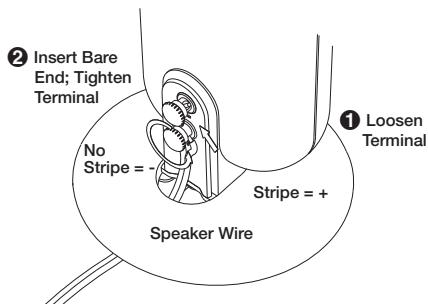
Important!
Do not reverse polarities (i.e., + to - or - to +) when making connections. Doing so will cause poor imaging and diminished bass response. Be certain that positive and negative wire strands are completely isolated to avoid short circuits that may damage your equipment.
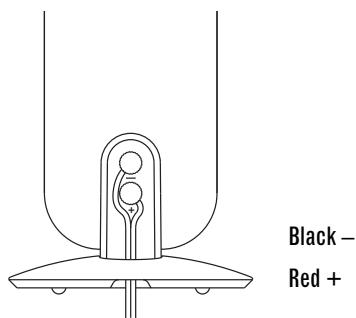
Center Channel
Observe polarities when making speaker connections, as explained under Satellites. Make sure that the polarity for the Center Speaker is identical to the Satellites.
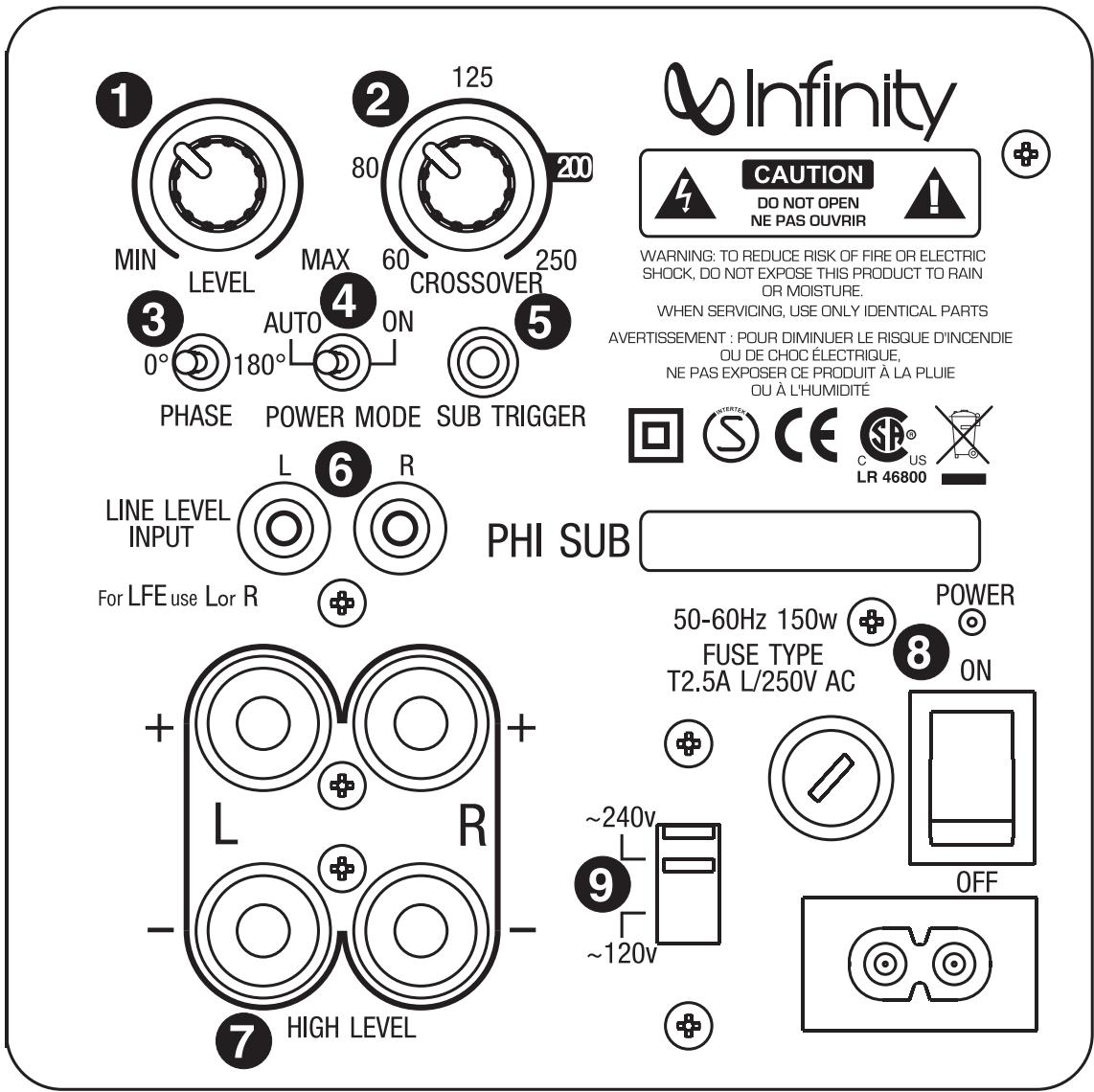
1 Subwoofer-Level Control
Crossover Adjustment
3 Phase Switch
4 Power Mode Switch
Sub Trigger Input
6 Line Level Input
7 High Level Input
3 Power Switch
Voltage Switch
A Few Suggestions
We recommend that you do not operate your speakers or subwoofer with the bass, treble and loudness controls set to full boost. This will place undue strain on your electronics and speakers and could damage them.
The volume control setting on your processor/preamp or receiver is not a specific indication of the overall loudness level of the speakers. The only important consideration is the loudness level at which the system can be played, regardless of where the volume control is set.
Always turn down the volume control setting on your processor/preamp or receiver when changing a cassette or CD, or switching inputs to AM or FM operation. Excessively loud transients ( clicks or popping, sounds) can damage the satellite speakers and, possibly, the subwoofer.
Important!
Whenever changing cables, pulling plugs, etc., ALWAYS TURN OFF ALL EQUIPMENT, including the subwoofer.
The PHI Subwoofer is equipped with a Voltage Switch . This switch is preset to the correct voltage for the part of the world where it is sold. Always make sure that this switch is in the correct position, according to the voltage in your country (240v is standard position). Use a screwdriver to move this switch if you move to a country with different voltage.
SUBWOOFER CONNECTIONS
CHOOSE THE SUBWOOFER CONNECTION THAT IS MOST SUITABLE FOR YOUR RECEIVER/PROCESSOR
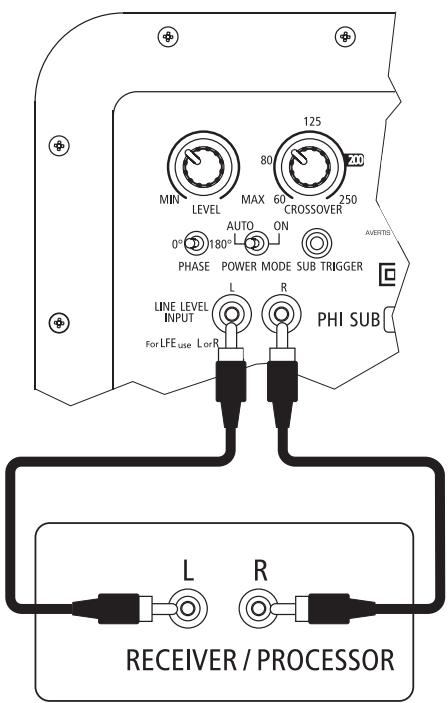
LINE-LEVEL SUBWOOFER CONNECTIONS
If you have a Dolby* Digital or DTS receiver/processor with a low-frequency-effects (LFE) or subwoofer output:
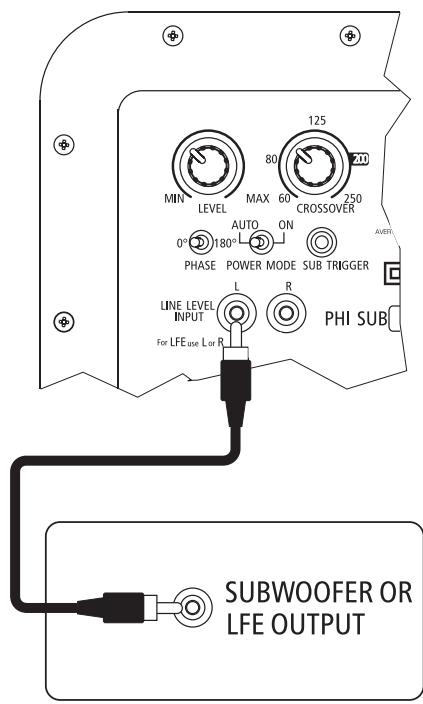
If your receiver/processor does not contain a Dolby Digital or DTS processor but has a subwoofer output:
SPEAKER-LEVEL SUBWOOFER CONNECTIONS
If your receiver/processor does not have subwoofer outputs for the left and right channels or an LFE output:
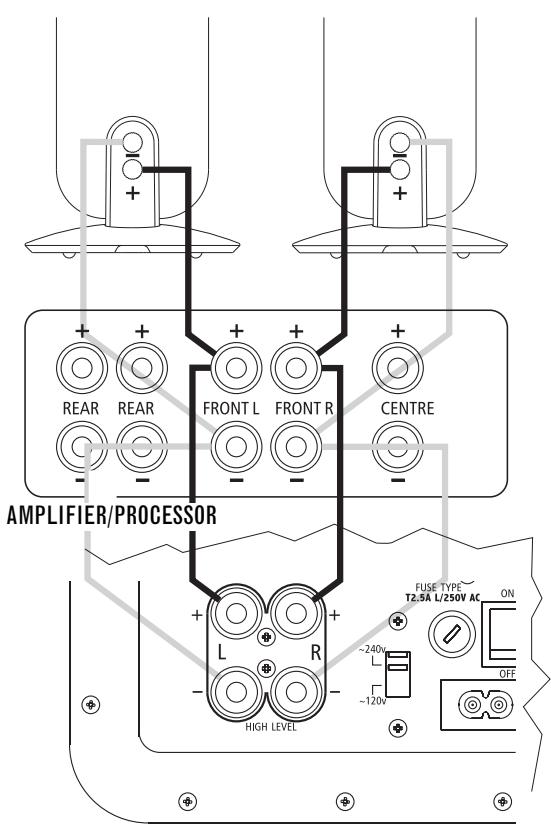
Connect speaker wire from your receiver/amplifier to your speakers and subwoofer using two sets of speaker wire.
OPERATION
Surround Modes (Using LFE or line level inputs to subwoofer)
When using the PHI system in a Dolby Digital or DTS home theater system, make sure all speakers are set to "Small".
Some Dolby Digital-equipped receivers/processors offer different setup options for each source or surround mode, e.g., CD-stereo, videotape, Dolby, Pro Logic. In each case, follow your equipment's instructions to ensure that the subwoofer output is turned on and that the speakers are set to "Small" in each mode.
Surround Modes (Using high level inputs to subwoofer)
When using the PHI in a Dolby Digital or DTS home theater system, make sure all speakers are set to "Large" in your receiver set-up menu.
When using the PHI in a Dolby Pro Logic* home theater system make sure the receiver's center channel mode is set to "Large".
Some Dolby Digital-equipped receivers/processors offer different setup options for each source or surround mode, e.g., CD-stereo, videotape, Dolby, Pro Logic. In each case, follow your equipment's instructions to ensure that the speakers are set to "Large" in each mode.
Power On
Plug your subwoofer's AC cord into a wall outlet. Do not use the outlets on the back of the receiver.
Initially set the Subwoofer Level Control 1 to the "MIN" position. Turn on the subwoofer by pressing the Power Switch 3 on the rear panel.
Turn on your entire audio system and start a CD or movie soundtrack at a moderate level.
Important Note: The PHI Subwoofer includes a switchable Auto-On/Auto-Off circuit. During periods of normal use, the Main Power Switch should always be left on. It should only be turned off during extended periods of nonoperation, e.g., when you are away on vacation.
Also, the Power Mode switch 4 controls the daily ON/OFF function of the subwoofer. In position "On", (which is the normal position), the supplied Sub Trigger cable controls the subwoofer, switching it ON when a trigger signal is sensed by the Sub Trigger input. This means that whenever your main system or receiver is switched OFF, the subwoofer goes to OFF as well. "Auto" is meant for systems that do not offer the use of a trigger signal. In Auto mode, the subwoofer "listens" for a signal, and switches ON whenever a signal is present. If no sound is sensed for a while, the subwoofer switches to OFF. This means that if there is almost no sound entering the subwoofer for a while, it shuts off, only to "wake up" again whenever a sound arrives. This causes a short delay in bass reproduction, so the initial part of a bass signal may not be reproduced. If possible, use the trigger cable and set the Power Mode Switch to ON.
Adjust Gain
Turn the Subwoofer Level Control 1 up about half way. If no sound emanates from the subwoofer, check the AC-line cord and input cables. Are the connectors on the cables making proper contact? Is the AC plug connected to a "live" receptacle? Has the Power Switch 3 been pressed to the "On" position and the Power Mode Switch been set to "On" if a Trigger Cable is used, or "Auto" to react to incoming sound? Once you have confirmed that the subwoofer is active, proceed by playing a CD, record or cassette. Use a selection that has ample bass information.
Set the overall volume control of the receiver/processor to a comfortable level. Adjust the Subwoofer Level Control ① until you obtain a pleasing blend of bass. Bass response should not overpower the room but rather be adjusted so there is a harmonious blend across the entire musical range. Many users have a tendency to set the subwoofer volume too loud, adhering to the belief that a subwoofer is there to produce lots of
bass. This is not entirely true. A subwoofer is designed to extend the response of the entire system so the bass can be felt as well as heard. However, overall balance must be maintained or the music will not sound natural. An experienced listener will set the volume of the subwoofer so its impact on bass response is always there but never obtrusive.
Crossover Adjustment
The Crossover control 2 determines the highest frequency at which the subwoofer reproduces sounds. For the PHI system, it is recommended that this control be set at 200Hz , which is marked as ideal crossover point on the Crossover control scale.
If you have a Dolby Digital or DTS receiver/processor with an LFE (Low Frequency Effect) output, please note that any internal filter (low-pass filter) in the receiver should be set to 200Hz as well.
Phase Control
The Phase Switch ③ determines whether the subwoofer speaker's piston-like action moves in and out with the main speakers, 0^ , or opposite the main speakers, 180^ . Proper phase adjustment depends on several variables such as room size, subwoofer placement and listener position. Adjust the phase switch to maximize bass output at the listening position.
Final Positioning
After correctly connecting the PHI system and verifying that both the subwoofer and all satellite speakers are playing, it is time to optimize the system for your particular listening room. Earlier, you placed the subwoofer in its general location. Finding the exact location for optimum performance sometimes only involves moving the speakers up to a few inches in any direction. We urge you, therefore, to experiment with placement, if possible, until your speakers deliver their full potential.
MAINTENANCE AND SERVICE
The speaker and subwoofer enclosures may be cleaned using a soft cloth to remove fingerprints or to wipe off dust. The grilles may be gently vacuumed. Stains may be removed with an aerosol cleaner, following its instructions. Do not use any solvents.
All wiring connections should be inspected and cleaned or remade periodically. The frequency of maintenance depends on the metals involved in the connections, atmospheric conditions, and other factors, but once per year is the minimum.
If a problem occurs, make sure that all connections are properly made and clean. If a problem exists in one loudspeaker, reverse the connection wires to the left and right system. If the problem remains in the same speaker, then the fault is with the loudspeaker. If the problem appears in the opposite speaker, the cause is in another component or cable. In the event that your PHI system ever needs service, contact your local Infinity dealer or distributor.
SPECIFICATIONS
PHI Satellite and Center
Enclosure type: Closed
Frequency Range: 200Hz-22kHz(±3dB)
Recommended Amp Power Range: 25-100Watts
Sensitivity (2.83V @ 1meter): 84dB
Nominal Impedance: 4 ohms
Crossover Frequency: 2500Hz, 12dB/Octave
Midrange Driver (S): 4 × 50mm (2 inch) neodymium woofer (Magnetically Shielded)
High-Frequency Driver: 19mm (3/4 inch) soft dome tweeter (Magnetically Shielded)
Dimensions (HxWxD): Satellite 367 × 85 × 120mm Center 345 × 107 × 120mm
Weight: 1.3Kg
PHI Subwoofer
Enclosure type: Bass Reflex
Frequency Range: 35Hz-250Hz
Power Rading: 100 Watts (RMS)
Amplifier Output: 100 Watts
Low-Frequency Driver: 210mm (8 inch) long throw shielded
Crossover Frequency: 50Hz-250Hz, 24dB/Octave, continuously variable
Dimensions (HxWxD): 296 x 296 x 296 mm
Weight: 9.7Kg
Infinity continually strives to update and improve existing products, as well as create new ones.
The specifications and construction details in this and related Infinity publications are therefore subject to change without notice.
The Infinity PHI system should not be used if the ambient temperature is higher than 45^ .
Notes:

Infinity
TECHNOLOGY·PERFORMANCE·DESIGN
© 2008 Harman International Industries, Incorporated
Infinity Systems, 250 Crossways Park Drive, Woodbury, NY 11797 USA 800.553.3332 (USA only) www.infinitysystems.com
- Trademark of Dolby Laboratories. DTS is a registered trademark of Digital Theater Systems, Inc. Infinity is a registered trademark of Harman International Industries, Incorporated.
Part no. YOMA00074-0001
A Harman International Company
- Infinity
- PHI 51 - PHI 21
- PHI OWNER'S GUIDE
- Table of Contents
- CAUTION
- RISK OF ELECTRIC SHOCK DO NOT OPEN
- read first! Important Safety Instruction!
- INTRODUCTION
- Infinity PHI Series
- Unpacking the System
- PLANNING YOUR SYSTEM
- PLACEMENT
- Left and Right Front Channels
- Center Channel
- Surround Channels
- Subwoofer
- REMOVING THE SATELLITE DESK STANDS
- WALL-MOUNTING THE SATELLITES
- ASSEMBLING THE FLOORSTAND
- Assembling the stand
- Attaching the stand to the speaker
- CENTER AND SATELLITE SPEAKER CONNECTIONS
- Turn Off All Power
- Satellites
- Important!
- A Few Suggestions
- SUBWOOFER CONNECTIONS
- LINE-LEVEL SUBWOOFER CONNECTIONS
- SPEAKER-LEVEL SUBWOOFER CONNECTIONS
- OPERATION
- Surround Modes (Using LFE or line level inputs to subwoofer)
- Surround Modes (Using high level inputs to subwoofer)
- Power On
- Adjust Gain
- Crossover Adjustment
- Phase Control
- Final Positioning
- MAINTENANCE AND SERVICE
- SPECIFICATIONS
- PHI Satellite and Center
- PHI Subwoofer
Marque : INFINITY
Modèle : PHI 51
Catégorie : Enceinte audio