
C70 - Montre CITIZEN WATCH - Notice d'utilisation et mode d'emploi gratuit
Retrouvez gratuitement la notice de l'appareil C70 CITIZEN WATCH au format PDF.


| Type de produit | Montre combinée analogique et numérique |
| Marque | CITIZEN WATCH |
| Modèle | C70 |
| Alimentation | Pile SR927W (280-44), durée de vie environ 2 ans |
| Affichage | Analogique (aiguilles) et numérique (cristaux liquides) |
| Fonctions principales | Heure, calendrier automatique, deux alarmes, chronographe 1/1000s, minuteur, thermomètre, éclairage EL, fonction voile/boussole via lunette |
| Précision | ±20 secondes par mois (en conditions normales) |
| Plage de température de fonctionnement | 0°C à +55°C |
| Résistance à l'eau | Variable selon modèle : voir indication sur le cadran (jusqu'à 20 bar pour certains) |
| Entretien et nettoyage | Chiffon doux pour le boîtier et le verre, eau savonneuse pour les bracelets métal/plastique/caoutchouc, éviter solvants |
| Sécurité | Ne pas exposer à des températures extrêmes, aimants, chocs violents ou produits chimiques |
| Pièces détachées et réparabilité | Remplacer la pile chez un revendeur agréé ou un service après-vente Citizen |
| Informations générales | Calibre C70* ; remise à zéro générale possible après choc ou anomalie |
FOIRE AUX QUESTIONS - C70 CITIZEN WATCH
Questions des utilisateurs sur C70 CITIZEN WATCH
0 question sur cet appareil. Repondez a celles que vous connaissez ou posez la votre.
Poser une nouvelle question sur cet appareil
Téléchargez la notice de votre Montre au format PDF gratuitement ! Retrouvez votre notice C70 - CITIZEN WATCH et reprennez votre appareil électronique en main. Sur cette page sont publiés tous les documents nécessaires à l'utilisation de votre appareil C70 de la marque CITIZEN WATCH.
MODE D'EMPLOI C70 CITIZEN WATCH
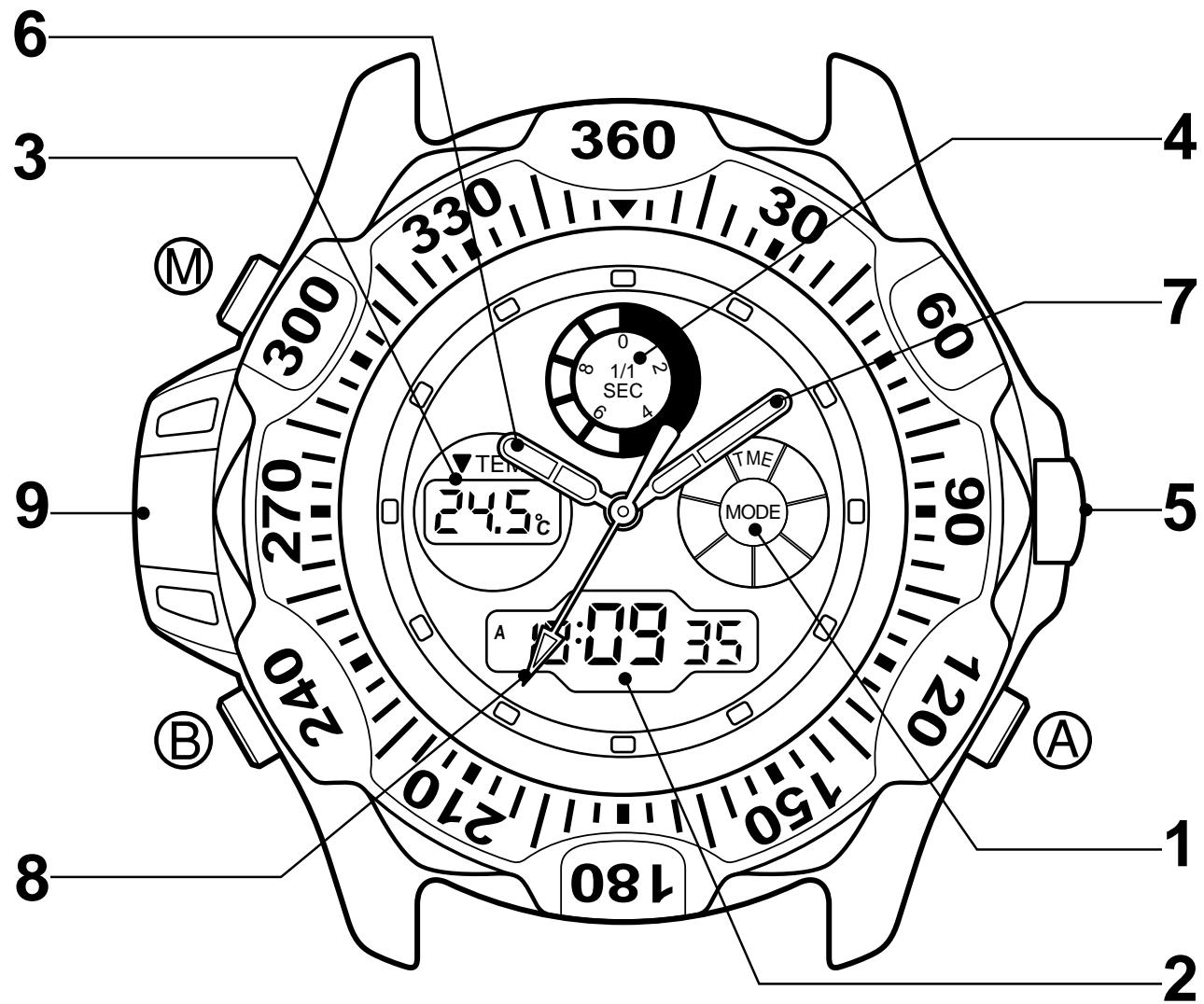
Cette montre est une montre à quartz combinée, avec une fonction de chronomètre de course pour diverses courses telles que la régate, etc., une fonction de chronographe et une fonction de minuteur. Elle dispose également d'une fonction de thermomètre et d'une fonction de lumière EL (électroluminescence).
Français
SOMMAIRE
- NOM DES PIÈCES 4
- RÉGLAGE DES AIGUILLES 7
- CHANGEMENT DES FONCTIONS NUMÉRIQUES (MODES) 8
- UTILISATION DE CHAQUE FONCTION (MODE) 9
A. Mode heure 9 B. Mode calendrier 12 C. Modes alarme 1 et 2 14 D. Mode chronographe 17 E. Mode chronomètre de course 20 F. Mode minuteur 25
- UTILISATION DU THERMOMÈTRE 28
- INDICATEUR DE BATTERIE FAIBLE 31
- RÉINITIALISATION TOTALE 32
- UTILISATION DE LA LUNETTE 33
- PRÉCAUTIONS 38
- SPÉCIFICATIONS 45
1. NOM DES PIÈCES
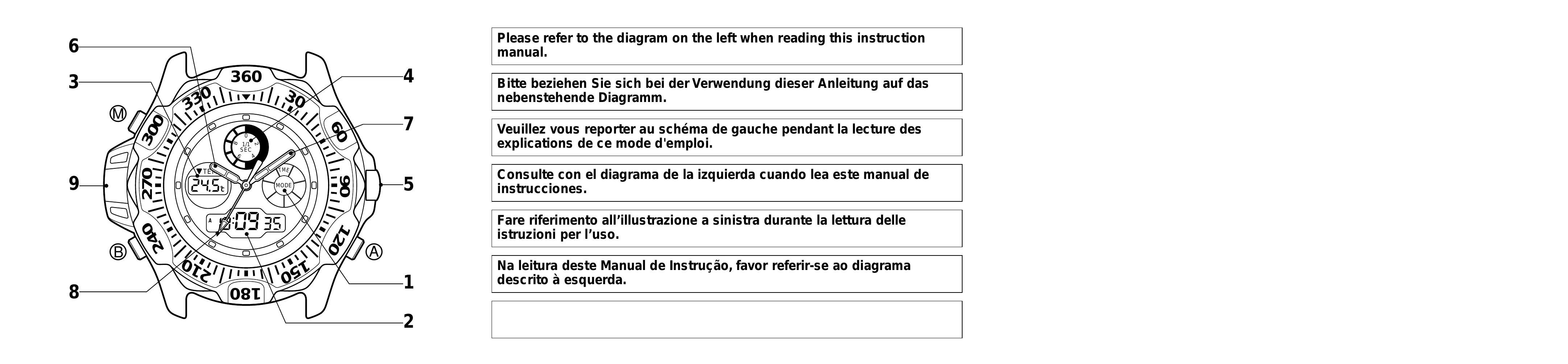
| Mode Name | Time | Calendar | Alarm 1 | Alarm 2 | Chronograph | Race Timer | Timer | |
| Button A | Press once | EL light ON | Switching ON/OFF | Switching ON/OFF | Start/Stop | Start/Stop | Start/Stop | |
| Press for more than 2 seconds | Alarm monitor | Alarm monitor | — | — | — | |||
| Button B | Press once | Thermometry | Thermometry | — | — | Split/Reset | Set time adjustment | Set time adjustment |
| Press for more than 2 seconds | To time adjustment mode | To calendar adjustment mode | To alarm adjustment mode | To alarm adjustment mode | — | Quick set time adjustment | Quick set time adjustment | |
| Button M | Press once | To <CAL> mode | To <AL-1> mode | To <AL-2> mode | To <CHR> mode | To <RACE> mode | To <TMR> mode | To <TME> mode |
| 1: Mode mark display | TME | CAL | AL-1 | AL-2 | CHR | RACE | TMR | |
| 2: Digital display [1] | Hours, Minutes, Seconds | Month, Date, Day of the week | Set time, ON/OFF | Set time, ON/OFF | Hours, Minutes, Seconds | Minutes, Seconds, Set time | Minutes, Seconds, Set time | |
| 3: Digital display [2] | Temperature | Temperature | Temperature | Temperature | 1/1000 second | Temperature | Temperature | |
| 4: Graphic display | Always indicates graphic, synchronized with digital display 1 |
| 5: Crown | Used for setting analog |
| 6: Hour hand | Always indicates time (hours) |
| 7: Minute hand | Always indicates time (minutes) |
| 8: Second hand | Always indicates time (seconds) |
| 9: Thermosensor | Senses current temperature, shown by digital display 2 |
2. RÉGLAGE DES AIGUILLES

(1) Tirez la couronne pour arrêter la trotteuse. (2) Tournez la couronne pour régler l'heure correcte. (3) Repoussez la couronne pour redémarrer.
L'heure analogique et l'heure numérique peuvent être réglées individuellement comme une montre à double fuseau horaire.
3. CHANGEMENT DES FONCTIONS NUMÉRIQUES (MODES)
Outre la fonction horaire, cette montre possède six autres fonctions : calendrier, alarme 1, alarme 2, chronographe, minuteur de course et minuteur.
Le mode actuel peut être vérifié par l'indicateur de mode. Chaque pression sur le bouton change le mode de la montre dans l'ordre suivant.
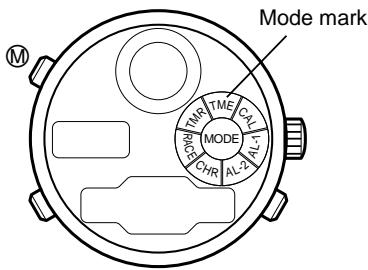
| Mode mark | Mode (function) |
| TME | Time |
| CAL | Calendar |
| AL-1 | Alarm 1 |
| AL-2 | Alarm 2 |
| CHR | Chronograph |
| RACE | Race timer |
| TMR | Timer |
Si la montre est laissée en mode alarme 1 ou alarme 2 pendant plus de 2 minutes, elle revient automatiquement en mode horaire.
4. UTILISATION DE CHAQUE FONCTION (MODE)
A. Mode horaire
Lorsque le bouton est pressé ou maintenu enfoncé en mode horaire, l'éclairage EL s'allume.
Lorsque le bouton ⑧ est pressé, la température actuelle est recalculée.
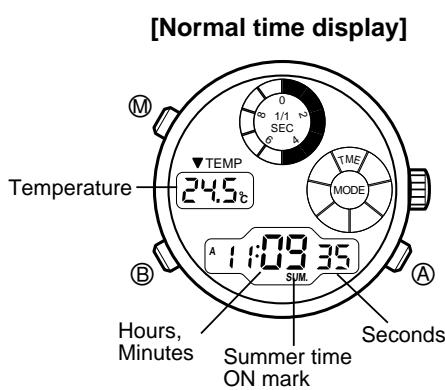
(1) Appuyez sur le bouton ⑧ en mode horaire pendant plus de 2 secondes. « SUM. » et « ON/OF » commencent à clignoter pour indiquer que la montre entre en mode de réglage de l'heure. (2) Appuyez sur le bouton A pour activer ou désactiver l'heure d'été.
Chaque pression sur le bouton active (ON) ou désactive (OF) le mode d'heure d'été alternativement.
(3) Appuyez sur le bouton M pour revenir à l'affichage normal de l'heure.
- Lorsque la montre est réglée sur l'heure d'été (ON).
Le symbole « SUM. » apparaît et la montre indique une heure qui est une heure en avance sur l'heure standard.
(1) Appuyez sur le bouton O en mode heure normale pendant plus de 2 secondes. Le symbole « SUM. » et « ON/OF » commence à clignoter pour indiquer que la montre entre en mode de réglage de l'heure. (2) Chaque fois que le bouton B est pressé en mode de réglage de l'heure, les chiffres clignotants changent de « SUM. » à « secondes », « minutes », « heures », « 12 heures/24 heures », puis à « SUM. » à nouveau. Utilisez le bouton B pour sélectionner les chiffres que vous souhaitez modifier. (3) Réglez les chiffres clignotants en appuyant sur le bouton A. (Si le bouton A est pressé en continu, les chiffres changent rapidement.) - L'affichage de l'heure d'été est activé/désactivé à chaque pression sur le bouton A. - Pour remettre les secondes à zéro, appuyez sur le bouton A pour redémarrer à partir de « 00 » seconde. - Le système d'indication « 12 heures/24 heures » est commuté alternativement à chaque pression sur le bouton A. (4) Appuyez sur le bouton pour revenir à l'affichage normal de l'heure.
- Lors du réglage de l'heure en mode 12 heures, assurez-vous qu'elle est correctement réglée pour le matin (A) ou l'après-midi (P).
- Si la montre est laissée en mode de réglage de l'heure (chiffres clignotants) pendant plus de 2 minutes, elle revient automatiquement à l'affichage normal de l'heure.
- Si le bouton M est pressé en mode de réglage de l'heure, la montre revient à l'affichage normal de l'heure.
B. Mode calendrier
Lorsque le bouton A est pressé ou maintenu pressé en mode calendrier, la lumière EL s'allume.
Lorsque le bouton B est pressé, la température actuelle est recalculée.
[Affichage normal du calendrier]
Température
Mois, date, jour de la semaine![CITIZEN WATCH C70 - [Affichage normal du calendrier] - 1](/content/2025/01/176730/images/85a8294900efb435b0fc1fd0602e829eef7e1cf7a79b03d89fc324e4d2a8b126.jpg)
(1) Appuyez sur le bouton ⑧ en mode calendrier pendant plus de 2 secondes. Le « Mois » commence à clignoter pour indiquer que la montre entre en mode de réglage du calendrier. (2) Appuyez sur le bouton ⑧ pour sélectionner le réglage « Mois », « Date » ou « Année ». Les chiffres clignotants se déplacent dans l'ordre de « Mois » à « Date », puis à « Année ». (3) Appuyez sur le bouton A pour régler les chiffres clignotants. (Si le bouton A est pressé en continu, les chiffres changent rapidement.) (4) Appuyez sur le bouton M pour revenir à l'affichage normal du calendrier.
- L'année (dans l'ère chrétienne) peut être réglée entre 1998 et 2099. (L'affichage de l'année n'apparaît qu'en mode de réglage du calendrier.)
- Si la montre est laissée en mode de réglage du calendrier (chiffres clignotants) pendant plus de 2 minutes, elle revient automatiquement à l'affichage normal du calendrier.
- Le jour de la semaine correct est réglé automatiquement grâce au réglage de l'année, du mois et de la date.
- Si la date est réglée sur une date inexistante (par exemple le 30 février), la montre affiche automatiquement le premier jour du mois suivant lorsqu'elle revient à l'affichage normal du calendrier.
- Cette montre n'a pas besoin d'être réglée pour le premier jour de chaque mois grâce à la fonction de calendrier automatique.
- Si le bouton M est enfoncé en mode de réglage du calendrier, la montre revient à l'affichage normal du calendrier.
C. Modes Alarme 1 et 2
La seule différence entre l'alarme 1 et l'alarme 2 est le son. Les deux modes sont identiques en termes d'utilisation et de réglage. Lorsqu'une alarme est activée (ON), elle sonne pendant 20 secondes à la même heure chaque jour.
[Affichage normal de l'alarme (ON)]
Température
![CITIZEN WATCH C70 - [Affichage normal de l'alarme (ON)] - 1](/content/2025/01/176730/images/a62aed074140b1a3b9e1bc15216588d8093e26826ed36e231b570dc8eb5745f2.jpg)
Heure de l'alarme (heures, minutes)
(1) Appuyez sur le bouton ⑧ en mode alarme pendant plus de 2 secondes. Les « Heures » commencent à clignoter pour indiquer que la montre entre en mode de réglage de l'alarme. Les chiffres clignotants peuvent être réglés. (2) Appuyez sur le bouton A pour régler les « Heures ». (3) Pendant que les « Heures » clignotent, appuyez sur le bouton ⑧ pour faire clignoter les « Minutes ». (4) Appuyez sur le bouton A pour régler les « Minutes ». (Une pression continue sur le bouton A fait défiler les chiffres rapidement.) (5) Appuyez sur le bouton M pour revenir à l'affichage normal de l'alarme.
Chaque fois que le bouton A est enfoncé en affichage normal de l'alarme, l'alarme est activée/désactivée (ON/OFF) en alternance.
("ON" : alarme activée, "OF" : alarme désactivée.)
![CITIZEN WATCH C70 - [Affichage normal de l'alarme (ON)] - 1](/content/2025/01/176730/images/fc3a694647c438b037a150e0739331c6f13fa0766e4f272513eada31751efe3a.jpg)
< Durée de la sonnerie de l'alarme, arrêt de l'alarme >
La durée de la sonnerie de l'alarme est de 20 secondes. La sonnerie s'arrête en appuyant sur n'importe quel bouton.
Lorsque le bouton est enfoncé en mode alarme, l'alarme continue de sonner.
- Lorsque le mode horaire est en système 12 heures, le mode alarme est dans le même système. Faites attention à l'indication A/P pour savoir s'il est réglé pour le matin (A) ou l'après-midi (P).
- Si le mode horaire est réglé sur l'heure d'été, cela n'affecte pas le mode alarme.
- Si la montre est laissée en mode de réglage de l'alarme pendant plus de 2 minutes, elle revient automatiquement à l'affichage normal de l'alarme.
- Si le bouton est enfoncé en mode de réglage de l'alarme, la montre revient à l'affichage normal de l'alarme.
D. Mode chronographe
Le chronographe peut mesurer et afficher un maximum de 23 heures, 59 minutes, 59 secondes et 999 millisecondes par incréments de 1/1000 seconde. Après 24 heures, il s'arrête avec un affichage de remise à zéro "00'00'00"000". Le chronographe peut également mesurer des temps intermédiaires (temps écoulé).
[Affichage de remise à zéro du chronographe] Temps mesuré (heures, minutes, secondes)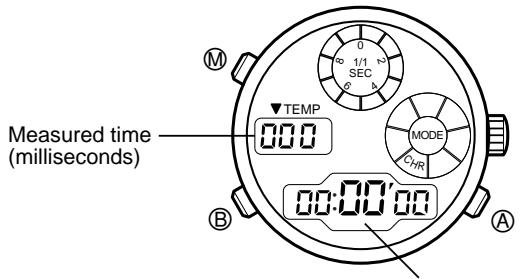
(1) Le chronographe démarre ou s'arrête à chaque pression sur le bouton . (2) Pour remettre le chronographe à zéro, appuyez sur le bouton ⑧ après l'avoir arrêté.
(1) Le chronographe démarre ou s'arrête à chaque pression sur le bouton . (2) Appuyez sur le bouton ⑧ pendant une mesure de temps, et la montre affiche un temps intermédiaire pendant 10 secondes. Pendant l'affichage d'un temps intermédiaire, "SPLIT" clignote.
Chaque pression sur le bouton 已 affiche le dernier temps intermédiaire. (3) Pour remettre le chronographe à zéro, appuyez sur le bouton ⑧ après l'avoir arrêté.
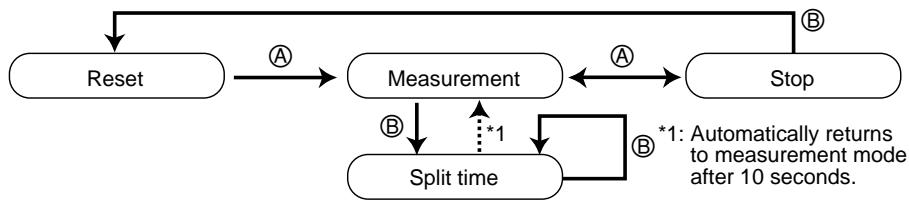
Même si le bouton est enfoncé pendant une mesure de temps en mode chronographe et que le mode est changé, la mesure de temps continue en interne. Le temps mesuré est affiché lorsque le mode revient au chronographe. Cependant, si la mesure de temps continue pendant plus de 24 heures, le chronographe s'arrête à l'état de remise à zéro.
* Son de confirmation et lumière EL
Au moment du démarrage, de l'arrêt, de la vérification du temps intermédiaire ou de la remise à zéro en mode chronographe, un son de confirmation se fait entendre.
Au moment de l'arrêt ou d'une mesure de temps intermédiaire, la lumière EL s'allume pendant 3 secondes avec le son.
Temps intermédiaire : temps écoulé depuis le point de départ
E. Mode chronomètre de course
Le mode chronomètre de course possède une fonction chronographe automatique qui démarre la mesure du temps lorsque le temps réglé est écoulé. Le chronomètre peut être réglé de 15 façons : pour 1, 3, 5 ou 6 minutes, et pour 10 à 60 minutes par incréments de 5 minutes. Réglez le chronomètre en fonction de la course.
[Affichage du réglage du chronomètre de course]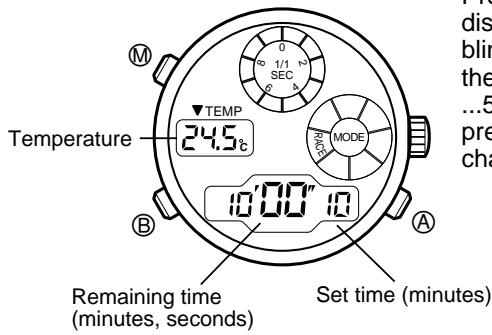
Appuyez sur le bouton ⑧ dans l'affichage du réglage du chronomètre de course pour sélectionner un temps réglé (le temps réglé clignote). Chaque pression sur le bouton ⑧ fait passer le temps réglé de 60, 55, 50, ... 5, 3, 1 (minutes). (Si le bouton ⑧ est maintenu enfoncé, le temps réglé change rapidement.)
(1) Appuyez sur le bouton A dans l'affichage du réglage du chronomètre de course et le chronomètre de course commence le compte à rebours. (2) Si le bouton A est enfoncé pendant le compte à rebours, le chronomètre de course s'arrête. Si le bouton A est enfoncé à nouveau, le chronomètre de course reprend le compte à rebours. (3) Si le bouton B est enfoncé après l'arrêt du chronomètre de course, le temps réglé du chronomètre de course est affiché. (4) Lorsque le compte à rebours du temps réglé est terminé, le chronographe automatique démarre tandis qu'un signal de fin de temps retentit pendant 5 secondes.
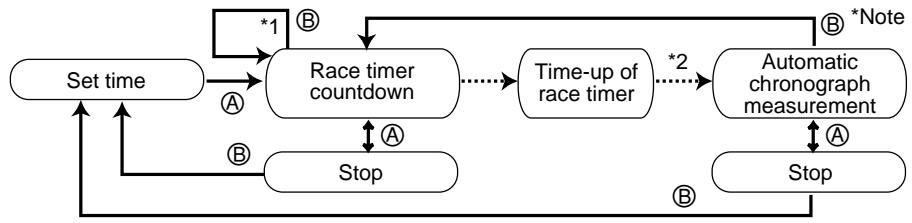
*1 : Fonction de redémarrage du chronomètre de course (fonction flyback)
Si le bouton ⑧ est enfoncé pendant le compte à rebours, le chronomètre de course revient au temps réglé et redémarre.
*2 : Fonction de démarrage automatique du chronographe
Lorsque le temps réglé du chronomètre de course est écoulé, le chronographe automatique démarre.
Le chronographe automatique commence la mesure du temps à l'instant où le temps du chronomètre de course est écoulé. Le temps maximal est de 23 heures, 59 minutes, 59 secondes par incréments de 1 seconde. Après 24 heures, il revient au temps réglé du chronomètre de course.
(1) Chaque pression sur le bouton A pendant que le chronographe automatique est en affichage de mesure du temps fait alterner arrêt et redémarrage du chronographe automatique. (2) Si le bouton B est enfoncé pendant que le chronographe automatique est en affichage de mesure du temps, l'affichage revient au compte à rebours du chronomètre de course. (3) Si le bouton B est enfoncé lorsque le chronographe automatique est arrêté, l'affichage revient au temps réglé du chronomètre de course.
* Remarque
Après que le chronomètre de course est passé à l'affichage du chronographe automatique, le chronomètre de course répète le compte à rebours en interne selon le temps réglé.
Si le bouton B est enfoncé dans l'affichage du chronographe automatique pour passer à l'affichage du chronomètre de course, le chronomètre de course indique le temps restant (dans le compte à rebours) qui a été vérifié en interne de manière répétée. (Cependant, si le chronographe automatique est arrêté en cours de route, le chronomètre qui continue à vérifier le temps en interne ne s'arrête pas.)
Exemple : lorsque le chronomètre de course est réglé sur 5 minutes.
Le chronomètre de course se répète pendant 5 minutes pendant que le chronographe automatique est en mesure du temps. Si le bouton ⑧ est pressé 3 minutes après l'affichage du chronographe automatique, 2 minutes sont indiquées comme temps restant du chronomètre de course.
Avertisseur sonore de fin de temps
Un avertisseur sonore de fin de temps se fait entendre lorsque le temps restant est de 10, 5, 3 minutes, 1 minute, 50 secondes, 40, 30, 20, 10, 5, 4, 3, 2 secondes et 1 seconde avant que le temps réglé soit écoulé.
Son de confirmation
Au moment du démarrage, de l'arrêt, de la remise à zéro ou du redémarrage en mode chronomètre de course ou chronographe automatique, un son de confirmation se fait entendre.
Si le bouton est pressé en affichage chronomètre de course ou chronographe automatique, la mesure du temps se poursuit en interne. Si le mode est ramené au chronomètre de course, le temps mesuré en continu par le chronomètre de course est indiqué. Cependant, si le chronographe automatique continue pendant plus de 24 heures, l'affichage revient au temps réglé du chronomètre de course.
F. Mode Minuterie
La minuterie peut être réglée de 1 minute à 60 minutes par incréments de 1 minute. Lorsque le temps réglé est écoulé, un avertisseur sonore de fin de temps se fait entendre pendant environ 5 secondes. Ensuite, la minuterie revient au temps réglé et s'arrête.
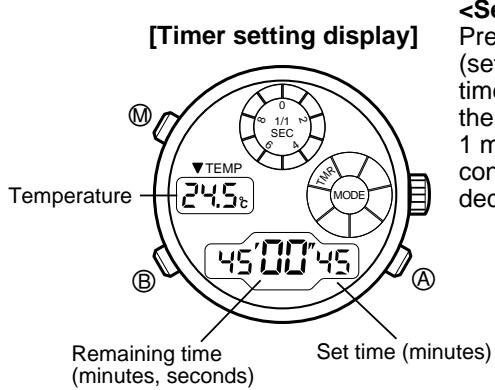
Appuyez sur le bouton ⑧ dans l'affichage de réglage de la minuterie (le temps réglé clignote) pour modifier le temps réglé. Chaque fois que le bouton ⑧ est pressé, le temps réglé indiqué diminue de 1 minute. (Si le bouton ⑧ est pressé en continu, la valeur indiquée diminue rapidement.)
(1) Appuyez sur le bouton pour démarrer la minuterie au temps réglé. (2) Si le bouton est pressé pendant le compte à rebours de la minuterie, la minuterie s'arrête. Si le bouton est pressé à nouveau, la minuterie redémarre. (3) Si le bouton est pressé lorsque la minuterie est arrêtée, l'affichage revient au temps réglé de la minuterie.
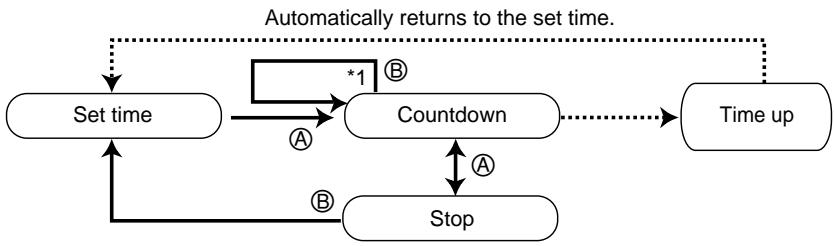
*1 : Fonction de redémarrage de la minuterie
Si le bouton ⑧ est pressé pendant le compte à rebours de la minuterie, le mode change immédiatement pour l'affichage du temps réglé de la minuterie et redémarre.
Son de confirmation
Au moment du démarrage, de l'arrêt, de la remise à zéro ou du redémarrage de la minuterie en mode minuterie, un son de confirmation se fait entendre.
Si le bouton est pressé en mode minuterie pour changer de mode, le compte à rebours continue en interne. Si le mode est changé à nouveau en mode minuterie, le temps compté en continu par la minuterie est affiché. Cependant, si le temps de la minuterie est écoulé, l'affichage revient au temps réglé de la minuterie.
5. UTILISATION DU THERMOMÈTRE
Le thermomètre indique la température actuelle ou la dernière température mesurée dans tous les modes, sauf le mode chronographe.
La température est mesurée de deux manières :
- Par action sur un bouton à tout moment
- Mesure automatique toutes les heures, à l'heure pile
La température peut être indiquée en degrés Celsius (°C) ou en degrés Fahrenheit (°F).
La température est mesurée automatiquement toutes les heures, à l'heure pile, et lorsque le mode passe de chronographe à minuterie de course.
Cependant, si la montre est en état de réglage (indication clignotante) en mode heure ou en mode chronographe au moment de la mesure, aucune température n'est mesurée.
Si le bouton ⑧ est pressé en mode heure normale ou en mode calendrier, la température est mesurée à plusieurs reprises pendant 3 minutes à intervalles de 2 secondes.
| In Centigrade (°C) | On Fahrenheit scale (°F) | |
| Temperature display range | -9.9°C ~ +59.9°C | 14°F ~ 139°F |
| Measurement unit | 0.1°C | 1°F |
| Measurement accuracy | 20°C ~ 30°C: ±1°C | 68°F ~ 86°F: ±2°F |
| -5°C ~ +40°C: ±2°C | 23°F ~ 104°F: ±4°F |
(Remarque)
- Si la montre est portée au poignet pendant la mesure de la température, la température corporelle affecte la mesure.
Pour une mesure précise de la température, retirez la montre et laissez-la dans l'environnement de mesure pendant au moins 20 à 30 minutes. L'influence de la température corporelle dépend des conditions environnementales telles que la différence entre la température atmosphérique et la température corporelle avant de retirer la montre, etc.
- N'utilisez pas le thermomètre en dehors de la plage d'affichage. Une température extrêmement chaude ou froide peut provoquer une panne de la montre.
Appuyez sur le bouton A en mode heure ou calendrier pendant plus de 3 secondes tout en appuyant sur le bouton M. L'affichage de la température passe de degrés Celsius (°C) à degrés Fahrenheit (°F) ou vice versa.
Si le bouton est pressé avant le bouton , l'affichage ne change pas.

6. INDICATEUR DE BATTERIE FAIBLE
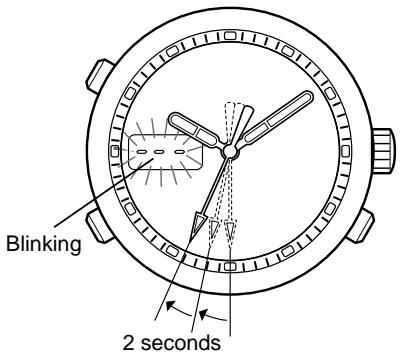
Lorsque la batterie est faible, l'indicateur de batterie faible apparaît sur l'affichage numérique 2 comme indiqué ci-dessous.
- L'aiguille des secondes se déplace par intervalles de 2 secondes (elle avance de 2 graduations toutes les 2 secondes).
- En mode heure ou calendrier, l'affichage de la température commence à clignoter "---".
Même si la montre se trouve dans cet état, elle affiche toujours l'heure, mais le rétroéclairage EL, le thermomètre et l'alarme ne fonctionneront pas. Remplacez immédiatement la batterie par une neuve.
7. RÉINITIALISATION COMPLÈTE
Après le remplacement de la batterie, assurez-vous d'effectuer la réinitialisation complète comme indiqué ci-dessous.
Si la montre fonctionne mal ou affiche un affichage anormal à la suite d'un choc excessif ou d'électricité statique (par exemple, la montre n'affiche rien, émet une alarme en continu, etc.), effectuez la réinitialisation complète.
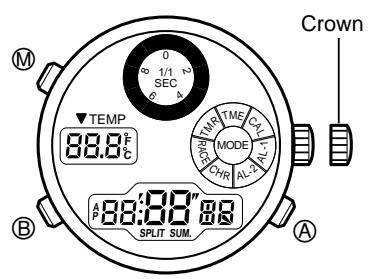
(1) Tirez la couronne. (2) Appuyez simultanément sur les boutons A, B et M. (3) Relâchez les trois boutons. (4) Repoussez la couronne. (Un son de confirmation se fait entendre.)
La réinitialisation complète est terminée.
Avant utilisation, réglez la montre à l'heure correcte dans tous les modes.
8. UTILISATION DE LA LUNETTE
Certaines montres ne disposent pas des fonctions de lunette suivantes en raison de différences de type ou de conception.
- Fonction boussole
- Fonction voile
- Fonction boussole (dans l'hémisphère nord)
La direction approximative de la boussole peut être obtenue grâce à cette fonction, en se basant sur la direction du soleil.
Orientez l'aiguille des heures vers le soleil. Le point médian entre l'aiguille des heures et le repère de 12 heures correspond approximativement au sud. Orientez le repère "S" vers le sud et vous pourrez lire les directions approximatives de la boussole. Utilisez cette indication uniquement comme repère, car elle varie légèrement selon la saison et la latitude.
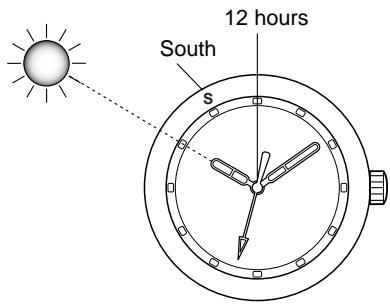
2. Fonction voile
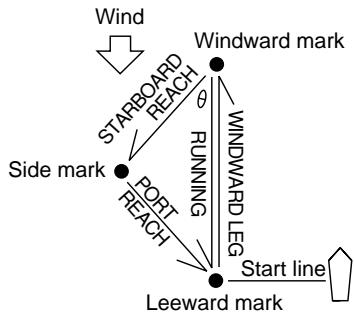
En général, dans les régates de voiliers, des marques comme celles indiquées sur la figure sont placées sur le parcours. Les régatiers s'affrontent pour savoir qui peut parcourir le parcours le plus rapidement dans l'ordre spécifié. Les directions de navigation sont spécifiées par des angles : nord = 0°, est = 90°, sud = 180°, ouest = 270°. Naviguer avec le vent venant du côté droit s'appelle bâbord amure, et naviguer avec le vent venant du côté gauche s'appelle tribord amure.
(2) Le parcours vers la marque latérale depuis la marque au vent (reach de tribord) est dans la direction de la marque verte "▲" située en bas à gauche. Par conséquent, naviguez dans cette direction pour atteindre la marque latérale même si celle-ci est difficile à repérer en raison du mauvais temps. (3) De la même manière qu'en (2), naviguez dans la direction indiquée par la marque rouge "▲" pour suivre le parcours de la marque latérale à la marque sous le vent (reach de bâbord). (4) Pour naviguer de la marque latérale droite vers la gauche, dirigez le voilier dans la direction de la marque blanche "▲".
Remarque : La méthode ci-dessus n'est efficace que lorsque θ est réglé à 45°. Si θ est de 60° et que la marque latérale se projette latéralement, lisez les chiffres au-dessus des marques verte et rouge, sinon le bon parcours ne peut pas être trouvé. Si θ est de 30° et que la marque latérale est à l'intérieur, lisez les chiffres sous les marques rouge et verte.
(1) Avant de prendre le départ, repérez la marque au vent à l'aide de la boussole et orientez la marque "▲" du repère de 12 heures dans cette direction.
Le voilier peut naviguer au plus près du vent avec un angle de 45° (un voilier performant peut atteindre 40°). Si le voilier est mené au plus près avant la course et que l'angle obtenu au niveau de la marque rouge ou verte (en haut à droite ou en haut à gauche) est réglé, le changement de vent peut être lu pendant la course. Ainsi, le voilier peut être mené dans la direction la plus favorable.
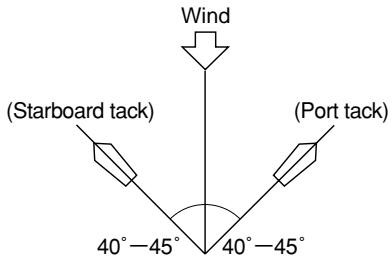
La lunette peut être utilisée pour trouver l'angle de la ligne de départ par rapport à la direction du vent. La ligne de départ est généralement perpendiculaire au vent, à un angle de 90°. Cependant, il est rare qu'elle soit vraiment à angle droit car la direction du vent change fréquemment. Par conséquent, placez le repère triangulaire blanc dans la direction du vent et naviguez dans la direction d'une extrémité à l'autre. Si la direction de navigation est du côté positif de la ligne blanche du point de 3 heures (ou 9 heures), il est avantageux de naviguer près de la direction actuelle. Si la direction actuelle est du côté négatif de la ligne blanche, il est avantageux de prendre une route opposée au repère.

- En utilisant pleinement les trois fonctions, vous pouvez naviguer sur la route la plus favorable.
9. PRÉCAUTIONS
(L'unité "bar" est approximativement égale à 1 atmosphère.)
| Indication | Specifications | Minor exposure to water (washing face, rain, etc.) | Moderate exposure to water (washing, kitchen work, swimming, etc.) | Marine sports (skin diving) | Scuba diving (with air tank) | Operation of the crown or buttons with moisture visible | |
| Dial | Case (case back) | ||||||
| No indication | WATER RESIST(ANT) | Water-resistant to 3 atmospheres | OK | NO | NO | NO | NO |
| WATER RESIST 5 bar or no indication | WATER RESIST(ANT) 5 bar | Water-resistant to 5 atmospheres | OK | OK | NO | NO | NO |
| WATER RESIST 10/20 bar or no indication | WATER RESIST(ANT) 10/20 bar | Water-resistant to 10/20 atmospheres | OK | OK | OK | NO | NO |
ATTENTION : Performance d'étanchéité à l'eau
Il existe plusieurs types de montres étanches, comme indiqué dans le tableau suivant. Pour une utilisation correcte dans les limites de conception de la montre, confirmez le niveau d'étanchéité de votre montre, comme indiqué sur le cadran et le boîtier, et consultez le tableau.
- Étanchéité pour un usage quotidien (jusqu'à 3 atmosphères) : Ce type de montre résiste à une exposition mineure à l'eau. Par exemple, vous pouvez porter la montre en vous lavant le visage ; cependant, elle n'est pas conçue pour être utilisée sous l'eau.
- Étanchéité améliorée pour un usage quotidien (jusqu'à 5 atmosphères) : Ce type de montre résiste à une exposition modérée à l'eau. Vous pouvez porter la montre en nageant ; cependant, elle n'est pas conçue pour être utilisée en plongée libre.
- Étanchéité améliorée pour un usage quotidien (jusqu'à 10/20 atmosphères) : Ce type de montre peut être utilisé pour la plongée libre ; cependant, elle n'est pas conçue pour la plongée sous-marine ou la plongée saturée utilisant de l'hélium.
ATTENTION
- Assurez-vous d'utiliser la montre avec la couronne enfoncée (position normale). Si votre montre a une couronne à vis, assurez-vous de bien la serrer.
- N'actionnez PAS la couronne ou les boutons avec des doigts mouillés ou lorsque la montre est mouillée. L'eau peut pénétrer dans la montre et compromettre son étanchéité.
- Si la montre est utilisée dans l'eau de mer, rincez-la à l'eau douce après utilisation et essuyez-la avec un chiffon sec.
- Si de l'humidité a pénétré dans la montre, ou si l'intérieur du verre est embué et ne redevient pas clair en un jour, apportez immédiatement la montre à votre revendeur ou au centre de service Citizen pour réparation. Laisser la montre dans un tel état permettra à la corrosion de se former à l'intérieur.
- Si de l'eau de mer pénètre dans la montre, placez la montre dans une boîte ou un sac en plastique et apportez-la immédiatement pour réparation. Sinon, la pression à l'intérieur de la montre augmentera et des pièces (verre, couronne, boutons, etc.) pourraient se détacher.
ATTENTION : Gardez votre montre propre.
- Laisser de la poussière et de la saleté s'accumuler entre le boîtier et la couronne peut rendre difficile l'extraction de la couronne. Tournez la couronne dans sa position normale de temps en temps pour desserrer la poussière et la saleté, puis brossez-les.
- La poussière et la saleté ont tendance à s'accumuler dans les interstices du dos du boîtier ou du bracelet. La poussière et la saleté accumulées peuvent provoquer de la corrosion et tacher vos vêtements. Nettoyez la montre de temps en temps.
Nettoyage de la montre
- Utilisez un chiffon doux pour essuyer la saleté, la transpiration et l'eau du boîtier et du verre.
- Utilisez un chiffon doux et sec pour essuyer la transpiration et la saleté du bracelet en cuir.
- Pour nettoyer un bracelet en métal, en plastique ou en caoutchouc, lavez la saleté avec de l'eau savonneuse douce. Utilisez une brosse douce pour enlever la poussière et la saleté coincées dans les interstices du bracelet en métal. Si votre montre n'est pas étanche, apportez-la à votre revendeur.
REMARQUE : Évitez d'utiliser des solvants (diluant, benzine, etc.), car ils peuvent ternir la finition.
AVERTISSEMENT : Manipulation de la pile
- Gardez la pile hors de portée des jeunes enfants. Si un enfant avale la pile, contactez immédiatement un médecin.
ATTENTION : Remplacement de la pile
- Pour remplacer la pile, confiez votre montre à votre revendeur ou à un centre de service Citizen.
- Remplacez la pile dès que possible si sa durée de vie est expirée. Laisser une pile déchargée dans la montre peut entraîner une fuite, ce qui peut gravement endommager la montre.
ATTENTION : Environnement d'utilisation
- Utilisez la montre dans la plage de températures de fonctionnement spécifiée dans le manuel d'instructions.
L'utilisation de la montre à des températures hors de la plage spécifiée peut entraîner une détérioration des fonctions ou même l'arrêt de la montre.
- N'utilisez PAS la montre dans des endroits exposés à des températures élevées, comme un sauna. Cela pourrait provoquer des brûlures cutanées.
- Ne laissez PAS la montre dans un endroit exposé à des températures élevées, comme la boîte à gants ou le tableau de bord d'une voiture. Cela pourrait entraîner une détérioration de la montre, comme la déformation des pièces en plastique.
- Ne placez PAS la montre près d'un aimant. Le réglage de l'heure deviendra imprécis si vous placez la montre près d'équipements de santé magnétiques tels qu'un collier magnétique, une fermeture magnétique de porte de réfrigérateur, une fermeture de sac à main ou l'écouteur d'un téléphone portable. Si cela se produit, éloignez la montre de l'aimant et réglez à nouveau l'heure.
- Ne placez PAS la montre près d'appareils électroménagers qui génèrent de l'électricité statique. Le réglage de l'heure peut devenir imprécis si la montre est exposée à une forte électricité statique, comme celle émise par un écran de télévision.
- Ne soumettez PAS la montre à un choc violent, comme la faire tomber sur un sol dur.
- Évitez d'utiliser la montre dans un environnement où elle pourrait être exposée à des produits chimiques ou à des gaz corrosifs. Si des solvants, tels que le diluant et la benzine, ou des substances contenant de tels solvants entrent en contact avec la montre, une décoloration, une fusion, des fissures, etc. peuvent en résulter. Si la montre entre en contact avec le mercure utilisé dans les thermomètres, le boîtier, le bracelet ou d'autres pièces peuvent se décolorer.
10. SPÉCIFICATIONS
- Numéro de calibre : C70*
- Type : montre à quartz combinée (analogique et numérique)
- Précision de la montre : ±20 secondes par mois (en moyenne) (portée à température ambiante [+5 °C à +35 °C / 41 °F à 95 °F])
- Plage de température de fonctionnement : 0 °C à +55 °C / 32 °F à 131 °F
- Fonctions d'affichage :
- Heure : heures, minutes, secondes, température
- Calendrier : mois, date, jour de la semaine, température
- Alarme 1 et 2 : heures, minutes, alarme ON/OFF (désactivée)
- Chronographe : chronographe 24 heures (unité : 1/1000 seconde), temps intermédiaire
- Minuteur de course : réglage de 15 façons, son d'avertissement de fin de temps, fonction chronographe automatique
- Minuteur : minuteur 60 minutes (unité de réglage : 1 minute)
- Fonctions supplémentaires : fonction de rétroéclairage EL, fonction thermomètre
- Fonction d'avertissement de batterie faible
- Pile utilisée : n° de pile : 280-44, code de pile : SR927W
- Durée de vie de la pile : environ 2 ans (conditions d'utilisation ; son d'alarme : 20 secondes/jour, son de fin de temps en mode minuteur : 5 secondes/jour, rétroéclairage EL : 3 secondes/jour)
- La pile spécifiée garantit la précision pendant 2 ans lorsque la montre est utilisée dans les conditions d'utilisation standard mentionnées ci-dessus. Cependant, la durée de vie de la pile varie considérablement selon la fréquence d'utilisation de l'alarme, du chronographe, de l'éclairage EL, etc.
- Les spécifications sont sujettes à modification sans préavis, à des fins d'amélioration.


- SOMMAIRE
- NOM DES PIÈCES
- RÉGLAGE DES AIGUILLES
- CHANGEMENT DES FONCTIONS NUMÉRIQUES (MODES)
- UTILISATION DE CHAQUE FONCTION (MODE)
- MODE HORAIRE
- MODE CALENDRIER
- [AFFICHAGE NORMAL DU CALENDRIER]
- MODES ALARME 1 ET
- [AFFICHAGE NORMAL DE L'ALARME (ON)]
- DURÉE DE LA SONNERIE DE L'ALARME, ARRÊT DE L'ALARME
- MODE CHRONOGRAPHE
- SON DE CONFIRMATION ET LUMIÈRE EL
- MODE CHRONOMÈTRE DE COURSE
- REMARQUE
- AVERTISSEUR SONORE DE FIN DE TEMPS
- SON DE CONFIRMATION
- UTILISATION DU THERMOMÈTRE
- (REMARQUE)
- INDICATEUR DE BATTERIE FAIBLE
- RÉINITIALISATION COMPLÈTE
- UTILISATION DE LA LUNETTE
- FONCTION VOILE
- PRÉCAUTIONS
- ATTENTION : PERFORMANCE D'ÉTANCHÉITÉ À L'EAU
- ATTENTION
- ATTENTION : GARDEZ VOTRE MONTRE PROPRE
- NETTOYAGE DE LA MONTRE
- AVERTISSEMENT : MANIPULATION DE LA PILE
- ATTENTION : REMPLACEMENT DE LA PILE
- ATTENTION : ENVIRONNEMENT D'UTILISATION
- SPÉCIFICATIONS
Marque : CITIZEN WATCH
Modèle : C70
Catégorie : Montre