
C70 - Wristwatch CITIZEN WATCH - Free user manual and instructions
Find the device manual for free C70 CITIZEN WATCH in PDF.


| Product Type | Analog and digital combination watch |
| Brand | CITIZEN WATCH |
| Model | C70 |
| Power supply | SR927W battery (280-44), lifespan approximately 2 years |
| Display | Analog (hands) and digital (liquid crystal) |
| Main functions | Time, automatic calendar, two alarms, 1/1000s chronograph, timer, thermometer, EL backlight, sail/compass function via bezel |
| Accuracy | ±20 seconds per month (under normal conditions) |
| Operating temperature range | 0°C to +55°C |
| Water resistance | Varies by model: see indication on dial (up to 20 bar for some) |
| Maintenance and cleaning | Soft cloth for case and glass, soapy water for metal/plastic/rubber straps, avoid solvents |
| Safety | Do not expose to extreme temperatures, magnets, strong shocks, or chemicals |
| Spare parts and repairability | Replace battery at an authorized dealer or Citizen after-sales service |
| General information | Caliber C70*; general reset possible after shock or malfunction |
Frequently Asked Questions - C70 CITIZEN WATCH
User questions about C70 CITIZEN WATCH
0 question about this device. Answer the ones you know or ask your own.
Ask a new question about this device
Download the instructions for your Wristwatch in PDF format for free! Find your manual C70 - CITIZEN WATCH and take your electronic device back in hand. On this page are published all the documents necessary for the use of your device. C70 by CITIZEN WATCH.
USER MANUAL C70 CITIZEN WATCH
This watch is a combination quartz watch, with a race timer function for various races such as yacht racing, etc., chronograph function, and timer function. It also has a thermometer function and an EL (electroluminescence) light function.
CONTENTS
- NAME OF PARTS 4
- SETTING THE HANDS 7
- CHANGING DIGITAL FUNCTIONS (MODES) 8
- USING EACH FUNCTION (MODE) 9
A. Time mode 9 B. Calendar mode 12 C. Alarm 1 & 2 modes 14 D. Chronograph mode 17 E. Race timer mode 20 F. Timer mode 25
- USING THE THERMOMETER 28
- LOW BATTERY INDICATOR 31
- ALL RESET 32
- USING THE BEZEL 33
- PRECAUTIONS 38
- SPECIFICATIONS 45
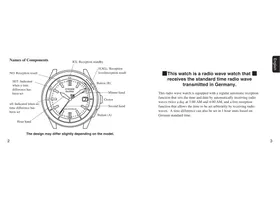
1. NAME OF PARTS
| Mode Name | Time | Calendar | Alarm 1 | Alarm 2 | Chronograph | Race Timer | Timer | |
| Button A | Press once | EL light ON | Switching ON/OFF | Switching ON/OFF | Start/Stop | Start/Stop | Start/Stop | |
| Press for more than 2 seconds | Alarm monitor | Alarm monitor | — | — | — | |||
| Button B | Press once | Thermometry | Thermometry | — | — | Split/Reset | Set time adjustment | Set time adjustment |
| Press for more than 2 seconds | To time adjustment mode | To calendar adjustment mode | To alarm adjustment mode | To alarm adjustment mode | — | Quick set time adjustment | Quick set time adjustment | |
| Button M | Press once | To <CAL> mode | To <AL-1> mode | To <AL-2> mode | To <CHR> mode | To <RACE> mode | To <TMR> mode | To <TME> mode |
| 1: Mode mark display | TME | CAL | AL-1 | AL-2 | CHR | RACE | TMR | |
| 2: Digital display [1] | Hours, Minutes, Seconds | Month, Date, Day of the week | Set time, ON/OFF | Set time, ON/OFF | Hours, Minutes, Seconds | Minutes, Seconds, Set time | Minutes, Seconds, Set time | |
| 3: Digital display [2] | Temperature | Temperature | Temperature | Temperature | 1/1000 second | Temperature | Temperature | |
| 4: Graphic display | Always indicates graphic, synchronized with digital display 1 |
| 5: Crown | Used for setting analog |
| 6: Hour hand | Always indicates time (hours) |
| 7: Minute hand | Always indicates time (minutes) |
| 8: Second hand | Always indicates time (seconds) |
| 9: Thermosensor | Senses current temperature, shown by digital display 2 |
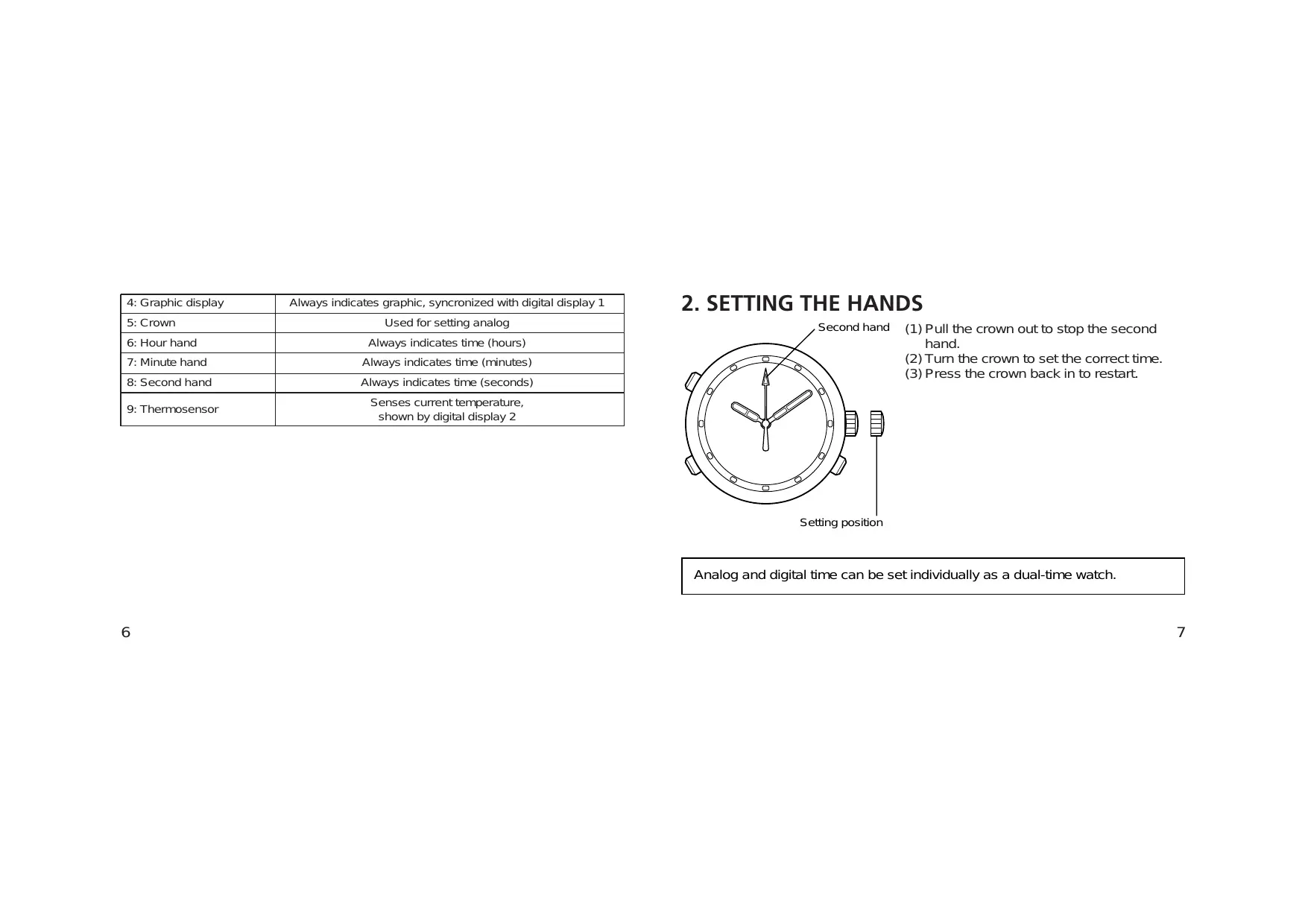
2. SETTING THE HANDS

(1) Pull the crown out to stop the second hand. (2) Turn the crown to set the correct time. (3) Press the crown back in to restart.
Analog and digital time can be set individually as a dual-time watch.
3. CHANGING DIGITAL FUNCTIONS (MODES)
Besides the time function, this watch has six other functions: calendar, alarm 1, alarm 2, chronograph, race timer, and timer.
The current mode can be checked by the mode mark. Each time button M is pressed, the watch mode changes in the following sequence.
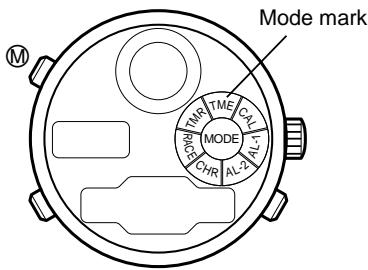
| Mode mark | Mode (function) |
| TME | Time |
| CAL | Calendar |
| AL-1 | Alarm 1 |
| AL-2 | Alarm 2 |
| CHR | Chronograph |
| RACE | Race timer |
| TMR | Timer |
When the watch is left in alarm 1 or alarm 2 mode for more than 2 minutes, it automatically returns to time mode.
4. USING EACH FUNCTION (MODE)
A. Time mode
When button A is pressed or being pressed in time mode, the EL light is turned on.
When button B is pressed, the current temperature is recalculated.
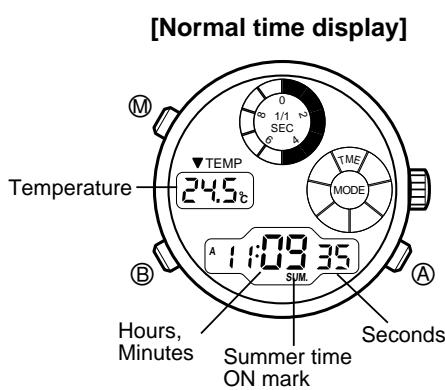
(1) Press button B in time mode for more than 2 seconds. The “SUM.” and “ON/OF” starts blinking to indicate that the watch enters time setting mode. (2) Press button A to set summer time on or off.
Each time button A is pressed, the summer time setting mode is switched on (ON) or off (OF) alternately.
(3) Press button M to return the watch to normal time display.
- When the watch is set to summer time (ON).
The "SUM." appears and the watch indicates a time that is one hour ahead of standard time.
(1) Press button O in normal time mode for more than 2 seconds. The "SUM." and "ON/OF" start blinking to indicate that the watch enters time setting mode. (2) Each time button B is pressed in time setting mode, the blinking figures change from the "SUM." to "seconds", "minutes", "hours", "12-hour/24-hour", and to "SUM." again. Use button B to select the figures you want to change. (3) Adjust the blinking figures by pressing button A. (If button A is pressed continuously, the figures change quickly.) - The summer time display is switched ON/OFF each time button A is pressed. - For resetting seconds, press button A to restart from "00" second. - The "12-hour/24-hour" indication system is switched alternately each time button A is pressed. (4) Press button M to return the watch to normal time display.
- When setting time in 12-hour indication system, make sure it is correctly set for the morning (A) or the afternoon (P).
- If the watch is left in time setting mode (figures blinking) for more than 2 minutes, it returns to normal time display automatically.
- If button M is pressed in time setting mode, the watch returns to normal time display.
B. Calendar mode
When button A is pressed or being pressed in calendar mode, the EL light is turned on.
When button B is pressed, the current temperature is recalculated.
[Normal calendar display]
Temperature
Month, Date Day of the week![CITIZEN WATCH C70 - [Normal calendar display] - 1](/content/2025/01/176730/images/85a8294900efb435b0fc1fd0602e829eef7e1cf7a79b03d89fc324e4d2a8b126.jpg)
(1) Press button B in calendar mode for more than 2 seconds. The "Month" starts blinking to indicate that the watch enters calendar setting mode. (2) Press button B to select the setting "Month", "Date" or "Year". Blinking figures move in order from "Month" to "Date", to "Year". (3) Press button A to adjust the blinking figures. (If button A is pressed continuously, the figures change quickly.) (4) Press button M to return the watch to normal calendar display.
- The Year (in the Christian era) can be set between 1998 and 2099. (Year display appears in calendar setting mode only.)
- If the watch is left in calendar setting mode (figures blinking) for more than 2 minutes, the watch returns to normal calendar display automatically.
- The correct day of the week is automatically set as a result of setting the year, month and date.
- If the date is set to a non-existing date (for example, February 30), the watch automatically displays the first day of the next month when it returns to normal calendar display.
- This watch does not need to be set for the 1st day of every month due to the automatic calendar function.
- If button M is pressed in calendar setting mode, the watch returns to normal calendar display.
C. Alarm 1 & 2 modes
The only difference between alarm 1 and alarm 2 is the sound. The two modes are the same in use and setting manner. When either alarm is set (ON) once, it sounds for 20 seconds at the same time every day.
[Normal alarm display (ON)]
Temperature
![CITIZEN WATCH C70 - [Normal alarm display (ON)] - 1](/content/2025/01/176730/images/a62aed074140b1a3b9e1bc15216588d8093e26826ed36e231b570dc8eb5745f2.jpg)
Alarm time (hours, minutes)
(1) Press button ⑧ in alarm mode for more than 2 seconds. The “Hours” starts blinking to indicate that the watch enters alarm setting mode. The blinking figures can be adjusted. (2) Press button A to adjust "Hours". (3) While the "Hours" is blinking, press button ⑧ to start the "Minutes" blinking. (4) Press button A to adjust "Minutes". (Pressing button A continuously changes the figures quickly.) (5) Press button M to return the watch to normal alarm display.
Each time button A is pressed while in normal alarm display, the alarm is switched ON/OFF (off) alternately.
("ON": alarm is on, "OF": alarm is off.)
![CITIZEN WATCH C70 - [Normal alarm display (ON)] - 1](/content/2025/01/176730/images/fc3a694647c438b037a150e0739331c6f13fa0766e4f272513eada31751efe3a.jpg)
< Alarm sound duration, Stopping alarm>
The Alarm sound duration is 20 seconds. Alarm sound stops by pressing any button.
While button A is being pressed in alarm mode, the alarm continues to sound.
- When time mode is in 12-hour system, the alarm mode is in the same system. Be aware of A/P indication whether it is set for morning (A) or afternoon (P).
- If time mode is set for summer time, it does not affect the alarm mode.
- If the watch is left in alarm setting mode for more than 2 minutes, it automatically returns to normal alarm display.
- If button M is pressed in alarm setting mode, the watch returns to normal alarm display.
D. Chronograph mode
The chronograph is capable of measuring and indicating a maximum of 23 hours, 59 minutes, 59 seconds and 999 milliseconds in increments of 1/1000 second. After 24 hours, it stops with a reset display of "00'00'00"000". The chronograph can also measure split time (elapsed time).
[Chronograph reset display] Measured time (hours, minutes, seconds)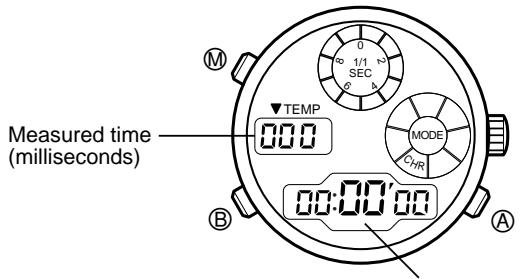
(1) The chronograph starts or stops each time button A is pressed. (2) To reset the chronograph, press button B after it is stopped.
(1) The chronograph starts or stops each time button A is pressed. (2) Press button B during a time measurement, and the watch shows a split time for 10 seconds. While a split time is shown, "SPLIT" will blink.
Each time button C is pressed, the chronograph shows the latest split time. (3) To reset chronograph, press button B after it is stopped.
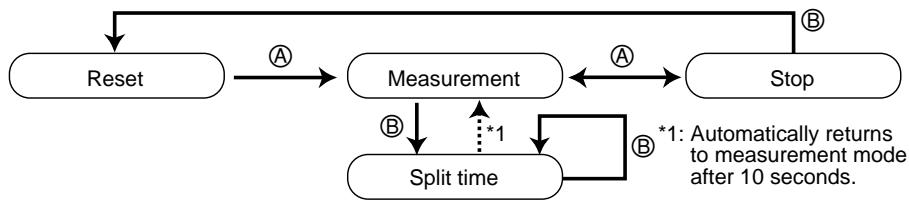
Even if button M is pressed during a time measurement in chronograph mode and mode is changed, time measurement is continued internally. The measured time is shown when the mode is returned to chronograph again. However, if the time measurement is continued for more than 24 hours, the chronograph stops at the reset state.
* Confirmation sound and EL light
At the time of start, stop, split time check or reset operation in chronograph mode, a confirmation sound is heard.
At the time of stop or a split time measurement, the EL light is turned on for 3 seconds with the sound.
Split time: Elapsed time from start point
E. Race timer mode
Race timer mode has an automatic chronograph function that starts time measurement when set time is up. The timer can be set in 15 ways; for 1, 3, 5 or 6 minutes, and for 10 to 60 minutes in increments of 5 minutes. Set the timer according to the race.
[Race timer setting display]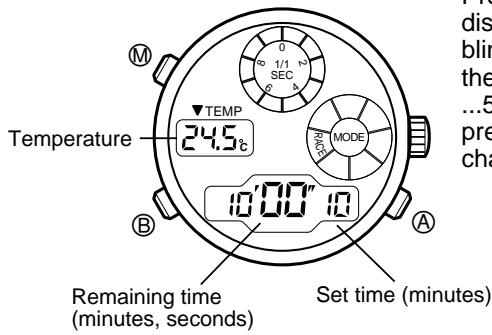
Press button ⑧ in race timer setting display to select a set time (set time blinks). Each time button ⑧ is pressed, the set time changes from 60, 55, 50, ...5, 3, 1 (minutes). (If button ⑧ is pressed continuously, the set time changes quickly.)
(1) Press button A in race timer setting display and the race timer starts counting down. (2) If button A is pressed during the countdown, the race timer stops. If button A is pressed again, the race timer restarts the countdown. (3) If button B is pressed after the race timer is stopped, the set time of the race timer is shown. (4) When the countdown of the set time is complete, the automatic chronograph starts while a time-up signal is sounding for 5 seconds.
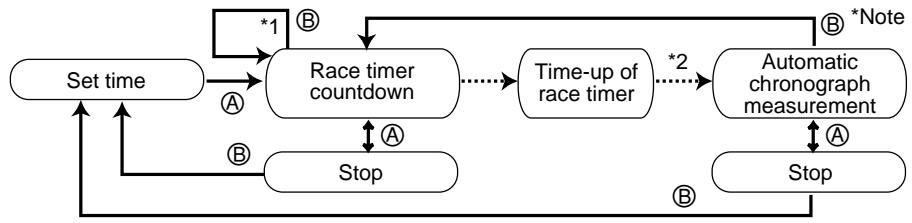
*1: Race timer restart function (flyback function)
If button ⑧ is pressed during the countdown, the race timer returns to the set time and restarts.
*2: Automatic chronograph start function
When the set time of the race timer is up, the automatic chronograph starts.
The automatic chronograph starts time measurement the instant the race timer time is up. The maximum time is 23 hours, 59 minutes, 59 seconds in increments of 1 second. After 24 hours, it returns to race timer set time.
(1) Each time button A is pressed while the automatic chronograph is in the time measurement display, the automatic chronograph alternately stops and restarts. (2) If button B is pressed while the automatic chronograph is in the time measurement display, the display returns to race timer countdown. (3) If button B is pressed when the automatic chronograph is stopped, and the display returns to the race timer set time.
* Note
After race timer is switched to the automatic chronograph display, the race timer repeats the countdown internally according to the set time.
If button B is pressed in automatic chronograph display to change to the race timer display, the race timer indicates the remaining time (in the countdown) that has repeatedly been checked internally. (However, if the automatic chronograph is stopped halfway, the timer that internally continues checking time will not stop.)
Example: When the race timer is set for 5 minutes.
The race timer repeats for 5 minutes while the automatic chronograph is in time measurement. If button ⑧ is pressed 3 minutes after the automatic chronograph display, 2 minutes is indicated as the remaining time of the race timer.
Time-up warning sound
A time-up warning sound is heard when the remaining time is 10, 5, 3 minutes, 1 minute, 50 seconds, 40, 30, 20, 10, 5, 4, 3, 2 seconds and 1 second before the set time is up.
Confirmation sound
At the time of start, stop, reset or restart operation in race timer or automatic chronograph mode, a confirmation sound is heard.
If button M is pressed in race timer or automatic chronograph display, the time measurement is continued internally. If the mode is moved to race timer again, the time that is continuously measured by the race timer is indicated. However, if automatic chronograph continues for more than 24 hours, the display is returned to the set time of the race timer.
F. Timer mode
The timer can be set for 1 minute to 60 minutes in increments of 1 minute. When the set time is up, a time-up warning sound is heard for about 5 seconds. After that, the timer returns to set time and stops.
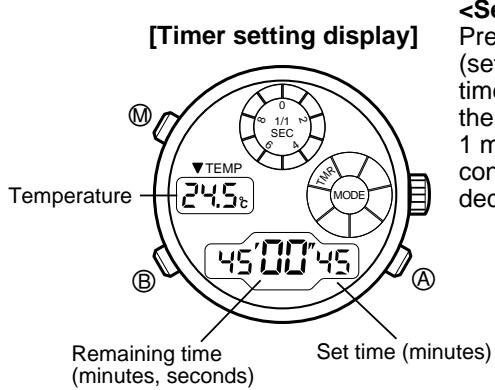
Press button ⑧ in timer setting display (set time is blinking) to change the set time. Each time button ⑧ is pressed, the indicated set time decreases by 1 minute. (If button ⑧ is pressed continuously, the indicated value decreases quickly.)
(1) Press button A to start the timer at the set time. (2) If button A is pressed during timer countdown, the timer stops. If button A is pressed again, the timer restarts. (3) If button B is pressed when the timer stops, the display returns to the timer set time.
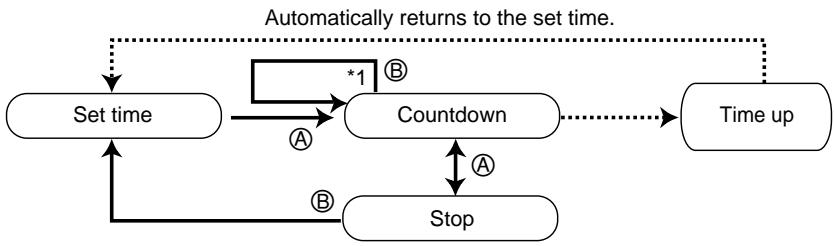
*1: Timer restart function
If button ⑧ is pressed during timer countdown, the mode immediately changes to timer set time display and restarts.
Confirmation sound
At the time of start, stop, reset or timer restart operation in timer mode, a confirmation sound is heard.
If button M is pressed in timer mode to change the mode, the time countdown is continued internally. If the mode is changed again to timer mode, the time continuously counted down by the timer is displayed. However, if the timer time is up, the display returns to timer set time.
5. USING THE THERMOMETER
The thermometer indicates the current or last measured temperature in all modes except the chronograph mode.
Temperature is measured in two ways:
- By button operation at any time
- Automatically measured every hour, on the hour
Temperature can be indicated either in centigrade (°C) or on Fahrenheit (°F).
Temperature is automatically measured every hour, on the hour and when the mode changes from chronograph to race timer.
However, if the watch is in the setting status (blinking indication) in time mode or chronograph mode at the moment of measurement, no temperature is measured.
If button ⑧ is pressed in the normal time mode or calendar mode, temperature is repeatedly measured for 3 minutes at intervals of 2 seconds.
| In Centigrade (°C) | On Fahrenheit scale (°F) | |
| Temperature display range | -9.9°C ~ +59.9°C | 14°F ~ 139°F |
| Measurement unit | 0.1°C | 1°F |
| Measurement accuracy | 20°C ~ 30°C: ±1°C | 68°F ~ 86°F: ±2°F |
| -5°C ~ +40°C: ±2°C | 23°F ~ 104°F: ±4°F |
(Note)
- If the watch is worn on the wrist during temperature measurement, the body temperature affects measurement.
For accurate temperature measurement, take the watch off and leave it in the measuring environment at least for 20 to 30 minutes. The influence of body temperature depends on environmental conditions such as difference between atmospheric temperature and body temperature before taking the watch off, etc.
- Do not use the thermometer out of the display range. Extremely hot or cold temperature may cause breakdown of the watch.
Press button A in time or calendar mode for more than 3 seconds while pressing button M. The temperature display changes from centigrade (°C) to Fahrenheit (°F) or vice versa.
If button A is pressed before button M, the display does not change.

6. LOW BATTERY INDICATOR
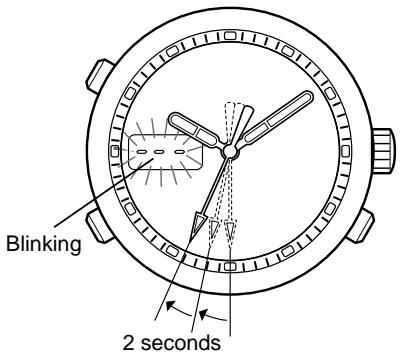
When the battery gets weak, the low battery indicator function appears in digital display 2 as shown below.
- The second hand moves at 2-second intervals (moves by 2 increments every 2 seconds).
- In time or calendar mode, the temperature display starts blinking "---".
Even when the watch falls into such condition, it still displays the time but the EL light, thermometer, and alarm will not function. Immediately replace the battery with a new one.
7. ALL RESET
After replacement of the battery, be sure to perform the all reset operation as shown below.
If the watch malfunctions or shows an abnormal display as a result of excessive shock or static electricity (for example, the watch indicates nothing, continuously sounds alarm, etc.), perform the all reset operation.
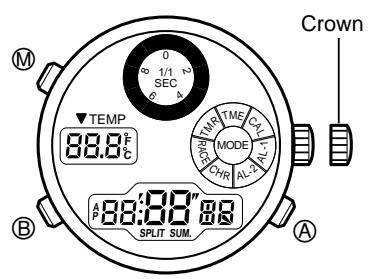
(1) Pull the crown out. (2) Simultaneously press buttons A, B, and M. (3) Release the three buttons. (4) Press the crown back. (A confirmation sound is heard.)
All reset operation is complete.
Before use, reset the watch for the correct time in all modes.
8. USING THE BEZEL
Some watches do not have the following bezel functions because of differences in type or design.
- Compass function
- Yachting function
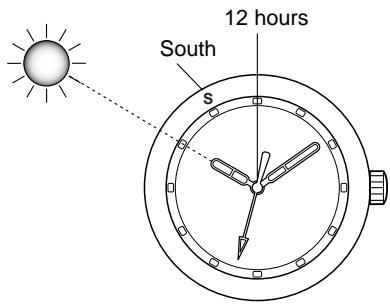
- Compass function (in the northern hemisphere)
Compass direction can be approximated by this function, based on the direction of the sun.
Point the hour hand in the direction of the sun. The midpoint between the hour hand and the 12 o'clock mark is roughly equal to south. Point the "S" mark in the south direction and you can read the approximate directions of the compass. Use this indication just as a guideline because the indication changes slightly depending on the season and latitude.
2. Yachting function
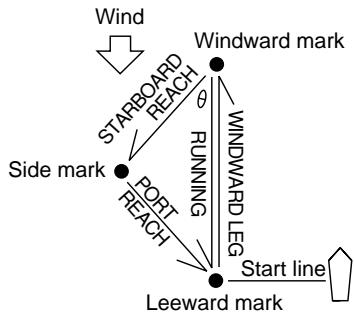
In general yacht racing, such markings as shown in the figure are set in the course. Yachtsmen compete in how fast they can sail the course in the specified order. Sailing directions are specified by angles such as north = 0°, east = 90°, south = 180°, west = 270°. Sailing with the wind coming from the right side is called starboard, sailing with wind from the left side is called port.
(2) The course toward the side mark from the windward mark (starboard reach) is in the direction of the green "▲" mark located in the lower left side. Therefore, sail in this direction so that the yacht reaches the side mark even when the mark is hard to find because of bad weather. (3) In the same manner as (2), sail in the direction indicated by the red "▲" mark in order to sail on the course from the side marking to the leeward mark (port reach). (4) For sailing from the right side marking to the left, sail the yacht in the direction of the white "▲" mark.
Note: The above-mentioned method is effective only when θ is set at 45°. If the θ is 60° and the side mark projects sideways, read the numbers above the green and red markings, otherwise the right course cannot be found. In case θ is 30° and the side mark is inside, read the numbers under the red and green markings.
(1) Before setting sail, find the windward mark by the compass and set the "▲" mark of the 12 o'clock point in the direction.
The yacht can sail in the windward direction at an angle of 45° (high performance yacht can sail 40°). If the yacht is sailed in the windward direction before race and the obtained angle at the red or green mark (upper right or upper left) is set, the wind shift can be read during the race. Therefore, the yacht can be sailed in the most favorable direction.
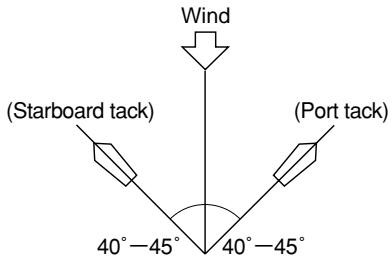
The bezel can be used to find the angle of the start line to the wind direction. The start line is generally set to the wind at an angle of 90 degrees. However, it seldom is the real right angle because the wind direction changes frequently. Therefore, set the white triangle mark in the wind direction and sail in the direction from one end to the other. If the sailing direction is in positive side of the white line of the 3-hours (or 9-hours) point, it is advantageous to set sail close to the current direction. If the current direction is in negative side of the white line, it is advantageous to take a course opposite to the mark.

- Making full use of the three functions enables you to sail in the most favorable course.
9. PRECAUTIONS
(The unit "bar" is roughly equal to 1 atmosphere.)
| Indication | Specifications | Minor exposure to water (washing face, rain, etc.) | Moderate exposure to water (washing, kitchen work, swimming, etc.) | Marine sports (skin diving) | Scuba diving (with air tank) | Operation of the crown or buttons with moisture visible | |
| Dial | Case (case back) | ||||||
| No indication | WATER RESIST(ANT) | Water-resistant to 3 atmospheres | OK | NO | NO | NO | NO |
| WATER RESIST 5 bar or no indication | WATER RESIST(ANT) 5 bar | Water-resistant to 5 atmospheres | OK | OK | NO | NO | NO |
| WATER RESIST 10/20 bar or no indication | WATER RESIST(ANT) 10/20 bar | Water-resistant to 10/20 atmospheres | OK | OK | OK | NO | NO |
CAUTION: Water-resistance performance
There are several types of water-resistant watches, as shown in the following table. For correct use within the design limits of the watch, confirm the level of water-resistance of your watch, as indicated on the dial and case, and consult the table.
- Water-resistance for daily use (to 3 atmospheres): This type of watch is water-resistant to minor exposure to water. For example, you may wear the watch while washing your face; however, it is not designed for use underwater.
- Upgraded water-resistance for daily use (to 5 atmospheres): This type of watch is water-resistant to moderate exposure to water. You may wear the watch while swimming; however, it is not designed for use while skin diving.
- Upgraded water-resistance for daily use (to 10/20 atmospheres): This type of watch may be used for skin diving; however, it is not designed for scuba or saturated diving using helium gas.
CAUTION
- Be sure to use the watch with the crown pressed in (normal position). If your watch has a screw-type crown, be sure to tighten the crown completely.
- Do NOT operate the crown or buttons with wet fingers or when the watch is wet. Water may enter the watch and compromise water-resistance.
- If the watch is used in seawater, rinse with fresh water afterward and wipe with a dry cloth.
- If moisture has entered the watch, or if the inside of the crystal is fogged up and does not become clear within a day, immediately take the watch to your dealer or Citizen Service Center for repair. Leaving the watch in such a state will allow corrosion to form inside.
- If seawater enters the watch, place the watch in a box or plastic bag and immediately take it in for repair. Otherwise, pressure inside the watch will increase, and parts (crystal, crown, buttons, etc.) may come off.
CAUTION: Keep your watch clean.
- Leaving dust and dirt deposited between the case and crown may result in difficulty in pulling the crown out. Rotate the crown while in its normal position, from time to time, to loosen dust and dirt and then brush it off.
- Dust and dirt tend to be deposited in gaps in the back of the case or band. Deposited dust and dirt may cause corrosion and soil your clothing. Clean the watch occasionally.
Cleaning the Watch
- Use a soft cloth to wipe off dirt, perspiration and water from the case and crystal.
- Use a soft, dry cloth to wipe off perspiration and dirt from the leather band.
- To clean a metal, plastic, or rubber watchband, wash away dirt with mild soap and water. Use a soft brush to remove dust and dirt jammed in the gaps in the metal band. If your watch is not water-resistant, take it to your dealer.
NOTE: Avoid using solvents (thinner, benzine, etc.), as they may mar the finish.
WARNING: Handling of the battery
- Keep the battery out of the reach of small children. If a child swallows the battery, contact a physician immediately.
CAUTION: Replacing the battery
- For replacement of the battery, take your watch to your dealer or Citizen Service Center.
- Replace the battery as soon as possible if the service life of the battery has expired. Leaving a depleted battery in the watch may result in leakage, which can damage the watch severely.
CAUTION: Operating environment
- Use the watch within the operating-temperature range specified in the instruction manual.
Using the watch where temperatures are outside the specified range, may result in deterioration of functions or even stoppage of the watch.
- Do NOT use the watch in places where it is exposed to high temperature, such as in a sauna. Doing so may result in a skin burn.
- Do NOT leave the watch in a place where it is exposed to high temperature, such as the glove compartment or dash-board of a car. Doing so may result in deterioration of the watch, such as deformation of plastic parts.
- Do NOT place the watch close to a magnet. Timekeeping will become inaccurate if you place the watch close to magnetic health equipment such as a magnetic necklace or a magnetic latch of a refrigerator door or handbag clasp or the earphone of a mobile phone. If this has occurred, move the watch away from the magnet and reset the time.
- Do NOT place the watch close to household appliances that generate static electricity. Timekeeping may become inaccurate if the watch is exposed to strong static electricity, such as is emitted from a TV screen.
- Do NOT subject the watch to a strong shock such as dropping it onto a hard floor.
- Avoid using the watch in an environment where it may be exposed to chemicals or corrosive gases. If solvents, such as thinner and benzine, or substances containing such solvents come in contact with the watch, discoloration, melting, cracking, etc. may result. If the watch comes in contact with mercury used in thermometers, the case, band or other parts may become discolored.
10. SPECIFICATIONS
- Caliber No.: C70*
- Type: Combination (analog and digital) quartz watch
- Watch accuracy: ±20 seconds per month (average) (Worn at room temperature [+5°C to +35°C / 41°F to 95°F])
- Operating temperature range: 0°C to +55°C / 32°F to 131°F
- Display functions:
- Time: Hours, minutes, seconds, temperature
- Calendar: Month, date, day of the week, temperature
- Alarm-1 & 2: Hours, minutes, alarm ON/OFF
- Chronograph: 24-hour chronograph (unit: 1/1000 second), split time
- Race timer: Set in 15 ways, time-up warning sound, automatic chronograph function
- Timer: 60-minute timer (setting unit: 1 minute)
- Additional functions: EL light function, thermometer function
- Low battery warning function
- Battery used: Battery No.: 280-44, Battery code: SR927W
- Battery life: 2 years approx. (operating conditions; alarm sound: 20 seconds/day, time-up sound in the timer mode: 5 seconds/day, EL light: 3 seconds/day)
- The specified battery ensures accuracy for 2 years when the watch is used under the standard operating conditions mentioned above. However, the battery's service life varies significantly depending on the frequency of use of the alarm, chronograph, EL light, etc.
- Specifications are subject to change without notice for improvement.


- CONTENTS
- NAME OF PARTS
- SETTING THE HANDS
- CHANGING DIGITAL FUNCTIONS (MODES)
- USING EACH FUNCTION (MODE)
- TIME MODE
- CALENDAR MODE
- [NORMAL CALENDAR DISPLAY]
- ALARM 1 & 2 MODES
- [NORMAL ALARM DISPLAY (ON)]
- ALARM SOUND DURATION, STOPPING ALARM
- CHRONOGRAPH MODE
- CONFIRMATION SOUND AND EL LIGHT
- RACE TIMER MODE
- NOTE
- TIME-UP WARNING SOUND
- CONFIRMATION SOUND
- USING THE THERMOMETER
- (NOTE)
- LOW BATTERY INDICATOR
- ALL RESET
- USING THE BEZEL
- YACHTING FUNCTION
- PRECAUTIONS
- CAUTION: WATER-RESISTANCE PERFORMANCE
- CAUTION
- CAUTION: KEEP YOUR WATCH CLEAN
- CLEANING THE WATCH
- WARNING: HANDLING OF THE BATTERY
- CAUTION: REPLACING THE BATTERY
- CAUTION: OPERATING ENVIRONMENT
- SPECIFICATIONS
Brand : CITIZEN WATCH
Model : C70
Category : Wristwatch