
8651 - Montre CITIZEN WATCH - Notice d'utilisation et mode d'emploi gratuit
Retrouvez gratuitement la notice de l'appareil 8651 CITIZEN WATCH au format PDF.


| Type de produit | Montre analogique à énergie solaire |
| Marque | CITIZEN WATCH |
| Modèle | 8651 |
| Alimentation | Cellule solaire + batterie secondaire rechargeable (sans mercure) |
| Précision | ±15 secondes par mois en moyenne (à +5°C à +35°C) |
| Température d'utilisation | -10°C à +60°C |
| Affichage | Aiguilles heures, minutes, secondes ; date, jour, mois par aiguilles ; phase de lune |
| Autonomie après charge complète | Environ 6 mois |
| Autonomie après avertissement de charge insuffisante | Environ 4 jours (mouvement 2-secondes) |
| Fonctions spéciales | Avertissement de charge insuffisante, prévention de surcharge, démarrage rapide |
| Étanchéité | Variable selon modèle (consulter l'indication sur le cadran, ex: WR 50 = 5 atm) |
| Nettoyage | Chiffon doux ; bracelet métal/plastique/caoutchouc : eau savonneuse et brosse douce ; éviter solvants |
| Précautions de charge | Ne pas exposer à plus de 60°C ; garder à 50 cm des lampes incandescentes |
| Batterie de rechange | Utiliser uniquement la batterie secondaire spécifiée par Citizen |
| Réparabilité | Inspection recommandée tous les 2 à 3 ans ; changement de joints pour étanchéité |
| Dimensions (estimation) | Environ 40 mm de diamètre, 10 mm d'épaisseur |
| Poids (estimation) | Environ 80 g |
| Garantie | Consulter le revendeur ou Citizen |
FOIRE AUX QUESTIONS - 8651 CITIZEN WATCH
Questions des utilisateurs sur 8651 CITIZEN WATCH
0 question sur cet appareil. Repondez a celles que vous connaissez ou posez la votre.
Poser une nouvelle question sur cet appareil
Téléchargez la notice de votre Montre au format PDF gratuitement ! Retrouvez votre notice 8651 - CITIZEN WATCH et reprennez votre appareil électronique en main. Sur cette page sont publiés tous les documents nécessaires à l'utilisation de votre appareil 8651 de la marque CITIZEN WATCH.
MODE D'EMPLOI 8651 CITIZEN WATCH
CONTENTS
- Features 4
2.Before Using 5 - Names of Components 6
-
Setting the Time and Date 8
-
Setting the Day
- Setting the Moon Phase
- Setting the Date and Month
-
Setting the Time
-
Unique Features of Solar-Powered Watches 16
Insufficient Charge Warning Feature
Overcharging Prevention Feature
- Quick Start Feature
-
General Reference for Charging Times 20
-
Solar-Powered Watch Handling Precautions 22
-
Charging Precautions
- Handling of Secondary Battery
-
Only Use the Specified Secondary Battery
-
Replacing the Secondary Battery 24
- Precautions 25
- Specifications 32
1. Features
This watch is a solar-powered watch equipped with a solar cell in the watch dial that converts light energy into electrical energy to power the watch. It is also provided with the features described below.
- A secondary battery is used to store electrical energy.
- This secondary battery is a clean energy battery that does not contain mercury or any other harmful substances.
- This watch is a multi-hand watch that displays the date, day and month using hands of the watch.
- It also features an additional display of the moon phase.
2. Before Using
Before using, please fully charge your watch by exposing the solar cell (watch dial) to light while referring to section 6 entitled "General Reference for Charging Times". Once fully charged, the watch will continue to keep the correct time for about 6 months.
In order to use this watch comfortably, try to keep the watch amply charged at all times. There is no risk of overcharging no matter how often the watch is charged (Overcharging Prevention Feature). It is recommended to charge the watch everyday.
3. Names of Components
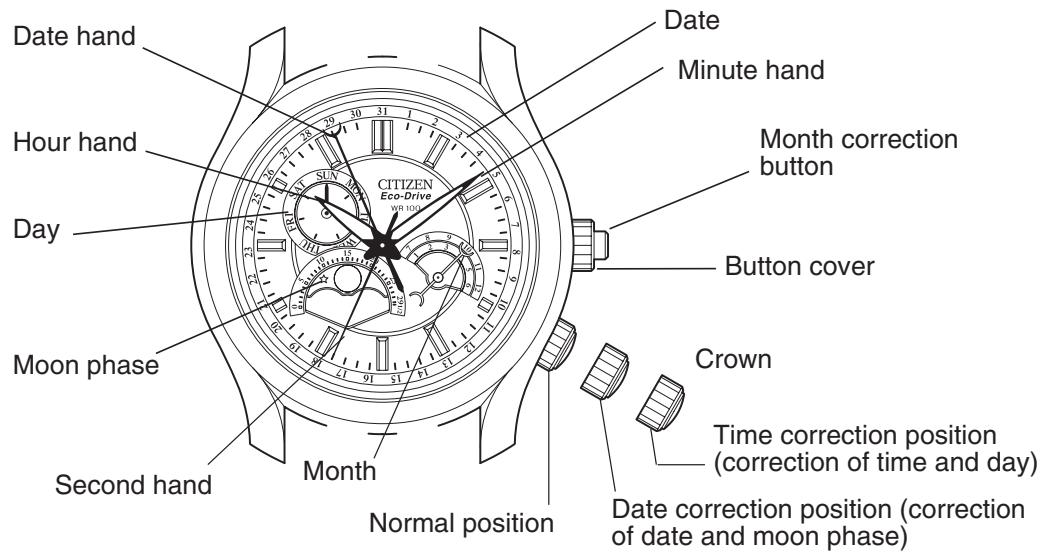
* The illustrations shown in this manual may differ from the actual watch you have purchased.
Month Correction Button:
In the case the month correction button is of the screw lock type, operate the month correction after first turning the "button cover" around the outside of the button to the left to loosen the screw. The button is unable to operate properly if the screw is not adequately loosened. Once you have finished operating the month correction button, turn the "button cover" to the right and tighten securely. Please note that if the button cover is not adequately tightened, the button may be bent or it may be accidentally depressed while wearing the watch causing the month to be changed inadvertently.
4. Setting the Time and Date
When setting the time and date simultaneously, the parameters are set in the order of day, moon phase, date and month and finally time.
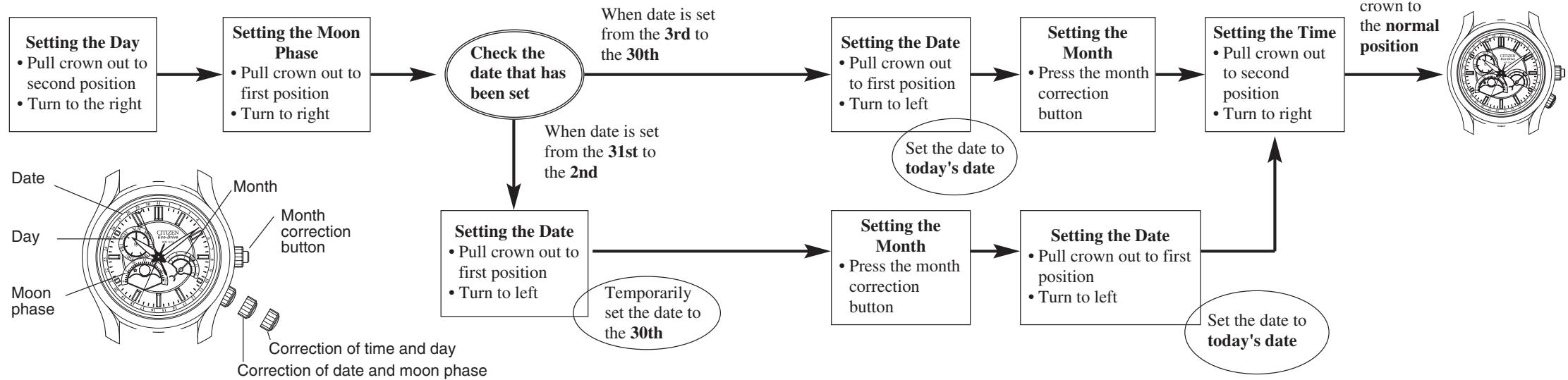
[Procedure for Setting Time and Date]
Setting the Day
- Pull the crown out to the time correction position (second position).
- Turn the crown to the right (clockwise) and set the day to the current day.
- The displayed day begins changing at around 12:00 AM and finishes changing at about 5:00 AM.
Setting the Moon Phase
- Pull the crown out to the date correction position (first position).
-
Turn the crown to the right (clockwise) and set the current moon phase.
-
The moon phase of a particular day can be read from a newspaper and so forth. Set the moon mark while referring to "Reading the Moon Phase" following.
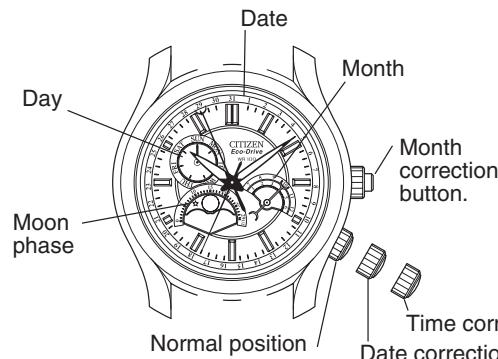
Time correction position (correction of time and day)
Date correction position (correction of date and moon phase)
The moon phase display does not display the shape of the moon itself, but rather simply indicates the moon phase. It can be used to provide an approximate indication of the moon phase.
| New moon Moon age:0 (spring tide) | First quarter Moon age: approx.7 (neap tide) | Full moon Moon age: approx.15 (spring tide) | Last quarter Moon age: approx.22 (neap tide) |
The moon phase can be set more accurately by setting the time during a new moon (when the moon mark cannot be seen: moon phase: 0) or during a full moon (when the moon mark is directly above in the 12:00 direction : moon phase: 15).
Setting the Date and Month
-
Pull the crown out to the date correction position (first position).
-
Set the date and month.
-
The date hand turns to the right when the crown is turned to the left (counterclockwise).
- The month changes when the month correction button is pressed.
[When the Date is Set from the 3rd to the 30th]
(1) Turn the crown to the left and set the date hand to today's date.
(2) Press the month correction button and set the month to the current month.
[When the Date is Set to the 31st]
(1) Temporarily set the date to the 30th.
(2) Press the month correction button and set the month to the current month.
(3) Set the date to the correct date of the 31st.
[When the Date is Set to the 1st or 2nd]
(1) Temporarily set the date to the 30th.
(2) Press the month correction button and temporarily set the month to the previous month.
Examples: Set the month to December when setting the month to January. Set the month to February when setting the month to March
(3) Set the date to the correct date of the 1st or 2nd.
The month changes to the current month simultaneous to the date changing from the 31st to the 1st.
- Return the crown to the normal position.
Setting the Time
- Pull the crown out to the time correction position (second position) when the second hand reaches the 0 seconds position.
- Turn the crown to the right (clockwise) and set the time.
- The day changes immediately after about 5:00 AM. Set the time while paying attention to AM and PM by referring to the time when the day has changed.
- Return the crown to the normal position in synchronization with a telephone or other time service.
[Helpful Hint for Setting the Time Accurately]
After first stopping the second hand at the 0 seconds position, advance the hour hand and minute hand 4-5 minutes past the correct time and then turn it back in the counterclockwise direction to the correct time to accurately set the time.
[Notes]
- If the date is corrected when the time on the watch is between 9:00 PM and 12:00 AM, the date may not change on the following day. Avoid correcting the date during this time.
- The calendar operates based on a 31-day month. Correct the date by turning the crown to the left to set to the first day of the following month in months with less than 31 days (months with 30 days and February).
- Avoid correcting the month when the date hand indicates a date from the 31st to the 2nd. If you want to correct the month during this time, wait until the date hand is outside the range of the 31st to the 2nd. Then reset the date hand to the correct date.
- When turning the crown to the left (counter-clockwise) when correcting the time or day, the changing of the date may change a day late during normal use.
5. Unique Features of Solar-Powered Watches
When the watch becomes insufficiently charged, the watch display changes as shown below.
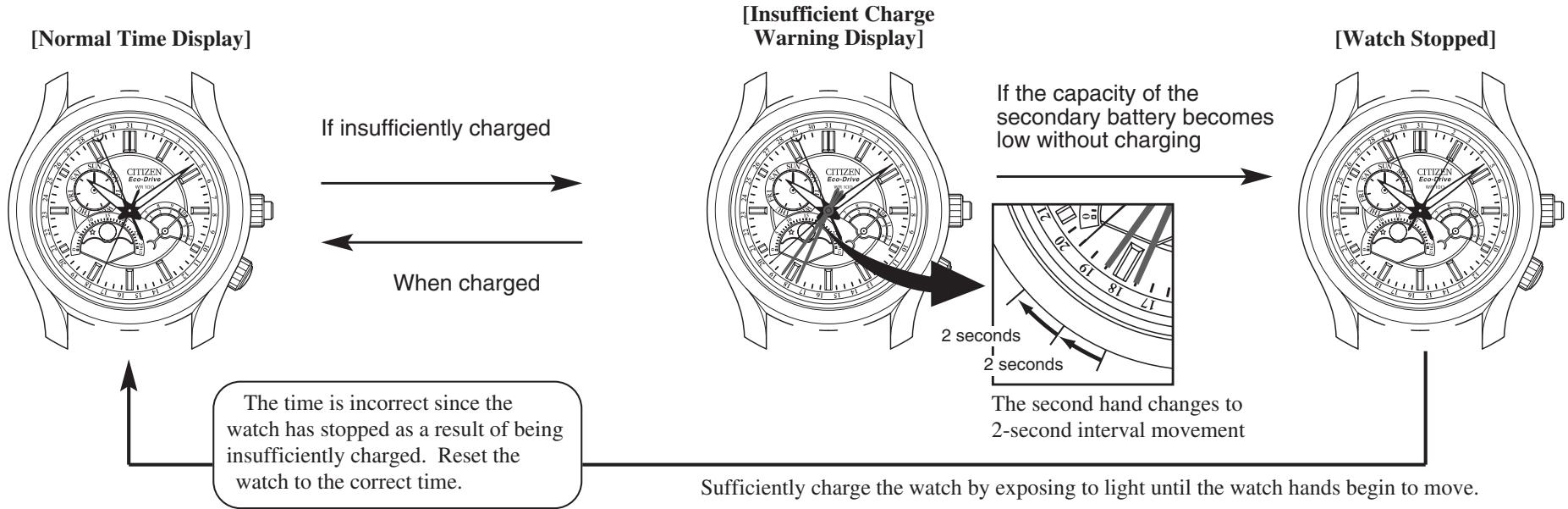
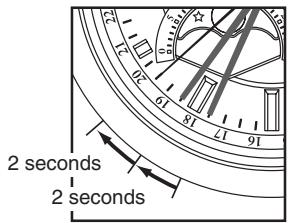
When the watch becomes insufficiently charged, the second hand begins 2-second interval movement to indicate that the watch is insufficiently charged.
- Although the watch continues to run normally at this time, the watch will stop after about 4 days have passed since the watch has become insufficiently charged.
Charge the watch by exposing to light to return to the original 1-second interval movement. Sufficiently charge the watch even after it has returned to 1-second interval movement to ensure that it can be used comfortably. There is no risk of overcharging since the watch is provided with an overcharging prevention feature.
- Although the watch will begin to run again when exposed to light after it has stopped due to being insufficiently charged, since the time is incorrect, reset the time after sufficiently charging the watch.
When the secondary battery becomes fully charged as a result of exposing the watch dial (solar cell) to light, the overcharging prevention feature is activated automatically to prevent the battery from being charged further. Consequently, there is no degradation in the performance of the solar cell or secondary battery no matter how often the watch is charged. This lets you expose the watch to light without worrying about overcharging.
The watch will stop running if it is not charged at all. The watch hands will begin to move after about 10 seconds when the watch is exposed to light. (The time until the hands begin to move varies depending on the model of the watch and the intensity of the light.) However, please note that the watch may stop again since it will not be adequately charged if the light is blocked at this time.
6. General Reference for Charging Times
The time required for charging varies according to the model of the watch (color of the dial, etc.). The following times are shown below to serve only as a reference.
- Charging time refers to the amount of time the watch is continuously exposed to light.
| Illuminance (lux) | Environment | Charging time | ||
| Approx. charging time for 1 day of operation | Approx. charging time from the stopped state until 1-second interval movement | Approx. charging time from the stopped state until fully charged | ||
| 500 | Inside an ordinary office | 4 hours | 40 hours | ----- |
| 1,000 | 60-70 cm (24-28 in) under a fluorescent lamp (30 W) | 2 hours | 18 hours | ----- |
| 3,000 | 20 cm (8 in) under a fluorescent lamp (30 W) | 40 minutes | 6 hours | 120 hours |
| 10,000 | Outdoors, cloudy weather | 11 minutes | 2 hours | 35 hours |
| 100,000 | Outdoors, summer, under direct sunlight | 3 minutes | 16 minutes | 12 hours |
Full charging time: Time required for charging the watch from the stopped state to fully charged.
Charging time for 1 day of operation: Time required for charging the watch to run for 1 day at 1-second
interval movement.
[Note]
- Once fully charged, the watch will continue to run for about 6 months with any additional charging. As shown in the table above, a considerable amount of time is required until the watch starts running once the watch has stopped as a result of being insufficiently charged. Try to keep your watch sufficiently charged at all times by charging everyday.
Furthermore, it is recommended to charge your watch by exposing to direct sunlight once a month.
7. Solar-Powered Watch Handling Precautions
[Try to keep the watch charged at all times]
Please note that if you frequently wear long sleeves, the watch can easily become insufficiently charged because of being hidden and not exposed to light. When you take the watch off, try to place in as bright a location as possible so that it will always be charged and continue to run properly at all times.
Charging Precautions
- Avoid charging the watch at high temperatures (about 60^ / 140^ or higher) since allowing the watch to reach a high temperature during charging can cause a malfunction.
Examples:
- Charging by placing the watch too close to a light source that may become hot such as an incandescent lamp or halogen lamp.
-
Charging by placing the watch on an automobile dashboard that can easily reach a high temperature.
-
When charging the watch with an incandescent lamp, halogen lamp or other light source that may reach a high temperature, always make sure to place the watch at least 50~cm (20 in) away from the light source to prevent the watch from reaching a high temperature.
Handling of Secondary Battery
- Never attempt to remove the secondary battery from the watch.
- If the secondary battery must unavoidably be removed, store it out of the reach of small children to prevent accidental swallowing.
- If the secondary battery should happen to be swallowed, consult a physician immediately and seek medical attention.
Only Use the Specified Secondary Battery
-
Never use a secondary battery other than the genuine secondary battery used in this watch. Even if another type of secondary battery is installed in the watch, the watch structure does not permit its operation. In cases in which a different secondary battery such as a silver battery is forcibly installed in the watch and charged, overcharging may occur that will eventually cause the secondary battery to rupture. This can result in the risk of the watch being damaged or injury to the wearer.
-
When the secondary battery is replaced, always make sure to use the specified secondary battery.
8. Replacing the Secondary Battery
Unlike ordinary silver batteries, the secondary battery used in this watch does not have to be periodically replaced due to repeated charging and discharging.
9. Precautions
WARNING: Water-resistance performance
- Water-resistance for daily use (to 3 atmospheres): This type of watch is water-resistant to minor exposure to water. For example, you may wear the watch while washing your face; however, it is not designed for use underwater.
- Upgraded water-resistance for daily use (to 5 atmospheres): This type of watch is water-resistant to moderate exposure to water. You may wear the watch while swimming; however, it is not designed for use while skin diving.
- Upgraded water-resistance for daily use (to 10/20 atmospheres): This type of watch may be used for skin diving; however, it is not designed for scuba or saturated diving using helium gas.
WARNING: Water-resistance performance
There are several types of water-resistant watches, as shown in the following table.
The unit "bar" is roughly equal to 1 atmosphere.
- WATER RESIST(ANT) xx bar may also be indicated as W.R. xx bar.
| Indication | Specifications | |
| Dial | Case (case back) | |
| WATER RESIST or no indication | WATER RESIST(ANT) | Water-resistant to 3 atmospheres |
| WR 50 or WATER RESIST 50 | WATER RESIST(ANT) 5 bar or WATER RESIST(ANT) | Water-resistant to 5 atmospheres |
| WR 100/200 or WATER RESIST 100/200 | WATER RESIST(ANT) 10bar/20 bar or WATER RESIST(ANT) | Water-resistant to 10/20 atmospheres |
For correct use within the design limits of the watch, confirm the level of water-resistance of your watch, as indicated on the dial and case, and consult the table.
| Examples of use | ||||
| Minor exposure to water (washing face, rain, etc.) | Moderate exposure to water (washing, kitchen work, swimming, etc.) | Marine sports (skin diving) | Scuba diving (with air tank) | Operation of the crown or button with moisture visible |
| OK | NO | NO | NO | NO |
| OK | OK | NO | NO | NO |
| OK | OK | OK | NO | NO |
CAUTION
- Be sure to use the watch with the crown pressed in (normal position). If your watch has a screw-lock type crown, be sure to tighten the crown completely.
- Do NOT operate the crown or button with wet fingers or when the watch is wet. Water may enter the watch and compromise water-resistance.
- If the watch is used in seawater, rinse with fresh water afterward and wipe with a dry cloth.
- If moisture has entered the watch, or if the inside of the crystal is fogged up and does not become clear within a day, immediately take the watch to your dealer or Citizen Service Center for repair. Leaving the watch in such a state will allow corrosion to form inside.
- If seawater enters the watch, place the watch in a box or plastic bag and immediately take it in for repair. Otherwise, pressure inside the watch will increase, and parts (crystal, crown, buttons, etc.) may come off.
CAUTION: Keep your watch clean.
- Leaving dust and dirt deposited between the case and crown may result in difficulty in pulling the crown out. Rotate the crown while in its normal position, from time to time, to loosen dust and dirt and then brush it off.
- Dust and dirt tend to be deposited in gaps in the back of the case or band. Deposited dust and dirt may cause corrosion and soil your clothing. Clean the watch occasionally.
Cleaning the Watch
- Use a soft cloth to wipe off dirt, perspiration and water from the case and crystal.
- Use a soft, dry cloth to wipe off perspiration and dirt from the leather band.
- To clean a metal, plastic, or rubber watchband, wash away dirt with mild soap and water. Use a soft brush to remove dust and dirt jammed in the gaps in the metal band. If your watch is not water-resistant, take it to your dealer.
NOTE: Avoid using solvents (thinner, benzine, etc.), as they may mar the finish.
CAUTION: Operating environment
- Use the watch within the operating-temperature range specified in the instruction manual. Using the watch where temperatures are outside the specified range, may result in deterioration of functions or even stoppage of the watch.
- Do NOT use the watch in places where it is exposed to high temperature, such as in a sauna.
Doing so may result in a skin burn.
- Do NOT leave the watch in a place where it is exposed to high temperature, such as the glove compartment or dash-board of a car.
Doing so may result in deterioration of the watch, such as deformation of plastic parts.
- Do NOT place the watch close to a magnet.
Timekeeping will become inaccurate if you place the watch close to magnetic health equipment such as a magnetic necklace or a magnetic latch of a refrigerator door or handbag clasp or the earphone of a mobile phone. If this has occurred, move the watch away from the magnet and reset the time.
- Do NOT place the watch close to household appliances that generate static electricity. Timekeeping may become inaccurate if the watch is exposed to strong static electricity, such as is emitted from a TV screen.
- Do NOT subject the watch to a strong shock such as dropping it onto a hard floor.
- Avoid using the watch in an environment where it may be exposed to chemicals or corrosive gases.
If solvents, such as thinner and benzine, or substances containing such solvents come in contact with the watch, discoloration, melting, cracking, etc. may result. If the watch comes in contact with mercury used in thermometers, the case, band or other parts may become discolored.
Periodical inspections
Your watch needs inspection once in every two or three years for safety and long use. To keep your watch water-resistant, the packing needs to be replaced regularly.
Other parts need to be inspected and replaced if necessary.
Ask for Citizen guine parts upon replacement.
10. Specifications
- Model: 865*
- Type: Analog solar-powered watch
- Timekeeping accuracy: Within ± 15 seconds per month on average (when worn at normal temperatures of +5^ to +35^ / 41^ to 95^ )
- Operating temperature range: -10°C to +60°C/14°F to 140°F
- Display functions:
Time: Hours, minutes, seconds
Calendar: Hand display of date, day and month
Display of moon phase
Additional functions: Insufficient charge warning feature Overcharging prevention feature Quick start feature
Continuous Operating Times
Time until watch stops without charging after being fully charged: Approx. 6 months
Time from insufficient charge warning display (2-second interval movement) until watch stops due to insufficient charging: Approx. 4 days
- Battery: Secondary battery, 1
* Specifications are subject to change without notice.