
HL-01 - Pédale d'effet pour guitare ZOOM - Notice d'utilisation et mode d'emploi gratuit
Retrouvez gratuitement la notice de l'appareil HL-01 ZOOM au format PDF.


| Type de produit | Pédale d'effet pour guitare (distorsion) |
| Marque | ZOOM |
| Modèle | HL-01 (Hyper Lead) |
| Dimensions | 127 (P) x 98 (L) x 48 (H) mm |
| Poids | 720 g (pile incluse) |
| Alimentation | Pile 9V (6F22) ou adaptateur secteur AD-0006 (9V DC, 300 mA, centre négatif) |
| Autonomie de la pile | Environ 26 heures (alcaline) / 8 heures (manganèse) |
| Entrée | Jack mono standard (impédance 470 kΩ, niveau nominal -20 dBm) |
| Sortie | Jack mono standard (impédance ≥ 10 kΩ, niveau nominal +10 dBm) |
| Commandes | GAIN, TREBLE, BASS, MIDDLE, RANGE, LEVEL, footswitch |
| Indicateur LED | Allumé lorsque l'effet est actif ; diminue lorsque la pile est faible |
| Bypass | True bypass (commutateur mécanique) |
| Boîtier | Châssis métallique robuste (aluminium) |
| Circuit de gain | Triple gain analogique développé par ZOOM |
| Égaliseur | 3 bandes (BASS, TREBLE, MIDDLE paramétrique avec contrôle RANGE) |
| Niveau de bruit | Extrêmement faible (conception optimisée) |
| Accessoires fournis | Manuel d'instructions, carte de garantie, pile 9V |
| Entretien et nettoyage | Chiffon doux et sec ; ne pas utiliser de solvants ou de produits abrasifs |
| Sécurité | Utiliser uniquement l'adaptateur spécifié ; éviter les environnements extrêmes ; ne pas ouvrir le boîtier |
| Adaptateur secteur recommandé | ZOOM AD-0006 (9V DC, 300 mA, centre négatif) |
FOIRE AUX QUESTIONS - HL-01 ZOOM
Questions des utilisateurs sur HL-01 ZOOM
0 question sur cet appareil. Repondez a celles que vous connaissez ou posez la votre.
Poser une nouvelle question sur cet appareil
Téléchargez la notice de votre Pédale d'effet pour guitare au format PDF gratuitement ! Retrouvez votre notice HL-01 - ZOOM et reprennez votre appareil électronique en main. Sur cette page sont publiés tous les documents nécessaires à l'utilisation de votre appareil HL-01 de la marque ZOOM.
MODE D'EMPLOI HL-01 ZOOM
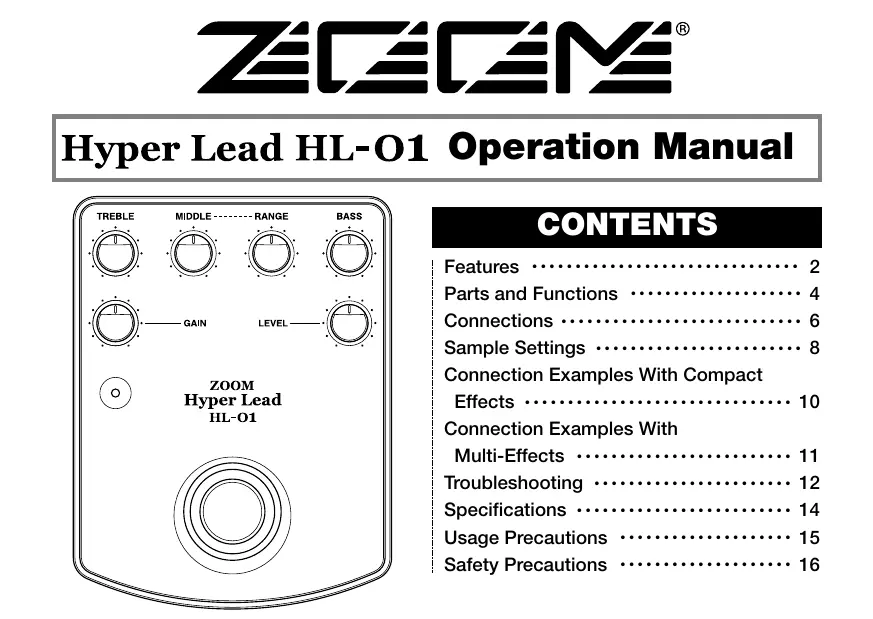
ZEEM
Hyper Lead HL-O1 Operation Manual
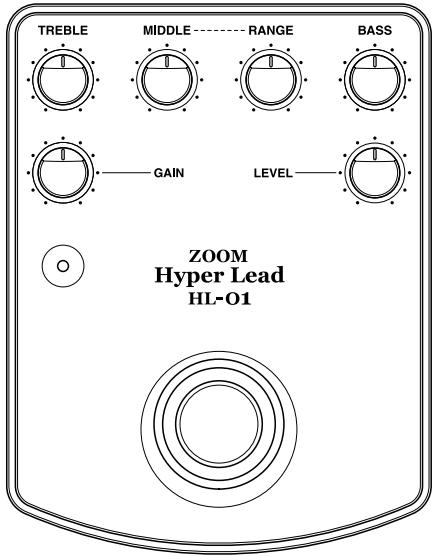
CONTENTS
Features 2
Parts and Functions 4
Connections 6
Sample Settings 8
Connection Examples With Compact Effects 10
Connection Examples With Multi-Effects 11
Troubleshooting 12
Specifications 14
Usage Precautions 15
Safety Precautions 16
Features
Thank you for selecting the ZOOM Hyper Lead HL-01 (hereafter simply called the "HL-01"). The HL-01 is a high-performance compact distortion unit developed with input from top-level professional musicians the worldwide. It reflects ZOOM's rich expertise with analog circuitry and has many attractive features.
Smooth and solid high-gain sound
Newly developed analog triple gain circuit is ideal for a wide range of playing styles and applications. From lead guitar to backing, the HL-01 opens up a world of distortion possibilities. Natural and smooth sounding distortion in the all-important midrange creates impressively solid guitar sound.
3-band equalizer with superb effectiveness
In addition to the BASS and TREBLE controls, the HL-01 features a parametric midrange control whose turnover point can be adjusted. This gives you full control over the most important frequency range for each instrument, letting you stress a characteristic or reduce overlapping ranges. The TREBLE and BASS controls are tuned to allow spot-on adjustments of high-range sparkle and low-end energy.
Amazing low-noise design
Designed from the ground up for optimum performance, the HL-01 uses only strictly selected parts. For an effect without built-in noise reduction, the low noise level of the HL-01 is truly amazing.
Mechanical switch for true bypass
On/off switching is performed using a mechanical foot switch which operates smoothly and gives tactile feedback. In the bypass position, the guitar signal is passed through without any alteration.
Sturdy metal chassis
The rock-solid case made of aluminum not only looks good, it also can withstand the rigors of use on stage or rough handling during transport. Stability is excellent, ensuring that the unit will not topple over while in use.
Parts and Functions
This section explains the various parts of the HL-01.
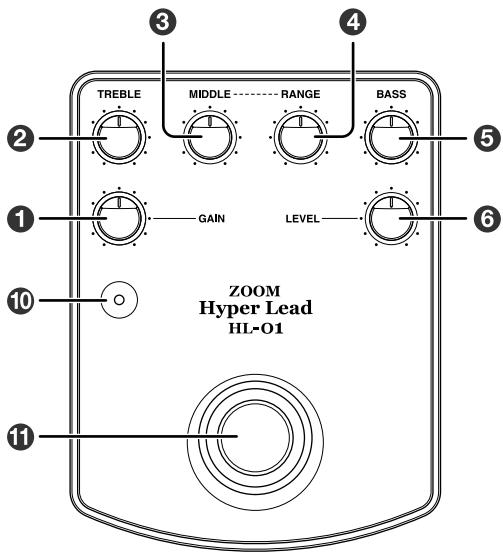
1 GAIN control
This control adjusts the distortion gain. Turning it clockwise increases the distortion intensity.
2 TREBLE control
This control adjusts the high frequency range. Turning the control clockwise makes the sound brighter and sharper.
MIDDLE control
This control adjusts the middle frequency range. Turning the control emphasizes or attenuates the range selected with the RANGE control (4).
4 RANGE control
Adjusts the turnover frequency for the MIDDLE control (6).
BASS control
This control adjusts the low frequency range.
Turning the control clockwise makes the sound more solid and heavy.
LEVEL control
This control adjusts the output signal level. Turning the control clockwise increases the volume.
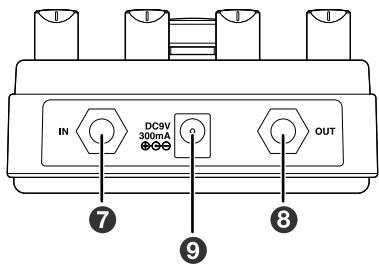
7 IN jack
This is the input of the unit and it also acts as a
power switch. When you connect the plug of the cable from the guitar, the unit is turned on.
OUT jack
This is the output of the unit. Connect the plug of the cable going to the guitar amplifier or other effect device here.
AC adapter jack
When powering the unit from the AC adapter, insert the plug from the adapter into this jack. Be sure to use only the dedicated AC adapter for the unit (Zoom AD-0006). When the AC adapter is connected, the HL-01 will always be ON, regardless of whether a cable is plugged into the IN jack.
Indicator
Lights up when the HL-01 effect is active. When the remaining battery capacity is getting low, indicator brightness decreases.
Foot switch
Switches the HL-01 effect on and off.
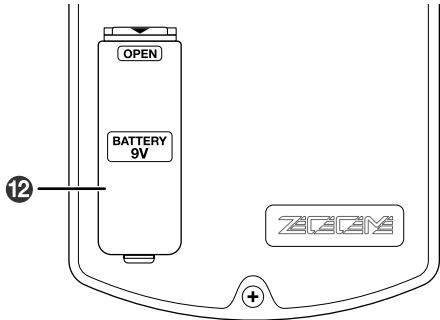
Battery compartment
A 9V battery (6F22) can be inserted here.
Connections
This section explains how to connect the HL-01.
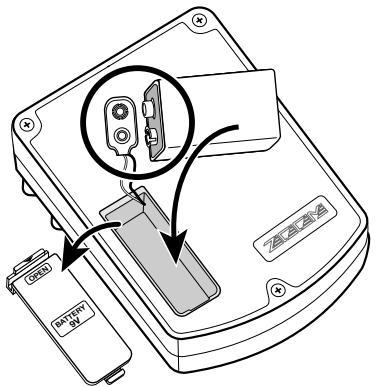
Open cover of battery compartment and insert battery
Make sure to insert the battery to the connector with correct polarity.
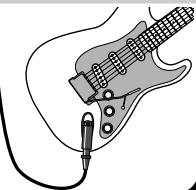
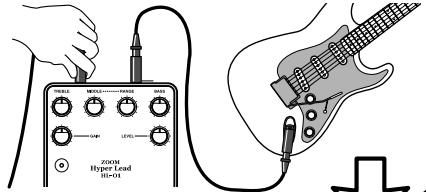
Turn amplifier off and connect cable to guitar
Make sure that the plug is inserted fully into the OUT jack of the guitar.
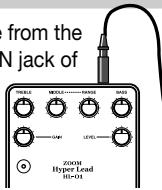
Plug cable from guitar into IN jack of HL-01
Insert the cable from the guitar into the IN jack of
the HL-01.
This turns the HL-01 on.

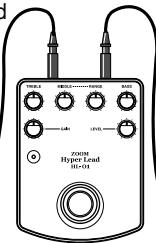
Connect cable to OUT jack of HL-01
Connect another cable to the OUT jack of the HL-01.
Make sure that the plug is inserted firmly.

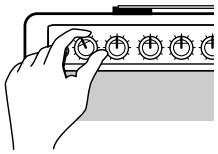
Turn amplifier on and raise volume
Turn power to the amplifier on, and adjust the volume to a suitable level, using the controls in the following sequence.
(1) Volume control on guitar
(2) LEVEL control on HL-01
(3) Volume control on amplifier
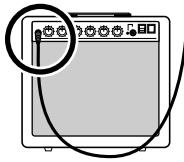
5 Connect output cable to amplifier
Make sure that the amplifier is turned off and the volume is turned down. Then plug the cable
from the OUT jack of the HL-01 to the IN jack of the amplifier.
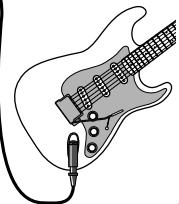
ATTENTION
Always follow the above sequence.
If steps are performed in reverse order, there is a danger of damage to the amplifier or speakers.
Sample Settings
This section shows some actual setting examples.
-
When experimenting, you should set the gain and drive controls on the amplifier so that it does not distort excessively.
-
Use the LEVEL control on the HL-01 to compensate for the level difference between the "effect on" and bypass condition.
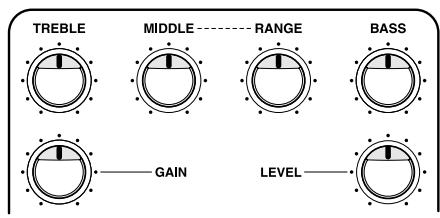
Almighty drive sound
With all controls in the center position, the HL-01 provides a standard drive sound suitable for many applications, ranging from lead solos to rhythm backing.
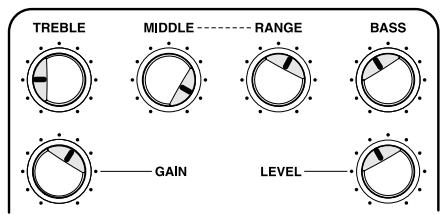
"Half pedal" sound with prominent midrange
With the TREBLE and BASS controls turned slightly down and the MIDDLE control raised a bit, the midrange is emphasized. This results in a peaky sound similar to pedal wah in about midway position.

TREBLE

MIDDLE------RANGE
RANGE


BASS

GAIN

LEVEL

TREBLE

MIDDLE RANGE


BASS

GAIN

LEVEL

TREBLE

MIDDLE------RANGE


BASS

GAIN

LEVEL
Fat sound
This is a heavy distortion sound achieved by turning the GAIN control all the way up and slightly raising the midrange. Even with deep distortion, the sound will stay stable and well defined. The fat sound is suited for riffs and rhythm guitar. Adjust the MIDDLE and RANGE controls according to the characteristics of the instrument.
Fast response lead sound
These settings are great for quick finger work. With the BASS control turned slightly down and the TREBLE control slightly up, you get a clear, distinct sound suitable for picking solos. Adjust the TREBLE control according to the characteristics of the instrument. To get a more crunchy character, turn down the GAIN control.
Glitter midrange
Raising the TREBLE and BASS controls and cutting the midrange gives a glittery sound, great for rhythm guitar or power chords. You can use the RANGE control to fine-tune the effect.
Connection Examples With Compact Effects
This section shows how to use the HL-01 together with other compact effect devices.
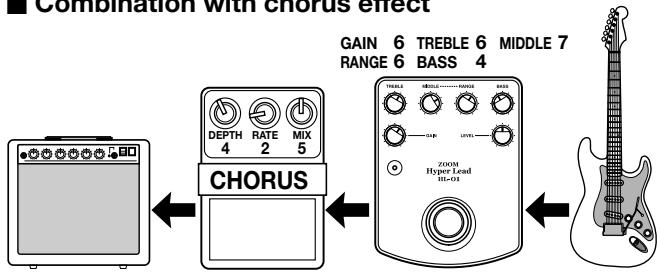
Combination with chorus effect
In this example, the chorus uses a light modulation (depth) setting at a fairly slow rate (speed), to achieve a light, airy sound. Make sure not to set the chorus modulation too high.
Guitar solos and arpeggios in LA rock style sound great with this setup.
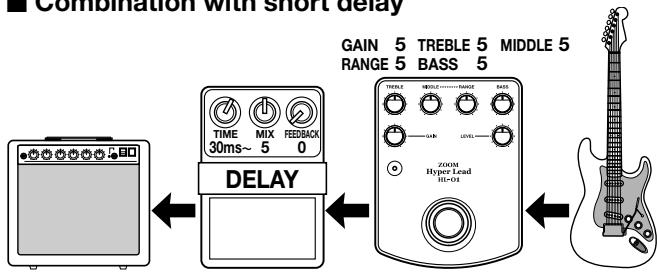
Combination with short delay
Using a single delay with short delay time can give more body to the sound. A delay time setting of about 30 to 40 milliseconds is suitable, and the level of the delay sound should be slightly lower than the level of the original sound. This setup is good for riffs and solos.
Connection Examples With Multi-Effects
This section shows how to use the HL-01 together with multi-effect devices such as the ZOOM GFX-4 or GFX-8.
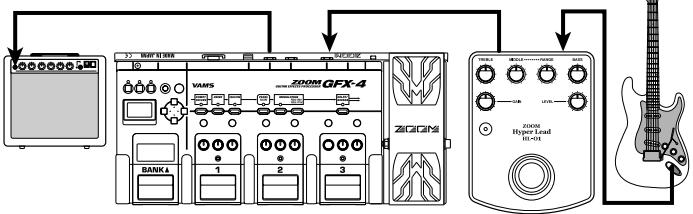
Connecting HL-01 before multi-effect device
In this example, the connection sequence is HL-01 multi-effect amplifier. Distortion is produced by the HL-01, and distortion effects of the multi-effect device are bypassed.
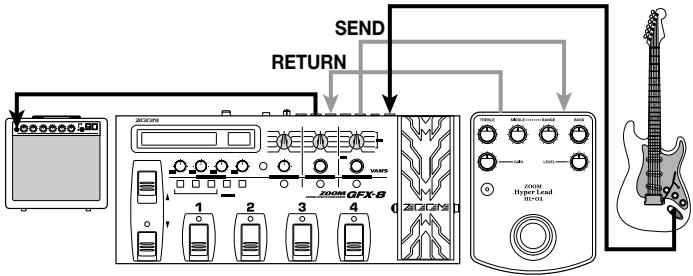
Using send/return loop of multi-effect
By connecting the HL-01 in the send/return loop of a multi-effect device such as the ZOOM GFX-8, the HL-01 can be used as if it were a part of the other device. You can switch the HL-01 on and off using patch programs of the multi-effect.
Troubleshooting
If there seems to be a problem with the unit, check the following points first.
No sound.
- Are connections to the IN and OUT jacks reversed?
Check the connections.
Is the battery exhausted?
Insert a fresh battery.
Is the AC adapter connected?
Make sure that the AC adapter is connected correctly.
Is guitar or amplifier volume or LEVEL control of HL-01 turned down?
Raise the volume.
Noise is heard.
- Are several distortion effects used in series?
Excessive compressor settings can also result in
noise. Turn on only the currently used devices.
Is the cable of good quality?
Low-quality cables can cause noise. Use a short, good-quality cable.
- Is the unit used in the vicinity of a computer monitor, refrigerator, fluorescent lamp, motor, or similar device?
The guitar or cable can pick up noise from such devices. In case of problems, increase the distance to such devices.
- Is an AC adapter other than the specified type used?
Be sure to use only the dedicated AC adapter (AD-0006).
Battery gets used up very quickly.
Is a plug inserted in the IN jack?
Power to the HL-01 gets turned on when a plug is inserted in the IN jack. In this condition, current is drawn from the battery regardless of whether the effect is switched on or off. When not using the unit, be sure to disconnect the plug from the IN jack.
Is a manganese battery being used?
The use of an alkaline battery rather than manganese is recommended. The initially supplied battery is for checking only and may have a short service life. When mounting the HL-01 on an effect board or similar, powering it with the AC adapter (AD-0006) is recommended.
Distortion is not strong enough.
Sound is not clear.
- Are controls on HL-01 and guitar set correctly?
Turn up the GAIN control and the TREBLE, MIDDLE, RANGE, or BASS control on the HL-01. Try to fully turn up the level and tone controls of the guitar.
- Is another effect device being used?
When using an effect device between the HL-01 and the guitar, check the battery, volume, and cable of that device.
Cannot produce the desired sound.
- Are controls set to extreme positions?
First set all controls to center and start with slight adjustments.
- Is the playing technique suitable?
The audible result of using the HL-01 depends on various different factors. Hardware such as effect devices, guitar, and amplifier of course must be considered, but technique such as picking and fingering are also important. Try varying your style to check the effect.
Specifications
Controls
Foot switch
GAIN control
LEVEL control
TREBLE control
BASS control
MIDDLE control
RANGE control
Input
Standard monaural phone jack
Rated input impedance: 470 kilohms
Rated input level: -20 dBm
Output
Standard monaural phone jack
Rated output impedance: 10 kilohms or more
Rated input level: +10 dBm
Power requirements
Battery (6F22, 9 V) or AC adapter AD-0006 (9 V DC, 300 mA, center minus)
Battery life
Continuous operation: approx. 26 hours (alkaline) or 8 hours (manganese)
External Dimensions
127 (D) x 98 (W) x48 (H) mm
Weight
720g (including battery)
Supplied accessories
Instruction manual
Warranty card
Battery (6F22, 9V)
- 0 dBm = 0.775 Vrms
- Design and specifications subject to change without notice.
Usage Precautions
Electrical interference
For safety considerations, the HL-01 has been designed to provide maximum protection against the emission of electromagnetic radiation from inside the device, and protection from external interference. However, equipment that is very susceptible to interference or that emits powerful electromagnetic waves should not be placed near the HL-01, as the possibility of interference cannot be ruled out entirely.
Cleaning
Use a soft, dry cloth to clean the HL-01. If necessary, slightly moisten the cloth. Do not use abrasive cleanser, wax, or solvents (such as paint thinner or cleaning alcohol), since these may dull the finish or damage the surface.
Please keep this manual in a convenient place for future reference.
Safety Precautions
In this manual, symbols are used to highlight warnings and cautions for you to read so that accidents can be prevented. The meanings of these symbols are as follows:

This symbol indicates explanations about extremely dangerous matters. If users ignore this symbol and handle the device the wrong way, serious injury or death could result.

This symbol indicates explanations about dangerous matters. If users ignore this symbol and handle the device the wrong way, bodily injury and damage to the equipment could result.
Please observe the following safety tips and precautions to ensure hazard-free use of the HL-01.
About power

- Since power consumption of this unit is fairly high, we recommend the use of an AC adapter whenever possible. When powering the unit from a battery, use only an alkaline type.
AC adapter operation
- Be sure to use only an AC adapter which supplies 9V DC, 300mA and is equipped with a "center minus" plug (Zoom AD-0006). The use of an adapter other than the specified type may damage the unit and pose a safety hazard.
- Connect the AC adapter only to an AC outlet that supplies the rated voltage required by the adapter.
- When disconnecting the AC adapter from the AC outlet, always grasp the adapter itself and do not pull at the cable.
- If the unit is not to be used for a long time, disconnect the AC adapter from the outlet.
Battery operation
- Use a generic 9V dry battery (6F22) (alkaline or manganese).
The HL-01 cannot be used for recharging. - Pay close attention to the labeling of the battery to make sure you choose the correct type.
- If the HL-01 is not to be used for an extended period of time, remove
the battery from the unit.
- If batteries leakage has occurred, wipe the battery compartment and the battery terminals carefully to remove all remnants of battery fluid.
While using the unit, the battery compartment cover should be closed.
Environment

Caution
Avoid using your HL-01 in environments where it will be exposed to:
Extreme temperature
High humidity or moisture
- Excessive dust or sand
- Excessive vibration or shock
Handling

Caution
- Since the HL-01 is a precision electronic device, avoid applying excessive force to the controls. Do not operate the keys or controls with your foot.
- Make sure that no foreign objects (coins or pins etc.) or liquids can enter the unit.
- Be sure to turn the power to all equipment off before making connections.
- Before moving the unit, turn the power off, and disconnect all cables and the AC adapter.
Alterations

Caution
Never open the case of the HL-01 or attempt to modify the product in any way since this can result in damage to the unit.

CATCH US IF YOU CAN
ZOOM CORPORATION
NOAH Bldg., 2-10-2, Miyanishi-cho, Fuchu-shi, Tokyo 183-0022, Japan
PHONE: +81-42-369-7116 FAX: +81-42-369-7115
Web Site: http://wwwzoomo.co.jp
- ZEEM
- Hyper Lead HL-O1 Operation Manual
- CONTENTS
- Features
- Smooth and solid high-gain sound
- 3-band equalizer with superb effectiveness
- Amazing low-noise design
- Mechanical switch for true bypass
- Sturdy metal chassis
- Parts and Functions
- GAIN control
- TREBLE control
- MIDDLE control
- RANGE control
- BASS control
- LEVEL control
- IN jack
- OUT jack
- AC adapter jack
- Indicator
- Foot switch
- Battery compartment
- Connections
- Connect cable to OUT jack of HL-01
- Turn amplifier on and raise volume
- Connect output cable to amplifier
- ATTENTION
- Sample Settings
- Almighty drive sound
- "Half pedal" sound with prominent midrange
- Fat sound
- Fast response lead sound
- Glitter midrange
- Connection Examples With Compact Effects
- Connection Examples With Multi-Effects
- Troubleshooting
- No sound.
- Noise is heard.
- Battery gets used up very quickly.
- Distortion is not strong enough.
- Sound is not clear.
- Cannot produce the desired sound.
- Specifications
- Controls
- Input
- Output
- Power requirements
- Battery life
- External Dimensions
- Weight
- Supplied accessories
- Usage Precautions
- Electrical interference
- Cleaning
- Safety Precautions
- About power
- AC adapter operation
- Battery operation
- Environment
- Handling
- Alterations
- ZOOM CORPORATION
Marque : ZOOM
Modèle : HL-01
Catégorie : Pédale d'effet pour guitare