BH-213 - Écouteurs sans fil NOKIA - Notice d'utilisation et mode d'emploi gratuit
Retrouvez gratuitement la notice de l'appareil BH-213 NOKIA au format PDF.


| Type de produit | Écouteur sans fil Bluetooth |
| Marque | NOKIA |
| Modèle | BH-213 |
| Technologie Bluetooth | Bluetooth 2.0 + EDR |
| Profils pris en charge | Headset Profile 1.1, Hands-Free Profile 1.5 |
| Autonomie en communication | Jusqu'à 10 heures |
| Autonomie en veille | Jusqu'à 400 heures |
| Temps de charge | Environ 2 heures |
| Type de batterie | Batterie rechargeable intégrée non amovible |
| Chargeurs compatibles | AC-3, AC-4, AC-5, DC-4 |
| Portée maximale | Jusqu'à 10 mètres |
| Indicateur lumineux | LED rouge (charge), verte (chargé/connexion) |
| Touches de commande | Touche multifonction, touche volume |
| Microphone | Intégré |
| Accessoires inclus | Earloop, embouts auriculaires |
| Compatibilité | Téléphones compatibles Bluetooth |
| Entretien | Nettoyer avec un chiffon doux et sec ; éviter les liquides et produits chimiques |
| Sécurité | Ne pas exposer à la chaleur, ne pas ouvrir, ne pas jeter au feu ; contient des aimants |
| Conformité | Directive 1999/5/EC |
| Marques déposées | Nokia, Nokia Connecting People, Nokia Original Accessories, Bluetooth |
FOIRE AUX QUESTIONS - BH-213 NOKIA
Questions des utilisateurs sur BH-213 NOKIA
0 question sur cet appareil. Repondez a celles que vous connaissez ou posez la votre.
Poser une nouvelle question sur cet appareil
Téléchargez la notice de votre Écouteurs sans fil au format PDF gratuitement ! Retrouvez votre notice BH-213 - NOKIA et reprennez votre appareil électronique en main. Sur cette page sont publiés tous les documents nécessaires à l'utilisation de votre appareil BH-213 de la marque NOKIA.
MODE D'EMPLOI BH-213 NOKIA
Nokia Bluetooth Headset BH-213
Issue 1
DECLARATION OF CONFORMITY Hereby, NOKIA CORPORATION declares that this HS-127W product is in compliance with the essential requirements and other relevant provisions of Directive 1999/5/EC. A copy of the Declaration of Conformity can be found at http://www.nokia.com phones/declaration_of_conformity/.
€0700
© 2008 Nokia. All rights reserved.
Nokia, Nokia Connecting People and the Nokia Original Accessories logo are registered trademarks of Nokia Corporation. Other product and company names mentioned herein may be trademarks or tradenames of their respective owners.
Reproduction, transfer, distribution, or storage of part or all of the contents in this document in any form without the prior written permission of Nokia is prohibited.
Bluetooth is a registered trademark of Bluetooth SIG, Inc.
Nokia operates a policy of ongoing development. Nokia reserves the right to make changes and improvements to any of the products described in this document without prior notice.
To the maximum extent permitted by applicable law, under no circumstances shall Nokia or any of its licensors be responsible for any loss of data or income or any special, incidental, consequential or indirect damages howsoever caused.
The contents of this document are provided "as is". Except as required by applicable law, no warranties of any kind, either express or implied, including, but not limited to, the implied warranties of merchantability and fitness for a particular purpose, are made in relation to the accuracy, reliability or contents of this document. Nokia reserves the right to revise this document or withdraw it at any time without prior notice.
The availability of particular products may vary by region. Please check with your Nokia dealer for details.
Export controls
This device may contain commodities, technology or software subject to export
laws and regulations from the US and other countries. Diversion contrary to law is prohibited.
Introduction
With the Nokia Bluetooth Headset BH-213, you can make and receive calls while on the move.
Read this user guide carefully before using the headset. Also, read the user guide for your phone. It provides important safety and maintenance information.
This product may contain small parts. Keep them out of the reach of small children.
Bluetooth wireless technology
Bluetooth wireless technology allows you to connect compatible devices without cables. The phone and the headset do not need to be
in line of sight, but they should be within 10 metres (33 feet) of each other. Connections may be subject to interference from obstructions, such as walls, or other electronic devices.
The headset complies with the Bluetooth Specification 2.0 + EDR that supports the Headset Profile 1.1 and Hands-Free Profile 1.5.
Check with the manufacturers of other devices to determine their compatibility with this device.
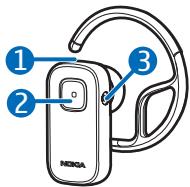
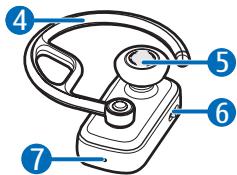
The headset contains the following parts shown on the title page: indicator light (1), multifunction key (2), charger connector (3), earloop (4), earpiece (5), volume key (6), and microphone (7).
Before using the headset, you must charge the battery and pair the headset with a compatible phone.
Parts of the device are magnetic. Metallic materials may be attracted to the device. Do not place credit cards or other magnetic storage media near the device, because information stored on them may be erased.
Chargers
This device is intended for use when supplied with power from the
following chargers: AC-3, AC-4, AC-5, and DC-4.

Warning: Use only chargers approved by Nokia for use with this
particular enhancement. The use of any other types may invalidate any approval or warranty, and may be dangerous.
When you disconnect the power cord of any enhancement, grasp and pull the plug, not the cord.
Charge the battery
Before charging the battery, carefully read "Battery information".
- Connect the charger to a wall outlet.
- Connect the charger cable to the charger connector. The red indicator light is on during
charging. Charging the battery fully may take up to 2 hours.
- When the battery is fully charged, the green indicator light is displayed. Disconnect the charger from the headset, then the wall outlet.
The fully charged battery has power for up to 10 hours of talk time or up to 400 hours of standby time.
When the battery is discharged, the headset beeps every minute and the red indicator light flashes quickly.
Switch on or off
To switch on, press and hold the multifunction key for about 2 seconds. The headset beeps, and the green indicator light is displayed. The headset tries to connect to a paired phone.
To switch off, press and hold the multifunction key for about 5 seconds. The headset beeps, and the red indicator light is briefly displayed.
Pair the headset
- Ensure that your phone is on and the headset is off.
- Press and hold the multifunction key (for about 5 seconds) until the green indicator light starts to flash quickly.
- Activate the Bluetooth feature on the phone, and set it to search for Bluetooth devices.
- Select the headset from the list of found devices.
- Enter the passcode 0000 to pair and connect the headset to your phone. In some phones, you may need to make the
connection separately after pairing.
When the headset is connected to your phone and is ready for use, the green indicator light flashes slowly.
Basic use
Place the headset on the ear
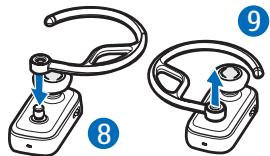
To use the headset with the earloop, attach the earloop to it (8). To detach the earloop, gently pull it from the headset (9).
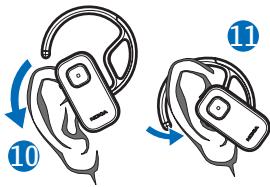
Slide the earloop behind your ear (10), and point the headset toward your mouth. Carefully bend the earloop around your ear for the best fit (11).
To change the earplug, pull the current earplug from the earpiece, and push the new earplug over the earpiece in the same position.
Calls
To make a call, use your phone in the normal way when the headset is connected to it.
To redial the number you last called (if your phone supports this feature with the headset), when no call is in progress, press the multifunction key twice.
To activate voice dialling (if your phone supports this feature with the headset), when no call is in progress, press and hold the multifunction key for about 2 seconds. Proceed as described in the phone user guide.
To answer or end a call, press the multifunction key. To reject a call, press this key twice.
To adjust the volume during a call, slide the volume key up or down.
To mute or unmute the microphone during a call, briefly press the middle of the volume key.
To switch a call from the headset to a compatible phone, press and hold the multifunction key for about 5 seconds (the headset switches off). To switch the call back to the headset, press the
Battery information
This device has an internal, nonremovable, rechargeable battery. Do not attempt to remove the battery from the device as you may damage the device. The battery can be charged and discharged hundreds of
multifunction key for about 2 seconds (the headset switches on).
Clear settings or reset
To delete the pairings from the headset or reset the headset, switch off the headset, and press and hold the multifunction key for over 8 seconds.
Troubleshooting
If you cannot connect the headset to your compatible phone, check that the headset is charged, switched on, and paired with the phone.
times, but it will eventually wear out. Recharge your battery only with Nokia approved chargers designated for this device. Use of an unapproved charger may present a risk of fire, explosion, leakage, or other hazard.
If a battery is being used for the first time or if the battery has not been used for a prolonged period, it may be necessary to connect the charger, then disconnect and reconnect it to begin charging the battery. If the battery is completely discharged, it may take several minutes before the charging indicator light is displayed. Unplug the charger from the electrical plug and the device when not in use. Do not leave a fully charged battery connected to a charger, since overcharging may shorten its lifetime. If left unused, a fully charged battery will lose its charge over time.
Always try to keep the battery between 15^ and 25^ (59°F and 77°F). Extreme temperatures reduce the capacity and lifetime of the battery. A device with a hot or cold battery may not work temporarily. Battery performance is particularly
limited in temperatures well below freezing.
Do not dispose of batteries in a fire as they may explode. Batteries may also explode if damaged.
Never use any charger that is damaged.

Important: Battery talk and standby times are estimates only and
depend on network conditions, features used, battery age and condition, temperatures to which battery is exposed, and many other factors. The amount of time a device is used for calls will affect its standby time. Likewise, the amount of time that the device is turned on and in the standby mode will affect its talk time.
Care and maintenance
Your device is a product of superior design and craftsmanship and should be treated with care. The following suggestions will help you protect your warranty coverage.
- Keep the device dry. Precipitation, humidity, and all types of liquids or moisture can contain minerals that will corrode electronic circuits. If your device does get wet, allow it to dry completely.
- Do not use or store the device in dusty, dirty areas. Its moving parts and electronic components can be damaged.
- Do not store the device in hot areas. High temperatures can shorten the life of electronic devices, damage batteries, and warp or melt certain plastics.
- Do not store the device in cold areas. When the device returns to
its normal temperature, moisture can form inside the device and damage electronic circuit boards.
- Do not attempt to open the device.
- Do not drop, knock, or shake the device. Rough handling can break internal circuit boards and fine mechanics.
- Do not use harsh chemicals, cleaning solvents, or strong detergents to clean the device.
- Do not paint the device. Paint can clog the moving parts and prevent proper operation.
These suggestions apply equally to your device, charger, or any enhancement. If any device is not working properly, take it to the nearest authorised service facility for service.