CNDV-800HD - Système de navigation GPS PIONEER - Notice d'utilisation et mode d'emploi gratuit
Retrouvez gratuitement la notice de l'appareil CNDV-800HD PIONEER au format PDF.


| Type de produit | Disque de mise à jour pour système de navigation GPS |
| Marque | Pioneer |
| Modèle | CNDV-800HD |
| Compatibilité | AVIC-HD3 |
| Contenu | Mise à jour de la base de données cartographique et du système |
| Base de données cartographique | Données jusqu'en mai 2007, incluant environ 32 000 POI |
| Base de données Gracenote | 300 000 albums les plus fréquents (août 2007) |
| Fonctions ajoutées | Appel téléphonique vers les POI via Bluetooth (option ND-BT1), nouvelles catégories de POI (sports nautiques, camping, office de tourisme) |
| Format du disque | CD/DVD (probablement DVD) |
| Dimensions du disque | Diamètre 12 cm |
| Poids du disque | Environ 20 g |
| Alimentation | Nécessite le système de navigation allumé (contact véhicule) |
| Durée de mise à jour | Environ 3 heures (phase 1) + 10 minutes (phase 2) |
| Authentification | Mot de passe en ligne unique basé sur le numéro de média et le numéro d'appareil |
| Précautions | Ne pas couper le contact pendant la phase 2 ; conserver la carte du numéro de média |
| Entretien | Nettoyer le disque avec un chiffon doux ; éviter les rayures |
| Pièces et réparabilité | Disque non réparable ; en cas de problème, contacter un revendeur agréé |
FOIRE AUX QUESTIONS - CNDV-800HD PIONEER
Questions des utilisateurs sur CNDV-800HD PIONEER
0 question sur cet appareil. Repondez a celles que vous connaissez ou posez la votre.
Poser une nouvelle question sur cet appareil
Téléchargez la notice de votre Système de navigation GPS au format PDF gratuitement ! Retrouvez votre notice CNDV-800HD - PIONEER et reprennez votre appareil électronique en main. Sur cette page sont publiés tous les documents nécessaires à l'utilisation de votre appareil CNDV-800HD de la marque PIONEER.
MODE D'EMPLOI CNDV-800HD PIONEER
Upgrade Instructions and Operation Manual Addendum CNDV-800HD
Notice to all users
- DO NOT LOSE SUPPLIED "MEDIA NUMBER CARD". If "MEDIA NUMBER CARD" is lost, re-creation of the "MEDIA NUMBER" is not possible. Also you must submit the "MEDIA NUMBER CARD" for repairs. The card is necessary as proof of authenticity if service is required (including recovery).
- This package is unique, and cannot be installed on more than one unit.
- Web-connected computer is required for the online issuance of password.
PIONEER CORPORATION
4-1,MEGURO 1-CHOME,MEGURO-KU,TOKYO 153-8654,JAPAN
PIONEER ELECTRONICS (USA) INC.
P.O. Box 1540, Long Beach, California 90801-1540, U.S.A.
TEL: (800) 421-1404
PIONEER EUROPE NV
Haven 1087, Keetberglaan 1, B-9120 Melsele, Belgium
TEL: (0) 3/570.05.11
Published by Pioneer Corporation.
Copyright © 2008 by Pioneer Corporation.
All rights reserved.
Instructions for Upgrading
The screen shown in the example may differ from the actual screens.
The actual screens may be changed without notice for performance and function improvements.
CAUTION
Read the entire manual before upgrading the programme of your navigation system.
Models to be Upgraded
this disc can upgrade the programme and database of the following models:
AVIC-HD3
Manual Overview
This manual is a supplementary document that summarises the points that will be renewed after upgrading your navigation system by using CNDV-800HD.
The operations other than those described in this manual are basically the same as those at the time you purchased the hardware. Use the Operation Manual and the Hardware Manual included in the hardware package as your primary reference.
Be sure to read the following descriptions
- Licence Agreement
This provides a licence agreement of this software. Be sure to read this before using the software.
- About the Database
This provides the date when the Database was recorded.
Copyright
This provides the copyright of the Map Database.
- Other Precautions
This provides the important precautions for using this software.
Licence Agreement
PIONEER CNDV-800HD
THIS IS A LEGAL AGREEMENT BETWEEN YOU, AS THE END USER, AND PIONEER CORP.(JAPAN) ("PIONEER"). PLEASE READ THE TERMS AND CONDITIONS OF THIS AGREEMENT CAREFULLY BEFORE USING THE SOFTWARE INSTALLED ON THE PIONEER PRODUCTS. BY USING THE SOFTWARE INSTALLED ON THE PIONEER PRODUCTS, YOU AGREE TO BE BOUND BY THE TERMS OF THIS AGREEMENT. THE SOFTWARE INCLUDES A DATABASE LICENCED BY THIRD PARTY SUPPLIER(S) ("SUPpliers"), AND YOUR USE OF THE DATABASE IS COVERED BY THE SUPpliers' SEPARATE TERMS, WHICH ARE ATTACHED TO THIS AGREEMENT. IF YOU DO NOT AGREE WITH ALL OF THESE TERMS, PLEASE RETURN THE PIONEER PRODUCTS (INCLUDING THE SOFTWARE, AND ANY WRITTEN MATERIALS) WITHIN FIVE (5) DAYS OF RECEIPT OF THE PRODUCTS, TO THE AUTHORISED PIONEER DEALER FROM WHICH YOU PURCHASED THEM.
1. GRANT OF LICENCE
Pioneer grants to you a non-transferable, non-exclusive licence to use the software installed on the Pioneer products (the "Software") and the related documentation solely for your own personal use or for internal use by your business, only on such Pioneer products.
You shall not copy, reverse engineer, translate, port, modify or make derivative works of the Software. You shall not loan, rent, disclose, publish, sell, assign, lease, subliscence, market or otherwise transfer the Software or use it in any manner not expressly authorised by this agreement. You shall not derive or attempt to derive the source code or structure of all or any portion of the Software by reverse engineering, disassembly, decompilation, or any other means. You shall not use the Software to operate a service bureau or for any other use involving the processing of data for other persons or entities.
Pioneer and its licensor(s) shall retain all copyright, trade secret, patent and other proprietary ownership rights in the Software. The Software is copyrighted and may not be copied, even if modified or merged with other products. You shall not alter or remove any copyright notice or proprietary legend contained in or on the Software.
You may transfer all of your licence rights in the Software, the related documentation and a copy of this Licence Agreement to another party, provided that the party reads and agrees to accept the terms and conditions of this Licence Agreement.
2. DISCLAIMER OF WARRANTY
The Software and related documentation are provided to you "AS IS". PIONEER AND ITS LICENSOR(S) (for the purpose of provisions 2 and 3, Pioneer and its licensor(s) shall be collectively referred to as "Pioneer") MAKES AND YOU RECEIVE NO WARRANTY, WHETHER EXPRESS OR IMplied, AND ALL WARRANTY OF MERCHANTABILITY AND FITNESS FOR ANY PARTICULAR PURPOSE ARE EXPRESSLY EXCLUDING. SOME COUNTRIES DO NOT ALLOW EXCLUSION OF IMplied WARRANTY, SO THE ABOVE EXCLUSION MAY NOT APPLY TO YOU.
The Software is complex and may contain some non-conformities, defects or errors. Pioneer does not warrant that the Software will meet your needs or expectations, that operation of the Software will be error free or uninterrupted, or that all non-conformities can or will be corrected. Furthermore, Pioneer does not make any representations or warranties regarding the use or results of the use of the Software in terms of its accuracy, reliability or otherwise.
3. LIMITATION OF LIABILITY
IN NO EVENT SHALL PIONEER BE LIABLE FOR ANY DAMAGES,CLAIM OR LOSS INCurred BY YOU (INCLUDING, WITHOUTLIMITATION, COMPENSATORY, INCIDENTAL, INDIRECT, SPECIAL, CONSEQUENTIAL, OR EXEMPLARY DAMAGES, LOST PROFITS, LOST SALES OR BUSINESS, EXPENDITURES, INVESTMENTS, OR COMMITMENTS IN CONNECTION WITH ANY BUSINESS, LOSS OF ANY GOOD WILL, OR DAMAGES) RESULTING FROM THE USE OF OR INABILITY TO USE THE SOFTWARE, EVEN IF PIONEER HAS BEEN INFORMED OF, KNEW OF, OR SHOULD HAVE KNOWN OF THE LIKELIHOOD OF SUCH DAMAGES. THIS LIMITATION APPLIES TO ALL CAUSES OF ACTION IN THE AGGREGATE, INCLUDING WITHOUT LIMITATION BREACH OF CONTRACT, BREACH OF WARRANTY, NEGLIGENCE, STRICT LIABILITY, MISREPRESENTATION, AND OTHER TORTS. IF PIONEER'S WARRANTY DISCLAIMER OR LIMITATION OF LIABILITY SET FORTH IN THIS AGREEMENT SHALL OR FOR ANY REASON WHATSOEVER BE HELD UNENFORCEABLE OR INAPPLICABLE, YOU AGREE THAT PIONEER'S LIABILITY SHALL NOT EXCEED FIFTY PERCENT (50%) OF THE PRICE PAID BY YOU FOR THE ENCLOSED PIONEER PRODUCT.
Some countries do not allow the exclusion or limitation of incidental or consequential damages, so the above limitation or exclusion may not apply to you. This warranty disclaimer and limitation of liability shall not be applicable to the extent that any provision of this warranty is prohibited by any country or local law which cannot be pre-empted.
4. EXPORT LAW ASSURANCES
You agree and certify that neither the Software nor any other technical data received from Pioneer, nor the direct product thereof, will be exported outside the country or district (the "Country") governed by the government having jurisdiction over you (the "Government") except as authorised and as permitted by the laws and regulations of the Government. If the Software has been rightfully obtained by you outside of the Country, you agree that you will not re-export the Software nor any other technical data received from Pioneer, nor the direct product thereof, except as permitted by the laws and regulations of the Government and the laws and regulations of the jurisdiction in which you obtained the Software.
5. TERMINATION
This Agreement is effective until terminated. You may terminate it at any time by destroying the Software. The Agreement also will terminate if you do not comply with any terms or conditions of this Agreement. Upon such termination, you agree to destroy the Software.
6. MISCELLANEOUS
This is the entire Agreement between Pioneer and you regarding its subject matter. No change in this Agreement shall be effective unless agreed to in writing by Pioneer. If any provision of this Agreement is declared invalid or unenforceable, the remaining provisions of this Agreement shall remain in full force and effect.
Tele Atlas End User Licensing Terms
THIS IS A LEGAL AGREEMENT (THE "AGREEMENT") BETWEEN YOU, THE END USER, AND PIONEER and its licensors of Data product (sometimes collectively "Licensors"). BY USING YOUR COPY OF THE LICENCED DATA, YOU AGREE TO THE TERMS AND CONDITIONS OF THIS AGREEMENT.
1. Grant of Licence.
Licensors grant you a non-transferable, nonexclusive licence to use the map data and business points of interest information (the "POIs"), (together, the "Data") contained on these discs, solely for personal, non-commercial use and not to operate a service bureau or for any other use involving the processing of data of other persons or entities. You may make one (1) copy of the Data for archival or backup purposes only but you may not otherwise copy, reproduce, modify, make derivative works, derive the structure of or reverse engineer the Data. The Data is restricted for use with the PIONEER Product(s). The Data contains confidential and proprietary information and materials, and may contain trade secrets, so you agree to hold the Data in confidence and in trust and not to disclose the Data or any portions in any form, including by renting, leasing, publishing, leasing, subs LICensing or transferring the Data to any third party. You are explicitly prohibited from downloading the digital maps and programmes contained in the Data or from transferring these to another data carrier or computer. You are prohibited from using the POIs (i) to create mailing lists or (ii) for other such similar uses.
2. Ownership.
The Data is copyrighted by the Licensors and the Licensors retain all ownership rights in the Data. You agree not to alter, remove, obliterate, or obscure any copyright notice or proprietary legend contained in or on the Data. The current copyrights are as follows:
Data Source © 2008 Tele Atlas
© BEV, GZ 1368/2003
DAV
© IGN France Michelin data © Michelin 2008
Ordnance Survey of Northern Ireland
© Norwegian Mapping Authority, Public Roads
Administration / © Mapsolutions
© Swisstopo
Topografische ondergrond Copyright
們 dienst voor het kadaster en de openbare registers, Apeldoorn 2008
© Roskartographia
This product includes mapping data licenced from Ordnance Survey with the permission of the Controller of Her Majesty's Stationery Office.
© Crown copyright and/or database right 2008.
All rights reserved. Licence number 100026920.
3. Warranty Disclaimer
THE DATA IS PROVIDED ON AN "AS IS" AND "WITH ALL FAULTS BASIS" AND PIONEER, ITS LICENSORS, AND ITS LICENCED DISTRIBUTORS AND SUPPLIERS (COLLECTIVELY, "SUPPLIER") EXPRESSLY DISCLAIM ALL OTHER WARRANTYES, EXPRESS OR IMPLIED, INCLUDING BUT NOT LIMITED TO, THE IMPLIED WARRANTY OF NON-INFRINGEMENT, MERCHANTABILITY, EFFECTIVENESS, COMPLETENESS, ACCURACY, TITLE AND FITNESS FOR A PARTICULAR PURPOSE. PIONEER, ITS LICENSORS AND SUPPLIERS DO NOT WARRANTY THAT THE DATA WILL MEET YOUR REQUIREMENTS OR THAT THE OPERATION OF THE DATA WILL BE UNINTERRUPTED OR ERROR FREE. NO ORAL OR WRITTEN ADVICE GIVEN BY PIONEER, ITS LICENSORS, SUPPLIERS OR ANY OF THEIR RESPECTIVE EMPLOYEES CREATES A WARRANTY OR IN ANY WAY INCREASES PIONEER', ITS LICENSORS OR SUPPLIERS LIABILITY AND YOU MAY NOT RELY ON ANY SUCH INFORMATION OR ADVICE. THIS DISCLAIMER IS AN ESSENTIAL CONDITION OF THIS AGREEMENT AND YOU ACCEPT THE DATA ON THIS BASIS.
4. Limitation of Liability.
IN NO EVENT SHALL PIONEER, ITS LICENSORS' OR SUPPLIER' AGGREGATE LIABILITY FOR ALL MATTERS ASRONG OUT OF THE SUBJECT MATTER OF THIS AGREEMENT, WHETHER IN CONTRACT, TORT OR OTHERWISE, EXCEED THE AMOUNT PAID BY YOU FOR YOUR COPY OF THE PIONEER DATA. PIONEER, ITS LICENSORS AND SUPPLIERS SHALL NOT BE LIABLE IN ANY MATTER TO YOU FOR ANY SPECIAL, INDIRECT, CONSEQUENTIAL OR INCIDENTAL DAMAGES (INCLUDING DAMAGES FOR LOSS OF BUSINESS PROFITS, BUSINESS INTERRUPTION, LOSS OF BUSINESS INFORMATION, AND THE LIKE) ASRIING OUT OF THIS AGREEMENT OR THE USE OF OR INABILITY TO USE THE DATA, EVEN IF PIONEER, ITS LICENSORS OR SUPPLIERS HAVE BEEN ADVISED OF THE POSSIBILITY OF SUCH DAMAGES.
5. Termination.
This Agreement will terminate immediately and automatically, without notice, if you breach any term of this Agreement. You agree that in the event of termination of the Agreement, you shall return the Data (including all documentation and all copies) to PIONEER and its suppliers.
6. Indemnity.
You agree to indemnify, defend and hold PIONEER, its Licensors, and its suppliers (including their respective licensors, suppliers, assignees, subsidiaries, affiliated companies, and the respective officers, directors, employees, shareholders, agents and representatives) free and harmless from and against any liability, loss, injury (including injuries resulting in death), demand, action, cost, expense, or claim of any kind or character, including but not limited to attorney's fees, arising out of or in connection with any use or possession by you of the Data.
7. Additional Provisions with respect to the Great Britain Data and Northern Ireland data only.
a. You are prohibited from removing or obscuring of any copyright, trademark or restrictive legend belonging to Ordnance Survey.
b. The Data may include the data of licensors, including Ordnance Survey. Such Data is provided on an "AS IS" AND "WITH ALL FAULTS BASIS" and the licensors EXPRESSLY DISCLAIM ALL WARRANTYES, EXPRESS OR IMPLIED, INCLUDING BUT NOT LIMITED TO, THE IMPLIED WARRANTYES OF NON-INFRINGE-MENT, MERCHANTABILITY, QUALITY, EFFECTIVENESS, COMPLETENESS, ACCURACY, TITLE AND FITNESS FOR A PARTICULAR PURPOSE. THE ENTIRE RISK AS TO THE QUALITY AND PERFORMANCE OF THE DATA PRODUCT RESTS WITH YOU. ORDNANCE SURVEY DOES NOT WARRANTY THAT THE DATA WILL MEET YOUR REQUIREMENTS, OR COMPLETE OR ACCURATE OR UP TO DATE OR ACCURATE OR THAT THE OPERATION OF THE DATA WILL BE UNINTERRUPTED OR ERROR FREE. NO ORAL OR WRITTEN ADVICE GIVEN BY ORDNANCE SURVEY, PIONEER OR ITS LICENSORS AND EMPLOYEES CREATES A WARRANTY OR IN ANY WAY INCREASES ORDNANCE SURVEY'S LIABILITY AND YOU MAY NOT RELY ON ANY SUCH INFORMATION OR ADVICE. This is an essential condition of the Agreement and You accept the Data on that basis.
c. IN NO EVENT SHALL ORDNANCE SURVEY BE LIABLE TO YOU FOR MATTERS ASING OUT OF THE SUBJECT MATTER OF THE AGREEMENTS, WHETHER IN CONTRACT, TORT OR OTHERWISE. THE LICENSORS SHALL NOT BE LIABLE TO YOU FOR ANY SPECIAL, INDIRECT, CONSEQUENTIAL, OR INCIDENTIAL DAMAGES (INCLUDING DAMAGES FOR LOSS OF BUSINESS PROFITS, BUSINESS INTERVENTION, LOSS OF BUSINESS INFORMATION, AND THE LIKE) ASING OUT OF THE AGREEMENT OR THE USE OF OR INABILITY TO USE THE DATA, EVEN IF THEY HAVE BEEN ADVISED OF THE POSSIBILITY OF SUCH DAMAGES.
d. You are prohibited from using the Data in any printed, published form that results in derivative products to be distributed freely or sold to the public without the prior permission of Ordnance Survey.
e. You shall indemnify and hold harmless Ordnance Survey from and against any claim, demand or action, irrespective of the nature of the claim, demand or action alleging loss, costs, damages, expenses, or injury (including injury from death) resulting from your authorised or unauthorised use, possession, modification, or alteration of the Data.
f. End User accepts the obligation to, on request, provide Ordnance Survey with information on what products and/or services containing and/or derived from the Licenced Products they produce.
g. You are liable to Ordnance Survey in the event of discovery of breach of the aforementioned contractual terms.
8. Additional Provisions with respect to the Denmark Data only.
You shall be prohibited from using the Data to create maps within telephone books, telephone books or other products similar to telephone books (e.g. directories), including such products in digital form.
9. Additional Provisions with respect to the Norway Data only.
You shall be prohibited from using the Data to create general purpose printed or digital maps, which are similar to the basic national products of the Norwegian Mapping Authority. (Any derivative product of the Data of Norway shall be regarded as similar to the basic national products of the Norwegian Mapping Authority if such derivative product has a regional or national coverage, and at the same time has a content, scale and format that are similar to the basic national products of the Norwegian Mapping Authority.)
10. Additional Provisions with respect to the Poland Data only.
You shall be prohibited from using the Data to create printed maps.
11. Miscellaneous.
This is the exclusive and complete Agreement between the Licensors and you regarding its subject matter. Nothing in this Agreement shall create a joint venture, partnership or principal-agent relationship between the Licensors and you. Sections 2 - 4 and 6 - 11 shall survive the expiration or termination of this Agreement. This Agreement may be amended, altered, or modified only by PIONEER. You may not assign any part of this Agreement without PIONEER' prior written consent. You acknowledge and understand that the Data may be subject to restrictions on exportation and agree to comply with any applicable export laws. In the event that any provision or part of a provision of this Agreement is determined to be invalid, illegal, or unenforceable, such provision or part thereof shall be stricken from this Agreement and the remainder of this Agreement shall be valid, legal, and enforceable to the maximum extent possible. Any notice under this Agreement shall be delivered by courier to PIONEER, Attention Legal Department.
Data for the Map Database
- This database was developed and recorded up to May 2007. Changes to streets/roads made after that time may not be reflected in this database.
- It is strictly prohibited to reproduce and use any part or the whole of this map in any form without permission from the copyright owner.
- If the local traffic regulations or conditions deviate from this data, follow the local traffic regulations (such as signs, indications, etc.) and conditions (such as construction, weather, etc.).
- The traffic regulation data used in the map database applies only to standard sized passenger vehicles. Note that regulations for larger vehicles, motorbikes, and other non-standard vehicles are not included in the database.
Gracenote® Database
- Part of the data cannot be acquired. The contents of the data in the Gracenote® Database included in the hard disk drive are not 100% guaranteed.
- The Gracenote® Database included in the hard disk drive contains the titles for the 300 000 most frequently accessed albums worldwide as of August 2007.
Music recognition technology and related data are provided by Gracenote.
Copyright
Data Source © 2008 Tele Atlas
BEV, GZ 1368/2003
DAV
© IGN France Michelin data © Michelin 2008
© Ordnance Survey of Northern Ireland
© Norwegian Mapping Authority, Public Roads Administration / © Mapsolutions
© Swisstopo
Topografische ondergrond Copyright © Dienst voor het kadaster en de openbare registers, Apeldoorn 2008
© Roskartographia
This product includes mapping data licenced from Ordnance Survey with the permission of the Controller of Her Majesty's Stationery Office.
© Crown copyright and/or database right 2008. All rights reserved. Licence number 100026920.
© 2008 INIncrement P CORP. ALL RIGHTS RESERVED
Other Precautions
In case of trouble
- Should the navigation system fail to operate properly, contact your dealer or nearest authorised Pioneer Service Station.
- The "MEDIA NUMBER CARD" is necessary as proof of authenticity if service is required (including recovery). When repair of navigation system is required, the updated data cannot be compensated if you don't submit the "MEDIA NUMBER CARD".
Setting items to be deleted and initialised
The following settings and items are cleared or returned to the default after upgrade. (The settings and items are not listed below will be retained.)
Map function:
View mode and scale setting on the map, direction of the map
Route Setting:
Current route and guidance status
[Destination] menu:
The history of "Auto fill-in function" for cities and streets
- Sorting order selected in [Address Book]
- The settings of Options
[Map] menu:
All settings
[Settings] menu:
[Volume], [Regional settings] (except for
[Language])
[Vehicle Dynamics]:
Right and left gauge type, [Adjust Style]
Others:
Learnt data used in [Learning Route]
The user data stored in the hard disc drive of the unit may be erased if unexpected error occurs during software installation. Pioneer is not responsible for any data loss or unavailability of user data.
Visit our website
Visit us at the following site:
http://www.pioneer.eu
- Register your product. We will keep the details of your purchase on file to help you refer to this information in the event of an insurance claim such as loss or theft.
STEP 1; Preparation requirement for the upgrade
Checking "Device Number"
First, check "DEVICE NUMBER" (Device Number, Device#) of your navigation system for later procedures. To display "Device Number", operate the following procedures.
1 Turn your navigation system on.
2 Press the MENU button to display the navigation menu.
Navigation menu appears.
3 Touch the key in the following order in the navigation menu.
[Settings] [Hardware]
[Service Info Screen]
4 Write down your "Device Number" onto the supplied "MEDIA NUMBER CARD" to avoid mistakes.
Also write down "Version" information which would be used to confirm completion of the update.
Getting the password for authentication
For upgrade, unique password with online issuance is necessary. Access the proprietary website with your PC and get your password.
The following information is required on issuing process.
"MEDIA NUMBER" (Media Number) printed on supplied "MEDIA NUMBER CARD"
— "DEVICE NUMBER" (Device Number) of your navigation system
1 Prepare both "MEDIA NUMBER" (Media Number) and "DEVICE NUMBER" (Device Number).
2 Access on the following website to issue your password.
http://www.pioneer.eu/software
For operation of issuing the password, follow the instruction on the website.
3 Record the password that you received.
You need to input this password accurately on the subsequent procedure. Keep your password to avoid later mistakes.
This section describes the upgrade procedures for your navigation system.
Important notice:
The update has two phases.
Phase 1; Update the database
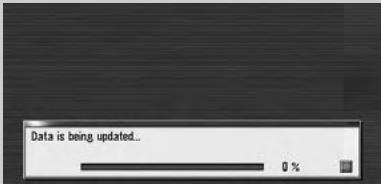
In this phase, take notice of the followings:
All the functions other than AM and FM are disabled during update. You can perform simplified operations by using the TRK (▲) button and VOL (▼/▲) button. (We recommend changing the AV source to AM or FM before you start the update.)
The update takes approximately 3 hours in total.
If you turn the ignition switch off (the navigation system turns off) or eject the upgrade disc, the update resumes when the navigation system turns on or the disc is reinserted.
Phase 2; Update the system programme
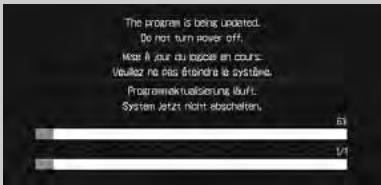
In this phase, take notice of the followings:
No functions are available.
The update takes approximately 10 minutes.
NEVER stop the engine of your vehicle nor turn off the power supply to the navigation system until the installation is completed. Turning the power off in this phase causes a malfunction or failure of the navigation system.
1 Park your vehicle in a safe place.
Leave the ignition in the "ACC" position and make sure that the handbrake is applied.
2 Press the MAP button to display the current location.
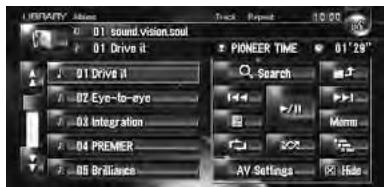

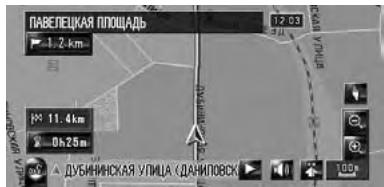
Be sure to display the map of current position. The updating cannot start at the other screens, such as the scroll mode, the navigation menu and AV screen.
3 Press OPEN CLOSE button and insert the upgrade disc into the disc loading slot.
The message confirming whether or not to start the update will appear.
If the message doesn't appear, eject the disc and display the map of current position and then reinsert the disc.
4 Touch [Yes].
![PIONEER CNDV-800HD - Touch [Yes]. - 1](/content/2025/01/118544/images/2639245c41398a16d0a45e0e52d08ff4dc1d6330da62fe079644c0a6d14addeb.jpg)
To cancel the update, touch [No].
5
Touch [Yes].
![PIONEER CNDV-800HD - Touch [Yes]. - 2](/content/2025/01/118544/images/0abd51074c9a9c3cf8f27525f3ad22e7c167052772c4fb33976bc34e8b9ddcc7.jpg)
The message "Password obtained from Pioneer should be entered to update. Have you obtained the password? Please press "Cancel" to stop update." appears.
To start the updating, touch [Yes].
Alternative options:
[No]
Shows "Device Number" ("Device#") of your navigation system.
[Cancel]
Cancel the update.
6
Enter the password for authentication that you obtained in the "STEP 1" section, then touch [OK].
![PIONEER CNDV-800HD - [Cancel] - 1](/content/2025/01/118544/images/ce232082e6f7796b4f1ad47b94d075856b312fadcd5ba004712572a877ca71ce.jpg)
After touching [OK], the system starts the authentication. When the authentication is finished properly, the message for confirmation will appear.
![PIONEER CNDV-800HD - [Cancel] - 2](/content/2025/01/118544/images/0d25b1aaa66aea570c8af2d43dd3ef18a46cfbd70f144f72516d396bee1be339.jpg)
![PIONEER CNDV-800HD - [Cancel] - 3](/content/2025/01/118544/images/9c8a018c176019f3b9681d861a8570632910849bdae3e75a606da5364b73b9f9.jpg)
After you touch [Yes] in this screen, you cannot abort the updating until the installation of the system programme finishes. The update takes approximately 3 hours in total.
7 Touch [Yes] to start the update.
The navigation system restarts and then the installation begins.
![PIONEER CNDV-800HD - Touch [Yes] to start the update. - 1](/content/2025/01/118544/images/d2d21bb2c64d3265f4532a45b69e070e083a46581d1dd290d0c7c8ac47f05877.jpg)
![PIONEER CNDV-800HD - Touch [Yes] to start the update. - 2](/content/2025/01/118544/images/2dbe21b8d4c011bb3a7e53dd8fd50f944ed73c7fd468f007623e39fcbc646857.jpg)
When the update of map database is completed, the finished message appears.
8
Touch [OK] to restart the system.
![PIONEER CNDV-800HD - Touch [Yes] to start the update. - 3](/content/2025/01/118544/images/2c31f6b07511fbbf9350496255b872de49c2a4c8086f84072c390bfb9302f9d5.jpg)
After touching [OK], the installation of system programme begins.
![PIONEER CNDV-800HD - Touch [Yes] to start the update. - 4](/content/2025/01/118544/images/baf5f8a4209dc07c7de93713a626427336618bc6eaca7c8752eef99df4eb37b9.jpg)
CAUTION
While this screen appears, NEVER switch the key position from ACC or turn the power to the navigation system, off.
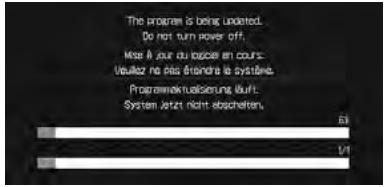
After the installation is completed, the navigation system restarts again.
9 Check the details of the caution message and touch [OK].
The [Regional Settings] screen appears.
10 If necessary, change the settings as desired.
In the [Regional Settings] screen, you can change the settings, such as language or time. (These operations are the same as before upgrade.)
The settings can also be changed afterward.
The time difference can be set from -4 to +9 hours.
11 Touch [OK].
The map of your surroundings is displayed. You can operate the navigation system by touching keys displayed on the screen as usual.
Checking whether the upgrade was done properly
Display "Version" to compare the current version number with the previous one. (For the operation, refer to "Checking "Device Number"" in the "STEP 1" section.)
Renewed Points through this Upgrade
If you upgrade your navigation system by this disc, the system will have the following changes.
Renewal data
The following data are updated:
Map database
— Gracenote® Database
POI data coverage
Approximately 32 000 POIs are included in the database.
- "Water Sports", "Camping" and "Tourist Office" are added as the category for "POI Search", "Vicinity Search" or "Overlay POI".
Some facilities and categories used in "POI Search", "Vicinity Search", and "Overlay POI" will be modified.
For the additional categories that can be used on the voice recognition, see "Category list for vicinity search (Renewal)".
Some POI information may not be accurate or may become inaccurate through the passage of time. Please directly contact the POI to verify the accuracy of the information about the POI which appears in this database. POI information is subject to change without notice.
This is the new feature. Either lowercase or uppercase letters can be selected. Touch to toggle the selection.
Dialling a facility's phone number
If you are using a mobile phone featuring Bluetooth technology by connecting the Bluetooth unit (ND-BT1) (sold separately) to the navigation system, You can make a call to facilities with phone number data.
- You cannot make a call to POIs that have no phone number data.
Dialling from the Detailed POI Information screen
1 Perform [POI Search] or [Vicinity Search] and display the detailed information.
2 Touch of the entry you want to call. The Detailed POI Information screen appears.
3 Touch to make a call.
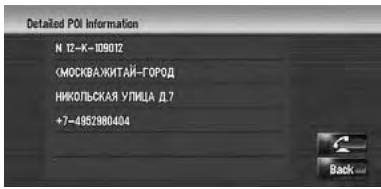
To cancel the call after the system starts dialling, touch
4 To end the call, touch at the top right of the screen.
Dialling from the map
You can make a call by selecting the POI icon from the map screen.
1 Scroll the map, and place the cursor on an icon on the map.
2 Touch
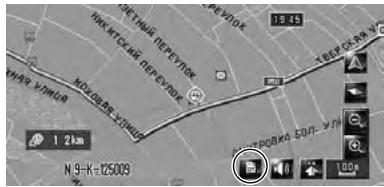
The Detailed POI Information screen appears.
3 Touch to make a call.
To cancel the call after the system starts dialling, touch
4 To end the call, touch at the top right of the screen.
Modified Categories
The following categories are modified or added as the sub-category.
| Category name | Old | New |
| Petrol Station | — | LOTOS |
| Hotel | — | PARK INN |
| Leisure | — | Water Sports |
| — | Camping | |
| — | Tourist Office | |
| Yacht Basin | Marina | |
| Car Dealer | ALFA ROMEO | (Not available.) |
| LANCIA | (Not available.) | |
| — | MERCEDES-BENZ TRUCKS | |
| — | SSANGYONG | |
| — | VOLVO TRUCKS | |
| Vehicle Repair Facility | CITROEN, Repair | (Not available.) |
| — | HONDA, Repair | |
| — | MERCEDES-BENZ, Repair | |
| — | MITSUBISHI, Repair | |
| MAZDA, Repair | (Not available.) | |
| OPEL, Repair | (Not available.) | |
| ROVER, Repair | (Not available.) | |
| VOLKSWAGEN, Repair | (Not available.) | |
| — | SUZUKI, Repair |