K5573 Digital - Mirar Calypso - Manual de uso y guía de instrucciones gratis
Encuentra gratis el manual del aparato K5573 Digital Calypso en formato PDF.



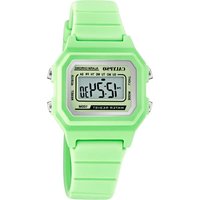
| Tipo de producto | Reloj digital |
| Marca | Calypso |
| Modelo | K5573 Digital |
| Pantalla | Digital (horas, minutos, mes, fecha, día de la semana) |
| Alimentación | Pila (tipo CR2032 o equivalente, no especificado) |
| Precisión | ±30 segundos por mes a temperatura normal (25°C) |
| Temperatura de uso | 10°C a 40°C |
| Cronómetro | Capacidad 100 horas, 50 registros de vueltas/intermedios, cálculo del tiempo promedio |
| Temporizador (cuenta regresiva) | Ajustable hasta 100 horas, alarma sonora al final del conteo |
| Alarmas | 8 alarmas: 4 diarias, 4 con fecha |
| Segundo huso horario | Sí, ajustable |
| Formato de hora | 12/24 horas |
| Retroiluminación | Electroluminiscente (EL) |
| Sonido de botones | Activable/desactivable |
| Carillón de horas | Sí, ajustable |
| Estanqueidad | No especificada; evitar todo contacto con el agua |
| Resistencia a golpes | Diseñada para uso normal, evitar golpes violentos |
| Mantenimiento | Limpiar con un paño suave y agua limpia; evitar productos químicos |
| Reciclaje | Recogida selectiva según normativa RAEE |
Preguntas frecuentes - K5573 Digital Calypso
Preguntas de los usuarios sobre K5573 Digital Calypso
0 pregunta sobre este aparato. Responde a las que conoces o haz la tuya.
Hacer una nueva pregunta sobre este aparato
Descarga las instrucciones para tu Mirar en formato PDF gratis! Encuentra tus instrucciones K5573 Digital - Calypso y toma tu dispositivo electrónico nuevamente en la mano. En esta página están publicados todos los documentos necesarios para el uso de su dispositivo. K5573 Digital de la marca Calypso.
MANUAL DE USUARIO K5573 Digital Calypso
1. MODO DE VISUALIZACIÓN Y OPERACIÓN DE LOS BOTONES

text_image
ALARMA MEDIDOR DE CUENTA REGRESIVA CRONOÓGRAFO FORMATO DE 12 HORAS AM/PM HORA FECHA ALARM WERN 5AT TIME CHRONO DÍA DE LA SEMANA MINUTOS SEGUNDOS 12:50 48 DATE 12-25 SEÑAL DE SILBATO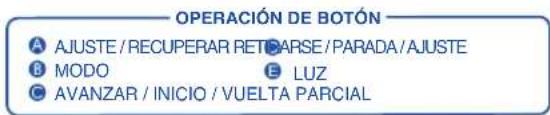
text_image
OPERACIÓN DE BOTÓN A AJUSTE / RECUPERAR RETCARSE / PARADA / AJUSTE B MODO E LUZ C AVANZAR / INICIO / VUELTA PARCIAL2. COMO CAMBIAR EL MODO DE VISUALIZACIÓN
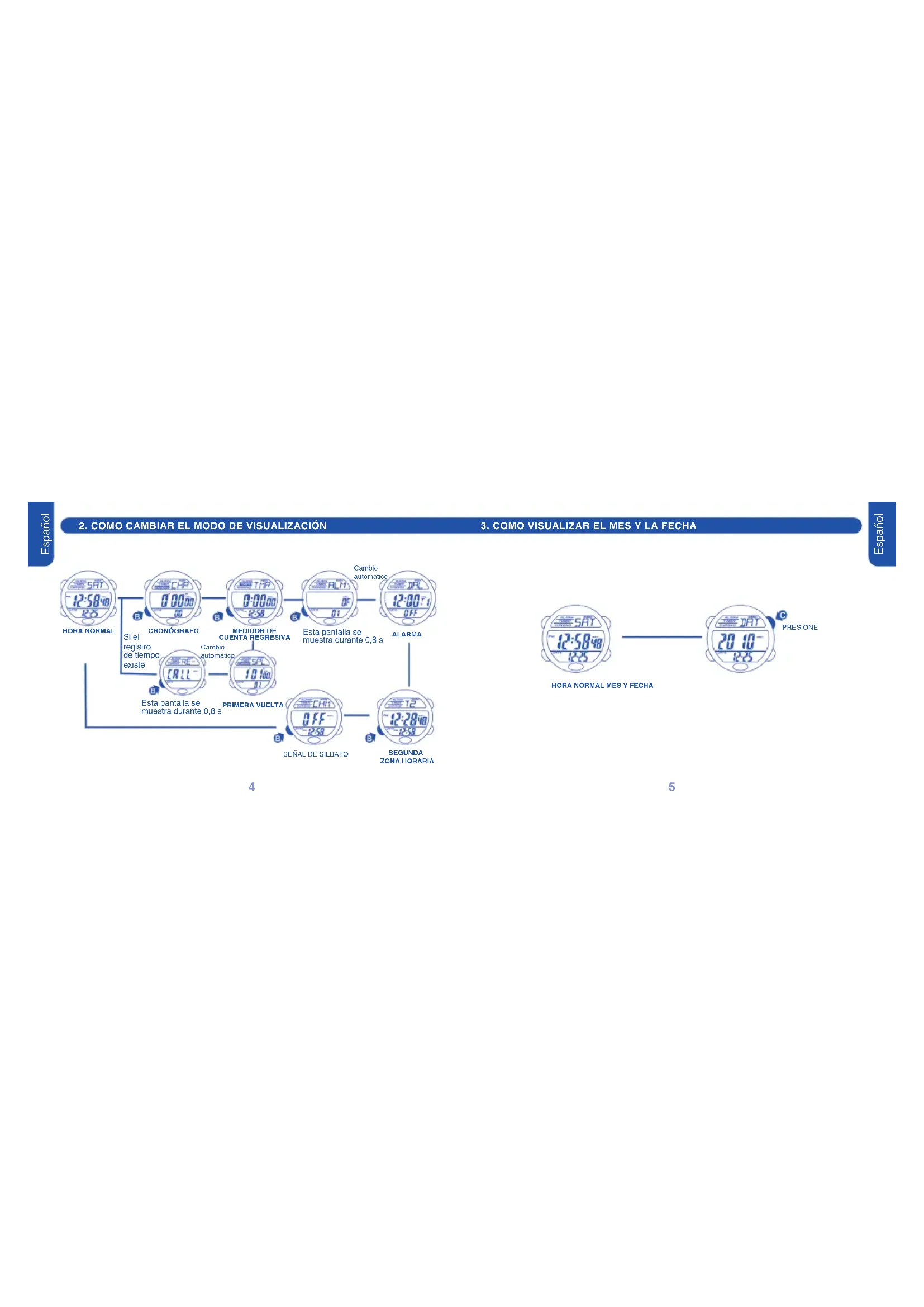
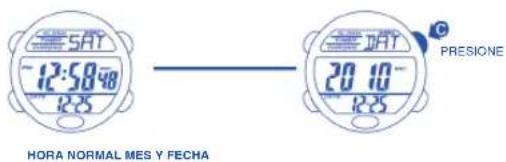
3. COMO VISUALIZAR EL MES Y LA FECHA
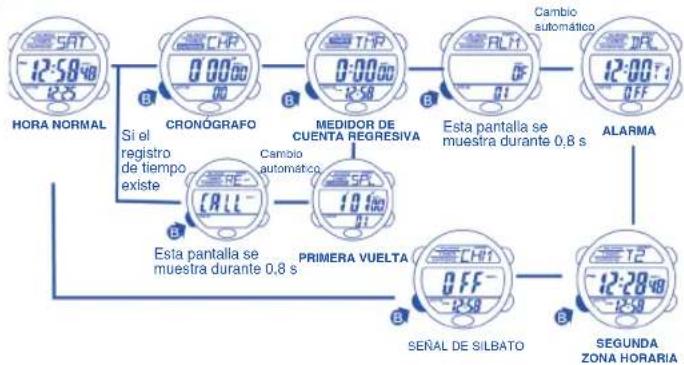
flowchart
graph TD
    A["HORA NORMAL"] --> B["SI el registro de tiempo existe"]
    B --> C["CRONÓGRAFO"]
    C --> D["MEDIDOR DE CUENTA REGRESIVA"]
    D --> E["Cambio automático"]
    E --> F["Essta pantalla se muestra durante 0,8 s"]
    F --> G["ALARMA"]
    G --> H["SEGUNDA ZONA HORARIA"]
    H --> I["SEÑAL DE SILBATO"]
    I --> J["PRIMERA VUELTA"]
    J --> K["CHI"]
    K --> L["Cambio automático"]
    L --> M["Essta pantalla se muestra durante 0,8 s"]
    M --> N["ALARMA"]
    N --> O["Cambio automático"]
    O --> P["Essta pantalla se muestra durante 0,8 s"]
    P --> Q["ALARMA"]
    Q --> R["Cambio automático"]
    R --> S["Essta pantalla se muestra durante 0,8 s"]
    S --> T["Cambio automático"]
    T --> U["Essta pantalla se muestra durante 0,8 s"]
    U --> V["Cambio automático"]
    V --> W["Cambio automático"]
    W --> X["Essta pantalla se muestra durante 0,8 s"]
    X --> Y["Cambio automático"]
    Y --> Z["Cambio automático"]
    Z --> AA["Cambio automático"]
    AA --> AB["Cambio automático"]
    AB --> AC["Cambio automático"]
    AC --> AD["Cambio automático"]
    AD --> AE["Cambio automático"]
    AE --> AF["Cambio automático"]
    AF --> AG["Cambio automático"]
    AG --> AH["Cambio automático"]
    AH --> AI["Cambio automático"]
    AI --> AJ["Cambio automático"]
    AJ --> AK["Cambio automático"]
    AK --> AL["Cambio automático"]
    AL --> AM["Cambio automático"]
    AM --> AN["Cambio automático"]
    AN --> AO["Cambio automático"]
    AO --> AP["Cambio automático"]
    AP --> AQ["Cambio automático"]
    AQ --> AR["Cambio automático"]
    AR --> AS["Cambio automático"]
    AS --> AT["Cambio automático"]
    AT --> AU["Cambio automático"]
    AU --> AV["Cambio automático"]
    AV --> AW["Cambio automático"]
    AW --> AX["Cambio automático"]
    AX --> AY["Cambio automático"]
    AY --> AZ["Cambio automático"]
    AZ --> BA["Cambio automático"]
    BA --> BB["Cambio automático"]
    BB --> BC["Cambio automático"]
    BC --> BD["Cambio automático"]
    BD --> BE["Cambio automático"]
    BE --> BF["Cambio automático"]
    BF --> BG["Cambio automático"]
    BG --> BH["Cambio automático"]
    BH --> BI["Cambio automático"]
    BI --> BJ["Cambio automático"]
    BJ --> BK["Cambio automático"]
    BK --> BL["Cambio automático"]
    BL --> BM["Cambio automático"]
    BM --> BN["Cambio automático"]
    BN --> BO["Cambio automático"]
    BO --> BP["Cambio automático"]
    BP --> BQ["Cambio automático"]
    BQ --> BR["Cambio automático"]
    BR --> BS["Cambio automático"]
    BS --> BT["Cambio automático"]
    BT --> BU["Cambio automático"]
    BU --> BV["Cambio automático"]
    BV --> BW["Cambio automático"]
flowchart
graph TD
    A["HORA NORMAL"] --> B["CRONÓGRAFO"]
    B --> C["INICIO"]
    C --> D["PARADA CONTANDO LAP 2"]
    D --> E["REAJUSTE"]
    E --> F["Volver a la hora normal desde el cronógrafo. El icono del cronógrafo parpadea."]
    D --> G["Volver a la hora normal desde el estado de parada. El icono del cronógrafo no parpadea."]
    D --> H["El cronógrafo se detiene automáticamente en 99:59:59. El icono del cronógrafo deja de parpadear."]

flowchart
graph TD
    A["HORA NORMAL"] -->|B| B["CRONÓGRAFO VUELTA"]
    B -->|C/D| C["MANTENER DURANTE 3 SEGUNDOS"]
    C --> D["PARCIAL"]
    D -->|C/D| E["Digital meters"]
    E --> F["Sat 12:58'40 2.5"]
    E --> G["Sat 10:100 0.1"]
    E --> H["Sat 5:PL 10:100 0.1"]
    E --> I["Sat 5:PT 10:100 0.1"]
- COMO AJUSTAR OPERACIÓN DE SPLIT Y LAP

flowchart
graph TD
    A["12:58:40 HORA NORMAL"] --> B["CRONOGRAFO"]
    B --> C["INICIO"]
    C --> D["PARADA"]
    D --> E["CONTANDO LAP 2"]
    E --> F["REAJUSTE"]
    F --> G["HORA NORMAL"]

    subgraph VUELTA / PARCIAL
        H["Esta pantalla se muestra durante 0.8 s"] --> I["2.06:00 R²"]
        J["Esta pantalla se muestra durante 0.8 s"] --> K["6.00:00 R³"]
        L["PARADA TERCERA VUELTA"] --> M["9.07:00 R⁴"]
        N["CONTANDO LAP 2"] --> O["132:08 R⁵"]
        P["CUARTA VUELTA"] --> Q["138:08 R⁶"]
        R["PARADA ÚLTIMA VUELTA"] --> S["138:08 R⁷"]
        T["A"] --> U["MANTENER DURANTE 3 SEGUNDOS"]
        V["A"] --> W["Cambio automático"]
        X["A"] --> Y["TABLA DE REGISTROS MULTIMODO"]
        Z["A"] --> AA["Esta pantalla se muestra durante 0.8 s CAMBIO AUTOMATICO"]
    end

    style A fill:#f9f,stroke:#333
    style G fill:#f9f,stroke:#333
    style H fill:#ccf,stroke:#333
    style I fill:#ccf,stroke:#333
    style J fill:#ccf,stroke:#333
    style K fill:#ccf,stroke:#333
    style L fill:#ccf,stroke:#333
    style M fill:#ccf,stroke:#333
    style N fill:#ccf,stroke:#333
    style O fill:#ccf,stroke:#333
    style P fill:#ccf,stroke:#333
    style Q fill:#ccf,stroke:#333
    style R fill:#ccf,stroke:#333
    style S fill:#ccf,stroke:#333
    style T fill:#ccf,stroke:#333
    style U fill:#ccf,stroke:#333
    style V fill:#ccf,stroke:#333
    style W fill:#ccf,stroke:#333
- COMO UTILIZAR LA FUNCIÓN DE RECUPERACIÓN

flowchart
graph TD
    A["HORA NORMAL"] --> B["PRIMERA VUELTA SEGUNDA VUELTA"]
    B --> C["TERCERA VUELTA"]
    C --> D["ÚLTIMA VUELTA"]
    D --> E["TIEMPO MEDIO"]
    E --> F["MANTENER DURANTE 3 SEGUNDOS"]
    F --> G["REAJUSTE"]
    H["Tabla de registros multimodo. Esta pantalla se muestra durante 0,8 s Cambio automático"] --> I["VUELTA"]
    I --> J["SEGUNDA VUELTA"]
    J --> K["TERCERA VUELTAPRIMERA VUELTA ÚLTIMA VUELTA"]
    K --> L["TIEMPO TOTAL"]
    L --> M["Cambio automático"]
    N["LAP 1 = 1°01" SPLIT 1 = 1°01" SPLIT 2 = 3°07" SPLIT 3 = 9°07" "] --> O["PARCIAL"]
    P["CAPS"] --> Q["12:58:40 25"]
    Q --> R["PARCIAL"]
    S["PE"] --> T["10:100 01"]
    T --> U["PARCIAL"]
    V["CALL"] --> W["10:100 01"]
    W --> X["PARCIAL"]
    Y["SI"] --> Z["20:00 02"]
    Z --> AA["PARCIAL"]
- COMO UTILIZAR EL MEDIDOR DE CUENTA REGRESIVA
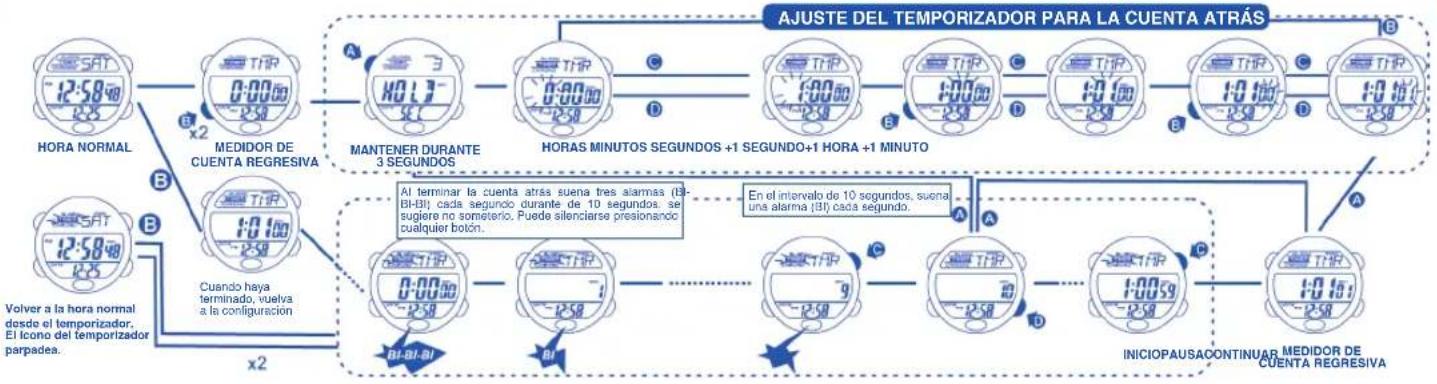
flowchart
graph TD
    A["HORA NORMAL"] --> B["MEDIDOR DE CUENTA REGRESIVA"]
    B --> C["MANTENER DURANTE 3 SEGUNDOS"]
    C --> D["HORAS MINUTOS SEGUNDOS +1 SEGUNDO+1 HORA +1 MINUTO"]
    D --> E["INICIOPAUSACONTINUAR MEDIDOR DE CUENTA REGRESIVA"]
    E --> F["BU-BI-BI"]
    F --> G["BU"]
    G --> H["BU"]
    H --> I["BU"]
    I --> J["BU"]
    J --> K["BU"]
    K --> L["BU"]
    L --> M["BU"]
    M --> N["BU"]
    N --> O["BU"]
    O --> P["BU"]
    P --> Q["BU"]
    Q --> R["BU"]
    R --> S["BU"]
    S --> T["BU"]
    T --> U["BU"]
    U --> V["BU"]
    V --> W["BU"]
    W --> X["BU"]
    X --> Y["BU"]
    Y --> Z["BU"]
    Z --> AA["BU"]
    AA --> AB["BU"]
    AB --> AC["BU"]
    AC --> AD["BU"]
    AD --> AE["BU"]
    AE --> AF["BU"]
    AF --> AG["BU"]
    AG --> AH["BU"]
    AH --> AI["BU"]
    AI --> AJ["BU"]
    AJ --> AK["BU"]
    AK --> AL["BU"]
    AL --> AM["BU"]
    AM --> AN["BU"]
    AN --> AO["BU"]
    AO --> AP["BU"]
    AP --> AQ["BU"]
    AQ --> AR["BU"]
    AR --> AS["BU"]
    AS --> AT["BU"]
    AT --> AU["BU"]
    AU --> AV["BU"]
    AV --> AW["BU"]
    AW --> AX["BU"]
    AX --> AY["BU"]
    AY --> AZ["BU"]
    AZ --> BA["BU"]
    BA --> BB["BU"]
    BB --> BC["BU"]
    BC --> BD["BU"]
    BD --> BE["BU"]
    BE --> BF["BU"]
    BF --> BG["BU"]
    BG --> BH["BU"]
    BH --> BI["BU"]
    BI --> BJ["BU"]
    BJ --> BK["BU"]
    BK --> BL["BU"]
    BL --> BM["BU"]
    BM --> BN["BU"]
    BN --> BO["BU"]
    BO --> BP["BU"]
    BP --> BQ["BU"]
    BQ --> BR["BU"]
    BR --> BS["BU"]
    BS --> BT["BU"]
    BT --> BU
    style A fill:#f9f,stroke:#333
    style B fill:#f9f,stroke:#333
    style C fill:#f9f,stroke:#333
    style D fill:#f9f,stroke:#333
    style E fill:#f9f,stroke:#333
    style F fill:#f9f,stroke:#333
    style G fill:#f9f,stroke:#333
    style H fill:#f9f,stroke:#333
    style I fill:#f9f,stroke:#333
    style J fill:#f9f,stroke:#333
    style K fill:#f9f,stroke:#333
    style L fill:#f9f,stroke:#333
    style M fill:#f9f,stroke:#333
    style N fill:#f9f,stroke:#333
    style O fill:#f9f,stroke:#333
    style P fill:#f9f,stroke:#333
    style Q fill:#f9f,stroke:#333
    style R fill:#f9f,stroke:#333
    style S fill:#f9f,stroke:#333
    style T fill:#f9f,stroke:#333
    style U fill:#f9f,stroke:#333
- COMO ESTABLECER LA HORA DE LA ALARMA DIARIA

flowchart
graph LR
    A["HORA NORMAL"] --> B["ALARMA ALARMA 1"]
    B --> C["ALARMA 4"]
    C --> D["ALARMA 3ALARMA 2"]
    D --> E["ALARMA APAGADA"]
    E --> F["MANTENER DURANTE 3 SEGUNDOS"]
    F --> G["ALARMA DIARIA (1-4 ALARMA)"]
    G --> H["HORAS"]
    H --> I["MINUTOS"]
    I --> J["ALARMA DE HORA NORMAL"]
    J --> K["ALARMA DE LA SEGUNDA ZONA HORARIA"]

    subgraph Periods
        L["No se ha presicado ningún botón, (esía pantalla se muestra durante 0,8 s) "] --> M["ALARMA 1"]
        N["No se ha presicado ningún botón, (esía pantalla se muestra durante 0,8 s) "] --> O["ALARMA 2"]
        P["No se ha presicado ningún botón, (esía pantalla se muestra durante 0,8 s) "] --> Q["ALARMA 3"]
    end

    subgraph Time Intervals
        R["A"] --> S["Pulse 'C' para avanzer el ajuste, Sodenga 'C' durante más de 2 segundos para avanzer el ajuste rápidamente"]
        T["A"] --> U["Pulse 'D' para inverter el ajuste"]
    end

    subgraph Control Signals
        V["+1 HORA"] --> W["+1 MINUTO"] --> X["ALARMA DE LA SEGUNDA ZONA HORARIA"]
    end

    style Periods fill:#f9f9f9,stroke:#333
    style Control Signals fill:#f9f9f9,stroke:#333
- COMO ESTABLECER LA HORA DE LA ALARMA DIARIA

flowchart
graph LR
    A["HORA NORMAL"] --> B["ALARMA 5"]
    B --> C["ALARMA APAGADA"]
    C --> D["MANTENER DURANTE 3 SEGUNDOS"]
    D --> E["MES FECHA"]
    E --> F["AVANCE DE LOS MESES"]
    E --> G["AVANCE DE LAS FECHAS"]
    E --> H["HORAS MINUTOS"]
    H --> I["+1 MINUTO+1 HORA"]

    style A fill:#f9f,stroke:#333
    style B fill:#f9f,stroke:#333
    style C fill:#f9f,stroke:#333
    style D fill:#f9f,stroke:#333
    style E fill:#f9f,stroke:#333
    style F fill:#f9f,stroke:#333
    style G fill:#f9f,stroke:#333
    style H fill:#f9f,stroke:#333
    style I fill:#f9f,stroke:#333

    note1["Pulse 'C' para avanzar el ajuste. Sostença 'C' durante más de 2 segundos para avanzar el ajuste rápidamente"]
    note2["Pulse 'D' para invertir el ajuste"]
    note1 -.-> note1
    note2 -.-> note2
    note1 -.-> note1
    note2 -.-> note2
    note1 -.-> note1
    note2 -.-> note2
    note1 -.-> note1
    note2 -.-> note1

    subgraph Legend
        direction TB
        direction LR
        direction A
        direction B
        direction C
        direction D
        direction E
        direction F
        direction G
        direction H
        direction I
        direction J
        direction K
        direction L
        direction M
        direction N
        direction O
        direction P
        direction Q
        direction R
        direction S
        direction T
        direction U
        direction V
        direction W
        direction X
        direction Y
        direction Z
        direction AA
        direction AB
        direction AC
        direction AD
        direction AE
        direction AF
        direction AG
        direction AH
        direction AI
        direction AJ
        direction AK
        direction AL
        direction AM
        direction AN
        direction AO
        direction AP
        direction AQ
        direction AR
        direction AS
        direction AT
        direction AU
        direction AV
        direction AW
        direction AX
        direction AY
        direction AZ
        direction BA
        direction BB
        direction BC
        direction BD
        direction BE
        direction BF
        direction BG
        direction BH
        direction BI
        direction BJ
        direction BK
        direction BL
        direction BM
        direction BN
        direction BO
        direction BP
        direction BPB
        direction BPBCC
        direction BPCCG
        direction BPCCGCC
    end

    Note1 -.-> note1
    Note2 -.-> note2

    %% Note1,Note2,Note3,Note4,Note5,Note6,Note7,Note8,Note9,Note10,Note11,Note12,Note13,Note14,Note15,Note16,Note17,Note18,Note19,Note20,Note21,Note22,Note23,Note24,Note25,Note26,Note27,Note28,Note29,Note30,Note31,Note32,Note33,Note34,Note35,Note36,Note37,Note38,Note39,Note40,Note41,Note42,Note43,Note44,Note45,Note46,Note47,Note48,Note49,Note50,Note51,Note52,Note53,Note54,Note55,Note56,Note57,Note58,Note59,Note60,Note61,Note62,Note63,Note64,Note65,Note66,Note67,Note68,Note69,Note70,Note71,Note72,Note73,Note74,Note75,Note76,Note77, Note100.]
12. AJUSTE DE LA SEGUNDA ZONA HORARIA
13. COMO ACTIVAR Y DESACTIVAR EL SONIDO DE CADA HORA
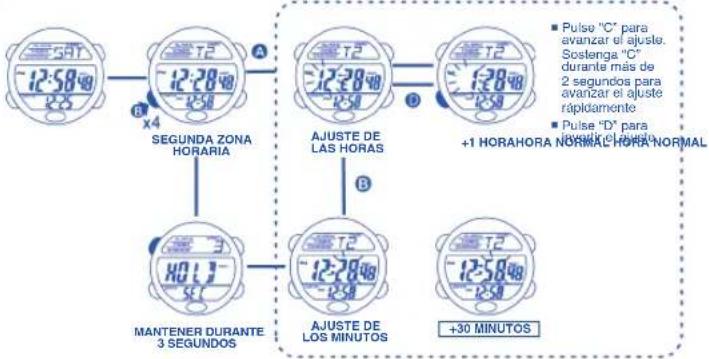
flowchart
graph TD
    A["50T -12:58Hz"] --> B["T2 -12:28Hz"]
    B --> C["A"]
    C --> D["T2 -12:28Hz"]
    D --> E["+1 HORAHORA NORMAL HORA NORMAL"]
    F["MANTENER DURANTE 3 SEGUNDOS"] --> G["T2 -12:78Hz"]
    G --> H["AJUSTE DE LOS MINUTOS"]
    H --> I["+30 MINUTOS"]
    style A fill:#f9f,stroke:#333
    style B fill:#f9f,stroke:#333
    style C fill:#f9f,stroke:#333
    style D fill:#f9f,stroke:#333
    style E fill:#f9f,stroke:#333
    style F fill:#f9f,stroke:#333
    style G fill:#f9f,stroke:#333
    style H fill:#f9f,stroke:#333
    style I fill:#f9f,stroke:#333
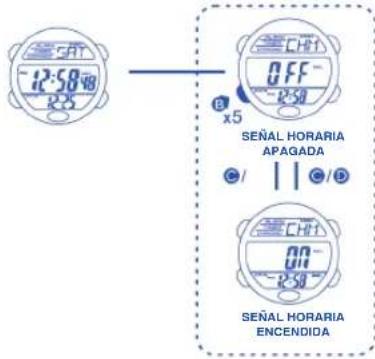
text_image
SAT 12:58 R3 OFF R50 B x5 SEÑAL HORARIA APAGADA C/ | C/D CHF1 00- 12:58 SEÑAL HORARIA ENCENDIDA14. USO DE LA LUZ
15. SONIDO
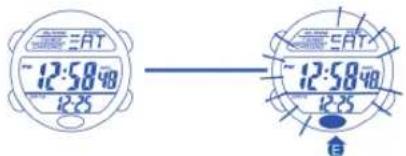
text_image
SAT ~12:58:40 12:25 SAT ~12:58:40 12:25NOTAS
La iluminación del reloj utiliza una luz electroluminiscente (EL) que tiende a perder 1. potencia después de usos muy prolongados.
Bajo la luz solar directa es difícil ver la iluminación que proporciona la luz de la 2. pantalla.
Sonido de los botones: ACTIVAR o DESACTIVAR. Consulte la sección "Cómo 1. establecer la visualización de funciones".
Pitidos cada vez que se presiona un botón, excepto el botón LIGHT.2.
El botón solamente pitará una vez cuando se presione y se mantenga pulsado.3.
Duración de la alarma: 20s, dos pitidos breves por segundo. Un pitido cada hora.4.
El sonido de TIMER tiene prioridad sobre el sonido de ALARM.5.
16. CUIDADO DE SU RELOJ
17. CARACTERÍSTICAS Y ESPECIFICACIONES
Este reloj contiene componentes electrónicos. No intente abrir la caja o 1. remover la tapa posterior.
No oprimir los botones de su reloj bajo la superficie del agua, nadando o 2. practicando submarinismo.
Si por cualquier motivo llegase a aparecer agua o condensación en el reloj 3. hágalo chequear inmediatamente. El agua puede corroer los componentes electrónicos dentro de la caja.
Evite impactos severos. El reloj está diseñado para resistir impactos bajo 4. condiciones normales de uso. Se sugiere no someterlo a impactos severos, al uso inadecuado o caídas bruscas sobre superficies duras.
Evite exponer el reloj a temperaturas extremas.5.
Limpie su reloj únicamente con agua y un paño suave. Evite el uso de 6. productos químicos especialmente de jabón.
Mantenga su reloj lejos de cualquier campo eléctrico o estático.7.
Modo de tiempo: hora, minutos, segundos, mes, fecha y día de la semana.1.
Función: 2.
- Función de temporizador (100 horas), 50 vueltas/parciales, vuelta media.
- Medidor de cuenta regresiva / Señal de silbato.
- 8 alarmas (4 alarmas diarias y 4 alarmas de fecha)
- Formato de 12/24 horas.
- Segunda zona horaria.
- Función de ACTIVACIÓN / DESACTIVACIÓN del sonido de los botones
- Mañana / Tarde, Luz Electroluminiscente.
Precisión a temperaturas normales (25°C): + - 30 segundos por mes.3.
Rango de temperatura de operación normal: 10°C - 40°C4.

En aplicación de la normativa sobre los desechos de equipos eléctricos y electrónicos, los productos de relojería de cuarzo que se encuentran al final de su vida útil deben ser sometidos a una recogida selectiva en vistas a su posterioro. También puede depositar nuestros productos de relojería de cuarzo en uno de puntos de venta autorizados, así como en cualquier punto de recogida habilitado. La selectiva, el tratamiento, la valoración y el reciclaje contribuyen a la salvaguarda o medio ambiente y a la protección de nuestra salud.
- REGULAR DISPLAY AND BUTTON OPERATION

text_image
ALARM TIMER CHRONOGRAPH 12 HOUR FORMAT AM/PM HOUR DATE ALARM 5SAT TIMES DAY OF THE WEEK MINUTES SECONDS HOURLY CHIME 12:50:48 12:25 PMBUTTON OPERATION
A SET / RECALL RECEDE/STOP / ADJUST
MODE LIGHT
ADVANCE / START / SPLIT / LAP