
appLS04WH - Barcode scanners Approx - Free user manual and instructions
Find the device manual for free appLS04WH Approx in PDF.


| Type | Handheld barcode scanner |
| Brand | Approx |
| Model | appLS04WH |
| Color | White |
| Dimensions (L x W x H) | 170 x 70 x 100 mm |
| Weight | 150 g |
| Power Supply | USB powered (5V DC) |
| Interface | USB (cable included) |
| Scan Technology | Laser |
| Resolution | 4 mil (minimum) |
| Scan Rate | 100 scans per second |
| Supported Barcodes | 1D: UPC, EAN, Code 39, Code 128, etc. |
| Operating Range | Up to 300 mm |
| Laser Class | Class 2 (safe for normal use) |
| Operating Temperature | 0°C to 40°C |
| Storage Temperature | -20°C to 60°C |
| Humidity | 5% to 95% (non-condensing) |
| Cable Length | 1.5 m |
| Maintenance | Clean lens with a soft, dry cloth |
| Reparability | Replaceable USB cable |
| Warranty | 2 years |
Frequently Asked Questions - appLS04WH Approx
User questions about appLS04WH Approx
0 question about this device. Answer the ones you know or ask your own.
Ask a new question about this device
Download the instructions for your Barcode scanners in PDF format for free! Find your manual appLS04WH - Approx and take your electronic device back in hand. On this page are published all the documents necessary for the use of your device. appLS04WH by Approx.
USER MANUAL appLS04WH Approx
natural_image
Illustration of a desktop computer setup with monitor, tower, and handheld device (no text or symbols visible)natural_image
Line drawing of a handheld electronic device (no text or symbols)natural_image
Illustration of a handheld device with a green cable attached to its side (no text or symbols)General Configuration
Default Setting

Edition Nbr

Initialization
Interface Setting

PS2 Keyboard Mode
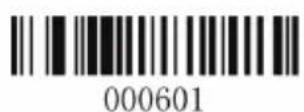
Serial Mode

USB Serial Mode

USB keyboard mode
Scan Setting

RF Mode
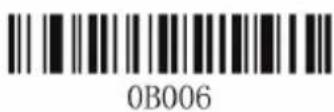
Reset
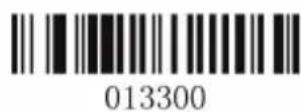
Default Mode
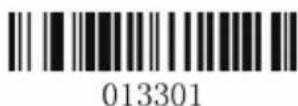
Single Trigger Mode

Key Delay Mode

Disable Key Delay

Auto Continuous Scan Mode
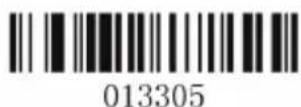
Auto Splashing Mode

Shut Sound

Open Sound

Open Capslock

Shut Capslock


0005021
Sweden

0005022
Switzerland-French

0005023
Switzerland-Germany

0005024
UK

0005025
General

0005026
Turkish-F

0005027
Turkish-Q
Serial Transmit
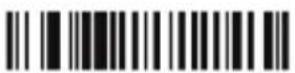
000701
Baud 600

000702
Baud -1200
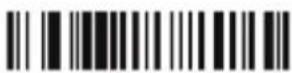
000703
Baud -2400

000704
Baud -4800
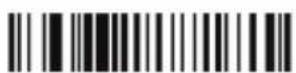
000705
Baud - 9600
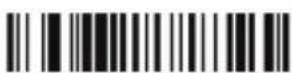
000706
Baud -19200

000707
Baud -38400

000708
Baud -57600

000709
Baud -115200

001200
N/A
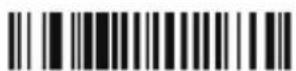
001201
XON/OFF

001202
RTS/CTS

001203
ACK/NCK
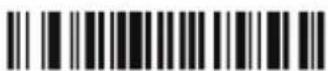
0013020
Handshake Signal Rebouncing-2s
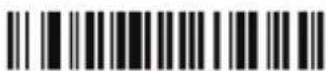
0013050
Handshake Signal Rebouncing-5s

00081
8digits

00080
7digits
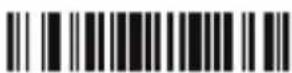
00090
1digits

Barcode Setting

01261
Open Code11

01260
Close Code11
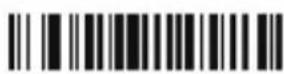
00221
Open Code39

00220
Close Code39

00231
Open Full ASCII
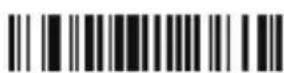
00230
Close Full ASCII
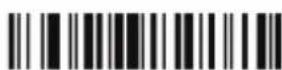
00621
Open Code93

00620
Close Code93

00691
Open Code128

00690
Close Code128

00701
Open Code128 ISBT

00700
Close Code128 ISBT

00851
Open Codabar
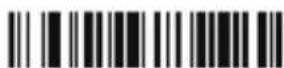
00850
Close Codabar

00961
Open Interleaved 2of5
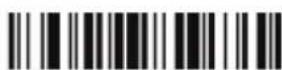
00960
Close Interleaved 2of5

01061
Open Industrial 2of5

01060
Close Industrial 2of5

Close Code93 Multiple Validation
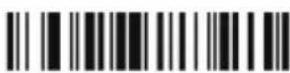
00841
Open Code128 Multiple Validation

00860
Close Codabar Transmit Start/Stop

0094k
Set Codabar ID -- "k"

00950
Close Codabar Multiple Validation
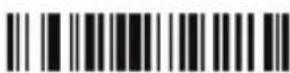
01051
Open Interleaved 2of5 Multiple Validation

0113Z
Set Industrial 2of5 ID -- "Z"

00331
Open Code39 Multiple Validation

0066Z
Close Interleaved 2of5 Multiple Validation

01141
Open Industrial 2of5 Multiple Validation

00330
Close Code39 Multiple Validation

00681
Open Code93 Multiple Validation
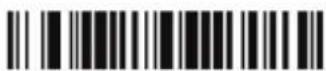
0081Z
Set Code128 ID--"Z"

00861
Open Codabar Transmit Start/Stop
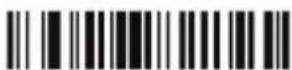
00900
Close Codabar Wide Space Allowance

00951
Open Codabar Multiple Validation

0104Z
Set Interleaved 2of5 ID --"Z"

0113j
Set Industrial 2of5 ID --"j"

01140
Close Industrial 2of5 Multiple Validation

Set MSI ID -- "f"

Set MSI ID -- "Z"

Open MSI Multiple Validation

Close MSI Multiple Validation

Open UPC-E converted to UPC-A

Close UPC-E converted to UPC-A

Open UPC-A to EAN-13

Close UPC-A to EAN-13

Open EAN-13 to ISBN

Close EAN-13 to ISBN

Open EAN-13 to ISSN

Close EAN-13 to ISSN

Set UPC-A ID -- "b"

Set UPC-A ID --"Z"

Set UPC-E ID -- "c"

Set UPC-E ID -'Z'

Set EAN-13 ID - "e"

Set EAN-13 ID - "Z"

Close UPC/EAN extra code

Open UPC/EAN 2digits extra code
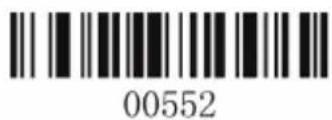
Open UPC/EAN
5digits extra code
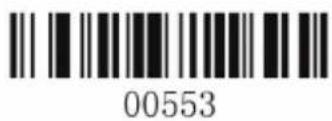
Open UPC/EAN 2&5 digits extra code
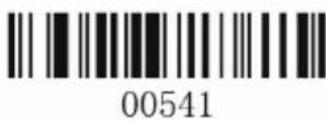
Open UPC/EAN Multiple Validation

Close UPC/EAN Multiple Validation
Data Edit Setting

Notices:
- All softwares (including firmwares) within the scanner packages are protected by the copyright of our company.
- Manufacturer claims to have the right to upgrade the software (including the firmwares) in the target of promoting the stabilization or other functions of scanner.
- If the contents of brochure corrected, we will not inform you in advance.
- The standard package contains: one laser scanner, one stand, one USB wire, and user manual.
Brief Introduction
Our series scanner has powerfull light source and enhanced long distance scanning technology so that it is able for us to quickly recognize damaged dusted and bad printing barcode. Industrial time-enduring quality guarantees its privilege of stable function and long bearing. High volume buzzer provides another way to confirm in chaotic industrial environment.
Strengths
- Enhanced water proof and dust proof capability to IP-54 Industrial Level, specially for use in moist and hazy environment.
- Manual trigger / continuous scan / auto sense, ultra comfortable operating.
- Strong barcode identify strength, which could scan colored barcode, plastic covered barcode, non-white background barcode.
- Recognize, set and update software from remote distance.
- Up to 10.000 hours laser life, French press key with life of 3 million pressing times.
• 1.8m free fall down to concrete ground. Satisfy 24 hours long time using. - Flexible, harmony shape reduces overfatigues, level up working efficiency.
Applications
- Suitable for commercial use (3C, publishing, fabrics, medicine, cosmetics, etc.) retailing, post, telecom, warehouse, express, police, customs, banks, hospitals.
- Compatible with Windows 98 and above, Android, Linux, operating systems. Plug-in use, no need for installation. Compatible with all kinds of POS, tablet, cash drawer, tax control machine. Also work with various retailing, ERP, warehouse management, invocing softwares.
• Multinational keyboard language.
Laser Scanner Standard
Technical parameters
- Scan mode: single line bi-directional
- Light source: 650 (visible laser)
- CPU: 32 digits ARM
- Scan speed: 200 line/sec
- Depth of scan: 2.5mm-600mm
- Width of scan: 18cm
- Print contrast: 20% minimum
- Corner: +/- 30°
- Elevation: +/- 45°
- Deflection: +/- 60°
- Decode capacity: UPC/EAN, UPC/EAN (include complement code), Code 128, UCC/EAN128, Code 39, Code 39 Full ASCII, Codabar, Interleaved 2of5, Code93, MSI, Code11, ISBN, ISSN, China Postage, etc.
- Bit error rate: 1/5 million
- Resolution: 3 mil
- Prompt: buzzer, Led light
- Scan mode1: Handheld / auto-sense
- Press key life: 3 million
- Laser life: 10.000 hours
- Interfaces: USB
- Wire length: 2m (30m - optional)
Environment Parameter
- Working temperature: 32°F to 104°F / 0°C to 40°C
- Storage temperature: -40°F to 140°F / -40°C to 60°C
- Humidity: 5% to 95% relative humidity (non-condesing)
- Anti-knock. 1.8m free fall to cement
- Environment luminance: Max 5000 Lux
- Electrostatic discharge: 15KV air discharge, 8KV contact discharge
Outlook
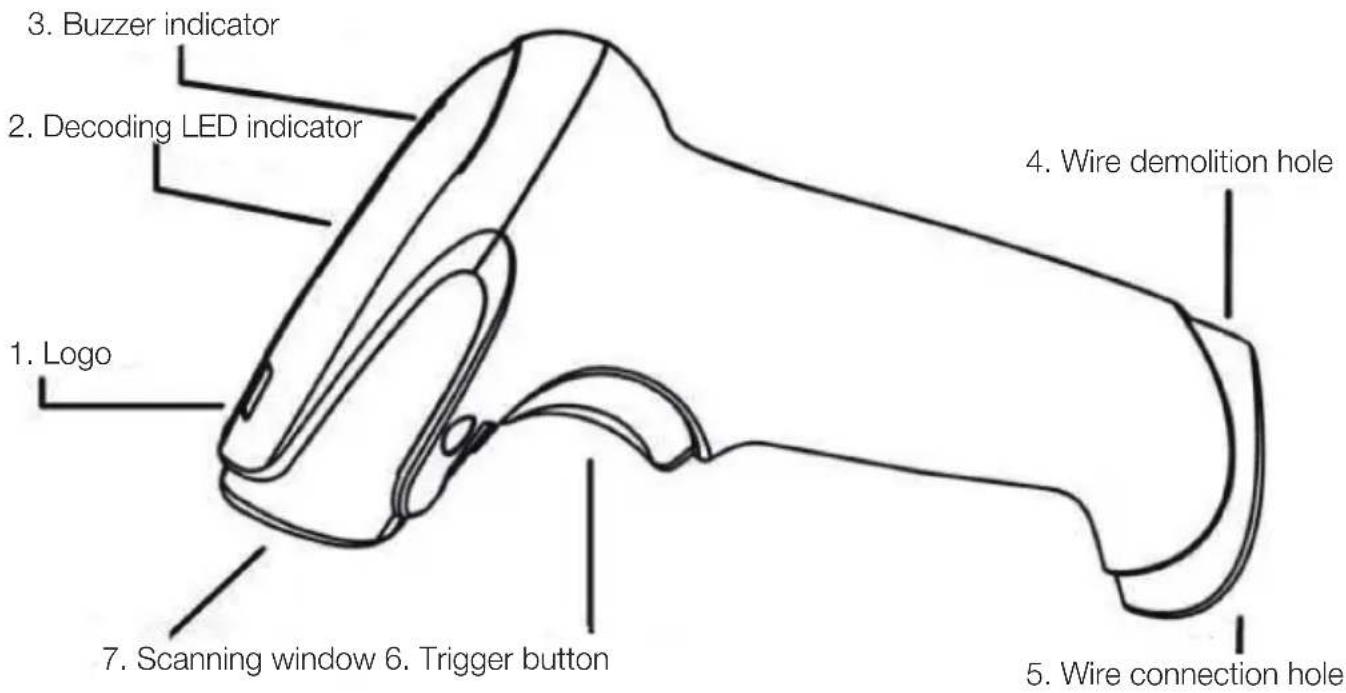
Wire Installation

natural_image
Illustration of a medical device with a computer, tower, and cable (no text or symbols)One USB wire, as the above picture shows. Notice: The host could provide power for the scanner through USB wire. Scanner does not need additional power supply.
Installation process is as follows:
- Plug the RJ45 end to the tail of the scanner.
- Connect the other end to the host's USB interface.
- The buzzer and LED light will give a signal if connected right.
- Windows will detect the USB device automatically.
Demoliton of the wire

natural_image
Line drawing of a handheld electronic device (no text or symbols)The demolition method is as follows:
- Find the hole close to the end of the scanner.
- Put a thin needle into the hole, softly drag the wire out.
Scanning
Handheld scanning
- Guarantee the connection is all right.
- Press the key, the red laser came out. Let the line covers the barcode, when the beep sound rises, the green vanishes, than the barcode is read and the data transmitted to the host.

natural_image
Simple line drawing of a handheld device with a green handle and red scroll wheel (no text or symbols)Manual mode
Autosense

Auto mode:
- In some applications, we will need auto function. The auto mode has continuous function and autosense function.
- The stand should be adjusted right to get a good reading distance.

Fault Solution
| Fault | Possible Reasons | Solutions |
| Pressing down the buttons, the scanner doesn’t react | The scanner got no power | Check host power, make sure the power is on if the configuration needs it. |
| Connection/Wire loosen | Check the wire connection loosen or not | |
| Could send laser, but can not decode | Don’t set the scanner with the right barcode type | Ensure setting the scanner right, make the scanned barcode readable |
| Can not read the barcode | Check the barcode to see if it is damaged, please try to scan the same type testing barcode | |
| Distance wrong between scanner and barcode | Move the scanner further or nearer to the barcode | |
| The barcode decoded, unable to transfer to host | Don’t set the scanner with the right host type | Ensure the configuration and telecom port right |
| Scanned digits does not show up right in the host | Don’t set the scanner to pare with the host | Ensure you choose the right host, please check the host type configure and edit options |
Safety, maintenance and recycling instructions
- Caution: Never open the device, the internal parts are danger, electrical shock.
- Do not install this unit near water, for example, in a wet basement, in an unprotected outdoor installation or in any area classified as a wet.
- Do not insert objects of any kind into this unit through openings as they may touch voltage points and short out parts that could result in fire or electric shock. Do not spill any liquid on the unit.
- Always use cables approved by the manufacturer.
- Never throw the product to a heat source or fire.
- Keep the product at room temperature, maximum 30
- Clean the product with a soft and dry cloth.
- Follow local regulations for disposing of the product.
Recycled
AEEREI-RAE 558 - In this manual, the container (bien) symbol indicates that the product is subject to the European directive 2002/96/EC, electrical and electronic products, batteries, and other accessories must necessarily be subject to a selective collection.
At the end of the life of the devise, make use of the recycling bins.
This gesture will help reduce the health risks and preserve the environment. Municipalities and distributor, will provide essential details on recycling your old device. If this device carries an internal battery, it must be removed and deposited separately for proper management.

Importado por / Imported by:
APPROX IBERIA S. L.
CIF: B-91202499
APPROX TPV
Tlf.: 954 323 886
Email: soporte@approxpv.es
MADE IN PRC
El contenido de esta guía está sujeto a errores tipográficos The content of this guide is subject to typographical errors
aqprox
www.approx.es
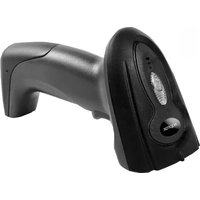


Brand : Approx
Model : appLS04WH
Category : Barcode scanners