
appLS07DK2D - Barcode scanners Approx - Free user manual and instructions
Find the device manual for free appLS07DK2D Approx in PDF.


| Brand | Approx |
| Model | appLS07DK2D |
| Product Type | 2D Barcode Scanner |
| Scanning Technology | Omnidirectional laser / 2D imager |
| Scan Modes | Hand-held trigger, Auto-sensing, Screen reading |
| Supported Barcodes | Code 39, EAN 13 (enable/disable) |
| Interface | USB keyboard emulation |
| Keyboard Languages | English (US), French, Italian, German, Spanish |
| USB Transfer Speed | Slow, Middle, Fast |
| Buzzer Volume | Low or High (adjustable) |
| Configuration Method | Scanning setup barcodes |
| User Profiles | Save and recover user configuration |
| Factory Reset | Via configuration codes |
| Power Source | USB bus power |
| Cleaning Instructions | Soft dry cloth |
| Safety Warnings | Do not open, keep away from water, avoid inserting objects |
| Recycling | Dispose according to local regulations (WEEE directive) |
| Included Accessories | User manual (12 pages PDF) |
| Usage Environment | Indoor, dry locations |
| Form Factor | Fixed or handheld platform |
Frequently Asked Questions - appLS07DK2D Approx
User questions about appLS07DK2D Approx
0 question about this device. Answer the ones you know or ask your own.
Ask a new question about this device
Download the instructions for your Barcode scanners in PDF format for free! Find your manual appLS07DK2D - Approx and take your electronic device back in hand. On this page are published all the documents necessary for the use of your device. appLS07DK2D by Approx.
USER MANUAL appLS07DK2D Approx
Español
1. Introducción
The scanning platform is high efficiency omnidirectional laser barcode scanning platform. Not only the shape is small and excels to cut also the property is stable and reliable. No matter how the POS environment it can do: Can be used as a fixed scanning platform, also be used as a hard-held scanning platform.
2. Parameter setting process
If need to modify the scanner settings parameters you can be achieved by scanning the settings.
Setting process as follows
Step 1: entry settings

Enable configuration code (por defecto)
Step 2: related set cycle (can be set a number of settings at the same time)
Step 3: exist sel uc

Disable configuration code
3. Function settings
Passure factory sellings don't need to scan and exit setup. Warning: AI parameters will be returned to factory sellings.

Factory default configuration
English
4. Product user configuration
Scan the following barcode to save the current parameters of the crocodile to the user configuration.

Save user configuration
Scan the following barcode to recovery the user configuration.
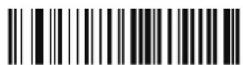
Recovery user configuration
5. Scan mode
When the auto-sensing scan mode is configured to be closed, you can trigger the button on top of scanner to scan bercodes.

Disable auto-sensing scan mode (default)
When the self-sensing scan mode is configured to be open, the scanner can decode automatically when barcodes close to the scanner lens.

Enable auto-sensing scan mode
6. Screen reading mode
When you turn on this mode, scanner can be able to decode codes from phone or computer directly. However turning on this mode will cause low speed on scanning codes from paper. Screen reading mode is turned off by default.

Disable screen reading mode (default)

Enable screen reading mode
7. Buzzer volume

Volume low Volume high (default)
8. USB keyboard transfer speed
The speed of transferring data using USB connecting mode
To obtain accuracy of the data transmission, the PC performance is poor relatively, slow transfer speed is suggested.

Slow
(default)

Middle

Fast
9. Keyboard language
In order to let the scanner upload the codes in a correct way, you have to set the keyboard language.
For example, if you use French keyboard scan below barcode or "French keyboard", then the scanner will upload barcodes according to France keyboard layout.

English (United States) French (France)

Italian (Italy) Italian 142 (Italy)

German (Germany) Spanish (Spain)
- Code 39

Enable code 39 Disable code 39
- EAN 13

Enable EAN 13 Disable EAN 13
12. Safety, maintenance and recycling instructions
- Caution: Never open the device, the normal parts are danger, electrical shock.
- Do no install this un-near water, for example, in a well basement, in an un-crone and outdoor installation or in any strain classified as a well.
- Do not insert objects at any kind into this unit through openings as they may touch storage points and short out parts that could result in line or electric shock.
- Deed soil and land on the unit. Danger of explosion!
- Don't crush power cables, danger of short circuit
- Always correct to the manufacturer's recommended mention.
- Clean the product, with a soft and dry cloth
- Follow local regulations or disposing of the product.
13. Recycled
A-E-H-RA-E 5549 In this manual, the container (pin) symbol indicates that the product is subject to the European directive 2002/96 / LC, electrical and electronic products, batteries, and batteries and other accessories must necessarily be subject to a selective collection.
At the end of the line of the device, make use of the recycling line. This pes-
Municipalise and distributors. Will provide essential details on recycling your old device. If this device carries an internal battery, I must be removed and deposited separately for proper management.

Importado por / Imported by:
APPROX IBERIA S. L.
CIF: B-91202499
APPROX TPV TLF: 954 323 886
soporte@approxpv.es
El contenido de esta guía está sujeto a errores tipográficos The content of this guide is subject to typographical errors
www.approx.es
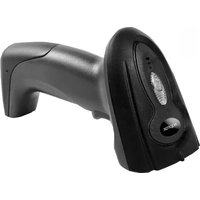


Brand : Approx
Model : appLS07DK2D
Category : Barcode scanners