
appLS05HD2D - Barcode scanners Approx - Free user manual and instructions
Find the device manual for free appLS05HD2D Approx in PDF.


| Product Type | 2D Barcode Scanner |
| Brand | Approx |
| Model | appLS05HD2D |
| Scanning Technology | 2D Image Scanning |
| Supported Barcode Types | 1D and 2D barcodes |
| Connectivity | USB (Host Computer) |
| Power Source | Via USB Connection |
| Startup | Automatic upon USB connection |
| Standby Mode | Automatic sleep after 130 minutes of inactivity; wakes on barcode approach |
| Scanning Window | Clean with hairbrush or soft cloth; avoid hard objects and solvents |
| Illumination Settings | Normal mode (LED off), LED always on; configurable via barcode |
| Beeper Settings | Good read beep on/off; pitch (low, middle, high); error sound pitch |
| Good-Read LED | On by default; can be turned off via barcode |
| Keyboard Layout Options | Multiple (English US, French, Italian, German, Spanish, etc.) |
| Update Speed Settings | Slow (default), Middle, Fast (for USB keyboard mode) |
| Text Transform | Normal output, case reverse, all caps |
| Configuration Mode | By scanning special barcodes |
| Factory Defaults Restore | Via barcode (see manual) |
| Safety Instructions | Do not open device; keep away from water; use approved cables; max operating temperature 30°C |
| Recycling | Subject to WEEE Directive 2002/96/EC; dispose at recycling bins |
Frequently Asked Questions - appLS05HD2D Approx
User questions about appLS05HD2D Approx
0 question about this device. Answer the ones you know or ask your own.
Ask a new question about this device
Download the instructions for your Barcode scanners in PDF format for free! Find your manual appLS05HD2D - Approx and take your electronic device back in hand. On this page are published all the documents necessary for the use of your device. appLS05HD2D by Approx.
USER MANUAL appLS05HD2D Approx
When you turn on this mode, scanners can be decoding the codes on phone or computer. However, turn on this code will be cause lower speed when scanning printing codes. The default is turn off

Disable Screen Head Mode (Default) Enable Screen Head Move
2.1.6. Luz / Illumination

Normal mode LED always off

LED always on
2.2. Beeper y notificaciones LED / Beeper and LED notifications
Good read beep off (pre auff)
2.2.4. Beep pitch-good read


Low pitch Middle pitch (delsuit)

High pitch
You will hear 4 continue alarm sounds when data upload failure, one single alarm sound means scan indistinguishability barcode.


Error sound low pitch (default)
Error sound middle pitch

error sound high pitch
2.2.7. LED de lectura correcta / Good-read LED

Good-read LTD

Good-read LCD on default
There barcools is used to set the update speed when scanner is in USD keyboard pattern. If the performance of your PC is lower, we suggest you choose slow update speed to make sure the scanner update for right data.

Slow update speed (default): Middle update speed

e update speed

Fast update speed
2.4. Ajuste de mayúsculas-minúsculas / USB keyboard text-transform

Normal output (delsull) Case reversa


All Chou Lough Chou

2.5. Keyboard layout setting

English (United States) French (France)


Italian itavi Italian 142 (Italy)


German (Germany) Spanish (Spain)


Enrich Japanese


Russian (MS) Russian (tyccwrito)


Arabic
101

Irish

Polish (214) Polish [Programmer]

Dutch (Netherlands); Czech (QW)

3TZ

Portuguese (Portugal) Portuguese

Brazil)

Swedish (Sweden) Turkish Q
The user guide applies to apolSC6 D2D which density 1D&2D barcode by 2D image scanning pattern, and apply the complete set of patent technology developed by Approx. The scanners above are of strong identification capability, and support automatic continuous scanning mode with test and flexible scanning speed.
1.1. Product display
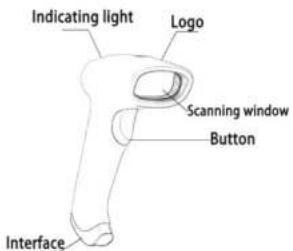
1.2. Start-up, shutdown, standby and restart
Start-up: Connect hos, computer with scanner, which will automatically start-up and in working slots.
Shuldown: Remove the USA which is connected with host computer. Standby Scanner with automatic sleep standby function, 130 minutes without work it will be in standby mode, but it will automatically start-up when barcode approach.
Hassar: If the scanner crashes or doesn't respond, please switch it off and restart.
1.3. Maintenance
- The window must be lect clean, the supplier do not bear the guarantee
responsibility due to the improper maintenance.
- Avoid the window being wear and tear or scratched by hard object
- Use the hairbrush to remove the stain on the window
- Clear the window with a soft cloth, such as lens cleaning cloth
- Epraying loud or a the window is prohibited
- Porbiary cleaning solvents, except for the clearing water.
1.4. Reading skills
If the barcode is small, it should be closer to the scanning window. If the barcode is large, I should be far away from the scanning window a little more. Thus easier to be read correctly.
If the barcode is highly reflective (for example, the coated surface; you may need to sit the barcode at an angle to successfully scan it.

2. Barcode Menu
This model of laser desktop barcode scanner is designed to change settings by reading some special barcode, which we will give you a detailed introduction and show you all the barcodes for the corresponding setting in this section.
The greatest advantage of this setting method is direct, malignant and user friendly.
2.1. Setting barcodes
2.1.1. Turn or turn all configuration code
When the configuration code is run on. All configuration codes available
When the configuration code is ...in oil, you need selling

Configuration Code Turn on [Default]. Configuration Case Turn off
2.1.2. Restore Factory Defaults
* See more on page 4.
3. Safety, maintenance and recycling instructions
- Caution: Never open the device, the internal parts are danger, electrical shock 2. Do not install this unit near water, for example, in a wet basement, in an unprotected outdoor installation or in any area classified as a wet.
- Do not insert objects of any kind into the unit through openings as they may touch voltage points and short cut parts that could result in the electric shock. Do not spill any load on the unit.
- Always use cabes approved by the manufacturer.
- Never throw the product to a host source of the.
- Keep the product at room temperature, maximum 30
- Follow local regulations for disposing of the product.
4. Recycled
ACORD-RAC 658 - In the manual, the container (bery) symbol indicates that the product is subject to the European directive 2002/06/EC electrical and electronic products, batteries and other accessories must necessarily be subject to a selective collection.
At the end of the life of the ocean, make use of the recycling bins. This gassture will help reduce the health risks and preserve the environment. Municipal ice and distributor, will provide essential details on recycling your old device. If the device carries an internal battery, I must be removed and deposited separately for proper management.

Importado por / Imported by:
APPROX IBERIA S. L.
CIF: B-91202499
APPROX TPV
Tlf.: 954 323 886
Email: soporte@approxtpv.es
MADE IN PRC
The content of this guide is subject to typographical errors
aqprox
www.approx.es


- Beep pitch-good read
- LED de lectura correcta / Good-read LED
- Ajuste de mayúsculas-minúsculas / USB keyboard text-transform
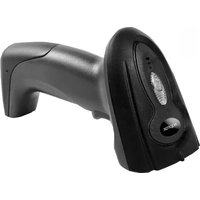
- Product display
- Start-up, shutdown, standby and restart
- Maintenance
- Reading skills
- Barcode Menu
- Setting barcodes
- Restore Factory Defaults
- Safety, maintenance and recycling instructions
- Recycled
Brand : Approx
Model : appLS05HD2D
Category : Barcode scanners