HTF-M45WH - Household Fan Heinner - Free user manual and instructions
Find the device manual for free HTF-M45WH Heinner in PDF.


| Product Type | Domestic Fan |
| Brand | Heinner |
| Model | HTF-M45WH |
| Fan Height | 45 cm |
| Base Diameter | 35 cm |
| Net Weight | 3.2 kg |
| Power Source | AC 220-240V, 50/60 Hz |
| Power Consumption | 45 W |
| Number of Speed Settings | 3 |
| Oscillation | Yes, 90° horizontal |
| Timer | Up to 2 hours |
| Remote Control | Included |
| Tilt Adjustment | Yes, manual up/down |
| Fan Blade Diameter | 40 cm |
| Material | ABS plastic, metal base |
| Noise Level | ≤ 55 dB |
| Power Cord Length | 1.5 m |
| Safety Features | Overheat protection, tip-over auto shut-off |
| Cleaning Instructions | Wipe with damp cloth, do not immerse |
| Spare Parts Availability | Blades, motor, remote (contact support) |
Frequently Asked Questions - HTF-M45WH Heinner
User questions about HTF-M45WH Heinner
0 question about this device. Answer the ones you know or ask your own.
Ask a new question about this device
Download the instructions for your Household Fan in PDF format for free! Find your manual HTF-M45WH - Heinner and take your electronic device back in hand. On this page are published all the documents necessary for the use of your device. HTF-M45WH by Heinner.
USER MANUAL HTF-M45WH Heinner
natural_image
Exterior view of a modern office building (no signage)- Digital control
- 3 speeds
- Timer
1. INTRODUCTION
Please read the instructions carefully and keep the manual for future information.
This manual is designed to give all necessary instructions concerning installation, use and maintenance of the unit. In order to operate the unit correctly and safely, please read this instruction manual carefully before installation and use.
2. CONTENT OF YOUR PACKAGE
→ Digital tower fan
→ User manual
→ Remote control
→ Certificate of warranty
→ Declaration of conformity
3. SAFETY INSTRUCTIONS
GENERAL
Read all instructions carefully and keep this manual for future reference.
- This appliance can be used by children aged from 8 years and above and persons with reduced physical, sensory, or mental capabilities or lack of experience and knowledge if they have been given supervision or instruction concerning use of the appliance in a safe way and understand the hazards involved. Children shall not play with the appliance. Cleaning and user maintenance shall not be done by children without supervision.
- Children less than 3 years should be kept away unless continuously supervised. Children aged from 3 years and less than 8 years shall only switch on/off the appliance if it has been placed or installed in its intended normal operating position and they have been given supervision or instruction concerning use of the appliance in a safe way and understand the hazards involved.
- Never insert fingers, pencils, or any other object through the grille when the fan is running.
- Disconnect fan when moving from one location to another.
- Be sure the fan is on a stable surface when operating to avoid overturning.
- DO NOT use the fan in the window, rain may create electrical hazard.
- Indoor and household use only.
WARNING:
- If the supply cord is damaged, it must be replaced by the manufacturer or its service agent or a similarly qualified person to avoid a hazard.
- To protect against the risk of electrical shock, do not immerse the unit, cord, or plug in water or other liquid.
- When the appliance is not in use and before cleaning, unplug the appliance from the outlet.
- When the fan was assembled, the rotor blade guard shall not be taken off anymore.
- Ensure that the fan is switched off from the supply mains before removing the guard.
4. PRODUCT DESCRIPTION
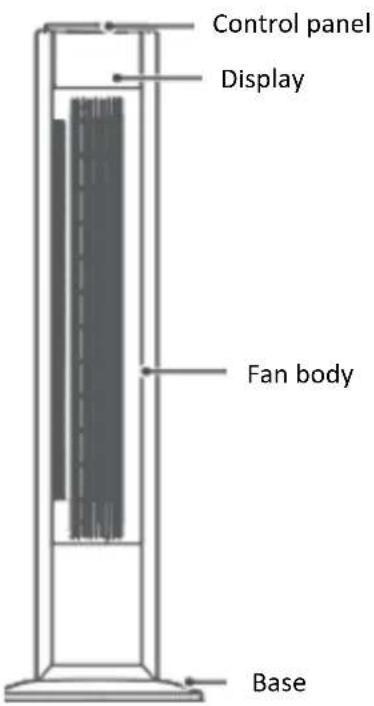
5. USING THE APPLIANCE
PRODUCT INSTALLATION
NOTE:
Please place the appliance on the package foam or other soft surfaces and place it upside down to avoid scratch mark when installing the base.
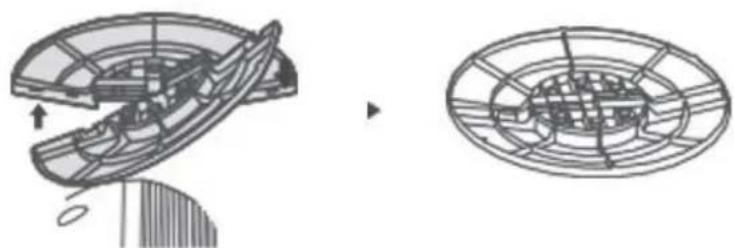
1. Base installation
- Take out the two parts of the base from packing box. Then, align the centres of the two parts of the base and place them in a crossed form. Rotate one of the two bases to align the holes and make them stuck correctly.
natural_image
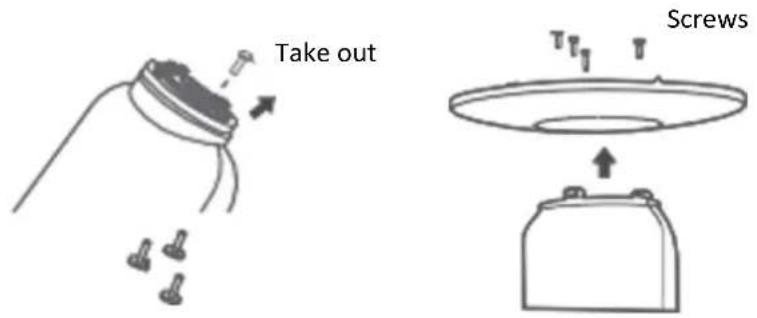
Technical line drawing of a mechanical component before and after assembly (no text or symbols)- Unscrew the four screws from the appliance body prior to installation of the base on the appliance body when the base and the fan body are aligned accurately. Afterwards, fix and tighten the base and the fan body by means of screws.
USE INSTRUCTION
Control panel
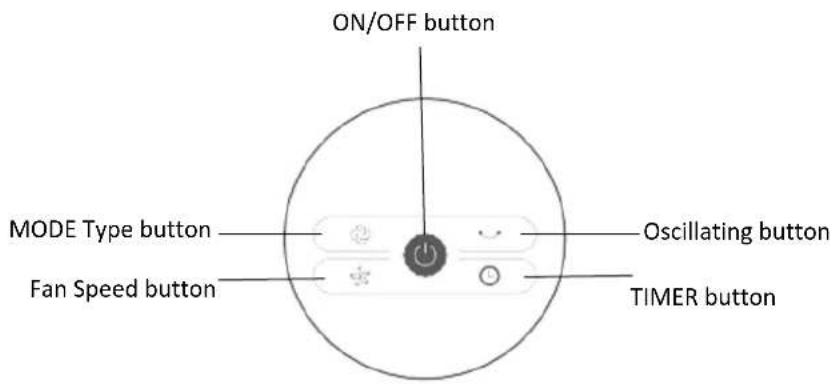
Press "ON / OFF" button to start or stop the appliance.
Press "Fan speed" button to adjust the speed from shift 1 to 3.
Press "TIMER" button to adjust the time:
- set the power off time between 1 hour and 7 hours in working mode.
- set the power on time between 1 hour and 7 hours in standby mode (the fan must be plugged in, but in standby mode).
Press "MODE type" button to select wind blowing mode: Normal wind, sleep wind, natural wind.
Press "Oscillating" button to control the airflow direction.
Display
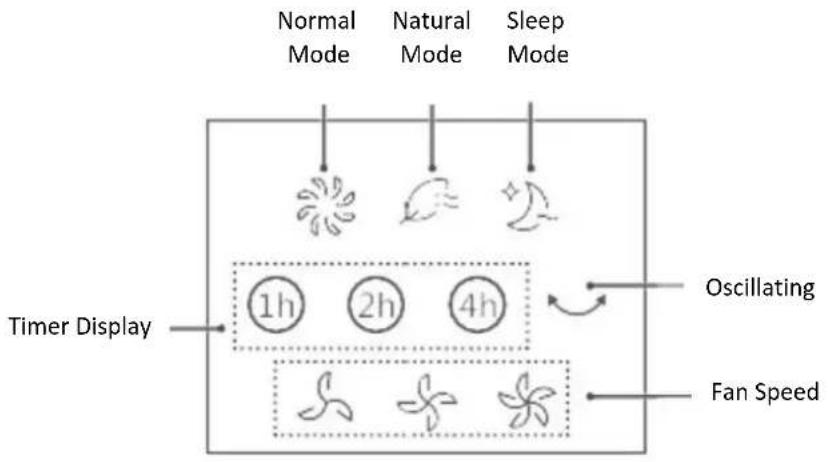
flowchart
graph TD
    A["Timer Display"] --> B["Normal Mode"]
    A --> C["Natural Mode"]
    A --> D["Sleep Mode"]
    B --> E["1h"]
    C --> F["2h"]
    D --> G["4h"]
    E --> H["Oscillating"]
    F --> H
    G --> I["Fan Speed"]
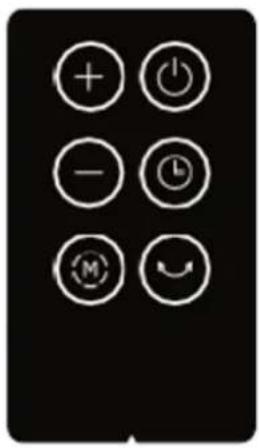
Remote Control - Effective Range of Remote Control: within 5 m distance and 30-degree angle of product position.
natural_image
Black background with six white circular icons representing function keys: plus, power, minus, clock, megaphone, and smile (no text or symbols beyond basic icons)| ON / OFF Key | |
| Mode wind type | |
| + | “+” Key |
| - | “-” Key |
| Timer key | |
| Oscillation Key |
Battery installation for remote control
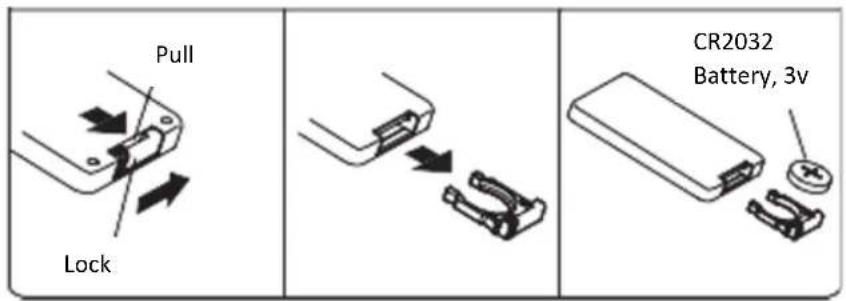
- The remote control uses one piece battery of type "CR2032".
○ Install the battery with positive side facing up.
6. CLEANING AND MAINTENANCE
The fan requires minimal maintenance. Do not try to fix it by yourself. Refer to qualified service personnel if service is needed.
- Before cleaning and assembling, unplug the fan power.
- To ensure adequate air circulation to the motor, keep vents at the rear of the motor free of dust. Do not disassemble the fan to remove dust.
- Please wipe the exterior parts with a soft cloth soaking in a mild detergent.
- Do not use any abrasive detergent or solvents to avoid scratching the surface.
- Do not use any of the following as a cleaner: gasoline, thinner.
- Do not allow water or any other liquid entering into the motor housing or interior parts.
- Be sure to unplug from the electrical supply source before cleaning.
- Plastic parts should be cleaned with a soft cloth moisten with mild soap thoroughly remove soapsuds with dry cloth.
7. TROUBLESHOOTING
Operation of your appliance can lead to errors and malfunctions. The following tables contain possible causes and notes for resolving an error message or malfunction. It is recommended to read the table below carefully in order to save your time and money that may cost for calling to the service center.
| Problem | Cause | Solution |
| The machine does not work properly after installed | • The power cable is not plugged in or has poor contact. | Make sure the plug is properly inserted into the socket. |
| • The switch on the body is not turned on. | Turn on the switch on the body. | |
| The remote does not work | • The battery needs replacing. | Replace the battery. |
| • The remote is being used more than 5m away from the fan. | Use the remote closer to the fan and make sure it is pointing directly at the display panel. |
CUSTOMER CARE AND SERVICE
Always use original spare parts.
When contacting our Authorised Service Centre, ensure that you have the following data available:
Model and Serial Number.
The information can be found on the rating plate. Subject to change without notice.
TECHNICAL DATA
| Voltage | 220-240V~50Hz |
| Power | 45 W |
Thank you for purchasing this product. If you need support with your product, visit our website using the links below.
Get User manuals: https://www.heinner.ro
Get Service information: https://www.heinner.ro

Environment friendly disposal
You can help protect the environment!
Please remember to respect the local regulations: hand in the non-working electrical equipment's to an appropriate waste disposal center.

HEINNER is a registered trademark of Network One Distribution SRL. Other brands and product names are trademarks or registered trademarks of their respective holders.
No part of the specifications may be reproduced in any form or by any means or used to make any derivative such as translation, transformation, or adaptation without permission from NETWORK ONE DISTRIBUTION.
Copyright © 2013 Network One Distribution. All rights reserved.
www.heinner.com, http://www.nod.ro

This product is in conformity with norms and standards of European Community.

Importer: Network One Distribution
Marcel Iancu Street, 3-5, Bucharest, Romania
Tel: +40 21 211 18 56, www.heinner.com, www.nod.ro
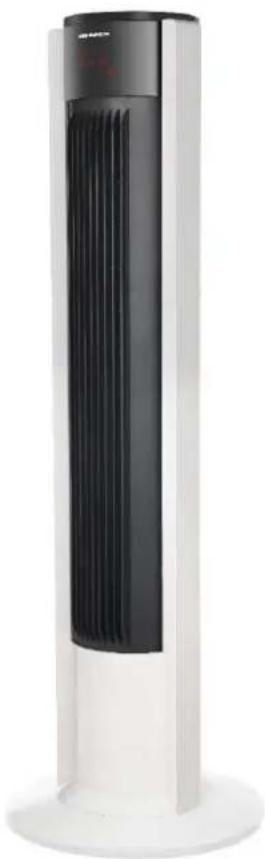
VENTILATOR DIGITAL TIP TURN
Model:
HTF-M45WH
natural_image
Exterior view of a modern office building (no signage)natural_image
Technical line drawing of a mechanical component before and after assembly (no text or symbols)natural_image
Black rectangular device with six white circular icons arranged in a grid: plus, power, minus, clock, megaphone, and curved arrow (no text or symbols)natural_image
Exterior view of a modern vertical tower with black ventilation grille and white base (no text or symbols visible)natural_image
Technical line drawing of a mechanical component before and after assembly (no text or symbols)natural_image
Black background with six white circular icons representing function buttons (no text or symbols)natural_image
Modern vertical tower with black ventilation grille and white base (no visible text or symbols)natural_image
Technical line drawing of a mechanical component before and after assembly (no text or symbols)- INTRODUCTION
- CONTENT OF YOUR PACKAGE
- SAFETY INSTRUCTIONS
- GENERAL
- WARNING:
- PRODUCT DESCRIPTION
- USING THE APPLIANCE
- PRODUCT INSTALLATION
- NOTE:
- Base installation
- USE INSTRUCTION
- Control panel
- Display
- Battery installation for remote control
- CLEANING AND MAINTENANCE
- TROUBLESHOOTING
- CUSTOMER CARE AND SERVICE
- TECHNICAL DATA
- Environment friendly disposal
- Importer: Network One Distribution
- VENTILATOR DIGITAL TIP TURN
Brand : Heinner
Model : HTF-M45WH
Category : Household Fan