
CTM1017 - Multifunction tool Ferm - Free user manual and instructions
Find the device manual for free CTM1017 Ferm in PDF.


| Product type | Oscillating multi-tool |
| Brand | Ferm |
| Model | CTM1017 |
| Dimensions (L x W x H) | 32 x 8 x 12 cm |
| Weight | 1.5 kg |
| Power supply | Mains 230 V ~ 50 Hz |
| Power consumption | 250 W |
| No-load speed | 11,000 to 22,000 oscillations/min |
| Oscillation angle | 3.2° |
| Main functions | Cutting, sanding, scraping, sawing |
| Included accessories | 3 cutting blades, 1 sanding pad, 1 Allen key |
| Fixing system | Screw clamping with Allen key |
| Speed control | Yes, integrated wheel |
| Switch | Trigger with lock-on function |
| Sound level (LpA) | 85 dB(A) |
| Vibrations (ah) | 7.5 m/s² |
| Maintenance and cleaning | Clean the tool after use with a dry cloth |
| Safety instructions | Wear gloves, safety glasses, and a mask |
| Spare parts and repairability | Available on the Ferm website (blades, pads, carbon brushes) |
| Warranty | 2 years |
Frequently Asked Questions - CTM1017 Ferm
User questions about CTM1017 Ferm
0 question about this device. Answer the ones you know or ask your own.
Ask a new question about this device
Download the instructions for your Multifunction tool in PDF format for free! Find your manual CTM1017 - Ferm and take your electronic device back in hand. On this page are published all the documents necessary for the use of your device. CTM1017 by Ferm.
USER MANUAL CTM1017 Ferm

natural_image
Product photo of a blue FERM electric shaver tool with various tools and components (no visible text or symbols)CTM1017
EN Original instructions 04
DE Übersetzung der Originalbetriebsanleitung 09
NL Vertaling van de oorspronkelijke gebruiksaanwijzing 15
FR Traduction de la notice originale 21
PL Tłumaczenie instrukcji oryginalnej 27

Fig. 1
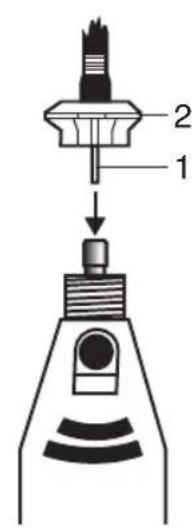

Fig. 2
Fig. 3

natural_image
Illustration of six different types of electronic components or connectors, including a cylindrical lamp, triangular prism, sphere, and rectangular block (no text or symbols present)Fig. 4
natural_image
Simple line drawing of two cylindrical objects with conical ends and vertical rods (no text or symbols)Fig. 5

natural_image
Technical line drawings of mechanical components including a cylindrical tool, cylindrical cap, and flanged base (no text or symbols)Fig. 6

natural_image
Three technical diagrams showing mechanical components: a cylindrical component with a top, a vertical rod with a cap, and a textured cylindrical part (no text or symbols)EN
COMBITOOL 160W
Thank you for buying this Ferm product.
By doing so you now have an excellent product, delivered by one of Europe's leading suppliers. All products delivered to you by Ferm are manufactured according to the highest standards of performance and safety. As part of our philosophy we also provide an excellent customer service, backed by our comprehensive warranty. We hope you will enjoy using this product for many years to come.
The numbers in the following text refer to the pictures on page 2-3

Read the operating instructions carefully before using this device. Familiarise yourself with its functions and basic operation. Service the device as per the instructions to ensure that it always functions properly. The operating instructions and the accompanying documentation must be kept in the vicinity of the device.
Contents
- Machine data
- Safety instructions
- Assembly of accessoires
- Mounting the flexible shaft and stand
- Maintenance
1. Machine data
Technical specifications
Voltage 220-240V\~
Frequency 50 Hz
Power consumption 160 W
No load speed 8.000-35.000/min
Capacity of spring chuck 3.2 + 2.4 mm
Weight 1.75 kg
Lpa (Sound pressure level) 73+3 dB(A)
Lwa (Sound power level) 84+3 dB(A)
Vibration 3.74+1.5 m/s
Vibration level
The vibration emission level stated in this instruction manual has been measured in accordance with a standardised test given in EN 60745; it may be used to compare one tool with another and as a preliminary assessment of exposure to vibration when using the tool for the applications mentioned.
- using the tool for different applications, or with different or poorly maintained accessories, may significantly increase the exposure level.
- the times when the tool is switched off or when it is running but not actually doing the job, may significantly reduce the exposure level.
Protect yourself against the effects of vibration by maintaining the tool and its accessories, keeping your hands warm, and organizing your work patterns.
Check first whether or not the delivery has been damaged by transport and/or whether all the parts are present.
2. Safety instructions
Explanation of symbols

Denotes risk of personal injury, loss of life or damage to the tool in case of non-observance of the instructions in this manual.

Risk of electric shock

Variable speed control.

Wear ear and eye protection.

Wear a dust mask.
General safety instructions

WARNING!
Read all safety warnings and all instructions. Failure to follow the
warnings and instructions may result in electric shock, fire and/or serious injury.
Save all warnings and instructions for future reference.
The term “power tool” in the warnings refers to your mains-operated (corded) power tool or battery-operated (cordless) power tool.
1) Work area safety
a) Keep work area clean and well lit. Cluttered or dark areas invite accidents.
b) Do not operate power tools in explosive atmospheres, such as in the presence of flammable liquids, gases or dust. Power tools create sparks which may ignite the dust or fumes.
c) Keep children and bystanders away while operating a power tool. Distractions can cause you to lose control.
2) Electrical safety
a) Power tool plugs must match the outlet. Never modify the plug in any way. Do not use any adapter plugs with earthed (grounded) power tools. Unmodified plugs and matching outlets will reduce risk of electric shock.
b) Avoid body contact with earthed or grounded surfaces, such as pipes, radiators, ranges and refrigerators. There is an increased risk of electric shock if your body is earthed or grounded.
c) Do not expose power tools to rain or wet conditions. Water entering a power tool will increase the risk of electric shock.
d) Do not abuse the cord. Never use the cord for carrying, pulling or unplugging the power tool. Keep cord away from heat, oil, sharp edges or moving parts. Damaged or entangled cords increase the risk of electric shock.
e) When operating a power tool outdoors, use an extension cord suitable for outdoor use. Use of a cord suitable for outdoor use reduces the risk of electric shock.
f) If operating a power tool in a damp location is unavoidable, use a residual current device (RCD) protected supply. Use of an RCD reduces the risk of electric shock.
3) Personal safety
a) Stay alert, watch what you are doing and use common sense when operating a power tool. Do not use a power tool while you are tired or under the influence of drugs, alcohol or medication. A moment of inattention while operating power tools may result in serious personal injury.
b) Use personal protective equipment. Always wear eye protection. Protective equipment such as dust mask, non-skid safety
shoes, hard hat, or hearing protection used for appropriate conditions will reduce personal injuries.
c) Prevent unintentional starting. Ensure the switch is in the off-position before connecting to power source and/or battery pack, picking up or carrying the tool.
Carrying power tools with your finger on the switch or energising power tools that have the switch on invites accidents.
d) Remove any adjusting key or wrench before turning the power tool on. A wrench or a key left attached to a rotating part of the power tool may result in personal injury.
e) Do not overreach. Keep proper footing and balance at all times. This enables better control of the power tool in unexpected situations.
f) Dress properly. Do not wear loose clothing or jewellery. Keep your hair, clothing and gloves away from moving parts. Loose clothes, jewellery or long hair can be caught in moving parts.
g) If devices are provided for the connection of dust extraction and collection facilities, ensure these are connected and properly used. Use of dust collection can reduce dust related hazards.
4) Power tool use and care
a) Do not force the power tool. Use the correct power tool for your application. The correct power tool will do the job better and safer at the rate for which it was designed.
b) Do not use the power tool if the switch does not turn it on and off. Any power tool that cannot be controlled with the switch is dangerous and must be repaired.
c) Disconnect the plug from the power source and/or the battery pack from the power tool before making any adjustments, changing accessories, or storing power tools. Such preventive safety measures reduce the risk of starting the power tool accidentally.
d) Store idle power tools out of the reach of children and do not allow persons unfamiliar with the power tool or these instructions to operate the power tool. Power tools are dangerous in the hands of untrained users.
EN
e) Maintain power tools. Check for misalignment or binding of moving parts, breakage of parts and any other condition that may affect the power tool's operation. If damaged, have the power tool repaired before use. Many accidents are caused by poorly maintained power tools.
f) Keep cutting tools sharp and clean.
Properly maintained cutting tools with sharp cutting edges are less likely to bind and are easier to control.
g) Use the power tool, accessories and tool bits etc. in accordance with these instructions, taking into account the working conditions and the work to be performed. Use of the power tool for operations different from those intended could result in a hazardous situation.
5) Battery tool use and care
a) Recharge only with the charger specified by the manufacturer. A charger that is suitable for one type of battery pack may create a risk of fire when used with another battery pack.
b) Use power tools only with specifically designated battery packs. Use of any other battery packs may create a risk of injury and fire.
c) When battery pack is not in use, keep it away from other metal objects, like paper clips, coins, keys, nails, screws or other small metal objects that can make a connection from one terminal to another. Shorting the battery terminals together may cause burns or a fire.
d) Under abusive conditions, liquid may be ejected from the battery; avoid contact. If contact accidentally occurs, flush with water. If liquid contacts eyes, additionally seek medical help. Liquid ejected from the battery may cause irritation or burns.
6) Service
a) Have your power tool serviced by a qualified repair person using only identical replacement parts. This will ensure that the safety of the power tool is maintained.
Special safety instructions
• Always keep the cord away from the moving parts of the machine.
- In the case of locking, switch the machine off immediately and remove the plug from the mains.
- Compare the maximum number of revolutions allowed of the accessories with the number of revolutions of the machine.
- When you put the machine away the engine must be switched off and moving parts must have reached a standstill.
- Never attach an assembly spanner to your machine with a piece of string or anything similar.
- Never use the axle locking button if the machine is operating.
- Make sure that the spring chuck diameter is the same as the axle diameter of the accessory.
- Use a clamping device for securing the work piece.
- Keep your hands away from the work piece.
Electrical safety
When using electric machines always observe the safety regulations applicable in your country to reduce the risk of fire, electric shock and personal injury. Read the following safety instructions and also the enclosed safety instructions.

Always check that the power supply corresponds to the voltage on the rating plate.

Your machine is double insulated, therefore no earthwire is required.
Replacing cables or plugs
If the mains cable becomes damaged, it must be replaced with a special mains cable available from the manufacturer or the manufacturer's customer service. Dispose of old cables or plugs immediately after replacing them with new ones. It is dangerous to connect the plug of a loose cable to a socket.
Using extension cables
Only use an approved extension cable suitable for the power input of the machine. The minimum conductor size is 1.5 mm^2 . When using a cable reel always unwind the reel completely.
3. Assembly of accessories

Before assembly always remove the plug from the mains.

Warning! Change accessories by inserting an accessory into the collet (or chuck) as far possible to minimize run out and unbalance.
Assembly of accessories
Fig. 1
Press down the axle locking button (2) and hold it down. Using the chuck spanner you can undo the chuck (1). Put the accessory in its place. Hold down the axle locking button when you fasten the spring chuck with the spring chuck spanner.
To mount an accessory in the flexible shaft, lock the spindle by putting the pin in the hole.
Then loosen the chuck with the spanner and place the accessory.
Keep the pin in place and tighten the chuck.
Make sure to remove the pin before operating the machine.
Operation
Switch on the machine by engaging the on/off switch (A) By adjusting the adjusting wheel (B) you can regulate the speed of the Combitool. Do not put the machine down when the motor is still running. Do not place the machine on a dusty surface. Dust particles may enter the mechanism.

Too high a load at a low speed of the Combitool can burn out the engine.
4. Mounting the flexible shaft and stand
Flexible shaft
Fig. 2
Screw the ring off the chuck and remove it. Mount the flexible shaft on the Combitool, placing the inner shaft (1) in the chuck. The ring of the flexible shaft (2) can then be fastened onto the Combitool.

Never operate the axle locking button if the engine is still rotating.
Stand for the Combitool
- Mount the stand on the side of a workbench or worktop with a maximum thickness of 60 mm.
- The height of the stand is adjustable. Loosen the top tube of the stand by turning it anticlockwise. Draw the tube out to its maximum height and secure it by turning the tube clockwise. The height of the suspension bracket is adjustable by loosening the black knob. After adjusting the suspension bracket to the correct height, retighten the knob.
- Attach the Combitool to the suspension bracket of the stand; this suspension bracket can be turned 360°.
Accessories for the Combitool
Always check that the maximum rpm of the accessory is suitable for the maximum speed of the Combitool.
Grinding stones
Fig. 3
When using a grinding stone the first time, use the dressing stone to balance it. The dressing stone can also be used for cleaning the surface or to give the grinding stone a special shape.
Material Speed setting
| Stone, shell - | |
| Steel | + |
| Aluminium, brass + - | |
| Plastic | - |
Felt wheels
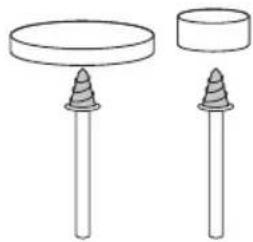
Fig. 4
The felt wheels should be screwed on the mandrel.
Material Speed setting
| Steel | + |
| Aluminium, brass + - | |
| Plastic | + |
Sanding bands and disc
Fig. 5
Material Speed setting
| Wood ++ | |
| Steel | - |
| Aluminium, brass + - | |
| Plastic | - |
EN
High speed cutter, Diamond wheel point and Drill
Fig. 6
Material Speed setting
| Stone, shell Max |
| Steel + - |
| Aluminium, brass ++ |
| Plastic - |
5. Maintenance

Make sure that the machine is not live when carrying out maintenance work on the motor.
This machine has been designed to operate over a long period of time with a minimum of maintenance. Continuous satisfactory operation depends upon proper machine care and regular cleaning.
Cleaning
Keep the ventilation slots of the machine clean to prevent overheating of the engine. Regularly clean the machine housing with a soft cloth, preferably after each use. Keep the ventilation slots free from dust and dirt. If the dirt does not come off use a soft cloth moistened with soapy water. Never use solvents such as petrol, alcohol, ammonia water, etc. These solvents may damage the plastic parts. Please clean the tool immediately after use.
Lubrication
Make sure to lubricate the flexible shaft regularly to prevent excessive heat generation.
Faults
Should a fault occur, e.g. after wear of a part, please contact the service address on the warranty card. In the back of this manual you find an exploded view showing the parts that can be ordered.
Environment
To prevent damage during transport, the appliance is delivered in a solid packaging which consists largely of reusable material. Therefore please make use of options for recycling the packaging.

Damaged and/or disposed of electrical or electronic devices must be dropped off at recycling stations intended for that purpose.
Only for EC countries
Do not dispose of power tools into domestic waste. According to the European Guideline 2012/19/EU for Waste Electrical and Electronic Equipment and its implementation into national right, power tools that are no longer usable must be collected separately and disposed of in an environmentally friendly way.
Warranty
Read the warranty conditions on the separately supplied warranty card.
The product and the user manual are subject to change. Specifications can be changed without further notice.
KOMBIWERKZEUG 160W
1. Specifications techniques
Caracteristeques techniques
Spare parts list
| No. | Description | Position | |||
| 480877 | Collet | nut | 1 | ||
| 480878 | Collet chuck 3.2mm | 2 | |||
| 480879 | Collet chuck 2.4mm | 2 | |||
| 480880 | Ring | 3 | |||
| 480881 | Spindle | lock | 4 | ||
| 480882 | Bearing | 5 | |||
| 480883 | Rotor incl. fan | 7 | |||
| 480884 | Carbon brush set (2pcs) | 9 | |||
| 480885 | Stator | 12 | |||
| 480886 | Switch | 14 | |||
| 480887 | Flex | shaft | - |
CE
DECLARATION OF CONFORMITY CTM1017 COMBITOOL
(EN) We declare under our sole responsibility that this product is in conformity with directive 2011/65/EU of the European parliament and of the council of 8 June on the restriction of the use of certain hazardous substances in electrical and electronic equipment is in conformity and accordance with the following standards and regulations:
(DE) Der Hersteller erklärt eigenverantwortlich, dass dieses Produkt der Direktive 2011/65/EU des Europäischen Parlaments und des Rats vom 8. Juni 2011 über die Einschränkung der Anwendung von bestimmten gefährlichen Stoffen in elektrischen und elektronischen Geräten entspricht. den folgenden Standards und Vorschriften entspricht:
(NL) Wij verklaren onder onze volledige verantwoordelijkheid dat dit product voldoet aan de conform Richtlijn 2011/65/EU van het Europees Parlement en de Raad van 8 juni 2011 betreffende beperking van het gebruik van bepaalde gevaarlijke stoffen in elektrische en elektronische apparatuur en in overeenstem ming is met de volgende standaarden en reguleringen:
(FR) Nous déclarons sous notre seule responsabilité que ce produit est conforme aux standards et directives suivants: est conforme à la Directive 2011/65/EU du Parlement Européen et du Conseil du 8 juin 2011 concernant la limitation d'usage de certaines substances dangereuses dans l'équipement électrique et électronique.
(ES) Declaramos bajo nuestra exclusiva responsabilidad que este producto cumple con las siguientes normas y estándares de funcionamiento: se encuentra conforme con la Directiva 2011/65/UE del Parlamento Europeo y del Consejo de 8 de junio de 2011 sobre la restricción del uso de determinadas sustancias peligrosas en los equipos eléctricos y electrónicos.
(PT) Declaramos por nossa total responsabilidade de que este produto está em conformidade e cumpre as normas e regulamentações que se seguem: está em conformidade com a Directiva 2011/65/EU do Parlamento Europeu e com o Conselho de 8 de Junho de 2011 no que respeita à restrição de utilização de determinadas substâncias perigosas existentes em equipamento eléctrico e electrónico.
(IT) Dichiariamo, sotto la nostra responsabilità, che questo prodotto è conforme alle normative e ai regolamenti seguenti: è conforme alla Direttiva 2011/65/UE del Parlamento Europeo e del Consiglio dell'8 giugno 2011 sulla limitazione dell'uso di determinate sostanze pericolose nelle apparecchiature elettriche ed elettroniche.
(SV) Vi garanterar på eget ansvar att denna produkt uppfyller och följer följande standarder och bestämmelser: uppfyller direktiv 2011/65/EU från Europeiska parlamentet och EG-rådet från den 8 juni 2011 om begränsningen av användning av farliga substanser i elektrisk och elektronisk utrustning.
(FI) Vakuutamme yksinomaan omalla vastuullamme, että tämä tuote täyttää seuraavat standardit ja säädökset: täyttää Euroopan parlamentin ja neuvoston 8. kesäkuuta 2011 päivätyn direktiivin 2011/65/EU vaatimukset koskien vaarallisten aineiden käytön rajoitusta sähkö- ja elektronisissa laitteissa.
(NO) Vi erklærer under vårt eget ansvar at dette produktet er i samsvar med følgende standarder og regler; er i samsvar med EU-direktivet 2011/65/EU fra Europa-parlamentet og Europa-rådet, pr. 8 juni 2011, om begrensning i bruken av visse farlige stoffer i elektrisk og elektronisk utstyr.
(DA) Vi erklærer under eget ansvar, at dette produkt er i overensstemmelse med følgende standarder og bestemmelser; er i overensstemmelse med direktiv 2011/65/EU fra Europa-Parlamentet og Rådet af 8. juni 2011 om begrænsning af anvendelsen af visse farlige stoffer i elektrisk og elektronisk udstyr.
(HU) Felelősségünk teljes tudatában kijelentjük, hogy ez a termék teljes mértékben megfelel az alábbi szabványoknak és előírásoknak; je v souladu se směrnící 2011/65/EU Evropského parlamentu a Rady EU ze dne 8. června 2011, která se týká omezení použití určitých nebezpečných látek v elektrických a elektronických zařízeních.
(CZ) Na naši vlastní zodpovědnost prohlašujeme, že je tento výrobek v souladu s následujícími standardy a normami: Je v súlade s normou 2011/65/EÚ Európskeho parlamentu a Rady z 8. júna 2011 týkajúcej sa obmedzenia používania určitých nebezpečných látok v elektrickom a elektronickom vybavení.
(SK) Výhlasujeme na našu výhradnú zodpovednosť, že tento výrobok je v zhode a súlade s nasledujúcimi normami a predpísmi: Je v súlade s normou 2011/65/EU Európske ho parlamentu a Rady z 8. júna 2011 týkajúcej sa obmedzenia používania určitých nebezpečných látok v elektrickom a elektronikom vybavení.
(SL) S polno odgovornostjo izjavljamo, da je ta izdelek v skladu in da odgovarja naslednjim standardom terpredpisom: je v skladu z direktivo 2011/65/EU Evropskega parlamenta in Sveta z dne 8. junij 2011 o omejevanju uporabe določenih nevarnih snovi v električni in elektronski opremi.
(PL) Deklarujemy na własną odpowiedzialność, że ten produkt spełnia wymogi zawarte w następujących normach i przepisach: jest zgodny z Dyrektywą 2001/65/UE Parlamentu Europejskiego i Rady z dnia 8 czerwca 2011 r. w sprawie ograniczenia stosowania niektórych niebezpiecznych substancji w sprzęcie elektrycznym i elektronicznym.
(LT) Prisiimdami visą atsakomybę deklaruojame, kad śis gaminys atitinka żemiau paminėtus standartus arba nuostatus: atitinka 2011 m. birželio 8 d. Europos Parlamento ir Tarybos direktyvą 2011/65/EB dėl tam tikrų pavojingų medžiagų naudojimo elektros ir elektroninėje jrangoje apribojimo.
(LV) Ir atbilstoša Eiropas Parlamenta un Padomes 2011. gada 8. jūnija Direktīvai 2011/65/ES par dažu bīstamu vielu izmantošanas ierobežošanu elektriskās un elektroniskās iekārtās.
(ET) Apgalvojam ar visu atbildību, ka šis produkts ir saskaņa un atbilst sekojošiem standartiem un nolikumiem: ir atbilstoša Eiropas Parlamenta un Padomes 2011. gada 8. jūnija Direktīvai 2011/65/ES par dažu bīstamu vielu izmantošanas ierobežošanu elektriskās un elektroniskās iekārtās.
(RO) Declarăm prin aceasta cu răspunderea deplină că produsul acesta este în conformitate cu următoarele standarde sau directive: este în conformitate cu Directiva 2011/65/UE a Parlamentului European și a Consiliului din 8 iunie 2011 cu privire la interzicerea utilizării anumitor substanțe periculoase la echipamentele electrice și electronice.
(HR) Izjavljujemo pod vlastitom odgovomoLsu da je strojem ukladan sa slijedešim standardima ili standardiziranim dokumentima i u skladu sa odredbama: usklađeno s Direktivom 2011/65/EU europskog parlamenta i vijeća izdanom 8. lipnja 2011. o ograničenju korištenja određenih opasnih tvari u električnoj i elektroničkoj opremi.
(SRL)Pod punom odgovornošću izjavljujemo da je usaglašen sa sledećim standardima ili normama: usaglašen sa direktivom 2011/65/EU Evropskog parlamenta i Saveta od 8.juna.2011. godine za restrikciju upotrebe određenih opasnih materija u električnoj i elektronskoj opremi.
(RU) Под свою ответственность заявляем, что данное изделие соответствует следующим стандартам и нормам: соответствует требованиям Директивы 2011/65/EU Европейского парламента и совета от 8 июня 2011 г. по ограничению использования определенных опасных веществ в электрическом и электронном оборудовании
(UK) На свою власну відповідальність заявляемо, що дане обладнання відповідає наступним стандартам і нормативам: задовольняє вимоги Директиви 2011/65/ЄС Європейського Парламенту та Ради від 8 червня 2011 року на обмеження використання деяких небезпечних речовин в електричному та електронному обладнанні.
(EL) Δηλώνουμε υπεύθυνα ότι το προϊόν αυτό συμφωνεί και τηρεί τους παρακάτω κανονισμούς και πρότυπα: συμμορφώνεται με την Οδηγία 2011/85/ΕΕ του Ευρωπαϊκού Κοινοβουλίου και του Συμβουλίου για Βης Ιωνίου 2011 τον πειρορισμό της χρήσης ορισμένων επικίνδυνων αυσιών σε Νελκτρικό και ηλεκτρονικό εξσπλισμό
EN 55014-1, EN 55014-2, EN 60745-1, EN 60745-2-23, EN 61000-3-2, EN 61000-3-3
2006/42/EC, 2014/30/EU, 2012/19/EU, 2011/65/EU
Zwolle, 01-05-2017
H.G.F. Rosberg
CEO Ferm B.V.
Ferm BV • Lingenstraat 6 • 8028 PM • Zwolle The Netherlands
- CTM1017
- EN
- COMBITOOL 160W
- Thank you for buying this Ferm product.
- The numbers in the following text refer to the pictures on page 2-3
- Contents
- Machine data
- Technical specifications
- Vibration level
- Safety instructions
- Explanation of symbols
- General safety instructions
- WARNING!
- Save all warnings and instructions for future reference.
- Special safety instructions
- Electrical safety
- Replacing cables or plugs
- Using extension cables
- Assembly of accessories
- Assembly of accessories
- Fig. 1
- Operation
- Mounting the flexible shaft and stand
- Flexible shaft
- Fig. 2
- Stand for the Combitool
- Accessories for the Combitool
- Grinding stones
- Fig. 3
- Felt wheels
- Fig. 4
- Sanding bands and disc
- Fig. 5
- Maintenance
- Cleaning
- Lubrication
- Faults
- Environment
- Only for EC countries
- Warranty
- KOMBIWERKZEUG 160W
- Specifications techniques
- CE
- DECLARATION OF CONFORMITY CTM1017 COMBITOOL
Brand : Ferm
Model : CTM1017
Category : Multifunction tool