
001-513 - Loudspeaker Marquant - Free user manual and instructions
Find the device manual for free 001-513 Marquant in PDF.


| Product type | Wireless soundbar speaker |
| Brand | Marquant |
| Model | 001-513 |
| Output power | 20 W |
| Impedance | 4 Ω |
| Sensitivity | 65 dB |
| Frequency range | 150 - 18000 Hz |
| Wireless range | 10 m |
| Bluetooth version | 4.2+EDR |
| Battery life (speaker) | 6 hours |
| Remote control battery | CR2025 (included) |
| Input connections | 3.5 mm AUX, RCA, DC |
| Rated voltage | 230 V ~ 50 Hz |
| Safety class | Class II (double insulated) |
| Wall mount spacing | 40 cm between screws |
| Indoor use only | Yes |
| Cleaning | Wipe with a dry cloth |
| Mode selection | Bluetooth, AUX input |
| Control buttons on speaker | On/Off, Volume +/-, Play/Pause, Mode, Previous/Next track |
Frequently Asked Questions - 001-513 Marquant
User questions about 001-513 Marquant
0 question about this device. Answer the ones you know or ask your own.
Ask a new question about this device
Download the instructions for your Loudspeaker in PDF format for free! Find your manual 001-513 - Marquant and take your electronic device back in hand. On this page are published all the documents necessary for the use of your device. 001-513 by Marquant.
USER MANUAL 001-513 Marquant
natural_image
Exterior view of a black rectangular electronic device with a small port and mounting bracket (no text or symbols visible)
SE SOUNDBAR
Operating instructions (Translation of the original instructions) Important! Read the user instructions carefully before use. Save them for future reference.
Värna om miljön!
Care for the environment!
Must not be discarded with household waste! This product contains electrical or electronic components that should be recycled. Leave the product for recycling at the designated station e.g. the local authority's recycling station.
Jula reserves the right to make changes. In the event of problems, please contact our service department.
www.jula.com

Tillverkare/ Produsent/ Producenci/ Manufacturer
Jula AB, Box 363, 532 24 SKARA
Distributör/ Distributør/ Dystrybutor/ Distributor
Jula Poland Sp. z o.o., ul.

flowchart
graph TD
    A["1"] --> B["MODE"]
    C["2"] --> D["+"]
    E["3"] --> F["−"]
    G["4"] --> H["Mode"]
    I["5"] --> J["+"]
    K["6"] --> L["+"]
    M["7"] --> N["+"]
    O["8"] --> P["+"]
    Q["9"] --> R["+"]
5
6
7
8
SÄKERHETSANVISNINGAR
- Do not use the appliance near water.
- Clean with a dry cloth.
- Do not cover the ventilation openings on the appliance. Follow the manufacturer's instructions when installing.
- Do not install near sources of heat, e.g. radiators, cookers or other equipment that produces heat.
- Connect the power cord on the appliance to an easily accessible power point.
- Only connect to an earthed power point. Never modify the plug in any way. Allow an authorised electrician to install an earthed power point if the plug does not fit in the power point.
- Protect the power cord so that it cannot be trod on or clenched.
- Only use accessories recommended by the manufacturer.
- Only use the supplied trolley, stand, bracket or table, or as
recommended by the manufacturer. Be careful when moving on a trolley – risk of tipping.
- Unplug the power cord during thunderstorms and when not using the appliance for a prolonged period.
- Service must only be carried out by qualified personnel. Do not use the appliance if the power cord or plug are damaged, if the appliance has been exposed to water or is not working properly, or if it has been damaged in some other way. Take the appliance to an authorised service centre to be checked, repaired or adjusted.
- The appliance is double insulated (safety class II) and therefore does not need to be earthed.
- Protect the battery from heat, direct sunlight and naked flames. The incorrect insertion of batteries could lead to a risk of explosion. Only use batteries of the
recommended type.
- The use of controllers, settings or procedures that are not described in these instructions could result in exposure to harmful radiation.
- Never modify the appliance in any way. The manufacturer cannot accept liability for any damage caused by unauthorised modifications.
- Do not expose the appliance to rain or moisture – risk of fire and/or electric shock. Do not expose the appliance to splashing, dripping water or other liquids. Do not, for example, place a vase of flowers on the appliance.
- Do not place the product on soft, porous or sensitive surfaces. The rubber feet can leave marks or stains on the surface. We recommend placing the appliance on a cloth, tray or the equivalent.
- Fluorescent tubes and other similar lighting can interfere with the functionality of the remote control. If the unit is
not working properly, try moving it away from any fluorescent tubes.
- Never try to open the appliance – risk of electric shock.
- Do not remove the appliance casing – risk of electric shock. The appliance does not contain any parts that can be repaired by the user. Service must only be carried out by qualified personnel.
SYMBOLS
Description of symbols used on the product.
 | This product has a safety class II rating. This means it is fitted with extra or double insulation. |
 | This product may only be used indoors. |
 | The product complies with the relevant EU directives, and an evaluation method to verify compliance with these directives has been applied. |
 | WEEE symbol. End-of-life electrical products must not be discarded with household waste. Recycle where possible. Check with local authorities or your local store for information on recycling. |
TECHNICAL DATA
| Rated voltage 230 V | ~ 50 Hz |
| Output | 20 W |
| Impedance 4 Ω | |
| Sensitivity 65 dB | |
| Frequency range 150 - 18000 Hz | |
| Wireless range 10 m | |
| Connections 3.5 mm, DC, Line In, Aux In | |
| Bluetooth that supports | 4.2+EDR |
| Run time | 6 hours |
| Battery, remote control | CR2025 |
DESCRIPTION
- Wireless speaker (Soundbar)
- Mains adapter
- 2 screws
- 3.5 mm AUX in cable
- 3.5 mm RCA cable
- Remote control
FIG. 1
ASSEMBLY
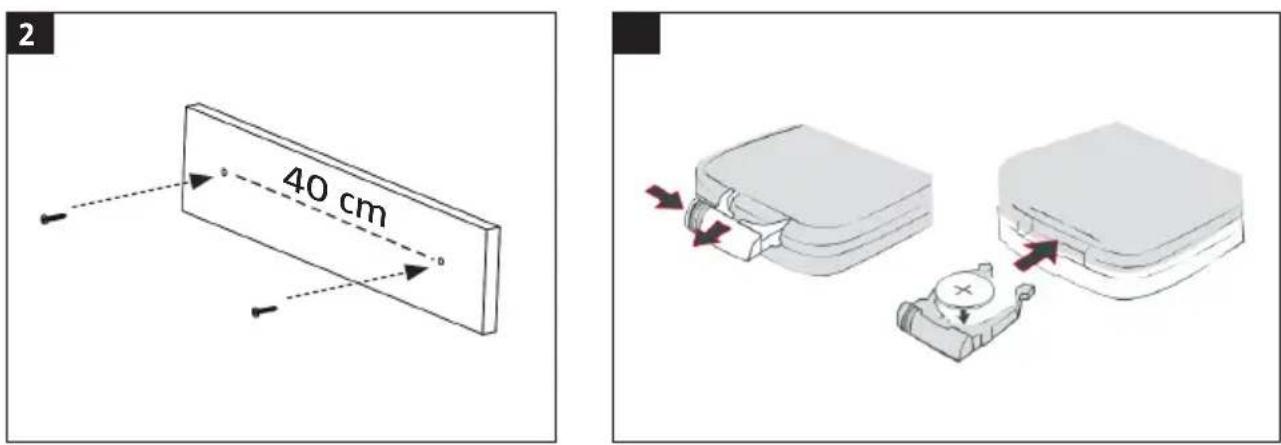
- Make two marks 40 cm apart on the wall for the retaining screws. Use a spirit level or laser level to make sure the holes are level, otherwise the speaker will come skew.
- Drill holes at the marks and screw in the supplied screws. Let the screw heads stick out 7–8 mm to hang up the speaker.
- Hang the speak on the screws and check that it fits firmly in place.
FIG. 2
USE
REMOTE CONTROL
Battery
(A CR2025 battery is supplied with the product). Open the battery cover on the remote control and insert the battery with the positive terminal (+) up. Replace the battery cover.
FIG. 3
NOTE:
The remote control is supplied with a plastic battery protection tab. Before using the remote control remove the protective tab by carefully pulling the part of the tab that sticks out under the battery cover.
Mode buttons
- On/Off
- Sound off
- Previous track
- Playback/Pause
- Next track
- Decrease volume
- Increase volume
-
Reset settings
-
Mode selection [AUX in, Bluetooth]
FIG. 4
SPEAKER
Mode buttons
Side panel
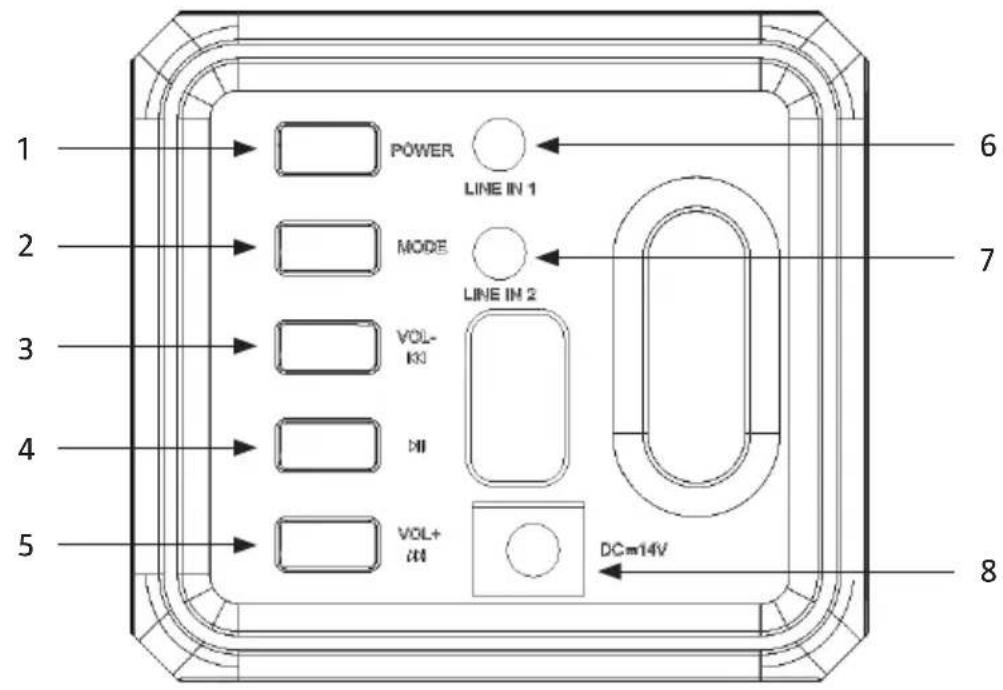
- On/Off
- Decrease volume
- Play/Pause
- Increase volume
- Line input 1: AUX input
- Line input 2: AUX input
-
Connection 14 VDC
-
Mode selection [AUX in, Bluetooth]
FIG. 5
Front panel
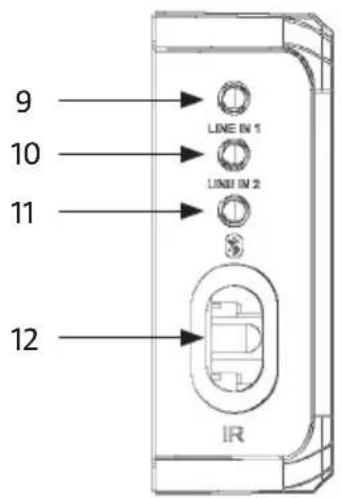
- Status lamp line input 1
- Status lamp line input 2
- Bluetooth status lamp
- Infrared sensor
FIG. 6
PAIRING
- Connect speaker to mains voltage.
- Start the speaker by pressing the button [1] on the speaker or the remote control.
- Press the button [2] on the speaker or the button [4] on the remote control to enable Bluetooth mode. An audio prompt is heard and the Bluetooth status lamp flashes rapidly.
- Place the speaker and Bluetooth unit within one metre of each other during the pairing.
- Activate search for compatible Bluetooth units on the mobile phone or unit to be paired with the speaker.
NOTE:
If there are no paired units within range when the speaker is started the pairing mode is activated automatically. If a paired unit is within range the speaker will be connected to it automatically.
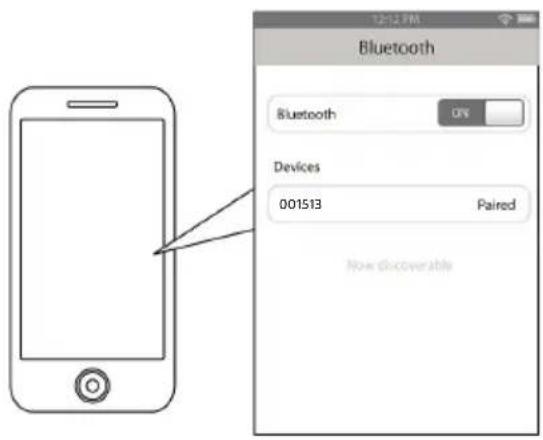
ios
Go to SETTINGS > BLUETOOTH (check that Bluetooth is enabled)
FIG. 7
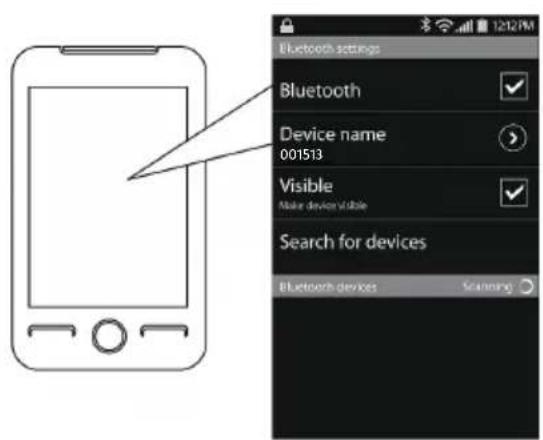
Android
Go to SETTINGS > BLUETOOTH > MENU > Search for devices (check that Bluetooth is enabled)
FIG. 8
Other mobile phones/units
See the instructions for the actual unit.
-
When the Bluetooth unit has found the speaker, select "001513" in the list of found units.
-
Enter password 0000 (four zeros), if necessary. Press OK or YES to pair the two units.
- An audio prompt is heard when the pairing is successful. The Bluetooth status lamp goes on to show that the unit is connected.
NOTE:
- If the speaker is to be connected to another unit it must first be disconnected from the unit it is paired with. Select "001513" under Bluetooth settings on the connected unit and then select "Unpair" (Android) or "Forget this unit" (iOS). When the pairing is interrupted, repeat the pairing process.
- The described procedures are typical for many Bluetooth units on the market and are intended as a guide to the pairing process. The Bluetooth unit may have a different interface and interact differently with the speaker.
USE
On/Off
Start/switch off the speaker by pressing the button [1] on the speaker or the remote control.
Mode switching
Press the button [2] on the speaker or the button [4] on the remote control to switch between Bluetooth mode and line input mode.
Playing music
Wireless playing music
To listen to wireless music, check that the appliance is connected to the Bluetooth unit. When the connection is established, press PLAY on the Bluetooth unit. Control the playback with the connected unit or with the buttons on the speaker (for units with Bluetooth profile AVRCP).
Playback/pause
Tap the button [4] on the speaker or the button [6] on the remote control to pause playback. Tap the same button again to resume the playback.
Skip tracks
Tap the button [3] on the speaker or the button [2] on the remote control to go to the previous track.
Tap the button [5] on the speaker or the button [7] on the remote control to go to the next track.
Adjusting the volume
Press the button [5] on the speaker or the button [8] on the remote control to increase the volume.
Press the button [3] on the speaker or the button [3] on the remote control to lower the volume.
Press the button [5] on the remote control to switch off the sound. Press again to activate the sound.
The sound volume can also be controlled with the volume control on the connected unit.
Using as a wireless speaker
- Start the speaker.
- Press the button [2] on the speaker or the button [4] on the remote control until the status lamp for line input 1 or line input 2 goes green.
- Connect one end of the supplied 3.5 mm AUX cable or the plug on the RCA cable to one of the line inputs [6] or [7] on the side of the speaker.
EN
- Connect the other end of the 3.5 mm AUX cable to the headphone connection on an external unit (smartphone, hand-held computer or MP3 player), or the red and white connectors on the RCA cable to an external speaker.
- Open a media player on the unit and press PLAY to start playing the music.
- Control the playback and volume with the controls on the connected unit.
TROUBLESHOOTING
The Bluetooth unit will not pair with the speaker.
- Check that the speaker is on before starting the pairing.
- Place the speaker and Bluetooth unit within one metre of each other during the pairing.
- Press the button [2] on the speaker or the button [4] on the remote control to enable Bluetooth mode. An audio prompt is heard and the Bluetooth status lamp flashes blue rapidly.
- Check that Bluetooth is enabled on the unit.
- Repeat the pairing according to the instructions.
The Bluetooth unit can be paired with the speaker, but no music can be heard.
- Check that the Bluetooth unit supports the profile A2DP.
- Increase the volume on the Bluetooth unit.
- It may be necessary to interrupt the pairing and pair the units again.
It is not possible to enable pairing mode on the speaker.
- Check that the speaker is on before starting the pairing.
- Press the button [2] on the speaker or the button [4] on the remote control to enable Bluetooth mode. An audio prompt is heard and the Bluetooth status lamp flashes rapidly.
- The speaker is in pairing mode.
CE
EC DECLARATION OF CONFORMITY
EG FÖRSÄKRAN OM ÖVERENSSTÄMMELSE
EF SAMSVARSERKLÆRING
DEKLARACJA ZGODNOŚCI WE

Jula AB, Box 363, SE-532 24 SKARA, SWEDEN
This product was CE marked in year -17
Skara 2017-02-08
MATTIAS LIF
BUSINESS AREA MANAGER
- SE SOUNDBAR
- SÄKERHETSANVISNINGAR
- SYMBOLS
- DESCRIPTION
- ASSEMBLY
- USE
- REMOTE CONTROL
- Battery
- NOTE:
- Mode buttons
- SPEAKER
- Side panel
- Front panel
- PAIRING
- ios
- Android
- Other mobile phones/units
- On/Off
- Mode switching
- Playing music
- Wireless playing music
- Playback/pause
- Skip tracks
- Adjusting the volume
- Using as a wireless speaker
- EN
- TROUBLESHOOTING
- The Bluetooth unit will not pair with the speaker.
- The Bluetooth unit can be paired with the speaker, but no music can be heard.
- It is not possible to enable pairing mode on the speaker.
- CE
- EC DECLARATION OF CONFORMITY
- EG FÖRSÄKRAN OM ÖVERENSSTÄMMELSE
- EF SAMSVARSERKLÆRING
- DEKLARACJA ZGODNOŚCI WE
Brand : Marquant
Model : 001-513
Category : Loudspeaker