
820-200 - Scale Marquant - Free user manual and instructions
Find the device manual for free 820-200 Marquant in PDF.


| Type | Digital kitchen scale |
| Brand | Marquant |
| Model | 820-200 |
| Maximum capacity | 5 kg (11 lb) |
| Precision | 1 g (0.1 oz) |
| Power supply | 2 x AAA batteries (not included) |
| Display | LCD screen |
| Dimensions | 20 x 15 x 2 cm (7.9 x 5.9 x 0.8 in) |
| Weight | 300 g (0.66 lb) |
| Material | Stainless steel platform, plastic base |
| Functions | Tare, unit conversion (g/oz/lb:oz/ml/fl.oz), auto-off, overload indication |
| Cleaning | Wipe with damp cloth, do not immerse |
| Safety | Do not exceed maximum capacity, avoid drops and liquid ingress |
| Spare parts availability | Contact Marquant customer service for replacement batteries |
| Reparability | Not user-serviceable; refer to qualified technician |
Frequently Asked Questions - 820-200 Marquant
User questions about 820-200 Marquant
0 question about this device. Answer the ones you know or ask your own.
Ask a new question about this device
Download the instructions for your Scale in PDF format for free! Find your manual 820-200 - Marquant and take your electronic device back in hand. On this page are published all the documents necessary for the use of your device. 820-200 by Marquant.
USER MANUAL 820-200 Marquant
natural_image
Black digital balance scale with white cutouts and a digital display showing 22.5 seconds (no text or symbols on the device itself)EN - Operating instructions (Translation of the original instructions)
Jula reserves the right to make changes. In the event of problems, please contact our service department.
www.jula.com
Tillverkare/ Produsent / Produenci/ Manufacturer
Jula AB, Box 363, 532 24 SKARA
Importör/ Importør/ Importer/ Importer
Care for the environment!
Must not be discarded with household waste! This product contains electrical or electronic components that should be recycled. Leave the product for recycling at the designated station e.g. the local authority's recycling station.
SVENSKA....6
SÄKERHETSANVISNINGAR....6
BESKRIVNING 6
Funktioner/Specifikationer 6
PRESTANDA....7
LCD-DISPLAY 7
HANDHAVANDE 7
VANLIGT VÄGNINGSLÄGE....7
SAFETY INFORMATION ....33
DESCRIPTION 33
Functions/specifications 33
PERFORMANCE....34
LCD-DISPLAY 34
OPERATION....34
NORMAL WEIGHING MODE 34
Fat/hydration/muscle/bone/calorie measuring mode....35
WARNING INDICATIONS 38
About fat 38
About calories 39
MAINTENANCE 40
SÄKERHETSANVISNINGAR
Read the operating instructions carefully before use.
Please retain for future reference.
- The Fat percent Hydration percent content evaluated by the Fat Monitor Scale is for reference only (not for medical purposes). If your Fat percentage and Hydration percentage is above/below the normal level, please consult your doctor for advice.
- Keep away from strong electro-magnetic fields when using the scale.
- If the surface on which the scale is standing is glazed, stay clear of the edge of the scale.
- Remember to keep your balance during weighing.
- The surface of the scale is slippery when wet. Keep the surface dry.
- Do not bang, knock or drop the scale.
During measuring
- The measured result may be misleading after intensive exercise, excessive dieting or during a period of dehydration.
• Always use the scale on a hard and flat surface. Stand still when weighing. - Measured data for the following people may deviate:
– children under 10 or adults over 100 (may only use the device in normal weighing mode) - adults over 70
– body building athletes or other elite athletes. - The following people should not use the device:
- pregnant women
– those with symptoms of oedema
– those undergoing dialysis treatment
— those who have heart pacemakers or other implanted medical devices.
DESCRIPTION
- The scale should not be used for commercial purposes.
- The scale has been designed to allow auto step on. Please always ignore the first reading and make calculations using the second weighing.
FUNCTIONS/SPECIFICATIONS
The scale features:
• high precision strain gauge sensor.
- Multifunction: test body fat percentage, body hydration percentage, body muscle percentage, body bone percentage and suggested calorie intake requirement.
• Built-in memory for 12 different users
- Optional normal weighing mode (option of bypassing parameter settings): Auto step on weighing and consecutive add-on weighings.
- Low battery and overload indication.
PERFORMANCE
| Object Index Weighing capacity | Fat % Hydration % Muscle % Bone % Calories | |||||
| Range 4.0% | -60.0% | 27.5%-66.0% | 20.0%-56.0% | 2.0%-20.0% | ||
| Deviation 0.1 kg | 0.2 lb | 0.1% 0.1% 0.1% 0.1% 1 kcal | ||||
LCD-DISPLAY
-
User memory code
-
Gender
-
Hydration, percentage
-
Fat percentage/Muscle percentage/Bone percentage
-
Fat status indication
-
Calorie unit
-
Weight unit
-
Age
-
Height unit

OPERATION
• Always remove shoes and socks and wipe feet clean before using.
- Step onto the weighing platform gently.
- It is advisable to take measurements at the same time of day.
NORMAL WEIGHING MODE
1. Auto step on weighing
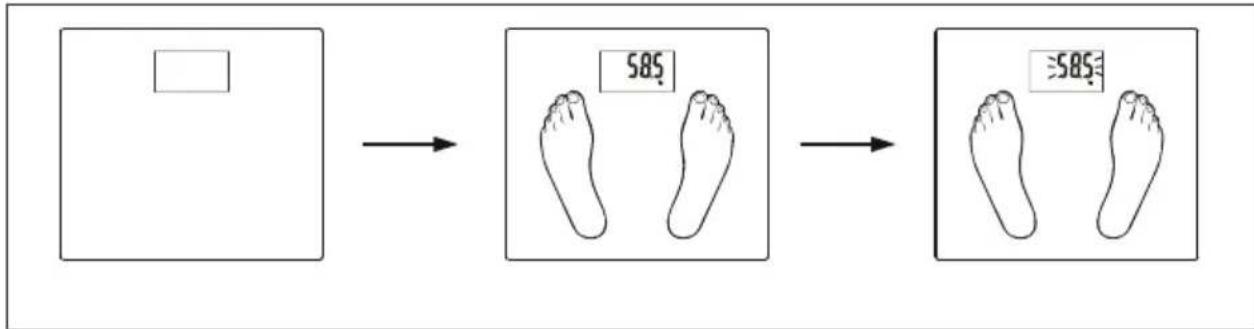
flowchart
graph LR
    A["Blank"] --> B["585 foot"]
    B --> C["Equal 585 foot"]
- Install battery and place the scale on a flat floor.
- Stand on the scale.
- Your weight is displayed.
- The digits will initially flash and are then locked.
2. Consecutive add-on weighing
After the digits are locked, additional weight can be added. Each further loading must exceed 2 kg in order to get a new reading.
Example: If you want to measure the weight of your baby, you can weigh yourself first and then pick up your baby without stepping off the scale. This will provide the total weight reading. You will get your baby's weight by subtracting the previous reading of yourself from the new reading.

FAT/HYDRATION/MUSCLE/BONE/CALORIE MEASURING MODE
1. Setting personal parameters
- The first time you install the battery and switch on, all default parameters are set as follows:
| Memory Gender Height Age | ||
| 1 Male 165 cm/5' 5" 25 |
- Parameters can be set in the following range:
| Memory Gender Height Age | |||
| 1-12 Male/Female | Female | 100-250 cm3' 3.5" - 8'2.5" | 10-100 |
Parameter setting
ON/SET: Start the scale and prompt to next parameter.
▲ Increase the value by one increment each time you press. Continuous pressing will speed up the advance in value.
Decrease the value by one increment each time you press. Continuous pressing will speed up the decrease in value.

flowchart
graph TD
    A["OFF"] --> B["1"]
    B --> C["165 cm"]
    C --> D["2"]
    D --> E["3"]
    E --> F["4"]
    F --> G["5 a"]
    G --> H["6"]
    H --> I["7"]
    I --> J["8"]
    J --> K["9"]
    K --> L["OFF"]
    style A fill:#ccc,stroke:#333
    style L fill:#ccc,stroke:#333
Example
The third user, who is female, 168 cm tall and 28 years old, can set her parameters as follows:
- Press SET (ON/SET) to switch on.
- Press ▲ to select user code.
- Press SET (ON/SET) to confirm and advance to next setting.
- Press ▲ to select gender.
- Press SET (ON/SET) to confirm and advance to next setting.
- Press ▲ to select height.
- Press SET (ON/SET) to confirm and advance to next setting.
- Press ▲ to select age.
- Press on the weighing platform.
NOTE:
If the scale is switched off for six seconds during parameter setting, the parameters already set will be memorized automatically and the LCD will show '0', indicating that measuring of body fat will begin.
If the LCD shows 'O' during parameter setting, press SET (ON/SET) for three seconds to return to setting mode, where you can set user code, gender, height and age.
2. To start measuring
Make sure your feet are in firm contact with the weighing platform, otherwise body fat cannot be measured. To ensure accuracy, please remove shoes and socks before stepping onto the scale. Example: The third user, who is female, 168 cm tall and 28 years old, can perform measurement as follows:

flowchart
graph TD
    A["OFF"] --> B["1 SET ON/SET"]
    B --> C["165 cm"]
    C --> D["2"]
    D --> E["168 cm"]
    E --> F["3"]
    F --> G["528 kg"]
    G --> H["528"]
    H --> I["4"]
    I --> J["0.0 kg"]
    J --> K["6"]
    K --> L["0.0000"]
    L --> M["7"]
    M --> N["528 kg"]
    N --> O["238 %"]
    O --> P["523 %"]
    P --> Q["372 %"]
    Q --> R["120 %"]
    R --> S["1840 mm"]
    S --> T["8"]
- Press SET (ON/SET) to switch on. Show parameters for the last user or default parameters.
- Press ▲ to select user code or reset parameters.
- Press on the scale. LCD shows '0.0'.
- Step onto the scale gently.
- Wait until the digits stabilize.
-
Measuring.
-
Measured results (repeats three times and is saved. The reading will be displayed again at next measuring for users' reference):
Weight: 8.4 lb Fat status 23.8% fat Hydration: 52.3%
Muscles: 37.2% Bone: 12% Calories: 1840
- The scale turns off automatically.
WARNING INDICATIONS
Low battery indication
The battery power is running low, please replace with a new battery.
lo
Over-load indication
The object to be weighed on the platform exceeds the maximum capability of scale. Please step off to avoid damage.
Err
Low body fat percentage indication
The fat percentage is too low. Please remember that it is important to maintain a balanced diet and healthy lifestyle.
Errl
High body fat percentage indication
The fat percentage is too high. Please remember that it is important to maintain a healthy diet and exercise.
Errh
Re-test
An error has occurred. Please re-test to get the correct result.
E
ABOUT FAT
About body fat percentage
• Body fat percentage is an index percentage of fat content in human body.
- Fat in the human body should be at a certain level. An overabundance of body fat results in poorer metabolism and can also cause various illnesses. Obesity is a risk factor for illness.
Working principles
When an electrical signal of a certain frequency is sent through the human body, the impedance of fat is greater than that of muscle or other human tissue. This product will pass a safe frequency of low voltage electrical current through the human body and then measure differences in the resistance of body tissue and conduct a so-called biological resistance analysis which shows the body fat percentage.
Assessment chart for fat percentage measurement/hydration level measurement
After weighing you can use the assessment chart for reference. the information below is only for reference:
| Age Fat (F) Fluid level | (F) | Fat (M) Fluid | level (M) Status Indication | |||
| ≤30 | 4.0 - 16.0% | 66.0 - 57.8% | 4.0 - 11.0% | 66.0 - 61.2% | Excessively underweight | III |
| 16.1 - 20.5% | 57.7 - 54.7% | 11.1 - 15.5% | 61.1 - 58.1% | Underweight III | II | |
| 20.6 - 25.0% | 54.6 - 51.6% | 15.6 - 20.0% | 58.0 - 55.0% | Normal weight III | III III | |
| 25.1 - 30.5% | 51.5 - 47.8% | 20.1 - 24.5% | 54.9 - 51.9% | Overweight III III | III III | |
| 30.6 - 60.0% | 47.7 - 27.5% | 24.6 - 60.0% | 51.8 - 27.5% | Excessively overweight | III III III III III | |
| >30 | 4.0 - 20.0% | 66.0 - 55.0% | 4.0 - 15.0% | 66.0 - 58.4% | Excessively underweight | III |
| 20.1 - 25.0% | 54.9 - 51.6% | 15.1 - 19.5% | 58.3 - 55.3% | Underweight III | II | |
| 25.1 - 30.0% | 51.5 - 48.1% | 19.6 - 24.0% | 55.2 - 52.3% | Normal weight III | III III | |
| 30.1 - 35.0% | 48.0 - 44.7% | 24.1 - 28.5% | 52.2 - 49.2% | Overweight III III | III III | |
| 35.1 - 60.0% | 44.6 - 27.5% | 28.6 - 60.0% | 49.1 - 27.5% | Excessively overweight | III III III III III | |
ABOUT CALORIES
Calorie and energy consumption
Calorie: Energy unit. The data reading indicates the energy you need to sustain your daily metabolism and other activities required for your weight, height, age and gender.
Calories and losing weight Controlling your calorie intake combined with proper exercise is an effective way to lose weight. This is a very simple concept. When the daily energy intake cannot support the body's energy consumption it will begin to break down carbohydrates and fat to meet the energy requirement. That leads to weight loss.
MAINTENANCE
- Treat the scale with care as it is a precision instrument.
- Clean the scale with a damp cloth and avoid water getting inside the scale. Do not use chemical or abrasive cleaning agents.
- Store the scale in a cool, dry place.
• Always store the scale in a horizontal position. - If the scale fails to turn on, check whether a battery is installed or if battery power is low. Insert a battery or replace with a new battery.
- If there is an error on the display or the scale does not shut down for a long time, please take out the battery for about three seconds, then install it again to resolve the software error. If you cannot resolve the problem, please contact your dealer for advice.
- Care for the environment!
- SVENSKA....6
- SÄKERHETSANVISNINGAR....6
- BESKRIVNING 6
- Funktioner/Specifikationer 6
- PRESTANDA....7
- LCD-DISPLAY 7
- HANDHAVANDE 7
- VANLIGT VÄGNINGSLÄGE....7
- SÄKERHETSANVISNINGAR
- Read the operating instructions carefully before use.
- During measuring
- DESCRIPTION
- FUNCTIONS/SPECIFICATIONS
- LCD-DISPLAY
- OPERATION
- NORMAL WEIGHING MODE
- Auto step on weighing
- Consecutive add-on weighing
- FAT/HYDRATION/MUSCLE/BONE/CALORIE MEASURING MODE
- Setting personal parameters
- Parameter setting
- Example
- NOTE:
- To start measuring
- WARNING INDICATIONS
- Low battery indication
- Over-load indication
- Low body fat percentage indication
- High body fat percentage indication
- Re-test
- ABOUT FAT
- About body fat percentage
- Working principles
- Assessment chart for fat percentage measurement/hydration level measurement
- ABOUT CALORIES
- Calorie and energy consumption
- MAINTENANCE
Brand : Marquant
Model : 820-200
Category : Scale