
820-198 - Scale Marquant - Free user manual and instructions
Find the device manual for free 820-198 Marquant in PDF.


| Product Type | Digital Bathroom Scale |
| Brand | Marquant |
| Model | 820-198 |
| Power Source | 2 x 1.5V AAA batteries (not included) |
| Battery Type | AAA |
| Battery Quantity | 2 |
| Max Weight Capacity | 180 kg (approx. 397 lb) |
| Display Type | Digital LCD |
| Auto Start | Yes, by stepping on the scale |
| Auto Shut-Off | Yes, after approx. 8 seconds of stable reading or when stepping off |
| Overload Indicator | Yes, warning displayed when maximum weight exceeded |
| Low Battery Indicator | Yes, displayed when battery power is low |
| Error Indicator | Displays "C" for incorrect reading |
| Surface Material | Glass (slippery when wet) |
| Dimensions (Approx.) | 30 x 30 x 4 cm (11.8 x 11.8 x 1.6 in) |
| Weight (Approx.) | 2 kg (4.4 lb) |
| Care Instructions | Clean with damp cloth; avoid chemical/abrasive cleaners; store horizontally in cool, dry place |
| Usage Precautions | Place on hard, flat floor; stand still when weighing; keep glass dry; do not drop or knock |
| Not for Commercial Use | Yes |
| Warranty | Contact dealer for issues; Jula reserves right to changes |
Frequently Asked Questions - 820-198 Marquant
User questions about 820-198 Marquant
0 question about this device. Answer the ones you know or ask your own.
Ask a new question about this device
Download the instructions for your Scale in PDF format for free! Find your manual 820-198 - Marquant and take your electronic device back in hand. On this page are published all the documents necessary for the use of your device. 820-198 by Marquant.
USER MANUAL 820-198 Marquant
natural_image
White digital balance scale with black buttons and a '00' display (no text or symbols on the device itself)EN - Operating instructions in original
Date of production: 2014-03-28
© Jula AB
SVENSKA....4
SÄKERHETSANVISNINGAR....4
BESKRIVNING 4
BYTA BATTERI 4
HANDHAVANDE 4
AUTOMATISK AVSTÄNGNING....5
VARNINGSSYMBOLER 5
ANVÄNDNING OCH SKÖTSEL....5
NORSK 7
SIKKERHETSANVISNINGER 7
BESKRIVELSE....7
BYTTE BATTERI. 7
HÄNDTERING 7
AUTOMATISK AVSTENGING 8
VARSELSSYMBOLER....8
BRUK OG STELL....8
POLSKI 10
ZASADY BEZPIECZEŃSTWA 10
OPIS 10
WYMIANA BATERII....10
OBSŁUGA 10
AUTOMATYCZNE WYŁĄCZANIE 11
TO REPLACE BATTERY 13
OPERATION 13
AUTOMATIC SHUT-OFF 14
WARNING INDICATORS 14
USE AND CARE 14
SÄKERHETSANVISNINGAR
natural_image
Illustration of two batteries with one fully filled and one partially filled, no text or symbols present.HANDHAVANDE
natural_image
Simple diagram of a platform with two base stations and a flat top platform (no text or symbols)AUTOMATISK AVSTÄNGNING
natural_image
Simple line drawing of a square meter with four legs and a top rectangular block (no text or symbols)VARNINGSSYMBOLER
natural_image
Symbol of a trash bin with diagonal lines crossing it, no text or labels presentVärna om miljön!
natural_image
Illustration of two batteries with one fully filled and one partially filled, no text or symbols present.HÄNDTERING
natural_image
Simple diagram of a platform with two base stations and a flat top platform (no text or symbols)natural_image
Simple line drawing of a square meter with four legs and a top rectangular block (no text or symbols)VARSELSSYMBOLER
natural_image
Symbol of a trash bin with no visible text or labelsVerne om miljøet!
natural_image
Two cylindrical batteries with 'AAA' labels, no additional text or symbols visibleWYMIANA BATERII
natural_image
Illustration of two batteries with one fully filled and one partially filled, no text or symbols present.OBSŁUGA
natural_image
Simple diagram of a platform with two base stations and a flat top platform (no text or symbols)natural_image
Simple line drawing of a square meter with four legs and a top rectangular block (no text or symbols)natural_image
Pure electrical circuit lines without any symbolsDBAJ O ŚRODOWISKO!
Read the operating instructions carefully before use.
Please retain for future reference.
DESCRIPTION
2 x 1.5V AAA batteries (not included)

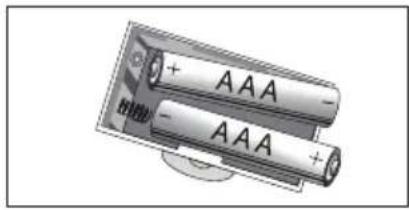
TO REPLACE BATTERY
- Open the battery case cover at the bottom of scale.
- Remove the used batteries (using a cuspidal pliers, if needed).
• Install a new battery by inserting one end of the battery and then by pressing down the other end. Please take note of the polarity.
natural_image
Illustration of two batteries with one fully filled and one partially filled, no text or symbols presentOPERATION
- To ensure the scale's accuracy, place the scale on a hard, flat floor. Avoid carpets and other soft surfaces.

natural_image
Simple diagram of a platform with a flat top and two base supports (no text or symbols)- Gently step on the scale which will then automatically turn on. Stand evenly on the scale without moving and wait until your weight shown in the display is totally stable.

AUTOMATIC SHUT-OFF
When you step off the scale, it will automatically switch off. Auto shut-off occurs if the display shows the same weight reading for approximately 8 seconds.

natural_image
Simple line drawing of a square frame with four circular ends and a small rectangular top (no text or symbols)WARNING INDICATORS
- Scale overload (max. weight capacity is indicated on the scale). Please step off to avoid damage.
- Battery power is low. Install new battery.
- If the display shows "C" when you step off the scale, this means the weight reading was incorrect. Try again.

USE AND CARE
- The glass surface is slippery when it is wet. Keep it dry!
- Stand still when weighing.
- Do not bang, knock or drop the scale.
- Treat the scale with care as it is a precise instrument.
- Clean the scale with a damp cloth and avoid water getting inside the scale. Do not use chemical/abrasive cleaning agents.
- Store the scale in a cool place with dry air.
• Always store the scale in a horizontal position. - If the scale failed to turn on, check whether a battery is installed or the battery power is low. Insert or replace with a new battery.
- If an error message is displayed or if the scale turns off after a long period: take out the battery for approximately three seconds and reinsert it to resolve the software error. If you can not resolve the problem, please contact your dealer for consultation.
- Not to be used for commercial purposes.
Jula reserves the right to make changes. In the event of problems, please contact our service department. www.jula.com

natural_image
Symbol of a trash bin crossed with no text or labels, representing waste sorting or disposal (no text present)Care for the environment!
Must not be discarded with household waste!
This product contains electrical or electronic components that should be recycled.
Leave the product for recycling at the designated station e.g. the clocal authority's recycling station.
- SVENSKA....4
- SÄKERHETSANVISNINGAR....4
- BESKRIVNING 4
- BYTA BATTERI 4
- HANDHAVANDE 4
- AUTOMATISK AVSTÄNGNING....5
- VARNINGSSYMBOLER 5
- ANVÄNDNING OCH SKÖTSEL....5
- NORSK 7
- SIKKERHETSANVISNINGER 7
- BESKRIVELSE....7
- BYTTE BATTERI. 7
- HÄNDTERING 7
- AUTOMATISK AVSTENGING 8
- VARSELSSYMBOLER....8
- BRUK OG STELL....8
- POLSKI 10
- ZASADY BEZPIECZEŃSTWA 10
- OPIS 10
- WYMIANA BATERII....10
- OBSŁUGA 10
- AUTOMATYCZNE WYŁĄCZANIE 11
- TO REPLACE BATTERY 13
- OPERATION 13
- AUTOMATIC SHUT-OFF 14
- WARNING INDICATORS 14
- USE AND CARE 14
- SÄKERHETSANVISNINGAR
- HANDHAVANDE
- AUTOMATISK AVSTÄNGNING
- VARNINGSSYMBOLER
- Värna om miljön!
- HÄNDTERING
- VARSELSSYMBOLER
- Verne om miljøet!
- WYMIANA BATERII
- OBSŁUGA
- DBAJ O ŚRODOWISKO!
- DESCRIPTION
- TO REPLACE BATTERY
- OPERATION
- AUTOMATIC SHUT-OFF
- WARNING INDICATORS
- USE AND CARE
- Care for the environment!
Brand : Marquant
Model : 820-198
Category : Scale