
820-199 - Scale Marquant - Free user manual and instructions
Find the device manual for free 820-199 Marquant in PDF.


| Product Type | Bathroom Scale |
| Model | 820-199 |
| Brand | Marquant |
| Power Source | 1 x 3V CR2032 Lithium Battery |
| Display Type | Digital LCD |
| Maximum Capacity | 180 kg (approx.) |
| Auto Shut-Off | After 8 seconds of stable reading |
| Overload Indicator | Yes |
| Low Battery Indicator | Yes |
| Platform Material | Glass |
| Surface | Tempered glass |
| Units of Measurement | kg / lb / st (not specified, typical) |
| Auto-On | Yes, by stepping on |
| Operating Conditions | Place on hard, flat floor |
| Cleaning | Damp cloth, no chemical/abrasive cleaners |
| Storage | Cool, dry place; keep horizontal |
| Safety Warning | Glass surface slippery when wet; keep dry |
| Intended Use | Household, not for commercial purposes |
| Maintenance | Do not bang, knock, or drop; precision instrument |
| Battery Replacement | Use pointed pliers; observe polarity |
| Waste Disposal | Recycle at designated station |
Frequently Asked Questions - 820-199 Marquant
User questions about 820-199 Marquant
0 question about this device. Answer the ones you know or ask your own.
Ask a new question about this device
Download the instructions for your Scale in PDF format for free! Find your manual 820-199 - Marquant and take your electronic device back in hand. On this page are published all the documents necessary for the use of your device. 820-199 by Marquant.
USER MANUAL 820-199 Marquant
natural_image
Digital kitchen scale with a digital display showing approximately 1.0 mm (no text or symbols on the device itself)EN - Operating instructions in original
Date of production: 2014-03-26
© Jula AB
SVENSKA....4
SÄKERHETSANVISNINGAR....4
BESKRIVNING 4
BATTERI....4
HANDHAVANDE 4
AUTOMATISK AVSTÄNGNING....5
VARNINGSSYMBOLER 5
UNDERHÅLL 5
NORSK 8
SIKKERHETSANVISNINGER 8
BESKRIVELSE....8
BATTERI....8
HÄNDTERING 8
AUTOMATISK AVSTENGING 9
VARSELSSYMBOLER....9
VEDLIKEHOLD 9
POLSKI 12
ZASADY BEZPIECZEŃSTWA 12
OPIS 12
BATERIA....12
OBSŁUGA 12
AUTOMATYCZNE WYŁĄCZANIE 13
SAFETY INFORMATION 16
DESCRIPTION 16
BATTERY 16
OPERATION....16
AUTO SHUT OFF 17
WARNING INDICATORS 17
MAINTENANCE 17
SÄKERHETSANVISNINGAR
natural_image
Simple diagram of a platform with a flat top and two base supports, no text or symbols present.AUTOMATISK AVSTÄNGNING
natural_image
Simple line drawing of a square frame with four circular ends and a small rectangular top on top (no text or symbols)VARNINGSSYMBOLER
natural_image
Simple line drawing of a trash bin with diagonal lines crossing it, no text or symbols present.Värna om miljön!
natural_image
Simple diagram of a platform with a flat top and two base supports (no text or symbols)AUTOMATISK AVSTENGING
natural_image
Simple line drawing of a square frame with four circular ends and a small rectangular top on top (no text or symbols)VARSELSSYMBOLER
natural_image
Symbol of a trash bin with no visible text or labelsVerne om miljøet!
natural_image
Simple diagram of a rectangular block with a flat top and two side supports (no text or symbols)AUTOMATYCZNE WYŁĄCZANIE
natural_image
Simple line drawing of a square frame with four circular ends and a small rectangular top on top (no text or symbols)natural_image
Pure electrical circuit lines without any symbolsDBAJ O ŚRODOWISKO!
Read the operating instructions carefully before use.
Please retain for future reference.
DESCRIPTION
BATTERY
1x3V lithium battery (CR2032). Please remove the isolation sheet from the battery contact before use.
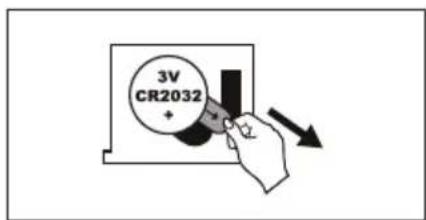
• Take out the used battery using a cuspidal pliers as shown in Figure 1.
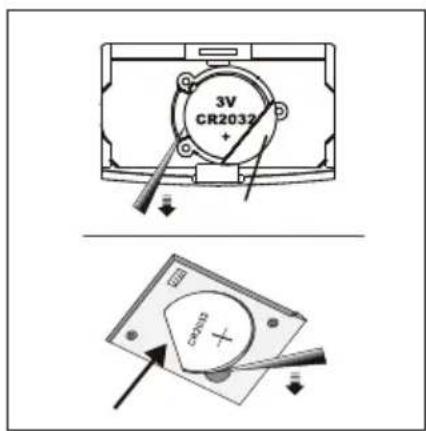
• Install the new battery by putting one side of the battery beneath the battery baffle and then pressing down the other side.
- Please take note of the polarity.
OPERATION
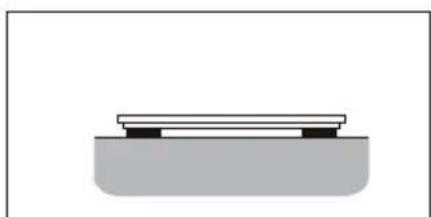
- To ensure the scale's accuracy, place the scale on a hard, flat floor. Avoid carpets and other soft surfaces.
natural_image
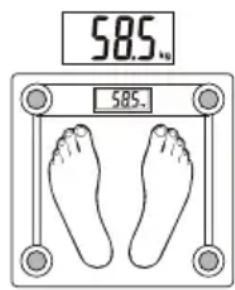
Simple diagram of a platform with two supports and a base, no text or symbols present- Gently step on the scale, which will automatically turn on. Stand evenly on the scale without moving and wait until your weight shown in the display is totally stable.
AUTO SHUT OFF
When you step off the scale, it will automatically switch off. Auto shut-off occurs if the display shows the same weight reading for approximately 8 seconds.
WARNING INDICATORS
- Scale overload (max. weight capacity is indicated on the scale). Please step off to avoid damage.
- Battery power is low. Install new battery.
- If the display shows "C" when you step off the scale, this means the weight reading was incorrect. Try again.



MAINTENANCE
- The glass surface is slippery when it is wet. Keep it dry!
- Stand still when weighing.
-
Do not bang, knock or drop the scale.
-
Treat the scale with care as it is a precise instrument.
- Clean the scale with a damp cloth and avoid water getting inside the scale. Do not use chemical/abrasive cleaning agents.
- Keep the scale in a cool place with dry air.
• Always store the scale in a horizontal position. - If the scale failed to turn on, check whether a battery is installed or the battery power is low. Insert or replace with a new battery.
- If an error message is displayed or if the scale turns off after a long period: take out the battery for approximately three seconds and reinsert it to resolve the software error. If you cannot resolve the problem, please contact your dealer for consultation.
- Not to be used for commercial purposes.
Jula reserves the right to make changes. In the event of problems, please contact our service department. www.jula.com
natural_image
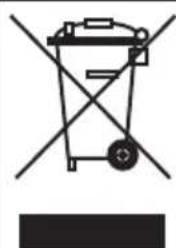
Symbol of a trash bin crossed with no text or labels, representing waste sorting or disposal (no text present)Care for the environment!
Must not be discarded with household waste!
This product contains electrical or electronic components that should be recycled.
Leave the product for recycling at the designated station e.g. the clocal authority's recycling station.
- SVENSKA....4
- SÄKERHETSANVISNINGAR....4
- BESKRIVNING 4
- BATTERI....4
- HANDHAVANDE 4
- AUTOMATISK AVSTÄNGNING....5
- VARNINGSSYMBOLER 5
- UNDERHÅLL 5
- NORSK 8
- SIKKERHETSANVISNINGER 8
- BESKRIVELSE....8
- BATTERI....8
- HÄNDTERING 8
- AUTOMATISK AVSTENGING 9
- VARSELSSYMBOLER....9
- VEDLIKEHOLD 9
- POLSKI 12
- ZASADY BEZPIECZEŃSTWA 12
- OPIS 12
- BATERIA....12
- OBSŁUGA 12
- AUTOMATYCZNE WYŁĄCZANIE 13
- SAFETY INFORMATION 16
- DESCRIPTION 16
- BATTERY 16
- OPERATION....16
- AUTO SHUT OFF 17
- WARNING INDICATORS 17
- MAINTENANCE 17
- SÄKERHETSANVISNINGAR
- AUTOMATISK AVSTÄNGNING
- VARNINGSSYMBOLER
- Värna om miljön!
- AUTOMATISK AVSTENGING
- VARSELSSYMBOLER
- Verne om miljøet!
- AUTOMATYCZNE WYŁĄCZANIE
- DBAJ O ŚRODOWISKO!
- DESCRIPTION
- BATTERY
- OPERATION
- AUTO SHUT OFF
- WARNING INDICATORS
- MAINTENANCE
- Care for the environment!
Brand : Marquant
Model : 820-199
Category : Scale