 ManualGo.com
XRM 62I - Mp3 player MPMAN - Free user manual and instructions
Find the device manual for free XRM 62I MPMAN in PDF.



Download the instructions for your Mp3 player in PDF format for free! Find your manual XRM 62I - MPMAN and take your electronic device back in hand. On this page are published all the documents necessary for the use of your device. XRM 62I by MPMAN.
USER MANUAL XRM 62I MPMAN
Qr: _ XRM62i Docking Station with CD/MP3/USB/SD CARD Player, Radio and iPod iPod is a trademark of Apple Inc. registered in the U.S. and other countries. iPod shown not included. “Made for iPod” means that an electronic accessory has been designed to connect specticaly to iPod and has been certified by the developer to meet Apple performance standards. Apple not responsible fre operation fi device or compiance tn sat and regullory standards. INSTRUCTION MANUAL
To achieve the utmost in enjoyment and performance, please read this manual carefully before attempting to operate the unit in order to became familiar with its features, and assure you years of faithful, trouble free performance and listening pleasure. Important Notes = Keepinstructions the safety and operating instructions should be retained for future reference. *_ Avoid installing the unit in locations described below Places exposed to direct sunlight or close to heat radiating appliances such as electric heaters. On top of other stereo equipment that radiate too much heat. Places lacking ventilation or dusty places. Places subject to constant vibration. Humid or moist places. = Make sure not to obstruct the ventilation openings.
- Before turning on the power for the first time, make sure the power cord is properly installed. ‘Mains plug is used as the disconnect device and it shall remain readily operable completely. “The produet shall notbe exposed to dripping or splashing and that no objects filed with liquids, such as vases, shall be placed on the roduct. The apparatus shall not be exposed to dripping or splashing and that no objects filed with liquids, such as vases, shall be placed on apparatus.
- To be completely disconnect the power input, the mains plug of apparatus shall be disconnected from the mains. + Whenthe stand-by LED gives no color, the apparatus is completely disconnected from mains. + Minimum distances 10cm around the apparatus for sufficient ventilations. *__ Attention should be drawn to the environmental aspects of battery disposal. + The use of apparatus in moderate climates.
- The mains plug should not be obstructed or should be easily accessed during intended use
- The ventilation should not be impeded by covering the ventilation openings with items such as newspaper, table-clothes, curtains etc. *__ No naked flame sources such as lighted candles should be placed on the apparatus. *__ Battery shall not be exposed to excessive heat such as sunshine, fire or the like. For safety reasons, do not remove any covers or attempt to gain access to the inside ofthe product. Refer any servicing to qualified personnel. Do not attémpt to remove any screws, or open the casing of the unit: there are no user serviceable parts inside, refer all servicing to qualified service personnel. CAUTION
CAUTION : TO REDUCE THE RISK OF ELECTRIC SHOCK DO NOT REMOVE COVER (OR BACK),NO USER SERVICEABLE PARTS INSIDE, REFER SERVICING TO QUALIFIED SERVICE PERSONNEL. within this products enclosure. ATTENTION The owners manual contains important operating and maintenance instructions, for your safety, itis necessary to refer to the manual
WARNING : TO PREVENT FIRE OR SHOCK HAZARD, DO NOT EXPOSE THIS APPLIANCE TO DRIPPING OR SPLASHING.
lote: - This unit will become warm when used for a long period of time. This is normal and does not indicate a problem with the unit. - The CD player includes micro-processors which may malfunction as a result of external electrical interference or noise. Ifthe CD player is not working properly, disconnect the power source and then reconnect it. - Excessive sound pressure from earphones and headphones can cause hearing loss. - Ifan unusual conditions occurs in the display window or key button, switch the unit off, then turn on the unit again. DANGEROUS VOLTAGE Conductor dangerous voltage, that may be of sufficient magnitude to constitute a risk of electric shock to persons is present Assembly Drawing of Unit and speaker
1. Fixing the whole set of the unit on the wall
Parallel the two nails that fix into the wall, the distance of them should keep in 84mm.Note : The size of the nail : 3.5*25BA. Parallel the two nails that fix into the wall, the distance of them should keep in 300mm. Note : The size of the nail : 3.5*25BA. ee 84 mm F4 1) UT | Press down and push the stand panel of the buckle A TZ and B on the rear of the each speaker, and then each stand of the speaker will remove from them. 50 mm 50 mm — À ] tar Note: When wall-mounting the set of product in line, suggest keeping at least 50mm distance from the main unit to the speakers fo achieve better stereo effect and to ensure the slide CD door with prefect movement. Press down and push the stand panel of the buckle C and D on the rear of the main unit, and then the stand of the main unit will remove from it.
3. Docking bracket and iPod Adjusting pad panel
Universal Dock adapter (Using the Dock Adapters to support all type ofthe iPod players
2. Speakers connection
Players as belows Made for iPod with display
iPod with video iPod classic iPod classic 2nd generation 12068
FEATURES AND CONTROLS
Adjust the Adjusting pad Knob atthe level 1 to supportthese iPod oo: {th generation) 4068, 60GB only iPod(4th generation)40GB only (St gengration]20GB only 2 to support thi (äth generation 2 Special ipog win
22.REPEAT BUTTON PUTTING THE BATTERIES INTO THE REMOTE CONTROL UNIT Press down the compartment cover, and slide the cover off to open the compartment.Place the two (UM4), (AAA), (RO3) batteries in the remote control according to the polarity markings ("+" and "- the batteries. Place the cover over the compartment, press down lightly, and push it upward until it snaps on. Note: Remove the batteries from the remote control if not in use for long period of the time. Do not mix normal batteries with rechargeable batteries, when the batteries ") inside the compartment and on become weak, remote control will not function and replace with new batteries.
STEREO INDICATOR COMPACT DISC Always use a compact discs bearing the mark as shown.
Notes on handling discs Removing the disc from its storage case and loadingit.
- Do not touch the reflective recorded surface. Do not stick paper or write anything on the surface.
F. __SLEEP INDICATOR
- Do not expose discs to direct sunlight or high temperatures, high humidity or dusty places.
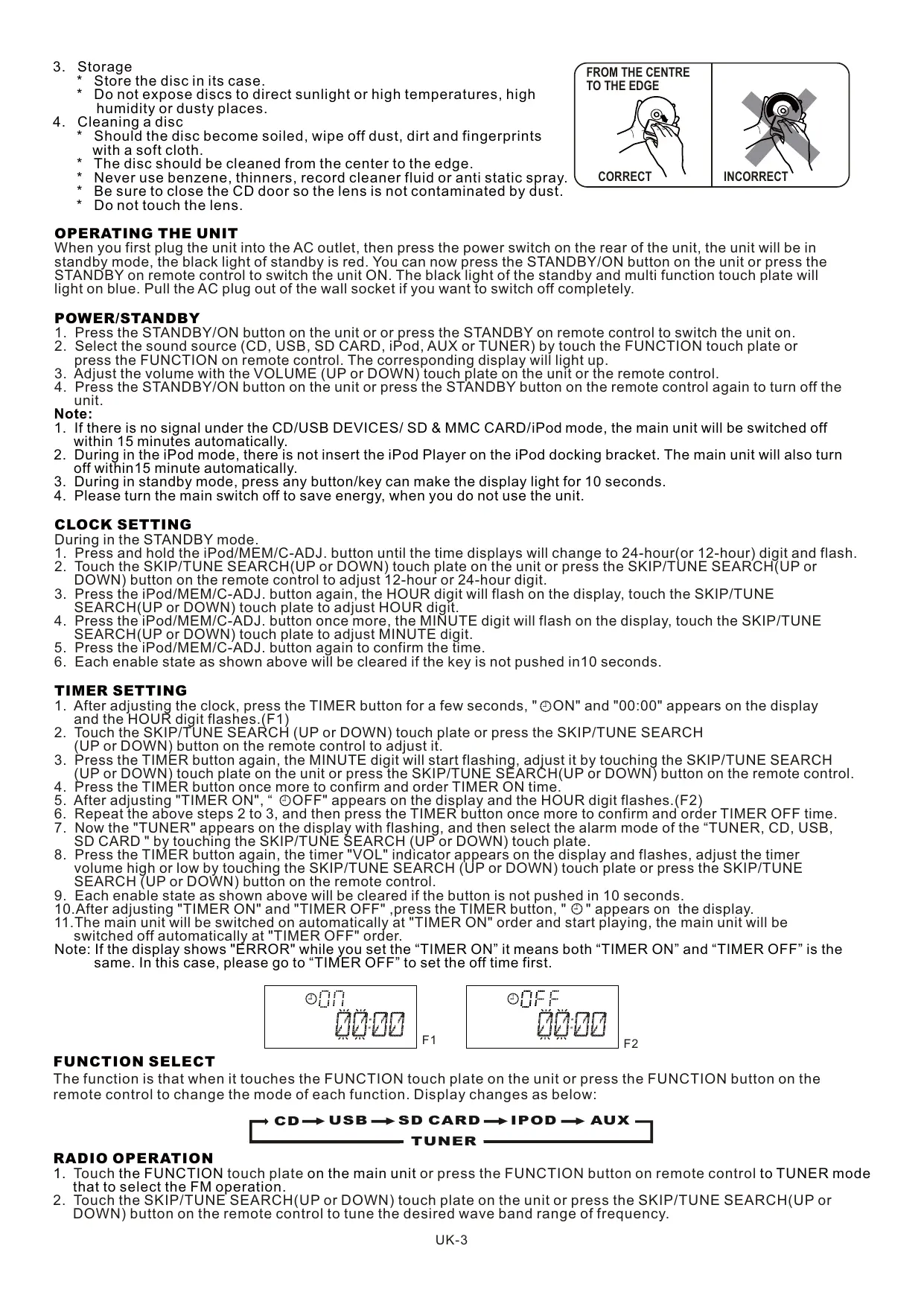
- Should the disc become soiled, wipe off dust, dirt and fingerprints with a soft cloth. The disc should be cleaned from the center to the edge. Never use benzene, thinners, record cleaner fluid or anti static spray. CORRECT Be sure to close the CD door so the lens is not contaminated by dust. Do not touch the lens.
When you first plug the unit into the AC outlet, then press the power switch on the rear of the unit, the unit will be in standby mode, the black light of standby is red. You can now press the STANDBY/ON button on the unit or press the STANDBY on remote control to switch the unit ON. The black light of the standby and multi function touch plate will light on blue. Pull the AC plug out of the wall socket if you want to switch off completely. INCORRECT POWER/STANDBY
3. Adjust the volume with the VOLUME (UP or DOWN) touch plate on the unit or the remote control.
4. Press the STANDBY/ON button on the unit or press the STANDBY button on the remote control again to turn off the
1. lfthere is no signal under the CD/USB DEVICES/ SD & MMC CARD/iPod mode, the main unit will be switched off
Within 15 minutes automatically. 2. During in the iPod mode, there is not insert the iPod Player on the iPod docking bracket. The main unit will also turn off within15 minute automatically.
3. During in standby mode, press any button/key can make the display light for 10 seconds.
4. Please turn the main switch off to save energy, when you do not use the unit.
CLOCK SETTING During in the STANDBY mode.
1. Press and hold the iPod/MEM/C-ADJ. button until the time displays will change to 24-hour(or 12-hour) digit and flash.
2. Touch the SKIP/TUNE SEARCH(UP or DOWN) touch plate on the unit or press the SKIP/TÜUNE SEARCH(UP or
DOWN) button on the remote control to adjust 12-hour or 24-hour digit.
5. Press the iPod/MEM/C-ADJ. button again to confirm the time.
6. Each enable state as shown above will be cleared if the key is not pushed in10 seconds.
IMER SETTING . After adjustin the clock, press the TIMER button for a few seconds, "©ON" and "00:00" appears on the display and the HOUR di faces (01)
2. Touch the SKIP/TUNE SEARCH (UP or DOWN) touch plate or press the SKIP/TUNE SEARCH
(UP or DOWN) button on the remote control to adjust it.
4. Press the TIMER button once more to confirm and order TIMER ON time.
5. After adjusting "TIMER ON", “ ©OOFF" appears on the display and the HOUR digit flashes.(F2)
6. Repeat the above steps 2 to 3, and then press the TIMER button once more to confirm and order TIMER OFF time.
7. Now the "TUNER" appears on the display with flashing, and then select the alarm mode of the “TUNER, CD, USB,
SD CARD "by touching the SKIP/TUNE SEARCH (UP or DOWN) touch plate.
8. Press the TIMER button again: the timer "VOL" indicator spears on the display and flashes, adjust the timer
volume high or low by touching the SKIP/TUNE SEARCH (UP or DOWN) touch plate or press the SKIP/TUNE SEARCH (UP or DOWN) button on the remote control.
9. Each enable state as shown above will be cleared if the button is not pushed in 10 seconds.
10.After adjusting "TIMER ON" and "TIMER OFF" ,press the TIMER button, " ©" appears on the display. 11.The main unit will be switched on automatically at "TIMER ON" order and start playing, the main unit will be switched off automatically at"TIMER OFF" order. Note: If the display shows "ÉRROR" while you set the “TIMER ON" it means both “TIMER ON’ and “TIMER OFF'is the same. In this case, please go to “TIMER OFF” to set the off time first. RE FA F2 FUNCTION SELECT The function is that when it touches the FUNCTION touch plate on the unit or press the FUNCTION button on the remote control to change the mode of each function. Display changes as below:
CD— USB —+ SD CARD —+ IPOD —+ AUX 7
that to select the FM operation.
2. Touch the SKIP/TUNE SEARCH(UP or DOWN) touch plate on the unit or press the SKIP/TUNE SEARCH{(UP or
DOWN) button on the remote control to tune the desired wave band range of frequency. UK-3
Manual Tuning To tune for weak stations, use manual tuning by touching the SKIP/TUNE SEARCH(UP or DOWN) touch plate continuously until you read the correct frequency or the reception is atits best. Automatic Tuning
1. Touch the SKIP/TUNE SEARCH{(UP or DOWN) touch plate on the unit or press the SKIP/TUNE SEARCH{(UP or
DOWN) button on the remote control for a second or more, then release the button. The tuner will automatically search the first station of sufficient signal strength.
2. Repeat above procedure if you wish to select another station.
Monol/stereo select You can select the MONO/STEREO only in FM mode. . When you want to select FM stereo station, press the ID3/MONO/STEREO button. When you receive a FM stereo station the "Œst2" indicator will appear on the display, you can receive FM stereo transmission .
2. When you press the ID3/MONO/STEREO button again, the FM STEREO indicator will turn off and switch to
MONO FM status. Programming preset stations You can also preset stations of your choice and store up to 30 FM stations in its memory. To store your selected broadcasting stations: . Tune to the required station. . Press the iPod/MEM/CLOCK-ADJ. button. . Press the PRESET/FOLDER (Up or DOWN) button for your desired station number. . Press the iPod/MEM/CLOCK-ADJ. button again to confirm your selection. . To program more stations into memory, repeat the above steps 2 to 4. . To change the stored preset stations, repeat the above steps 2 to 4. CISENTNEN Note: 1. Storing a new station into a preset location will erase the previously stored station in that location.
2. Power off will not erase the memory of preset stations. Perform the stations presetting procedures again to
store the stations. Selecting the Preset Stations
1. Press the PRESET/FOLDER (UP or DOWN) button to select the desired preset station number.
2. The numeric location of that preset station is displayed along with the corresponding frequency.
FM Antenna FM antenna wire is for better FM reception.
CD/MP3/WMA OPERATION
Listening To Compact Disc (CD/MP3/WMA) . If you want to enjoy CD/MP3, press the CD OPEN/CLOSE button once on the unit first, and then the CD door will open automatically.(F3)
2. Insertthe CD/MP3 disc into the CD compartment, press the CD OPEN/CLOSE button again, and then the CD door
will close automatically.
3. Touch the FUNCTION touch plate on the unit or press the FUNCTION button on the remote controlis select to
CD/MP3 mode. The unit will read the CD/MP3/WMA disc automatically. Note: (1) This unit can play CD, CD-R, CD-RW, MP3 and WMA discs. (2) lt can read" 8 cm" and" Multi Section " of MP3 DISC. (3) The "Playback Transfer Rate" in MP3 and WMA. a. In MP3, transfer bit rate : 8- 256 kbps. b. In WMA, transfer bit rate : 8 - 192 kbps. (4) The "Max Readable 99 folders and 999 tracks". (5) If no disc or can'tread TOC, NO DISC will be displayed.(F4) Playing The Entire CD/MP3/WMA
1. Insert the CD disc into the CD compartment, the main unit will automatically read the
total number of the folders and tracks at the same time.
2. Touch the PLAY/PAUSE/ENTER touch plate on the unit or press the
PLAY/PAUSE/ENTER button on the remote control, the unit will play the first track of the CD disc automatically.(F5)
3. Touch the PLAY/PAUSE/ENTER touch plate on the unit or press the
PLAY/PAUSE/ENTER button on the remote control once again, the time elapsed indicator will flash and pause CD playback.(F6)
4. Touch the SKIP/TUNE SEARCH(UP or DOWN) touch plate once to change Track NO.,
Touch and hold the SKIP/TUNE SEARCH (UP or DOWN) touch plate on the unit once or (on the remote control) to skip fast forward or backward of each song.
5. To resume playback, touch the PLAY/PAUSE/ENTER touch plate on the unit or press the PLAY/PAUSE/ENTER
button on the remote control once more again.
1. Insertthe MP3/WMA disc into the CD compartment, the main unit will automatically
read the total number of the folders and tracks at the same time.
2. Touch the PLAY/PAUSE/ENTER touch plate on the unit or press the PLAY/PAUSE
JENTER button on the remote control, the unit will play the first track ofthe CD disc automatically.(F7)
3. Touch the PLAY/PAUSE/ENTER touch plate on the unit or press the PLAY/PAUSE
JENTER button on the remote control once again, the time elapsed indicator will flash and pause CD playback.(F8) UK-4
unit or press the PLAY/PAUSE/ENTER button on the remote control once. And touch and hold the SKIP/TUNE SEARCH (UP or DOWN) touch plate on the unit once or (on m1 the remote control) to skip fast forward or backward of each song DE |
5. To resume playback, touch the PLAY/PAUSE/ENTER touch plate on the unit or press our à
the PLAY/PAUSE/ENTER button on the remote control once more again.
Note: Ifthe main unit is not working properly, disconnect the power source and then reconnectit again.
1D3 OPERATION Duringi in the MP3/WMA mode . Press the ID3/MONO/STEREO button on th unit (or remote control) once to open the ID3 function. ; Ifthe MP3/WMA file is write in “ID3” it will automatically to search the information of “TITLE NAME”, “ARTIST NAME”and “ALBUM NAME'"indicated on the display.
3. Press the ID3/MONO/STEREO button on the on th unit (or remote control) again. Then the unit will resume to play
normally. C TITLE NAME—ARTIST NAME— ALBUM NAME CURRENT TIME ms
USB/SD CARD OPERATION
During i in the STANDBY mode . Insert the USB DEVICE or SD/MMC CARD, and then press the STANDBY button on = FE the main unit (or remote control) to power" "ON" the unit. va Li
2. Touch the FUNCTION touch plate on the main unit (or remote control) to select the PE | ET CP
USB or SD/MMC mode. The main unit will tomatically read the total number of the Î folders and tracks at the same time. (F9) F9
3. Ifthe USB memory device more than one folder.
a. Press the PRESET/FOLDER (UP or DOWN) button to select each folder. b. Touch the SKIP/TUNE SEARCH(UP or DOWN) touch plate to select current track in desired folder.
4. Ifthe MP3 and WMA are written in "ID3".
a. During the unit in the MP3 or WMA playing. Press the ID3/MONO/STEREO button once. The display will shows a "ID3 ON", and then it will automatically to search more than 64 letters of "TITLE NAME", "ARTIST NAME" or" ALBUM NAME" which move from the right corner to the left corner on the display continuously. b. Press the ID3/MONO/STEREO button once again. The display will shows a "ID3 OFF", and then the main unit will play normally. Note: 1. The main unit can play MP3 and WMA only in this mode.
2. This unit can support most of USB devices and SD/MMC/SDHC cards. The memory capacity up-to 32GB. lt can
not access (or access a longer time) the memory capacity over 32GB. Otherwise, make an others to access it.
3. It can support USB version 1.1 and 2.0.
4. Not support all kinds of “ dual voltage-MMC” card nor “MMC-Plus” card.
5. The main unit does not support the WMA file which is protected “DRM FILE”.
Playing The Entire flash disc
1. Playback will start by touching the PLAY/PAUSE/ENTER touch plate on the unit or
press the PLAY/PAUSE/ENTÉR button on the remote control . Playback starts with Er Di the first track. The display shows the current track number andits elapsed time.(F10) 28 ; BARS
press the PLAŸ/PAUSE/ENTER button on the remote control again. . To stop playback, touch the STOP/MENU button. Note: In any time, the USB DEVICE or SD CARD must be fixed well underinthe STANDBY mode to avoid the main unit and USB DEVICE or SD CARD were damaged. F10 F11
REPEAT PLAY FUNCTION
1. Touch the REPEAT touch plate on the unit or press the REPEAT button on the remote
control once, “REPEAT"is displayed. CD will play the current track repeatedly.(F12)
2. Touch the REPEAT touch plate on the unit or press the REPEAT button on the remote
control twice, "REPEAT ALL'"is displayed. CD will play all tracks repeatedly.(F13) [0 | Gn "6
3. Touch the REPEAT touch plate on the unit or press the REPEAT button on the remote EI m0 08 08 F12
control once more again, REPEAT function will be off.
- MP3/WMA/USB/SD CARD
1. Touch the REPEAT touch plate on the unit or press the REPEAT button on the remote control once, then" REPEAT”
is displayed. It will play the current track repeatedly.(F14)
2. Touch the REPEAT touch plate on the unit or press the RÉPEAT button on the remote control twice, "REPEAT ALL"
is displayed. lt will play all tracks repeatedly.(F15)
3. Touch the REPEAT touch plate on the unit or press the REPEAT button on the remote control thrice, “REPEAT
ALBUM'"is displayed. lt will play all tracks in the current folder repeatedly .(F16)
4. Touch the REPEAT touch plate on the unit or press the REPEAT button on the remote control once more again,
PROGRAM FUNCTION User can make the program up to 32 tracks in CD mode or 64 tracks in MP3/WMA/USB/SD CARD mode in any desired order. Program mode is activated while in stop mode.
1. How to play the program
3) Press the iPod/MEM/C-ADJ. button to confirm the track number. F17
2) Press the PRÉSET/FOLDER button on the unit or on the remote control , the album fl
number will be changed. F18
3) Press the iPod/MEM/C-ADJ. button, the first track number will be displayed.(F 19)
4) Touch the SKIP/TUNE SEARCH(UP or DOWN) touch plate on the unit or press the 5
SKIP/TUNE SEARCH(UP or 1 luesonr DOWN) button on remote control , the track number will be changed. AlAlA ©
5) Press the iPod/MEM/C-ADJ. button to confirm the favorite track number. La PT |
ÉDETD on on 00 08 F19
Touch the PLAY/PAUSE/ENTER touch plate on the unit or press the PLAY/PAUSE/ENTER button on remote control. The unit will play the first track of the program. When all tracks have been played, the unit display will be shows the number of tracks and the playing time of the CD/MP3 songs.
the CD tray door and close it again that the memory will be erased.
2. Seta new program, the existing one will be cleared.
Note : During in the program mode.
1. Touch the REPEAT touch plate on the unit or press the REPEAT button on the remote control once, the "REPEAT"
indicator will light on the display. Then the unit will repeat the current track.
2. Touch the REPEAT touch plate on the unit or press the REPEAT button on the remote control twice, the "REPEAT
ALL" will light onthe display: Then the unit will repeat all the total number oftracks.
3. Touch the REPEAT touch plate on the unit or press the REPEAT button on the remote control once more again.
The unit will return to play the program in normally. RANDOM PLAY
1. Press the RANDOM button on the unit (or remote control), then RANDOMis 2
2. Press the RANDOM button again, then the audio device unit will resume to normally
play. F20 INTRO PLAY(on the remote control)
1. Press the INTRO button on the remote control, INTRO is displayed. INTRO will play h =
the first 10 seconds of each track.(F21) I
2. Press the INTRO button twice, then the audio device unit will resume to normally play. | mp 2 m E rot
iPod OPERATION Note: To avoid damage the iPod, please make sure the iPod in standby mode to insert and take out. During the uni STANDBY mode:
1. Press the iPod OPEN/CLOSE button once on the unit first to open the iPod door.
2. Insertthe iPod players in the iPod docking bracket on the front of the main unit fixedly.
3. Power on the main unit, and then Touch the FUNCTION touch plate on the unit or press
the FUNCTION button on remote control to the iPod mode, the iPod indicator will appear on the main unit display. (F22) During the unit in iPod mode:
1. Touch the PLAY/PAUSE/ENTER (only in iPod) touch plate or press the PLAY/PAUSE/ENTER button on the remote
control once to start the iPod playing. Adjust the volume control by touch the VOLUME (UP or DOWN) button or press the VOLUME (UP or DOWN) button to stop the current playing, touch the STOP/MENU(only in IPod ) touch ate once.
2. Touch the PLAY/PAUSE/ENTER (only in iPod) touch plate once to pause the current track. To resume the playback,
touch the PLAY/PAUSE/ENTER (only in iPod) joue plate once again.
Note: iPod touch version 1.1.4 or above can support REPEAT or RANDOM function. During the uni! iPod MENU mode:
1. During the uni n iPod mode, press ine jPONIMEMICLOCKADI: button once, the unit
will enter to the iPo: mode. The iPo indicator will appear on the unit TN7 display. (F23 . TEDTMENU
3. Touch the PLAY/PAUSE/ENTER (only in iPod) touch plate enter to the desired menu folder.
a. Touch the SKIP/TUNE SEARCH (ÜP or DOWN) touch plate on the unit (or remote control) to search the current content in the each desired menu folder. b. If you want return to the iPod menu, touch the STOP/MENU (only in iPod) touch plate again.
4. To resume playback, press the iPod/MEM/CLOCK-ADJ. button once again, the unit will return to iPod mode.
Charging the iPod Player battery through the main unit:
1. iPod Player has a infernal nonremovable battery, the battery may need to be crarged that is not used for a while.
2. You can charge the iPod Player through the main unit automatically under the STÂNDBY or POWER ON mode.
Note : 1. The iPod Player battery is 80-percent charged in about an hour, and fully charged in about a few hours. If you charge it while playing music, it may take longer.
2. Itis not better to charge under the TUNER mode. lt may interfere the reception.
Note: 1. In any time, you can control the iPod player on the main unit, remote control or iPod player itself while the unit in the “iPod” or "Pod MENU" mode.
2. In any time, the iPod player must be fixed well under in the STANDBY mode to avoid the unit and iPod player were
3. During the unit in iPod mode. The video function of the iPod with ahnormal working normally. Update the latest
version of the iPod video function from the apple web-site. VIDEO OUT SETTING (for i-Pod Video only)
1. During the unit in the STANDBY mode : Connect the TV set with a videos cable (RCA-type cables) to the VIDEO
out jack on the rear of the unit.
2. During the unit in the iPod mode : Press the "MENU" button on the iPod Click Wheel to set the video function.
3. To set iPod to display videos on a TV:
a) Choose Videos > Video Settings, and then set TV Out to Ask or On. b le you set TV Out to Ask, iPod gives you the option of showing videos on TV or on iPod while every time you play a video. Note :1. The Vedio mode only support that the iPod players have a vedio function.
2. iPod classic 80/160GB, iPod nano 3rd generation(Video) 4/8GB and iPod touch 8/16GB should be fixed well
under in the STANDBY mode before operation of the Vedio function.
3. Vedio cable (RCA:type cable) not included.
indicator light on the display. This unit can input analog audio through the AUX(LINE) IN jack on the right of the unit.
2. Use a cable with RCA jack to connect external audio source.
Note: Aux in cable not included.
TO SET SLEEP FUNCTION
1. lf you want to fall asleep to music, press the SLEEP button on the unit or on the remote control.
2. You may select the TUNER, CD/MP3, USB, SD/MMC, iPod or AUX mode in sleep function to play from 90, 80, 70
up to10 minutes of music before shutting itself off automatically. 90 —+ 80 —+ 70 —+ 60 + 50 = 40 = 30 + 20 710 — NORMAL EQ CONTROL EQ shows the present sound tone. When you touch the EQ touch plate or press the EQ button on the remote control, the sound tone changes as below:
volume level will flash and the audio output will be temporarily terminated.(F24) er
2. Press the MUTE button on the unit or on the remote control again, the volume level 0 | PPS
and the audio output will return to normal. hé dé M F24 LISTEN TO THE MUSIC BY USING HEADPHONE Astereo headphone jack is provided for private listening. To listen to the unit with headphones (not included ) insert the 3.5mm mini-stereo plug from the headphones into the PHONES jack on the front panel. The external speakers are automatically disconnected when headphones are using. MEMORY BACK-UP To insert 1.5V x 3, UM-4, AAA or equivalent batteries in the battery compartment of the unit. Itis used to back-up the memory of the main CPU. SPECIFICATION ! RADIO SECTION POWER SUPPLY : 230V-50Hz . QUTRUTPQUER. D ou tu FREQUENCY RANGE : FM 87.5-108 Mhz : x X mm SPEARER BOX DIMENSION : 180 {) x 184 (D}x 211 {tpm SOMPACTDISC SECTION lu LAcER N.W.: 5.1kg FREQUENCY RESPONSE: 100Hz-16kHz SPECIFICATION SUBJECT TO CHANGE WITHOUT FURTHER NOTICE. Ventilation warning : " The normal ventilation of the product shall not be impeded for intended use." www.mpmaneurope.com UK-7
FINESTRA SCHERMO LCD N 7
17. Preset / folder-up knop
under in the STANDBY mode before operation of the Vedio function.