FS-44P - Compteur de billets Royal Sovereign - Free user manual and instructions
Find the device manual for free FS-44P Royal Sovereign in PDF.


| Product Type | Coin Sorter |
| Brand | Royal Sovereign |
| Model | FS-44P |
| Sorting Speed | Up to 312 coins per minute |
| Motor Type | AC synchronous, 26 RPM |
| Power Consumption | 5.5 W |
| Power Supply | 120 V / 50–60 Hz |
| Unit Weight | 7.9 lb (3.6 kg) |
| Unit Dimensions | 7.7 x 13.4 x 10.2 in (195 x 340 x 258 mm) |
| Coin Denominations Sorted | Quarters, Dimes, Nickels, Pennies (U.S. currency) |
| Number of Coin Tubes | 16 (4 per denomination) |
| Tube Capacity (per tube) | Pennies: 50 ($0.50), Nickels: 40 ($2.00), Dimes: 50 ($5.00), Quarters: 40 ($10.00) |
| Anti-Jam Feature | Automatic agitation screw and running vessel reverse |
| Automatic Tube Adjustment | Sensors slide full tubes and reposition empty ones |
| Display | LCD with total dollar amount and individual coin count |
| Optional Printer | Compatible with Royal Sovereign RTP-1 thermal printer |
| Wrapper Compatibility | Prefitted coin wrappers (recommended FSW-216N or FSW-360N) or flat wrappers |
| Safety Features | Polarized plug, must operate with front cover open |
| Warranty | 1 year limited (parts and labor) |
Frequently Asked Questions - FS-44P Royal Sovereign
User questions about FS-44P Royal Sovereign
0 question about this device. Answer the ones you know or ask your own.
Ask a new question about this device
Download the instructions for your Compteur de billets in PDF format for free! Find your manual FS-44P - Royal Sovereign and take your electronic device back in hand. On this page are published all the documents necessary for the use of your device. FS-44P by Royal Sovereign.
USER MANUAL FS-44P Royal Sovereign
natural_image
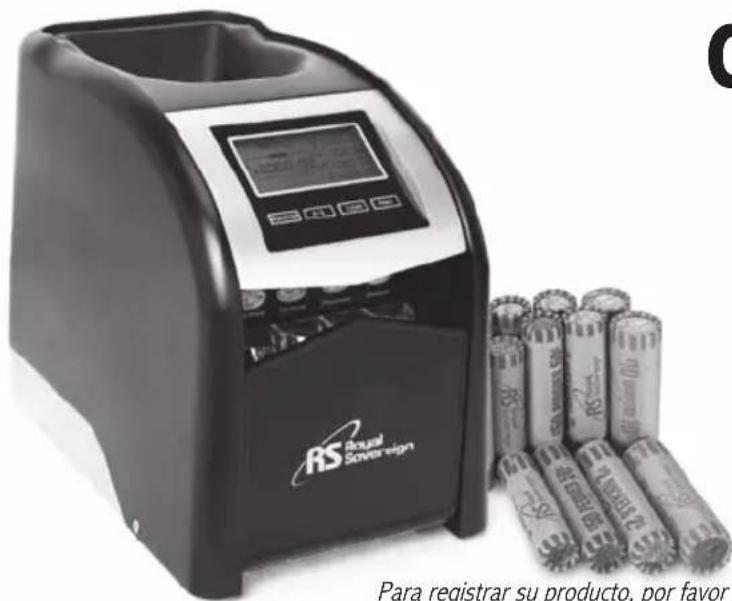
Exterior view of a Royal Sovereign financial instrument with batteries and digital display (no visible text or symbols on main body)COIN SORTER
Please read and retain these instructions
To register your product, please go to
www.royalsovereign.com USA-Customer Support Tab then Registration Tab
www.royalsovereign.com
Royal Sovereign International Inc.
COIN SORTER
Fast - Sort™
FOREWORD
The FS-44P is the perfect small business coin sorter.
It's precise internal sorting design and Anti-Jamming device allows
United States currency to be counted accurately.
Please read instructions carefully before operating the machine.
TABLE OF CONTENTS
Topics Pages
Foreword 2
Machine Parts 4
Introduction 5
Safety Precautions 5
Characteristics 6
Directions.... 6\~8
Using Flat Wrappers 8
Using Optional Printer (RTP-1) 8
TroubleShooting....9
Specifications.... 10
Procedure.... 11
Warranty 12
Manual in Spanish 13\~24
MACHINE PARTS
- HOPPER
- LCD DISPLAY
- RUN/STOP
-
/\$
- CLEAR
- COIN TUBE
- TUBE TRAY
- FRONT COVER
- HOPPER LID
- INNER VESSEL
- HOPPER LID SCREW
- AGITATION SCREW
- RUNNING VESSEL
- PRINT PORT
- POWER
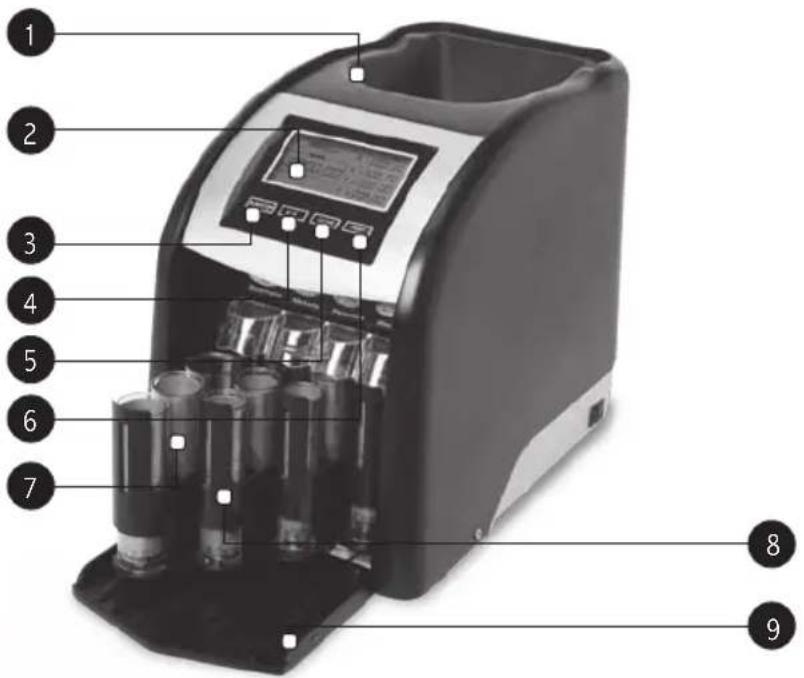
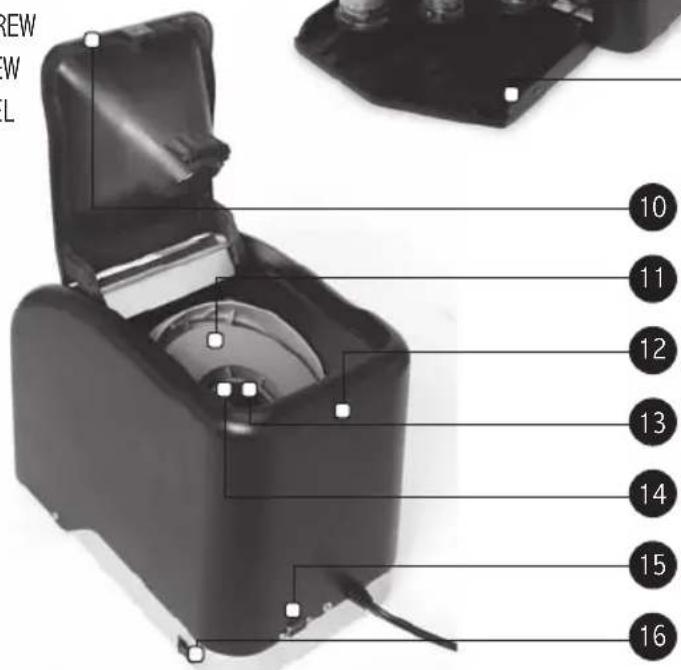
INTRODUCTION
Thank you for purchasing the Royal Sovereign FS-44P FAST SORT Coin Sorter. To ensure optimum performance, please read these instructions carefully before use.
SAFETY PRECAUTIONS
The safety recommendations outlined in this section should be read and understood before operating this machine. Keep this information for future reference.
- To prevent the possibility of electric shock, do not allow any liquids inside or around the machine.
- Do not operate machine for any purpose other than its intended use.
- Place the machine on a sturdy level work surface.
- Do not allow any other materials to enter except coins.
- Do not operate machine if electrical plug or power cord is damaged.
- The machine should be placed nearby an electrical outlet so that the outlet is easily accessible.
- Do not alter the electric plug in any way.
- Turn off the power when unattended or not in use. Unplug the machine before moving it or when it is not in use for an extended period of time.
- To reduce the risk of electric shock, this appliance has a polarized plug (one blade is wider than the other). This plug will fit in a polarized outlet one way. If the plug does not fit in the outlet, contact a qualified electrician to install the proper outlet. Do not alter the plug in any way.
- Keep machine out of direct sunlight and moisture.
- Sorter operates best at room temperature.
- Front door must be open before operating machine.
CHARACTERISTICS
- The FS-44P coin tubes automatically adjust when full.
- The FS-44P sorts up to 312 U.S. Quarters, Dimes, Nickels, and Pennies per minute.
- There are sixteen coin tubes included.
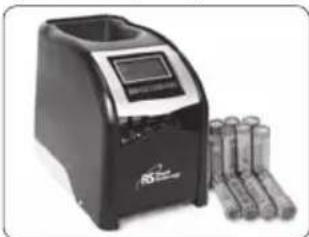
- When you place good quality, preformed coin wrappers into the proper coin tubes (we recommend Royal Sovereign FSW-216N or FSW-360N coin wrappers) the FS-44P automatically dispenses coins into the wrappers.
- The FS-44P may also be used without coin wrappers.
- If you want to print, please connect the printer.
natural_image
Black and white photo of a digital water heater with cylindrical batteries beside it (no visible text or symbols)Filled wrappers are ready for storage or bank deposit.
DIRECTIONS
WARNING:
- DO NOT OPERATE THE MACHINE WITH THE FRONT COVER CLOSED. THIS MAY DAMAGE THE MACHINE. ALWAYS OPEN THE FRONT COVER BEFORE OPERATING THE MACHINE.
- Sensors automatically adjust tube trays into position. For best operation of the machine DO NOT manually move tube trays while the FS-44P is in operation or sensors may become misaligned affecting the performance of the machine.
NOTE: DO NOT insert any foreign objects including: \$1 coin, Non-US coins, damaged coins, sticky coins or coins that are stuck together, clips, screws, paper, glass, and pins. DO NOT put fingers in opening.
- Place the machine on a sturdy level work surface.
- Plug the machine in after verifying the 120V outlet.
-
Open the front cover.
-
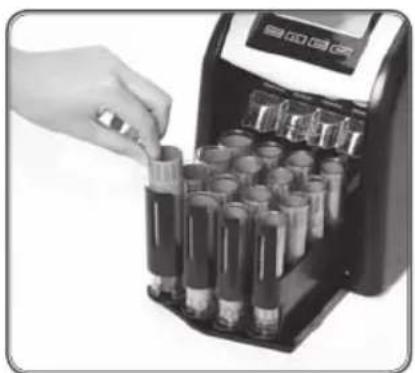
Remove coin tubes. Place the coin wrappers into the correct tubes. It is very important that the coin wrappers be inserted all the way to the bottom of the tubes and that they do not extend above the top edge of the tube. If they extend above the top edge of the tube, coins will not sort properly into the wrappers.
- Return all sixteen tubes to the proper position. The coin tubes can only be inserted right side up. The tubes are labeled on the inside base for each denomination: Q (Quarters), N (Nickels), P (Pennies), D (Dimes).
NOTE: BECAUSE PENNIES AND DIMES ARE VERY CLOSE IN SIZE AND THICKNESS, THEY MAY SOMETIMES SORT INTO OPPOSITE TUBES.
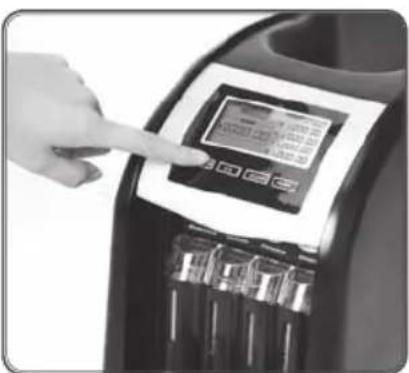
- Turn the power switch on, located on the right side of the machine.
- Press the RUN/STOP button to start the machine.
- You will hear a "ticking" sound. This is the anti-jam device.
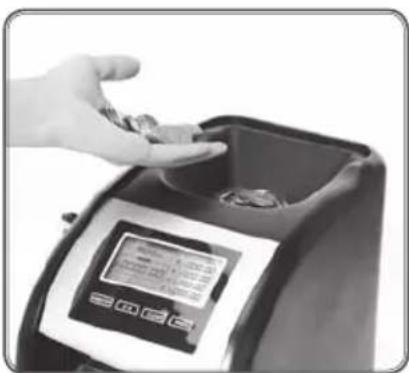
- Drop the coins into the collection opening.
- Coins will automatically start sorting into the first row.
- Press the #/\$ button at any time to switch from total dollar amount view or individual coin count view.
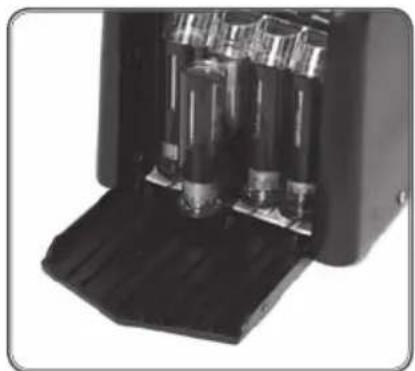
- When a coin tube is full, the machine will stop temporarily to slide another coin tube into position. When an entire row of one denomination is full, an alarm will sound and that row will automatically slide out.
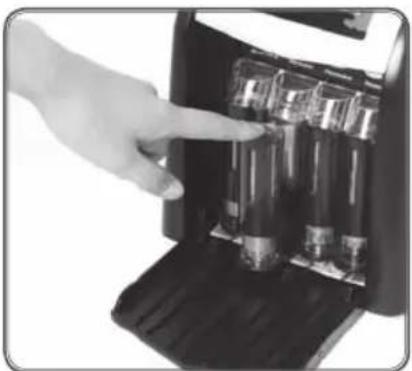
- Take out the full coin tubes and replace them with empty wrappers. Return the tubes back in place and push them back so that the machine can start sorting into the first row again.
- The digital counter will reset for that coin denomination but will continue counting the dollar amount until the CLEAR bottom is pushed.
- Press the RUN/STOP button to restart.
- To remove filled wrappers, pull up on the inside edge of the plastic tube. Then push the coin wrapper up from the bottom of the tube. Fold inward the edges of the wrapper.
- At any time during or after sorting you can view the LCD Display for your total dollar amount or your individual coin count.
- Press the CLEAR button to reset the display.
- When you are finished sorting press the RUN/STOP button to stop the machine and then turn off the machine using the power switch on the right side.
- Be sure that the Hopper Lid Screw is always fastened when operating the machine. A loose lid may reduce performance.
USING FLAT WRAPPERS
- Allow coins to fall directly into plastic tubes. Do not place flat wrappers into plastic tubes while operating.
- Remove full coin tubes after sorting.
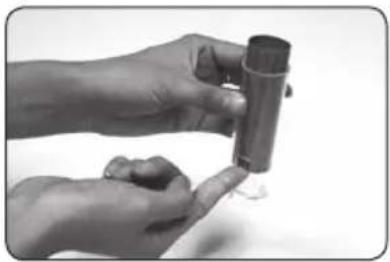
- Hold a flat wrapper open by placing your index finger slightly inside the end of the wrapper. Slide the flat wrapper over the top few coins in the tube.
- While gently pushing the wrapper toward the bottom of the coin tube, tilt the coin tube so that the coins slide into the wrapper. When the wrapper touches the bottom of the coin tube, hold the tube upright, and then fold the top of the wrapper.
- Turn the coin tube upside down and remove the coin-filled wrapper. Fold over the other end of the wrapper.
natural_image
Close-up of hands holding a small cylindrical object with a small white object attached (no visible text or symbols)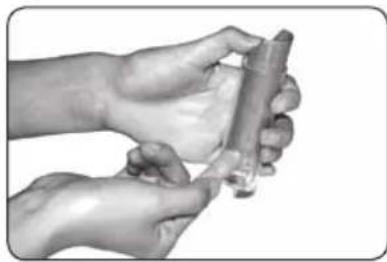
natural_image
Close-up of hands holding a cylindrical object with a small object inserted (no visible text or symbols)USING OPTIONAL PRINTER (RTP-1)
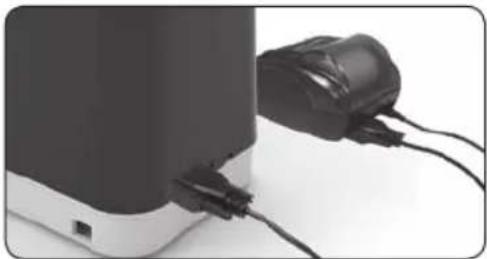
The FS-44P has an optional printer port that allows printing with Royal Sovereign optional thermal printer model RTP-1
- Connect both ends of the serial cable supplied with the RTP-1 optional printer to FS-44P and RTP-1
- Follow operation instructions for setting up the RTP-1 in the RTP-1 user manual.
- Press the PRINT button to print totals from the FS-44P display to the RTP-1 printer.
natural_image
Close-up of a black and white electronic device with attached power cord (no visible text or symbols)TROUBLESHOOTING
| Symptom Check | |
| 1. Motor does not run. | 1. Check that the power cord is plugged in.2. Check that the power switch is turned on.3. Push the 'RUN/STOP' button again.4. Check that the tube trays are positioned properly. |
| 2. There is a ticking sound. The ticking sound is normal. This is the anti-jam device. | |
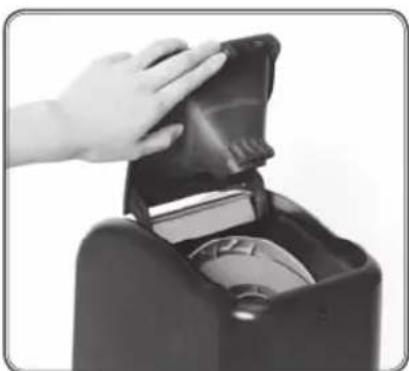
| 3. Coins are not sorting into tubes. | Foreign objects and bent, damaged, or sticky coins may cause the machine to jam:1. Tap machine gently on the side to loosen jam.2. This unit is designed to resolve jams automatically, so wait about 15 seconds as the Agitation Screw and Running Vessel rotate forwards and backwards.3. If the machine is still not sorting, push RUN/STOP to stop sorting.4. Loosen Hopper Lid Screw with coin.5. Lift Hopper Lid and remove Inner Vessel, exposing Running Vessel.6. Retrieve jammed item and replace Inner Vessel.7. Screw Hopper Lid and push RUN/STOP to start sorting again. |
| 4. Counting is not correct | If there is a ERR sign on each coin counting column, then the sensor is failed or covered by something. Contact Royal Sovereign office. |
| 5. Coins are not counting If the counting sensor is broken, ERR will be seen on the display | |
| 6. Display shows ERR in total column | Check that the tube trays are positioned properly |
NOTE: ERR1 : In case of wrong positioning between trays and front sensor or front sensor malfunction.
ERR2 : In case of wrong positioning between trays and back sensor or back sensor malfunction.
ERR3 : In case of wrong positioning between trays and sensors or sensors malfunction.
SPECIFICATIONS
| MODEL FS-44P | |
| Speed Up to 312 coins/min | |
| Motor type AC synchronous | |
| Motor RPM 26 RPM | |
| Power consumption 5.5 W | |
| Power supply 120V / 50-60 Hz | |
| Unit weight 7.9 (lbs) / 3.6 (kg) | |
| Unit dimensions 7.7 x 13.4 x 10.2 (in) / 195 x 340 x 258 (mm) | |
ONE TUBE COIN QUANTITY
| COIN QUANTITY DOLLAR AMOUNT | ||
| Pennies 50 0.50 | ||
| Nickels 40 2.00 | ||
| Dimes 50 5.00 | ||
| Quarters | 40 | 10.00 |
PROCEDURE
natural_image
Hand inserting a small cylindrical object into a digital scanner (no visible text or symbols)Open front cover on coin sorter and insert preformed coin wrappers into the corresponding coin tubes.
natural_image
Close-up of a hand interacting with a digital touchscreen device on a black appliance (no visible text or symbols)Push the tube tray back to the proper position. Turn on the machine.
natural_image
Hand inserting a coin into a digital kitchen machine (no visible text or symbols)Place loose change into the hopper to automatically start sorting coins into the wrappers.
natural_image
Close-up of a black electronic device with multiple cylindrical components and a base, no visible text or symbols.When a coin tube is full, the machine will stop temporarily to slide another coin tube into position.
natural_image
Hand inserting a cylindrical device into a black appliance (no visible text or symbols)The digital counter will reset for that coin denomination but will continue counting the dollar amount until it is cleared. Press the RUN/STOP button to restart.
natural_image
Close-up of a hand opening a black plastic bag into a black container (no text or symbols visible)To retrieve jammed items, unscrew Hopper Lid and remove Inner Vessel.
LIMITED ONE YEAR WARRANTY
This warranty applies to repair or replacement of product found to be defective in material or workmanship for one year from the date of the original purchase. This warranty is extended only to the original purchaser.
This warranty does not apply to damage resulting from abuse, misuse, or improper maintenance of damage that is attributable to acts of nature. This warranty excludes both parts and labor for cosmetic parts (cabinet). Royal Sovereign International, Inc. (and its affiliated companies) is not liable for incidental or consequential damages of any nature. This limitation would not apply if you live in those areas that do not permit the exclusion or limitation of incidental or consequential damages.
Defective products for warranty repair or replacement cannot be returned without a Return Authorization number. Please go to www.royalsovereign.com USA-Customer Support Tab to make a request for an Office Product Return Authorization.
Defective products must be returned to Royal Sovereign International Consumer Return Department, freight prepaid, with proof of purchase and Return Shipping and Handling payment (check or money order). Upon repair or replacement the product will be returned to the customer.
Return defective product to the following address with a detailed description of the problem. If possible, pack in original carton. Please prepay shipping charges.
For out of warranty service or frequently asked questions please go to www.royalsovereign.com USA- Customer Support Tab. For sales of product, parts or accessories please visit us at www.royalfulfillmentcorp.com. For service or sales please contact your local Royal Sovereign Office:
Royal Sovereign International Inc.
2 Volvo Drive Rockleigh, NJ 07647 USA
TEL:+1) 201.750.1020,800-397-1025
FAX:+1)201.750.1022
MANUAL DEL USUARIO
FS-44P
www.royalsovereign.com
Royal Sovereign International Inc.
INTRODUCCIÓN
natural_image
Black and white photo of a digital ink mill machine with cylindrical batteries beside it (no visible text or symbols)natural_image
Close-up of hands holding a small cylindrical object with a small white object nearby (no text or symbols visible)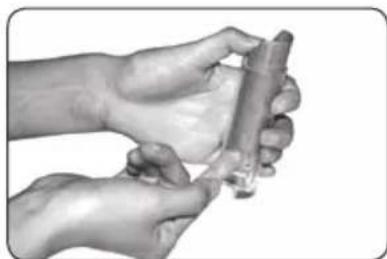
natural_image
Close-up of hands holding a small cylindrical object, possibly a medical or laboratory device (no visible text or symbols)ADDUTILIZANDO LA IMPRESORA OPCIONAL (RTP-1)
natural_image
Close-up of a black and white electronic device with attached power cord and cable (no visible text or symbols)natural_image
Hand inserting a small object into a digital scanner device (no visible text or symbols)natural_image
Hand placing coins into a digital kitchen appliance (no visible text or symbols)natural_image
Close-up of a mechanical device with internal components and a base, no visible text or symbolsnatural_image
Hand inserting a small container into a black appliance (no visible text or symbols)natural_image
Close-up of a hand opening a black plastic bag into a small container (no text or symbols visible)- COIN SORTER
- Fast - Sort™
- FOREWORD
- TABLE OF CONTENTS
- Topics Pages
- MACHINE PARTS
- /\$
- INTRODUCTION
- SAFETY PRECAUTIONS
- CHARACTERISTICS
- DIRECTIONS
- WARNING:
- USING FLAT WRAPPERS
- USING OPTIONAL PRINTER (RTP-1)
- PROCEDURE
- LIMITED ONE YEAR WARRANTY
- MANUAL DEL USUARIO
- INTRODUCCIÓN
- ADDUTILIZANDO LA IMPRESORA OPCIONAL (RTP-1)
Brand : Royal Sovereign
Model : FS-44P
Category : Compteur de billets