RCD-3120 - Compteur de billets Royal Sovereign - Free user manual and instructions
Find the device manual for free RCD-3120 Royal Sovereign in PDF.


| Product Type | Bill Counter with Counterfeit Detection |
| Model | RCD-3120 |
| Dimensions | 6.1" W x 5.4" D x 3.2" H (155 x 137 x 82 mm) |
| Net Weight | 1.10 lbs |
| Power Supply | AC 100V~240V 50/60Hz or DC 12V/1.0A |
| Battery | Rechargeable Lithium Battery 11.1V/3500mAh (optional) |
| Power Consumption | <10W |
| Detecting Speed | <0.5 seconds per banknote |
| Counterfeit Detection Methods | Ultraviolet, Magnetic, Infrared, Imaging, Paper Quality, Size/Thickness |
| Orientation Support | 4-Way insertion |
| Display | LED display for sheets and value |
| Functions | Counting, counterfeit detection, report mode, sleep mode (auto power off after 5 min idle) |
| Operating Temperature | 0°C to 40°C |
| Storage Temperature | -20°C to 65°C |
| Warranty | 1 year limited warranty |
| Maintenance | Clean sensors with cotton and alcohol; wipe cover with damp cloth |
| Safety Precautions | Unplug before cleaning; do not disassemble; avoid high humidity |
Frequently Asked Questions - RCD-3120 Royal Sovereign
User questions about RCD-3120 Royal Sovereign
0 question about this device. Answer the ones you know or ask your own.
Ask a new question about this device
Download the instructions for your Compteur de billets in PDF format for free! Find your manual RCD-3120 - Royal Sovereign and take your electronic device back in hand. On this page are published all the documents necessary for the use of your device. RCD-3120 by Royal Sovereign.
USER MANUAL RCD-3120 Royal Sovereign
RCD-3120
Royal Sovereign International, Inc.
Please read and retain these instructions. To register your product, please go to www.royalsovereign.com
Thank you for purchasing the Royal Sovereign Quick Scan Counterfeit Detector, RCD-3120. This manual will provide you with safety information, instructions for optimal use, and proper care and maintenance for your product. Please read this manual carefully before operating.
CONTENTS
SAFETY INSTRUCTIONS 2
PRODUCT VIEW 3
PRODUCT OPERATION 4-6
SELF TEST ERROR CODE DISPLAY....7
DETECTING ERROR CODE DISPLAY....8
TROUBLESHOOTING....9
MAINTENANCE....9
SPECIFICATIONS.... 10
WARRANTY....11
SAFETY INSTRUCTIONS
When using this machine follow these safety precautions to reduce risk of fire, electric shock, or injury.
WARNING
- Do not operate the machine in areas with high temperature or high humidity since it may cause the unit to malfunction.
- Do not disassemble this product. Incorrect re-assembly can cause electric shock. If repair is required please contact Royal Sovereign International.
- Before turning on the power, please make sure that there are no objects obstructing the operation of the rollers and wheels.
- Unplug this product from the outlet before cleaning. Do not use liquid cleaners or aerosol cleaners. Use a damp cloth for cleaning the cover.
- To prevent shock hazard, do not disconnect the plug of the AC/DC adapter when hands are wet.
- To prevent fire or short circuit, unplug the unit when moving it to another position.
- Hold the plug when disconnecting the unit from the power outlet. Do not pull the cord as it can be damaged.
- Keep the AC/DC cord from being damaged. Avoid placing heavy objects on the cord.
- The unit should be connected to a power supply through the AC/DC adapter.
- Keep the battery storage clean and in a dry ventilation room between the temperatures of -5 - 35°C.
- When the battery is unused for a long period of time, please take the battery out from the machine as it should be recharged once every 6 months.
- Do not change the position of the optical sensors.
Read & Fully Understand This Owner's Manual Before Using This Machine.
PRODUCT VIEW
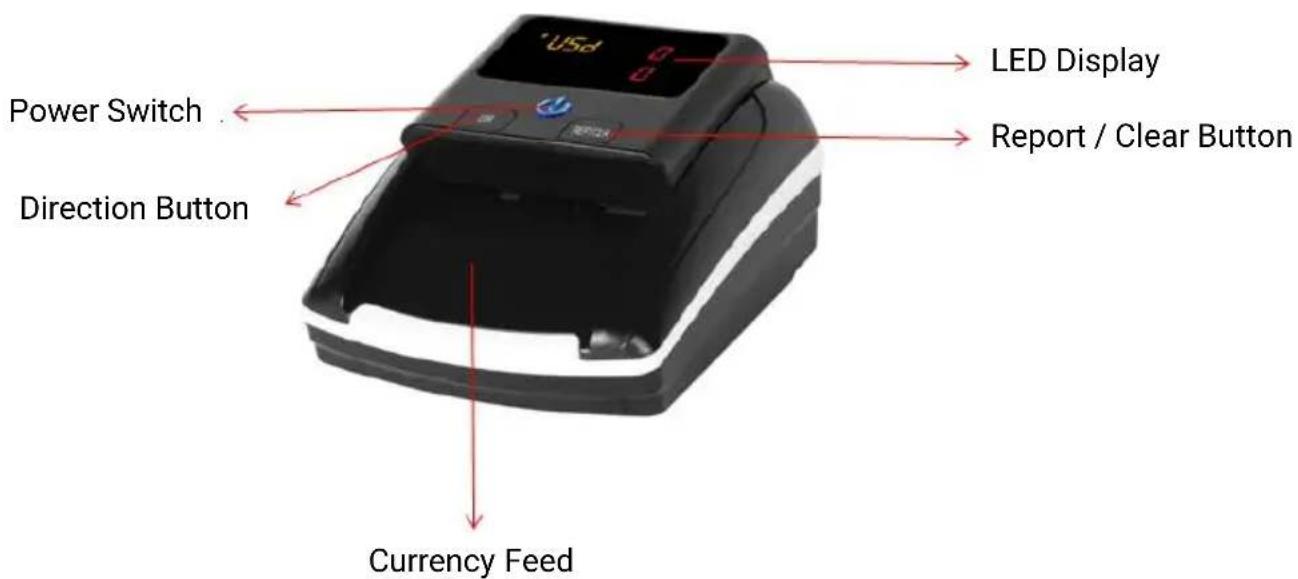
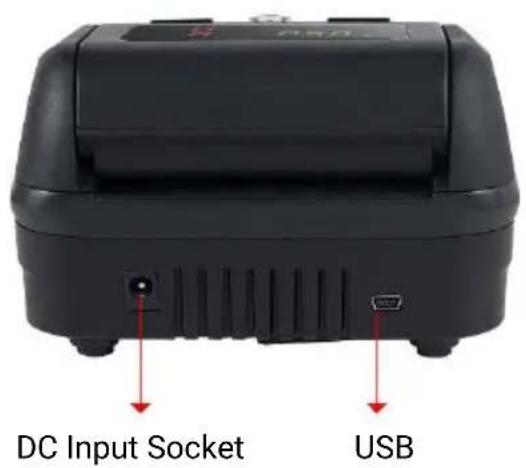
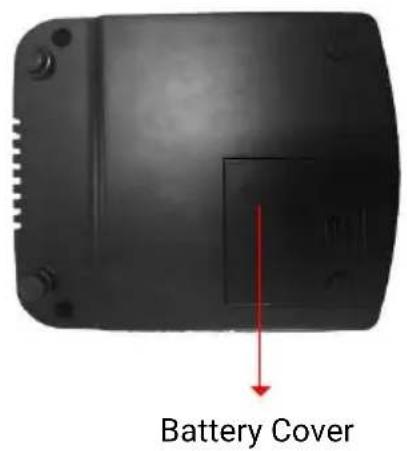
PRODUCT OPERATION
- Turning the machine on and off:
- Connect the power adapter to a 110V or 220V outlet, then connect to the machine.
NOTE: Insert lithium battery (OPTIONAL)
- Once connected, press the power switch button to turn on the machine.
The indicator light will light up and the machine will run a self test.
If the test is successful, the display window will show the currency type and two "0"'s on the sheets display window and the value display window.
- Hold the power switch button for about 2 seconds to turn off the machine. When the indicator lights are off, it means the machine has been successfully turned off.
- Button Introduction:
• DIR:
Hold the "DIR" button to choose the exiting direction of the valid banknotes. Take your finger away when you hear the beep sound, as the direction indicator will be changed.
The denotation of direction will be shown on the left part of the display. An up arrow means the valid banknote will go out from the back of the machine. A down arrow means the valid banknote will retreat and come back to you where you inserted the banknote.
- REP/CLR:
➢ Press the "REP/CLR" button to check the pieces of each denomination. Hold the button for about 2 seconds to clear the records.
After finishing detecting the banknotes, press the "REP/CLR" button to enter the report mode. When checking the notes detection record, you can press the button again and again to display records for different denominations and its pieces.
PRODUCT OPERATION (CONTINUED)
3. Inserting the banknotes correctly
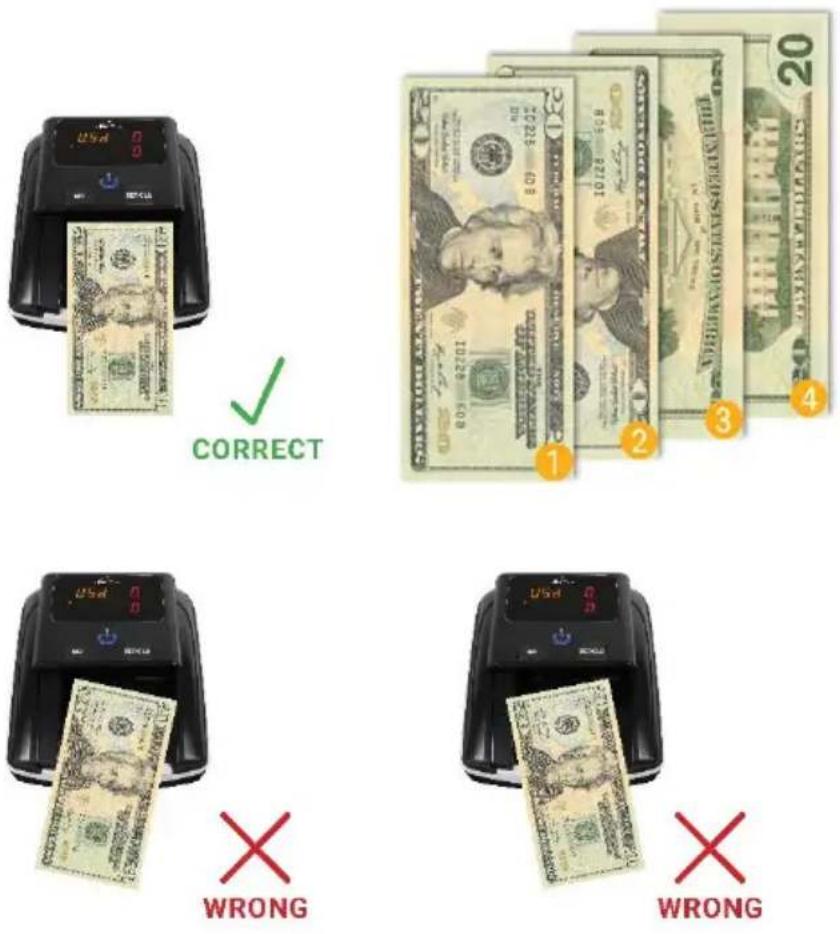
- Please insert the banknotes as shown in the pictures below. On the right side of the insertion. If a banknote is incorrectly inserted, the machine will refuse it and alert the user that an error has occurred. This machine is equipped with 4-Way Orientation as shown below. This allows the user to insert the banknote in any direction they want.
PRODUCT OPERATION (CONTINUED)
4. Detecting
- If the banknote is genuine, the total pieces will be increased by one and the total value will be added to the current value, with the banknote exiting from the selected direction (See Figure 1). When the number of sheets is beyond 999 or the total value is beyond 999, the data will automatically be set back to 0.

Figure 1
Figure 2
- If a banknote is suspicious, it will be rejected and exit the machine from the currency feed with three beeps. At the same time, the power switch will light, and the corresponding error will be shown on the sheets display window (See Figure 2).
5. Sleep (Power Saving Mode)
- The detector will enter sleep mode after 3 minutes of being idle to save power. The information on the display window will turn off and only the blue power button indicator light will remain on. The machine can be woken up and return to working mode by touching any key or by feeding a banknote through the machine. If the machine is idle for more than 5 minutes, the machine will power off automatically.
SELF TEST ERROR CODE DISPLAY
The detector automatically performs a self test after powered on. If one of the following codes is showed on the display window, it is probable that the sensor is blocked by banknotes or dust. Please use a brush or a piece of soft cloth to clean the dust on the sensor or remove the blocking banknote. Once complete, restart the machine.
| Error Code Reason | |
| C1 The code disc is abnormal | |
| C2 The feeding sensor is abnormal | |
| C3 The left IR penetrating sensor is abnormal | |
| C4 The right IR penetrating sensor is abnormal | |
| C5 The bottom left IR reflection is abnormal | |
| C6 The bottom right IR reflection is abnormal | |
| C7 The upper left IR reflection is abnormal | |
| C8 The upper right left IR reflection is abnormal | |
| C9 The 850nm IR sensor is abnormal | |
| C10 The 960nm IR sensor is abnormal | |
| C11 The left MG sensor is abnormal | |
| C12 The right MG sensor is abnormal | |
If error codes still occur, please contact Royal Sovereign Customer Support: TEL: +1) 800-397-1025
DETECTING ERROR CODE DISPLAY
If the following error code is showed on the display window during the course of detecting, you can handle them as per the error type when the machine is stopped.
| Error Code Reason | |
| E1 Motor or code | disc or banknote length abnormal |
| E2 Left magnetic | feature abnormal |
| E3 Right magnetic | feature abnormal |
| E4/E5 IR feature abnormal | |
| E6 IR metal thread | abnormal |
| E7 Slant note | |
| E8 Reflective tape | abnormal |
| E10 Banknote retreat | abnormal |
| E20 Feeding hopper part abnormal | |
TROUBLESHOOTING
| Problem Solution | |
| Machine alarm keeps beeping | Check whether the main power supply is within the specified range (AC 100V-240V / 50-60HZ).Check whether the DC output is within the specified range: DC 12V±5%.Check whether the supply plug is properly connected.Check whether the built-in battery is sufficient to work.Clear the dust on the sensors. |
| Banknote is jammed | Please open the top cover to remove the banknote. |
MAINTENANCE
This machine is a precise financial detecting machine that needs periodic maintenance:
- Periodically check the voltage of the power supply to ensure that the voltage is within the specified range.
- Keep the banknote detector in a ventilated place and away from strong sunshine.
- Periodically clean the sensors. Use a piece of cotton within a small amount of alcohol to clean all sensors, rubber wheels, and rubber synchronous belt. Keep the surface of sensors away from sharp and hard articles to avoid damage.
- Do not attempt to disassemble the detector. If errors occur, please contact Royal Sovereign Customer Support.
SPECIFICATIONS
| MODEL RCD-3120 | |
| Operating Temperature | 0 °C - 40 °C |
| Storage Temperature | -20 °C - 65 °C |
| Dimensions 6.1" W x 5.4" D x 3.2" H 155x137x82 (mm) | |
| Net Weight 1.10 lbs. | |
| Power Supply AC100V~240V 50/60Hz or DC 12V/1.0A | |
| Battery | Rechargeable Lithium Battery11.1V/3500mAh |
| Power Consumption <10W | |
| Detecting Speed <0.5 Seconds/Banknote | |
| Counterfeit DetectionMethods | Ultraviolet, Magnetic, Infrared, Imaging, PaperQuality, and Size / Thickness Detection |
ONE YEAR LIMITED WARRANTY
Royal Sovereign International, Inc. warranties this product to be free from defects in material and workmanship for a period of one (1) year. This warranty is extended to the original purchaser only.
This warranty only covers products that are properly installed, properly maintained, and properly operated in accordance with the instructions provided. This limited warranty does not cover any failures or operating difficulties due to normal wear and tear, accident, abuse, misuse, alteration, misapplication, improper installation, or improper maintenance and service by you or any third party.
Returned product will not be accepted without a Return Authorization number. To request a Return Authorization number, please visit us at www.royalsovereign.com. All transportation costs for the return of damaged product or parts will be the responsibility of the purchaser. Return defective product, in original packaging, to the address below.
Royal Sovereign International, Inc. requires reasonable proof of your date of purchase from an authorized retailer or distributor. Therefore, you should keep your receipt, invoice, or canceled check from the original purchase. The limited warranty shall be limited to the repair or replacement of parts which prove defective under normal use and service within the warranty period.
Royal Sovereign International, Inc. (and its affiliated companies) SHALL HAVE NO LIABILITY WHATSOEVER TO PURCHASER OR ANY THIRD PARTY FOR ANY SPECIAL, INDIRECT, PUNITIVE, INCIDENTAL, OR CONSEQUENTIAL DAMAGES. Some states do not allow the exclusion or limitation of incidental or consequential damages so the above exclusion and limitations may not apply to you.
ROYAL SOVEREIGN INTERNATIONAL, INC.
2 Volvo Dr., Rockleigh, NJ 07647 USA
Email: info@royalsovereign.com
- CONTENTS
- SAFETY INSTRUCTIONS
- WARNING
- PRODUCT OPERATION
- PRODUCT OPERATION (CONTINUED)
- Inserting the banknotes correctly
- Detecting
- Sleep (Power Saving Mode)
- SELF TEST ERROR CODE DISPLAY
- DETECTING ERROR CODE DISPLAY
- TROUBLESHOOTING
- MAINTENANCE
- ONE YEAR LIMITED WARRANTY
- ROYAL SOVEREIGN INTERNATIONAL, INC.
Brand : Royal Sovereign
Model : RCD-3120
Category : Compteur de billets