RBC-1000 - Bill Counter Royal Sovereign - Free user manual and instructions
Find the device manual for free RBC-1000 Royal Sovereign in PDF.


| Product Type | Bill Counter |
| Brand | Royal Sovereign |
| Model | RBC-1000 |
| Dimensions (W x D x H) | 10.2 x 10.6 x 5.5 inches |
| Weight | 6.6 lbs |
| Power Supply | AC 110V, 60Hz |
| Counting Speed | Up to 1,000 bills per minute |
| Hopper Capacity | 200 bills |
| Stacker Capacity | 100 bills |
| Detection Modes | UV, MG, IR, Size, and Double-note detection |
| Display | LED display with count and status indicators |
| Batch Function | Preset batch from 1 to 999 |
| Add Mode | Accumulates counts from multiple runs |
| Auto-Start | Yes, with adjustable sensitivity |
| Silent Operation | Low noise level for office use |
| Maintenance | Clean sensors and rollers regularly with soft cloth |
| Security Features | UV counterfeit detection, magnetic sensing, and infrared scanning |
| Warranty | 1 year limited warranty |
Frequently Asked Questions - RBC-1000 Royal Sovereign
User questions about RBC-1000 Royal Sovereign
0 question about this device. Answer the ones you know or ask your own.
Ask a new question about this device
Download the instructions for your Bill Counter in PDF format for free! Find your manual RBC-1000 - Royal Sovereign and take your electronic device back in hand. On this page are published all the documents necessary for the use of your device. RBC-1000 by Royal Sovereign.
USER MANUAL RBC-1000 Royal Sovereign
natural_image
Digital cash register machine with digital display and control buttons, shown in an inset image (no readable text or symbols)CASH COUNTER
With UV Counterfeit Detection
Please read and save instructions
With UV Counterfeit Detection
FOREWORD
The RBC-1000 series, The Perfect Digital Small Business Cash Counter. It has been designed to accurately count the currencies of several countries including the United States, Canada, Hong Kong, and Taiwan. Its UV counterfeit detection feature will automatically detect counterfeit bills that are known at the time of design and manufacturer disclaimer. Royal Sovereign cannot be held responsible for the counting of counterfeit bills. Please read the instructions carefully before operating the machine.
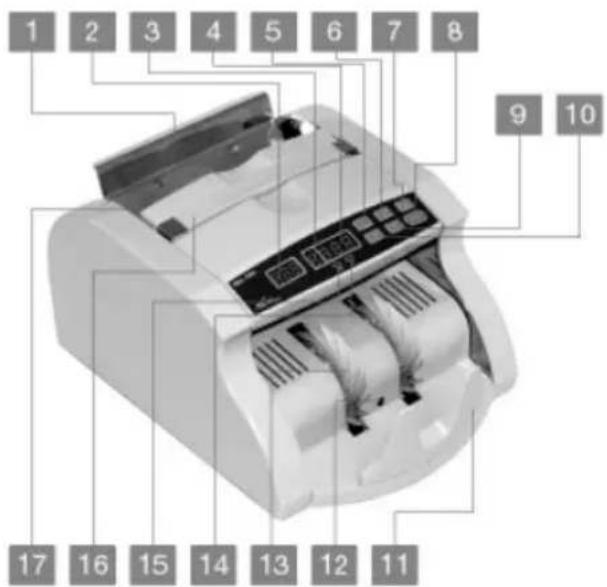
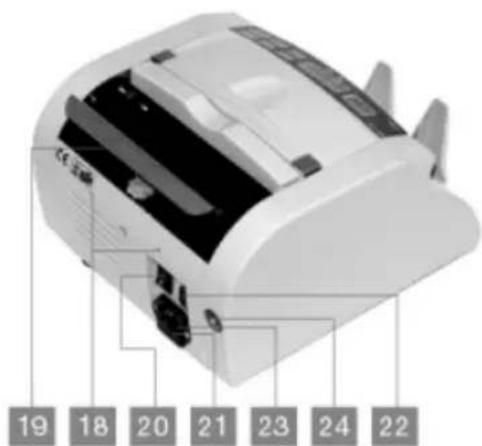
Illustration
- Hopper Plate
- Preset (Batch) Displayer
- Alarm Display
- Count Display
- +1 Key
- x 10 Key
- Preset (Batch) Key
- Clearing and Resetting Key
- UV Key
- ADD Key (Accumulation)
- Stacker Plate
- Stacker Sensor
- Stacker Vanes
- UV Indicator
- ADD Indicator
- Handle
- Hopper Sensor
- Rear Cover Screw
- Hopper Adjust Screws
- Power Switch
- Fuse
- External Displayer Socket
- Power Socket
- UV Sensitive Adjuster (UV Type)
Features
Automatic Self-test:
The machine will perform a self-test automatically. The Count Display will show "0" and the Preset Display will be empty. If there is anything wrong with the machine, the Preset Display will show an error code.
UV Indicator:
The UV Indicator in the machine will alarm and automatically stop counting when it finds forged, jammed, double or broken notes, etc. The Preset display will then show an error code.
| Error Codes | Problem | |
| EC1 | = | Half notes, broken notes |
| EC2 | = | Double notes |
| EC3 | = | Chain notes |
| EC4 | = | Forged notes |
UV Sensitivity Adjuster
The UV Sensitivity Adjuster allows you to adjust the sensitivity of the UV light. Example- A forged note passes through without detection. The UV sensitivity adjuster should then be enhanced by turning the adjustment knob clockwise.
Common Counting
The Common Counting feature will count all bank notes placed in the Hopper.
Batch Counting
The Batch Counting feature will count bank notes in batches. You must preset batch numbers by using "+1" and "x10" key for use.
Add Function
The Add function will count the number of notes in the hopper and a accumulate the total numbers to your previous count. To use this function you must press the "Add" key until the indicator turns on. Press the "Add" key again when you are finished using this function to set the machine back to the Common counting mode.
Auto-start
The machine will automatically start when notes are placed in the hopper.
Auto-reset
When using the common counting and the batch counting functions, the machine will automatically clear the sum and reset after the counted notes on the stacker are removed and a new batch is placed in the Hopper.
Operations
Power
Plug the machine into the power source and turn the machine on. A self-test will automatically begin once the machine is on. If a problem is detected during the self-test an error code will appear in the display.
UV Indicator
When you turn the machine on the UV Indicator will automatically light up. Press the "UV" key to turn this feature off.
Counting Methods
Common Counting - To set the machine to Common Counting mode press the Preset key to clear the Preset Display. Place the notes into the Hopper Plate, and the machine will start counting automatically. The counting result will be shown on the Count display. Take out the notes from the Stacker, and place another stack of notes onto the Hopper Plate. The Count Display will then reset to "0". If you wish to continue counting from the total of the first batch do not remove the notes from the stacker. Place a new batch of notes into the Hopper plate and the counting will continue.
Batch Counting - To set the machine to the Batch Counting mode press the Preset key until the Preset Display shows "00". Press "+1" and "x10" key to preset the batch numbers between 1 and 999, the machine is now ready to count batches. Place the notes in the Hopper Plate and the machine will start counting automatically. Once it reaches the preset batch number the machine will stop. When the first batch is finished remove the notes from the stacker plate and the machine will start counting the next batch. If the quantity of the notes on the Hopper plate is less than the preset batch number, you will have to place more notes on the hopper plate and allow the machine to finish counting.
Add Function - To add the total amount of counted notes press the "Add" key until the "Add indicator" turns on. Then place the notes on the hopper to begin process.
CAUTION
Pressing any keys when machine is in use may cause jamming or incorrect counting problems, therefore only press keys before you start the counting process.
Trouble Shooting
CAUTION The machine must be turned off and unplugged before trouble shooting.
* ERROR CODES:
| Error Code | Problem | Solution |
| ER0 | Left Counting Sensor is dusty, not positioned correctly or broken | Clean the Counting Sensor, Reposition it, or Replace it with a new one |
| ER1 | Right Counting Sensor is dusty, not positioned correctly or broken | Clean the Counting Sensor, Reposition it, or Replace it with a new one |
* ERROR CODES:
| Error Code | Problem | Solution |
| ER2 | Hopper Sensor is dusty, not positioned correctly or broken | Clean the Hopper Sensor, Reposition it, or Replace it with a new one |
| ER3 | Stacker Sensor is dusty, not positioned correctly or broken | Clean the Stacker Sensor, Reposition it, or Replace it with a new one |
| ER4 (UV Model Only) | UV Sensor is dusty or broken | Clean the UV Sensor or Replace it with a new one |
| ER8 | Width Detection Sensor does not have enough voltage or is broken | Adjust the voltage or replace it with a new one |
Adjustment to the Hopper Plate
Adjusting the Hopper Plate
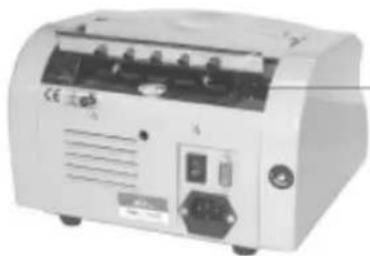
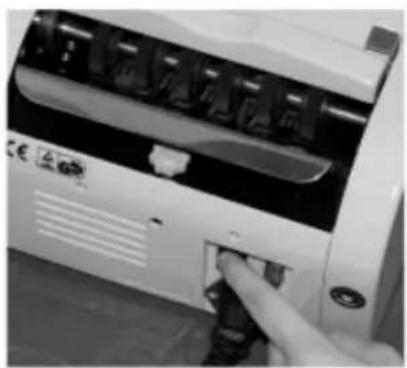
To adjust the hopper plate you must use the Hopper adjuster screw.
natural_image
Exterior view of a medical or laboratory device with control panel and buttons (no visible text or symbols)Hopper Adjusters Screw
Specifications
| MODEL | RBC-1000 Series |
| Counting Speed | 1000 notes per minute |
| Banknote Size | 3.9" x 1.9" |
| Banknote Thickness | .002" x .0005" |
| Hopper Capacity | 130 notes |
| Display | LED |
| Alarm Display | LED |
| Batch Display | LED |
| Environmental Temperature | 32°F-140°F |
| Power Source | 110 V / 60 Hz or 220V / 50Hz |
| Power Consumption | 70 W |
| Weight | 14.3 lbs. |
Procedure
natural_image
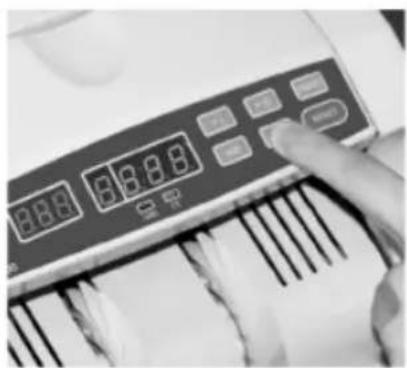
Close-up of a hand inserting a small electronic device into a white rack (no visible text or symbols)Place on flat sturdy surface and turn on the machine.
natural_image
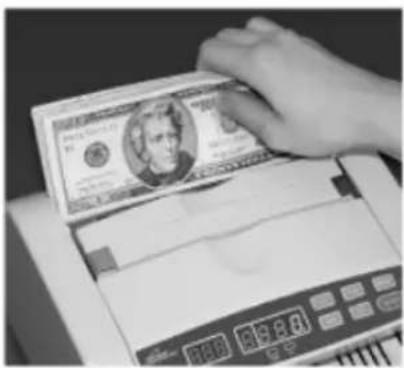
Close-up of a hand pressing down on a digital calculator with visible numeric display (no readable text or symbols)Select function before inserting bills.
natural_image
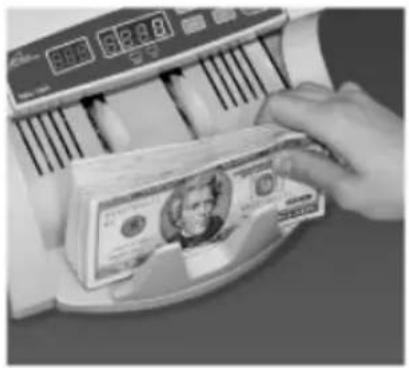
Close-up of a hand counting US $100 bills (no visible text or symbols on the image itself)Insert evenly stacked bills in the collection feeder.
Remove bills from bill depository and secure with bill wrapper.
natural_image
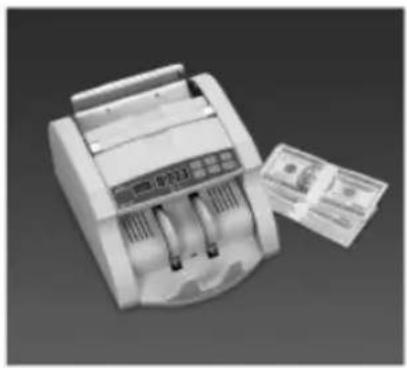
Illustration of a digital counting machine with a paper receipt (no visible text or symbols)Bills are now ready for storage or bank deposit.
LIMITED ONE YEAR WARRANTY
This warranty applies to repair or replacement of product found to be defective in material or workmanship for one year from the date of the original purchase. This warranty is extended only to the original purchaser.
This warranty does not apply to damage resulting from abuse, misuse or improper maintenance or damage that is attributable to acts of God. Royal Sovereign International, Inc. (and its affiliated companies) is not liable for incidental or consequential damages of any nature. This limitation would not apply if you live in those areas that do not permit the exclusion or limitation of incidental or consequential damages.
Royal Sovereign International will repair or replace this product if it is found to be defective in material or workmanship. Defective product must be returned to Royal Sovereign International, freight prepaid, with proof of purchase and Return Shipping & Handling payment (check or money order). Upon repair or replacement the product will be returned to the customer.
Return defective product to the following address with a detailed description of the problem. If possible, pack in original carton. Please prepay shipping charges.
For service or sales please contact your local Royal Sovereign office:
Royal Sovereign International, Inc.
100 West Sheffield Avenue
Englewood, NJ 07631
TEL: +1) 800-397-1025/ +1) 201-568-0830
FAX: +1) 201-568-1079
Royal Sovereign Germany GmbH
Friedrich Ebert Str.38, D-65824
Schwalbach, Germany
39-41 Fourth Avenue, Unit 5
Blacktown, Australia NSW 2148
164 Oakdale Road, Unit 164
Toronto, Ontario M3N2S5
TEL: +1) 416-741-8400
FAX: +1) 416-741-8185
www.royalsovereign.com
info@royalsovereign.com
- With UV Counterfeit Detection
- FOREWORD
- Illustration
- Features
- Automatic Self-test:
- UV Indicator:
- UV Sensitivity Adjuster
- Common Counting
- Batch Counting
- Add Function
- Auto-start
- Auto-reset
- Operations
- Power
- UV Indicator
- Counting Methods
- CAUTION
- Trouble Shooting
- Adjustment to the Hopper Plate
- Adjusting the Hopper Plate
- Procedure
- LIMITED ONE YEAR WARRANTY
Brand : Royal Sovereign
Model : RBC-1000
Category : Bill Counter