
EnergyUp HF3431 - Light therapy PHILIPS - Free user manual and instructions
Find the device manual for free EnergyUp HF3431 PHILIPS in PDF.


| Product Type | Light therapy device |
| Brand | Philips |
| Model | EnergyUp HF3431 |
| Intended Use | Increase energy, adjust circadian rhythms, relieve winter blues |
| Light Source | LED, blue light (dominant wavelength 475-480 nm) |
| Light Output (100% intensity) | 220 +/-15 lux at 50 cm |
| Intensity Settings | 5 levels |
| Timer | Up to 1 hour (6 segments of 10 minutes) |
| Power Supply | Adapter (100-240 Vac, 50/60 Hz) or rechargeable battery |
| Battery Type | Lithium-ion 3.6 V, 2250 mAh |
| Charging Time | Approximately 3-4 hours |
| Battery Runtime | About 1 hour at full intensity |
| Dimensions | 14.3 × 14.3 × 3.5 cm |
| Weight | 0.4 kg (less than 14 oz) |
| Protection Rating | IP51 (main unit only) |
| Safety Standards | IEC62471 (photobiological safety), no UV |
| Operating Temperature | 5°C to 35°C |
| Storage Temperature | -20°C to 50°C |
| Travel Lock | Yes (press and hold on/off 5 sec) |
| Cleaning | Dry or moist cloth; do not immerse |
| Accessories Included | Adapter HF10, pouch |
| Spare Parts | Adapter (4222.036.2482.1), pouch (4222.036.2485.1) |
| Warranty | Refer to separate worldwide guarantee leaflet |
| Country of Origin | Manufactured for Philips Consumer Lifestyle BV, Netherlands |
Frequently Asked Questions - EnergyUp HF3431 PHILIPS
User questions about EnergyUp HF3431 PHILIPS
0 question about this device. Answer the ones you know or ask your own.
Ask a new question about this device
Download the instructions for your Light therapy in PDF format for free! Find your manual EnergyUp HF3431 - PHILIPS and take your electronic device back in hand. On this page are published all the documents necessary for the use of your device. EnergyUp HF3431 by PHILIPS.
USER MANUAL EnergyUp HF3431 PHILIPS
natural_image
White Philips portable electronic device with visible grille and buttons (no text or symbols on body)
natural_image
Diagram of a folded paper or document with two panels, each showing an open page and a black arrow indicating direction (no text or symbols present)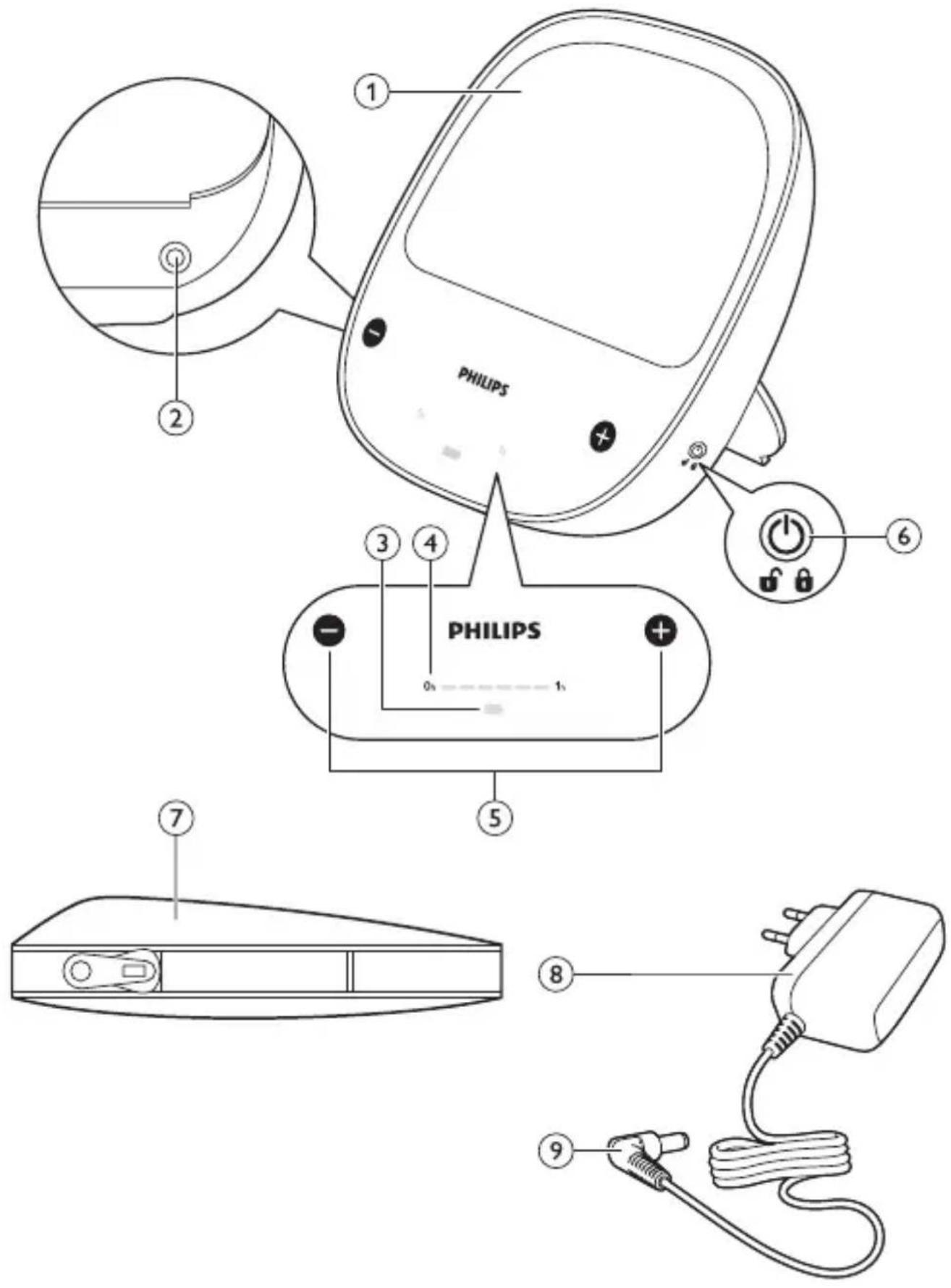
ENGLISH 6
ҚАЗАҚША 24
РУССКИЙ 45
Introduction
Congratulations on your purchase and welcome to Philips! To benefit fully from the support that Philips offers, register your product at
www.philips.com/welcome.
Read this user manual carefully before using this Philips appliance.
Intended use
This Philips appliance EnergyUp Intense Blue is intended to make people feel more energetic, to adjust circadian rhythms and to provide relief from the winter blues.
Light - a natural energiser
Today's busy modern lifestyles demand peak performance all day long. Even the fittest person suffers energy dips, particularly when deprived of natural daylight, such as in an office in winter. Daylight is essential to well-being, keeping fit and feeling energised throughout the day – just like healthy nutrition and regular exercise. This Philips appliance EnergyUp Intense Blue mimics the natural energising power of daylight on a bright sunny day. It stimulates special receptors in the eye to trigger the body's natural response to sunlight. This helps you to fight energy dips, to feel more energetic, active and alert, and to improve your mood.
Circadian rhythms and sleep patterns
The human body uses light cues, such as those provided by the sun, to time certain internal functions. Properly timed rhythms regulate energy, mood, sleep, appetite and digestion. These daily internal cycles, called circadian rhythms, sometimes fall out of sync with nature, which can have impact on our well-being. Nature's cues no longer govern our modern lifestyle. Our day no longer starts at sunrise and ends at sunset, working days are getting longer, and many people work in shifts. Moreover, our activities often extend well into the night. Many people tend to get too little sleep during the week, which diminishes their energy levels during the day. Using this Philips appliance EnergyUp Intense Blue at the right time of day can help you establish and reinforce regular sleep patterns.
Light via eyes
Research shows that a special photoreceptor in our eyes is responsible for regulating our energy, mood and sleep/wake cycles. This receptor responds mostly to the blue light of the summer sky. We do not get much of this light in autumn and winter. Most indoor light does not provide enough of this essential colour. This appliance helps you to be at your best by delivering the wavelength, colour and intensity of light to which our body responds most efficiently.
Winter blues
Lack of light during the darker winter months causes many people to experience a noticeable drop in energy level and low spirits as autumn sets in. These symptoms, known as ‘winter blues’, may cause you to feel low, listless and fatigued for weeks or even months. This affects both personal performance and mood. Blue light therapy is a successful method to fight these winter blues symptoms. It provides your body with summer vitality throughout the dark winter months.
General description (Fig. 1)
1 Light panel
2 Socket for small plug
3 Charge indicator
4 Time indicator bar
5 Intensity increase and decrease buttons
6 On/off button
7 Pouch
8 Adapter HF10
9 Small plug
Important
Read this user manual carefully and always adhere to the treatment instructions.
Contraindications
The following conditions may be contraindications for use of this appliance:
- bipolar disorder
- recent eye surgery or a diagnosed eye condition for which your doctor advised you to avoid bright light
- use of photo-sensitising medications (e.g. certain antidepressants, psychotropic drugs or malaria tablets), as this may cause side effects (e.g. skin irritation)
If any of the above conditions apply to you, always consult your doctor before you start using the appliance.
Possible reactions
Possible adverse reactions to light from this appliance are relatively mild and of a transient nature. They may include:
- Headache
- Eyestrain
- Nausea
Measures to avoid, minimise or alleviate these adverse reactions:
- Always use the appliance in a well-lit room.
- Reduce the light intensity if these reactions occur.
- Stop using the appliance for a few days to make the reactions disappear and then try again.
Important safety information
Danger
- Keep the appliance and the adapter dry and away from water. Do not place or store it over or near water contained in a bathtub, washbasin, sink etc. Do not immerse it in water or any other liquid. This may affect the safety of the appliance.
- The adapter contains a transformer. Do not cut off the adapter to replace it with another plug, as this may cause a hazardous situation.
- Never use the adapter if it is damaged in any way. Always have the adapter replaced with one of the original type in order to avoid a hazard.
Warning
- If you suffer from depression, consult your doctor before you start using this appliance.
- Do not use the appliance in a room where there is no other light source, as this may cause eyestrain. Use the light of this appliance as an addition to the normal light (sunlight, electric light) in your home.
- Do not look straight into the light too long, as this may be uncomfortable to your eyes.
- Do not use the appliance where its light may hinder you or other people during the performance of essential tasks such as driving or operating heavy equipment.
- This appliance is not intended for use by persons (including children) with reduced physical, sensory or mental capabilities, or lack of experience and knowledge, unless they have been given supervision or instruction concerning use of the appliance by a person responsible for their safety.
- Children should be supervised to ensure that they do not play with the appliance.
- Only use the appliance with the adapter supplied.
- Do not modify the appliance and its accessories.
- Stop using the appliance if it is damaged in any way. Do not look directly at uncovered LEDs, as their light is very bright. If repair is needed, consult chapter ‘Guarantee and support’ for information.
- Never open the appliance to prevent electric shock, finger burns or temporary black spots in the eye.
Caution
- Do not use the appliance outdoors or near heated surfaces or heat sources.
- This appliance contains an internal rechargeable lithium-ion battery pack. Do not incinerate, disassemble or expose to high temperatures above 50^ C ( 122^ F). Do not operate or charge the appliance at temperatures below 5^ C ( 4^ F) or above 35^ C ( 95^ F). Batteries can overheat, causing fire or bursting.
- Use the appliance in vertical position with the stand in place. Do not use it in horizontal position without the stand or cover it, as this might cause the appliance to overheat.
ENGLISH10
- Do not place heavy objects on the appliance, the adapter or the cord.
- Do not use the adapter in or near wall sockets that contain or have contained an electric air freshener to prevent irreparable damage to the adapter.
- When you remove the adapter from the wall socket, do not pull at the cord but grasp the adapter directly to avoid cord damage.
- When you remove the small plug from the appliance socket, do not pull at the cord but grasp the small plug directly to avoid cord damage.
Safety and compliance
- This Philips appliance complies with all applicable standards and regulations regarding exposure to electromagnetic fields.
- This is a luminaire. It meets the requirements of IEC60598.
- This is not a general illumination product.
Electromagnetic compatibility (EMC)
Portable and mobile radio frequency communication equipment, such as mobile phones, cordless telephones and their base stations, walkie-talkies, and wireless home network devices (routers), can affect the Philips EnergyUp. They must therefore not be used in close proximity to the EnergyUp. If this cannot be avoided, the EnergyUp must be observed to verify normal operation. If abnormal performance (e.g. loss of functionality, light inconsistency, flicker) is observed, additional measures may be necessary, such as re-orientation of the radio frequency communication equipment or the EnergyUp.
General
The adapter is equipped with an automatic voltage selector and is suitable for mains voltages ranging from 100 to 240 Vac, 50/60 Hz.
Charging
To operate the appliance corded, connect it to a wall socket. For more flexibility, charge the rechargeable battery. Charging takes approximately 3 to 4 hours
Note: You can use the appliance while it is charging. The charging time is longer when you use the appliance while it is charging.
1 Fold out the stand and place the appliance on a table (Fig. 2).
2 Insert the small plug into socket on the appliance (Fig. 3).
3 Put the adapter in the wall socket.
The charge indicator pulsates green during charging. When the battery is fully charged, the charge indicator turns solid green. It continues to light up solid green for 1 hour and then goes off (Fig. 4).
Note: When the battery is fully charged, it contains enough energy for about 1 hour of use at full intensity.
Using the EnergyUp
When to use
Knowing at what time to use the appliance is essential. It may mean the difference between feeling better in a few days instead of weeks and between experiencing benefits or experiencing none. Follow these guidelines to understand how light affects us and when to use the appliance for the best results.
Duration
Most people experience benefits if they use the appliance 20 to 30 minutes each day. It is safe to use the appliance longer, provided you do so at the correct time of day. You may notice some energising effects of light immediately. Other effects become noticeable after several days of regular use.
Indoor life and energy dips
If you spend a lot of time indoors with little daylight and artificial light, you can experience the energising effects of the appliance very quickly after you switch it on.
Many people experience a natural dip in the afternoon. This Philips appliance can help you counteract this dip.
Winter blues
If you experience lower energy levels, an increased need for sleep, and a lower mood in the dark season compared to spring and summer, use the energy light for 20-30 minutes a day. Preferably use it in the morning to help you start the day. You may also use it later during the day, but do not use it in the last few hours before bedtime. If you do, the light could delay your sleep and make you even less energetic the next day.
Sleep patterns
- Morning persons tend to wake up early in the morning and usually find it difficult to stay awake in the evening. If you want to get more out of your evening, avoid bright light directly after waking up and use the appliance in the evening.
- Evening persons find it difficult to get up in the morning and are full of energy in the evening. If this applies to you, you need morning light. Use the appliance within the first 1-2 hours after you get out of bed. Avoid bright light or blue-rich light in the last 4 hours before bedtime. Daily use of the appliance in the morning may help you establish a regular sleep pattern that allows you to function better in the morning.
Note: If your desired wake-up time is less than six hours after your normal bedtime, do not use the appliance immediately after you wake up. This could give your body a signal that is opposite to the one intended.
Recommended times to use the appliance
Time to use EnergyUp >>
Morning Lunchtime Afternoon Evening
Energy need ▼
| Lack of daylight indoors | +++ +++ +++ --- | |||
| Morning person --- + | ++ | +++ | ||
| Evening person | +++ | ++ | + | --- |
| Time to useEnergyUp >> | Morning Lunchtime Afternoon Evening |
| Afternoon energy dip | + +++ +++ --- |
| Winter blues +++ + + --- | |
- The more pluses (+++) there are in a column, the more suitable the time.
- --- means: do not use the appliance at this time.
Jet lag
Rapidly travelling across several time zones puts your internal body clock out of sync with the new external time. This not only causes sleeping problems, but also influences your mood and energy level. If you stay for more than a few days in the other time zone, you may want to shift your body clock to the new time zone. This will help you sleep better and be more alert and energetic when you need to. One of the best strategies to deal with jet lag is to start shifting your body clock and sleep times several days before you leave.
Travelling east
When you travel east, you have to advance your sleep time by a number of hours that equals the time zones you cross. You can shift your body clock forwards in steps of one hour a day. The number of time zones you cross determines how many days before departure you have to start using the appliance. Use the appliance for 30 minutes after you wake up. Avoid bright light in the evening and go to bed early. When you arrive at your destination, avoid bright light during your normal sleep period. Expose yourself to bright light at the end of this period to advance your body clock further to the local time.
Before your return flight, use the appliance late in the evening for a couple of days. On the last night of the trip, try to stay up and use the appliance as late as possible after midnight. On the day of the flight, avoid any bright light in the morning.
ENGLISH14
Travelling west
Since most people's body clocks adjust more easily to later time zones, you only have to use the appliance for one day before you travel across four time zones. Add an additional preparation day for each three additional time zones. You do not have to use the appliance for more than three days, even on longer westbound trips. Use the appliance for 30–40 minutes late in the evening. Start two or three days before you leave. Use the appliance two hours later the following nights.
When you arrive at your destination, try to stay awake until bedtime and avoid bright evening light (wear sunglasses) for the first few days. Before you travel home, avoid any bright afternoon and evening light. Use the appliance in the morning for a few days.
Light intensity
Use the appliance in addition to the normal room lighting. This Philips appliance is more comfortable to use in a well-lit room. Adjust the brightness to a comfortable level. Allow a few minutes for your eyes to get used to the bright light. If the highest setting is too bright for you, start using the appliance at a lower setting. Increase the light intensity if you feel no effect after a week.
How to use the appliance
1 Place the appliance at arm's length (at approximately 50-75cm from your eyes) within your field of vision. The light must bathe your face (Fig. 5).
- You can read, eat, work at the computer, watch TV or exercise while you use the appliance.
- For the best results, place the appliance at the same level as your midriff (stomach area), e.g. place it on the table at which you are sitting.
- Use the appliance in a well-lit room to minimise eyestrain.
Note: Do not stare into the light of the appliance. It is sufficient that the blue light reaches your eyes indirectly.
2 Press the on/off button briefly to switch on the appliance (Fig. 6). The first time you switch on the appliance, the light comes on at the default middle intensity setting (setting 3) of 5 intensity settings
The next time you switch on the appliance, the light comes on at the last used intensity setting.
3 You can choose five intensity settings.
To choose a lower setting, touch the - button briefly (Fig. 7).
To choose a higher setting, touch the + button briefly (Fig. 8).
Note: For the best results, use the highest light setting that is comfortable to your eyes.
4 The timer indicator shows the time that elapsed since you switched on the appliance.
The timer indicator has 6 segments. Each segment represents 10 minutes. All segments together represent one hour.
When you switch on the appliance, the first segment of the time indicator starts flashing (Fig. 9).
5 If you use the appliance on its rechargeable battery, the charge indicator lights up solid orange after about 1 hour to let you know that the rechargeable battery is low. Connect the appliance to the mains to charge the rechargeable battery (Fig. 10).
Note: You can use the appliance while it is charging.
6 If the battery runs low and the appliance is not connected to the mains, the light will switch off after some time.
7 After the light has switched off, the charge indicator starts flashing orange to indicate that the battery is empty and the appliance will switch off (Fig. 11).
Travel lock
You can activate the travel lock to prevent the appliance from being switched on when a button is pressed accidentally while you travel or carry the appliance.
1 To activate the travel lock, press and hold the on/off button for 5 seconds (Fig. 12).
If the appliance is on, it switches off. The segments of the timer indicator bar flash once to confirm that the appliance is locked.
ENGLISH16
When the appliance is locked, the segments of the timer indicator bar will flash once when you press the on/off button briefly to indicate that the appliance is locked. If you touch the + or - button while the appliance is locked, the appliance does not respond.
2 To deactivate the travel lock, press and hold the on/off button for 5 seconds.
The appliance switches on.
The segments of the time indicator bar flash twice to confirm that the appliance is unlocked.
The + and - buttons are active again.
Note: The travel lock is deactivated automatically when you connect the appliance to the mains.
Cleaning and storage
Never immerse the appliance in water or any other liquid, nor rinse it under the tap.
Never use scouring pads, abrasive cleaning agents or aggressive liquids such as petrol or acetone to clean the appliance.
1 Clean the appliance with a dry or moist cloth. Do not use a wet cloth (Fig. 13).
2 If you are not going to use the appliance for some time or if you want to take it with you while travelling, put it in the travel pouch for protection (Fig. 14).
3 Store the appliance in a safe and dry place.
Frequently asked questions
This chapter lists the questions most frequently asked about the appliance. If you cannot find the answer to your question, visit www.philips.com/support for more frequently asked questions or contact the Consumer Care Centre in your country.
| Question Answer | |
| I have heard that blue light can be dangerous. Can this appliance damage my eyes? | This Philips appliance complies with the photobiological safety standard IEC62471. According to this standard, the appliance represents no risk to healthy eyes and can be safely used. |
| Can I get sunburn from using this appliance? | No, sunburn is caused by UV light. The light produced by this appliance does not contain UV. |
| Is this appliance safe to use around children and pets? | The light is safe to be used around children and pets. However, do not let children play with the appliance. |
| Can I use the appliance when I am pregnant? | Yes, there are no known side effect from using this appliance during pregnancy. |
| Do I have to take off my glasses when I use the appliance? | No, you can use the appliance with your glasses on. Do not wear tinted glasses or sunglasses when you use the appliance, as these glasses reduce its effectiveness. |
| How often do I have to use the appliance? | Use the appliance every day at the right time to achieve the result you want. For more information on the duration of a session, read chapter ‘Using the appliance’. Except when you try to adjust your sleep time, we advise you to use the appliance at the same time every day. It is usually sufficient to use it 20 to 30 minutes a day. It is absolutely safe to use it longer, if you want to. |
| When do I start to notice improvement from using this appliance? | You may start to feel the energising effect any time between first use and 1 to 2 weeks of daily use. |
| Is it harmful to sit in front of a switched-on appliance for a long time? | No, the appliance is absolutely safe, also when you use it throughout the day. However, in general avoid using the appliance in the last 4 hours before you go to bed, as the energising effect of the light may interfere with your sleep. Only morning persons who want to get more out of their evening can use it in the evening, see chapter ‘Using the appliance’, section ‘Sleep patterns’. |
| Can the lamp of this appliance be replaced? | No, the appliance has a durable LED lamp that lasts many years. |
| Can I replace the rechargeable battery? | No, the battery is not replaceable. If the battery capacity decreases, you can continue to use the appliance on mains power. |
| The appliance appears to be locked because I cannot switch it on. What should I do? | The travel lock is active. Press and hold the on/off button for 5 seconds until the appliance switches on. You can also plug in the appliance. This automatically unlocks it. |
Ordering accessories
To buy accessories or spare parts, visit www.shop.philips.com/service or go to your Philips dealer. You can also contact the Philips Consumer Care Centre in your country (see the worldwide guarantee leaflet for contact details).
Accessories
The following accessories are available:
- adapter HF10 EU: service code 4222.036.2482.1
- pouch: service code 4222.036.2485.1
Guarantee and support
If you need information or support, please visit the Philips website at www.philips.com/support or read the separate worldwide guarantee leaflet.
Recycling
- This symbol means that this product shall not be disposed of with normal household waste (2012/19/EU) (Fig. 15).
- This symbol means that this product contains a built-in rechargeable battery which shall not be disposed of with normal household waste (2006/66/EC). We strongly advise you to take your product to an official collection point or a Philips service centre to have a professional remove the rechargeable battery (Fig. 16).
- Follow your country's rules for the separate collection of electrical and electronic products and rechargeable batteries. Correct disposal helps prevent negative consequences for the environment and human health.
Removing the rechargeable battery
This procedure is irreversible. You cannot use the device anymore after this procedure.
Only remove the rechargeable battery when you discard the appliance. Make sure the battery is completely empty when you remove it.
Caution: Observe basic safety precautions when you follow the procedure described below. Be sure to protect your eyes, hands, fingers, and the surface on which you work.
Note: We strongly advise you to take your product to an official collection point or a Philips service centre to have a professional remove the battery.
1 Disconnect the appliance from the mains and remove the appliance plug.
ENGLISH20
2 Switch on the appliance and leave it on until it goes out automatically.
3 To open the housing, place the tip of a flat-head screwdriver on the break line. The break line is indicated on the back of the housing. Hit the top of the screwdriver handle with a hammer until the screwdriver penetrates the housing breaks. Repeat this in several spots along the break line (Fig. 17).
4 Continue with the final part of the break line which is located between the rubber feet and the housing. Once all segments of the break line are loose, you can open the housing with the tip of the screwdriver. The rechargeable battery is now visible (Fig. 18).
5 Remove the rechargeable battery from the housing with the tip of the screwdriver (Fig. 19).
Note: Do not try to remove the rechargeable battery with your fingers. The plastic edges of the housing may be sharp.
- You have now successfully removed the rechargeable battery from the appliance.
Specifications
Model HF3431
Electrical
Rated input voltage adapter 100-240 Vac
Rated input frequency adapter 50/60 Hz
No-load power adapter <0.1 W
Rated output voltage adapter 9 Vdc
Rated output power adapter 10 W
Standby power appliance <0.25 W
Model HF3431
Classifications
- Device classification Luminaire
- Insulation class adapter II
- Ingress of an object and water IP51 (main unit only)
- Mode of operation Continuous
Rechargeable battery type
1-cell lithium-ion nominal 3.6 V, 2250 mAh
IEC 62133 and UL 1642 compliant
Operating conditions
Temperature from 5^ C to +35^ C
Relative humidity from 15% to 90%
(no condensation)
Storage conditions
Temperature from -20^ to +50^
Relative humidity from 15% to 90%
(no condensation)
Physical characteristics
Dimensions 14.3 × 14.3 × 3.5 cm
Weight 0.4 kg (less than 14 ounces)
Dominant wavelength 475-480 nm
Full width at half maximum 20 nm (FWHM)
Output (100% intensity) 220 +/-15 lux at 50cm
ENGLISH22
Symbol key
The following symbols may appear on the appliance:
| Symbol Description | |
 | Consult the user manual supplied |
 | DC power |
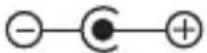 | DC jack polarity |
 | Indoor use only |
| IP51 | Degree of protection against liquid and particles. |
| HF3431 Model number | |
 | KEMA approval logo |
| CE | CE stands for European Declaration of Conformity. |
 | Class III luminaire |
| [T2SZ] | Compliant with the Waste Electrical and Electronic Equipment/Restriction of the Use of Certain Hazardous Substances in Electrical and Electronic Equipment (WEEE) recycling directives. |
 | Philips Shield |
 | Manufactured for: Philips Consumer Lifestyle BV, Tussendiepen 4, 9206 AD Drachten, The Netherlands. |
Symbol Description
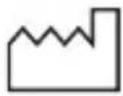 | Date code and serial number of this appliance |
 | On/off button |
 | Decreasing light intensity button |
 | Increasing light intensity button |
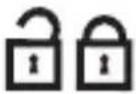 | Locking and unlocking the travel lock |
 | EAC certification mark |
Kipicne
natural_image
Diagram of a folded paper or document with two panels, each showing a blank page and an arrow indicating direction (no text or symbols present)- Introduction
- www.philips.com/welcome.
- Read this user manual carefully before using this Philips appliance.
- Intended use
- Light - a natural energiser
- Circadian rhythms and sleep patterns
- Light via eyes
- Winter blues
- General description (Fig. 1)
- Important
- Read this user manual carefully and always adhere to the treatment instructions.
- Contraindications
- If any of the above conditions apply to you, always consult your doctor before you start using the appliance.
- Possible reactions
- Important safety information
- Danger
- Warning
- Caution
- ENGLISH10
- Safety and compliance
- Electromagnetic compatibility (EMC)
- General
- Charging
- Using the EnergyUp
- When to use
- Duration
- Indoor life and energy dips
- Sleep patterns
- Recommended times to use the appliance
- Jet lag
- Travelling east
- ENGLISH14
- Travelling west
- Light intensity
- How to use the appliance
- Travel lock
- ENGLISH16
- Cleaning and storage
- Frequently asked questions
- Ordering accessories
- Accessories
- Guarantee and support
- Recycling
- Removing the rechargeable battery
- ENGLISH20
- Specifications
- Model HF3431
- Electrical
- Classifications
- Rechargeable battery type
- Operating conditions
- Storage conditions
- Physical characteristics
- ENGLISH22
- Symbol key
- Kipicne
Brand : PHILIPS
Model : EnergyUp HF3431
Category : Light therapy