
Z4 - Dash cam Xblitz - Free user manual and instructions
Find the device manual for free Z4 Xblitz in PDF.


| Product Type | Dash cam |
| Brand | Xblitz |
| Model | Z4 |
| Dimensions (H/W/D) | 65 x 68 x 21 mm |
| Display | 2 inch LCD |
| Recording Resolution | Max Full HD (1920x1080) |
| Viewing Angle | 110° |
| IR LEDs | 6 |
| Lens | 4G glass |
| Memory Support | micro SD up to 32GB (Class 10) |
| File Format | .avi MJPG |
| Power Supply | 5V / 0.5A via mini USB (cigarette lighter adapter) |
| Battery | Built-in rechargeable (~5 min backup) |
| Microphone / Speaker | Built-in |
| Key Features | Loop recording, G-Sensor, Parking mode, Motion detection, Audio recording, Date stamp, Screensaver, Burst photo |
| Safety | Do not disassemble; use original charger; avoid high temperatures; operating temp 0-35°C |
| Care & Cleaning | Clean only when disconnected; avoid detergents |
| Spare Parts & Repairability | Use original accessories; contact service for repairs |
| Warranty | 24 months (see xblitz.pl/warranty) |
| Manufacturer | KGK Trade sp. z o.o. sp. k., Kraków, Poland |
Frequently Asked Questions - Z4 Xblitz
User questions about Z4 Xblitz
0 question about this device. Answer the ones you know or ask your own.
Ask a new question about this device
Download the instructions for your Dash cam in PDF format for free! Find your manual Z4 - Xblitz and take your electronic device back in hand. On this page are published all the documents necessary for the use of your device. Z4 by Xblitz.
USER MANUAL Z4 Xblitz
User's manual in English language - EN
natural_image
Exterior view of a black Baidu 3.0 video camera with a mounted head-mounted display (no visible text or symbols)
natural_image
Abstract geometric shape with diagonal light pink fill on white background, no text or symbols presentXblitz®
Z 4
INSTRUKCJA OBSŁUGI
natural_image
Black and white photo of a digital camera with a rear-mounted display showing a landscape (no visible text or symbols)PL
Xblitz.
Producent:
KGK Trade sp. z o.o. sp. k.
os. Urocze 12
31-953 Kraków
Polska
natural_image
Abstract geometric shape with diagonal division and horizontal lines (no text or symbols)Xblitz®
Z 4
USER'S MANUAL
natural_image
Black digital camera with rearview and front-mounted display showing a landscape image (no visible text or symbols)EN
Xblitz.
Thank you for purchasing our product, we hope that it will meet your expectations.
The product is a camera powered by a 12/24V outlet for use in cars, used to record the route of the vehicle. It is made out of the highest quality components.
Please read the user's manual before using the product.
01. PACKAGE CONTENTS
- Camera
- Memory card reader
- Charger
- Mount
- USB cable
- User's manual
Xblitz.
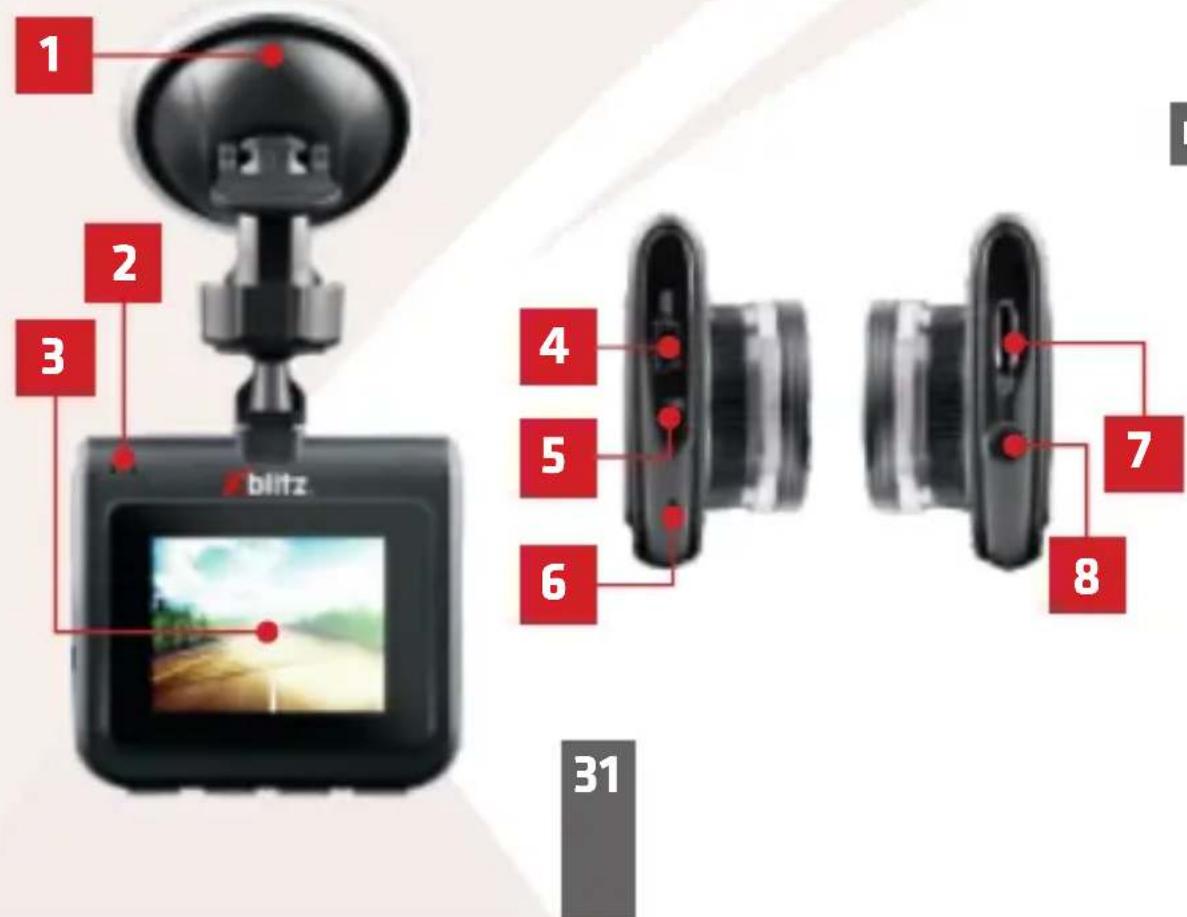
02. DEVICE DESCRIPTION
EN
31
Xblitz.
- Holder
- LEDs
- Display
- Mini USB port (camera power)
- Reset button
- Microphone
- Micro SD card slot
- Power button
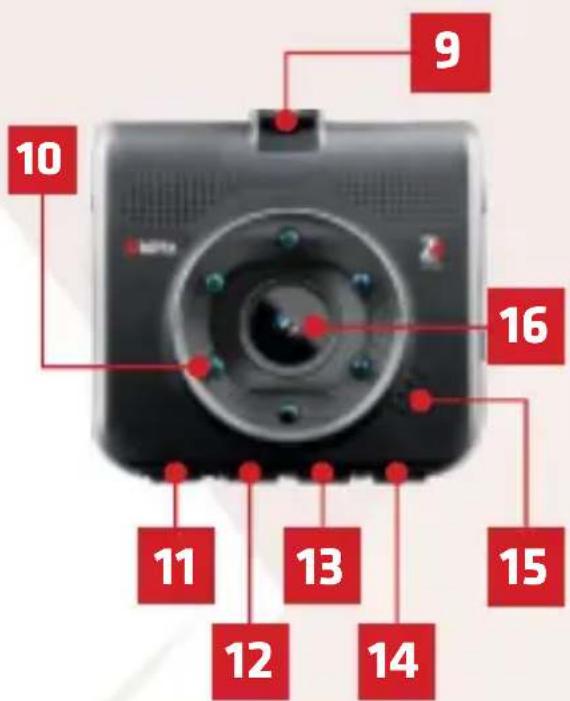
- Mounting location of the holder
- IR lights
- OK. button
- DOWN button
- UP button
- MODE button
- Speaker
- Lens
32
Xblitz.
03. BUTTON DESCRIPTION
| POWER | Hold 3 for seconds to turn the camera on or off. |
| MODE | Holding down the button (when the camera is not recording) moves you between the camera's video/ photo/ playback modesA short press of the button (when the camera is not recording) opens the menu. Pressing the button during recording protects the current video from being overwritten. |
| UP | In the menu and playback mode, the button navigates between individual items. |
Xblitz.
| DOWN | In the menu and playback mode, the button navigates between individual items.In video mode, it turns audio recording on/ off. |
| OK | In video mode, a short press turns recording on and off.In photo mode, a short press takes a picture.In playback mode, a short press acts as PLAY/ PAUSE.In menu and playback mode, a short press confirms actions. |
| RESET | Pressing the button resets the camera and restores it to its default settings. |
Xblitz.
04. BEFORE USE
- It is recommended to use branded micro SD cards (8GB to 32GB) of speed class 10.
- Before inserting the card into the recorder, you must format it into the FAT32 file system on your computer, then in the DVR.
- Install the memory card when the device is turned off, otherwise the card and device may be damaged. The same applies to card removal.
- Fully charged battery allows you to record without power for max 5 minutes. The battery in the device is mainly used to maintain the DVR settings.
- When the memory card is full, the oldest unsecured recordings will be overwritten.
- It is recommended to use the functions of the device for their intended purpose, that is, not to use MOTION DETECTION or PARKING MODE while driving, as this may cause the device to turn on and off automatically, e.g. when stationary at an intersection.
It is recommended to set the G - SENSOR option to a minimum in order to avoid securing unnecessary materials and thus losing space on the memory card. Format the card in FAT32 format first on your computer and then in the DVR. - Sound: The device has a condenser microphone that records any ambient noise. Sounds can overlap, causing distortion.
Xblitz.
05. CAMERA INSTALLATION INSTRUCTIONS
CAMERA INSTALLATION INSTRUCTIONS
Xblitz.
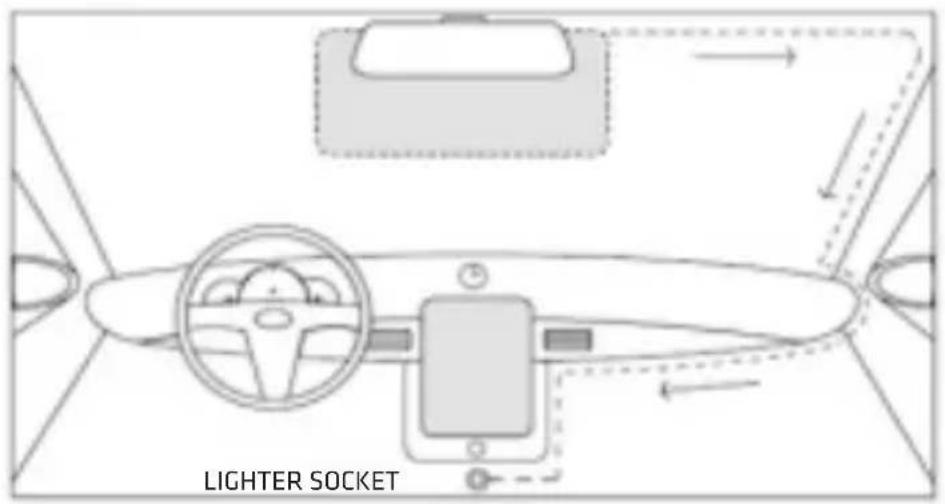
- Select the camera mount location. It is best to set the camera so that the display screen shows the largest possible area in front of the car. Make sure that the camera does not obscure the driver's view while driving.
- Install the holder on the windshield, then install the camera in it.
- Move the USB cable as shown above.
- Connect the mini USB plug to the device.
- Connect the charger to the 12V or 24V lighter socket.
EN
06. GETTING STARTED
- Mount and connect the camera to the power supply.
- Insert the micro SD memory card (formatted to FAT32 file system).
NOTE: Please insert and remove the memory card only when the device is turned off. - Set the following in the menu:
a. date and time.
b. Loop recording (adjust recording time). If you turn off loop recording, files won't be overwritten.
c. Set the highest available resolution.
d. Set the G-Sensor to the lowest possible sensitivity so that the camera does not secure videos recorded when driving on bumpy roads.
Xblitz.
- Make sure PARKING MODE and MOTION DETECTION are turned off. If they remain on during normal use, they will affect the recordings.
Enabling parking mode is recommended only when leaving the vehicle. - The camera will start recording automatically every time you turn it on (as long as your car does not have a constant power supply in the cigarette lighter slot).
07. FEATURES
1. Camera modes
The camera has 3 operating modes. Video mode: in this mode, the camera records video. Photo: in this mode, the camera takes pictures.
Playback mode: view footage captured by the camera.
2. Loop recording
The camera divides videos into separate files of select length. When the memory card is full, the oldest recording is overwritten.
3. Resolution
The camera can record in several resolutions. The higher the resolution, the better the quality of the recordings, but also the bigger the files.
It is recommended to use the highest resolution.
Xblitz.
4. G-Sensor
Gravity sensor. When the sensor is on at the time of impact, the recording file will be protected from being overwritten. It is recommended to set the lowest available setting, as at a higher level the camera can catch shocks caused by road bumps, which can cause the memory card to get filled up.
5. Parking mode
When it is turned on, the camera left in the car and connected to power captures the car's vibrations (for example, caused by a parking bump) turns on and starts recording. Recordings are automatically protected from being overwritten. We recommend that you turn it off while driving. It can affect the loop recording feature by blocking it.
6. Motion detection mode
When it is on and you leave the camera in standby mode and connected to a power source, the camera will record a short video when motion is detected.
7. Record audio
The camera, along with video recording, can also record audio.
Xblitz.
08. MENU OPTIONS
VIDEO MODE MENU:
- Resolution – allows you to change the resolution of recorded videos. Choose from VGA, HD or FHD quality.
- Loop recording – allows you to select the length of videos recorded by the camera.
- Exposure – allows you to set the exposure correction of the recorded image, so you can avoid overexposure or underexposure.
- Audio – allows you to turn the sound recording on/off.
- Motion detection – allows you to turn motion detection mode on/off. The mode triggers the recording of a short video when the camera detects motion in front of the lens.
- Date stamp – allows you to turn date and time stamp on videos on/off.
- Gravity sensor – allows you to set the sensitivity of the G-SENSOR, which protects against videos recorded when the camera detects vibrations (e.g. due to collision) from being overwritten.
- Parking guard – allows you to turn the parking mode on/off, which triggers the recording of a short video when the camera detects vibrations (e.g. due to a parking bump). The video is protected from being overwritten.
Xblitz.
PHOTO MODE MENU:
- Capture mode – allows you to set the time that passes between pressing the OK button and taking a picture by the camera
- Resolution – allows you to change the resolution of photos taken by the camera
- Burst photo – enabling this option will make the camera take 3 shots in a series whenever you press OK button in Photo mode.
- Quality – allows you to change the quality of the photos taken by the camera. The higher the quality, the bigger the photo files.
- Sharpness – allows you to adjust the sharpness of the photos taken by the camera.
- White balance – allows you to adjust the camera settings to the lighting conditions.
- Color – allows you to apply a sepia filter or a black and white filter to photos taken by the camera.
- ISO – allows you to set the sensitivity of the camera sensor.
- Exposure – allows you to set the exposure correction of the recorded image so that you can avoid overexposure or underexposure.
- Anti-shaking – allows you to enable digital image stabilization, which makes photos taken with a shaking camera clearer.
- Quick Review – allows you to set the time period during which a newly taken photo is displayed on the screen.
Xblitz.
- Date stamp – allows you to turn the display of date and time on taken pictures on/off.
PLAYBACK MODE MENU:
-
Delete – deletes the currently selected file or all files in the device's memory.
-
Protection – allows you to turn file protection on or off. The setting protects file from being overwritten or deleted.
GENERAL MENU:
-
Date/ Time – allows you to change the date and time displayed by the camera.
-
Auto power Off – allows you to set the period of inactivity after which the camera turns off automatically.
-
Beep sound – allows you to turn the sound of pressing buttons on/off.
-
Language – allows you to change the language in which the camera settings are displayed.
-
Fill Tight – allows you to turn additional lighting using IR LEDs on/off.
-
Frequency – allows you to change the recording frequency of the device between 50Hz and 60Hz.
-
Screensaver – Allows you to set the period of inactivity after which the display of the device will be automatically turned off.
-
Format – Allows you to format the memory card placed in the device.
-
Default setting – Allows you to restore your device to its default settings.
-
Version – Displays the current version of the device software.
Xblitz.
09. ICON DESCRIPTION
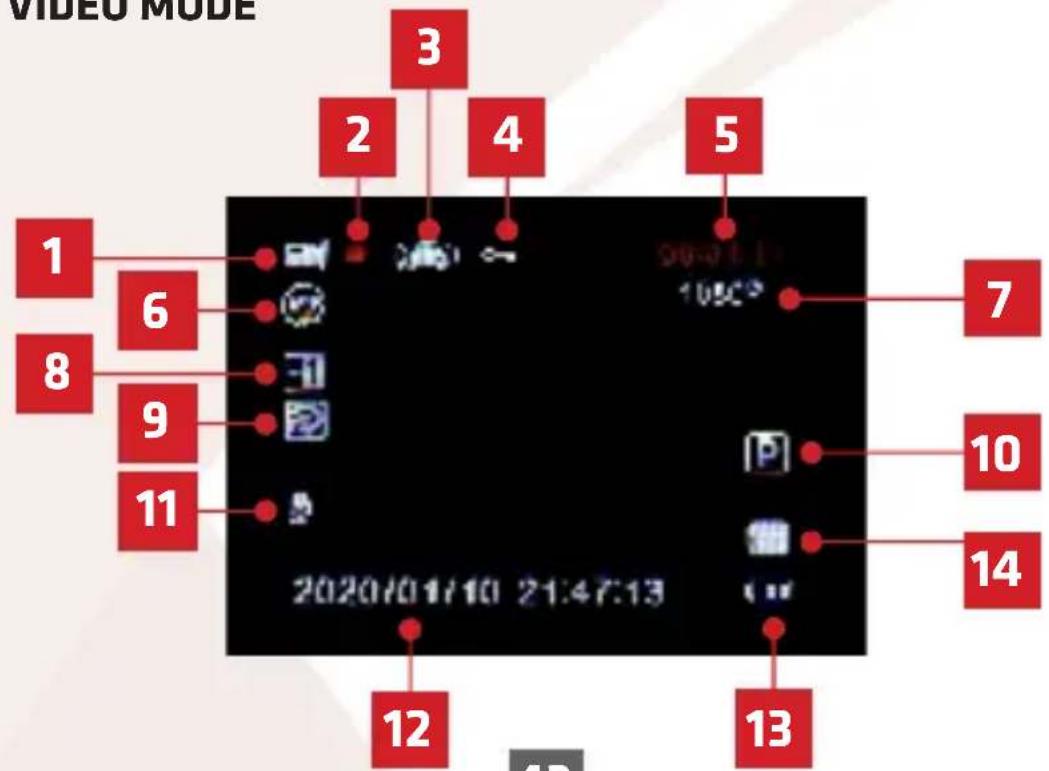
A. VIDEO MODE
EN
43
Xblitz.
- Video mode
- Recording enabled
- G-Sensor enabled
- Recording protection on
- Video length
- Loop recording
- Recording resolution
- Exposure correction value
- Motion detection enabled
- Parking mode on
- Audio recording on
- Date and time
- Battery status
- Memory card detected
Xblitz.
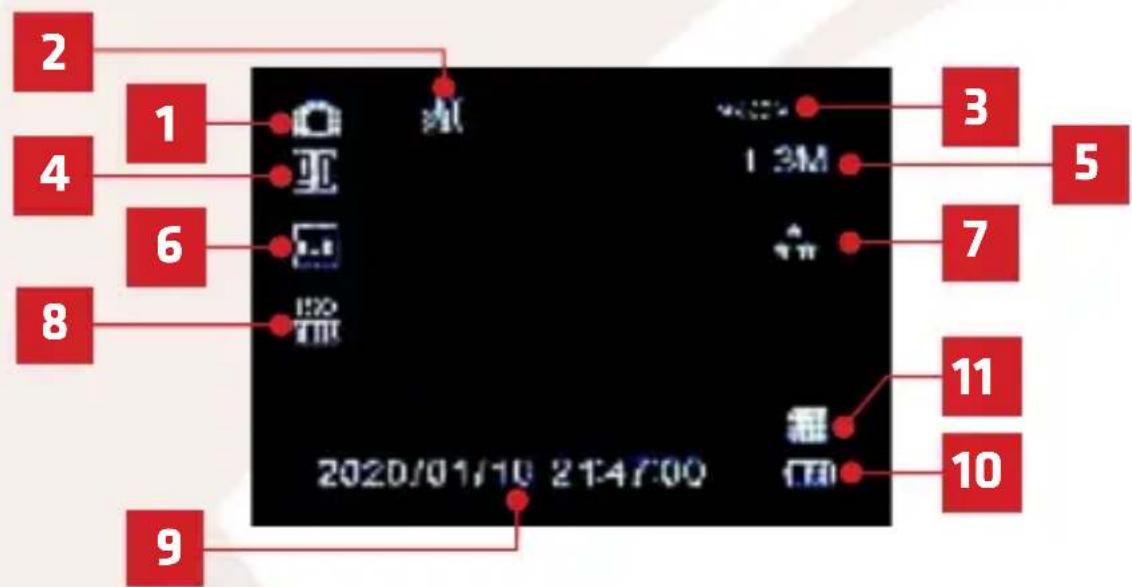
B. PHOTO MODE
EN
- Photo mode
- Anti-shock mode on
- Number of photos that can fit on the memory card
- Exposure value
-
Photo resolution
-
Automatic white balance
- Photo quality
- ISO value
- Date and time
- Battery status
- Memory card detected
Xblitz.
C. PLAYBACK MODE
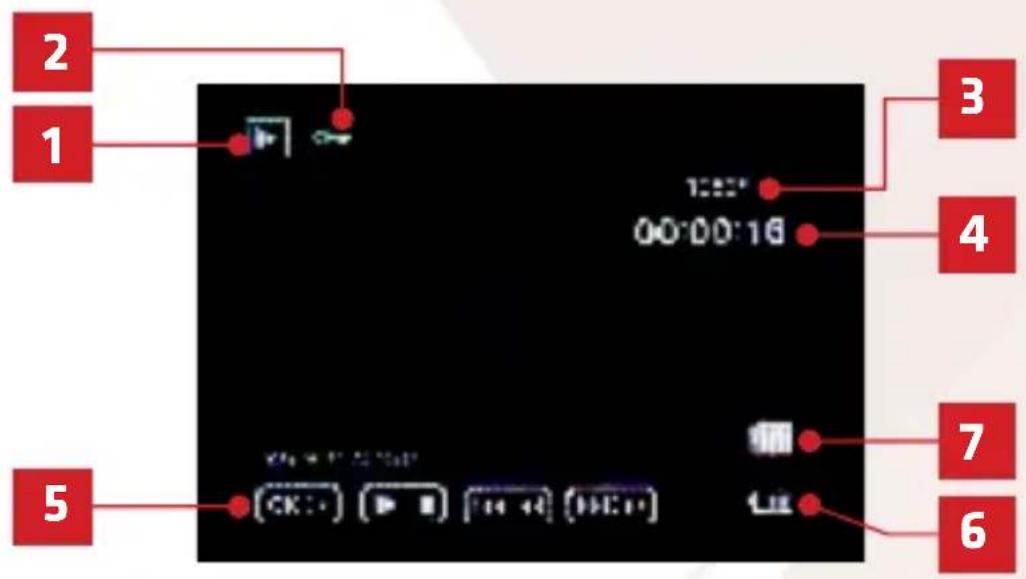
- File type (in image - video)
- File protected
- File resolution
-
Recording length
-
File replay options
- Battery status
- Memory card detected
Xblitz.
10. LEDs
There are two LEDs on the case of the device.
When the RED LED lights up, the device is connected to the power supply. The LED goes out when the battery of the device is fully charged.
A BLUE LED lights up to indicate that the device is turned on.
EN
11. PRECAUTIONS
- Do not disassemble or try to repair the camera yourself. In the event of device failure, please contact the service.
- Use only original accessories.
- Use only the original charger included with the device.
- The device cannot be used in violation of the laws of your country or region.
- Operating temperature range of the device is 0 - 35 °C.
Storage: +5 to +45°C. Humidity: 5-90% without condensation.
-
Do not expose the device to damage or physical impact.
-
Keep the product clean, the lens in particular. Do not use detergents or chemicals for cleaning.
Xblitz.
- Clean the device only when it is disconnected from the power supply.
- Keep the device out of children's reach.
- Do not expose the device to very high temperatures or fire.
- If you notice the smell of burnt plastic or electronics from the camera, unplug the device as soon as possible and contact the service.
12. FAQ
- The device does not turn on, the screen flashes.
Before turning it on, charge the device's battery.
- The device does not turn on/off automatically.
The reason for this may be the constant power supply in the car lighter socket.
- The device restarts while driving.
It is recommended to check the power source.
- The device does not record in a loop (records randomly).
Check the setting of the "motion detection" and "parking mode" functions – both should be disabled when driving.
Xblitz.
5. The device shows the message "memory card full".
Check the "G-sensor" and "parking mode" functions and set them to a minimum. The card must be formatted in FAT32 format first on a computer and then in the recorder.
6. The device records noise and distorted, blurred sound.
The device has a very sensitive microphone that records any sounds from the environment. Recorded sounds can overlap. The windshield's air supply can also distort the sound recorded.
7. The device does not respond.
Briefly press the RESET button or restore the device to factory settings.
8. Horizontal strips appear on the recording.
Incorrect setting of image refresh rate values. Set the frequency value to "50Hz" or "60Hz", depending on local settings.
Due to the continuous improvement of the products, the manufacturer reserves the right to change the device and its set without prior notice, some of the features described in this manual may differ slightly in reality.
Xblitz.

NOTE: Use only the original 5V charging charger. (Do not connect directly to the 220/230V socket). Failure to follow the recommendations may cause damage to the camera or dangerous situations.

NOTE! We do not guarantee the device working properly with all kinds of memory cards.
Xblitz.
13. SPECIFICATION
Recording resolution: Max Full HD
IR LEDs: 6pcs
Lens: 4G
Viewing angle: 110°
Dimension: H/W/D: 65x68x21mm
Display: 2 inch
Memory: Support for micro SD cards, up to 32GB
File format: .avi MJPG.avi MJPG
Power: 5V/0.5A
USB: Mini USB
Microphone/Speaker: Built-in
Battery: Built-in rechargeable battery
Xblitz.
14. WARRANTY CARD/ COMPLAINTS
The product is covered by a 24-month warranty. The terms of the guarantee can be found at: https://xblitz.pl/warranty/
Complaints should be reported using the complaint form located at: http://reklamacje.kgktrade.pl/
Details, contact and website address can be found at: www.xblitz.pl
Specifications and contents of the kit are subject to change without notice. We apologise for any inconvenience.
Xblitz.

The crossed out trash can symbol indicates that unusable electrical or electronic devices, its accessories (such as power supplies, cords) or components (for example batteries, if included) cannot be disposed of alongside with household waste. In order to dispose of the devices or its components (for example, batteries) deliver the device to the collection point, where it will be accepted free of charge. Disposal is subject to the recast version of the WEEE Directive (2012/19/EU) and the Directive on batteries and accumulators (2006/66/EC). Proper disposal of the device prevents degradation of the natural environment. Information about the collection points of the facilities is issued by the competent local authorities. Incorrect disposal of waste is subject to penalties provided for by the law in force in the given area.

Manufacturer:
KGK Trade sp. z o.o. sp. k.
os. Urocze 12
31-953 Cracow
Poland
Made in P.R.C.

natural_image
Abstract geometric shape with diagonal division and horizontal lines (no text or symbols)Xblitz®
Z 4
NÁVOD K POUŽITÍ
natural_image
Black and white photo of a digital camera with a rearview display showing a landscape (no visible text or symbols)Xblitz.
Výrobce:
KGK Trade sp. z o.o. sp. k.
Os. Urocze 12
31-953 Krakow
Polsko
Vyrobeno w P.R.C.

natural_image
Abstract geometric shape with diagonal light pink fill on white background, no text or symbols presentXblitz
Z 4
BEDIENUNGSANLEITUNG
natural_image
Black digital camera with rearview and front-mounted display showing a landscape image (no visible text or symbols)Xblitz.
DE
Hersteller:
KGK Trade sp. z o.o. sp. k.
Os. Urocze 12
31-953 Kraków
Polen
Hergestellt in P.R.C.

natural_image
Abstract geometric shape with diagonal light pink and white gradient, no text or symbols presentXblitz®
EXPLORE THE FUTURE...
- Xblitz.
- Producent:
- PACKAGE CONTENTS
- DEVICE DESCRIPTION
- BUTTON DESCRIPTION
- BEFORE USE
- CAMERA INSTALLATION INSTRUCTIONS
- GETTING STARTED
- FEATURES
- Camera modes
- Loop recording
- Resolution
- G-Sensor
- Parking mode
- Motion detection mode
- Record audio
- MENU OPTIONS
- VIDEO MODE MENU:
- PHOTO MODE MENU:
- PLAYBACK MODE MENU:
- GENERAL MENU:
- ICON DESCRIPTION
- LEDs
- PRECAUTIONS
- FAQ
- The device shows the message "memory card full".
- The device records noise and distorted, blurred sound.
- The device does not respond.
- Horizontal strips appear on the recording.
- SPECIFICATION
- WARRANTY CARD/ COMPLAINTS
- Manufacturer:
- Výrobce:
- Hersteller:
- Xblitz®
Brand : Xblitz
Model : Z4
Category : Dash cam