
S5 Duo - Dash cam Xblitz - Free user manual and instructions
Find the device manual for free S5 Duo Xblitz in PDF.


| Product Type | Dash Cam |
| Model | S5 Duo |
| Brand | Xblitz |
| Dimensions | Approx. 9 x 5 x 3 cm |
| Weight | Approx. 80 g |
| Power Supply | 5V/1A via USB cable |
| Battery | Built-in rechargeable lithium battery (approx. 200 mAh) |
| Video Resolution | Full HD 1080p (front & rear) |
| Lens | Wide angle lens (approx. 140°) |
| Night Vision | Yes, with infrared LEDs |
| G-Sensor | Built-in gravity sensor for impact detection |
| Loop Recording | Yes, continuous recording in loops |
| Storage | Micro SD card up to 128 GB (not included) |
| Display | 2.0 inch LCD screen |
| Installation | Suction cup mount on windshield |
| Connection | USB 2.0 for power and data |
| Main Functions | Video recording, photo capture, motion detection, parking mode |
| Maintenance & Cleaning | Clean lens with soft cloth; avoid liquids |
| Safety | Use only approved power adapter; keep away from moisture |
| Spare Parts & Repairability | Replacement mounts, cables, and suction cups available; repair via authorized service |
Frequently Asked Questions - S5 Duo Xblitz
User questions about S5 Duo Xblitz
0 question about this device. Answer the ones you know or ask your own.
Ask a new question about this device
Download the instructions for your Dash cam in PDF format for free! Find your manual S5 Duo - Xblitz and take your electronic device back in hand. On this page are published all the documents necessary for the use of your device. S5 Duo by Xblitz.
USER MANUAL S5 Duo Xblitz
User's manual in English lanugage - EN
natural_image
Abstract geometric shape with diagonal light gray fill on white background (no text or symbols)Xblitz®
S5 DUO
INSTRUKCJA OBSŁUGI
PL
natural_image
Exterior view of a black X-bitzf digital vehicle with dual camera modules (no visible text or symbols)Xblitz®
Producent:
KGK Trade sp. z o.o. sp. k.
ul. Ujastek 5b
31-752 Kraków
Polska
natural_image
Exterior view of a black BYD-300 driver's phone displaying on its screen, shown from two different angles (no visible text or symbols on device body)Xblitz®
Thank you for purchasing Xblitz S5 Duo!
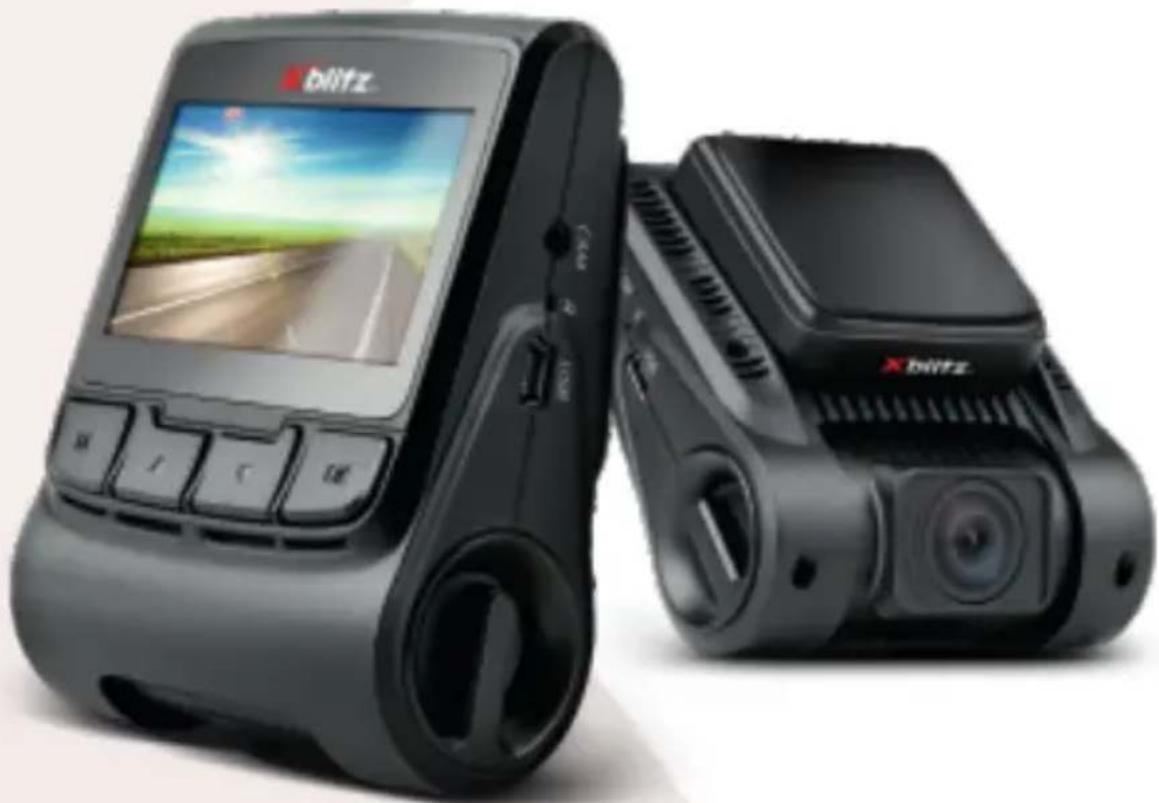
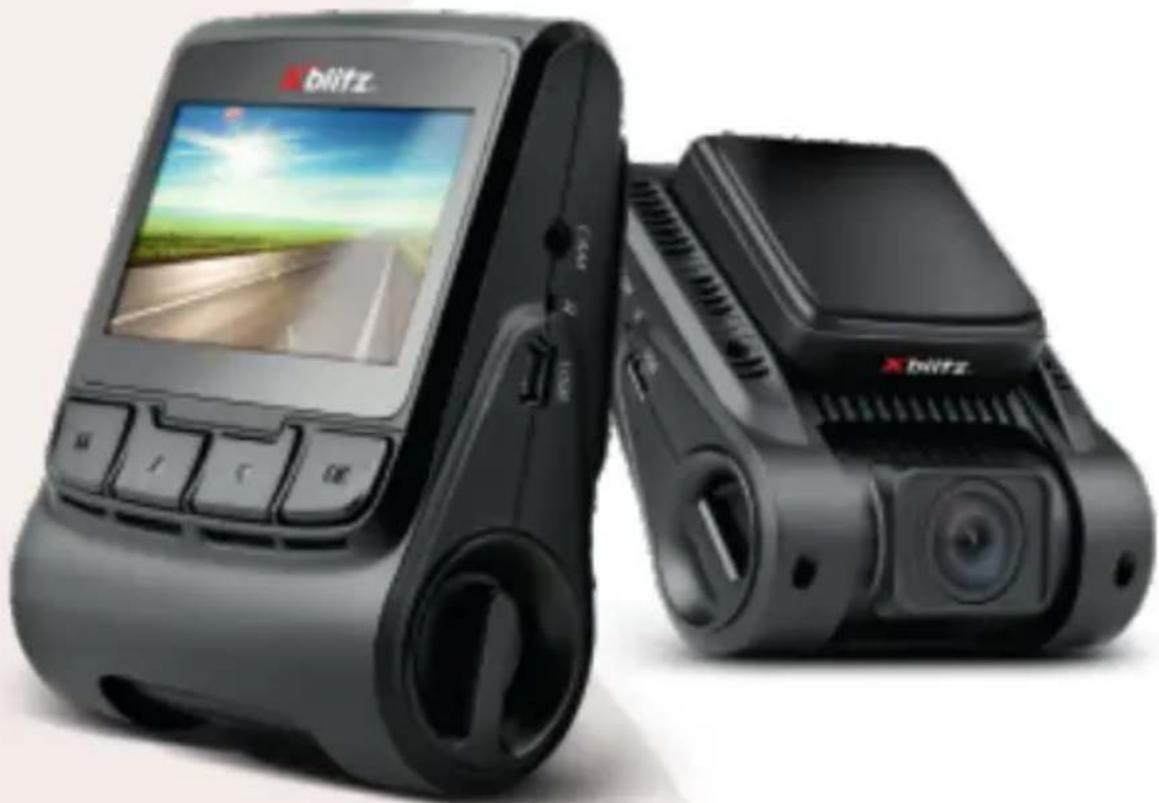
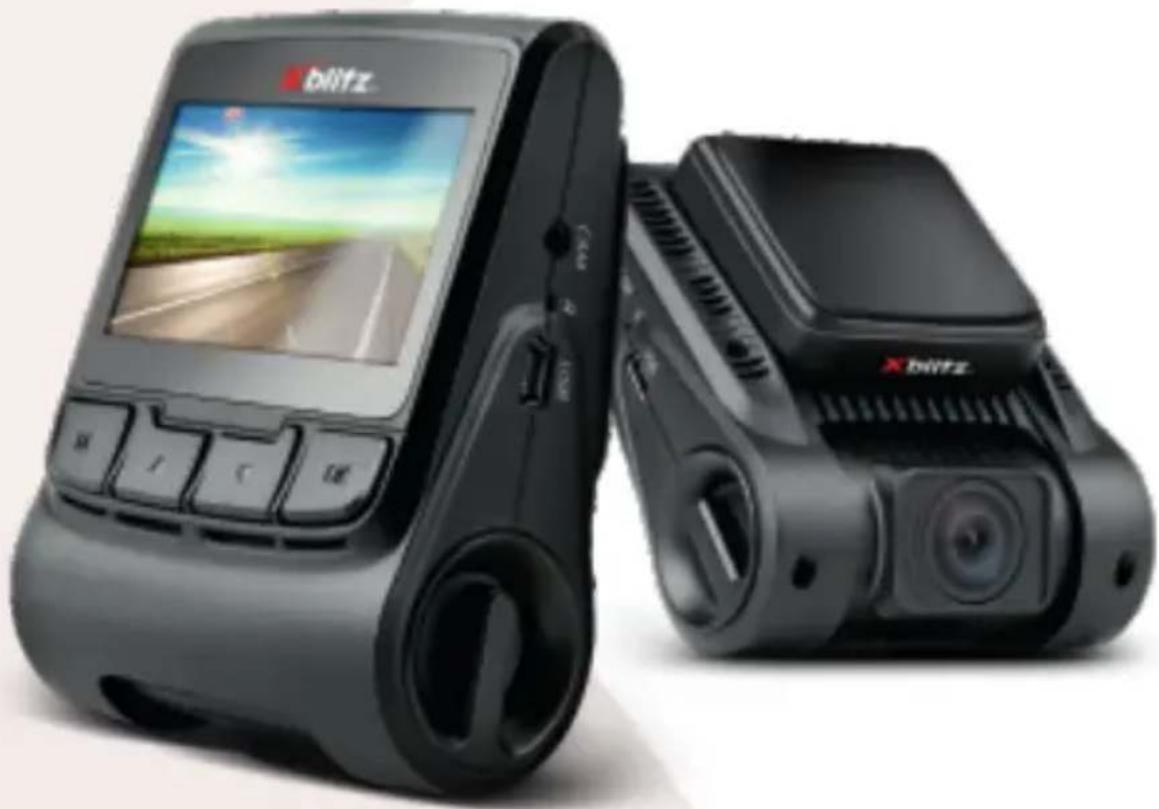
The device you have purchased is a dashboard camera with an additional, rear camera, powered by a car lighter socket, intended for use in cars. It is used to record the route of the vehicle. The dashcam is made out of the highest quality components and elements.
Please read the user's manual before using the product.
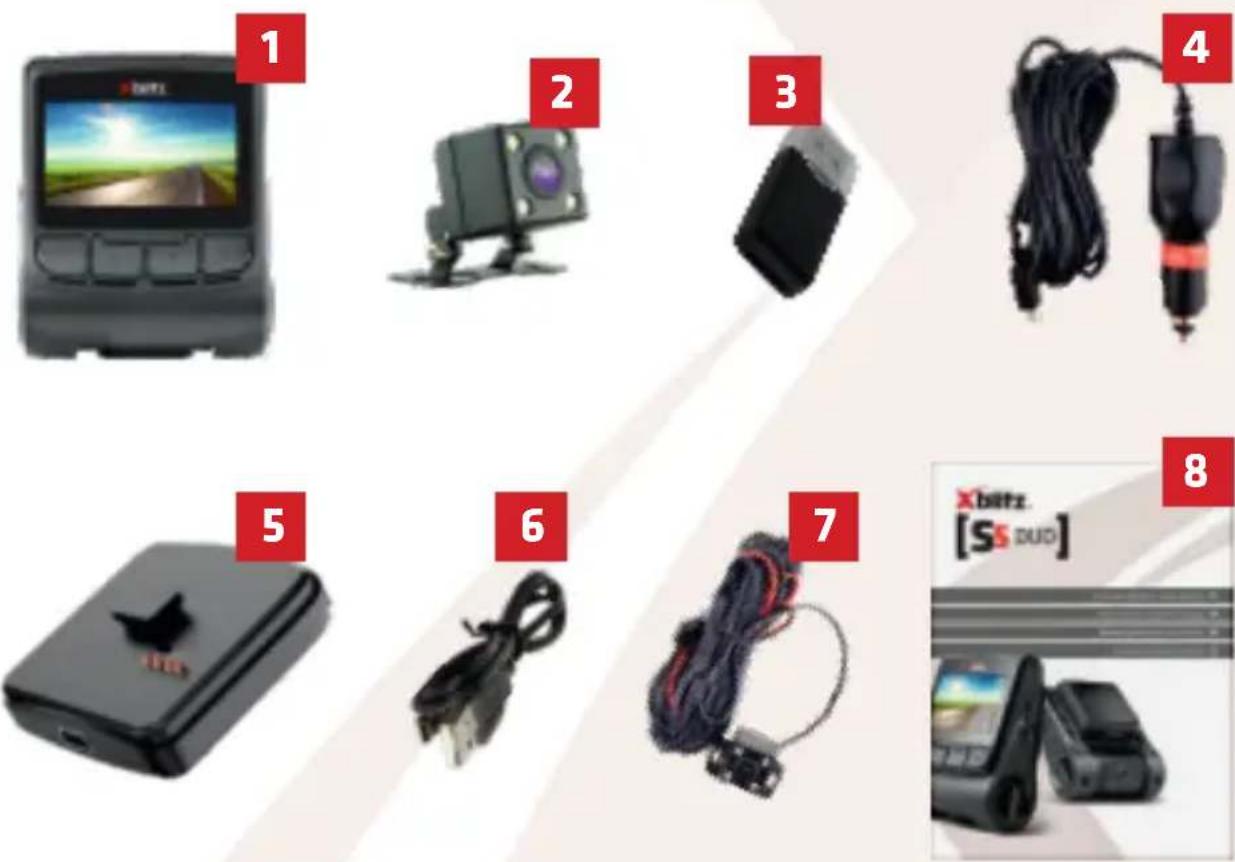
01. PACKAGE CONTENTS
- Dashboard camera
- Rear Camera
- MicroSD memory card reader
- Charger
- Battery with adhesive handle
- USB Cable
- AV cable (for rear camera)
- User's manual
Xblitz®
02. BEFORE USE
- Using brand microSD memory cards (up to 32GB of memory) with speed class 10 is recommended.
- Before putting the card into the camera, it needs to be formatted to FAT32 file system on your computer, and then again in your camera.
- The memory card should be installed when the device is turned off, otherwise you can damage the card and the device. The same is true for taking out the memory card.
- Using the menu, set:
a. Date and time.
b. Loop recording (adjust the time of recording). If you turn off loop recording, the files will not be overwritten.
c. Set the highest available resolution.
d. Set the G-Sensor to the lowest possible sensitivity so that the camera does not protect undesired recordings because of, e.g., a bump in the road.
e. Enable HDR mode. - The camera has a built-in battery that allows for a short operation after disconnecting the power supply.
- When the memory card is full, the oldest unprotected recordings will be overwritten.
- It is recommended that you use the device's functions as intended. Do not use MOTION DETECTION and PARKING MODE when driving, as it can cause the device to turn on and off by itself. Every recording made with these modes turned on will be protected from being overwritten.
- It is recommended to set the G-SENSOR option to minimum to avoid protecting unimportant files and loss of space on your memory card.
- Sound: The device has a condenser microphone that continuously records all of the surrounding sounds. The sounds can overlap and cause distortion.
EN
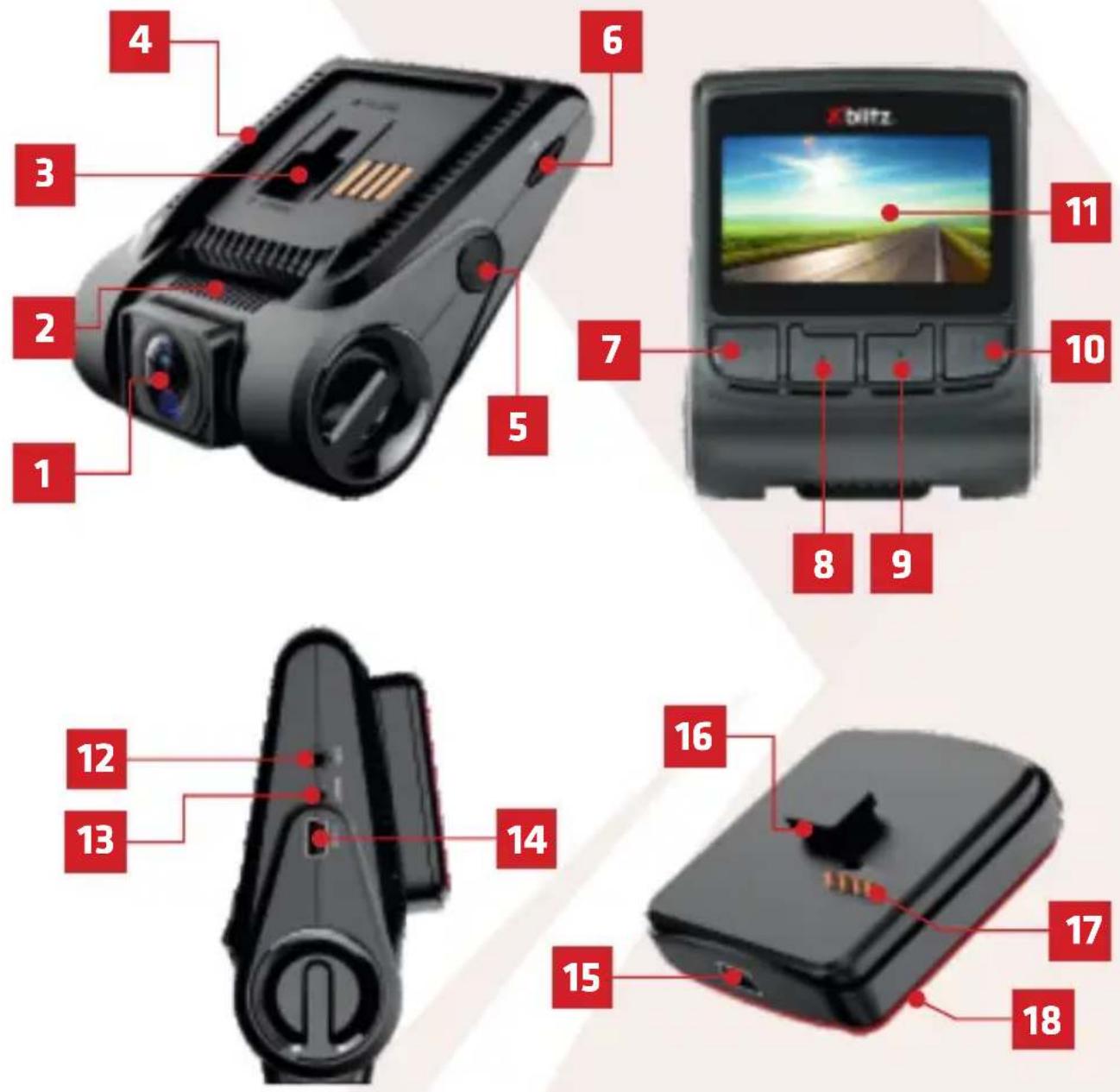
03. DESCRIPTION OF THE RECORDER
- Movable lens
- Microphone (on the moving lens cylinder)
- Mounting location of the handle/battery
4.Speaker (on the sides of the holder slot) - POWER button
- MicroSD memory card slot Display
- MENU button
-
UP button
-
DOWN button
- OK button
- Display
- AV port (for REAR camera connection)
- RESET button
- Mini USB port (power supply)
- Mini USB port (power supply)
- Hook
- Multi-pin connector
- Adhesive tape
Xblitz®
Xblitz®
04. MOUNTING THE CAMERA
MOUNTING THE CAMERA
EN
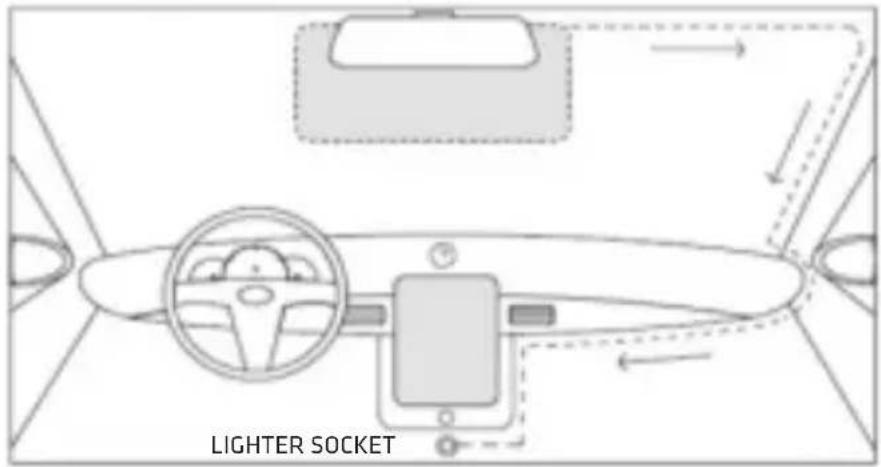
- Select the camera mounting location. It is best to set the camera so that the screen preview shows the largest area in front of the car. Make sure the camera does not obstruct the driver's view while driving.
- Mount the holder on the windshield, then install the camera.
- Route the USB cable as shown above.
- Route the rear camera AV cable and connect it to the car camera.
- Connect the mini USB plug to the camera or battery/ mount.
- Connect the charger to a 12/24V cigarette lighter socket.
The mounting location of the secondary camera supplied with the kit depends on your preference. The camera has an IP67 (weatherproof) waterproof rating.
Mounting the rear camera:
Connect the black cable to the AV port on the main unit, drag the secondary camera to the mounting location and connect it. Make sure the master device sees the secondary camera (if not, check that the cable is properly connected on both ends).
Rear camera Installation: connect the rear camera wires to the reversing light wiring (red = plus). This connection will allow you to use the device as a reversing camera.
The wiring placed on the outside of the vehicle should be properly insulated and not tightly stretched.
Xblitz®
05. BUTTON DESCRIPTION
| POWER | Hold for 3 seconds to turn the camera on or off.A short press of the button turns the screen on and off. |
| MENU | Holding the button opens the menu (unless the camera is recording).Short press moves betweenVideo camera/Photo/File browsing modes.In the MENU and browsing mode, it functions as a “back” button.Briefly pressing the buttonduring recordingprotects the currently recorded file from being overwritten. |
| UP | In themenuand in the file browsing mode, it is used to move through options. Invideo and photomodes, pressing the button toggles the view between the front and rear cameras. |
| DOWN | In themenuand in thefile browsing mode, it is used to move through options.Invideo mode, pressing it turns audio recording on and off. Holding the button toggles theparking modeon and off. |
| OK | Invideo mode, press it to turn recording on and off.Inphoto mode, pressing it takes a picture.In themenuandfile browsingmode, the button confirms your choice. |
| RESET | Pressing the button resets the camera and restores the default settings. |
Xblitz®
06. MENU
A. GENERAL SYSTEM SETTINGS (AVAILABLE IN ALL MODES)
- LCD Brightness - Sets the time after which the LCD screen will turn off automatically.
- Auto Power Off - Specifies the time of inactivity, after which the device will turn off automatically.
- Frequency - changes the frequency of the video being recorded (50/60Hz).
- Beep Sound - Enables or disables the sound when pressing buttons.
- Language - allows you to change the menu language.
- Date/ Time - allows you to change the date and time recorded by the device.
- Format - allows to format the memory card in the device.
- Default setting - restores default settings.
- Version - displays the version of the device software.
EN
B. SETTINGS IN VIDEO RECORDING MODE
- Resolution - allows you to set the resolution of recorded files.
- Loop recording - sets the maximum length of recorded files.
- Recording intervals - sets how often the time-lapse video frame is to be taken by the device. If you enable this function, the recording of regular video is interrupted.
- High Dynamic Range - allows you to enable/disable HDR mode
- Exposure - adjusts the light sensitivity of the lens
- Motion detection - activates/deactivates the motion detection mode.
When turned on, the camera starts recording when it detects motion in front of it (e.g. an approaching person). - Recording - enables/ disables audio recording
- Date Stamp- enable/ disable date stamp on recording
- Gravity sensor - sets the sensitivity of the gravity sensor. When turned on, the camera detects a sudden shift of the vehicle (caused by, e.g., sudden braking or an accident) and protects the recording of the incident from being overwritten.
- Parking guard - activates/ deactivates parking mode (parking mode can also be activated by holding DOWN button in video recording mode or photo mode). When turned on, the camera starts recording video when it detects a sudden shift of the parked vehicle (e.g. because of a parking crash).
- Car number - allows you to enable/ disable the display of the license plate number of your car on the recording
C. PHOTO MODE SETTINGS
- Capture mode - allows you to set the delay with which photos are taken.
- Resolution - sets the resolution of photos taken.
- Continuous shooting - enables/disables continuous photo shooting.
- Quality - allows you to change the quality of the image compression.
- Sharpness - allows you to change the sharpness of the image.
Xblitz
- White balance - allows you to select the white balancing profile in the photo, depending on the lighting conditions.
- Color - allows you to choose between taking pictures in color, black and white or sepia.
- ISO - sets the sensitivity of the sensor.
- Exposure - adjusts the light sensitivity of the lens.
- Anti-Shaking - enable/ disable image stabilization function.
- Date Stamp - enable/ disable the date stamp in the picture taken.
D. FILE BROWSING MODE SETTINGS
- Delete - Deletes the currently viewed file.
- Protection - protects files from being overwritten or disables overwriting protection.
- Slideshow - Displays each file stored in the device's memory in succession as a slide show.
07. SAFETY MEASURES
- Do not disassembly or interfere with the camera. If the device is faulty, contact the service point.
- Only use the original accessories.
- Use only the original charger, included in the set. Using a different power supply can affect the battery negatively.
- Do not use the device for purposes that are against the law of the country or region you are in.
- The operating temperature of the device is 0 - 35°C. Storage temperature is 5°C to 45°. Operating air humidity is 5-90% without condensation.
- Avoid damaging the device with physical force.
- Clean the device, especially the lens. Do not use detergents or other chemicals when cleaning the device.
- Clean the device only when it's disconnected from the power supply.
- Keep the device away from children.
- Do not expose the device to very high temperatures and fire.
Xblitz®
08. FAQ
- The device doesn't turn on, the screen is flickering.
Charge the device's battery before using the device.
- The device doesn't turn on/ off automatically.
This can be caused by a constant power supply in the car's lighter socket.
- The device restarts when driving.
Check the power supply.
- The device doesn't record in loop (or records randomly).
Check the "Motion detection" and "Parking mode" settings - both should be turned off when driving.
- The device displays a "Memory card full" message.
Check "G-sensor" and "Parking mode" settings and set them to minimum.
The memory card should be formatted to FAT32 file system, first on a computer and then in the camera.
- The device records noise or distorted, unclear sound.
The device has a very sensitive microphone that records sound from the surroundings. The recorded sounds can overlap. Air conditioning blowing air on your front windshield can also affect the sound recorded.
- The device doesn't respond.
Press the RESET button or restore factory settings.
- There are vertical stripes on the recording.
Wrong screen refresh rate setting. Change the frequency to "50Hz" or "60Hz", depending on the local settings.
Due to constant improvement of our products, the manufacturer reserves the right to making changes in the device and its set without prior information, some of the functions described in this manual can slightly differ in reality.

WARNING! Use only the original charger with 5V power output. (Do not connect directly to a 220V/230V power socket).
Not following the instructions can lead to damaging the camera or dangerous situations.

WARNING! Playing files on a computer:
The camera does not have a mass memory drive mode. To play the files on a computer, take the memory card out of the device and use a memory card reader to connect it to a computer.
Xblitz®
09. SPECIFICATION
| CPU | JL5401 |
| Recording resolution | Front: Max 1920x1080 Rear: VGA |
| Sensor | Front: 2Mpx |
| Lens | 4G |
| View angle | 120 degrees |
| Dimension: height/width/depth | 82 x 61 x 29 mm |
| Display | 2.45 inches |
| Memory | Micro SD card up to 32GB class 10 |
| Recording Format | MOV |
| Power supply | 5V |
| USB | Mini USB (Alternate power source) |
| Microphone/Speaker | Built-in |
| Battetry | YES. Built-in. |
10. WARRANTY CARD/ COMPLAINTS
The product is covered by a 24-month warranty. The terms of the guarantee can be found at: https://xblitz.pl/warranty/
Complaints should be reported using the complaint form located at: http://reklamacje.kgktrade.pl/
Details, contact and website address can be found at: www.xblitz.pl
Specifications and contents of the kit are subject to change without notice. We apologise for any inconvenience.

The crossed out trash can symbol indicates that unusable electrical or electronic devices, its accessories (such as power supplies, cords) or components (for example batteries, if included) cannot be disposed of alongside with household waste. In order to dispose of the devices or its components (for example, batteries) deliver the device to the collection point, where it will be accepted free of charge. Disposal is subject to the recast version of the WEEE Directive (2012/19 / EU) and the Directive on batteries and accumulators (2006/66 / EC). Proper disposal of the device prevents degradation of the natural environment. Information about the collection points of the facilities is issued by the competent local authorities. Incorrect disposal of waste is subject to penalties provided for by the law in force in the given area.

Manufacturer:
KGK Trade sp. z o.o. sp. k.
Ujastek 5b
31-752 Cracow
Poland
Made in P.R.C.
Xblitz®
Xblitz®
S5 DUO
NÁVOD K POUŽITÍ
natural_image
Exterior view of a black BYDitz VR headset with dual camera modules (no visible text or symbols)Xblitz®
Výrobce:
KGK Trade sp. z o.o. sp. k.
Ujastek 5b
31-752 Krakow
Polsko
Vyrobeno w P.R.C.
Xblitz®
Xblitz®
S5 DUO
BEDIENUNGSANLEITUNG
DE
natural_image
Exterior view of a black X-bitzz navigation device with dual camera modules (no visible text or symbols)Xblitz®
Hersteller:
KGK Trade sp. z o.o. sp. k.
Ujastek 5b
31-752 Kraków
Polen
Hergestellt in P.R.C.
Xblitz®

Xblitz®

Xblitz®
- Xblitz®
- S5 DUO
- INSTRUKCJA OBSŁUGI
- Producent:
- Thank you for purchasing Xblitz S5 Duo!
- PACKAGE CONTENTS
- BEFORE USE
- DESCRIPTION OF THE RECORDER
- MOUNTING THE CAMERA
- Mounting the rear camera:
- BUTTON DESCRIPTION
- MENU
- GENERAL SYSTEM SETTINGS (AVAILABLE IN ALL MODES)
- SETTINGS IN VIDEO RECORDING MODE
- PHOTO MODE SETTINGS
- Xblitz
- FILE BROWSING MODE SETTINGS
- SAFETY MEASURES
- FAQ
- SPECIFICATION
- WARRANTY CARD/ COMPLAINTS
- Manufacturer:
- NÁVOD K POUŽITÍ
- Výrobce:
- BEDIENUNGSANLEITUNG
- Hersteller:
Brand : Xblitz
Model : S5 Duo
Category : Dash cam