
MB08.2 - Hi-Fi System BLAUPUNKT - Free user manual and instructions
Find the device manual for free MB08.2 BLAUPUNKT in PDF.


| Type | Hi-Fi System |
| Model | MB08.2 |
| Brand | Blaupunkt |
| Dimensions (W x H x D) | Approx. 350 x 200 x 250 mm |
| Weight | Approx. 3.5 kg |
| Power Supply | 120-240 V AC, 50/60 Hz |
| Power Consumption | 30 W (typical) |
| Output Power | 2 x 30 W RMS |
| Media Playback | CD, CD-R, CD-RW |
| Radio Tuner | FM/AM with 30 presets |
| Connectivity | Bluetooth, USB, AUX-in |
| Speaker System | 2-way bass reflex |
| Equalizer Presets | Rock, Pop, Classic, Jazz, Flat |
| Display | LED dot matrix |
| Remote Control | Yes, included |
| Headphone Jack | 3.5 mm |
| Safety | Class II, double insulation |
| Cleaning | Use a soft dry cloth; avoid solvents |
| Repairability | Spare parts available via authorized service |
Frequently Asked Questions - MB08.2 BLAUPUNKT
User questions about MB08.2 BLAUPUNKT
0 question about this device. Answer the ones you know or ask your own.
Ask a new question about this device
Download the instructions for your Hi-Fi System in PDF format for free! Find your manual MB08.2 - BLAUPUNKT and take your electronic device back in hand. On this page are published all the documents necessary for the use of your device. MB08.2 by BLAUPUNKT.
USER MANUAL MB08.2 BLAUPUNKT
Important Safety Instructions



RISK OF ELECTRIC SHOCK DO NOT OPEN
Caution:
To reduce the risk of electric shock, do not remove cover (or back). No user serviceable parts inside. Refer servicing to qualified service personnel.
Explanation of Graphical Symbols:

The lightning flash within an equilateral triangle is intended to alert you to the presence of uninsulated dangerous voltage within the product's enclosure that may be of sufficient magnitude to constitute an electric shock to a person or persons.

The exclamation point within an equilateral triangle is intended to alert you to the presence of important operating and maintenance (servicing) instructions in the literature accompanying the product.
To achieve the utmost in enjoyment and performance, and in order to become familiar with its features, please read this manual carefully before attempting to operate this product. This will assure you years of trouble free performance and listening pleasure.
Important Notes
• This safety and operating instruction should be retained for future reference.
• The apparatus should not be exposed to dripping or splashing or placed in a humid atmosphere such as a bathroom.
• Do not install the product in the following areas:
- Places exposed to direct sunlight or close to radiators.
• On top of other stereo equipment that radiate too much heat.
• Blocking ventilation or in a dusty area.
• Areas where there is constant vibration.
• Humid or moist places.
• Do not place near candles or other naked flames.
• Operate the product only as instructed in this manual.
• Before turning on the power for the first time, make sure the power adaptor is properly connected.
• Plug in the USB stick directly or use a USB extension cable that is not longer than 25 cm.
For safety reasons, do not remove any covers or attempt to gain access to the inside of the product. Refer any servicing to qualified personnel.
Do not attempt to remove any screws or open the casing of the unit; there are no user-serviceable parts inside. Refer all servicing to qualified service personnel.
SAFETY INSTRUCTIONS
- Read Instructions - All the safety and operating instructions must be read before the product is operated.
- Retain Instructions - The safety and operating instructions should be kept with the product for future reference.
- Heed warnings - All warnings on the product and in the operating instructions should be adhered to.
- Follow instructions - All operating and user instructions should be followed.
- Installation - Install in accordance with the manufacturer's instructions.
- Power sources - This product should be operated only from the type of power source indicated by the marking adjacent to the power cord entry. If you are not sure of the type of power supply to your home, consult your product dealer or local power company.
- Grounding or polarization - the product is not required to be grounded. Ensure that the plug is fully inserted into the wall outlet or extension cord receptacle to prevent blade or pin exposure. Some versions of the product are equipped with a power cord fitted with a polarized alternating line plug (a plug having one blade wider than the other). This plug will fit onto the power outlet only one way. This is a safety feature. If you are unable to insert the plug fully into the outlet, try reversing the plug. If the plug should still fail to fit, contact your electrician to replace your obsolete outlet. Do not defeat the safety purpose of the polarized plug. When using an extension power-supply cord or a power-supply cord other than that supplied with the appliance, it should be fitted with the appropriate molded plugs and carry safety approval appropriate to the country of use.
- Power cord protection - Power-supply cords should be routed so that they are not likely to be walked on, kinked or pinched by items placed on or against them, paying particular attention to cords from plugs, receptacles and the point where they exit from the product.
- Overloading - Do not overload wall outlets, extension cords, or multiple sockets, as this can result in a risk of fire or electric shock.
- Ventilation - The product must be properly ventilated. Do not place the product on a bed, sofa, or other similar surface. Do not cover the product with any items such as tablecloths, newspapers, etc.
- Heat - The product should be situated away from heat sources such as radiators, heat registers, stoves, or other products, including amplifiers that produce heat. No naked flame sources, such as lighted candles, should be placed on the apparatus.
- Water and moisture - To reduce the risk of fire or electric shock, do not expose the product to rain, dripping, splashing or excessive moisture such as in a sauna or bathroom. Do not use this product near water, for example, near a bathtub, washbowl, kitchen sink, laundry tub, in a wet basement or near a swimming pool (or similar).
- Object and Liquid Entry - Never push objects of any kind into this product through openings, as they may touch dangerous voltage points or short-circuit parts that could result in a fire or electric shock. Never spill liquid of any kind on the product. Do not place any object containing liquid on top of the product.
- Cleaning - Unplug the product from the wall outlet before cleaning. Dust in the woofer may be cleaned with a dry cloth. If you wish to use an aerosol cleaning spray, do not spray directly on the cabinet; spray onto the cloth. Be careful not to damage the drive units.
- Attachments - Do not use attachments not recommended by the product manufacturer, as they may cause hazards.
- Accessories - Do not place this product on an unstable cart, stand, tripod, bracket or table. The product may fall, causing serious injury to a child or adult, and serious damage to the product. Use only with a cart, stand, tripod, bracket or table recommended by the manufacturer or sold with the product. Any mounting of the product should follow the manufacturer's instructions and should use a mounting accessory recommended by the manufacturer.
- Moving the product - A product and cart combination should be moved with care. Quick stops, excessive force and uneven surfaces may cause the product and cart combination to overturn.
- Unused periods - The power cord of the appliance should be unplugged from the outlet during lightning storms or when the apparatus is left unused for a long period of time.
- Servicing - Do not attempt to service this product yourself, as opening or removing covers may expose you to dangerous voltage or other hazards. Refer all servicing to qualified service personnel.
- Please remove the power plug from the main power source or wall power source when not in use. When plugged in to a power source, the system is in standby mode, so the power is not entirely cut off.
- Replacement parts - When replacement parts are required, ensure that the service technician has used replacement parts specified by the manufacturer or have the same characteristics as the original part. Unauthorized substitutions may result in fire, electric shock or other hazards.
- Mains fuses - For continued protection against fire hazard, use fuses only of the correct type and rating. The correct fuse specification for each voltage range is marked on the product.
- Do not turn up the volume while listening to a section with very low level inputs or no audio signals. If you do, the speaker may be damaged when a peak level section is suddenly played.
- The only means of completely disconnecting the product from the power supply is by removing the power cord from the wall outlet or the product. The wall outlet or the power cord entry to the product must remain freely accessible at all times while the product is in use.
- Try to install the product near a wall socket or extension cord and shall be easily accessible.
- The highest environmental temperature suitable for this product is 35°C.
- ESD hints - If the product may reset or not reset to operation of control due to electrostatic discharge, just switch off and reconnect again, or move the product to another location.
- Battery
a. The batteries must not be exposed to excessive heat such as sunshine, fire or the like. b. The batteries should be drawn to the environmental aspects of battery disposal. c. Battery usage CAUTION - to prevent battery leakage which may result in body injuries, property damage, or damage to the apparatus:
Install all batteries correctly, + and - as marked on the apparatus.
Do not mix batteries (old and new or carbon and alkaline, etc.)
Remove batteries when the unit is not used for a long time.
ERP2 (Energy Related Products) note
This product with ecodesign complies with the stage 2 requirements of Commission Regulation (EC) NO. 1275/2008 implementing Directive 2009/125/EC regard to standby and off mode electric power consumption of electronic household and office equipment. After 15 minutes without any audio input, the device will automatically switch into standby mode. Follow up the instruction manual to resume the operation.
Important note:
This device is equipped with an energy saving mode: if no signal is given during 15 minutes the device will switch automatically into standby mode in order to save energy (ERP 2 standard). Please note that low volume setting in the audio source may be recognized as "no audio signal": this will affect the capability of signal detection from the device and can also originate an automatic switch into standby mode. If this happens please reactivate the audio signal transmission or increase the volume setting on the audio source player (MP3 player, etc.), in order to resume playback. Please contact the local service center if the problem remains.
WARNING
This appliance is not intended for use by persons (including children) with reduced physical sensory or mental capabilities, or lack of experience and knowledge, unless they have been given supervision or instruction concerning use of the appliance by a person responsible for their safety. Children should be supervised to ensure that they do not play with the appliance.
- Never use the device unsupervised! Switch off the device whenever you are not using it, even if this only for a short while.
- The appliance is not intended to be operated by means of an external timer or separate remote control system.
- If the supply cord is damaged, it must be replaced by the manufacturer, its service agent or similarly qualified persons in order to avoid a hazard.
- Before operating this system, check the voltage of this system to see if it is identical to the voltage of your local power supply.
- The unit should not be impeded by covering the ventilation opening with items such as newspaper, table-cloths, curtains etc. Make sure that there are at least 20 cm of space above and at least 5 cm of space on each side of the unit.
- The apparatus must not be exposed to dripping or splashing and that objects filled with liquids, such as vases, must not be placed on the apparatus.
- To prevent fire or shock hazard, do not expose this equipment to hot places, rain, moisture or dust.
- Do not locate this unit near any water sources e.g. taps, bathtubs, washing machines or swimming pools. Ensure that you place the unit on a dry, stable surface.
- Do not place this unit close to a strong magnetic field.
- Do not place the unit on a amplifier or receiver.
- Do not place this unit in a damp area as the moisture will affect the life of electric components.
- If the system is brought directly from a cold to a warm location, or is placed in a very damp room, moisture may condense on the lens inside the player. If this occurs, the system will not operate properly. Please leave the system turned on for about an hour until the moisture evaporates.
- Do not attempt to clean the unit with chemical solvents as this might damage the finish. Wipe with a clean, dry or slightly damp cloth.
- When removing the power plug from the wall outlet, always pull directly on the plug, never pull on the cord.
- Depending on the electromagnetic waves used by a television broadcast, if a TV is turned on near this unit while it is also on, lines might appear on the TV screen. Neither this unit nor the TV is malfunctioning. If you see such lines, keep this unit well away from the TV set.
- The mains plug is used as the disconnect device, the disconnect device must remain readily operable.
- To prevent possible hearing damage, do not listen at high volume levels for long periods.

NOTICE

Conformity
Hereby, Blaupunkt Competence Center 2N-Everpol Sp. z o.o., declares that this equipment is in compliance with the essential requirement and other relevant provisions of Directive 2014/53/EU. Declaration of conformity can be obtained from the product page at www.blaupunkt.com.
Responsible party: 2N-Everpol Sp. z o.o, Puławska 403A, 02-801 Warsaw, Poland, Phone: +48 22 331 99 59, E-mail: info@everpol.pl

Your product is designed and manufactured with high quality materials and components, which can be recycled and reused.

When this crossed-out wheeled bin symbol is attached to a product, it means that the product is covered by the European Directive 2012/19/EU. Please inform yourself about the local separate collection system for electrical and electronic products. Please act according to your local rules and do not dispose of your old products with your normal household waste. Correct disposal of your old product helps to prevent potential negative consequences for the environment and human health.

Your product contains batteries covered by the European Directive 2006/66/EC, which cannot be disposed of with normal household waste. Please inform yourself about the local rules on separate collection of batteries because correct disposal helps to prevent negative consequences for the environment and human health. Environmental information
All unnecessary packaging has been omitted. We have tried to make the packaging easy to separate into three materials: cardboard (box), polystyrene foam (buffer) and polyethylene (bags, protective foam sheet). Your system consists of materials which can be recycled and reused if disassembled by a specialized company. Please observe the local regulations regarding the disposal of packaging materials, exhausted batteries and old equipment. Recording and playback of material might require consent. See Copyright Act 1956 and The Performer's Protection Acts 1958 to 1972.

Bluetooth
The Bluetooth® wordmark and logos are registered trademarks owned by Bluetooth SIG, Inc. and any use of such marks by us is under license. Other trademarks and trade names are those of their respective owners.
Thank you for purchasing our model. Please read and reference this manual carefully before operating the unit. Please keep the manual for future operation reference.
Important: Due to this being a universal manual for our PA and MB series models, your ordered model (depending on model) may not include all functions in this manual, so you can choose and reference the relevant content for the function operation corresponding to your ordered model.
Control panel

1- SD card slot;
2- Play/pause button;
3- Previous button;
4- Display;
5- Next button;
6- Repeat button;
7- Mode button;
8- USB port;
Remote control

1-Power button; 2-Mode button; 3-Mute button; 4-Volume increase button; 5-Previous button; 6-Volume decrease button; 7-Radio station scanning button; 8-Digits button; 9-EQ button (Normal, Rock, POP, Classic, Jazz, News); 10-Play/pause button; 11-Next button; 12-Repeat button (repeat one/random/repeat all)
Power connection
Please check if the power source corresponds to the rated voltage specification, which is located on the panel of the unit. If it does not match, please consult your dealer or service center. Insert the female terminal of the power cord into the AC outlet, and then connect the power plug with the wall-mount socket in order to get the power source. Then switch on the main power button to turn on the display screen, which means the power connection is successful now.

Remote control battery installation
Open the battery door and insert 2 x AAA dry batteries into the compartment; please make sure the polarity of the batteries aligns with the positive and negative symbols silkscreened in the compartment. Then close the battery door.
![graph TD A["Step 1: Down arrow"] --> B["Step 2: Up arrow"] B --> C["Step 3: Down arrow"] C --> D["Step 4: Up arrow"]](/content/2026/05/930463/images/f6839651208ecdeb84196b1d8e4e5e11ee767d9b9e373f321fa9bfe3000cde28.jpg)
Notes:
a. The best working distance for the remote control is within 5 meters without any obstacles in between. Aim the remote control at the sensor located on the front of the unit during operation. b. The sensitivity of the remote control will weaken when the battery power is exhausted. Replace it with fresh batteries for operation. c. Please remove the batteries if the unit will not be used for a long time. d. Please dispose of the batteries in an environmentally friendly way. Please refer to local government requirements for details.
General operation
- Power on/off: Switch the main power button on the panel to turn the unit on or off; you can also put the unit in standby or turn it on by pressing the power button on the remote control.
- Play source selection: Press the MODE button on the control panel or remote control to cycle through the play sources: FM/Bluetooth/Line in/USB/SD.
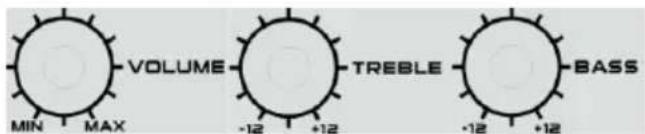
- Volume adjustment: Turn the main volume knob on the panel to increase or decrease the main output volume level. You can also adjust the volume in small steps by pressing the VOL +/- buttons on the remote control, but the maximum volume level adjusted by the remote control is limited by the main volume setting.
- Treble & bass adjustment: Turn the treble/bass knob on the panel to adjust the output sound level.
- Sound silence: Press the MUTE button on the remote control to mute the sound; press it again to resume the sound output.
- Preset EQ: Press the EQ button on the remote control to switch the EQ between Normal, Rock, POP, Classic, Jazz, News. (Function only available in USB/SD/FM and Bluetooth mode)
- Play/pause: Press the button to pause the music, and press it again to resume playback in Bluetooth/USB/SD mode.
- Repeat: Press the button to switch the music playback mode between repeat one, random, and repeat all.
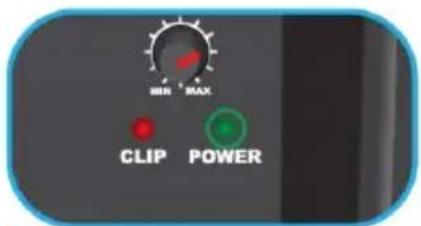
- Power and overload: The power LED indicator will light up when the power connection is successful. The clip red color LED will flash in case of overload and detection. This occurs to protect your speaker. Please reduce the volume level to prevent serious damage to the speaker. (Power clip indicator only available in PA series.)
FM radio operation
Before starting FM radio listening, please try to move the unit next to a window or other location for better FM reception. The unit has a built-in internal FM antenna.
- Auto scan and preset radio station (All-in-one): Short press the play/pause button on the control panel, or press the scan button on the remote control to auto scan and save the available radio stations. The unit will automatically play the first preset station after scanning is finished. (Max preset stations: 99)
- Preset station picking up: In radio mode, press the NEXT/PREVIOUS button on the control panel or remote control to pick up and play the last and next preset station; or key in the relative preset station number using the digit buttons on the remote control to quickly pick up the station.
3. Auto tune and fast go-to a specific FM station:
3-1. Press and hold the NEXT/PREVIOUS button for a few seconds on the control panel or remote control to auto tune to the available station in upward or downward frequency. The unit will stop and automatically play the available station.
3-2. Key in the relative frequency number using the digit buttons on the remote control to skip and play the specific defined FM station. For example, if you want to listen to the FM station at 89.8MHz, key in 8-9-8 on the remote control; the unit will jump and play the station at 89.80MHz frequency accordingly.
Important note: the voice of radio broadcasting station may get worse during battery charging due to interference, which is not a malfunction. You can try to remove the AC power connection, but using battery power for better listening.
USB/SD playback operation
The product includes USB/SD playback function, which can decode and playback the music from a USB/SD storage device.
Before starting the operation, please copy the MP3 format music into the device; and insert the device into the unit first, because the USB/SD mode is only available when the device is plugged into the unit successfully. Then the unit will detect and play the inside MP3 music automatically.
- Track selection: short press the NEXT/PREVIOUS button to select previous and next track; press and hold the button for fast-forwarding and rewinding the playing music. Press the digit buttons on the remote control to quickly select the corresponding track.
- In USB mode, you can achieve the play/pause, mute, repeat, EQ, treble/bass functions, etc. Please reference the operation from the general operation part of this manual.
Notes:
a. Connecting the USB stick via a USB extension cable for playback is not recommended, as it may produce noise or intermittent sound due to audio data loss during transfer.
b. Decoding and playing all MP3 format music is not guaranteed.
c. The maximum supported storage device is 32GB.
d. Some different devices and brands may take a little longer to start playback; please note that this is not a malfunction.
Bluetooth operation
This product includes Bluetooth function which can wirelessly playback music from other Bluetooth devices (like smartphones, tablets, etc.).
- Press the MODE button repeatedly to enter Bluetooth mode. A notice sound will come out from the speaker, which means the unit is ready to pair.
- Enable the Bluetooth function on your device, and search for available devices (please reference the device manual for operation). Then check the available Bluetooth devices on the list. Select "BP (PA/MB series model name)" for pairing.
- Another notice sound will come out from the speaker after the Bluetooth pairing is successful.
- Select and play the music from your Bluetooth device, then the sound will come out from the speaker.
- Press the previous/next button to select the last or next track during playback.
- In Bluetooth mode, you can achieve play/pause, mute, EQ, treble and bass adjustment, etc. functions. Please reference the operation from the general operation part of this manual.
Notices:
a. Not all Bluetooth devices are guaranteed to pair successfully due to different designs and brands.
b. The best working distance for Bluetooth is within 10 meters without any obstacles in between.
c. The unit can only pair and work with one Bluetooth device at a time.
d. In case of an incoming phone call during Bluetooth playback, the music will stop temporarily and resume after the call ends.
e. Please quit the current Bluetooth pairing before pairing with another device; otherwise, our model's pairing name will not appear on the device list.
Bluetooth TWS (True Wireless Stereo) Playing: The speaker includes a TWS function via Bluetooth. If you have two identical units on hand and switch to Bluetooth mode, for the first time playing, you need to choose one of the speakers as the master. Then long press (5 seconds) the play/pause button on the control panel to pair with the other speaker. There will be a prompt notice sound "right channel" coming from the master speaker, and "left channel" sound from the other speaker after pairing successfully. Then you can start the Bluetooth operation as usual. The sound will output from both speakers. When you power off or change the play mode, and switch back to Bluetooth mode, the two speakers can auto-pair with each other for TWS playing. At the first TWS pairing, there may be some "sa sa sa..." short noise from the speaker, which is not a malfunction. If you turn off the master speaker, the TWS playing will stop.
Line in/AUX IN/MP3 link operation
In order to wire connect and playback music with other players or amplifiers, please follow the steps below.
- Using the correct audio cable, connect the AUX IN jack (RCA or Cannon type) on the panel of the unit, and the other terminal connect with the line-out jack of an external player like MP3, CD, DVD, Mixer, etc. audio device. (Only model PA25 includes Cannon
type connector)
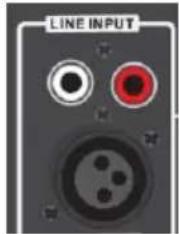
- Select the music and play on the external player, then the sound will output from the speaker.
- In line-in playback mode, the main control is on the external player side. But you can also control the volume, mute the sound, and adjust treble & bass on the speaker system.
Line out/Audio out
Using the correct audio cable, connect the line out jack (RCA or Cannon type) on the panel of the unit, and the other terminal connect with the AUX IN jack on another active speaker device. Then the sound will output both on the speaker and on the other speaker device. Please note that the main control is on our speaker side during line out playback mode. (This function is only available in PA series)
Speaker light
Press down the LED button below to turn on the LED light for the speaker; press it again to turn off the light. (Function only available on PA20LED/MB08.2/MB06.2)

Karaoke
The unit includes a microphone function that allows you to sing a song at home or at a music party. Connect a microphone into the microphone input jack using a 6.5 mm plug or Cannon type plug (our model includes a 6.5 mm wired microphone), and adjust the microphone output level properly by turning the volume control knob. Then you can start to sing.


Tips:
a. When using the microphone for Karaoke function, you can adjust the treble/bass/echo/delay settings by turning the relative knobs. b. There may be a big noise coming from the speaker when you adjust volume/treble/bass/echo to high levels due to overloading and distortion on the microphone. This is not a malfunction. So please turn and increase these settings slowly, and turn them back or turn off the microphone to retry in case of such big noise. c. There is a microphone priority function in our model. If you select it, the karaoke voice will output from the speaker in priority (without background music); and resume to background music output automatically after you finish singing. d. You can use the karaoke function and listen to the music at the same time; in case you need to increase the karaoke volume and decrease the background music, you can try to adjust the separate microphone volume and main volume knob. (Special to our model PA25, you need to increase or decrease the background music individually by adjusting the LEVEL knob which is located next to the Line-in jack). e. Please turn off the microphone when you put it next to the speaker, otherwise it will cause huge noise.
Battery power and charging
Our model has a built-in rechargeable battery which can play music outdoors without AC power connection. The unit will start to charge once the AC power connection is ready. The charging LED will be red during charging, and turn green when fully charged. In case of low battery power, the output music will be abnormal or have big distortion. Please arrange recharging for playing. (Model PA25 has no built-in battery)
There is also a DC 12V battery connection jack, which can connect and play with other external DC 12V battery power sources directly.
Note:
Your battery lifetime will last longer if you follow these simple guidelines for charging and storing.
a. For the first few charges, please charge the battery fully.
b. Recharge and store the unit within the temperature range of 5°C~35°C (40°F~95°F).
c. Do not charge longer than 24 hours. Excessive charging or discharging may shorten the battery's life.
d. Battery life naturally shortens slowly over time with use.
e. The speaker can play music during charging. Please turn off the speaker and remove the power plug if not used for a long time.
f. Due to prolonged charging and discharging, the unit's battery life will be affected and playback time will be shortened. We cannot guarantee consistent playback throughout, and this is not included in our warranty and service.
g. Charging time: approximately 5-9 hours; music playback time: around 3.5 hours.
Placement
The speaker has been designed for placing on the ground, a table, or a speaker tripod (only available in small size models under the PA series; tripod not included). Please avoid placing the unit in the corner of a room or facing a wall, as this may cause sound distortion due to low frequency increase.

Troubleshooting
- The speaker cannot turn on.
a. Please check if the power connection is correct and the main power switch is on.
b. Please recharge the battery if it is low.
- No sound output.
a. Check if the play source is correct and the audio cable connection status.
b. Please try adjusting the volume knob.
- Sound distortion.
a. Please try adjusting and playing the music at a lower volume level.
b. Check the status of treble/bass settings.
- Background noise on FM station.
a. Try moving the unit to another place for better reception.
b. Scan and switch to another station for listening.
Specifications
Power source: AC 110-240V, 50/60 Hz.
FM frequency: 87.5-108.0 MHz.
USB rating: 5V, 200mA, 2.0 versions, supported up to 32GB storage device.
Bluetooth: V5.0, within 10 meters for operation.
RMS output power: 35W for model PA10.
38W for model PA12.
42W for model PA15.
160W for model PA25.
35W for model MB06.
35W for model MB06.2.
40W for model MB08.2.
36W for model MB10.
2 x 38W for model PA20LED
Treble & bass adjustment: -12dB\~+12dB.
Built-in rechargeable lead-acid battery: Model PA10/PA12/PA15/PA20LED, MB06/MB06.2/MB08.2/MB10.
Power consumption: 50W (160W for Model: PA25).
Standby power consumption: <1W.
(The above spec may update without priority notice.)
Karaoke
Karaoke
Troubleshooting
160 W for model PA25.
35 W for model MB06.
35 W for model MB06.2
40W for model MB08.2.
36 W for model MB10.
2 x 38W for model PA20LED
IMPORTANT SAFETY INSTRUCTIONS
![graph TD A["Top Bottle"] --> B["Arrow to Container"] B --> C["Arrow to Box"] C --> D["Arrow to Bottle"]](/content/2026/05/930463/images/e7c735c7c89a705d2ec9c0ca414873f7aa2fe20f7fb72046536b1bfbda2a8f05.jpg)
Notes:
Karaoke
![graph LR A["MIC VOL"] --> B["MIC TRE"] B --> C["MCBASS"] C --> D["ECHO"] D --> E["Delay"] E --> F["MIC PRI"] style A fill:#f9f,stroke:#333 style B fill:#f9f,stroke:#333 style C fill:#f9f,stroke:#333 style D fill:#f9f,stroke:#333 style E fill:#f9f,stroke:#333 style F fill:#f9f,stroke:#333](/content/2026/05/930463/images/68ce18141d03ddc5973cc39edc32b5de1068da83a44c2d4acfd7262144a49e5b.jpg)
Recommendations:
2 x 38W for model PA20LED
Karaoke
2 x 38W for model PA20LED
IMPORTANT SAFETY INSTRUCTIONS



RISK OF ELECTRIC SHOCK DO NOT OPEN
Caution:
To reduce the risk of electric shock, do not remove the cover or the back of the device. There are no user-serviceable parts inside. Maintenance and repair should be performed only by qualified service personnel.
Explanation of graphical symbols:

The lightning flash with arrowhead symbol within an equilateral triangle alerts the user to the presence of uninsulated "dangerous voltage" within the device's enclosure that may be of sufficient magnitude to cause electric shock.

The exclamation point within an equilateral triangle alerts the user to important operating and maintenance instructions in the documentation accompanying the device.
Notes:
a. The distance between the remote control and the device that ensures optimal operation is 5 meters, with no obstacles between the remote control and the device being operated. When operating the remote control, point it at the remote sensor on the front of the device. b. The sensitivity of the remote control decreases when the battery is low. It must be replaced with new batteries to control the device. c. Remove the battery if the device is not used for an extended period. d. Dispose of the battery in an environmentally friendly manner. For details, refer to local regulations.
General operation
Karaoke
Tips:
2 x 38W for model PA20LED
Bass and treble control: -12 dB to +12 dB.
Built-in lead-carbon rechargeable battery: Models PA10/12/15/PA20LED, MB06//MB06.2/MB08.2/MB10.
Power consumption: 50W (160W for model PA25).
Standby power consumption < 1 W.
(The above specification may be updated without prior notice.)
IMPORTANT SAFETY INSTRUCTIONS

ELECTRIC SHOCK HAZARD DO NOT OPEN
Warning:
Karaoke
MB06/MB06.2/MB08.2/MB10.
MB06/MB06.2/MB08.2/MB10.
Notes:
Karaoke
Troubleshooting
For 2 x 38W model PA20LED
WARNING: DO NOT OPEN
Warning:
Karaoke
![graph LR A["MIC VOL"] --> B["MIC TRE"] B --> C["MCBASS"] C --> D["ECHO"] D --> E["Delay"] E --> F["MIC PRI"] style A fill:#f9f,stroke:#333 style B fill:#f9f,stroke:#333 style C fill:#f9f,stroke:#333 style D fill:#f9f,stroke:#333 style E fill:#f9f,stroke:#333 style F fill:#f9f,stroke:#333](/content/2026/05/930463/images/f7f103da86835395cd8dd854686a3ef13716cda937eba6adeadb87bb7238ffdb.jpg)
Tips:
For 2 x 38W model PA20LED
Karaoke
For 2 x 38W model PA20LED
Bass and treble adjustment: from -12 dB to +12 dB.
Built-in rechargeable lead-acid battery: Model PA10/12/15/PA20LED, MB06/MB06.2/MB08.2/MB10.
Power consumption: 50 W (160 W for model PA25).
For 2 × 38W model PA20LED.
02-801 Warsaw, Poland
phone: +48 22 331 99 59
e-mail: info@everpol.pl
www.blaupunkt.com
In case of questions or problems please contact our service.
Tel. 00 48 22 331 99 53
E-mail: info@blaupunkt-audio.pl
All rights reserved. All brand names are registered trademarks of their respective owners. Specifications are subject to change without prior notice.
Enjoy it.

- IMPORTANT SAFETY INSTRUCTIONS
- CAUTION
- EXPLANATION OF GRAPHICAL SYMBOLS
- IMPORTANT NOTES
- SAFETY INSTRUCTIONS
- ERP2 (ENERGY RELATED PRODUCTS) NOTE
- IMPORTANT NOTE
- WARNING
- NOTICE
- BLUETOOTH
- CONTROL PANEL
- REMOTE CONTROL
- POWER CONNECTION
- REMOTE CONTROL BATTERY INSTALLATION
- NOTES
- GENERAL OPERATION
- FM RADIO OPERATION
- AUTO TUNE AND FAST GO-TO A SPECIFIC FM STATION
- USB/SD PLAYBACK OPERATION
- BLUETOOTH OPERATION
- NOTICES
- LINE IN/AUX IN/MP3 LINK OPERATION
- LINE OUT/AUDIO OUT
- SPEAKER LIGHT
- KARAOKE
- TIPS
- BATTERY POWER AND CHARGING
- NOTE
- PLACEMENT
- TROUBLESHOOTING
- SPECIFICATIONS
- RECOMMENDATIONS
- RISK OF ELECTRIC SHOCK DO NOT OPEN
- ENJOY IT
Brand : BLAUPUNKT
Model : MB08.2
Category : Hi-Fi System