
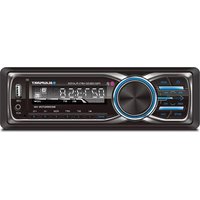
BB18 - Hi-Fi System BLAUPUNKT - Free user manual and instructions
Find the device manual for free BB18 BLAUPUNKT in PDF.


Pick your language and provide your email: we'll send you a specifically translated version.
| Brand | Blaupunkt |
| Model | BB18 |
| Product Type | Hi-Fi System |
| Audio Power Output | 2 x 20 W RMS |
| Disc Playback | CD, CD-R, CD-RW |
| Radio Tuner | FM with 30 presets |
| Connectivity | Bluetooth, USB, AUX-in |
| Power Supply | AC 230 V, 50 Hz |
| Power Consumption | 30 W |
| Dimensions (W x H x D) | 250 x 150 x 220 mm |
| Weight | 2.8 kg |
| Remote Control | Included |
| Display | LCD screen |
| Compatible Devices | Smartphones, tablets, MP3 players |
| Cleaning Instructions | Use a soft dry cloth |
| Safety Features | Overheat protection, anti-slip feet |
| Spare Parts Availability | Authorized service centers |
| Repairability | Modular components for easy access |
| Manual Language | English |
| Manual Pages | 84 |
Frequently Asked Questions - BB18 BLAUPUNKT
How do I connect my smartphone via Bluetooth?
Turn on the system and press the Bluetooth button. Activate Bluetooth on your smartphone and search for "BB18" in the available devices. Select it and your device will be paired.
Can I play USB drives with this system?
Yes, the BB18 features a USB port located on the front panel. Insert a USB drive containing MP3 or WMA files, then select the USB source. Use the remote control to navigate tracks.
How do I set the radio presets?
Tune to the desired station manually, then press and hold a preset number button (1-30) until the display confirms the preset. The station is now stored for quick radio tuning.
What should I do if the system does not power on?
Check that the power cord is properly connected and the wall outlet is working. Also verify that the standby indicator is lit. If the system still does not power on, contact an authorized service center.
How do I clean and maintain the Hi-Fi system?
Use a soft, dry microfiber cloth to clean the exterior. Avoid using volatile liquids that may damage the casing. For the disc compartment, do not attempt to clean the lens yourself; use a DVD lens cleaner if needed.
Can I use headphones with this unit?
The BB18 is equipped with a 3.5 mm headphone jack on the front panel. Plug in your headphones and the internal speakers will be muted.
What types of discs are compatible?
The system supports CD, CD-R, CD-RW discs. It can play audio CDs and MP3 files burned onto CD-RW. Do not use damaged or warped discs.
Is there an auxiliary input for non-Bluetooth devices?
Yes, a 3.5 mm AUX-in socket is available on the front panel. Use a 3.5 mm-to-3.5 mm cable to connect your MP3 player or other audio source.
How do I reset the system to factory settings?
Press and hold the Stop button for 5 seconds in standby mode to reset the system to factory settings. This clears presets and paired Bluetooth devices.
Are replacement parts available for the BB18?
Yes, spare parts are available from Blaupunkt authorized service centers. For repairability, the BB18 is designed with modular components that allow easy access and replacement.
User questions about BB18 BLAUPUNKT
0 question about this device. Answer the ones you know or ask your own.
Ask a new question about this device
No questions yet. Be the first to ask one.
Download the instructions for your Hi-Fi System in PDF format for free! Find your manual BB18 - BLAUPUNKT and take your electronic device back in hand. On this page are published all the documents necessary for the use of your device. BB18 by BLAUPUNKT.
USER MANUAL BB18 BLAUPUNKT


Manual assistant
Powered by Anthropic
Waiting for your message
Product information
Brand : BLAUPUNKT
Model : BB18
Category : Hi-Fi System