
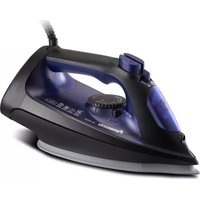
NI-GT500 - Iron PANASONIC - Free user manual and instructions
Find the device manual for free NI-GT500 PANASONIC in PDF.


| Product Type | Steam Generator Iron |
| Brand | Panasonic |
| Model | NI-GT500 |
| Dimensions (W x D x H) | Approx. 350 x 200 x 300 mm |
| Weight | Approx. 4.4 kg |
| Power Consumption | 2200 - 2400 W |
| Voltage | 220-240 V ~ 50-60 Hz |
| Water Tank Capacity | Approx. 1.8 L |
| Power Cord Length | Approx. 1.8 m |
| Steam Levels | Enhanced and Eco steam levels |
| Steam Boost | Yes, double press in enhanced mode |
| Automatic Shut-Off | After 10 minutes of inactivity or continuous dry ironing |
| Level Adjustment | Quick Care and Optimal Care settings |
| Soleplate Material | Stainless steel |
| Scale Inhibition Box | Built-in, lasts about 5 years |
| Descaling Indicator | Lights after 3100 minutes accumulative use |
| Water Shortage Indicator | Yes, with audible beeps |
| Heat-Insulation Pad | Integrated on power base |
| Cable Storage | Cable trough for corded hose and power cord |
| Usage | Household use only |
| Warranty Registration | Online at www.cs.com (Singapore/Vietnam) |
| Fabric Recommendations | Table for synthetics, wool, cotton, linen, etc. |
| Cleaning Method | Descaling via bottom knob; clean steam vents with toothpick |
Frequently Asked Questions - NI-GT500 PANASONIC
User questions about NI-GT500 PANASONIC
0 question about this device. Answer the ones you know or ask your own.
Ask a new question about this device
Download the instructions for your Iron in PDF format for free! Find your manual NI-GT500 - PANASONIC and take your electronic device back in hand. On this page are published all the documents necessary for the use of your device. NI-GT500 by PANASONIC.
USER MANUAL NI-GT500 PANASONIC
Operating Instructions
使用說明書
Arahan Penggunaan
Hương dan sư cụng
Warranty registration
The warranty can be registered online. Please visit the website by www.cs.com
Only Singapore - Only Vietnam


© Panasonic Corporation 2021
Website: http://www.panasonic.com
P0921-0
Printed in China
2015.7.14



Panasonic

Operating Instructions (Household Use Only) Steam Generator Iron

Model No. NI-GT500 NI-GT200
EN English 03-23
CN 繁體中文 25-42
MY Melayu 43-63
VN Tiếng Việt 65-85
TH ไทย 87-109
RU Русский 111-132
UK Українська 133-154
(KZ) Казакша 155-176
Contents
| Safety precautions | 04-09 |
| Parts identification | 10-12 |
| Operating Instructions for each part | 12-13 |
| How to use | 14-16 |
| After use | 17 |
| Cleaning | 17-19 |
| Specifications | 19 |
| Fabric and ironing recommendations | 20-21 |
| Troubleshooting | 22-23 |
Thank you for purchasing this Panasonic product.
Before operating this unit, please read these instructions completely and save them for future use.
H-C1502 series-CHEN 31702136D 14:34:22

03

Safety precautions
To reduce the risk of electric shock, injury, fire, loss of life, and damage to equipment or property, always observe the following safety precautions.
Explanation of symbols
The following symbols are used to classify and describe the level of hazard, injury, and property damage caused when the denolation is disregarded and improper use is performed.

WARNING
Denotes a potential hazard that could result in serious injury or death.

CAUTION
in minor injury or damage your belongings.
The following symbols are used to classify and describe the type of instructions to be observed.

This symbol is used to alert users to a specific operating procedure that must not be performed.

This symbol is used to alert users to a specific operating procedure that must be followed in order to operate the unit safely.

WARNING

Do not use when the power plug or power cord is damaged or hot.
Never use the product if the power plug fits loosely in a household outlet.
- Doing so may cause electric shock, or fire due to a short circuit.

Do not leave the product unattended while it is connected to the outlet.

Do not connect or disconnect the power plug to a household outlet or the power base with wet hands.

- Doing so may cause electric shock or injury.
Do not damage, modify, forcibly bend, pull, or twist the power cord.
Do not place anything heavy on or pinch the power cord.
- Doing so may cause electric shock or fire due to a short circuit.

Do not allow the power cord to touch hot surfaces of the iron.
- Doing so may cause electric shock or injury.


WARNING

Do not use with the power cord bundled.
- Doing so may cause electric shock or fire due to a short circuit.

Do not use the product with wet hands.
- Doing so may cause electric shock or fire due to a short circuit.

Never modify, disassemble, or repair the
product by yourself.
- Doing so may cause ignition or injury due to abnormal operation. Contact an authorized service agent for repair.

Do not use in proximity of flammable materials (such as benzine or the like).
- Doing so may cause an explosion or fire.

Do not wrap the power cord around the product for storage.
- Doing so may cause breakage to the wire of the power cord, and may cause electric shock or fire due to a short circuit.

Do not immerse the product in water or other liquids.
- Doing so may cause burns, electric shock or fire due to a short circuit.

The iron is not to be used if it has been dropped, and there are visible signs of damage or If It Is leaking.
- Refer servicing to authorized service personnel.

Do not use in a way exceeding the rating of the household outlet or the wiring. - Exceeding the rating by connecting too many
plugs to one household outlet may cause fire due to overheating.

Always ensure the product is operated on an electric power source matched to the rated
voltage Indicated on the product.
- Failure to do so may cause injury, electric shock or fire.

Regularly clean the power plug to prevent dust from accumulating.
- Disconnect the power plug and wipe with a dry cloth.

Independently use a household outlet, and do not use extension cord.
- Failure to do so may cause electric shock or fire.

This product must use the electrical outlet with earth connection.
- Failure to do so may cause fire or electric shock.


WARNING

This product is not intended for use by persons (including children) with reduced physical, sensory or mental capabilities, or lack of experience and knowledge, unless they have been given supervision or instruction concerning use of the product by a person responsible for their safety. Children should be supervised to ensure that they do not play with the product.
- Failure to do so may cause an accident or injury.

Immediately stop using and remove the power plug if there is an abnormality or malfunction. - Using it in such conditions may cause fire, electric shock, or injury.
• The power cord is damaged (like It cracks, or the core wire is exposed).
- The main body, power cord or power plug is abnormally hot, deformed or discolored.
- The product cannot power on occasionally after the power cord is moved.
- The power plug or power cord smells of burning.
- Immediately request inspection or repair at an authorized service center.
If the power cord is damaged, it must be replaced by the manufacturer, its service center, or similarly qualified persons in order to avoid a hazard.
Be sure to take out the water tank when adding water; be sure to install the water tank in place when installing it back to the power base.
- Failure to do so may cause electric shock.
The iron must be firmly rested on the power base, and the power base must be placed on a flat and stable surface. When this product is used as a horizontal steam iron, the iron must be used on a flat, stable surface.
- The iron may be scratched, or even injuries or scald may be caused if the iron falls over.
CAUTION
Do not insert pins or needles into the iron or use the product on clothes with sewing needles or the like inserted.
- Doing so may cause electric shock or injury.
Do not put the soleplate too close to you or others since steam may unexpectedly erupt from it.
- Doing so may cause scalds or injury.

CAUTION
Do not use the product with the exception of fabric.
- Failure to do so may cause damage it. Do not store the product until it has fully cooled down.
- Doing so may cause scalds.
Do not take out the water tank while you are using the product.
- Doing so may cause water leakage.
Do not store the product while the power cord is twisted.
- Doing so may cause breakage to the wire of the power cord, and may result in scalds, electric shock or fire due to a short circuit.
Do not add perfume, vinegar, starch, descaling agents, ironing aids or other chemicals in the water tank. Please only use room-temperature pure water or distilled water in this product.
- Otherwise the clothes may be stained or discolored.

Do not use any ironing accessories available on the market.
- Doing so may cause burns or damage to cloth due to incorrect operation.

Do not use the product near walls or furniture that cannot withstand high temperature or humidity.
- Doing so may damage the wall or furniture.

Do not move or lift the power base by pulling on the corded hose.
- Doing so may damage the corded hose, thus resulting in electric shock or fire.

Do not use steam when wearing gloves through which steam can penetrate. - Doing so may cause scalds.

Do not use the product with the corded hose compressed or clogged. - Otherwise the hot water may come out from the power base and thus damage the floors and carpels or result in scalds.

Do not use the product with the corded hose or power cord entangled. - Doing so may damage the corded hose, thus resulting in electric shock or a fire.
06
H-C1502 series-01 H, nrd 57001362D 14:34:22

07



CAUTION

Do not use steam while the iron is rested on the power base.
- Doing so may cause scalds.
Do not tilt or move the power base violently back and forth.
- Doing so may cause water leakage.
Do not touch the hot surface (such as the surface of the soleplate, any side of the iron, the corded hose, the heat-insulation pad and the hot area around it) during use.
- Doing so may cause scalds.
- Do not place your hands, feet, etc. under the
irching board.
• Do not place the iron on your hand, knee or any other part of the body.
• Do not use steam when the iron is partially slicking out from the ironing board.

Do not touch the steam during use. - Do not aim the steam towards your hand, knee, or any other part of the body.
- Do not iron clothes that you are wearing.

Do not place the power base sidelong.
- Doing so may cause water leakage, and then damage floors and carpets.

Do not put the iron on a carpet or the floor. - Doing so may damage the product, carpel or floor.

Make sure the product has fully cooled down before opening the bottom knob. - Failure to do so may cause scalds.

CAUTION
! Disconnect the power plug by holding the power plug instead of pulling the power cord.
- Failure to do so may break the power cord, and may cause burns, electric shock, or fire due to a short circuit.
Care should be taken when using the product. - Steam emission may cause burns.
Use the product only for its intended purpose, for ironing fabrics. - Failure to do so may cause injury.
When using with following fabric, test on an inconspicuous area, or place a cloth over the fabric to prevent the fabric from marking.
• Expensive or specially processed fabrics (velvet,
acrylic, nylon, cashmere, etc.
• Fabrics that are labeled as "low heat" or "medium
heal", or dark colored fabrics.
- Failure to do so may cause damage fabric.
- Expensive or specially processed fabrics (velvet, acrylic, nylon, cashmere, etc.) - Fabrics that are labeled as "low heat" or "medium heat", or dark colored fabrics. - Failure to do so may cause damage fabric.
Always unplug the power plug during filling, emptying, cleaning and not in use. - Failure to do so may cause electric shock or fire due to electrical leakage resulting from insulation deterioration.
When ironing wet clothes, please use dry ironing.
- Failure to do so may cause scalds due to hot water splashes from the main body.
Place the iron correctly as instructed after use. - Failure to do so may cause the product to fall over, thus resulting in injury or scalds.
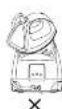
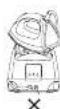


H-C1502

09

Parts identification
H-C1502 series-CHEN 730136D 14:34:24


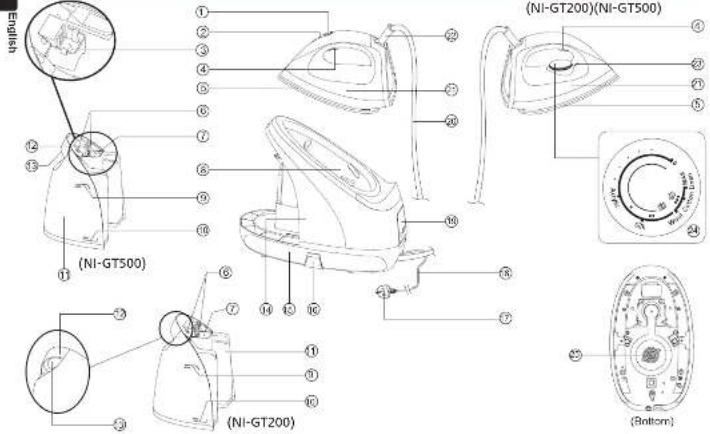
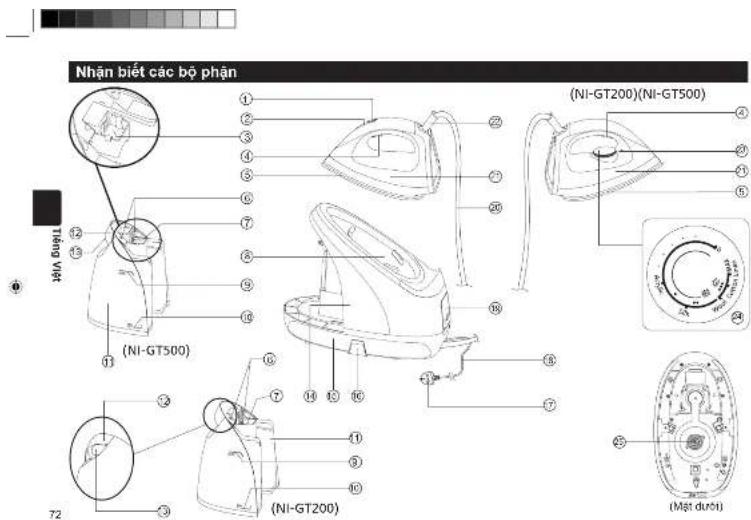
① Level adjustment button
(for NI-GT500 only)
② Level indicator
(for NI-GT500 only)
③ Scale inhibition box
(for NI-GT500 only)
④ Steam button
⑤ Solplate
⑥ Water outlet
① Water inlet ② Heat Ineviation pod
- Heat-insulation pad - MAX water level m
③ MAX WATER LEVEL MARK ④ MINI water level mark
① MIN WATER LEVEL MARK ② WATER BANK
① Water tank ② Water tank
© Water Bank
[Non-Text]
13 Water tank latch
19 Power base
⑮ Cable trough
16 Cable holder
37 Power plug®
③ Power cord
18 Control pane
C Corded hose
2) Iran
2 Power cord sheath
3 Thermostat Indicator Level
scale mark (for NL-GT7
(10) N1-G1200 only) Temperature selector
Temperature selector (for NI-GT300 only)
25 Koch
*Plug type may vary comply with respective country or region requirement.
⑱ Control panel

① Level adjustment button (for NI-GT500 only)
② Level indicator (for NI-GT500 only)

English
1110
• Level adjustment button (for NI-GT500 only)
Press the button to set the level according to materials of clothes (See the section "Fabric and ironing recommendations").
• Temperature selector (for NI-GT200 only)
Select an appropriate temperature level according to materials of clothes (See the section "Fabric and ironing recommendations").
+ Power button
Press the power button. The product will start working. At this time, the power indicator turns on in red.
To power off the product, press and hold the power
button for about three seconds to disconnect the power supply.
- Steam switching button
This product can switch between the enhanced steam level and the eco steam level through the steam switching button. Please select an appropriate steam level according to the thickness of clothes.
- Eco steam level: suitable for light clothes that need a little steam.
* Enhanced steam level: suitable for heavy clothes that need much steam.
The product starts with the eco steam level by default. Press the steam switching button to switch to your desired level. It takes about 3 minutes for the eco steam level indicator or enhanced steam level indicator to become steady on from flashing in the process from the start to the completion of preheating of the power base.
• Level indicator (for NI-GT500 only)
When the iron starts healing, the level indicator starts flashing. After the iron finishes heating, the level indicator becomes steady on. During ironing, the level indicator is always on. The quick care indicator turns on in red and the optimal care indicator turns on in blue.
• Thermostat indicator (for NI-GT200 only)
When the temperature selector is set above ^3 Acrylic level, the thermostat indicator will turn on when the iron starts heating and will turn off when the iron finishes heating. During ironing, the thermostat indicator will turn on and off to indicate that the iron is heating.
• Water shortage indicator
When the water level of the water tank drops below the "MIN" water level mark, the water shortage indicator will turn on and two beeps will be sounded to remind you of insufficient water of the water tank. In this case, disconnect the power supply, remove the water tank, inject water into the water tank through the water inlet and install the water tank back into the main body. Then the water shortage indicator will turn off and the product can start to work properly again.
- Scale inhibition box (for NI-GT500 only)
- When water is added into the water tank, the scale inhibitor in the scale inhibition box will be slowly dissolved into the
water to prevent scale accumulation and stabilize the steam. The service life of the scale inhibitor is about five years.
Conditions of use: Assumed that 250 ppm hard water is used and the product is used two or three times a week in average (about 20 minutes each time).
After each use, please drain residual water in the water tank to make the scale inhibitor more stable. Do not remove the scale inhibition box.
To replace the inhibition box, please send your product to an authorized service center.
- Descalling Indicator
- When the product has output steam for up to 100 minutes accumulatively (for NI-GT200 only)
When the product has been used for up to 3,100 minutes accumulatively (for NI-GT500 only)
The descaling indicator will turn on, indicating that accumulated scale and other impurities in the product need to be cleared. Please operate according to "Descaling" instructions in "Cleaning".
After descaling, restart the product and press the reset button. Then the descaling indicator will turn off and the product can work properly again.
• Cable trough
When the product is not in use, the corded hose and power cord can be stored in the cable trough.

How to use
First use
-
Remove the label on the product
-
Set the level adjustment button (for NI-GT500 only) / temperature selector (for NI-GT200 only) of iron by following the instructions for "Steam ironing", and then iron a wet cloth for a few minutes to clear the residue from the sole plate.
14
H-C1502
Notes:
a. When you use the product for the first time, you may smell an odor. The odor will disappear naturally after the product is used for several times. Please rest assured.
b. When the product is used for the first time, some particles may appear on the soleplate. This is normal. The particles are harmless and will disappear after a short period of time.
c. When the product is started, a sound may be heard, which is the sound of pumping by the water pump. This is normal.
d. During heating of the soleplate, a few drops of water may keep dripping out for about 3 seconds. This is normal.
e. After the first use, a small amount of condensate water may appear in the corded hose. When the product is used the next time, the condensate water will be ejected together with steam when steam is ejected from the soleplate, which will last several seconds. This is normal.
1. When removing the water tank from the power base, you will see some drops of water at the position where the water tank is installed on the power base. This is normal.
[NO TEXT]
Operating Instructions
This product has been designed for dry ironing and steam ironing.
- Dry ironing
- Place the iron on the heat-insulation pad of the power base.
-
Connect the power supply. Then a beep is sounded.
-
Press the power button. Then the power indicator turns on.
4.1ForNI-G1500 only.
Press the level adjustment button to set the level according to materials of clothes (See the section "Fabric and ironing recommendations"). The corresponding level indicator and the eco steam level indicator start flashing and the product starts heating. When the iron finishes heating, the level indicator will become steady on from flashing. This indicates that you can start dry ironing.
4.2ForNI-GT200 only
Turn the temperature selector to set the level according to materials of clothes (See the section "Fabric and ironing recommendations"). The thermostat indicator turns on, the eco steam level indicator starts flashing and the product starts heating. After the iron finishes heating, the thermostat indicator turns off. This indicates that you can start dry ironing.

• Steam ironing
- Place the power base on a stable surface.
- Take out the water tank and inject water through the water inlet. It is recommended to use purified water with less mineral content. The maximum capacity of the water tank is 1.8 L. Please make sure that the "MAX" water level mark is not exceeded. Then attach the water tank onto the power base correctly. Push it until a click sound is heard.
- Place the iron on the heat-insulation pad of the power base.
4.1 For NI-GT500 only:
(1) Connect the power supply and press the power button. The power indicator turns on. Press the level adjustment button to set the level according to materials of clothes (See the section "Fabric and ironing recommendations"). The corresponding level indicator and the eco steam level indicator start flashing and the product starts heating.
② Wait about 2 minutes until the level indicator becomes steady on from flashing, which indicates that the soleplate finishes heating. About 3 minutes later, the steam level indicator becomes steady on from flashing, which indicates that the power base finishes heating. Then, you can press the steam button to use steam for ironing. - Water may leak when the iron sprays steam at the beginning. Please press the steam level adjustment button to set the steam level to "QUICK CARE" or rest the iron on the power base for about 15 seconds.
15

English
4.2 For NI GT200 only
(1) Connect the power supply and press the power button. The power indicator turns on. Press the steam switching button to set the steam level and rotate the temperature selector to align the desired level with the thermostat indicator (See the section "Fabric and ironing recommendations"). The steam level indicator starts flashing and the thermostat indicator turns on.
② Wait about one minute until the thermostat indicator turns off, which indicates that the soleplate finishes heating. About three minutes later, the steam level indicator becomes steady on from flashing, which indicates that the power base finishes heating. Then, you can press the steam button to use steam for ironing. Do not press the steam button when the level set by the temperature selector is outside the steam area and the steam level indicator are still blinking. Otherwise, water may leak from the soleplate.
- Steam boost
When the enhanced steam level is set, if you press the steam button twice in one second, steam boost will be generated in a short time (about 2 seconds).
• Automatic shut-off
When the product is not operated within 10 minutes or the product uses only dry ironing continuously for 10 minutes, the product will be automatically powered off.
To restart the product, press the power button again.
16
HG150 series-01 EN rod 102023670 142435
Notes:
a. During use, a few drops of water and steam may be ejected from the soleplate at the same time. This is normal.
b. Do not touch the soleplate before it has fully cooled down.
c. Do not iron clothes that you are wearing
d. Do not allow the soleplate surface to get close to
yourself or others.
e. Do not use steam when the iron is rested on the power base in case of scalding.
- During use, a large amount of steam will be ejected when the steam button is first pressed and later the amount of steam will slowly decrease and tend to be flat. If a large amount of steam is needed, please put the iron back to the power base and heat it for about 15 seconds.
[NO TEXT]

After use
-
After ironing, place the iron on the heat-insulation pad correctly, and then press and hold the power button for about two seconds. When the product shuts down and all indicators turn off, remove the power plug.
-
Take out the water tank and pour out the remaining water.
- Install the water tank back to the power base and clean residual water from where the water tank is installed.
- Store the product in a safe place.
Cleaning
Notes:
a. After use, remove the power plug and leave the product to cool down for more than 60 minutes before any cleaning or maintenance.
b. Never use such cleaning products as the thinner, cleanser and volatile solvent to wash the product. Otherwise, the product may be damaged.
• Cleaning the main body
For stubborn stains, use a soft cloth dipped with neutral detergent to clean the surface of the main body.
- Cleaning the soleplate surface If glue or the like sticks to the soleplate surface, wipe it with a wet cloth.
- Cleaning steam vents
If scale appears on steam vents, remove the scale with a wooden or bamboo toothpick and then wipe the soleplate with a wet cloth.
- Descalling(Please perform the operation in a place convenient for drainage)
*ForNI-GT200 only: When the product has output steam for up to 100 minutes accumulatively.
*ForNI-GT500 only: When the product has been used for up to 3,100 minutes accumulatively.
The descaling indicator will turn on.
indicating that accumulated scale and other impurities in the product need to be cleared. Descaling indicator Please follow the steps below for descaling:
-
Disconnect the power supply and wait (for more than 60 minutes) until the product has fully cooled down.
-
Take out the water tank.


17

English
- Turn over the power base, place it horizontally on a stable surface and make sure that the power base is placed stably. Then rotate the bottom knob counterclockwise to remove the knob.
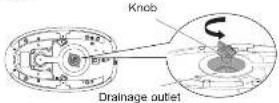
Note: Scalds may be caused. Make sure the product is completely cooled before opening.
The knob shall not be opened during use.
- Turn over the power base and shake it horizontally several times to pour out the scale and impurities in the boiler inside the product.
- Add an appropriate amount of water to the drainage outlet on the bottom of the power base and shake the power base horizontally several times.
- Turn over the power base, and pour out the scale and impurities in the main body.
Repeat the cleaning process until all the scale and impurities in the main body are poured out. This can prevent reduction of the amount of steam caused by increase of scale.
18
N-C1502 series-01 EN rod 11 2023670 14:24:28
- After pouring out all the scale and impurities, tighten the knob, restart the product and press the "RESET" button. Then the product can work properly.
Note: Before tightening the
knob, make sure that
the sealing rubber ring cannot be dislodged.

rubber ring
- Wind and place the corded hose and power cord in the

Storage of the
corded hose
Storage of the power cord
• Cleaning frequency:
After the descaling indicator lights up
Note: Depending on the using region and water quality, the
product may need to be best-case multiple times.


Notes:
• Steam output may be significantly decreased before
the descaling indicator turns on, depending on the
using region or the composition of the used tap water.
Therefore, Cleaning is recom- descriptive indicators turn on
- If steam output is significantly decreased after
cleaning, the scale inhibitor may be used up soon.
Please contact the after-sales service personnel for
replacement of parts.
+ In addition to the reduced effect of the descaling agent,
the shortened service life of the product may also result
in decreased steam output
- When the product will not be in use for a long period of
time: • For NL-GT300 only: Drain water in the water tank and
For RT 2.125 only, 2.125 water in the water tank and rotate the temperature selector to set the product to the
'Silk' steam level
*For NI-GT500 only. Drain water in the water tank and
press the level adjustment button to set the product to the
optimal care steam level
Specifications
| Model | NI-GT500 N-GT200 | |
| Rated voltage | 220-240 V ~ 50-60 Hz | |
| Power consumption 2 | 200-2 400 W | |
| Weight Approx. 4.4 kg | Approx. 4.3 kg | |
| Dimensions (assembly) | (W x D x H) Approx. 350 x 200 x 300 mm | |
| Power plug/Cord length | Single-phase 5-pole plug/ Approx. 1.8 m | |
| Water tank capacity Approx. 1.8 L | ||
This product is intended for household use only.
English
19


Fabric and ironing recommendations
English
- Do not use the product on leather products.
• To iron heat-sensitive materials or dark-colored fabrics, test on a small corner of the fabric before ironing the entire garment to avoid
damages. - Keep the soleplate slightly away from the clothes when ironing clothes labeled "Use press cloth" or "Cool iron".
- Iron the clothes labeled "No steam" in the dry ironing mode.
• To iron blended yam fabrics, select the level according to the material requiring the lowest heat setting.
• To iron clothes without a fabric care label, select the level by referring to the following table.
| Fabric | For NI-GT500 only For NI-GT200 only | ||||||||||
| Ironing method Level Ironing method Level | |||||||||||
| Soleplate against | Soleplate slightly away | QUICK CARE | OPTIMAL CARE | Soleplate against | Soleplate slightly away | Acrylic Silk Wool | Collum | Linen | |||
| Acrylic Acetate Nylon Silk | ○ | ○ | × | ○ | ○ | ○ | ○ | ○ | × | × | × |
| Wool Cashmere | ○ | ||||||||||
| Rayon (Chiflon) Polyester | ○ Dry ironing only | ○ | × | ○ | ○ Dry ironing only | ○ | ○ | ○ | ○ | × | × |
| Cotton Linen | ○ | ○ | ○ | ○ | ○ | ○ | ○ | ○ | ○ | ○ | ○ |
2D
HG150 series-01 H, nrd 12/02/3620 14:24:27
Fabric and ironing recommendations
| Fabric Tips | |
| Acrylic Acetate Nylon Silk | • When pressing the soleplate slightly sway the garment, keep the soleplate about 1 cm away from the garment. • Iron the fluffy garment inside out to help them retain their shape. |
| Wool | |
| Cashmere | |
| Rayon (Chiffon) Polyester | • When pressing the soleplate against the garment, place a cloth over the fabric and iron the garment by sliding the iron quickly in the dry ironing mode. • Ironing rayon clothes for a long time may cause shrinkage of clothes. |
| Cotton | • Slowly move the soleplate while ironing. If may be hard to remove the wrinkle if the movement is too quick. |
| Linen | |
English
21

| Troubleshooting | ||
| Problem Causes Solution | ||
| The product produces no steam or irregular steam. | The power plug is not inserted. the power button is not pressed. | Connect the power plug, press the power button to lighten the power indicator, and press the steam button. |
| There is no or insufficient water in the water tank. | Add water again to above the 'MIN' mark. | |
| The product is not fully heated. | Wait until the temperature indicator is steady on before use. | |
| The corded hose is bent and thus the steam cannot smoothly run through it. | Ensure that the corded hose is not bent. | |
| The circuit fails or the fuse is burned out. | Send your product to an authorized service center for repair. | |
| Water leaks out from the power base. | The water tank is not installed correctly onto the power base. | Attach the water tank onto the power base correctly. |
| The bottom knob is not tightened. Tighten the bottom knob. | ||
| The water tank is broken. | Have the water tank replaced by an authorized service center. | |
| The inner pipe is loose or damaged. | Send your product to an authorized service center for repair. | |
| A lot of water chips from the soleplate (for NI-GT200 only) | The temperature selector is not set to the steam level. | Set the temperature selector to the 'Wool' level or above. |
| The quick care indicator and the optimal care indicator are flashing at the same time. | Press the power button to restart the product. | |
22
H-C1502 series-07 H. nrd 13
The image is too blurry to recognize any text content.

| Troubleshooting | |
| Problem Causes Solution | |
| The quick cars indicator and the optimal cars indicator are flashing alternately.No steam is generated after the steam button is pressed.Unexpected steam is output when no operation is performed.The temperature cannot be changed.The amount of steam cannot be changed.The product is powered off abnormality. ▶The problem persists even after you have followed the above solutions. ▶Steam keeps coming out from the bottom of the power base. ▶A lot of water leaks from the soleplate.The descaling indicator cannot be turned off. | External abnormal electromagnetic noise causes interference. |
中
23
2021.6.29 16:34:27


Panasonic
使用說明書
(何家宝座使用) 压力式蒸氣電裂斗
型航 NI-GT500
NI-GT200

日文
NHC1502 series-07 CN info: 6
m = 311
m = 311
-
×
封
家
广力云智慧零售收银系统
[Non-Text]
[Non-Text]
[Non-Text]
[Non-Text]
[Non-Text]
[Non-Text]
[Non-Text]
[Non-Text]
[Non-Text]
[Non-Text]
[Non-Text]
[Non-Text]
[Non-Text]
[Non-Text]
[Non-Text]
[Non-Text]
[Non-Text]
[Non-Text]
[Non-Text]
[Non-Text]
[Non-Text]
[Non-Text]
[Non-Text]
No. Model NI-GT500 NI-GT200
Kandungan
| Langkah peringatan | 44.49 |
| Pengenalpastan bahan | 50.52 |
| Arahan pengendalian bagi setap bahaglan | 52.53 |
| Cara penggunaan | 54.56 |
| Selecas penggunaan | 57 |
| Penecujan | 57.59 |
| Speelikasi | 59 |
| Cadangan fabrik dan penyeterlikaan | 50.61 |
| Penyelesalan Masalah | 52.63 |
MY Mclayu
Dicetak di China
③ Tanisa para as all MAX ④ Tania seres os ir "MIN"
① Tanis parts all MIN ② Topak sir
N-C1502 series-03 NV incl 10.70918670 14:31/21
Nota:
N-C150C series-01 NY intr 12/02/16/0 14:38:23
The image is too blurry to recognize any text content.

H-C1502 series-01 5th, nrd 27001369 14:38:07
中
65

N-C1502 series-04 9th, nrd 37021363D 14:38:07

67
The following table is in English:
- หาก provides forward expansion of the first generation of the first generation of the first generation of the first generation of the first generation of the first generation of the first generation of the first generation of the first generation of the first generation of the first generation of the first generation of the first generation of the first generation of the first generation of the first generation of the first generation of the first generation of the first generation of the first generation of the first generation of the first generation of the first generation of the first generation of the first generation of the first
- โอน้ําคิด Transport Operations Management Process Management Process Management Process Management Process Management Process Management Process Management Process Management Process Management Process Management Process Management Process Management Process Management Process Management Process Management Process Management Process Management Process Management Process Management Process Management Process Management Process Management Process Management Process Management Process Management Process Management Process Management Process Management Process Management Process Management Process Management Process Management Process Management Process Management Process Management Process Management Process Management Process Management Process Management Process Management Process Management Process Management Process Management Process Management Process Management Process Management Process Management Process Management Process Management Process Management Process Management Product Maintenance and Maintenance, Equipment Maintenance and Maintenance, Equipment Maintenance and Maintenance, Equipment Maintenance and Maintenance, Equipment Maintenance and Maintenance, Equipment Maintenance and Maintenance, Equipment Maintenance and Maintenance, Equipment Maintenance and Maintenance, Equipment Maintenance and Maintenance, Equipment Maintenance and Maintenance, Equipment Maintenance and Maintenance, Equipment Maintenance and Maintenance, Equipment Maintenance and Maintenance, Equipment Maintenance and Maintenance, Equipment Maintenance and Maintenance, Equipment Maintenance and Maintenance, Equipment Maintenance and Maintenance, Equipment Maintenance and Maintenance, Equipment Maintenance and Maintenance, Equipment Maintenance and Maintenance, Equipment Maintenance and Maintenance, equipment maintenance maintenance maintenance maintenance maintenance maintenance maintenance maintenance maintenance maintenance maintenance maintenance maintenance maintenance maintenance maintenance maintenance maintenance maintenance maintenance maintenance maintenance maintenance maintenance maintenance maintenance maintenance maintenance maintenance maintenance maintenance maintenance maintenance maintenance maintenance maintenance maintenance maintenance maintenance maintenance maintenance maintenance maintenance maintenance maintenance maintenance maintenance maintenance maintenance maintenance maintenance maintenance maintenance maintenance maintenance maintenance maintenance maintenance maintenance maintenance maintenance maintenance maintenance maintenance maintenance maintenance maintenance maintenance maintenance maintenance maintenance maintenance maintenance maintenance maintenance maintenance maintenance maintenance maintenance maintenance maintenance maintenance maintenance maintenance maintenance maintenance maintenance maintenance maintenance maintenance maintenance maintenance maintenance maintenance maintenance maintenance maintenance maintenance maintenance maintenanceMaintenance management management management management management management management management management management management management management management management management management management management management management management management management management management management management management management management management management management management management management management management management management management management management management management management management management management management management management management management management management management management management management management management management management management management management management management management management management management management management management management management management management management management management management management management management management management management management management management management management management management management managementManagement, 2017.
- หาบริมาณไอน้ําที่ปีเมื่อออกหมายตั้งของจําเนาการตั้งห้าความสะอาด สารป้องกับและกรัน substanceหนดในเข้า โปรติดต่อเจ้า ห้าที่บริหารหลังการขายเพื่อปริยบขึ้นส่วน
- constructed materials that are used to create a new material with the following:
| บัญหา สนิทว์ วิชาปัญหา | ||
| [IMAGE] | คัญญาแบบ frameworksเพลิงคําให้ทําเรียนการที่ได้บริหาร ชื่อว่า 2017 10.14.15.16.17.18.19.20.21.22.23.24.25.26.27.28.29.30.31.32.33.34.35.36.37.38.39.40.41.42.43.44.45.46.47.48.49.50.51.52.53.54.55.56.57.58.59.60.61.62.63.64.65.66.67.68.69.70.71.72.73.74.75.76.77.78.79.80.81.82.83.84.85.86.87.88.89.90.91.92.93.94.95.96.97.98.99.100.101.102.103.104.105.106.107.108.109.110.111.112.113.114.115.116.117.118.119.120.121.122.123.124.125.126.127.128.129.130.131.132.133.134.135.136.137.138.139.140.141.142.143.144.145.146.147.148.149.150.151.152.153.154.155.156.157.158.159.160.161.162.163.164.165.166.167.168.169.170.171.172.173.174.175.176.177.178.179.180.181.182.183.184.185.186.187.188.189.190.191.192.193.194.195.196.197.198.199.200.201.202.203.204.205.206.207.208.209.210.211.212.213.214.215.216.217.218.219.220.221.222.223.224.225.226.227.228.229.230.231.232.233.234.235.236.237.238.239.240.241.242.243.244.245.246.247.248.249.250.251.252.253.254.255.256.257.258.259.260.261.262.263.264.265.266.267.268.269.270.271.272.273.274.275.276.277.278.279.280.281.282.283.284.285.286.287.288.289.290.291.292.293.294.295.296.297.298.299.300.301.302.303.304.305.306.307.308.309.310.311.312.313.314.315.316.317.318.319.320.321.322.323.324.325.326.327.328.329.330.331.332.333.334.335.336.337.338.339.340.341.342.343.344.345.346.347.348.349.350.351.352.353.354.355.356.357.358.359.360.361.362.363.364.365.366.367.368.369.370.371.372.373.374.375.376.377.378.379.380.381.382.383.384.385.386.387.388.389.390.391.392.393.394.395.396.397.398.399.400.401.402.403.404.405.406.407.408.409.410.411.412.413.414.415.416.417.418.419.420.421.422.423.424.425.426.427.428.429.430.431.432.433.434.435.436.437.438.439.440.441.442.443.444.445.446.447.448.449.450.451.452.453.454.455.456.457.458.459.460.461.462.463.464.465.466.467.468.469.470.471.472.473.474.475.476.477.478.479.480.481.482.483.484.485.486.487.488.489.490.491.492.493.494.495.496.497.498.499.500.501.502.503.504.505.506.507.508.509.510.511.512.513.514.515.516.517.518.519.520.521.522.523.524.525.526.527.528.529.530.531.532.533.534.535.536.537.538.539.540.541.542.543.544.545.546.547.548.549.550.551.552.553.554.555.556.557.558.559.560.561.562.563.564.565.566.567.568.569.570.571.572.573.574.575.576.577.578.579.580.581.582.583.584.585.586.587.588.589.590.591.592.593.594.595.596.597.598.599.600.601.602.603.604.605.606.607.608.609.610.611.612.613.614.615.616.617.618.619.620.621.622.623.624.625.626.627.628.629.630.631.632.633.634.635.636.637.638.639.640.641.642.643.644.645.646.647.648.649.650.651.652.653.654.655.656.657.658.659.660.661.662.663.664.665.666.667.668.669.670.671.672.673.674.675.676.677.678.679.680.681.682.683.684.685.686.687.688.689.690.691.692.693.694.695.696.697.698.699.700.701.702.703.704.705.706.707.708.709.710.711.712.713.714.715.716.717.718.719.720.721.722.723.724.725.726.727.728.729.730.731.732.733.734.735.736.737.738.739.740.741.742.743.744.745.746.747.748.749.750.751.752.753.754.755.756.757.758.759.760.761.762.763.764.765.766.767.768.769.770.771.772.773.774.775.776.777.778.779.780.781.782.783.784.785.786.787.788.789.790.791.792.793.794.795.796.797.798.799.800.801.802.803.804.805.806.807.808.809.810.811.812.813.814.815.816.817.818.819.820.821.822.823.824.825.826.827.828.829.830.831.832.833.834.835.836.837.838.839.840.841.842.843.844.845.846.847.848.849.850.851.852.853.854.855.856.857.858.859.860.861.862.863.864.865.866.867.868.869.870.871.872.873.874.875.876.877.878.879.880.881.882.883.884.885.886.887.888.889.890.891.892.893.894.895.896.897.898.899.900.901.902.903.904.905.906.907.908.909.910.911.912.913.914.915.916.917.918.919.920.921.922.923.924.925.926.927.928.929.930.931.932.933.934.935.936.937.938.939.940.941.942.943.944.945.946.947.948.949.950.951.952.953.954.955.956.957.958.959.960.961.962.963.964.965.966.967.968.969.970.971.972.973.974.975.976.977.978.979.980.981.982.983.984.985.986.987.988.989.990.991.992.993.994.995.996.997.998.999.1000 | |
N-C1502

107106


H-C1502


Panasonic
- RESELLING, INC. (2014) 35% OF U.S. FINANCIAL ANDERATE
Ynrinep: NI GT500*, NI GT200*, "Panasonic"
H-C150C series-N ALC mill K

2013.7.14:18

• الكى بالخار
The following table provides the information in English:
The following table is provided in the image. The text 'in' is not clearly legible and should be ignored according to Rule 4 (Edge Noise Strategy). Therefore, no text should be output.
[1]
(1) 15.4% (2) 16.5% (3) 17.6% (4) 18.7% (5) 19.8% (6) 20.9% (7) 21.0% (8) 22.1% (9) 23.2% (10) 24.3% (11) 25.4% (12) 26.5% (13) 27.6% (14) 28.7% (15) 29.8% (16) 30.9% (17) 31.0% (18) 32.1% (19) 33.2% (20)
i.e. is a very high NII-GT500 which is very similar?
N-C1502 series-24 N3, nrd 7

HOLD 16:44:18


N-C150C series-2 N AC nm 9 202136D 14:44:17





الهندويItem Anstek Istk Ibi Chyok Msh Khyokli, and Tsob Hrqi
The image is too blurry to recognize any text content.




H-C1502 series-N AF-rem 10
أَنْبِهِ
N-C150C series-N,N, nrd 13762.3670 14:40:19
- Panasonic
- Safety precautions
- Explanation of symbols
- WARNING
- CAUTION
- How to use
- Notes:
- Operating Instructions
- - Dry ironing
- 4.1ForNI-G1500 only.
- 4.2ForNI-GT200 only
- • Steam ironing
- English
- For NI GT200 only
- - Steam boost
- • Automatic shut-off
- After use
- Cleaning
- • Cleaning the main body
- - Cleaning steam vents
- Fabric and ironing recommendations
- 2D
- ب (%)
- 1
- 2
- 3
- 4
- 5
- 6
- 7
- 8
- 9
- 10
- 11
- 12
- 13
- 14
- 15
- 16
- 17
- 18
- 19
- 20
- 21
- 22
- 23
- 24
- 25
- 26
- 27
- 28
- 29
- 30
- 31
- 32
- 33
- 34
- 35
- 36
- 37
- 38
- 39
- 40
- 41
- 42
- 43
- 44
- 45
- 46
- 47
- 48
- 49
- 50
- 51
- 52
- 53
- 54
- 55
- 56
- 57
- 58
- 59
- 60
- 61
- 62
- 63
- 64
- 65
- 66
- 67
- 68
- 69
- 70
- 71
- 72
- 73
- 74
- 75
- 76
- 77
- 78
- 79
- 80
- 81
- 82
- 83
- 84
- 85
- 86
- 87
- 88
- 89
- 90
- 91
- 92
- 93
- 94
- 95
- 96
- 97
- 98
- 99
Brand : PANASONIC
Model : NI-GT500
Category : Iron