
002-774 - Loudspeaker Marquant - Free user manual and instructions
Find the device manual for free 002-774 Marquant in PDF.


| Product Type | Wireless Speaker |
| Brand | Marquant |
| Model | 002-774 |
| Dimensions (W x H x D) | 200 x 50 x 65 mm |
| Weight | 742 g |
| Power Supply | AC 250 V, 50 Hz |
| Transformer Output | 5 V DC |
| Battery Capacity | 2200 mAh, 7.4 V |
| Battery Runtime | 6 hours |
| Charging Time | 4 hours |
| Bluetooth Version | 4.2 |
| Speaker Output | 40 W (20 W RMS) |
| Signal-to-Noise Ratio | >75 dB |
| Connections | Bluetooth, 3.5 mm AUX, micro USB |
| Functions | Volume +/-, Play/Pause, Answer calls, Mode switch, Reset, Microphone |
| Pairing Name | C01 |
| Pairing Code | 0000 |
| Safety | Indoor use only; avoid moisture, heat, and direct sunlight |
| Cleaning | Soft, dry cloth |
| Repair | Qualified personnel only |
Frequently Asked Questions - 002-774 Marquant
User questions about 002-774 Marquant
0 question about this device. Answer the ones you know or ask your own.
Ask a new question about this device
Download the instructions for your Loudspeaker in PDF format for free! Find your manual 002-774 - Marquant and take your electronic device back in hand. On this page are published all the documents necessary for the use of your device. 002-774 by Marquant.
USER MANUAL 002-774 Marquant
natural_image
Black rectangular electronic device with a circular logo on top (no visible text or symbols)
SE BLUETOOTH-HÖGTALARE
Care for the environment!
Must be discarded with household waste. This
product contains electrical in electronic components that
should be recycled. Leave the product for recycling at the
designated station e.c. the local authority's recycle platform.
..ula reserves the right to make changes. In the event of
problems, please contact our service department.
www.jnlal.com

Tilverkare/ Produsert/ Produzendi/ Manufacturer
Julia AB, Box 163, 512-24 SKARA
Distribuior/ Distribuior/ Oysirpludan/ Distribuir
Jula Pelanc Sp. 2010, u
Walborska 41, 08-28: Warsawa, Polska
Jula Marge 75, so hemserien 6–8.
147112K-RSKDJ.

EC DECLARATION OF CONFORMITY
EG FÖRSÄKRAN OM ÖVERENSSTÄMMELSE
EF SAMSVARSERKLÆRING
DEKLARACJA ZGODNOSCI WE

Jula AB, Box 363, SE-532 24 SKARA, SWEDEN
certify that the design and manufacturing of this product
WIRELESS SPEAKER / TRADLÖS HÖGTALARE
TRÁDŁÓS HÓYTTALERE / BEZPRZ. GŁOŚNIKI
40W Aluminium
Item number / Artikelnummer / Artikelnummer / Numer artykułu
002-774
RoHS Directive 2011/65/EU
EN 50581:2012
This product was CE marked in year -17
Skara
2017-07-05

MATTIAS LIF
BUSINESS AREA MANAGER

SÄKERHETSANVISNINGAR
- Follow the instructions to avoid electric shock, fire and/or serious personal injury.
- Only use the appliance indoors.
- Check that the mains voltage matches the rated voltage on the type plate before connecting the appliance to the mains.
- Connect the appliance by following these instructions.
- Handle the appliance with care, and do not expose it to knocks or blows.
- Pull out the plug during thunder storms and when the appliance is not going to be used for some time.
• The appliance must only be repaired by qualified personnel. - Keep the power cord out of the way so that it cannot be walked over or clenched.
put safety at risk and will invalidate the warranty.
- Do not remove the casing from the unit.
- Leave at least a few centimetres of free space around the appliance for ventilation.
- Do not expose the appliance to moisture or liquids.
- Do not place the appliance in direct sunlight or near other equipment that emits heat.
- Do not put the appliance over any other electrical equipment.
- Do not put any potentially dangerous objects on the unit, e.g. flower vase or candle.
- Do not put watches, credit cards or other similar items on the appliance because the magnet field in the speakers can affect such products.
- Clean the product with a soft, dry cloth.
Approved as per applicable directives.
Recycle discarded product in accordance with local regulations.
TECHNICAL DATA
| Mains voltage 250 V = 50 Hz | |
| Transformer 5 V DC | |
| Speaker output 40 W (20 W RMS) | |
| Battery capacity 2200 mAh/7.4 V | |
| Runtime 6 h | |
| Charging time 4 h | |
| Connections Bluetooth 4.2 | |
| 3.5 mm AUX | |
| micro USB | |
| Signal/noise ratio >75 dB | |
| Dimensions 200 x 50 x 65 mm | |
| Weight 742 g |
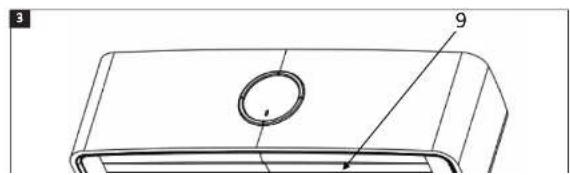
DESCRIPTION
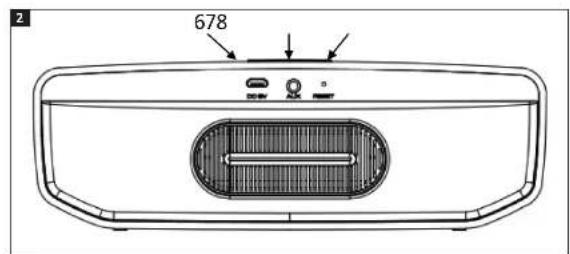
- Volume -
- Volume +
- Play/Pause, answer coll, switch mode
- Function indicator
- Power switch
- Micro USB input
- 3.5 mm AUX input
- Reset
- Microphone
FIG. 1
FIG. 2
USE
Pairing
- Place the speaker near a unit with activated Bluecloth.
- Press the power switch to start the speaker. One red and one blue status light flash alternately. The speaker is now in pairing mode.
- Follow the instructions on the unit to search for the speaker.
- The speaker is called C01, enter PIN code 0000 if necessary.
- The blue status light goes on when the pairing is finished, and an audio prompt is given. The speaker connects automatically to the last paired unit during the first 3 seconds after starting. If it is not possible to connect to the unit the speaker switches automatically to pairing mode.
NOTE:
The pairing time varies between different mobile phones. The speaker only needs to be paired with the unit the first time. It will then automatically connect to units it has been paired with. (The speak can only remember the last 8 units.)
AUX input
The speaker has an AUX input and can easily be connected to units without Bluetooth with a 3.5 mm audio cable. The green status light goes on when a cable is connected for playback.
NOTE:
If the audio cable is connected when the
sneaker is in Bluetooth mode it will switch.
Charging the battery
NOTE:
The speaker battery should be charged at least
2 hours before being used for the first time.
- Put the USB cable in the USB port on the speaker, and put the other end in the USB port on the adapter (void separate).
- The red status light goes on when the speaker is charging.
- When the battery is fully charged the status light goes off.
NOTE:
- An audio prompt signals a low battery level and the red status light flashes. This means only 10% of the battery capacity is left. The battery needs to be charged as soon as possible.
- Switch off the speaker when not in use to prevent the battery discharging.
Functions
Power switch
Press POWER to switch the speaker on or off.
VOL
- Press to lower the volume.
- Tap to go to previous track.
VOL+
- Press to increase the volume
- Tap to go to next track.
- With connection with audio cable, press to switch to Bluetooth.
Function indicator
| Red Charging | |
| Red/blue flashing pairing mode | |
| Blue Connected | |
| Blue Cable connection | |
Micro USB
Use a USB port on a computer or mains adapter with USB connection.
3.5 mm AUX input
Used for connection of playback source via audio cable.
RESET
Resets speaker functions.
Microphone
Microphone to talk in telephone via the speaker.
TROUBLESHOOTING
| Problem Action | |
| Mobile phone cannot find new Bluetooth unit. Check that the speaker is in pairing mode. | |
| Make sure the speaker is within reception range. | |
| Will not pair with Bluetooth units. Check that the mobile phone permits new connections, and that the maximum number of permitted connections has not been reached; see mobile phone instructions. | |
| Check password: "0000". If a transmission unit with Bluetooth is used, check that it supports password 0000. | |
| The speaker does not play music and cannot answer calls when connected to a Bluetooth mobile. | Check that the mobile phone has Bluetooth and support for A2DP and HSF (handsfree). |
| Make sure the mobile phone is within the reception area. | |
| When the speaker is paired with My computer Windows asks for new drive routine. Can you send a drive routine? | We cannot send a drive routine. The Bluetooth drive routines A2DP/HSF can request to play stereo sound via the Bluetooth connection. But the drive routine is needed for the Bluetooth module on the computer and not for the speaker. Different Bluetooth module can require different drive routines. Contact the computer manufacturer or the manufacturer of the Bluetooth module to update the drive routine. |
| Why can I not remotely control the speaker, e.g. pause, play, go to previous track during playback? | When the 3.5 mm AUX input is used the speaker cannot be controlled with the buttons on the speaker. |
| For this function to work the Bluetooth unit paired with the speaker needs to have support for AVRCP (Audio/video Remote Control Profile). Check that your Bluetooth unit (mobile phone or other) has support for AVRCP. | |
Brand : Marquant
Model : 002-774
Category : Loudspeaker