
920-542 - Loudspeaker Marquant - Free user manual and instructions
Find the device manual for free 920-542 Marquant in PDF.


| Product Type | Bluetooth Speaker |
| Model | 920-542 |
| Brand | Marquant |
| Colour | Blue and Black |
| Dimensions (approx.) | Height: 120 mm, Diameter: 70 mm |
| Weight (approx.) | 250 g |
| Power Supply | 5 V DC via USB charging |
| Battery | 3.7 V, 520 mAh |
| Speaker Unit | Size: 0.45 mm, Impedance: 4 Ω, Output: 3 W |
| Frequency Range | 280 Hz - 15 kHz |
| Signal-to-Noise Ratio | ≥ 95 dB |
| Distortion | ≤ 0.5% |
| Wireless Technology | Bluetooth |
| Inputs | AUX (3.5 mm), MicroSD card slot, USB (charging only) |
| Supported Audio Formats | MP3 (via MicroSD) |
| FM Radio | Yes (requires AUX cable as antenna) |
| Hands-Free Calling | Yes (built-in microphone) |
| Controls | Multi-function button, track skip/volume, play/pause |
| LED Indicators | Green (SD/MP3), Blue (Bluetooth), Red (charging/low battery) |
| Safety | Not waterproof; avoid moisture and heat. Use by children 8+ under supervision. |
| Cleaning & Maintenance | Wipe with a dry cloth; do not use harsh chemicals. Do not disassemble. |
| Repair & Spare Parts | Contact authorized service centre; do not attempt to open. |
| Battery Life (approx.) | 3-5 hours (depending on volume) |
| Charging Time (approx.) | 1-2 hours |
Frequently Asked Questions - 920-542 Marquant
User questions about 920-542 Marquant
0 question about this device. Answer the ones you know or ask your own.
Ask a new question about this device
Download the instructions for your Loudspeaker in PDF format for free! Find your manual 920-542 - Marquant and take your electronic device back in hand. On this page are published all the documents necessary for the use of your device. 920-542 by Marquant.
USER MANUAL 920-542 Marquant
natural_image
Blue and black cylindrical electronic device with mesh grille (no visible text or symbols)SE Bruksanvisning för Bluetooth-högtalare
NO Brukpanvisning for Bluetooth-hovtaler
SE - Bruksanvisning i original
EN - Operating instructions (Translation of the original instructions)
Jula reserves the right to make changes. In the event of problems, please contact our service department.
www.ju la.com
Tillverkare/ Produsent / Produenci/ Manufacturer
Jula AB, Box 363, 532 24 SKARA
Importör/ Importör/ Importer/ Importer
Jula Norge AS, Solheimsveren 6–8, 1471 L∅RENSKOG
Distributör/Distributör/Dystrybutor/Distributor
Jula Poland Sp. z o.o., ul. Maiborska 49, 03-286 Warszawa, Polska

Värna om miljön!
Care for the environment!
Must not be discarded with household waste! This product contains electrical or electronic components that should be recycled. Leave the product for recycling at the designated station e.g. the local authority's recycling station.
SVENSKA....5
SÄKERHETSANVISNINGAR....5
TEKNISKA DATA....5
BESKRIVNING 6
HANDHAVANDE 6
NORSK 8
SIKKERHETSANVISNINGER 8
TEKNISKE DATA 8
BESKRIVELSE....9
BRUK 9
POLSKI 11
ZASADY BEZPIECZEŃSTWA 11
DANE TECHNICZNE 11
OPIS 12
OBSŁUGA 12
ENGLISH 14
SAFETY INSTRUCTIONS....14
TECHNICAL DATA 14
DESCRIPTION 15
USE....15
SÄKERHETSANVISNINGAR
Read the operating instructions carefully before use.
Save them for future reference.
- This appliance can be used by children from eight years and upwards and by persons with physical, sensorial or mental disabilities, or persons who lack experience or knowledge, if they are supervised or receive instructions concerning the safe use of the appliance and understand the risks involved with its use.
- Do not allow children to play with the appliance.
- Cleaning and maintenance must not be carried out by children unless they are more than eight years old, and are kept under supervision.
- Do not subject the product to knocks and blows
- Do not expose the product to moisture or heat. The performance of the produce is reduced at low temperature.
- Do not burn the product.
• Do not block the speaker. - Any repairs must be carried out by an authorised service centre. Never try to open or dismantle the product.
TECHNICAL DATA
Charging voltage 5 V DC
Battery 3.7 V DC / 520 mAh
Speaker unit Size: 0.45 mm
Impedance: 40
Output: 3 W
Distortion ≤ 0.5%
Signal/noise ratio ≥ 95 dB
Frequency range: 280 Hz - 15 kHz

DESCRIPTION
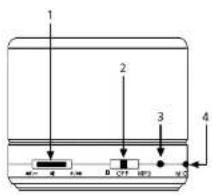
- Multi-function button
- Bluetooth (AV) Mo3
- Status lamp
- Microphone

- USB port for charging
- AUX connection
- MicroSD card slot
USE
- Taf50 SD/Bluetooth mode. Go to next track. Press and hold: Increase volume. Disabled in AUX mode.
- In SD/Bluetooth mode: Go to previous track. Press and hold: Lower volume. Disabled in AUX mode.
- Take in SD mode: Play/pause music. In Bluetooth mode, tap: Play/pause music/answer/end/cancel call/pair. In Bluetooth mode: Double tap: Call last dialed number. Press and hold for 2 seconds: Dismiss call. In SD/AUX mode, press to switch between SD card and AUX.
Bluetooth pairing
- Check that Bluetooth speaker is switched off.
- Press ON/OFF button to activate Bluetooth mode. The blue status lamp flashes 6 times. Tap the button for playback/pause. The blue and the red status lamps flash alternately.
- Follow instructions for Bluetooth in mobile phone and allow phone to search for Bluetooth headset. This setting is usually made from the Settings, Connection or Bluetooth menu on your phone, where you select an option to find Bluetooth devices.
Status lamp
- Green status lamp flashes: SD card MP3 mode.
- Green status lamp flashes: SD card MP3 paused or in AUX mode.
- Blue status lamp flashes: Bluetooth mode.
- Red and blue status lamps flash alternately: Bluetooth pairing.
• Red status lamp goes on: Charging.
• Red status lamp off: Fully charged.
• Red status light flashes: Discharged battery.
Playing music
Music can either be played via Bluetooth or AUX connection. The speaker has an integrated SD card
reader so that music in MP3 format can be played directly from the memory card.
FM settings
Connect the stereo audio cable 3.5 mm plug to the speaker connection LINE IN. Press the button to switch to MPB mode. The blue status lamp goes on. Keep the button pressed for 2 seconds to listen to FM music.
- 邮FFM mode: Go to next station. Press and hold: Increase volume.
- T###in FM mode: Go to previous station. Press and hold: Lower volume.
Brand : Marquant
Model : 920-542
Category : Loudspeaker