
MCE4W - Multicooker GORENJE - Free user manual and instructions
Find the device manual for free MCE4W GORENJE in PDF.
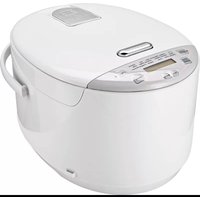


| Product Type | Multicooker |
| Brand | Gorenje |
| Model | MCE4W |
| Capacity | 5 L |
| Power Consumption | 900 W |
| Voltage / Frequency | 220-240 V ~ 50/60 Hz |
| Dimensions (W x D x H) | 30 x 30 x 30 cm |
| Weight | 4.5 kg |
| Inner Pot Material | Stainless steel with non-stick coating |
| Display Type | Digital LED |
| Programs | Rice, Soup, Stew, Steam, Porridge, Bake, Slow Cook, Keep Warm |
| Timer | Up to 24 hours delay start |
| Safety Features | Automatic shut-off, overheat protection, lid lock |
| Accessories Included | Measuring cup, rice paddle, steam basket |
| Cleaning & Maintenance | Wipe exterior with damp cloth; inner pot is dishwasher safe |
| Spare Parts Availability | Replaceable inner pot, seal ring, and steam valve available via service centers |
| Repairability | Repairable by authorized Gorenje service |
| Country of Origin | Slovenia (brand) |
| Warranty | 2 years (standard) |
Frequently Asked Questions - MCE4W GORENJE
User questions about MCE4W GORENJE
0 question about this device. Answer the ones you know or ask your own.
Ask a new question about this device
Download the instructions for your Multicooker in PDF format for free! Find your manual MCE4W - GORENJE and take your electronic device back in hand. On this page are published all the documents necessary for the use of your device. MCE4W by GORENJE.
USER MANUAL MCE4W GORENJE
Instruction manual....2
- Exhaust hood cover
- Exhaust hood
- Top lid
- Pressure plate
- Rice spoon holder
- Steamer rack
- Inner pot
- Handle
- Housing
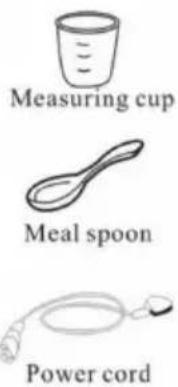
Accessories:
Important
Before using the appliance for the first time, carefully read this instruction manual and save it for future reference.
Danger
Do not immerse the unit with electrical components in water and do not wash it under running water.
Warning
Before connecting the appliance to the power mains, make sure the voltage specified on the bottom of the appliance matches the voltage of the power mains in your home. If the power cord is damaged, it may only be replaced by Gorenje, Gorenje's authorized service and repair center, or an adequately trained professional.
Do not use the appliance if the plug, power cord, or any other component is damaged. The appliance should not be used by children or persons with impaired physical or psychological skills, or persons with lacking experience and knowledge, unless such persons are supervised or advised by a person responsible for their safety. Do not let children play with the appliance.
Do not touch the appliance housing during use, as it will get hot. To move the appliance, hold it by the handle.
Be careful when opening the cooker; there is a danger of scalding. Do not use force to open the lid.
To avoid hazard, do not connect the appliance to an external timer or a remote control system.
This equipment is labelled in compliance with the European Directive 2002/96/EC on waste electric and electronic equipment. The Directive specifies the requirements for collection and management of waste electric and electronic equipment effective in the entire European Union.
Caution!
Place the appliance on a level and stable surface. The appliance is intended solely for household use.
Do not use attachments, accessories, or other parts provided by other manufacturers not expressly recommended by Gorenje. In case of use of such attachments or accessories, the warranty shall be void.
Preparing for use
- Remove the packaging.
- Clean the appliance as instructed in the chapter "Cleaning".
- When inserting the inner pot, make sure the bottom is clean. When the inner pot is inserted into the pressure cooker, rotate it slightly in both directions to make sure it sits correctly in place.
- Make sure the sealing ring is correctly installed.
- Wait until the appliance cools down and clean it.
Using the appliance
Control panel
Button explanation

Button: to cancel working. In standby mode, keep warm function will start when this button is pressed.

Button: to change cooking time and/or start.

Button: to set hours. By holding this button, hours are added rapidly.

Button: to set minutes. By holding this button, minutes are added rapidly.
Setting time

Press. When done, wait for 3 sec and time will be set.
Starting cooking programs P01 to P03
Those programs are fully automatic.
Cooking time is determined by the amount of ingredients you put into the appliance.
Multi cooker has built-in scale that weighs and adjusts cooking time in accordance with the amount of ingredients you put in.

Press button to select the program P01, P02 or P03.

Display will show local time!
When cooking is finished, buzzer will ring and keep warm function will start. Display will

show. Keep warm function will keep your food warm for maximum 11 hours.

Press to cancel keep warm function and put the cooker in stand-by mode.
Cooking programs default time table:
| Program | Default time | Time range |
| P04“Porridge” | 1:00 | 0:30--4:00 |
| P05“Soup” | 1:10 | 0:30--4:00 |
| P06“Stew” | 2:00 | 0:40--6:00 |
| P07“Yoghurt | 6:00 | 1:00—10:00 |
| P08“Slow cook” | 4:00 | 2:00—8:00 |
| P09“Fry” | 0:30 | 0:10--1:00 |
| P10“Reheat” | 0:20 | 0:10--2:00 |
| P11“Boil” | 1:00 | 0:40--3:00 |
| P12“Steam” | 0:20 | 0:10--1:30 |
| P13“Cake” | 1:20 | 1:10—2:10 |
| P14“Pasta” | 0:10 | 0:05--0:40 |
| P15“Fish” | 0:40 | 0:30--2:00 |
| P16“Chicken” | 0:55 | 0:45--3:00 |
| P17“Beef” | 1:20 | 0:40--5:00 |
| P18“Pork” | 1:00 | 0:40--4:00 |
Starting cooking programs P04 to P18
Press button to select the program you want (like P04 – P18).
Press to start the program.
Display will show and the remaining cooking time!
When cooking is finished, buzzer will ring and keep warm function will start. Display will
show. Keep warm function will keep your food warm for maximum 11 hours.
Press to cancel keep warm function and put the cooker in stand-by mode.
Starting cooking program with delayed start
Press button to select the program you want (like P01 – P18).
Pressing you can set when you want your cooking to start!
Press to start the program.
Example: if now it's 7:00 and you want to slow cook your dish and that your lunch will be finished at 16:00
First select the program you want by
Pressing . Then press so that display will show . With and
set time to 5:00 (4 hours default cooking time + 5 hours delay) and press and hold for 3 sec. Display will show and local time.
time + 5 hours delay) and press and hold for 3 sec. Display will show and local time.

To cancel press button.
When cooking is finished, buzzer will ring and keep warm function will start. Display will
When cooking is finished, the buzzer will ring and the keep-warm function will start. The display will
Show. Keep warm function will keep your food warm for a maximum of 11 hours.

Press to cancel keep warm function and put the cooker in stand-by mode.
Starting cooking program with changed cooking time
Press the button to select the desired program (e.g., P01 – P18).
Pressing you can set how long your meal will be cooked.
Press to start the program.
Example: First select the program you want by pressing . Then press so that
display will show . With and set cooking time.


When cooking is finished, buzzer will ring and keep warm function will start. Display will
show . Keep warm function will keep your food warm for maximum 11 hours.
Press to cancel keep warm function and put the cooker in stand-by mode.
Starting cooking program with changed cooking time and delayed start.
Press button to select the program you want (like P01 – P18).
Press to set how long your meal will be cooked.
Timer Program Press again to set when you want your cooking to start!
Start Press to start the program.
Example: if now its 7:00 and you want to slow cook your dish for 6h and that your lunch will be finished at 16:00.
Press button to select the P8 program.
Press, the display will show and by pressing and set you cooking time to 6h.

To cancel press button.
When cooking is finished, buzzer will ring and keep warm function will start. Display will
Show. Keep warm function will keep your food warm for a maximum of 11 hours.
Press to cancel the keep warm function and put the cooker in stand-by mode.
Special feature for programs Pasta, Steam, and Fry.
For these cooking programs, it's important that water or oil have the correct temperature before you start cooking.
When selecting these programs, cooking time will not start to count down until the right temperature is reached. When the right temperature is reached, the cooker will beep three times and then cooking time will start to count down. When beeps are heard, you can insert food in water or oil.
Tip: Clean the appliance immediately after use (see chapter "Cleaning").
Cleaning
The appliance and parts of the appliance are not dishwasher safe. Thoroughly clean the appliance after each use, as well as before use if it hasn't been used for a while.
- Before cleaning, disconnect the appliance from the power mains and wait for it to cool down.
- Rinse the cooking pot with hot water and some liquid detergent, and dry thoroughly.
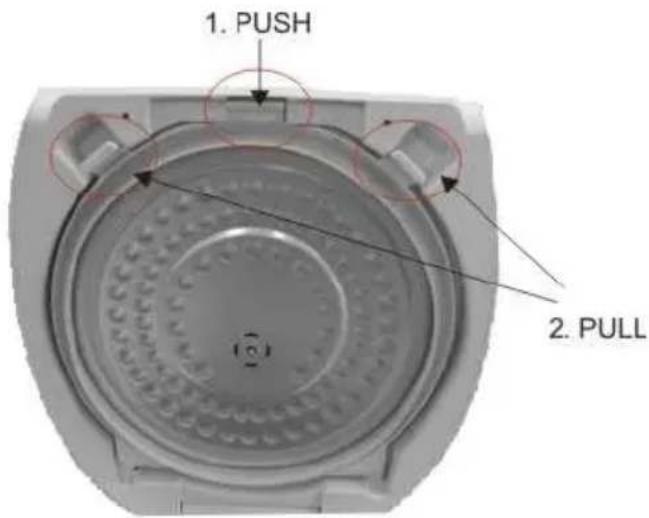
- Remove the pressure plate as shown in the picture, rinse with hot water and some liquid detergent, and dry thoroughly.
- Wipe the housing with a damp cloth. Do not wash the housing under running water and do not immerse it in water.
- To make sure the appliance works properly, make sure the heating plate is clean. Clean the heating plate with a damp cloth and dry it thoroughly.
- Do not use aggressive cleaners and metal accessories for cleaning as these may damage the appliance.
Storage
Store the appliance in a safe and dry place.
Environment
After the expiry of its useful life, do not discard the appliance with common household waste. Take it to an authorized recycling center. This will help preserve the environment.
Warranty and repair
If you need information or if you have a problem, please contact the Gorenje Customer Care Centre in your country (you find its phone number in the worldwide guarantee leaflet). If there is no Customer Care Centre in your country, go to your local Gorenje dealer or contact the Service department of Gorenje domestic appliances.
For personal use only!
GORENJE WISHES YOU A LOT OF PLEASURE IN USING YOUR APPLIANCE.
We reserve the right to any modifications.
General description
Important note


- IMPORTANT
- DANGER
- WARNING
- CAUTION
- PREPARING FOR USE
- USING THE APPLIANCE
- BUTTON EXPLANATION
- SETTING TIME
- STARTING COOKING PROGRAMS P01 TO P
- COOKING PROGRAMS DEFAULT TIME TABLE
- STARTING COOKING PROGRAMS P04 TO P
- STARTING COOKING PROGRAM WITH DELAYED START
- CLEANING
- STORAGE
- ENVIRONMENT
- WARRANTY AND REPAIR
- GORENJE WISHES YOU A LOT OF PLEASURE IN USING YOUR APPLIANCE
- IMPORTANT NOTE
Brand : GORENJE
Model : MCE4W
Category : Multicooker