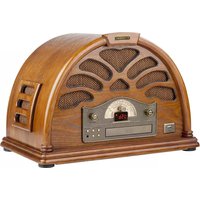
RC 403 U - Radio HYUNDAI - Free user manual and instructions
Find the device manual for free RC 403 U HYUNDAI in PDF.


| Product Type | Radio with CD and USB playback |
| Brand | Hyundai |
| Model | RC 403 U |
| Power Source | AC 230V ~ 50Hz |
| Radio Bands | AM (MW) and FM |
| CD Player | Yes, with CD drawer |
| USB Playback | Yes, via USB port on front panel |
| Headphone Jack | 3.5mm stereo earphone jack |
| Line Out | Yes, on back panel |
| FM Antenna | External wire antenna (back cabinet) |
| AM Antenna | Built-in internal antenna |
| Controls | Volume, Tuning, Function selector (AM/FM/CD/USB), CD open/close, play/pause, stop, fast forward/rewind |
| Display | Track number display, FM stereo indicator, power indicator |
| Safety Features | Polarized plug, do not expose to moisture, unplug during storms |
| Cleaning | Clean with dry cloth only |
| Included Accessories | User manual, AC power cord |
| Non-skid Feet | Yes, rubber feet to prevent slipping |
Frequently Asked Questions - RC 403 U HYUNDAI
User questions about RC 403 U HYUNDAI
0 question about this device. Answer the ones you know or ask your own.
Ask a new question about this device
Download the instructions for your Radio in PDF format for free! Find your manual RC 403 U - HYUNDAI and take your electronic device back in hand. On this page are published all the documents necessary for the use of your device. RC 403 U by HYUNDAI.
USER MANUAL RC 403 U HYUNDAI
natural_image
Diagram of a dual-arm digital device with curved arrows indicating rotation or feedback, no text or symbols present.DÔLEŽITÉ BEZPEČNOSTNÉ POKYNY
natural_image
Diagram of a dual-arm digital device with curved arrows indicating rotation or feedback, no text or symbols present.natural_image
Diagram of a device with curved top and bottom sides, showing internal components and directional arrows (no text or symbols)Producent: Hyundai Corporation, Seoul, Korea
Importer: DIGISON Polska sp. z o.o., ul. Krzemieniecka 46, Wrocław 54 613 Poland
The lighting flash and arrow head within the triangle is warning sign alerting you of dangerous voltage inside the product
CAUTION
RISK OF ELECTRIC SHOCK DO NOT OPEN
CAUTION : TO REDUCE THE RISK OF ELECTRIC SHOCK DO NOT REMOVE COVER (OR BACK). NO USER SERVICIABLE PARTS INSIDE. REFER SERVICING TO QUALIFIED SERVICE PERSONNEL.

The exclamation point within the triangle is a warning sign alerting you of important instructions accompanying the product
CAUTION
TO PREVENT FIRE OR SHOCK HAZARD, DO NOT USE THIS PLUG WITH AN EXTENSION CORD, RECEPTACLE OR OTHER OUTLET UNLESS THE BLADES CAN BE FULLY INSERTED TO PREVENT BLADE EXPOSURE. TO PREVENT FIRE OR SHOCK HAZARD, DO NOT EXPOSE THIS APPLIANCE TO RAIN OR MOISTURE.
IMPORTANT SAFETY INSTRUCTIONS
- Read these instructions.
- Keep these instructions.
- Heed all warnings.
- Follow all instructions.
- Do not use this apparatus near water.
- Clean only with dry cloth.
- Do not block any ventilation openings. Install in accordance with the manufacturer's instructions.
- Do not install near any heat sources such as radiators, heat registers, stoves, or other apparatus (including amplifiers) that produce heat.
- Protect the power cord from being walked on or pinched particularly at plugs, convenience receptacles, and the point where they exit from the apparatus.
- Only use attachments I accessories specified by the manufacturer.
- Unplug this apparatus during lightning storms or when unused for long periods of time.
- Refer all servicing to qualified service personnel. Servicing is required when apparatus has been damaged in any way, such as power-supply cord or plug is damaged, liquid has been spilled or objects have fallen into the apparatus, the apparatus has been exposed to rain or moisture, does not operate normally, or has been dropped.
- This appliance shall not be exposed to dripping or splashing water and no object filled with liquids such as vases shall be placed on the apparatus.
- Do not overload wall outlet. Use only power source as indicated.
POWER SOURCE
This system is designed to operate on normal 230V 50 Hz AC only. Attempting to operate from any other power source may cause damage to the system, and such damage is not covered by your warranty.
NOTE:
You will note that this system is equipped with a polarized AC power plug having one blade wider than the other. This is a safety feature. If this plug does not fit into your existing AC outlet, do not try to defeat this safety feature by filing the wide blade to make it fit into your outlet. If this plug will not fit into your outlet, you probably have an outdated non-polarized AC outlet. You should have you outlet changed by a qualified licensed electrician.

Where the main plug or an appliance coupler is used as the disconnect device, the disconnect device shall remain readily operable
PROTECT YOUR FURNITURE
This model is equipped with non-skid rubber ,feet' to prevent the product from moving when you operate the controls. These ,feet' are made from nonmigrating rubber material specially formulated to avoid leaving any marks or stains on your furniture. However certain types of oil based furniture polishes, wood preservatives, or cleaning sprays may cause the rubber ,feet' to soften, and leave marks or a rubber residue on the furniture. To prevent any damage to your furniture we strongly recommend that you purchase small self-adhesive felt pads, available at hardware stores and home improvement centers everywhere, and apply these pads to the bottom of the rubber ,feet' before you place the product on fi ne wooden furniture.
UMÍSTĚNÍ OVLÁDACÍCH PRVKŮ A KONTROLEK
ČELNÍ PANEL

- Speakers.
- AM Dial Scale.
- Tuning Control.
- FM Dial Scale.
- VOLUME Control.
- CD OPEN/CLOSE Button
- EARPHONE (Head phone) Jack.
- CD/USB STOP Button
-
CD/USB (Fast Forward) Button.
-
CD/USB (Fast Reverse) Button.
- CD/USB PLAY/PAUSE Button.
- POWER ,on' Indicator.
- CD Drawer.
- CD/USB Track Number Display.
- FM ST. Indicator.
- AM/FM/CD/USB Function Selector.
- USB Port.
BACK PANEL
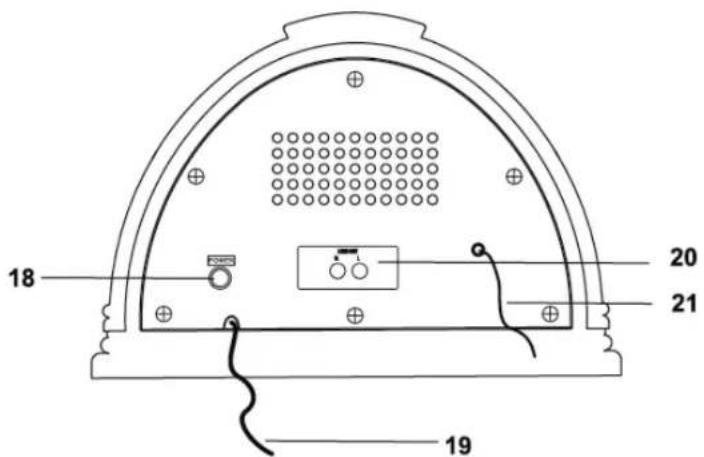
- POWER Button.
- AC Power Cord.
- LINE out.
- Antenna Jack/FM Antenna.
- Press POWER button to setthe syslem on.
- Set the Function selector (AM/FM/CD/USB) to the AM or FM position.
- Rotate the TUNING control to tune to the desired radio station. If you tune to a strong FM Stereo station the FM 5T .Indicatorwilllight and reception will be in stereo. If you tune to a weaker FM station, the reception will automatically switch to mono.
- Adjust the VOLUME control to the desired level.
- When you finish listening, press POWER button again to set the system off.
ANTENNA INFORMATION
The MW antenna is inside the cabinet. If MW reception is unsatisfactory try repositioning the cabinet slightly until the internal antenna is picking up the strongest signal.

natural_image
Diagram of a dual-arm digital device with curved top and bottom sides, showing internal components and directional arrows (no text or symbols)The FM wire antenna is located on the back cabinet. If necessary adjust the position and direction of this antenna until you find the position that provides the best reception.
PLAYING COMPACT DISC
- Press POWER to turn on the system.
- Rotate the VOLUME control clockwise and set the volume to a low level.
- Set the Function selector(AM/FM/PH/CD/USB) to the CD position.
- Press the OPEN/CLOSE button to open the CD drawer.'NOd' will be shown on the disc if has no disc in the CD drawer.
- Place your disc into the CD drawer with the label side facing up.
- Press the OPEN/CLOSE button again to close the CD drawer. The disc will spin for a few seconds while the player is reading the disc, then the disc stops spinning and start to play the first track on the disc. The playing track number, Cd and the folder name will be shown on the screen 5 seconds in turn during the playback. For example: ,001 „Cd“F01'.
- Press the F.R or F.F button to choose play the desired track.
- Adjust the VOLUME to the desired level.
- Playback will continue until the end of this disc. You may stop at any time by pressing the STOP button.
- When you finish listening, press POWER button again to set the system off.
PAUSE CONTROL
To pause momentarily during playback press the CD PLAY/PAUSE button again. Playback stops but the disc continues to spin and the Play indicator flashes. Press the CD PLAY/PAUSE button once more to cancel Pause and resume playback. The Play indicator stops flashing.
USB OPERATION
- Press POWER to turn on the system.
- Set the Function selector(AM/FMJPH/CD/USB) to the USB position.
- Plug the U disk into the USB socket, The player will begin to play the first song on the USB. the playing track number, USB and the folder name will be shown on the screen 5 seconds in turn during the playback. For example: ,001 „USb“F01'.
- Adjust the VOLUME to the desired level.
- PLAY/PAUSE, F.F,F.R, STOP buttons are the same function as in CD playback.
- When you finish listening, press POWER button again to set the system off.
USING STEREO HEADPHONES (NOT INCLUDED)
Connect a set of stereo headphones with a 3.5mm mini - plug to the EARPHONE jack on the front panel. Before putting on the headphones always set the VOLUME control to a low level. Then put the headphones on and gradually increase the Volume to a comfortable listening level. The built-in speakers automatically shut off when headphones are connected to the EARPHONE jack.
WARNING: Do not use this product near water, in wet areas to avoid fire or injury of electric current. Always turn off the product when you don't use it or before a revision. There aren't any parts in this appliance which are reparable by consumer. Always appeal to a qualified authorized service. The product is under a dangerous tention.
Old electrical appliances, used batteries and accumulators disposal

This symbol appearing on the product, on the product accessories or on the product packing means that the product must not be disposed as household waste. When the product/ battery durability is over, please, deliver the product or battery (if it is enclosed) to the respective collection point, where the electrical appliances or batteries will be recycled. The places, where the used electrical appliances are collected, exist in the European Union and in other European countries as well. By proper disposal of the product you can prevent possible negative impact on environment and human health, which might otherwise occur as a consequence of improper manipulation with the product or battery/ accumulator. Recycling of materials contributes to protection of natural resources. Therefore, please, do not throw the old electrical appliances and batteries/ accumulators in the household waste. Information, where it is possible to leave the old electrical appliances for free, is provided at your local authority, at the store where you have bought the product. Information, where you can leave the batteries and accumulators for free, is provided to you at the store, at your local authority.
We reserve the right to change technical specifications.

natural_image
Diagram of a dual-arm digital meter device with curved arrows indicating rotation or signal flow (no text or symbols)Licensed by Hyundai Corporation, Korea


- DÔLEŽITÉ BEZPEČNOSTNÉ POKYNY
- CAUTION
- RISK OF ELECTRIC SHOCK DO NOT OPEN
- IMPORTANT SAFETY INSTRUCTIONS
- POWER SOURCE
- NOTE:
- PROTECT YOUR FURNITURE
- UMÍSTĚNÍ OVLÁDACÍCH PRVKŮ A KONTROLEK
- ČELNÍ PANEL
- BACK PANEL
- ANTENNA INFORMATION
- PLAYING COMPACT DISC
- PAUSE CONTROL
- USB OPERATION
- USING STEREO HEADPHONES (NOT INCLUDED)
- Old electrical appliances, used batteries and accumulators disposal
Brand : HYUNDAI
Model : RC 403 U
Category : Radio