
ST. LOUIS C32 - Car radio BLAUPUNKT - Free user manual and instructions
Find the device manual for free ST. LOUIS C32 BLAUPUNKT in PDF.



| Product type | Car radio |
| Brand | Blaupunkt |
| Model | ST. LOUIS C32 |
| Power supply | 14.4 V DC |
| Output power (RMS) | 4 x 22 watts per DIN 45 324 |
| Output power (max) | 4 x 50 watts |
| Radio wave bands | FM 87.5 - 107.9 MHz / AM 530 - 1710 kHz |
| Cassette player | Yes, with auto-reverse |
| Detachable faceplate | Yes, anti-theft system |
| Equalizer | Presets: Classic, Pop, Rock + X-BASS |
| Sound settings | Bass, treble, balance, fader |
| Station memory | Manual (6 per level) and automatic (Travelstore) |
| Clock display | Yes, adjustable 12/24h |
| Mute function | Yes, adjustable (Mute) |
| Search sensitivity | Adjustable (HI/LO) |
| Contact maintenance | Clean with a lint-free cloth moistened with alcohol |
| Supplied accessories | Case for detachable faceplate, mounting hardware |
| Compatible options | Blaupunkt amplifiers |
| Number of manual pages | 80 pages |
Frequently Asked Questions - ST. LOUIS C32 BLAUPUNKT
User questions about ST. LOUIS C32 BLAUPUNKT
0 question about this device. Answer the ones you know or ask your own.
Ask a new question about this device
Download the instructions for your Car radio in PDF format for free! Find your manual ST. LOUIS C32 - BLAUPUNKT and take your electronic device back in hand. On this page are published all the documents necessary for the use of your device. ST. LOUIS C32 by BLAUPUNKT.
USER MANUAL ST. LOUIS C32 BLAUPUNKT
Operating and installation instructions
① [▼] button to release the control panel
② Button to switch the unit on/off
③ Volume control
④ △ Cassette eject
⑤ Cassette compartment
⑥ FR button, fast tape winding
⑦ FF button, fast tape winding
⑧ Arrow buttons
MENU button, to open the basic settings menu
⑨ SOURCE button, to select the CC, radio and CD changer sources
10 AUDIO button, to adjust the bass, treble, balance and fader settings (Balance und Fader)
⑪ Short press: EQ button, to select the sound presets Long press: X-BASS, X-Bass function
⑫ Keys 1 - 6
⑬ Short press: BAND button, to select the FM memory bank and the AM waveband, source selection to radio mode Long press: TS, to start the Travelstore function.
⑭ button, to display the time
CONTENTS
Notes and accessories......5
Road safety 5
Installation 5
Accessories.... 5
Removable control panel ......6
Theft protection 6
Detaching the control panel ...... 6
Attaching the control panel...... 6
Switching on/off......7
Adjusting the volume .....7
Setting the power-on volume...... 7
Instantaneously reducing the volume (mute)....7
Mute while telephoning 8
Radio mode......8
Switching to radio mode 8
Selecting the frequency band / memory bank....8
Tuning into a station 9
Setting the sensitivity of station seek tuning....9
Storing station presets.... 9
Storing stations automatically (Travelstore) 9
Listening to station presets ...... 9
Cassette mode....10
Cassette playback 10
Switching over the playing side of the tape 10
Fast tape winding 10
Cassette eject 10
CD changer mode......11
Switching to CD changer mode ..... 11
Selecting CDs 11
Selecting tracks.... 11
Fast searching (audible)...... 11
Repeating individual tracks or whole CDs (REPEAT).... 11
Random track play (MIX)...... 12
Scanning all tracks on all CDs (SCAN) 12
Pausing playback (PAUSE) 12
CLOCK - Time......13
Displaying the time.... 13
Setting the clock.... 13
Selecting 12/24-hour clock mode .. 13
Displaying the time when the unit is off and the ignition is on.... 13
Sound and volume distribution settings....14
Adjusting the bass 14
Adjusting the treble.... 14
Adjusting the balance settings...... 14
Adjusting the fader settings...... 14
Equalizer and X-BASS......15
X-BASS 15
Selecting preset sound effect...... 15
Specifications......16
Amplifier 16
Tuner 16
CC 16
Pre-Amp Out 16
Installation instructions......72


NOTES AND ACCESSORIES
Thank you for deciding to use a Blaupunkt product. We hope you enjoy using this new piece of equipment.
Please read these operating instructions before using the equipment for the first time. The Blaupunkt editors are constantly working on making the operating instructions clearer and easier to understand. However, if you still have any questions on how to operate the equipment, please contact your dealer or the telephone hotline for your country. You will find the hotline telephone numbers printed at the back of this booklet.
Road safety
Road safety has absolute priority. Only operate your radio unit if the road and traffic conditions allow you to do so. Familiarize yourself with the unit before setting off on your journey.
You should always be able to hear police, fire and ambulance sirens from far. For this reason, set the volume of the program you are listening to at a reasonable level.
Installation
If you want to install your car radio by yourself, please read the installation and connection instructions that follow these operating instructions.
Accessories
Only use accessories approved by Blaupunkt.
Remote control
The RC 04 remote control is optionally available for the Lexington C32 unit.
The St. Louis C32 unit cannot be remotely controlled.
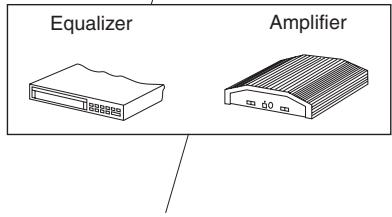
Amplifier
All Blaupunkt and Velocity amplifiers can be used.
CD changer
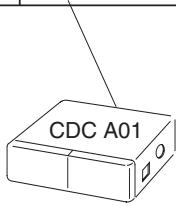
The Blaupunkt CD changer CDC A 01 (7607 700 022) can be connected to the Lexington C32 unit.
No CD changer can be connected to the St. Louis C32 unit.
REMOVABLE CONTROL PANEL
Removable control panel
Theft protection
As a way of protecting your equipment against theft, the unit is equipped with a detachable control panel (release panel). Without this control panel, the car radio is worthless to a thief.
Protect your equipment against theft by taking the control panel with you every time you leave your vehicle. Do not leave the control panel in your vehicle - not even in a hiding place.
The control panel has been designed to be easily use.
Note:
- Never drop the control panel.
- Never expose the control panel to direct sunlight or other heat sources.
- Avoid making direct skin contact with the control panel's contacts. If necessary, clean the contacts with a lint-free cloth and some alcohol.
Detaching the control panel
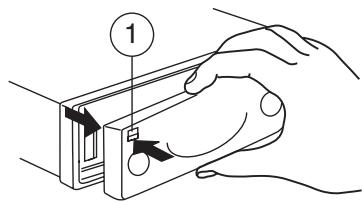
Press the [▼] button ①.
The control panel locking mechanism opens.
First, pull the control panel straight off the unit and then out towards the left.
- The unit switches off after the control panel is removed.
- All current settings of the radio are saved.
- CD already inserted in the unit remains there.
Attaching the control panel
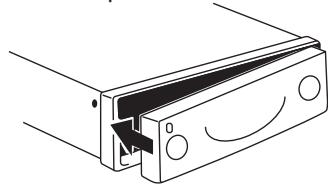
→ Slide the control panel from left to right into the unit's guide.
Press the left-hand edge of the control panel into the unit until it clicks into place.
natural_image
Technical line drawing of a mechanical bracket or bracket with a curved arrow indicating direction (no text or symbols present)Note:
- When attaching the control panel, make sure you do not press on the display.
If the unit was still switched on when you removed the control panel, the unit will automatically switch back on with the last settings activated i.e. radio, CC or CD changer (CD changer only with the Lexington C32) when the panel is reinserted.


SWITCHING ON/OFF
Switching on/off
There are various ways of switching the unit on/off:
Switching on/off using the vehicle ignition
If the unit is correctly connected to the vehicle's ignition and it was not switched off using button ②, it will switch on/off simultaneously with the ignition.
Switching on/off using the removable control panel
Remove the control panel.
The unit switches off.
Attach the control panel again.
The unit switches on. The last settings i.e. radio, CC or CD changer (CD changer only with the Lexington C32) will be reactivated.
Switching on/off using button ②
To switch the unit on, press button ②.
The unit can only be switched on when the ignition is turned on.
To switch the unit off, press button ② for longer than two seconds.
The unit switches off.
ADJUSTING THE VOLUME
Adjusting the volume
The system volume can be adjusted in steps from 0 (off) to 100 (maximum).
To increase the system volume,
→ turn the volume control ③ clockwise.
To decrease the volume,
→ turn the volume control ③ anti-clockwise.
Setting the power-on volume
You can set the unit's default power-on volume.
Press the MENU button ⑧.
Keep pressing the X or Y button ⑧ until "ON VOL" appears in the display.
Set the power-on volume using the < and > buttons ⑧.
To help you adjusting the volume more easily, the volume will be increased / decreased as you make your changes.
When you have finished making your changes,
→ press the MENU button ⑧ twice.
Instantaneously reducing the volume (mute)
You can instantaneously reduce the volume (mute) to a level preset by you.
Briefly press button ②.
ADJUSTING THE VOLUME
RADIO MODE
"MUTE" appears in the display.
Setting the mute level
You can set the unit's mute volume level.
Press the MENU button ⑧.
Keep pressing the or button ⑧ until "MUTE LVL" appears in the display.
Set the mute level using the < and > buttons ⑧.
When you have finished making your changes,
→ press the MENU button ⑧ twice.
Mute while telephoning
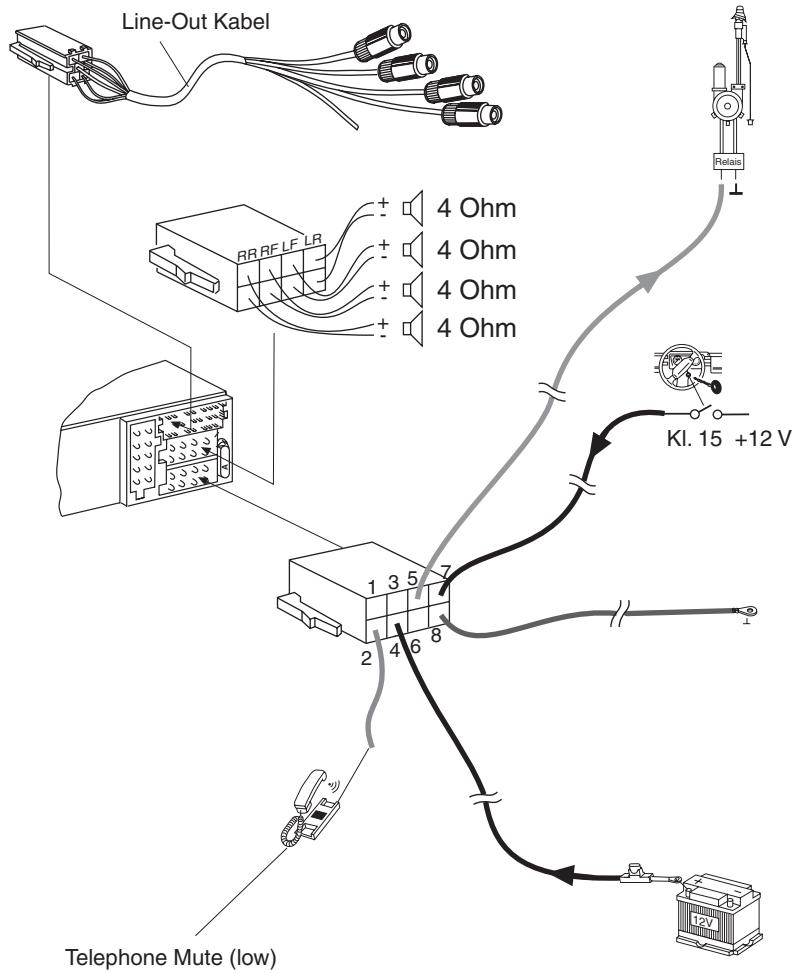
If your unit is connected to a mobile telephone, the car radio's volume will be muted as soon as you "pick up" the telephone. "TEL CALL" flashes in the display.
This requires to the mobile telephone be connected to the car radio as described in the installation instructions.
The volume will be reduced to the configured mute volume level.
Radio mode
Switching to radio mode
If you are in CC or CD changer mode (CD changer only with the Lexington C32),
keep pressing the SOURCE ⑨ button until the radio mode appears in the display together with the memory bank and frequency.
Selecting the frequency band / memory bank
This unit can receive programs broadcast over the FM and AM frequency band. There are three preset memory bank for the FM range and one for the AM range. Six stations can be stored on each memory bank.
Selecting the FM memory bank
To switch between the FM memory bank FM1, FM2 and FMT,
press the BAND/TS button ⑬.
Selecting the AM waveband
To select the AM waveband,
keep pressing the BAND/TS button ⑬ until AM appears in the display.
Tuning into a station
There are various ways of tuning to a station.
Automatic seek tuning
Press the √ or ∧ button ⑧.
The unit tunes to the next receivable station.
Setting the sensitivity of station seek tuning
You can choose whether to tune only to strong reception stations or to also tune to those with a weak reception.
Press the MENU button ⑧.
Keep pressing the √ or ∧ button ⑧ until “SENS HI” or “SENS LO” appears in the display
“SENS HI” means that the tuner is set high to sensitivity. “SENS LO” means it is set to the low sensitivity setting. If “SENS LO” is selected, “LOC” lights up in the display.
Set the required sensitivity using the < and > buttons ⑧.
When you have finished making your changes,
→ press the MENU button ⑧.
Tuning into stations manually
You can also tune into stations manually.
Press the
Storing station presets
Storing stations manually
Select the required memory bank (FM1, FM2 or FMT) or the AM waveband.
→ Tune into the station.
Press one of the station buttons 1-6 ^12 for longer than one second to store the station in that preset memory.
Storing stations automatically (Travelstore)
You can automatically store the six stations with the strongest reception in the region. The stations are stored in the FMT or AM memory depending on the selected frequency band.
Note:
- Any stations that were previously stored on this memory bank are deleted in the process.
Press and hold the BAND/TS button ⑬ until seek tuning begins.
The station storing procedure begins. Once the procedure finishes, all the stored stations are played briefly.
Listening to station presets
Select the memory bank on which the station was stored.
Press the preset station button 1-6
⑫ of the station you want to listen to.
CASSETTE MODE
Cassette mode
Cassette playback
- If there is no cassette inserted in the unit.
Insert the cassette with its open edge on the right and side A/1 facing up into the cassette compartment ⑤.
The side of the cassette that is facing up is then played first of all (side A/1). The cassette symbol appears in the display.
- If a cassette is already inserted in the unit.
Keep pressing the SOURCE button ⑨ until “TAPE” appears in the display.
The cassette is played in the direction that was last set.
Switching over the playing side of the tape
Press the tape-winding buttons FR ⑥ and FF ⑦ simultaneously.
The tape playing direction changes.
The direction of play is automatically switched over when the end of the tape is reached (autoreverse).
Fast tape winding
Fast-forwarding
- To fast forward side A/1,
→ press the FF tape-winding button ⑦ so that it clicks into position. - To fast forward side B/2,
→ press the FR tape-winding button ⑥ so that it clicks into position.
"TAPE FF" appears in the display.
Fast-rewinding
- To fast rewind side A/1,
→ press the FR tape-winding button ⑥ so that it clicks into position. - To fast rewind side B/2,
→ press the FF tape-winding button ⑦ so that it clicks into position.
"TAPE FR" appears in the display.
Stopping tape winding
→ Press the fast tape-winding button for the opposite direction.
Playback is resumed.
Cassette eject
→ Press the △ button ④ to eject the cassette from the unit.


CD CHANGER MODE
CD changer mode
You can connect a CD changer to the Lexington C32 unit. You can obtain further information on available CD changers from your dealer.
Note:
- Information on handling CDs, inserting CDs and operating the CD changer can be found in the operating instructions supplied with your CD changer.
Switching to CD changer mode
Keep pressing the SOURCE ⑨ button until the display shows, for instance, "CDC 1--1".
The first digit in this display represents the CD number (in this case 1), and the second digit represents the track number (in this case 1).
Playback begins with the first CD that the CD changer detects.
Selecting CDs
To move up or down to another CD,
→ press the ∧ or ∨ button ⑧ once or several times.
Selecting tracks
To move up or down to another track on the current CD,
→ press the > or < button ⑧ once or several times.
Fast searching (audible)
To fast search backwards or forwards,
keep one of the <> buttons ⑧ pressed until fast searching backwards / forwards begins.
Repeating individual tracks or whole CDs (REPEAT)
To repeat the current track,
briefly press button 3 (RPT) ⑫.
“S--RPT” appears briefly in the display.
To repeat the current CD,
keep the 3 (RPT) button ⑫ pressed for longer than two seconds.
"D--RPT" appears briefly in the display.
Deactivating REPEAT
To stop the current track or current CD from being repeated,
press button 3 (RPT) ⑫ until "S--RPT" or "D--RPT" disappears and the standard CD changer display reappears.
CD CHANGER MODE
Random track play (MIX)
To play the tracks on the current CD in random order,
briefly press button 4 (MIX) ⑫.
“S--MIX” appears briefly in the display.
To play the tracks on all inserted CDs in random order,
keep the 4 (MIX) button ⑫ pressed for longer than two seconds.
"D--MIX" appears briefly in the display.
Canceling MIX
To stop the tracks from being played in random order,
press button 4 (MIX) ⑫ until "S--MIX" or "D--MIX" disappears and the standard CD changer display reappears.
Scanning all tracks on all CDs (SCAN)
Scanning tracks on the current CD
To briefly play all the tracks on the current CD in ascending order,
→ press button 2 (SCAN) ⑫.
“S--SCN” appears in the display.
Scanning the first track on all CDs
You can briefly play the first track all CDs in the CD changer.
keep the 2 (SCAN) button ⑫ pressed for longer than two seconds.
“D--SCAN” appears in the display.
Stopping SCAN
To stop scanning,
briefly press the 2 (SCAN) button ⑫ again.
The currently scanned track will then continue to be played normally.
Note:
- You can set the scanning time (scantime). For further details, read the section entitled “Setting the scantime” in the “CD mode” chapter.
Pausing playback (PAUSE)
→ Press button 1 ▶) ⑫.
“S--PAUSE” appears in the display.
Canceling pause
→ Press button 2 ▶) ⑫ while in pause mode.
Playback is resumed.
CLOCK - Time
Displaying the time
To display the time,
briefly press the ⏱ button 14.
Setting the clock
Press the MENU button ⑧.
Keep pressing the X or Y button ⑧ until "CLOCKSET" appears in the display.
Press the > button ⑧.
The time appears in the display. The minutes flash on and off and can be adjusted.
Adjust the minutes using the ✗ ✕ buttons ⑧.
Once the minutes are set,
→ press the<button ⑧.
The hours flash on and off.
Adjust the hours using the √√ buttons ⑧.
When you have finished making your changes,
→ press the MENU button ⑧ twice.
Selecting 12/24-hour clock mode
Press the MENU button ⑧.
Keep pressing the X or Y button ⑧ until "24 H MODE" or "12 H MODE" appears in the display.
Press the
When you have finished making your changes,
→ press the MENU button ⑧.
Displaying the time when the unit is off and the ignition is on
To display the clock when the unit is off and the ignition is on,
→ press the MENU button ⑧.
Keep pressing the or button ⑧ until "CLOCK OFF" or "CLOCK ON" appears in the display.
Press the
When you have finished making your changes,
→ press the MENU button ⑧.
SOUND AND VOLUME DISTRIBUTION SETTINGS
Sound and volume distribution settings
Adjusting the bass
To adjust the BASS,
→ press the AUDIO button ⑩.
"BAS" appears in the display.
To increase the bass,
→ turn the volume control ③ clockwise.
To decrease the bass,
→ turn the volume control ③ anti-clockwise.
When you have finished making your changes,
→ wait 8 seconds, the settings are saved and the audio source display appears.
Adjusting the treble
To adjust the TREBLE,
keep pressing the AUDIO ⑩ button until “TRE” appears in the display.
To increase the treble,
→ turn the volume control ③ clockwise.
To decrease the treble,
→ turn the volume control ③ anti-clockwise.
When you have finished making your changes,
→ wait 8 seconds, the settings are saved and the audio source display appears.
Adjusting the balance settings
To adjust the left/right volume distribution (balance),
keep pressing the AUDIO ⑩ button until “BAL” appears in the display.
To move the volume distribution toward the right,
→ turn the volume control ③ clockwise.
To move the volume distribution toward the left,
→ turn the volume control ③ anti-clockwise.
When you have finished making your changes,
→ wait 8 seconds, the settings are saved and the audio source display appears.
Adjusting the fader settings
To adjust the front/back volume distribution (fader),
keep pressing the AUDIO ⑩ button until “FAD” appears in the display.
To move the volume distribution toward the back,
→ turn the volume control ③ clockwise.
To move the volume distribution toward the front,
→ turn the volume control ③ anti-clockwise.


EQUALIZER AND X-BASS
When you have finished making your changes,
→ wait 8 seconds, the settings are saved and the audio source display appears.
Equalizer and X-BASS
X-BASS
The X-BASS feature can be used to boost the bass at low volume levels.
To activate X-BASS,
keep the EQ/X-BASS button ⑪ pressed until “XBASS ON” appears in the display.
“X-BASS” appears in the display.
To deactivate X-BASS,
keep the EQ/X-BASS button ⑪ pressed until “XBASS OFF” appears in the display.
"X-BASS" disappears.
Selecting preset sound effect
You can select preset sound effect for the following styles of music:
- CLASSIC
- POP M
- ROCK M
The settings for these music styles have already been programmed.
To select one of the sound presets,
keep pressing the EQ/X-BASS button ⑪ until the required setting appears in the display.
If you want to deactivate the sound preset,
keep pressing the EQ/X-BASS button ⑪ until “DSP OFF” appears in the display.
SPECIFICATIONS
Specifications
Amplifier
Output power:
St. Louis C32: 4 x 22 watts sine
in accordance
with DIN 45 324
at 14.4 V 4 x 50
watts max. power
Lexington C32: 4 x 15 watts sine
in accordance
with DIN 45 324
at 14.4 V 4 x 40
watts max. power
Tuner
Frequency ranges US:
FM: 87.5 - 107.9 MHz
AM: 530 - 1710 kHz
FM mono sensitivity:
15 dBf
FM frequency response:
35 - 16.000 Hz
CC
Frequency response:
30 - 18.000 Hz
Pre-Amp Out
(not applicable to St. Louis C32:)
Output: 1.5 V_rms ± 2.5 dB
Subject to changes!
ÉLÉMENTS DE COMMANDE
natural_image
Technical line drawing of a mechanical component with no visible text or symbolsNote:
La lecture continue.
Éjection de la cassette
(Frontal extraíble)....34
Seguro antirrobo.... 34
natural_image
Technical line drawing of a mechanical component with a curved handle and mounting holes (no text or symbols)Nota:
Leitor Multi-CD (changer)
Retire o painel frontal puxando-o
natural_image
Technical line drawing of a mechanical component with no visible text or symbolsNota:
Retire o painel frontal.
Regule o volume inicial com as teclas <> ⑧.
Acerte as horas com as teclas ⚫ ∨⑧.
Para regular os graves (BASS),
Para regular os agudos (TREBLE),
natural_image
Technical line drawing of a mechanical component with a curved handle and mounting holes (no text or symbols)Uyarı:
FM: 87.5 - 107.9 MHz
AM: 530 - 1710 kHz
FM mono hassasiyet: 15 dBf
Installation and connection regulations
- In the event that this equipment is installed or repaired incorrectly, this could cause malfunctions in the vehicle electronics.
- To avoid causing damage to your radio, use the corresponding Blaupunkt adapter cable to connect the 8-pin +/- ISO plug in the vehicle.
While installing and connecting this equipment, please observe the following safety notes:
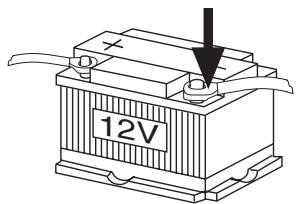
- Disconnect the negative battery termina.
- Observe the car manufacturer's safety instructions.
- If you drill any holes, make sure that you do not damage any parts of the vehicle.
- The diameter of the positive/negative cable must not be less than 1.5 ~mm^2 .
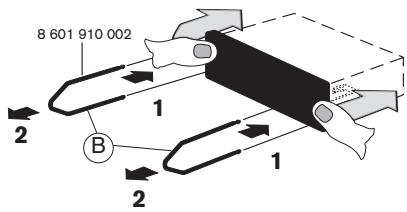
Supplied Mounting Hardware
Bend as many taps as possible.
* Car-specific adapter cable which is available at your dealer.
7.
C-1
C-2
C-3
C
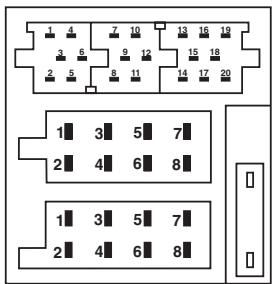
| A | B | ||
| 1 | — | 1 | Speaker out RR+ |
| 2 | Telefon Mute | 2 | Speaker out RR- |
| 3 | nc | 3 | Speaker out RF+ |
| 4 | Permanent +12V | 4 | Speaker out RF- |
| 5 | Aut. antenna | 5 | Speaker out LF+ |
| 6 | nc | 6 | Speaker out LF- |
| 7 | Kl.15/Ignition | 7 | Speaker out LR+ |
| 8 | Ground | 8 | Speaker out LR- |
B
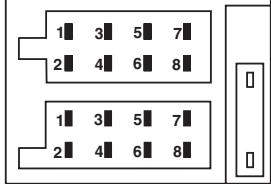
| C | |||||
| C1 | C2 | C3 | |||
| 1 | Line Out LR 5V/10K | 7 | nc | 13 | Changer Bus |
| 2 | Line Out RR 5V/10K | 8 | nc | 14 | nc |
| 3 | Line Out Masse / Ground | 9 | nc | 15 | +12V |
| 4 | nc | 10 | nc | 16 | 12V |
| 5 | nc | 11 | nc | 17 | Changer GND |
| 6 | nc | 12 | nc | 18 | AF - GND |
| 19 | Line In - L 1,2V/10K | ||||
| 20 | Line In - R 1,2V/10K | ||||
only
Lexington C 32
only
Lexington C 32
● BLAUPUNKT
Please keep the filled-in radio pass in a safe place!


- CONTENTS
- Notes and accessories......5
- Removable control panel ......6
- Switching on/off......7
- Adjusting the volume .....7
- Radio mode......8
- Cassette mode....10
- CD changer mode......11
- CLOCK - Time......13
- Sound and volume distribution settings....14
- Equalizer and X-BASS......15
- Specifications......16
- Installation instructions......72
- NOTES AND ACCESSORIES
- Road safety
- Installation
- Accessories
- REMOVABLE CONTROL PANEL
- Theft protection
- Note:
- Attaching the control panel
- SWITCHING ON/OFF
- ADJUSTING THE VOLUME
- Setting the power-on volume
- Instantaneously reducing the volume (mute)
- RADIO MODE
- Mute while telephoning
- Switching to radio mode
- Selecting the frequency band / memory bank
- Tuning into a station
- Setting the sensitivity of station seek tuning
- Storing station presets
- Storing stations automatically (Travelstore)
- Listening to station presets
- CASSETTE MODE
- Cassette playback
- Switching over the playing side of the tape
- Fast tape winding
- Fast-forwarding
- Fast-rewinding
- Cassette eject
- CD CHANGER MODE
- Switching to CD changer mode
- Selecting CDs
- Selecting tracks
- Fast searching (audible)
- Repeating individual tracks or whole CDs (REPEAT)
- Random track play (MIX)
- Scanning all tracks on all CDs (SCAN)
- Pausing playback (PAUSE)
- CLOCK - Time
- Displaying the time
- Setting the clock
- Selecting 12/24-hour clock mode
- Displaying the time when the unit is off and the ignition is on
- SOUND AND VOLUME DISTRIBUTION SETTINGS
- Adjusting the bass
- Adjusting the treble
- Adjusting the balance settings
- Adjusting the fader settings
- EQUALIZER AND X-BASS
- X-BASS
- Selecting preset sound effect
- SPECIFICATIONS
- Amplifier
- Tuner
- CC
- Pre-Amp Out
- ÉLÉMENTS DE COMMANDE
- Éjection de la cassette
- (Frontal extraíble)....34
- Nota:
- Uyarı:
- Installation and connection regulations
- While installing and connecting this equipment, please observe the following safety notes:
- Supplied Mounting Hardware
- 7.
- ● BLAUPUNKT
Brand : BLAUPUNKT
Model : ST. LOUIS C32
Category : Car radio