
BS-1000 - Hi-Fi System Vivax - Free user manual and instructions
Find the device manual for free BS-1000 Vivax in PDF.


| Product Type | Karaoke Bluetooth Speaker System with FM Radio |
| Model | BS-1000 / BS-1001 |
| Brand | Vivax |
| Dimensions (approx.) | 310 x 295 mm |
| Power Supply | AC 100-240V, 50/60Hz; Built-in rechargeable battery 7500mAh |
| Battery Life | Up to 13.5 hours at moderate volume, up to 3.5 hours at maximum volume |
| Charging Time | Approx. 6-7 hours |
| Audio Output Power | 100W RMS (2x 8" woofers + 2 tweeters) |
| Bluetooth | Version 5.0, range up to 10m (line of sight) |
| TWS Function | True Wireless Stereo – pair two identical speakers |
| FM Radio | Digital FM tuner 87.5-108 MHz with auto-scan and station memory |
| Media Playback | USB and TF card (supports MP3, up to 32GB) |
| Audio Inputs | AUX IN (3.5mm), 2x 6.5mm for microphone/guitar |
| Wireless Microphones | 2 included (UHF) |
| LED Lighting | Multi-color changing with multiple modes |
| Additional Features | Microphone echo, treble/bass controls, voice prompt, outdoor/indoor mode, music ducking, USB charging output (5V 1A) |
| Remote Control | Included (requires 2x AAA batteries, not included) |
| Accessories Included | Power cable, user manual, remote control, 2 wireless microphones |
| Safety & Care | Do not expose to water or heat; clean with dry cloth; disconnect when not in use for long periods; charge every 6 months if unused |
Frequently Asked Questions - BS-1000 Vivax
User questions about BS-1000 Vivax
0 question about this device. Answer the ones you know or ask your own.
Ask a new question about this device
Download the instructions for your Hi-Fi System in PDF format for free! Find your manual BS-1000 - Vivax and take your electronic device back in hand. On this page are published all the documents necessary for the use of your device. BS-1000 by Vivax.
USER MANUAL BS-1000 Vivax
natural_image
Black and blue portable electronic device with two speakers, no visible text or symbols on bodyKarakteristike
- Bluetooth 5.0 wireless-domet 10 metara.
• TWS (True Wireless Stereo) funkcija – uparivanje 2 zvučnika kao par - Karaoke zvučnik s 2x8" snažnim niskotoncem i dva visokotonca
• Audio izlaz 100W RMS
• LED rasvjeta s promjenom boje svjetla
• Digitalni FM radio - Bežični mikrofon + 1x ulaz za mikrofon i 1x ulaz za gitaru (6,5mm)
• AUX IN 3,5mm audio ulaz
• USB/TF priključak - podržava MP3 format, do 32GB
• Ugrađena punjiva baterija 7500mAh - Trajanje baterije: do 13,5 sati na srednoj jačini, do 3,5h na maksimalnoj jačini
Oprema uz uređaj:
• Kabel za napajanje i punjenje
- Upute za uporabu
• Daljinski upravljač
• Dva Bežična mikrofona
Dobrodošli
Kada odspojite kabel tijekom punjenja i želite ga ponovno uključiti, pričekajte barem 20 sekundi. Ako uključite kabel u roku od 20 sekundi, uređaj se više neće moći puniti. Nakon toga isključite kabel za napajanje i pričekajte tri minute da ga ponovno uključite.
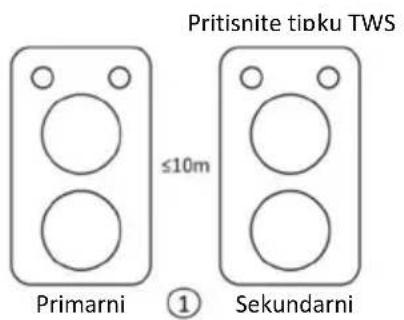
TWS (BEŽIČNI STEREO)
- Uključite dva ista modela, kratkim pritiskom tipke TWS na jednoj jedinici (kao sekundarnom
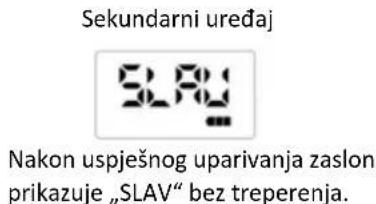
uređaju), kada se uspješno poveže, prikazuje se LCD zaslon sekundarnog uređaja bez treperenja.

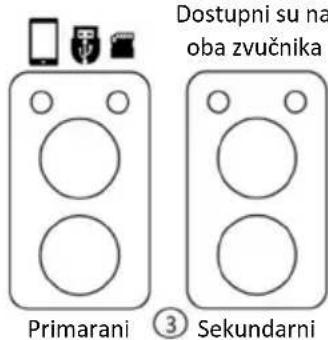
- Na drugom uređaju (kao primarnom uređaju) možete povezati Bluetooth sa svojim pametnim telefonom ili umetnuti USB, TF karticu, FM, AUX funkciju, a zatim reproducirati glazbu na oba zvučnika.
- Možete promijeniti glasnoću i pritisnuti tipku sljedeći/pauza/prethodni na bilo kojem uređaju i oba uređaja slijede isto.
- Napomena: TWS funkcija podržava samo vezu jedan-na-jedan. Nemojte omogućiti TWS funkciju na više uređaja u isto vrijeme.
②
NAČIN PRIPRAVNOSTI
natural_image
Black and white crossed-out symbol on white background, no text or symbols presentOTKLANJANJE POTEŠKOĆA
natural_image
Black and blue portable electronic device with two speakers, no visible text or symbols on bodyKarakteristike
- Bluetooth 5.0 wireless-domet 10 metara.
• TWS (True Wireless Stereo) funkcija – uparivanje 2 zvučnika kao par - Karaoke zvučnik sa 2x8" snažnim vuferom i dva visokotonca
• Audio izlaz 100W RMS
• LED rasveta s promenom boje svetla
• Digitalni FM radio - Bežični mikrofon + 1x ulaz za mikrofon i 1x ulaz za gitaru (6,5mm)
• AUX IN 3,5mm audio ulaz
• USB/TF priključak- podržava datoteke u MP3 formatu, do 32GB
• Ugrađena punjiva baterija 7500mAh - Trajanje baterije: do 13,5 sati na srednoj jačini, do 3,5h na maksimalnoj jačini
Oprema uz uređaj:
• Kabl za napajanje i punjenje
- Korisničko upustvo
• Daljinski upravljač
• Dva bežična mikrofona
Dobrodošli
Zahvaljujemo na kupovini audio uređaja VIVAX BS-1000/1001. Molimo vas da pažljivo pročitate i sledite sva uputstva navedena u ovom priručniku kako biste s lakoćom mogli da koristite ovaj proizvod. Preporučujemo da ova uputstva sačuvate kako biste ih, u slučaju potrebe, mogli koristiti u budućnosti.
VAŽNA SIGURNOSNA UPOZORENJA
| TREBLE VOLUME | |
| BASS VOLUME | |
| MIC VOLUME | |
| MIC ECHO | |
| MIC. TREBLE VOLUME | |
| MIC BASS VOLUME | |
| GUITAR BOLUME |
16. MODE:
Izaberite ulazni izvor za reprodukciju muzike. Bluetooth, FM radio, Line in, USB/TF (ako je stavljeno).
Dug pritisak: Uključite/isključite glasovne komande.
OTKLANJANJE POTEŠKOĆA
U slučaju pojave poteškoća u radu, pročitajte donja uputstva pre nego što uređaj odnesete na popravku. U slučaju da niste u mogućnosti otkloniti problem pomoću donjih uputstava, molimo kontaktirajte ovlašćenog trgovca ili službu za korisnike.
natural_image
Black and blue portable electronic device with two speakers, no visible text or symbols on bodyКарактеристики
natural_image
Simple line drawing of a speaker with three circular buttons and three icons above (no text or symbols)Примарен
natural_image
Black and white crossed-out symbol on white background, depicting multiple cosmetic products (no text or labels)Rm.1503A,15/F,Shun Kwong Commercial Bldg.,No.8 Des Voeux Road West,Sheu Wan, Hong Kong
EN IEC 62368-1:2020+A11:2020
EN 50564:2011
IEC 62321-1:2013
IEC 62321-2:2021
IEC 62321-3-1:2013
IEC 62321-4:2013+AMD1:2017
IEC 62321-5:2013
IEC 62321-6:2015
IEC 62321-7-1:2015
IEC 62321-7-2:2017
IEC 62321-8:2017
Скопје, 20.12.2023
member of M SAN Grupa
KOMPANI

Rm.1503A,15/F,Shun Kwong Commercial Bldg.,No.8 Des Voeux Road West,Sheung Wan,Hong Kong
Subjekti i deklaratës:
Produkt: BLUETOOTH BOKS
EN IEC 62368-1:2020+A11:2020
EN 50564:2011
IEC 62321-1:2013
IEC 62321-2:2021
IEC 62321-3-1:2013
IEC 62321-4:2013+AMD1:2017
IEC 62321-5:2013
IEC 62321-6:2015
IEC 62321-7-1:2015
IEC 62321-7-2:2017
IEC 62321-8:2017
Skopje, 20.12.2023
member of M SAN Grupa
KOMPANI

natural_image
Black and blue portable electronic device with two speakers, no visible text or symbols on bodyKarakteristikat:
- Bluetooth 5.0 me rreze wireless 10m.
• TWS (True Wireless Stereo) funksioni - çiftimi i 2 altoparlantëve
 | TREBLE VOLUME |
| BASS VOLUME | |
 | MIC VOLUME |
 | MIC ECHO |
 | MIC. TREBLE VOLUME |
 | MIC BASS VOLUME |
 | GUITAR BOLUME |
16. MODALITETI:
MODALITETI STANDBY
natural_image
Black cross symbol crossed over a collage of cosmetic bottles and boxes (no text or labels)MËNJANIMI I PROBLEMEVE
natural_image
Black and white electronic device with two blue speakers emitting sound waves, no visible text or symbols on the device body.Karakteristike
Ko med polnjenjem izključite napajalni kabel in ga želite znova priključiti, prosimo, ne vklopite takoj in počakajte vsaj 20 sekund. će kabel priključite v 20 sekundah, se naprava ne bo mogla znova polniti. Po tem izključite napajalni kabel in nato počakajte tri minute, da ga znova priključite.
- Press MODE button until you enter FM Radio mode.
- Press >> to auto scan Radio stations and store it automatically.
- Press << or >>I to navigate forward or backward FM Radio stations.
AUX IN (LINE IN NAČIN)
TWS (PRAVI BREZŽIČNI STEREO)
ODPRAVLJANJE TEŽAV
V primeru pojava težav, v celoti preberite ta navodila, preden boste napravo odnesli na popravilo. V primeru, da naprave ne morete usposobiti s pomočjo navodil, se obrnite na pooblaščenega prodajalca ali servis.
OPOZORILO: V nobenem primeru sami ne popravljajte in odpirajte naprave, saj se bo tako garancija prekinila.
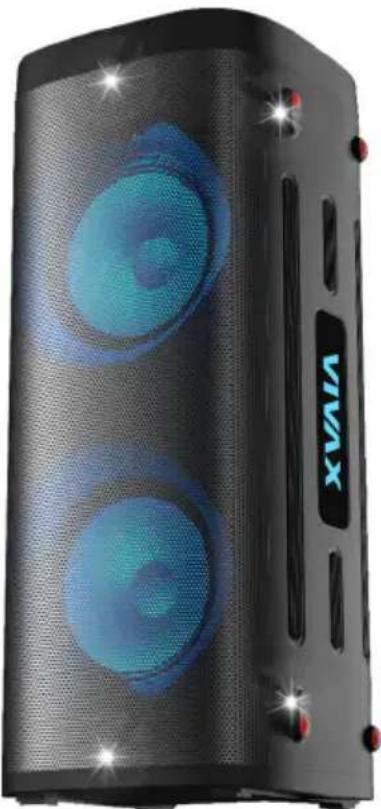
Bluetooth/MP3 Player with FM Radio and Karaoke
natural_image
Black and blue portable electronic device with two speakers, no visible text or symbols on bodyFeatures:
- Bluetooth 5.0 with wireless range 10m.
- TWS (True Wireless Stereo) function – connection 2 speakers as pair
- Karaoke speaker with 2x8" Powerfull Woofer and two tweeter
- RMS output 100W
• LED color changing lights - FM radio
• 1x Wireless Microphone + 1x Microphone and guitar inputs (6,5mm)
• AUX IN 3,5mm audio input - USB/TF card playback port - supports MP3 file format, up to 32GB
• Built-in rechargeable battery 7500mAh. - Playing time: Aprox: 13,5 hours at Mid volume, up to 3,5h on Max volume
Accessories:
- Power and charger cable
- User manual
- Remote controller
- Two Wireless Microphone
Welcome
Thank you for purchasing the Bluetooth Audio system VIVAX BS-1000/1001.
It is important to read this user manual prior to using your new product for the first time. In order to fully benefit from this product, please follow the instructions in this user manual very carefully. Store this user manual in a safe place for future reference. We are sure your new Micro Audio system will satisfy your needs.
IMPORTANT SAFETY INSTRUCTIONS
When used in the directed manner, this unit has been designed and manufactured to ensure your personal safety. However, improper use can result in potential electrical shock or fire hazards. Please read all safety and operating instructions carefully before installation and use, and keep these instructions handy for future reference. Take special note of all warnings listed in these instructions and on the unit.
CAUTION: TO REDUCE THE RISK OF ELECTRIC SHOCK, DO NOT REMOVE COVER. NO USER SERVICEABLE PARTS INSIDE, REFER SERVICING TO QUALIFIED SERVICE PERSONNEL.
- Water and Moisture – The unit should not be used near water. For example: near a bathtub, washbowl, kitchen sink, laundry tub, swimming pool or in a wet basement.
- Ventilation – The unit should be situated so that its location or position does not interfere with its proper ventilation. For example, it should not be situated on a bed, sofa, rug or similar surface that may block ventilation openings. Also, it should not be placed in a built-in installation, such as a bookcase or cabinet, which may impede the flow of air through the ventilation openings.
- Heat – The unit should be situated away from direct sunlight or heat sources such as radiators, heat registers, stoves or other appliances (including amplifiers) that produce heat.
- Power Sources – The unit should be connected to a power supply only of the type described in the operating instructions or as marked on the appliance.
- Charger Cable Protection – Charger cable should be routed so that they are not likely to be walked on or pinched by items placed upon or against them.
- Cleaning – The unit should be cleaned only using a warm damp cloth. Do not use solvents, etc.
- Objects and Liquid Entry – Care should be taken so that objects do not fall and liquids are not spilled into any openings or vents located on the product. In that case, immediately disconnect power supply and contact authorized service.
- Attachments – Do not use attachments not recommended by the product manufacturer.
- Periods of Non use – If the unit is to be left unused for an extended period of time, such as a month or longer, the power charging cable should be unplugged from the unit to prevent damage. Storage device on dry and dark place.
-
Servicing – The user should not attempt to service the unit beyond those methods described in the user's operating instructions. Service methods not covered in the operating instructions should be referred to qualified service personnel.
-
WARNING: Unit contains Rechargeable batteries. To change batteries in case that battery became weak, contact your Official Service or Dealer.
-
Unit and batteries should not be exposed to excessive heat, such as sunshine, heat registers, or fire.
-
Battery chemicals can cause a rash. If the batteries leak, clean the battery compartment with a cloth. If chemicals touch your skin, wash immediately.
-
Using Audio product prolonged periods or at a high volume can damage your hearing permanently. If you experience noise in the ears or other problems immediately stop using the unit. It is recommended to use Audio unit at a moderate volume.
- Place exposed to vibration can affect the damage of internal parts of the device. The device should not be placed near open flames and sources of intense heat, such as, electric heaters.
- Do not allow children to play with device.
This appliance is not intended for use by persons (including children) with reduced physical, sensory or mental capabilities, or lack of knowledge and experience to use the appliance, unless they are supervised by a person who is responsible for their safety or you're not received training on the use of appliances.
- Place the unit on a hard and flat surface so that the unit does not tilt.
- Do not cover the unit. Adequate ventilation with a minimum gap of 15cm between the ventilation holes and surrounding surfaces is necessary to prevent heat build-up

PREPARATION FOR USE
Unpacking and Setup
* Carefully remove the unit from the display carton and remove all packing material from the unit itself.
* Do not remove any labels located on either the back or button cabinet of the unit.
POWER SUPPLY-CHARGING
The unit is supplied with powerfull rechargeable battery 7500mAh. Unit can play music many hours powered by battery. When the battery becomes weak speaker announce "Lower Power, Please Charge". There will be three voice alerts each time 1 min apart, then speaker will automatically shut down. Please use the attached Power cable, plug in into AC Power socket to charge battery.
- Power off the unit (Power ON/OFF button ⏻).
You can charge unit in ON state, but charging will go slower.
- Put the provided Power cable into the AC Power socket on the back side of the unit.
- Connect the other end of the Power Cable to Power outlet 100-240V, 50/60Hz.
- The charging indicator keep Red lighting.
- Charge time should be aprox. 6-7 hours.
- When Battery is fully charged, the indicator light will become green.
Note: Remote controller power ON/OFF:
When you shut down unit with remote controller, unit can not be charged. Press power ON button for 3 seconds to start up, then put it on charge.
When you unplug the power code during charging and want to plug in again, please do not plug in immediately and at least wait 20 seconds. if you plug in the cable within 20 seconds, the device will
not be able to charge again. After that unplug power cable and then wait for three minutes to plug in again.
When playing music during charging, please put the volume to middle, because for some music with heavy bass, the charger may can not afford the high current temporarily under the maximum volume.
ATTENTION: In order to prolong the life of battery, please do not leave unit continuously on Charger or charge unit more than 10 hours.
OVERVIEW OF THE PLAYER
Top side
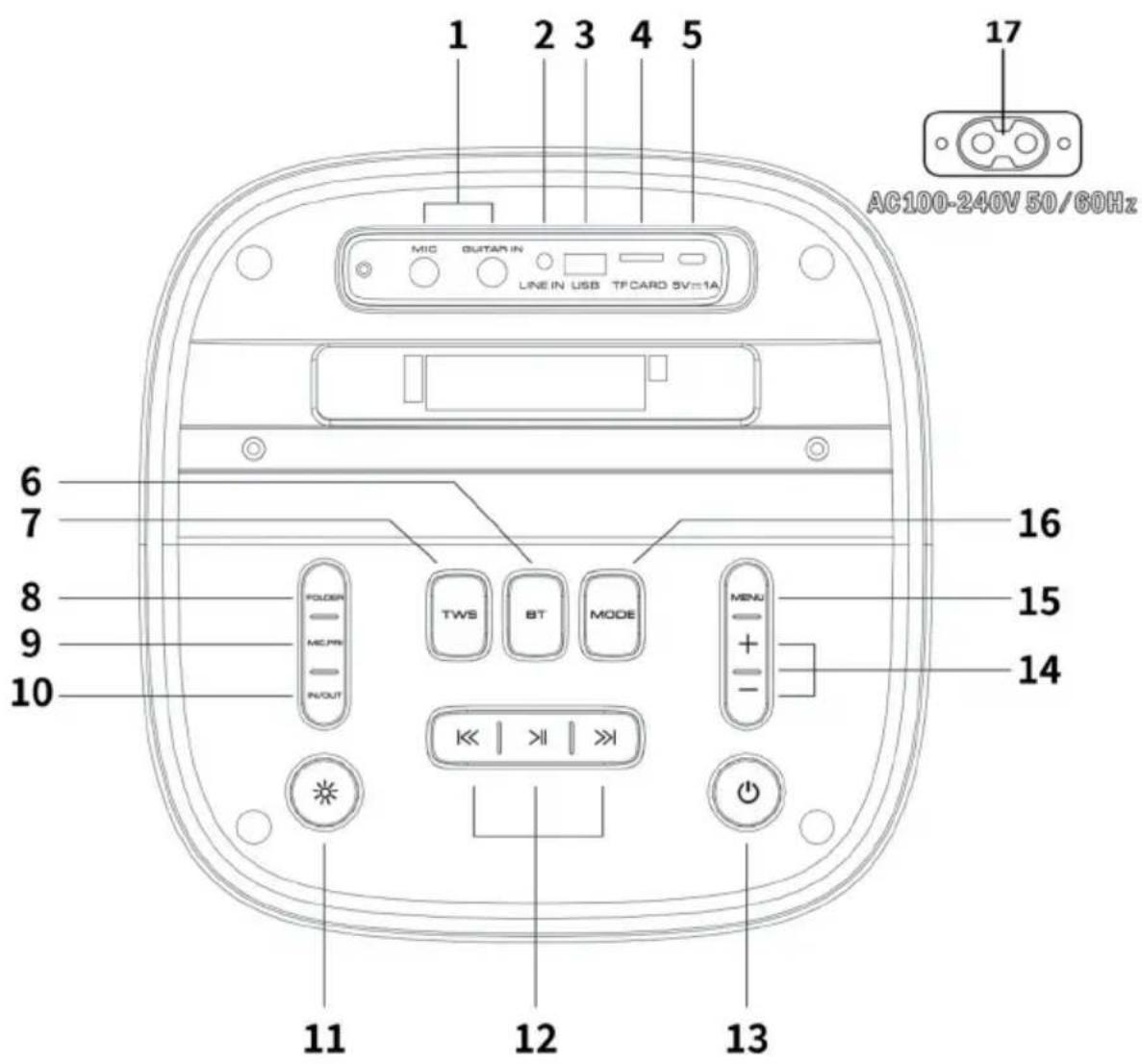
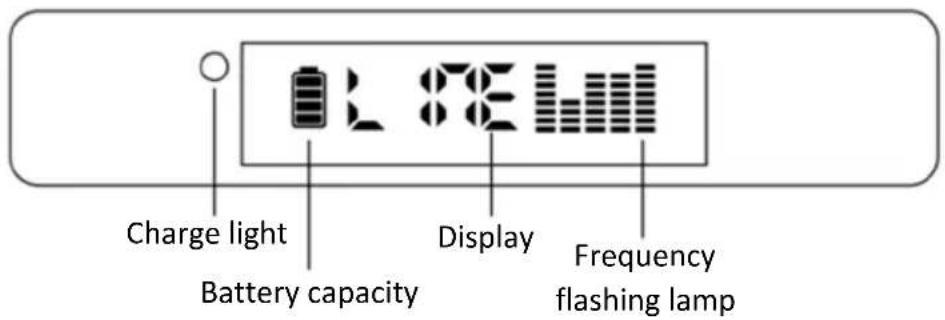
Control Panel
1. MIC/GUITAR:
Microphone input and Guitar input for wired microphone and guitar (6,5mm)
2. LINE IN:
Analog 1/8" stereo input jack for external audio source (music).
3. USB:
USB connector for playing audio files from external USB memory.
4. TF Card
TF card interface for playing audio files.
5. 5V 1A (Type C):
Used for charging phones or other devices.
6. BT:
Short press to select Bluetooth mode. If device is already connected, long press to disconnect the device.
7. TWS:
Short press to search and connect the Host device, press again to disconnect the device.
8. FOLDER:
Press to switch the folder and play the another content.
9. MIC. PRI. (MICROPHONE PRE-AMPLIFIER)
Set the music ducking function on or off. Adjust the volume level of the music when the microphone voice signal is present.
10. IN/OUT
Press to select outdoor or indoor mode.
11. LIGHT
Switch the LED lights styles/colors. There are 2 modes of light style; Long press to change modes; Short press can choose different colors on either mode.
12. NEXT
Bluetooth mode: Play the next music track on the connected Bluetooth device.
USB/TF mode: Play or pause the next music track.
FM mode: Select the next radio station.
PREVIOUS:
Bluetooth mode: Play the previous music track on the connected Bluetooth device.
USB/TF mode: Play or pause the previous music track.
FM mode: Select the previous radio station.
PAUSE / PLAY
Bluetooth mode: Play or pause the music on the connected Bluetooth device.
USB/TF mode: Play or pause the current music track.
FM mode: Automatically scan radio stations.
13. POWER
Long press 2\~3 seconds to turn on/off the speaker.
NOTE: When the device is turned off on device power button, it is not possible to turn it on via the remote control.
14. VOL + / - :

Short press to increase the main volume. Long press to adjust faster.

Short press to decrease the main volume. Long press to adjust faster.
15. MENU:
Short press to adjust TREBLE/BASS/MIC VOL/MIC ECHO/MIC TREBLE/MIC BASS/GUITAR VOL and control the volume accordingly. Long press: Factory Reset.
Below is the symbols on the display:
| TREBLE VOLUME | |
| BASS VOLUME | |
| MIC VOLUME | |
| MIC ECHO | |
| MIC. TREBLE VOLUME | |
| MIC BASS VOLUME | |
| GUITAR BOLUME |
16. MODE:
Select the input source for music. Bluetooth, FM radio, Line in, USB/TF (if inserted).
Long press: Turn on/off the Voice prompt.
Below is the symbols on the display:
| Bluetooth Mode | FM radio LINE IN USB mode TF Card | |||
17. AC 100-240V Input
OPERATION
USB / TF Card Mode
- When insert the USB or TF device, the units will enter in USB/TF Card mode and play the music automatically. Or you can press „Mode“ until USD/TF Card Mode is selected.
- Short press key to pause or play the song.
- Short press key to the previous song. Long press to fast backward the music track.
- Short press >> key to the next song. Long press to fast forward the music track.
BLUETOOTH WIRELESS PAIRING MODE
- Press MODE or BT button on the panel or on the remote control unit BT is selected.
- Place your smartphone or other device within 15 meters.
- Activate the Bluetooth on your smartphone and start to search for the Bluetooth device.
-
Select the correct model „BS-1001“ from the device found by the cell phone.
-
Short press PLAY/PAUSE button to play or pause music.
-
Short press or key to select the previous or next track.
-
Long press on key to fast forward or backward the music track.
FM RADIO
- Press MODE button until you enter FM Radio mode.
- Press > to auto scan Radio stations and store it automatically.
- Press or to navigate forward or backward FM Radio stations.
AUX IN (LINE IN MODE)
- Press MODE button until LINE-in mode is selected. Play the music on the device connected to the LINE input.
- Make sure you have a 3.5mm AUX cable plugged into your audio device from the AUX port on the top of Speaker.
- In AUX mode, you can only control the functions through the audio device. Though you can adjust the volume on either device.
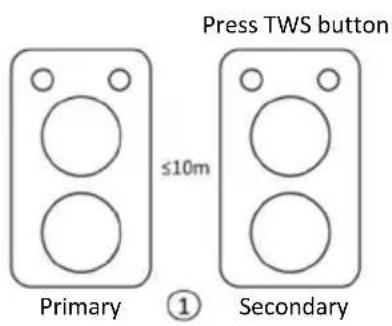
TWS (TRUE WIRELESS STEREO)
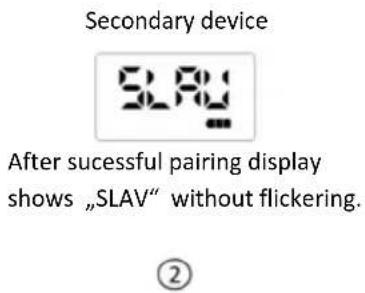
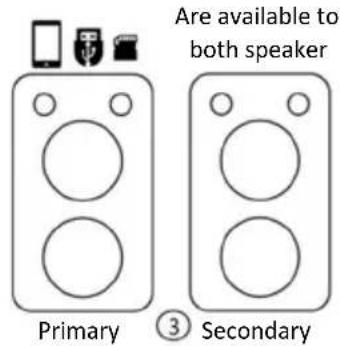
- Power on two same models, short press TWS button on one unit (as a secondary device), when
successfully connected, the LCD screen of the secondary device shows without flickering.
- On the another device (as primary device), you can connect the Bluetooth with your smartphone or insert USB, TF Card, FM, AUX function, then play music on both speakers.
- You can switch the volume and press next/pause/previous button on either unit and both units follow the same.
- Note: TWS function only supports one-to-one connection. Do not enable the TWS function on multiple devices at the same time.
STANDBY MODE
- Press POWER button on remote to enter Standby Mode; you can press POWER button to exit the standby mode.
- When there is no signal input for more than 15 minutes, the speaker will automatically enter standby mode.
- When the speaker is under standby mode more than 15 minutes, the speaker will automatically shutdown.
WARNINGS:
DO NOT CHARGE THE SPEAKER OR A MOBILE DEVICE WHILE IT IS NEAR WATER OR IF IT MAY GET WET.
DO NOT LEAVE DEVICE UNATTENDED DURING THE BATTERY CHARGE!
ALWAYS DISCONNECT POWER CABLE IF UNIT WILL NOT USE LONGER TIME!
IF YOU DO NOT USE THE DEVICE FOR A LONG TIME, CHARGE THE BATTERY EVERY 6 MONTHS.
REMOTE CONTROLLER
-
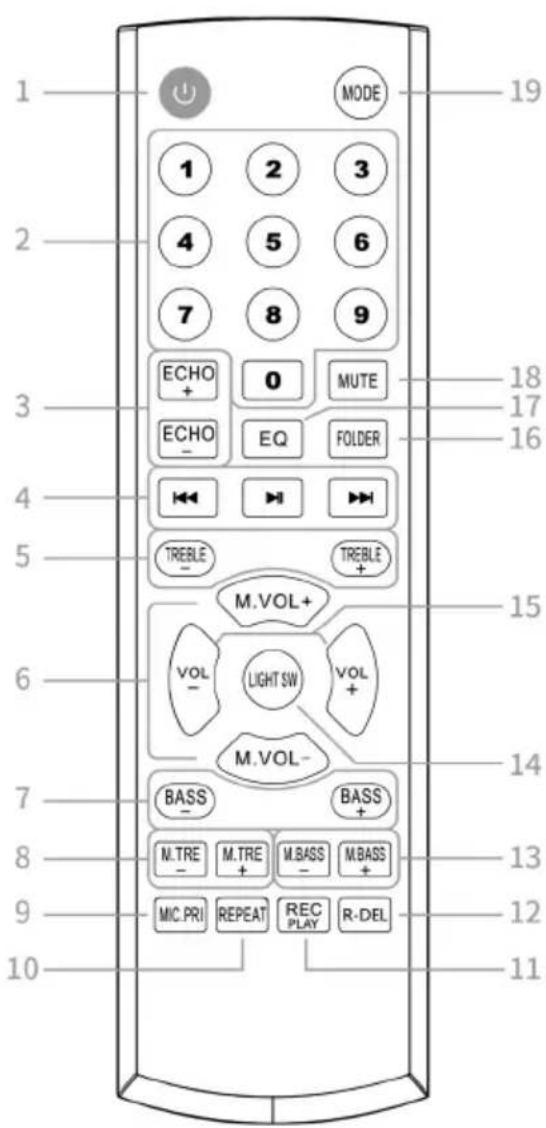
POWER: Standy by mode (When there is no singal input, the speaker will automatically enter stand by mode).
-
N UMBERS 0-9: Select track from external memory (USB/TF) or FM station.
-
ECHO +/-: Adjust the microphone echo volume.
-
PREVIOUS: Bluetooth mode: Play the previous music track on the connected Bluetooth device. USB/TF mode: Play previous radio station. FM mode: Select the previous radio station. PAUSE/PLAY: Bluetooth mode: Play or pause the music on the connected Bluetooth device. USB/TF mode: Play or pause the current music track. FM mode: Automatically scan radio stations. NEXT: Bluetooth mode: Play the next music track on the connected Bluetooth device. USB/TF mode: Play the next music track. FM mode: Select the next radio station.
-
TREBLE +/-: Adjust treble sound.
-
MIC. VOL +/- : Adjust Microphone volume.
-
BASS +/-: Adjust Bass sound
-
MI C. TREBLE +/-: Adjust Microphone treble sound.
-
MI C.PRI.: Set the music ducking function on/off.
-
REPEAT: USB /TF mode: Set as "ONE" to loop a single track. Set as "ALL" to play all soundtrack.
-
REC PLAY: Sh ort press to record the microphone voice/Guitar sound to external memory (USB/TF card). Long press to play the recorded file. Press MODE to return back USB mode to play music.
- R-DEL: Delete r recorded file.
- MIC. BASS +/-: Adjust Microphon e bass sound.
- LIGHT SW: Change the style or color of the light.
- VOL +/-: Adjust the music volume.
- FOLDER: Select the music folder which you want to play.
- EQ: Select the EQ preset for the music.
- Flat 2. Pop 3. Rock 4. Jazz 5. Classic
- MUTE: Mute the speaker. Press again to unmute.
- MODE: Select input source (Bluetooth, FM radio, Line in, USB, TF card) Long press to turn on/off the voice prompt.
REMOTE CONTROL BATTERIES (not included in all models)
Open the battery compartment and insert 2xAAA batteries, (Preferably Alkaline) with the correct polarity as indicated by the “+” and “-” symbols inside the compartment.
WARNING:
- Dispose of your batteries in a designated disposal area. Do not throw the batteries into a fire.
- Do not mix battery types or combine used batteries with new ones.
- Remove depleted batteries immediately to prevent battery acid from leaking into the battery compartment.
• If you do not intend to use the remote control for a long time, remove the batteries. - Batteries should not be exposed to excessive heat, such as sunshine, heat registers, or fire.
- Battery chemicals can cause a rash. If the batteries leak, clean the battery compartment with a cloth. If chemicals touch your skin, wash immediately.
- Place the unit on a hard and flat surface so that the unit does not tilt.
- Do not expose the unit to excessive humidity, rain, sand or excessive heat caused by heating equipment or direct sunlight.
- Do not cover the unit. Adequate ventilation to prevent heat build-up.
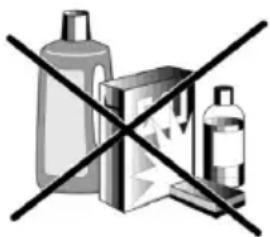
- To clean the set, use a soft dry cloth. Do not use any cleaning agents containing alcohol, ammonia, benzene or abrasives as these may harm the cabinet.
natural_image
Cross symbol of crossed-out items including bottles and a box (no text or labels)TROUBLESHOOTING
If a fault occurs, it is important you first check the points listed below before taking the unit for repair. If you are unable to remedy a problem by following these hints, consult your dealer or service center.
WARNING: no circumstances should you try to repair the unit yourself, as this will invalidate the warranty.
No Sound / Power
- Volume not adjusted Adjust the VOLUME
- Battery is Empty
- Connect the power cord for charging
No reaction to operation of any of the controls
- Electrostatic discharge
Switch off the unit. Connect it after a few seconds
TECHNICAL SPECIFICATIONS
| TECHNICAL SPECIFICATIONS | |
| GENERAL | |
| Power Requirement AC: 100-240V, 50/60Hz | |
| Power consumption 100W | |
| Battery / Working time* | Lead-acid, 7500mAh / Aprox. 3,5h on Max / 13,5h on moderate volume |
| Dimensions | Approx. 310 |
| Operation temperature +5°C - +35°C | |
| RECEIVER SECTION | |
| FM Tuning Range FM: 87.5-108 MHz | |
| BT Range | 2402-2480 MHz, Max Antenna gain: 2.81dBi, Range up to 10m*** |
| AUDIO SECTION | |
| Output Power Maximum 100 Watt RMS, 40Hz-18kHz, SNR >65dB | |
| Speakers | Bass: 2x210mm, Tweeter: 2x62mm |
| ACCESSORIES | |
| Instruction Booklet 1 | |
| AC Power cable 1 | |
| Remote controller 1 | |
| Two Wireless Microphones 1 | |
mm(D)x295mn
* Design an d specifications subject to change without notice.
** Working battery time is aproximative; It depends about room temperature, battery condition and how unit is use.
*** Bluetooth range is affected by walls, obstructions, and movement. For optimal performance, place the product in your room at line of sight, so it is unaffected by walls, furniture, etc.
Disposal of Waste Electrical & Electronic Equipment

This symbol on the product(s) and / or accompanying documents means that used electrical and electronic products should not be mixed with general household waste. For proper treatment, recovery and recycling, please take this product(s) to designated collection points where it will be accepted free of charge. Alternatively, in some countries you may be able to return your products to your local retailer upon purchase of an equivalent new product. Disposing of this product correctly will help save valuable resources and prevent any potential negative effects on human health and the environment, which could otherwise arise from inappropriate waste handling. Please contact your local authority for further details of your nearest designated collection point. Penalties may be applicable for incorrect disposal of this waste, in accordance with your national legislation.
Disposal of waste batteries

Check local regulations for disposal of waste batteries or call your local customer service in order to get instructions on the disposal of old and used batteries. The batteries in this product should not be disposed of with household waste. Be sure to dispose of old batteries in special places for disposal of used batteries that are found in all retail shops where you can buy batteries.
EU Declaration of Conformity
This device is manufactured in accordance with the applicable European standards and in accordance with applicable RED Directives 2014/53/EU and Regulations. The full text of the EU declaration of conformity is available at the following internet address: www.msan.hr/dokumentacijaartikala

POŠTOVANI!
Zahvaljujemo na kupnji Vivax uređaja i nadamo se da ćete biti zadovoljni odabirom. Ako u jamstvenom roku bude potreban popravak proizvoda, molimo savjetujte se sa ovlaštenim prodavačem koji Vam je proizvod prodao ili nas kontaktirajte na dolje navedene brojeve i adrese. MOLIMO VAS DA PRIJE UPORABE PROIZVODA PAŽLJIVO PROČITATE UPUTE PRILOŽENE UZ PROIZVOD!
JAMSTVENI LIST HR
VIVAX
MODEL UREĐAJA
SERIJSKI BROJ
DATUM PRODAJE
BROJ RAČUNA PRODAVATELJA
POTPIS I PEČAT PRODAVATELJA
POTPIS I PEČAT PRODAVCA
PRAVA POTROŠAČA NA OSNOVU ZAKONA O ZAŠTITI POTROŠAČA I NESAOBRAZNOSTI PROIZVODA
U skladu sa članom 49 Zakona o zaštiti potrošača ("Sl.glasnik RS" br.88/2021) roba je saobrazna ako:
- Odgovara opisu koji je dao prodavac i ako ima svojstva robe koju je prodavac pokazao potrošaču kao uzorak ili model,
- Ima svojstva potrebna za naročitu upotrebu za koju je potrošač nabavlja, a koja je bila poznata prodavcu ili mu je morala biti poznata u vreme zaključenja ugovora, te ako ima svojstva potrebna za redovnu upotrebu robe iste vrste,
- Po kvalitetu i funkcionisanju odgovara onome što je uobičajeno kod robe iste vrste i što potrošač može osnovano da očekuje s obziorm na prirodu robe i javna obećanja o posebnim svojstvima robe data od strane prodavca, proizvođača ili njihovim predstavnika, naročito ako je obećanje učinjeno putem oglasa ili na ambalaži robe.
Ako isporučena roba nije saobrazna ugovoru (član 51 Zakona o zaštiti potrošača), potrošač ima pravo da zahteva od prodavca da otkloni nesaobraznost, bez naknade, opravkom ili zamenom, odnosno da zahteva odgovarajuće umanjenje cene ili da raskine ugovor u pogledu te robe.
POTPIS I PEČAT PRODAVATELJA
GARANCIJSKA IZJAVA
- Ovom garancijom garantira proizvođač proizvoda, preko KIM TEC d.o.o., kao uvoznika i davatelja garancije u Republici Bosni i Hercegovini besplatan popravak istog u skladu s važećim propisima i u skladu s uvjetima opisanim u ovom garantnom listu. Ovom garancijom garantiramo da će predmet ove garancije raditi bez greške uzrokovane eventualnom lošom izradom i lošim materijalom izrade. Svi eventualno nastali kvarovi biti će besplatno otklonjeni u ovlaštenom servisu u garantnom roku.
UVJETI GARANCIJE:
Garantni rok počinje teći od dana kupnje proizvoda i traje 12 mjeseci, osim za Vivax Imago televizore za koje garancija traje 24 mjeseca
- U slučaju kvara na proizvodu koji je predmet ove garancije, obavezujemo se da ćemo isti popraviti u najkraćem mogućem roku, a najkasnije u roku od 30 dana. Ako se proizvod ne može popraviti ili se ne popravi u roku od 30 dana, biti će zamijenjen novim. Ako popravak proizvoda traje duže od 10 dana, garancija se produljužuje za vrijeme trajanja popravka.
- Garancija se priznaje samo uz račun o kupnji, te uz ovaj garantni list koji mora biti ispravno popunjen odnosno mora sadržavati datum prodaje, pečat i potpis prodavatelja.
- Davalac garancije osigurava servis i rezervne dijelove 7 godina od datuma kupnje.
GARANCIJA NE OBUHVAĆA:
POTPIS I PEČAT PRODAVCA
- Ovom izjavom o saobraznosti proizvođač proizvoda, preko KIM TEC CG d.o.o., kao uvoznika i davaoca prava u Crnoj Gori besplatan popravak istog u skladu s vazećim propisima i u skladu s uslovima opisanim u ovoj izjavi o saobraznosti. Ovom izjavom o saobraznosti istićemo da će predmet ovog prava raditi bez greške uzrokovane eventualnom lošom izradom i lošim materijalom izrade. Svi eventualno nastali kvarovi biće besplatno otklonjeni u ovlašćenom servisu u predviđenom roku za reklamaciju.
- USLOVI REKLAMACIJE: Rok za reklamaciju počinje teći od dana kupovine proizvoda i traje 24 mjeseca.
- U slučaju kvara na proizvodu koji je predmet reklamacije, obavezujemo se da ćemo isti popraviti u najkraćem mogućem roku, a najkasnije u roku od 15 dana. Ako se proizvod ne može popraviti ili se ne popravi u roku od 15 dana, biće zamijenjen novim.
- Pravo na reklamaciju se priznaje uz fiskalni račun o kupovini, ili uz ovu izjavu o saobraznosti koji mora biti ispravno popunjen odnosno mora sadržati datum prodaje, pečat i potpis prodavca.
- Davalac izjave o saobraznosti osigurava servis i rezervne djelove 7 godina od datuma kupovine.
- PRAVO NA REKLAMACIJU NE OBUHVATA


