
VCP 7330 - Vacuum Cleaner GRUNDIG - Free user manual and instructions
Find the device manual for free VCP 7330 GRUNDIG in PDF.


| Product Type | Cordless Stick Vacuum Cleaner |
| Brand | Grundig |
| Model | VCP 7330 |
| Motor Power | 450 W |
| Power Supply | Input: 100-240 V~ 50-60 Hz 0.5 A; Output: 32 V 0.45 A |
| Charging Time | 4-6 hours |
| Runtime (Handheld, Min Speed) | Up to 60 minutes |
| Runtime (Handheld, Mid Speed) | Up to 30 minutes |
| Runtime (Handheld, Max Speed) | Up to 10 minutes |
| Runtime (With Tube & Brush, Min Speed) | Up to 37 minutes |
| Runtime (With Tube & Brush, Mid Speed) | Up to 25 minutes |
| Runtime (With Tube & Brush, Max Speed) | Up to 8 minutes |
| Filtration System | EPA12 filter, pre-filter, mesh filter |
| Display | LED screen with suction mode, battery level, filter and blockage indicators |
| Speed Levels | 3 (Min, Mid, Max) |
| Accessories Included | Combination tool, crevice tool, electrical turbo brush |
| Dimensions (Approx.) | Height with tube: ~110 cm; Base diameter: ~25 cm |
| Weight (Approx.) | 2.5 kg |
| Warranty | Standard manufacturer warranty (check documentation) |
Frequently Asked Questions - VCP 7330 GRUNDIG
User questions about VCP 7330 GRUNDIG
0 question about this device. Answer the ones you know or ask your own.
Ask a new question about this device
Download the instructions for your Vacuum Cleaner in PDF format for free! Find your manual VCP 7330 - GRUNDIG and take your electronic device back in hand. On this page are published all the documents necessary for the use of your device. VCP 7330 by GRUNDIG.
USER MANUAL VCP 7330 GRUNDIG
Cordless Stick Vacuum Cleaner
User Manual

natural_image
Two abstract geometric patterns: a woven bamboo design and a rectangular circuit board with circular cutouts (no text or symbols)VCP 7330
natural_image
Technical line drawing of a mechanical device with screws and a sensor, no text or symbols presentnatural_image
Diagram of a wall-mounted electrical socket with an attached plug, showing internal components and wiring (no text or symbols)natural_image
Technical line drawing of a mechanical component with arrows indicating assembly or disassembly (no text or symbols)natural_image
Diagram of a vacuum cleaner with directional arrows indicating motion (no text or symbols)natural_image
Mechanical device diagram showing a lever mechanism with two adjustment knobs and a sensor (no text or labels)natural_image
Technical line drawing of a mechanical device with an upward arrow indicating motion or assembly (no text or symbols present)natural_image
Line drawing of a handheld device with a circular dial and three buttons, no text or symbols presentnatural_image
Line drawing of a handheld device with a digital display and control buttons (no text or symbols)natural_image
Line drawing of a handheld device with a circular dial and control buttons, no text or symbols present.
natural_image
Technical line drawing of a vacuum cleaner with mounting base and vertical panel (no text or symbols)natural_image
Diagram showing a mechanical assembly with an arrow indicating a process or transformation (no text or symbols present)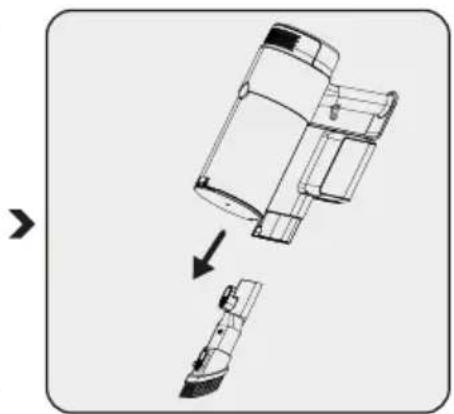
natural_image
Diagram showing a mechanical assembly with an arrow indicating transformation or assembly (no text or symbols present)natural_image
Illustration of a hand cleaning a cylindrical device with a cloth (no text or symbols visible)natural_image
Line drawing of a mechanical device with a lever and granular base (no text or symbols)natural_image
Cross-sectional diagram of a cylindrical device with internal components and an upward arrow indicating motion (no text or symbols)natural_image
Technical illustration of a mechanical device with an upward arrow indicating motion (no text or symbols present)natural_image
Diagram of a mechanical device with arrows indicating motion or assembly, no text or symbols presentnatural_image
Diagram showing a mechanical component being lifted by an arrow, with no visible text or symbols.natural_image
Technical line drawing of a cylindrical device with internal components and a downward arrow indicating a process (no text or symbols present)natural_image
Technical line drawing of a cylindrical device with an arrow indicating motion or force direction (no text or symbols)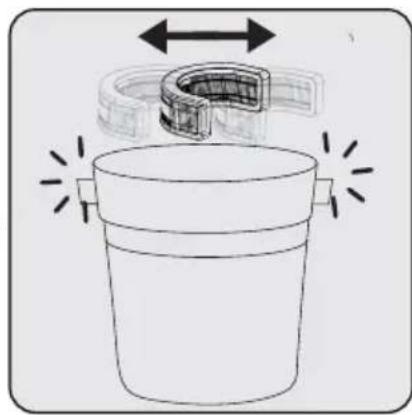
natural_image
Diagram of a container with a U-shaped tube and directional arrows indicating flow or movement (no text or symbols)natural_image
Technical line drawing of a vehicle with a magnified inset showing circular components (no text or symbols)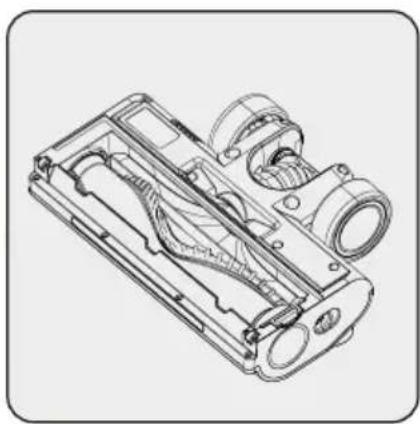
natural_image
Technical line drawing of a mechanical device housing with internal components (no text or symbols)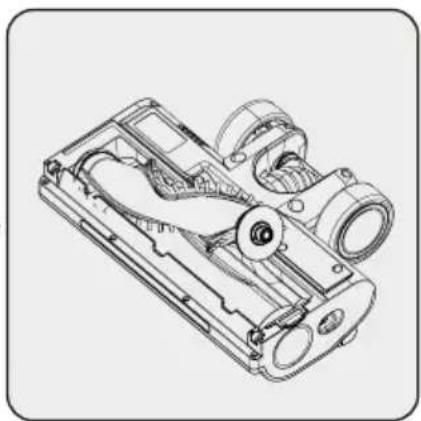
natural_image
Technical line drawing of a mechanical device with internal components (no text or symbols)Please read this guide first!
Dear Customer,
Thank you for choosing a Grundig product. We would like you to achieve the optimal efficiency from this high quality product which has been manufactured with state of art technology. Please make sure you read and understand this guide and supplementary documentation fully before use and keep it as a reference. Include this guide with the unit if you hand it over to someone else. Observe all warnings and information herein and follow the instructions.
Symbols and their meanings
These symbols are used throughout this guide:

Important information and useful hints about usage.

WARNING: Warnings against dangerous situations concerning the security of life and property.

Electric shock protection rating
1 Important safety and environmental instructions
This section contains safety instructions to prevent hazards that can result in injury or property damage.
Any warranty is void if these instructions are not followed.
1.1 General safety
- This appliance complies with international safety standards.
- This device can be used by children over 8 years of age, people with physical, sensory or mental challenges or people with lack of experience or knowledge; as long as control is ensured or information is provided regarding the hazards. Children must not play with the appliance. Cleaning and user maintenance shall not be carried out by unattended children.
- Do not use the appliance if the power cord or the appliance is damaged. Contact authorized service.
- Your mains power supply shall match the information shown on the rating plate label of the appliance.
- Do not use the appliance with an extension cord.
- To prevent damage to the power cord, prevent it from being pinched, crimped or rubbed against sharp edges.
- Do not touch the plug of the appliance with damp or wet hands while the appliance is plugged in.
- Do not pull on the cord while unplugging the appliance.
- Do not vacuum flammable materials and ensure that the cigarette ashes are cooled down before vacuuming them.
- Do not vacuum water and other fluids.
- Protect the appliance against precipitation, humidity and heat sources.
1 Important safety and environmental instructions
- Do not use the appliance in or near explosive or flammable environments and substances.
- Unplug the appliance before cleaning and maintenance.
- Do not immerse the appliance or its power cord in water for cleaning.
- Do not disassemble the appliance.
- Use only original parts or parts recommended by the manufacturer.
- To prevent blockage of the filter or damage to the motor, do not vacuum cement, plaster or fragments of compressed paper.
- Use the appliance with the adapter delivered with the appliance only.
- Do not use the appliance without filters, it may get damaged.
- If you keep the packaging materials, keep them out of the reach of children.
- This appliance is not intended to be used by persons, including children, with physical, sensory and mental disabilities or those who have not adequate experience and knowledge regarding its use, unless they are under the supervision of a person responsible for their safety or they are informed about the operation of the appliance.
• Children shall be supervised to prevent them from playing with the appliance.
- Unplug the adaptor and remove the battery pack before any cleaning or maintenance procedure.
- To avoid any risk of hazard, a damaged adaptor shall be replaced by the manufacturer, the authorized representative of the manufacturer or a similarly qualified technician.
- Keep your fingers, hair and loose clothes away from moving parts or clearances while vacuuming.
1 Important safety and environmental instructions
- Batteries shall be removed from the appliance before discarding the appliance.
- Disconnect the appliance from power supply before removing the battery.
- Please discard used batteries in accordance with local laws and regulations.
- The batteries included in this appliance may only be replaced with qualified persons.
• Appliance is not intended to be operated for commercial purposes. This appliance is not designed for commercial use, it is intended for home use and in applications as follows:
- In the staff kitchens of the stores, offices and other working environments
- In farm houses;
- By customers in hotels, motels or other accommodation facilities
- In hostels or similar environments.
- WARNING: Use the HCX1501-3200450E removable supply unit delivered with the appliance to charge to the battery.
- This appliance shall not be operated by children and people with limited physical, sensory and cognitive skills or people with lack of experience and knowledge unless they are under supervision or they are provided with the relevant instructions.
• Children shall be supervised to prevent them from playing with the appliance.
1 Important safety and environmental instructions
1.2 Compliance with the WEEE Directive and disposal of the waste product
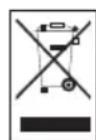
This product complies with EU WEEE Directive (2012/19/EU). This product bears a classification symbol for waste electrical and electronic equipment (WEEE). This symbol indicates that this product shall not be disposed with other household wastes at the end of its service life. Used device must be returned to official collection point for recycling of electrical and electronic devices. To find these collection systems please contact to your local authorities or retailer where the product was purchased. Each household performs important role in recovering and recycling of old appliance. Appropriate disposal of used appliance helps prevent potential negative consequences for the environment and human health.
1.3 Packaging information

Packaging materials of the product are manufactured from recyclable materials in accordance with our National Environment Regulations. Do not dispose of the packaging materials together with the domestic or other wastes. Take them to the packaging material collection points designated by the local authorities.
1.4 Information on Waste Batteries
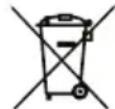
This symbol on rechargeable batteries/batteries or on the packaging indicates that the rechargeable battery/battery may not be disposed of with regular house hold rubbish. For certain rechargeable batteries/batteries, this symbol may be supplemented by a chemical symbol. Symbols for mercury (Hg) or lead (Pb) are provided if the rechargeable batteries/batteries contain more than 0,0005 % mercury or more than 0,004 % lead.
Rechargeable batteries/batteries, including those which do not contain heavy metal, may not be disposed of with household waste. Always dispose of used batteries in accordance with local environmental regulations. Make enquiries about the applicable disposal regulations where you live.
1.5 What to do for energy saving
- When using your appliance, adjust the speed settings according to the surface, in order to save energy.
- Normally, lower speeds are used when cleaning hard surfaces, curtains and sofas, while high speeds are used in for cleaning carpets.
1.6 Compliance with RoHS Directive
The product you have purchased complies with EU RoHS Directive (2011/65/EU). It does not contain harmful and prohibited materials specified in the Directive.
2 Overview
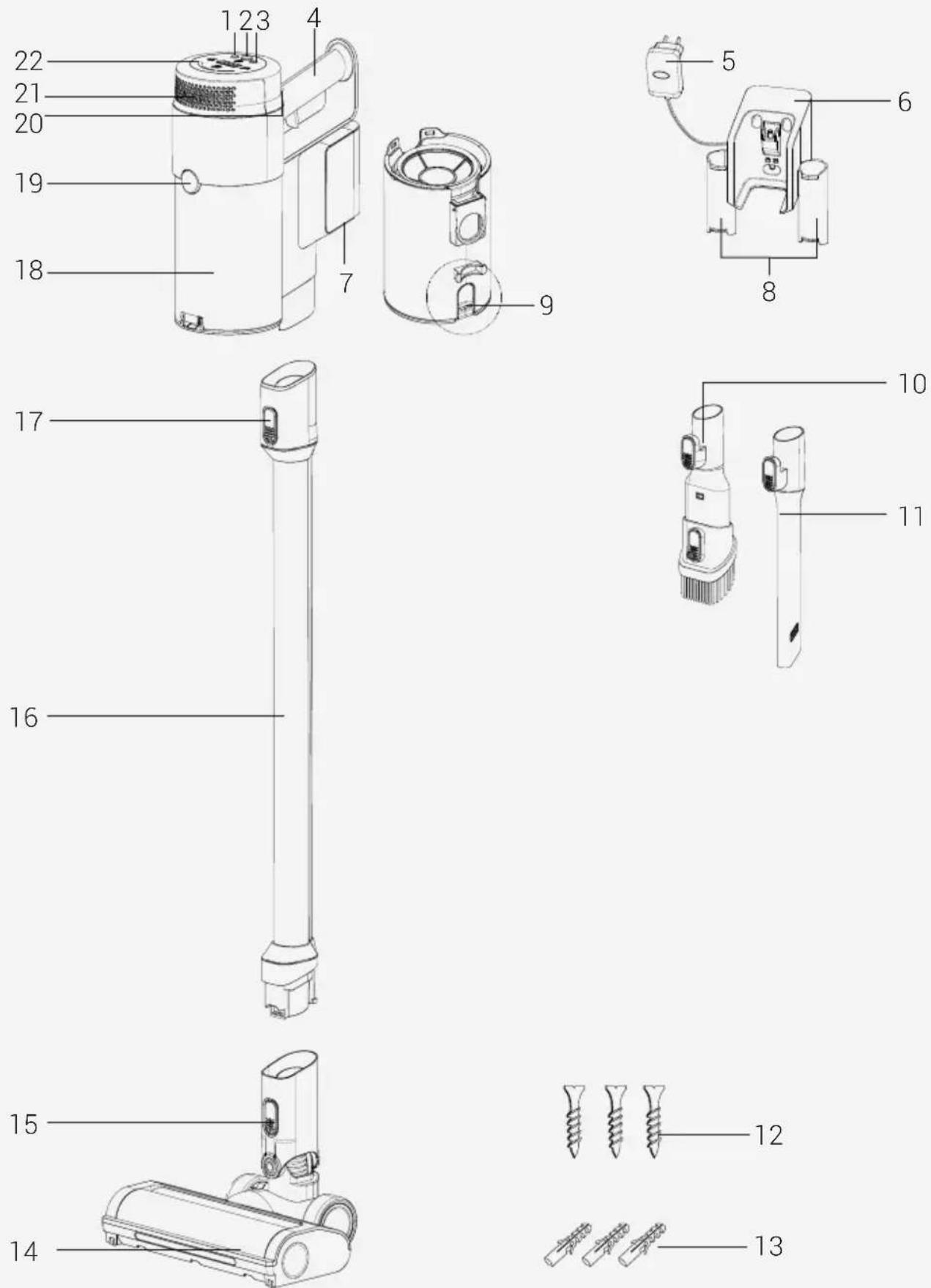
2 Overview
2.1 Controls and components
- Speed level adjustment button
- On/off button
- Speed level adjustment button
- Handle
- Adaptor
- Charging dock
- Battery pack release button
- Accessory attachment compartments
- Dust container empty button
- Combination tool
- Crevice
- Screw (3 pcs)
- Dowel (3 pcs)
- Electrical turbo brush
- Electrical turbo brush release button
- Tube
- Tube release button
- Dust container
- Dust container release button
- Hepa filter cover release button
- Hepa filter cover
- LED screen
2.2 Technical data
| 450 W | |
| Input 100 - 240 V~ 50-60 Hz 0,5 A | |
| Output 32 V 0.45 A | --- |
| Charging time 4-6 hours | |
| Runtime at max. power 10 mins | |
| Runtime at mid power 30 mins | |
| Runtime at min. power 60 mins | |
The rights to make technical and design changes are reserved.
The values provided with the appliance or its accompanying documents are laboratory readings in accordance with the respective standards. These values may differ depending on the use and ambient conditions.
2 Overview
External Power Supply Parameter
| Manufacturer: Guangdong Huachuangxing Power Supply Co.,Ltd | |
| Model ID: HCX1501-3200450E | |
| Input Voltage: 100-240V~ | |
| Input Frequency: 50-60Hz | |
| Input Current: 0.5A | |
| Output Voltage 32.0V | |
| Output Current 0.45A | |
| Output Power: 14.4W | |
| Average active efficiency: 85.5% | |
| Efficiency at low load (10%): | 83.33% |
| Power consumption under no load: | 0.041W |
| Usage Type Speed Level Usage Time | |||
| Use with tube and brush | Minimum speed Up to 37 min |  | |
| Medium speed Up to 25 min | |||
| Maximum speed | Up to 8 min | ||
| Handheld (With non-motorized accessories) | Minimum speed Up to 60 min | 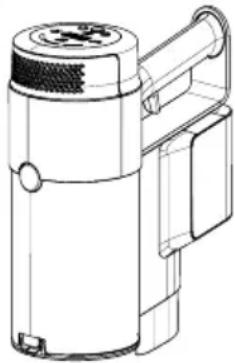 | |
| Medium speed Up to 30 min | |||
| Maximum speed | Up to 10 min | ||
3 Installation
3.1 Intended use
This appliance is intended for household use and it is not suitable for industrial use.
3.2 Installation of the charging dock
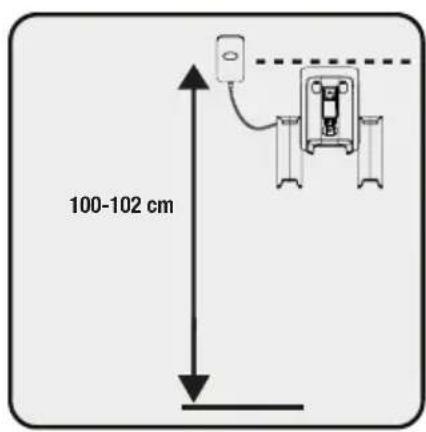
Position the charging dock at a height of minimum 100-102 cm from the ground.
natural_image
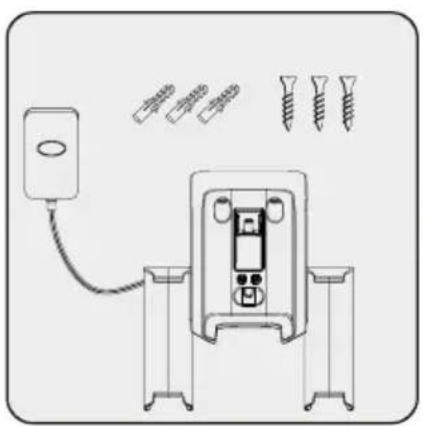
Diagram of a device with screw and screw holes, connected to a power outlet (no text or labels)1- Fix four dowels on the wall
2- Place four screws into their locations on the charging dock and mount on the dowels on the wall.
natural_image
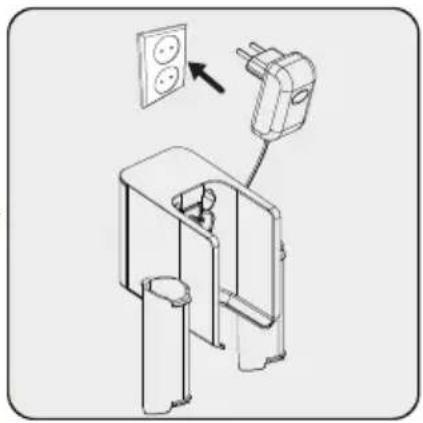
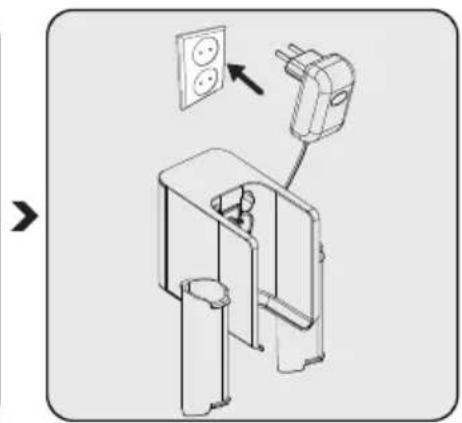
Diagram of a wall-mounted electrical outlet with an attached power plug, showing internal components and wiring (no text or symbols)Plug the charging adaptor to the socket.
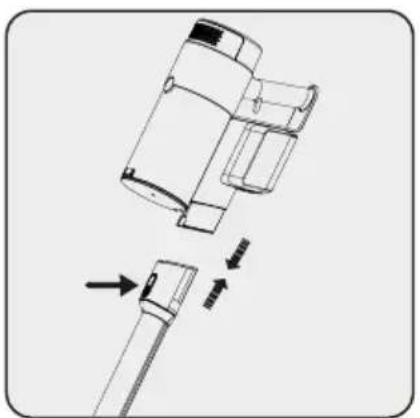
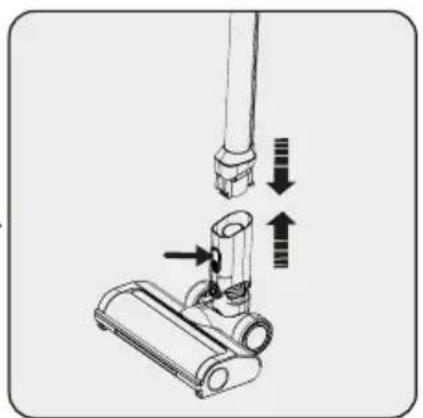
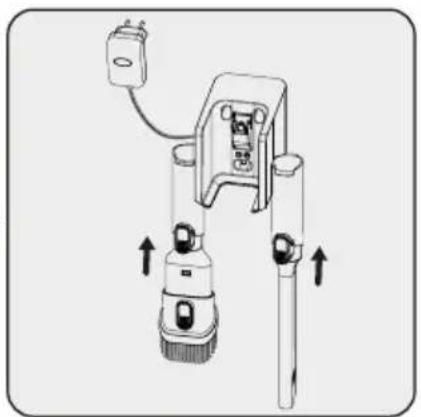
3.3 Installation of the body and the brush
natural_image
Technical line drawing of a mechanical component with arrows indicating assembly or disassembly (no text or symbols)Push the tube in the direction of arrow towards the body by pushing on the tube release button.
natural_image
Diagram of a vacuum cleaner with directional arrows indicating motion (no text or symbols)Press the electric turbo brush release button on the electric turbo brush and push it in the direction of arrow towards the tube.
natural_image
Mechanical device with lever and adjustment knob, showing upward force arrows (no text or symbols)Attach crevice attachment and combination tool to the charging dock.
4 Operation
4.1 Charging the appliance

WARNING: If you want to use the device for the first time or after a long time, charge the batteries completely before using.
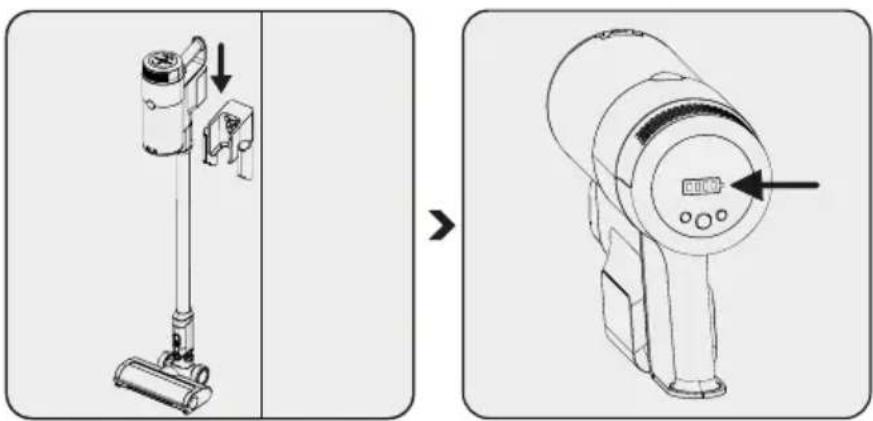
Place the appliance on the charging dock.
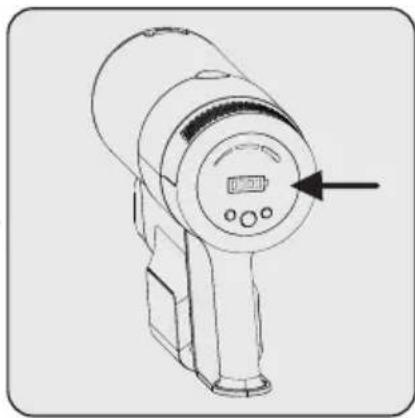
When you place appli- ance to the charging dock, it starts to charge and the battery charge levels shall be displayed on the screen. When all the battery levels are full and stable, the charging process will be complet- ed.

It takes up to 4 to 6 hours to charge the appliance completely. The appliance shall not be operated while charging.

If the appliance is placed on the charging dock while it is being operated, it shall be stopped automatically.
4 Operation
4.2 Usage
natural_image
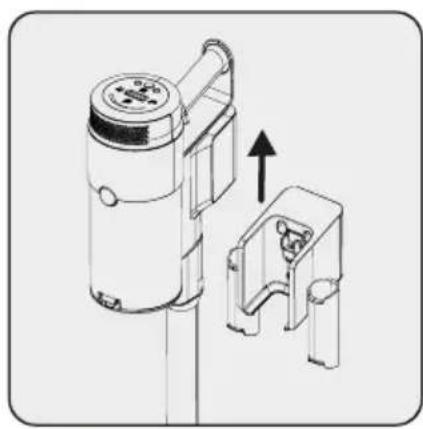
Technical line drawing of a mechanical device with an arrow indicating upward motion (no text or symbols)1- Pull the appliance from the charging dock upward.
natural_image
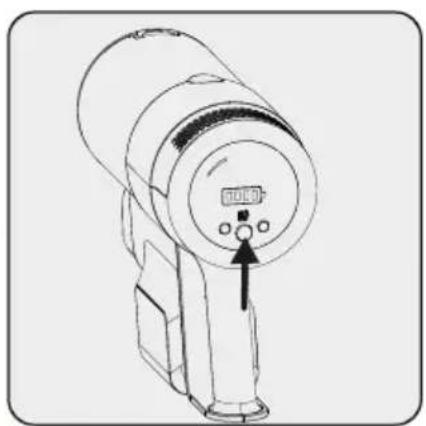
Line drawing of a handheld device with a circular dial and three buttons, no text or symbols presentPress the on/off button to operate the appliance. The appliance starts operating with the minimum power when the on/off button is pressed.
natural_image
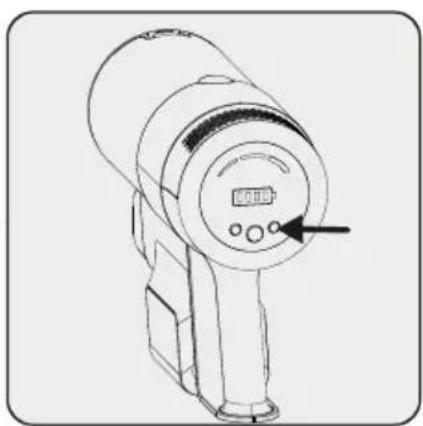
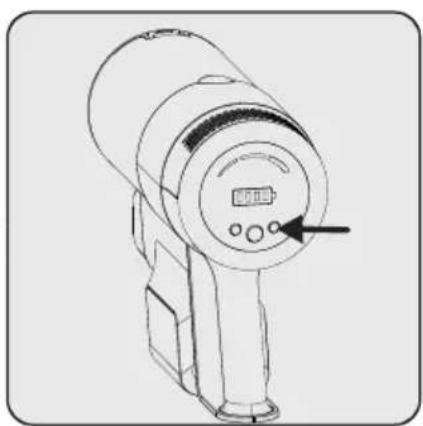
Line drawing of a handheld electronic device with a digital display and control buttons (no text or symbols)To adjust the speed level, push the button. On the screen, which suction mode is being used will be shown as min, mid and high. By pressing the - and + buttons, the speed level can be adjusted.

The appliance may be placed for charging before the complete discharging of the battery. The appliance may be kept continuously as charging on the charging dock until the next operation.
natural_image
Line drawing of a handheld device with a circular dial and control buttons, no text or symbols present.
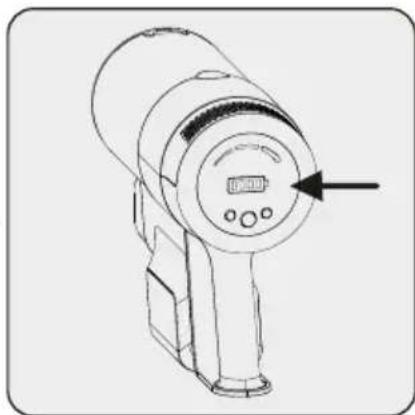
Pay attention to the battery levels during operation. Battery levels should be tracked during usage when it is empty, the appliance stops operating automatically.
4 Operation
natural_image
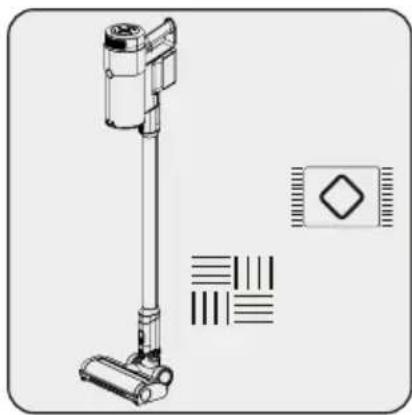
Technical line drawing of a vacuum cleaner with mounting base and control panel (no text or symbols)This appliance is suitable for use on carpets and hard floors.
4.3 LED screen indicators
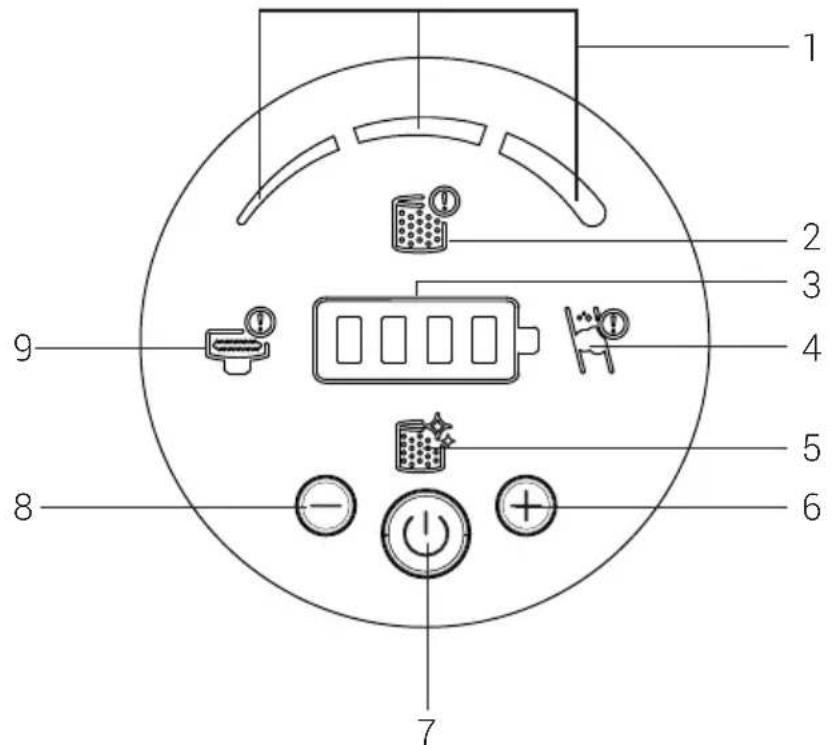
- Those icons will show the suction mode which is being used.
- If the prefilter or EPA12 filter did not put into the device, this icon will warn the user and the product will not turn on if the prefilter or EPA12 filter is absent to protect the machine. Make sure the filters are installed.
- Remain battery level status with iconic show
- Indicates that there is air blockage. Please check the tube inside, the suction mouth of product body to find the foreign material that blocks the machine.
- Indicates that the filter needs to be cleaned.
- Speed boost button
- On/Off button
- Speed power reduction
- Indicates that there is a blockage on the rollers and needs to be cleaned.
4 Operation
4.4 Accessories
natural_image
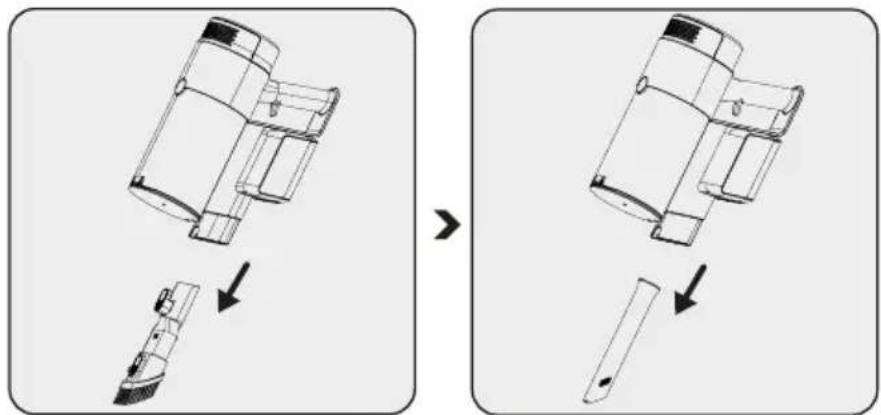
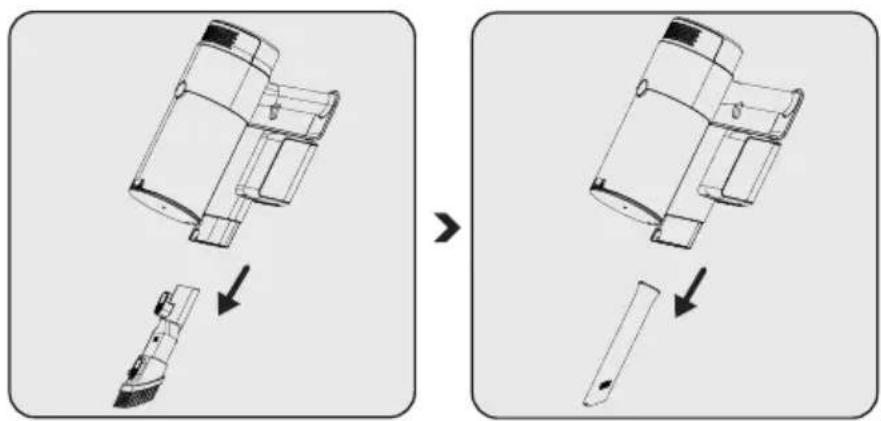
Diagram showing a vehicle's internal components before and after assembly, with no visible text or symbols.Combination tool:
Suitable for vacuuming curtains, sofas, waxed furniture and delicate and fragile objects.
Crevice: Suitable for vacuuming the rear of the furnitures, hard to reach areas and narrow areas.
5 Cleaning and maintenance
Turn off and unplug the appliance before cleaning.

WARNING: Never use gasoline, solvent, abrasive cleaners, metal objects or hard brushes to clean the appliance.

WARNING: Deformation may occur on the filters within time as a result of usage. It shall be replaced with a new one to prevent loss of performance. Contact with the customer services to buy a new one.
5.1 Cleaning the Dust container and Filters

WARNING: Do not wash the filters.

We recommend you to clean the dust container after each operation.
natural_image
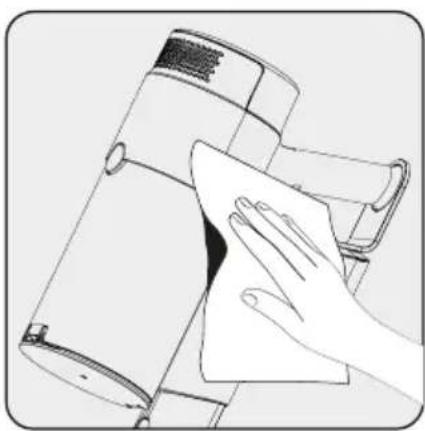
Illustration of a hand cleaning a device with a cloth (no text or symbols visible)Wipe the surface of the body with a wet cloth.

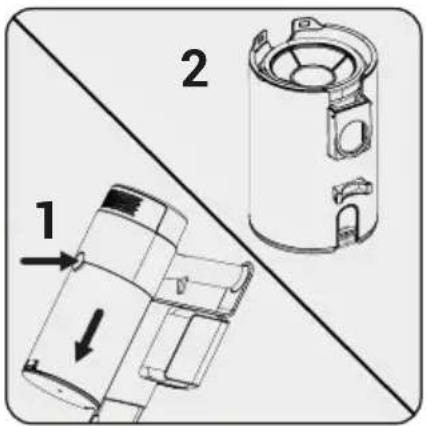
Press the dustbin release button and pull dustbin part.

natural_image
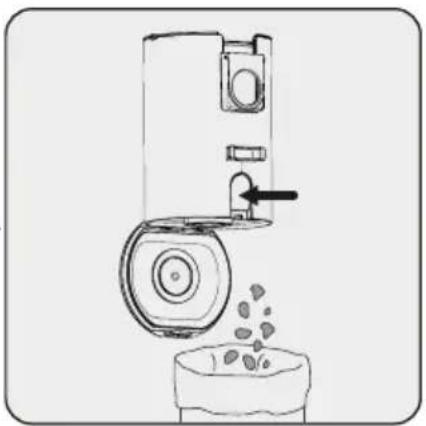
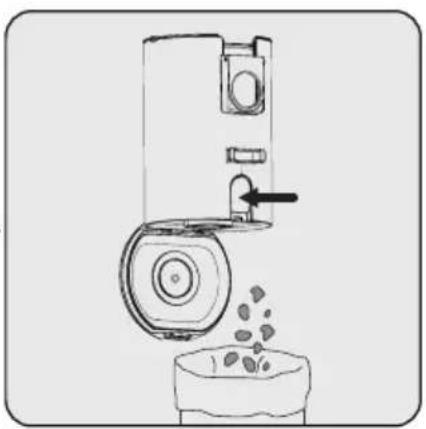
Diagram of a mechanical device emitting granular material from a bowl (no text or symbols)Press the dustbin cover release button and empty the dustbin.
5 Cleaning and maintenance
natural_image
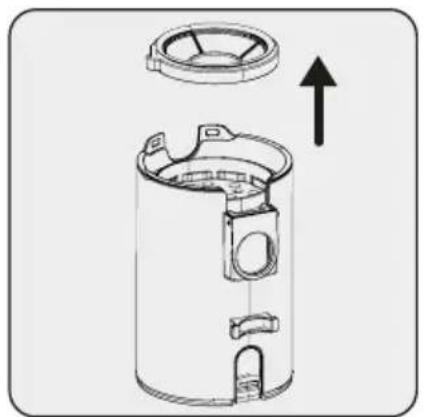
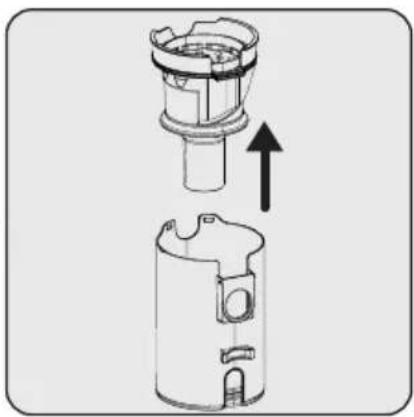
Technical line drawing of a cylindrical device with internal components and an upward arrow indicating motion (no text or symbols)For a detailed cleaning of filters, remove the pre-filter part upward.

natural_image
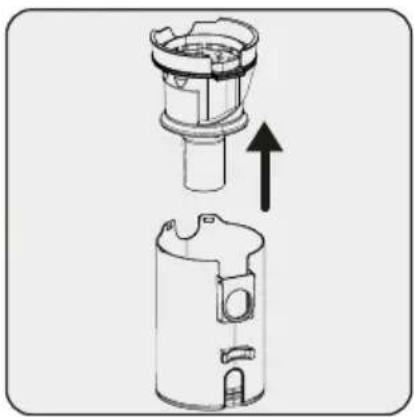
Technical illustration of a mechanical device with an upward arrow indicating motion or assembly (no text or symbols present)Pull the mesh filter part upward.

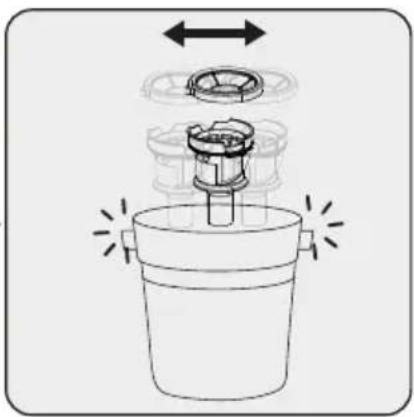
natural_image
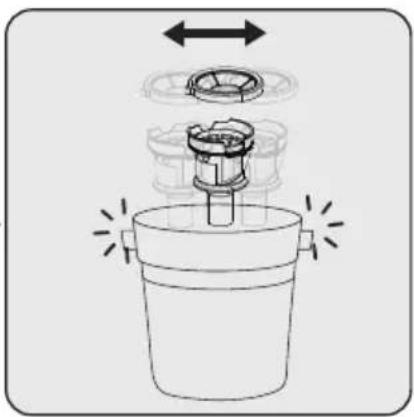
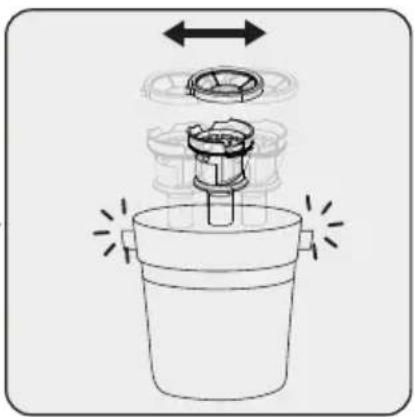
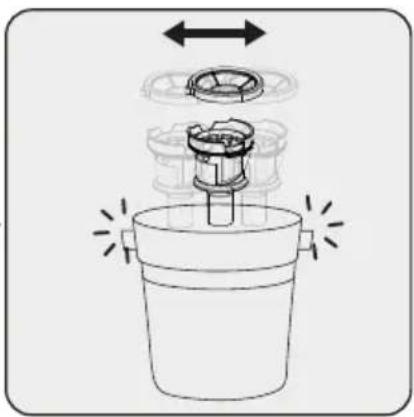
Diagram of a mechanical device with arrows indicating motion or assembly (no text or symbols)Clean the mesh filter and pre-filter by shaking in order to clean the dust.
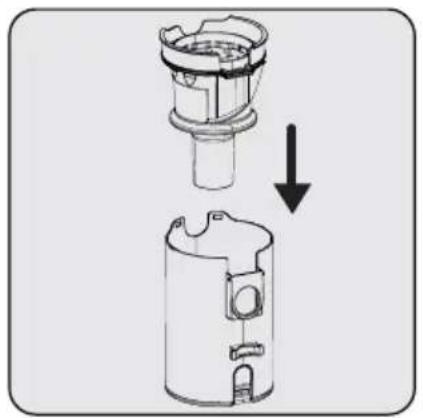
natural_image
Diagram showing a mechanical component being lifted by an arrow, with no visible text or symbols.Insert the mesh filter into dustbin.

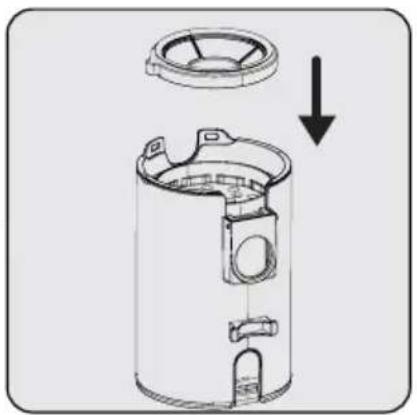
natural_image
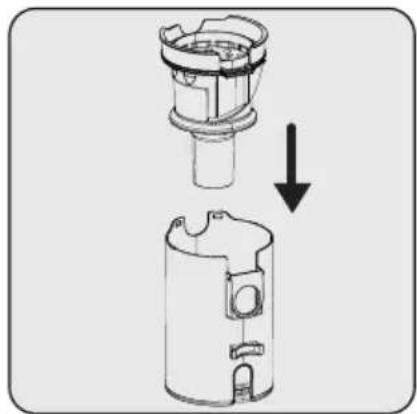
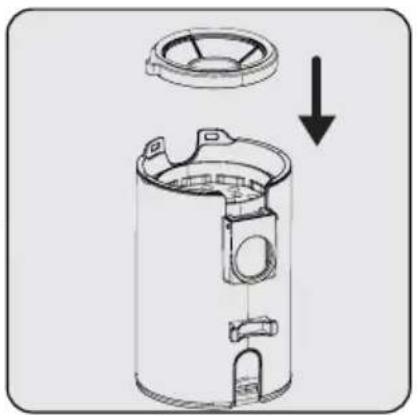
Technical line drawing of a cylindrical device with internal components and a downward arrow indicating a process or assembly (no text or symbols present)Insert the pre-filter on mesh filter.
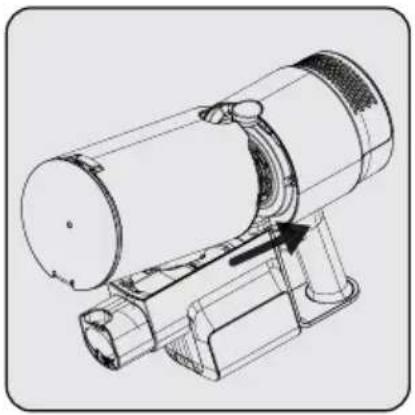
natural_image
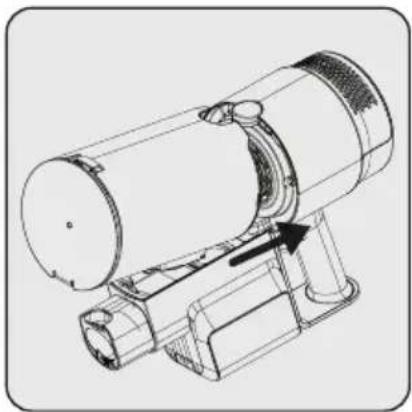
Technical line drawing of a mechanical device with a curved component and an arrow indicating motion (no text or symbols present)First, place the dustbin on the product body so that its back side fits into the body, and then place it in the button area.
5 Cleaning and maintenance
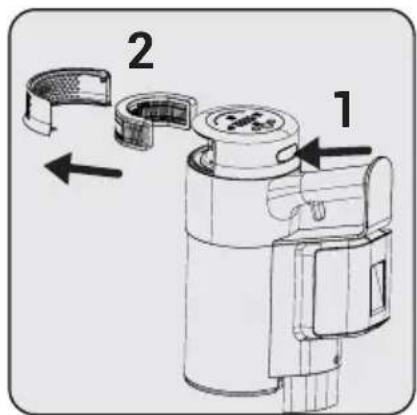
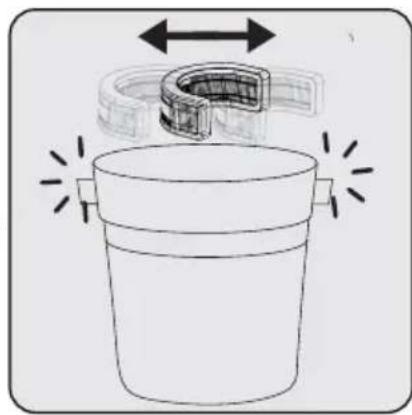
natural_image
Diagram of a container with a U-shaped tube and directional arrows indicating flow or movement (no text or symbols)In order to clean EPA E12 Filter, press the button (1) and remove the filter part.
Clean the EPA E12 filter by shaking in order to clean the dust.
5.2 Cleaning of the brush

WARNING: Do not wash the turbo brush and the main roller.
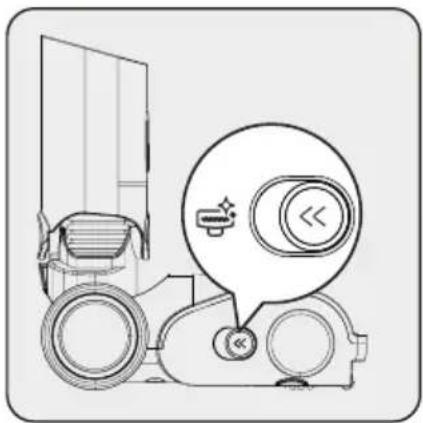
natural_image
Technical line drawing of a mechanical device with a magnified inset showing circular components (no text or symbols)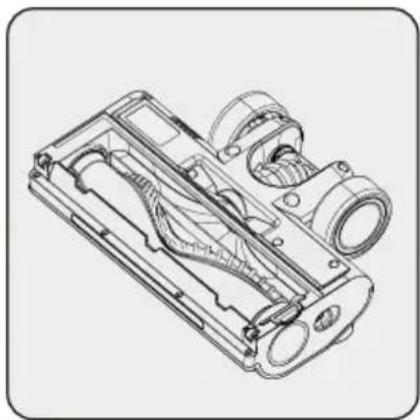
natural_image
Technical line drawing of a mechanical component with internal cavities and mounting holes (no text or symbols)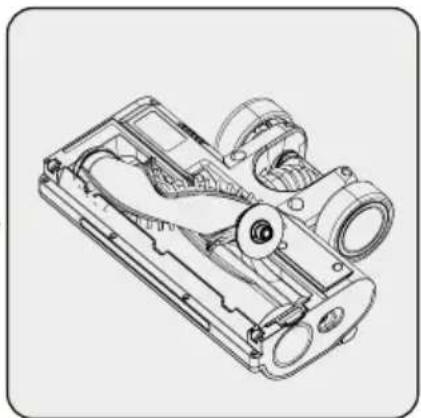
natural_image
Technical line drawing of a mechanical device with internal components (no text or symbols)Push the roller release button to the left side.
Remove the dust on it by tapping it lightly to a hard surface or remove the dust with a brush. If any hair, etc. is tangled, remove it by cutting it off.
Fix the roller back to its place by pushing.
5 Cleaning and maintenance
5.3 Storage
- If you do not intend to use the appliance for a long time, store it carefully.
- Unplug the appliance.
- Ensure that the appliance is kept out of reach of children.
- Store the battery on a non-conducting material, and do not allow the battery to contact metal directly. This shall damage the battery.
5.4 Transport and shipping
- During transport and shipping, carry the appliance with its original packaging. The packaging of the appliance will protect the appliance against physical damage.
- Do not put heavy objects on the appliance or its packaging. Otherwise the appliance may be damaged.
- If the appliance is dropped, the appliance may not operate or permanent damage may occur.
natural_image
Diagram of a device with screw and screw holes, connected to a power outlet (no text or labels)natural_image
Diagram of a wall-mounted electrical socket with an attached plug, showing internal components and wiring (no text or symbols)natural_image
Diagram of a mechanical component with arrows indicating assembly or disassembly (no text or symbols present)natural_image
Diagram of a vacuum cleaner with directional arrows indicating motion (no text or symbols)natural_image
Diagram of a medical or laboratory device with directional arrows indicating movement or force (no text or symbols present)natural_image
Technical line drawing of a mechanical device with an upward arrow indicating motion or assembly (no text or symbols present)natural_image
Line drawing of a handheld device with a circular dial and three buttons, no text or symbols presentnatural_image
Line drawing of a handheld device with a circular dial and three buttons, no text or symbols present.natural_image
Line drawing of a handheld device with a circular dial and control buttons, no text or symbols present.
natural_image
Technical line drawing of a vacuum cleaner with attached circuit board (no text or symbols)natural_image
Diagram showing a mechanical assembly with an arrow indicating direction (no text or symbols present)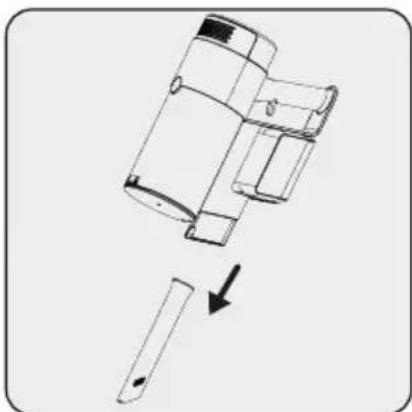
natural_image
Diagram showing a mechanical assembly with a downward arrow indicating a process or transformation (no text or symbols present)Çok işlevli aparat:
natural_image
Illustration of a hand cleaning a device with a cloth (no text or symbols visible)natural_image
Line drawing of a portable kitchen or oven with a hand valve and granular contents (no text or symbols)natural_image
Technical line drawing of a cylindrical device with internal components and an upward arrow indicating motion (no text or symbols)natural_image
Technical illustration of a mechanical device with an upward arrow indicating motion (no text or symbols present)natural_image
Diagram of a mechanical device with arrows indicating motion or assembly, no text or symbols presentnatural_image
Diagram showing a mechanical component being lifted by an arrow, with no visible text or symbols.natural_image
Technical diagram of a cylindrical mechanical component with a lid and internal structure, showing an arrow indicating downward motion (no text or symbols present)natural_image
Technical line drawing of a mechanical device with a circular component and a lever mechanism (no text or symbols)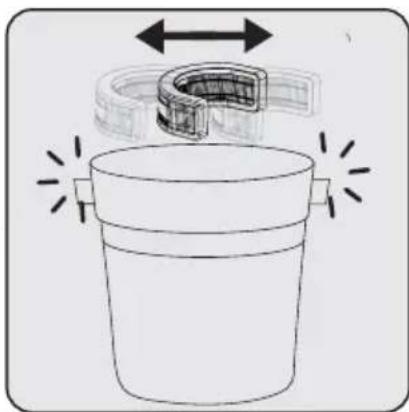
natural_image
Diagram of a container with a curved pipe and directional arrows indicating flow or movement (no text or symbols)natural_image
Technical line drawing of a mechanical device with a magnified inset showing a circular component and directional arrows (no text or symbols)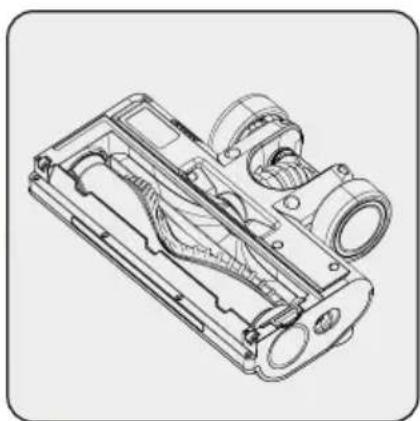
natural_image
Technical line drawing of a mechanical device with internal components (no text or symbols)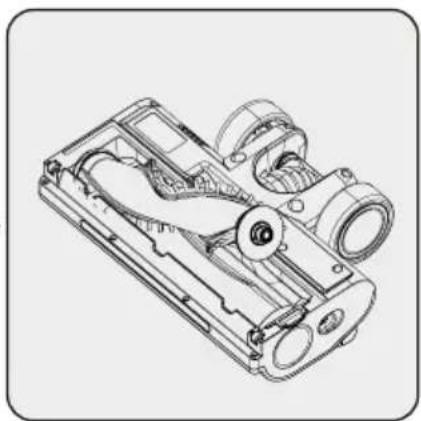
natural_image
Technical line drawing of a mechanical device with internal components (no text or symbols)natural_image
Diagram of a device with screw and screw holes, connected to a power outlet (no text or symbols)1- Pričvrstite četiri tipla na zid
2- Postavite četiri vijka na njihova mjesta na stanicu za punjenje i monitrajte ti-ple na zid.
natural_image
Diagram of a mechanical component with arrows indicating assembly or disassembly (no text or symbols present)natural_image
Diagram of a vacuum cleaner with directional arrows indicating motion (no text or symbols)natural_image
Diagram of a medical or laboratory device with directional arrows indicating movement or force (no text or symbols present)Pričvrstite cjevasti nastavak i kombinirani alat na stanicu za punjenje.
4 Rukovanje
Uređaj postavite na stani- cu za punjenje.
natural_image
Technical line drawing of a mechanical device with an arrow indicating upward motion (no text or symbols present)natural_image
Line drawing of a handheld device with a digital display and control buttons (no text or symbols)Pritisnite gumb uključeno/isključeno za rukovanje uređajem. Uređaj počinje s radom s minimalnom snagom kada se pritisne gumb uključivanja/isključivanja.
natural_image
Line drawing of a handheld device with a digital display and control buttons (no text or symbols)Za podešavanje razine brzine pritisnite gumb. Na zaslonu načina jačine usisa koji se koristi prikazat će se minimalna, srednja i maksimalna jačina usisa. Pritiskom na gumbe - i + možete podesiti razinu brzine.

Uređaj možete staviti na punjenje prije nego se baterija potpuno isprazni. Uređaj se može držati na stanici za punjenje i neprekidno se puniti do iduće upotrebe.
natural_image
Line drawing of a handheld device with a circular dial and control knob (no text or symbols)natural_image
Technical line drawing of a vacuum cleaner with attached circuitry and mounting bracket (no text or symbols)Ovaj uređaj prikladan je za uporabu na tepisima i drvenim podnim oblogama.
4.3 Pokazatelji LED zaslona
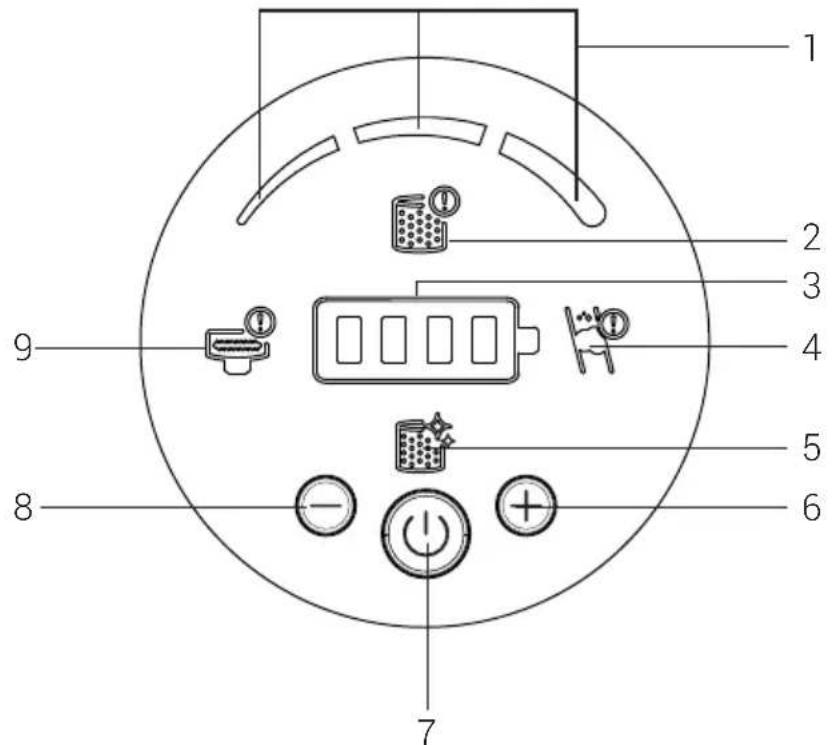
- Ove ikone prikazat će način usisa koji se koristi.
- Ako na uređaj nije postavljen predfiltrar ili filtar EPA12, ova ikona će upozoriti kori- snika te se proizvod neće uključiti ako nema predfiltr ili filtar EPA12 koji će zaštititi uređaj. Provjerite jesu li filtri postavljeni.
- Prikazuje se ikona statusa preostale razine napunjenosti baterije
- Označava da postoji blokada zraka. Provjerite cijev unutar, usisni otvor kućišta proizvoda i pronađite materijal koji blokira uređaj.
- Označava kako se filtar treba očistiti.
- Gumb pojačivača brzine
- Gumb uključeno/isključeno
- Smanjenje snage brzine
- Označava kako postoji blokada okrugle četke i treba je očistiti.
4 Rukovanje
4.3 Pribor
Kombinirani alat:
natural_image
Illustration of a hand cleaning a device with a cloth (no text or symbols visible)Pritisnite gumb za odvaja- nje spremnika za prašinu i izvucite dio spremnika za prašinu.

natural_image
Diagram of a mechanical device emitting granular material from a bowl (no text or symbols)Pritisnite gumb za odvajanje poklopca spremnika za prašinu i ispraznite spremnik za prašinu.
natural_image
Technical line drawing of a cylindrical device with internal components and an upward arrow indicating motion (no text or symbols)Za detaljno čišćenje filtara, uklonite dio predfiltra povlačenjem prema gore.

natural_image
Technical illustration of a mechanical device with an upward arrow indicating motion (no text or symbols present)Povucite dio mrežastog filtra prema gore.

natural_image
Diagram of a mechanical device with arrows indicating motion or assembly (no text or symbols)Očistite mrežasti filtar i predfilter tako da ih protresete i s njih stresete prašinu.
natural_image
Diagram showing a mechanical component being lifted by an arrow, with no visible text or symbols.natural_image
Technical line drawing of a cylindrical mechanical component with a downward arrow indicating a cut or assembly (no text or symbols present)Umetnite predfilter u mrežasti filter.
natural_image
Technical line drawing of a mechanical device with a circular component and a directional arrow (no text or symbols)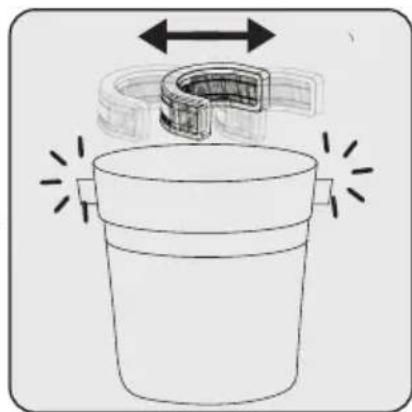
natural_image
Diagram of a container with a U-shaped tube and directional arrows indicating flow or movement (no text or symbols)Za čišćenje filtra EPA E12, pritisnite gumb (1) i uklo-nite dio s filtrom.
Očistite filtar EPA E12 tako da ih protresete i s njih stresete prašinu.
5.2 Čišćenje četke

natural_image
Diagram of a vehicle with a door and circular components, no text or symbols present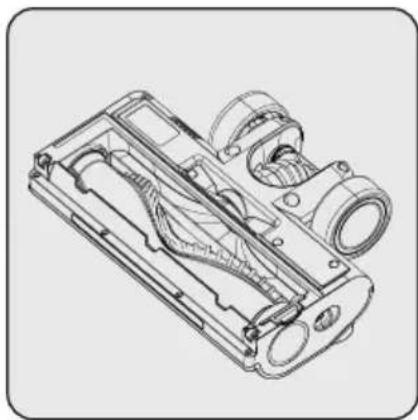
natural_image
Technical line drawing of a mechanical component with internal channels and housing (no text or symbols)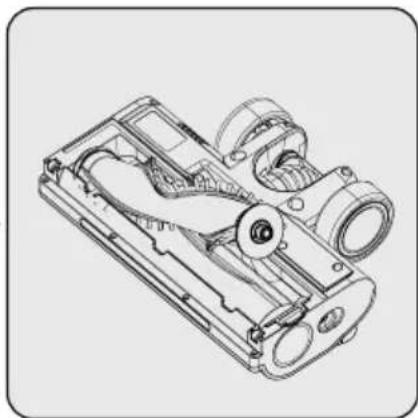
natural_image
Technical line drawing of a mechanical device with internal components (no text or symbols)natural_image
Diagram of a device with screw and screw holes, connected to a power outlet (no text or symbols)natural_image
Diagram of a wall-mounted electrical socket with an attached power plug, showing internal components and wiring (no text or symbols)natural_image
Diagram of a mechanical component with arrows indicating assembly or disassembly (no text or symbols present)natural_image
Diagram of a vacuum cleaner with directional arrows indicating motion (no text or symbols)natural_image
Mechanical device with lever and sensor components, showing upward force arrows (no text or symbols)natural_image
Technical line drawing of a mechanical device with an upward arrow indicating motion or assembly (no text or symbols present)natural_image
Line drawing of a handheld device with a circular dial and three buttons, no text or symbols presentnatural_image
Line drawing of a handheld electronic device with a digital display and control buttons (no text or symbols)natural_image
Line drawing of a handheld device with a circular dial and control buttons, no text or symbols present.
natural_image
Technical line drawing of a vacuum cleaner with attached circuitry and mounting bracket (no text or symbols)natural_image
Diagram showing a device being processed from a left-side tool, with no visible text or symbols.natural_image
Illustration of a hand cleaning a device with a cloth (no text or symbols visible)natural_image
Diagram of a mechanical device emitting granular material from a bowl (no text or symbols)natural_image
Cross-sectional diagram of a cylindrical device with internal components and an upward arrow indicating motion (no text or symbols)natural_image
Technical illustration of a mechanical device with an upward arrow indicating motion or assembly (no text or symbols present)Trekk nettingfilterdelen oppover.

natural_image
Diagram of a mechanical device with arrows indicating motion or assembly, no text or symbols presentnatural_image
Diagram showing a mechanical component being lowered from above to below, with no visible text or symbols.Sett nettingfilteret inn i søppelkassen.

natural_image
Technical line drawing of a cylindrical device with internal components and a downward arrow indicating a process (no text or symbols present)natural_image
Technical line drawing of a cylindrical device with a directional arrow indicating motion or force (no text or symbols)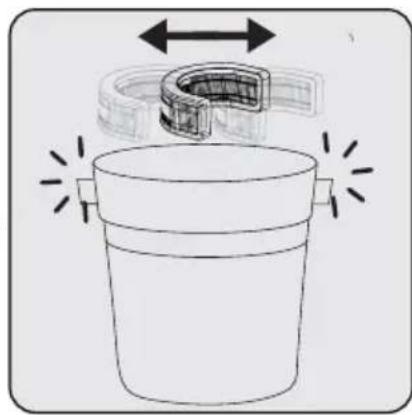
natural_image
Diagram of a container with a U-shaped tube and directional arrows indicating flow or movement (no text or symbols)natural_image
Technical line drawing of a mechanical device with a magnified inset showing circular components (no text or symbols)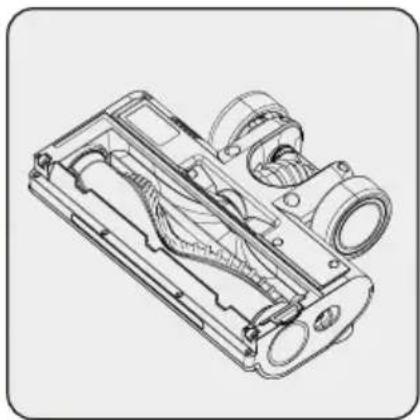
natural_image
Technical line drawing of a mechanical device with internal components (no text or symbols)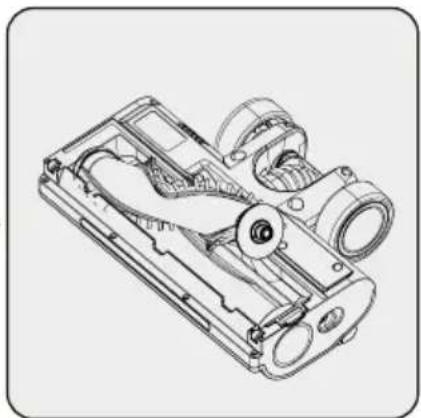
natural_image
Technical line drawing of a mechanical device with internal components (no text or symbols)natural_image
Diagram of a device with screw and screw holes, connected to a power outlet (no text or symbols)natural_image
Diagram of a mechanical component with arrows indicating assembly or disassembly (no text or symbols)natural_image
Diagram of a vacuum cleaner with directional arrows indicating motion (no text or symbols)natural_image
Diagram of a medical or laboratory device with directional arrows indicating movement or force (no text or symbols present)natural_image
Technical line drawing of a mechanical device with an arrow indicating upward motion (no text or symbols present)natural_image
Line drawing of a handheld device with a circular dial and pointer (no text or symbols)natural_image
Line drawing of a handheld device with a digital display and control buttons (no text or symbols)natural_image
Line drawing of a handheld device with a circular dial and control buttons, no text or symbols present.
natural_image
Technical line drawing of a vacuum cleaner with mounting base and control panel (no text or symbols)natural_image
Diagram showing a mechanical assembly with an arrow indicating a process or transformation (no text or symbols present)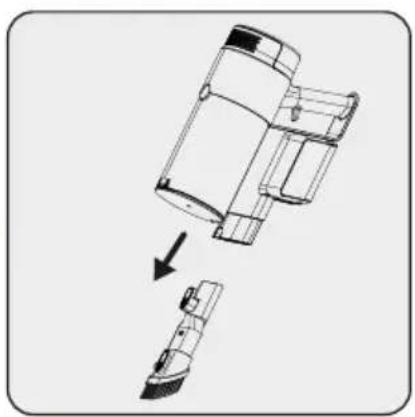
natural_image
Diagram showing a mechanical assembly with an arrow indicating transformation or assembly (no text or symbols present)natural_image
Illustration of a hand cleaning a device with a cloth (no text or symbols visible)natural_image
Line drawing of a mechanical device with a bowl and granular substance, no text or symbols presentnatural_image
Cross-sectional diagram of a cylindrical device with internal components and an upward arrow indicating motion (no text or symbols)natural_image
Technical illustration of a mechanical device with an upward arrow indicating motion (no text or symbols present)
natural_image
Diagram of a mechanical device with arrows indicating motion or assembly, no text or symbols presentnatural_image
Diagram showing a mechanical component being lifted by an arrow, with no visible text or symbols.natural_image
Technical line drawing of a cylindrical device with internal components and a downward arrow indicating a process (no text or symbols present)natural_image
Technical line drawing of a cylindrical mechanical device with an arrow indicating motion or assembly (no text or symbols present)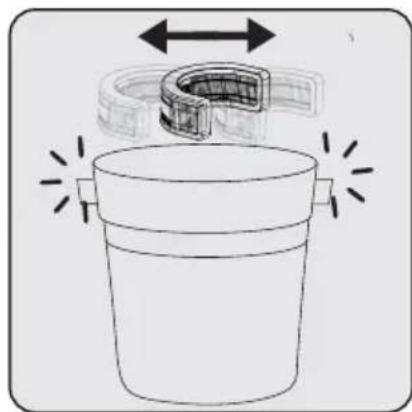
natural_image
Diagram of a container with a U-shaped tube and directional arrows indicating flow or movement (no text or symbols)natural_image
Technical line drawing of a mechanical device with a magnified inset showing circular components (no text or symbols)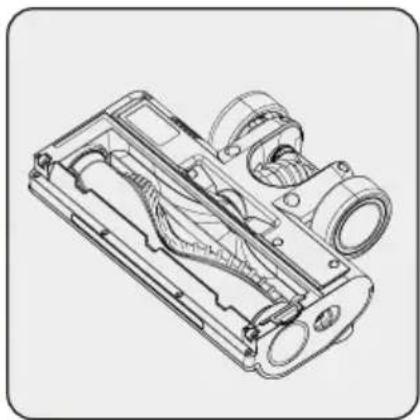
natural_image
Technical line drawing of a mechanical component with internal cavities and mounting holes (no text or symbols)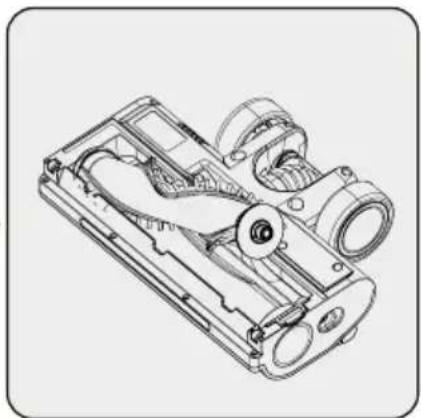
natural_image
Technical line drawing of a mechanical device with internal components (no text or symbols)- Cordless Stick Vacuum Cleaner
- Please read this guide first!
- Symbols and their meanings
- Important safety and environmental instructions
- General safety
- Compliance with the WEEE Directive and disposal of the waste product
- Packaging information
- Information on Waste Batteries
- What to do for energy saving
- Compliance with RoHS Directive
- Overview
- Controls and components
- Technical data
- Installation
- Intended use
- Installation of the charging dock
- Installation of the body and the brush
- Operation
- Charging the appliance
- Usage
- Accessories
- Combination tool:
- Cleaning and maintenance
- Cleaning the Dust container and Filters
- Cleaning of the brush
- Storage
- Transport and shipping
- Çok işlevli aparat:
- Rukovanje
- Pribor
- Kombinirani alat:
- Čišćenje četke
Brand : GRUNDIG
Model : VCP 7330
Category : Vacuum Cleaner