KT-128 - Measurement Sonel - Free user manual and instructions
Find the device manual for free KT-128 Sonel in PDF.


| Product Type | Thermal Camera |
| Brand | Sonel |
| Model | KT-128 |
| Detector Resolution | 120 x 90 pixels (17 μm VOx) |
| Spectral Range | 7.5–14 μm (LWIR) |
| Thermal Sensitivity (NETD) | 60 mK |
| Temperature Measurement Range | -20°C to +400°C (two ranges: -20°C…+150°C and +100°C…+400°C) |
| Accuracy | ±2°C or ±2% of reading (for ambient 15°C…30°C, object ≥0°C) |
| Display | 2.4" LCD, 240 x 320 pixels |
| Image Modes | IR (infrared), Visual (visible), PiP (picture-in-picture) |
| Field of View (FOV) | 50° x 38° |
| Focus | Fixed (minimum focus distance 0.5 m) |
| Built-in Features | 2 MP visual camera, LED flashlight, laser pointer (Class 2, 645-655 nm, <1 mW) |
| Emissivity Adjustment | Adjustable from 0.01 to 1.00 or select from preset list |
| Measurement Adjustments | Distance, ambient temperature (reflected), temperature scale (auto/semi-auto/manual) |
| Image Analysis | Central point, 3 measurement areas, min/max temperature, temperature alarm |
| File Format | JPEG |
| Storage | SD card slot (max 32 GB) |
| Interfaces | USB Type-C (file transfer / image capture), tripod mount (¼") |
| Power Supply | Internal Li-ion battery (over 5 h continuous operation), USB-C charging (max 2.5 h), AC adapter 110-230 V |
| Dimensions (W x H x D) | 194 x 61.5 x 76 mm |
| Weight | Approx. 0.35 kg |
| Ingress Protection | IP54 (dust and splash resistant) |
| Operating Temperature | -10°C to +50°C |
| Storage Temperature | -40°C to +70°C |
| Certification | CE, RoHS, FCC |
| Safety | Laser Class 2, do not stare into beam |
| Cleaning and Maintenance | Clean enclosure with soft damp cloth (no solvents). Clean optics with dry soft cloth only when visibly soiled. No user-serviceable parts inside. |
| Repair and Warranty | Only authorized service centers. Opening device voids warranty. |
| Manufacturer | SONEL S.A., Wokulskiego 11, 58-100 Świdnica, Poland |
Frequently Asked Questions - KT-128 Sonel
User questions about KT-128 Sonel
0 question about this device. Answer the ones you know or ask your own.
Ask a new question about this device
Download the instructions for your Measurement in PDF format for free! Find your manual KT-128 - Sonel and take your electronic device back in hand. On this page are published all the documents necessary for the use of your device. KT-128 by Sonel.
USER MANUAL KT-128 Sonel
natural_image
Exterior view of a black thermal imaging device with display screen and orange warning triangle (no visible text or symbols)
INSTRUKCJA OBSŁUGI 1
USER MANUAL 22
MANUAL DE USO 43
natural_image
Thermal imaging view showing heat distribution with temperature scale and timestamp (no readable text or symbols)4 Funkcje specjalne
4.1 Latarka
Thank you for purchasing our thermal camera. KT camera is a modern, easy and safe measuring device. Please acquaint yourself with the present manual in order to avoid measuring errors and prevent possible problems related to operation of the camera.
All products of Sonel S.A. are manufactured in accordance with Quality Management System which is approved to ISO9001:2008 for the design, manufacturing, and servicing.
Due the continuous development of our products, we reserve the right to introduce changes and improvements in the thermal imaging camera and in the software described in this manual without prior notice. Illustrations presented in this manual may slightly differ from the real product.
Copyrights
© Sonel S.A. 2023. All rights reserved.
CONTENTS
1 General information.... 25
1.1 Safety symbols....25
1.2 Safety 25
2 Functional description 28
2.1 The imager....28
2.2 Display 29
3 Quick start 30
3.1 Turning the camera ON/OFF 30
3.2 Capturing and saving images 30
3.3 Autofocus 31
4 Special features 32
4.1 Floodlight....32
4.2 KT-256 KT-256F Temperature scale level and range .....32
4.3 Image capture mode....33
4.4 Files – viewing, deleting....34
4.5 Files – transfer to the computer 34
4.6 Restoring factory settings 34
4.7 Formatting the SD card....34
5 Troubleshooting.... 35
6 Menu, settings, functions.... 36
7 Power supply, battery charging.... 37
8 Cleaning and maintenance.... 39
9 Storing 40
10 Dismantling and disposal 40
11 Specifications.... 41
12 Manufacturer 42
1 General information
1.1 Safety symbols
The following international symbols are used in the device and/or in this manual:
 | Declaration of Conformity with EU directives (Conformité Européenne) | ||
 | Do not dispose of with other household waste | ||
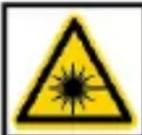 | LASER2 | 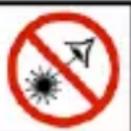 | Caution, laser radiation. Class 2 laser device. Risk of eye irritation. |
1.2 Safety
Before you proceed to operate the camera, acquaint yourself thoroughly with the present manual and observe the safety regulations and specifications defined by the producer.
- Any application that differs from those specified in this manual may result in damage to the device and constitute a source of danger for the user.
- The camera must not be used in rooms where special conditions are present e.g. fire and explosion risk.
- It is forbidden to use damaged or malfunctioning camera.
- Do not use any other adapter than the one supplied with the camera.
- Repairs may be performed only by an authorised service point.
KT-128 / 256 / 256F thermal camera is designed to measure and record the images in the infrared. It is designed to provide the user with maximum performance and safety during the work. However, the following guidelines and recommendations must be observed at all times (in addition to all binding precautions applicable at individual work stands and work areas):
- Keep the camera steady when performing the measurements.
- Do not use the camera in temperatures exceeding its working and storage temperature ranges.
- Do not direct the camera toward very high intensity radiation sources such as the sun, lasers or welding arcs etc.
- Do not expose the camera to dust and moisture. When operating the device near water, ensure that it is adequately guarded against splashes.
- When the camera is not in use or is to be transported, ensure that the unit and its accessories are stored in the protective carry case.
- Do not re-switch on the camera until 15 seconds later after switching it off.
- Do not throw, knock or shake intensely the camera and its components in order to avoid the damage.
- Do not attempt to open the camera body, as this action will void the warranty.
- Use only the SD memory card supplied with the camera.
- During operation, if the camera is to be moved from hot/cold place to cold/hot place, e.g. from inside/outside to outside/inside of a room, switch off the camera and leave it in the new workplace for ca. 60 minutes. Only after that time, turn it on and start normal operation with an accurate temperature measurement. Sudden and rapid changes in ambient temperature may cause fault temperature measurement and even damage camera's IR detector.
- Calibration of the detector – during operation, the camera performs auto-calibration from time to time, which takes approx. 2 seconds.

- Due to continuous development of the instrument's software, the actual appearance of the display may slightly differ from the display presented in this manual.
- To maintain required parameters of rechargeable batteries, unused rechargeable batteries should be charged every 3 months.

CAUTION!
- KT-128 / 256 / 256F thermal camera has no parts that could be repaired by the user. Never attempt to disassemble or modify the camera. Opening the device will void the warranty.
- Use only dedicated accessories. Using other accessories does not ensure proper operation of the camera and may cause its damage.
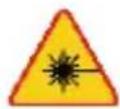
WARNING
LASER RADIATION DO NOT STARE INTO THE BEAM OF THE LASER DIODE
Wavelength 645-655 nm Max. output power <1 mW Class 2 laser product
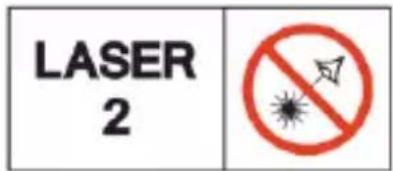
Do not point your eyes toward the laser beam. Laser radiation poses hazards to unprotected eyes. It is necessary to use protective goggles.
2 Functional description
2.1 The imager
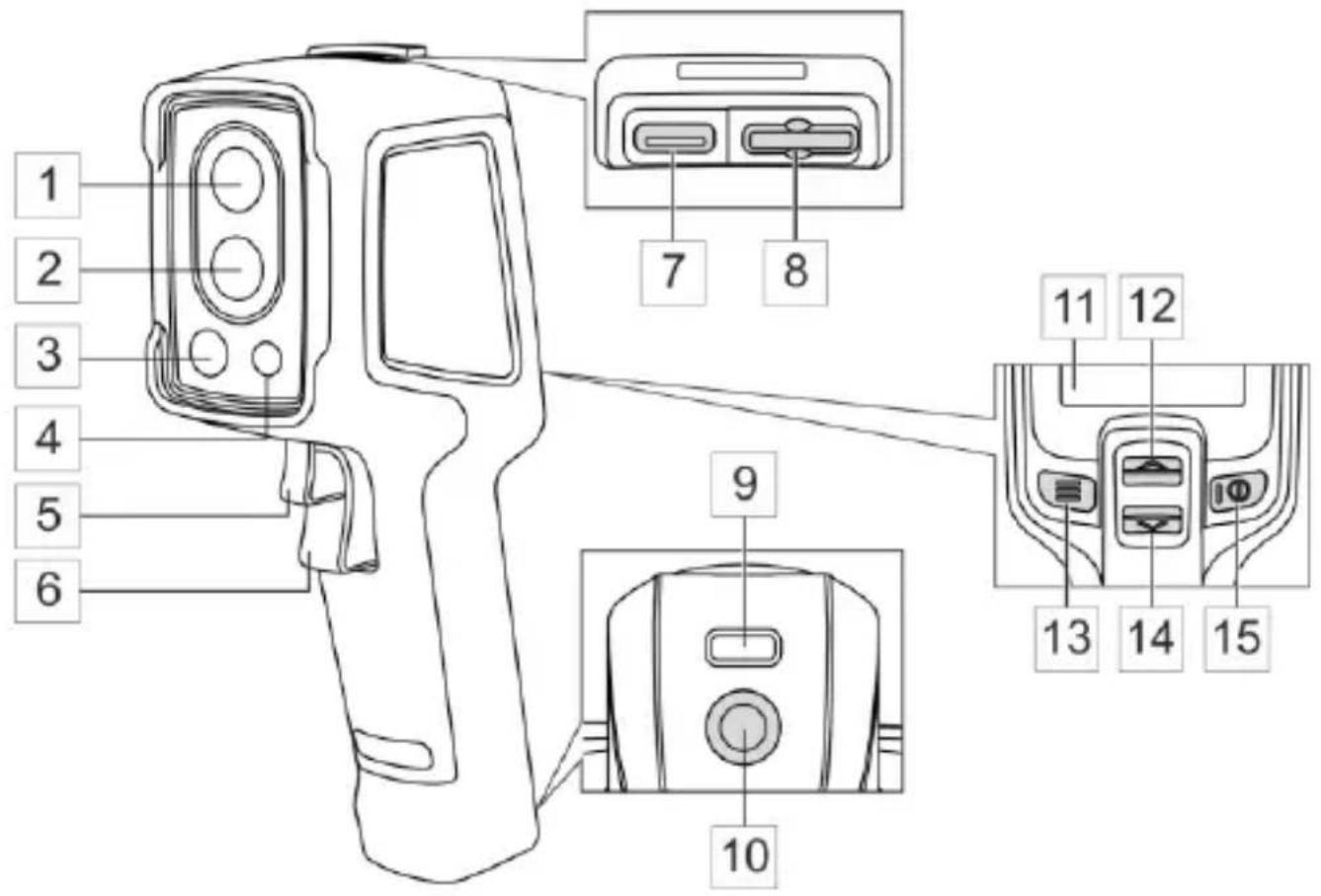
Visual lens
IR lens
Laser pointer
LED flashlight
KT-256F
Autofocus button
Trigger button
USB socket
Memory card slot
Strap holder
Tripod mount
LCD display
UP button
MENU button
DOWN button
POWER button
2.2 Display
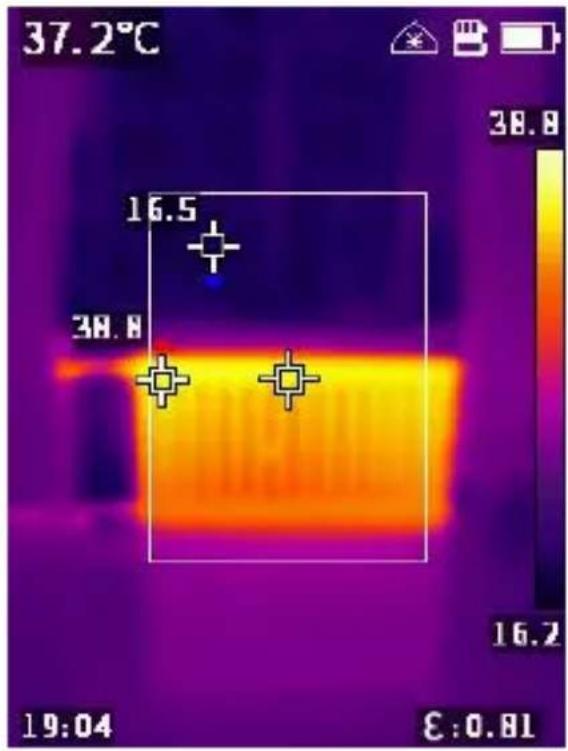
After turning on the camera, the infrared image is displayed in real time on the screen.
- The temperature of the object is displayed for the whole time (upper left corner).
- Depending on the settings made according to sec. 6, the screen may also display the central point or measurement area showing temperatures: maximum and minimum.
- If the laser pointer is activated, as described in sec. 6, an indicator will be displayed next to the battery symbol.
The following image modes are available:
- IR – infrared image,
- VL - visual image from the camera,
- KT-256 KT-256F MIF – infrared image combined with visual image,
- PIP – visual image with superimposed IR image, including the central point or measurement area.
The mode can be switched using ▲▼ buttons. Confirm the selection by pressing button. Exit MENU by pressing button.
3 Quick start
3.1 Turning the camera ON/OFF
In order to switch the camera on, press and hold Ⓞ button for more than 3 sec. The camera will display the welcome logo and commence the start-up, including the self-check. After completing the self-check, the camera is ready to work and enters the mode of real-time display of infrared image.
To switch OFF the camera press and hold Ⓞ button until the screen goes blank.

In order to obtain the correct indications, the camera must stabilize them. Stabilization may take ca. 10 minutes after the instrument is turned on.
3.2 Capturing and saving images
- In the real-time image mode, point the camera into the direction of the tested object.
- Press and hold the trigger - the laser pointer will be activated to facilitate finding the target (if the laser is turned on - see. sec. 6).
- Release the trigger - the image is frozen.
- Select [√] (button) to save the thermal image or [x] (button) to cancel saving.
- Then, the camera returns to real-time image mode.
3.3 Autofocus
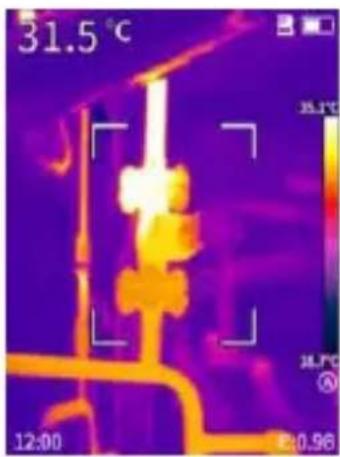
For a sharp image, press the trigger 5
4 Special features
4.1 Floodlight
To turn on/off the floodlight:
- enable the appropriate option in Menu ▶ Floodlight.
- press and hold button .

4.2 KT-256 KT-256F Temperature scale level and range
The temperature scale can be adjusted in three ways: automatic (A), semi-automatic (S) and manual (M).
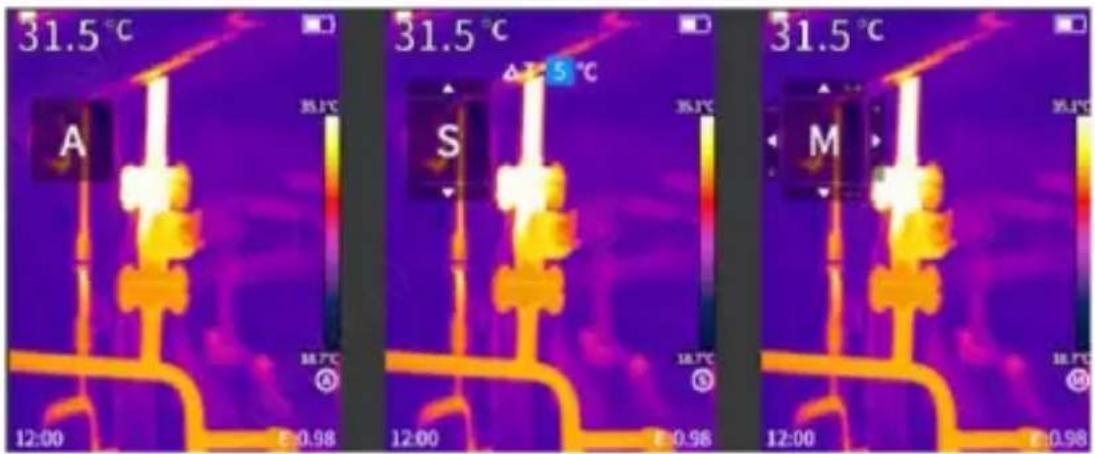
- Press and hold button to enter the settings. Each successive press of switches the scale adjustment mode in the order of A, S, M.
○ Semi-automatic mode (S) – in this mode, you can set the T value, i.e. the difference between the maximum and minimum temperature value on the scale.
⇒ To increase the T value, use the ▲▼ buttons and select the “▲” arrow in the interface, then press
⇒ To decrease the T value, use the ▲▼ buttons and select the “▼” arrow in the interface, then press
○ Manual mode (M) – in this mode you can set the maximum (Tmax) and minimum (Tmin) temperature on the scale.
⇒ To increase Tmax and Tmin at the same time (i.e. move the scale up), use the ▲▼ buttons and select the “▲” arrow on the interface, then press button.
⇒ To decrease Tmax and Tmin at the same time (i.e. move the scale down), use the ▲▼ buttons and select the “▼” arrow on the interface, then press button.
⇒ To decrease Tmax and increase Tmin at the same time (i.e. narrow the scale), use the ▲▼ buttons and select the “◀” arrow on the interface, then press button ☐.
⇒ To increase Tmax and decrease Tmax at the same time (i.e. broaden the scale), use the ▲▼ buttons and select the “▶” arrow on the interface, then press button 📄.
○ Auto Mode (A) – in this mode, Tmax and Tmin are set automatically based on the real-time image. They cannot be adjusted manually.
- Press button to save and exit the settings.
4.3 Image capture mode
To use this mode, you need to use an external PC video capture application.
• Install a video capture program on your computer.
- Connect the camera to the computer using the USB cable.
- In the application, select the image capture mode.
4.4 Files – viewing, deleting
- Briefly press the button to access the menu interface.
- Using ▲▼ buttons select Gallery and Review. Photo list will appear.
- To display another photo press ▲▼.
- In order to delete a photo, press briefly the 📄 button, use buttons ▲▼ to select [√] and confirm your selection with 📄 button.
4.5 Files – transfer to the computer
In order to transfer thermal images to a computer, connect the camera via a USB cable or install the camera memory card in the computer. The detected memory will show desired files.
4.6 Restoring factory settings
In order to restore the settings to the factory defaults, go to Menu ▶ Reset and press the button to confirm the reset.
4.7 Formatting the SD card
In order to wipe the SD card, go to Menu ▶ Format SD and press the button to confirm the formatting.
5 Troubleshooting
| Problems | Causes | What to do |
| Boot failure. | Low battery. | Reuse battery after charging. |
| External power source plug is not inserted properly. | Pull the plug and reinsert it properly. | |
| IR image is not clear. | Lens is misted up or dirty. | Clean lens. |
| Niewyraźny obraz wizualny | Zbyt ciemne otoczenie. | Zapewnić oświetlenie. |
| Obiektyw jest zaparowany lub brudny. | Wyczyść obiektyw. | |
| Imprecise temperature measurement | Emissivity and/or the distance from the object incorrectly set. | Change the parameters. |
| A long time without calibration. | Order the calibration of the camera from the manufacturer. |
6 Menu, settings, functions
Press to enter setting menu. Using buttons ▲▼ highlight items.
Enter them and change their value using . Go back using .

Following items are available:
- Gallery – go to images list,
- TempRange – display temperature measurement range,
- Emissivity – changing the emissivity of the tested object.
- Palette - selecting the colour palette.
- CenterPoint - turning on/off the central point on the screen.
- TempUnit – temperature unit: ^ or ^ .
- ReflMeasure – measurement area.
- Alarm – temperature alarm: setting upper and lower threshold temperature. Use buttons ▲▼ to set the temperatures.
- ReflMeasure – ambient temperature. Use buttons ▲▼ to set the temperature.
- Distance – the distance from the tested object. Use buttons ▲▼ to set the distance.
KT-256 KT-256F Distance unit.
- AutoShut – automatic shutdown: disabled or 5, 10, 15 min.
- ScreenBright – low/medium/high screen brightness.
- Laser – laser pointer on/off.
- Floodlight – flashlight on/off.
- Date/time.
- Language.
- Reset – use buttons ▲▼ to select command.
- Format SD – use buttons ▲▼ to select command.
- PIPtransparent – transparency of superimposed IR image: 0%, 30%, 60%, 90%.
- Visual – shows visual images in Gallery.
- USBMode – operating mode when connected to an external device via a USB cable: file transfer/image capture.
- Camera info.
7 Power supply, battery charging
The camera is powered by an internal rechargeable battery. It may be also powered using the AC adapter.
In order to charge a KT camera, just plug in the AC adapter to the camera USB socket when it is switched off. Charging does not take place during operation of the camera.
If the camera is to be inactive for a long time, it is recommended to recharge the rechargeable battery every 3 months.
- Store the half-charged battery pack in a dry, cool and well ventilated place and protect them from direct sunlight. The battery pack may be damaged if stored when fully discharged. The ambient temperature for prolonged storage should be maintained within the range of 5°C...25°C.
- Charge the batteries in a cool, well-ventilated place at a temperature of 10^ C... 28^ C. Modern fast chargers detect both too low and too high temperature of rechargeable batteries and react to the situation adequately. When the temperature is too low, charging should be prevented as it may irreparably damage the batteries. The increase in temperature of the battery pack may cause electrolyte leakage and even its ignition or explosion.
- Do not exceed the charging current, as it may result in ignition or "swelling" of the battery pack. "Swollen" battery pack must not be used.
- Do not charge or use the batteries in extreme temperatures. Extreme temperatures reduce the lifetime of rechargeable batteries. Always observe the rated operating temperature. Do not dispose the battery pack into fire.
- Li-Ion cells are sensitive to mechanical damage. This kind of damage may cause their permanent damage and thus – ignition or explosion.
- Any interference in the structure of Li-ion battery pack may cause its damage. This may result in the ignition or explosion.
- A short-circuit of the battery poles "+" and "-" may permanently damage the battery pack or even cause its fire or explosion.
- Do not immerse Li-Ion battery in liquids and do not store in humid conditions.
- If the electrolyte contained in the Lithium-Ion battery pack, contacts eyes or skin, immediately rinse the affected place with plenty of water and consult a doctor. Protect the battery against unauthorised persons and children.
- When you notice any changes in the Lithium-Ion battery pack (e.g. changes in colour, swelling, excessive temperature), stop using the battery pack. Li-Ion batteries that are mechanically damaged, overcharged or excessively discharged are not suitable for use.
- Any misuse of the battery may cause its permanent damage. This may result in the ignition. The seller and the manufacturer shall not be liable for any damages resulting from improper handling Li-lon battery pack.
8 Cleaning and maintenance

NOTE!
- Use the below specified methods of maintenance only.
-
The thermal imager does not comprise any parts serviceable by the user. Do not at-tempt to dismantle or modify the camera on your own. Opening the instrument voids the warranty.
-
Camera enclosure – all surfaces, except for optical elements of the camera, can be cleaned with a soft and moist cloth with generally available mild detergents. Do not use any solvents or cleaning agents that could scratch the enclosure (powder, paste, etc.). During cleaning, the camera must be turned off.
- Due to the applied anti-reflective coating, optical lens are the most sensitive and at the same time the most expensive part of the camera (the lens is of key importance to radiometric capabilities of the infrared system). Optical surfaces should be cleaned only, when they are visibly fouled. Do not touch exposed surfaces of optical lens with fingers, because fouling left with fingerprints can be harmful to coatings and glass of the lens.
- Chemical agents must not be used for cleaning the optics and accessories of the camera. Use a clean, dry and soft cloth.
9 Storing
When storing the instrument, observe the following guidelines:
• make sure the camera and its accessories are dry,
- allowed are storage temperatures specified in technical specifications,
- in order to avoid complete discharging of rechargeable batteries during prolonged storage, charge them once in a while (recommended time: 3 months).
10 Dismantling and disposal
- Used-up electrical or electronic equipment must be collected selectively, i.e. must not be mixed with waste of other types.
- Used-up electronic equipment must be delivered to an appropriate collection centre in accordance with regulations related to used-up electrical or electronic equipment.
- Before delivering the equipment to the collection centre do not attempt to dismantle any of its parts.
- Follow local regulations related to disposing of packaging, used-up batteries and rechargeable batteries.
11 Specifications
| KT-128 | KT-256 | KT-256F | |
| Camera | |||
| Detector resolution | 120 x 90 / 17 μm VOx | 256 x 192 / 12 μm VOx | |
| Spectral range | 7.5~14 μm | ||
| Frame rate | 25 Hz | ||
| Thermal sensitivity | 60 mK | 45 mK | |
| Focus | Fixed | Auto | |
| IFOV | 7.6 mrad | 3.75 mrad | 1.71 mrad |
| Min. focus distance | 0.5 m | 0.3 m | 0.5 m |
| Lens (field of view/focal length) | 50° x 38°/2.28 mm | 56° x 48°/3.2 mm | 25° x 19°/7 mm |
| Image | |||
| Display | 2.4" 240 x 320 px LCD | ||
| Image modes | IR / Visual / PiP | IR / Visual / Infrafusion MIF / PiP | |
| Temperature measurement | |||
| Temperature range | Range 1: -20°C...+150°CRange 2: 100°C...+400°C | Range 1: -20°C...+150°CRange 2: 100°C...+550°C | |
| Accuracy | ±2°C or ±2% of reading(for ambient temperature 15°C...30°C, object temp. ≥0°C) | ||
| Functions | |||
| Image analysis modes | Point. 3 areas. Temperature indication: min, max. Temp. alarm | ||
| Palettes | 6 | ||
| Emissivity | Selectable from 0.01 to 1.00 or from the list | ||
| Measurement adjustment | Adjustable distance, ambient temperature (reflected) | ||
| File format | JPG | ||
| Built-in features | Visual camera 2 MPix, LED flashlight, laser pointer | ||
| Interface | SD card slot (max. 32 GB), USB type C, tripod | ||
| Power supply | Li-lon battery (over 5 h of continuous operation),built-in charger (max.charging time 2.5 h),AC adapter 110-230 V(50/60 Hz) | Li-lon battery (over 16 h of continuous operation),built-in charger (max. charging time 2.5 h),AC adapter 110-230 V (50/60 Hz) | |
| Environmental conditions | |||
| Operating temperature | -10°C...50°C | -15°C...50°C | |
| Storage temperature | -40°C...70°C | ||
| Ingress protection | IP54 | ||
| Certification | CE, ROHS, FCC | ||
| Weight | approx. 0.35 kg | approx. 0.38 kg | |
| Dimensions | 194 x 61.5 x 76 mm | ||
12 Manufacturer
The manufacturer and provider of warranty and post-warranty services for this instrument is:
SONEL S.A.
Wokulskiego 11
58-100 Świdnica
Poland
tel. +48 74 884 10 53 (Customer Service)
e-mail: customerservice@sonel.com
web page: www.sonel.com

NOTE!
Only the manufacturer is authorized to perform service repairs.

MANUAL DE USO
CÁMARA TÉRMICA
KT-128 • KT-256 • KT-256F

SONEL S.A.
Wokulskiego 11
58-100 Świdnica
Polonia
natural_image
Thermal imaging view showing heat distribution with temperature scale and timestamp (no readable text or symbols)natural_image
Thermal imaging view showing heat distribution with temperature scale and timestamp (no readable text or symbols)4 Funkcje specjalne
4.1 Taschenlampe
- Funkcje specjalne
- Latarka
- Copyrights
- CONTENTS
- General information.... 25
- Functional description 28
- Quick start 30
- Special features 32
- Troubleshooting.... 35
- General information
- Safety symbols
- Safety
- CAUTION!
- WARNING
- LASER RADIATION DO NOT STARE INTO THE BEAM OF THE LASER DIODE
- Functional description
- The imager
- KT-256F
- Display
- Quick start
- Turning the camera ON/OFF
- Capturing and saving images
- Autofocus
- Special features
- Floodlight
- KT-256 KT-256F Temperature scale level and range
- Image capture mode
- Files – viewing, deleting
- Files – transfer to the computer
- Restoring factory settings
- Formatting the SD card
- Menu, settings, functions
- Power supply, battery charging
- Cleaning and maintenance
- NOTE!
- Storing
- Dismantling and disposal
- Manufacturer
- SONEL S.A.
- MANUAL DE USO
- CÁMARA TÉRMICA
- KT-128 • KT-256 • KT-256F
- Taschenlampe
Brand : Sonel
Model : KT-128
Category : Measurement