
BDR-XD07TB - Car PIONEER - Free user manual and instructions
Find the device manual for free BDR-XD07TB PIONEER in PDF.


| Product type | External portable Blu-ray burner |
| Brand | Pioneer |
| Model | BDR-XD07TB |
| Dimensions (L x W x H) | 135 x 135 x 14 mm |
| Weight | 250 g |
| Power supply | USB port (5 V, 1.5 A) |
| Interface | USB 3.0 Type-C |
| Blu-ray read speed | 6x |
| Blu-ray write speed | 6x (BD-R) |
| DVD read speed | 8x |
| DVD write speed | 8x |
| Supported formats | BD-R, BD-RE, DVD±R, DVD±RW, CD-R, CD-RW |
| Compatible operating systems | Windows 10, 11; macOS 10.12 or later |
| Box contents | Burner, USB cable, quick start guide, software |
| Main functions | Blu-ray, DVD and CD playback and burning; Labelflash compatible |
| Maintenance and cleaning | Clean with a dry soft cloth; avoid liquids |
| Safety | Do not expose to moisture or shocks; use on a flat surface |
| Spare parts and repairability | Contact Pioneer customer service for parts; repair by a professional |
| General information | 2-year warranty; made in Japan |
Frequently Asked Questions - BDR-XD07TB PIONEER
User questions about BDR-XD07TB PIONEER
0 question about this device. Answer the ones you know or ask your own.
Ask a new question about this device
Download the instructions for your Car in PDF format for free! Find your manual BDR-XD07TB - PIONEER and take your electronic device back in hand. On this page are published all the documents necessary for the use of your device. BDR-XD07TB by PIONEER.
USER MANUAL BDR-XD07TB PIONEER
Operating Instructions
Mode d'emploi
Bedienungsanleitung
Handleiding
Provozní pokyny
Instrukcja obsługi
操作手册
Thank you for buying this Pioneer product. Before using the drive, read all warnings, cautions, notices and other important safety information contained in these Operating Instructions. Please read the entire manual before using this drive as it contains important information, such as regulatory data, software license agreement(s), product registration details, service instructions and guidelines.
WARNING
This equipment is not waterproof. To prevent a fire or shock hazard, do not place any container filled with liquid near this equipment (such as a vase or flower pot) or expose it to dripping, splashing, rain or moisture.
D3-4-2-1-3_B_En
Operating Environment
Operating environment temperature and humidity: +5 °C to +35 °C (+41 °F to +95 °F); less than 85 %RH (cooling vents not blocked)
Do not install this unit in a poorly ventilated area, or in locations exposed to high humidity or direct sunlight (or strong artificial light)
D3-4-2-1-7c*_A1_En
Precautions Regarding Use
- Pioneer may not be held liable for the loss of any data or any other direct or indirect damage suffered as the result of the use or breakdown of this product. It is strongly recommended to regularly back up all critical data.
- Care must be taken not to infringe copyright restrictions under the laws of each country. If this device is used to record copyrighted materials, approval must be obtained from the respective copyright holders. The recording of copyrighted materials without the express approval of the respective copyright holders may result in legal penalties. Pioneer disclaims any and all responsibility for any legal damages resulting from the use of this device in the unauthorized copying of copyrighted materials.
- All names of corporations, products, and systems listed herein, even when the (TM) or (®) symbols are omitted, are considered the registered trademarks of the respective owners.
DANGER – VISIBLE AND INVISIBLE LASER RADIATION WHEN OPEN. AVOID DIRECT EXPOSURE TO BEAM.
IMPORTANT
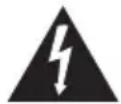
The lightning flash with arrowhead symbol, within an equilateral triangle, is intended to alert the user to the presence of uninsulated "dangerous voltage" within the product's enclosure that may be of sufficient magnitude to constitute a risk of electric shock to persons.
CAUTION
RISK OF ELECTRIC SHOCK DO NOT OPEN
CAUTION:
TO PREVENT THE RISK OF ELECTRIC SHOCK, DO NOT REMOVE COVER (OR BACK). NO USER-SERVICEABLE PARTS INSIDE. REFER SERVICING TO QUALIFIED SERVICE PERSONNEL.

The exclamation point within an equilateral triangle is intended to alert the user to the presence of important operating and maintenance (servicing) instructions in the literature accompanying the appliance.
D3-4-2-1-1_A1_En
CAUTION
This product is a class 1 laser product classified under the Safety of laser products, IEC 60825:2014, but this product contains a laser diode higher than Class 1. To ensure continued safety, do not remove any covers or attempt to gain access to the inside of the product.
Refer all servicing to qualified personnel. The following caution label appears on your unit.
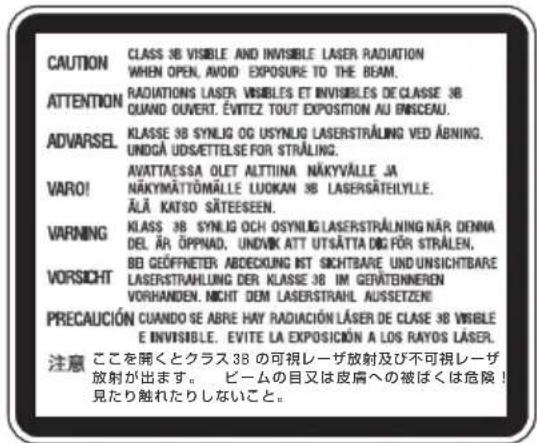
CLASS 1 LASER PRODUCT
Location: Top of built-in drive and rear of outer mounting case
Location: bottom of the unit
D58-5-2-2b*_A1_En
CAUTION: USE OF CONTROLS OR ADJUSTMENTS OR PERFORMANCE OF PROCEDURES OTHER THAN THOSE SPECIFIED HEREIN MAY RESULT IN HAZARDOUS RADIATION EXPOSURE.
CAUTION: THE USE OF OPTICAL INSTRUMENTS WITH THIS PRODUCT WILL INCREASE EYE HAZARD.
D58-5-1-2a A1 En
For PLUGGABLE EQUIPMENT, the socket-outlet shall be installed near the equipment and shall be easily accessible.
Machine Noise Information Regulation 3.
GPSGV: The highest sound-pressure level is 70 dB(A) or less in accordance EN ISO 7779.
Information to User
Alterations or modifications carried out without appropriate authorization may invalidate the user's right to operate the equipment. D8-10-2_A1_
CAUTION
This product satisfies EMC regulations when shielded cables and connectors are used to connect the unit to other equipment. To prevent electromagnetic interference with electric appliances such as radios and televisions, use shielded cables and connectors for connections.

is a trademark of Blu-ray Disc Association.

is a trademark of DVD Format/Logo Licensing Corporation.
AFTER-SALES SERVICE FOR PIONEER PRODUCTS
Please contact the dealer or distributor from where you purchased the product for its after-sales service (including warranty conditions) or any other information. If the necessary information is not available, please contact the Pioneer's subsidiaries (regional service headquarters) listed below:
PLEASE DO NOT SHIP YOUR PRODUCT TO THE COMPANIES at the addresses listed below for repair without advance contact.
AUSTRALIA
Pioneer Electronics Australia Pty Ltd
5 Arco Lane, Heatherton, VIC 3202, Australia
Telephone: 1800-672-102,
9am to 5pm Monday to Friday (EST)
OTHER REGIONS
PIONEER HIGH FIDELITY TAIWAN CO., LTD.
8F., No.407, Ruiguang Rd., Neihu Dist., Taipei City 114, Taiwan (R.O.C)
S022_A_En

If you want to dispose this product, do not mix it with general household waste. There is a separate collection system for used electronic products in accordance with legislation that requires proper treatment, recovery and recycling.
Private households in the member states of the EU, in Switzerland and Norway may return their used electronic products free of charge to designated collection facilities or to a retailer (if you purchase a similar new one).
For countries not mentioned above, please contact your local authorities for the correct method of disposal.
By doing so you will ensure that your disposed product undergoes the necessary treatment, recovery and recycling and thus prevent potential negative effects on the environment and human health.
Safety instructions
To ensure your personal safety and to maximize the full operating potential of your unit, read and follow these safety instructions.
Read & Retain Instructions – Read all operating and user information provided with this drive.
Cleaning – Use a damp cloth to clean the exterior housing. Avoid using any fluids including liquid, aerosol or alcohol-based cleaning products.
Water or Moisture – Avoid operating or locating this drive near water or other sources of fluid.
Installation – Do not place this product on an unstable cart, stand, or table. The product may fall and be seriously damaged.
Ventilation – Slots and openings in the chassis are for cooling and proper operation of the unit. Do NOT block or cover the openings. Do NOT place this unit on a bed, rug, etc. as this can block the openings. This unit should not be placed in a built-in installation unless properly ventilated.
Operation - Avoid moving, lifting or reorienting this drive while a disc is rotating inside.
Environment – Avoid installing this drive in a location with exposure to large quantities of dust, high temperatures, high humidity, or subject to excessive vibrations or shocks.
Power Sources – Operate this drive only from the recommended power sources. If you are unsure of the power source, consult an authorized Pioneer representative.
Power-Cord Protection – When unplugging the unit, pull on the plug – not on the cord. Do not handle the cord or plug with wet hands; doing so could cause an electric short or shock. Do not allow anything to pinch or rest on the power cord and do not place in a walkway.
Object & Liquid Entry – Never push inappropriate objects into the device. Avoid spilling any liquids into or on the outside of the drive.
Condensation – Moisture can form in the operating section of the product if the drive is taken from cool surroundings to a room with a warmer temperature. Let the drive stand for one to two hours in the new location before turning it ON.
Servicing – Opening or removing the cover exposes you to possible electrical shock or other danger. Contact a Pioneer authorized service representative for repairing this drive.
Damage Requiring Service – Unplug the unit and refer servicing to qualified service personnel in the following situations:
- When the power cord, plug, or chassis is damaged.
• If liquid has been spilled. - If the product has been exposed to rain or water.
- If the product does not operate normally when the operating instructions are followed. Adjust only those controls that are covered by the operating instructions. Improper adjustment of other controls may result in damage and can require extensive work by a qualified technician to restore the unit to its normal operation.
- When the product exhibits a distinct change in performance – this indicates a need for service.
About DualDisc Playback – DualDisc is a two-sided disc with one side containing DVD video/audio/etc. content and the opposite side containing non-DVD content such as digital audio material. The non-DVD audio side is not compliant with the CD Audio Specification; therefore, may not play. The DVD side of DualDisc media plays in this unit. For more details about the DualDisc specification, please refer to the disc manufacturer or your retailer.
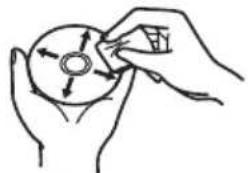
- Avoid touching or scratching the signal surface (shiny side) of the disc.
- Hold the disc by the edges or by the center hole and one edge.
- Do not affix paper or labels to the disc.
- Discard warped or cracked discs as they may cause damage to the drive.
- Avoid specially shaped discs such as hearts or polygons.
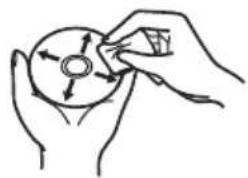
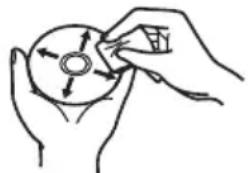
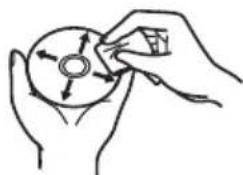
- Remove dust or lint from the disc with a soft cloth by wiping from the inside to the outside edge rather than in a circular motion.
- Do not use record-cleaning or anti-static agents as the solutions may cause damage to a disc.
Always be sure to store your discs in proper disc storage cases when not in use, and always be sure to check for dirt or dust on discs (especially on the signal surface) before use.
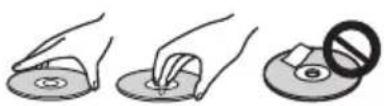
natural_image
Three-step diagram showing hand holding a circular object, pressing down on it, and removing a disc with a prohibition symbol (no text or labels)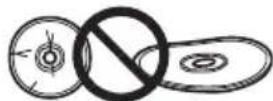

natural_image
Hand holding a circular object with directional arrows, no text or symbols present
Note
Some discs may not be playable due to different recording formats or the physical condition of the disc at the time of recording or playback.
Features
Maximum Write Speed* Maximum Read Speed*
| BD-R | 6X | BD-ROM SL/DL | 6X |
| BD-R DL | 6X | BD-R | 6X |
| BD-R TL | 4X | BD-R DL | 6X |
| BD-R QL | 4X | BD-R TL/QL | 4X |
| BD-R (LTH) | 6X | BD-R (LTH) | 6X |
| BD-RE | 2X | BD-RE | 6X |
| BD-RE DL | 2X | BD-RE DL | 6X |
| BD-RE TL | 2X | BD-RE TL | 4X |
| M-DISC BD-R SL/TL | 4X | M-DISC BD-R SL/DL | 6X |
| M-DISC BD-R DL | 6X | M-DISC BD-R TL | 4X |
| DVD-R | 8X | DVD-ROM | 8X |
| DVD-R DL | 6X | DVD-ROM DL | 8X |
| DVD-RW | 6X | DVD-R | 8X |
| DVD+R | 8X | DVD-R DL | 8X |
| DVD+R DL | 6X | DVD-RW | 8X |
| DVD+RW | 8X | DVD+R | 8X |
| DVD-RAM | 5X | DVD+R DL | 8X |
| M-DISC(DVD) | 4X | DVD+RW | 8X |
| DVD-RAM | 5X | ||
| CD-R | 24X | M-DISC(DVD) | 8X |
| CD-RW | 24X | ||
| CD-ROM, CD-R, CD-RW | 24X |
* When using a USB 2.0 port, BD writing/reading speed doesn't achieve 6X.
Buffer Memory Size Interface
4 MBytes (Read/Write) USB 3.0 & 2.0
Disc Format
• BD-ROM (Single/Dual layer)
• BD-R (Single/Dual/Triple/Quadruple layer)
• BD-RE (Single/Dual/Triple layer)
• M-DISC BD-R (Single/Dual/Triple layer)
• DVD-ROM (Single/Dual layer)
• DVD-Video (Single/Dual layer)
• DVD - R
• DVD - RW
• DVD + R
• DVD + RW
• DVD-RAM (Non-cartridge), ver2.0&2.1&2.2
• M - D I S C ( D V D )
• CD-ROM Mode 1&2
• CD-ROM XA Mode 2 (form 1, form 2)
• KODAK Photo CD (Single and Multi-session)
• CD-Extra (CD PLUS)
- C D t e x t
• C D - R
• CD-RW (MS/HS/US/US+)
• C D - D A
- Video CD
RAM2 media is supported only reading.

Note
- A specific application software is necessary to write the formats listed above.
• Supported media required for specific BD, DVD and CD writing speeds.
• Average writing speed may decrease when multiple discs are written during the same session.
•The Pioneer's Drive Utility is needed to configure the Quiet Drive and PureRead features. https://pioneer.jp/support/download/index-e.html
Interface
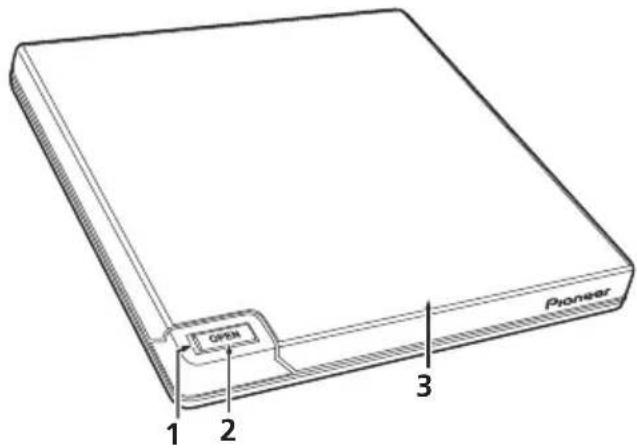
Front/Top view
1 Power/Busy Indicator
Operation status is indicated as follows: During Power ON: Lights dimly During reading/writing: Lights During disc cover open/close: Lights dimly
2 OPEN Button
Press to open the disc cover. * If this device is connected to Mac, you will not be able to use this function due to the specifications of macOS.
3 Disc Cover
Press the OPEN button to open the disc cover then place only a BD, DVD or CD disc onto the tray with the label facing up. Close the disc cover gently.
Do not manually force open the disc cover. Use the Forced Open Lever to open the disc cover during POWER OFF.
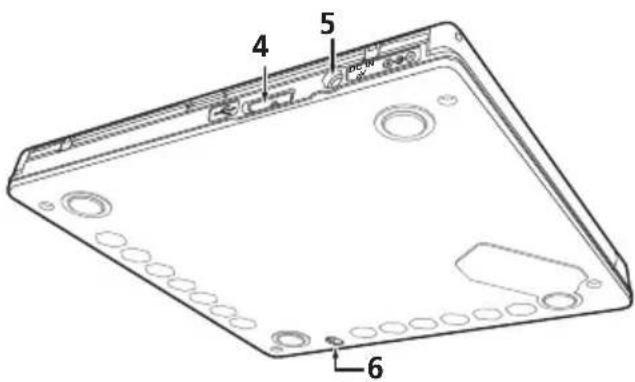
Rear/Bottom view
4 U S B 3 . 0
USB 3.0 Micro-B Connector
5 D C ⊕ ⊙ ⊙
AC Adapter Connector
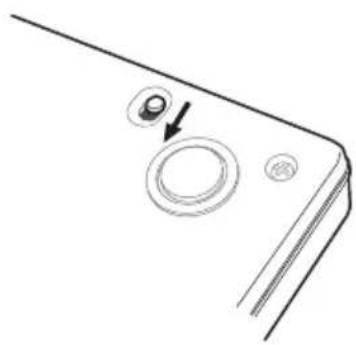
6 Forced Open Lever
Use to open the disc cover when the drive is not powered. If the disc cover fails to open when the Open button is pressed, turn the power to the drive OFF and wait approximately one minute until the disc stops spinning before trying to open the disc cover. During normal operation, the Open button should be used to open the disc cover.

Caution
About Region codes
- The region code can only be changed five (5) times, including the initial setting. Please be aware that the fifth change becomes PERMANENT. Therefore, avoid changing the region code unless absolutely necessary.
- Region codes are part of the DVD Standard. However, region codes on DVD discs are optional. DVD discs with no specified region code can be played on all compliant players and/or application.
Downloading and Installing CyberLink Media Suite (with Product Key)
*This is an application specially for Windows. It cannot be used with macOS.
1 Access the website shown on the back of this manual.
2 Check the content of the License Agreement, and click "Agree" to proceed to the CyberLink webpage.
<>
1 After accessing the download website, sign in with your CyberLink member e-mail address and password.
(If you have not registered as a CyberLink member, click "Register now" and register to be a member.)
2 After signing in, the product key input screen will be displayed. Enter the provided product key and click "Submit".
The product key is on the back of this manual.
(The 16-character key printed on the label.)
3 If the product key has been entered correctly, the screen to download the downloader will be displayed. Click the download link to download the downloader.
*Re-downloading the downloader
After registering the product key on the download website, an e-mail will be sent to your registered CyberLink member e-mail address.
The downloader can be re-downloaded from the Link in the e-mail for 30 days from registration of the product key.
<>
1 Connect the drive to Windows PC.
2 Run the downloaded file to start downloading the program.
3 After the download is complete, the installation message will be displayed in the dialog box. Click "Install" to start up the installer.
(Even if you do not click "Install", the installer will automatically start up after 1 minute.)
4 After the installer starts up, follow the instructions on the installer to install the product.
Connection
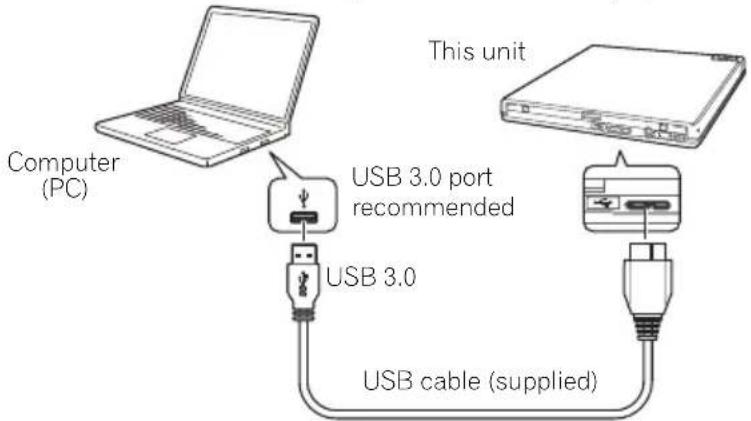
This is a hot-plug unit. Connect the unit to the supplied USB cable.
1 Confirm that your computer (PC) has available USB port.
2 With your Windows® or Mac operating system running, use the supplied USB cable to connect this unit to the PC.

Caution
- Do not disconnect the USB cable during data transfers.
- Do not disconnect the USB cable during the PC start nor any operation with the unit.

Note
- Connection to a USB 3.0 port is recommended, since when a USB 3.0 cable is connected to a USB 2.0 port, the connection will be limited to USB 2.0 performance standards.
- This unit can operate with USB 1.1 but will not provide optimum performance.
- Connecting this unit through a USB HUB or using unspecified cables may not guarantee proper operation.
Operations
The unit writes to disc when the supplied software application is installed on your PC. Writing fails if the PC or operating system does not support the software.
Begin writing to disc
1 Connect the supplied USB cable.
2 Turn on the PC.
3 Press the OPEN button, and gently lift the disc cover by hand.
* If this device is connected to Mac, you will not be able to use this function due to the specifications of macOS.
4 Place the disc in the tray with the label facing up.
5 Close the disc cover gently.
6 Start the disc burning application.
End the writing session
1 Quit the disc burning application.
2 Press the OPEN button, and gently lift the disc cover by hand.
* If this device is connected to Mac, you will not be able to use this function due to the specifications of macOS.
3 Remove the disc.
4 Close the disc cover gently.
5 Shut down the PC.
- When the lock mechanism is released, the disc cover needs to be fully opened in order to close again.
Manual disc cover open
Use the Forced Open Lever to remove discs if the disc cover fails to open and all other methods have been exhausted.
1 Shut down the PC.
2 Wait for the disc to stop spinning.
3 Slide the Forced Open Lever to open the disc cover.
4 Gently open the disc cover and remove the disc.

Warning
To prevent injury and damage to the unit, do NOT force the disc cover to open while the disc is spinning.
natural_image
Diagram of a device's front panel with a circular button and an arrow pointing to it (no text or symbols)The required environment varies depending on your OS and applications.
For answers to your queries on the OS and applications, contact the consultation desk of each software manufacturer.
Blu-ray Disc, BDXL, the Blu-ray Disc and BDXL logos are trademarks of the Blu-ray Disc Association.
Windows is a registered trademark of Microsoft Corporation in the U.S. and other countries.
Mac, Mac logo, Mac OS, OS X, macOS, Sierra and Mojave are trademarks of Apple Inc., registered in the U.S. and other countries.
Other company and product names used herein might be the trademarks or registered trademarks of their respective companies.
Specifications
Orientation This drive is horizontal use.
Disc Size 12 cm/8 cm
(Drive does not support non-standard shapes such as business cards, diamond, etc.)
(Drive does not support 8 cm adapter.)
Data Transfer Rate * Media that is dirty or damaged can affect the transfer rate.
| Data Read (sustained) | BD | Max. 21.06 MBytes/sec. |
| DVD | Max. 8.64 MBytes/sec. | |
| CD | Max. 3.24 MBytes/sec. | |
| Data Write (sustained) | BD | Max. 21.06 MBytes/sec. (6X BD-R) |
| DVD | Max. 8.64 MBytes/sec. (8X DVD-R) | |
| CD | Max. 3.24 MBytes/sec. (24X CD-R) |
Access Time/Seek Time (Random Averages)
| Access Time | BD-ROM | 210 ms |
| DVD-ROM | 200 ms | |
| CD-ROM | 190 ms | |
| Seek Time | BD-ROM | 190 ms |
| DVD-ROM | 180 ms | |
| CD-ROM | 170 ms |
Power
Standby 0.5 W
DC IN Connector
Power Supply. DC +5 V, 1.0 A (AVE)
Physical Information
| Dimensions (excluding foot pad) | 133 mm (W) x 133 mm (D) x 14.8 mm (H) |
| Weight (Drive only) | 0.23 kg (Typ.) |
| Operation Temperature | +5 °C to +35 °C |
| Operation Humidity | 5 % to 85 % (no condensation) |
| Storage Temperature | -40 °C to +60 °C |
| Storage Humidity | 5 % to 90 % (no condensation) |
Accessories
| Instruction manual (This document) |
| USB cable (TypeA)......1 |

Note
Specifications and designs are subject to possible modifications without notice, due to improvements.
© 2019 PIONEER CORPORATION.
All rights reserved.
D'ÉLECTROCUTION, NE PAS ENLEVER LE
COUVERCLE (NI LE PANNEAU ARRIÈRE).
AUCUNE PIÈCE RÉPARABLE PAR
Pioneer Electronics Australia Pty Ltd
5 Arco Lane, Heatherton, VIC 3202, Australia
Téléphone: 1800-672-102,
8F., No.407, Ruiguang Rd., Neihu Dist., Taipei City 114, Taiwan (R.O.C)
S022_A_Fr
natural_image
Three-step diagram showing hand positioning of a disc and a circular object with a ring (no text or symbols)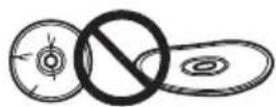

natural_image
Hand holding a CD with arrows indicating rotation (no text or symbols)
Remarque
4 Mo (Lecture/Écriture) USB 3.0 & 2.0
Format du Disque
• BD-ROM (simple/double couche)
- BD-R(simple/double/triple/quadruple couche)
• BD-RE (simple/double/triple couche)
• M-DISC BD-R (simple/double/triple couche)
• DVD-ROM (simple/double couche)
• DVD-Video (simple/double couche)
• DVD - R
• DVD - R W
• DVD + R
• DVD + R W
• DVD-RAM (Non-cartouche), ver2.0&2.1&2.2
• M - D I S C ( D V D )
- Mode CD-ROM 1 & 2
• CD-ROM XA Mode 2 (form 1, form 2)
• KODAK Photo CD (Simple et Multi-session)
• CD-Extra (CD PLUS) - C D t e x t
• C D - R
• CD-RW (MS/HS/US/US+)
• C D - D A
• Video CD
natural_image
Diagram of a smartphone front panel showing a circular button and a pointer (no text or symbols)Dimensions (talon non compris) 133 mm (L) x 133 mm (P) x 14.8 mm (H)
© 2019 PIONEER CORPORATION.
Pioneer Electronics Australia Pty Ltd
5 Arco Lane, Heatherton, VIC 3202, Australia
Telefon: 1800-672-102,
8F, No. 407, Ruiguang Rd., Neihu Dist., Taipei City 114,
Taiwan (R.O.C.)
S022_A_De

• M - D I S C ( D V D )
• CD-ROM Mode 1&2
• CD-ROM XA Mode 2 (form 1, form 2)
• KODAK Photo CD (Einzel- und Multi-Session)
• CD-Extra (CD PLUS)
- C D t e x t
• C D - R
• CD-RW (MS/HS/US/US+)
• C D - D A
- Video CD
3 Disc-Abdeckung
natural_image
Diagram of a device's corner panel with a circular button and an arrow pointing to it (no text or symbols)© 2019 PIONEER CORPORATION.
KLASSE 1 LASERPRODUCT
SERVICE NA VERKOOP VOOR PIONEER-PRODUCTEN
Pioneer Electronics Australia Pty Ltd
8F., No.407, Ruiguang Rd., Neihu Dist., Taipei City 114, Taiwan (R.O.C.)
S022_A_NI


Opmerking
natural_image
Diagram of a smartphone door handle with a circular button and an arrow pointing to the dial (no text or symbols)© 2019 PIONEER CORPORATION.
Pioneer Electronics Australia Pty Ltd
5 Arco Lane, Heatherton, VIC 3202, Australia
Telefon: 1800-672-102,
8F., No.407, Ruiguang Rd., Neihu Dist., Taipei City 114, Taiwan (R.O.C)
S022_A_Cs

natural_image
Illustration showing three steps of a hand holding a circular object, with a magnified inset showing a disc and a prohibition symbol (no text or labels)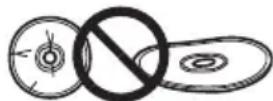

natural_image
Hand holding a circular object with directional arrows, no text or symbols present
Poznámka
Pohled zezadu/zdola
4 USB 3.0
Konektor USB 3.0 Micro-B
5 DC IN

Konektor adaptéru AC

Upozornění
O kódech regionů
natural_image
Diagram of a device's front panel showing a circular button and a pointer (no text or symbols)© 2019 PIONEER CORPORATION.
Pioneer Electronics Australia Pty Ltd
5 Arco Lane, Heatherton, VIC 3202, Australia
Telefon: 1800-672-102,

Uwaga
natural_image
Diagram of a smartphone door handle with a circular button and an arrow pointing to the center (no text or symbols)© 2019 PIONEER CORPORATION.
natural_image
Illustration showing three steps of a hand holding a circular object with a handle, next to a disc with a prohibition symbol (no text or labels)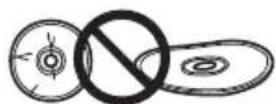

natural_image
Hand holding a CD or DVD with arrows indicating direction (no text or symbols)
註
後 / 底視圖
4 USB 3.0
USB 3.0 Micro-B 連接器
5
D C ⊕ ⊖ A
AC 變壓器連接器
6 強制開啟拉桿
natural_image
Diagram of a smartphone door handle with a circular button and an arrow pointing to the center (no text or symbols)Pioneer Electronics Australia Pty Ltd
5 Arco Lane, Heatherton, VIC 3202, Australia
電話:1800-672-102

Замечание
natural_image
Diagram of a device's top view showing a circular button and an arrow pointing to it (no text or symbols present)© 2019 PIONEER CORPORATION.
All rights reserved.
Pioneer Electronics Australia Pty Ltd
5 Arco Lane, Heatherton, VIC 3202, Australia
8F, No.407, Ruiguang Rd., Neihu Dist., Taipei City 114,
Taiwan (R.O.C)
S022_A_Ru
https://jpn.pioneer/ja/pcperipherals/bdd/eula/cyberlink_media_suite/en.php
The downloader can be re-downloaded from the Link in the e-mail sent from CyberLink for 30 days from registration of the product key.
CyberLink Media Suite Product key for free download
© 2019 PIONEER CORPORATION.
All rights reserved.
© 2019 PIONEER CORPORATION.
28-8, Honkomagome 2-chome, Bunkyo-ku, Tokyo 113-0021, Japan
Корпорация Пайонир
Pioneer Electronics Australia Pty Ltd
5 Arco Lane, Heatherton, VIC 3202, Australia TEL: 61-3-9586-6300